

Los 10 mejores programas de mesa de ayuda por correo electrónico de 2026

10 Selección del mejor software de mesa de ayuda por correo electrónico


El software de mesa de ayuda por correo electrónico ayuda a los equipos de soporte a gestionar grandes volúmenes de correos de clientes con rapidez, estructura y responsabilidad. Si tienes la bandeja de entrada llena de correos sin seguimiento o te cuesta priorizar las respuestas, las herramientas de mesa de ayuda por correo electrónico pueden ayudarte a optimizar la gestión de tickets, mejorar los tiempos de respuesta y mantenerte organizado a medida que tu equipo crece.
He seleccionado estos mejores programas de mesa de ayuda por correo electrónico después de probarlos e investigar personalmente su capacidad para convertir bandejas de entrada desordenadas en flujos de trabajo manejables, centrándome en las funciones que ayudan tanto a los agentes de primera línea como a los responsables de atención al cliente.
¿Qué es el software de mesa de ayuda por correo electrónico?
El software de mesa de ayuda por correo electrónico es una herramienta que ayuda a los equipos de soporte a gestionar, hacer seguimiento y responder a las consultas de los clientes por correo electrónico. Agiliza la comunicación al centralizar los mensajes, automatizar los flujos de trabajo y mejorar la visibilidad en todo el equipo.
Por qué confiar en nuestras recomendaciones de software
Nuestro equipo lleva probando y evaluando software desde 2012. Como líderes de CX, sabemos lo difícil —y lo importante— que es elegir el software adecuado.
Para esta guía, evaluamos las herramientas mediante pruebas prácticas e investigación independiente, puntuando las herramientas según nuestros criterios de selección.
Nuestras reseñas reflejan nuestro criterio editorial humano, no un discurso de ventas.
Resumen del mejor software de mesa de ayuda por correo electrónico
| Tool | Best For | Trial Info | Price | ||
|---|---|---|---|---|---|
| 1 | Ideal para un sólido sistema de gestión de tickets | Prueba gratuita de 14 días + demo gratuita disponible | Desde $19/agente/mes (facturado anualmente) | Website | |
| 2 | La mejor automatización de tickets desde correo electrónico | Prueba gratuita de 14 días | Precio a consultar | Website | |
| 3 | Ideal para bandejas de entrada centralizadas de correo electrónico y chat | Prueba gratuita disponible | Desde $16/usuario/mes (facturado anualmente) | Website | |
| 4 | La mejor opción para ofrecer soporte al cliente potenciado por IA | Plan gratuito + prueba gratis de 7 días + demo gratuita disponible | Desde $25/usuario/mes (facturación anual) | Website | |
| 5 | Ideal para combinar IA con asistencia humana | Prueba gratuita disponible | Desde $25/usuario/mes (facturado anualmente) | Website | |
| 6 | Ideal para colaborar y compartir información en tiempo real | Prueba gratuita de 15 días + demo gratuita disponible | Desde $7/usuario/mes (facturado anualmente) | Website | |
| 7 | Ideal para la redacción colaborativa de correos electrónicos en equipo | Prueba gratuita de 30 días disponible | Desde $14/usuario/mes (facturado anualmente) | Website | |
| 8 | Ideal para la automatización de tareas de soporte en ecommerce | Prueba gratuita de 14 días | Desde $39/agente/mes | Website | |
| 9 | Ideal para la organización inteligente de tickets | Prueba gratuita de 7 días + plan gratuito disponible | Desde $24.17/mes (facturado anualmente) | Website | |
| 10 | Ideal para el seguimiento de incidencias | Prueba gratuita de 14 días | Precios bajo petición | Website |


Reseñas de los 20 mejores programas de mesa de ayuda por correo electrónico
Puedes utilizar las reseñas sencillas de cada herramienta que aparecen a continuación para entender en qué se diferencia cada una de los demás programas de mesa de ayuda por correo electrónico.

Ideal para un sólido sistema de gestión de tickets
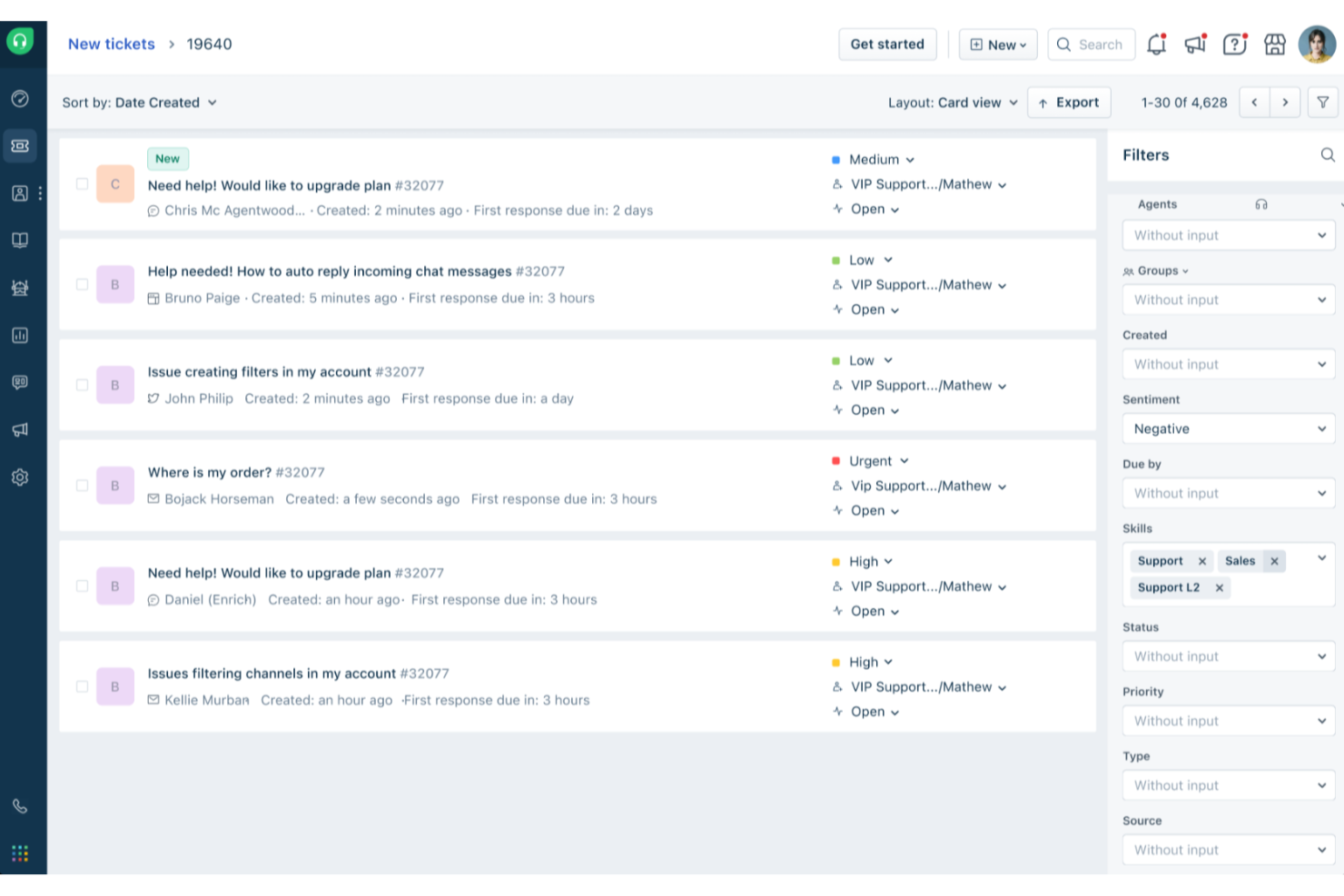
Freshdesk (un producto de Freshworks Inc.) es una plataforma de mesa de ayuda centrada en el correo electrónico, diseñada para ayudar a los equipos a gestionar las consultas de los clientes de manera más estructurada. Convierte los correos electrónicos entrantes en tickets de soporte, permitiendo a los equipos hacer seguimiento de las conversaciones, priorizar solicitudes y mantener la coherencia a medida que aumenta el volumen de tickets.
Por qué elegí Freshdesk
Elegí Freshdesk por sus capacidades de gestión de tickets adaptadas a los flujos de trabajo de soporte basados en email. Funciones como bandejas de entrada compartidas y tickets padre-hijo ayudan a los equipos a gestionar problemas relacionados y dependencias sin perder el contexto. Freddy AI está integrado en la plataforma para asistir en tareas como el manejo de tickets y el soporte de flujos de trabajo, lo cual puede ayudar a reducir el trabajo manual repetitivo. En conjunto, estas herramientas facilitan que los equipos de soporte se organicen y colaboren al manejar altos volúmenes de consultas por correo electrónico.
Características clave de Freshdesk
Además de su sólido sistema de gestión de tickets, Freshdesk ofrece una variedad de funciones que mejoran las operaciones de la mesa de ayuda por email para tu equipo.
- Portal del cliente: Esta función permite a tus clientes enviar tickets y acceder a recursos por sí mismos, fomentando la autonomía y reduciendo la carga sobre tu equipo de soporte.
- Analítica e informes: Proporciona análisis bajo demanda de métricas clave como la satisfacción del cliente y el tiempo de primera respuesta, ayudándote a rastrear el rendimiento e identificar áreas de mejora.
- Herramientas de autoservicio: Incluye una base de conocimientos multilingüe y foros comunitarios, permitiendo a los clientes encontrar respuestas de manera rápida y eficiente.
- Automatización de enrutamiento y SLA: Optimiza los flujos de trabajo automatizando el reparto de tickets y seguimientos, de modo que tus agentes puedan centrarse en los casos críticos.
Integraciones de Freshdesk
Las integraciones incluyen Microsoft Teams, Slack, WhatsApp, Google Drive, Shopify, Mailchimp, Trello, Salesforce, Jira y HubSpot.
Pros and Cons
Pros:
- Las herramientas de automatización optimizan la gestión de tickets y mejoran la organización
- Opciones de autoservicio para los clientes, incluida una base de conocimientos
- La automatización impulsada por IA mejora los tiempos de respuesta y la satisfacción del cliente
Cons:
- La base de conocimientos multilingüe solo está disponible en los planes de nivel superior
- La creación de informes personalizados puede requerir habilidades avanzadas o planes superiores
New Product Updates from Freshdesk

Freshdesk Adds Voice AI Agents in Freshcaller
Freshdesk introduces Voice AI Agents available through Freshcaller Marketplace apps to handle routine calls and reduce queues. This feature enables automated call handling with real-time, conversational support. For more information, visit Freshdesk's official site.

SysAid
La mejor automatización de tickets desde correo electrónico
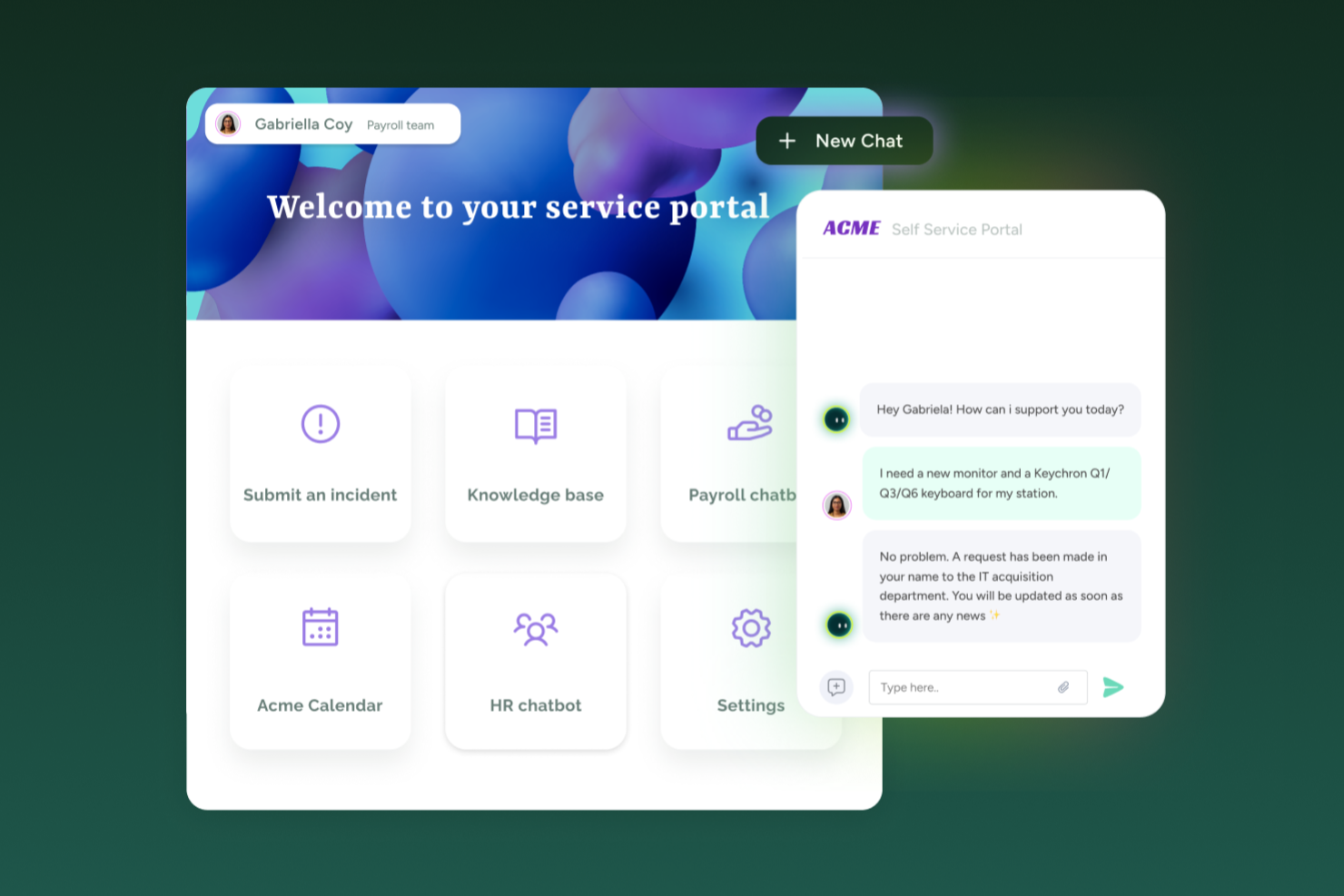
SysAid reúne la mesa de ayuda y la gestión de servicios de TI de una manera que se adapta a los equipos de TI que manejan solicitudes de soporte basadas en correo electrónico junto con el seguimiento de activos y el enrutamiento de solicitudes. Si necesitas una herramienta de mesa de ayuda que admita la recepción de tickets por correo electrónico, portales de autoservicio y flujos de trabajo ITSM, ya sea para una empresa mediana o una organización más grande, SysAid ofrece un sistema único para gestionar solicitudes de servicio, activos y cargas de tickets.
Por qué elegí SysAid
Elegí SysAid porque soporta la creación automatizada de tickets a partir de los correos electrónicos entrantes, convirtiendo cada mensaje de soporte en una solicitud de servicio rastreada con enrutamiento y categorización integrados. Esto ayuda a garantizar que las solicitudes enviadas por correo electrónico no se pierdan ni pasen desapercibidas, lo cual es importante si el correo electrónico sigue siendo un canal principal para tus usuarios. Sus funciones de automatización, incluyendo el enrutamiento basado en reglas y la priorización de tickets, ayudan a tu equipo a manejar las solicitudes de manera más consistente. También me gusta que SysAid soporte tanto la funcionalidad principal de mesa de ayuda como procesos avanzados de ITSM, haciéndolo adecuado para equipos que esperan que sus necesidades de gestión de servicios crezcan con el tiempo.
Funciones clave de SysAid
Además de convertir correos electrónicos en tickets y automatizar el enrutamiento, podrían resultarte útiles estas funciones:
- Portal de Autoservicio: Permite a los usuarios finales enviar solicitudes de servicio directamente a través de un portal web, reduciendo la dependencia de solicitudes manuales por correo electrónico o teléfono.
- Gestión de Activos: Te permite rastrear activos de hardware y software, vincularlos a tickets y ver el historial completo de servicio por activo.
- Informes y Análisis: Ofrece informes y paneles listos para usar que te ayudan a rastrear volúmenes de tickets, tiempos de resolución y ciclos de vida de activos, útiles para entender el desempeño y planificar mejoras.
- Gestión de Incidentes: Gestiona y resuelve incidentes de manera eficiente a través de una interfaz optimizada que facilita tiempos de respuesta rápidos.
Integraciones de SysAid
Las integraciones incluyen Microsoft 365, Salesforce, Slack, Google Workspace, Microsoft Dynamics 365, Zendesk, QuickBooks, Shopify, ServiceNow y Zoom.
Pros and Cons
Pros:
- La automatización impulsada por IA reduce significativamente las tareas repetitivas de TI.
- SysAid brinda una sólida integración con correo electrónico para la creación eficiente de tickets.
- La plataforma ofrece capacidades integrales de gestión de activos.
Cons:
- La experiencia en la aplicación móvil carece de funcionalidad completa.
- Cuando las funciones no están configuradas correctamente, las automatizaciones y los flujos de trabajo de SLA pueden volverse complejos y confusos para los agentes.
New Product Updates from SysAid

SysAid Adds Bulk Contract Import
SysAid added bulk contract import to License Manager Essentials, letting admins upload a CSV template, validate entries, and create multiple contracts at once. For more information, visit SysAid's official site.

Ideal para bandejas de entrada centralizadas de correo electrónico y chat
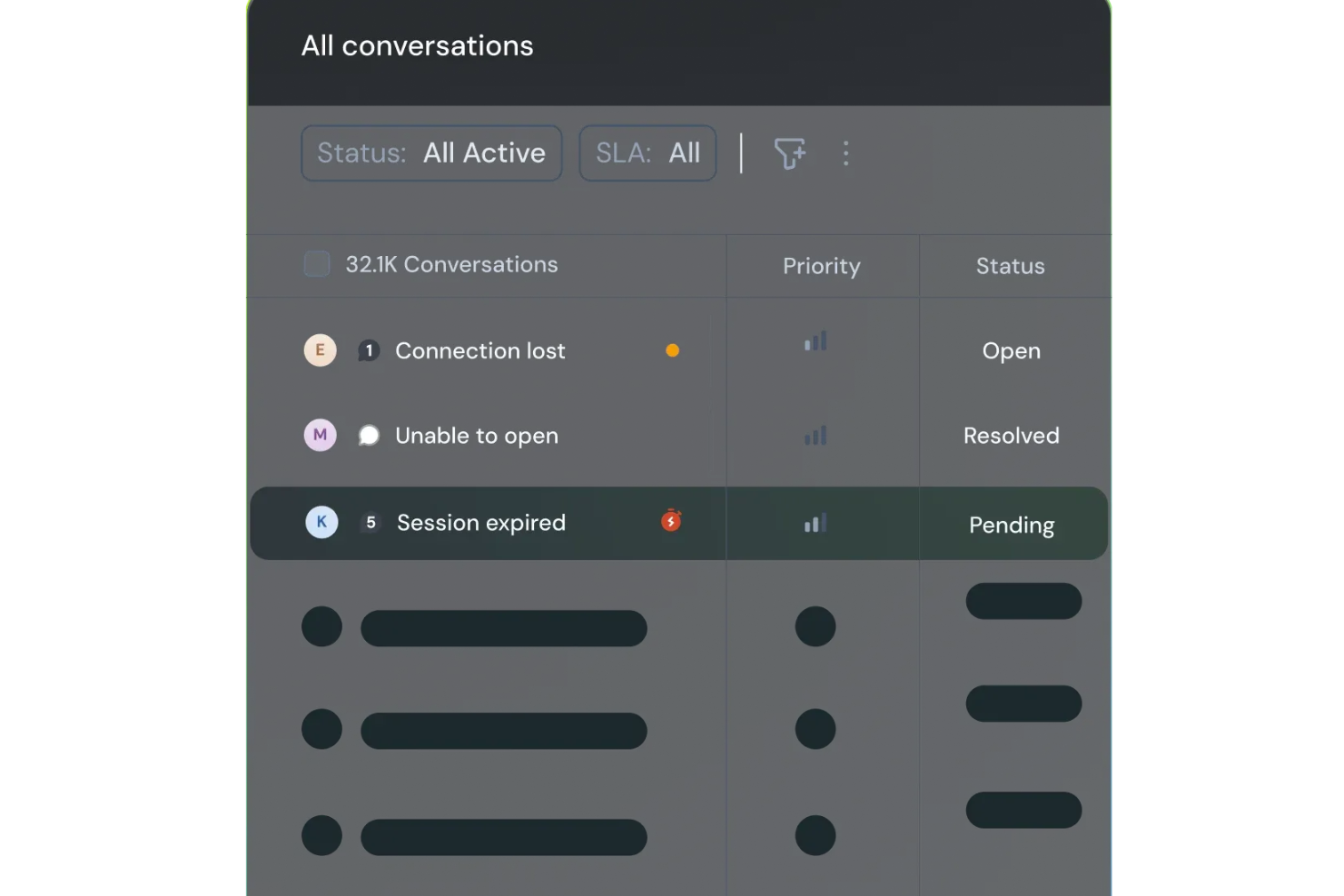
SparrowDesk es una plataforma de servicio al cliente impulsada por IA, diseñada para mejorar la productividad del equipo y la satisfacción del cliente a través de funciones inteligentes. Pensada para empresas que buscan optimizar sus canales de soporte, ofrece una bandeja de entrada unificada que consolida las comunicaciones por correo electrónico y chat, atendiendo eficazmente la necesidad de una gestión eficiente de tickets y tiempos de respuesta rápidos.
Por qué elegí SparrowDesk
Elegí SparrowDesk por sus destacadas capacidades potenciadas por IA que mejoran directamente la gestión del correo electrónico. El agente Luna AI de la plataforma resuelve automáticamente una parte significativa de las consultas de los clientes, lo que permite que tu equipo se enfoque en los problemas más complejos. Otra función que valoro es la bandeja de entrada centralizada, ya que unifica todas las comunicaciones, permitiendo una gestión fluida de correos y chats. Además, el Copiloto AI asiste a los agentes con resúmenes instantáneos y sugerencias inteligentes de borradores, lo que puede reducir considerablemente los tiempos de respuesta y mejorar la calidad del soporte.
Características clave de SparrowDesk
Además de sus capacidades basadas en IA, SparrowDesk ofrece otras características que aumentan su utilidad como software de helpdesk para correo electrónico:
- Acuerdos de Nivel de Servicio (SLA): Establece objetivos de respuesta y resolución para asegurar atención oportuna a tus clientes.
- Gestión de Horarios Laborales: Administra automáticamente las expectativas de los clientes y el direccionamiento de tickets según tus horarios definidos.
- Macros de acción rápida: Automatiza tareas repetitivas, ahorrando tiempo a tu equipo y asegurando coherencia en las respuestas.
- Analíticas interactivas: Ofrece información en tiempo real sobre el desempeño del equipo y tendencias de clientes para ayudarte a tomar decisiones informadas.
Integraciones de SparrowDesk
Actualmente, SparrowDesk no indica integraciones nativas.
Pros and Cons
Pros:
- La bandeja de entrada unificada para correo electrónico y chat en vivo evita la fragmentación de canales y permite que tu equipo trabaje en un solo lugar.
- El constructor de flujos de trabajo sin código simplifica el enrutamiento, etiquetado y reglas de escalamiento sin requerir recursos de ingeniería.
- Los paneles y reportes en tiempo real ofrecen visibilidad sobre el cumplimiento de los SLA y la carga de trabajo de los agentes.
Cons:
- El fuerte enfoque en IA puede implicar una mayor configuración inicial.
- No posee soporte para canales distintos al correo electrónico y chat.

Hiver
La mejor opción para ofrecer soporte al cliente potenciado por IA
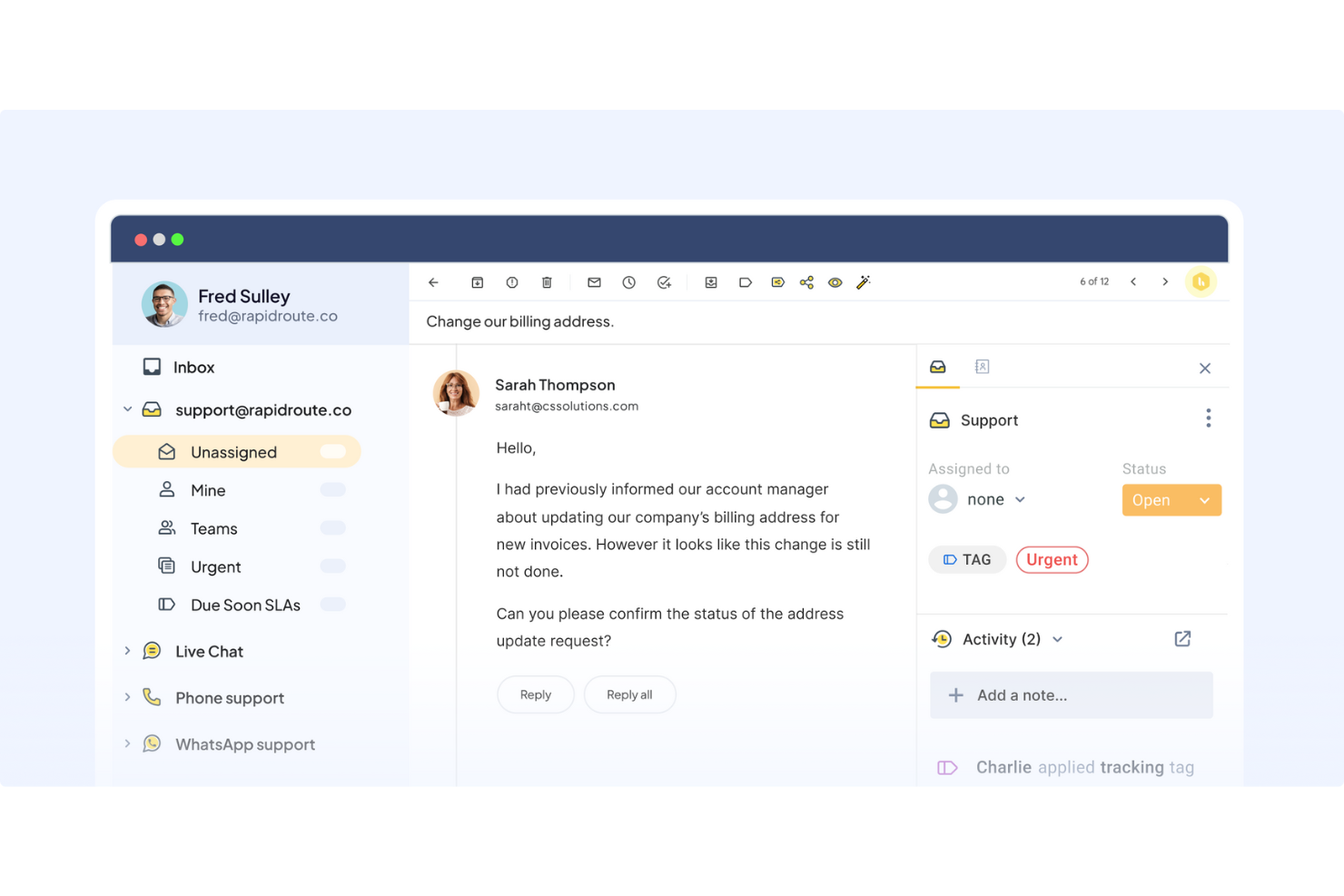
Hiver es una moderna plataforma de atención al cliente impulsada por IA que hace que el soporte por correo electrónico sea sencillo y eficiente. Reúne todas las consultas de los clientes en una interfaz familiar, similar al correo electrónico, donde puedes asignar tickets, controlar el progreso y colaborar con tus compañeros en tiempo real.
Por qué elegí Hiver: Las capacidades de IA de Hiver lo convierten en una excelente opción para equipos que buscan maximizar la eficiencia y brindar un soporte de calidad incluso con recursos limitados. Esto se debe a que la IA asume gran parte de la carga de trabajo. Por ejemplo, el Copiloto de IA ayuda a los agentes a responder a los clientes. Sugiere respuestas contextuales, redacta respuestas, ajusta el tono y reformula mensajes para mantener las respuestas claras y alineadas con la marca, apoyándose en conversaciones anteriores, el conocimiento interno y documentos almacenados.
Sus Agentes de IA permiten configurar flujos de trabajo autónomos que gestionan preguntas frecuentes, envían seguimientos, detectan cierres de agradecimiento, ejecutan acciones de varios pasos como reembolsos y clasifican/redirigen conversaciones por categoría, urgencia o sentimiento. Hiver también ofrece AI Insights, que convierte cada conversación en una oportunidad de aprendizaje. Ayuda a detectar cuellos de botella en las resoluciones, prever problemas potenciales y señalar riesgos en la salud de las cuentas antes de que se agraven. Los modelos predictivos identifican tendencias para que los equipos puedan actuar de forma anticipada y mejorar continuamente.
Características destacadas e integraciones de Hiver
Características incluyen una bandeja de entrada compartida para asignar y rastrear consultas, junto con herramientas de colaboración como notas, @menciones y borradores compartidos que mantienen la alineación del equipo. También ofrece automatizaciones de flujo de trabajo y gestión de SLA para asegurar respuestas a tiempo, además de analíticas detalladas para monitorear el desempeño y la satisfacción del cliente. La base de conocimientos ayuda a los agentes a evitar tener que gestionar consultas habituales y frecuentes.
Integraciones incluyen Aircall, Asana, Jira, Okta, QuickBooks, Salesforce, Slack, WhatsApp, Zapier y más de 100 plataformas adicionales.
Pros and Cons
Pros:
- Soporte al cliente por personas reales disponible 24/7 por chat o correo electrónico, en todos los planes (incluido el gratuito)
- Funcionalidades de IA integradas en todas las etapas del soporte al cliente
- Potentes funciones de colaboración interna
Cons:
- La experiencia en dispositivos móviles no es tan óptima como en escritorio
- En comparación con otras plataformas, Hiver ofrece menos integraciones de terceros
New Product Updates from Hiver

Hiver Brings Chat Widget Support to Mobile Apps
Hiver now lets you embed the Hiver Chat Widget in iOS, Android, React Native, and Flutter apps so customers can start chats without leaving your app. For more information, visit Hiver's official site.

Ideal para combinar IA con asistencia humana
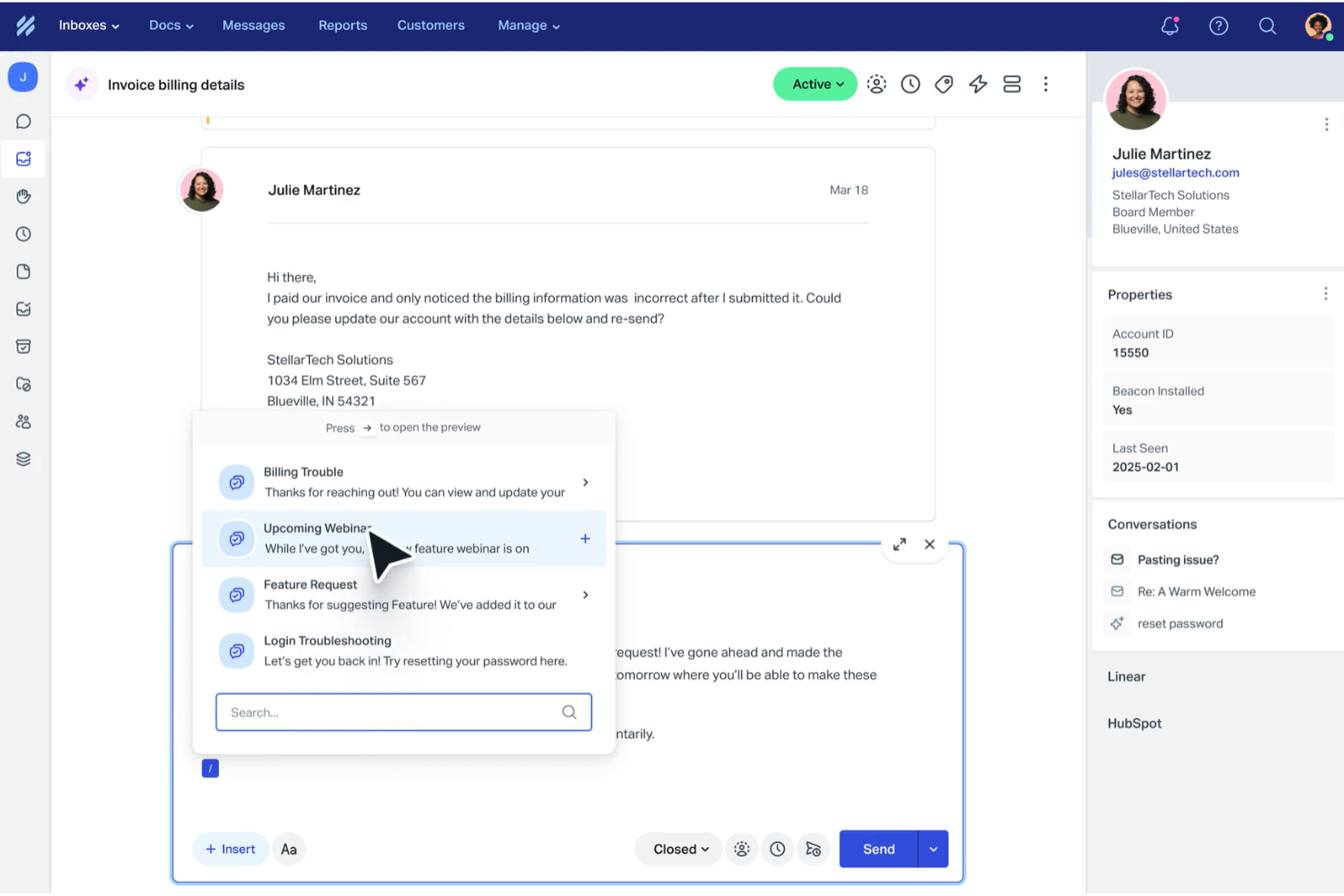
Help Scout está diseñado para empresas que desean mejorar su experiencia de atención al cliente mediante una combinación de IA y la interacción humana. Automatizando tareas rutinarias y ofreciendo una bandeja de entrada compartida para la colaboración en equipo, Help Scout aborda retos como la comunicación desorganizada y los tiempos de respuesta lentos, convirtiéndose en una herramienta valiosa para aumentar la satisfacción del cliente.
Por qué elegí Help Scout
Elegí Help Scout por su capacidad para combinar IA con soporte humano, lo que lo convierte en una excelente opción para equipos de distintos sectores. Su función de bandeja de entrada compartida permite que tu equipo colabore, asegurando que todas las comunicaciones con los clientes estén organizadas y sean accesibles. Además, el chatbot con IA gestiona una gran parte de las consultas rutinarias, permitiendo que tu equipo se enfoque en cuestiones más complejas. Esta combinación de funciones ayuda a resolver el desafío de manejar grandes volúmenes de consultas sin sacrificar la calidad del servicio.
Características clave de Help Scout
Además de su bandeja de entrada compartida y el chatbot con IA, Help Scout ofrece varias funciones útiles para tu equipo:
- Centro de ayuda: Esta función te permite crear un portal de autoservicio donde los clientes pueden encontrar respuestas a preguntas frecuentes, reduciendo la carga de trabajo de tu equipo de soporte.
- Flujos de trabajo automatizados: Puedes configurar reglas de automatización para optimizar la gestión de tu bandeja de entrada, garantizando que nunca se pierdan correos importantes.
- Respuestas guardadas: Esta función permite que tu equipo responda rápidamente a las preguntas más frecuentes, mejorando los tiempos de respuesta y la coherencia.
- Mensajería in-app: Interactúa con tus clientes directamente dentro de tu producto para brindar asistencia en la incorporación, recoger comentarios y compartir actualizaciones.
Integraciones de Help Scout
Help Scout ofrece una amplia variedad de integraciones nativas que amplían su funcionalidad, incluyendo Salesforce, Shopify, Slack, HubSpot, Mailchimp, Jira, Trello, Google Apps, WooCommerce y WordPress.
Pros and Cons
Pros:
- El chatbot con IA gestiona eficazmente las consultas rutinarias de los clientes.
- Proporciona análisis detallados para el seguimiento y mejora del rendimiento.
- Ofrece una sólida base de conocimientos para el autoservicio del cliente.
Cons:
- Opciones limitadas de personalización avanzada en comparación con la competencia.
- No admite canales en tiempo real como WhatsApp ni llamadas de voz.
New Product Updates from Help Scout

Help Scout Adds Automatic Conversation Reassignment
Help Scout can now automatically unassign conversations when the assigned teammate has been away long enough, keeping replies moving so others can pick them up. For more information, visit Help Scout's official site.
 .
.
Ideal para colaborar y compartir información en tiempo real
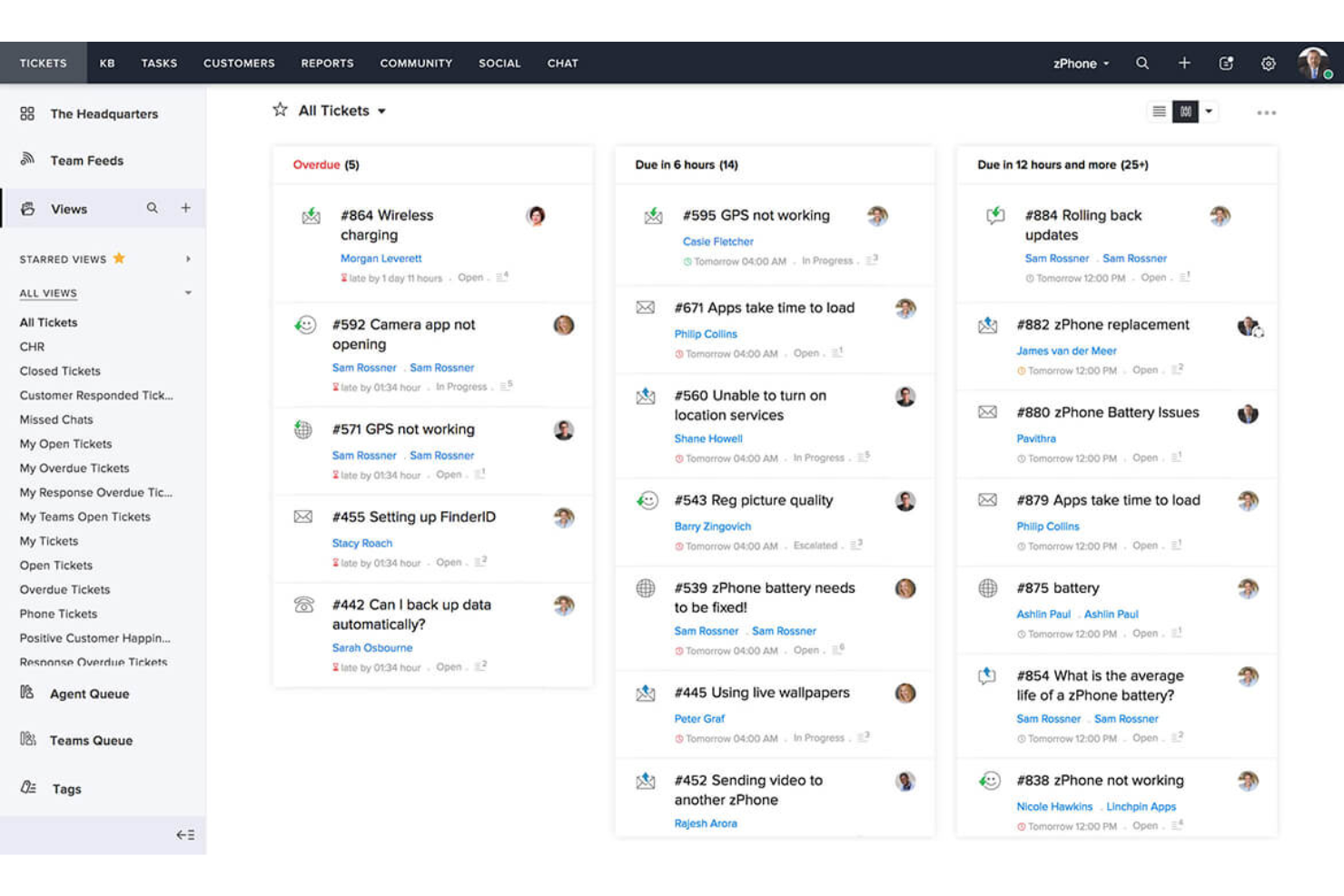
Zoho Desk es un software de mesa de ayuda habilitado con IA que ayuda a los usuarios a gestionar conversaciones con clientes por correo electrónico, teléfono, chat y redes sociales.
Por qué elegí Zoho Desk: Cuenta con un asistente virtual inteligente llamado Zia, que automatiza varias tareas. Por ejemplo, puede categorizar tickets, sugerir soluciones a consultas y predecir los niveles de satisfacción del cliente.
Zoho Desk también brinda funciones para tus agentes de soporte, gerentes y clientes. Por ejemplo, herramientas de autoservicio como la Base de Conocimiento y la Comunidad ayudan a los clientes a encontrar respuestas por sí mismos, mientras que las funciones de informes y análisis permiten a los gerentes analizar el desempeño de los agentes de soporte.
Otro gran aspecto del software es que se integra de forma nativa con otras aplicaciones de Zoho, como Zoho CRM, Zoho SalesIQ, Zoho Analytics y más. Esto permite a las empresas crear un centro centralizado para los datos y el soporte al cliente y facilita la colaboración entre diferentes equipos.
Funciones destacadas e integraciones de Zoho Desk
Las funciones incluyen gestión de tickets, etiquetado automático de tickets, análisis de sentimientos, notificaciones Zia, panel de control Zia, asistente de respuestas, herramientas de autoservicio, integración con CRM, funciones personalizadas, SDKs, marketplace y plataforma, APIs, informes y paneles, seguimiento de tiempo, centro de ayuda multimarcas, mapeo de dominios y gestión de usuarios y accesos.
Las integraciones incluyen Twilio, RingCentral, Amazon Connect, Ozonetel, Exotel, Knowlarity, Jive, sipgate, JustCall, ringover y otras opciones de software.
Pros and Cons
Pros:
- Ofrece una amplia gama de funciones
- Opciones de personalización extensas
- Interfaz limpia e intuitiva que es fácil de navegar
Cons:
- Informes limitados en los planes de nivel inferior
- Curva de aprendizaje en características avanzadas

Missive
Ideal para la redacción colaborativa de correos electrónicos en equipo
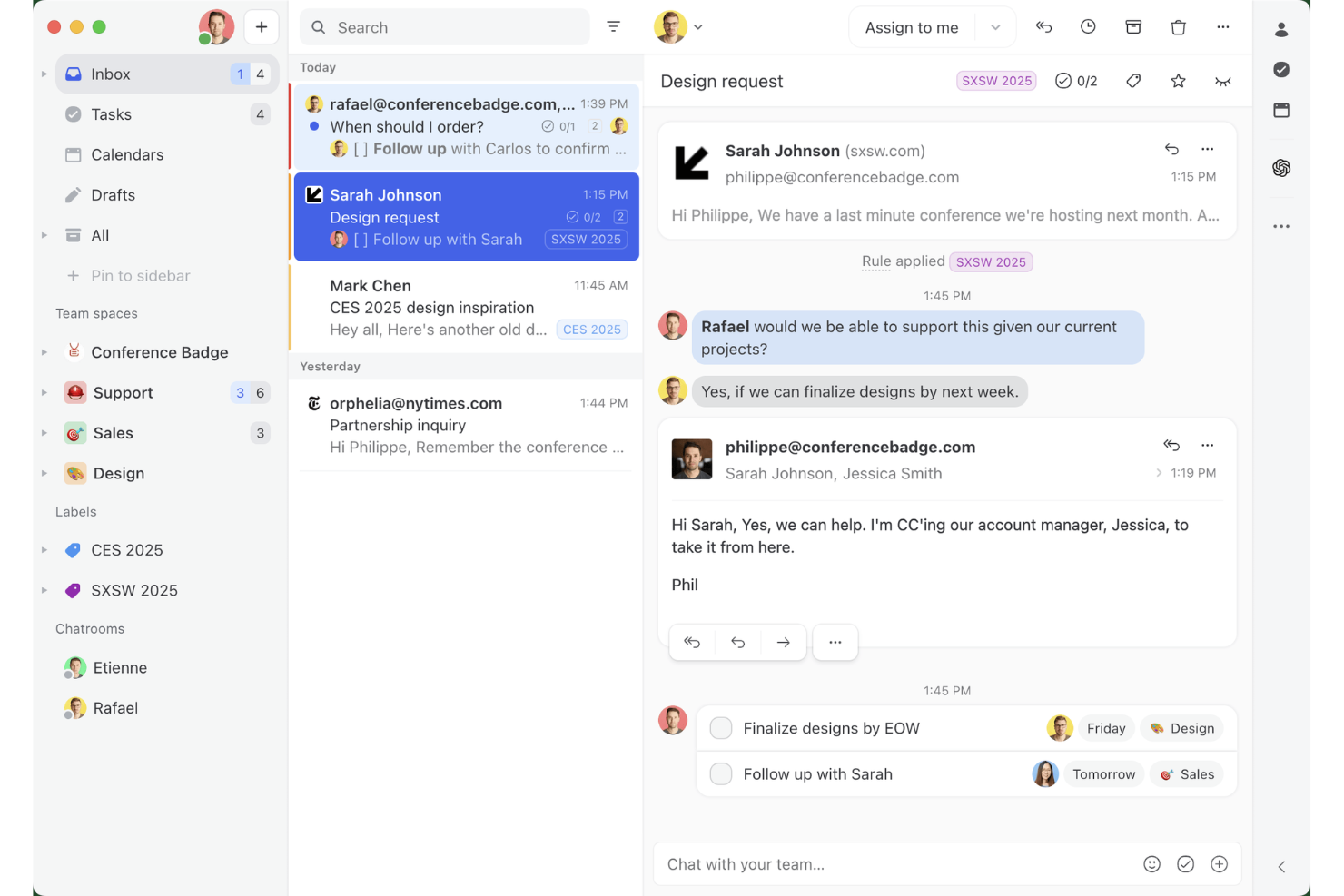
Missive es una plataforma colaborativa de bandeja de entrada compartida que combina la gestión multicanal del correo electrónico, los hilos internos del equipo, las reglas de enrutamiento impulsadas por IA y la coelaboración de borradores en tiempo real a través del correo electrónico, WhatsApp, SMS y los canales de mensajería social.
¿Para quién es más adecuado Missive?
Missive es una opción excelente para equipos de soporte pequeños y medianos que necesitan que varios agentes colaboren en colas de correo compartidas sin la sobrecarga de un sistema formal de gestión de tickets.
Por qué elegí Missive
He incluido Missive entre mis principales opciones porque es la única herramienta de soporte por correo electrónico en la que varios agentes pueden elaborar conjuntamente una única respuesta en tiempo real, algo importante cuando un problema complejo de un cliente requiere la intervención de dos personas antes de enviar cualquier mensaje. Su detección de conflictos muestra quién está viendo o escribiendo activamente en una conversación, por lo que el equipo deja de enviar respuestas duplicadas. Además, las reglas de IA incorporan un enrutamiento basado en el contenido, marcando automáticamente los mensajes urgentes o con sentimiento negativo.
Características principales de Missive
- Respuestas predefinidas: Guarda y reutiliza respuestas prediseñadas con compatibilidad con variables para ofrecer mensajes personalizados y coherentes en todo el equipo.
- Equilibrio de carga de trabajo: Distribuye automáticamente las conversaciones entrantes mediante métodos de asignación rotativa, al agente menos ocupado, a todos a la vez o aleatoria.
- Reglas de IA: Automatizaciones basadas en el contenido que analizan el significado de los mensajes para activar el etiquetado, la escalación o la creación de borradores según la intención o el sentimiento.
- Servidor MCP de Missive: Conecta clientes de IA externos, como Claude o ChatGPT, para consultar datos del soporte por correo electrónico, comprobar calendarios y redactar respuestas, manteniendo la revisión humana como requisito previo al envío.
- Bandeja de entrada multicanal: Gestiona el correo electrónico, WhatsApp, SMS, Facebook Messenger y los mensajes directos de Instagram desde una única bandeja de entrada compartida.
Integraciones de Missive
Missive ofrece integraciones nativas con Salesforce, HubSpot, Pipedrive, Shopify, Asana, ClickUp, Trello, Todoist, WhatsApp Business y Twilio para SMS. También admite una API REST, webhooks, Zapier y su nuevo servidor MCP en los planes Productive y Business (requiere activación por parte de un administrador).
Pros and Cons
Pros:
- Redacción colaborativa de correos electrónicos en tiempo real para equipos
- Enrutamiento y sugerencias de respuesta impulsados por IA disponibles
- La bandeja de entrada unificada abarca el correo electrónico y los canales de mensajería
Cons:
- No incluye un ID de ticket tradicional ni seguimiento del ciclo de vida
- Los informes avanzados requieren un plan de nivel superior
New Product Updates from Missive
Missive Adds Conversation Pins
Missive now lets you pin key links, decisions, and notes inside a conversation, keeping them accessible in a dedicated Pins section in the Details sidebar. For more information, visit Missive's official site.
 .
.
eDesk
Ideal para la automatización de tareas de soporte en ecommerce
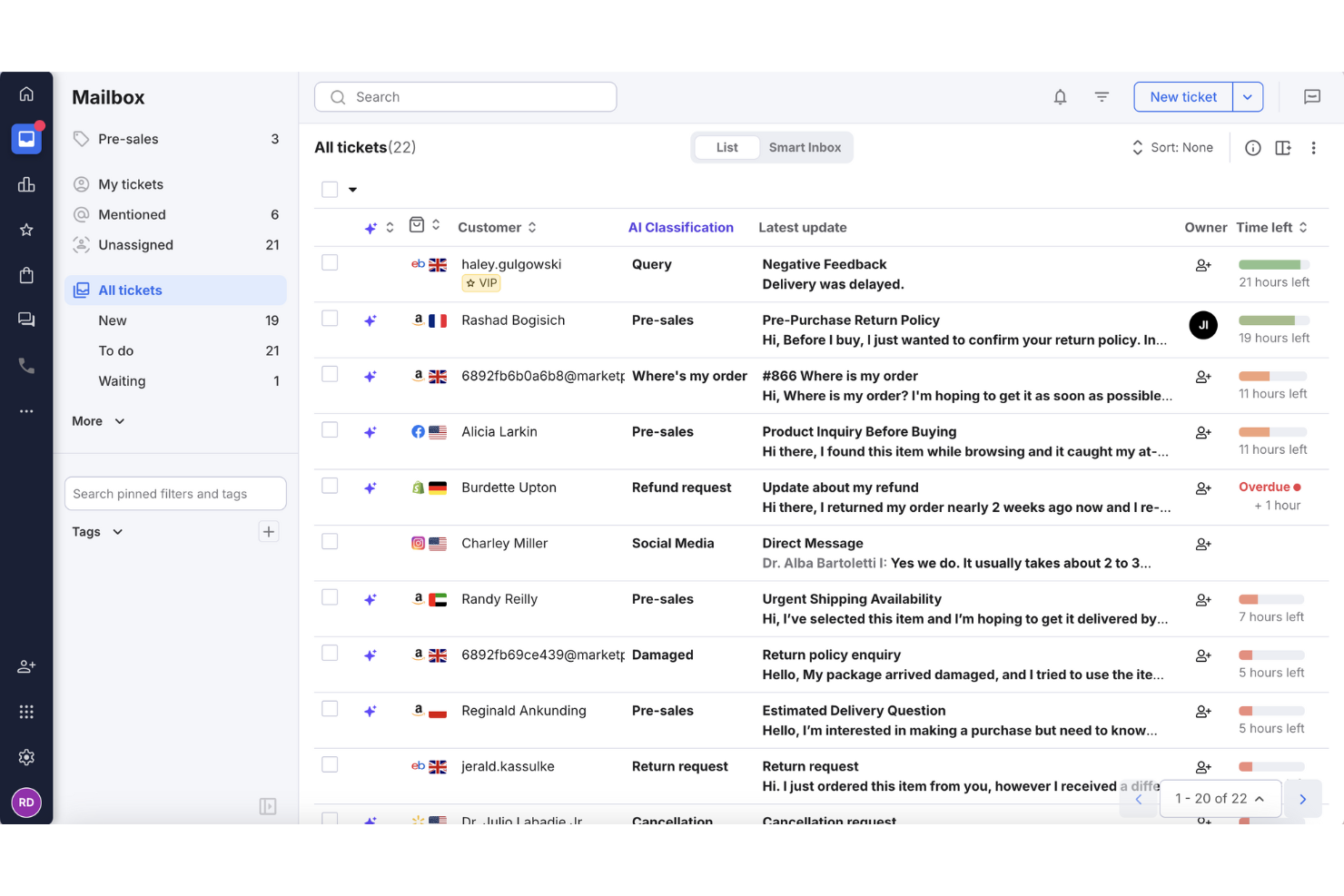
Para las empresas de comercio electrónico que buscan una forma eficiente de gestionar las consultas de los clientes, eDesk destaca como una solución especialmente adaptada. Su plataforma impulsada por IA centraliza la comunicación de múltiples canales en una sola bandeja de entrada, lo que facilita que tu equipo proporcione respuestas oportunas. Diseñado específicamente para comercio electrónico, eDesk no solo aumenta la satisfacción del cliente, sino que también optimiza tus operaciones de soporte, resolviendo el desafío común de gestionar grandes volúmenes de interacciones con los clientes.
Por qué elegí eDesk
Elegí eDesk por su capacidad de automatizar tareas rutinarias de soporte, algo fundamental para empresas que manejan un alto volumen de consultas. Esta automatización está respaldada por funciones como un chatbot 24/7 que ayuda a responder preguntas frecuentes en cualquier momento. eDesk también se integra con múltiples canales de comercio electrónico, facilitando la gestión de conversaciones con clientes y el soporte relacionado con pedidos desde un solo lugar.
Funciones clave de eDesk
Además de sus impresionantes capacidades de automatización, eDesk ofrece:
- Bandeja de entrada unificada: Consolida mensajes de más de 300 canales, incluidos los principales marketplaces y plataformas de redes sociales.
- Informes en tiempo real: Ofrece información sobre métricas de rendimiento, ayudando a optimizar las operaciones de soporte.
- Automatización impulsada por IA: Automatiza respuestas para consultas comunes, permitiendo que tu equipo se concentre en asuntos más complejos.
- Flujos de trabajo personalizables: Permite a tu equipo crear flujos de trabajo adaptados a las necesidades específicas del negocio.
Integraciones de eDesk
Las integraciones incluyen Amazon, eBay, Walmart, Shopify, Magento, Facebook, WhatsApp, Etsy, BigCommerce y WooCommerce.
Pros and Cons
Pros:
- El chatbot 24/7 puede atender preguntas básicas
- Las automatizaciones con IA reducen tareas de soporte repetitivas
- Integra datos detallados de pedidos para un mejor servicio al cliente
Cons:
- Está principalmente diseñado para ecommerce, con menor flexibilidad para otros sectores
- La personalización de informes es limitada para análisis complejos
New Product Updates from eDesk
eDesk Adds Galeria and Kaufland Support in Spain and Netherlands
eDesk adds support for Galeria, Kaufland Spain, and Kaufland Netherlands marketplaces. These integrations bring more European buyer messages into eDesk with routing, templates, AI insights, and automated translation. For more information, visit eDesk’s official site.
 .
.
Tidio
Ideal para la organización inteligente de tickets
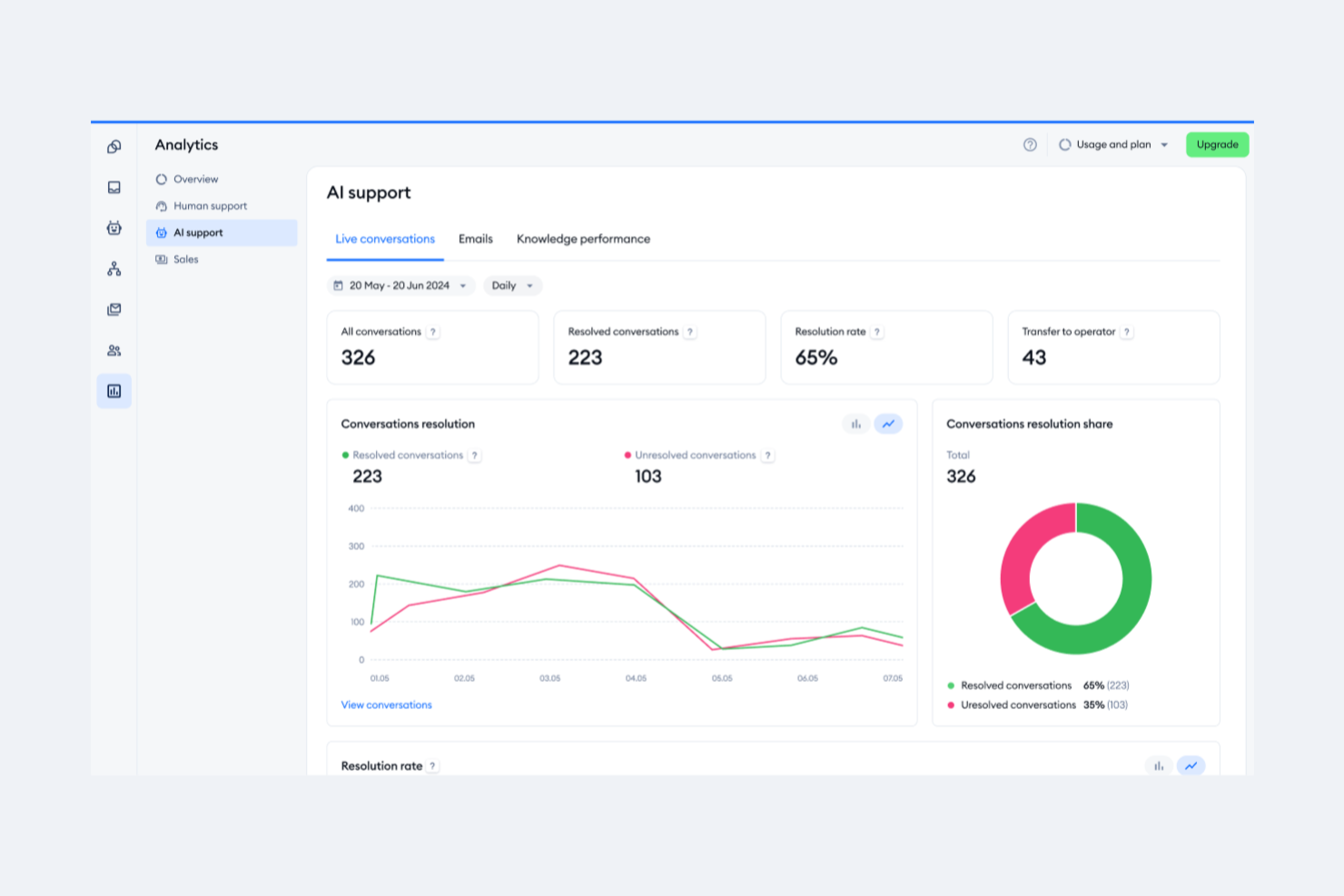
Tidio es una plataforma de atención al cliente que combina chat en vivo, automatización con IA y herramientas de asistencia a través de correo electrónico. Está diseñada para ayudar a los equipos a gestionar conversaciones con clientes en múltiples canales desde un solo panel de control.
Por qué elegí Tidio: Algo que me gusta es el sistema inteligente de gestión de tickets de Tidio. Puedes convertir correos electrónicos, chats y mensajes de redes sociales en tickets, asignarlos a los compañeros, establecer prioridades y hacer seguimiento de su estado. El sistema soporta etiquetas, notas internas y vistas personalizadas, para que tu equipo pueda filtrar y organizar los tickets según condiciones específicas.
Otra razón por la que elegí Tidio es su automatización de correos electrónicos impulsada por IA. El Agente Lyro AI puede encargarse de solicitudes rutinarias de clientes escaneando los correos entrantes y respondiendo a problemas comunes. Si la IA no puede resolver el problema, transfiere la conversación a tu equipo manteniendo el contexto.
Funciones y integraciones destacadas de Tidio
Funciones incluyen respuestas predefinidas, vistas personalizadas de tickets, gestión de carpetas de spam, respuestas automáticas, actualizaciones de estado de tickets, combinación de tickets, personalización de la dirección del remitente, priorización de tickets, notas internas, etiquetado de tickets, encuestas de satisfacción al cliente y políticas SLA.
Integraciones incluyen Shopify, WordPress, Squarespace, WIX, Adobe Commerce, BigCommerce, WooCommerce, Google Analytics, Mailchimp, HubSpot y Zendesk.
Pros and Cons
Pros:
- Soporte multicanal, incluyendo chats, correos electrónicos y redes sociales
- Lyro AI gestiona una parte significativa de las consultas de clientes
- Ofrece perspectivas sobre el rendimiento del equipo y la satisfacción del cliente
Cons:
- Muchas funciones de automatización sólo están disponibles en planes superiores
- Limitaciones al integrar con algunas herramientas de terceros

Halo
Ideal para el seguimiento de incidencias
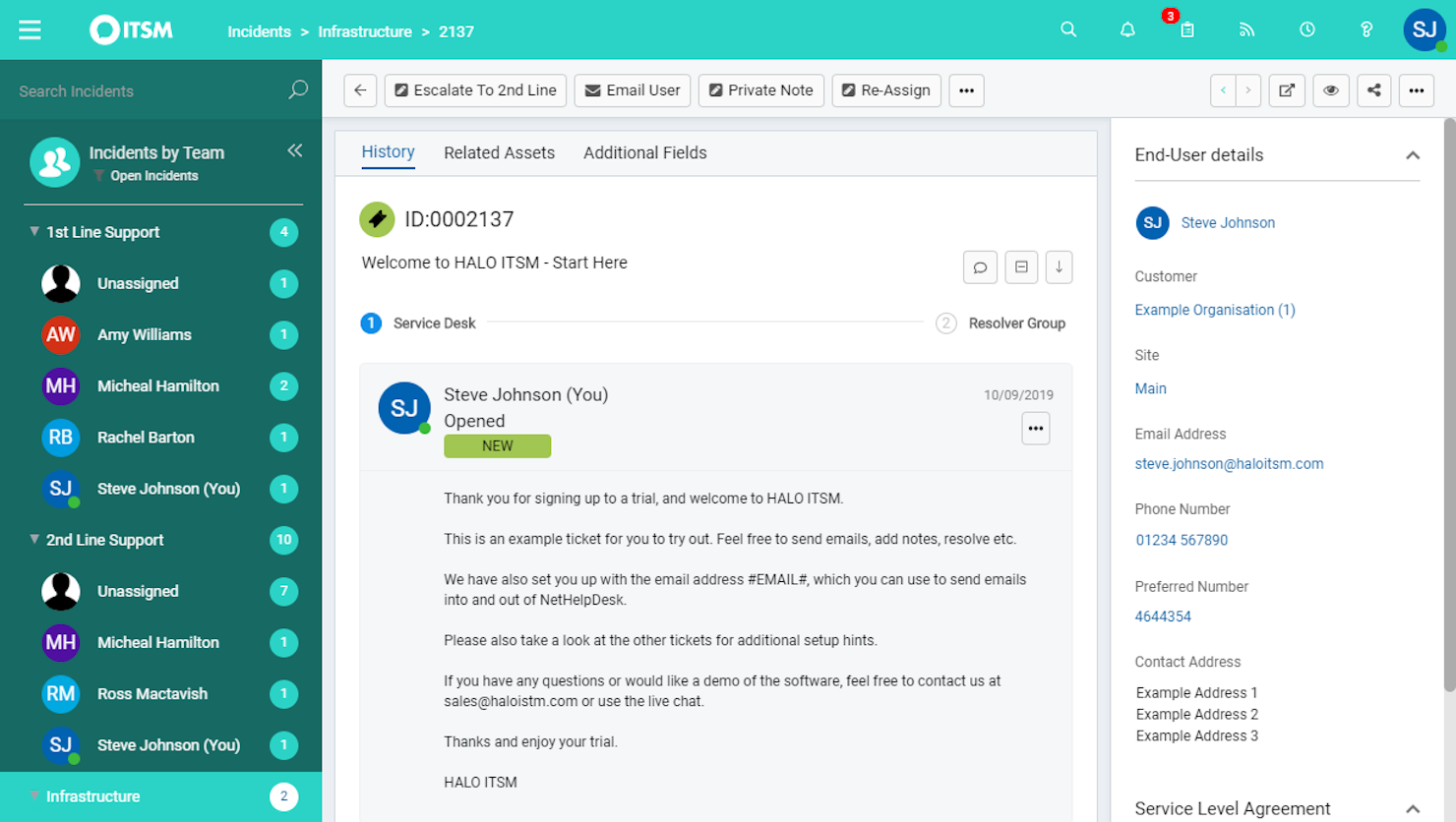
HaloITSM es una plataforma versátil de gestión de servicios de TI que respalda el manejo eficiente de los procesos informáticos. Ofrece un conjunto de herramientas para mejorar la entrega de servicios, por lo que es una excelente opción para equipos que buscan fortalecer sus capacidades de mesa de ayuda.
Por qué elegí HaloITSM: Elegí HaloITSM por sus sólidas capacidades de gestión de incidencias. Esta función asegura que tu equipo pueda rastrear y resolver problemas, lo cual es fundamental para mantener un soporte de alta calidad. Además, las notificaciones por correo electrónico de la plataforma mantienen informados a todos, reduciendo las posibilidades de perder actualizaciones críticas.
Otra razón para elegir HaloITSM es su excelente sistema de base de conocimientos. Esta función permite que tu equipo cree y gestione artículos de soporte, ayudando a los usuarios a encontrar soluciones rápidamente sin necesidad de enviar numerosos correos. Favorece un enfoque proactivo al servicio al cliente, permitiéndote reducir el volumen de consultas entrantes.
Características y integraciones destacadas:
Las características incluyen un catálogo de servicios que permite a los usuarios solicitar servicios fácilmente, asegurando que todas las solicitudes sean rastreadas y gestionadas. Sus capacidades de gestión de activos te ayudan a llevar un control de tus recursos informáticos, brindando visibilidad sobre tus recursos. Además, la función de gestión de cambios te permite manejar las modificaciones de manera sistemática, minimizando las interrupciones en tus servicios.
Las integraciones incluyen RingCentral, Xero, Slack, Salesforce, TeamViewer, Cisco Webex, QuickBooks Online, Jira, AnyDesk, Azure Active Directory, Lansweeper y Splashtop.
Pros and Cons
Pros:
- Funciones de gestión de activos
- Enrutamiento automático de tickets
- Herramientas detalladas de generación de informes
Cons:
- Retrasos ocasionales en el rendimiento
- Funcionalidad móvil limitada
Otras opciones
Estas son algunas opciones más que no llegaron a formar parte de la lista de los mejores programas de mesa de ayuda por correo electrónico:
- Vision Helpdesk
Ideal para soporte multicanal
- monday service
La mejor para centralizar las comunicaciones por correo electrónico
- Gorgias
Ideal para integrar con otras plataformas de comercio electrónico
- Assembled AI
Mejor para previsión con aprendizaje automático
- Issuetrak
Ideal para el seguimiento y la gestión de incidencias
- Froged
Ideal para comunicación omnicanal
- TOPdesk
La mejor opción para visualización de datos en tiempo real
- Front
Ideal para mejorar la colaboración y comunicación del equipo
- Jira Service Desk
Ideal para conectar soporte al cliente, operaciones de TI y equipos de negocio
- HelpSpot
Ideal para equipos que necesitan una amplia gama de opciones de personalización
- Rescue
Ideal para capacidades de soporte y acceso remoto
- Front
Ideal para la automatización y la gestión de la comunicación
- NinjaOne
Ideal para la gestión de activos de mesa de ayuda
- LiveAgent
Ideal para mejorar la motivación y el rendimiento de los agentes mediante gamificación
- Zendesk
Ideal para crear una experiencia de cliente omnicanal


Cómo Evalúo el Software de Mesa de Ayuda para Correos Electrónicos
Divido mi evaluación en dos niveles: el mínimo indispensable que toda herramienta debe cumplir—buzón compartido, enrutamiento de tickets y seguimiento de SLA—y los diferenciadores que determinan la mejor opción para tu equipo.
Funcionalidad Principal (Condiciones Indispensables para esta Lista)
Al seleccionar las herramientas para mi lista, califico cada una en una escala del 0 (no ofrece la funcionalidad) al 5 (sobresale en esta área) para cada funcionalidad principal que se detalla a continuación. Luego, calculo el puntaje total de la herramienta como un porcentaje. Cada herramienta debe obtener un puntaje total mínimo del 65% para ser considerada en la selección.
- Buzón de Correo Electrónico Compartido: Verifico si la herramienta consolida múltiples direcciones de soporte (por ejemplo, soporte@, facturacion@, devoluciones@) en un solo espacio de trabajo donde los agentes pueden ver y responder sin interferir entre ellos.
- Conversión y Seguimiento de Tickets: Todo correo entrante debe convertirse automáticamente en un ticket rastreable con un ID único, todo el hilo de conversación y etiquetas de estado claras para que nada se pierda.
- Reglas de Asignación y Enrutamiento: Evalúo cómo la plataforma distribuye los tickets—si es compatible con distribución por turnos, enrutamiento por habilidades o reglas condicionales como enviar correos de clientes VIP a la cola de agentes senior.
- Respuestas Predefinidas y Macros: Las respuestas guardadas y macros de varios pasos son importantes aquí. Busco variables dinámicas (nombre del cliente, número de pedido) y bibliotecas de plantillas compartidas que el equipo pueda administrar de manera centralizada.
- Herramientas Internas de Colaboración: Funciones como notas privadas, @menciones y detección de colisiones permitirán a los agentes involucrar a compañeros o marcar una solicitud complicada de reembolso sin que el cliente vea las comunicaciones internas.
- SLA y Reportes de Correo Electrónico: Reviso si la plataforma mide el tiempo de primera respuesta, tiempo de resolución y cumplimiento de SLA por buzón o equipo, y si los paneles de control son lo suficientemente personalizables para detectar cuellos de botella.
Una vez que tengo una lista de herramientas que cumplen estos criterios, considero qué diferencia a cada plataforma.
Factores Diferenciadores (Qué Distingue a los Proveedores)
Así es como comparo y contrasto los diferentes proveedores:
Funciones Destacadas
Las sugerencias de respuesta impulsadas por IA marcan una diferencia real. Cuando un agente abre un ticket común como un restablecimiento de contraseña, una respuesta pre-redactada ahorra minutos reales a gran escala. También evalúo si la herramienta muestra una barra lateral con el contexto del cliente—tickets anteriores, detalles de la cuenta o historial de pedidos—al lado del hilo activo. Una base de conocimientos integrada es otro diferenciador que reviso. Permite a los agentes insertar artículos de ayuda directamente e incluso evitar preguntas repetidas antes de que lleguen a la cola.
Más Allá de las Funciones
El ecosistema de integraciones es clave aquí. Verifico si una herramienta se conecta de manera nativa con las plataformas de CRM y comercio electrónico que tu equipo ya utiliza—Salesforce, HubSpot, Shopify—para que los agentes no tengan que cambiar de pestaña para buscar el estado de un pedido. La estructura de precios es otro factor que considero cuidadosamente, especialmente si los costos por agente siguen siendo razonables a medida que el equipo de soporte crece de cinco a diez personas o más. También tengo en cuenta el tamaño del equipo, ya que una startup de tres personas compartiendo un buzón de Gmail tiene necesidades muy diferentes a una operación de 50 agentes con SLAs escalonados.
Cómo elegir un software de mesa de ayuda por correo electrónico
Es fácil perderse entre largas listas de funciones y estructuras de precios complejas. Para ayudarte a mantener la concentración mientras avanzas en tu proceso específico de selección de software, aquí tienes una lista de factores que debes tener en cuenta al elegir una herramienta de mesa de ayuda por correo electrónico:
| Factor | Qué debes tener en cuenta |
|---|---|
| Escalabilidad | Asegúrate de que el software pueda crecer con tu empresa y gestionar un mayor volumen de correos y equipos de agentes más grandes sin comprometer el rendimiento. |
| Integraciones | Comprueba si el software se integra con tus herramientas actuales, como el CRM, el chat y las plataformas de redes sociales, para crear un sistema de soporte cohesionado. |
| Personalización | Busca opciones que te permitan adaptar los flujos de trabajo, los paneles y los roles de usuario a las necesidades y procesos específicos de tu equipo. |
| Facilidad de uso | Evalúa la interfaz de usuario y la navegación para asegurarte de que tu equipo pueda ponerse al día rápidamente sin una formación exhaustiva. |
| Presupuesto | Compara los planes de precios y comprueba qué funciones se incluyen en cada nivel. Ten en cuenta el coste total de propiedad, incluidas las tarifas ocultas o los costes adicionales. |
| Medidas de seguridad | Verifica que el software cumpla las normativas de protección de datos y ofrezca funciones como el cifrado y los controles de acceso para mantener seguros los datos de los clientes. |
| Opciones de soporte | Considera la disponibilidad y la calidad del servicio de atención al cliente, incluida la asistencia 24 horas al día, 7 días a la semana, varios canales de contacto y recursos de autoayuda. |
| Herramientas de informes | Examina las funciones de análisis y generación de informes para asegurarte de que puedes realizar un seguimiento de las métricas de rendimiento y obtener información sobre las interacciones con los clientes. |
Tendencias del software de mesa de ayuda por correo electrónico
En mi investigación, recopilé innumerables actualizaciones de productos, comunicados de prensa y registros de lanzamientos de distintos proveedores de software de soporte por correo electrónico. Estas son algunas de las tendencias emergentes que estoy siguiendo de cerca:
- IA y aprendizaje automático: La IA se está convirtiendo en un elemento fundamental para predecir las necesidades de los clientes y automatizar las respuestas, y el software de mesa de ayuda basado en IA incorpora cada vez más estas capacidades al flujo de trabajo principal de soporte. Herramientas como Zoho Desk utilizan la IA para proporcionar información útil y automatizar tareas repetitivas, lo que ayuda a tu equipo a centrarse en problemas complejos.
- Soporte omnicanal: Los clientes quieren conectarse a través de varios canales. El software de soporte por correo electrónico ahora integra chat, redes sociales y soporte telefónico, lo que permite a los equipos gestionar todas las interacciones desde un mismo lugar.
- Portales de autoservicio: Las empresas están capacitando a los clientes para resolver los problemas por sí mismos. Software como Freshdesk ofrece opciones completas de autoservicio, lo que reduce la carga de los equipos de soporte y mejora los tiempos de respuesta.
- Funciones de personalización: Personalizar las interacciones con los clientes es fundamental. Algunas herramientas ahora ofrecen opciones para adaptar las respuestas según el historial y las preferencias del cliente, mejorando la experiencia general del cliente.
- Análisis avanzado: Las empresas necesitan información sobre las interacciones con los clientes. Las nuevas funciones de análisis ayudan a los equipos a realizar un seguimiento de las métricas de rendimiento e identificar tendencias, lo que facilita la mejora de la calidad del servicio.
Funciones del software de soporte por correo electrónico
Al elegir un software de soporte por correo electrónico, presta atención a las siguientes funciones clave:
- Gestión de tickets multicanal: Organiza, realiza un seguimiento y resuelve de forma eficiente las consultas de los clientes que llegan por correo electrónico, chat y redes sociales, todo desde un único panel ordenado. Puedes olvidarte de tener que cambiar entre pestañas o de perder mensajes importantes.
- Asignación automática de tickets: Dirige automáticamente los tickets entrantes al miembro del equipo o departamento adecuado según las reglas que configures. Esto mantiene la fluidez del flujo de trabajo y garantiza que las preguntas lleguen de inmediato a la persona correcta.
- Respuestas predefinidas: Guarda y envía respuestas ya redactadas a preguntas frecuentes para no tener que escribir lo mismo una y otra vez. Esto acelera los tiempos de respuesta y garantiza una comunicación precisa y coherente con la marca en todo momento.
- Herramientas de colaboración: Etiqueta a tus compañeros de equipo, deja notas internas o escala los tickets complejos. Estas funciones ayudan a que todos estén al tanto, para que no tengas que reenviar correos electrónicos ni perder tiempo haciendo un seguimiento de las actualizaciones.
- Seguimiento del historial del cliente: Accede al instante a un registro completo de las conversaciones anteriores y los tickets pasados de cada cliente. Este contexto te permite personalizar tus respuestas y evitar que el cliente tenga que repetirse.
- Informes y análisis sólidos: Realiza un seguimiento de métricas de rendimiento como los tiempos de respuesta, las tasas de resolución y la satisfacción del cliente. Utiliza esta información para perfeccionar la estrategia de soporte de tu equipo (y quizá incluso presumir un poco).
- Integración con el portal de autoservicio: Ofrece a los clientes un portal de fácil acceso con preguntas frecuentes, guías y opciones para enviar nuevos tickets. Esto reduce la presión sobre tu bandeja de entrada y permite que los clientes se ayuden a sí mismos la mayor parte del tiempo.
- Gestión de acuerdos de nivel de servicio (SLA): Configura y supervisa los SLA para asegurarte de que tu equipo cumpla los plazos de respuesta y resolución. Puedes detectar cuellos de botella y mantener tus estándares de soporte al cliente en niveles excelentes.
- Campos de ticket personalizables: Adapta la información que recopilas y supervisas en cada ticket a las necesidades de tu empresa. Esto te facilita categorizar y elaborar informes sobre problemas específicos.
- Funciones de seguridad y cumplimiento: Protege los datos confidenciales de los clientes mediante permisos de usuario, cifrado, registros de auditoría y opciones de cumplimiento como la compatibilidad con el RGPD. Así mantienes la confianza alta y los quebraderos de cabeza al mínimo.
Ventajas del software de soporte por correo electrónico
La implementación de un software de soporte por correo electrónico ofrece varias ventajas para tu equipo y tu empresa. Estas son algunas de las que puedes esperar:
- Tiempos de respuesta mejorados: La automatización de tareas y la gestión de interacciones mediante asistencia omnicanal ayudan a tu equipo a responder a los clientes más rápidamente.
- Mayor satisfacción del cliente: Ofrecer interacciones personalizadas y opciones de autoservicio da lugar a una experiencia del cliente más satisfactoria.
- Mayor eficiencia: Las herramientas de automatización y la información basada en IA reducen el trabajo manual, lo que permite a tu equipo centrarse en problemas de clientes más complejos.
- Mejor gestión de datos: Las funciones avanzadas de análisis e integración te ayudan a realizar un seguimiento del rendimiento y a obtener información sobre las interacciones con los clientes.
- Escalabilidad: Las opciones de personalización y la accesibilidad desde dispositivos móviles garantizan que el software pueda crecer junto con tu empresa y adaptarse a las necesidades cambiantes.
- Ahorro de costes: Reducir la necesidad de procesos manuales y mejorar la eficiencia puede ahorrar tiempo y dinero a tu empresa.
- Mayor seguridad: Las medidas de protección de seguridad protegen los datos de los clientes, garantizan el cumplimiento de las normativas y generan confianza entre tus usuarios.
Opciones de implementación para un servicio de asistencia por correo electrónico
Al configurar un servicio de asistencia por correo electrónico, las empresas deben evaluar factores clave como los requisitos técnicos, las opciones de personalización y los modelos de implementación. Elegir el método de implementación adecuado garantiza una asistencia al cliente fluida, escalabilidad y eficiencia operativa.
Requisitos técnicos
Antes de implementar un servicio de asistencia por correo electrónico, debes tener en cuenta lo siguiente:
- Compatibilidad de la infraestructura – Asegúrate de que el software se integre con los sistemas de correo electrónico existentes (por ejemplo, Outlook y Gmail) y las herramientas de gestión de relaciones con los clientes (CRM).
- Capacidades de automatización – Busca funciones como el enrutamiento de tickets, las respuestas automáticas y la automatización de flujos de trabajo para mejorar la eficiencia.
- Seguridad y cumplimiento – Verifica los estándares de cifrado, las políticas de conservación de datos y el cumplimiento de normativas (por ejemplo, GDPR y HIPAA).
Posibilidades de personalización
- Marca y personalización – Elige un software que permita utilizar plantillas de correo electrónico y firmas personalizadas, así como respuestas con la imagen de marca.
- Configuración del flujo de trabajo – Posibilidad de adaptar las categorías de tickets, las reglas de escalado y los roles de usuario a las necesidades de la organización.
- Opciones de integración – Asegúrate de que sea compatible con herramientas de terceros, como el chat en directo, las bases de conocimiento y los paneles de informes.
Modelos de implementación
Las organizaciones pueden elegir entre distintos métodos de implementación según el presupuesto, los recursos informáticos y los objetivos empresariales:
a. Servicio de asistencia basado en la nube
- Ventajas: Configuración rápida, actualizaciones automáticas, acceso remoto y costes iniciales más bajos.
- Desventajas: Personalización limitada, dependencia de la conexión a Internet y cuotas de suscripción periódicas.
b. Servicio de asistencia local
- Ventajas: Mayor control sobre la seguridad, la propiedad de los datos y la personalización.
- Desventajas: Requiere recursos informáticos dedicados, costes iniciales más elevados y mantenimiento continuo.
c. Implementación híbrida
- Ventajas: Combina la accesibilidad de la nube con el control local y ofrece flexibilidad a las empresas con necesidades de cumplimiento normativo.
- Desventajas: Configuración más compleja y posibles dificultades de integración.
Al evaluar estos factores, las empresas pueden seleccionar la mejor estrategia de implementación para su servicio de asistencia por correo electrónico, garantizando una asistencia al cliente eficiente y unas operaciones fluidas.
Costes y precios del software de asistencia por correo electrónico
Para seleccionar un software de asistencia por correo electrónico es necesario comprender los distintos modelos de precios y planes disponibles. Los costes varían según las funciones, el tamaño del equipo, los complementos y otros factores. La siguiente tabla resume los planes habituales, sus precios medios y las funciones típicas incluidas en las soluciones de software de asistencia por correo electrónico:
Tabla comparativa de planes para software de mesa de ayuda por correo electrónico
| Tipo de plan | Precio medio | Funciones habituales |
|---|---|---|
| Plan gratuito | $0 | Gestión básica de tickets, asistencia por correo electrónico e informes limitados. |
| Plan personal | $5-$25/usuario/mes | Gestión del correo electrónico, automatización básica e integración con el servicio de atención al cliente. |
| Plan empresarial | $30-$50/usuario/mes | Automatización avanzada, asistencia multicanal y análisis detallados. |
| Plan para empresas | $60-$100/usuario/mes | Flujos de trabajo personalizados, información basada en IA y asistencia prémium al cliente. |
Preguntas frecuentes
¿Tienes preguntas generales sobre cómo funciona el software de mesa de ayuda por correo electrónico? Estas respuestas a las preguntas más frecuentes (FAQ) deberían orientarte en la dirección correcta:
¿Qué medidas de seguridad y cumplimiento normativo debe tener el software de mesa de ayuda por correo electrónico?
Debes buscar un software de mesa de ayuda que ofrezca cifrado de extremo a extremo, controles de acceso sólidos, registros de auditoría detallados y copias de seguridad automáticas. Asegúrate de que admita las normas de cumplimiento relevantes para tu sector, como GDPR, PCI DSS o HIPAA, especialmente si gestionas datos confidenciales de clientes. Las certificaciones del proveedor y las actualizaciones de seguridad periódicas también son importantes para proteger tanto la información de los clientes como la de los agentes.
¿Cómo gestiona el software de mesa de ayuda por correo electrónico el spam y los mensajes no deseados?
La mayoría de las herramientas de mesa de ayuda por correo electrónico incluyen filtros de spam integrados y permiten establecer reglas personalizadas. Puedes marcar el spam sospechoso o dirigirlo automáticamente a carpetas específicas. Para los centros de llamadas, esto significa que los agentes dedican menos tiempo a clasificar mensajes irrelevantes y más a resolver problemas reales de los clientes. También puedes incluir direcciones en listas blancas y negras para mejorar la precisión.
¿Cómo puedo medir el rendimiento de los agentes mediante el software de mesa de ayuda por correo electrónico?
Puedes hacer un seguimiento del rendimiento de los agentes mediante métricas como el tiempo de resolución de los tickets, el tiempo de primera respuesta, las puntuaciones de satisfacción del cliente y el volumen de correos electrónicos gestionados. La mayoría de las plataformas ofrecen paneles y generación de informes en tiempo real, para que puedas identificar las necesidades de formación, recompensar a los empleados con mejor rendimiento y gestionar las cargas de trabajo de forma eficiente. Muchas también se integran con herramientas de gestión de la plantilla para ofrecer una visión completa de la productividad del equipo.
¿Qué integraciones debo buscar en un software de mesa de ayuda por correo electrónico para mi centro de llamadas?
Busca un software que se integre con tu CRM, los sistemas telefónicos del centro de llamadas, el chat en directo y las herramientas de gestión de la plantilla. Esto te ayuda a mantener alineados los datos de los clientes en todos los canales, automatizar tareas repetitivas y mejorar el flujo de trabajo de tu equipo. La compatibilidad con API y los conectores prediseñados para plataformas como Salesforce, Zendesk o Microsoft Teams son especialmente útiles.
¿Puede el software de mesa de ayuda por correo electrónico ofrecer atención al cliente omnicanal en mi centro de contacto?
Sí, muchas soluciones de mesa de ayuda por correo electrónico ofrecen funciones omnicanal que permiten gestionar el correo electrónico, el chat, las redes sociales y las llamadas desde una única interfaz. Esto ayuda a los agentes a ofrecer respuestas coherentes y facilita que los clientes se pongan en contacto contigo a través de su canal preferido. La integración con tu CRM y tu sistema de gestión de tickets garantiza que todas las interacciones se registren en un mismo lugar.
¿Cómo mejoran la eficiencia de mi equipo las funciones de automatización de las herramientas de mesa de ayuda por correo electrónico?
Las funciones de automatización, como el enrutamiento automático de tickets, las respuestas predefinidas y los recordatorios de los SLA, agilizan los flujos de trabajo habituales y reducen el trabajo manual. Puedes establecer reglas para asignar tickets según la disponibilidad o la experiencia, escalar automáticamente los problemas no resueltos y activar alertas para las solicitudes urgentes. Esto ayuda a tu equipo a priorizar las tareas de mayor valor y permite que los agentes se centren en las necesidades más complejas de los clientes.
Otras reseñas de software de mesa de ayuda
¿Buscas otro tipo de software de mesa de ayuda? También puedes consultar estas otras listas de las 10 mejores opciones:
- Software de mesa de ayuda: revisado y comparado
- Software de mesa de ayuda para pequeñas empresas
- Bases de conocimiento de mesa de ayuda para el servicio de atención al cliente
- Software de mesa de ayuda en línea
- Software de mesa de ayuda sencillo y fácil de usar
- Software interno de mesa de ayuda
- Software de mesa de ayuda para empresas
- Software de mesa de ayuda en la nube
- El mejor software gratuito de mesa de ayuda
Conclusión
Hoy en día, los clientes esperan más que un buen producto o servicio. También quieren una excelente experiencia de soporte, lo que puede ser un factor importante a la hora de decidir si te comprarán o no.
Espero que mi análisis del mejor software de mesa de ayuda por correo electrónico te haya ayudado en tu búsqueda. Si quieres leer más sobre cómo mejorar la experiencia de tus clientes, suscríbete a nuestro boletín.