
26 Best AI Customer Support Software in 2026

AI Customer Support Software Shortlist
Here’s my shortlist of the best AI customer support software:


AI customer support software uses artificial intelligence to automate, streamline, and enhance customer service interactions across chat, email, and other channels. If you’re searching for the best AI customer support software, you’re likely aiming to handle higher volumes of requests, reduce response times, and deliver consistent experiences—without sacrificing quality or personalization.
Choosing the right platform can help your team resolve issues faster, surface insights from conversations, and free up time for more complex customer needs. In this guide, you’ll find a carefully researched shortlist of trusted AI customer support tools to help you compare features and make an informed decision.
Why Trust Our Software Reviews
Best AI Customer Support Software Summary
This comparison chart summarizes pricing details for my top AI customer support software selections to help you find the best one for your budget and business needs.
| Tool | Best For | Trial Info | Price | ||
|---|---|---|---|---|---|
| 1 | Best for shared inbox support teams | Free 30-day trial available | From $24/user/month (billed annually) | Website | |
| 2 | Best for conversational customer messaging | 14-day free trial available | From $29/user/month (billed annually) | Website | |
| 3 | Best for unified customer conversation management | 30-day free trial + free demo available | Pricing upon request | Website | |
| 4 | Best for AI-powered omnichannel support | Free trial + free demo available | From $19/agent/month (billed annually) | Website | |
| 5 | Best for automated support workflows | 14-day free trial + free demo available | From $19/agent/month (billed annually) | Website | |
| 6 | Best for AI contact center solutions | Free demo available | From $85/user/month | Website | |
| 7 | Best for no-code AI chatbots | Expert consultation available | Pricing upon request | Website | |
| 8 | Best for AI-driven customer engagement | Free demo + free 14-day trial available | From $75/user/month (billed annually) | Website | |
| 9 | Best for generative AI support automation | Free demo available | Pricing upon request | Website | |
| 10 | Best for AI chatbots and lead capture | 7-day free trial available | From $24.17/month (billed annually) | Website |
-

SupportYourApp
Visit WebsiteThis is an aggregated rating for this tool including ratings from Crozdesk users and ratings from other sites.4.7 -
Freshdesk
Visit WebsiteThis is an aggregated rating for this tool including ratings from Crozdesk users and ratings from other sites.4.4 -
Zendesk
Visit WebsiteThis is an aggregated rating for this tool including ratings from Crozdesk users and ratings from other sites.4.3





AI Customer Support Software Reviews
Below are my detailed summaries of the best AI customer support software that made it onto my shortlist. My reviews offer a detailed look at the features, capabilities, and integrations of each platform to help you find the best one for you.

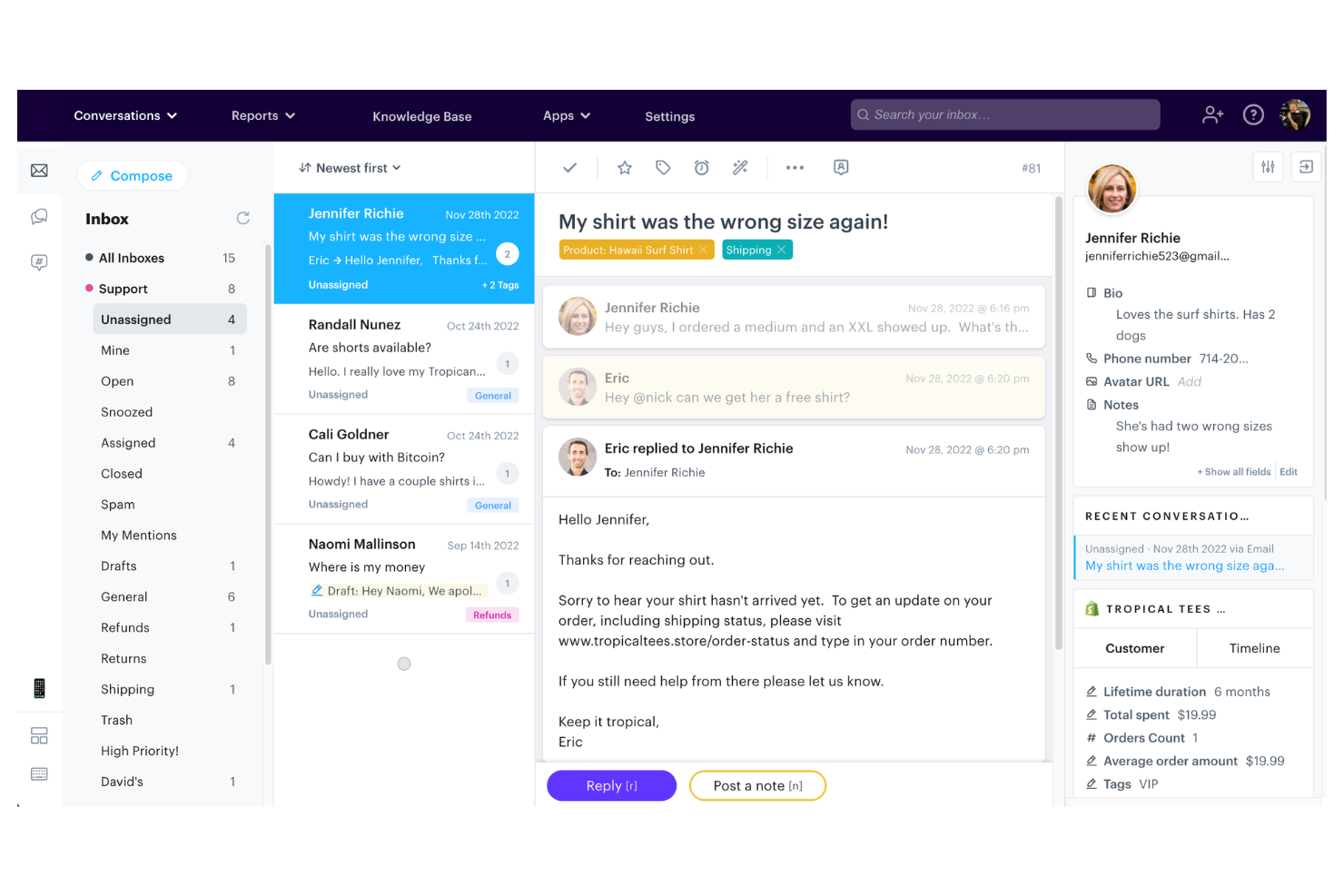
Groove offers a shared inbox and knowledge base platform designed for small teams that want to manage customer conversations efficiently. It’s a good fit for startups and growing businesses looking for a straightforward way to organize support requests and centralize customer information. With features that help teams collaborate and respond quickly, Groove addresses the challenge of keeping customer support organized without unnecessary complexity.
Who Is Groove Best For?
Groove is well-suited for small businesses and startups that need a simple, collaborative customer support solution.
Why I Picked Groove
I picked Groove because its shared inbox and knowledge base are purpose-built for small teams that need to manage customer conversations without extra complexity. The shared inbox lets multiple team members collaborate on support tickets, assign conversations, and leave internal notes, which helps prevent duplicate responses and missed messages.
I also appreciate how the knowledge base feature allows teams to create and update self-serve articles, reducing repetitive questions and freeing up agent time. For small businesses looking for an AI customer support solution that keeps things organized and accessible, Groove’s focus on simplicity and collaboration stands out.
Groove Key Features
Some other features that make Groove useful for AI customer support teams include:
- Automated workflows: Set up rules to automatically assign, tag, or prioritize incoming conversations based on custom criteria.
- Collision detection: Get real-time alerts when another team member is viewing or replying to the same conversation to avoid duplicate responses.
- Customer profiles: View a complete history of each customer’s interactions, including previous tickets and contact details, in one place.
- Reporting and analytics: Access built-in reports to track metrics like response times, ticket volume, and team performance.
Groove Integrations
Integrations include Slack, Stripe, Shopify, Recharge, Messenger, Instagram, MailChimp, Trello, Jira, HubSpot, and more.
Pros and Cons
Pros:
- Collision detection prevents duplicate agent replies
- Knowledge base reduces repetitive support questions
- Shared inbox supports multi-agent collaboration
Cons:
- Lacks sentiment analysis for incoming messages
- No built-in AI chatbot functionality

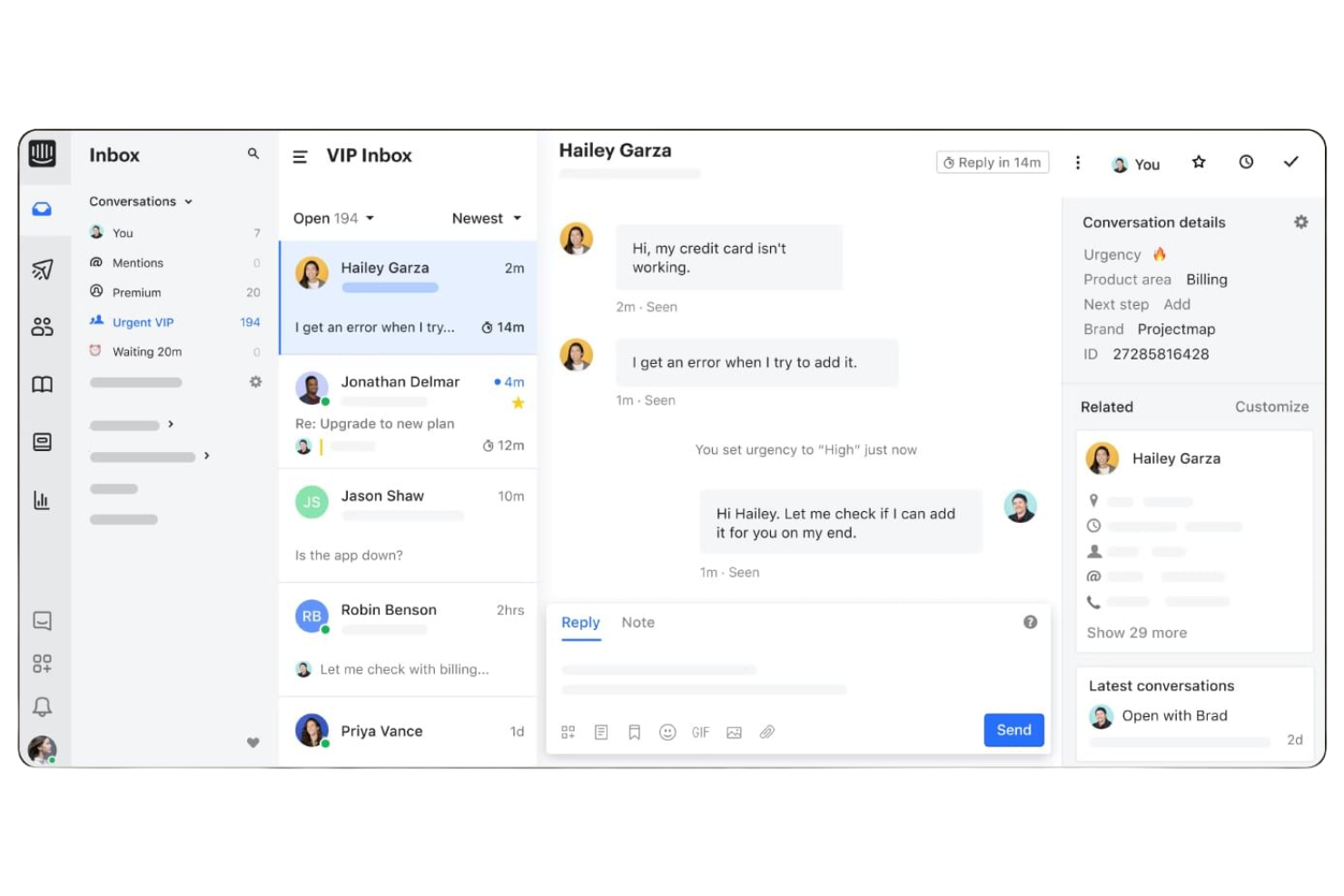
Intercom offers an AI-first customer service platform designed for teams that want to automate and personalize support at scale. It’s a strong choice for SaaS companies, ecommerce brands, and digital businesses looking to deliver proactive help through chat, bots, and messaging. Intercom helps reduce repetitive workload and ensures customers get fast, relevant answers across channels.
Who Is Intercom Best For?
Intercom fits SaaS and digital businesses that want to automate and personalize customer support through AI-driven chat and messaging.
Why I Picked Intercom
What stands out about Intercom is its AI-first approach to customer service, which goes beyond simple automation. The platform’s AI bots handle common questions, triage conversations, and proactively reach out to customers before issues escalate. I picked Intercom because its AI can suggest relevant help articles in real time and automate personalized responses across chat, email, and messaging. This makes it a strong fit for teams that want to deliver proactive, always-on support without overwhelming human agents.
Intercom Key Features
Some other Intercom features that support AI-driven customer support include:
- Inbox workspace: Agents manage all conversations from multiple channels in a single, unified inbox.
- Customizable workflows: Teams can design automated flows for routing, escalation, and follow-up based on customer data.
- Help center builder: Create and update a branded knowledge base with AI-powered article suggestions.
- Conversation ratings: Collect customer feedback directly within chat conversations to monitor support quality.
Intercom Integrations
Integrations include Salesforce, Slack, HubSpot, Jira Cloud, Stripe, Google Analytics, WhatsApp, Instagram, Statuspage, and more.
Pros and Cons
Pros:
- Proactive messaging reduces repetitive inquiries
- Multilingual support for global customer bases
- AI bots handle high chat volumes automatically
Cons:
- Occasional delays in AI-generated responses
- Limited AI customization for niche workflows

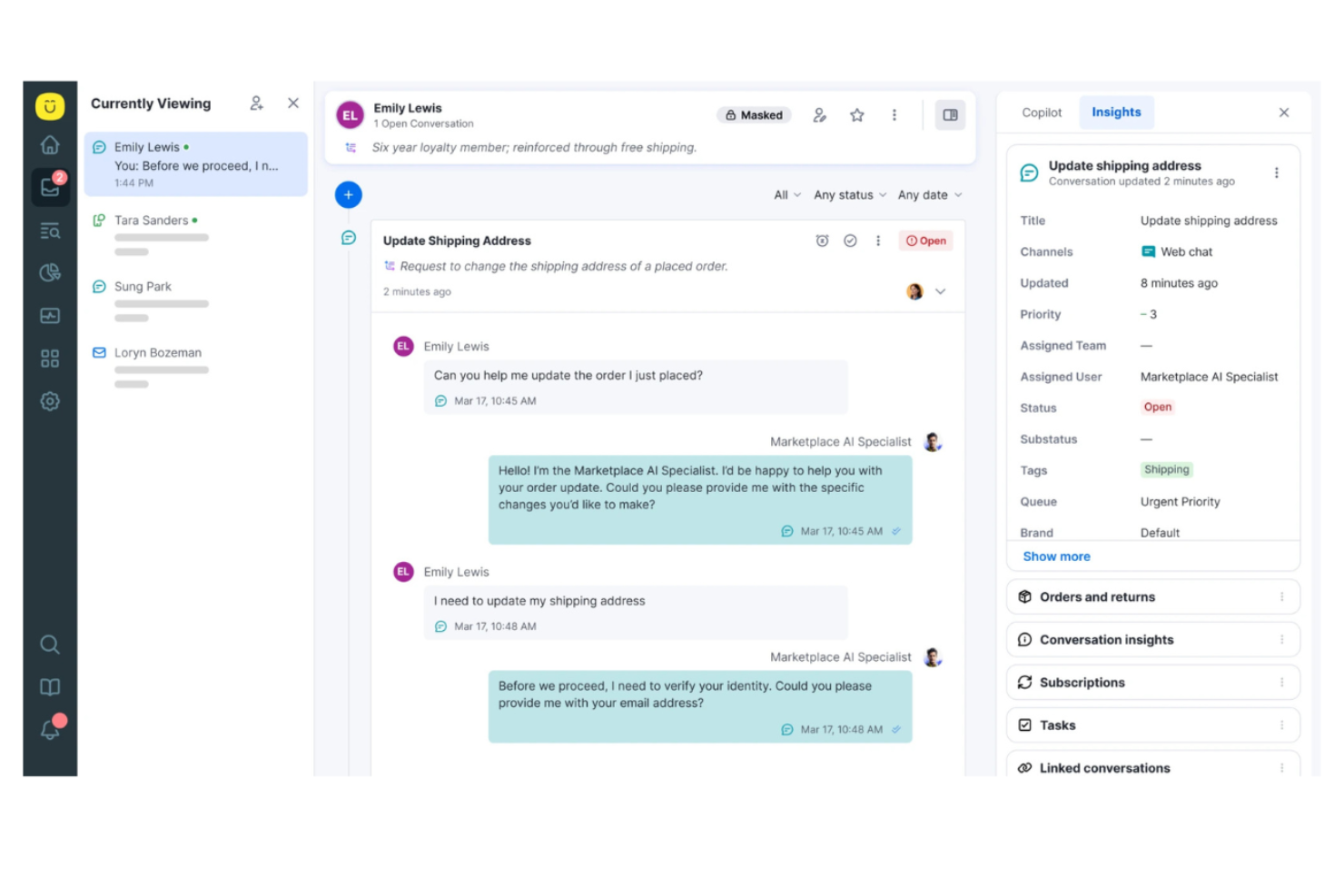
Kustomer is a customer service platform designed for teams that want to manage conversations across channels in a single workspace. It’s a strong fit for businesses that prioritize personalized support and need a unified view of each customer’s history. If your team handles high volumes of inquiries and values automation, Kustomer can help simplify complex support workflows.
Who Is Kustomer Best For?
Kustomer suits mid-sized to large customer service teams that need unified, AI-driven support across multiple channels.
Why I Picked Kustomer
What drew me to Kustomer is its unified timeline, which brings every customer interaction—across chat, email, SMS, and social—into a single, searchable thread. This approach makes it much easier for support teams to see the full context of each customer’s journey and respond with relevant, personalized help.
I also appreciate how Kustomer’s AI tools automate routine tasks and surface suggested responses right in the agent workspace. These features make Kustomer a strong choice for teams that want to deliver fast, context-aware support without toggling between multiple systems.
Kustomer Key Features
Some other features that make Kustomer stand out for AI customer support teams include:
- AI-powered intent detection: Automatically identifies customer intent to route conversations and suggest next steps.
- Custom workflow automation: Lets you build automated processes for repetitive tasks and escalations.
- Integrated knowledge base: Provides agents and customers with searchable, AI-suggested help articles during conversations.
- Real-time reporting and analytics: Tracks team performance, conversation trends, and customer satisfaction across all channels.
Kustomer Integrations
Integrations include Shopify, Salesforce, Slack, Facebook, Instagram, WhatsApp, Gmail, Twilio, TikTok Shop, and more.
Pros and Cons
Pros:
- Integrated knowledge base surfaces relevant articles
- Intent detection routes conversations automatically
- The unified timeline shows all customer interactions
Cons:
- Automation is hard to debug at scale
- Timeline UI slows simple ticket views

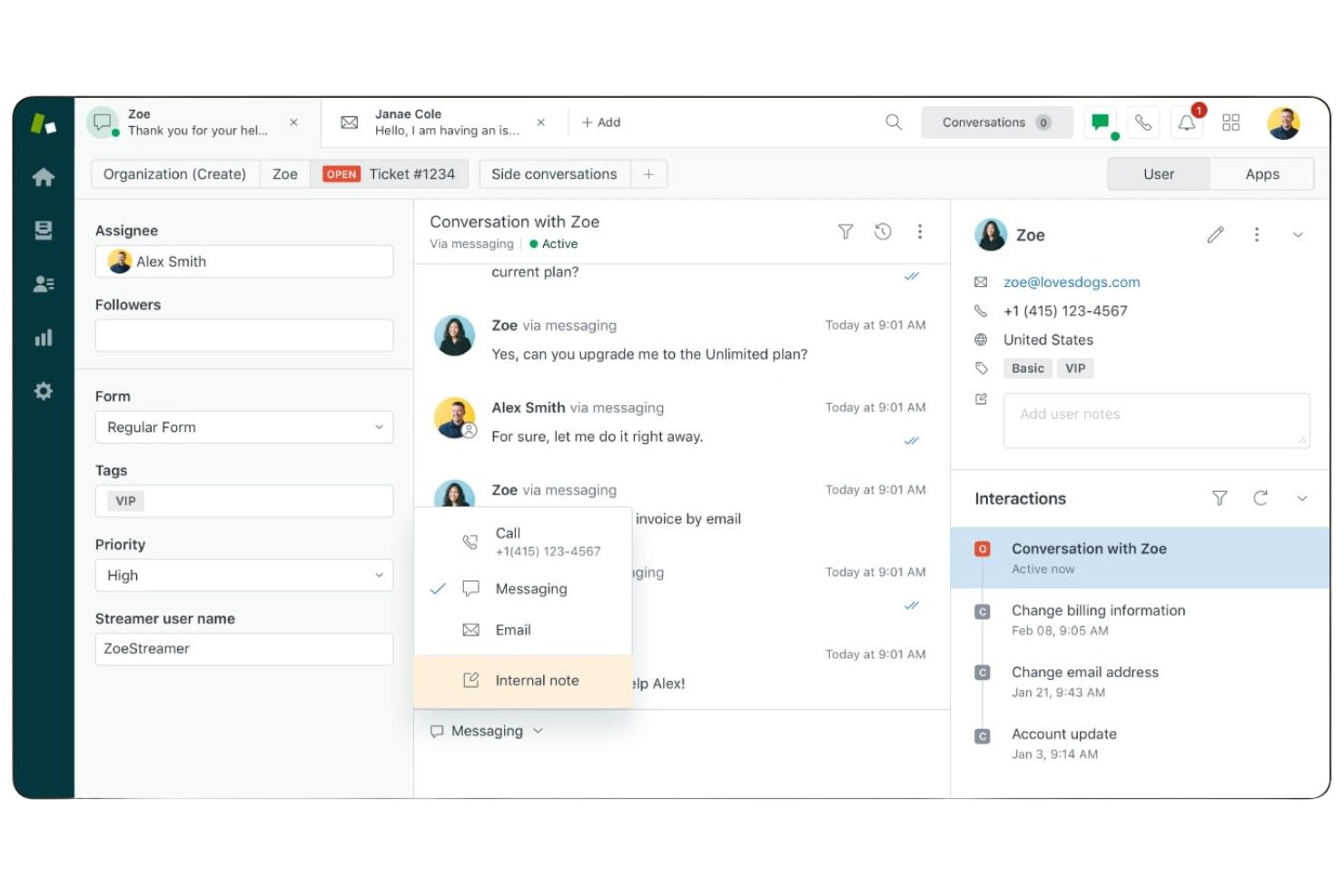
Zendesk offers AI-driven customer support software designed for teams managing high volumes of inquiries across multiple channels. It’s a strong fit for organizations that need to unify support operations and automate repetitive tasks without losing visibility or control, with Zendesk AI improving automation, routing, and response quality. Customer experience leaders in ecommerce, SaaS, and enterprise environments often turn to Zendesk to simplify complex workflows and maintain consistent service quality.
Who Is Zendesk Best For?
Zendesk suits mid-sized to large organizations with dedicated support teams that need to manage omnichannel customer interactions at scale.
Why I Picked Zendesk
I chose Zendesk for its advanced AI-powered ticketing and automation, which directly addresses the needs of teams handling complex, high-volume support environments. The platform’s AI tools automatically categorize, prioritize, and route tickets across channels, reducing manual workload and response times.
I also appreciate Zendesk’s automation capabilities for repetitive tasks, such as sending follow-up messages or escalating urgent issues. These features help support teams maintain consistency and efficiency, even as customer demands grow.
Zendesk Key Features
Some other Zendesk features that stand out for customer support teams include:
- AI-powered knowledge base suggestions: The system recommends relevant help articles to agents and customers during conversations.
- Multilingual support automation: Zendesk’s AI can detect language and provide automated translations for global customer bases.
- Customizable ticket forms: Teams can design ticket forms to capture the exact information needed for different types of support requests.
- Integrated customer satisfaction surveys: Built-in tools let you collect and analyze customer feedback directly within the platform.
Zendesk Integrations
Integrations include Harvest, SweetHawk Suite, ChannelReply, Pipedrive, Sprout Social, and more.
Pros and Cons
Pros:
- Omnichannel messaging across chat, email, and social
- Multilingual AI support for global teams
- AI automates ticket routing and prioritization
Cons:
- Occasional delays in AI ticket responses
- Limited AI customization for unique workflows

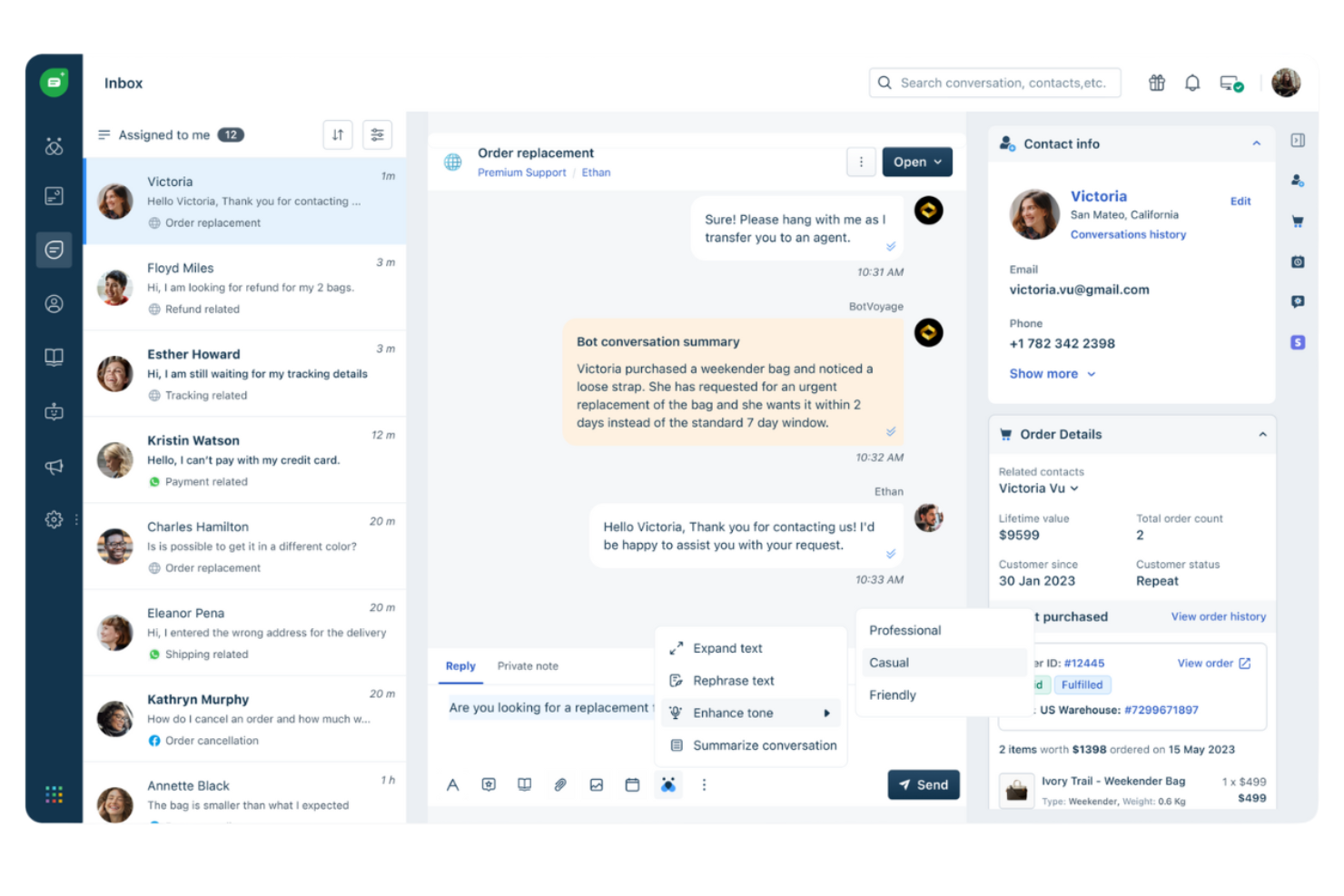
Freshdesk is a customer support platform designed for teams that want to manage conversations across multiple channels in one place. It’s a strong fit for businesses looking to automate ticketing, simplify workflows, and use AI to resolve issues faster. If you need a solution that brings together email, chat, phone, and social support with built-in AI tools, Freshdesk is worth considering.
Who Is Freshdesk Best For?
Freshdesk suits customer support teams at small to midsize businesses that need omnichannel ticketing and AI-powered automation.
Why I Picked Freshdesk
What drew me to Freshdesk is its focus on delivering omnichannel support with AI-powered ticketing and automation. The platform brings together email, chat, phone, and social channels so your team can manage all customer conversations in one place.
I appreciate how Freshdesk’s AI features, like Freddy AI, automatically categorize, prioritize, and assign tickets to the right agents. This makes it a strong choice for businesses that want to reduce manual work and deliver faster, more consistent support across every channel.
Freshdesk Key Features
Some other Freshdesk features that support AI-driven customer support include:
- Self-service portal: Customers can find answers and submit tickets through a branded help center.
- Canned responses: Agents use pre-written replies to respond quickly to common questions.
- Collision detection: The system alerts agents when multiple people are viewing or responding to the same ticket.
- Custom ticket fields: Teams can capture and track unique data points relevant to their support process.
Freshdesk Integrations
Integrations include Slack, Microsoft Teams, Shopify, Salesforce, HubSpot, Mailchimp, Dropbox, Jira, QuickBooks, and more.
Pros and Cons
Pros:
- Proactive chatbots handle repetitive questions
- Freddy AI suggests knowledge base articles
- AI ticket assignment reduces manual triage
Cons:
- Automation logic is basic and lacks multi-step conditions
- Rigid ticket fields limit complex workflow customization

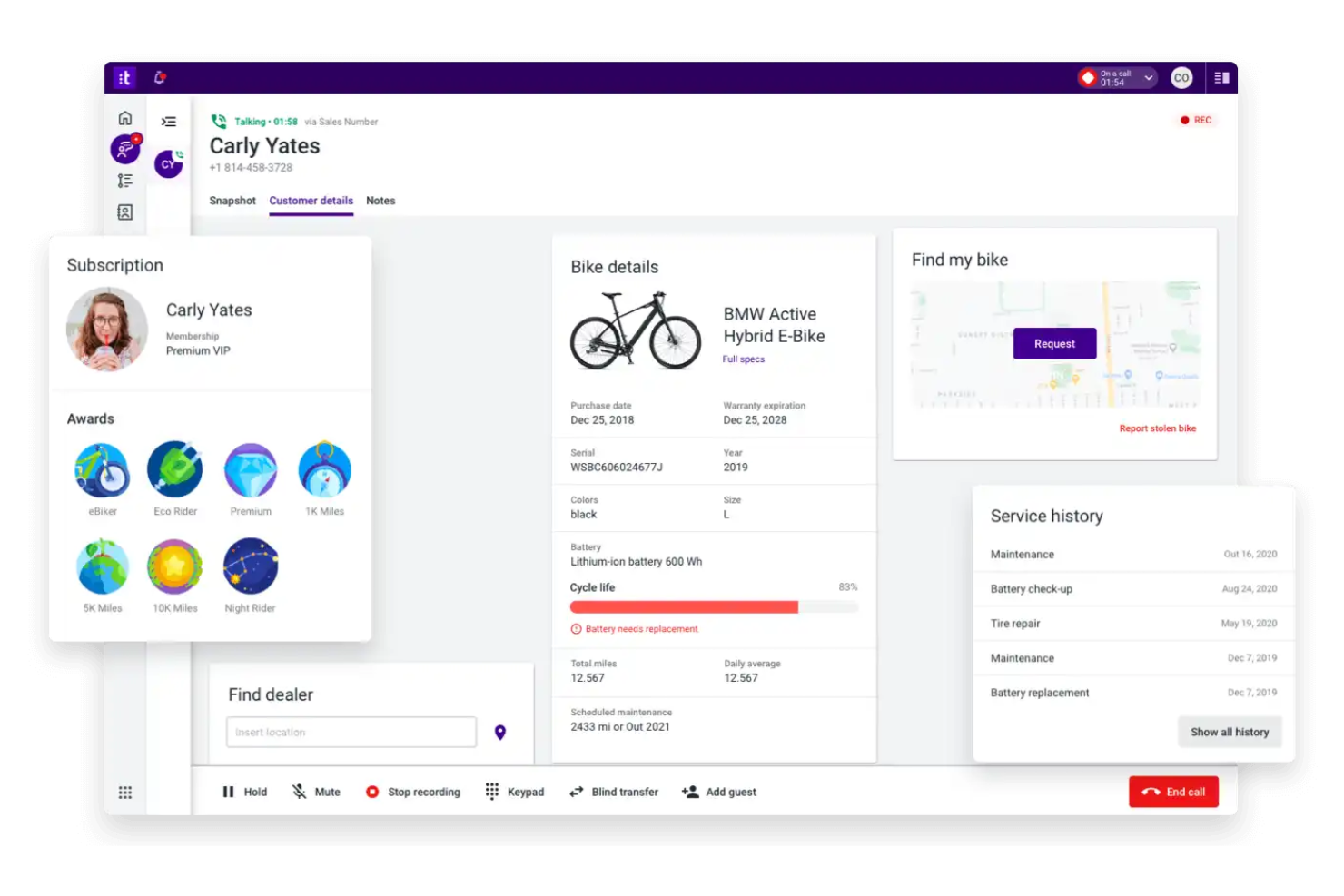
Talkdesk is an AI-driven contact center platform designed for enterprise teams that need to manage high volumes of customer interactions across multiple channels. It appeals to organizations looking for advanced automation, real-time analytics, and integrated voice and digital support. Teams use Talkdesk to unify customer conversations, automate routine tasks, and improve response quality at scale.
Who Is Talkdesk Best For?
Talkdesk is a strong fit for large enterprises and contact center teams that need advanced AI automation and omnichannel support.
Why I Picked Talkdesk
What sets Talkdesk apart for me is its focus on delivering an AI-powered contact center platform that’s built for enterprise-scale teams. The platform’s AI virtual agents handle routine customer inquiries across voice and digital channels, which helps reduce wait times and free up human agents for more complex issues.
I also value the real-time speech analytics and automated quality management features, which give teams actionable insights into customer sentiment and agent performance. For organizations that need to manage large, distributed support operations with advanced automation, Talkdesk’s AI capabilities make it a strong contender.
Talkdesk Key Features
Some other features that make Talkdesk valuable for AI customer support teams include:
- Automated ticket routing: Assigns incoming tickets to the most appropriate agent based on skill set and availability.
- Customizable agent dashboards: Lets agents view real-time metrics, customer data, and performance insights in one place.
- Workforce management tools: Supports forecasting, scheduling, and shift management for large support teams.
- Integrated knowledge base: Provides agents and customers with quick access to articles and FAQs during live interactions.
Talkdesk Integrations
Integrations include Salesforce, Zendesk, Microsoft Teams, ServiceNow, HubSpot, Microsoft Dynamics 365, Zoom, Slack, Shopify, and more.
Pros and Cons
Pros:
- Customizable agent dashboards with live metrics
- Real-time speech analytics for live interactions
- AI virtual agents automate routine customer queries
Cons:
- Occasional delays in analytics data updates
- Limited self-service options for smaller teams

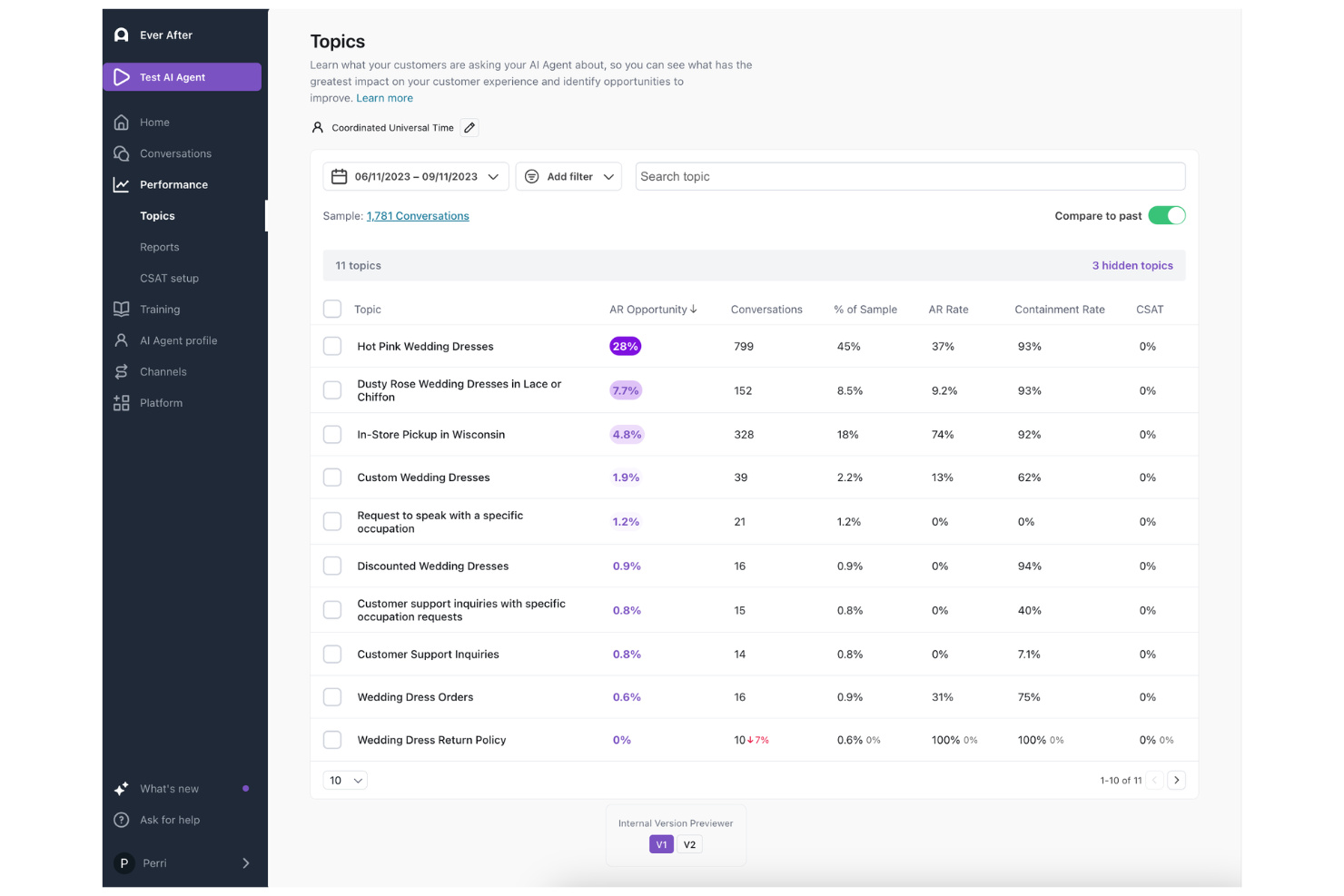
Ada is an AI-powered customer support platform designed for teams that want to automate and personalize customer interactions at scale. It’s especially useful for businesses with high support volumes or those looking to offer 24/7 self-service. Ada helps reduce repetitive inquiries and empowers support teams to focus on more complex customer needs.
Who Is Ada Best For?
Ada suits mid-sized to large customer support teams that need scalable, no-code AI automation for handling high volumes of customer inquiries.
Why I Picked Ada
What stands out to me about Ada is its no-code approach to building AI chatbots for customer support. I picked Ada because it lets support teams design, launch, and update automated chat experiences without needing engineering resources.
The platform’s drag-and-drop interface and prebuilt templates make it easy to tailor conversations and workflows to specific business needs. For organizations that want to quickly deploy personalized, AI-driven support without heavy technical investment, Ada’s no-code functionality is a strong differentiator.
Ada Key Features
Some other features that make Ada valuable for AI customer support teams include:
- Multilingual support: Ada can handle customer conversations in multiple languages, allowing teams to serve global audiences.
- Intent recognition: The platform uses AI to identify customer intent and route inquiries to the right workflows or agents.
- Proactive messaging: Teams can trigger automated messages based on customer behavior or events to guide users or prevent issues.
- Analytics dashboard: Ada provides reporting tools to track chatbot performance, customer engagement, and conversation outcomes.
Ada Integrations
Integrations include Zendesk, Salesforce, Freshworks, ServiceNow, Genesys, Kustomer, Help Scout, Aircall, Amazon Connect, and more.
Pros and Cons
Pros:
- Intent recognition for accurate query routing
- Proactive messaging based on user behavior
- No-code chatbot builder for rapid deployment
Cons:
- Bot builder UX can feel limiting
- Flows require manual rule-building

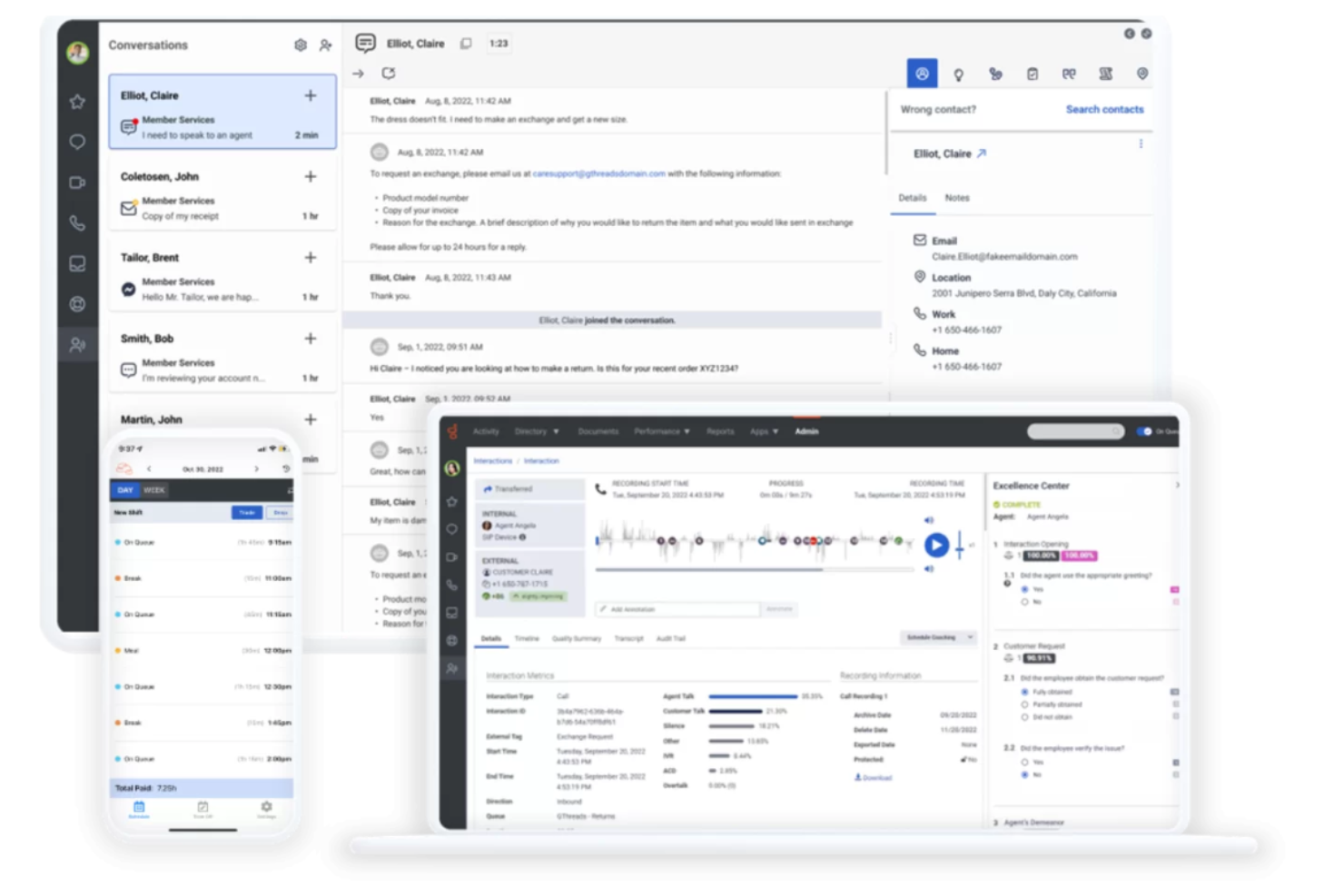
Genesys offers a unified platform for businesses that want to deliver AI-driven customer support across voice, chat, and digital channels. It’s a strong fit for large organizations and contact centers that need advanced automation, routing, and analytics. If your team is looking to orchestrate complex customer journeys and personalize interactions at scale, Genesys is worth a closer look.
Who Is Genesys Best For?
Genesys is a strong choice for large enterprises and contact centers that need advanced AI-powered customer engagement across multiple channels.
Why I Picked Genesys
What stands out to me about Genesys is its ability to unify customer interactions across voice, chat, email, and social channels using AI. The platform’s AI-powered routing and orchestration tools help ensure every customer is matched with the right agent or automated resource, no matter how they reach out.
I also like that Genesys offers real-time analytics and journey mapping, so teams can monitor and optimize every touchpoint. These capabilities make Genesys a strong fit for organizations that need a centralized, AI-driven approach to managing complex, omnichannel customer experiences.
Genesys Key Features
Some other Genesys features that support AI-driven customer support include:
- Predictive engagement: Uses AI to identify customer intent and trigger proactive outreach during digital interactions.
- Knowledge management: Centralizes articles and FAQs for both agents and customers, with AI-powered search and suggestions.
- Workforce management: Automates forecasting, scheduling, and real-time agent management for contact centers.
- Speech and text analytics: Analyzes conversations across channels to surface trends, sentiment, and compliance issues.
Genesys Integrations
Integrations include Salesforce, ServiceNow, Microsoft Teams, Zoom, Zendesk, Amazon Lex, Google CCAI, Okta, OneLogin, and more.
Pros and Cons
Pros:
- Speech analytics surfaces sentiment and compliance issues
- Predictive engagement triggers proactive customer outreach
- AI-powered routing improves first-contact resolution
Cons:
- Non-English AI accuracy can drop
- Platform modules feel fragmented

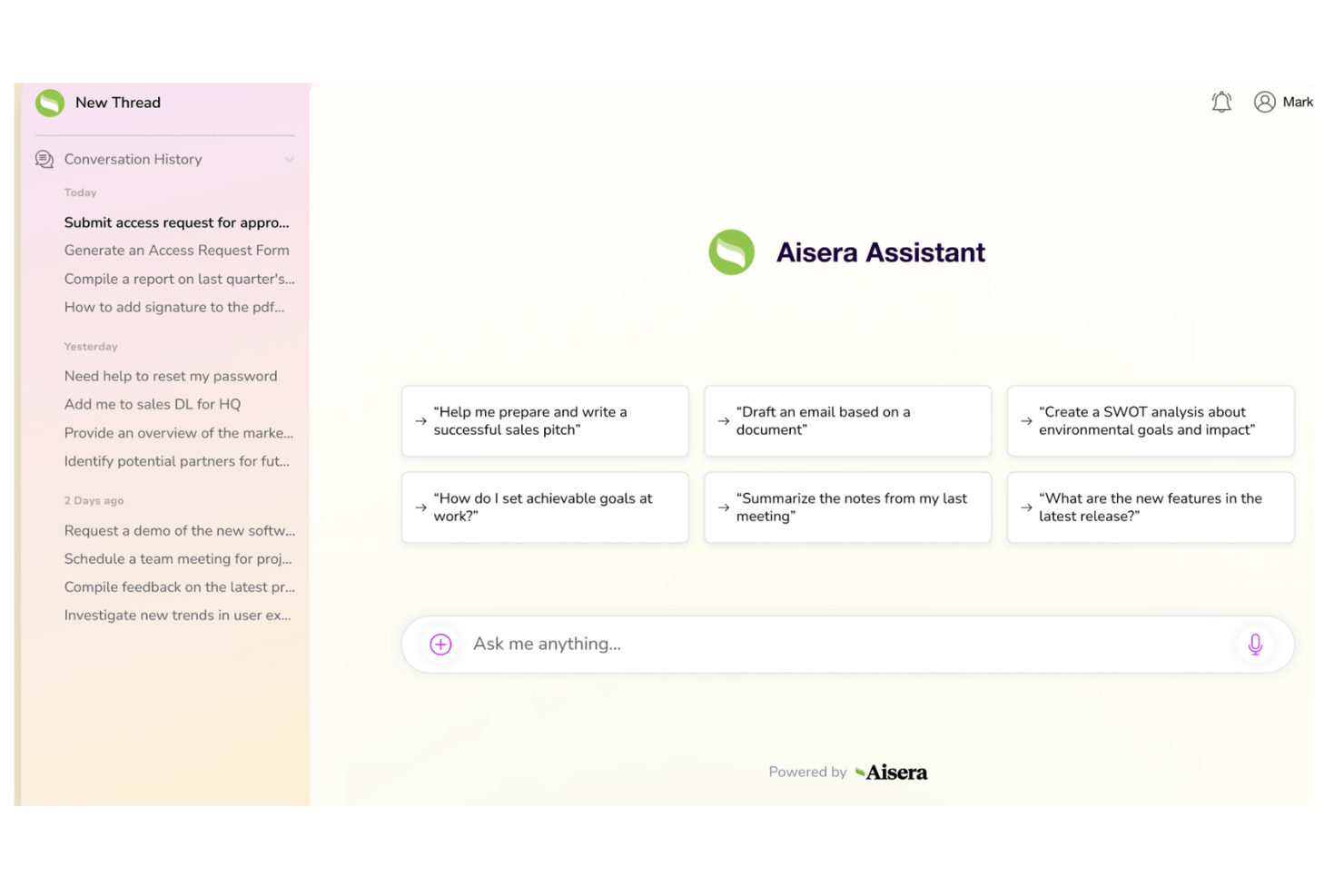
Aisera offers AI-driven automation for customer support and service operations. It’s designed for organizations that want to resolve tickets faster and reduce manual workloads using generative AI. Teams looking to modernize their helpdesk with conversational AI and self-service capabilities may find Aisera especially appealing.
Who Is Aisera Best For?
Aisera suits mid-sized to large enterprises that need advanced AI automation for IT and customer service operations.
Why I Picked Aisera
What drew me to Aisera is its focus on generative AI for automating service desk operations. The platform uses natural language understanding to resolve tickets, answer questions, and automate repetitive support tasks without human intervention.
I see real value in its ability to integrate with existing IT and customer service systems, allowing teams to deploy AI-driven workflows across multiple channels. For organizations looking to reduce manual workloads and deliver faster, more accurate support, Aisera’s automation capabilities stand out.
Aisera Key Features
Some other features that make Aisera useful for AI customer support teams include:
- Omnichannel support: Connects with chat, email, voice, and messaging platforms to provide consistent service across channels.
- Knowledge base integration: Surfaces relevant articles and resources automatically to help resolve customer questions.
- Sentiment analysis: Detects customer mood and intent to prioritize and personalize responses.
- Role-based access controls: Lets you manage permissions and data access for different team members and departments.
Aisera Integrations
Integrations include ServiceNow, Salesforce, Microsoft Teams, Workday, Confluence, Slack, Zendesk, Freshdesk, and more.
Pros and Cons
Pros:
- Provides real-time sentiment and intent analysis
- Integrates with major ITSM and CRM platforms
- Automates ticket resolution with generative AI
Cons:
- Enterprise-focused, making it slower to deploy
- Requires heavy fine-tuning for accurate automation

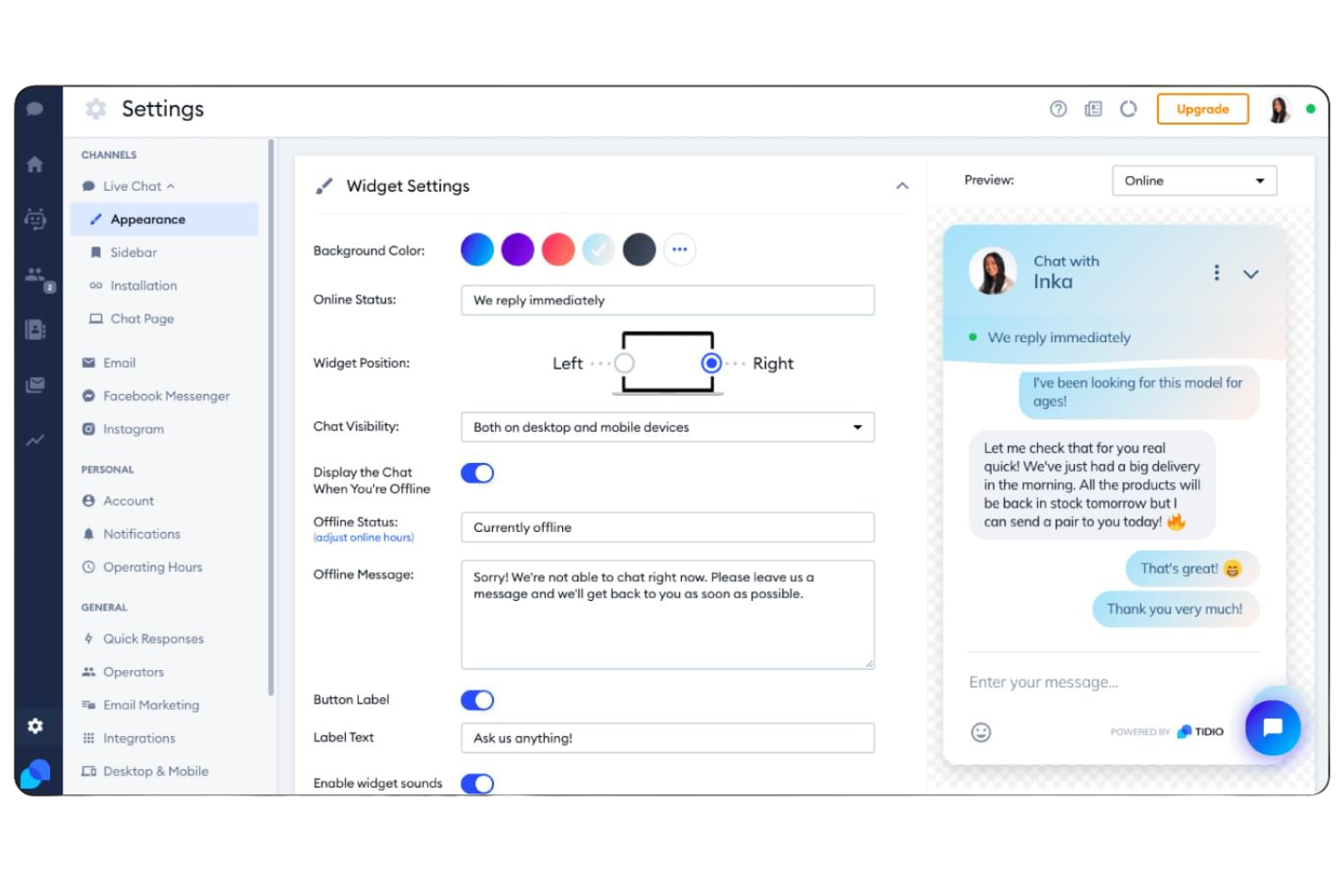
If you’re looking for AI-powered live chat and helpdesk tools built for small businesses, Tidio is worth a look. It combines chatbots, automation, and multichannel messaging in one platform. Tidio helps teams respond faster and manage customer conversations without needing a large support staff.
Who Is Tidio Best For?
Tidio fits small businesses and ecommerce shops that want to automate customer support and manage live chat across multiple channels.
Why I Picked Tidio
What stands out to me about Tidio is how it brings AI-powered live chat and helpdesk features together in a way that’s accessible for small businesses. The platform’s AI chatbot can handle common customer questions instantly, while live chat lets agents step in for more complex issues.
I also like that Tidio supports multichannel messaging, so you can manage conversations from your website, Facebook Messenger, and Instagram in one place. This combination makes Tidio a strong fit for teams that want to automate support without losing the personal touch.
Tidio Key Features
Some other features in Tidio that are especially useful for AI customer support teams include:
- Ticketing system: Lets you organize, assign, and track customer support requests from multiple channels in one dashboard.
- Visitor monitoring: Shows real-time website visitor activity so you can proactively reach out or offer help.
- Canned responses: Allows agents to quickly insert pre-written replies for common questions to save time.
- Customizable chat widgets: Enable you to tailor the look, feel, and behavior of chat windows to match your brand and website needs.
Tidio Integrations
Integrations include Shopify, Zendesk, Salesforce, HubSpot, WordPress, Messenger, Instagram, WhatsApp, Intercom, and more.
Pros and Cons
Pros:
- Customizable chat widgets for brand consistency
- Real-time visitor tracking for proactive support
- AI chatbot handles repetitive customer questions
Cons:
- Limited multi-brand visibility
- Pricing scales quickly with usage
New Product Updates from Tidio

Tidio Expands Lyro AI Across Email and Chat
Tidio expands Lyro AI to email ticketing and enhances its chatbot with Claude 3.0 integration. These updates improve automation across support channels and enhance AI-driven interactions. For more information, visit Tidio’s official site.
 .
.Other AI Customer Support Software
Here are some additional AI customer support software options that didn’t make it onto my shortlist, but are still worth checking out:
- CoSupport AI
For AI-assisted support responses
- Chatbase
For custom AI chatbot creation
- Salesforce Service Cloud
For AI-driven service management
- HappyFox
For omnichannel support automation
- ProProfs Help Desk
For AI ticketing and knowledge base
- Gorgias
For ecommerce helpdesk automation
- ServiceNow
For enterprise service automation
- Comm100
For AI chat and live support
- Observe.AI
For conversation intelligence insights
- Zoho Desk
For AI-powered ticket management
- Level AI
For support, QA, and agent coaching
- Zowie
For ecommerce AI customer service
- Crescendo
For AI voice and chat support
- Kore.ai
For enterprise conversational AI
- Fin
For AI-powered ticket management
- Cognigy.AI
For low-code AI agent building


AI Customer Support Software Selection Criteria
When selecting the best AI customer support software to include in this list, I considered common buyer needs and pain points like automating repetitive support tasks and providing 24/7 customer assistance. I also used the following framework to keep my evaluation structured and fair:
Core Functionality (25% of total score)
To be considered for inclusion in this list, each solution had to fulfill these common use cases:
- Automate responses to common customer questions
- Route tickets or conversations to the right agent
- Integrate with existing help desk or CRM systems
- Support multiple channels like chat, email, and messaging
- Provide analytics on customer interactions
Additional Standout Features (25% of total score)
To help further narrow down the competition, I also looked for unique features, such as:
- Custom chatbot training with business-specific data
- Live agent handoff and escalation workflows
- Multilingual support for global audiences
- Sentiment analysis and intent detection
- Visual workflow or conversation builder
Usability (10% of total score)
To get a sense of the usability of each system, I considered the following:
- Simple and intuitive user interface
- Clear navigation and labeling of features
- Minimal steps to set up a chatbot or workflow
- Responsive design for desktop and mobile
- Accessibility for users with different needs
Onboarding (10% of total score)
To evaluate the onboarding experience for each platform, I considered the following:
- Availability of step-by-step product tours
- Access to training videos and documentation
- Pre-built templates for common use cases
- In-app chatbots or guides for new users
- Live or recorded onboarding webinars
Customer Support (10% of total score)
To assess each software provider’s customer support services, I considered the following:
- Availability of live chat or phone support
- Response times for support inquiries
- Quality and depth of help center resources
- Access to community forums or user groups
- Proactive outreach and follow-up from support
Value For Money (10% of total score)
To evaluate the value for money of each platform, I considered the following:
- Transparent and flexible pricing plans
- Features included at each pricing tier
- Free trial or free plan availability
- No hidden fees or surprise charges
- Discounts for annual or volume commitments
Customer Reviews (10% of total score)
To get a sense of overall customer satisfaction, I considered the following when reading customer reviews:
- Positive feedback on reliability and uptime
- Reports of helpful and responsive support
- Comments on ease of setup and use
- Critiques of missing or buggy features
- Overall value compared to similar tools
How to Choose AI Customer Support Software
It’s easy to get bogged down in long feature lists and complex pricing structures. To help you stay focused as you work through your unique software selection process, here’s a checklist of factors to keep in mind:
| Factor | What to Consider |
|---|---|
| Scalability | Will the software handle your current and projected support volume as your business grows? Consider user limits, conversation caps, and pricing jumps. |
| Integrations | Does the tool connect natively with your CRM, help desk, or messaging platforms? Check for compatibility with your existing tech stack. |
| Customizability | Can you tailor workflows, branding, and responses to fit your processes and customer expectations? Look for flexible configuration options. |
| Ease of use | Will your team be able to manage and update the system without heavy training or technical support? Test the interface and admin controls. |
| Implementation and onboarding | How long will it take to get up and running? Ask about migration support, onboarding resources, and typical time to first value. |
| Cost | Are the pricing tiers clear and predictable as usage grows? Watch for hidden fees, overage charges, or required add-ons. |
| Security safeguards | Does the software meet your data privacy and security standards? Review encryption, access controls, and compliance certifications. |
| Support availability | What support channels and hours are offered? Consider if you need 24/7 help, dedicated account management, or multilingual support. |
What Is AI Customer Support Software?
AI customer support software is a type of customer service software that uses artificial intelligence and machine learning to automate and enhance support interactions across digital channels. These tools can answer common questions, route inquiries, and provide personalized support through an AI assistant or AI copilot, helping teams manage requests more efficiently.
By enabling ticket deflection, improving quality assurance, and supporting end-to-end service workflows, AI customer support software helps businesses deliver faster, more consistent experiences and improve key metrics like CSAT. Many platforms also highlight customer stories and case studies to show how teams improve efficiency while freeing up human agents for more complex issues.
Features
When selecting AI customer support software, keep an eye out for the following key features:
- Automated chatbots: AI-powered bots that handle routine customer questions and provide instant responses across chat, messaging, or web channels.
- Natural language processing: Technology that allows the software to understand, interpret, and respond to customer queries in conversational language.
- Multi-channel support: The ability to manage customer interactions across various platforms such as web chat, email, SMS, and social media from a single interface.
- Ticket routing: Automated assignment of customer inquiries to the appropriate agent or department based on topic, urgency, or customer profile.
- Knowledge base integration: Smooth connection to internal or external knowledge resources so the AI can pull accurate answers from up-to-date documentation.
- Analytics and reporting: Tools that track conversation trends, response times, customer satisfaction, and other metrics to help teams monitor and improve support quality.
- Customizable workflows: Options to design and adjust automated processes, escalation paths, and response templates to fit your organization’s needs.
- Live agent handoff: Smooth transfer of conversations from AI to human agents when issues require personal attention or advanced troubleshooting.
- Sentiment analysis: AI-driven detection of customer emotions and intent, helping teams prioritize urgent or sensitive interactions.
- Security and compliance controls: Features that protect customer data, manage user permissions, and support compliance with privacy regulations.
Benefits
Implementing AI customer support software provides several benefits for your team and your business. Here are a few you can look forward to:
- Faster response times: Automated chatbots and instant messaging ensure customers get answers without waiting in a queue.
- 24/7 availability: AI-powered systems can handle inquiries around the clock, supporting customers outside of standard business hours.
- Consistent support quality: Automated workflows and knowledge base integration help deliver accurate, standardized responses every time.
- Reduced agent workload: By handling repetitive questions and simple tasks, AI frees up human agents to focus on complex or sensitive issues.
- Actionable insights: Built-in analytics and sentiment analysis provide data on customer needs, satisfaction, and support trends.
- Scalability: AI solutions can manage high volumes of interactions without requiring additional staff or resources.
- Improved customer satisfaction: Personalized, timely, and reliable support experiences help build trust and loyalty with your customers.
Costs and Pricing
Selecting AI customer support software requires an understanding of the various pricing models and plans available. Costs vary based on features, team size, add-ons, and more. The table below summarizes common plans, their average prices, and typical features included in AI customer support software solutions:
Plan Comparison Table for AI Customer Support Software
| Plan Type | Average Price | Common Features |
|---|---|---|
| Free Plan | $0 | Basic chatbot functionality, limited conversations per month, single-channel support, and basic analytics. |
| Personal Plan | $10-$30/user/month | Multi-channel support, simple integrations, basic customization, and email support. |
| Business Plan | $30-$80/user/month | Advanced integrations, analytics and reporting, ticket routing, team collaboration, and workflow automation. |
| Enterprise Plan | $80-$200+/user/month | Custom SLAs, dedicated account management, advanced security, compliance features, and priority support. |
AI Customer Support Software FAQs
Here are some answers to common questions about AI customer support software:
Can AI customer support software fully replace human agents?
No, AI customer support software can’t fully replace human agents. While it handles routine questions and tasks, complex or sensitive issues still require human judgment and empathy. Most businesses use AI to support agents, not replace them.
How does AI customer support software integrate with existing systems?
Most AI customer support software connects with popular CRMs, help desks, and messaging platforms through native integrations or APIs. Before choosing a tool, check compatibility with your current systems to avoid data silos and manual workarounds.
Is AI customer support software secure for handling sensitive data?
Yes, reputable AI customer support software includes security safeguards like encryption, access controls, and compliance certifications. Always review a vendor’s security documentation and ensure their practices align with your organization’s data privacy requirements.
How long does it take to implement AI customer support software?
Implementation time varies by tool and complexity. Some platforms offer quick setup with templates and guided onboarding, while others may require weeks for integration and training. Ask vendors for typical timelines and available onboarding resources.
What types of businesses benefit most from AI customer support software?
Businesses with high volumes of customer inquiries, repetitive support tasks, or global customer bases benefit most. AI is especially useful for ecommerce, SaaS, telecom, and financial services, but can add value in any industry with digital customer interactions.