

10 Best Call Center Analytics Software in 2026

Call Center Analytics Software Shortlist


Call center analytics software tracks, measures, and analyzes customer interactions to help your team understand performance, spot trends, and improve service quality. If you’re searching for the right analytics solution, you’re likely facing challenges with fragmented data, inconsistent reporting, or difficulty identifying actionable insights across channels. The right platform can help you monitor agent activity, uncover customer sentiment, and connect analytics to business outcomes. In this guide, you’ll find expert-vetted options for call center analytics software, so you can compare features and choose the best fit for your team’s needs in 2026.
Why Trust Our Software Recommendations
Our team has been testing and reviewing software since 2012. As CX leaders ourselves, we know how difficult—and important—it is to choose the right software.
For this guide, we evaluated tools using hands-on testing and independent research, scoring tools using our selection criteria.
Our reviews reflect our human editorial judgment, not a sales pitch.
Call Center Analytics Software Comparison Table
This comparison table summarizes pricing details for my top call center analytics software selections.
| Tool | Best For | Trial Info | Price | ||
|---|---|---|---|---|---|
| 1 | Best for inbound and outbound call metrics | 14-day free trial | From $25/user/month (billed annually) | Website | |
| 2 | Best for agile team scaling and global expansion | Free demo available | From $25/user/month | Website | |
| 3 | Best for customizable analytics dashboards | Free demo available | Pricing upon request | Website | |
| 4 | Best for conversational AI automation | Free demo available | Pricing upon request | Website | |
| 5 | Best for integrated voice and messaging analytics | 14-day free trial + free demo available | Pricing upon request | Website | |
| 6 | Best for multilingual speech analytics | 30-day free trial | Pricing upon request | Website | |
| 7 | Best for omnichannel reporting capabilities | Free demo available | From $75/user/month (billed annually) | Website | |
| 8 | Best for automated sentiment analysis | Free demo available | Pricing upon request | Website | |
| 9 | Best for AI-driven performance management | Free demo available | Pricing upon request | Website | |
| 10 | Best for real-time agent coaching insights | Free demo available | Pricing upon request | Website |
Call Center Analytics Software Reviews
Below are my detailed summaries of call center analytics software that made it onto my shortlist. My reviews offer a detailed look at the features, capabilities, and best use cases of each platform to help you find the best one for you.

Best for inbound and outbound call metrics
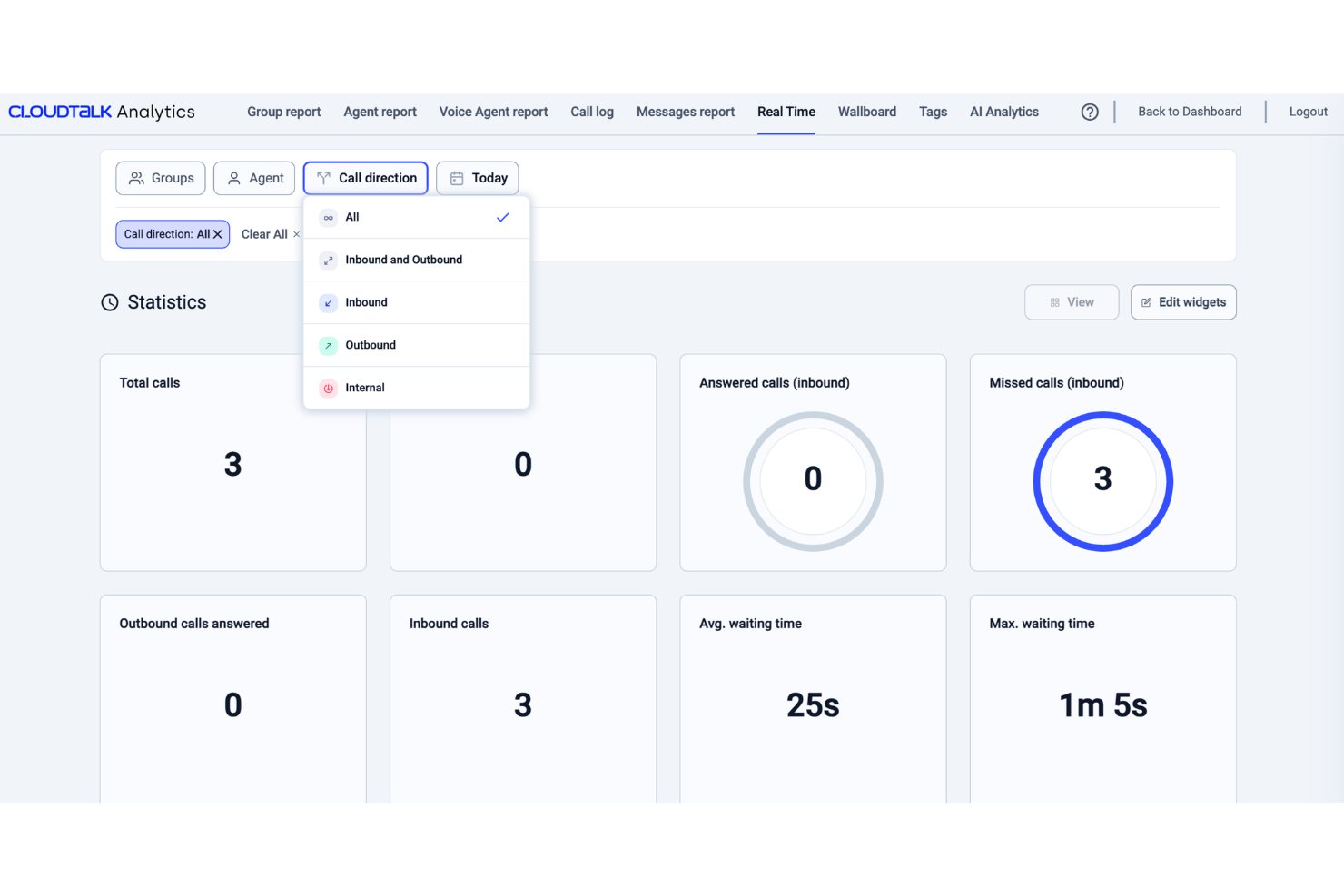
Built for customer-facing teams, CloudTalk is a VoIP call center platform that pairs inbound and outbound calling with analytics tools such as sentiment analysis, live dashboards, and call tagging.
Who Is CloudTalk Best For?
CloudTalk is well-suited for sales and support teams at small to mid-sized businesses that need a VoIP call center with built-in analytics and performance tracking.
Why I Picked CloudTalk
I picked CloudTalk for its VoIP call statistics tracking that gives teams a granular, real-time view of call performance. The real-time dashboard surfaces live KPIs like call volume, wait times, agent occupancy, and abandonment rates in one place. I also like the group and agent reporting layers, which let you break down VoIP call data by individual rep or team, so you can spot where performance gaps exist rather than relying on blended averages.
CloudTalk Key Features
- AI Conversation Intelligence: Analyzes calls for sentiment, talk/listen ratio, and trending topics to reveal patterns in customer conversations.
- Call recording: Records inbound and outbound calls and stores them for review, quality monitoring, and coaching.
- Mandatory call tagging: Requires agents to categorize calls before closing them to keep reporting data organized.
- Call monitoring: Allows managers to listen to calls and review interactions to support quality assurance and agents.
CloudTalk Integrations
CloudTalk offers 70+ integrations, including Salesforce, HubSpot, Zendesk, Pipedrive, Intercom, Zoho CRM, Microsoft Teams, Freshdesk, Gorgias, and Shopify. It also connects with Zapier and Make for workflow automation, while API access supports custom integrations.
Pros and Cons
Pros:
- Call tagging keeps conversation context across teams
- Local numbers available in over 160 countries
- Real-time analytics track agent performance
Cons:
- Mobile app has fewer features than desktop version
- Reporting customization options can feel limitedcompetitors

Best for agile team scaling and global expansion
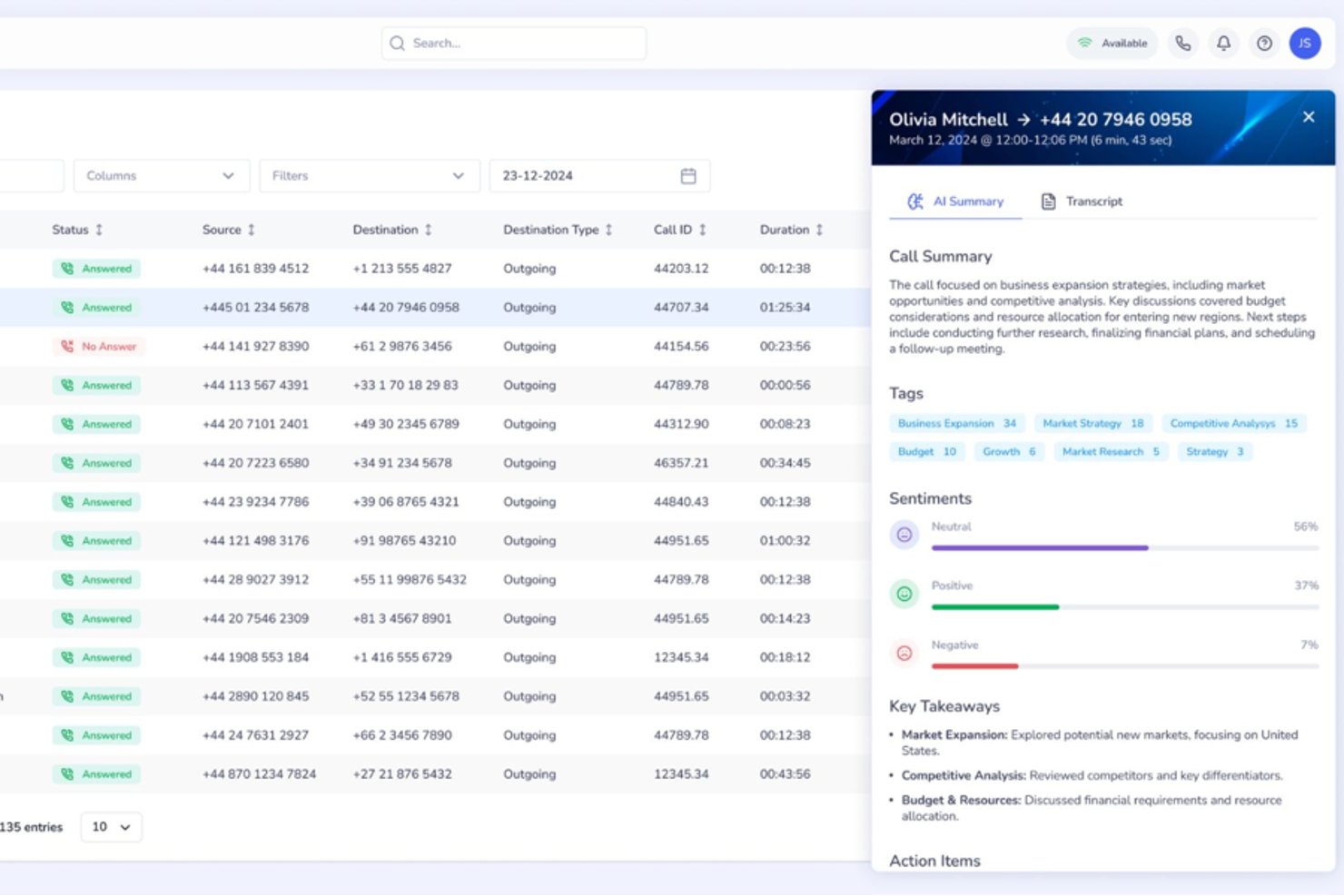
Squaretalk is a cloud-based contact center platform with AI-powered conversation analytics, omnichannel communication, predictive dialing, and real-time performance monitoring across voice and messaging channels.
Who Is Squaretalk Best For?
Squaretalk suits SMB and mid-market sales and support teams that operate across multiple countries and need to add agents or phone numbers quickly without complex procurement.
Why I Picked Squaretalk
Squaretalk earns its spot as one of the best on my shortlist because it pairs real-time analytics across 80+ metrics with AI transcription in 100+ languages, so conversation insights stay consistent as my team expands into new regions. When I add agents or local numbers across 150+ destinations, the analytics layer scales alongside the operation. Sentiment analysis and keyword tagging work across voice and messaging channels from day one, with no reconfiguration needed.
Squaretalk Key Features
- Omnichannel messaging: Manage voice, WhatsApp Business, email, SMS, Viber, and Telegram conversations from one platform.
- Predictive dialer: Automatically calls leads and skips unanswered calls, connecting agents only to live prospects.
- Real-time call monitoring: Listen to live calls, supervise agent conversations, and use whisper mode for on-the-spot coaching.
- CRM integrations: Connects with Salesforce, HubSpot, Zoho CRM, Zendesk, monday.com, and more for seamless data flow.
Squaretalk Integrations
Squaretalk offers native integrations with Salesforce, Zoho CRM, Freshworks, Pipedrive, and more, and provides an API for custom integrations.
Pros and Cons
Pros:
- Transcription and sentiment analysis in 100+ languages
- Real-time monitoring with whisper and barge modes
- Omnichannel analytics across voice and messaging
Cons:
- Lacks forecasting and workforce management features
- No built-in automated QA scoring tools
New Product Updates from Squaretalk
Squaretalk Adds TradeCore Integration for Brokerage Workflows
Squaretalk adds a TradeCore integration that connects customer conversations with BrokerIQ CRM workflows. This helps brokerage teams trigger AI-driven follow-ups, tasks, and other actions from calls and messages. For more information, visit Squaretalk’s official site.
 .
.
Talkdesk
Best for customizable analytics dashboards
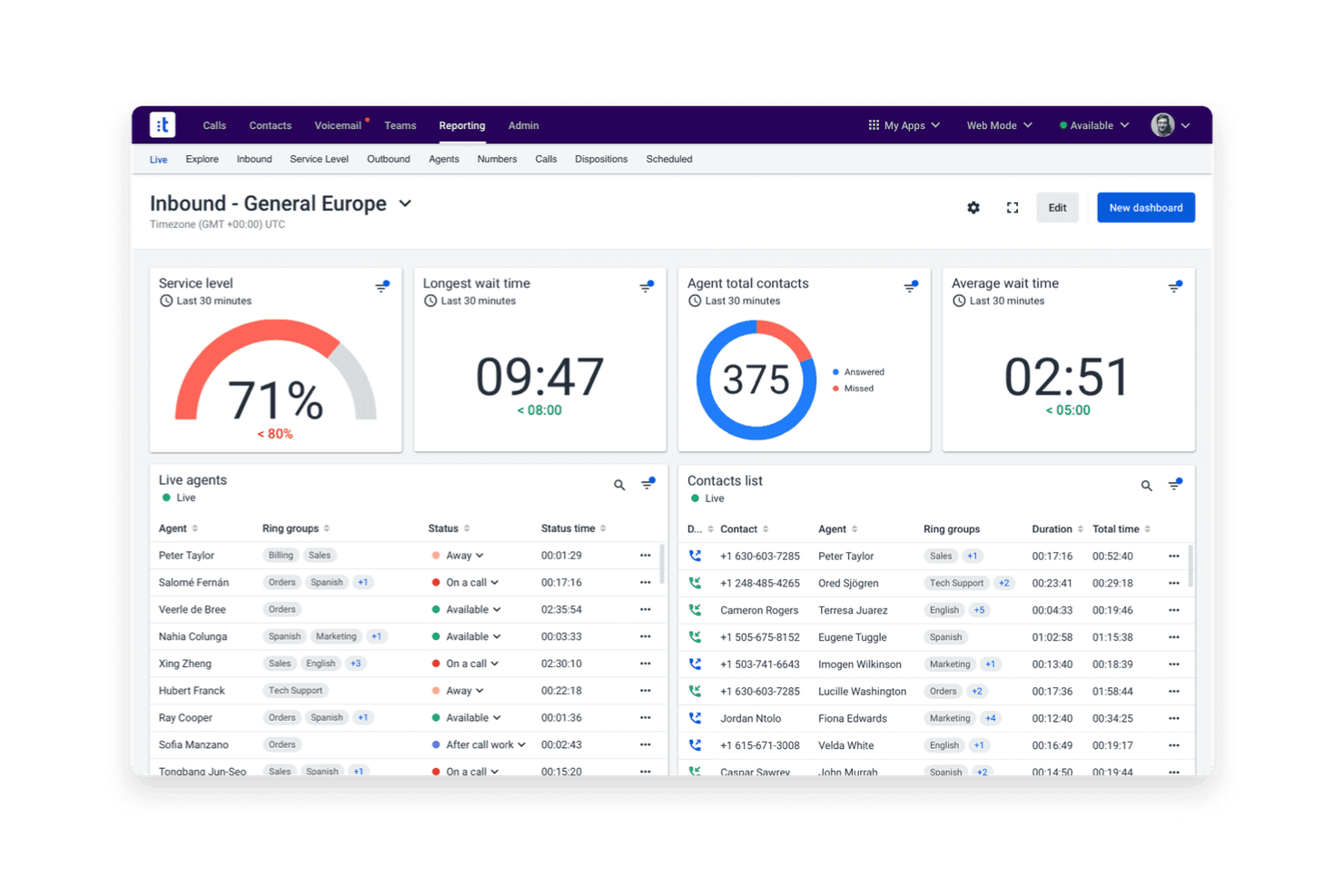
If you need analytics dashboards that adapt to your team’s unique KPIs, Talkdesk offers a flexible solution for contact centers. The platform is built for operations leaders and analysts who want to visualize, filter, and drill into real-time and historical data. With Talkdesk, you can design dashboards that match your reporting needs and quickly spot trends across channels.
Why I Picked Talkdesk
Customizable analytics dashboards are what set Talkdesk apart for call center analytics. The platform lets you build dashboards from scratch, choosing which metrics and visualizations matter most to your team. I appreciate how you can filter, segment, and drill down into data by agent, queue, or channel in real time. This flexibility makes Talkdesk a strong fit for teams that need analytics tailored to their specific workflows and reporting requirements.
Talkdesk Key Features
Some other features that make Talkdesk useful for analytics teams include:
- Speech Analytics: Analyze call recordings for keywords, sentiment, and compliance triggers.
- Automated Reporting: Schedule and deliver recurring reports to stakeholders directly from the platform.
- Real-Time Agent Monitoring: View live agent activity and performance metrics as calls happen.
- Custom Alerting: Set up notifications for specific metric thresholds or operational events.
Talkdesk Integrations
Integrations include Salesforce, Zendesk, Microsoft Teams, ServiceNow, HubSpot, Microsoft Dynamics 365, Zoom, Slack, Shopify, and Freshdesk.
Pros and Cons
Pros:
- Speech analytics includes keyword and sentiment tracking
- Real-time analytics updates instantly during calls
- Dashboard widgets support drag-and-drop arrangement
Cons:
- Custom report building requires advanced setup
- Historical data exports limited to CSV format
Best for conversational AI automation

Replicant offers a conversational AI platform designed for contact centers that want to automate high-volume voice interactions. It’s a strong fit for enterprise support teams and operations leaders looking to reduce wait times and handle repetitive requests without human agents. Replicant’s AI can resolve common customer issues end-to-end, freeing up your team for more complex tasks.
Why I Picked Replicant
Replicant stands out for its focus on automating complex, conversational interactions in call centers using AI. I picked it because its platform can handle full customer conversations, not just simple routing or basic responses. Replicant’s AI listens, understands intent, and responds in real time, allowing it to resolve common issues like order status, account updates, or troubleshooting without human intervention. This level of conversational automation is especially valuable for teams looking to scale support and reduce agent workload.
Replicant Key Features
Some other features that make Replicant appealing for call center analytics include:
- Call Transcription: Automatically transcribes every customer conversation for later review and analysis.
- Analytics Dashboard: Visualizes call metrics, trends, and AI performance in a centralized dashboard.
- Intent Recognition: Detects and categorizes customer intents to help identify common issues and requests.
- Quality Monitoring Tools: Provides tools for supervisors to review, score, and coach AI-driven interactions.
Replicant Integrations
Integrations include Salesforce, Zendesk, ServiceNow, Genesys, NICE inContact, Five9, Talkdesk, Amazon Connect, Cisco, and Shopify.
Pros and Cons
Pros:
- Intent detection highlights trending customer issues
- Real-time analytics dashboard tracks call outcomes
- Conversational AI resolves calls without agents
Cons:
- No self-service analytics customization tools
- Limited support for non-English languages

Dialpad
Best for integrated voice and messaging analytics
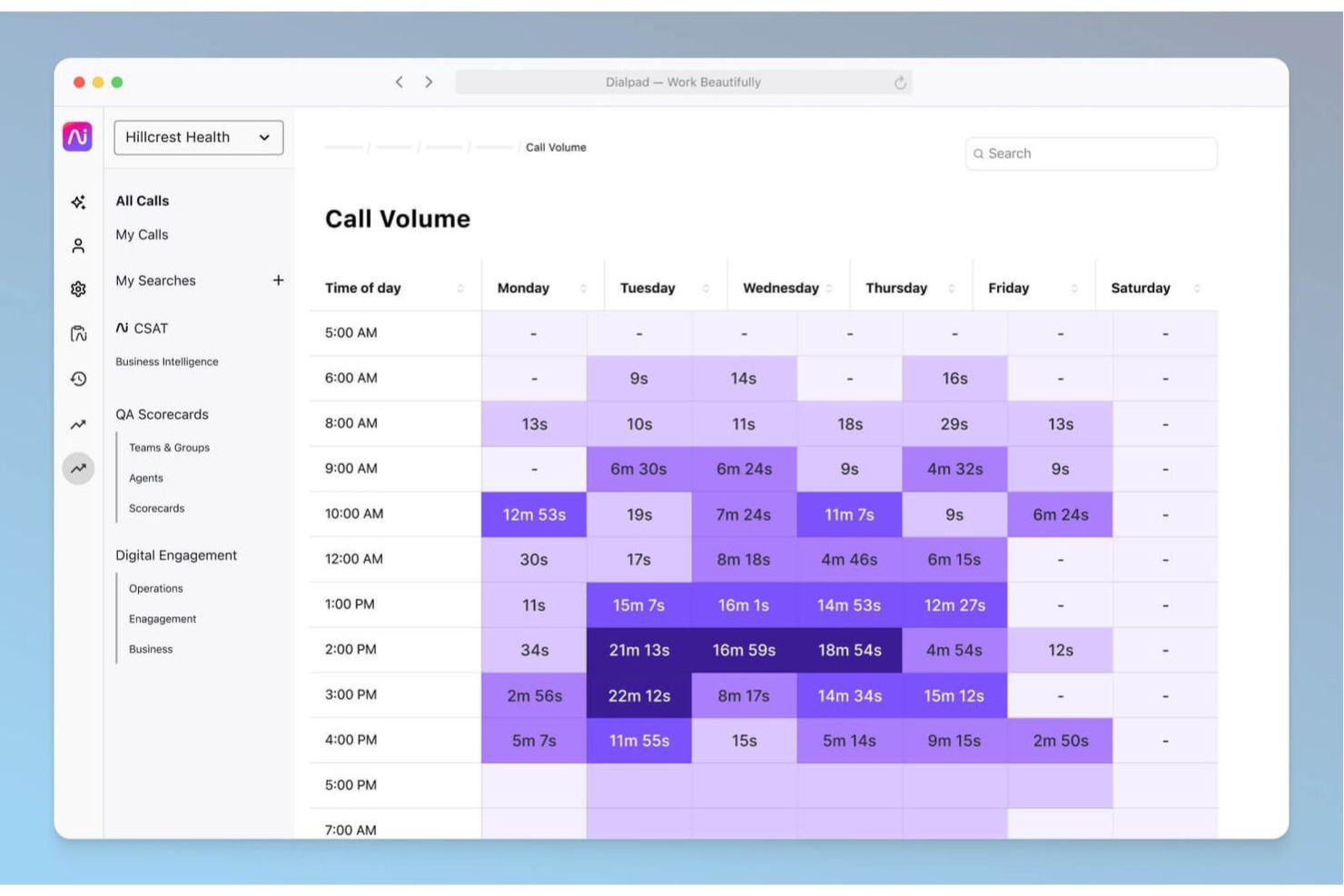
Dialpad brings together voice and messaging analytics in a single platform, making it a strong choice for teams managing multichannel contact centers. It’s designed for supervisors and analysts who want to track conversations across calls, SMS, and chat without switching tools. With Dialpad, you can monitor agent performance and customer sentiment in real time, no matter which channel your customers use.
Why I Picked Dialpad
What makes Dialpad a strong fit for call center analytics is its ability to unify voice and messaging data in one place. I picked Dialpad because it automatically transcribes calls and messages, then applies AI-powered sentiment analysis across both channels. You can view conversation trends, keyword mentions, and agent performance metrics for calls, SMS, and chat together. This integrated approach helps teams spot issues and opportunities across all customer touchpoints without juggling multiple analytics tools.
Dialpad Key Features
Some other features that make Dialpad useful for analytics teams include:
- Live Call Monitoring: Listen in on active calls and provide coaching in real time.
- Customizable Analytics Dashboards: Build dashboards with widgets for the metrics that matter most to your team.
- Automated Call Summaries: Receive AI-generated summaries after each call, highlighting key topics and action items.
- Real-Time Alerts: Set up notifications for specific keywords or call events as they happen.
Dialpad Integrations
Integrations include Salesforce, HubSpot, Zendesk, Microsoft 365, Google Workspace, Zoho CRM, Intercom, Outreach, Okta, and Rippling.
Pros and Cons
Pros:
- Keyword tracking works for both voice and SMS
- Automated call summaries highlight key discussion points
- Analytics dashboards update instantly during conversations
Cons:
- No built-in call quality scoring tool
- Historical analytics limited to one year

SentiSum
Best for multilingual speech analytics
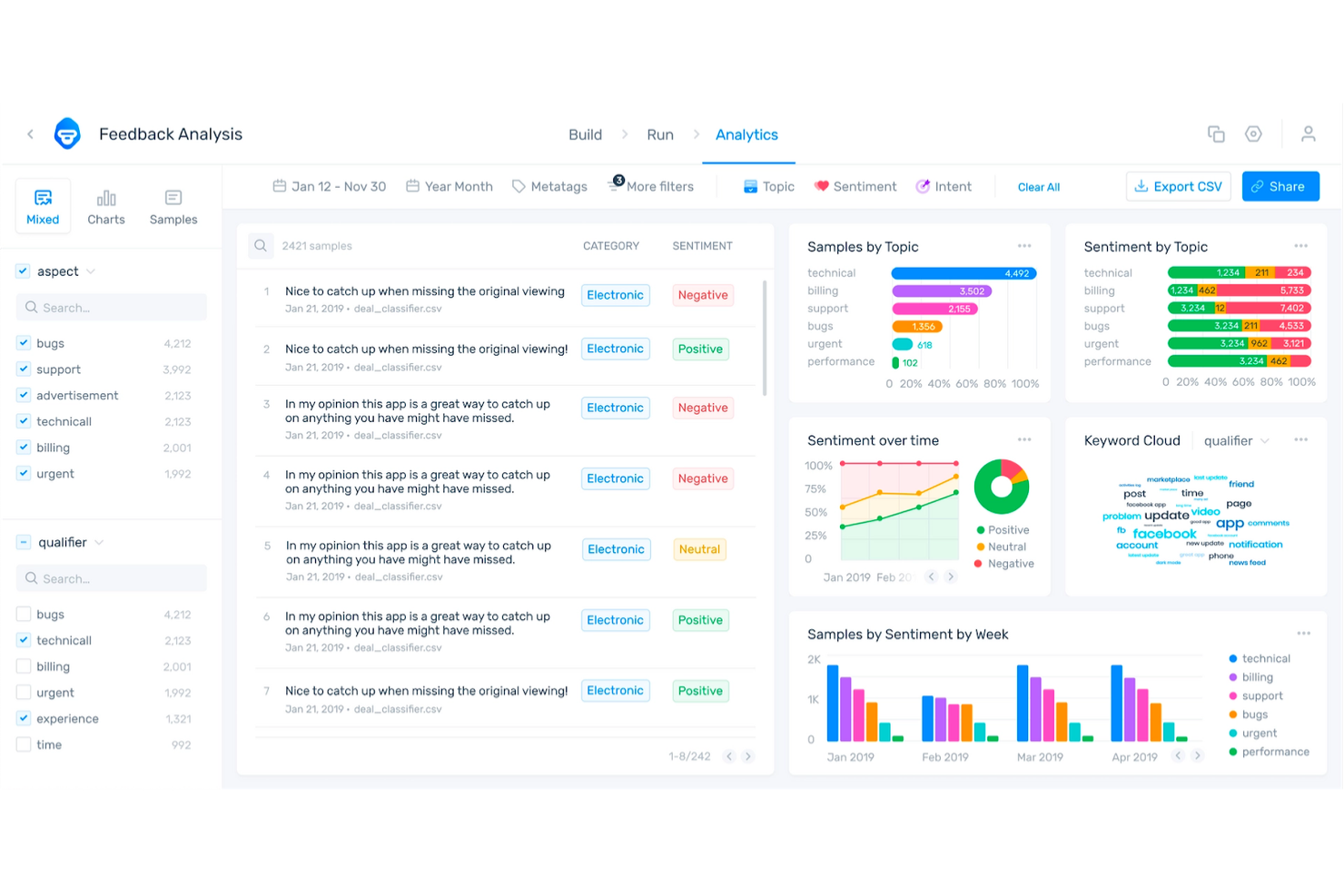
SentiSum is built for contact centers that need to analyze calls in multiple languages without manual effort. It’s especially useful for global CX teams and operations leaders who want to surface customer insights from diverse regions. With SentiSum, you can automatically detect topics, sentiment, and intent across every conversation, regardless of language.
Why I Picked SentiSum
What stands out about SentiSum is its ability to analyze speech data in over 100 languages, making it a strong choice for multilingual call centers. The platform automatically transcribes and tags calls for topics, sentiment, and intent, so you can track customer experience trends across regions without manual translation. I like that SentiSum’s AI models are trained to handle language nuances, which helps surface actionable insights from non-English conversations. This focus on multilingual analytics makes it especially valuable for global support teams and CX leaders.
SentiSum Key Features
In addition to its multilingual analytics capabilities, SentiSum offers several other features worth noting:
- Automated Root Cause Analysis: Identify the underlying reasons behind spikes in call volume or negative sentiment.
- Real-Time Alerts: Receive instant notifications when specific topics or issues are detected in calls.
- Customizable Reporting Dashboards: Build and share reports tailored to your team’s metrics and goals.
- API Access: Integrate SentiSum’s analytics with your existing systems for deeper data analysis.
SentiSum Integrations
Integrations include Zendesk, Freshdesk, Intercom, Dixa, Gorgias, and Survey Monkey.
Pros and Cons
Pros:
- Real-time alerts for emerging customer issues
- Automated topic detection for every conversation
- Multilingual speech analytics covers 100+ languages
Cons:
- Sentiment analysis accuracy varies by language
- Lacks direct connection to app stores
Genesys
Best for omnichannel reporting capabilities

Genesys is built for organizations that need to track customer interactions across voice, chat, email, and social channels in one place. It’s especially useful for CX leaders and operations teams who want unified reporting and analytics for every touchpoint. With Genesys, you can break down channel silos and get a complete view of your contact center’s performance.
Why I Picked Genesys
What sets Genesys apart for call center analytics is its ability to bring together data from every customer channel into a single reporting environment. I picked Genesys because it lets you track and compare metrics across voice, chat, email, and social media without switching platforms. The platform’s omnichannel dashboards and customizable reports help you spot trends and performance gaps across all touchpoints. This unified approach is especially valuable for teams managing complex, multi-channel customer journeys.
Genesys Key Features
Some other features that make Genesys valuable for analytics teams include:
- Real-Time Performance Dashboards: Monitor live metrics for agents, queues, and channels as activity happens.
- Speech and Text Analytics: Analyze call recordings and written interactions for sentiment, keywords, and compliance.
- Custom Report Builder: Design and schedule reports tailored to your team’s specific KPIs and data needs.
- Workforce Management Integration: Connect analytics with forecasting, scheduling, and agent adherence tools.
Genesys Integrations
Integrations include Salesforce, Microsoft Teams, Zendesk, ServiceNow, Zoom, Okta, Amazon Lex, Google CCAI, eMite, and Brightmetrics.
Pros and Cons
Pros:
- Speech analytics support sentiment and compliance tracking
- Real-time dashboards display live agent performance
- Omnichannel analytics unify all customer interactions
Cons:
- Some integrations require additional third-party subscriptions
- Initial setup for analytics can be time-consuming
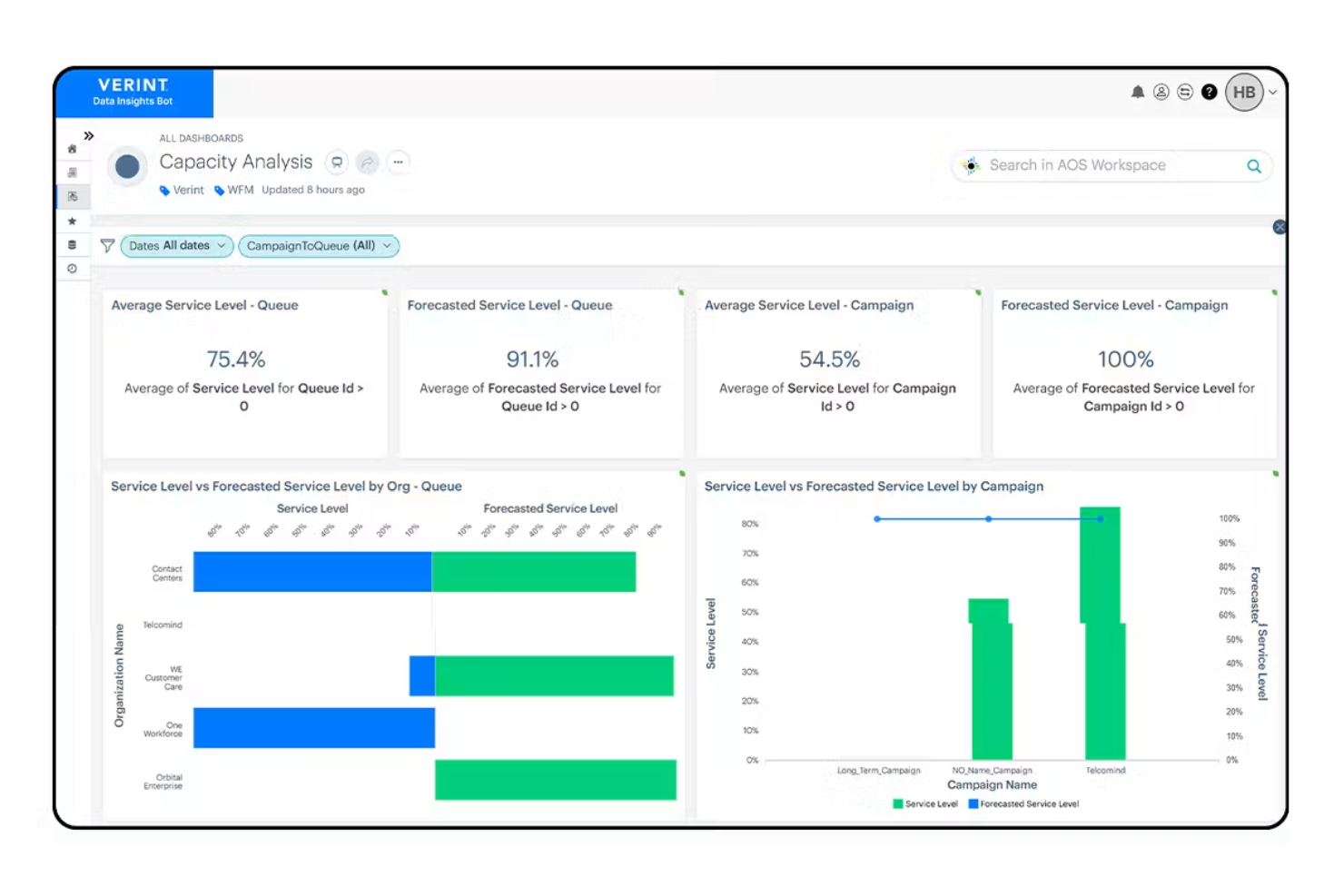
Verint is designed for contact centers that want to automatically analyze customer sentiment across every interaction. It’s a strong fit for CX teams and quality managers who need to quickly surface trends in customer emotion and agent performance. With Verint, you can move beyond manual call reviews and use AI-driven analytics to pinpoint coaching opportunities and service issues.
Why I Picked Verint
What drew me to Verint for call center analytics is its focus on automated sentiment analysis using AI. The platform automatically scores every customer interaction for emotion, intent, and satisfaction, so you don’t have to rely on manual call sampling. I appreciate how Calabrio’s analytics dashboard highlights emerging sentiment trends and flags interactions that need attention. This makes it easier for quality managers to identify coaching needs and address service issues before they escalate.
Verint Key Features
Some other features that make Verint useful for analytics teams include:
- Omnichannel Interaction Capture: Collect and analyze data from calls, emails, chats, and social channels in one place.
- Customizable Dashboards: Build dashboards tailored to your team’s KPIs and reporting needs.
- Automated Quality Scoring: Automatically evaluate agent performance based on pre-set criteria and analytics.
- Speech-to-Text Transcription: Convert voice interactions into searchable, analyzable text records.
Verint Integrations
Integrations include Twilio, Amazon Connect, Genesys, NICE, Avaya, Cisco, Five9, RingCentral, Mitel, and Talkdesk.
Pros and Cons
Pros:
- Customizable dashboards for KPI tracking
- Speech-to-text transcription for call analysis
- Automated sentiment scoring for every interaction
Cons:
- Some analytics features require additional modules
- Sentiment analysis accuracy varies by language

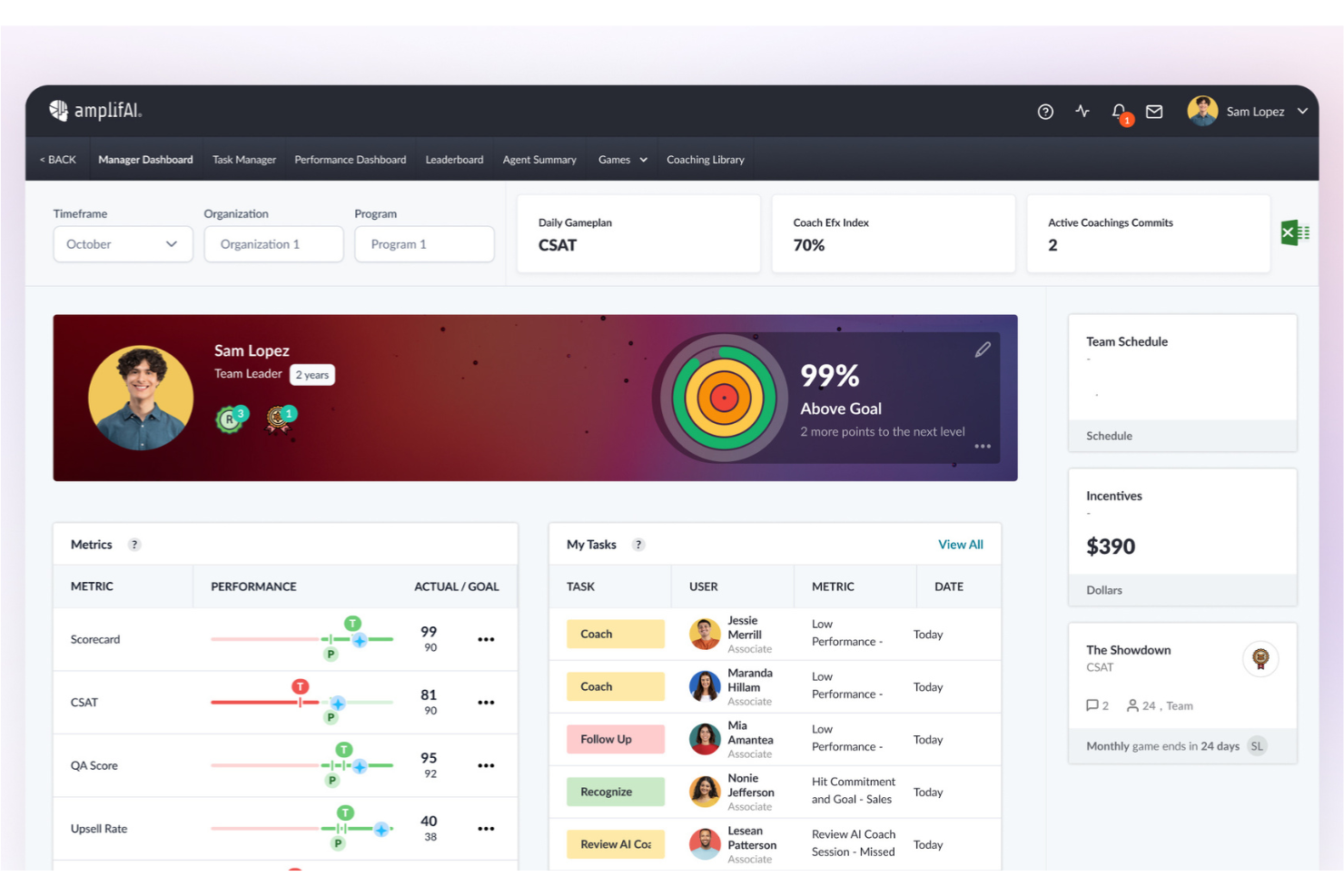
AmplifAI brings AI-driven performance management to contact centers that want to personalize coaching and automate agent development. This platform is well-suited for operations leaders and supervisors who need to identify performance gaps and deliver targeted interventions at scale. If you’re looking to use data and automation to improve agent outcomes and engagement, AmplifAI offers tools built specifically for that purpose.
Why I Picked AmplifAI
What drew me to AmplifAI is its focus on AI-driven performance management, which is especially relevant for call centers looking to automate and personalize agent coaching. The platform uses AI to analyze agent performance data and recommend targeted coaching actions, helping supervisors address skill gaps quickly. I appreciate how AmplifAI automates recognition and rewards for top performers, making it easier to motivate teams based on real metrics. These features make AmplifAI a strong fit for organizations that want to use analytics to drive continuous improvement in agent performance.
AmplifAI Key Features
Some other features that make AmplifAI appealing for call center analytics teams include:
- Automated Task Assignment: Assign coaching, training, and follow-up tasks to agents based on performance data.
- Performance Dashboards: Visualize key metrics and trends for individuals, teams, and the entire organization.
- Speech and Text Analytics: Analyze customer interactions across calls, chats, and emails for deeper insights.
- Gamification Tools: Use leaderboards and achievement tracking to encourage healthy competition among agents.
AmplifAI Integrations
Integrations include NICE, Genesys, Five9, Talkdesk, Salesforce, Amazon Connect, RingCentral, Avaya, Cisco, and Zendesk.
Pros and Cons
Pros:
- Real-time performance dashboards for supervisors
- Automated recognition and rewards for agents
- Personalized coaching recommendations based on analytics
Cons:
- Some integrations require additional setup support
- Limited customization for dashboard visualizations

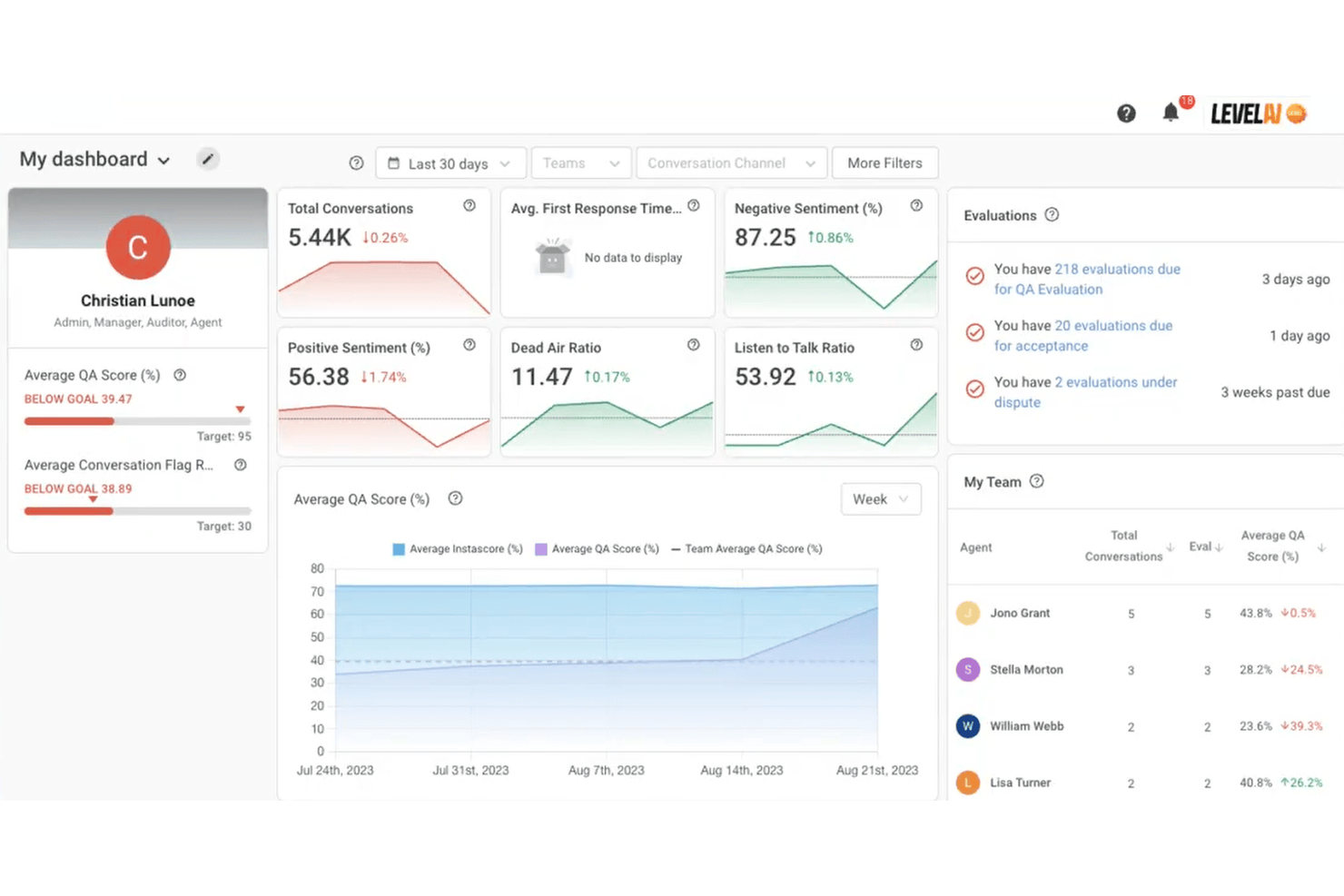
Level AI offers real-time agent coaching and conversation intelligence designed for contact centers that want to improve agent performance on the spot. This platform is a strong fit for teams looking to surface actionable insights from customer interactions and provide immediate feedback to agents. If you need to close performance gaps quickly and ensure consistent service quality, Level AI brings targeted analytics and coaching tools to your workflow.
Why I Picked Level AI
Level AI stands out for its real-time agent coaching insights, which are especially valuable for contact centers aiming to improve agent performance during live interactions. I picked this platform because it uses AI to analyze conversations as they happen and delivers instant feedback to agents, helping them adjust their approach on the spot. The tool’s live coaching cards and automated quality monitoring let supervisors identify coaching opportunities without waiting for post-call reviews. This focus on immediate, actionable insights makes Level AI a strong choice for teams that want to drive continuous improvement in agent-customer interactions.
Level AI Key Features
Some other features that make Level AI a strong option for call center analytics teams include:
- Omnichannel Conversation Analytics: Analyze customer interactions across voice, chat, and email channels in a single dashboard.
- Customizable Scorecards: Build and tailor evaluation forms to match your team’s quality assurance standards.
- Automated Compliance Monitoring: Flag conversations that may violate compliance requirements using AI-driven detection.
- Knowledge Base Integration: Surface relevant knowledge articles to agents during live conversations based on context.
Level AI Integrations
Integrations include Salesforce, Zendesk, Freshworks, Kustomer, Five9, Twilio, Talkdesk, Genesys, Amazon Connect, and Slack.
Pros and Cons
Pros:
- Automated quality assurance scoring for agents
- AI-driven conversation analytics across channels
- Real-time coaching prompts during live calls
Cons:
- No mobile app for on-the-go access
- Limited historical reporting depth for analytics
Other Call Center Analytics Software
Here are some additional call center analytics software options that didn’t make it onto my shortlist, but are still worth checking out:
- Tethr
For actionable conversation intelligence
- Cresta
For live conversation guidance
- RingCentral
For unified communications integration
- InMoment
For experience data aggregation
- Vonage
For flexible API connectivity
- Kustomer
For timeline-based data views
- Observe.AI
For AI-powered quality assurance
- Qualtrics
For customer feedback correlation
- Salesforce
With CRM-driven analytics
- CallMiner
For advanced interaction analytics
- Zoom Contact Center
For video-enabled interactions


How I Evaluate Call Center Analytics Software
I split my evaluation into baseline must-haves—like speech analytics and automated QA—and the differentiators that separate tools built for serious contact center operations from the rest.
Core Functionality (Table Stakes For This List)
When I'm selecting tools for my list, I rank each one on a scale from 0 (does not offer the functionality) to 5 (excels in this area) for each core functionality listed below. Then, I calculate the tool's total score into a percentage. Each tool needs to achieve a minimum total score of 65% to be considered for inclusion.
- Speech & Text Analytics: I check whether the tool transcribes and analyzes both voice and digital interactions, including how well it handles keyword spotting, topic clustering, and custom category tagging across channels.
- Real-Time Performance Dashboards: I evaluate how a platform surfaces live and historical KPIs like AHT, FCR, and abandonment rate, and whether supervisors can drill down by queue, team, or time period.
- Sentiment & Emotion Detection: The ability to score customer sentiment at the interaction or sentence level matters here, especially for flagging escalation-prone calls before they reach a supervisor's desk.
- Agent Performance Analytics: I look for tools that go beyond raw call counts to offer scorecards, peer benchmarking, and the ability to tie individual agent metrics back to specific coaching areas.
- Automated Quality Management: Manual QA sampling covers a fraction of calls. I evaluate whether a platform can auto-score 100% of interactions against configurable criteria like script adherence or compliance language.
- CCaaS & Telephony Integration: A tool's value depends on how well it connects with platforms like Genesys, Five9, Amazon Connect, or Talkdesk. I look for native connectors and real-time data ingestion.
Once I have a list of tools that meet this criteria, I consider what sets each platform apart.
Differentiating Factors (What Sets Vendors Apart)
Here's how I compare and contrast different vendors:
Standout Features
Generative AI summarization is a big one for me. Tools that auto-generate call summaries and dispositions cut after-call work significantly for agents. I also look at predictive analytics capabilities, specifically whether a platform can forecast churn risk or CSAT dips based on interaction trends. Conversational coaching tools round things out. The best implementations tie QA scores directly to personalized coaching plans, giving supervisors a clear path from insight to action.
Beyond Features
Compliance and data security weigh heavily in my evaluation. Contact centers in healthcare and finance handle sensitive customer data, so I check for PCI-DSS redaction, HIPAA support, and SOC 2 Type II certification. Integration ecosystem depth matters just as much. A tool that connects to your CRM, WFM platform, and BI tools like Tableau or Power BI becomes far more valuable than one that operates in isolation. I also consider time-to-value, looking at whether vendors offer pre-built scorecards and onboarding support to get teams producing insights quickly.
How to Choose Call Center Analytics Software
It’s easy to get bogged down in long feature lists and complex pricing structures. To help you stay focused as you work through your unique software selection process, here’s a checklist of factors to keep in mind:
| Factor | What to Consider |
|---|---|
| Scalability | Will the software handle your current and projected call volumes? Ask about limits, pricing tiers, and how growth impacts costs. |
| Integrations | Does it connect natively with your CRM, telephony, and workforce management tools? Check for compatibility with your existing stack. |
| Customizability | Can you tailor dashboards, reports, and analytics to your team’s workflows? Consider how much flexibility you need for your processes. |
| Ease of use | Will your agents and managers adopt it quickly? Look for intuitive navigation, clear data displays, and minimal training requirements. |
| Implementation and onboarding | How long will setup take, and what resources are required? Ask about migration support, onboarding programs, and typical go-live timelines. |
| Cost | Are pricing structures transparent and predictable? Watch for hidden fees, required add-ons, and minimum contract terms. |
| Security safeguards | Does the platform meet your data privacy and security standards? Confirm encryption, access controls, and compliance certifications. |
| Support availability | What support channels and hours are offered? Consider if you need 24/7 help, dedicated account managers, or multilingual support. |
What Is Call Center Analytics Software?
Call center analytics software is a category of tools that capture, process, and analyze data from customer interactions across voice and digital channels. These platforms help teams monitor agent performance, track customer sentiment, and identify trends or compliance issues. By turning raw conversation data into actionable insights, call center analytics software supports continuous improvement in service quality, operational efficiency, and customer experience.
Features of Call Center Analytics Software
When selecting call center analytics software, keep an eye out for the following key features:
- Call recording: Captures and stores audio from customer calls, allowing supervisors to review interactions for quality assurance and training purposes.
- Customizable dashboards: Let users visualize key metrics and trends in real time, tailoring the display to highlight the most relevant data for different roles.
- Sentiment analysis: Evaluates the tone and emotion in customer conversations, helping teams understand customer satisfaction and identify potential issues early.
- Agent performance tracking: Monitors individual and team metrics such as call handling time, resolution rates, and adherence to scripts or protocols.
- Compliance monitoring: Flags calls that may violate regulatory or internal standards, supporting risk management and audit readiness.
- Automated reporting: Generates scheduled or on-demand reports summarizing call center activity, making it easier to share insights with stakeholders.
- Omnichannel analytics: Aggregates data from voice, chat, email, and other channels to provide a unified view of customer interactions.
- Quality assurance tools: Provides scorecards, evaluation forms, and workflows to standardize and document agent assessments.
- Real-time alerts: Notifies supervisors or agents immediately when specific keywords, phrases, or behaviours are detected during live interactions.
Benefits of Call Center Analytics Software
Implementing call center analytics software provides several benefits for your team and your business. Here are a few you can look forward to:
- Improved service quality: Access to call recordings, sentiment analysis, and quality assurance tools helps teams identify coaching opportunities and maintain high standards.
- Faster issue resolution: Real-time alerts and omnichannel analytics enable supervisors to address problems as they arise, reducing customer wait times and escalations.
- Data-driven decision making: Customizable dashboards and automated reporting provide leaders with actionable insights to guide staffing, training, and process improvements.
- Improved compliance management: Compliance monitoring features help ensure regulatory requirements are met and reduce the risk of costly violations.
- Greater operational efficiency: Automated scoring, performance tracking, and workflow tools minimize manual tasks and free up time for higher-value work.
- Unified customer view: Aggregating data from multiple channels gives teams a holistic understanding of customer journeys and pain points.
- Increased agent engagement: Transparent performance metrics and feedback mechanisms support agent development and recognition.
Costs and Pricing of Call Center Analytics Software
Selecting call center analytics software requires an understanding of the various pricing models and plans available. Costs vary based on features, team size, add-ons, and more. The table below summarizes common plans, their average prices, and typical features included in call center analytics software solutions:
Plan Comparison Table for Call Center Analytics Software
| Plan Type | Average Price | Common Features |
|---|---|---|
| Free Plan | $0 | Basic call recording, limited reporting, and simple dashboards. |
| Personal Plan | $20–$40/user/month | Call recording, basic analytics, sentiment tracking, and standard support. |
| Business Plan | $50–$100/user/month | Advanced analytics, customizable dashboards, performance tracking, compliance monitoring, and integration options. |
| Enterprise Plan | $120–$200/user/month | Omnichannel analytics, real-time alerts, workflow automation, dedicated support, and advanced security controls. |
Call Center Analytics Software FAQs
Here are some answers to common questions about call center analytics software:
How does call center analytics software help with agent performance management?
Call center analytics software tracks key metrics like average handle time, first call resolution, and script adherence to drastically improve agent productivity. This call center data helps managers identify coaching needs, recognize top performers, and set clear key performance indicators for agents. By monitoring call center performance, leaders can ensure customer satisfaction scores stay high.
Can call center analytics software analyze interactions across multiple channels?
Yes, most software can aggregate and analyze data from voice phone calls, chat, email, and sometimes social media to measure overall FCR. This unified view across all communication channels helps teams understand the full customer journey, spot trends across all touchpoints, and unearth valuable insights into customer behaviour.
What should I look for to ensure data security in call center analytics software?
Look for features like end-to-end encryption, role-based access controls, and compliance certifications such as SOC 2 or GDPR to protect sensitive customer data. Ask vendors about their storage practices, how they handle confidential information, and how they secure data passing through your IVR or routing systems to maintain a strong net promoter score.
How long does it take to implement call center analytics software?
Implementation timelines vary, but most teams can expect setup to take anywhere from a few days to several weeks. Factors include data migration needs, integration complexity, and the availability of onboarding resources. Taking the time to properly set up tools like predictive analytics and machine learning helps you accurately forecast churn and map out customer needs.
Is it possible to customize reports and dashboards in call center analytics software?
Yes, most solutions offer customizable dashboards and reporting tools to optimize your workflows. You can usually tailor views to highlight the specific call center metrics—like retention, nps, or quality management trends—that are most relevant to your business goals.