
30 Best Customer Experience Automation Platforms For 2026

10 Best Customer Experience Automation Platforms Shortlist
Here's my pick of the 10 best software from the 30 tools reviewed.


Customer experience automation platforms help you scale personalized interactions, streamline workflows, and reduce manual effort across the customer journey. If your team is juggling too many tools, missing key moments, or struggling to maintain consistency as you grow, automation can bring structure and speed to your CX strategy.
In this article, I tap into my years of expertise as a CX specialist and SaaS industry analyst to review the top customer experience automation platforms that can help you improve efficiency, deepen engagement, and build more responsive journeys across channels.
What is a Customer Experience Automation Platform?
A customer experience automation platform is a software solution that automates and personalizes customer interactions across channels using AI, machine learning, and analytics. It helps businesses streamline engagement, predict customer needs, and deliver consistent service at scale.
CX automation platforms typically combine various functions such as contact center management, help desk support, API integrations, and metrics systems.
Table of Contents
- Best Software Shortlist
- What is a Customer Experience Automation Platform?
- Why Trust Us
- Compare Specs
- Overview Of The 10 Best Customer Experience Automation Platforms
- Other Options
- Selection Criteria for Choosing Customer Experience Automation Platform
- FAQs
- More Customer Experience Automation Platform-Related Reviews
- Summary
Why Trust Our Software Reviews
| Tool | Best For | Trial Info | Price | ||
|---|---|---|---|---|---|
| 1 | Best for multi-channel support management | Free demo + 14-day free trial available | From $19/user/month (billed annually) | Website | |
| 2 | Best for multilingual customer support | 7-day free trial + free plan available | From $25/user/month | Website | |
| 3 | Best for no-code onboarding | Free plan + free demo available | From $174/month (billed annually) | Website | |
| 4 | Best for AI-driven customer interactions | Free plan available | From $25/user/month (billed annually) | Website | |
| 5 | Best for cross-team workflow coordination | 14-day free trial + free demo available | From $25/seat/month (billed annually) | Website | |
| 6 | Best for actionable customer insights | Free trial available | From $115/month | Website | |
| 7 | Best for email marketing automation | 14-day free trial + free demo available | From $15/month (billed annually) | Website | |
| 8 | Best for robust customer feedback management | Free demo available | Pricing upon request | Website | |
| 9 | Best for data-driven customer insights | Free demo available | Pricing upon request | Website | |
| 10 | Best for personalized messaging at scale | 14-day free trial available | Pricing upon request | Website |


-

SupportYourApp
Visit WebsiteThis is an aggregated rating for this tool including ratings from Crozdesk users and ratings from other sites.4.7 -
Freshdesk
Visit WebsiteThis is an aggregated rating for this tool including ratings from Crozdesk users and ratings from other sites.4.4 -
Hiver
Visit WebsiteThis is an aggregated rating for this tool including ratings from Crozdesk users and ratings from other sites.4.6


Overview Of The 10 Best Customer Experience Automation Platforms

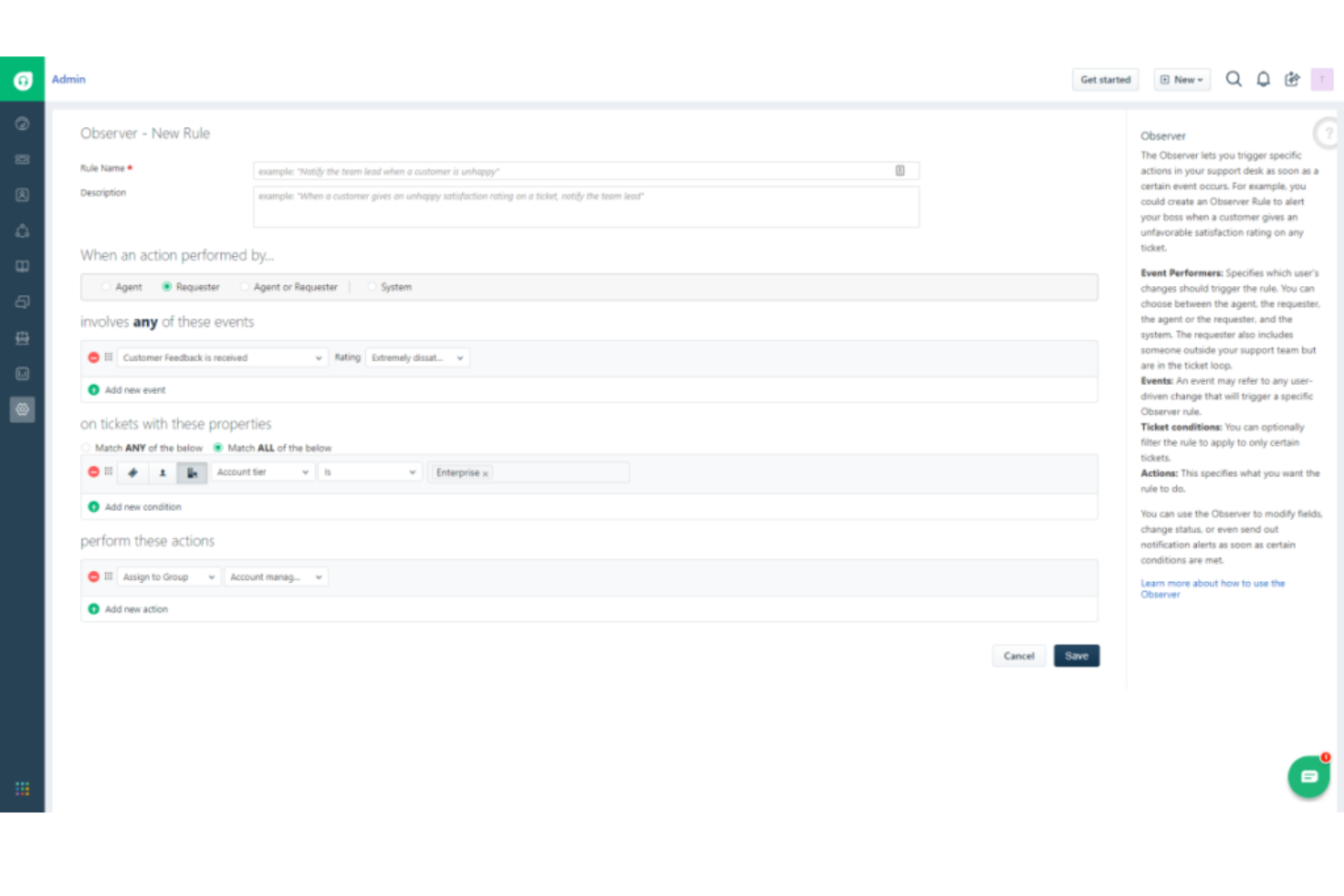
Freshdesk is a customer support software that enables businesses to streamline their support across multiple channels like email, phone, social media, and more. Its strength lies in consolidating customer conversations from different channels into a single interface, which justifies it being the best for multi-channel support management.
Why I Picked Freshdesk:
Due to its robust multi-channel management capabilities, I was drawn to Freshdesk in making my selections. Among the options I compared, Freshdesk stood out with its intuitive design and ease of handling customer interactions across various channels. For businesses seeking an efficient way to manage multi-channel support, Freshdesk serves as an optimal tool.
Standout features & integrations:
Notable features of Freshdesk include a unified inbox for all customer communications, automation capabilities for routine tasks, and robust ticketing. Furthermore, the platform's ability to seamlessly integrate with various apps, including CRM systems like Zoho CRM and Salesforce, project management tools like Trello and Asana, and communication tools like Slack and Teams, provides a well-rounded support management ecosystem.
Pros and Cons
Pros:
- Robust automation for routine tasks.
- Solid range of integrations with essential business tools.
- Excellent multi-channel support.
Cons:
- Customization capabilities could be better.
- Advanced features require higher-tier plans.
- The interface might be overwhelming for new users.
New Product Updates from Freshdesk

Freshdesk Enhances Contact Data Management and Social Identity Fields
Freshdesk now lets you manage social handles and handle large contact lists with ease, streamlining customer profiles and data tasks. For more information, visit Freshdesk’s official site.


Tidio is a customer experience automation platform that combines AI-powered chatbots, live chat, and multi-channel communication tools to help you handle customer inquiries efficiently. It’s designed to automate routine interactions, provide quick responses, and support customers across multiple languages and platforms.
Why I Picked Tidio:
I chose Tidio for its strong multilingual capabilities and AI chatbot, which together help businesses serve diverse audiences without sacrificing response quality. Its Lyro AI agent uses your existing support content to provide fast, human-like replies across chat, email, and social channels. This can free your team to focus on more complex requests while still offering timely, accurate support. I also like how Tidio’s analytics help you monitor performance and adjust your service strategy, all while maintaining GDPR and CCPA compliance for customer data protection.
Standout Features & Integrations:
Tidio includes self-service tools for instant FAQ responses, visitor tracking for proactive engagement, and a help desk that routes complex issues to human agents with full context. It integrates with e-commerce platforms like Shopify, WooCommerce, BigCommerce, PrestaShop, and Adobe Commerce, plus CRM and marketing tools such as HubSpot, Pipedrive, Mailchimp, and Klaviyo, helping centralize communication and ensure a consistent customer experience.
Pros and Cons
Pros:
- Includes up to 500 chatbot triggers in their Starter plan
- The Free and Starter plans offer a wide range of features
- Multilanguage capabilities are included in all plans
Cons:
- Limited customization options
- Live chat support is limited to 24/5 and not available in the free plan

UserGuiding is a customer experience automation platform that provides tools and resources to automate customer journeys, personalize automation, and collect feedback, leading to a more efficient and personalized customer experience. It is tailored to improve user activation rates, reduce the need for demo calls, and enhance trial conversions.
Why I Picked UserGuiding: UserGuiding is a user onboarding software designed to assist businesses in creating interactive experiences within their products to facilitate user familiarization and engagement. The platform emphasizes the importance of creating a solid knowledge base, using AI chatbots, and balancing automation with human touch to provide the best customer experience possible. It offers a code-free solution, personalized user onboarding, and a variety of resources to help businesses improve their overall customer experience and engagement.
Standout features & integrations:
UserGuiding offers several standout features, including product tours, onboarding checklists, resource centers, segmentation, analytics, customization, in-app surveys, tooltips, hotspots, announcement modals, NPS surveys, and product updates. UserGuiding additionally integrates with platforms such as HubSpot, Woopra, Google Tag Manager, Google Analytics, Slack, Segment, Mixpanel, and Intercom.
Pros and Cons
Pros:
- Provides excellent customer support services
- Easy-to-use system
- Simplifies user segmentation and offers flexible targeting
Cons:
- Steep learning curve
- Limited analytics
- Can be expensive to scale


If you're seeking an AI-powered solution to elevate your customer service operations, Hiver might be the right fit for you. Designed to streamline customer interactions across various industries, Hiver offers a suite of features that cater to the needs of customer support teams, IT departments, and even HR professionals. By integrating AI-driven tools and an omnichannel inbox, Hiver helps you reduce response times, automate routine tasks, and ultimately improve customer satisfaction, making it a valuable asset for enhancing your customer experience strategy.
Why I Picked Hiver
I picked Hiver because its AI-driven capabilities, particularly the omnichannel inbox, stand out in the realm of customer experience automation. This feature allows your team to manage communications from various platforms in one place, reducing the chaos of multiple channels. Additionally, Hiver's AI integration assists in resolving customer queries by suggesting responses and automating repetitive tasks, which is crucial for maintaining efficiency and accuracy. These functionalities directly address the common challenges of slow response times and manual workload, making Hiver a compelling choice for those focused on optimizing customer interactions.
Hiver Key Features
In addition to its standout AI and omnichannel capabilities, Hiver offers several other features that enhance customer experience:
- Knowledge Base: Provides a self-service portal where customers can find answers to common questions, reducing the volume of direct inquiries.
- Workflow Automation: Streamlines the triage and assignment of customer requests, ensuring that issues are directed to the right team members promptly.
- Analytics and Reporting: Delivers insights into customer interactions and satisfaction levels, helping you make data-driven decisions to improve service quality.
- AI Tagging: Uses AI to tag conversations, learning from existing tags to enhance accuracy.
Hiver Integrations
Integrations include Google Workspace, Slack, Salesforce, JIRA, Zapier, Mailchimp, Dropbox, Trello, Asana, and QuickBooks.
Pros and Cons
Pros:
- Self-service knowledge base reduces ticket volume
- Strong workflow automation for ticket handling
- Omnichannel inbox centralizes customer conversations
Cons:
- Some advanced features locked to higher plans
- Limited customization compared to enterprise CX tools
New Product Updates from Hiver

Hiver Introduces AI-Powered Task Creation
Hiver introduces AI-powered task creation for email workflows. This update enables users to extract key details, summarize requests, and trigger actions automatically from incoming emails. For more information, visit Hiver’s official site.

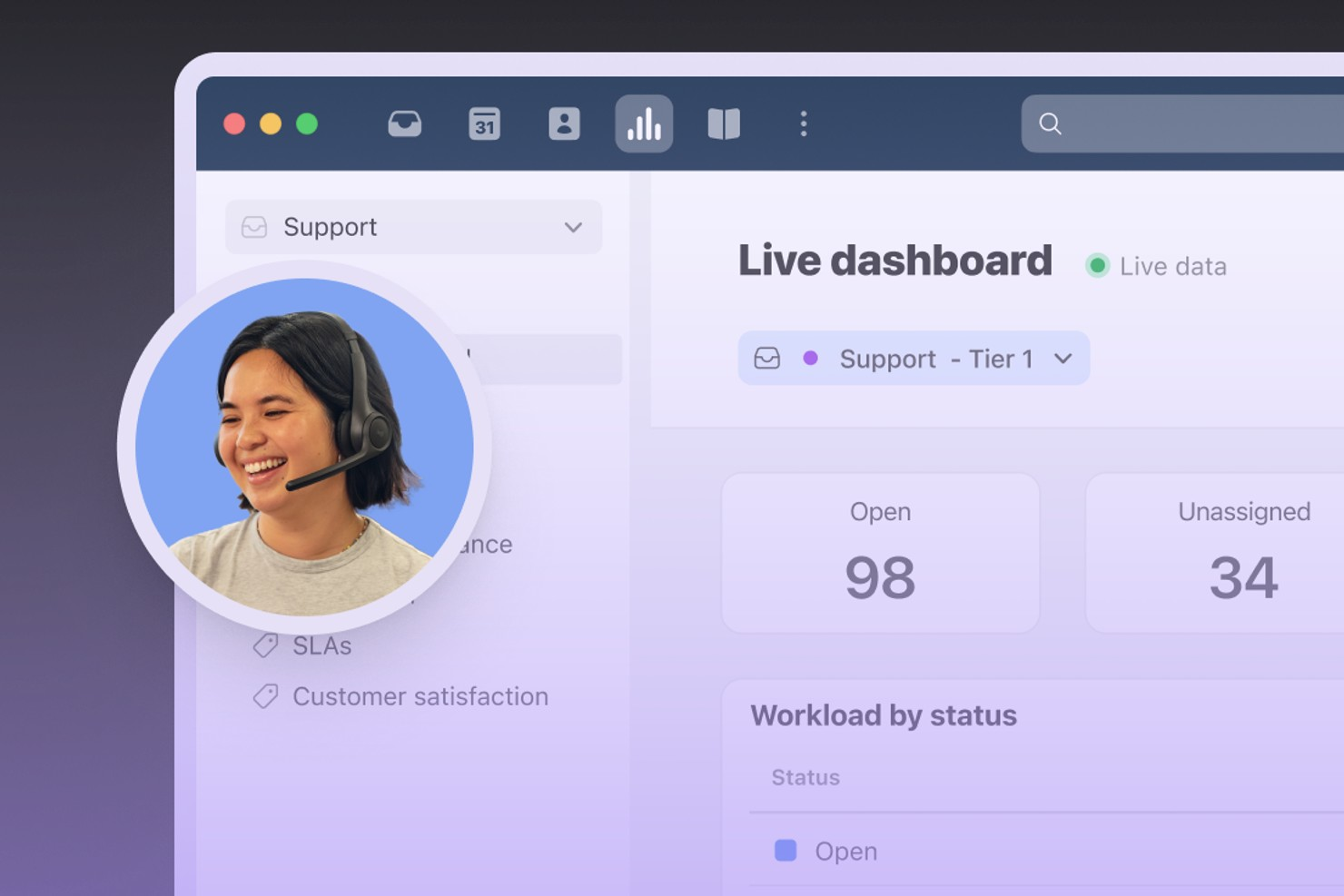
Front brings all your customer conversations into a single collaborative inbox, making it easier for teams to manage high volumes of messages across channels. It’s designed for organizations that need to coordinate responses, automate workflows, and keep customer context front and center. If you’re looking for a platform that blends communication, automation, and team collaboration, Front is built to help you deliver faster, more consistent customer experiences.
Who Is Front Best For?
Front is a strong choice for customer support and operations teams in mid-sized to large businesses that need to manage high volumes of customer communications across multiple channels.
Why I Picked Front
For teams that need to coordinate across departments and functions, Front stands out for its ability to streamline cross-team workflow coordination. I picked Front because it lets users assign, comment, and collaborate on customer conversations directly within a shared inbox, so everyone stays aligned without switching tools. The platform’s workflow automation rules help route messages to the right people or teams, reducing bottlenecks and manual handoffs. This approach keeps customer experience consistent and responsive, even as multiple teams work together behind the scenes.
Front Key Features
Some other features in Front that support customer experience automation include:
- Omnichannel inbox: Manage email, SMS, live chat, and social media messages from a single unified workspace.
- Analytics and reporting: Track team performance, response times, and customer interaction trends with built-in dashboards.
- Customer data sidebar: View relevant customer details and conversation history alongside every message for better context.
- Template library: Create and share message templates to ensure consistent responses across your team.
Front Integrations
Integrations include Salesforce, HubSpot, Asana, Slack, Aircall, FullContact, Gainsight, ClickUp, Chatra, and AMGiNE.
Pros and Cons
Pros:
- SLA tracking and analytics for performance monitoring
- Collision detection prevents duplicate responses
- Automated routing rules for message assignment
Cons:
- Advanced workflow automation requires higher-tier plans
- Limited in-app chat functionality for websites

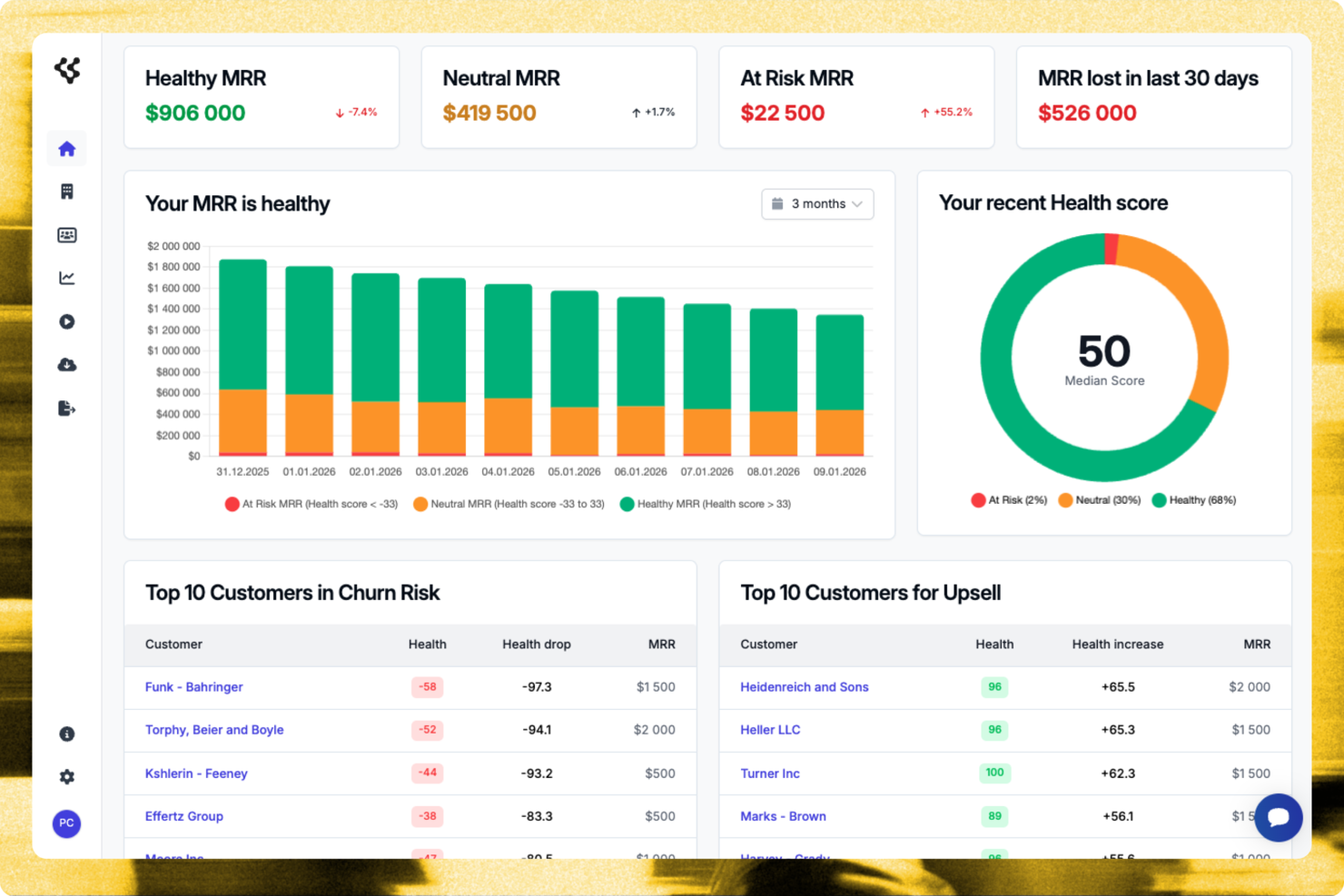
Customerscore.io provides a practical solution for businesses focused on improving customer success and growth. It helps teams monitor engagement, identify churn risk, and surface upsell opportunities. For organizations working to strengthen customer experience strategies, the platform integrates with tools like Stripe and HubSpot to deliver insights that support retention and revenue growth. These capabilities help address common challenges around customer retention and satisfaction while supporting stronger customer relationship management.
Why I Picked Customerscore.io
I picked Customerscore.io because it delivers actionable insights that directly support customer retention and growth. Its AI-driven health scoring and customer segmentation make it easier to identify at-risk customers and prioritize the right engagement efforts. The platform also includes automated workflows and event-based customer campaigns, allowing teams to manage customer interactions proactively. This approach helps reduce churn and uncover upsell opportunities while enabling teams to scale their customer success efforts without adding headcount.
Customerscore.io Key Features
In addition to its core capabilities, Customerscore.io offers several other features that enhance its value as a customer experience automation platform.
- Real-Time Dashboards: Provides live updates on customer engagement metrics, helping your team stay informed about customer health and trends.
- Integration with Key Services: Connects with tools like Stripe and HubSpot, allowing for consolidated data analysis and strategy development.
- Smart Alerts: Automatically notifies your team of significant changes in customer behaviour, enabling timely intervention and support.
- Predictive Analytics: Utilizes historical data to forecast future customer behaviours and trends, aiding in strategic planning and decision-making.
Customerscore.io Integrations
Integrations include HubSpot, Salesforce, Stripe, Intercom, Zendesk, Slack, Microsoft Teams, Google Analytics, Shopify, and Mailchimp.
Pros and Cons
Pros:
- Robust integrations list
- Efficient automated workflows and smart alerts
- Strong AI-driven insights and predictive capabilities
Cons:
- Setup, training, and customization can be time-consuming
- Potential privacy concerns and limited transparency around data usage
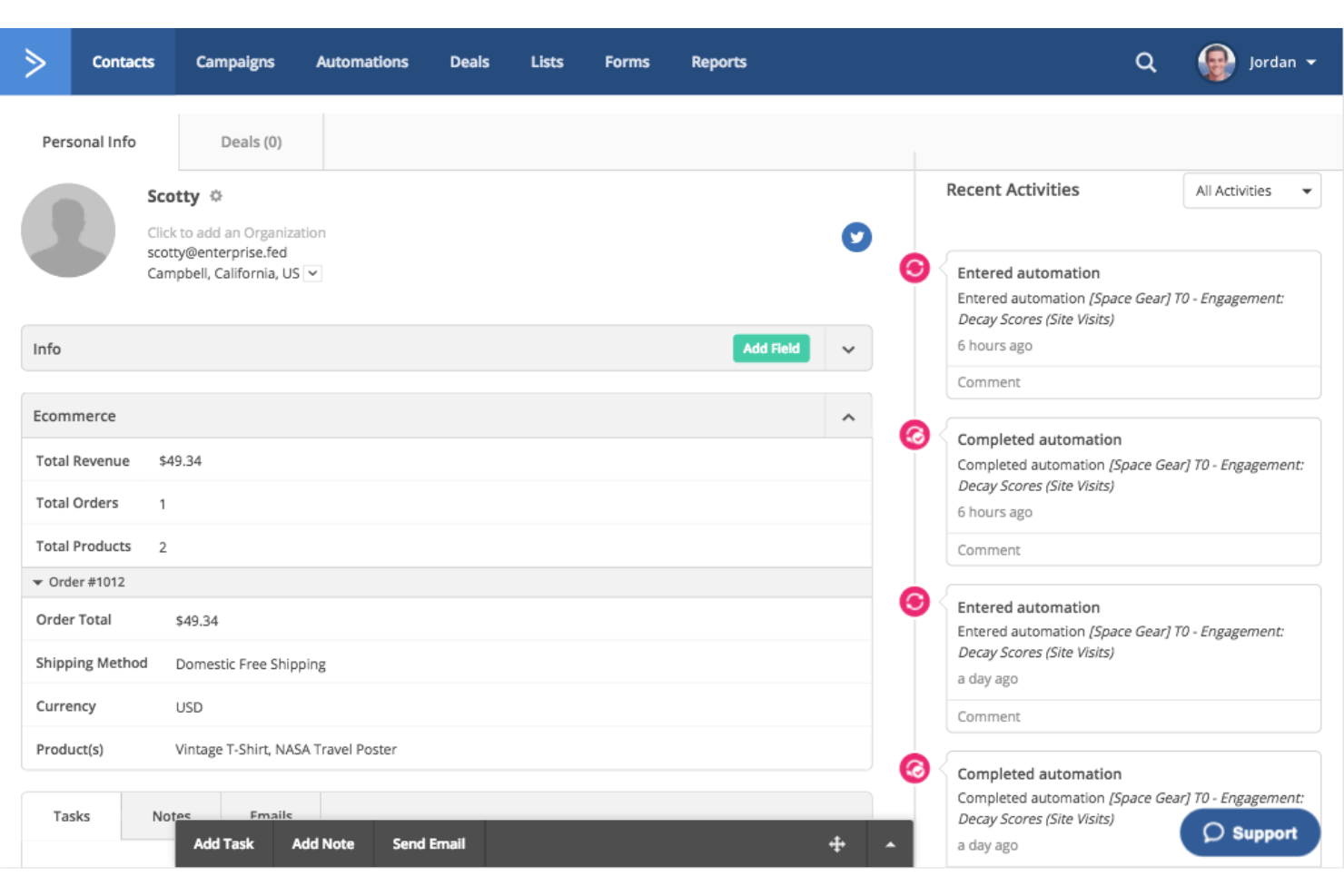
ActiveCampaign offers a rich blend of email marketing, sales automation, and CRM (Customer Relationship Management) functionalities. Known for its robust email marketing capabilities, it allows businesses to create, customize, and distribute marketing campaigns, making it an excellent choice for email marketing automation.
Why I Picked ActiveCampaign:
I chose ActiveCampaign for its focus on email marketing automation. It provides an intuitive and detailed approach to designing and implementing email campaigns compared to other platforms. Thanks to its diverse set of email-oriented features, I have determined it's best for businesses that rely heavily on email marketing to communicate with customers and leads.
Standout features & integrations:
ActiveCampaign stands out with features like its dynamic content and segmentation abilities, which help tailor the message for individual recipients. The automation builder simplifies the creation of intricate marketing workflows. As for integrations, ActiveCampaign meshes well with many tools, including Shopify, WordPress, and Zapier, allowing businesses to create a streamlined workflow.
Pros and Cons
Pros:
- Extensive library of integrations.
- User-friendly interface with easy setup.
- Comprehensive email marketing capabilities.
Cons:
- Reporting tools could offer more depth.
- There are no built-in video tutorials for learning.
- Advanced automation features require higher-priced plans.

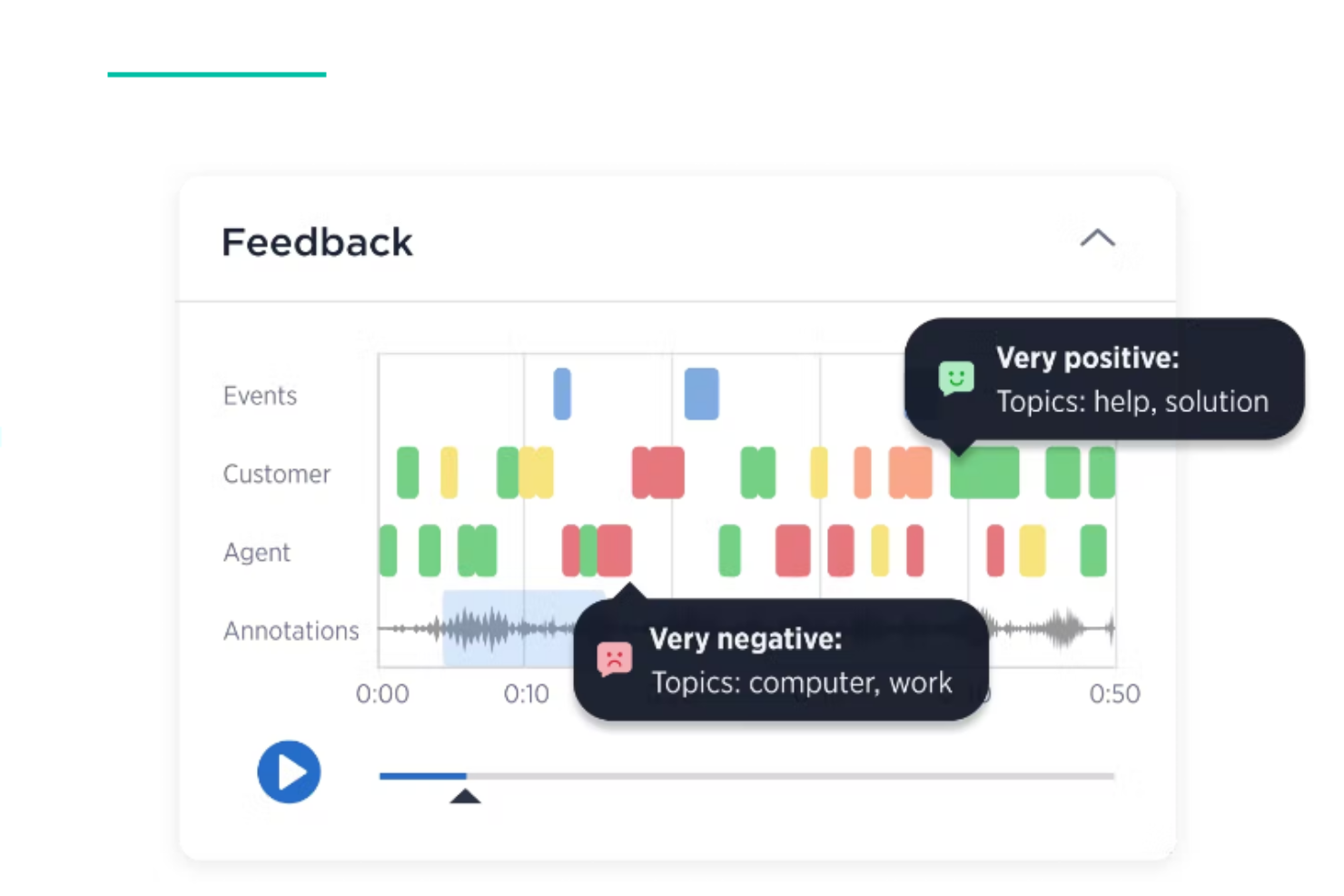
Medallia is a renowned name in the customer experience tool management domain, focusing on maximizing the value of customer feedback. It helps businesses collect and analyze feedback from multiple channels, allowing for a more comprehensive understanding of customer needs and expectations, thereby justifying its label as best for robust customer feedback management.
Why I Picked Medallia:
I chose Medallia for its outstanding reputation in customer experience management and its comprehensive tools for handling feedback. In my analysis, it stood out due to its capacity to collect customer insights from various touchpoints, making it best for managing a wealth of customer feedback. This capability allows businesses to measure, understand, and improve customer experiences effectively.
Standout features & integrations:
Medallia’s key features include omnichannel feedback collection, real-time analytics, and personalized customer journey mapping. These tools allow businesses to make data-driven decisions, enhancing customer satisfaction. Furthermore, Medallia integrates well with several prominent software solutions, including Salesforce, Adobe, and Microsoft, enabling seamless data flow and increased operational efficiency.
Pros and Cons
Pros:
- Smooth integration with popular software platforms.
- Powerful real-time analytics.
- Efficient collection of feedback across multiple channels.
Cons:
- Steeper learning curve compared to some other platforms.
- Advanced features require a higher pricing tier.
- The starting price point may be high for small businesses.

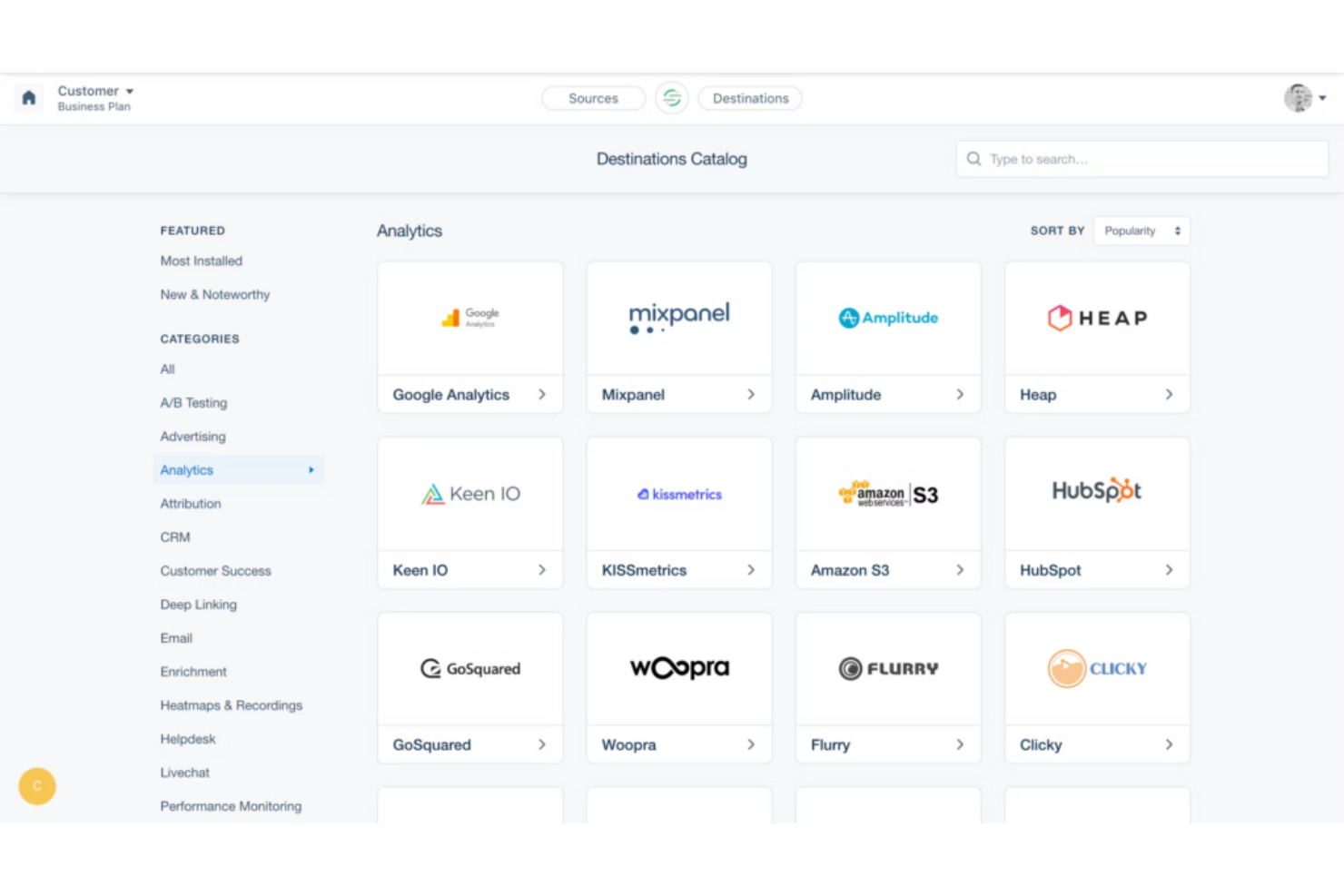
Segment is a customer data platform that helps businesses capture, organize, and activate customer data. It effectively consolidates data from multiple sources and enables you to gain valuable insights about your customers, which supports my view of it being the best for data-driven customer insights.
Why I Picked Segment:
I selected Segment for its unique ability to provide a comprehensive, data-centric view of the customer journey. Its exceptional ability to consolidate varied data points into a unified view gives it an edge over many other tools in the market. Segment is the superior choice for companies striving to better understand their customers through data.
Standout features & integrations:
Segment offers robust features like real-time data collection, user tracking, and governance. It allows businesses to collect, clean, and control their customer data in one place. With integrations spanning analytics tools like Google Analytics, Amplitude, and Mixpanel to marketing automation platforms like Mailchimp and Marketo, Segment ensures seamless data transfer and utilization.
Pros and Cons
Pros:
- Wide range of integrations with essential business tools.
- Real-time data tracking and insights.
- Comprehensive data collection and management.
- Wide range of integrations with essential business tools.
- Real-time data tracking and insights.
- Comprehensive data collection and management.
Cons:
- Setup and configuration can be complex for beginners.
- Requires some technical knowledge to use effectively.
- Pricing can get high for large businesses with an increased number of MTUs.
- Setup and configuration can be complex for beginners.
- Requires some technical knowledge to use effectively.
- Pricing can get high for large businesses with an increased number of MTUs.

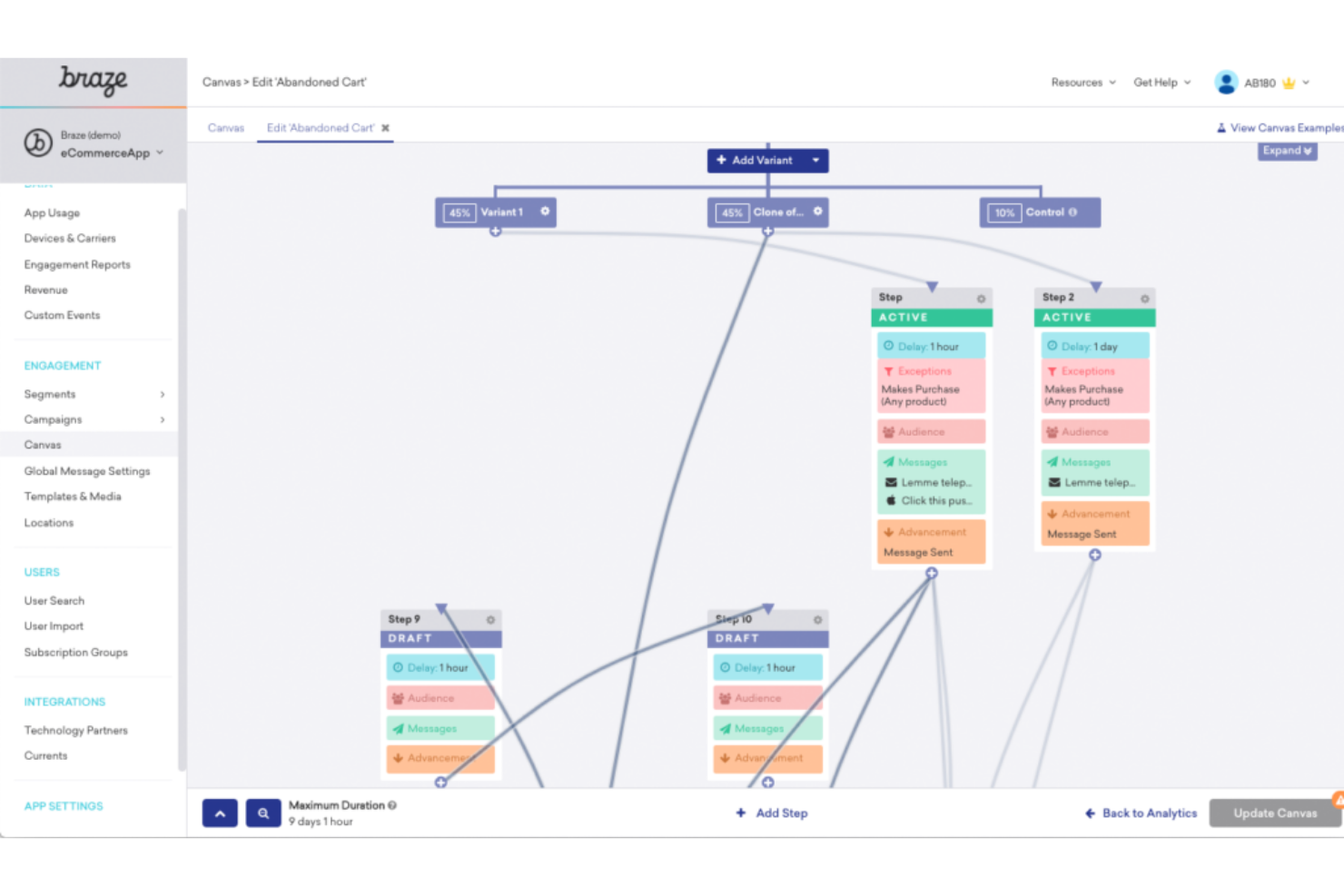
Braze is a comprehensive customer engagement platform that aids businesses in crafting personalized messaging experiences across different channels. With a specific focus on large-scale campaigns, Braze has become a trusted partner for companies looking to streamline and personalize their communication at scale.
Why I Picked Braze:
Braze caught my attention with its unique ability to facilitate personalized messaging on a large scale. Its ability to manage and deliver personalized experiences across multiple channels made it stand out. Thus, Braze is ideal for businesses that aim to provide customized messages to a large audience.
Standout features & integrations:
Braze has many standout features, such as its user-friendly campaign builder and real-time data synchronization, which facilitate personalized messaging. It also offers a 'Currents' feature for high-speed data exporting. As for integrations, Braze integrates well with analytics platforms like Amplitude and Mixpanel, enhancing data-driven decision-making processes.
Pros and Cons
Pros:
- Real-time data synchronization allows for more timely actions.
- Integrates well with various data analytics platforms.
- Offers robust tools for personalized messaging.
Cons:
- Limited functionality in the free version.
- It might be complex for beginners.
- Pricing is not transparent.
Other Noteworthy Customer Experience Automation Platforms
- Intercom
For live chat automation
- Nextiva
For personalized customer journey orchestration
- Qualtrics
For integrating customer service data
- ZOHO CRM Plus
For unified customer experience management
- Salesforce Customer 360
For all-round Salesforce integration
- Helpshift
For in-app customer support
- Ushur
For intelligent process automation
- Leaptree
For Salesforce-native sales coaching
- 14.ai
For automated, on-brand customer experiences
- Leaptree
For call center quality assurance
- Freshchat
Good for interactive customer engagement with live chat capabilities
- Sprinklr
Good for managing customer conversations across channels with AI assistance
- Gainsight
Good for enhancing customer retention through proactive customer success management
- Iterable
Good for multi-channel user engagement with robust segmentation capabilities
- InMoment
Good for gathering and analyzing customer feedback across multiple channels
- Pendo
Good for improving product experience with data-driven insights and guidance
- Kustomer
Good for leveraging AI for efficient customer service and support
- Pipedrive
Good for managing and optimizing sales processes with a visually intuitive pipeline
- Emarsys
Good for omnichannel marketing automation and personalization
- Satmetrix
Good for measuring and improving Net Promoter Score (NPS) across the customer lifecycle


Selection Criteria for Choosing Customer Experience Automation Platform
When choosing a customer experience automation platform, several factors come into play. As someone who has tested and researched multiple tools in this arena, I've found that some critical criteria significantly affect these platforms' overall effectiveness and usability.
Core Functionality (25% of total score)
- Track and map customer journeys across multiple touchpoints.
- Automate responses and actions based on specific customer behaviors.
- Gather, analyze, and act upon customer feedback.
- Provide proactive customer service based on predictive analysis.
Additional Standout Features (25% of total score)
- AI-powered insights
- Advanced segmentation tools
- Integration with multiple platforms
- Customizable dashboards
- Real-time analytics
Usability (10% of total score)
- Intuitive interface design
- Customizable user experience
- Responsive across devices
- Minimal learning curve
- Comprehensive search functionality
Onboarding (10% of total score)
- Interactive product tours
- Availability of training videos
- Access to customizable templates
- Supportive community forums
- Dedicated onboarding support
Customer Support (10% of total score)
- 24/7 customer service availability
- Multiple contact methods (chat, email, phone)
- Access to a comprehensive knowledge base
- Fast response times
- Personalized support options
Value For Money (10% of total score)
- Transparent pricing models
- Competitive pricing compared to features offered
- Availability of free trials or demos
- Flexible subscription plans
- Discounts for long-term commitments
Customer Reviews (10% of total score)
- High satisfaction with customer service
- Positive feedback on ease of use
- Consistent updates and improvements
- Effective issue resolution
- Overall positive user experience ratings
Features of Customer Experience Automation Platform
When selecting a customer experience automation platform, keep an eye out for the following key features:
- Omnichannel communication: Supports seamless interaction across various channels like email, chat, and social media, ensuring consistent customer engagement.
- Personalization engine: Delivers personalized experiences by leveraging customer data and behavior to tailor interactions and recommendations.
- Workflow automation: Automates repetitive tasks and processes to enhance efficiency and allow teams to focus on more strategic activities.
- Analytics and reporting: Provides insights into customer interactions and experiences through comprehensive data analysis and reporting tools.
- Integration capabilities: Offers robust integration with existing systems and third-party tools to unify customer data and streamline operations.
- Customer feedback management: Collects and analyzes customer feedback to improve service delivery and customer satisfaction.
- AI-driven insights: Utilizes artificial intelligence to predict customer needs and optimize experience strategies.
- Security and compliance: Ensures data protection and compliance with industry standards and regulations.
- Scalability: Supports growth by accommodating increasing customer interactions and data without performance degradation.
- Real-time monitoring: Enables real-time tracking of customer interactions to promptly address issues and optimize experiences.
Benefits of Customer Experience Automation Platforms
Implementing customer experience automation platform provides several benefits for your team and your business. Here are a few you can look forward to:
- Improved communication with CRM: Integrations with CRM systems allow for faster updates and real-time information sharing, enhancing collaboration and decision-making.
- Enhanced team collaboration: Built-in integrations facilitate collaboration among team members, allowing them to use existing workflows and tools they are familiar with.
- Automated internal communication: Automating internal briefings and status updates helps keep stakeholders informed through modular updates, improving overall efficiency.
- Efficient product management: Features like idea capture and visual roadmaps support product management by streamlining the process of collecting and communicating product ideas and releases.
- Comprehensive go-to-market planning: AI-powered tools assist in creating detailed go-to-market plans, centralizing information on plans, timelines, assets, and tasks for better alignment across teams.
- Data-driven insights: Automated collection and monitoring of competitive intelligence and customer research help in building a knowledge base, leading to more informed decision-making.
- Supports global compliance: Platforms ensure compliance with various regional regulations, making them suitable for global operations and enterprise organizations.
FAQs on Customer Experience Automation Platforms
How much do customer experience automation platforms typically cost?
The cost of these platforms can vary significantly based on features, your business size, and your specific needs. Some platforms start as low as $10/user/month, while others can cost several hundred dollars per user per month.
What are the pricing models for customer experience automation platforms?
Most platforms use a subscription-based pricing model, often billed annually. The cost typically scales based on the number of users and the extent of features required. Some platforms also offer volume discounts for larger businesses.
What is the cheapest customer experience automation software?
While pricing varies, platforms like Freshdesk offer packages that start at around $15/user/month, making it one of the more affordable options.
What is the most expensive customer experience automation software?
Higher-end platforms such as Sprinklr can cost several hundred dollars per user per month, depending on the features and services required.
Are there any free customer experience automation tools available?
While most platforms do not offer a completely free plan, many provide a free trial period or a fundamental free tier. However, these typically have limited features and are best used for small businesses or trial purposes before upgrading to a paid plan.
More Customer Experience Automation Platform-Related Reviews
Summary
To summarize, selecting the right Customer Experience Automation Platform requires a clear understanding of your unique needs and the features and functionalities of the various tools available. It’s essential to consider each tool's core functionality, key features, and usability about your specific use case.
Key takeaways:
- Understand Your Needs: Before comparing tools, clarify what you need in a Customer Experience Automation Platform. This could range from managing emails or other multi-channel customer interactions to gaining data-driven customer insights. Once you've defined your requirements, picking a tool that offers the right mix of features and functionalities becomes easier.
- Comprehensive Evaluation: Don't limit your evaluation to just features. Usability plays a crucial role in how effectively you can leverage the tool. Look for aspects such as the intuitiveness of the interface, ease of onboarding, and the quality of customer support.
- Pricing Considerations: Pricing models vary significantly across different platforms, with factors like the number of users, specific features, and whether it's billed monthly or annually playing a role. Please understand the complete pricing structure and ensure it aligns with your budget while fulfilling your needs.
What's Next?
If you're in the process of researching customer experience automation platforms, connect with a SoftwareSelect advisor for free recommendations.
You fill out a form and have a quick chat where they get into the specifics of your needs. Then you'll get a shortlist of software to review. They'll even support you through the entire buying process, including price negotiations.