
30 Best Customer Feedback Software of 2026

20 Best Customer Feedback Software Shortlist
Here's my pick of the 20 best software from the 30 tools reviewed.


Customer feedback software helps CX, product, and support teams eliminate guesswork and capture what customers are really thinking. But finding a tool that gives you actionable insights (not just survey fatigue) is easier said than done.
In this guide, I’ve reviewed the best customer feedback tools that help you close the loop faster, uncover root causes, and turn raw feedback into real business outcomes. Whether you’re trying to improve retention, test product-market fit, or just get closer to your customer, you’ll find a solution that fits your stack and stage.
Why Trust Our Reviews
We’ve been testing and reviewing customer feedback software since 2021. As CX professionals ourselves, we know how critical and difficult it is to make the right decision when selecting software.
We invest in deep research to help our audience make better software purchasing decisions. We’ve tested more than 2,000 tools for different customer experience use cases and written over 1,000 comprehensive software reviews. Learn how we stay transparent & our software review methodology.
20 Best Customer Feedback Software Comparison Chart
This comparison chart summarizes basic details about each of my top customer feedback software selections. You can view pricing details and the availability of free trials or demos side-by-side to help you find the best software for your budget and business needs.
| Tool | Best For | Trial Info | Price | ||
|---|---|---|---|---|---|
| 1 | Best for AI theme tagging | Free demo available | Pricing upon request | Website | |
| 2 | Best for visual feedback with screen annotation | Free plan available | From $7/user/month | Website | |
| 3 | Best for natural language assistant | Free demo available | Pricing upon request | Website | |
| 4 | Best for centralized customer feedback | Free demo available | Pricing upon request | Website | |
| 5 | Best for its feedback widget and in-app survey feature | Free trial + free demo available | From $111/month (billed annually) | Website | |
| 6 | Best flexible customer surveys with conditional logic branching | Free 14-day trial + free demo available | Pricing upon request | Website | |
| 7 | Best for custom survey design with question branching | Free trial + free plan + free demo available | From $39/month (billed annually) | Website | |
| 8 | Best for customer analytics and feedback loops | Free demo available | From $45/month (billed annually) | Website | |
| 9 | Best for built-in CSAT surveys | Free demo + 14-day free trial available | From $19/user/month (billed annually) | Website | |
| 10 | Best for omnichannel inbox consolidation | Free plan available | From $25/user/month (billed annually) | Website | |
| 11 | Best customizable digital forms for feedback collection | Free plan available | From $19.50/month (billed annually) | Website | |
| 12 | Best user analytics tool with feedback & survey features | Free plan available | From $39/month (billed annually) | Website | |
| 13 | Best business messaging with feedback built in | Free 14-day trial + free demo available | From $29/user/month (billed annually) | Website | |
| 14 | Best for real-time feedback collection | Free plan + Free demo available | From $19.99/month (billed annually) | Website | |
| 15 | Best feedback for product usage analytics & reports | Free demo available | Pricing upon request | Website | |
| 16 | Best feedback software for customer segments | Free plan + free demo available | Pricing upon request | Website | |
| 17 | Best for AI-driven feedback insights | 7-day free trial | From $55/user/month | Website | |
| 18 | Best for visual feedback capture | Free 15-day trial | From $45/month | Website | |
| 19 | Best for real-time feedback insights | Free demo available | From $555/month (billed annually) | Website | |
| 20 | Best customer feedback for company reviews | Free 14-day trial and demo available | From $99/month (billed annually) | Website |


-

SupportYourApp
Visit WebsiteThis is an aggregated rating for this tool including ratings from Crozdesk users and ratings from other sites.4.7 -
Freshdesk
Visit WebsiteThis is an aggregated rating for this tool including ratings from Crozdesk users and ratings from other sites.4.4 -
Hiver
Visit WebsiteThis is an aggregated rating for this tool including ratings from Crozdesk users and ratings from other sites.4.6


Best Customer Feedback Software Reviews
Here are brief descriptions of my top 20 customer feedback software solutions that showcase each tool’s best use case and noteworthy features, plus screenshots to give a snapshot of their user interface. I’ve also included additional bonus solutions below if you’d like even more options to consider.

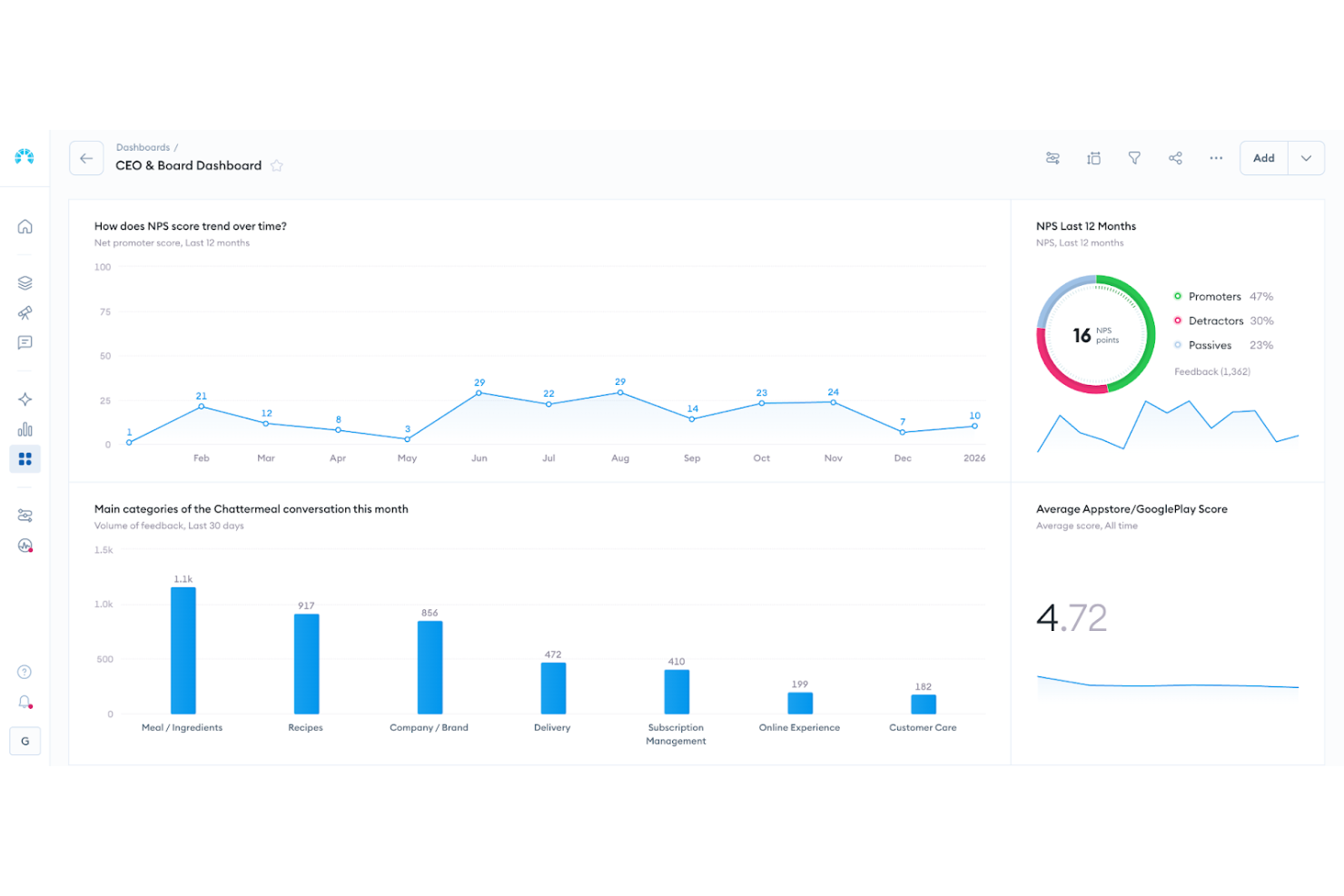
Chattermill is built for businesses that want to turn customer feedback into meaningful, strategic action. It supports customer-focused organizations across industries such as retail, finance, and technology that are looking to strengthen customer experience and inform product development. Using AI-driven analytics, Chattermill surfaces trends, highlights emerging issues, and helps you prioritize improvements, so you can make data-informed decisions and stay closely aligned with evolving customer needs and behaviors.
Why I Picked Chattermill
I picked Chattermill for its sophisticated AI-driven analytics that unify feedback from multiple channels into a single platform. This feature allows you to quickly understand customer sentiment and preferences without sifting through endless data. The instant AI tagging of themes and sentiment ensures that your team can pinpoint critical issues and trends as they arise. Moreover, automatic alerts for significant sentiment changes keep you informed, enabling timely interventions that can enhance customer satisfaction.
Chattermill Key Features
In addition to Chattermill's core analytics capabilities, I also found the following features valuable for customer feedback software:
- Unified Feedback Management: Consolidates feedback from various sources into one platform, providing a comprehensive view of customer insights.
- Trend Tracking: Monitors changes in customer sentiment over time, helping you identify patterns and anticipate future needs.
- NPS and CSAT Impact Measurement: Assesses how feedback themes affect key performance metrics, guiding your strategic planning.
- Automatic Alerts: Notifies you of critical insights and changes in customer sentiment, allowing for proactive management.
Chattermill Integrations
Integrations include Zendesk, Typeform, Salesforce, Trustpilot, Sprinklr, Google Cloud Platform, Dropbox, HubSpot, Slack, and Amazon S3.
Pros and Cons
Pros:
- Industry specific sentiment models
- AI powered theme tagging
- Real time sentiment tracking
Cons:
- May require enterprise onboarding
- Pricing not publicly available

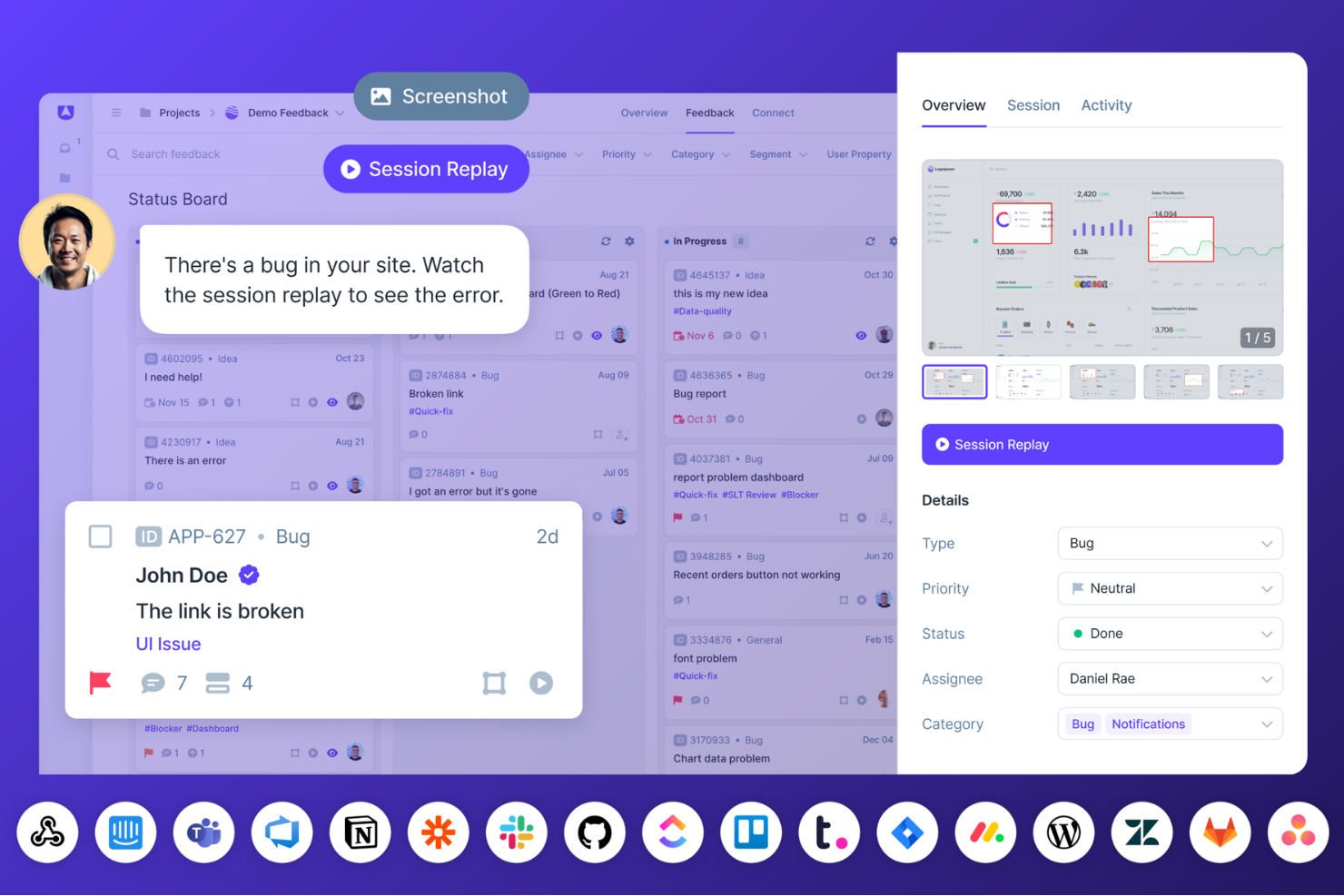
Userback is tailored for teams seeking to improve their feedback collection and management. It appeals to businesses seeking to better understand user experiences, streamline bug reporting, and enhance product development. By offering tools like feedback widgets, session replays, and user surveys, Userback addresses the challenge of gathering actionable insights from users, making it an ideal choice for product managers and development teams striving to refine their offerings.
Why I Picked Userback
I picked Userback for its unique ability to provide visual context to feedback through features like screen annotation and video recordings. These tools allow your team to see exactly what users experience, making it easier to identify and resolve issues. Additionally, the session replay functionality offers a replay of user interactions, giving you a deeper understanding of user behavior.
Userback Key Features
Aside from its visual feedback capabilities, Userback offers:
- Feedback Widgets: Allows users to submit feedback directly from your application or website, making it easy to capture user thoughts in real-time.
- User Surveys: Customizable surveys enable the structured collection of feedback tailored to specific user groups or needs.
- Public Roadmap: Share your development plans with users, allowing them to vote and comment on features, enhancing transparency and engagement.
- Automation Tools: Streamlines the feedback process by automating repetitive tasks, ensuring your team can focus on high-priority items.
Userback Integrations
Integrations include Jira, Slack, GitHub, Trello, WordPress, Zendesk, Wrike, Teamwork, Webhooks, and Zapier. An API is also available for custom integrations.
Pros and Cons
Pros:
- Integrates smoothly with project management workflows
- Centralized dashboard for organizing client feedback
- Customizable feedback widgets capture user input effortlessly
Cons:
- User capacity and advanced controls limited on lower tiers
- Some feature gaps compared to larger feedback platforms
New Product Updates from Userback

Userback Introduces AI Assist for Feedback Management
Userback introduces AI Assist features, including Similar Feedback and AI Comment. These updates improve feedback management by helping teams identify trends and respond more efficiently. For more information, visit Userback's official site.
 .
.
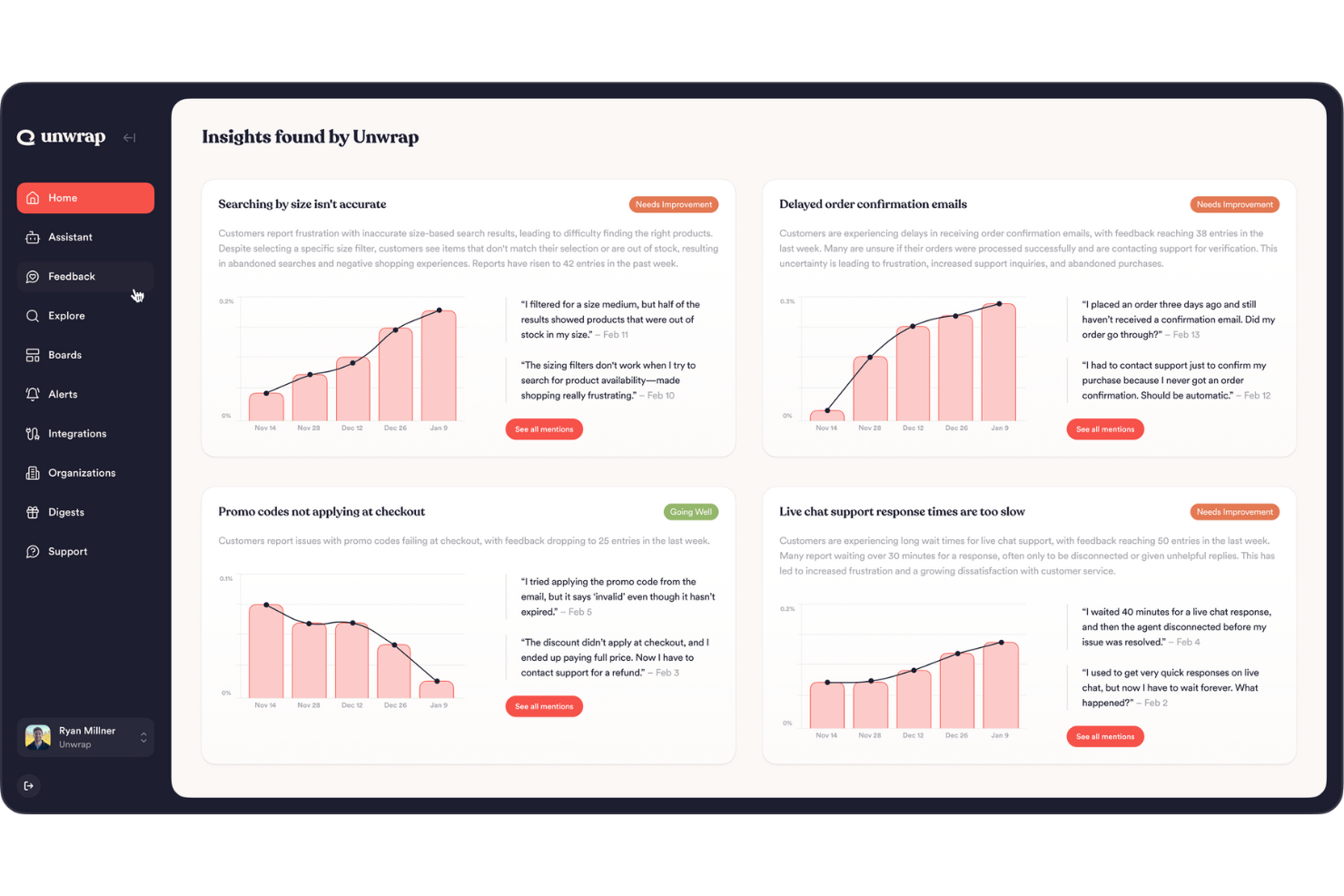
Unwrap is an AI-powered platform that enhances how businesses collect and analyze customer feedback, making it ideal for those looking to turn insights into informed decisions. If you're in a role where understanding the customer voice is crucial, such as customer support or product development, Unwrap's ability to transform raw data into actionable insights can be a game-changer. The platform addresses common challenges like data overload and manual analysis by offering automated tagging and trend detection, ensuring you can focus on strategic actions rather than data crunching.
Who is Unwrap Best For?
Product and CX analysts in mid-sized organizations globally using natural language tools to interpret customer feedback at scale.
Why I Picked Unwrap
I picked Unwrap for its innovative approach to automating customer feedback analysis, which is a crucial aspect of customer feedback software. The Auto Tagger is particularly noteworthy as it organizes feedback into intuitive categories, saving you time and effort. Additionally, the customizable dashboards provide a clear view of customer insights, making it easier to track trends and make data-driven decisions. For those looking to stay ahead of emerging customer needs, the automated Alerts ensure you're always informed about significant changes or new patterns in feedback.
Unwrap Key Features
In addition to its unique selling points, I also found several other features that make Unwrap a compelling choice for customer feedback software:
- Natural Language Assistant: This feature allows you to query feedback data effortlessly, providing instant insights and answers to your pressing questions.
- Cross-Organizational Accessibility: Designed for use across various roles within an organization, ensuring that feedback is addressed promptly and effectively.
- Data Security and Compliance: Unwrap is compliant with SOC 2 Type II and GDPR, emphasizing data privacy and security.
- User-Friendly Interface: The platform is easy to navigate, requiring minimal setup, which promotes widespread adoption across your team.
Unwrap Integrations
Integrations include Slack, Salesforce, Zendesk, HubSpot, Intercom, Microsoft Teams, Jira, Asana, Trello, and Google Workspace.
Pros and Cons
Pros:
- Automates large-scale feedback analysis
- Identifies themes and sentiment trends
- Centralizes feedback from multiple sources
Cons:
- Limited advanced customization options
- Less effective with low feedback


Enterpret is an AI-powered platform designed to transform how businesses understand and act on customer feedback. It appeals to companies focused on enhancing customer experiences by deriving actionable insights from diverse sources of feedback. The platform addresses the challenge of scattered customer signals, enabling businesses to quickly identify and address customer needs and preferences.
Who is Enterpret Best For?
Product managers and customer experience teams in mid-sized to large companies worldwide centralizing feedback from multiple customer channels.
Why I Picked Enterpret
I picked Enterpret for its unique ability to integrate feedback from over 50 sources and transform it into actionable insights using AI-driven analysis. This feature is crucial for businesses looking to centralize customer feedback and gain a comprehensive understanding of customer sentiments. Additionally, Enterpret's adaptive taxonomy and customer knowledge graph provide deep contextual insights, allowing teams to identify trends and make informed decisions.
Enterpret Key Features
In addition to centralized customer feedback, Enterpret offers:
- AI Agents: Automate responses and actions based on customer feedback to enhance efficiency in addressing customer concerns.
- Customizable Feedback Themes: Allows businesses to tailor feedback themes according to specific needs, ensuring relevant insights are prioritized.
- Real-Time Insights: Provides up-to-the-minute analysis of customer feedback, enabling quick strategy adjustments and proactive issue resolution.
- Feedback Visualization Tools: Offers charts and graphs to help teams visualize trends and patterns in customer feedback for better strategic planning.
Enterpret Integrations
Integrations include Salesforce, Zendesk, Slack, Microsoft Teams, Intercom, HubSpot, Freshdesk, Jira, Asana, and Trello.
Pros and Cons
Pros:
- Aggregates feedback from multiple sources, providing comprehensive insights
- Automated categorization saves time on feedback analysis
- AI-driven analysis offers actionable insights for customer trends
Cons:
- AI-generated summaries can sometimes be inconsistent
- Users report occasional delay issues


If you want to collect feedback directly inside your product, Product Fruits offers a flexible widget and in-app survey tools designed for SaaS teams and product managers. The platform is especially useful for gathering contextual feedback at key moments in the user journey. With Product Fruits, you can launch surveys and feedback forms without relying on developers or interrupting your users’ experience.
Who is Product Fruits Best For?
Product and growth teams in small to mid-sized SaaS companies in North America and Europe collecting in-app feedback through widgets and surveys.
Why I Picked Product Fruits
What sets Product Fruits apart is its focus on capturing feedback right where users interact with your product. I picked Product Fruits because its feedback widget and in-app survey feature let you gather insights without disrupting the user experience. You can trigger surveys based on user actions or specific pages, making feedback more relevant and timely. This approach helps product teams collect actionable input exactly when and where it matters most.
Product Fruits Key Features
Some other features that stood out to me include:
- NPS survey builder: Create and launch Net Promoter Score surveys directly within your product.
- Feedback dashboard: View, filter, and analyze all collected feedback in a centralized dashboard.
- User segmentation: Target surveys and feedback requests to specific user groups based on behavior or attributes.
- Multi-language support: Deliver surveys and feedback forms in multiple languages to reach a global audience.
Product Fruits Integrations
Integrations include HubSpot, Amplitude, Sleeknote, VWO, Stripe, Calendly, LinkedIn, Microsoft, G2Crowd, and YouTube.
Pros and Cons
Pros:
- Easy creation of feature tours and announcements
- User-friendly interface with intuitive onboarding tools
- Responsive, helpful and knowledgeable customer support
Cons:
- Analytics and reporting features need improvement
- Limited customization options in design choices
New Product Updates from Product Fruits
New Generation Onboarding with Elvin AI
Product Fruits has launched its AI-driven onboarding with Elvin AI, offering personalized guidance to boost user activation. For more information, visit Product Fruits's official site.
 .
.
Best flexible customer surveys with conditional logic branching

SurveySparrow offers a dynamic solution for transforming customer feedback into actionable insights, making it ideal for industries like healthcare, education, and hospitality. Its mobile-first design and diverse survey types, including NPS and offline surveys, ensure you can gather feedback anytime, anywhere. With features like chatbot integration and customizable workflows, you can deepen customer engagement and drive business growth.
Who is SurveySparrow Best For?
Customer experience and research teams in mid-sized companies in North America and Europe running flexible surveys with conditional logic.
Why I Picked SurveySparrow
I picked SurveySparrow because of its flexible customer surveys with conditional logic branching. This feature enables you to tailor survey questions based on previous responses, ensuring the feedback you gather is both relevant and insightful. The tool's ability to handle offline data collection and support multiple languages further adds to its adaptability for different business needs. With these functionalities, SurveySparrow is an excellent choice for refining your customer feedback process.
SurveySparrow Key Features
In addition to its flexible customer surveys with conditional logic branching, SurveySparrow offers several other features that enhance its utility as a customer feedback software.
- Conversational Surveys: Create engaging surveys that transform feedback collection into an interactive experience.
- Multilingual Support: Conduct surveys in multiple languages to reach a diverse audience.
- Omnichannel Feedback Collection: Share surveys across various platforms, including social media, email, and QR codes.
- Visual Workflows: Automate actions based on survey responses to streamline your feedback process.
SurveySparrow Integrations
Integrations include Salesforce, HubSpot, Mailchimp, Zendesk, Slack, Google Sheets, Trello, Intercom, Freshdesk, and Microsoft Teams.
Pros and Cons
Pros:
- Intuitive UI with many useful features
- Integrates with Zendesk for chat feedback
- Easy to build surveys with dynamic variables
Cons:
- Drag-and-drop alignment issues complicate survey creation process
- Limited customization restricts design flexibility in surveys


Sogolytics is designed for teams that need advanced control over survey structure and question flow. Its custom survey design tools and detailed branching logic help you capture nuanced feedback from different customer groups. This makes it a strong fit for organizations that want to tailor every aspect of the feedback process to specific audiences or touchpoints.
Who is Sogolytics Best For?
Research and insights teams in mid-sized to large organizations globally designing custom surveys with advanced branching logic.
Why I Picked Sogolytics
What drew me to Sogolytics is its depth of customization for survey design and question branching. The platform lets you build complex surveys with advanced skip logic, so you can direct respondents down different paths based on their answers. I appreciate how Sogolytics supports a wide range of question types and conditional display options, making it easy to tailor surveys for different audiences or feedback scenarios. This level of control is especially valuable for teams that need to capture detailed, context-specific insights from their customers.
Sogolytics Key Features
In addition to its advanced branching capabilities, I also found these features worth noting:
- Multilingual survey support: Create and distribute surveys in multiple languages to reach a broader audience.
- Real-time reporting dashboards: Monitor survey responses and key metrics as data comes in.
- Anonymous response collection: Allow respondents to submit feedback without revealing their identity.
- Automated email invitations and reminders: Schedule and send survey invitations and follow-ups directly from the platform.
Sogolytics Integrations
Integrations include Salesforce, Microsoft Teams, and native API access for custom integrations.
Pros and Cons
Pros:
- Strong data-export and reporting features praised by users
- Extensive survey design options for advanced branching
- Highly flexible logic supports complex question flows
Cons:
- Extensive feature set may overwhelm small, simple use-cases
- Interface can feel cluttered and hard to navigate

TeamSupport addresses the complex needs of B2B companies seeking an effective way to manage customer feedback. By focusing on collaboration and communication, it appeals to industries that require a robust system for handling customer interactions and data. This tool is particularly beneficial for those looking to enhance customer satisfaction and streamline their support processes.
Who is TeamSupport Best For?
Customer support leaders in mid-sized B2B organizations in North America and Europe monitoring analytics and structured feedback loops.
Why I Picked TeamSupport
I picked TeamSupport for its advanced customer analytics and feedback loop capabilities, which are crucial for businesses aiming to improve their customer service strategies. The software's real-time communication features, including live chat, allow you and your team to engage with customers instantly, ensuring their voices are heard. Additionally, the comprehensive ticketing system helps manage and track feedback efficiently, making it easier to identify trends and areas for improvement.
TeamSupport Key Features
In addition to its strong analytics and communication tools:
- Customer Distress Index (CDI): This feature helps you identify and prioritize customers who need immediate attention.
- Collaborative Ticket Management: Allows teams to work together seamlessly on resolving customer issues.
- Customizable Knowledge Base: Provides a self-service option for customers to find answers, reducing the load on your support staff.
- Product Tagging: Enables detailed tracking and analysis of customer interactions with specific products.
TeamSupport Integrations
Integrations include Salesforce, HubSpot, Microsoft Teams, SAP Sales and Service Clouds, Jira Software, Nicereply, MS Dynamics, Dropbox, Beanstalk, and an available API for custom integrations.
Pros and Cons
Pros:
- Customizable customer self service hub
- Real time sentiment insights
- AI powered ticket automation
Cons:
- Limited mobile app functionality
- Knowledge base lacks configurability

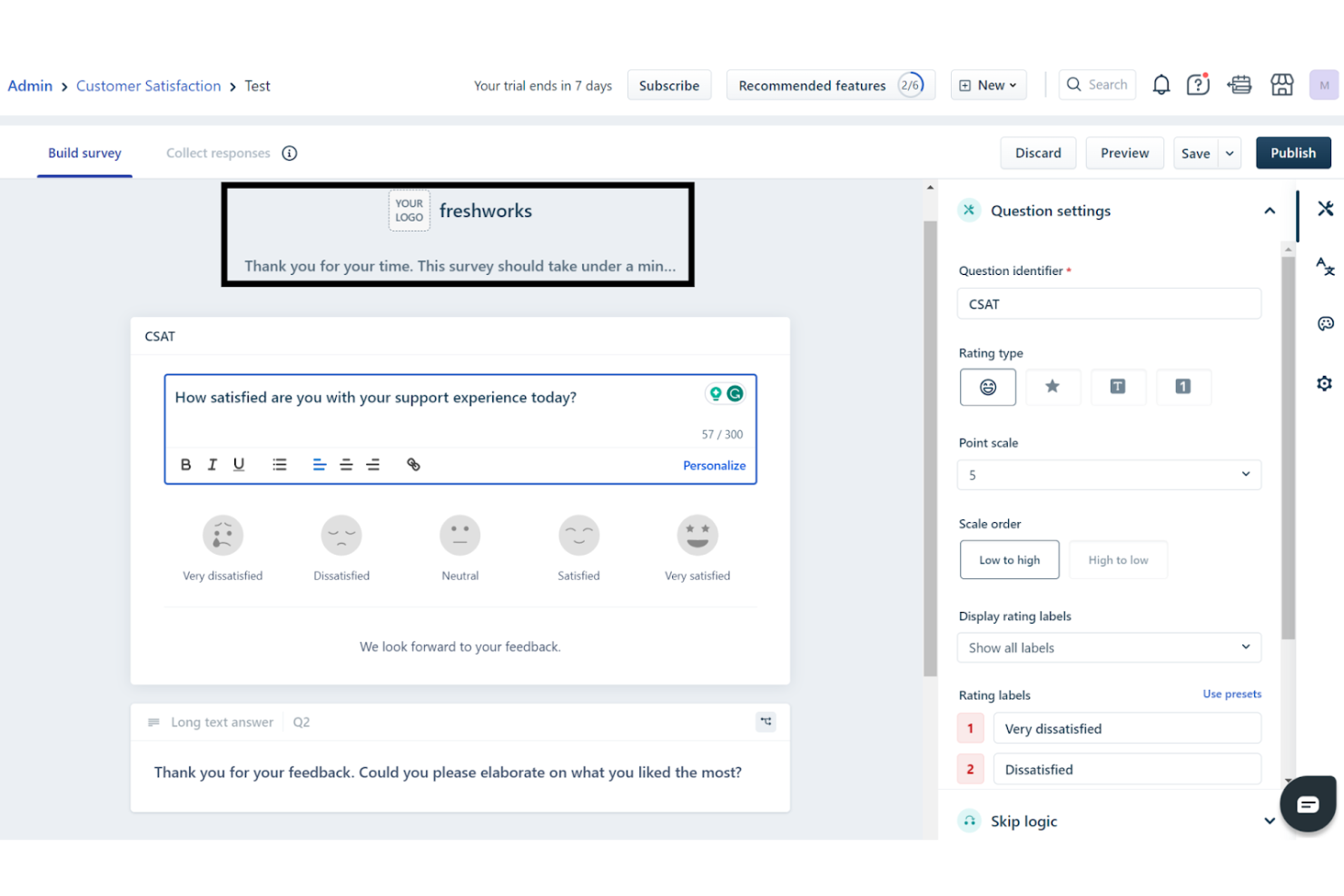
Freshdesk empowers your team to transform customer interactions with its AI-driven platform, designed to improve support processes and enhance feedback management. It appeals to businesses across various industries, offering a centralized workspace that fosters communication and faster resolution of customer queries.
Who Freshdesk is Best For?
Customer support leaders and service teams in small to mid-sized companies in North America and Europe managing support interactions and collecting CSAT feedback within a single platform.
Why I Picked Freshdesk
I picked Freshdesk because it natively embeds customer feedback collection into your support workflow, so you can measure satisfaction and loyalty without needing to build something separate. Its CSAT survey builder lets you send customizable surveys triggered at key moments like ticket resolution, tying each response back to the original interaction and support agent.
You can also extend Freshdesk with marketplace apps that bring NPS and CES surveys directly into your helpdesk, keeping customer sentiment aligned with your support metrics. For teams that want feedback that’s both contextual and quantitative — tied to real support events rather than scattered insights — these built-in and integrated feedback tools make Freshdesk a strong fit.
Freshdesk Key Features
In addition to its core functionalities, I also like that it offers:
- Self-Service Tools: Freshdesk provides a customizable customer portal and multilingual knowledge base, empowering users to find solutions independently.
- Routing and SLA Management: Automates ticket categorization, prioritization, and routing, ensuring timely responses and efficient feedback handling.
- Security Features: Implements role-based access control and IP whitelisting to protect sensitive customer data.
- Business Hours Management: Allows you to define support team working hours and automate workflows for continuous support.
Freshdesk Integrations
Integrations include Slack, Microsoft Teams, Shopify, Google Workspace, Jira, Salesforce, HubSpot, Zoom, Mailchimp, and WooCommerce. An API is available for custom integrations.
Pros and Cons
Pros:
- Omnichannel support integrates various communication platforms.
- AI automation improves response times and reduces workload.
- Surveys can be automated at ticket resolution
Cons:
- Mobile app lacks some advanced features available on desktop, limiting on-the-go support.
- Native survey options are basic compared to dedicated tools
New Product Updates from Freshdesk

Freshdesk Enhances Contact Data Management and Social Identity Fields
Freshdesk now lets you manage social handles and handle large contact lists with ease, streamlining customer profiles and data tasks. For more information, visit Freshdesk’s official site.


Hiver is an AI-powered customer service platform that caters to businesses looking to enhance their customer feedback management. With its focus on streamlining communication, Hiver is especially appealing to industries such as technology, healthcare, and education. It offers tools like an omnichannel inbox and AI assistance, which help resolve queries and gather valuable insights from customer interactions. By simplifying feedback collection and analysis, Hiver helps your team make data-driven decisions and improve overall customer satisfaction.
Who is Hiver Best For?
Customer support managers in small to mid-sized businesses in North America and Europe consolidating omnichannel communications into a shared inbox.
Why I Picked Hiver
I picked Hiver for its unique ability to transform how you manage customer feedback through its AI-driven features. The omnichannel inbox consolidates all customer interactions into a single view, allowing your team to respond swiftly and accurately. Additionally, Hiver's AI capabilities assist in triaging and analyzing conversations, ensuring that urgent issues are prioritized. These features directly address the challenge of managing high volumes of customer feedback efficiently, making Hiver a standout choice for your team.
Hiver Key Features
In addition to its excellent customer feedback management capabilities, Hiver offers several other valuable features:
- Knowledge Base: Enables your team to create a repository of common queries and solutions, reducing repetitive questions.
- AI Copilot: Assists agents by drafting responses and suggesting next steps, enhancing response quality and speed.
- Customer Portal: Provides a self-service platform where customers can find answers and submit feedback easily.
- Workflow Automation: Automates repetitive tasks, freeing up your team to focus on resolving customer issues.
Hiver Integrations
Hiver integrates with popular platforms such as Salesforce, Hubspot, Pipedrive, Shopify, Jira, Asana, WhatsApp, and QuickBooks. These integrations enhance its functionality, allowing you to streamline workflows and improve productivity across your preferred applications.
Pros and Cons
Pros:
- AI capabilities triage conversation data
- CSAT feature collects satisfaction feedback
- Omnichannel inbox unifies communication workflows
Cons:
- Draft sharing limitations hinder collaboration
- Limited analytics features hinder insights
New Product Updates from Hiver

Hiver Introduces AI-Powered Task Creation
Hiver introduces AI-powered task creation for email workflows. This update enables users to extract key details, summarize requests, and trigger actions automatically from incoming emails. For more information, visit Hiver’s official site.
 .
.
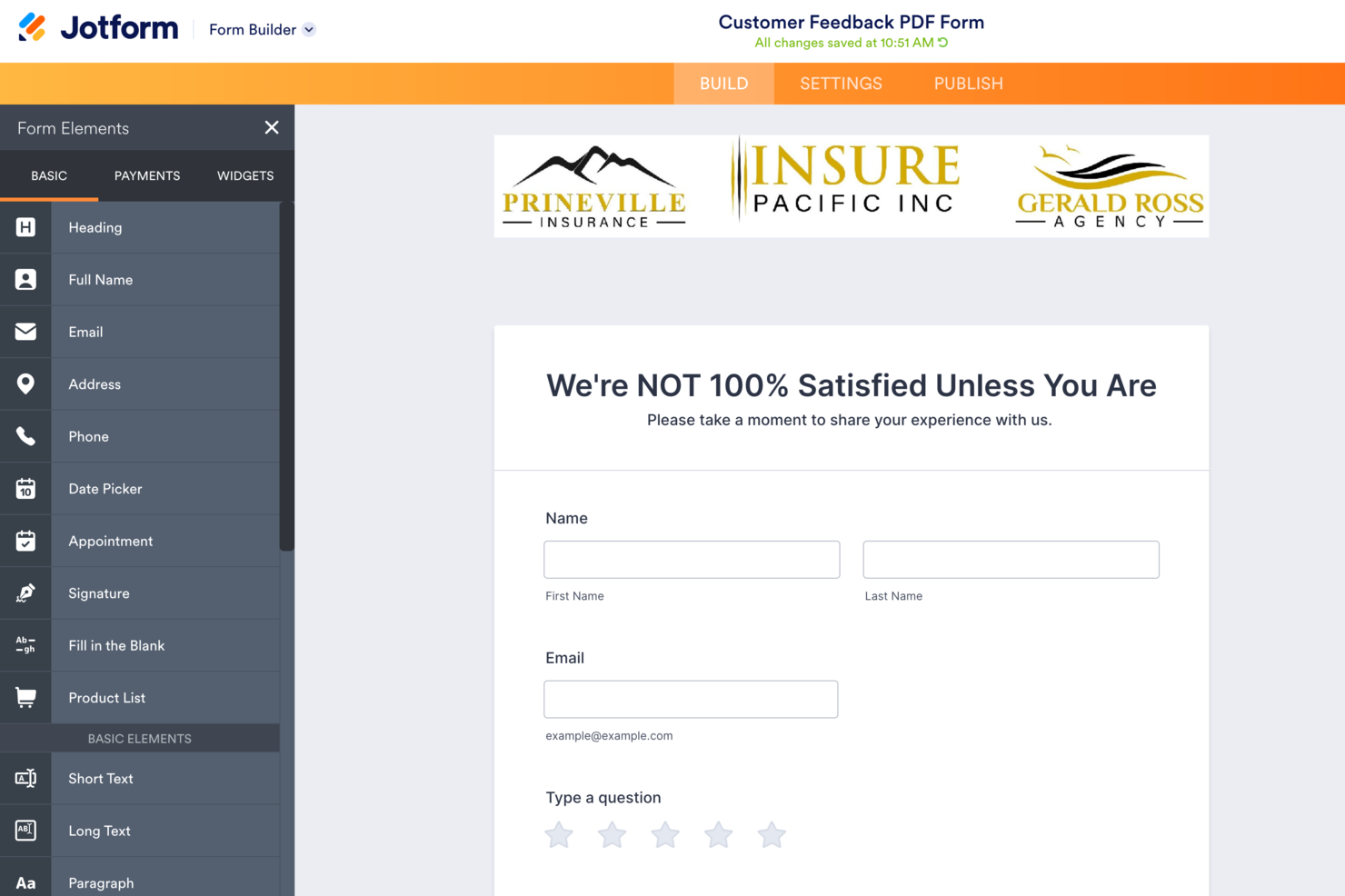
If you need to design highly customizable feedback forms for your organization, Jotform offers a flexible solution. Teams in education, healthcare, retail, and beyond can tailor digital forms to match branding, workflows, and data collection needs. Jotform is especially useful for businesses that want to gather structured feedback across multiple channels and automate how responses are routed or analyzed.
Who is Jotform Best For?
Operations and marketing teams in small to mid-sized organizations worldwide creating customizable digital forms for feedback collection.
Why I Picked Jotform
When collecting customer feedback requires more than just a basic survey, Jotform’s customizable digital forms make it a strong choice. I picked Jotform because it lets you build forms with advanced logic, conditional fields, and custom branding, so you can tailor every aspect to your organization’s needs. The drag-and-drop builder supports a wide range of question types and file uploads, which is helpful for gathering detailed feedback or supporting documentation. This flexibility is especially valuable for teams that want to control the look, feel, and flow of their feedback collection process.
Jotform Key Features
Some other features that make Jotform appealing for feedback collection include:
- Approval workflows: Route submitted feedback to specific team members for review or follow-up.
- Automated email notifications: Send instant alerts to stakeholders when new feedback is received.
- Data export options: Download feedback responses in formats like CSV, Excel, or PDF.
- HIPAA compliance: Collect sensitive feedback securely for organizations in regulated industries.
Jotform Integrations
Integrations include Salesforce, HubSpot, Google Sheets, Slack, Mailchimp, Dropbox, PayPal, Stripe, Google Drive, and Microsoft Teams.
Pros and Cons
Pros:
- Intuitive platform create forms in minutes
- Wide variety of templates and integrations
- Drag-and-drop interface makes customization effortless
Cons:
- Limited collaborative editing single editor bottleneck
- Customer service response can be slow


Hotjar combines user analytics with built-in feedback and survey tools, making it a strong choice for teams that want to connect behavioral data with direct user input. Digital product teams and UX researchers can use Hotjar to visualize user journeys and collect targeted feedback at key moments. This approach helps you understand not just what users do, but why they do it.
Who is Hotjar Best For?
UX researchers and product teams in small to mid-sized companies in North America and Europe analyzing user behavior alongside feedback data.
Why I Picked Hotjar
Hotjar stands out for customer feedback because it brings together user analytics and direct feedback tools in one platform. I picked Hotjar since it lets you pair heatmaps and session recordings with on-site surveys and feedback widgets, so you can see both what users do and what they think. This combination helps you pinpoint where users struggle and immediately collect their input at those moments. For teams that want to connect behavioral data with real user sentiment, Hotjar offers a unique approach.
Hotjar Key Features
Some other features that make Hotjar useful for gathering customer feedback include:
- Incoming Feedback widget: Collect quick, visual feedback from users as they browse your site.
- Survey targeting rules: Set conditions for when and where surveys appear to specific user segments.
- Customizable survey templates: Choose from a library of pre-built survey formats or create your own.
- CSV export for survey results: Download feedback data for further analysis or reporting.
Hotjar Integrations
Integrations include HubSpot, Slack, Google Analytics, Segment, Optimizely, Omniconvert, Zapier, Microsoft Teams, Google Optimize, and Shopify.
Pros and Cons
Pros:
- Intuitive dashboard accessible for non-technical teams
- Heatmaps and session recordings provide insights
- Easy setup and installation for websites
Cons:
- Session recording can slow page load
- Complex setup process for some users


If you’re looking for a customer feedback solution that’s tightly integrated with business messaging, Intercom brings feedback tools right into live chat and automated conversations. SaaS companies and support teams can use Intercom to gather feedback in the same place they manage customer interactions. This setup helps you capture insights in real time, directly from the flow of customer conversations.
Who is Intercom Best For?
Customer success and support teams in mid-sized companies worldwide managing business messaging with integrated feedback collection.
Why I Picked Intercom
What sets Intercom apart for customer feedback is how it weaves feedback collection directly into business messaging workflows. I picked Intercom because it lets you gather feedback through live chat, automated bots, and in-app messages, so you can capture insights while conversations are happening. This approach means you’re not relying on separate surveys or follow-ups—feedback becomes part of the natural customer interaction. For teams that want to act on feedback in real time, Intercom’s built-in tools make it easy to close the loop quickly.
Intercom Key Features
Some other features that make Intercom useful for collecting customer feedback include:
- Customizable survey templates: Build and launch feedback surveys tailored to your brand and goals.
- Conversation tagging: Tag conversations with feedback topics for easy tracking and reporting.
- Customer satisfaction (CSAT) surveys: Trigger CSAT surveys automatically after support interactions.
- Reporting dashboards: View feedback trends and survey results in real time.
Intercom Integrations
Native integrations are not publicly listed.
Pros and Cons
Pros:
- Easy-to-use features enhance customer support workflows
- Helpful AI enhances customer service interactions
- Clean UI/UX and conversations synced efficiently
Cons:
- Slow issue resolution and inconsistent support
- Lacks marketing attribution and Salesforce integration


Qualaroo stands out for teams that need to capture real-time feedback from users as they interact with your website or product. Digital product managers, UX researchers, and marketers can use Qualaroo’s targeted surveys to surface insights at key moments in the user journey. This approach helps you understand user intent and pain points while they’re still fresh.
Who is Qualaroo Best For?
Marketing and product teams in mid-sized organizations globally capturing real-time customer feedback directly within digital experiences.
Why I Picked Qualaroo
When I need to gather feedback in the moment, Qualaroo’s real-time targeting stands out. The tool lets you launch surveys that appear based on user behavior, so you can ask questions right when someone is making a decision or encountering an issue. I appreciate how Qualaroo’s Nudges™ let you collect insights without interrupting the user experience. For teams focused on capturing authentic, in-context feedback, these features make Qualaroo a strong choice.
Qualaroo Key Features
In addition to real-time targeting, Qualaroo offers several other features for collecting and analyzing customer feedback:
- AI-powered sentiment analysis: Automatically interpret open-ended survey responses to identify trends and emotions.
- Question branching: Customize survey paths based on how users answer previous questions.
- Multi-channel deployment: Launch surveys on websites, mobile apps, and within products.
- Response export options: Download feedback data in multiple formats for further analysis.
Qualaroo Integrations
Integrations include Salesforce, Tableau, Intercom, Slack, HubSpot, Marketo, Eloqua, Mailchimp, Google Analytics, and FullStory.
Pros and Cons
Pros:
- Easy survey creation with templates and languages.
- AI-powered sentiment analysis yields deeper insights.
- Advanced targeting reaches specific audiences effectively.
Cons:
- Steep learning curve for first-time users.
- Limited export formats and no bulk actions.


Gainsight is built for teams that want to connect customer feedback with detailed product usage analytics and reporting. It’s especially useful for SaaS companies and customer success leaders who need to understand how feedback aligns with actual user behavior. By combining survey data with in-depth usage metrics, Gainsight helps you identify trends and prioritize improvements based on real product engagement.
Who is Gainsight Best For?
Customer success and product analytics teams in mid-sized to large enterprises worldwide analyzing feedback tied to product usage data.
Why I Picked Gainsight
When you need to connect feedback with real product usage, Gainsight stands out for its analytics and reporting capabilities. The platform lets you overlay survey responses with granular usage data, so you can see how feedback aligns with actual customer behavior. I appreciate how Gainsight’s dashboards make it easy to spot trends and identify which features drive satisfaction or frustration. For teams focused on data-driven product decisions, these analytics tools are a strong fit.
Gainsight Key Features
Some other features that make Gainsight valuable for customer feedback teams include:
- Automated customer health scoring: Track customer health using customizable scoring models.
- Playbooks for follow-up actions: Assign and manage follow-up tasks based on feedback triggers.
- NPS and CSAT survey tools: Launch and manage Net Promoter Score and customer satisfaction surveys.
- Customer journey mapping: Visualize and manage customer touchpoints across the lifecycle.
Gainsight Integrations
Integrations include Salesforce, Zendesk, Jira, Slack, Intercom, ServiceNow, Segment, Snowflake, Google Analytics, and Mixpanel.
Pros and Cons
Pros:
- Powerful health scoring and segmentation tools
- Deep Salesforce integration for customer data
- Easy to use and customizable
Cons:
- Clunky interface requiring too many clicks
- Steep learning curve and complex configuration


If you’re looking to collect feedback from specific customer segments, Pendo offers advanced targeting and analytics built for product teams and customer experience leaders. The platform helps SaaS companies and digital product owners gather, organize, and act on feedback from different user groups within a single interface. This makes it easier to prioritize improvements based on the needs of your most valuable segments.
Who is Pendo Best For?
Product operations and analytics teams in mid-sized to large SaaS organizations globally gathering feedback across defined customer segments.
Why I Picked Pendo
Segmenting feedback by user type is a challenge for many teams, and that’s where Pendo excels. The platform lets you filter and analyze feedback based on customer segments, so you can see what matters most to different groups—like new users, power users, or enterprise accounts. I like that you can tie feedback directly to in-app behavior, which helps you understand context and prioritize requests. For teams that need to align product decisions with the needs of specific audiences, Pendo’s segmentation features are a strong fit.
Pendo Key Features
Some other features that make Pendo useful for customer feedback management include:
- In-app surveys: Collect feedback directly within your product interface.
- Product usage analytics: Track how users interact with features and pages.
- Guided onboarding flows: Create walkthroughs and tooltips to support new users.
- Feedback-to-roadmap linking: Connect user feedback to product roadmap items for better visibility.
Pendo Integrations
Integrations include HubSpot, Intercom, Jira, Marketo, Okta, Salesforce, Segment, Zendesk, Tableau, and Slack.
Pros and Cons
Pros:
- Outstanding support team ensures smooth onboarding
- Automation streamlines requests and follow-up workflows
- Intuitive interface simplifies review management tasks
Cons:
- Limited customization options for outreach emails
- Some features and UI feel clumsy

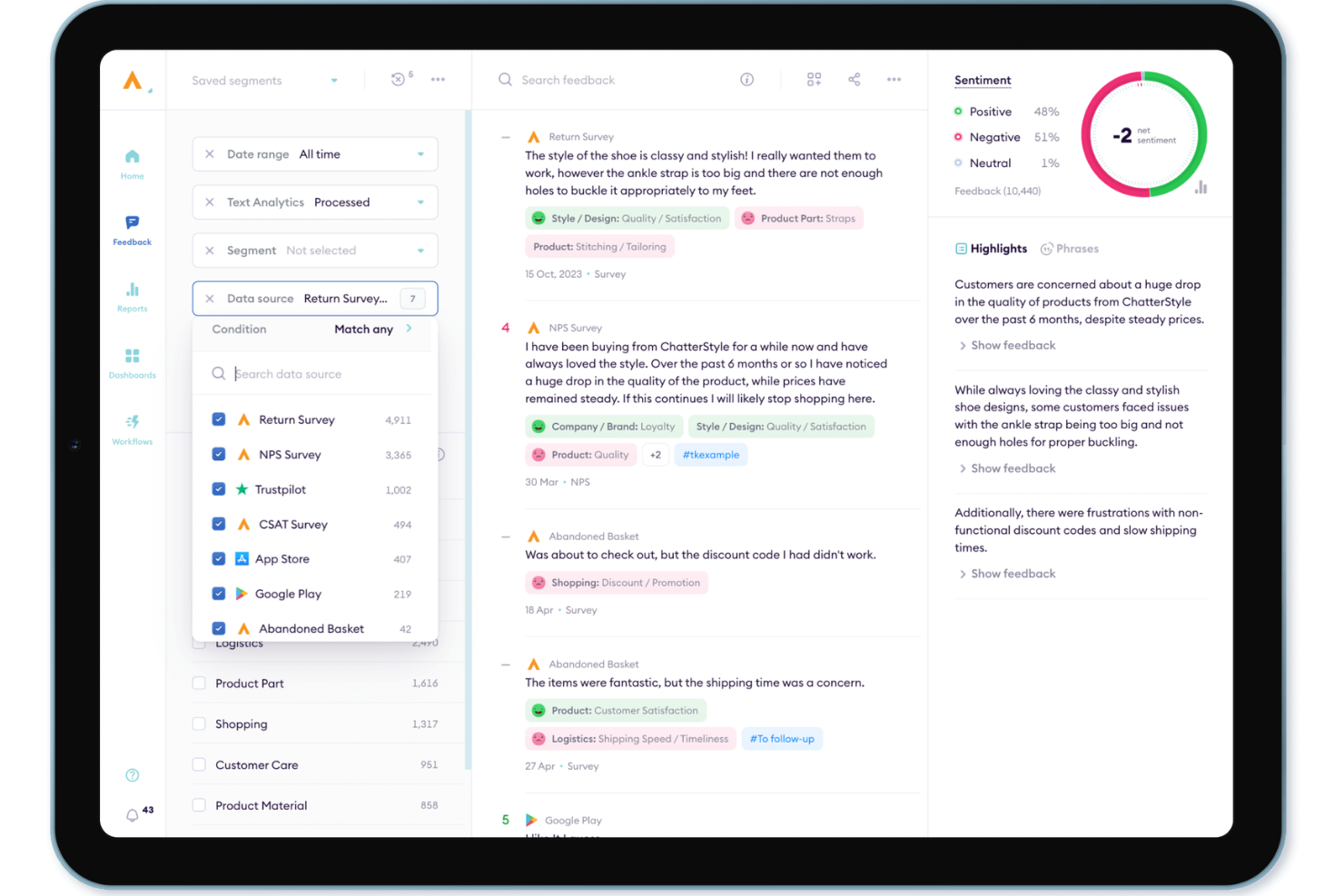
Alchemer is an enterprise-grade solution built for organizations that need to move beyond static data collection and toward strategic feedback loops. Catering to industries from SaaS to high-volume retail, the platform excels at capturing high-signal data and embedding it directly into existing business processes. By focusing on both the "how" and "where" of data collection, Alchemer addresses the critical need for a centralized system that bridges the gap between customer sentiment and executive decision-making.
Why I Picked Alchemer
I selected Alchemer for this list because of its sophisticated Alchemer Pulse engine, which solves the "black hole" of open-text feedback. While most tools struggle with unstructured data, Pulse uses AI to automatically categorize themes and sentiment in real time, allowing teams to instantly prioritize product requests or service fixes. It is a compelling choice for mature CX teams who need to synthesize high volumes of global feedback into a single, coherent narrative for stakeholders.
Alchemer Key Features
In addition to its AI-driven insights, I also found the following features beneficial:
- Customizable Surveys: Tailor feedback forms to suit your specific business requirements, ensuring you gather the most relevant data.
- Real-Time Feedback Collection: Engage with customers through various channels like SMS, email, and in-app prompts, capturing immediate insights.
- Automated Feedback Routing: Direct feedback to the appropriate teams for quick analysis and response, enhancing operational efficiency.
- Mobile App & Digital Intercepts: Engage users in-the-moment with precisely timed prompts and "micro-surveys" inside mobile apps and websites, capturing feedback without disrupting the user journey.
Alchemer Integrations
Integrations include Salesforce, Microsoft Dynamics, HubSpot, Slack, Zendesk, Tableau, Google Analytics, Marketo, and Adobe Analytics.
Pros and Cons
Pros:
- Provides customizable survey logic for tailored data collection
- Advanced data analysis capabilities with filtering and exporting options
- Offers extensive question types for diverse feedback needs
Cons:
- Some users may find the cost a drawback despite its capabilities
- Lacks significant analytics and logic features in the free version


Usersnap gives product teams and customer experience professionals a way to collect visual feedback directly from users. It’s especially useful for SaaS companies, web agencies, and digital product teams that need annotated screenshots and screen recordings to understand user issues. By capturing feedback in context, Usersnap helps you pinpoint bugs, usability problems, and feature requests with clear visuals.
Who is Usersnap Best For?
Product and QA teams in small to mid-sized technology companies globally collecting visual feedback from users during testing and live use.
Why I Picked Usersnap
For teams that need to capture feedback with clear visuals, Usersnap offers a unique approach to collecting user input. The tool lets users submit annotated screenshots and screen recordings directly from your website or app, making it easy to see exactly what issues or suggestions they have. I like that Usersnap’s feedback widget can be customized to fit different workflows, so you can gather bug reports, feature requests, or general comments in a way that suits your process. This focus on visual context helps product and support teams quickly understand and act on user feedback.
Usersnap Key Features
Some other features that make Usersnap useful for feedback collection include:
- Customizable feedback forms: Tailor forms to collect specific information from users.
- Project-based organization: Sort and manage feedback by project for easier tracking.
- Automated notifications: Receive alerts when new feedback is submitted.
- Integration with project management tools: Connect feedback directly to tools like Jira, Trello, and Asana.
Usersnap Integrations
Integrations include Jira, Azure DevOps, Zendesk, Slack, GitHub, Trello, Asana, Intercom, Microsoft Teams, and Linear.
Pros and Cons
Pros:
- Visual feedback aids bug tracking
- Seamless integration with project tools
- Easy to set up and use
Cons:
- Custom fields sometimes missing options
- File uploads sometimes slow or lagging


Lumoa is designed for CX leaders and teams who need to turn real-time customer feedback into actionable insights. It’s especially useful for organizations handling large volumes of feedback across multiple channels and languages. With its AI-driven analysis, Lumoa helps you quickly spot trends, pain points, and opportunities as they emerge.
Who is Lumoa Best For?
Customer experience analysts in mid-sized organizations in Europe and North America tracking real-time feedback insights across touchpoints.
Why I Picked Lumoa
When you need to act on feedback as soon as it comes in, Lumoa stands out for its real-time insights. The platform uses AI to analyze feedback from multiple channels instantly, so you can spot emerging issues or trends without delay. I appreciate that Lumoa automatically categorizes comments and highlights urgent topics, making it easier for teams to prioritize action. This focus on immediate, actionable insights is especially valuable for organizations that want to stay ahead of customer needs.
Lumoa Key Features
Some other features that make Lumoa useful for feedback management include:
- Multi-language support: Analyze and categorize feedback in over 60 languages.
- Custom dashboards: Build dashboards tailored to specific teams or business units.
- Role-based access controls: Set permissions for different users and departments.
- Automated report scheduling: Send recurring feedback reports to stakeholders on a set schedule.
Lumoa Integrations
Integrations include Netigate, Qualtrics, SurveyMonkey, Zendesk, Salesforce, HubSpot, Microsoft Dynamics, Freshdesk, Intercom, and Trustpilot.
Pros and Cons
Pros:
- Responsive to customer ideas and suggestions
- GPT summaries provide quick sentiment overviews
- Great at collecting and analyzing feedback
Cons:
- Limited resources lead to slower updates
- Support quality varies between representatives


If your business relies on building a strong online reputation, GatherUp is built to help you collect and showcase customer reviews across major platforms. It’s a good fit for local businesses, agencies, and multi-location brands that want to turn customer feedback into public endorsements. GatherUp streamlines the process of requesting, monitoring, and leveraging reviews to boost your company’s visibility and trust.
Who is GatherUp Best For?
Marketing and reputation management teams in small to mid-sized businesses in North America managing customer feedback tied to public reviews.
Why I Picked GatherUp
For businesses focused on growing their reputation through customer reviews, GatherUp offers targeted tools that make this process much easier. The platform lets you automate review requests and collect feedback directly from customers, which helps you build a steady stream of public endorsements.
I like that GatherUp also monitors major review sites and pulls in new reviews so you can respond quickly and manage your online presence from one place. These features make it a strong choice for anyone who wants to turn customer feedback into visible company reviews.
GatherUp Key Features
Some other features that make GatherUp useful for managing customer feedback include:
- Customer feedback widgets: Add customizable widgets to your website to display recent reviews and testimonials.
- Net Promoter Score (NPS) tracking: Measure customer loyalty and satisfaction with built-in NPS surveys.
- White-labeling options: Brand the platform and communications with your own company’s logo and colors.
- Multi-location management: Organize and monitor feedback for multiple business locations from a single dashboard.
GatherUp Integrations
Integrations include Salesforce, Mailchimp, Constant Contact, Google Sheets, QuickBooks Online, Toast, and Athena Health.
Pros and Cons
Pros:
- Automated review requests and follow-up workflows
- Highly customizable review requests and follow-ups
- Simple, user-friendly and intuitive interface design
Cons:
- Platform not fully customizable or cluttered
- Customer support can be slow
Other Customer Feedback Software
Here are a few more worthwhile options that didn’t make it into my top 20 list of the best customer feedback software, but are still worth checking out:
- AskNicely
For third-party review platform connectors
- Clootrack
For unsupervised themes driving decisions
- InputKit
Automated surveys for customer service feedback
- UserGuiding
For its customer microsurveys with real-time insights
- Survicate
For gathering customer insights
- LiveAgent
For turning feedback into tickets
- ReviewFlowz
For SaaS review generation
- Canny
For tracking customer feedback and feature requests
- PathPro
For a feature voting system


Related Customer Feedback Software
If you still haven't found what you're looking for here, check out these related customer feedback software that we've tested and evaluated.
- Customer Service Software
- Help Desk Software
- Call Center Software
- Customer Messaging Platform
- Digital Experience Platform
- Sentiment Analysis Tools
What is Customer Feedback Software?
Customer feedback software is a platform that collects, manages, and analyzes feedback across customer touchpoints. It helps businesses surface insights to improve products, services, and experiences.
Selection Criteria for Customer Feedback Software
Selecting customer feedback software requires a detailed analysis of its functionality and how well it meets specific use cases. Here’s how I evaluate these solutions.
Core Functionality: 25% of total weighting score
- Collecting feedback across multiple channels (e.g., email, web, mobile).
- Analyzing feedback for actionable insights.
- Integrating with other CX and CRM tools to enrich customer profiles.
- Automating the collection and analysis of feedback.
- Personalizing follow-up actions based on feedback received.
Additional Standout Features: 25% of total weighting score
- Advanced analytics capabilities, such as predictive analytics.
- Video feedback or interactive polls to enhance engagement.
- Seamless integrations with a wider range of business tools not commonly supported.
- Customizable feedback loops for specific customer segments.
- Use of AI and machine learning to automatically categorize and prioritize feedback.
Usability: 10% of total weighting score
- A clean and intuitive interface
- The balance between powerful features and ease of use
- Drag-and-drop functionality for survey creation and template customization.
Onboarding: 10% of total weighting score
- Comprehensive training materials, such as video tutorials, templates, and interactive product tours.
- Dedicated support during onboarding, including chatbots and webinars.
Customer Support: 10% of total weighting score
- Responsive support teams available through multiple channels (e.g., live chat, email, phone).
- Knowledgeable community or forum where users can exchange tips and solutions.
- Proactive support, including regular updates and guidance on new features.
Value For Money: 10% of total weighting score
- Pricing structures that offer flexibility for businesses of all sizes.
- The range of features available in relation to the price.
- Free trials or freemium plans that allow businesses to test the software before committing.
Customer Reviews: 10% of total weighting score
- Consistency in positive feedback regarding usability, support, and functionality.
- How the tool has helped businesses improve their customer feedback management.
- Reported drawbacks or limitations and how they might impact your specific needs.
How to Choose Customer Feedback Software
It’s easy to get bogged down in long feature lists and complex pricing structures. To help you stay focused as you work through your unique software selection process, here’s a checklist of factors to keep in mind:
| Factor | What to Consider |
|---|---|
| Scalability | Ensure the software can grow with your business. It should handle increased data and user numbers without performance issues. |
| Integrations | Look for software that connects with existing tools your team uses, like CRM systems or email platforms, to streamline workflows. |
| Customizability | The software should allow personalization to fit your processes, like modifying feedback forms or dashboards to meet specific needs. |
| Ease of Use | Choose a platform that's intuitive for all team members. A steep learning curve can slow down adoption and effectiveness. |
| Budget | Consider not just the initial cost but also ongoing expenses. Ensure it fits within your financial plans without hidden fees. |
| Security Safeguards | Verify robust security measures are in place to protect sensitive customer data from breaches and comply with regulations like GDPR. |
| Reporting Tools | Ensure the software offers comprehensive reporting features that help analyze feedback efficiently, turning data into actionable insights. |
| Customer Support | Opt for a provider with strong support services to assist your team during implementation and troubleshooting. |
Trends In Customer Feedback Software
The evolution of customer feedback software is marked by several distinct trends that reflect a shift towards more engaging, integrated, and insightful approaches to capturing customer feedback.
Here's a distilled overview of the key trends:
- Holistic Feedback Collection and Analysis: Comprehensive solutions that gather feedback across multiple touchpoints capture a full spectrum of customer experiences, providing businesses with a more detailed and nuanced understanding of their customers.
- Enhanced Engagement and Response Rates: There's a noticeable pivot towards making feedback mechanisms more engaging and interactive. The use of conversational interfaces and the automation of feedback collection at critical moments increase response rates by making the process more intuitive and less intrusive for customers.
- Prioritizing Accessibility and User-Friendly Design: By ensuring that these tools are straightforward and accessible to all users, businesses can broaden their reach and ensure that no valuable feedback is lost due to technological barriers or design oversights.
- Decreasing Importance of Traditional Surveys: A shift away from traditional, lengthy surveys towards more dynamic and engaging feedback forms indicates a changing landscape. This trend reflects a broader recognition of customer time constraints and the need for feedback processes that are not only efficient but also capable of capturing high-quality insights.
Together, these trends point towards a future where customer feedback mechanisms are more integrated, responsive, and user-focused. This evolution suggests that businesses will have access to deeper, more actionable insights, enabling them to foster stronger, more informed relationships with their customers.
Features of Customer Feedback Software
When selecting customer feedback software, keep an eye out for the following key features:
- In-app feedback: Capture immediate thoughts from users without making them leave your product experience. In-app feedback is all about collecting real-time impressions and reactions, usually via short surveys that seamlessly pop up inside your software, helping you get more genuine and timely responses.
- Automated surveys: Set up surveys that are automatically triggered after specific interactions or events. With this feature, you keep the feedback loop running on autopilot, making it easier for you to gather fresh, unbiased input right when customer experiences are still top of mind—no extra chasing required.
- Survey builder tools: Create custom surveys, quizzes, and questionnaires using intuitive drag-and-drop tools or handy templates. A robust survey builder gives you the flexibility to ask the questions you actually care about, making the process smoother (and less intimidating) for both you and your respondents.
- Analytics: Dive deep into all the feedback data you collect. With built-in analytics, you can spot patterns, understand customer trends, and pinpoint problem areas, helping you translate individual opinions into actionable business improvements.
- Segmentation: Break down feedback by different user groups based on demographics, purchase history, or engagement. Segmentation lets you see what specific audiences are saying, so you can personalize your responses and tweak your product or service for maximum impact.
- Workflows: Automate how you handle incoming feedback, from routing to follow-up actions. With workflows, you can make sure every piece of feedback gets the right attention—assigning tasks, triggering alerts, or even sending thank-you notes automatically—so nothing falls through the cracks.
- Feature requests: Track, prioritize, and organize suggestions for new features or enhancements. This feature turns your customer feedback loop into a direct line for product innovation, helping you focus your development efforts on the updates your users actually want.
- Form builder: Build flexible, custom feedback forms tailored to different touchpoints in the user journey. A form builder lets you ask targeted questions, whether you’re probing post-purchase satisfaction or getting thoughts on support interactions.
- Sentiment analysis: Understand the emotional undertones of your customer feedback automatically. Sentiment analysis highlights whether your users feel frustrated, delighted, or somewhere in between, sharpening your sense of where to double down or pivot your strategy.
Benefits of Customer Feedback Software
By leveraging customer feedback software, businesses can directly tap into the pulse of their customer base, gaining invaluable insights that inform product development, service enhancements, and customer experience strategies. Here are five primary benefits of customer feedback software:
- Insights into customer needs and preferences: Allows precise tailoring of products and services. This direct line to customer feedback illuminates what users truly want, enabling businesses to refine their offerings and ensure they meet the market's demands effectively.
- Identifying areas for improvement: Pinpoints specific challenges within the customer experience. By systematically analyzing customer feedback, businesses can identify and address issues promptly, enhancing the overall quality of their service and product offerings.
- Data-driven decision-making: Supports informed strategic choices. Customer feedback provides a solid foundation of data, helping businesses to move beyond guesswork and make decisions that are anchored in real user experiences and preferences.
- Improved customer satisfaction and loyalty: Builds stronger relationships with customers. Acting on feedback demonstrates to customers that their opinions are valued, fostering a sense of belonging and loyalty. This can lead to increased customer retention and positive word-of-mouth.
- Staying competitive: Ensures relevance in a fast-paced market. Regular feedback helps businesses stay aligned with customer expectations and ahead of evolving trends, enabling them to adapt swiftly and maintain a competitive edge.
Costs And Pricing For Customer Feedback Software
Whether you're running a small startup or a large enterprise, there's a wide range of customer feedback software options available, each with its own set of features, capabilities, and pricing plans. These solutions can range from simple survey tools to comprehensive feedback management platforms, catering to different business needs and budgets.
For those with little to no experience in using such software, understanding the various plan options and their pricing can be a crucial step in selecting the right tool for your business.
| Plan Type | Average Price | Common Features |
|---|---|---|
| Free | $0 | Basic surveys, Limited responses, Email support, Basic analytics |
| Basic | $10 - $50/month | Advanced survey options, Unlimited responses, Email and chat support, Basic analytics, Custom branding |
| Professional | $50 - $200/month | Comprehensive feedback tools, Advanced analytics, Multi-user access, Integration with CRM systems, Priority support |
| Enterprise | $200+/month | Customizable feedback channels, Full analytics suite, Dedicated account manager, Custom integrations, 24/7 support |
When considering customer feedback software, it's important to assess both your current and future needs, as well as your budget. Start with a plan that offers the essential features you need today, knowing you can upgrade as your business grows and your requirements become more sophisticated.
Customer Feedback Software FAQs
Here are a few questions I wanted to address while writing on what tool provides feedback on the customer experience.
What types of feedback can customer feedback software collect?
Customer feedback software can collect various input types like surveys, NPS, CSAT, open-ended comments, product suggestions, and in-app ratings. You can gather feedback through email, SMS, website pop-ups, and embedded widgets. Some platforms also capture voice feedback or analyze customer support interactions, helping you understand experience across key touchpoints. Choose tools that offer flexibility in formats so you can match feedback channels to your customer journey.
How do I create a customer feedback system?
Start by mapping which friction points you want to measure in your customer journey. Select a software tool that supports multiple feedback channels and integrates with your core systems. Set clear goals—like tracking NPS or identifying support issues. Use templates or automation to schedule outreach. Most platforms will let you trigger surveys post-purchase, after support, or at other milestones. Regularly review results and calibrate your system based on evolving business needs.
How do these customer feedback tools handle data privacy and GDPR compliance?
Most leading tools are GDPR compliant and offer controls for data retention, consent management, and user access. Look for platforms that provide audit trails, anonymization options, and secure data storage within your region. Always review each vendor’s privacy policy and settings to ensure you can meet company requirements and customer expectations.
Can customer feedback software help in identifying customer trends over time?
Yes, customer feedback software can analyze responses over time to spot patterns and changes in sentiment, NPS, or satisfaction scores. Most tools feature dashboards and trend reports that let you filter results by date, team, or product. This makes it easy for CX leaders to understand long-term shifts and proactively address emerging issues or capitalize on positive momentum.
How can I automate follow-up actions based on customer feedback?
You can set rules in most platforms to trigger automatic alerts, route negative feedback to support, or send thank-you emails after a response. Integrating with CRMs or workflow tools lets you assign follow-up tasks or escalate urgent issues. Automation ensures no feedback slips through the cracks and keeps your team accountable without the manual effort.
What integrations should I look for in customer feedback software?
Prioritize integrations with your CRM (like Salesforce or HubSpot), help desk (Zendesk, Intercom), and communication platforms (Slack, Teams). Connections to email marketing and analytics tools are also valuable. Seamless integrations let you centralize customer insights, automate feedback collection, and act on findings faster.
How do I increase response rates for customer feedback requests?
Keep surveys short and relevant. Personalize invites and tell customers how their input will be used. Time requests after a meaningful interaction—for example, after a support call or product delivery. Some tools allow reminders or incentives, but always balance frequency and value to avoid survey fatigue.
What are some pitfalls to avoid when implementing customer feedback software?
Don’t collect feedback without a clear plan for acting on it—customers notice when their input goes nowhere. Avoid overwhelming customers with too many requests, and don’t rely only on one type of survey. Failing to involve key internal teams can slow adoption. Test your process on a small scale to spot workflow issues before going live.
What Do You Think About This List?
Up to 74% of customers will switch to a competitor if your path to purchase is too difficult for them to navigate. Collecting feedback is the best way to discover the information you need to build top-notch CX products. That's where customer feedback software can help. This list contains some of the best options available for collecting that feedback.
Some of the tools are dedicated to this single task, while others have more complex features. Choose the best one for you by considering what you need and then trying out a few of the tools that offer this functionality.
For more information about improving your business's customer experience, sign up for our newsletter.