
32 Best Feedback Management Tools For 2026

20 Best Feedback Management Tools Shortlist
Here's my pick of the 20 best software from the 32 tools reviewed.


Feedback management tools help your team collect, organize, and act on customer insights without drowning in noise. They’re built to centralize feedback from multiple channels, surface patterns that matter, and close the loop with customers.
I've reviewed these tools based on how well they support collection, tagging, analysis, integrations, and feedback-to-action workflows. This guide breaks down the best feedback management platforms for different team sizes and goals, so you can so you can build better experiences.
What Is a Feedback Management Tool?
A feedback management tool is a digital platform that helps businesses collect, organize, and analyze feedback from customers or employees. It streamlines how teams capture insights and is used to inform product decisions, improve service, and track satisfaction over time, and often plays a crucial role in enhancing product development, improving customer service, and fostering customer loyalty.
The Best Feedback Management Software Comparison Chart
Here’s a comparison chart that summarizes basic details about each of my top feedback management software selections. You can view pricing details and the availability of free trials or demos side-by-side to help you find the best software for your budget and business needs.
| Tool | Best For | Trial Info | Price | ||
|---|---|---|---|---|---|
| 1 | Best for transforming feedback into insights | 7-day free trial + free demo available | From $55/user/month | Website | |
| 2 | Best for advanced survey design and analytics | Free trial + free plan + free demo available | From $39/month (billed annually) | Website | |
| 3 | Best for visual feedback with context | Free plan available | From $7/user/month | Website | |
| 4 | Best for unifying customer feedback | Free demo available | Pricing upon request | Website | |
| 5 | Best for unifying feedback sources | Free demo available | Pricing upon request | Website | |
| 6 | Best for automating customer feedback analysis | Free 14-day trial + free demo available | Pricing upon request | Website | |
| 7 | Best for comprehensive customer feedback programs | Free 10-day trial available | From $55.99/month | Website | |
| 8 | Best for automated customer review requests | 14-day free trial | From $39/agent/month | Website | |
| 9 | Best for tracking customer feedback and feature requests | Free plan available | From $19/month | Website | |
| 10 | Best for creating engaging, interactive forms | Free plan available | From $25/user/month (billed annually) | Website | |
| 11 | Best for measuring customer satisfaction scores | 14-day free trial | From $39/month/up to 100 responses | Website | |
| 12 | Best for omni-channel customer support teams | 14-day free trial + free demo available | From $49/agent/month (billed annually) | Website | |
| 13 | Best for creating customizable, detailed surveys | Free plan available | From $30/user/month (billed annually) | Website | |
| 14 | Best for comprehensive product feedback management | Free demo available | from $500/month (min 5 seats) | Website | |
| 15 | Best for analyzing feedback at scale with AI | 14-day free trial + free plan available | From $175/month (billed annually) | Website | |
| 16 | Best for advanced user experience research | Free trial + free demo available | Pricing upon request | Website | |
| 17 | Best for simplicity and easy sharing of forms | Free with Google Account | From $7/user/month (billed annually) | Website | |
| 18 | Best for integrating survey feedback with CRM | Free plan available | From $7.42/month (billed annually) | Website | |
| 19 | Best for collecting and leveraging customer reviews | Free plan available | From $299/month/domain | Website | |
| 20 | Best for Salesforce users seeking integrated feedback | Free 14-day trial | Pricing upon request | Website |

-

SupportYourApp
Visit WebsiteThis is an aggregated rating for this tool including ratings from Crozdesk users and ratings from other sites.4.7 -
Freshdesk
Visit WebsiteThis is an aggregated rating for this tool including ratings from Crozdesk users and ratings from other sites.4.4 -
Zendesk
Visit WebsiteThis is an aggregated rating for this tool including ratings from Crozdesk users and ratings from other sites.4.3





The 20 Best Feedback Management Tools Reviews
I’ve provided detailed summaries of my top feedback management tool choices and explained why I included each system in this list.

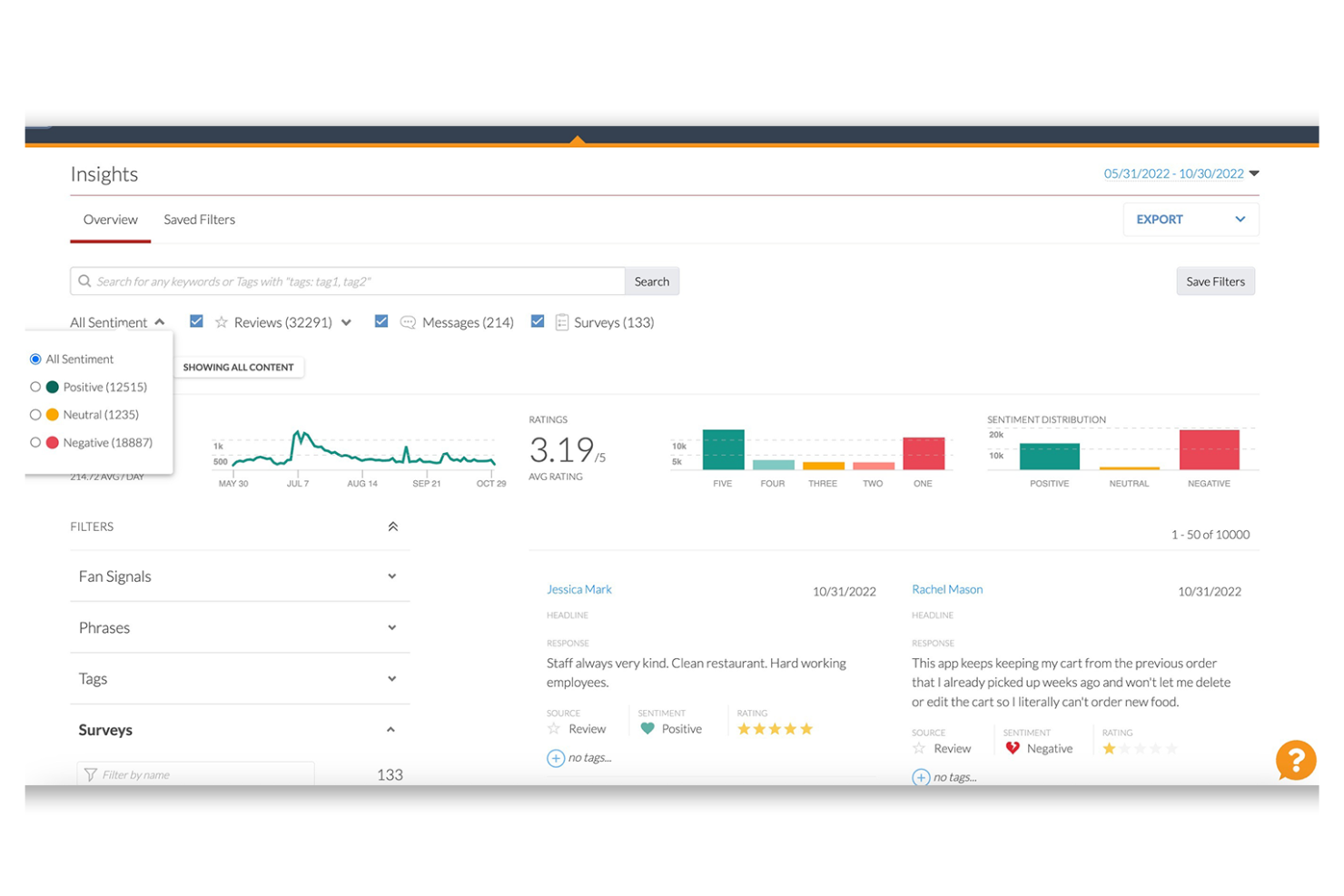
For those seeking a solution to optimize feedback collection and analysis, Alchemer stands out as an adaptable platform tailored to improve customer engagement and derive insights. This tool is particularly appealing to businesses across industries such as government, education, and retail, where understanding customer sentiment is crucial for driving improvements.
Why I Picked Alchemer
I picked Alchemer because it excels in transforming feedback into actionable insights, a crucial aspect of feedback management. Its in-app customer interactions allow you to engage with users directly and gauge sentiment through features like Love Dialogs and Rating Dialogs. Additionally, the experience customization feature lets you align interaction designs with your brand, including multilingual support, which is vital for diverse audiences. The platform's reporting and analytics tools offer detailed metrics on customer sentiment and engagement, ensuring you stay informed and responsive to customer needs.
Alchemer Key Features
In addition to its unique selling propositions, here are some other features you may find valuable:
- Customizable Surveys: Design surveys that reflect your brand's identity, with options for various question types and logic to enhance response quality.
- Real-time Feedback Collection: Capture and analyze feedback as it happens, allowing for quick responses and adjustments to customer needs.
- Role-based Dashboards: Provide tailored insights and reporting tools to different team members, ensuring relevant data is accessible to the right people.
- AI-driven Analysis: Utilize AI technology to delve deeper into customer sentiments and trends, providing a more comprehensive understanding of feedback.
Alchemer Integrations
Integrations include Salesforce, HubSpot, Zendesk, Slack, Tableau, Marketo, and Shopify.
Pros and Cons
Pros:
- Continuous updates and new features keep the platform relevant
- Multilingual support broadens audience engagement possibilities
- Role-based dashboards facilitate targeted data access
Cons:
- Mobile survey creation can be somewhat challenging
- Some users report a need for more advanced analytics


Sogolytics is an advanced feedback management tool designed to help organizations of all sizes gather, analyze, and act on critical feedback from various stakeholders. The platform's intuitive design and robust features make it a good choice for anyone needing reliable and insightful data collection and analysis tools.
Why I Picked Sogolytics: One of the reasons Sogolytics excels as a feedback management tool is its powerful analytics capabilities. The platform provides live reports and response trend analysis, allowing users to gain immediate insights into their data. Advanced reporting features like cross-tab analysis and conditional formatting help in identifying patterns and trends within the feedback, making it easier to draw meaningful conclusions. Additionally, Sogolytics' Omni report offers a comprehensive view of all feedback data.
Another standout feature is the platform's ability to personalize survey experiences. Sogolytics includes tools such as automated reminders and personalized survey invitations. It also has advanced branching and skip logic to ensure that respondents are only presented with relevant questions.
Standout Features & Integrations:
Features include ready-to-use survey templates that cater to various purposes, from customer satisfaction to employee engagement. It also supports anonymous surveys and has an intuitive drag-and-drop interface that simplifies survey creation, allowing users to design professional surveys without extensive technical knowledge.
Integrations include Google Drive, HubSpot, Mailchimp, Microsoft Teams, Salesforce, Slack, SurveyMonkey, Trello, Webhooks, and Zendesk.
Pros and Cons
Pros:
- Supports multiple languages
- Variety of templates and design options for surveys
- Advanced metrics and custom KPIs
Cons:
- Some advanced features may come with a learning curve
- The free version has limited features
New Product Updates from Sogolytics

Sogolytics Launches AI-Powered Experience Navigator
Sogolytics introduces Experience Navigator, an AI-powered tool for building strategy and action plans. This update helps teams turn goals into tailored execution plans with relevant metrics and projects in minutes. For more information, visit Sogolytics’ official site.
 .
.

Userback offers a tailored solution that simplifies the collection and analysis of user feedback. With features like feedback widgets, user surveys, and session replays, your team can gather actionable insights and respond to user needs with precision. By integrating into your existing workflow, Userback helps eliminate guesswork and fosters collaboration, ultimately driving product improvements and customer satisfaction.
Why I Picked Userback
I picked Userback for its exceptional ability to provide visual feedback with contextual depth, which is ideal for teams looking to capture user experiences accurately. With features like annotated screenshots and screen recordings, you can receive feedback that highlights specific issues directly on visuals, eliminating ambiguity. This approach allows your team to understand user challenges better and prioritize improvements effectively. By integrating these visual feedback tools into your workflow, you can address user needs swiftly and enhance overall product development.
Userback Key Features
In addition to its visual feedback capabilities, Userback offers a suite of features designed to elevate your feedback management process.
- Feedback Widget: This feature allows you to collect feedback directly from within your website or application, making it easy for users to share their insights without leaving the page.
- User Surveys: Customize and deploy surveys to gather detailed user feedback and understand their experiences and preferences better.
- Feature Portal: Engage users by providing a dedicated portal where they can suggest new features and vote on existing ones, fostering a sense of community and involvement.
- Session Replay: Capture and review user sessions to gain a deeper understanding of how users interact with your product, helping you pinpoint areas for improvement.
Userback Integrations
Integrations include Jira, Slack, ClickUp, Intercom, Asana, Linear, Notion, GitHub, Microsoft Teams, and Zendesk.
Pros and Cons
Pros:
- Centralized dashboard for organizing and prioritizing feedback
- Offers public roadmaps and feature voting
- Supports visual feedback with screenshots, annotations, and video
Cons:
- Occasional issues with data export and reporting
- Performance can be affected in certain web environments
New Product Updates from Userback

Userback Introduces AI Assist for Feedback Management
Userback introduces AI Assist features, including Similar Feedback and AI Comment. These updates improve feedback management by helping teams identify trends and respond more efficiently. For more information, visit Userback's official site.
 .
.

Enterpret is an AI-driven customer intelligence platform designed for businesses that aim to enhance their product management and customer experience through detailed feedback analysis. By consolidating feedback from over 50 sources, Enterpret appeals to organizations looking to transform customer insights into actionable strategies. It provides advanced features such as adaptive taxonomy and AI agents to automate resolution, addressing the challenge of managing vast amounts of customer feedback and turning it into valuable business insights.
Why I Picked Enterpret
I picked Enterpret for its unique ability to unify customer feedback from multiple sources and turn it into actionable insights. The platform's adaptive taxonomy allows you to organize feedback by themes and impact, making it easier to prioritize product improvements. Additionally, Interpret's AI agents automate workflows, significantly reducing the time your team spends on manual tasks. This combination of features makes Enterpret an ideal choice for businesses looking to streamline their feedback management processes and enhance decision-making.
Enterpret Key Features
In addition to unifying customer feedback, Enterpret offers:
- Customer Knowledge Graph: This feature provides contextual insights by connecting feedback with related business elements, enhancing your understanding of customer needs.
- Natural Language Querying: Enables you to extract insights from feedback using simple queries, making data analysis more accessible.
- Dashboard Visualization: Offers customizable dashboards for visualizing feedback trends and patterns, aiding in better decision-making.
- Anomaly Detection: Alerts you to unusual feedback spikes or dips, so you can respond to emerging issues promptly.
Enterpret Integrations
Integrations include Zendesk, Intercom, Salesforce, Amplitude, Gong, JIRA, Mixpanel, Slack, Snowflake, and AWS Connect.
Pros and Cons
Pros:
- Integrates with major platforms for seamless data flow.
- Consolidates feedback for holistic customer understanding.
- AI-powered tagging and taxonomy organize feedback automatically.
Cons:
- Users report delay issues.
- Limited customization in feedback categorization.


Chattermill is a feedback analytics platform designed to help businesses turn customer insights into meaningful improvements. It brings together feedback from surveys, reviews, support tickets, and other channels, then uses AI-driven analysis to uncover themes, sentiment shifts, and recurring issues. This makes it particularly valuable for customer experience and product teams that need a clear view of what matters most
Why I Picked Chattermill
I picked Chattermill because of its exceptional ability to unify fragmented feedback sources into a single, cohesive view. The platform's AI-driven sentiment analysis feature provides instant insights, allowing your team to pinpoint trends and address customer concerns proactively. Additionally, Chattermill's real-time alert system ensures that you never miss critical feedback, enabling timely responses that can significantly enhance customer satisfaction.
Chattermill Key Features
In addition to its AI-driven sentiment analysis and real-time alerts, here are some other features that might interest you:
- Multi-Channel Integration: Easily integrates feedback from surveys, social media, and customer service platforms into one centralized system.
- Advanced Analytics Dashboard: Offers a customizable dashboard that presents data insights in a clear and concise manner, helping you make informed decisions.
- Automated Tagging: Automatically categorizes feedback by topic or sentiment, reducing the need for manual data entry and allowing for quicker analysis.
- Impact Measurement: Tracks the effect of feedback on business metrics like Net Promoter Score (NPS) and Customer Satisfaction (CSAT), providing a direct link between insights and business performance.
Chattermill Integrations
Integrations include Zendesk, SurveyMonkey, Salesforce, Trustpilot, Intercom, Medallia, Qualtrics, Recharge, Sprinklr, and Thingtesting.
Pros and Cons
Pros:
- Customizable analytics dashboards available
- Multi-channel feedback integration support
- AI-driven sentiment and topic analysis
Cons:
- Pricing not publicly disclosed
- No native feedback collection tools


SurveySparrow is a comprehensive Voice of Customer (VOC) platform designed to enhance customer experience by efficiently capturing and analyzing feedback across multiple channels, such as email, social media, and messaging apps like WhatsApp.
Why I Picked SurveySparrow: SurveySparrow stands out for its AI-powered analytics, which allow you to uncover customer loyalty drivers, sentiments, and key experience metrics. With tools like CogniVue, you can automate the transformation of raw feedback into actionable insights, helping your team make data-driven decisions. The platform also supports automated customer satisfaction (CSAT) follow-ups, ensuring that your team can quickly resolve issues and improve overall customer happiness.
Another reason for choosing SurveySparrow is its ability to conduct surveys across multiple channels, including WhatsApp, SMS, websites, and even offline. This flexibility means you can reach your audience wherever they are, increasing response rates and ensuring diverse data collection. Additionally, its customer effort score (CES) and transactional Net Promoter Score (NPS) surveys help you evaluate customer ease of use and satisfaction after interactions.
Standout Features & Integrations:
Features include ticketing system integration, survey automation, multilingual surveys, real-time analytics, visual KPIs on dashboards, offline survey capabilities, customer sentiment analysis, product feedback collection, transactional NPS surveys, customized weblink surveys, event feedback tracking, and data-driven insights.
Integrations include Gmail, Google Sheets, Slack, Microsoft Teams, Salesforce, HubSpot, Zendesk, Jira Software Cloud, NetSuite, Pipedrive, QuickBooks Online, and Mailchimp.
Pros and Cons
Pros:
- Supports multilingual surveys
- Good AI feedback analysis
- Offers customizable survey templates
Cons:
- Limited configuration options on basic plans
- Sentiment analytics features only available on higher-tier plans


Survicate is a multi-channel user survey platform that helps your teams collect feedback and insights from customers, users, and website visitors. Surveys conducted through the software boast an average 30% response rate, compared to an average 5% response rate for other online surveys.
Why I picked Survicate: This platform made it onto my list because it makes it easy to gather feedback from multiple sources. Because of this, it can provide insights across user touchpoints, helping to form a complete picture of the customer journey. It can even capture data from partially completed surveys, making sure no bit of feedback goes untapped.
Surveys can measure key customer satisfaction metrics including Net Promoter Score (NPS), Customer Satisfaction Score (CSAT), and Customer Effort Score (CES). Custom branding can be added to provide a consistent user experience, and multiple question types can be configured.
Standout Features & Integrations:
Features include pre-built, customizable templates that cover common areas of customer satisfaction. You can also set up the surveys to appear only when key actions are taken, targeting users when they’re most likely to engage. The software also has AI features that support the faster creation and analysis of surveys.
Integrations include ActiveCampaign, Drip, Amplitude, HubSpot, Intercom, Mailchimp, Salesforce, FullStory, Zendesk, and Microsoft Teams.
Pros and Cons
Pros:
- Ability to create targeted surveys
- Quick and helpful customer support
- Easy-to-use interface and widget design
Cons:
- Limited maximum response limit per month
- Integrations not available in freemium plan
New Product Updates from Survicate

Survicate Introduces Custom Survey Fonts for Better Branding
Survicate introduces custom survey fonts. This update allows users to customize survey typography directly in theme settings for better brand consistency. For more information, visit Survicate’s official site.
 .
.
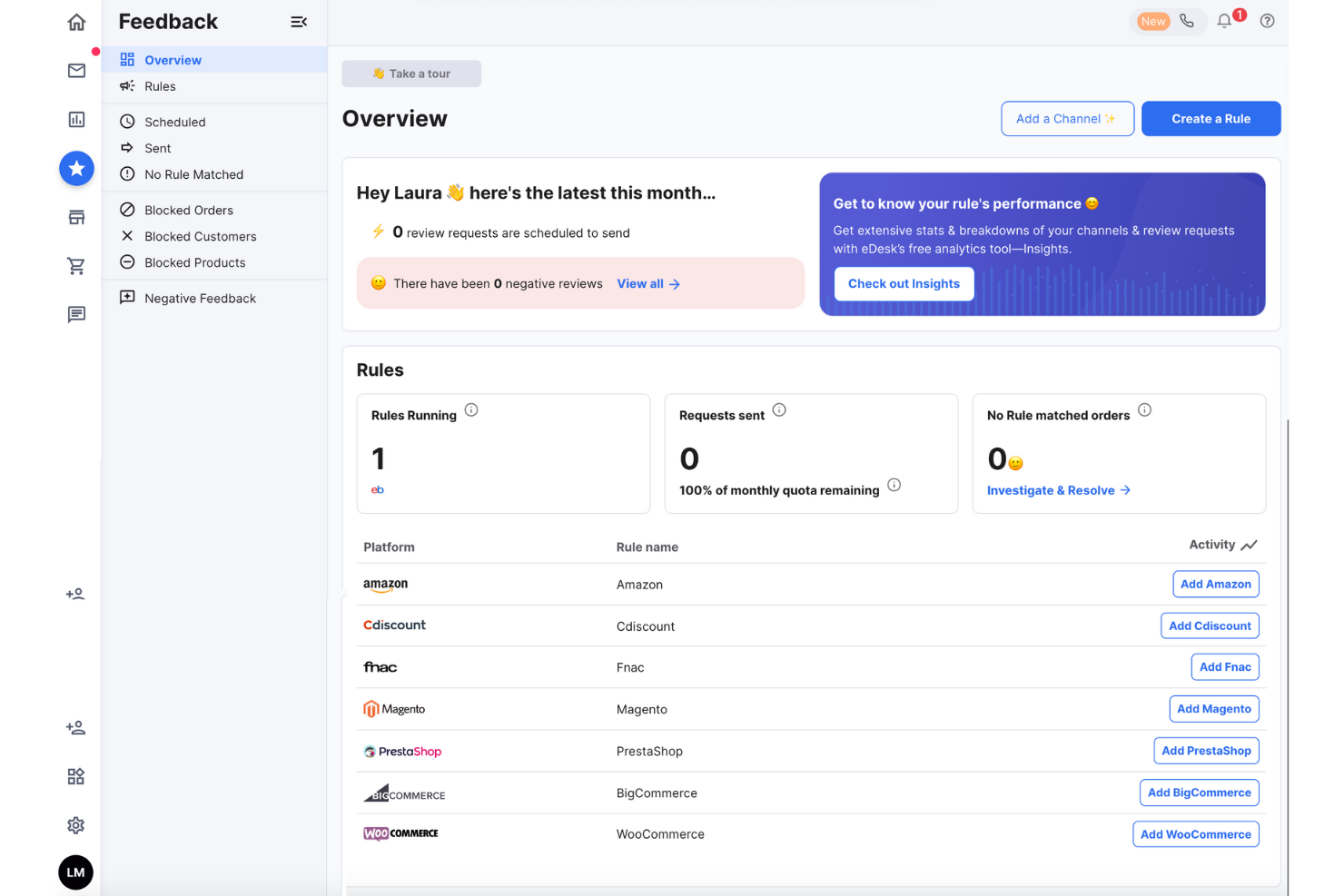
For businesses in the ecommerce sector seeking an effective feedback management tool, eDesk offers a compelling solution. It is designed to enhance the customer support experience by automating interactions and providing insightful feedback analytics, making it ideal for online retailers looking to optimize their customer service operations. By addressing challenges in managing customer reviews and interactions across multiple platforms, eDesk empowers your team to deliver exceptional service and build lasting customer relationships.
Why I Picked eDesk
I picked eDesk for its unique ability to automate review requests, a feature that directly addresses the need for efficient feedback collection. eDesk's Smart Review Requests automatically target satisfied customers, increasing the likelihood of positive feedback. Additionally, its AI Automation handles a significant portion of customer interactions, allowing your team to focus on more complex issues. These features, combined with real-time insights into customer feedback, make eDesk a valuable tool for businesses aiming to enhance their feedback management processes.
eDesk Key Features
In addition to automated customer review requests, eDesk offers:
- AI-driven Ticket Routing: Ensures that customer inquiries are directed to the appropriate team members, enhancing response accuracy.
- Automated Replies: Provides immediate responses to common customer queries, reducing wait times and improving customer satisfaction.
- 24/7 Chatbot: Offers round-the-clock support, ensuring that customer queries are addressed promptly, even outside business hours.
- Comprehensive Reporting Tools: Enables your team to track and analyze feedback trends, helping you make data-driven decisions to improve customer service.
eDesk Integrations
Integrations include Amazon, eBay, Shopify, WhatsApp, Facebook, and more than 200 other platforms, enabling seamless management of customer interactions across multiple channels.
Pros and Cons
Pros:
- AI automations reduce repetitive support tasks
- Seamless order data synchronization with major marketplaces
- Integrates rich order data for enhanced customer service
Cons:
- Reporting and analytics, while present, can be less customizable than more enterprise dashboards
- Primarily built for ecommerce, less flexible for other industries


Canny is a feedback management tool that specifically aids businesses in capturing and tracking customer feedback and feature requests. It effectively bridges the gap between businesses and their user base, making it an ideal tool for product development and improvement.
Why I Picked Canny: In my evaluation, Canny distinguished itself with its focus on tracking feedback and feature requests, an essential component in shaping future product development. In particular, I selected Canny because of its transparency in managing feedback, enabling businesses and their users to follow the lifecycle of feature requests.
The platform offers various channels for customers to submit their requests, such as a public feedback board, in-app widgets, and integrations with tools like Intercom and Slack. Canny then helps businesses categorize and tag feature requests based on different criteria, such as product area, customer segment, or priority level.
Standout Features & Integrations:
Features include feedback boards, roadmap publishing, and voting systems that allow users to vote on feature requests, enabling businesses to gauge the popularity and demand for specific ideas or enhancements. These features can help businesses to organize feedback, prioritize feature requests, and communicate their plans.
Integrations include Intercom, Slack, GitHub, HubSpot, Discord, Microsoft Teams, Google Workspace, Okta SSO, Google Analytics and Jira.
Pros and Cons
Pros:
- Voting system encourages user engagement
- Roadmap publishing increases transparency
- Easy to set up
Cons:
- Limited advanced reporting capabilities
- User interface could be more intuitive
New Product Updates from Canny

Canny Adds Two-Way Status Sync for Integrations
Canny introduces two-way status sync for project management integrations. This update keeps statuses aligned across tools, improving workflow efficiency and reducing manual updates. For more information, visit Canny’s official site.
 .
.

Typeform is a unique online platform that specializes in creating dynamic, interactive forms that are not just functional but enjoyable for users to complete. Given its focus on user engagement and interactive design, it's best for businesses aiming to provide their audience with an engaging experience when gathering feedback.
Why I Picked Typeform: When I was selecting tools for this list, I was particularly drawn to Typeform due to its ability to create forms that focus on creating an engaging user experience in addition to collecting data. For example, Typeform is known for its conversational form design, which creates an engaging and interactive survey experience for respondents. Instead of presenting a traditional question-and-answer format, Typeform's forms mimic a conversation, asking one question at a time and using a friendly and conversational tone. This approach encourages respondents to provide thoughtful and detailed answers, resulting in higher engagement and more accurate data collection.
Standout Features & Integrations:
Features include logic jumps, answers piping, and a wide array of question types to keep respondents engaged, including interactive question types. Typeform is also known for its intuitive interface that allows for the creation of beautifully designed, interactive forms. It additionally allows businesses to enrich surveys by integrating multimedia elements such as images, videos, and GIFs.
Integrations include Google Sheets, Slack, Notion, Microsoft Teams, Salesforce, Canva, Monday.com, Mailchimp, Intercom, and Zapier.
Pros and Cons
Pros:
- Provides a wide variety of question types
- Offers a simple survey UI with minimal distractions
- Creates highly engaging, interactive forms
Cons:
- Some essential features only available in higher-priced tiers
- The advanced design features might have a steeper learning curve for beginners
- Could use more data visualization tools

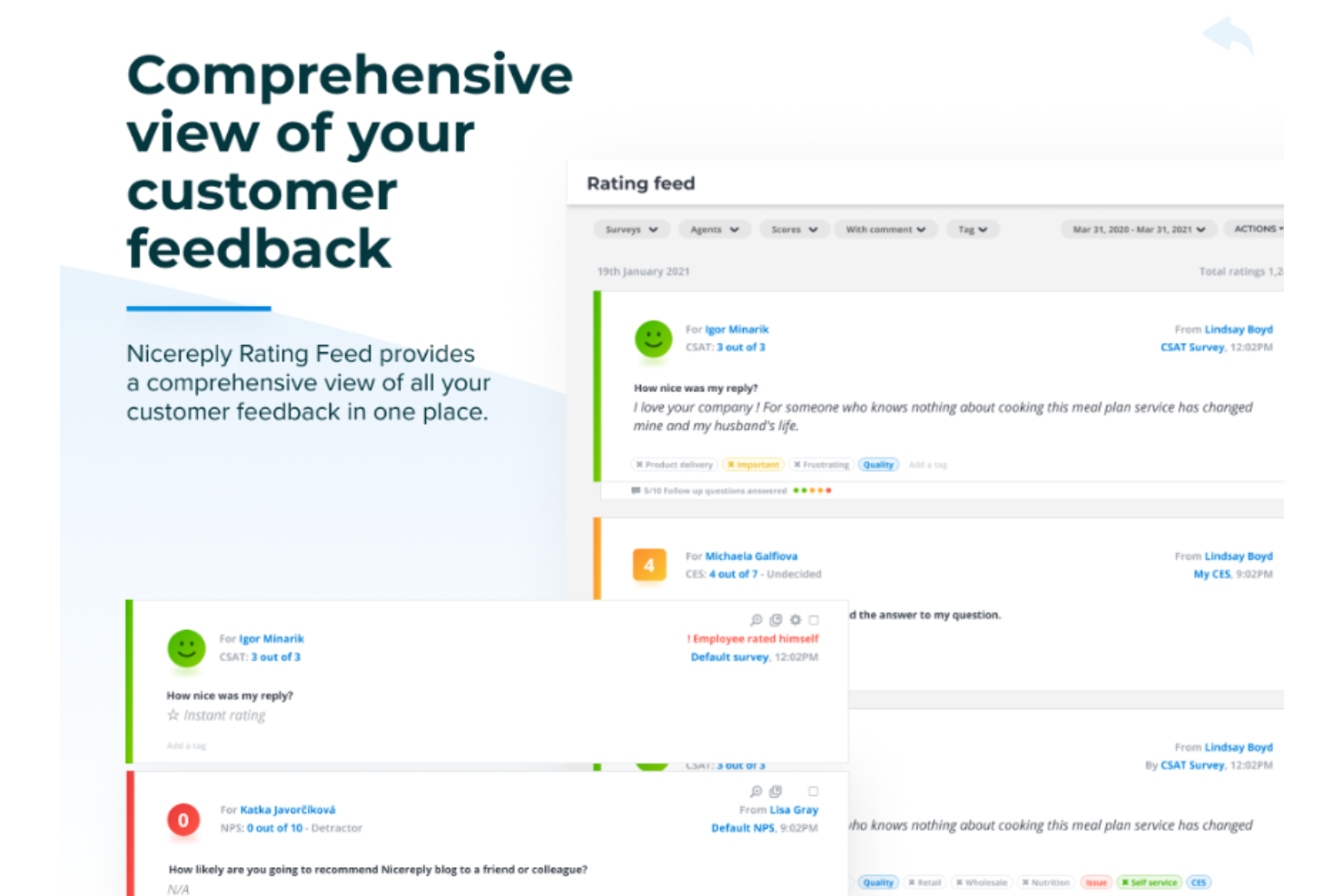
Nicereply is a customer satisfaction survey tool that specializes in measuring key customer satisfaction metrics. Its streamlined approach to collecting and analyzing customer feedback ensures businesses get a clear, quick understanding of their customer satisfaction scores, making it an optimal tool for this purpose.
Why I Picked Nicereply: I selected Nicereply for its focus on customer satisfaction measurements. Its dedication to this single purpose brings precision to the task, delivering accurate metrics that businesses can act on, including net promoter score (NPS), customer satisfaction score (CSAT), and customer effort score (CES).
Nicereply also provides reporting and benchmarking features to help businesses analyze and compare their customer satisfaction metrics. The platform offers visual dashboards and reports that display key metrics, trends, and performance over time. Additionally, Nicereply provides benchmarking data that allows businesses to compare their customer satisfaction scores against industry averages or other companies in their sector.
Standout Features & Integrations:
Features include customizable surveys, omni-channel feedback collection, target-based scoring, and automated follow-ups and reminders. Nicereply also incorporates gamification elements, such as leaderboards and achievements, to motivate teams to consistently deliver exceptional customer service.
Integrations include Zendesk, Help Scout, Front, Outlook, Gmail, Mailchimp, LiveAgent, Gladly, Dixa, and Freshdesk.
Pros and Cons
Pros:
- Customers can review and rate interactions
- Highly customizable surveys
- Specializes in measuring customer satisfaction
Cons:
- Fewer integrations compared to some competitors
- Limited feature set for users not focusing on satisfaction metrics
- Daily CSAT calculations can bring down your overall CSAT average


UseResponse is an all-in-one customer support software that provides a suite of tools designed to manage customer interactions across various channels. This omni-channel solution enables businesses to consolidate and streamline their customer support efforts.
Why I Picked UseResponse: I chose UseResponse for this list because of its comprehensive support coverage across multiple channels, including social media, email, and live chat. What makes it stand out is its ability to centralize all customer support interactions into a robust ticket management system, offering a single point of reference for all customer feedback.
Additionally, UseResponse provides threaded discussions and notification systems that enable real-time communication among team members. This allows support agents to collaborate on tickets, assign tasks, and share internal notes or knowledge base articles, ensuring more efficient issue resolution.
Standout Features & Integrations:
Features include multi-channel support, AI-powered chatbots, multilingual support, CSAT surveys, extensive brand customization, and a knowledge base for self-service. UseResponse also allows businesses to create community forums for customers to ask questions, share ideas, and engage in discussions with other users and company representatives.
Integrations include Slack, Zapier, Jira, Confluence, HubSpot, Azure DevOps, Zoho CRM, and Salesforce.
Pros and Cons
Pros:
- Responsive customer support team
- Features AI-powered chatbots
- Simple, functional, and intuitive user interface
Cons:
- UI might be challenging for non-tech savvy users
- Might be overly complex for small businesses
- Individual conversations with the same customer can't be merged

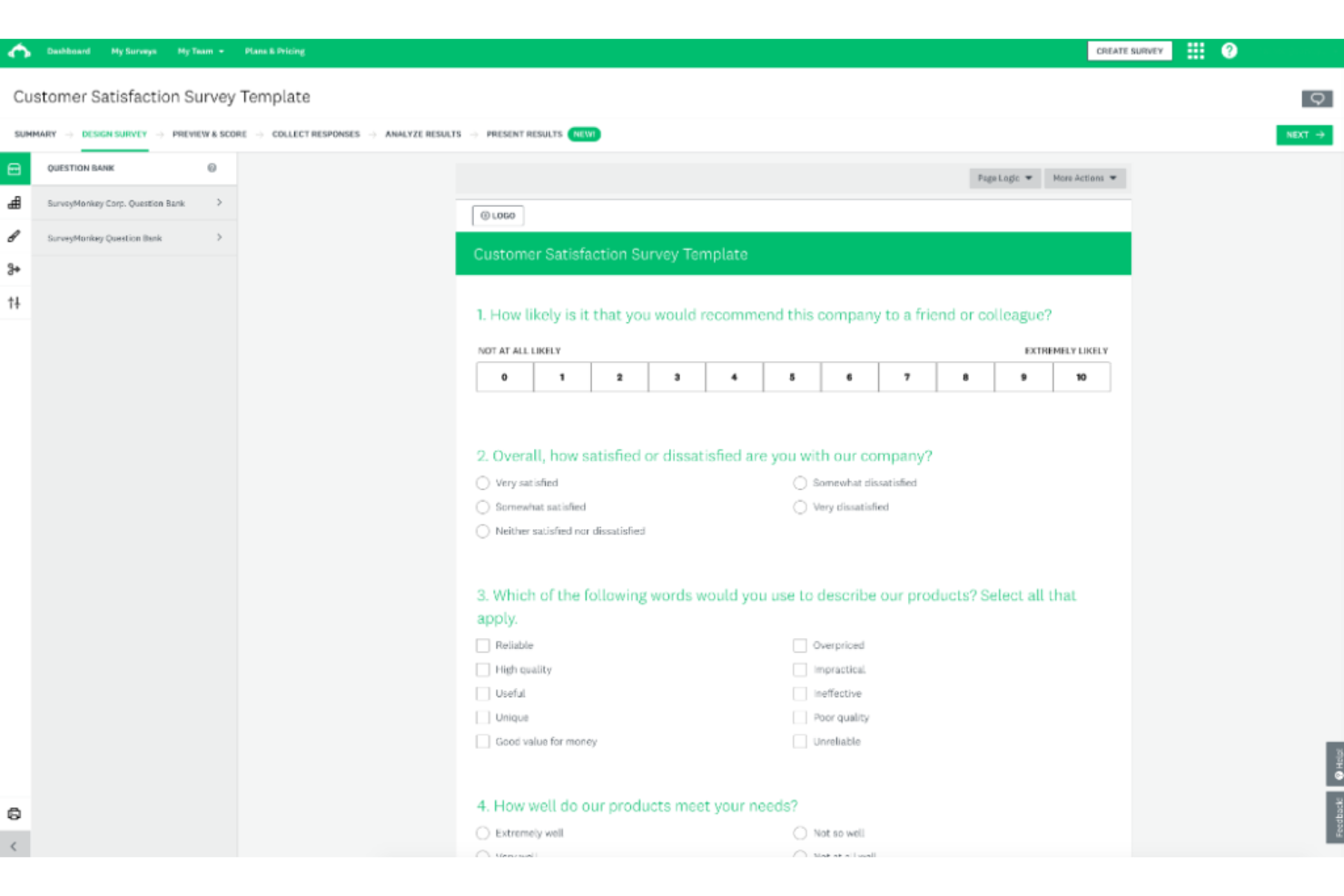
SurveyMonkey is an online survey development platform that allows users to design and send out customized surveys for data collection. This tool provides a variety of options to design detailed and targeted surveys, making it a great choice for businesses seeking in-depth insights from their customers or audience. Vishveshwar Jatain, a marketing and sales operations leader with over a decade of experience, has often used SurveyMonkey for mass opinion surveys. In a recent conversation with me, he said, “The features that stood out to me were the ability to export raw data from SurveyMonkey for further analysis and the in-built report builders with various chart types to visualize survey results.”
Why I Picked SurveyMonkey: I picked SurveyMonkey for its extensive customization options that allow teams to create detailed, well-branded surveys. For example, SurveyMonkey gives you control over the layout and structure of your survey questions and pages. You can rearrange questions, group them into sections or pages, and control the flow and order of questions. This flexibility allows you to design surveys that follow a logical progression and are easy for respondents to navigate.
SurveyMonkey also offers advanced logic features such as skip logic and branching, which enable you to create dynamic surveys that adapt based on respondents' previous answers.
Standout Features & Integrations:
Features include its intuitive survey builder, a wide array of question types, survey invitations and thank you messages, brand customization features. It additionally has strong data analytics capabilities that can help you generate customized charts and graphs.
Integrations include MailChimp, Eventbrite, Google Drive, Microsoft Teams, Zoom, Microsoft OneDrive, CleverX, and Salesforce.
Pros and Cons
Pros:
- Intuitive user interface
- Robust data analysis capabilities
- Extensive customization options
Cons:
- Limited customer support for lower-tier plans
- Steep learning curve for beginners
- Higher cost for advanced features


UserVoice is a well-established feedback management tool that specializes in helping businesses capture and understand customer feedback. This platform is particularly adept at managing product feedback, offering a complete set of features to streamline this crucial process.
Why I picked UserVoice: In my quest to identify the best feedback management tools, UserVoice stood out for its product-centric approach. Its unique ability to gather, organize, and prioritize product-related feedback enables companies to build better products based on real customer insights. For example, UserVoice offers automated notifications and Slack updates that can alert teams of product launch issues and bugs, allowing teams to respond to and solve problems more efficiently.
UserVoice additionally makes it easy to create and collect validation studies and guided microsurveys so users can continuously provide actionable product feedback.
Standout Features & Integrations:
Features include smart vote capturing, customer segmenting, and feedback prioritization. It also has robust reporting capabilities that allow you to view both real-time and historical data to provide a more comprehensive view of customer feedback and its impact on product development.
Integrations include Jira, Salesforce, Slack, Zendesk, Azure DevOps, Fullstory, Gainsight, and Microsoft Teams.
Pros and Cons
Pros:
- Includes a customer-facing product-request tracking system for transparency
- In-depth reporting provides valuable insights
- Smart vote capturing allows for efficient feedback collection
Cons:
- Lack of customization options compared to some competitors
- Steep learning curve for first-time users
- High starting price may deter smaller businesses


Sprig is a product experience platform designed to help CX teams capture, analyze, and act on customer feedback. By integrating advanced AI into tools like in-product surveys, feedback widgets, heatmaps, and session replays, Sprig provides a comprehensive platform to collect and analyze in-the-moment insights directly from users. This real-time feedback loop helps identify customer pain points, preferences, and behavior patterns, providing actionable insights and driving data-backed optimizations to the customer experience.
Why I picked Sprig: Sprig helps your team continuously gather and analyze feedback at scale, allowing you to focus on implementing changes rather than managing the feedback process and manually sifting through high volumes of data. With in-product surveys, heatmaps, and session replays, it enables you to collect hyper-relevant experience data directly from your users while they’re engaging with your product.
Additionally, Sprig's AI-powered analysis tool automatically summarizes and categorizes user feedback and behavior data, making it easy for CX teams to understand and prioritize issues without needing to spend hours manually sifting through every user response themselves. Its ability to automate complex feedback flows makes it an efficient solution for busy teams managing high volumes of customer feedback.
Standout Features & Integrations:
Features include in-product surveys, unmoderated feedback collection, heatmaps, session replays, and video interviews to capture user insights. You can set up automated workflows to collect feedback at various touchpoints, and easily analyze results through Sprig’s AI-powered reporting.
Integrations include Mixpanel, Amplitude, Jira, Slack, Segment, Google Analytics, and Optimizely.
Pros and Cons
Pros:
- Surveys built into the product
- Video interviews for rich feedback
- In-product testing for quick insights
Cons:
- Limited customization for surveys
- Requires some technical setup


Qualtrics is a sophisticated customer experience management platform that enables businesses to conduct advanced user experience research. The platform provides especially robust tools for survey creation, distribution, and analysis, making it an optimal choice for businesses seeking a deep dive into user experience.
Why I Picked Qualtrics: I chose Qualtrics for its wide range of tools that provide comprehensive user experience insights. Such tools include experience sampling, which involves capturing user feedback and perceptions at specific moments or intervals as they interact with products, services, or digital experiences. This feature enables businesses to understand users' thoughts, emotions, and behaviors in the moment, providing valuable insights for optimizing user experiences.
Qualtrics also offers user journey mapping tools that help businesses visualize and analyze the end-to-end user experience. User journey mapping can help teams to understand the user's interactions, pain points, and satisfaction levels at each stage of their journey.
Standout Features & Integrations:
Features include AI-based analytics, a diverse question library, heatmaps and click tracking, embedded multimedia, skip logic and branching, and predictive intelligence capabilities. It also features remote user testing tools, which allow teams to create and distribute remote usability tests surveys, and other research activities on a global scale.
Integrations include Salesforce, Great Question, Marketo, Fullstory, Zendesk, Slack, Jira, Freshdesk, Hubspot, and Tableau.
Pros and Cons
Pros:
- Offer customizable survey flows
- Provides robust data analytics features
- Offers interactive dashboards
Cons:
- Steep learning curve
- Pricing information is not transparent
- The advanced feature set may be overwhelming for beginners


Google Forms is an uncomplicated, user-friendly tool that allows you to easily create and distribute forms. Its simplicity and seamless integration with other Google apps make it best for users looking for straightforward form creation and easy sharing options.
Why I Picked Google Forms: Google Forms made it onto this list due to its straightforward, no-frills interface and the ease with which you can share and distribute forms. It is distinctive in its integration with other Google products, making sharing and collaboration effortless. Google Forms also automatically generates a summary of responses, providing an overview of the collected data in a visual format. The summary includes charts, graphs, and statistics to help users quickly analyze and understand the data. This feature eliminates the need for manual data processing and allows users to gain insights from the collected responses in a concise and accessible manner.
Standout Features & Integrations:
Features include real-time response information, automatic response validation, and customizable themes and templates. Google Forms also helps users to create custom forms with a variety of question types. Additionally, it allows multiple users to collaborate on form creation in real-time. This feature enables teams to make edits, add questions, and review changes simultaneously.
Integrations include Google Workspaces, such as Google Sheets, Google Drive, and Gmail.
Pros and Cons
Pros:
- Free to use with a Google account
- Integrates seamlessly with other Google products
- User-friendly and easy to use
Cons:
- No direct integration with non-Google apps
- Lacks advanced data analysis tools
- Limited customization options compared to other platforms


Zoho Survey is a powerful survey tool that allows businesses to create detailed surveys for their customers. The key advantage of Zoho Survey is its capability to integrate responses with Zoho's CRM, making it an ideal solution for businesses looking to merge customer feedback with their existing CRM data.
Why I Picked Zoho Survey: I selected Zoho Survey for this list because of its powerful CRM integration capabilities. It's unique in its ability to directly link survey data with CRM records and to sync survey responses and customer data between the two platforms. This integration ensures that survey responses are automatically recorded and associated with the corresponding customer profiles in Zoho CRM.
Zoho Survey can also trigger specific actions within Zoho CRM, such as assigning leads to sales representatives or initiating follow-up activities. This alignment helps streamline lead management, improves sales efficiency, and ensures timely and personalized customer interactions.
Standout Features & Integrations:
Features include extensive question types, question branching and skip logic, real-time analytics, and multi-channel distribution, including distribution using QR codes. Zoho Survey also features a wide variety of survey templates and customizable options, allowing businesses to gather a broad range of customer data.
Integrations include other Zoho products, notably Zoho CRM, as well as Google Sheets, Slack, Eventbrite, Shopify, Tableau, MailChimp, and Zendesk.
Pros and Cons
Pros:
- Supports surveys for every screen size, including mobile previews
- Offers a wide variety of customizable survey templates
- Provides excellent integration with Zoho CRM
Cons:
- Strong focus on Zoho ecosystem could be limiting for those not already using Zoho products
- Limited functionality on the free plan and mobile app
- The user interface can be complex for new users


Trustpilot is a reputable feedback management tool that provides businesses with an efficient way to collect, analyze, and display customer reviews. It excels in helping businesses make the most of customer reviews for building trust and improving service.
Why I Picked Trustpilot: Trustpilot made it onto my list due to its specific focus on customer reviews, a critical area for any customer-centric business. I especially appreciate its approach to turning customer reviews into marketing and reputation-building opportunities.
Trustpilot first allows customers to provide ratings, write detailed reviews, and share their overall experience for various businesses with which they have experience. It then offers review verification and a dashboard for teams to monitor incoming reviews, respond to feedback, and address any concerns or issues raised by customers.
Standout Features & Integrations:
Features include review invitations, reminders, and an easy-to-use review widget for your website. It also has a strong reporting suite for analyzing review data, including advanced fraud detection algorithms used to identify fake reviews and spam. Finally, TrustPilot's TrustBox feature allows businesses to embed positive reviews on relevant page on the company website.
Integrations include Shopify, Salesforce, WordPress, PayPal, JavaScript, Square, Wix, Magento, and WooCommerce, and Hubspot.
Pros and Cons
Pros:
- Easy-to-use review widget for websites
- Wide range of integrations with eCommerce platforms
- Strong focus on customer reviews
Cons:
- Reporting could be more in-depth
- Limited customization options in lower-tier plans
- Only annual billing available


GetFeedback is a customer feedback platform that connects seamlessly with Salesforce. Designed to capture customer insights in real-time, GetFeedback’s tight integration with Salesforce makes it a prime choice for businesses that utilize Salesforce and are seeking to combine feedback with their CRM data.
Why I Picked GetFeedback: GetFeedback's distinct integration with Salesforce, as well as its ability to collect and analyze customer feedback in real time, differentiates it from other tools. For example, GetFeedback's integration with Salesforce allows businesses to map survey response fields to specific Salesforce fields, ensuring that the data is accurately transferred and stored in the relevant fields within Salesforce.
Additionally, businesses can configure field updates based on survey responses, allowing them to automate actions within Salesforce, such as updating lead statuses, triggering workflows, or assigning tasks based on survey data.
Standout Features & Integrations:
Features include real-time feedback collection and analysis capabilities, which are enhanced by its integration with Salesforce. Other features of the Salesforce integration include lead and case creation and seamless data sync. GetFeedback also offers a drag-and-drop survey builder and mobile-optimized surveys.
Integrations include Slack, Salesforce, Chattermill, Google Analytics, Jira, Adobe Analytics, Optimizely, Decibel, ContentSquare, and Microsoft Teams.
Pros and Cons
Pros:
- Allows users to share preview links for surveys
- Real-time feedback collection and analysis
- Provides deep integration with Salesforce
Cons:
- The user interface might seem complex to some users
- User permissions function is limited
- Its usefulness may be limited for non-Salesforce users
Other Feedback Management Tools
Below is a list of additional feedback management tools that I shortlisted but did not make it to the top 20.
- Feedbackify
For gathering website-specific customer feedback
- Zeda.io
For AI-driven feedback for product insights
- PathPro
For feature voting and prioritization
- Medallia
For comprehensive customer experience management across multiple touchpoints
- Feedier
For gamified feedback collection to increase response rates
- Jotform
For intuitive form design with robust customization options
- Birdeye
For managing business reputation and customer experience
- AskNicely
For real-time customer feedback and automated responses
- HappyOrNot
For simple, instant customer satisfaction insights
- Wootric
For measuring customer experience metrics like NPS, CSAT, and CES
- Reputology
For monitoring and managing online reviews
- Feedback Genius
For Amazon sellers seeking automated feedback communication


Feedback Management Tool Selection Criteria
When selecting the best feedback management tools to include in this list, I considered common buyer needs and pain points like (aggregating customer feedback from various sources in one place and prioritizing features based on customer insights and business impact). I also used the following framework to keep my evaluation structured and fair:
Core Functionality (25% of total score)
- Collect feedback from multiple channels
- Centralize insights in a single repository
- Categorize and tag feedback for analysis
- Prioritize features based on feedback and impact
- Report on trends with dashboards and analytics
Additional Standout Features (25% of total score)
- AI assisted summarization and classification of feedback
- Priority poker for collaborative scoring
- Dynamic interactive roadmaps for stakeholder communication
- Two way sync with development tools like jira
- Open api for custom integrations
Usability (10% of total score)
- Clear navigation with configurable views and filters
- Low learning curve with contextual tips and help
- Consistent performance when working with large feedback volumes
- Accessible and visually coherent interface across devices
- Simple workflows for capturing organizing and prioritizing feedback
Onboarding (10% of total score)
- Guided product tours checklists and interactive walkthroughs
- Ready to use templates for forms roadmaps and prioritization
- Video tutorials webinars and live demo sessions
- Easy data import migration tools and sample datasets
- In app chat documentation and community forums for early support
Customer Support (10% of total score)
- Multiple channels including chat email and ticketing
- Clear response times and helpfulness reflected in reviews
- Comprehensive knowledge base documentation and tutorials
- Access to live demos webinars and community forums
- Option for dedicated success or onboarding support on higher plans
Value For Money (10% of total score)
- Transparent tiered pricing with features listed per plan
- Availability of free trials or demos before purchase
- Reasonable per seat costs and any usage limits or minimums
- Clarity on add ons setup fees and annual discounts
- Competitive total cost of ownership compared to similar tools
Customer Reviews (10% of total score)
- Consistent feedback on ease of use and learning curve
- Reports on onboarding resources like videos templates and tours
- Comments on support quality responsiveness and available channels
- Sentiment about pricing fairness and value received
- Notes on integration reliability and impact on workflows
Benefits of Feedback Management Tools
Feedback management tools offer several benefits:
- They help to systematically collect valuable customer insights, aiding businesses in understanding customer preferences, pain points, and overall experience.
- They allow real-time engagement with customers, thus promoting immediate responses to customer concerns and enhancing customer satisfaction.
- They provide robust data analysis capabilities, turning raw feedback data into actionable insights for business improvement.
- They streamline the process of feedback collection, making it more efficient and less time-consuming.
- They facilitate integration with other business systems like CRM or help desk software, ensuring smooth data flow and comprehensive customer view.
Features of Feedback Management Tools
When selecting feedback management tools, keep an eye out for the following key features:
- Centralized dashboard: This feature gathers all your feedback in one easy-to-navigate place, making it simple for you to view, sort, and manage responses without jumping between different platforms.
- Multi-channel collection: Easily collect feedback from a variety of channels like email, web forms, mobile apps, and social media. This lets you meet your audience where they are and ensures you never miss valuable insights.
- Automated notifications: Stay in the loop by receiving real-time alerts when new feedback comes in, so you can address issues or respond to praise quickly—before things slip through the cracks.
- Customizable survey tools: Tailor questions, rating scales, and design to fit your unique needs. With this flexibility, you can ask exactly what matters to you and your audience.
- Analytics and reporting: Turn mountains of raw feedback into clear, actionable insights. Detailed reports and visual analytics help you spot trends, uncover hidden issues, and see the bigger picture at a glance.
- Integration capabilities: Seamlessly connect with tools you already use, like CRM systems, help desks, or communication platforms. You can sync feedback directly into your workflow without extra steps.
- User segmentation: Sort feedback by user groups, demographics, or customer types. This lets you customize responses and see which segments need the most attention, delivering a more personal experience.
- Access controls: Protect sensitive information by granting the right level of access to the right people. This helps you manage privacy and keeps your feedback processes secure.
- Feedback tagging and categorization: Quickly organize responses by tagging and assigning them to specific topics or themes. This cuts down on manual tracking and helps identify recurring issues faster.
Cost & Pricing of Feedback Management Tools
The pricing of feedback management tools tend to vary significantly depending on the specific features, number of users, and scale of operations. Typically, you can expect to pay anywhere from $10 to over $100 per user per month, depending on the features and functionality you need. Enterprise-level solutions with more advanced features might cost more.
Most feedback management tools operate on a subscription model, where users pay a monthly or annual fee to access the service. The fee often scales with the number of users or volume of feedback data processed. Some also offer a tiered pricing structure, with more advanced features and capabilities available at higher pricing tiers.
People Also Ask
Here are some answers to commonly asked questions about feedback management tools:
How to Choose a Feedback Management Tool
It’s easy to get bogged down in long feature lists and complex pricing structures. To help you stay focused as you work through your unique software selection process, here’s a checklist of factors to keep in mind:
Factor | What to Consider Scalability | Estimate feedback volume, users, and teams for 12–36 months. Check limits on records, attachments, and projects. Watch for price jumps after user or response thresholds. Confirm export limits and data retention so you’re not locked in as volume grows. Integrations | List your CRM, support, analytics, and dev tools. Verify native connectors or API coverage, sync direction (one-way vs two-way), frequency, identity mapping, and historical backfill. Ask about API rate limits and connector or SSO fees. Customizability | Can you model your taxonomy (tags, fields, categories) without breaking reports? Set governance for who can edit schemas. Avoid over-customization that fragments data. Ensure you can version changes and audit edits for consistency across teams. Ease of use | Run a pilot with 5–10 users. Measure time to capture, dedupe, and find feedback. Check role-based views and admin overhead for taxonomy upkeep. A steep learning curve slows adoption; plan training accordingly. Implementation and onboarding | Who will own SSO, integrations, data migration, and taxonomy design? Confirm vendor onboarding packages, training formats, and sandbox access. Map timeline dependencies on internal IT and system owners. Phase rollout by team to manage change. Cost | Model TCO: licenses (by seat/response/workspace), implementation, training, connectors, SSO, API, storage, and export. Identify overage penalties and contract minimums. Price over 12, 24, and 36 months under headcount and volume growth scenarios. Security safeguards | Demand SSO/SAML, MFA, encryption in transit/at rest, role-based access, audit logs, backups with stated RPO/RTO, and incident response. Request SOC 2 or ISO 27001, recent pen test summary, and subprocessor list. Confirm data residency options if needed.
Sources:
- Productboard review (PRD Human-Created Content)
- Productboard market report (PRD Human-Created Content)
- ProdPad market report (PRD Human-Created Content)
What are the cheapest and most expensive feedback management tools?
While pricing can vary and change over time, as of my last update, Google Forms is one of the more affordable options as it is free for basic use. The cheapest feedback management tools often start with limited free plans or low-cost tiers, but features and integrations are limited. The most expensive options, like Qualtrics or Medallia, offer advanced analytics, deep integrations, and support at a higher price.
Are there any free feedback management tools available?
Yes, some feedback management tools offer free versions, such as Google Forms, SurveyMonkey, or Typeform’s basic plan. These are good for simple surveys but don’t include automation, advanced analytics, or integrations that CX teams often need as they scale. Review free tool limitations before making it part of your customer experience workflow.
How can feedback management tools improve customer experience strategy?
Feedback management tools help you collect, analyze, and act on customer insights in real time. By surfacing trends and pain points, these platforms let you prioritize CX initiatives, track improvement efforts, and demonstrate impact to stakeholders. They also enable you to segment responses for targeted action.
What integrations should I prioritize in feedback management platforms?
You should prioritize integrations with your CRM, help desk, analytics, and marketing automation tools. These connections ensure feedback is linked to real customer profiles, triggers actions for your support team, and provides a complete view of journey pain points. Seamless integrations save your team time and help close the loop with customers.
How do feedback management tools support compliance and data privacy?
Most reputable feedback management tools offer features to support GDPR, CCPA, and other privacy standards through data encryption, access controls, and regular audits. As a CX leader, always check vendor documentation for compliance certifications and ensure they meet your organization’s data protection needs.
What features help my team close the loop with customers?
Look for features like automated alerts, case management, and response workflows. These help you acknowledge feedback quickly and assign tasks to the right team members. Tools with built-in messaging, follow-up surveys, or integration with ticketing systems make it easy to resolve customer concerns and communicate improvements.
How do I measure ROI on feedback management software?
You can measure ROI by tracking key metrics like increased NPS/CSAT, reduced churn, or higher retention after implementing the tool. Tie improvements to changes in business outcomes and cost savings from automation or efficiency gains. Report on these metrics regularly to show value to leadership.
Other Software Reviews
If you feel like falling down a customer feedback rabbit hole, feel free to check out some of our other articles on the subject:
Final Thoughts
I hope you've found this guide helpful as you navigate the process of choosing the right feedback management tool for your needs. These are just a few of the many options out there, and the right choice will always depend on your business needs, usability preferences, and budget constraints. From cost-effective solutions like Google Forms to advanced platforms like Medallia, the market offers a wide array of options suitable for different use cases. There might even be some hidden gems out there that I missed in my roundup.
Finally, if you want to stay up-to-date on feedback management tools, or anything else from the world of customer experience, please sign up for our newsletter to get the latest insights from industry experts!