

10 Beste CX-Plattformen für bessere Kundenerlebnisse 2026

10 Beste CX-Plattformen: Auswahlliste


Bei der Vielzahl an CX-Management-Lösungen ist es schwer zu entscheiden, welche für Sie die richtige ist. Sie wissen, dass Sie Ihr Kundenerlebnis verbessern und effizienter verwalten möchten, müssen aber das passende Tool finden. Ich helfe Ihnen dabei! In diesem Beitrag erleichtere ich Ihnen die Auswahl, indem ich meine persönlichen Erfahrungen mit Dutzenden verschiedener CX-Tools in großen Teams und Projekten teile – und meine Favoriten unter den besten CX-Plattformen vorstelle.
Warum Sie unseren Software-Empfehlungen vertrauen können
Unser Team testet und bewertet Software seit 2012. Als CX-Führungskräfte selbst wissen wir, wie schwierig – und wichtig – es ist, die richtige Software auszuwählen.
Für diesen Leitfaden haben wir Tools mithilfe von praktischen Tests und unabhängiger Recherche bewertet und dabei unsere Bewertungskriterien angewendet.
Unsere Bewertungen spiegeln unser menschliches redaktionelles Urteilsvermögen wider, keine Verkaufsstrategie.
Die besten CX-Plattformen: Preisvergleichstabelle
Diese Vergleichstabelle fasst die wichtigsten Details zu jeder meiner Top-CX-Plattform-Auswahlen zusammen. Sie können Preisdetails sowie die Verfügbarkeit kostenloser Testversionen oder Demos nebeneinander einsehen und so die richtige CX-Plattform für Ihr Budget und Ihre Geschäftsanforderungen finden.
| Tool | Best For | Trial Info | Price | ||
|---|---|---|---|---|---|
| 1 | Am besten geeignet für personalisierte Journey-Orchestrierung | Kostenlose Demo verfügbar | Ab $15/Nutzer/Monat (jährliche Abrechnung) | Website | |
| 2 | Am besten für die schnelle Bereitstellung von Unternehmens-Feedback | Kostenlose 7-Tage-Testversion + kostenlose Demo verfügbar | Ab $55/Nutzer/Monat | Website | |
| 3 | Am besten geeignet für KI-gestützte Echtzeit-Unterstützung von Agenten | Kostenlose Demo verfügbar | Preis auf Anfrage | Website | |
| 4 | Am besten geeignet für die Erfassung von Feedback über mehrere Kanäle | Kostenlose 14-tägige Testphase + kostenlose Demo verfügbar | Preise auf Anfrage | Website | |
| 5 | Am besten geeignet für die sofortige Erfassung von Kundenfeedback | Kostenlose Demo verfügbar | Preise auf Anfrage | Website | |
| 6 | Am besten geeignet für detaillierte Stimmungsanalysen | Kostenlose Demo verfügbar | Preise auf Anfrage | Website | |
| 7 | Am besten geeignet für Kollaboration in geteilten Posteingängen | Kostenlose Testversion verfügbar | Ab $25/Nutzer/Monat (jährlich abgerechnet) | Website | |
| 8 | Am besten geeignet für individuell anpassbare Automatisierungsabläufe für Agenten | 14-tägige kostenlose Testphase verfügbar | Ab $19/Nutzer/Monat (jährliche Abrechnung) | Website | |
| 9 | Beste KI-unterstützte Kunden-Insights | Kostenlose Demo verfügbar | Preis auf Anfrage | Website | |
| 10 | Am besten für Self-Service-Nutzer-Onboarding geeignet | 14-tägige kostenlose Testversion | Ab 174 $/Monat (jährliche Abrechnung) | Website |


CX-Plattformen im Test

Nextiva
Am besten geeignet für personalisierte Journey-Orchestrierung
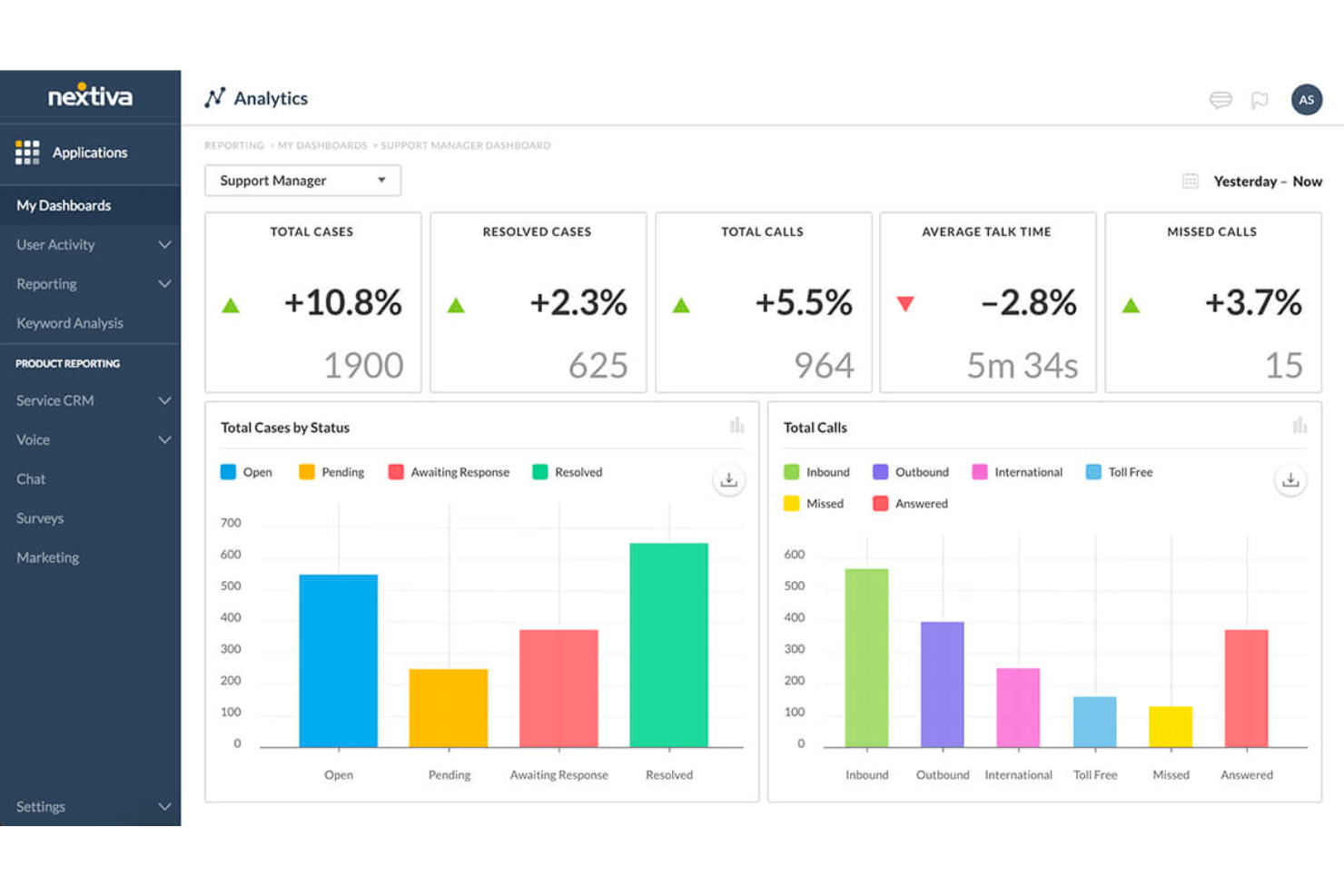
Nextiva ist eine umfassende cloudbasierte Plattform, die Unternehmen dabei unterstützt, außergewöhnliche Kundenerlebnisse zu bieten. Sie stellt eine Suite an Werkzeugen bereit, die Sprache, Video, Messaging und Zusammenarbeit in einer einheitlichen Plattform integriert. Mit Fokus auf Zuverlässigkeit und Skalierbarkeit stellt Nextiva sicher, dass Unternehmen eine nahtlose Kommunikation mit ihren Kunden aufrechterhalten können, was letztlich die Kundenzufriedenheit und -loyalität verbessert.
Warum ich mich für Nextiva entschieden habe: Die Journey-Orchestrierungsfunktion von Nextiva ermöglicht es Unternehmen, Kundeninteraktionen in Echtzeit zu verfolgen und zu analysieren, wodurch ein umfassender Überblick über die Kundenreise entsteht. Dies erlaubt es Unternehmen, Kundenbedürfnisse vorherzusehen, ihre Interaktionen zu personalisieren und ein konsistentes Erlebnis über alle Kontaktpunkte hinweg zu bieten. Durch den Einsatz KI-basierter Erkenntnisse und automatisierter Workflows unterstützt Nextiva Unternehmen dabei, Kunden proaktiv anzusprechen, Reibungsverluste zu minimieren und die Gesamtzufriedenheit zu steigern. Dieses Maß an Personalisierung ist entscheidend für den Aufbau starker Kundenbeziehungen.
Herausragende Nextiva-Funktionen und Integrationen:
Funktionen umfassen KI-gestützte Sprach- und Chatbots, die sofortigen, personalisierten Support bieten und Kundeninteraktionen effizient gestalten. Diese Bots können häufige Anfragen selbstständig bearbeiten, sodass menschliche Mitarbeiter sich auf komplexere Anliegen konzentrieren können. Eine weitere bemerkenswerte Funktion ist die Sprachanalyse von Nextiva, die Telefondaten auswertet, um Einblicke in die Kundenzufriedenheit und die Mitarbeiterleistung zu gewinnen.
Integrationen umfassen Salesforce, HubSpot, Microsoft Teams, Zoho CRM, Zendesk, G Suite, Microsoft Outlook, Slack, ServiceNow, QuickBooks, SugarCRM und NetSuite.
Pros and Cons
Pros:
- Skalierbare und flexible Plattform
- Team-Collaboration-Tools verfügbar
- Unbegrenzte Videotelefonie
Cons:
- Das umfangreiche Angebot kann für kleinere Unternehmen überwältigend sein
- Viele Integrationen stehen nur bei höheren Tarifen zur Verfügung

Alchemer
Am besten für die schnelle Bereitstellung von Unternehmens-Feedback
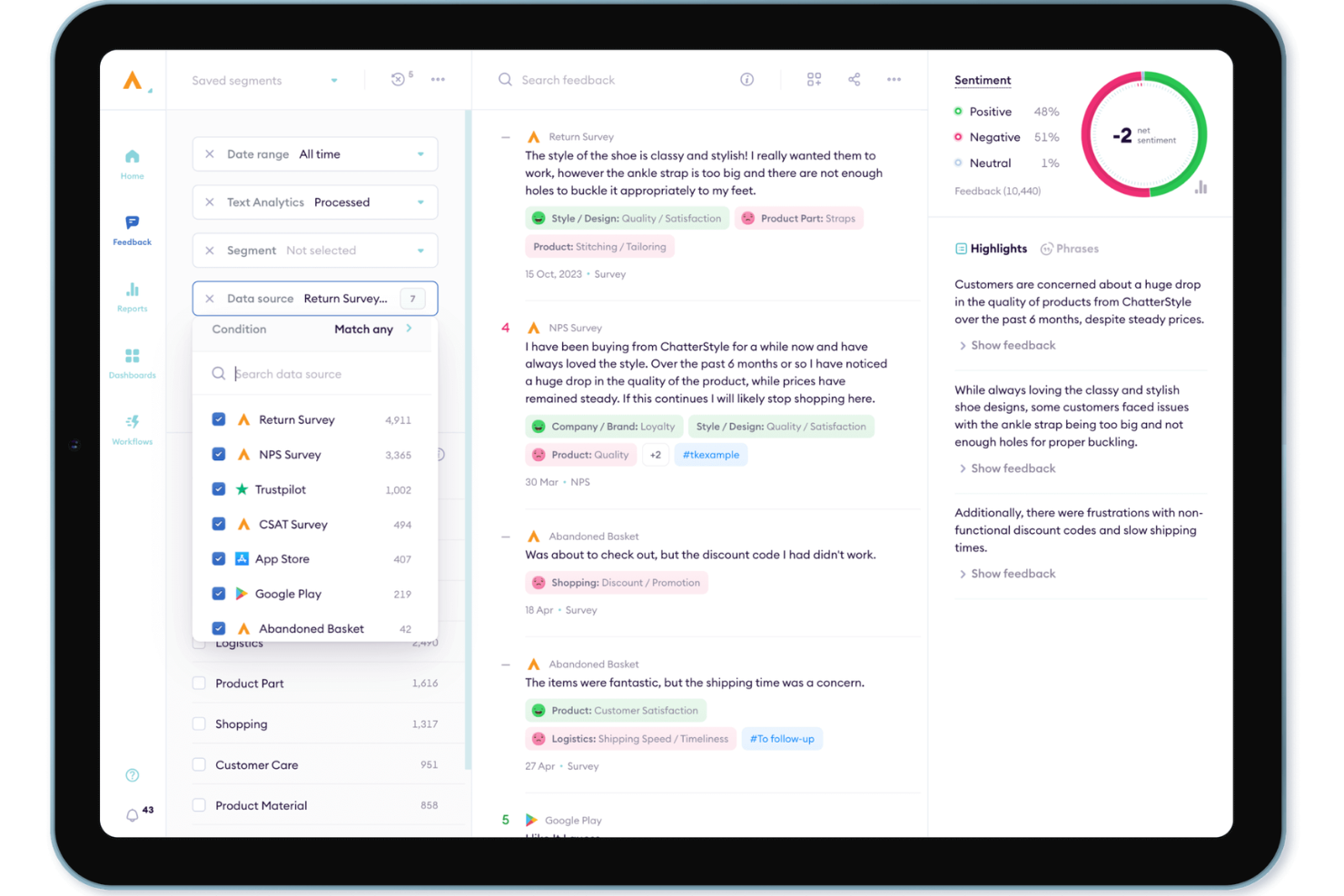
Alchemer ist eine VoC- und Unternehmens-Feedback-Plattform, die die Omnichannel-Umfrageverteilung, KI-gestützte Stimmungsanalyse und Workflow-Automatisierung kombiniert, um Kundenfeedback über digitale, soziale und Offline-Kanäle zu sammeln und entsprechende Maßnahmen zu ergreifen.
Für wen eignet sich Alchemer am besten?
Alchemer eignet sich besonders für CX- und VoC-Teams im mittleren Marktsegment und im Unternehmensbereich, die eine Feedback-Plattform schnell und ohne umfangreiche IT-Unterstützung in Betrieb nehmen müssen.
Warum ich Alchemer ausgewählt habe
Alchemer verdient einen Platz unter den besten Lösungen auf meiner Auswahlliste, weil ich beeindruckend finde, wie schnell Teams großer Unternehmen von Grund auf ein aktives Feedback-Programm aufbauen können. Besonders überzeugend ist für mich AI Pulse, das Stimmungen, Themen und Risikosignale in Umfragen und Bewertungen ohne manuelle Analyse erkennt. Der Connect-Bereich leitet diese Erkenntnisse anschließend direkt in bestehende Systeme wie Salesforce oder Slack weiter und löst automatisch konkrete Folgeaktionen aus.
Wichtige Funktionen von Alchemer
- Omnichannel-Feedback-Erfassung: Erfassen Sie Kundenerkenntnisse über Umfragen, In-App-Kanäle, soziale Medien, Offline-Kanäle und Bewertungsportale von Drittanbietern.
- Erweiterte Umfragelogik: Erstellen Sie komplexe Umfragen mit anpassbaren Verzweigungen, Bedingungen und Optionen zur dynamischen Einbindung von Inhalten.
- Rollenbasierte Dashboards: Konfigurieren Sie Dashboards und Berichte für verschiedene Stakeholder, einschließlich geplanter Berichte und Datenexporte.
- Mehr als 400 Integrationen: Verbinden Sie Feedback und Workflows nahtlos mit CRM-, Helpdesk- und Geschäftssystemen wie Salesforce und HubSpot.
Alchemer-Integrationen
Alchemer bietet integrierte Schnittstellen zu Salesforce, HubSpot, Microsoft Teams, Slack, Zendesk, Google Sheets, Tableau und Mailchimp. Für benutzerdefinierte Integrationen steht eine API zur Verfügung.
Pros and Cons
Pros:
- Schnelle Bereitstellung von Feedback-Programmen für Unternehmen
- Vorgefertigte Umfragevorlagen beschleunigen den Programmstart
- AI Pulse erkennt automatisch Stimmungen und Themen
Cons:
- Die Anpassung von Berichten erfordert technische Umgehungslösungen
- Analysen der Kundenreise sind weniger ausgereift als bei Wettbewerbern

Cresta
Am besten geeignet für KI-gestützte Echtzeit-Unterstützung von Agenten

Cresta ist eine KI-gestützte Customer-Experience-Plattform, die Contact Centern hilft, die Servicequalität durch Echtzeit-Unterstützung für Agenten, autonome KI-Agenten, Qualitätsmanagement und Gesprächsanalysen über Sprach- und digitale Kanäle zu verbessern.
Für wen ist Cresta am besten geeignet?
Cresta eignet sich am besten für mittelgroße und große Contact Center in Branchen wie Finanzdienstleistungen, Versicherungen, Einzelhandel und Telekommunikation, die ein hohes Kommunikationsvolumen mit Kunden über verschiedene Kanäle hinweg verwalten.
Warum ich Cresta ausgewählt habe
Ich habe Cresta ausgewählt, weil es Agenten unterstützt, ihre Leistung bereits während eines Gesprächs und nicht erst nachträglich zu verbessern. Anstatt sich ausschließlich auf Schulungen oder die nachträgliche Gesprächsanalyse zu verlassen, liefert Cresta während des Gesprächs Echtzeit-Unterstützung basierend auf Kundendialogen und vorhandenen Wissensquellen. Zudem gefällt mir, dass die Plattform Coaching, Automatisierung und Analysen in einem System vereint und Unternehmen so eine Möglichkeit bietet, die Leistung der Agenten und die Kundenergebnisse zu verbessern, ohne bestehende Workflows zu verkomplizieren.
Hauptfunktionen
- Autonomer KI-Agent: Bearbeitet routinemäßige Kundenanfragen über Sprach-, Chat- und Messaging-Kanäle ohne das Eingreifen eines Agenten.
- Automatisiertes Qualitätsmanagement: Bewertet Kundengespräche anhand vordefinierter Qualitätskriterien und deckt dabei einen viel größeren Teil der Interaktionen ab als traditionelle Stichprobenverfahren.
- Automatisierung der Nachbearbeitung: Erstellt automatisch Zusammenfassungen, Notizen und Abschlusscodes, um den administrativen Aufwand zu reduzieren.
- No-Code KI-Studio: Ermöglicht Teams den Aufbau und die Verwaltung von KI-Workflows ohne Entwicklerressourcen.
Integrationen
Cresta lässt sich in Salesforce, Zendesk, Twilio, Amazon Connect, Five9, Genesys, HubSpot, Marketo und Databricks integrieren. Zudem werden API-Zugänge für individuelle Integrationen und Unternehmenseinsatz bereitgestellt.
Pros and Cons
Pros:
- Echtzeit-KI-Anleitung während Gesprächen
- Automatisiertes Qualitätsmanagement in großem Maßstab
- Umfassende Gesprächsanalyse
Cons:
- Vorwiegend für große Unternehmen konzipiert
- KI-Empfehlungen können in komplexen Situationen Überprüfung benötigen

Am besten geeignet für die Erfassung von Feedback über mehrere Kanäle

SurveySparrow ist eine Experience Management-Plattform, mit der Sie Kundenfeedback in Echtzeit erfassen, analysieren und darauf reagieren können. Sie bietet Tools wie Net Promoter Score (NPS), Offline-, Chat-, klassische und 360°-Umfragen, um Kunden- und Mitarbeitererfahrungen zu verbessern.
Warum ich SurveySparrow ausgewählt habe: Die CX-Plattform von SurveySparrow überzeugt durch das Sammeln von Feedback über verschiedene Kanäle wie WhatsApp, E-Mail und soziale Medien. Diese Flexibilität stellt sicher, dass Sie Ihre Kunden dort erreichen, wo sie am aktivsten sind, was zu besseren Rücklaufquoten und detaillierteren Rückmeldungen führen kann. Besonders gut gefallen mir die konversationellen Umfragen, die traditionelle Fragebögen in Chat-ähnliche Interaktionen verwandeln und so für höhere Antwortraten sorgen können. Dieser Ansatz macht es den Teilnehmenden leichter, sich einzubringen, und motiviert sie, wertvolles Feedback zu geben.
Herausragende Funktionen und Integrationen von SurveySparrow:
Funktionen umfassen anpassbares Branding, mit dem Sie Umfragen individuell an das Erscheinungsbild Ihrer Marke anpassen können, was Erkennung und Vertrauen der Befragten stärkt. Die Plattform bietet außerdem fortschrittliches Reporting mit klickfreien Dashboards und Filtern, sodass Sie Antworten einfach analysieren und verwertbare Erkenntnisse gewinnen können.
Integrationen umfassen Gmail, Google Sheets, Slack, Microsoft Teams, Salesforce, HubSpot, Zendesk, Jira Software Cloud, NetSuite, Pipedrive, QuickBooks Online und Mailchimp.
Pros and Cons
Pros:
- Unterstützt mehrsprachige Umfragen
- Gute KI-Feedbackanalyse
- Bietet anpassbare Umfragevorlagen
Cons:
- Begrenzte Konfigurationsmöglichkeiten im Basis-Tarif
- Stimmungsanalyse nur in höherpreisigen Tarifen verfügbar

Am besten geeignet für die sofortige Erfassung von Kundenfeedback
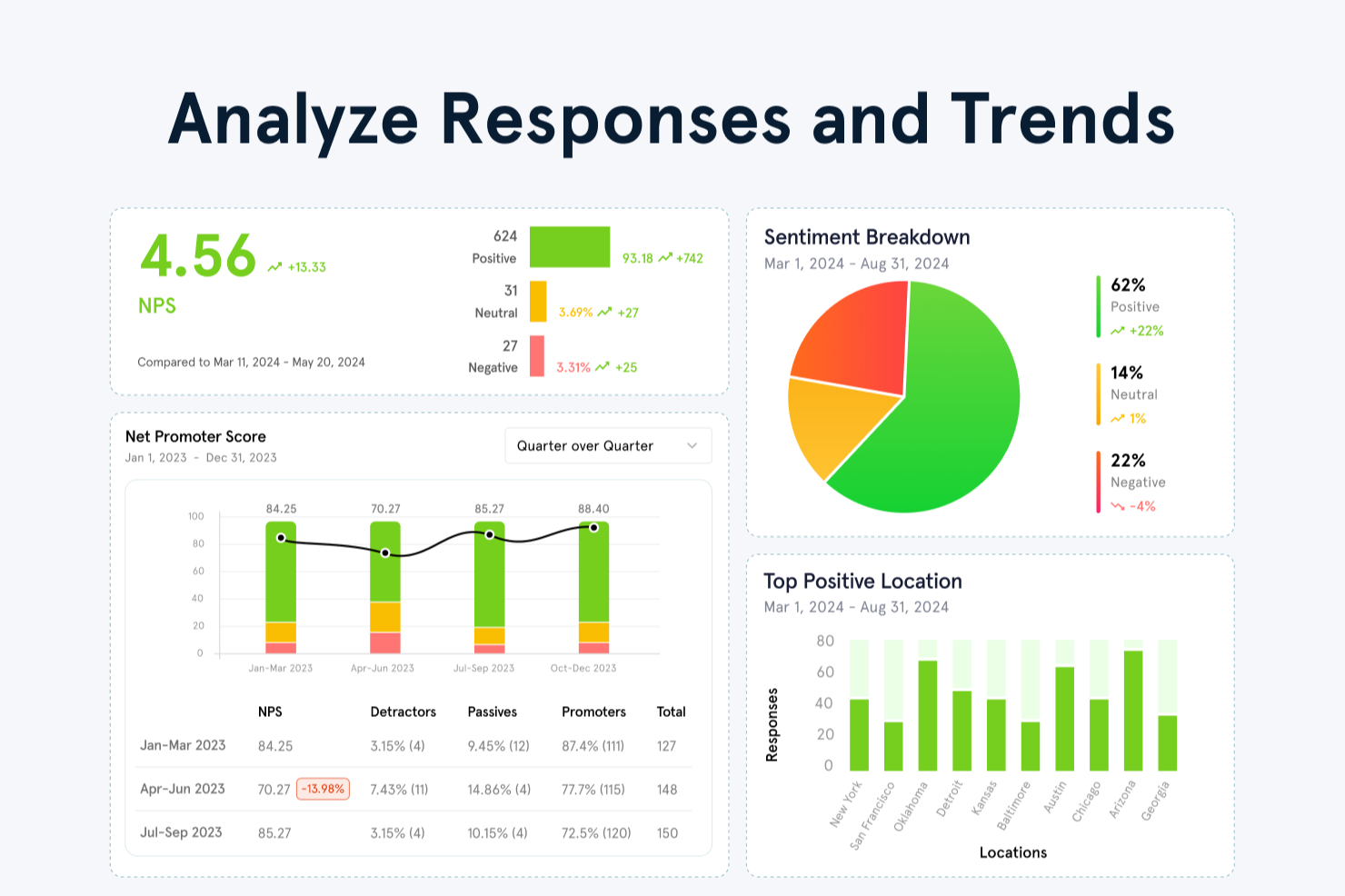
Zonka Feedback ist eine Customer-Experience-Plattform, die auf multikanaler Umfrageverteilung, KI-gestützter Feedback-Analyse, CX-Messwertverfolgung (NPS, CSAT, CES) und geschlossenen Workflows zur Umsetzung von Kundenrückmeldungen basiert.
Für wen ist Zonka Feedback am besten geeignet?
Zonka Feedback eignet sich besonders für CX- und Support-Teams in mittelständischen bis großen Unternehmen, die Kundenfeedback an mehreren Kontaktpunkten sammeln und umsetzen wollen.
Warum habe ich Zonka Feedback ausgewählt?
Ich habe Zonka Feedback in meine Top-Auswahl aufgenommen, weil es eine der wenigen CX-Plattformen ist, die Feedback von sämtlichen Kanälen unmittelbar nach einer Kundeninteraktion erfasst. Besonders nützlich finde ich die ereignisbasierten Umfragetrigger: Sie können eine CSAT- oder NPS-Umfrage automatisch durch ein CRM-Ereignis, ein erledigtes Ticket oder eine abgeschlossene Transaktion auslösen, sodass das Feedback eingeht, solange die Erfahrung noch frisch ist. Darüber hinaus sorgt die Multikanal-Reichweite (E-Mail, SMS, WhatsApp, In-App, Kiosk, QR-Code und offline) dafür, dass kein Kontaktpunkt unberücksichtigt bleibt, egal ob stationärer Handel oder digitaler Produktablauf.
Zonka Feedback Hauptfunktionen
- KI-Stimmungsanalyse: Kategorisiert offene Antworten automatisch nach Stimmung, sodass negative Feedbacktrends erkannt werden, ohne jeden Kommentar lesen zu müssen.
- Closed-Loop-Fallmanagement: Wandelt negative Rückmeldungen in zuweisbare Aufgaben um, sodass Ihr Team unzufriedene Kunden direkt innerhalb der Plattform nachverfolgen kann.
- Umfragelogik und Verzweigungen: Zeigt je nach vorheriger Antwort des Teilnehmers unterschiedliche Anschlussfragen an, damit Umfragen kurz und kontextrelevant bleiben.
- CX-Analyse-Dashboard: Verfolgt NPS-, CSAT- und CES-Werte über die Zeit mit filterbaren Ansichten nach Kanal, Standort, Mitarbeiter oder Kundensegment.
Zonka Feedback Integrationen
Zonka Feedback bietet native Integrationen mit Salesforce, HubSpot, Zendesk, Freshdesk, Intercom, HelpScout, Front, Slack, Pipedrive und weiteren. Es verbindet sich mit Zapier, Make und Integrately und unterstützt Webhooks sowie eine API für individuelle Integrationen.
Pros and Cons
Pros:
- Standortbasierte Berichterstattung für standortübergreifende Teams
- Kiosk-Modus für Erfassung von Feedback vor Ort
- KI-gesteuerte Themenanalyse offener Antworten
Cons:
- Keine Rückgängig-Option bei versehentlichem Löschen
- Umfang der Analysen in niedrigeren Tarifstufen eingeschränkt

Am besten geeignet für detaillierte Stimmungsanalysen
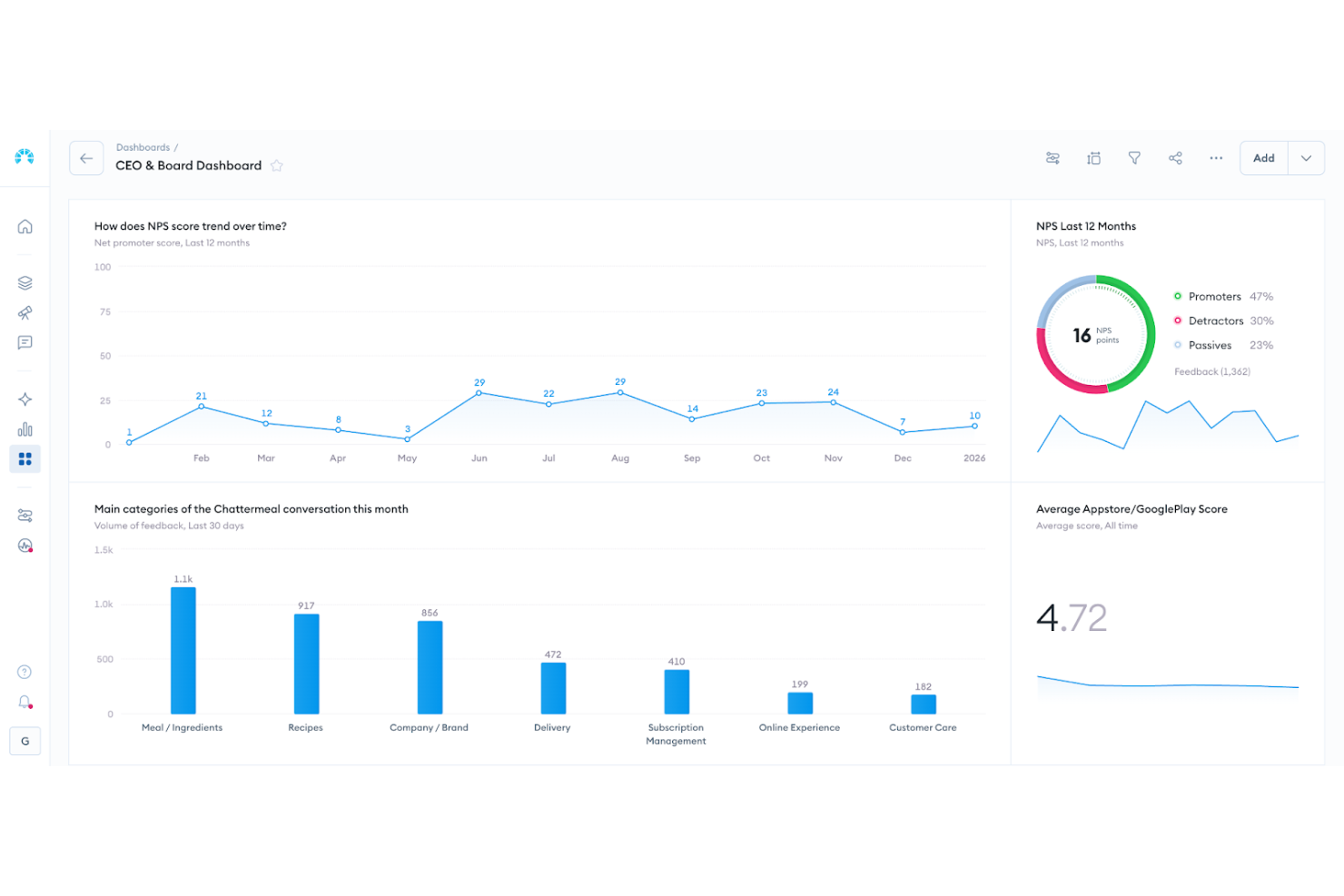
Chattermill bietet eine Lösung für Voice-of-Customer-Analysen für Organisationen, die ihre Strategien im Bereich Kundenerlebnis stärken möchten. Entwickelt für CX-orientierte Teams aus verschiedenen Branchen hilft es, mithilfe fortschrittlicher KI-gestützter Analysen große Mengen unstrukturierter Rückmeldungen zu verstehen. Durch die Konsolidierung von Feedback aus mehreren Kanälen in einer einzigen Ansicht reduziert Chattermill den Aufwand für manuelle Auswertungen und fragmentierte Daten. Das Ergebnis sind zeitnahe, umsetzbare Erkenntnisse, mit denen Sie Verbesserungen priorisieren, auf neue Trends reagieren und die Kundenbindung nachhaltig stärken können.
Warum ich Chattermill gewählt habe
Ich habe Chattermill aufgrund seiner einzigartigen Fähigkeit gewählt, Feedback aus verschiedenen Quellen zu vereinheitlichen und in umsetzbare Erkenntnisse zu verwandeln. Die Lyra-KI von Chattermill ist besonders hervorzuheben, da sie eine detaillierte Stimmungs- und Themenanalyse liefert, die Feedback direkt mit wichtigen Geschäftskennzahlen wie NPS und CSAT verknüpft. Diese Funktion ermöglicht es Ihrem Team, nicht nur die Kundenstimmung zu verstehen, sondern auch zugrundeliegende Probleme und Verbesserungsmöglichkeiten gezielt zu identifizieren. Darüber hinaus erlauben die Echtzeit-Dashboards von Chattermill ein proaktives CX-Management, indem sie Erkenntnisse liefern, die Ihnen helfen, Bedürfnisse der Kunden frühzeitig zu erkennen und gezielt darauf zu reagieren.
Chattermill Hauptfunktionen
Neben seinen Kernstärken habe ich noch weitere Funktionen entdeckt, die die Fähigkeit Ihres Teams, das Kundenerlebnis effektiv zu steuern, verbessern:
- Beobachtungen: Diese Funktion extrahiert präzise Erkenntnisse aus Kundendaten, sodass Sie spezifische Probleme schnell erkennen und beheben können.
- Highlights: Fasst große Mengen an Feedback zu verlässigen Zusammenfassungen zusammen und sorgt so für Klarheit und Fokussierung im Team.
- Ask Lyra: Ein KI-Tool, das sofortige, datenbasierte Antworten auf kundenbezogene Fragen in einfacher Sprache liefert, sodass Erkenntnisse für alle zugänglich sind.
- Anpassbare Dashboards: Ermöglichen es Ihrem Team, Markenerwähnungen und Trends zu verfolgen und bieten so einen umfassenden Überblick über die Kundenzufriedenheit und Performance.
Chattermill Integrationen
Zu den Integrationen gehören Trello, Google Sheets, Slack, Typeform, Salesforce, G2 Crowd, Notion und Mailchimp.
Pros and Cons
Pros:
- Echtzeit-Stimmungsverfolgung
- KI-gestütztes Tagging von Themen
- Branchenspezifische Stimmungsmodelle
Cons:
- Preise werden nicht öffentlich ausgewiesen
- Unternehmenseinführung möglicherweise notwendig

Am besten geeignet für Kollaboration in geteilten Posteingängen
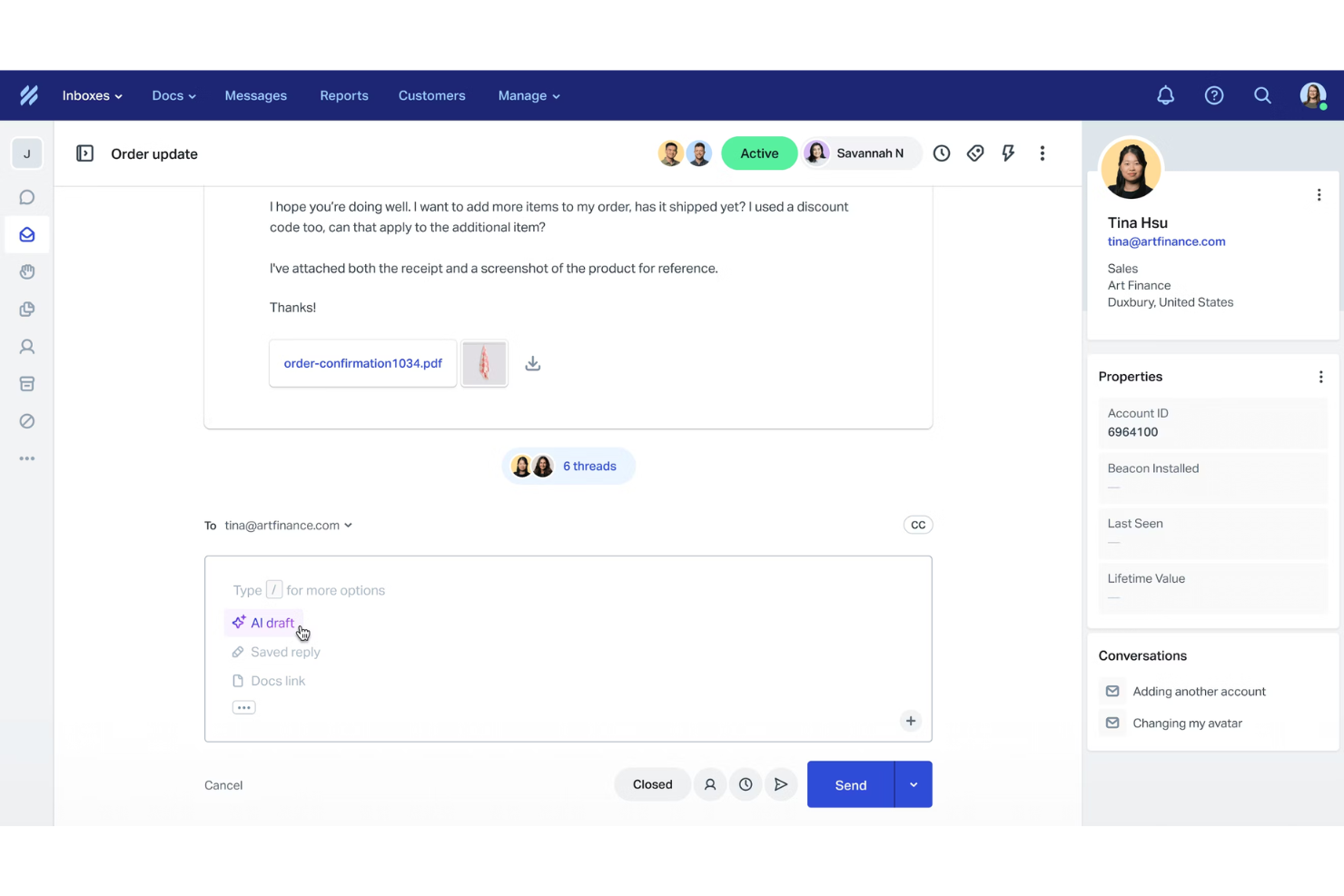
Help Scout ist eine Customer-Experience-Plattform, die Support-Teams dabei unterstützt, E-Mail-basierte Interaktionen mit einem klaren, kollaborativen Workflow zu verwalten. Ihr Team kann Kundenanfragen aus gemeinsamen Posteingängen bearbeiten, Self-Service über eine Wissensdatenbank anbieten und über die Beacon-gestützte Chat-Funktion in Echtzeit Unterstützung bieten.
Warum ich Help Scout ausgewählt habe:
Ich habe Help Scout gewählt, weil es CX-Abläufe simpel hält, wenn Ihr Fokus auf E-Mail-basiertem Support liegt. Sie können Konversationen über mehrere Posteingänge hinweg organisieren, sodass Sie immer wissen, wer für welche Kundenanfrage zuständig ist. Das Help Center ermöglicht es Ihnen, Artikel zu veröffentlichen, die Kunden dabei helfen, häufige Probleme selbst zu lösen, was bei wachsendem Team das Anfragevolumen reduziert. Help Scout bietet außerdem leichte Automatisierungs- und KI-Funktionen, sodass Sie Antworten beschleunigen können, ohne eine komplexe Einrichtung zu benötigen.
Hervorzuhebende Funktionen und Integrationen
Zu den Funktionen gehören gemeinsame Posteingänge für die Koordination von Antworten bereichsübergreifend, eine integrierte Wissensdatenbank für Self-Service sowie Beacon, das Live-Chat, Hilfeartikel und E-Mail in einem einzigen, kundenorientierten Widget vereint. Die Plattform bietet außerdem KI-Antworten für sofortige Rückmeldungen sowie Reporting-Tools zum Verständnis von Kunden-Trends. Integrationen sind unter anderem Salesforce, Zapier, Shopify, Slack, HubSpot, Mailchimp, Asana, Google Sheets, Stripe, Facebook, Trello und WooCommerce.
Pros and Cons
Pros:
- Benutzerfreundliche Oberfläche für Support-Teams
- Hilfreiche integrierte Wissensdatenbank-Tools
- Klare Workflows für E-Mail-Management
Cons:
- Begrenzte erweiterte Automatisierungsoptionen
- Keine native WhatsApp- oder Voice-Unterstützung
New Product Updates from Help Scout

Help Scout Adds Automatic Conversation Reassignment
Help Scout can now automatically unassign conversations when the assigned teammate has been away long enough, keeping replies moving so others can pick them up. For more information, visit Help Scout's official site.
 .
.
Am besten geeignet für individuell anpassbare Automatisierungsabläufe für Agenten
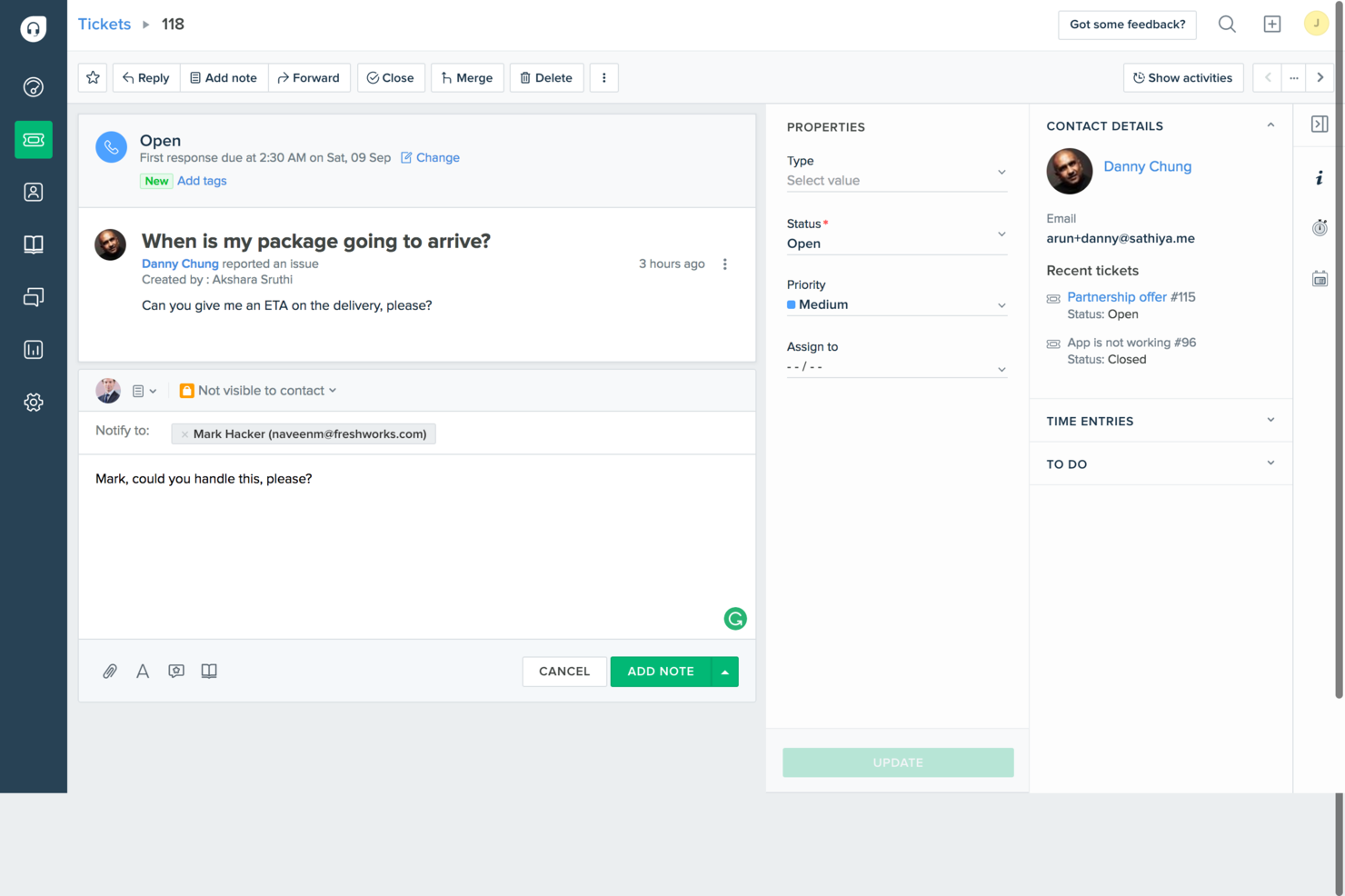
Freshdesk ist eine Omnichannel-CX-Plattform, die Ticketing, KI-gestützte Automatisierung, Live-Chat und Self-Service-Tools vereint, um den Kundensupport über E-Mail, Chat, Telefon und soziale Kanäle hinweg zu verwalten.
Für wen ist Freshdesk am besten geeignet?
Freshdesk eignet sich besonders gut für mittelgroße bis große Support-Teams, die viele Kundenanfragen über verschiedene Kanäle hinweg bearbeiten.
Warum ich Freshdesk ausgewählt habe
Ich habe Freshdesk in meine Top-Auswahl aufgenommen, weil die fortschrittliche Workflow-Automatisierung Support-Teams echte Kontrolle darüber gibt, wie Tickets in der Warteschlange weitergeleitet werden. Sie können kanalspezifische Routing-Regeln, SLA-basierte Eskalationsauslöser, automatische Zuweisungen basierend auf Agentenfähigkeiten oder Auslastung sowie automatische Lösungsabläufe innerhalb derselben Oberfläche konfigurieren. Besonders nützlich finde ich, dass diese Regeln nicht nach dem Einheitsprinzip funktionieren – Sie können für jeden Kanal eigene Automatisierungslogiken erstellen, sodass ein WhatsApp-Ticket einen ganz anderen Ablauf als ein E-Mail-Ticket durchläuft.
Wichtige Funktionen von Freshdesk
- Freddy KI Copilot: Ein KI-Assistent, der Antwortvorschläge macht, Ticketverläufe zusammenfasst und relevante Wissensdatenbank-Artikel für Agenten während Live-Interaktionen bereitstellt.
- Omnichannel-Posteingang: Eine einheitliche Ansicht aller Kundengespräche über E-Mail, Chat, WhatsApp, Instagram und Telefon hinweg in einer einzigen Agenten-Arbeitsoberfläche.
- CSAT-Umfragen: Automatisierte Umfragen nach Interaktionen werden mit individuell einstellbarer Zeitsteuerung, Bewertungsskalen und integriertem Antwort-Tracking im Dashboard an Kunden gesendet.
- Kollisionserkennung: Echtzeit-Benachrichtigungen weisen Agenten darauf hin, wenn ein anderer Teamkollege dasselbe Ticket bereits ansieht oder beantwortet.
Freshdesk-Integrationen
Freshdesk bietet über 1.200 Marktplatz-Integrationen über den Freshworks Marketplace, darunter Slack, Microsoft Teams, Salesforce, Jira, Shopify, Google Calendar und Google Analytics. Außerdem besteht eine Anbindung an Zapier und es werden flexible APIs für individuelle Integrationen bereitgestellt.
Pros and Cons
Pros:
- Tagespässe ermöglichen temporäre Agenten bei Nachfragespitzen
- Wissensdatenbank unterstützt über 42 Sprachen
- SEO-optimierte Wissensdatenbank-Artikel erscheinen in Suchergebnissen
Cons:
- Telefon-Support erfordert ein separates kostenpflichtiges Add-on
- Die überarbeitete Berichts- und Analysefunktion wirkt übermäßig komplex
New Product Updates from Freshdesk

Freshdesk Adds Voice AI Agents in Freshcaller
Freshdesk introduces Voice AI Agents available through Freshcaller Marketplace apps to handle routine calls and reduce queues. This feature enables automated call handling with real-time, conversational support. For more information, visit Freshdesk's official site.

Unwrap
Beste KI-unterstützte Kunden-Insights
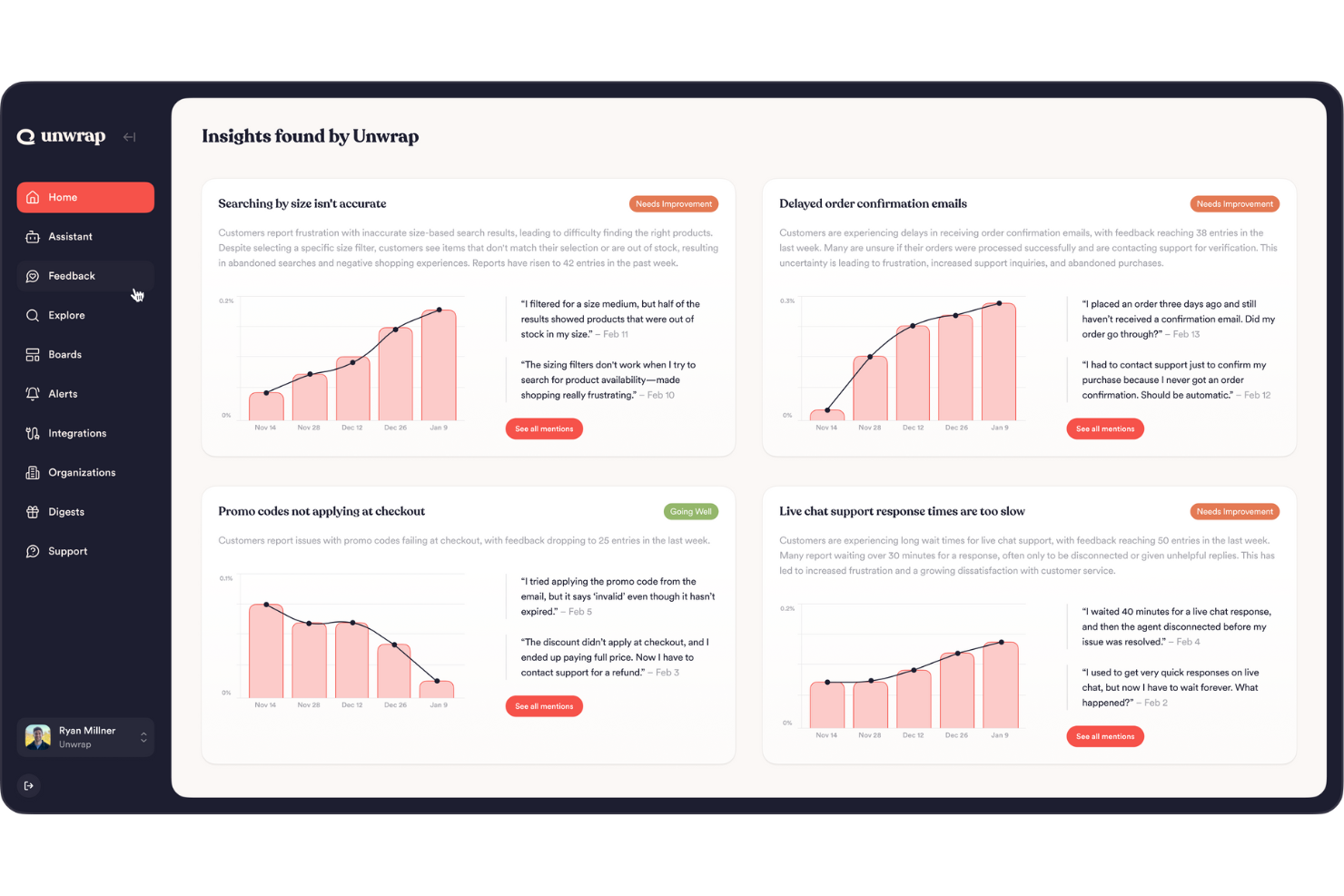
Unwrap bündelt alles, was Sie von Ihren Kunden hören – Support-Tickets, Bewertungen, Umfragen, Social-Media-Beiträge und mehr – an einem Ort und nutzt KI, um all dieses unstrukturierte Feedback in klare Muster und Trends zu verwandeln, auf die Sie und Ihr Team reagieren können. So erfahren Sie, was Ihren Nutzern wirklich wichtig ist, ohne stundenlange manuelle Auswertung. Entwickelt für Produktmanager, CX-Teams und alle, die für Kunden-Insights verantwortlich sind, hilft es Ihnen, Probleme und Feature-Ideen anhand der tatsächlichen Kundenmeinungen zu priorisieren.
Warum ich Unwrap gewählt habe
Ich habe Unwrap gewählt, weil es große Mengen unstrukturierter Rückmeldungen in priorisierte, leicht verständliche Erkenntnisse verwandelt, mit denen Ihr Produkt- und Kundenerlebnis-Team arbeiten kann, ohne jeden einzelnen Kommentar durchsuchen zu müssen. Das KI-gestützte thematische Clustering und die Sentiment-Analyse kategorisieren das Feedback automatisch in aussagekräftige Themen, sodass Ihr Team Trends statt Störungen erkennt. Echtzeit-Benachrichtigungen helfen außerdem, neue Probleme beim Entstehen zu erkennen. Dieser Fokus auf das Herausfiltern der wichtigsten Punkte aus verschiedenen Feedbackquellen macht Unwrap besonders nützlich für Teams, die Entscheidungen auf Grundlage der Kundenstimme treffen möchten.
Unwrap Hauptfunktionen
Neben seinen herausragenden Funktionen bietet Unwrap noch weitere Möglichkeiten:
- Individuell anpassbare Dashboards: Ermöglichen Ihrem Team, personalisierte Datenansichten für bessere Zusammenarbeit und Entscheidungsfindung zu erstellen.
- Abfragen in natürlicher Sprache: Nutzer können mit den Daten in Umgangssprache interagieren, was die Analyse vereinfacht.
- Benachrichtigungssysteme: Bieten Echtzeit-Benachrichtigungen über neue Erkenntnisse, damit Ihr Team potenzielle Probleme frühzeitig erkennt.
- Automatisierte Feedbackanalyse: Wandelt unstrukturiertes Feedback in strukturierte Daten um und spart so Zeit und reduziert manuellen Aufwand.
Unwrap Integrationen
Zu den Integrationen zählen Salesforce, Zendesk, Intercom, Slack, HubSpot, Mailchimp, Google Analytics, Asana, Trello und Jira.
Pros and Cons
Pros:
- Sentiment-Analyse hilft Teams, die Stimmung der Nutzer über die Zeit messbar zu machen.
- KI-Tools lassen aufkommende Trends erkennen, ohne große Datensätze manuell durchsuchen zu müssen.
- Automatisiert die Kategorisierung unstrukturierter Rückmeldungen in aussagekräftige Gruppen mit NLP.
Cons:
- Das Einrichten einer Feedback-Taxonomie kann zusätzlichen Anpassungsaufwand bedeuten.
- Gelegentliche Lücken bei nativen Plattform-Integrationen im Vergleich zu Wettbewerbern.

UserGuiding
Am besten für Self-Service-Nutzer-Onboarding geeignet
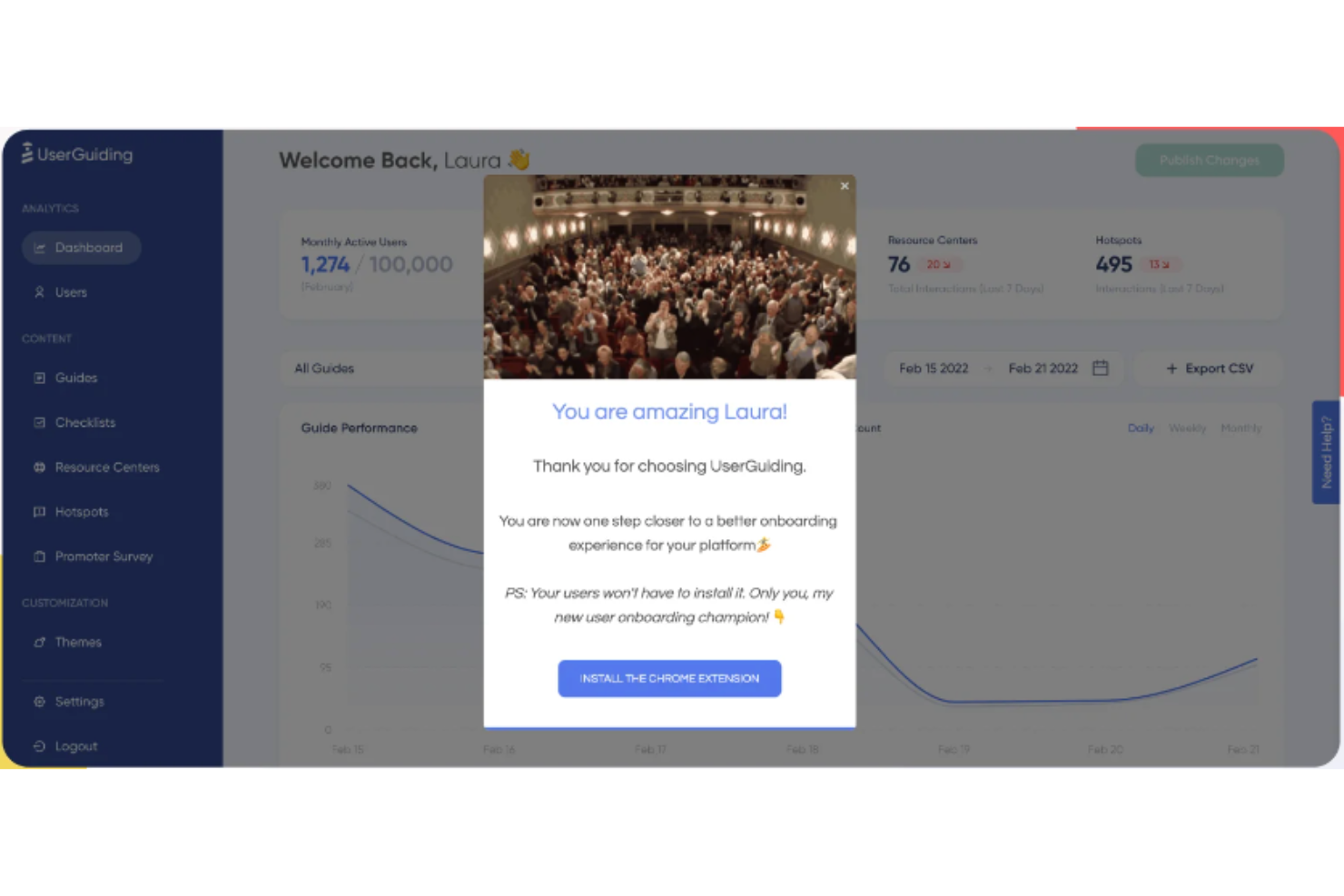
UserGuiding ist eine Software für das Nutzer-Onboarding, die Unternehmen dabei unterstützt, interaktive Erlebnisse innerhalb ihrer Produkte zu erstellen, um Nutzer durch den Onboarding-Prozess zu führen. Sie wurde entwickelt, um die Bindung zu erhöhen, die Nutzung von Funktionen zu verbessern und ansprechende Onboarding-Erlebnisse zu bieten.
Warum ich UserGuiding ausgewählt habe: UserGuiding unterstützt Plattformen für das Kundenerlebnis (CX), indem es eine Reihe von Tools anbietet, die die Automatisierung von Kundeninteraktionen und die Personalisierung von Nutzererlebnissen erleichtern. Der Ansatz des Tools umfasst die Erstellung von In-App-Anleitungen und interaktiven Journeys, die Nutzern bei der Navigation durch digitale Plattformen helfen und Unternehmen dadurch in die Lage versetzen, ansprechende und gut durchdachte Erlebnisse zu bieten. UserGuiding stellt außerdem In-App-Umfragen bereit, darunter NPS-Umfragen (Net Promoter Score), um Feedback zu sammeln, die Nutzerzufriedenheit zu messen und Verbesserungsmöglichkeiten zu identifizieren.
Funktionen und Integrationen von UserGuiding
Zu den herausragenden Funktionen von UserGuiding gehören Onboarding-Checklisten, Ressourcenzentren, Segmentierung, Analysen, Tooltips, Hotspots, Ankündigungsmodals und Produktaktualisierungen. UserGuiding lässt sich in verschiedene Anwendungen von Drittanbietern integrieren, darunter Google Analytics, MixPanel, HubSpot, Segment, Intercom, Woopra, Google Tag Manager und Slack.
Pros and Cons
Pros:
- Erhöht nachweislich die Konversionsrate und reduziert Support-Tickets
- Bietet flexible Optionen für die Kundenzielgruppenansprache
- Benutzerfreundliche Oberfläche
Cons:
- Begrenzte Integrationen
- Eingeschränkte Anpassungsmöglichkeiten
- Analysetools sind für einige Teams möglicherweise unzureichend
Weitere bemerkenswerte CX-Plattformen
Nachfolgend finden Sie eine Liste weiterer CX-Plattform-Tools, die ich in die engere Auswahl genommen, aber nicht in die Top 10 aufgenommen habe. Definitiv einen Blick wert.
- Zendesk
Am besten geeignet für personalisierten KI-Kundensupport
- Customerscore.io
Am besten geeignet für automatisierte Kundenkampagnen
- Tidio
Am besten geeignet für kontextbezogene KI-Chatbot-Unterstützung
- Guidde
Am besten geeignet für KI-gestützte Videoanleitungen
- Front
Am besten mit automatischer Qualitätskontrolle für Tickets
- Fullstory
Am besten geeignet für Echtzeit-Sitzungswiedergaben
- Kustomer
Am besten für Omnichannel-Kundensupport geeignet
- ServiceNow
Am besten geeignet für ITSM-orientierten Kundenservice
- ZOHO CRM Plus
Am besten für integriertes Customer-Experience-Management
- Crescendo
Am besten geeignet für KI-gestütztes Coaching von Vertriebsteams


Verwandte CX-Software-Tests
Falls Sie hier noch nicht fündig geworden sind, schauen Sie sich diese verwandten Customer Experience Management Tools an, die wir getestet und bewertet haben.
- Kundenservice-Software
- Helpdesk-Software
- Callcenter-Software
- Kunden-Messaging-Plattform
- Digitale Experience-Plattform
- Sentiment-Analyse-Tools
Wie ich CX-Plattformen bewerte
Ich unterteile jede CX-Plattform in zwei Ebenen: die Basis — Omnichannel-Feedback, NPS-/CSAT-Umfragen, Closed-Loop-Workflows — und Differenzierungsmerkmale, die wirklich nützliche Tools von generischen unterscheiden.
Kernfunktionen (Grundvoraussetzungen für diese Liste)
Wenn ich Tools für meine Liste auswähle, bewerte ich jedes einzelne auf einer Skala von 0 (bietet diese Funktion nicht an) bis 5 (übertrifft in diesem Bereich) hinsichtlich jeder unten aufgeführten Kernfunktion. Anschließend berechne ich die Gesamtpunktzahl des Tools als Prozentsatz. Jedes Tool muss eine Mindestpunktzahl von 75 % erreichen, um für die Aufnahme berücksichtigt zu werden.
- Omnichannel-Feedback-Erfassung: Ich prüfe, wie viele Kanäle eine Plattform nativ für die Feedback-Erfassung abdeckt — E-Mail, SMS, Web-Interception, In-App, Social — und ob diese Eingaben in Echtzeit synchronisiert werden.
- CX-Kennzahlen & Umfragen: Die Plattform sollte NPS, CSAT und CES standardmäßig unterstützen, mit Umfragelogik wie Verzweigung, Begrenzung (Throttling) und integrierter mehrsprachiger Verteilung.
- Kundenreise-Analyse: Ich bewerte, ob ein Tool in der Lage ist, Kundenreisen über verschiedene Berührungspunkte hinweg abzubilden und zu visualisieren — beispielsweise die Nachverfolgung eines Kunden vom Onboarding bis zur Verlängerung — mit echten Verhaltensdaten.
- Text- & Stimmungsanalyse: KI-basierte Themen-Erkennung und Stimmungsbewertung für offene Antworten, Bewertungen und Gesprächsprotokolle sind hierbei entscheidend, nicht nur Keyword-Tagging.
- Management geschlossener Maßnahmen (Closed-Loop Action Management): Plattformen sollten bei Erhalt eines Detraktor-Scores Alarme auslösen, Fälle weiterleiten und Folgeaktionen automatisieren, damit Frontline-Teams handeln können, bevor Kunden abwandern.
- Rollenbasierte Dashboards & Berichte: Ich achte auf konfigurierbare Ansichten, die einem CX-Direktor Trend-Insights und einem Support-Manager detaillierte Queue-Informationen aus demselben Datensatz bieten.
Nachdem ich eine Liste von Tools habe, die diese Kriterien erfüllen, prüfe ich, was jede Plattform einzigartig macht.
Differenzierungsmerkmale (Was Anbieter unterscheidet)
So vergleiche und bewerte ich verschiedene Anbieter:
Herausragende Funktionen
Prädiktive CX-Analytik ist ein wichtiges Unterscheidungsmerkmal — ich achte auf Modelle, die gefährdete Accounts identifizieren, bevor Vertragsverlängerungen anstehen, damit Customer-Success-Teams eingreifen können. Die Verknüpfung mit finanziellen Auswirkungen ist ebenso relevant, denn ein CX-Direktor muss Verbesserungen beim CSAT mit Umsatzentwicklungen verbinden, wenn er dem Vorstand berichtet. Außerdem bewerte ich generative KI-Zusammenfassungen, die Tausende von offenen Antworten in wenigen Minuten auf umsetzbare Themen komprimieren können — statt in Wochen manueller Auswertung.
Mehr als nur Funktionen
Die Tiefe der Integration ist eines der ersten Dinge, auf die ich achte. Eine CX-Plattform, die sich nicht nativ mit Ihrem CRM und Ihren Contact-Center-Tools verbindet, verursacht Datensilos und erschwert jede abgebildete Kundenreise. Ich prüfe auch branchenspezifische Fähigkeiten — vorgefertigte Programme für Branchen wie das Gesundheitswesen oder Finanzdienstleistungen können die Implementierungszeit deutlich verkürzen. Auch die Einführungsdauer ist entscheidend, besonders für operative Teams, die vorkonfigurierte Vorlagen und einen Self-Service-Setup benötigen — und keinen sechsmonatigen Professional-Services-Prozess.
Vorteile von CX-Plattformen
Die Wahl der richtigen Customer Experience (CX)-Plattform ist entscheidend für Unternehmen, die ihren Kundenservice verbessern und interne Prozesse optimieren möchten. Diese Plattformen bieten zahlreiche Vorteile, die nicht nur das Nutzererlebnis steigern, sondern auch dem gesamten Unternehmen bedeutende Mehrwerte bringen. Nachfolgend finden Sie fünf Hauptvorteile, die CX-Plattformen bieten – als Orientierungshilfe für potenzielle Softwarekäufer, um zu verstehen, wie diese Tools den Ansatz für die Kundenbindung verändern können.
- Zentrale Kundendatenerfassung: Fasst Interaktionen aus verschiedenen Kanälen zusammen. Dies erleichtert es Unternehmen, Kundeninteraktionen zu verwalten und nachzuverfolgen, wodurch jedes Teammitglied Zugriff auf die gleichen Informationen hat und einen konsistenten, personalisierten Service bieten kann.
- Verbesserte Kundenzufriedenheit (CSAT): Ermöglicht eine schnellere Problemlösung. Durch die Bereitstellung von Tools und Einblicken zur effizienteren Lösung von Kundenanliegen tragen CX-Plattformen direkt zu einer höheren Kundenzufriedenheit bei, fördern Loyalität und regen Folgegeschäfte an.
- Gesteigerte Produktivität: Automatisiert sich wiederholende Aufgaben. Indem Routineaufgaben übernommen werden, ermöglichen CX-Plattformen es Kundenserviceteams, sich auf komplexere und wertvollere Tätigkeiten zu konzentrieren, was die Gesamtproduktivität und Effizienz steigert.
- Aussagekräftige Analysen: Bietet detaillierte Analysen und Berichte. Der Zugriff auf umfassende Analysen ermöglicht es Unternehmen, das Verhalten und die Bedürfnisse der Kunden besser zu verstehen, strategische Entscheidungen darauf auszurichten und Dienstleistungen gezielter an Kundenerwartungen anzupassen.
- Nahtlose Integration: Lässt sich in bestehende Softwaretools integrieren. Die Fähigkeit zur nahtlosen Integration mit anderen Geschäftsanwendungen sorgt für einen reibungslosen Workflow, steigert die Effizienz und minimiert potenzielle Fehler oder Datensilos.
Für Organisationen, die ihre Customer Experience verbessern möchten, bietet die Investition in eine CX-Plattform nicht nur die Aussicht auf eine höhere Kundenzufriedenheit, sondern auch auf operative Effizienz und strategische Einblicke.
Häufig gestellte Fragen zu CX-Plattformen
Wie viel kosten diese Customer-Experience-Plattformen typischerweise?
Die Preise für Software-Plattformen zum Customer Experience Management können stark variieren, abhängig von Funktionsumfang, Unternehmensgröße und Nutzeranzahl. Manche Plattformen starten mit einem Preismodell ab 20 $ pro Nutzer und Monat, während andere mehrere Hundert Dollar pro Nutzer und Monat kosten können. Die meisten Anbieter bieten gestaffelte Preise, die sich nach den enthaltenen Funktionen richten.
Welche typischen Preismodelle gibt es für Customer-Experience-Plattformen?
Typischerweise folgen Customer-Experience-Plattformen einem Preismodell pro Nutzer und Monat. Es kann zudem Preisstufen geben, bei denen jede Stufe zusätzliche Funktionen bietet. Einige Plattformen bieten auch eine jährliche Abrechnung, die oft zu einem rabattierten Preis angeboten wird.
Welche sind die günstigsten und teuersten Customer-Experience-Plattformen?
Die Kosten dieser Plattformen können stark schwanken. Beispielsweise bietet Dialpad Tarife ab 15 $ pro Nutzer und Monat an, während Tools wie Genesys Cloud eher im Premium-Bereich angesiedelt sind. Beim Vergleich der Kosten sollte man stets auf die enthaltenen Funktionen und den konkreten Nutzen achten.
Gibt es kostenlose Customer-Experience-Plattformen?
Die meisten Customer-Experience-Plattformen bieten keinen vollständig kostenlosen Tarif an, allerdings gibt es oft eine kostenlose Testphase. Diese ermöglicht es potenziellen Nutzern, die Funktionen und Bedienbarkeit der Plattform zu prüfen, bevor sie sich für ein kostenpflichtiges Angebot entscheiden. Es ist ratsam, solche Testphasen zu nutzen, um sicherzustellen, dass die Plattform zu Ihren Anforderungen passt.
Wie gehen diese Plattformen mit mehrsprachigem Kundensupport um?
CX-Plattformen integrieren häufig Unterstützung für verschiedene Sprachen, um eine globale Kundschaft zu bedienen und so die Zufriedenheit und das Engagement in unterschiedlichen Regionen zu steigern. Dieser Funktionsumfang ist besonders für Unternehmen wertvoll, die personalisierte Kundenerlebnisse für unterschiedliche Zielgruppen bieten möchten. Plattformen mit Omnichannel-Support, wie Kustomer, ermöglichen nahtlose Kommunikation über verschiedene Kanäle (Soziale Medien, E-Mail, Chat) in mehreren Sprachen und stellen sicher, dass Sprachbarrieren den Kundenkontakt nicht beeinträchtigen.
Wie stellen CX-Plattformen die Einhaltung internationaler Vorschriften sicher?
Die Einhaltung internationaler Vorschriften ist eine komplexe Aufgabe, die verschiedene Ebenen von Datensicherheit, Datenschutz und Rechtskonformität umfasst. CX-Plattformen wie Segment zeichnen sich durch leistungsstarke Datenerfassungs- und Management-Tools aus, darunter Governance-Funktionen, die die Einhaltung von Vorschriften unterstützen. Diese Plattformen nutzen üblicherweise verschiedene Sicherheitsmaßnahmen wie Verschlüsselung und Zugriffskontrollen zum Schutz der Kundendaten. Zudem bieten viele Integrationen mit Compliance-Management-Tools oder verfügen über integrierte Rahmenwerke, die internationale Standards wie GDPR, SOC II und weitere erfüllen. Es ist ebenfalls üblich, dass die Plattformen ihre Compliance-Maßnahmen laufend an neue gesetzliche Anforderungen anpassen.
Was sind Best Practices für die Implementierung und Optimierung einer CX-Plattform?
Für die Implementierung und Optimierung einer CX-Plattform ist es entscheidend, dass das Tool mit Ihren Unternehmensabläufen sowie Ihren spezifischen Zielsetzungen abgestimmt ist.
Analysieren Sie zunächst Ihre bestehenden Prozesse, um zu erkennen, was funktioniert und wo es noch Herausforderungen gibt. Diese Analyse sorgt dafür, dass die Plattform Ihr Geschäft unterstützt, anstatt bestehende Abläufe zu verkomplizieren. Ebenso wichtig ist es, von Anfang an Erfolgskriterien festzulegen. Beispielsweise könnten Sie größere Transparenz bei der Leistung oder verbesserte Kundenzufriedenheitswerte anvisieren. Diese Ziele sollten die Auswahl und Nutzung der CX-Plattform lenken und sicherstellen, dass jede genutzte Funktion zur Zielerreichung beiträgt. Die beste CX-Plattform für Ihr Unternehmen ist letztlich diejenige, die sich nahtlos in Ihr bestehendes Ökosystem einfügt und Ihre Fähigkeit verbessert, außergewöhnliche Kundenerlebnisse zu bieten, ohne Ihren Workflow zu stören.
Zusammenfassung
Abschließend ist die Wahl der richtigen CX-Plattform entscheidend für jedes Unternehmen, das seine Kundenerfahrung verbessern möchte. Diese Plattformen bieten eine Vielzahl an Funktionen, Eigenschaften und Preismodellen, sodass die Auswahl der zu den Bedürfnissen Ihrer Organisation am besten passenden Lösung eine Herausforderung darstellen kann. Hier sind die wichtigsten Erkenntnisse aus diesem Leitfaden:
- Bewerten Sie Ihre Anforderungen: Analysieren Sie die individuellen Bedürfnisse Ihres Unternehmens, bevor Sie sich für eine Plattform entscheiden. Dazu gehört es, die Größe Ihrer Kundenbasis, die Kanäle, über die Sie Ihre Kunden erreichen möchten, und die gewünschte Art der Interaktion richtig einzuschätzen.
- Funktionen sind entscheidend: Das passende Funktionspaket kann einen erheblichen Unterschied machen. Achten Sie auf Fähigkeiten wie Echtzeit-Analysen, Multikanal-Support, Skalierbarkeit, Kundeninteraktions-Tools und Integrationen in andere Systeme. Die besten CX-Plattformen bieten oft Anpassungsmöglichkeiten, die auf Ihre spezifischen Geschäftsprozesse zugeschnitten werden können.
- Preise sind wichtig: CX-Plattformen bieten unterschiedliche Preisstrukturen. Während einige ein einfaches monatliches Preismodell pro Nutzer anbieten, können andere Einrichtungsgebühren oder Grundgebühren verlangen. Klären Sie alle Kostenaspekte, bevor Sie sich für eine Plattform entscheiden, einschließlich möglicher Zusatzkosten für Premium-Funktionen oder Integrationen.
Denken Sie daran: Die beste Plattform für Ihr Unternehmen ist diejenige, die Ihren individuellen Anforderungen an personalisierte Erlebnisse entspricht und zu Ihrem Budget passt.
Wie geht es weiter?
Wenn Sie dabei sind, CX-Plattformen zu recherchieren, lassen Sie sich von einem SoftwareSelect-Berater kostenlos beraten.
Sie füllen ein Formular aus und führen ein kurzes Gespräch, in dem Ihre spezifischen Anforderungen besprochen werden. Danach erhalten Sie eine Auswahl an Software, die Sie prüfen können. Die Berater unterstützen Sie sogar während des gesamten Kaufprozesses, einschließlich Preisverhandlungen.