

10 beste CX-Software-Plattformen im Vergleich für 2026

12 Beste CX-Software im Überblick


Bei der großen Auswahl an Lösungen für das Customer Experience Management ist es schwierig, herauszufinden, welches Tool das Richtige für Sie ist. Sie wissen, dass Sie Ihre Customer Journey steuern und standardisieren möchten, aber welches Tool ist am besten? Ich helfe Ihnen dabei! In diesem Beitrag mache ich Ihnen die Wahl leicht und teile meine persönlichen Erfahrungen aus der Arbeit mit zahlreichen CX-Tools bei großen Teams und Projekten – zusammen mit meiner Auswahl der besten verfügbaren CX-Software.
Was ist eine CX-Software?
CX-Software, also Customer-Experience-Software, ist ein digitales Tool, mit dem Sie die Interaktionen mit Ihren Kunden verbessern können. Unternehmen aller Branchen nutzen diese Plattformen, um sämtliche Berührungspunkte entlang der Customer Journey zu verwalten, zu analysieren und zu optimieren. Sowohl kleine Betriebe als auch große Unternehmen können damit starke Kundenbeziehungen aufbauen, die Zufriedenheit steigern und die Kundentreue fördern.
Durch das Erfassen und die Analyse von Kundenfeedback hilft CX-Software dabei, Kundenbedürfnisse zu verstehen, Herausforderungen zeitnah zu lösen und die Interaktionen zu personalisieren. Der strategische Einsatz dieser Technologie beeinflusst letztlich die Wahrnehmung einer Marke und spielt eine entscheidende Rolle für Wachstum und Nachhaltigkeit eines Unternehmens.
Spezifikationen vergleichen
| Tool | Best For | Trial Info | Price | ||
|---|---|---|---|---|---|
| 1 | Am besten geeignet für die Analyse von großflächigem Feedback | Kostenlose Demo verfügbar | Preise auf Anfrage | Website | |
| 2 | Am besten für das Management von Marktplatzanbieter-Support | 14-tägige kostenlose Testversion verfügbar | Ab $19/Nutzer/Monat (jährliche Abrechnung) | Website | |
| 3 | Am besten für KI-gestützte, rollenbasierte CX-Dashboards | Kostenlose Demo verfügbar | Preise auf Anfrage | Website | |
| 4 | Am besten für konversationsbasierte Umfragen | Kostenlose 14-tägige Testphase + kostenlose Demo verfügbar | Preis auf Anfrage | Website | |
| 5 | Am besten für personalisierte Kundenumfragen | Kostenlose Testversion + kostenloser Plan + kostenlose Demo verfügbar | Ab $39/Monat (jährliche Abrechnung) | Website | |
| 6 | Beste KI-gesteuerte Kunden-Insights | Kostenlose Demo verfügbar | Preise auf Anfrage | Website | |
| 7 | Bester KI-Support-Agent | 7-tägige kostenlose Testphase + kostenloser Tarif verfügbar | Ab $25/Nutzer/Monat | Website | |
| 8 | Am besten geeignet für den KI-Chatbot-Einsatz auf individuellen Daten | Kostenloser Plan verfügbar | Ab $32/Monat (jährliche Abrechnung) | Website | |
| 9 | Am besten geeignet für dynamische Mindmaps | 7-tägige kostenlose Testversion + kostenloser Plan verfügbar | Ab $9/Monat (1 Nutzer, jährliche Abrechnung) | Website | |
| 10 | Am besten für automatisierte, kanalübergreifende Kundenerlebnis-Feedbacksammlung | Kostenlose 10-Tage-Testversion verfügbar | Ab $55.99/Monat | Website |


Überblick: Die 12 besten CX-Software-Lösungen

Am besten geeignet für die Analyse von großflächigem Feedback
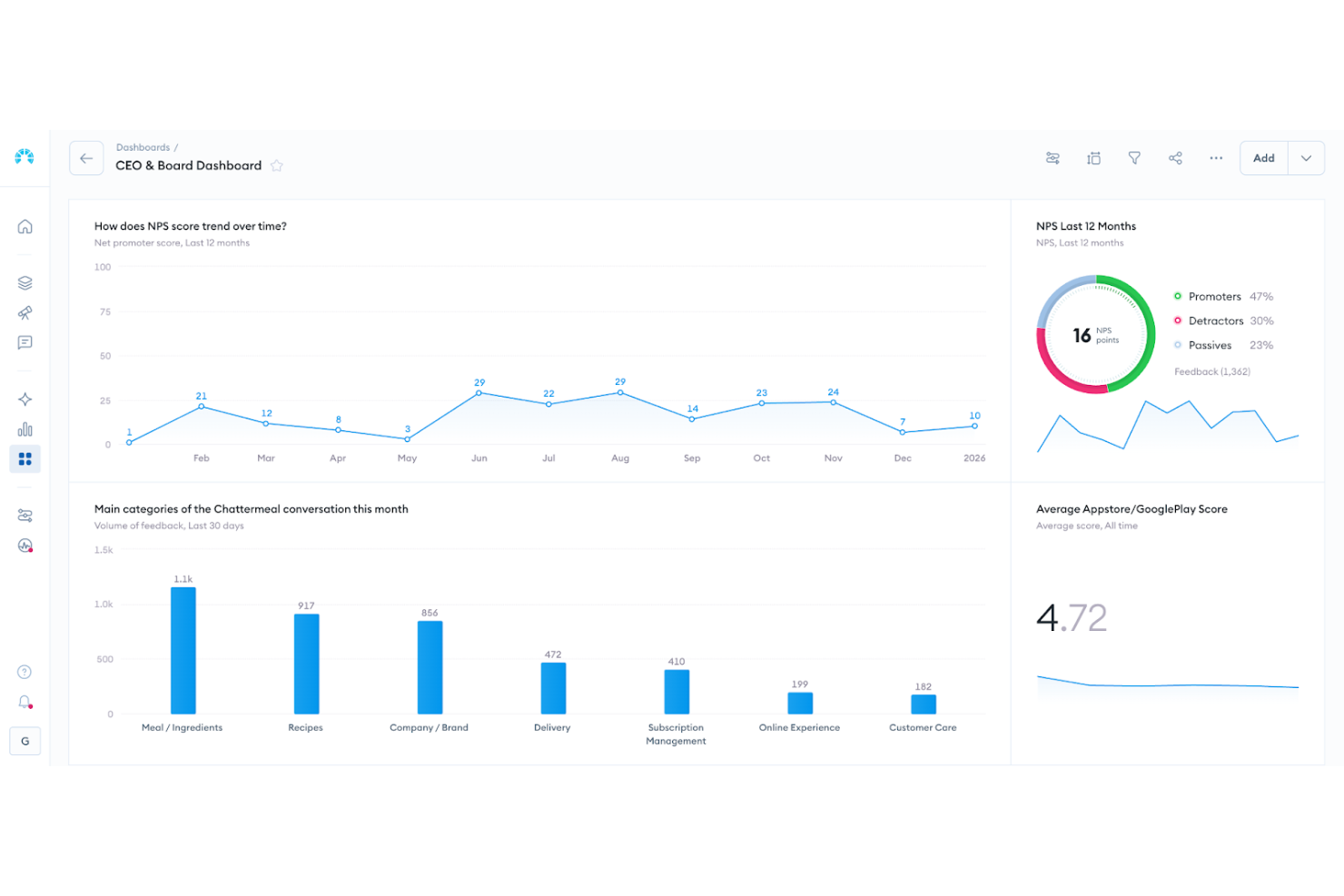
Chattermill ist eine Voice-of-Customer-Analyseplattform, die für Unternehmen entwickelt wurde, die ihre Strategien zur Verbesserung des Kundenerlebnisses stärken möchten. Sie unterstützt Organisationen dabei, mithilfe KI-gestützter Analyse den vollen Wert von Kundenfeedback zu erschließen. Indem Feedback aus Umfragen, Bewertungen, Support-Interaktionen und anderen Kanälen zentralisiert wird, hilft Chattermill Teams dabei, zentrale Themen herauszuarbeiten, aufkommende Probleme zu erkennen und sicherzustellen, dass wichtige Erkenntnisse nicht in fragmentierten Daten verloren gehen.
Warum ich Chattermill gewählt habe
Ich habe mich für Chattermill entschieden, weil es sich besonders darin auszeichnet, Kundenfeedback in umsetzbare Erkenntnisse zu verwandeln – ein entscheidender Aspekt jeder CX-Software. Seine KI-basierte Analyse ist herausragend und erlaubt Ihrem Team, große Mengen an Feedback effizient zu kategorisieren und auszuwerten. Zudem stellt die Fähigkeit, Trends zu erkennen und Probleme zu identifizieren, die sich auf Geschäftsmetriken wie NPS und CSAT auswirken, sicher, dass Sie den Kundenbedürfnissen und Erwartungen immer einen Schritt voraus sind. Dieser Fokus auf konkrete Handlungsempfehlungen ist für alle, die ihr Kundenerlebnis verbessern möchten, von zentraler Bedeutung.
Wichtige Funktionen von Chattermill
Neben seiner leistungsstarken Analyse bietet Chattermill mehrere weitere Funktionen, die den Nutzen als CX-Tool erhöhen.
- Analyse von Kundenfeedback: Mit dieser Funktion können Sie Feedback aus verschiedenen Kanälen auf einer einzigen Plattform zentralisieren und umfassend auswerten.
- Produkt-Erlebnis-Analyse: Erhalten Sie Einblicke, wie Kunden mit Ihren Produkten interagieren, und identifizieren Sie Bereiche mit Verbesserungsbedarf.
- Analyse von Support-Daten: Analysieren Sie Kunden-Support-Interaktionen, um Trends und Bereiche mit Handlungsbedarf zu erkennen.
- Soziale CX-Analyse: Überwachen und analysieren Sie Interaktionen in sozialen Medien, um die Stimmung und das Engagement Ihrer Kunden zu verstehen.
Chattermill-Integrationen
Zu den Integrationen gehören Zendesk, Trustpilot, Qualtrics, Intercom, Salesforce, HubSpot, Slack, Google Analytics, Shopify und Freshdesk.
Pros and Cons
Pros:
- Echtzeit-Verfolgung von Stimmungen
- KI-gestützte Themenmarkierung
- Branchenspezifische Stimmungsmodelle
Cons:
- Preise nicht öffentlich zugänglich
- Kann eine Einführung auf Unternehmensebene erfordern

Am besten für das Management von Marktplatzanbieter-Support
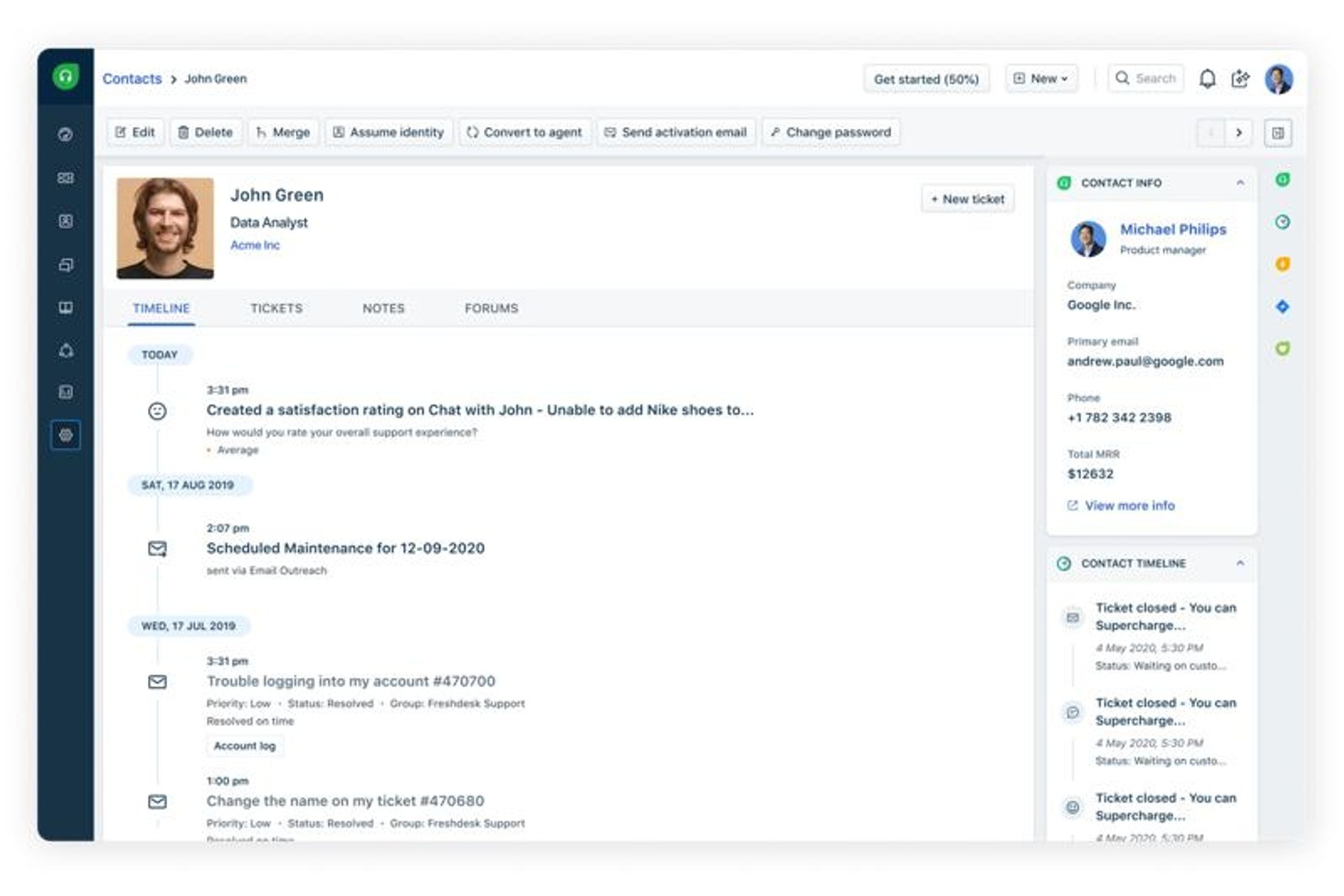
Freshdesk ist eine Omnichannel-Kundenserviceplattform, die Ticketing, Live-Chat, Telefon, E-Mail und Social-Media-Interaktionen zusammen mit KI-gestützter Automatisierung und Self-Service-Tools zentralisiert.
Für wen ist Freshdesk am besten geeignet?
Freshdesk eignet sich besonders für mittelständische bis große E-Commerce- und Marktplatzunternehmen, die eine zentrale Support-Plattform für verschiedene Kundenkanäle benötigen.
Warum ich Freshdesk gewählt habe
Freshdesk ist für mich eine der besten Optionen für das Management von Marktplatzanbietern, weil es die Komplexität von Tickets mit mehreren Beteiligten hervorragend abwickelt. Wenn eine Käuferbeschwerde eingeht, erhalten die Agenten im Command Center den kompletten Gesprächsverlauf, sodass sie nicht zwischen Tabs wechseln müssen, um zusammenzusetzen, was der Anbieter gesagt hat und was der Käufer gemeldet hat. Außerdem gefällt mir das skillbasierte Routing – so landen Tickets zu Verkäuferstreitigkeiten, Zahlungsproblemen oder logistischen Schwierigkeiten automatisch beim richtigen Agenten und nicht einfach beim Erstbesten in der Warteschlange.
Freshdesk Hauptfunktionen
- Freddy AI Copilot: Zeigt während Live-Interaktionen in Echtzeit vorgeschlagene Antworten und relevante Wissensdatenbank-Artikel für Agenten an.
- SLA-Management: Festlegung von Antwort- und Lösungszeiten nach Tickettyp mit automatischen Eskalationstriggern, wenn Fristen gefährdet sind.
- CSAT-Umfragen: Automatische Zufriedenheitsumfragen nach Ticketabschluss zur Erfassung von Kundenfeedback auf Interaktionsebene.
- Self-Service-Portal: Gibt Kunden ein gebrandetes Portal, um Tickets einzureichen, Status zu verfolgen und Hilfsartikel zu durchsuchen, ohne einen Agenten kontaktieren zu müssen.
Freshdesk Integrationen
Freshdesk bietet über 1.000 Marktplatzintegrationen, darunter Slack, Microsoft Teams, Shopify, Salesforce, Jira, Google Kalender, Google Analytics und Aircall. Es ist auf Zapier verfügbar und stellt eine API für individuelle Integrationen bereit.
Pros and Cons
Pros:
- Deckt E-Mail-, Chat-, Telefon- und Social-Media-Kanäle ab
- Freshworks-Ökosystem teilt CRM-Daten
- Unterstützt automatisierte Ticketweiterleitung
Cons:
- Berichtswerkzeuge bei niedrigen Tarifen wenig tiefgehend
- Begrenzte Funktionen der mobilen App
New Product Updates from Freshdesk

Freshdesk Adds Voice AI Agents in Freshcaller
Freshdesk introduces Voice AI Agents available through Freshcaller Marketplace apps to handle routine calls and reduce queues. This feature enables automated call handling with real-time, conversational support. For more information, visit Freshdesk's official site.

Am besten für KI-gestützte, rollenbasierte CX-Dashboards
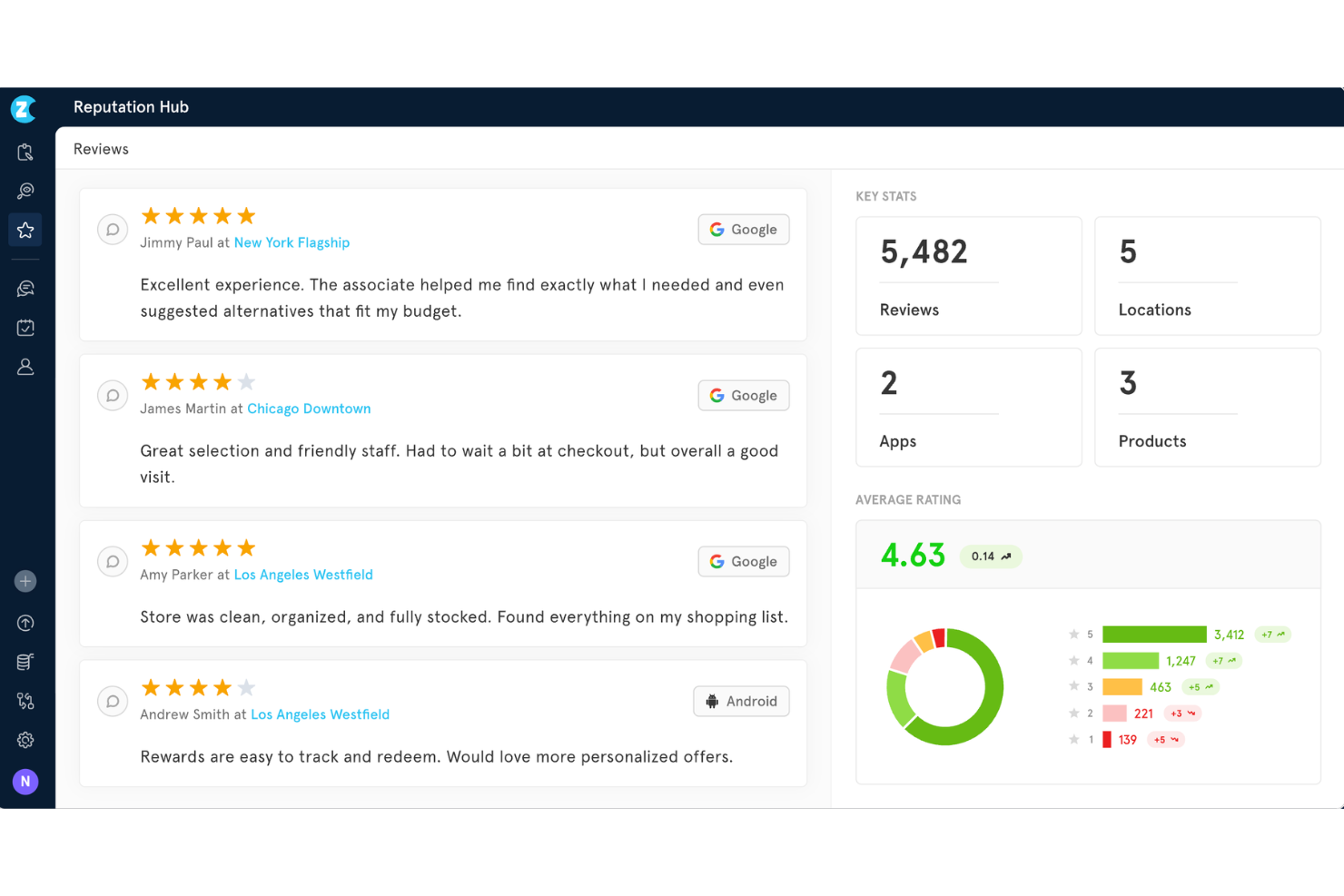
Zonka Feedback ist eine KI-gestützte CX-Plattform, die Omnichannel-Feedback-Erfassung, NPS/CSAT/CES-Umfragetools, Stimmungs- und Themenanalyse, Closed-Loop-Case-Management und rollenbasierte Dashboards kombiniert.
Für wen ist Zonka Feedback am besten geeignet?
Zonka Feedback eignet sich für CX-Teams von kleinen und mittelständischen Unternehmen, die ein standortübergreifendes Feedback-Management und KI-gestützte Einblicke benötigen, ohne die Komplexität einer Enterprise-Lösung.
Warum habe ich mich für Zonka Feedback entschieden?
Ich habe Zonka Feedback in meine Top-Auswahl aufgenommen, weil seine rollenbasierten Dashboards die Art und Weise, wie verschiedene Teams CX-Daten konsumieren, wirklich verändern. Ein Standortleiter sieht die CSAT-Trends seines Standorts, während ein CXO eine KI-gestützte Wirkungsanalyse erhält, die Feedback-Themen direkt mit der Entwicklung des NPS verknüpft. Außerdem gefällt mir die Agentic-AI-Anomalieerkennung, die Punktabfälle in Echtzeit erkennt, bevor sie zu Kündigungsrisiken eskalieren.
Hauptfunktionen von Zonka Feedback
- Omnichannel-Umfrage-Engine: Sammeln Sie Feedback über E-Mail, SMS, WhatsApp, Web, Mobile App, Kioske und QR-Codes auf einer Plattform.
- Erweiterte Umfragelogik: Nutzen Sie Verzweigungslogik, Skip-Logik und mehrsprachige Unterstützung, um Fragen individuell auf Zielgruppen zuzuschneiden.
- Automatisierte CX-Workflows: Automatisieren Sie Folgeaktionen, Eskalationen und Fallzuweisungen basierend auf spezifischen Auslösern in Umfragen.
- Enterprise-taugliche Compliance: Gewährleisten Sie Sicherheit mit ISO 27001-, DSGVO- und HIPAA-Konformität sowie Optionen zur Datenlokalisierung.
Zonka Feedback Integrationen
Zonka Feedback bietet über 20 native Integrationen, darunter Salesforce, HubSpot, Pipedrive, Mailchimp, Zendesk, Intercom, Freshdesk, HelpScout, Front, Jira und Slack. Zapier und eine offene API sind für individuelle Integrationen verfügbar.
Pros and Cons
Pros:
- Offline-Kiosk-Modus verfügbar
- Wirkungsanalyse verknüpft Feedback-Themen mit NPS
- KI-Zusammenfassungen erkennen automatisch Muster
Cons:
- Journey Mapping bietet keine visuellen Orchestrierungs-Tools
- Prädiktives Churn-Scoring ist eingeschränkt

Am besten für konversationsbasierte Umfragen
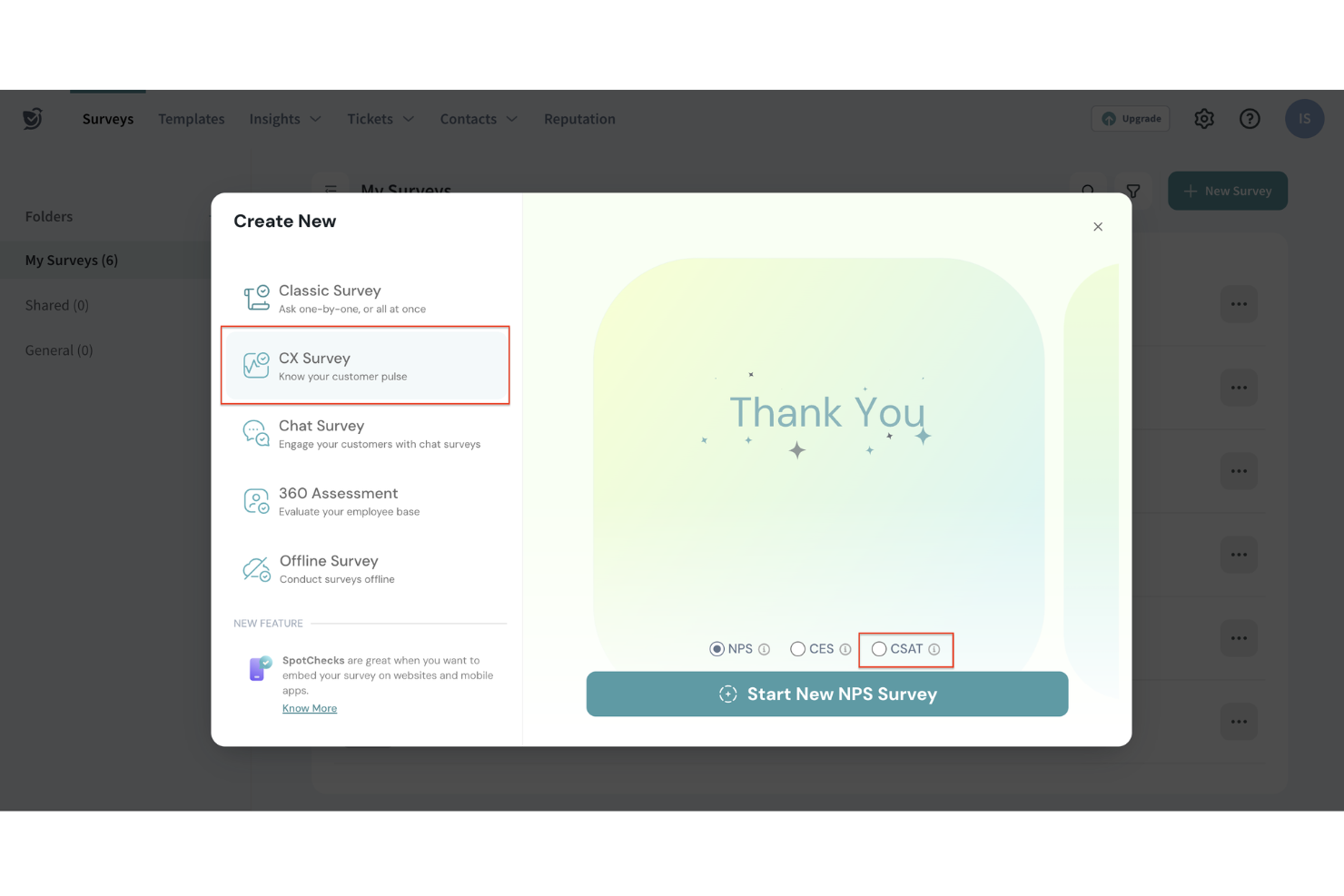
Für Unternehmen, die ihre Strategien zur Kundenerfahrung verbessern möchten, bietet SurveySparrow eine intuitive Plattform, die Feedback in umsetzbare Erkenntnisse verwandelt. Egal, ob Sie im Einzelhandel, Gesundheitswesen oder in einer anderen Branche tätig sind, in der Kundenzufriedenheit im Mittelpunkt steht – SurveySparrow hilft Ihnen, Ihre Zielgruppe effektiver einzubinden. Dieses Tool wurde entwickelt, um die Herausforderung zu lösen, aussagekräftiges Feedback zu sammeln und in Strategien umzusetzen, die Kundentreue und Unternehmenswachstum fördern.
Warum ich SurveySparrow gewählt habe
Ich habe mich für SurveySparrow entschieden, weil es konversationsbasierte Umfragen nach dem Prinzip 'eine Frage nach der anderen' bietet, sodass Sie Ihre gesamte Voice-of-Customer-Strategie von einem Ort aus steuern können. Die KI-gestützten Analysen der Plattform über CogniVue liefern Unternehmen die notwendigen Daten, um schnell fundierte Entscheidungen zu treffen. Zusätzlich hilft das Ticket-System, Kundenanliegen zeitnah zu bearbeiten, sodass Feedback nicht nur gesammelt, sondern auch effektiv umgesetzt wird.
SurveySparrow Hauptfunktionen
Neben den konversationalen Umfragen und KI-gestützten Analysen bietet SurveySparrow außerdem:
- NPS®-Umfragen: Messen Sie Kundenloyalität und Zufriedenheit mit Net Promoter Score-Umfragen, die einfach zu erstellen und auszuwerten sind.
- Multi-Channel-Distribution: Erreichen Sie Ihre Zielgruppe über verschiedene Kanäle wie E-Mail, soziale Medien und SMS, um die Teilnehmerquote zu maximieren.
- Reputationsmanagement: Überwachen und verwalten Sie Online-Bewertungen, um den Ruf Ihrer Marke effektiv aufzubauen und zu erhalten.
- White-Label-Umfragen: Passen Sie Umfragen mit Ihrem eigenen Branding an, um ein einheitliches und professionelles Erscheinungsbild sicherzustellen.
SurveySparrow Integrationen
Integrationen umfassen Slack, HubSpot, Salesforce, Mailchimp, Google Analytics, Microsoft Dynamics 365, Shopify, Stripe, Zendesk und Intercom. SurveySparrow bietet zudem API-Zugriff für individuelle Integrationen, sodass Sie die Plattform auf Ihre spezifischen Bedürfnisse zuschneiden können.
Pros and Cons
Pros:
- Ermöglicht einfaches Teilen über Web, Mobilgerät und E-Mail.
- Bietet KI-gestützte Erkenntnisse für umsetzbare Entscheidungen.
- Unterstützt verschiedene Fragetypen für eine vielfältige Feedbacksammlung.
Cons:
- Eingeschränkte Exportmöglichkeiten der Daten schränken die Flexibilität bei der Berichterstattung ein.
- Für mobile oder Offline-Umfragen im Service-Außendienst sind ggf. zusätzliche Konfigurationen erforderlich.

Am besten für personalisierte Kundenumfragen
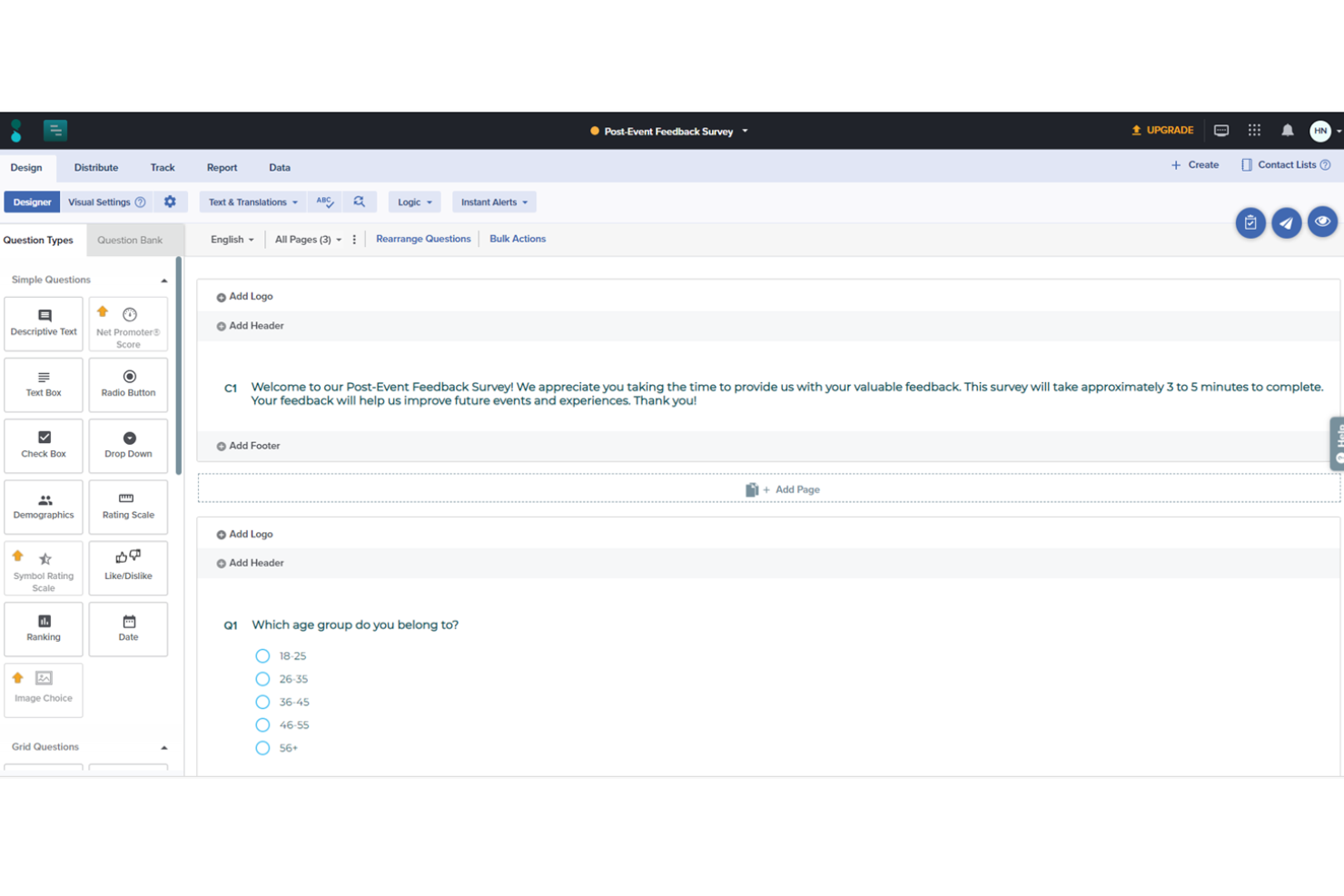
Sogolytics ist eine leistungsstarke Online-Plattform für Umfragen und Feedback-Management, die Unternehmen dabei unterstützt, Feedback von Kunden, Mitarbeitern und anderen Interessengruppen zu erfassen, zu analysieren und darauf zu reagieren. Mit einer intuitiven Benutzeroberfläche und leistungsstarken Analysen ermöglicht Sogolytics die einfache Erstellung individuell gestalteter Umfragen, die entscheidende Erkenntnisse liefern.
Warum ich Sogolytics ausgewählt habe:
SogoCX, ein Bestandteil der Sogolytics-Plattform, konzentriert sich auf die Verbesserung der Kundenzufriedenheit und -treue, indem es ein interaktives Dashboard bietet, das Kundeninteraktionen und Feedback über mehrere Berührungspunkte hinweg nachverfolgt. Unternehmen können damit Trends erkennen, die wichtigsten Einflussfaktoren für die Kundenstimmung messen und proaktiv Maßnahmen zur Verbesserung der gesamten Customer Journey ergreifen. Funktionen wie automatische Erinnerungen und personalisierte Einladungen zu Umfragen helfen, die Rücklaufquote zu erhöhen, sodass das gesammelte Feedback sowohl zahlreich als auch repräsentativ ist.
Herausragende Funktionen & Integrationen:
Die fortschrittlichen Umfrage-Design-Funktionen von Sogolytics umfassen individuell anpassbare Designs, erweiterte Verzweigungslogik und Übersprungbedingungen, was hochgradig personalisierte und ansprechende Umfragen ermöglicht. Darüber hinaus liefert die leistungsstarke Analyse-Engine Echtzeitberichte, bedingte Formatierung und Kreuztabellenanalysen, um Nutzern bei der Entschlüsselung komplexer Daten zu helfen.
Integrationen umfassen Salesforce, Microsoft Office, Google Workspace, Zapier, Tableau, HubSpot und Slack.
Pros and Cons
Pros:
- Große Auswahl an erweiterten Fragetypen
- Gute Datenerfassungs- und Analysefunktionen
- Multi-Channel-Verteilung
Cons:
- Kostenlose Version könnte für manche Nutzer zu eingeschränkt sein
- Für einige fortschrittliche Analysen sind tiefere technische Kenntnisse erforderlich
New Product Updates from Sogolytics
Sogolytics Adds Teams and Slack Surveys and Custom Automations
Sogolytics adds native Microsoft Teams and Slack survey distribution, a Custom Automations Builder, Derived Fields, PointClickCare integration, and authenticator-based MFA. These updates expand survey distribution and workflow automation while adding new data management and security capabilities. For more information, visit Sogolytics’ official site.
 .
.
Unwrap
Beste KI-gesteuerte Kunden-Insights
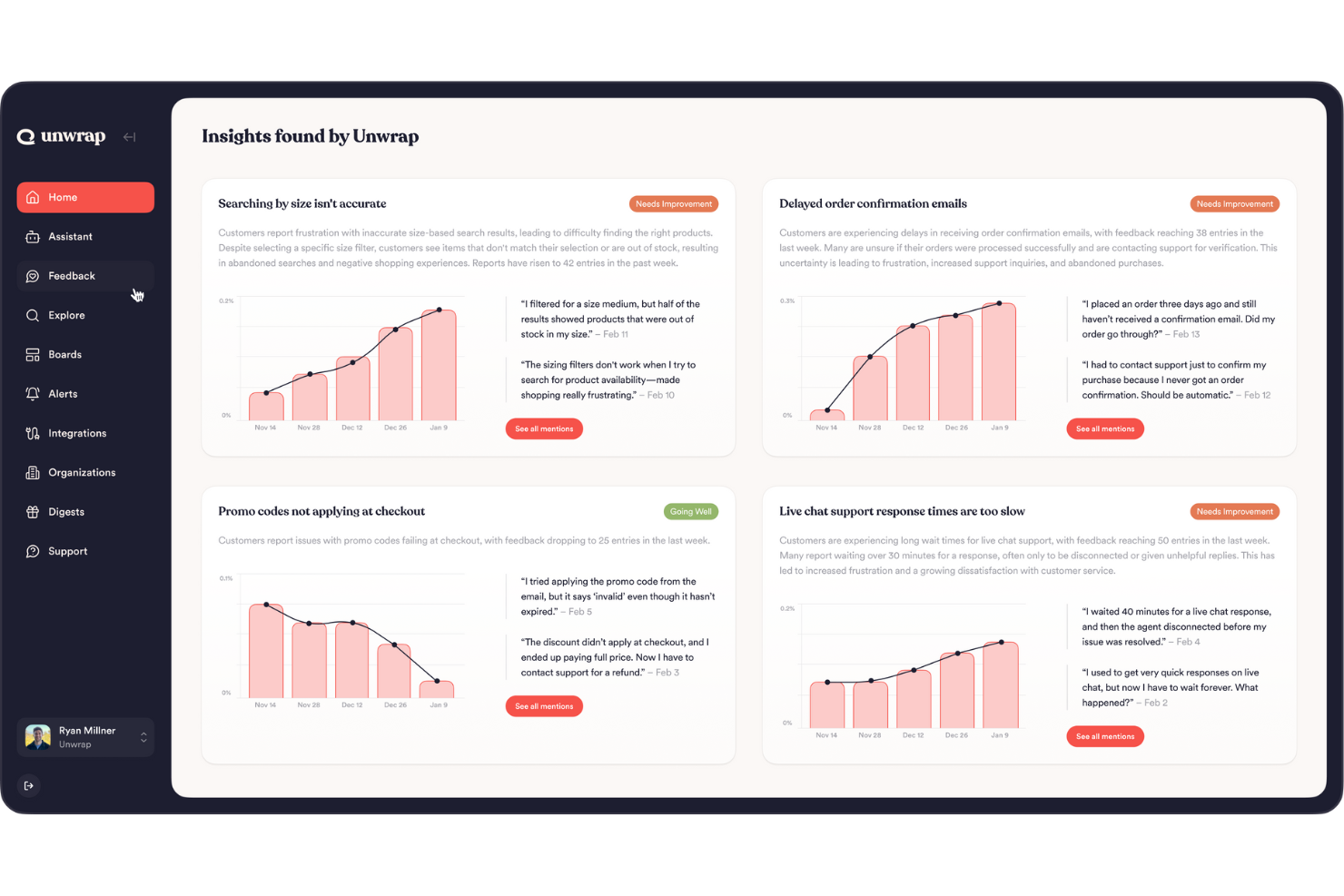
Unwrap ist eine fortschrittliche Customer-Intelligence-Plattform, die darauf ausgelegt ist, die Art und Weise zu verändern, wie Unternehmen Kundenfeedback erfassen und nutzen. Sie ist besonders attraktiv für Branchen wie Einzelhandel, Reisen und Software, in denen das Verständnis der Kundenzufriedenheit einen direkten Einfluss auf die Produktentwicklung und die Kundenzufriedenheit haben kann.
Warum ich Unwrap ausgewählt habe
Ich habe mich für Unwrap entschieden, weil es in der Lage ist, mit KI proaktive Erkenntnisse zu liefern, die das Management der Kundenerfahrung verbessern. Ein herausragendes Merkmal ist der Auto Tagger, der Feedback automatisch in Kategorien einordnet, was Ihrem Team Zeit spart und manuelle Fehler reduziert. Darüber hinaus ermöglicht der Natural Language Query Assistant, Informationen schnell abzurufen, ohne sich durch komplexe Systeme navigieren zu müssen – so erhalten Sie bequem und spontan die gewünschten Antworten. Diese Funktionen passen ideal zu Ihrem datenbasierten Ansatz, um Kundenstimmungen zu verstehen und den Service zu verbessern.
Wichtige Funktionen von Unwrap
Zusätzlich zu den bereits genannten Funktionen bietet Unwrap:
- Anpassbare Dashboards: Damit kann Ihr Team Daten so visualisieren, wie es für Ihr Unternehmen am sinnvollsten ist, um Leistungsindikatoren leichter nachzuverfolgen.
- Echtzeit-Benachrichtigungen: Diese Funktion stellt sicher, dass Sie bei kritischem Feedback sofort informiert werden, sodass Sie zeitnah reagieren können.
- Responder-Tool: Ermöglicht eine nahtlose Kundenkommunikation, indem Sie Rückmeldungen direkt über die Plattform beantworten können.
- SupportIQ: Bietet einen umfassenden Überblick über Leistungskennzahlen und hilft so, Ihren Kundensupport gezielt auszuwerten und zu verbessern.
Unwrap-Integrationen
Zu den Integrationen gehören Salesforce, Zendesk, Intercom, Slack, HubSpot, Mailchimp, Google Analytics, Asana, Trello und Jira.
Pros and Cons
Pros:
- Sentiment-Analysen helfen Teams, die Stimmung der Nutzer über die Zeit hinweg quantifizierbar zu machen.
- KI-Tools erkennen neue Trends, ohne dass große Datenmengen manuell durchsucht werden müssen.
- Automatisiert die Kategorisierung von unstrukturiertem Feedback in sinnvolle Gruppen mithilfe von NLP.
Cons:
- Die Einrichtung der Feedback-Taxonomie kann zusätzlichen Anpassungsaufwand erfordern.
- Gelegentlich Lücken bei nativen Plattform-Integrationen im Vergleich zu Wettbewerbern.

Tidio
Bester KI-Support-Agent

Tidio ist eine Customer-Experience-Plattform, die Live-Chat, KI-gestützte Automatisierung und Multichannel-Kommunikationstools kombiniert, um Unternehmen eine schnellere und individuellere Kundenbetreuung zu ermöglichen. Sie ermöglicht Echtzeitunterhaltungen mit Kunden über verschiedene Kanäle wie Websites, E-Mail und soziale Medien – alles zentral auf einem einzigen Dashboard verwaltet.
Warum ich Tidio gewählt habe:
Ich schätze den Lyro KI-Agenten, der den Großteil routinemäßiger Kundenanfragen mithilfe der Verarbeitung natürlicher Sprache und Ihres bestehenden Support-Contents bearbeiten kann. Er versteht Kontext und Absicht, liefert präzise Antworten und leitet bei Bedarf komplexe Anliegen an menschliche Mitarbeiter weiter. Außerdem verfügt Tidio über einen visuellen Automatisierungseditor, mit dem Sie individuelle Chatbot-Workflows ohne Programmierkenntnisse erstellen können. Mit über 40 vorkonfigurierten Vorlagen können Sie automatisierte Antworten für häufige Szenarien wie Warenkorbabbrüche oder Lead-Qualifizierung einrichten. Diese Abläufe lassen sich durch das Verhalten der Nutzer – etwa Seitenbesuche oder Scrolltiefe – auslösen und ermöglichen ein proaktives Engagement.
Herausragende Funktionen & Integrationen:
Weitere Funktionen sind ein einheitlicher Posteingang, der Nachrichten aus Live-Chat, E-Mail und sozialen Netzwerken zusammenfasst und so Ihrem Team das Management aller Kundenanfragen an einem Ort ermöglicht. Die Plattform bietet außerdem ein Echtzeit-Besuchertracking, mit dem Sie sehen können, welche Seiten Ihre Kunden besuchen, und basierend auf deren Verhalten Chats starten können.
Integrationen umfassen Shopify, WordPress, Squarespace, WIX, Adobe Commerce, BigCommerce, WooCommerce, Google Analytics, Mailchimp, HubSpot und Zendesk.
Pros and Cons
Pros:
- Bietet Einblicke in Team-Performance und Kundenzufriedenheit
- Lyro KI übernimmt einen Großteil der Kundenanfragen
- Multichannel-Support, einschließlich Chat, E-Mails und soziale Medien
Cons:
- Begrenzungen bei der Integration bestimmter Drittanbieter-Tools
- Viele Automatisierungsfunktionen nur in höheren Tarifen verfügbar

Chatbase
Am besten geeignet für den KI-Chatbot-Einsatz auf individuellen Daten

Chatbase ist ein KI-gestützter Chatbot-Builder, mit dem Sie Konversationsbots auf den Daten Ihres Unternehmens trainieren können. Er unterstützt mehrsprachige Bereitstellungen, bietet detaillierte Steuerungsmöglichkeiten und Integrationen, um Chatsupport nahtlos in Customer-Experience-Workflows einzubetten.
Für wen ist Chatbase am besten geeignet?
Chatbase eignet sich besonders für kleine und mittelgroße Unternehmen sowie digitale Teams, die einen maßgeschneiderten, trainierten KI-Chatbot ohne umfassende Entwicklerressourcen bereitstellen möchten.
Warum ich Chatbase ausgewählt habe
Ich habe Chatbase als eines der besten Tools ausgewählt, weil es die individuelle Datenanbindung hervorragend umsetzt. Sie können Ihre bestehende Wissensdatenbank, Produktdokumentation, PDFs, URLs und sogar Notion-Seiten einpflegen und Chatbase nutzt genau diese Inhalte als alleinige Wahrheitsquelle für jede Kundeninteraktion. Mir gefällt, dass Sie im Bereich Quellen Ihre Trainingsdaten stetig verwalten und aktualisieren können, sodass der Agent stets aktuell bleibt, ohne einen kompletten Neuaufbau. Kombiniert mit der Möglichkeit, verschiedene KI-Modelle zu vergleichen, um die beste Konfiguration für Ihren Anwendungsfall zu finden, entsteht so ein Chatbot, der exakt auf Ihre Support-Inhalte zugeschnitten ist – und nicht einfach auf einem generischen LLM basiert.
Chatbase Hauptfunktionen
- Konversationsprotokolle: Vollständige Gesprächsverläufe der Chatbot-Interaktionen einsehen, um die Antwortqualität zu überwachen und Lücken im Trainingsdatensatz zu erkennen.
- Lead-Erfassungsformulare: Kontaktdaten von Besuchern direkt im Chat-Widget während Kundenunterhaltungen erfassen.
- Benutzerdefinierte Aktionen: Verbinden Sie Ihren Chatbot mit externen Tools, damit er Live-Daten abrufen oder bei einem Chat bestimmte Workflows anstoßen kann.
- Übergabe an Agenten: Übergabe der Konversation an einen menschlichen Support-Agenten, wenn der Chatbot an die Grenzen seines Wissens stößt.
Chatbase Integrationen
Chatbase bietet native Integrationen mit Make, Zendesk, Notion, Slack, Stripe, Salesforce und weiteren Tools. Auch eine API für individuelle Integrationen ist verfügbar.
Pros and Cons
Pros:
- Erlaubt das Einschränken des Chatbots auf bestimmte Themen
- Exportiert vollständige Gesprächsverläufe zur Analyse
- Bietet ein Analyse-Dashboard mit Konversationsübersicht
Cons:
- Keine Live-Übergabe an menschliche Support-Agenten
- Wenig vorgefertigte Templates für spezifische Branchen

Am besten geeignet für dynamische Mindmaps
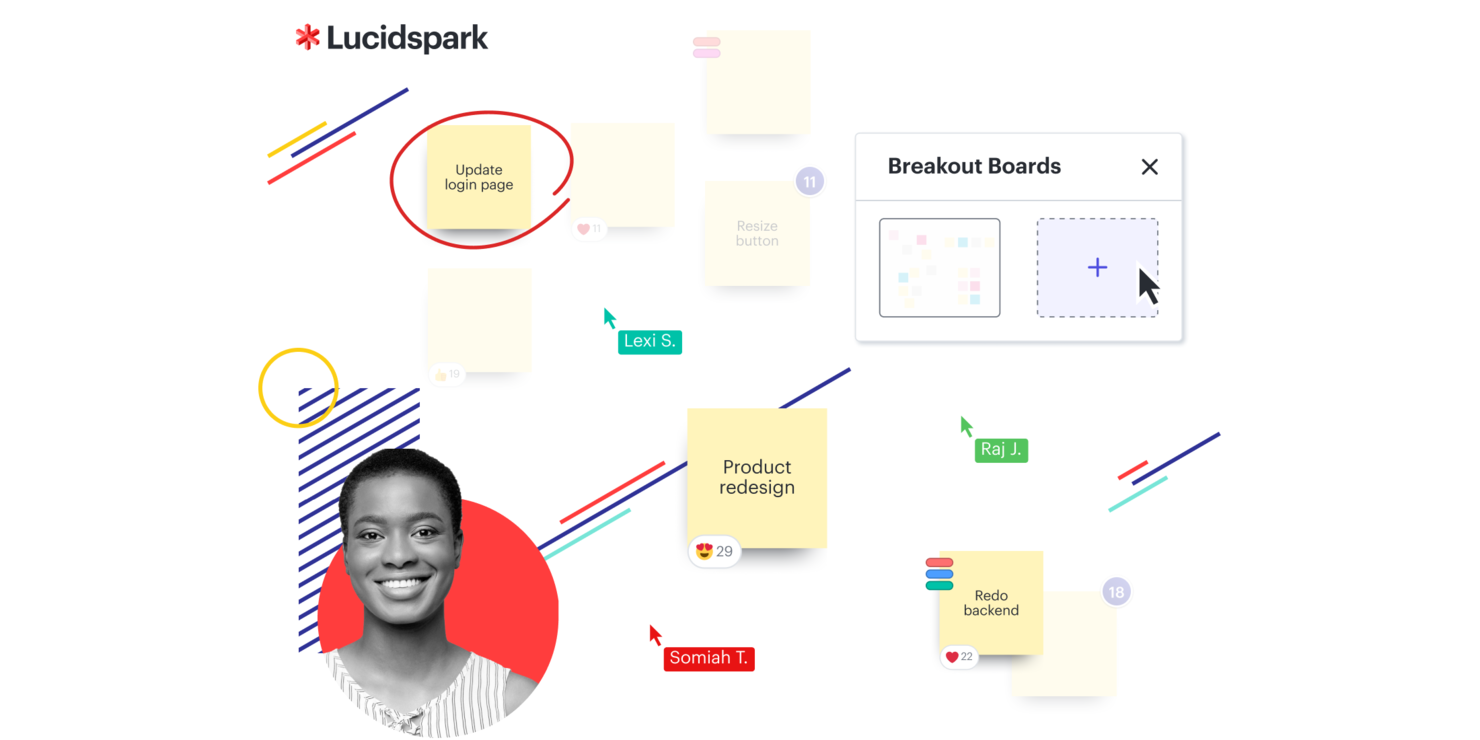
Lucidspark ist ein virtuelles Whiteboard, das entwickelt wurde, um die Zusammenarbeit im Team und die Organisation von Ideen zu unterstützen. Für Unternehmen, die sich auf die Verbesserung der Kundenerfahrung konzentrieren, unterstützt es Brainstorming, Projektplanung und agile Entwicklung. Die Plattform hilft Teams, von der Ideenfindung bis zur Umsetzung zu gelangen und dabei gängige Herausforderungen bei Zusammenarbeit und Entscheidungsfindung zu bewältigen.
Warum ich Lucidspark gewählt habe
Ich habe mich für Lucidspark entschieden, weil es die Art der Zusammenarbeit unterstützt, die für Verbesserungen der Kundenerfahrung nötig ist. Die unendliche Arbeitsfläche ermöglicht es Teams, Ideen und Strategien visuell abzubilden und sorgt so für eine klare Kommunikation. Dynamische Mindmaps erleichtern das Organisieren und Verbinden von Gedanken während der Ideensuche. Die Integration mit Tools wie Slack sorgt dafür, dass alle auf dem gleichen Stand bleiben und informiert sind, was die Reibung im Projektmanagement reduziert.
Lucidspark Hauptfunktionen
Zusätzlich zu seiner kollaborativen Basis bietet Lucidspark mehrere weitere Funktionen, die seinen Nutzen als CX-Software erhöhen:
- Moderationswerkzeuge: Mit diesen Tools können Sie Diskussionen und Workshops effektiv steuern, damit alle auf Kurs bleiben.
- Lucid Cards: Mit dieser Funktion können Sie Aufgaben organisieren und priorisieren, was das Projektmanagement effizienter macht.
- Dynamische Tabellen: Sie können damit strukturierte, visuelle Darstellungen von Daten erstellen, was die Entscheidungsfindung unterstützt.
- KI-Funktionen: Diese bereichern Brainstorming-Sitzungen durch Vorschläge für Ideen und Verbindungen und fördern die Kreativität.
Lucidspark Integrationen
Zu den Integrationen gehören Microsoft Graph, Slack, Google Sheets, ServiceNow, Microsoft Teams, Google Drive, Google Meet, Okta, Jira und Asana.
Pros and Cons
Pros:
- Kanban-Workflow-Vorlagen für Teams verfügbar
- Echtzeit-Zusammenarbeit für Teams
- Integration mit Google Drive und Jira
Cons:
- Team-Tarife beginnen bei $10 pro Monat und Nutzer
- Jährliche Abrechnung erforderlich

Survicate
Am besten für automatisierte, kanalübergreifende Kundenerlebnis-Feedbacksammlung
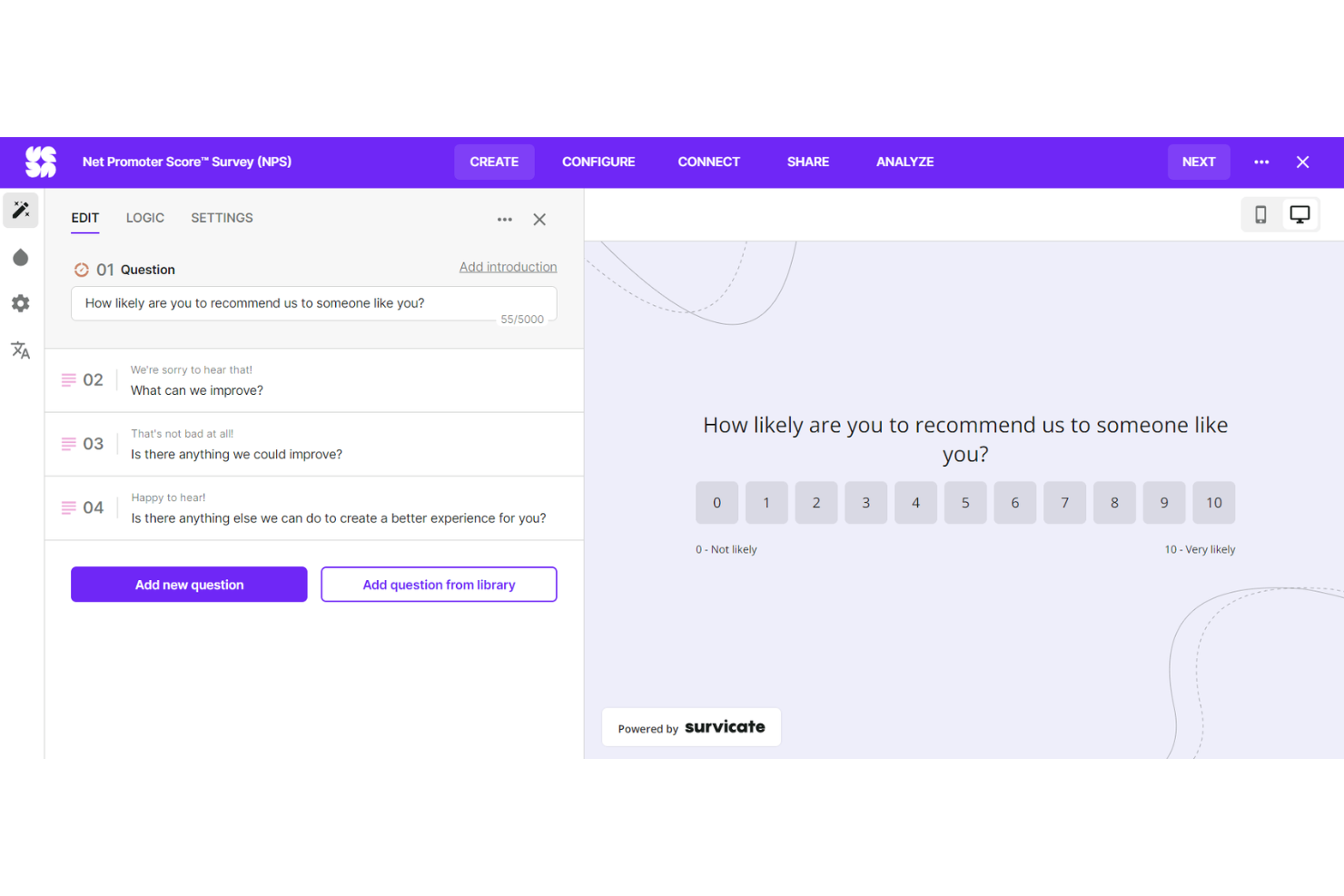
Survicate ist eine Umfragesoftware, die entwickelt wurde, um Einblicke in die Kundenerfahrung zu gewinnen und Feedback über mehrere Kanäle zu sammeln. Sie lässt sich in viele Tools integrieren und bietet einen detaillierten Überblick über Kundenmeinungen, was sie ideal für Unternehmen macht, die ihre Customer Experience verbessern möchten.
Warum ich Survicate gewählt habe:
Survicate ist eine einzigartige CX-Software, die es ermöglicht, die Kundenerfahrung an jedem Kontaktpunkt durch zahlreiche Feedback-Optionen zu messen – zum Beispiel per E-Mail, im Produkt, in der App, auf Ihrer Website oder über den Intercom Messenger. Sie müssen nicht viel Zeit und Energie darauf verwenden, den stetigen Feedback-Strom zu sortieren, da die Plattform die Daten selbstständig verfolgt und Analysen in Echtzeit liefert. So können Sie genau dort handeln, wo es am nötigsten ist.
Hervorstechende Funktionen & Integrationen:
Survicate bietet Funktionen wie automatisierte Feedback-Erhebung und sammelt wichtige Kennzahlen wie Net Promoter Score (NPS), Customer Satisfaction Score (CSAT) und Customer Effort Score (CES), um Kundenzufriedenheit und Loyalität zu erfassen und auszuwerten. Zudem gibt es über 400 Umfragevorlagen für unterschiedlichste Nutzerforschungsprojekte.
Survicate lässt sich mit vorhandenen Tool-Stacks per Mausklick integrieren. Zu den Integrationen gehören Active Campaign, Drip, FullStory, Google Analytics, HubSpot, Klaviyo, Intercom, MailChimp, Microsoft Teams, Slack, Zendesk und viele mehr.
Pros and Cons
Pros:
- Analyse in Echtzeit
- Keine Programmierkenntnisse erforderlich
- Hochgradig anpassbare Umfragevorlagen
Cons:
- Stetiger Kundenzustrom an Antworten kann schwer zu überblicken sein
- Lernaufwand für alle, die mit automatisierter Feedbackerhebung nicht vertraut sind
New Product Updates from Survicate

Survicate MCP Support Now Available
Survicate now supports MCP, letting teams use AI tools like Claude, ChatGPT, and Slack to explore survey results, analyze responses and insights, and draft new surveys. For more information, visit Survicate's official site.
 .
.Weitere CX-SoftwareWeitere CX-Software
Nachfolgend finden Sie eine Liste weiterer CX-Software, die ich ebenfalls in die engere Auswahl genommen habe, die es jedoch nicht in die Top 12 geschafft haben. Ein Blick lohnt sich auf jeden Fall.
- Customerscore.io
Am besten für KI-gestütztes Echtzeit-Kundenmonitoring
- UserGuiding
Am besten für intuitives Nutzer-Onboarding
- Nextiva
Am besten geeignet für KI-gestütztes Management des Kundenerlebnisses
- Dock
Am besten geeignet zum Erstellen von Kundenportalen
- Groove
Am besten für kleine Teams, die eine einheitliche Kundenkommunikation benötigen
- Front
Am besten für KI-gestützte, teamübergreifende Workflows
- Intercom
Am besten geeignet für individuelle Bots und gezieltes Messaging
- Uservoice
Am besten geeignet für das Sammeln und Analysieren von Kundenfeedback
- ZOHO CRM Plus
Am besten für integriertes Kundenerlebnismanagement über verschiedene Kontaktpunkte hinweg
- Salesforce Financial Services Cloud
Am besten geeignet für große Unternehmen mit vielfältigen Kundenmanagement-Anforderungen
- Guru
Am besten zur Zentralisierung von Wissen für CX-Teams
- Qualtrics CustomerXM
Am besten für robuste Datenanalysen
- HubSpot Service Hub
Ideal zur Integration von Kundenservice mit Vertriebs- und Marketingmaßnahmen
- Medallia Experience Cloud
Am besten geeignet für umfassendes Customer Journey Mapping


Auswahlkriterien für CX-Software
Nach unzähligen Stunden, in denen ich zahlreiche Customer-Experience-Management-Software geprüft habe, kann ich bestätigen: Nicht jedes Tool ist gleich gut. Auf der Suche nach den besten Lösungen habe ich gezielt nach Software gesucht, die in den Bereichen Kernfunktionen, Schlüsselfunktionen und Benutzerfreundlichkeit überzeugt. Im Folgenden gehe ich näher auf diese Kriterien ein.
Kernfunktionen
Jedes Customer-Experience-Management-Tool sollte einige grundlegende Funktionen unbedingt abdecken:
- Customer Journey Mapping: Das Tool sollte visuell darstellen können, welche Schritte Ihre Kunden bei der Interaktion mit Ihrem Unternehmen durchlaufen.
- Feedback-Erfassung: Die Möglichkeit, Feedback aus zahlreichen Kanälen wie E-Mails, Umfragen, Social Media usw. zu sammeln, ist essenziell.
- Datenanalyse: Leistungsstarke Analysefunktionen sind notwendig, um die Feedback-Daten auszuwerten.
- Reporting: Das Tool sollte umfassende Berichte generieren, um Erkenntnisse mit Ihrem Team zu teilen.
Schlüsselfunktionen
Beim Vergleich von Customer-Experience-Management-Tools gibt es bestimmte Funktionen, die entscheidend sind:
- Multi-Channel-Support: So können Sie Feedback aus unterschiedlichen Quellen sammeln und erhalten einen ganzheitlichen Blick auf die Customer Experience.
- Integration: Das Tool sollte sich problemlos mit anderer Software wie Ihrem CRM oder Helpdesk verbinden lassen.
- Anpassbarkeit: Sie sollten in der Lage sein, Umfragen, Dashboards und Berichte individuell an Ihre Anforderungen anzupassen.
- Echtzeit-Benachrichtigungen: Mit sofortigen Rückmeldungen zu Kundenfeedback können Sie schnell reagieren und Probleme zügiger lösen.
Benutzerfreundlichkeit
Schließlich ist die Benutzerfreundlichkeit des Tools selbst ein entscheidender Faktor. Hierauf habe ich besonders geachtet:
- Intuitive Oberfläche: Ein gutes Customer-Experience-Management-Tool sollte leicht zu bedienen sein, ein übersichtliches Design aufweisen und eindeutig gekennzeichnete Funktionen besitzen.
- Schnelle Einführung: Das Tool sollte einen schnellen Einrichtungsprozess ermöglichen, mit unkomplizierten Anweisungen und idealerweise Vorlagen, um schneller loslegen zu können.
- Skalierbarkeit: Das Tool sollte mit Ihrem Unternehmen wachsen können und eine steigende Datenmenge verarbeiten, ohne an Leistung einzubüßen.
- Zuverlässiger Support: Zugang zu schnellem und hilfreichem Kundensupport stellt sicher, dass technische Probleme das Tracking der Customer Experience nicht beeinträchtigen.
Häufig gestellte Fragen zu CX-Software
Was sind die Vorteile der Nutzung von Customer Experience (CX) Software?
Der Einsatz von CX-Software bietet Unternehmen zahlreiche Vorteile:
- Besseres Verständnis der Kunden: Durch das Sammeln und Analysieren von Feedback liefern CX-Tools Einblicke darin, was Kunden an Ihren Dienstleistungen oder Produkten mögen oder nicht mögen. Dieses Wissen hilft dabei, Angebote zu verbessern und letztlich die Kundenbindung und -zufriedenheit zu steigern.
- Effiziente Feedback-Erfassung: CX-Software automatisiert die Erfassung von Kundenfeedback über verschiedene Kanäle hinweg, spart Zeit und erhöht die Reichweite Ihrer Feedback-Initiativen.
- Proaktive Problemlösung: Mit Echtzeit-Benachrichtigungen ermöglichen CX-Tools Unternehmen, Probleme schnell zu erkennen und zu lösen, bevor sie sich verschärfen, und verhindern so Unzufriedenheit.
- Datenbasierte Entscheidungsfindung: Die von CX-Software bereitgestellten Daten und Analysen unterstützen fundierte, strategische Geschäftsentscheidungen.
- Stärkere Kundenbindung: Durch die Priorisierung der Customer Experience und Verbesserungen auf Basis von Kundenfeedback können Unternehmen die Treue und Bindung ihrer Kundschaft stärken.
Wie viel kostet CX-Software?
Die Kosten für CX-Software variieren erheblich, abhängig von der Komplexität des Tools, der Anzahl der Nutzer und den gewünschten Funktionen. Einige Plattformen bieten kostenlose Versionen an, diese sind jedoch meist eingeschränkt.
Was sind die typischen Preismodelle für CX-Software?
Die meisten CX-Tools verwenden entweder ein Preismodell pro Nutzer/Monat oder eine Pauschale pro Monat. Beim Nutzer/Monat-Modell zahlen Sie einen bestimmten Betrag für jeden Nutzer. Eine pauschale Preisstruktur sieht einen festen Monatsbeitrag vor, unabhängig von der Nutzerzahl.
In welchem Preisrahmen bewegen sich CX-Software-Lösungen typischerweise?
Die Preise für CX-Software können bei $10/Nutzer/Monat beginnen und für fortgeschrittene, unternehmensweite Lösungen bis zu mehreren hundert Dollar pro Monat betragen.
Welches ist die günstigste und welches die teuerste CX-Software?
Unter den genannten Tools bietet Freshdesk einen der günstigsten Einstiegspreise mit $15/Nutzer/Monat. Am oberen Ende der Preisskala liegt Qualtrics CustomerXM, dessen Preis aufgrund der hohen Anpassbarkeit nur auf Anfrage erhältlich ist.
Gibt es kostenlose CX-Software-Optionen?
Ja, einige CX-Tools bieten kostenlose Optionen. Zum Beispiel stellt Freshdesk eine kostenlose Stufe mit eingeschränkten Funktionen zur Verfügung. Auch Wootric bietet einen kostenlosen Plan an, jedoch mit einer Begrenzung der monatlichen Umfrageanzahl.
Weitere Helpdesk-Software-Reviews
- Helpdesk-Software
- Helpdesk-Wissensdatenbanken
- Kundenservice-Ticketing-Software
- Online-Helpdesk-Software
Zusammenfassung
Abschließend hängt die Wahl der richtigen Customer Experience (CX) Software maßgeblich von den spezifischen Anforderungen Ihres Unternehmens ab – eine universelle Lösung für alle gibt es nicht. Jede Software bringt ein einzigartiges Funktionsspektrum für verschiedene Einsatzbereiche mit. Das Verständnis der eigenen Bedürfnisse ist daher entscheidend.
Wichtigste Erkenntnisse
- Beurteilen Sie Ihren Bedarf. Beginnen Sie damit, die Kernfunktionen zu identifizieren, die Ihr Unternehmen benötigt. Dies kann alles sein, von Stimmungsanalysen bis hin zu Ticketing-Systemen oder Omnichannel-Support. Die beste CX-Software für Sie wird diese Anforderungen effektiv erfüllen.
- Berücksichtigen Sie die Benutzerfreundlichkeit. Zwar sind Funktionen wichtig, aber die Software sollte auch einfach zu bedienen sein. Eine gute CX-Plattform verfügt über eine intuitive Benutzeroberfläche und einen zuverlässigen Kundensupport, sodass Sie das Beste aus dem Tool herausholen können, ohne auf unnötige Hindernisse zu stoßen.
- Denken Sie an zukünftige Skalierbarkeit. Berücksichtigen Sie schließlich die Skalierbarkeit der Software. Mit dem Wachstum Ihres Unternehmens können sich auch Ihre CX-Bedürfnisse weiterentwickeln. Die von Ihnen gewählte Software sollte mit Ihrem Unternehmen mitwachsen und sich an veränderte Kundenerwartungen anpassen können.
Was denken Sie?
Wenn Sie noch andere CX-Tools kennen, die Ihrer Meinung nach auf dieser Liste stehen sollten, würde ich mich freuen, Ihre Gedanken und Erfahrungen zu hören. Ihr Feedback ist von unschätzbarem Wert, um diesen Leitfaden so umfassend und hilfreich wie möglich zu gestalten. Zögern Sie also nicht, Kontakt aufzunehmen!