

Die 10 besten Live-Chat-Softwares für Websites im Jahr 2026

10 Auswahl der besten Live-Chat-Software für Websites


Bei der großen Auswahl an Live-Chat-Software für Websites kann es eine echte Herausforderung sein, die beste Lösung zu finden. Sie möchten, dass Kunden Antworten auf ihre konkreten Fragen erhalten, ohne sich durch Self-Service-Artikel arbeiten oder auf die Verbindung mit einem Mitarbeiter in einem Callcenter warten zu müssen – dafür benötigen Sie das passende Tool. Ich helfe Ihnen dabei! In diesem Beitrag erleichtere ich Ihnen die Entscheidung und teile meine persönlichen Erfahrungen bei der Bewertung dutzender Live-Chat-Tools sowie meine Auswahl der besten Live-Chat-Software für Websites.
Warum Sie unseren Software-Empfehlungen vertrauen können
Unser Team testet und bewertet Software seit 2012. Als CX-Führungskräfte selbst wissen wir, wie schwierig – und wichtig – es ist, die richtige Software auszuwählen.
Für diesen Leitfaden haben wir Tools mithilfe von praktischen Tests und unabhängiger Recherche bewertet und dabei unsere Bewertungskriterien angewendet.
Unsere Bewertungen spiegeln unser menschliches redaktionelles Urteilsvermögen wider, keine Verkaufsstrategie.
Vergleichstabelle für Live-Chat-Software für Websites
Diese Vergleichstabelle fasst die Preisinformationen meiner Auswahl der besten Live-Chat-Software für Websites zusammen:
| Tool | Best For | Trial Info | Price | ||
|---|---|---|---|---|---|
| 1 | Am besten für KI-gestützten Chat in regulierten Branchen geeignet | 30-tägige kostenlose Testversion | Ab $31/Agent/Monat (jährlich abgerechnet) | Website | |
| 2 | Am besten für KI-gestützte Live-Chat-Entlastung | 14-tägige kostenlose Testversion verfügbar | Ab $16/Nutzer/Monat (jährliche Abrechnung) | Website | |
| 3 | Am besten für Omnikanal-Kundensupport geeignet | Kostenlose 30-Tage-Testversion verfügbar | Ab $15/Nutzer/Monat (jährliche Abrechnung) | Website | |
| 4 | Am besten geeignet für groß angelegte Automatisierung im Kundendienst | Kostenlose Testversion + kostenlose Demo verfügbar | Ab $25/Nutzer/Monat (jährlich abgerechnet) | Website | |
| 5 | Am besten bei einfacher Chatbot-Erstellung aus eigenen Daten | Kostenloser Plan verfügbar | Ab $32/Monat (jährliche Abrechnung) | Website | |
| 6 | Am besten für Echtzeit-Chat-Automatisierung | Kostenlose Testversion verfügbar | Ab $0,99 pro gelöster Anfrage (mindestens 50 gelöste Anfragen) | Website | |
| 7 | Am besten für KI-gesteuerten Kundenservice | 7-tägige kostenlose Testversion + kostenloser Plan verfügbar | Ab $25/Nutzer/Monat | Website | |
| 8 | Am besten mit individuell anpassbarem Onboarding für große Teams | 14-tägige kostenlose Testphase | Ab $25/Nutzer/Monat (jährliche Abrechnung) | Website | |
| 9 | Am besten für personalisierte Kundenkommunikation geeignet | Kostenlose 14-tägige Testphase + kostenlose Demo verfügbar | Ab $29/Nutzer/Monat (jährliche Abrechnung) | Website | |
| 10 | Am besten geeignet für Conversational Marketing | Kostenlose Demo verfügbar | Preis auf Anfrage | Website |

Tests der besten Live-Chat-Software für Websites
Nachfolgend finden Sie meine ausführlichen Zusammenfassungen der besten Live-Chat-Software für Websites, die es in meine engere Auswahl geschafft haben. Meine Tests bieten einen detaillierten Überblick über die wichtigsten Funktionen, Vor- und Nachteile, Integrationen und idealen Einsatzmöglichkeiten jedes Tools, damit Sie die beste Lösung für Ihre Anforderungen finden.

Comm100
Am besten für KI-gestützten Chat in regulierten Branchen geeignet
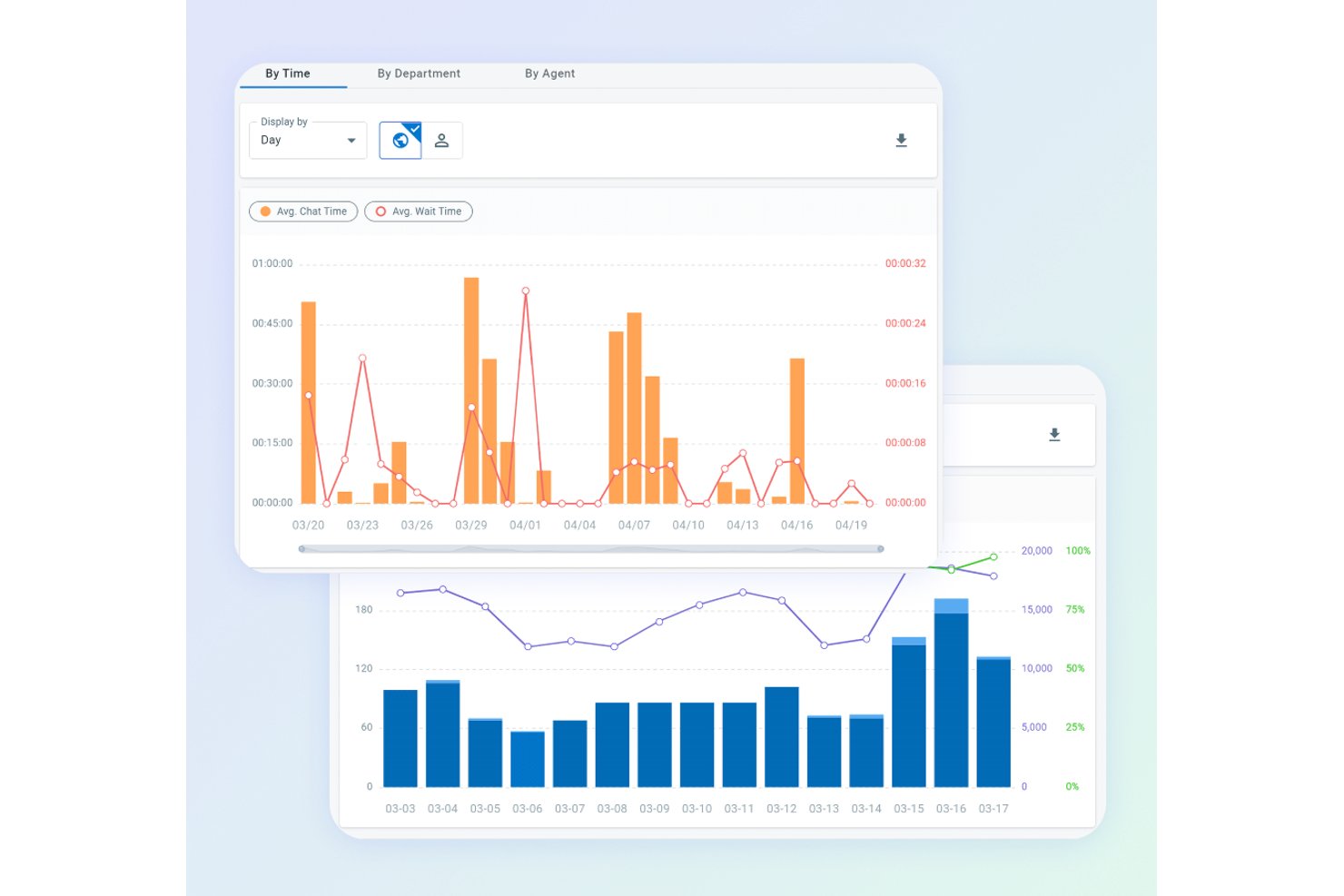
Comm100 ist eine Live-Chat- und Omnichannel-Plattform für die Kundeninteraktion, die ein anpassbares Website-Chat-Widget, KI-gestützte Automatisierung, Echtzeit-Besucherüberwachung und einen einheitlichen Agentenposteingang mit Unterstützung für mehr als 12 Kommunikationskanäle kombiniert.
Für wen eignet sich Comm100 am besten?
Comm100 eignet sich besonders für Teams im Gesundheitswesen, bei Finanzdienstleistern, in Behörden und im Hochschulbereich, die KI-gestützten Chat mit Compliance-Zertifizierungen auf Unternehmensebene benötigen.
Warum ich Comm100 ausgewählt habe
Comm100 hat sich einen Platz auf meiner Auswahlliste verdient, weil die Plattform Compliance sehr ernst nimmt, ohne bei den KI-Funktionen Abstriche zu machen. Ich habe nur wenige Live-Chat-Plattformen gesehen, die mit diesem Zertifizierungsumfang mithalten können: SOC 2 Type II, HIPAA, PCI DSS und ISO 27001 an einem Ort. Das ist von großer Bedeutung, wenn Sie Patienten, Studierende oder Kunden aus dem Finanzdienstleistungsbereich betreuen. Die Maßnahmen des KI-Agenten gegen Halluzinationen, die Antworten strikt auf verifizierte Wissensquellen beschränken, machen Comm100 zu einer Plattform, der ich in regulierten Umgebungen vertrauen würde, in denen eine einzige falsche Antwort ein erhebliches Risiko darstellt.
Wichtige Funktionen von Comm100
- Echtzeit-Besucherüberwachung: Erfasst mehr als 30 Verhaltensparameter – darunter Navigationspfad, Herkunftsquelle und Warenkorbwert –, sodass Agenten genau sehen können, wer sich auf der Website befindet, bevor sie ein Gespräch beginnen.
- Omnichannel-Agentenposteingang: Führt mehr als 12 Kanäle (Live-Chat, E-Mail, SMS, WhatsApp, Instagram und weitere) in einem einzigen Arbeitsbereich zusammen, sodass Agenten jede Unterhaltung an einem Ort bearbeiten können.
- Fähigkeitsbasierte Chat-Zuweisung: Weist Chats automatisch zu und überträgt sie basierend auf den Fähigkeiten des Agenten, der Abteilung oder des Besuchersegments mithilfe eines integrierten ACD-Systems.
- On-Premises-Bereitstellung: Ermöglicht es Unternehmen, die vollständige Plattform einschließlich der KI auf ihrer eigenen Infrastruktur zu hosten. Das ist in dieser Kategorie selten und für strenge Anforderungen an den Datenstandort unerlässlich.
Comm100-Integrationen
Comm100 bietet native Integrationen mit Salesforce, HubSpot, Microsoft Dynamics 365, Zendesk, ServiceNow, Shopify, Google Drive, SharePoint Online und Confluence Cloud. Außerdem werden REST-API und Webhooks für benutzerdefinierte Integrationen unterstützt.
Pros and Cons
Pros:
- Abdeckung von SOC 2 Type II, HIPAA, PCI DSS und WCAG
- Bildschirmfreigabe, Video und Sprache sowie Dateiübertragung
- Vollständig in die KI-Suite integriert
Cons:
- Die Kosten können bei fortgeschrittenen Funktionen steigen
- KI-Funktionen könnten für kleinere Teams überdimensioniert sein

Am besten für KI-gestützte Live-Chat-Entlastung
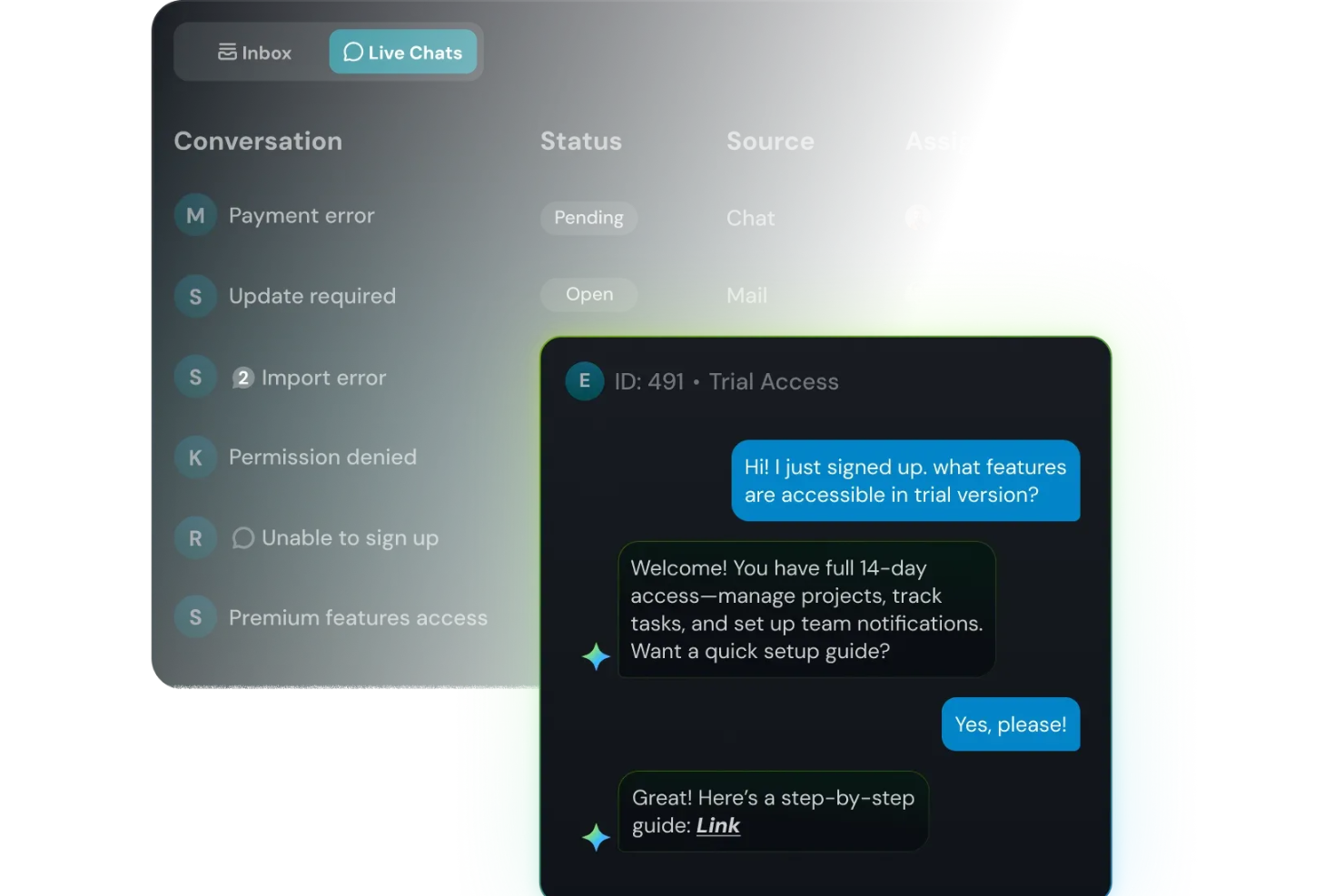
Wenn sich der Website-Chat mit wiederkehrenden Fragen und ungeduldigen Kunden füllt, bietet SparrowDesk eine Möglichkeit, Antworten schnell bereitzustellen, ohne dass Ihr Team ausbrennt. Es richtet sich an Support-Leiter, die möchten, dass KI die Routine übernimmt, während sich Agenten auf anspruchsvolle Gespräche in einem gemeinsamen Posteingang für Live-Chat und E-Mail konzentrieren können. Mit SparrowDesk verwandeln Sie Ihren Website-Chat in eine Mischung aus sofortigen KI-Antworten, menschlicher Unterstützung und klarer Transparenz darüber, was Ihre Kunden immer wieder fragen.
Warum ich SparrowDesk gewählt habe
Ich habe SparrowDesk gewählt, weil es das Website-Widget als Eingangstür zu einem KI-zentrierten Helpdesk behandelt – und nicht einfach nur als einen weiteren isolierten Kanal. Luna, die integrierte KI-Agentin, kann einen großen Teil der Routineanfragen direkt im Chat abfangen und automatisch lösen, sodass Ihr Team mehr Zeit für komplexe Anliegen hat anstatt für Passwortzurücksetzungen und Bestellaktualisierungen. Ihre Agenten arbeiten weiterhin in einem einheitlichen Posteingang, der Chat und E-Mail kombiniert; dabei schlägt der KI-Copilot markengerechte Antworten vor und fasst lange Konversationen zusammen, sodass Ihre Mitarbeiter schnell vorankommen, ohne den Kontext zu verlieren.
Da Live-Chat, gemeinsamer Posteingang und Kontaktsegmentierung alle im selben Plan enthalten sind, ist SparrowDesk besonders geeignet, wenn Sie Echtzeit-Kommunikation eng mit Ticketing und Kundenhistorie verknüpft haben möchten, statt dies als separates Tool anzuflanschen.
SparrowDesk Hauptfunktionen
Neben seinem KI-geführten Ansatz für Live-Chat bietet SparrowDesk weitere Funktionen, die Ihrem Team helfen, Echtzeitgespräche im großen Stil zu bewältigen.
- Service Level Agreements (SLA): Definieren Sie klare Antwort- und Lösungsziele, um eine zeitnahe Unterstützung sicherzustellen.
- Geschäftszeiten: Legen Sie die Arbeitszeiten Ihres Teams fest, um Kundenerwartungen zu steuern und Tickets effektiv weiterzuleiten.
- Schnellaktionen-Makros: Automatisieren Sie gängige Aufgaben mit vordefinierten Makros, um die Produktivität zu steigern.
- Interaktive Analysen: Erhalten Sie Einblicke in Teamleistungen und Kundenentwicklungen mit Echtzeit-Dashboards.
SparrowDesk Integrationen
Von SparrowDesk werden aktuell keine nativen Integrationen aufgelistet. Die Plattformfunktionen deuten jedoch auf die Möglichkeit individueller Integrationen über APIs hin.
Pros and Cons
Pros:
- Omnichannel-Posteingang bündelt die Kommunikation plattformübergreifend.
- Mehrsprachige Unterstützung spricht ein globales Publikum an.
- KI-Copilot unterstützt Agenten mit intelligenten Antwortvorschlägen.
Cons:
- Begrenzte native Integrationen könnten nahtlose Konnektivität erschweren.
- Die starke Abhängigkeit von KI passt nicht zu jedem Kundenservice-Stil.

Am besten für Omnikanal-Kundensupport geeignet
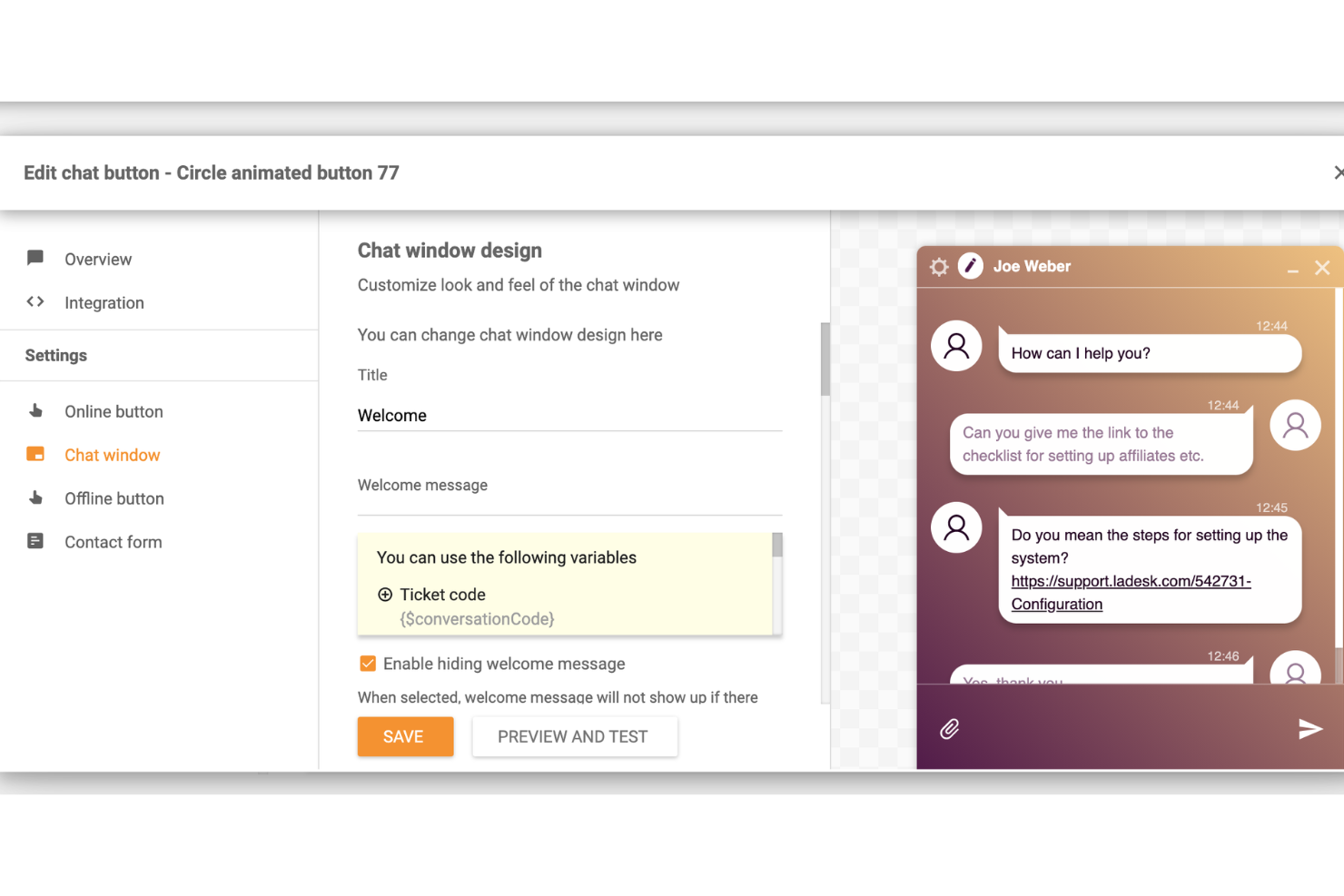
LiveAgent ist eine Kundensupport-Software, die Live-Chat-Funktionalität für Websites bereitstellt und Teams eine einfache und effiziente Möglichkeit gibt, in Echtzeit mit Kunden zu kommunizieren.
Warum ich mich für LiveAgent entschieden habe: Die Plattform zeichnet sich durch ihren umfassenden Omnikanal-Support aus, der Live-Chat, Ticketing, Callcenter, Social Media und Funktionen für Wissensdatenbanken in einer Plattform integriert. Die Möglichkeit, alle Kommunikationskanäle in einer einzigen Oberfläche zu bündeln, erleichtert es Support-Teams, Kundenanfragen effizient zu verwalten und zu beantworten und so ein einheitliches Kundenerlebnis zu bieten.
Darüber hinaus bietet die Live-Chat-Funktion eine Echtzeit-Kommunikation mit Website-Besuchern. Sie umfasst ein schnelles Chat-Widget, das sich einfach auf jeder Website implementieren lässt. Das Live-Chat-Tool unterstützt proaktive Chat-Einladungen, vorgefertigte Antworten und die Historie der Chats, sodass Agenten so schnell wie möglich mit Kunden in Kontakt treten können.
Hervorstechende Funktionen & Integrationen:
Funktionen umfassen ein Callcenter, Self-Service-Kundensupport, Berichte und Analysen, mehrsprachigen Support und Workflow-Automatisierung. Außerdem bietet es ein Ticketsystem mit automatischer Ticketverteilung, Tagging und benutzerdefinierten Feldern.
Integrationen umfassen Actinic, ActiveCampaign, ChargeDesk, ClickUp, CS-Cart, Drupal, Expression Engine, Jira, Joomla, Klaus, Klaviyo, Nicereply, Opencart, Pipedrive, Post Affiliate Pro, Quriobot, Salesforce und viele weitere.
Pros and Cons
Pros:
- Erweiterte Automatisierungsfunktionen
- Anpassbare Benutzeroberfläche für Branding
- Multikanal-Support
Cons:
- Funktion zum Zusammenführen von Tickets könnte verbessert werden
- Könnte mehr Drittanbieter-Integrationen bieten

Am besten geeignet für groß angelegte Automatisierung im Kundendienst
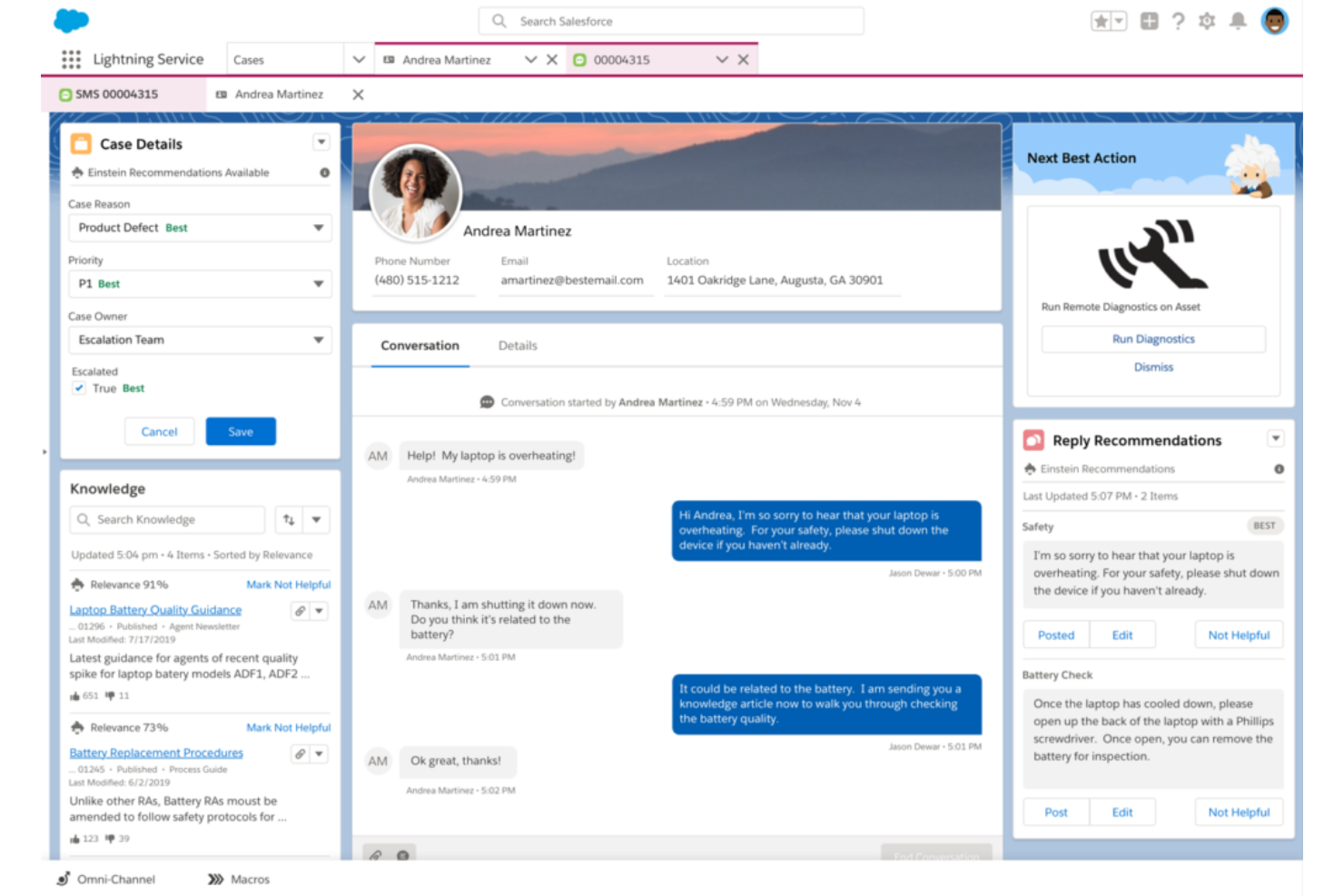
Salesforce Service Cloud ist eine umfassende Kundendienstlösung, die entwickelt wurde, um Interaktionen zwischen Unternehmen und ihren Kunden zu erleichtern. Besonders geeignet ist sie für große Organisationen, da sie Tools zur Automatisierung von Serviceprozessen bietet, die Workflows optimieren und die Serviceeffizienz in großem Maßstab verbessern.
Warum ich Salesforce Service Cloud ausgewählt habe: Ich habe Salesforce Service Cloud aufgrund ihres guten Rufs in der Branche und der umfangreichen Funktionen für diese Liste ausgewählt, da sie bei der Automatisierung von groß angelegten Kundendienstprozessen unübertroffen ist. Zum Beispiel nutzt Service Cloud intelligente Routing-Funktionen, um Kundenanfragen automatisch an die am besten geeigneten Supportmitarbeiter oder Teams weiterzuleiten. Dabei werden Faktoren wie Fähigkeiten, Verfügbarkeit und Arbeitslast der Agenten berücksichtigt, um eine effiziente und effektive Fallzuweisung zu gewährleisten.
Service Cloud beinhaltet außerdem Chatbot- und künstliche Intelligenz (KI)-Funktionen zur Automatisierung von Kundeninteraktionen und für sofortige Unterstützung. KI-gesteuerte Automatisierung ermöglicht es dem System, die Kundenabsicht zu verstehen, relevante Lösungen vorzuschlagen und personalisierte Empfehlungen zu geben – was das Kundenerlebnis verbessert.
Hervorstechende Funktionen & Integrationen:
Funktionen beinhalten Automatisierungen im Fallmanagement, SLA-Management, Workflow- und Prozessautomatisierung, Tools zur Erstellung einer Wissensdatenbank, Außendienstverwaltung, Omnichannel-Support und eine einheitliche Service-Konsole.
Integrationen umfassen die umfassende Salesforce-Suite, Slack, Trello, Mailchimp, HubSpot CRM, Freshdesk, Twilio, Quickbase, Guru und Helpshift.
Pros and Cons
Pros:
- Zentralisiert Kundeninteraktionen und -daten an einem Ort
- Skalierbar für große Unternehmen
- Dynamische, intuitive Benutzeroberfläche (UI)
Cons:
- Wenige Updates und langsame Weiterentwicklung
- Funktionsumfang kann eine gewisse Einarbeitungszeit erfordern
- Abhängigkeit von anderen Salesforce-Produkten für maximalen Nutzen
New Product Updates from Agentforce Service (formerly Service Cloud)
Agentforce Service Keeps Full Agentforce Voice Transcripts After Calls
Agentforce Service now shows the full conversation history in post-call transcripts for Agentforce Voice calls within the Service Console, giving agents better context for follow-ups. For more information, visit Salesforce’s official site.
 .
.
Chatbase
Am besten bei einfacher Chatbot-Erstellung aus eigenen Daten
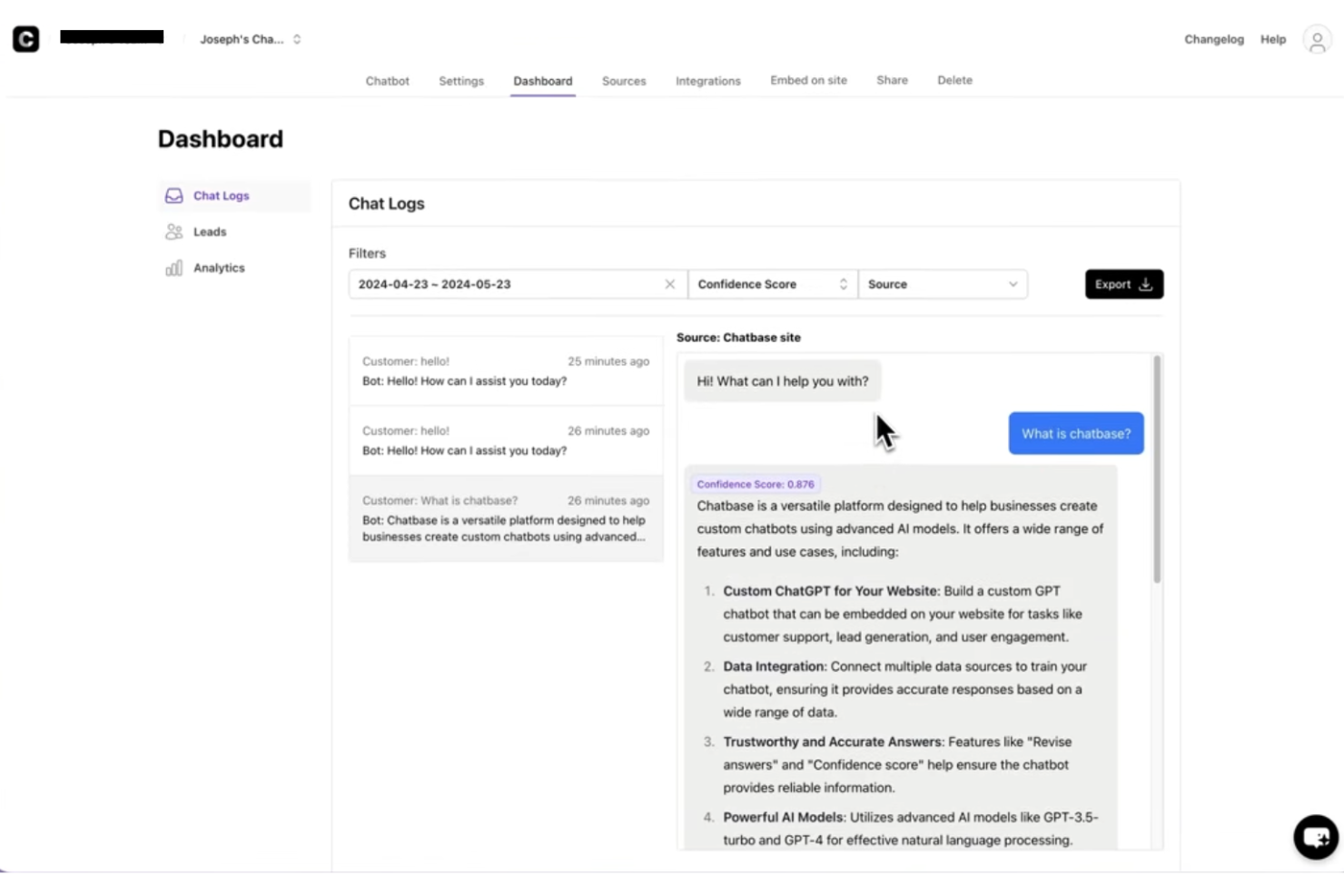
Chatbase ist eine KI-gesteuerte Live-Chat-Software für Websites, mit der Sie Chatbots auf Basis Ihrer eigenen Daten erstellen und einsetzen können. Sie unterstützt die Integration von Website-Widgets und mehrsprachige Kundengespräche.
Für wen ist Chatbase am besten geeignet?
Chatbase eignet sich besonders für kleine bis mittelgroße Unternehmen und SaaS-Teams, die ohne Entwickler KI-Chatbots auf ihren Websites einsetzen möchten.
Warum ich Chatbase ausgewählt habe
Chatbase hat es auf meine Shortlist geschafft, weil die Erstellung eines Chatbots aus eigenen Inhalten extrem einfach ist. Ich habe PDFs hochgeladen, Website-URLs eingefügt und Wissensdatenbanken verbunden, um einen Chatbot zu erstellen, der tatsächlich Fragen so beantwortet, wie es mein Team tun würde. Das ist das Hauptargument für Chatbase: Sie trainieren den Bot mit Ihren spezifischen Daten, und er führt Kundengespräche auf dieser Basis. Gefallen hat mir auch die Funktion für KI-gesteuerte Aktionen, mit der der Chatbot beispielsweise Leads sammelt oder an einen Menschen weiterleitet, wenn er nicht mehr weiter weiß.
Hauptfunktionen von Chatbase
- Weiterleitung an Menschen: Leiten Sie Gespräche an einen Live-Agenten weiter, wenn KI ihre Grenzen erreicht oder eine Anfrage eine menschliche Antwort benötigt.
- Erweiterte Analysen: Überwachen Sie Konversationsdaten, Agentenleistung und Kundeninteraktion über ein integriertes Analyse-Dashboard.
- KI-Modellvergleich: Testen und wechseln Sie zwischen verschiedenen KI-Modellen, um die beste Konfiguration für Ihren Support zu finden.
- Omnikanal-Bereitstellung: Setzen Sie Ihren Chatbot in Website-Chats, WhatsApp, Slack und anderen Kanälen aus derselben Plattform ein.
Chatbase-Integrationen
Chatbase bietet native Integrationen mit Make, Zendesk, Notion, Slack, Stripe, Salesforce und mehr. Außerdem ist eine API für individuelle Integrationen verfügbar.
Pros and Cons
Pros:
- Beinhaltet Analysen zur Überwachung der Chatbot-Leistung
- Widget-Design vollständig individualisierbar für das Branding
- KI-Agent kann Aktionen zur Lead-Erfassung durchführen
Cons:
- Entfernung des Brandings nur im höchsten Abo verfügbar
- Keine integrierte Live-Agenten-Übergabe


Weav ist eine KI-gestützte Live-Chat- und Kundensupport-Plattform, die ein Chatbot-Widget für die Website, einen gemeinsamen Posteingang für Mensch und KI sowie No-Code-Agententraining kombiniert, um Kundenanfragen automatisch zu bearbeiten und zu lösen.
Für wen ist Weav am besten geeignet?
Weav eignet sich gut für kleine und mittelgroße Unternehmen, die den Kundensupport auf ihrer Website automatisieren möchten, ohne eine komplexe Chatbot-Infrastruktur aufbauen oder pflegen zu müssen.
Warum habe ich Weav ausgewählt?
Ich habe Weav in meine Top-Auswahl aufgenommen, weil Sie damit einen vollständig automatisierten Live-Chat-Agenten einrichten können, indem Sie einfach Ihre Website synchronisieren oder Ihre Support-Dokumente hochladen – ganz ohne Programmierkenntnisse. Die KI wird direkt auf Ihre Inhalte trainiert und beginnt sofort, Kundenanfragen in Echtzeit über das Chat-Widget auf Ihrer Website zu beantworten. Zudem gefällt mir, dass Weav Gespräche, die über den Umfang der KI hinausgehen, automatisch und ohne manuelle Konfiguration an menschliche Agenten weiterleitet.
Wichtige Funktionen von Weav
- Gemeinsamer Posteingang: Verwalten Sie Live-Chat- und E-Mail-Konversationen in einem einzigen Agenten-Dashboard.
- Antwortanpassung: Legen Sie den Ton, die Antwortlänge und verbotene Ausdrücke der KI für jede Chat-Interaktion fest.
- Analyse-Dashboard: Verfolgen Sie Lösungsquoten, Gesprächsvolumen und Agentenaktivitäten in einer Übersicht.
- REST-API-Zugriff: Verbinden Sie Weav mit externen Systemen oder erstellen Sie eigene Support-Prozesse mithilfe der API.
Weav-Integrationen
Weav bietet native Integrationen mit Stripe und Google Drive. Außerdem werden benutzerdefinierte Aktionen unterstützt, mit denen Ihre KI-Agenten während einer Live-Konversation beliebige HTTPS-APIs von Drittanbietern aufrufen können, um Daten in externen Systemen abzurufen oder zu aktualisieren. Für benutzerdefinierte Integrationen stehen eine API und Echtzeit-Webhooks zur Verfügung.
Pros and Cons
Pros:
- Unbegrenzte Anzahl an Sitzplätzen und KI-Agenten enthalten
- Bezahlung pro gelöster Anfrage vermeidet Sitzplatzkosten
- KI-Agenten werden auf Ihren echten Dokumenten trainiert
Cons:
- Sehr eingeschränkte native Integrationen mit Drittanbietern
- Noch keine Unterstützung für soziale Medienkanäle

Tidio
Am besten für KI-gesteuerten Kundenservice
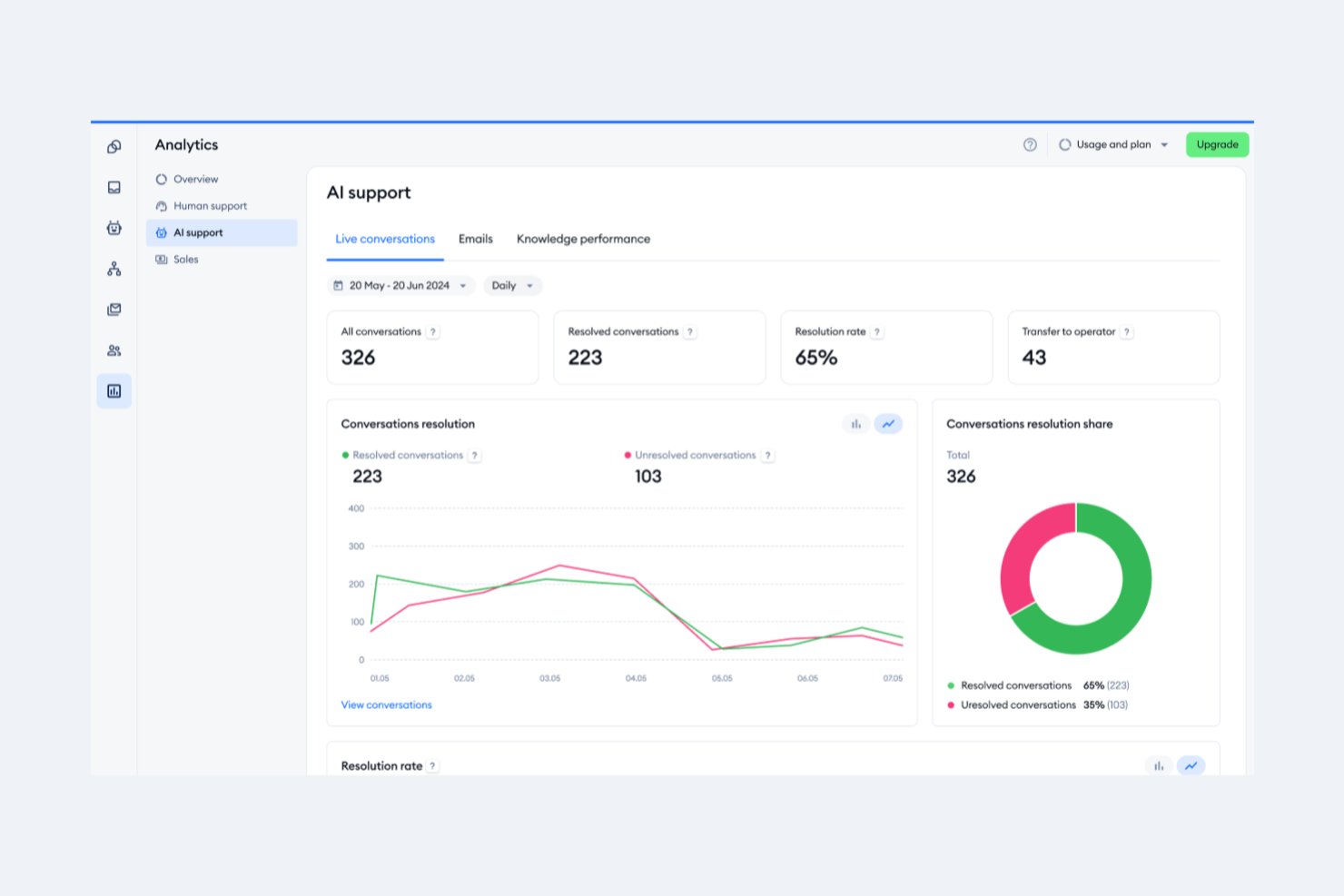
Tidio ist eine Live-Chat-Software, die entwickelt wurde, um Unternehmen bei der Bereitstellung von Echtzeit-Kundensupport zu unterstützen und den Umsatz über ihre Websites zu steigern. Sie nutzt KI, um Kundenserviceteams bei der Bearbeitung von Anfragen und Support zu unterstützen.
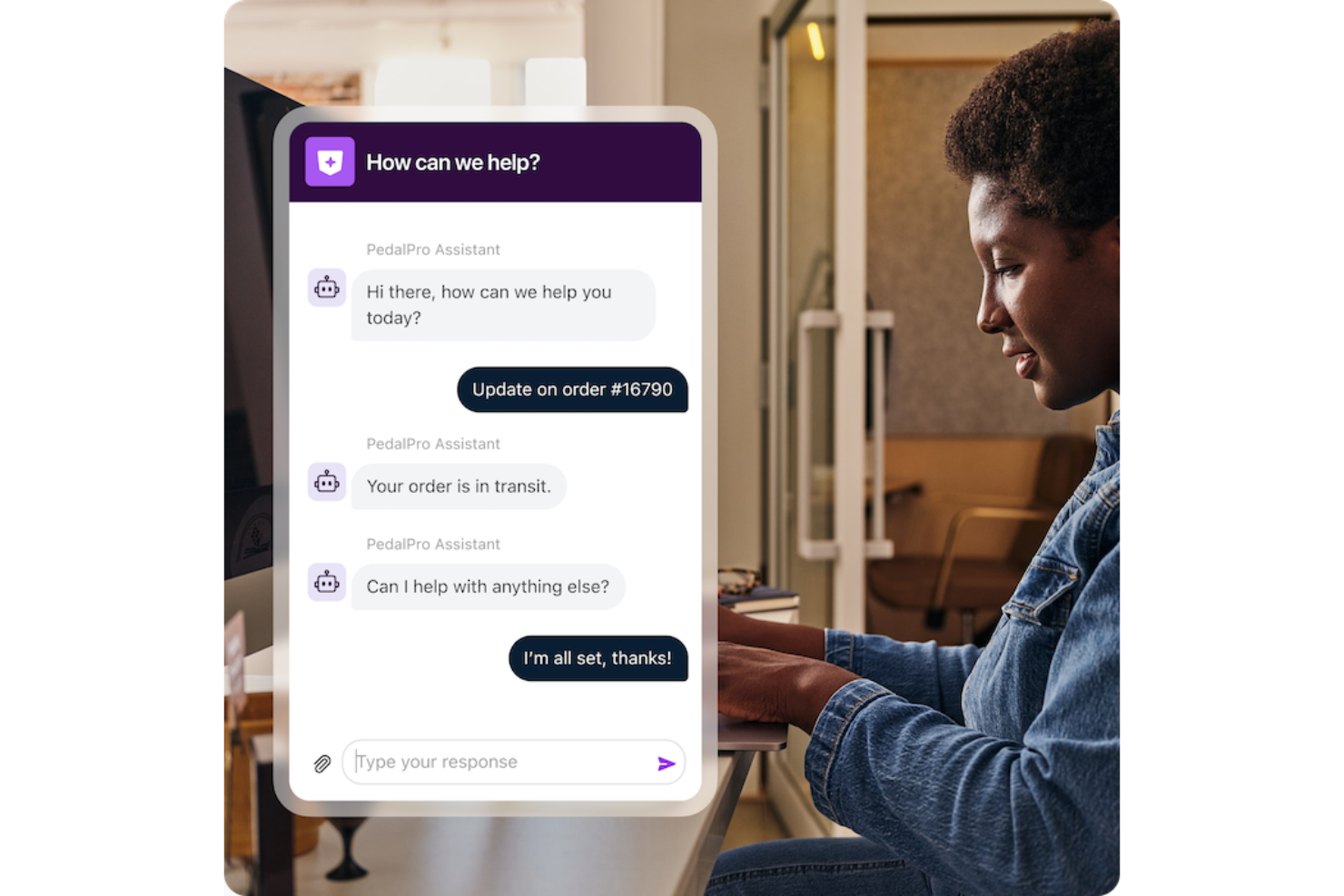
Warum ich Tidio ausgewählt habe: Das herausragende Merkmal der Plattform, der Lyro KI-Chatbot, kann Kundenanfragen eigenständig und in mehreren Sprachen lösen. Tidio überzeugt als Tool für KI-gesteuerten Kundenservice, weil es nicht nur rund um die Uhr Support bietet, sondern Unternehmen auch hilft, ihre Kundendienstabläufe mit kalkulierbaren Kosten zu skalieren und das Nutzerengagement durch personalisierte Erlebnisse und Automatisierung zu steigern.
Die Software ermöglicht es Unternehmen außerdem, verschiedene Kommunikationskanäle wie E-Mails, Live-Chats und Social Media-Nachrichten von einem einzigen Dashboard aus zu verwalten. Tidio bietet zudem Tools, um das Besucherverhalten zu verfolgen, die Kommunikation zu personalisieren und mit Funktionen wie vordefinierten Antworten und Live-Tippvorschauen schnell zu reagieren.
Hervorstechende Funktionen & Integrationen:
Funktionen umfassen Live-Chat und Helpdesk, Analysen, Anpassungsmöglichkeiten, Videoanrufe, Mobile- und Desktop-Apps, interaktive Kundenreisen und intelligente Umleitungen.
Integrationen umfassen Shopify, WordPress, Squarespace, Weebly, WooCommerce, Google Analytics, Klaviyo, Zendesk, Salesforce und mehr.
Pros and Cons
Pros:
- Besucher-Tracking
- Omnikanalkommunikation
- KI-Chatbot-Assistent
Cons:
- Einschränkungen beim kostenlosen Plan
- Kann zusätzliche Ressourcen für eine effektive Verwaltung erfordern

Front
Am besten mit individuell anpassbarem Onboarding für große Teams
Front vereint Live-Chat, E-Mail und andere Kanäle in einem gemeinsamen Posteingang für kundenorientierte Teams. Wenn Sie nach einer Lösung suchen, mit der Ihr Team Website-Gespräche zusammen mit anderen Kanälen verwalten kann, bietet Front einen einheitlichen Arbeitsplatz mit Automatisierungs- und Integrationsmöglichkeiten. Es ist besonders geeignet für Unternehmen, die ihre Kundenkommunikation optimieren und jede Interaktion abteilungsübergreifend organisiert halten möchten.
Für wen ist Front am besten geeignet?
Front ist ideal für mittelgroße bis große Kundenservice- und Operationsteams, die große Mengen an Website-Chats und anderer Kundenkommunikation in einer kollaborativen Umgebung verwalten müssen.
Warum ich Front ausgewählt habe
Für Teams, die schnell und effektiv große Gruppen einarbeiten müssen, überzeugt Front mit individuell anpassbaren Onboarding-Optionen. Ich habe Front ausgewählt, weil Sie damit Onboarding-Workflows, Berechtigungen und Schulungsressourcen auf die Struktur und Prozesse Ihres Teams zuschneiden können. Die Plattform unterstützt rollenbasierte Zugriffsrechte und ein detailliertes Benutzermanagement, damit Sie neue Agenten vom ersten Tag an mit den richtigen Werkzeugen und Informationen ausstatten können. Dieser Ansatz hilft großen Organisationen, ihren Website-Live-Chat ohne Verzögerungen oder Verwirrung einzurichten.
Wichtige Funktionen von Front
Weitere Funktionen, die Front zu einer starken Wahl für Live-Chat-Teams machen:
- Live-Chat-Widget: Fügen Sie Ihrer Website ein anpassbares Chat-Widget hinzu, um in Echtzeit mit Besuchern zu kommunizieren.
- Gemeinsamer Posteingang: Leiten und weisen Sie eingehende Chat-Nachrichten den richtigen Teammitgliedern zu, damit schneller geantwortet werden kann.
- Omnikanal-Messaging: Verwalten Sie Konversationen aus E-Mail, SMS, sozialen Medien und Website-Chat in einem einzigen Posteingang.
- Analysen und Berichte: Verfolgen Sie Chat-Volumen, Antwortzeiten und Team-Performance mit integrierten Analysetools.
Front-Integrationen
Zu den Integrationen gehören Salesforce, HubSpot, Slack, Jira, Asana, Aircall, ClickUp, FullContact, Gainsight und Chatra.
Pros and Cons
Pros:
- Unterstützt fortgeschrittene Workflow-Automatisierungen für Chat-Routing
- Gemeinsamer Posteingang ermöglicht Teamarbeit bei Chats
- Echtzeit-Analysen zur Leistungsüberwachung im Chat
Cons:
- Kein dauerhaft kostenloser Tarif für kleine Teams
- Erfordert separate Add-ons für SMS oder WhatsApp

Intercom
Am besten für personalisierte Kundenkommunikation geeignet
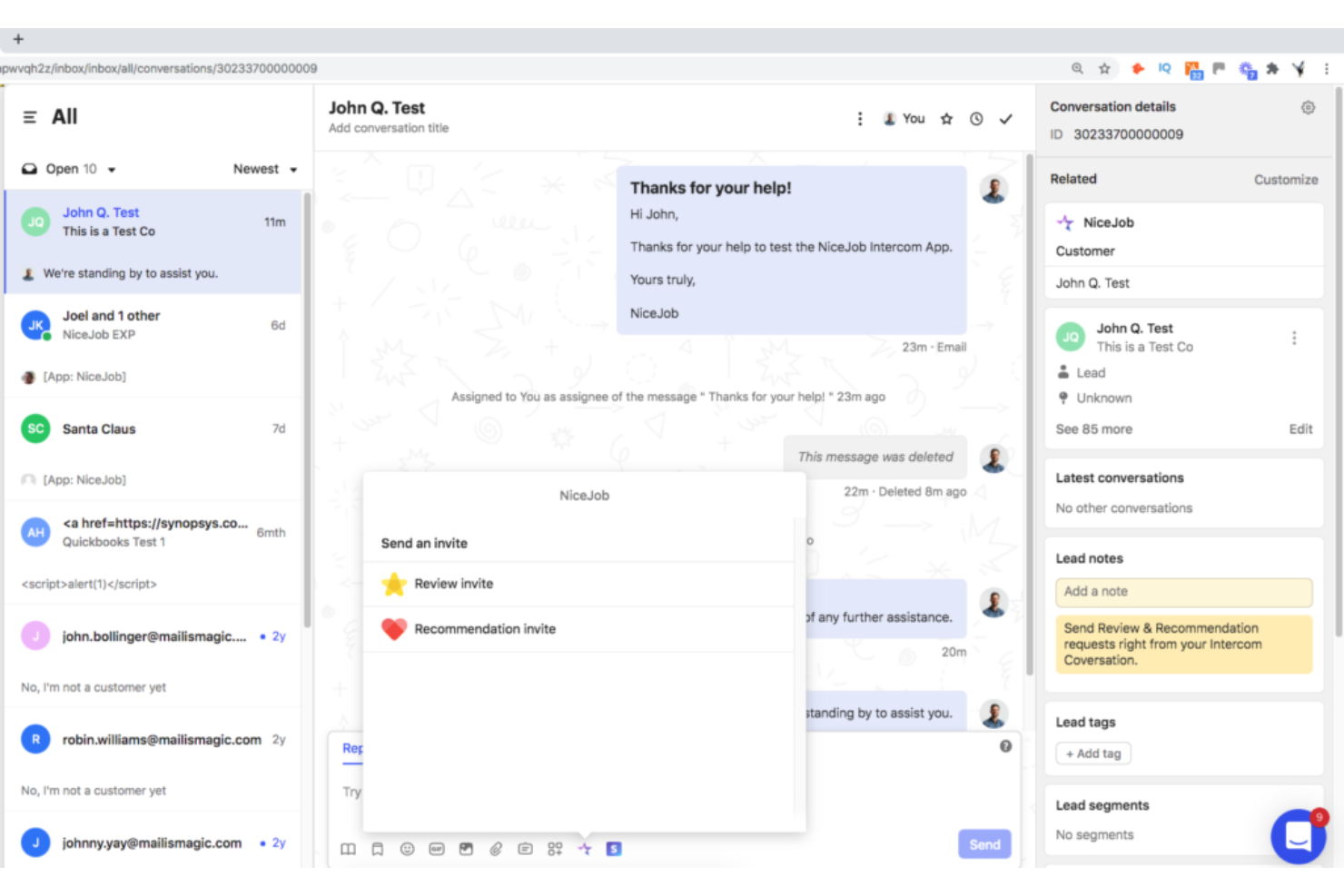
Intercom ist eine Plattform für konversationelle Kundenbeziehungen, die sich durch personalisierte Kundenkommunikation über verschiedene Kontaktpunkte hinweg auszeichnet. Sie ermöglicht es Unternehmen, individuell angepasste, automatisierte Nachrichten basierend auf dem Nutzerverhalten zu versenden, was der Auszeichnung als die beste Lösung für personalisierte Kundenansprache entspricht.
Warum ich Intercom ausgewählt habe: Intercom war eine eindeutige Wahl für diese Liste aufgrund der Möglichkeit, personalisierte Nachrichten basierend auf individuellem Verhalten und Präferenzen zu automatisieren. Mithilfe von Kundendaten, wie Verhalten, demografischen Merkmalen oder bisherigen Interaktionen, können Unternehmen ihr Publikum segmentieren und zugeschnittene Nachrichten erstellen, die bei bestimmten Kundengruppen besonders gut ankommen. Dieser gezielte Ansatz steigert das Engagement und die Konversionsraten, indem personalisierte Inhalte an einzelne Kunden oder definierte Gruppen gesendet werden.
Intercom bietet zudem detaillierte Analysen und Berichte zur Performance der Nachrichten. Unternehmen können Kennzahlen wie Öffnungsraten, Klickraten, Konversionsraten sowie das Engagement der Kundschaft mit den über die Plattform versendeten Nachrichten nachverfolgen.
Hervorstechende Funktionen & Integrationen:
Funktionen beinhalten verhaltensbasiertes Targeting, Kundensegmentierung, Live-Chat und konversationellen Support, In-App-Nachrichten sowie eine automatisierte Nachrichtenplattform.
Die Integration mit Slack, HubSpot, Salesforce und anderen Tools ermöglicht reibungslose Arbeitsabläufe und eine gesteigerte Produktivität.
Pros and Cons
Pros:
- Die Software wird häufig aktualisiert, um den Erwartungen der Kunden zu entsprechen
- Attraktive und intuitive Benutzeroberfläche
- HIPAA-Konformität macht die Plattform ideal für medizinische Fachkräfte
Cons:
- Eingeschränkte Suchmöglichkeiten
- Erweiterte Funktionen kosten extra.
- Begrenzter Nutzersupport
Drift
Am besten geeignet für Conversational Marketing
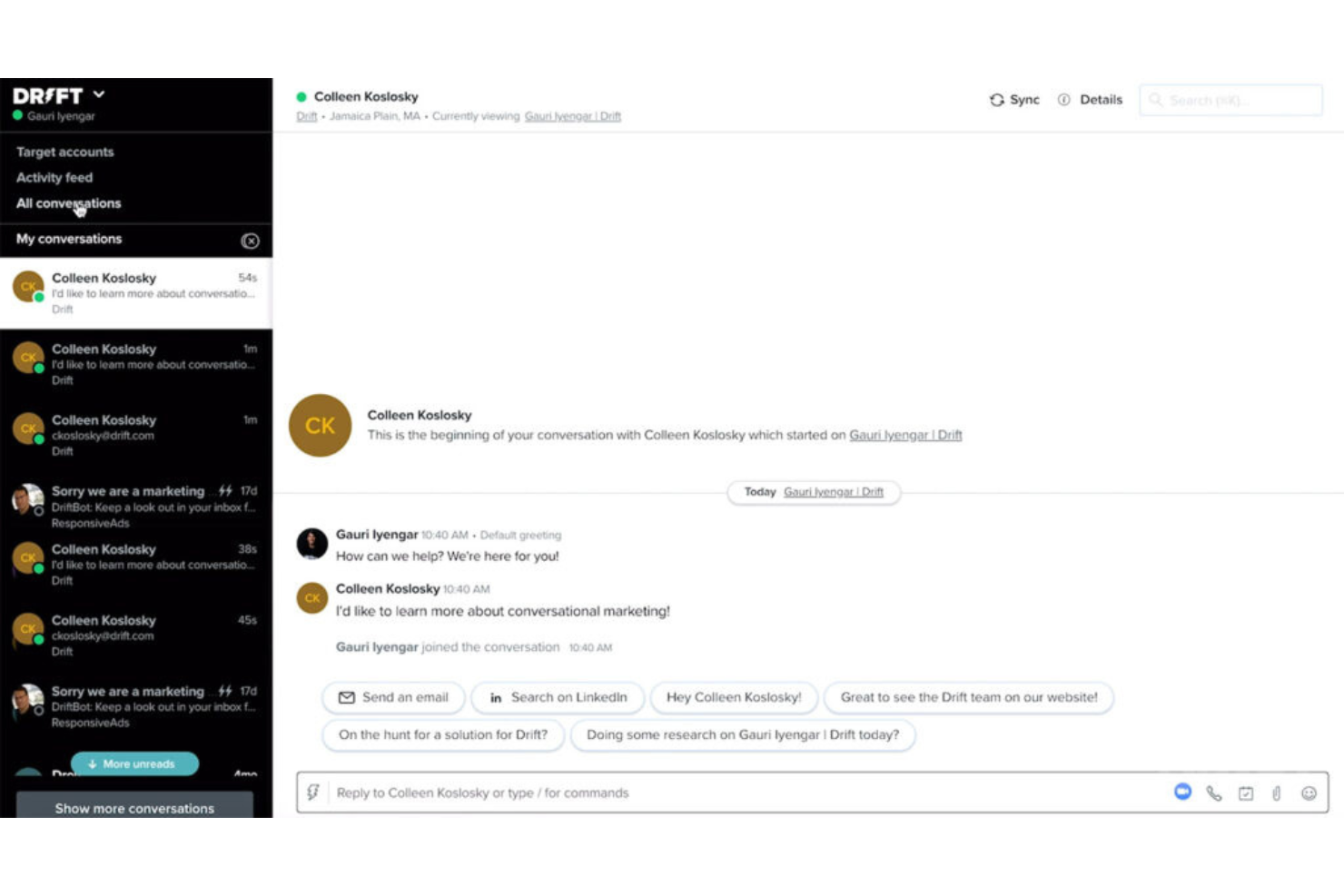
Drift ist eine Plattform für Conversational Marketing, die Unternehmen befähigt, mit Website-Besuchern in Echtzeit über personalisierte Chat-Nachrichten in Kontakt zu treten und so eine Umgebung für bedeutungsvolle Gespräche zu schaffen.
Warum ich Drift ausgewählt habe: Was mich an Drift beeindruckt hat, ist die konsequente Integration von Gesprächen als zentralem Bestandteil der Marketingstrategie. Es geht nicht nur um grundlegendes E-Mail-Marketing und die Beantwortung von Kundenfragen, sondern darum, relevante Chat-Gespräche zu initiieren, die Kunden durch den Verkaufstrichter führen.
Zu diesem Zweck umfasst Drift gezielte Messaging-Kampagnen, die auf dem Verhalten der Besucher, deren Eigenschaften oder bestimmten Aktionen auf der Website basieren. Diese Personalisierung trägt dazu bei, den Besuchern relevante Nachrichten und Angebote zu übermitteln, wodurch das Engagement und die Konversionsrate steigen. Nachrichten können auf bestimmte Segmente oder einzelne Besucher zugeschnitten werden, um ein individuelleres Erlebnis zu schaffen.
Herausragende Funktionen & Integrationen:
Funktionen umfassen Lead-Qualifizierung und Zuweisung, Terminvereinbarung, KI-gestützte Chatbots und Live-Chat-Funktionen sowie Analyse- und Reporting-Tools, um die Wirksamkeit von Conversational Marketing Maßnahmen zu messen.
Integrationen umfassen Salesforce, Salesloft, Databox, FullStory, Google Analytics, Google Workspace, HubSpot, Lokalise, Marketo und Slack
Pros and Cons
Pros:
- Umfassende Tools für Conversational Marketing
- Leistungsstarke KI-basierte Chatbots
- Anpassbare Playbooks für das Kundenerlebnis
Cons:
- Chat-Routing und Benachrichtigungen können langsam sein
- Kein kostenloser Tarif verfügbar.
- Aufgrund des großen Funktionsumfangs kann es für Einsteiger überwältigend sein.
Weitere Live-Chat-Software für Websites
Hier finden Sie einige zusätzliche Optionen für Live-Chat-Software für Websites, die es nicht in meine engere Auswahl geschafft haben, aber dennoch einen Blick wert sind:
- HubSpot Service Hub
E Lösung zur Integration in ein umfassendes CRM
- Sprinklr
Am besten geeignet für Kundenengagement in sozialen Medien
- Crescendo
Am besten für AI-Coaching, das in Kundengespräche integriert ist
- Zendesk Support Suite
Am besten geeignet für zentrales Anfragemanagement
- Zoho Desk
Am besten geeignet für die Integration mit anderen Zoho-Produkten
- Gladly
Am besten geeignet für einheitliche Kundenkommunikation
- Qualified
Am besten geeignet zur Identifikation von Website-Besuchern
- 14.ai
E absichtserkennende Antwort-Engine
- SwiftCX
Am besten geeignet für KI-gestützte Live-Unterstützung bei Kundenchats
- Hiver
Am besten zur Verwaltung hoher Anfragevolumina geeignet
- Birdeye
Am besten für Kundenfeedback und Reputationsmanagement geeignet
- LiveChat
Am besten für individuell gebrandete Chats
- Nextiva
Am besten geeignet für sprachgetriebenen Kundenservice
- Alhena AI
Ideal für schnelle Implementierung und besonders hohe Genauigkeit


So bewerte ich Live-Chat-Software für Websites
Ich teile meine Bewertung in grundlegende Funktionen – Echtzeit-Chat, Routing und proaktive Auslöser – sowie in die Unterscheidungsmerkmale auf, die empfehlenswerte Tools von solchen unterscheiden, die hinter den Erwartungen zurückbleiben.
Kernfunktionen (Grundvoraussetzungen für diese Liste)
Bei der Auswahl der Tools für meine Liste bewerte ich jedes einzelne für jede unten aufgeführte Kernfunktion auf einer Skala von 0 (bietet die Funktion nicht an) bis 5 (ist in diesem Bereich hervorragend). Anschließend rechne ich die Gesamtpunktzahl des Tools in einen Prozentsatz um. Jedes Tool muss eine Mindestgesamtpunktzahl von 75 % erreichen, um für die Aufnahme berücksichtigt zu werden.
- Echtzeit-Chat-Widget: Ich bewerte, wie gut das Widget den Markenauftritt, Vorab-Chat-Formulare, Dateifreigaben und die mobile Darstellung unterstützt, damit Besucher auf allen Geräten eine konsistente Erfahrung erhalten.
- Arbeitsbereich und Posteingang für Mitarbeiter: Ein guter Arbeitsbereich zeigt Besucherdetails, Chatverlauf und Tags auf einen Blick. Ich achte auf die Möglichkeit, mehrere Chats gleichzeitig zu bearbeiten, sowie auf interne Notizen für die Zusammenarbeit der Mitarbeiter.
- Routing und Zuweisung: Ich prüfe, ob Chats nach Abteilung, Kompetenz oder Verfügbarkeit weitergeleitet werden. Fragen zur Abrechnung sollten beispielsweise das Zahlungsteam erreichen und nicht den allgemeinen Support.
- Proaktive Chat-Auslöser: Die Einrichtung von Auslösern ist wichtig. Ich achte auf verhaltensbasierte Bedingungen wie die Verweildauer auf der Warenkorbseite oder wiederholte Besuche, mit denen Ihr Team Besucher ansprechen kann, bevor sie abspringen.
- Chatbot und Automatisierung: Unabhängig davon, ob es sich um einen regelbasierten Ablauf oder einen KI-gestützten Bot handelt, bewerte ich, wie gut automatisierte Antworten häufig gestellte Fragen bearbeiten und bei Bedarf an Mitarbeiter im Live-Chat übergeben.
- CRM- und Supportsystem-Integrationen: Chatdaten müssen in Ihre bestehende Systemlandschaft einfließen. Ich prüfe, ob direkte Verbindungen zu Plattformen wie Salesforce, HubSpot, Zendesk und Freshdesk vorhanden sind.
Sobald ich eine Liste von Tools zusammengestellt habe, die diese Kriterien erfüllen, prüfe ich, wodurch sich die einzelnen Plattformen voneinander abheben.
Unterscheidungsmerkmale (Was Anbieter voneinander abhebt)
So vergleiche ich die verschiedenen Anbieter:
Herausragende Funktionen
Omnichannel-Kommunikation ist ein wichtiges Unterscheidungsmerkmal. Wenn ein Kunde einen Chat auf der Website beginnt und über WhatsApp nachfasst, benötigen Mitarbeiter den vollständigen Gesprächsverlauf in einem einzigen Posteingang. Ich bewerte auch die Unterstützung durch KI bei Antworten – Tools, die Antworten vorschlagen oder lange Gesprächsverläufe zusammenfassen, helfen Mitarbeitern, ein höheres Volumen zu bewältigen, ohne dass die Qualität leidet. Auch die Integration einer Wissensdatenbank ist wichtig. Die besten Lösungen zeigen relevante Hilfeartikel direkt im Chat und in Bot-Abläufen an, sodass Kunden sich selbst helfen können, bevor überhaupt ein Mitarbeiter eingreift.
Über die Funktionen hinaus
Die Preisstruktur spielt hier eine große Rolle. Preise pro Mitarbeiter können bei wachsenden Teams schnell in die Höhe schießen. Daher bewerte ich, ob Anbieter volumenbasierte oder gesprächsbasierte Modelle als Alternativen anbieten. Auch Sicherheit und Compliance fallen stark ins Gewicht – Teams, die Zahlungs- oder Gesundheitsdaten verarbeiten, benötigen Unterstützung für GDPR, HIPAA oder PCI-DSS sowie eine SOC-2-Zertifizierung. Ich berücksichtige außerdem die Zeit bis zur Wertschöpfung. Ein Tool mit CMS-Plugins für Shopify oder WordPress und vorgefertigten Bot-Vorlagen bringt Ihr Team schneller live als eine Lösung, die umfangreiche Unterstützung durch Entwickler erfordert.
So wählen Sie Live-Chat-Software für Websites aus
Bei langen Funktionslisten und komplexen Preisstrukturen kann man leicht den Überblick verlieren. Damit Sie sich bei der Bearbeitung Ihres individuellen Auswahlprozesses auf das Wesentliche konzentrieren können, finden Sie hier eine Checkliste mit den wichtigsten Faktoren:
| Faktor | Was Sie beachten sollten |
|---|---|
| Skalierbarkeit | Wächst die Software mit Ihrem Unternehmen? Berücksichtigen Sie die Anzahl der Benutzer, das Chat-Volumen und künftige Erweiterungen. Achten Sie auf Tools, die eine steigende Nachfrage ohne zusätzliche Kosten bewältigen. |
| Integrationen | Lässt sich die Software mit Ihren bestehenden Systemen verbinden? Stellen Sie die Kompatibilität mit CRM, E-Mail und anderen Tools sicher, die Ihr Team täglich nutzt. Vermeiden Sie Tools, die komplexe Umgehungslösungen erfordern. |
| Anpassbarkeit | Können Sie die Software an Ihre Anforderungen anpassen? Prüfen Sie, ob Sie Chat-Widgets, Workflows und Benutzerberechtigungen an Ihre Prozesse anpassen können. |
| Benutzerfreundlichkeit | Ist die Benutzeroberfläche für Ihr Team intuitiv? Wählen Sie Software, die den Schulungsaufwand minimiert und die Einarbeitung neuer Benutzer erleichtert. |
| Implementierung und Einarbeitung | Wie lange dauert die Inbetriebnahme? Suchen Sie nach einem Tool mit klaren Ressourcen für die Einarbeitung, einer schnellen Einrichtung und Unterstützung während der Übergangsphase. |
| Kosten | Passt die Preisgestaltung zu Ihrem Budget? Vergleichen Sie die Kosten mit den angebotenen Funktionen. Berücksichtigen Sie die Gesamtbetriebskosten einschließlich versteckter Gebühren und Zusatzoptionen. |
| Sicherheitsmaßnahmen | Sind Ihre Daten und Kundeninteraktionen geschützt? Überprüfen Sie die Einhaltung von Datenschutzstandards sowie das Vorhandensein von Verschlüsselungs- und Datenschutzfunktionen. |
| Verfügbarkeit des Supports | Ist Hilfe verfügbar, wenn Sie sie benötigen? Achten Sie auf Support-Optionen rund um die Uhr, Reaktionszeiten und die Verfügbarkeit fester Ansprechpartner. |
Was ist Live-Chat-Software für Websites?
Live-Chat-Software für Websites ist ein Tool, das die Echtzeitkommunikation zwischen Unternehmen und ihren Website-Besuchern ermöglicht. Kundensupportteams, Vertriebsteams und Marketingfachleute verwenden diese Tools häufig, um Besucher anzusprechen, Fragen zu beantworten und Leads zu konvertieren. Funktionen wie Chat-Widgets, automatisierte Antworten und Integrationsmöglichkeiten unterstützen die Kundeninteraktion, eine effiziente Kommunikation und eine nahtlose Workflow-Integration. Insgesamt verbessern diese Tools die Kundenbindung und die Servicebereitstellung.
Funktionen
Achten Sie bei der Auswahl von Live-Chat-Software für Websites auf die folgenden wichtigen Funktionen:
- Echtzeitkommunikation: Ermöglicht die sofortige Interaktion mit Besuchern und verbessert dadurch Kundenbindung und -zufriedenheit.
- Chat-Widgets: Anpassbare Oberflächen, die zu Ihrer Marke passen und sich nahtlos in Ihre Website integrieren lassen.
- Automatisierte Antworten: Liefert schnelle Antworten auf häufige Fragen und entlastet Ihr Team, damit es sich um komplexe Anfragen kümmern kann.
- Besucherverfolgung: Überwacht das Nutzerverhalten auf Ihrer Website und hilft dabei, Interaktionen an den Interessen der Besucher auszurichten.
- Integrationsmöglichkeiten: Verbindet sich mit CRM-, E-Mail- und anderen Tools, um Workflows und Datenverwaltung zu optimieren.
- Chatverlauf und Transkripte: Speichert Aufzeichnungen vergangener Interaktionen, um Kontext bereitzustellen und die zukünftige Kommunikation zu verbessern.
- KI-gestützte Chatbots: Automatisieren Gespräche und bearbeiten Anfragen, wenn Ihr Team nicht verfügbar ist, und gewährleisten so eine Betreuung rund um die Uhr.
- Multichannel-Support: Verwaltet die Kommunikation über mehrere Plattformen hinweg, einschließlich sozialer Medien und E-Mail, über eine einzige Oberfläche.
- Video-Chat: Bietet Möglichkeiten zur persönlichen Interaktion von Angesicht zu Angesicht für einen individuelleren Kundenservice.
- Sicherheitsvorkehrungen: Schützt Daten und gewährleistet die Einhaltung von Datenschutzstandards, sodass Interaktionen sicher bleiben.
Vorteile
Die Implementierung von Live-Chat-Software für Websites bietet Ihrem Team und Ihrem Unternehmen mehrere Vorteile. Hier sind einige, auf die Sie sich freuen können:
- Verbesserte Kundenbindung: Echtzeitkommunikation hält Besucher aktiv eingebunden und erhöht die Wahrscheinlichkeit, dass sie zu Kunden werden.
- Höhere Effizienz: Automatisierte Antworten und KI-gestützte Chatbots bearbeiten routinemäßige Anfragen und entlasten Ihr Team, damit es sich komplexen Problemen widmen kann.
- Verbesserter Kundenservice: Chatverläufe und Transkripte liefern Kontext und ermöglichen einen persönlicheren und effektiveren Support.
- Bessere Datenintegration: Integrationsmöglichkeiten gewährleisten einen reibungslosen Datenfluss zwischen Ihrer Chat-Software und bestehenden Systemen wie CRM.
- Verfügbarkeit rund um die Uhr: Multichannel-Support und Chatbots stellen sicher, dass Ihr Unternehmen unabhängig von Zeitzonen jederzeit für Kunden erreichbar ist.
- Kostengünstiger Support: Reduziert den Bedarf an einem großen Supportteam, indem viele Kundeninteraktionen automatisiert werden.
- Personalisierte Interaktionen: Besucherverfolgung und anpassbare Chat-Widgets ermöglichen es Ihnen, das Erlebnis auf die Bedürfnisse jedes Besuchers abzustimmen.
Kosten und Preise
Die Auswahl von Live-Chat-Software für Websites setzt ein Verständnis der verschiedenen verfügbaren Preismodelle und Tarife voraus. Die Preise reichen von kostenlosen Live-Chat-Tools bis hin zu kostenpflichtigen Optionen, wobei die Kosten je nach Funktionen, Teamgröße, Zusatzoptionen und weiteren Faktoren variieren. Die folgende Tabelle fasst gängige Tarife, ihre Durchschnittspreise und typische enthaltene Funktionen von Lösungen für Live-Chat-Software für Websites zusammen:
Vergleichstabelle der Tarife für Live-Chat-Software für Websites
| Tarifart | Durchschnittspreis | Übliche Funktionen |
|---|---|---|
| Kostenloser Tarif | $0 | Grundlegende Chat-Funktionen, begrenzte Integrationen und Standardsupport. |
| Persönlicher Tarif | $5-$25/Benutzer/Monat | Unbegrenzter Chatverlauf, anpassbare Chat-Widgets und grundlegende Berichte. |
| Geschäftstarif | $30-$60/Benutzer/Monat | Erweiterte Analysen, Automatisierungstools und Multichannel-Support. |
| Unternehmenstarif | $70+/Benutzer/Monat | KI-gestützte Chatbots, vollständige CRM-Integration und dedizierte Kontoverwaltung. |
Häufig gestellte Fragen zur Live-Chat-Software für Websites
Hier finden Sie Antworten auf häufig gestellte Fragen zur Live-Chat-Software für Websites:
Woher weiß ich, ob Live-Chat-Software für mein Unternehmen geeignet ist?
Ja, Live-Chat-Software kann den meisten Unternehmen zugutekommen, insbesondere solchen mit einer Online-Präsenz. Berücksichtigen Sie den Bedarf an Kundeninteraktionen und wie Echtzeitkommunikation den Service und den Vertrieb verbessern kann. Wenn Sie eine Website haben und Kunden häufig Fragen stellen oder Unterstützung benötigen, kann Live-Chat-Software die Interaktion und Zufriedenheit steigern.
Ist es schwierig, Live-Chat-Software einzurichten?
Nein, die Einrichtung von Live-Chat-Software ist in der Regel unkompliziert. Die meisten Anbieter bieten benutzerfreundliche Oberflächen und Ressourcen wie Tutorials und Anleitungen, die Ihnen den Einstieg erleichtern. Je nach Komplexität Ihrer Website und Ihren Anforderungen benötigen Sie möglicherweise nur minimale technische Unterstützung. Achten Sie auf Software mit guter Unterstützung bei der Einführung, um den Prozess zu erleichtern.
Wie kann sich Live-Chat-Software auf die Produktivität meines Teams auswirken?
Live-Chat-Software kann die Produktivität steigern, indem sie routinemäßige Anfragen automatisiert und Ihrem Team ermöglicht, sich auf komplexe Anliegen zu konzentrieren. Funktionen wie Chatbots und automatische Antworten verkürzen die Reaktionszeiten und verbessern die Effizienz. Durch die gleichzeitige Bearbeitung mehrerer Gespräche kann Ihr Team in kürzerer Zeit mehr Kunden betreuen.