

10 beste ServiceNow-Alternativen im Test 2026

Auswahl der besten ServiceNow-Alternativen


ServiceNow ist eine weit verbreitete Plattform für das Servicemanagement, die für ihre umfangreichen Funktionen für das IT-Servicemanagement (ITSM) bekannt ist. Die komplexe Benutzeroberfläche und die hohen Kosten können jedoch ein Nachteil sein, insbesondere für kleine und mittelständische Unternehmen, die nach Alternativen suchen.
Auf Grundlage meiner Erfahrung mit Software für Kundenerlebnisse habe ich mehrere der besten verfügbaren ServiceNow-Alternativen getestet und verglichen. Anschließend habe ich meine Ergebnisse in ausführlichen Bewertungen zusammengestellt, um Ihnen dabei zu helfen, die beste Software für Ihre spezifischen Anforderungen zu finden.
Was ist ServiceNow?
ServiceNow ist eine cloudbasierte Plattform, die Arbeitsabläufe optimiert und verschiedene Geschäftsprozesse automatisiert, vor allem für das IT-Servicemanagement (ITSM), aber auch für Personalwesen, Kundenservice und Sicherheitsabläufe.
Sie wird im Allgemeinen von IT-Fachkräften und Servicedesk-Teams eingesetzt, um den IT-Betrieb und die Weiterleitung zu verwalten und gleichzeitig durch Automatisierung, Störungsmanagement und die Optimierung von Arbeitsabläufen die Effizienz zu steigern.
Vergleichstabelle der ServiceNow-Alternativen
Diese Vergleichstabelle fasst die Preisdetails meiner besten ausgewählten ServiceNow-Alternativen zusammen:
| Tool | Best For | Trial Info | Price | ||
|---|---|---|---|---|---|
| 1 | Am besten für sofortige Ursachenanalyse | 30-tägige kostenlose Testversion verfügbar | Ab $209/Monat/Techniker (jährliche Abrechnung) | Website | |
| 2 | Am besten geeignet für die Kombination von IT-Service- und Asset-Lifecycle-Management | 14-tägige kostenlose Testversion verfügbar | Ab $19/Nutzer/Monat (jährliche Abrechnung) | Website | |
| 3 | Am besten für KI-gestützte Automatisierung | 14-tägige kostenlose Testversion | Preise auf Anfrage | Website | |
| 4 | Am besten geeignet für die automatische Bearbeitung von Kundenanfragen | 7-tägige kostenlose Testversion + kostenloser Plan verfügbar | Ab $25/Nutzer/Monat | Website | |
| 5 | Am besten für teamübergreifende Workflow-Koordination | 14-tägige kostenlose Testversion | Ab $25/Nutzer/Monat (jährliche Abrechnung) | Website | |
| 6 | Am besten geeignet für ITIL-Konformität | 14-tägige kostenlose Testversion | Preis auf Anfrage | Website | |
| 7 | Am besten für Benutzerfreundlichkeit und Automatisierung geeignet | 14-tägige kostenlose Testphase | Ab $24/Agent/Monat (jährlich abgerechnet) | Website | |
| 8 | Am besten für visuelles Workflow-Management | 14-tägige kostenlose Testphase | Ab $9/Sitz/Monat (jährlich abgerechnet) | Website | |
| 9 | Am besten für KI-gestützten Ticket-Support | 30-tägige kostenlose Testversion verfügbar | Ab $17/Nutzer/Monat | Website | |
| 10 | Ideal für schnelle Einrichtung und Anpassung | 30-tägige kostenlose Testversion + kostenlose Demo verfügbar | Ab $76/Agent/Monat | Website |


Warum Sie unseren Software-Empfehlungen vertrauen können
Unser Team testet und bewertet Software seit 2012. Als CX-Führungskräfte selbst wissen wir, wie schwierig – und wichtig – es ist, die richtige Software auszuwählen.
Für diesen Leitfaden haben wir Tools mithilfe von praktischen Tests und unabhängiger Recherche bewertet und dabei unsere Bewertungskriterien angewendet.
Unsere Bewertungen spiegeln unser menschliches redaktionelles Urteilsvermögen wider, keine Verkaufsstrategie.
Bewertungen der besten ServiceNow-Alternativen
Hier finden Sie meine ausführlichen Zusammenfassungen der besten ServiceNow-Alternativen. Jede Bewertung behandelt wichtige Funktionen, Vor- und Nachteile, Integrationen sowie ideale Anwendungsfälle, damit Sie das richtige Tool für Ihre Anforderungen auswählen können.

Am besten für sofortige Ursachenanalyse
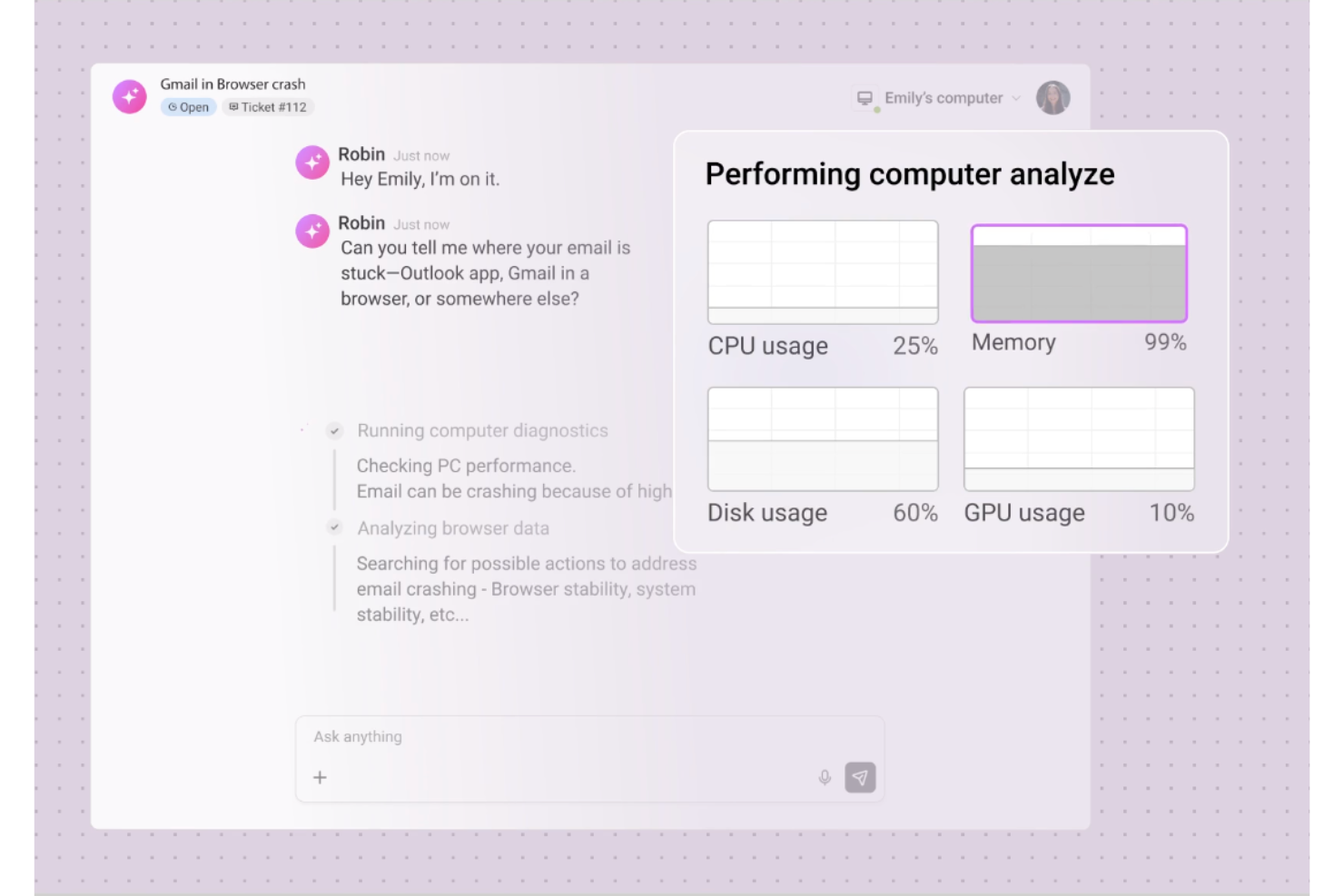
Robin Autonomous IT bietet IT-Teams und Managed Service Providern eine KI-gesteuerte Plattform zur Automatisierung und Optimierung komplexer IT-Workflows. Es zeichnet sich besonders für Anwender aus, die Abläufe verschlanken, die Fehlersuche beschleunigen und die Gesamteffizienz im Vergleich zu herkömmlichen ITSM-Tools verbessern möchten.
Für wen ist Robin Autonomous IT am besten geeignet?
IT-Betriebsteams und Managed Service Provider in mittelständischen Unternehmen, die KI-gestützte Automatisierung für Fehlerbehebung und Vorfallanalyse benötigen.
Warum ist Robin Autonomous IT eine gute ServiceNow-Alternative?
Ich habe Robin für diese Liste ausgewählt, weil es im Falle eines Vorfalls direkt zur Sache kommt. Die KI analysiert den vollständigen Kontext einer Meldung – Gerätehistorie, kürzliche Änderungen, Fehlermuster – und identifiziert die Ursache in Sekunden statt in Stunden. Ich schätze, dass mein Team nicht mehr mühsam Protokolle durchsuchen muss; Robin zeigt exakt an, was und warum etwas schiefgelaufen ist. Für IT-Teams, die ServiceNows mehrstufige Untersuchungsprozesse leid sind, ist diese sofortige Analyse ein echtes Unterscheidungsmerkmal.
Hauptfunktionen von Robin Autonomous IT
- Automatisierte Ticket-Lösung: Robin löst eigenständig häufige IT-Tickets, ohne dass ein Techniker eingreifen muss.
- Proaktive Geräteüberwachung: Überwacht Endpunkte kontinuierlich auf Anomalien und meldet Probleme, bevor sie eskalieren.
- KI-generierte Handlungsempfehlungen: Robin schlägt auf Basis des Echtzeit-Kontextes von Geräten und Systemen gezielte Abhilfemaßnahmen vor.
- Ticketaufnahme in natürlicher Sprache: Akzeptiert und versteht Supportanfragen, die in Alltagssprache formuliert sind, um den Lösungsprozess zu starten.
Robin Autonomous IT Integrationen
Robin verfügt über integrierte Anbindungen an Identitätsanbieter wie Google, Azure AD und Okta und akzeptiert Anfragen über Kanäle wie Slack, Microsoft Teams, E-Mail und das Atera Customer Portal. Es integriert sich außerdem mit HubSpot und verbindet sich mit Drittanbieter-ITSM-Tools. Robin unterstützt zusätzliche Konnektivität über Cloud Actions, MCP und Zapier, und Atera stellt eine API für individuelle Integrationen bereit.
Pros and Cons
Pros:
- KI ermittelt die Ursachen für Tickets punktgenau
- Die Problemanalyse liefert schnell umsetzbare Erkenntnisse
- Reduziert manuelle Eskalationen für IT-Mitarbeitende
Cons:
- KI-gesteuerte Maßnahmen könnten besondere Einzelfälle übersehen
- Berichtsfunktionen sind weniger detailliert als bei Wettbewerbern
Am besten geeignet für die Kombination von IT-Service- und Asset-Lifecycle-Management
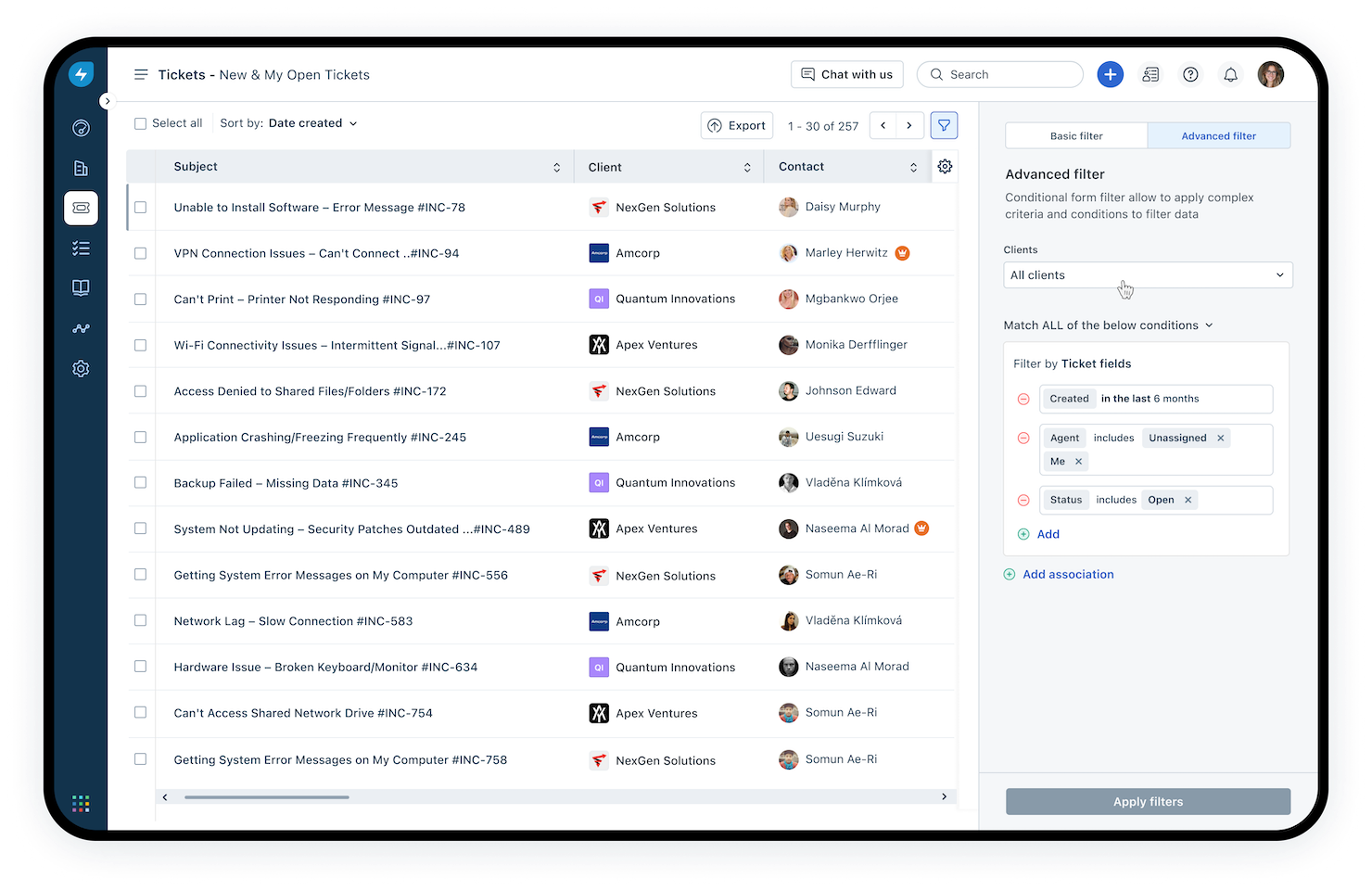
Mit Freshservice können Sie Serviceanfragen, Assets und Workflows zentralisieren – sowohl für IT- als auch für Geschäftsteams. Es hilft, schwergewichtige, ältere ITSM-Tools durch eine Plattform zu ersetzen, die auf Wartung, Automatisierung und eine mitarbeiterzentrierte Servicebereitstellung ausgerichtet ist.
Warum ich Freshservice als ServiceNow-Alternative gewählt habe: Ich habe Freshservice ausgewählt, weil es eine klare Balance zwischen IT-Service-Management-(ITSM)-Reife und Kosten-Nutzen-Komplexität bietet. Es unterstützt Incident-, Problem-, Change- und Asset-Management auf einer einzigen Plattform mit integrierter Automatisierung, sodass Sie sich von reaktivem zu proaktivem Handeln bewegen. Es bringt KI-gestütztes Ticketing (über die „Freddy“-KI), um Self-Service und Routing zu unterstützen. Die Preisgestaltung beginnt niedriger als bei vielen Enterprise-ITSM-Suiten, was den Umstieg von ServiceNow für Teams erleichtert.
Hervorzuhebende Funktionen & Integrationen
Funktionen umfassen ein Self-Service-Portal und Workflow-Automatisierungen für Incident-, Request- und Change-Lebenszyklen; Asset-Erkennung und Lebenszyklusverwaltung, die in Ticketing und Serviceanfragen integriert sind; Orchestrierung und Low-Code/Connector-Workflows, um andere Tools (DevOps, HR, Cloud) in Ihren Serviceprozess einzubinden; sowie ein Analyse-/Reporting-Modul zur Überwachung von SLAs, Arbeitslast und Asset/IT-Gesundheit. Zudem werden mobile Apps, Multi-Abteilungs-Service-Desks und die Zusammenarbeit von IT- und Business-Serviceteams unterstützt.
Integrationen beinhalten Slack, Microsoft Teams, Atlassian Jira, Azure AD, Workday, BambooHR, GitHub, DocuSign, Smartsheet und viele mehr – zusätzlich zu einer öffentlichen API und einem Connector-App-Ökosystem.
Pros and Cons
Pros:
- Umfangreiche ITSM-Funktionsvielfalt (Incident, Problem, Change, Asset) unter einem Dach
- Starkes Connector-Ökosystem und Automatisierung durch Orchestrierung
- Benutzerfreundliche Oberfläche mit Self-Service-Portal verbessert Endnutzer-Erlebnis
Cons:
- Berichte und Analysen weniger tiefgründig/individuell anpassbar
- Einige erweiterte Funktionen (Asset-Pakete, Orchestrierungs-Transaktionen) sind höheren Tarifen vorbehalten
New Product Updates from Freshservice
 Experience)
Freshservice Introduces a Reimagined IT Asset Management (ITAM) Experience
Freshservice introduces a reimagined IT Asset Management (ITAM) experience with continuous infrastructure discovery, dependency mapping, IPAM, and Software License Management. This update helps teams improve asset visibility and manage connected IT environments more effectively. For more information, visit Freshservice’s official site.

SysAid
Am besten für KI-gestützte Automatisierung
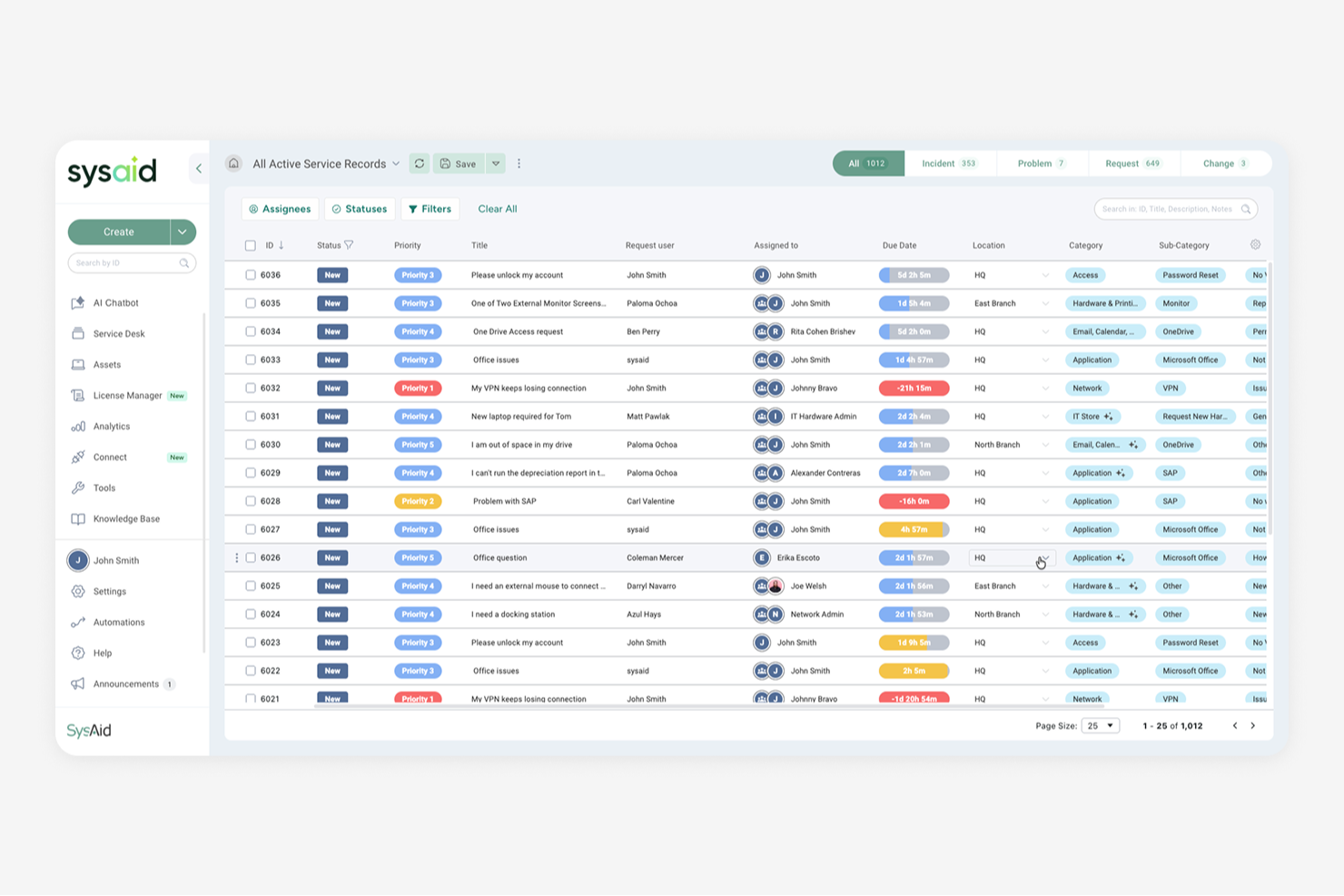
SysAid ist eine IT-Service-Management (ITSM) Lösung, die für IT-Teams und Service-Desk-Profis entwickelt wurde. Sie unterstützt das Ticketmanagement, Asset-Management und die Workflow-Automatisierung, um Teams zu helfen, IT-Services effizienter zu verwalten.
Warum SysAid eine gute Alternative zu ServiceNow ist: Die KI-gestützten Funktionen von SysAid, wie automatisierte Ticket-Kategorisierung und konversationelle Self-Service-Möglichkeiten, helfen IT-Teams, manuellen Aufwand zu reduzieren. Diese Tools ermöglichen eine schnellere Bearbeitung von Anfragen und eine konsistentere Servicebereitstellung, ohne dass eine komplexe Konfiguration erforderlich ist. In Kombination mit geführtem Onboarding und verfügbaren Supportressourcen kann SysAid Teams schneller zum Start verhelfen als umfangreichere ITSM-Plattformen, die oft eine aufwendige Einrichtung und Schulung erfordern.
Hervorstechende Funktionen & Integrationen:
Funktionen umfassen KI-gestützte Ticket-Kategorisierung, Service-Automatisierung, Self-Service und konversationelle Anfrageannahme sowie Performance-Tracking-Tools, die helfen, die Effektivität von IT-Services zu überwachen.
Integrationen umfassen Microsoft Teams, Slack, Jira, Zendesk, Salesforce, Active Directory, Google Workspace, Okta, ServiceNow und Azure AD.
Pros and Cons
Pros:
- KI-gesteuerte Ticketautomatisierung
- Effizientes Asset-Management
- Umfassende Onboarding-Unterstützung
Cons:
- Begrenzte Anpassungsmöglichkeiten
- Erfordert anfängliche Einrichtungszeit
New Product Updates from SysAid

SysAid Adds Bulk Contract Import
SysAid added bulk contract import to License Manager Essentials, letting admins upload a CSV template, validate entries, and create multiple contracts at once. For more information, visit SysAid's official site.

Tidio
Am besten geeignet für die automatische Bearbeitung von Kundenanfragen
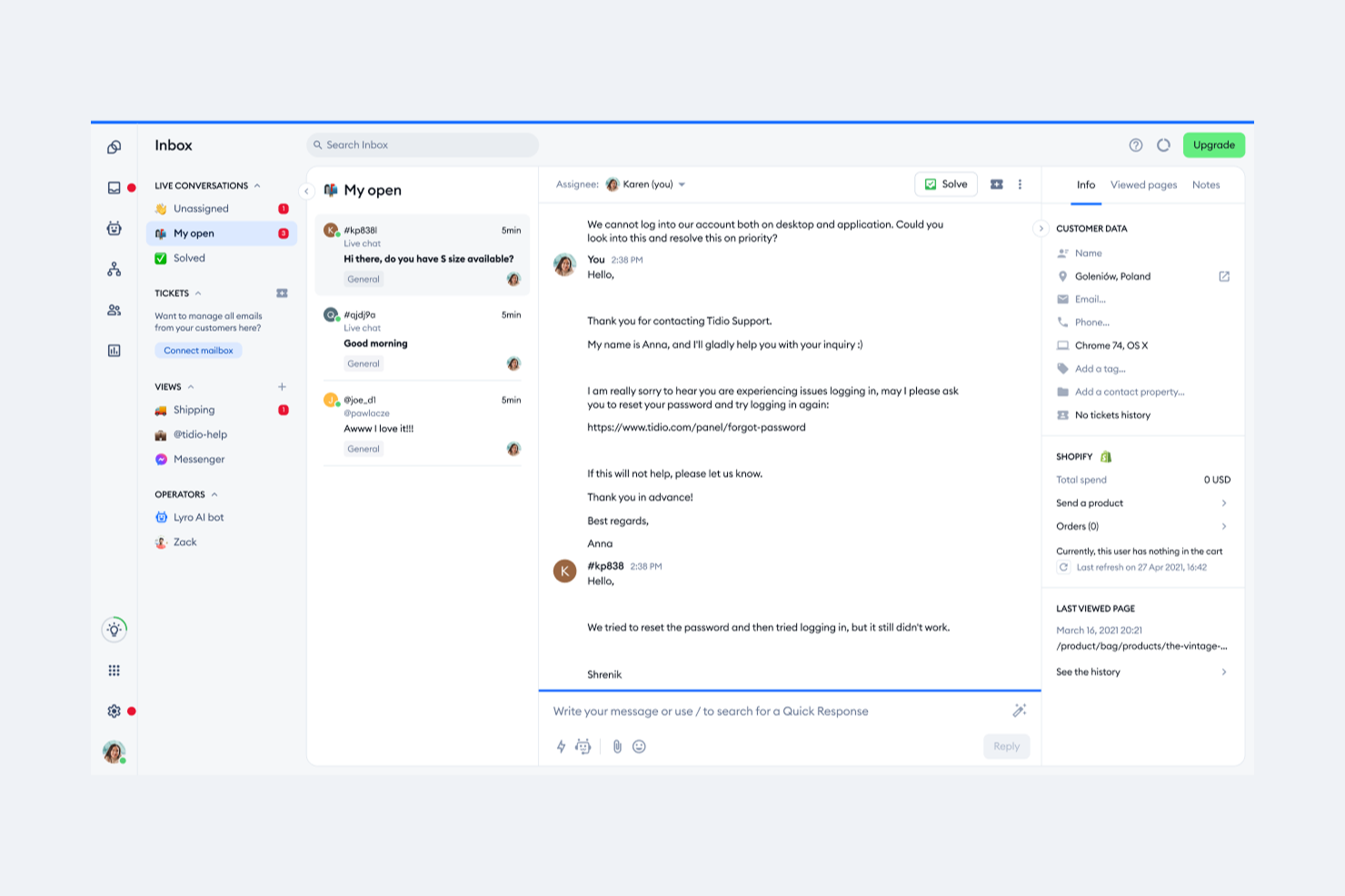
Die KI-gesteuerten Kundendienstlösungen von Tidio, darunter der Lyro AI Agent und der Multichannel-Support, sind eine interessante Option für Teams, die nach Alternativen zu ServiceNow suchen. Wenn Sie in einer Branche tätig sind, in der die Verbesserung von Kundeninteraktionen und die Optimierung von Supportprozessen im Vordergrund stehen, könnte Tidios Fokus auf die Steigerung der Lösungsquote und der Kundenzufriedenheit Ihre Aufmerksamkeit erregen. Die Integrationsmöglichkeiten und Automatisierungsfunktionen tragen dazu bei, Herausforderungen bei der effizienten Bearbeitung von Kundenanfragen zu bewältigen und stärken letztlich die Kundenbeziehungen.
Warum ich Tidio ausgewählt habe
Ich habe Tidio aufgrund seines einzigartigen Schwerpunkts auf KI-gesteuerte Kundeninteraktionen ausgewählt, der besonders attraktiv ist, wenn Sie nach ServiceNow-Alternativen suchen. Der Lyro AI Agent der Plattform zeichnet sich dadurch aus, dass er Kundenanfragen automatisch bearbeitet und so die Lösungsquote sowie die Kundenzufriedenheit erhöht. Zusätzlich ermöglicht der Multichannel-Support von Tidio Ihrem Team die nahtlose Verwaltung von Kommunikation über verschiedene Kanäle hinweg, sodass keine Kundenanfrage verloren geht. Diese Funktionen entsprechen den Anforderungen von Unternehmen, die ihren Kundenservice über das traditionelle IT-Service-Management hinaus verbessern möchten.
Tidio Hauptfunktionen
Neben den herausragenden KI-Fähigkeiten bietet Tidio mehrere Funktionen, die für Sie interessant sein könnten:
- Live-Chat: Interagieren Sie in Echtzeit mit Kunden über ein anpassbares Chat-Widget auf Ihrer Website.
- Helpdesk: Organisieren und verfolgen Sie Kundenanfragen mit einem Ticketsystem, das für schnelle Antworten sorgt.
- Automatisierung: Richten Sie automatisierte Antworten und Workflows ein, um Routineinteraktionen effizient abzuwickeln.
- Analytik: Gewinnen Sie Einblicke in Kundeninteraktionen und die Performance Ihres Supports, um datengestützte Entscheidungen zu treffen.
Tidio Integrationen
Integrationen umfassen Shopify, WordPress, HubSpot, Zapier, Mailchimp, Facebook Messenger, Instagram, WhatsApp, Google Analytics und Slack.
Pros and Cons
Pros:
- KI-Chatbot löst Routineanfragen automatisch
- Unterstützt 120+ Integrationen inklusive Shopify und HubSpot
- Multichannel-Posteingang bündelt Chat, E-Mail und Soziales
Cons:
- KI-Nutzungslimits gelten für günstigere Pläne
- Preisgestaltung kann bei hohem Gesprächsvolumen teuer werden

Front
Am besten für teamübergreifende Workflow-Koordination
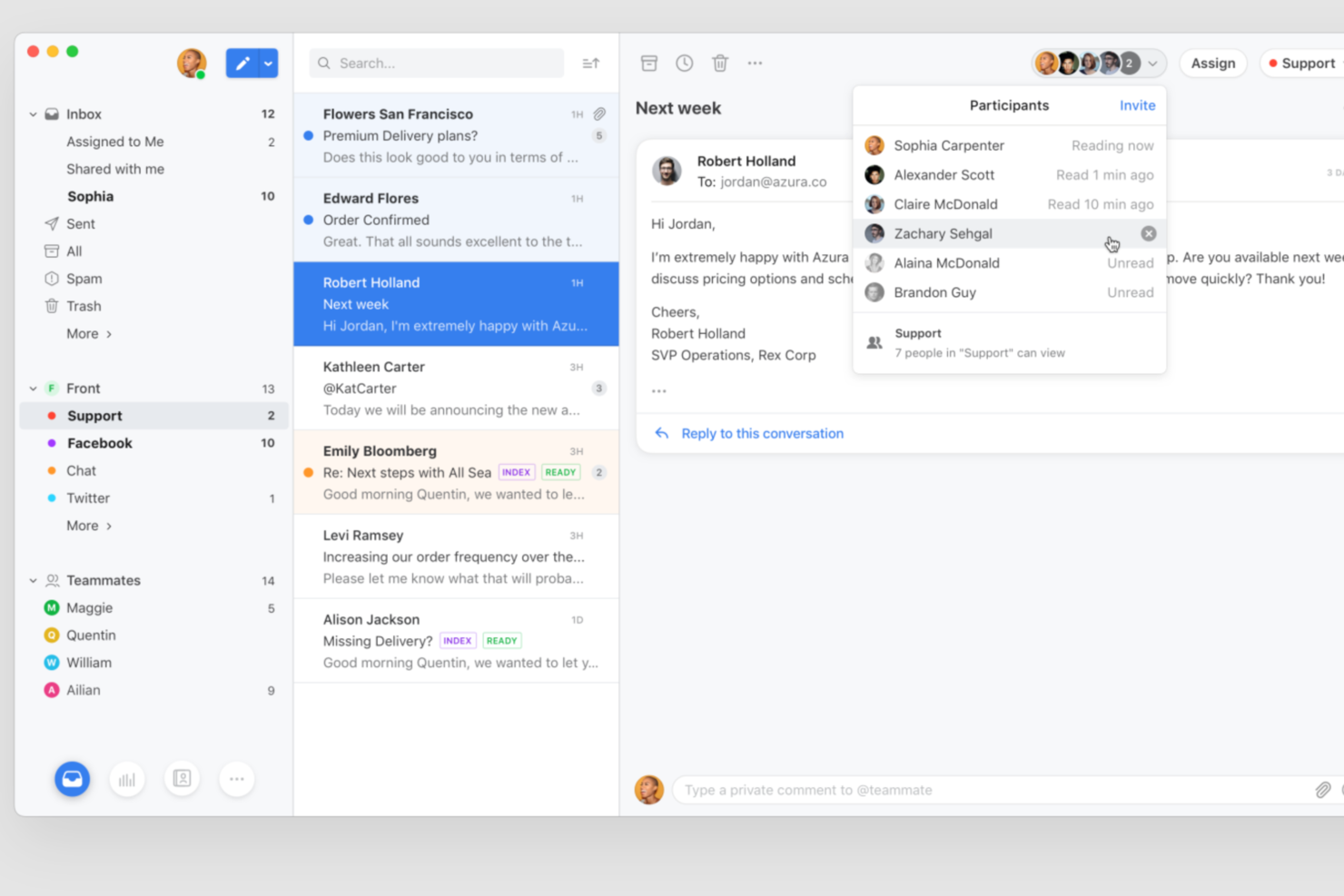
Front bietet eine kollaborative Kommunikationsplattform für den Kundenservice, die speziell für Teams entwickelt wurde, die ein hohes Nachrichtenvolumen über mehrere Kanäle hinweg verwalten müssen. Sie ist ideal für Support-, Betriebs- und Serviceteams, die mehr Transparenz und Koordination wünschen, als herkömmliche Ticketingsysteme bieten. Wenn Sie starre IT-Workflows durch flexible, dialogorientierte Prozesse ersetzen möchten, gibt Front Ihrem Team die Werkzeuge an die Hand, gemeinsam schneller zu reagieren.
Für wen ist Front am besten geeignet?
Front ist eine ausgezeichnete Wahl für Kundenservice- und Operationsteams in mittelgroßen bis großen Unternehmen, die Antworten über mehrere Abteilungen hinweg koordinieren müssen.
Warum Front eine gute ServiceNow-Alternative ist
Wenn ich nach einer ServiceNow-Alternative suche, die echte teamübergreifende Workflow-Koordination unterstützt, überzeugt Front durch seine kollaborative Herangehensweise an die Kundenkommunikation. Gemeinsame Posteingänge ermöglichen mehreren Teams, gemeinsam an Konversationen zu arbeiten, ohne den Kontext zu verlieren oder doppelte Arbeit zu leisten. Integrierte Workflow-Automatisierung leitet Nachrichten an die richtigen Personen weiter und sorgt dafür, dass alle Beteiligten über die nächsten Schritte im Bilde sind. Ich schätze es sehr, wie interne Kommentare und Aufgaben in Front die Koordination komplexer Anfragen über Support, Betrieb und andere Abteilungen hinweg erleichtern.
Kernfunktionen von Front
Weitere Funktionen von Front, die für Teams auf der Suche nach ServiceNow-Alternativen interessant sein könnten, sind:
- Analysen und Berichte: Zugriff auf Dashboards und Analysen zur Überwachung der Teamleistung und zur Erkennung von Nachrichtentrends.
- SLA-Management: Service Level Agreements festlegen und überwachen, um zeitnahe Antworten und Verantwortlichkeit sicherzustellen.
- Multikanal-Messaging: Verwaltung von E-Mails, SMS, Live-Chat und Social-Media-Nachrichten auf einer zentralen Plattform.
- Anpassbare Vorlagen: Nachrichten-Vorlagen erstellen und verwenden, um Antworten zu standardisieren und die Kommunikation zu beschleunigen.
Front-Integrationen
Zu den Integrationen gehören HubSpot, Salesforce, Asana, Slack, Aircall, FullContact, ClickUp, Chatra, Gainsight und AMGiNE.
Pros and Cons
Pros:
- Gemeinsame Posteingänge ermöglichen echte teamübergreifende Zusammenarbeit
- Omnichannel-Messaging deckt E-Mail, Chat, SMS und Soziales ab
- KI-Funktionen unterstützen bei der Kategorisierung und Qualitätssicherung
Cons:
- Kein integriertes ITIL-Framework oder Compliance-Tools
- Nicht für komplexes IT-Service-Management konzipiert

Halo
Am besten geeignet für ITIL-Konformität
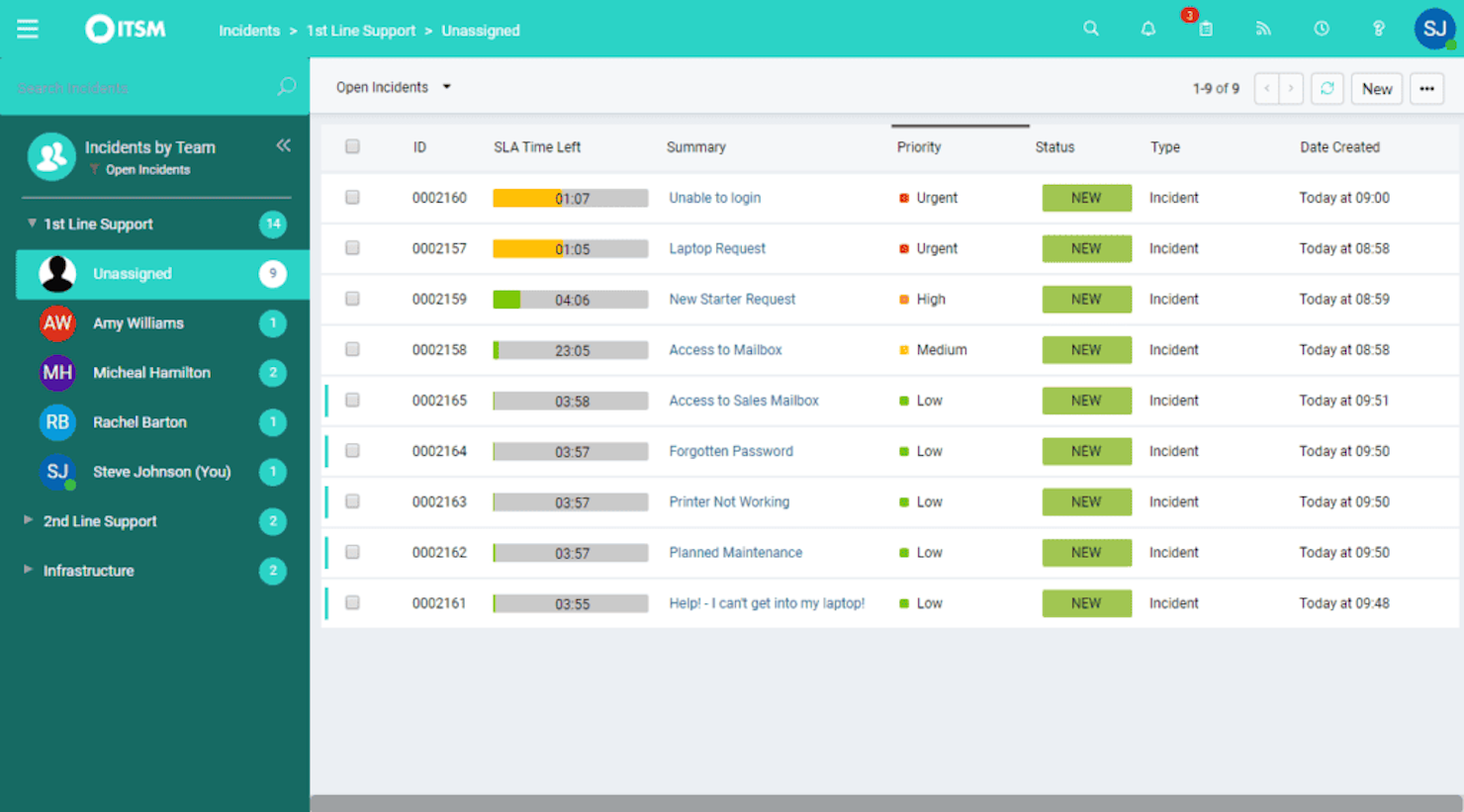
HaloITSM ist ein vielseitiges IT-Service-Management-Tool, das darauf ausgelegt ist, sich an die Bedürfnisse Ihrer Organisation anzupassen. Es bietet eine umfassende Funktionssuite zur Unterstützung effizienter IT-Betriebsabläufe und Servicebereitstellung.
Warum ich HaloITSM als Alternative zu ServiceNow ausgewählt habe: Ich habe mich für HaloITSM entschieden, weil es sich konsequent an die ITIL-Konformität hält. Das gewährleistet, dass Ihre IT-Services den Branchenstandards entsprechen. Diese Funktion ist besonders wichtig für Organisationen, die Wert auf strukturierte und standardisierte IT-Prozesse legen. Ein weiteres herausragendes Merkmal sind die anpassbaren Workflows, die es ermöglichen, Prozesse individuell auf Ihre spezifischen Anforderungen zuzuschneiden und so die Anpassungsfähigkeit in unterschiedlichen IT-Umgebungen zu erhöhen.
Darüber hinaus bieten die Reportingfähigkeiten von HaloITSM wertvolle Einblicke in Ihre IT-Betriebsabläufe. Mit detaillierten Analysen lassen sich Trends erkennen und fundierte Entscheidungen zur Optimierung der Servicebereitstellung treffen. Diese Funktionen machen HaloITSM zu einer starken Alternative für diejenigen, die eine flexible und datenbasierte Lösung als Ersatz für ServiceNow suchen.
Hervorstechende Funktionen & Integrationen
Funktionen beinhalten ein Self-Service-Portal, das Nutzern ermöglicht, Probleme eigenständig zu lösen, was die IT-Abteilung entlastet. Das Tool unterstützt außerdem die Kommunikation über mehrere Kanäle und stellt so sicher, dass Ihr Team Nutzer über ihre bevorzugten Plattformen erreichen kann. Zusätzlich bietet es Asset-Management-Funktionen, mit denen Sie die IT-Assets Ihres Unternehmens sowie deren Lebenszyklus im Blick behalten.
Integrationen umfassen Microsoft Teams, Azure Active Directory, Slack, Jira, Salesforce Marketing Cloud, Google Workspace, TeamViewer, Webex Suite, 3CX, PagerDuty, Splunk Enterprise und ConnectWise Cybersecurity Management.
Pros and Cons
Pros:
- Übersichtliche, intuitive Oberfläche für tägliche Anwender
- Starke ITIL-konforme Service-Management-Abdeckung
- Einfache Anpassung von Workflows und Feldern
Cons:
- Weniger native Integrationen als bei Enterprise-Mitbewerbern
- Automatisierungsfunktionen schwächer als im ServiceNow-Portfolio

HappyFox
Am besten für Benutzerfreundlichkeit und Automatisierung geeignet
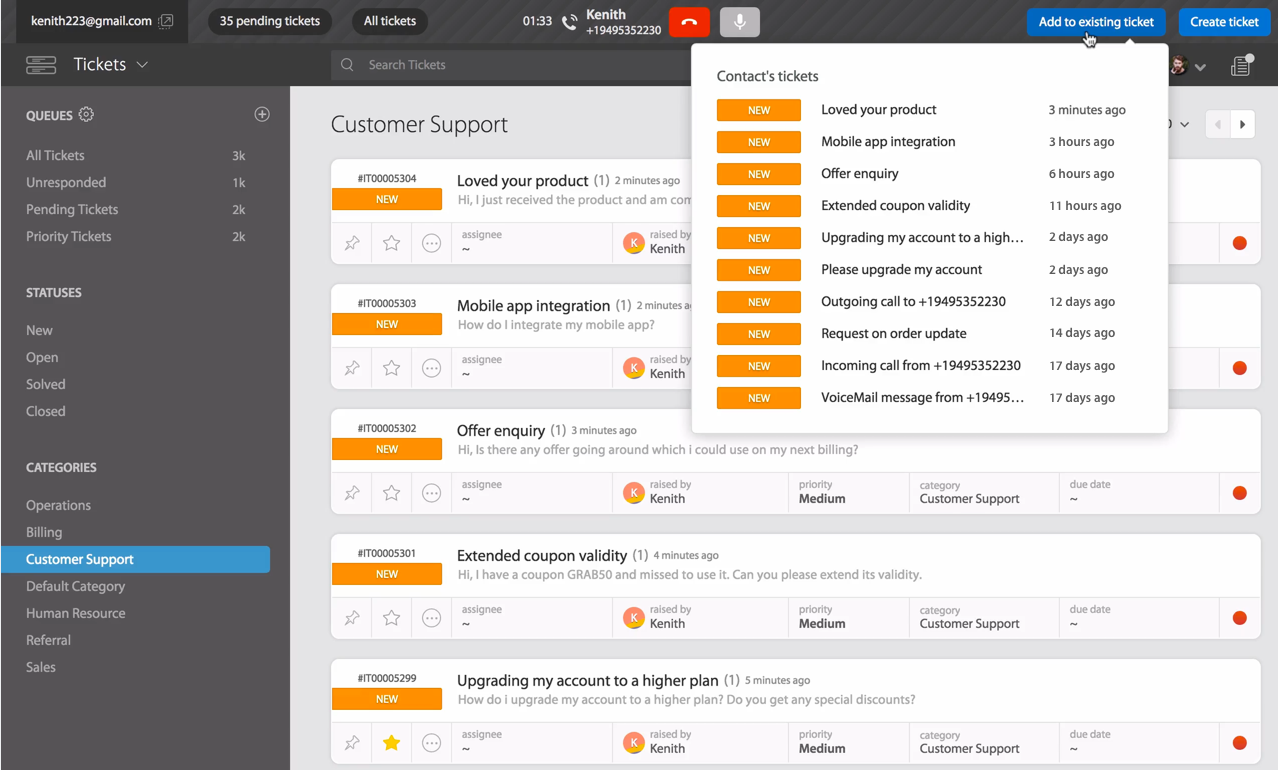
HappyFox ist eine Helpdesk-Softwarelösung, die sich an Unternehmen richtet, die ein effizientes Ticketmanagement und Kundensupport suchen. Support-Teams nutzen sie, um Anfragen zu bearbeiten, Arbeitsabläufe zu automatisieren und die Reaktionszeiten zu verbessern.
Warum HappyFox eine gute ServiceNow-Alternative ist: HappyFox ist benutzerfreundlich, sodass Ihr Team ohne viel Schulungsaufwand schnell starten kann. Die automatisierte Ticketerstellung der Software reduziert manuellen Aufwand, während die intuitive Benutzeroberfläche für Teams jeder Größe geeignet ist. Zusätzlich bietet HappyFox anpassbare Berichte, mit denen Sie die Support-Leistung verfolgen und Verbesserungsbereiche identifizieren können.
Herausragende Funktionen & Integrationen:
Funktionen umfassen anpassbare Workflows, Ticketautomatisierung und eine Self-Service-Wissensdatenbank zur Verbesserung der Supporteffizienz. Darüber hinaus gibt es detaillierte Berichte, Integrationen mit beliebten Apps und KI-gestützte Tools zur Automatisierung sich wiederholender Aufgaben.
Integrationen umfassen Salesforce, Slack, Microsoft Teams, Shopify, Mailchimp, Google Workspace, Jira, Trello, QuickBooks und Zapier.
Pros and Cons
Pros:
- Intuitive Benutzeroberfläche
- Anpassbare Berichtsfunktionen
- Unterstützt Workflow-Automatisierung
Cons:
- Begrenzte erweiterte Funktionen
- Keine umfangreichen Analysetools
Am besten für visuelles Workflow-Management
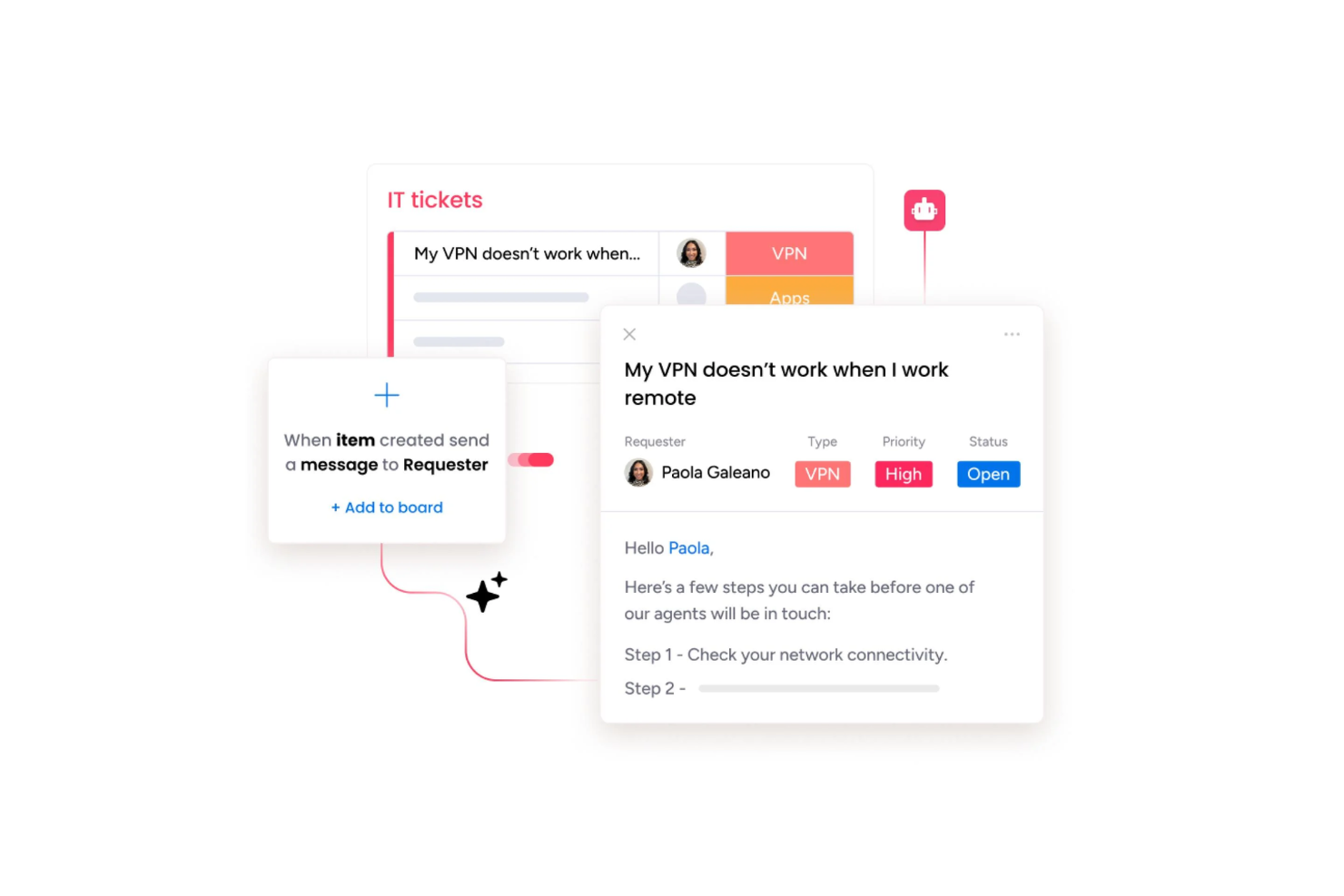
monday service ist eine moderne Service-Management-Plattform, die für Teams entwickelt wurde, die komplexe Arbeitsabläufe vereinfachen und Serviceanfragen optimieren möchten. Es ist eine vielseitige Wahl für Organisationen, die Altsysteme durch einen visuellen, flexiblen Arbeitsbereich für das Tagesgeschäft ersetzen wollen.
Für wen ist monday service am besten geeignet?
Mittelgroße und große Serviceteams, die eine visuelle Plattform benötigen, um Arbeitsabläufe abzustimmen und Anfragen abteilungsübergreifend zu verwalten.
Warum monday service eine gute ServiceNow-Alternative ist
Ich habe monday service für diese Liste ausgewählt, weil der visuelle Workflow-Builder das Entwerfen und Anpassen von Service-Prozessen wirklich einfach macht, ganz ohne Entwickler. Ich habe Eskalationsabläufe für Tickets und Genehmigungsketten direkt in der Board-Ansicht erstellt, indem ich Automatisierungsauslöser per Drag-and-Drop platziert habe, anstatt komplexe Skripte zu schreiben. Besonders schätze ich den No-Code-Workflow-Builder, mit dem mein Team mehrstufige Serviceprozesse visuell abbilden und diese in Echtzeit anpassen kann, wenn sich Anforderungen ändern. Für Teams, die von starren, schwer änderbaren ITSM-Konfigurationen genug haben, ist diese Flexibilität kaum zu übertreffen.
monday service Hauptfunktionen
- KI-gestützte Ticketklassifizierung: Kategorisiert und leitet eingehende Serviceanfragen automatisch anhand ihres Inhalts weiter.
- Serviceportal: Bietet Endnutzern eine Self-Service-Oberfläche zum Einreichen und Nachverfolgen ihrer Anfragen.
- SLA-Tracking: Überwacht Antwort- und Lösungsfristen mit visuellen Statusanzeigen auf jedem Ticket.
- Individuelle Dashboards: Teams können Ansichten erstellen, die Ticketvolumen, Team-Workload und Leistungskennzahlen an einem Ort anzeigen.
monday service Integrationen
monday service bietet native Integrationen mit Tools wie Slack, Salesforce, HubSpot, Jira, Zendesk, Microsoft Teams, Google Workspace, GitHub, Dropbox und Outlook. Es verbindet sich außerdem mit Zapier und stellt eine API für individuelle Integrationen bereit.
Pros and Cons
Pros:
- Starke native Integrationen mit Business-Apps
- Hochgradig anpassbare Dashboards für Teams
- Visueller No-Code Workflow-Builder für Serviceprozesse
Cons:
- Begrenzte erweiterte ITIL- und CMDB-Funktionen
- Berichterstellung weniger leistungsfähig als bei Enterprise-ITSM-Plattformen

Am besten für KI-gestützten Ticket-Support
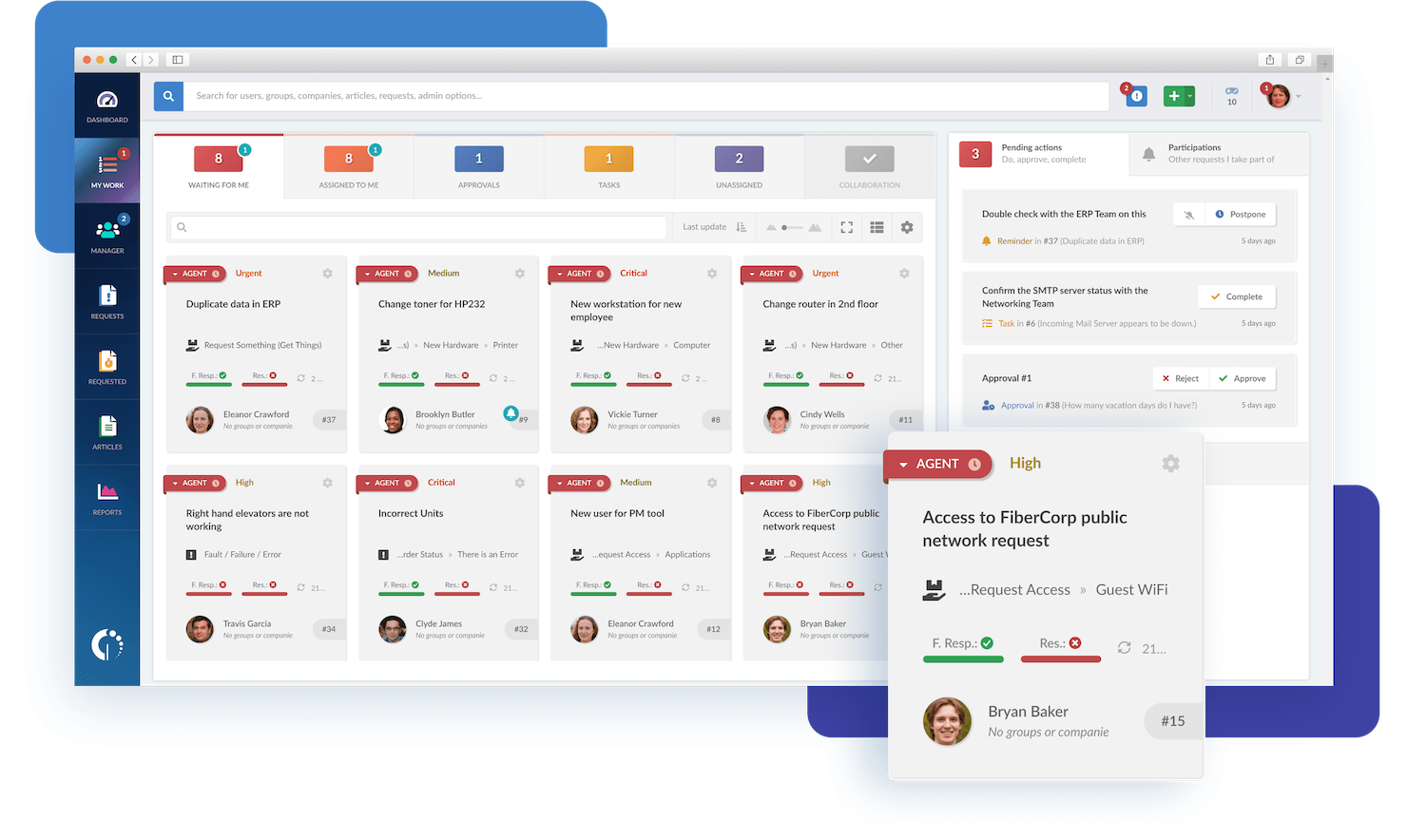
Für diejenigen, die nach Alternativen zu ServiceNow suchen, stellt InvGate Service Management eine überzeugende Wahl dar, da seine KI-gesteuerte Plattform die IT-Operationen vereinfacht. Besonders vorteilhaft ist dies für Branchen wie Bildung und Bankenwesen, in denen nahtlose Tool-Integration und Nutzererlebnis entscheidend sind. Mit Funktionen wie automatisierten Workflows und KI-gestütztem Wissensmanagement adressiert es Herausforderungen wie operative Silos und ineffiziente Ticketbearbeitung und bietet somit eine geeignete Option zur Verbesserung von Servicebereitstellungsprozessen.
Weshalb ich InvGate Service Management ausgewählt habe
Ich habe InvGate Service Management als herausragende Alternative zu ServiceNow ausgewählt, da es beim KI-gestützten Ticket-Support besonders überzeugt. Die Plattform erkennt zuverlässig den passenden Experten für jedes Ticket, was zu schnelleren Lösungen und besserer Teamarbeit führt. Zu den KI-Fähigkeiten gehört zudem die Erkennung von schwerwiegenden Vorfällen, sodass proaktive Maßnahmen und minimale Ausfallzeiten ermöglicht werden. Außerdem sorgt die automatische Erstellung von Wissensartikeln aus gelösten Vorfällen dafür, dass die Wissensdatenbank stets auf dem aktuellen Stand bleibt und Self-Service sowie Zufriedenheit der Nutzer fördert.
Wichtige Funktionen von InvGate Service Management
Zusätzlich zum KI-gestützten Ticket-Support bietet InvGate Service Management weitere wichtige Funktionen, die als ServiceNow-Alternative überzeugen:
- UI-Flexibilität: Personalisieren Sie das Branding von Anmeldebildschirmen und Nachrichten, um es an Ihre Unternehmensidentität anzupassen.
- Freigabenmanagement: Automatisieren Sie Ticket-Freigabeprozesse, um Arbeitsabläufe zu optimieren und die Effizienz zu steigern.
- Mehrsprachige Unterstützung: Verwenden Sie die Oberfläche in mehreren Sprachen, inklusive Unicode-Unterstützung für verschiedene Textanforderungen.
- Zeitverfolgung: Behalten Sie den Zeitaufwand für Lösungen im Blick, um Ressourcenmanagement und Leistungsanalysen zu verbessern.
InvGate Service Management Integrationen
Zu den Integrationen gehören Microsoft Entra ID, Google Workspace, Jira, Slack, Microsoft Teams, WhatsApp und IT Asset Inventory.
Pros and Cons
Pros:
- Umfassende ITSM-Unterstützung und formalisierter Helpdesk
- Anpassbare SLA-Regeln und ein intuitiver Workflow-Designer ermöglichen flexible Prozesse
- Motivierende Gamification-Elemente steigern die Nutzerbindung und die Leistung der Agents
Cons:
- Kein Ticket-Erstellen über soziale Medien unterstützt
- Es können keine E-Mails von einer eigenen Domain über InvGates E-Mail-Server versendet werden
New Product Updates from InvGate Service Management
InvGate Adds KB Article Creation and PDF Indexing for AI Search
InvGate Service Management adds KB article creation shortcuts and AI indexing for PDF attachments in KB articles. The updates help teams improve knowledge coverage and make more support content searchable through AI features. For more information, visit InvGate Service Management’s official site.
 .
.
TOPdesk
Ideal für schnelle Einrichtung und Anpassung
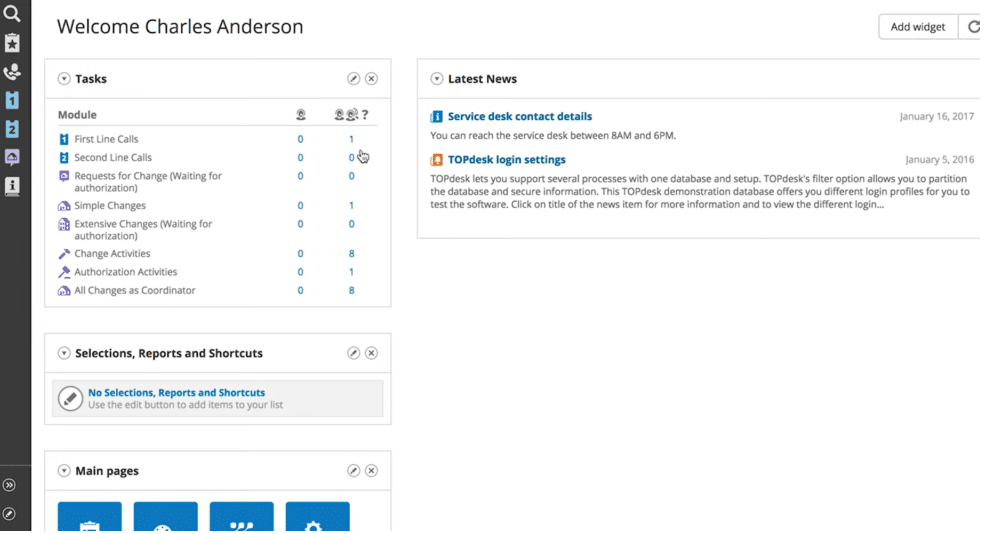
TOPdesk ist ein IT-Service-Management-Tool, das hauptsächlich von IT-Abteilungen und Servicedesk-Teams eingesetzt wird. Es unterstützt das Incident Management, Asset Management und weitere IT-Service-Prozesse.
Warum TOPdesk eine gute Alternative zu ServiceNow ist: TOPdesk lässt sich einfach einrichten und anpassen, sodass Ihr Team schnell starten kann, ohne eine lange Einarbeitung zu benötigen. Sie können Dashboards und Formulare nach Ihren Arbeitsabläufen anpassen – ganz ohne technisches Fachwissen. Diese Flexibilität verkürzt die Einarbeitungszeit und ermöglicht es Ihnen, die Plattform an die Bedürfnisse Ihres Teams anzupassen.
Herausragende Funktionen & Integrationen:
Funktionen umfassen anpassbare Dashboards, Incident Management und Asset-Tracking. Mit TOPdesk kann Ihr Team Probleme und Assets ganz einfach verfolgen, ohne komplizierte Prozesse. Außerdem ermöglichen die benutzerfreundlichen Oberflächen eine effiziente Verwaltung Ihrer IT-Services, ohne sich in zu komplexen Systemen zu verlieren.
Integrationen umfassen Microsoft Teams, Slack, Azure DevOps, Jira, Outlook, Active Directory, Google Workspace, Intune, SAP und Okta.
Pros and Cons
Pros:
- Gut für kleine Teams
- Flexible Dashboards
- Einfache Einrichtung
Cons:
- Begrenzte erweiterte Funktionen
- Könnte für große Unternehmen zu wenig Tiefgang bieten
Weitere ServiceNow-Alternativen
Hier finden Sie einige weitere ServiceNow-Alternativen, die es nicht in meine engere Auswahl geschafft haben, aber dennoch einen Blick wert sind:
- Jira Service Management
Am besten für individuell anpassbare Service-Warteschlangen
- Zendesk
Am besten für Omnichannel-Support geeignet
- BMC Helix
Am besten für Dateneinblicke
- Helpjuice
Am besten geeignet für Wissensmanagement
- EasyVista
Am besten für die Nachverfolgung von Benutzerinteraktionen in Echtzeit
- SymphonyAI
Am besten geeignet für KI-native Automatisierung im ITSM
- Atomicwork
Am besten für die Mitarbeiterkommunikation
- Hiver
Am besten geeignet für Omnichannel-Postfach
- Help Scout
Am besten für personalisierten Support
- Zoho Desk
Am besten geeignet für den Fokus auf Datenschutz
- Agentforce Service (formerly Service Cloud)
Am besten geeignet für CRM-Integration
- ManageEngine ServiceDesk Plus
Am besten für kanalübergreifendes Incident-Logging
- InvGate
Am besten für automatisiertes Ticketing


Wie ich ServiceNow-Alternativen bewerte
Ich teile meine Bewertung in grundlegende Anforderungen – Omnichannel-Ticketing, Fallautomatisierung und Self-Service – sowie die Unterscheidungsmerkmale, die speziell für CX-Teams entwickelte Tools von generischen Serviceplattformen abheben.
Kernfunktionen (Grundvoraussetzungen für diese Liste)
Wenn ich Tools für meine Liste auswähle, bewerte ich jedes einzelne auf einer Skala von 0 (bietet die Funktion nicht) bis 5 (überzeugt in diesem Bereich) für jede unten aufgeführte Kernfunktionalität. Anschließend berechne ich die Gesamtpunktzahl des Tools als Prozentwert. Jedes Tool muss eine Mindestgesamtpunktzahl von 65 % erreichen, um für die Aufnahme berücksichtigt zu werden.
- Omnichannel-Ticketing & Fallmanagement: Ich überprüfe, ob eine Plattform E-Mail-, Chat-, Telefon-, Social-Media- und Web-Anfragen in einem Arbeitsbereich vereint, statt Agenten kanalweise auf separate Warteschlangen zu verteilen.
- Workflow-Automatisierung: Jedes Tool wird danach bewertet, wie einfach ein CX-Administrator Auto-Routing, SLA-Eskalationen und Status-Trigger ohne einen Antrag an das Entwicklerteam einrichten kann.
- Self-Service-Portal & Wissensdatenbank: Ich achte auf gebrandete, kundenorientierte Portale, in denen Nutzer in einer Wissensdatenbank suchen, Anfragen stellen und den Status ihrer Fälle selbstständig verfolgen können.
- Customer 360-Ansicht: Der Agenten-Arbeitsplatz sollte die vollständige Interaktionshistorie, offene Fälle und Profildaten eines Kunden an einem Ort anzeigen, damit Agenten nicht während der Unterhaltung zwischen Tabs wechseln müssen.
- CX-Analysen & Reporting: Ich bewerte, ob die Plattform Service-KPIs wie CSAT, Erstreaktionszeit und Lösungszeit über Dashboards nachverfolgt, die CX-Leiter für Stakeholder-Reviews individuell anpassen können.
- Integrationen & APIs: Die Anbindung an CRM-Systeme, Kommunikationsplattformen und Geschäftswerkzeuge ist hier entscheidend. Ich prüfe native Connector-Bibliotheken und API-Dokumentation, um die Eignung fürs Ökosystem einzuschätzen.
Habe ich eine Liste von Tools, die diese Kriterien erfüllen, betrachte ich, was jede Plattform besonders auszeichnet.
Differenzierungsmerkmale (Was Anbieter unterscheidet)
So vergleiche und kontrastiere ich verschiedene Anbieter:
Herausragende Funktionen
KI-gestützte Agententools sind ein entscheidender Unterschied. Ich achte auf Plattformen, bei denen generative KI Antwortvorschläge entwirft oder lange Fallverläufe zusammenfasst, was Agenten gerade bei hohem Aufkommen echte Zeit spart. Auch Chatbot- und virtuelle Agenten-Funktionen sind wichtig – besonders, wenn Bots gängige Anfragen wie Bestellstatus bearbeiten und nahtlos mit vollständigem Kontext an einen Live-Agenten übergeben. Außerdem bewerte ich Voice-of-Customer-Funktionen wie integrierte CSAT- oder NPS-Umfragen, die nach einer Lösung ausgelöst werden, da die Feedback-Schleife direkt auf der Plattform einen separaten Umfrage-Tool überflüssig macht.
Mehr als nur Funktionen
Die Gesamtkosten spielen eine große Rolle. ServiceNow erfordert oft dedizierte Administratoren und Berater, daher prüfe ich, ob eine Alternative es einem CX-Operations-Manager ermöglicht, die Konfiguration ohne diesen Aufwand durchzuführen. Ebenso wichtig ist die Time-to-Value – ich bevorzuge Plattformen mit vorgefertigten Servicetemplates, die Teams in wenigen Wochen und nicht erst in Quartalen einsatzbereit machen. Sicherheit und Compliance runden meine Bewertung ab. CX-Teams haben täglich mit sensiblen Kundendaten zu tun, deshalb bestätige ich SOC-2- und DSGVO-Konformität sowie rollenbasierte Zugriffskontrollen und Audit-Logging.
Warum nach einer ServiceNow-Alternative suchen?
Obwohl ServiceNow eine vielseitige Software für verschiedene Endnutzer ist, gibt es mehrere Gründe, warum Sie nach alternativen Lösungen suchen könnten. Vielleicht suchen Sie nach einer ServiceNow-Alternative, weil:
- sie für kleinere Teams zu teuer ist
- die Benutzeroberfläche für Anfänger zu komplex ist
- es nur begrenzte Anpassungsmöglichkeiten gibt
- sie eine umfangreiche Schulung erfordert
- sie für Abteilungen außerhalb der IT nicht ideal ist
- es in bestimmten Regionen an lokaler Unterstützung mangelt
Wenn Ihnen einer dieser Punkte bekannt vorkommt, sind Sie hier genau richtig. Meine Liste enthält mehrere ServiceNow-Alternativen, die besser für Teams geeignet sind, die mit diesen Herausforderungen konfrontiert sind.
Auf welche Funktionen Sie bei ServiceNow-Alternativen achten sollten
Achten Sie bei der Auswahl von ServiceNow-Alternativen auf die folgenden wichtigen Funktionen:
- Arbeitsablaufautomatisierung: Diese Funktion hilft Ihnen, sich wiederholende Aufgaben und Prozesse zu optimieren, damit Sie sich auf das Wesentliche konzentrieren können – die Lösung echter Probleme, anstatt sich in manueller Arbeit zu verstricken. Die Arbeitsablaufautomatisierung reduziert Fehler und beschleunigt die Servicebereitstellung, indem Anfragen und Genehmigungen durch individuell angepasste Schritte geleitet werden.
- Vorfallmanagement: Mit dem Vorfallmanagement können Sie Benutzerprobleme oder Serviceunterbrechungen einfach erfassen, nachverfolgen und beheben. Es bietet Ihnen eine klare Struktur, um Probleme zu priorisieren, den richtigen Personen zuzuweisen und alle Beteiligten auf dem Laufenden zu halten, bis die Probleme gelöst sind.
- Selbstbedienungsportal: Ein Selbstbedienungsportal ermöglicht es Benutzern, Antworten zu finden, Anfragen zu stellen und den Fortschritt zu verfolgen – ohne unzählige Telefonate führen oder E-Mails schreiben zu müssen. Es bündelt Wissensartikel, häufig gestellte Fragen und Ticketübermittlungen und macht dadurch sowohl Ihnen als auch Ihren Benutzern das Leben leichter.
- Änderungsmanagement: Das Änderungsmanagement kümmert sich um die Planung, Genehmigung und Umsetzung von Änderungen an Systemen oder Prozessen. Diese Funktion minimiert Risiken und verhindert Chaos, indem sie sicherstellt, dass alle informiert bleiben und jede Änderung einem einheitlichen, prüfbaren Prozess folgt.
- Wissensdatenbank: Die Wissensdatenbank bietet eine durchsuchbare Bibliothek mit Artikeln, Handbüchern und Anleitungen zur Fehlerbehebung. Sie ermöglicht es Benutzern, schnell Lösungen für häufig auftretende Probleme abzurufen, wodurch der Supportaufwand reduziert und die Problemlösung beschleunigt wird.
- Verwaltung von Ressourcen und Konfigurationen: Mit dieser Funktion können Sie physische und digitale Ressourcen im Blick behalten – etwa Laptops, Softwarelizenzen oder Server. Sie können Eigentümer, Status und Abhängigkeiten nachverfolgen und wissen so jederzeit, wo sich Ihre Ressourcen befinden und wie sie verwendet werden.
- Berichte und Analysen: Werkzeuge für Berichte und Analysen helfen Ihnen, die Leistung zu messen, Trends zu erkennen und datengestützte Entscheidungen zu treffen. Diese Funktionen verwandeln große Mengen an Rohdaten in klare, umsetzbare Erkenntnisse, die Sie zur Optimierung von Services und zur Begründung von Verbesserungen nutzen können.
- Integrationsmöglichkeiten: Integrationsmöglichkeiten erlauben es Ihnen, eine Verbindung zu anderen Softwarewerkzeugen und Plattformen herzustellen, die Sie bereits verwenden. Ob HR-Systeme, Kommunikationswerkzeuge oder Überwachungslösungen – Sie können Informationen zusammenführen, damit Ihre Arbeitsabläufe in unterschiedlichen Umgebungen reibungslos ablaufen.
Häufig gestellte Fragen
Basiert ServiceNow auf AWS?
Nein, ServiceNow basiert nicht auf AWS, kann aber in bestimmten Fällen auf AWS-Infrastruktur ausgeführt werden. ServiceNow wird hauptsächlich in einer eigenen proprietären Cloud betrieben, aber einige Kunden haben die Möglichkeit, ServiceNow auf Amazon Web Services bereitzustellen. Dieser hybride Ansatz bietet Flexibilität, wenn bestimmte regulatorische Anforderungen oder Anforderungen an den Datenstandort erfüllt werden müssen. Die standardmäßige ServiceNow-Plattform wird jedoch von ServiceNow selbst gehostet und verwaltet, nicht von AWS.
Was sind die Vor- und Nachteile eines Wechsels von ServiceNow zu einer anderen Plattform?
Der Wechsel von ServiceNow zu einer anderen Plattform bringt sowohl Vorteile als auch Nachteile mit sich. Auf der positiven Seite finden Sie möglicherweise eine Lösung, die besser auf die Anforderungen Ihres Teams zugeschnitten ist, mehr Anpassungsmöglichkeiten bietet oder weniger kostet. Sie könnten auch zu einer Plattform mit einer benutzerfreundlicheren Oberfläche, verbesserter Automatisierung oder besserer Integration in Ihre bestehenden Tools wechseln.
Zu den Nachteilen gehören jedoch der für die Migration erforderliche Zeit- und Ressourcenaufwand, ein möglicher Datenverlust sowie die Notwendigkeit, Ihr Team neu zu schulen. Möglicherweise verlieren Sie einige Funktionen, auf die Sie derzeit angewiesen sind, oder müssen während des Übergangs mit Beeinträchtigungen rechnen. Prüfen Sie die spezifischen Anforderungen Ihres Unternehmens, um festzustellen, ob die Vorteile eines Wechsels die damit verbundenen Herausforderungen überwiegen.
Wie wähle ich die richtige ServiceNow-Alternative für mein Team aus?
Um die richtige ServiceNow-Alternative für Ihr Team auszuwählen, legen Sie zunächst Ihre wichtigsten Anforderungen fest – etwa Funktionen für das IT-Service-Management, Automatisierung, Integrationen, Benutzerfreundlichkeit und Budget. Erstellen Sie eine Liste der unverzichtbaren Anforderungen und Ihrer Präferenzen. Vergleichen Sie mehrere Optionen, indem Sie Nutzerbewertungen lesen, Demos prüfen und Fallstudien zu Teams untersuchen, die Ihrem ähnlich sind. Konzentrieren Sie sich auf Tools, die zu Ihrem Arbeitsablauf passen, einen guten Kundensupport bieten und eine klare Investitionsrendite ermöglichen. Testen Sie Ihre zwei oder drei Favoriten mit kostenlosen Testversionen, um herauszufinden, welche Lösung am besten zu Ihrem Team passt, bevor Sie sich festlegen.
Gibt es Open-Source-Lösungen, die ServiceNow ähneln?
Ja, es gibt Open-Source-Lösungen, die ServiceNow ähneln. Optionen wie OTRS, GLPI und iTop bieten Funktionen für das IT-Service-Management (ITSM), etwa Ticketverwaltung, Anlagenverwaltung und Workflow-Automatisierung. Diese Tools bieten möglicherweise nicht den vollständigen Funktionsumfang von ServiceNow für Unternehmen, sind aber kostengünstig für Teams, die Flexibilität und Anpassungsmöglichkeiten ohne hohe Lizenzgebühren suchen. Sie können diese Plattformen an Ihre IT-Prozesse anpassen, sollten jedoch beachten, dass sie im Vergleich zu kommerziellen Tools wie ServiceNow möglicherweise mehr manuelle Einrichtung und Support erfordern.
Können ServiceNow-Alternativen in meine bestehenden Tools integriert werden?
Ja, die meisten ServiceNow-Alternativen können in Ihre bestehenden Tools integriert werden. Viele Plattformen bieten robuste APIs, vorgefertigte Konnektoren und Integrationen mit beliebter Software für Personalwesen, IT, Kundensupport und Projektmanagement. Prüfen Sie vor der Auswahl einer Alternative, ob sie eine nahtlose Integration in die spezifischen Tools unterstützt, die Ihr Team verwendet – etwa Slack, Jira, Microsoft Teams oder Salesforce. Für komplexere Konfigurationen benötigen Sie möglicherweise technische Unterstützung, aber viele Anbieter stellen Anleitungen und Kundensupport bereit, um die Integration so reibungslos wie möglich zu gestalten.
Wie unterscheiden sich ServiceNow-Alternativen hinsichtlich Kosten und Funktionen?
ServiceNow-Alternativen kosten im Voraus oft weniger und bieten flexible Preismodelle, etwa nutzerbasierte oder gestaffelte Tarife. Während die meisten Alternativen grundlegende Funktionen für das IT-Service-Management wie Ticketverwaltung, Workflow-Automatisierung und Berichte umfassen, konzentrieren sich einige Tools auf bestimmte Branchen oder Anwendungsfälle und bieten möglicherweise mehr Anpassungsmöglichkeiten. Integrationen und Benutzeroberflächen können sich stark unterscheiden. Prüfen Sie die spezifischen Funktionen, die Sie benötigen – etwa Anlagenverwaltung, Self-Service-Portale oder erweiterte Analysen – und testen Sie Demos, um herauszufinden, welche Plattform am besten zu Ihrem Team und Budget passt.
Wer ist der größte Wettbewerber von ServiceNow?
Als größter Wettbewerber von ServiceNow gilt häufig BMC Helix (ehemals BMC Remedy). BMC Helix bietet ähnliche Lösungen für das IT-Service-Management (ITSM) in Unternehmen und wird in Branchenvergleichen häufig gemeinsam mit ServiceNow genannt. Weitere starke Wettbewerber sind Cherwell, Ivanti und Freshservice, aber BMC Helix wird allgemein als die ähnlichste Alternative für große Unternehmen angesehen, die robuste ITSM-Plattformen suchen.