

10 meilleurs logiciels de réponse vocale interactive comparés pour 2026

Sélection des meilleurs logiciels IVR


Le meilleur logiciel IVR aide les équipes d’assistance et des opérations à relever des défis tels que les longs temps d’attente, les appels mal orientés et les agents surchargés. Ces outils simplifient le libre-service, orientent les appelants avec davantage de précision et réduisent les transferts inutiles afin que les clients obtiennent des réponses plus rapidement et que les agents puissent se concentrer sur des tâches à plus forte valeur ajoutée.
Fort de plus de 20 ans d’expérience dans le domaine des technologies, j’ai évalué ces plateformes IVR selon leur flexibilité de routage, leur facilité de configuration, leurs intégrations, leurs analyses et leur convivialité générale. Dans ce guide, je présente les meilleurs logiciels IVR, les raisons pour lesquelles chaque solution se distingue et la manière de choisir celle qui convient le mieux à vos flux d’appels, à la structure de votre équipe et à vos objectifs opérationnels.
Pourquoi faire confiance à nos recommandations de logiciels
Notre équipe teste et évalue des logiciels depuis 2012. En tant que leaders CX nous-mêmes, nous savons à quel point il est difficile — et important — de choisir le bon logiciel.
Pour ce guide, nous avons évalué les outils grâce à des tests pratiques et une recherche indépendante, en notant les outils selon nos critères de sélection.
Nos avis reflètent notre jugement éditorial humain, et non un argumentaire de vente.
Résumé des meilleurs logiciels IVR
Ce tableau comparatif récapitule les informations tarifaires de ma sélection des meilleurs logiciels IVR et vous aide à trouver la solution la mieux adaptée à votre budget et aux besoins de votre entreprise.
| Tool | Best For | Trial Info | Price | ||
|---|---|---|---|---|---|
| 1 | Idéal pour le routage vocal par IA connecté au CRM | Démo gratuite disponible | À partir de $15/utilisateur/mois (facturé annuellement) | Website | |
| 2 | Idéal pour les équipes à distance | Essai gratuit de 7 jours + démo gratuite disponible | À partir de $30/licence/mois (facturé annuellement) | Website | |
| 3 | Idéal pour les parcours d'appels personnalisés | Essai gratuit de 14 jours disponible | À partir de $25/utilisateur/mois (facturé annuellement) | Website | |
| 4 | Idéal pour le respect des lois sur les données | Démo gratuite disponible | Tarification sur demande | Website | |
| 5 | Idéal pour l'engagement client | Démo gratuite disponible | Tarification sur demande | Website | |
| 6 | Idéal pour les capacités d'enquête | Démo gratuite disponible | Tarification sur demande | Website | |
| 7 | Idéal pour l'intégration omnicanale | Démo gratuite disponible | À partir de $119/par poste/mois | Website | |
| 8 | Idéal pour les petites entreprises | Essai gratuit de 7 jours + démo gratuite disponible | À partir de $20/utilisateur/mois (facturé annuellement) | Website | |
| 9 | Idéal pour les équipes de support client | Essai gratuit de 14 jours | À partir de $19/utilisateur/mois (facturé annuellement) | Website | |
| 10 | Idéal pour la montée en charge | Démo gratuite disponible | À partir de $75/utilisateur/mois | Website |

Avis sur les meilleurs logiciels IVR
Vous trouverez ci-dessous mes analyses détaillées des meilleurs logiciels de réponse vocale interactive (IVR) de ma sélection. Mes avis présentent en détail les principales fonctionnalités, les avantages et les inconvénients, les intégrations et les cas d’utilisation idéaux de chaque outil afin de vous aider à trouver celui qui répond le mieux à vos besoins.

Nextiva
Idéal pour le routage vocal par IA connecté au CRM
Nextiva est un agent vocal conversationnel doté d’une IA qui gère le routage des appels entrants, le libre-service multicanal par téléphone, SMS et chat, ainsi que les transferts vers des agents en direct connectés au CRM.
À qui Nextiva convient-il le mieux ?
Nextiva convient particulièrement aux équipes CX des secteurs réglementés comme la santé ou les services financiers, qui ont besoin d’un routage vocal par IA connecté au CRM et disposant déjà de certifications de conformité.
Pourquoi j’ai choisi Nextiva
J’ai choisi Nextiva comme l’une des meilleures solutions parce que son routage connecté au CRM est véritablement intégré à l’expérience d’appel, et non ajouté après coup. XBert extrait les données CRM en temps réel de Salesforce, HubSpot ou Zoho afin de déterminer l’intention de l’appelant au cours de la conversation et de transmettre l’intégralité du contexte à un agent en direct lors du transfert. J’apprécie également son IA conversationnelle multitour, qui gère les appels vocaux, les SMS et le chat avec une mémoire commune : ainsi, un appelant qui a commencé par téléphone n’a pas à se répéter lors du passage au chat.
Fonctionnalités principales de Nextiva
- Certifications de conformité : XBert est audité selon la norme SOC 2 Type II, certifié ISO 27001, conforme à la norme PCI DSS et éligible à la norme HIPAA avec un accord de partenaire commercial.
- Modes d’agent multicanal : XBert fonctionne selon trois modes — Autonome, Pilote automatique et Assistance à l’agent — afin de vous permettre de contrôler la part de tâches que l’IA prend en charge de manière indépendante.
- Transcriptions et résumés des conversations : Chaque interaction génère une transcription complète, un enregistrement et un résumé rédigé par l’IA avec les actions à effectuer pour examen par l’agent.
- Configuration d’agent sans code : Des rôles prédéfinis comme Réceptionniste ou Assistance vous permettent de configurer et de lancer un agent vocal IA en quelques minutes, sans écrire de code.
Intégrations de Nextiva
Nextiva propose des intégrations natives avec Salesforce, HubSpot, Zoho, Google Calendar et bien d’autres. La solution prend également en charge l’accès à une API REST pour les intégrations personnalisées et se connecte aux produits CRM de Microsoft, à Zendesk, ServiceNow, Marketo et Zapier.
Pros and Cons
Pros:
- Le routage conversationnel réduit la charge de travail des agents
- Les transferts contextuels préservent l’historique de l’appelant
- Les certifications de conformité répondent aux besoins des équipes de services réglementés
Cons:
- Les commandes DTMF traditionnelles nécessitent des produits distincts
- Les analyses propres à l’IVR restent insuffisamment documentées
Aircall
Idéal pour les équipes à distance
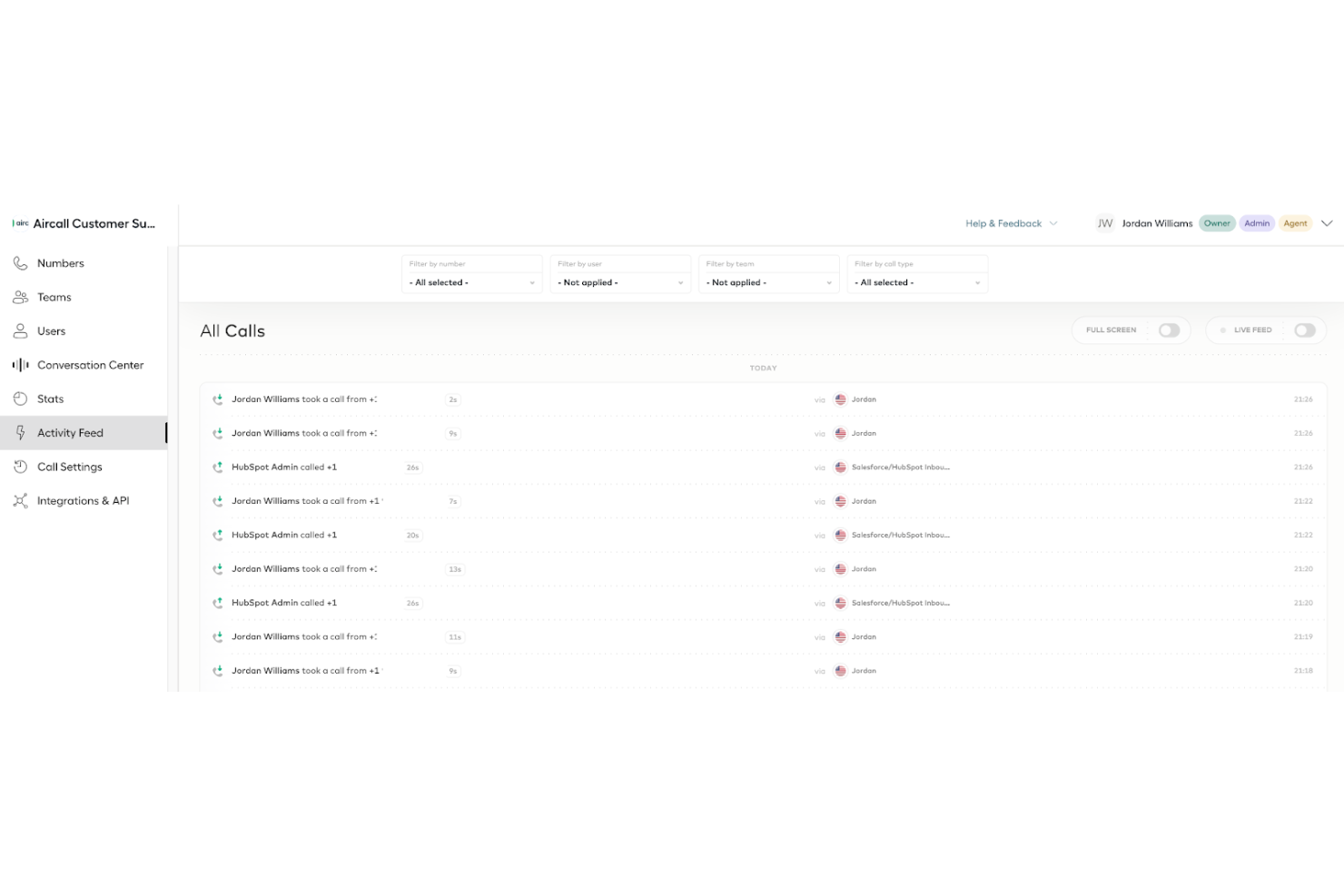
Aircall est un système téléphonique cloud pour les entreprises qui gèrent des appels depuis n'importe où. Il est idéal pour les équipes à distance qui souhaitent maintenir la communication et la collaboration.
Pourquoi j'ai choisi Aircall : Aircall soutient efficacement les environnements de travail à distance grâce à des fonctionnalités telles que les centres d'appel virtuels et le routage flexible. Le logiciel facilite l'installation et la gestion des systèmes téléphoniques sur plusieurs sites, tandis que la surveillance des appels et les analyses aident votre équipe à rester informée sur la performance globale. De plus, son interface conviviale permet une adoption rapide par les équipes éloignées, ce qui en fait un choix pratique pour les entreprises en déplacement.
Fonctionnalités clés & intégrations :
Fonctionnalités telles que la mise en file d'attente des appels, le routage des appels et la messagerie vocale, ainsi que l'analyse en temps réel pour le suivi des performances. La plateforme propose également une application conviviale, permettant aux équipes de gérer facilement les appels depuis n'importe où.
Intégrations incluent Salesforce, HubSpot, Slack, Zendesk, Intercom, Microsoft Teams, Pipedrive, Shopify, Zoho CRM et Freshdesk.
Pros and Cons
Pros:
- Mise en place à distance facile
- Analyses d'appels en temps réel
- Interface conviviale
Cons:
- Fonctionnalités avancées limitées
- Aucune fonctionnalité hors ligne

Idéal pour les parcours d'appels personnalisés

CloudTalk est un logiciel de centre d'appels basé sur le cloud conçu pour améliorer la communication des équipes commerciales et du support client. Il propose des fonctionnalités telles que le routage des appels, l'enregistrement et l'analytique afin d'optimiser les interactions clients.
Pourquoi j'ai choisi CloudTalk : Le système de réponse vocale interactive (IVR) de CloudTalk vous permet de créer des parcours d'appels personnalisés, garantissant que les clients atteignent rapidement le bon service. Cela réduit les temps d'attente et améliore l'expérience de l'appelant. L'éditeur visuel IVR est convivial, ce qui facilite la mise en place et la modification des flux d'appels selon les besoins. De plus, la fonctionnalité de mise en attente des appels de CloudTalk gère efficacement de grands volumes d'appels. Elle organise les appels entrants selon des critères prédéfinis afin que chaque appelant soit dirigé correctement.
Fonctionnalités et intégrations remarquables :
Fonctionnalités : routage selon les compétences, messagerie vocale, étiquetage d'appel, prise de notes sur les appels, supervision des appels, chuchotement, intervention sur appel, conversion de la parole en texte, messagerie SMS, transfert d'appels, conférences téléphoniques et scripts d'appel.
Intégrations : Salesforce, HubSpot, Zendesk, Intercom, Gong, Pipedrive, Zapier, Gorgias, MS Dynamics, Zoho CRM, Freshdesk et Help Scout.
Pros and Cons
Pros:
- Flexible pour l'évolution des opérations
- Routage d'appels avancé
- Propose des numéros de téléphone internationaux
Cons:
- Des problèmes occasionnels de connexion aux appels
- L'intelligence conversationnelle IA est un module additionnel
New Product Updates from CloudTalk
CloudTalk Adds Campaign Statistics to MCP
CloudTalk adds campaign statistics to MCP with funnel, call, conversion, disposition, and duration metrics. This helps reporting assistants review campaign performance using read-only aggregate data. For more information, visit CloudTalk’s official site.
 .
.
IPscape
Idéal pour le respect des lois sur les données
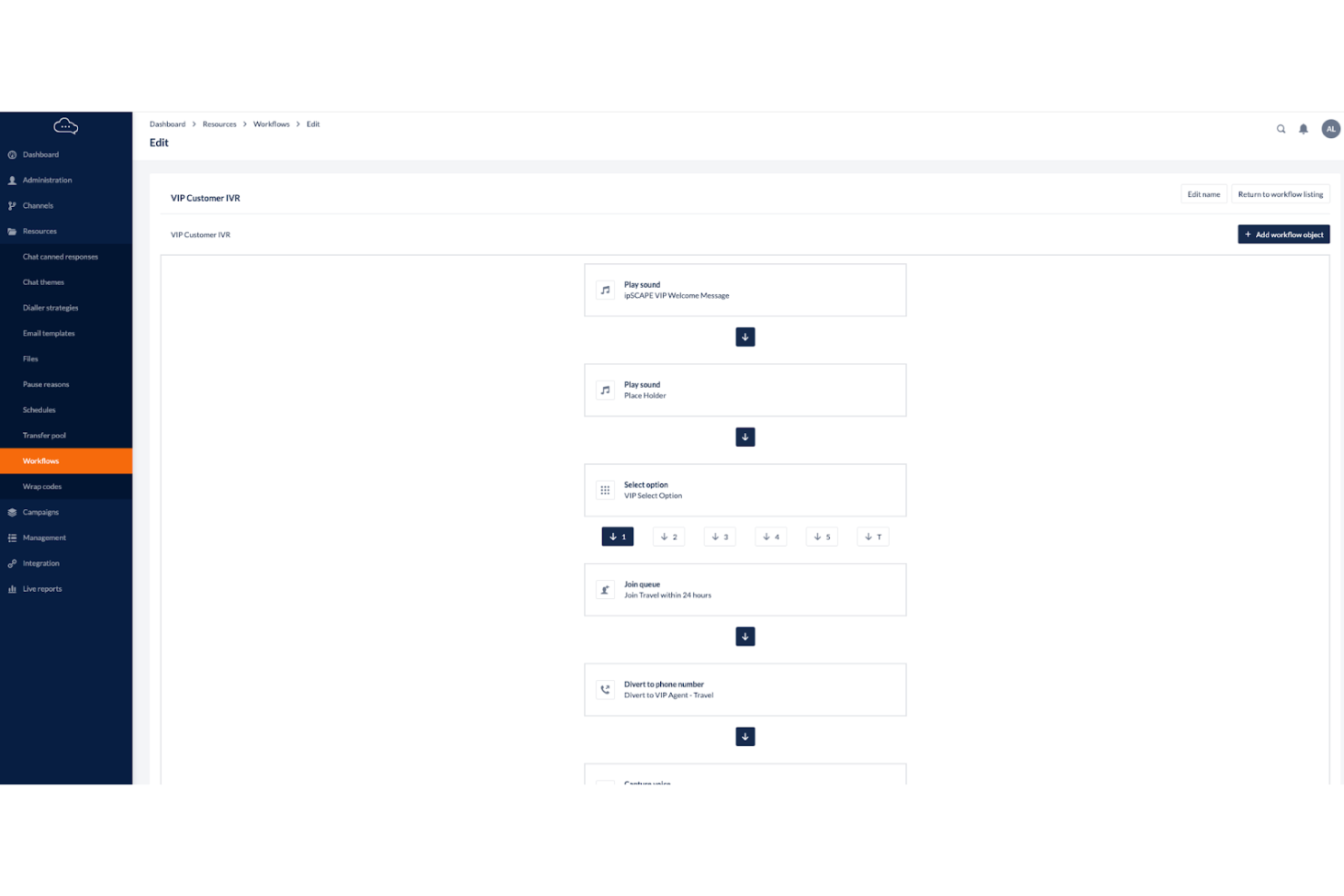
IPscape est une solution de centre de contact cloud conçue pour les entreprises qui gèrent les interactions clients tout en assurant la conformité avec les réglementations sur les données. Elle est adaptée aux organisations opérant dans des secteurs réglementés.
Pourquoi j'ai choisi IPscape : IPscape met l'accent sur le respect des lois relatives aux données, ce qui en fait une solution idéale pour les secteurs aux exigences strictes en matière de gestion des données. Elle propose des fonctionnalités telles que l'enregistrement sécurisé des appels, un traitement des paiements conforme à la norme PCI DSS et des solutions de stockage de données robustes. De plus, leur plateforme VaultSCAPE garantit un stockage chiffré et à long terme des enregistrements d'appels, aidant les organisations à satisfaire les réglementations spécifiques à leur secteur et à maintenir la confiance des clients.
Fonctionnalités et intégrations remarquables :
Fonctionnalités incluent des flux d'appels personnalisables, une surveillance en temps réel et des analyses détaillées.
Intégrations incluent Salesforce, Microsoft Dynamics, Zendesk, ServiceNow, Oracle NetSuite, HubSpot, Slack, Google Workspace, Amazon Web Services et Twilio.
Pros and Cons
Pros:
- Stockage sécurisé des données
- Surveillance en temps réel
- Flux d'appels personnalisés
Cons:
- Nécessite une expertise technique
- Courbe d'apprentissage pour les nouveaux utilisateurs

Ameyo
Idéal pour l'engagement client
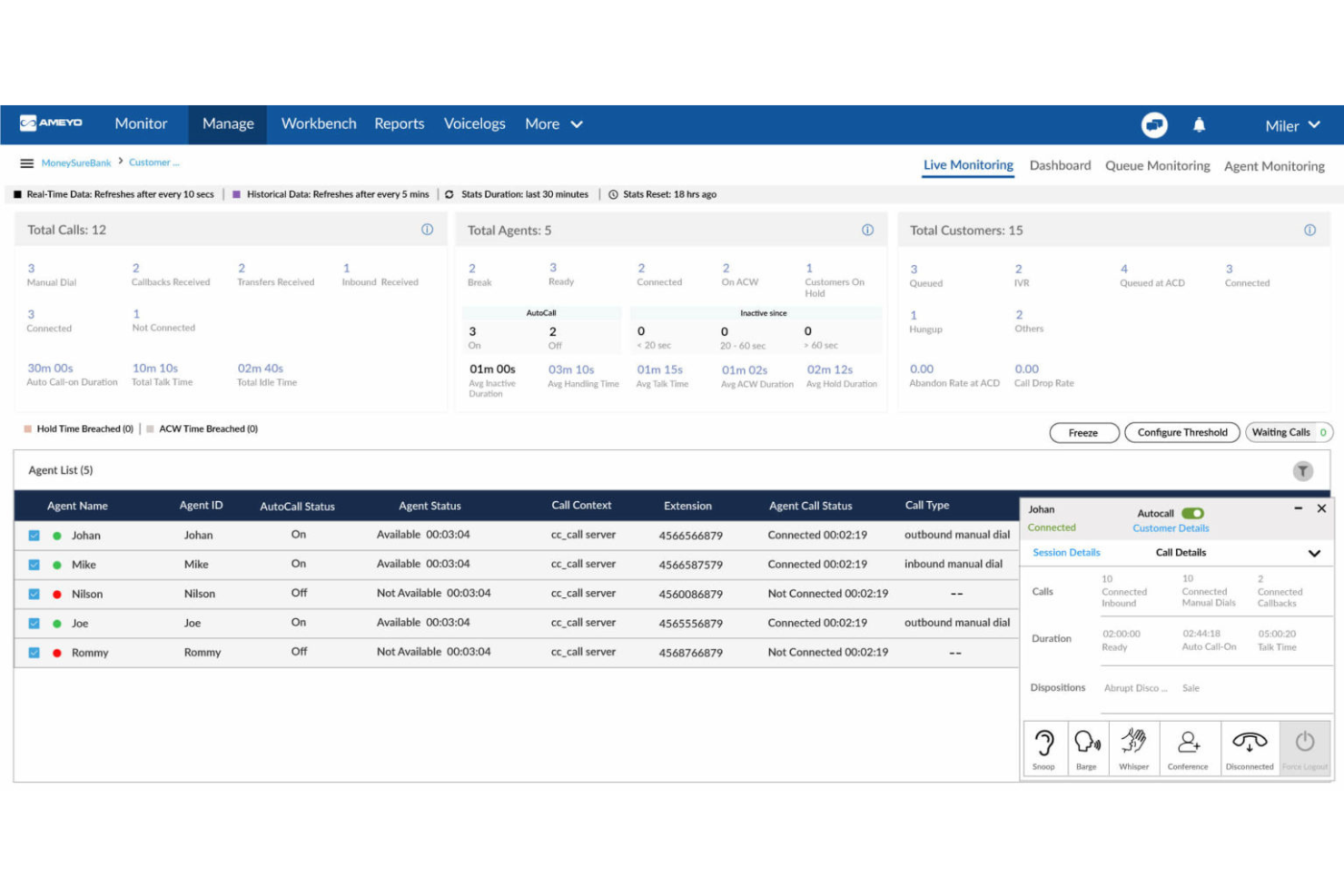
Ameyo est une solution logicielle de centre de contact conçue pour les entreprises souhaitant renforcer l'engagement client. Elle s'adresse à divers secteurs d'activité en offrant des outils qui améliorent l'interaction et la satisfaction client.
Pourquoi j'ai choisi Ameyo : Ameyo excelle dans l'engagement client grâce à des fonctionnalités comme la communication omnicanale et la personnalisation des parcours clients. La plateforme permet à votre équipe d'interagir avec les clients via plusieurs canaux, garantissant un service cohérent. De même, les analyses en temps réel du logiciel vous aident à mieux comprendre les besoins des clients et à adapter vos services en conséquence.
Fonctionnalités et intégrations remarquables :
Fonctionnalités comprennent la numérotation prédictive, le routage intelligent et les intégrations CRM pour améliorer la productivité des agents. De plus, Ameyo propose des capacités d'analyse et de reporting pour suivre et optimiser les efforts d'engagement client.
Intégrations incluent Salesforce, Microsoft Dynamics, Zendesk, Freshdesk, Zoho CRM, HubSpot, Oracle NetSuite, SAP, Slack et Google Workspace.
Pros and Cons
Pros:
- Outils d'engagement client performants
- Communication omnicanale
- Parcours clients personnalisés
Cons:
- La configuration peut être complexe
- Nécessite une gestion continue

Voxco
Idéal pour les capacités d'enquête
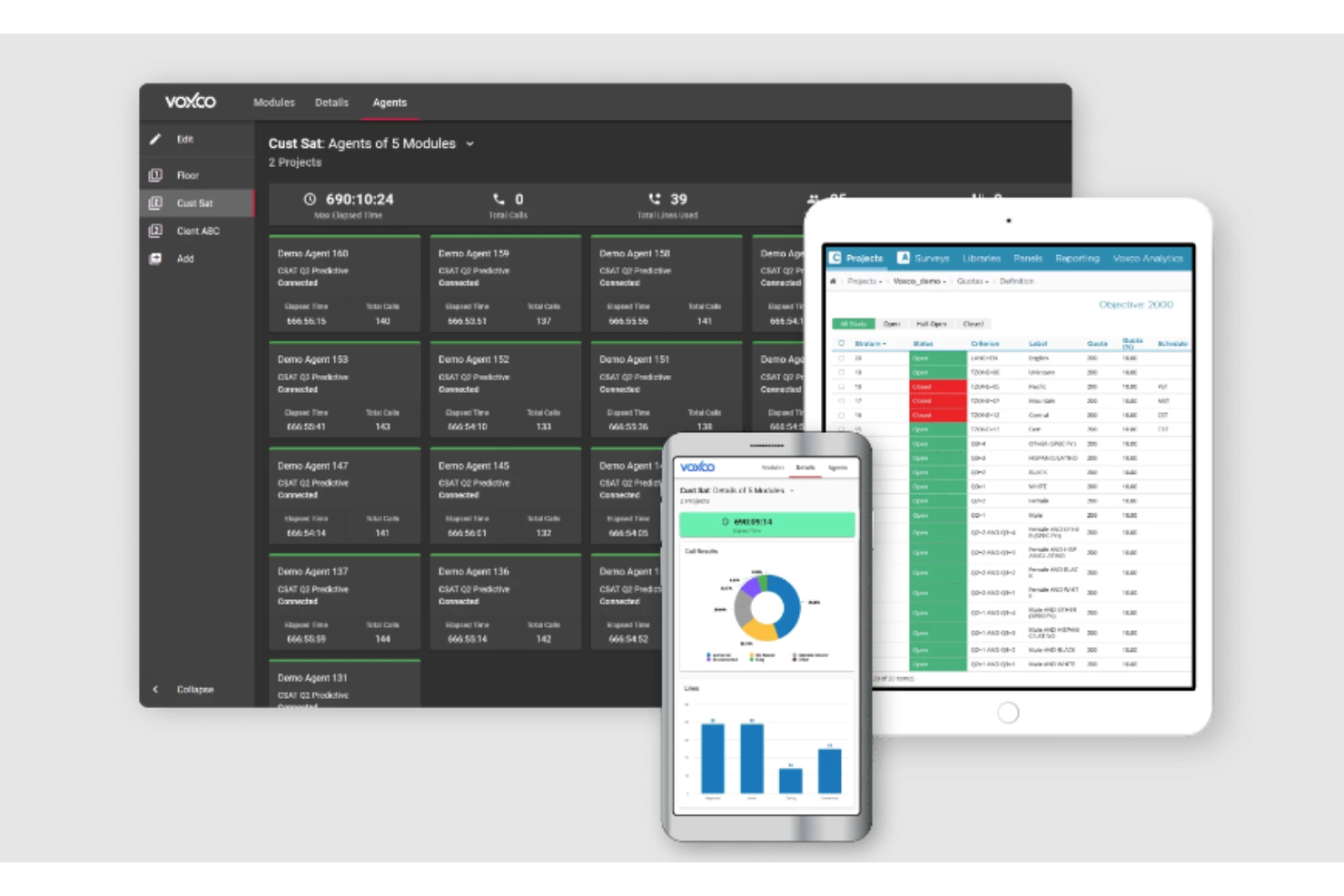
Voxco est une solution SVI polyvalente conçue pour les entreprises qui réalisent des enquêtes et recueillent efficacement les retours clients. Elle s'adresse principalement aux organisations œuvrant dans la recherche de marché et le service à la clientèle.
Pourquoi j'ai choisi Voxco : Voxco est une plateforme omnicanale qui prend en charge les enquêtes en ligne, par téléphone et en face à face, assurant une collecte de données complète sur divers modes. Son interface conviviale propose plus de 40 types de questions, des fonctionnalités de logique avancée et un support multilingue, permettant de créer des enquêtes engageantes et personnalisées.
Fonctionnalités et intégrations remarquables :
Fonctionnalités incluent l’analyse avancée, la conception personnalisable des enquêtes, ainsi qu'une intégration fluide avec divers outils tiers permettant des analyses approfondies. De plus, Voxco offre des fonctionnalités de sécurité et de conformité des données, le rendant adapté aux secteurs ayant des exigences strictes en matière de confidentialité des données.
Intégrations incluent Salesforce, Microsoft Dynamics, Oracle NetSuite, HubSpot, Google Analytics, Tableau, SAP, Marketo, Adobe Experience Cloud et IBM SPSS.
Pros and Cons
Pros:
- Personnalisation souple des enquêtes
- Collecte de données en temps réel
- Outils de reporting détaillés
Cons:
- Nécessite une formation pour la mise en place
- Dépendance à la stabilité de la connexion internet

Five9
Idéal pour l'intégration omnicanale
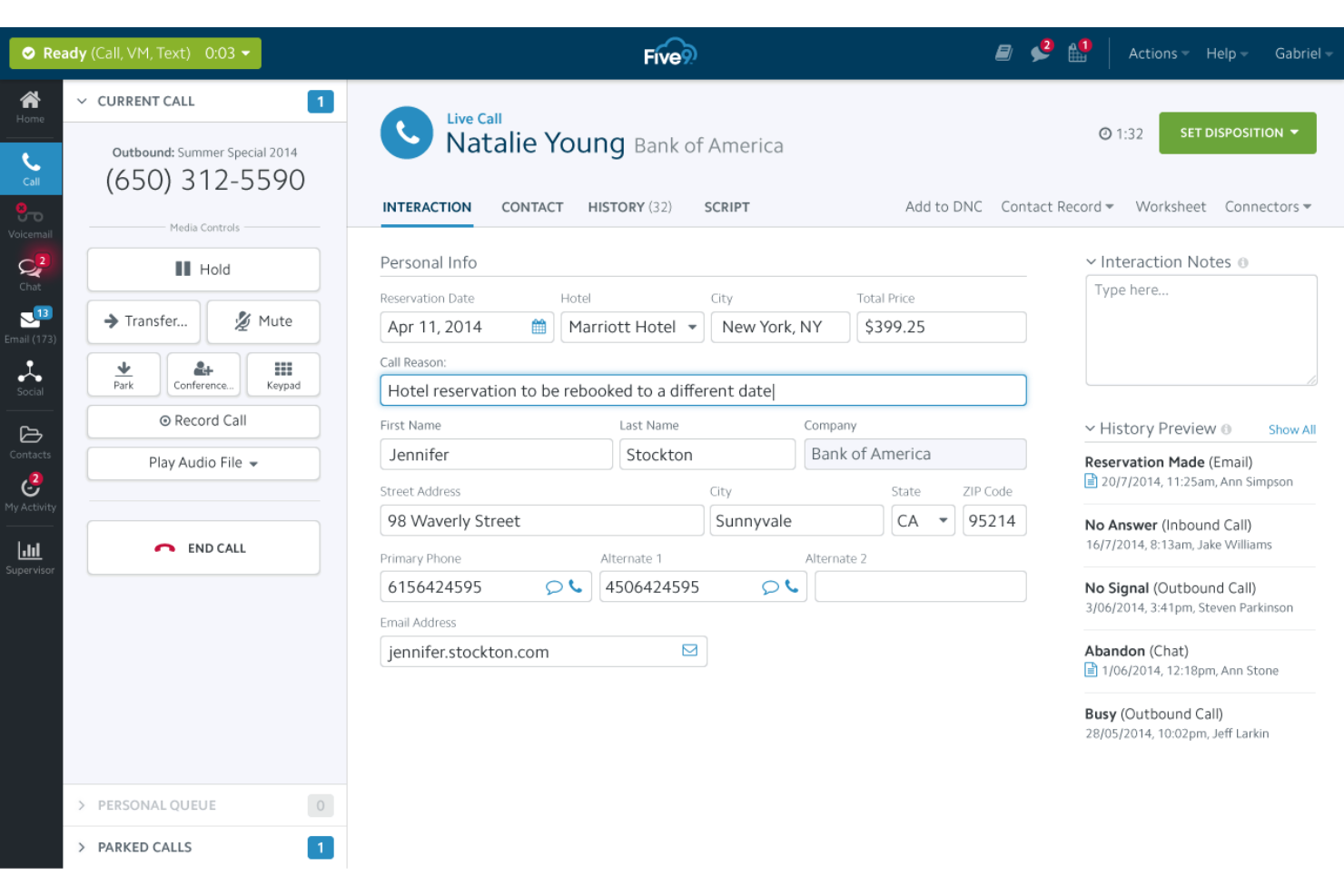
Five9 est une solution de centre de contact basée sur le cloud pour gérer les interactions clients sur plusieurs canaux. Elle est idéale pour les entreprises de taille moyenne à grande cherchant à renforcer l'engagement client.
Pourquoi j'ai choisi Five9 : Five9 excelle dans l'intégration omnicanale, permettant à votre équipe de gérer les appels, e-mails, chats et interactions sur les réseaux sociaux depuis une seule plateforme. Le logiciel propose des fonctionnalités clés, dont un SVI visuel et un routage intelligent pour aider à gérer efficacement les demandes des clients. De plus, ses outils d'analyse fournissent des informations sur les interactions clients, ce qui peut améliorer la qualité du service.
Fonctionnalités et intégrations remarquables :
Les fonctionnalités incluent le transfert d'appel, la messagerie vocale vers email, et un éditeur visuel de flux d'appels pour une gestion simple des appels. Il fournit également des numéros verts et locaux, des outils de collaboration en équipe et des intégrations avec les systèmes CRM.
Les intégrations incluent Salesforce, Microsoft Dynamics 365, Zendesk, ServiceNow, Oracle NetSuite, SugarCRM, HubSpot, RingCentral et Zoom.
Pros and Cons
Pros:
- Communication omnicanale
- Outils d’analyse avancés
- Options de routage flexibles
Cons:
- Configuration initiale complexe
- Quelques problèmes techniques occasionnels

Idéal pour les petites entreprises
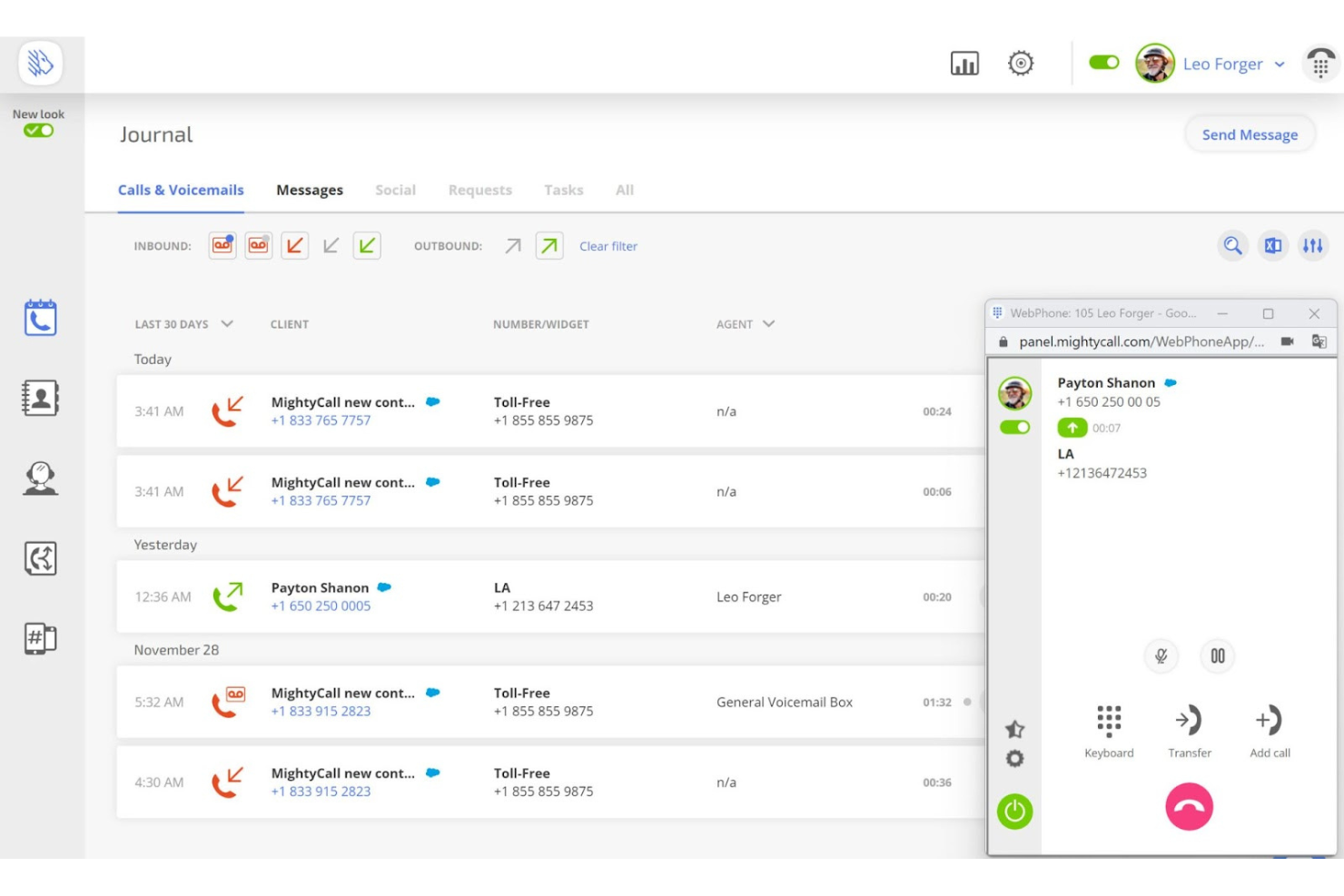
MightyCall est un logiciel de centre d'appels en cloud conçu pour les petites et moyennes entreprises. Il aide à gérer les appels entrants et sortants grâce à des fonctionnalités telles que la distribution automatique des appels et l'analytique en direct.
Pourquoi j'ai choisi MightyCall : MightyCall s'adresse spécifiquement aux PME, offrant des configurations faciles et un support client exceptionnel. Il propose des fonctionnalités comme le renvoi d'appels, la transcription des messages vocaux et l'enregistrement des appels, le tout sans nécessiter de matériel supplémentaire. De plus, l'interface conviviale du logiciel et ses tarifs compétitifs en font un choix idéal pour les petites entreprises souhaitant améliorer leurs capacités de communication.
Fonctionnalités et intégrations remarquables :
Les fonctionnalités incluent l'analytique en temps réel, la gestion des files d’attente d’appels et les systèmes IVR à plusieurs niveaux. La surveillance des appels en direct par le logiciel permet à votre équipe de contrôler les appels en temps réel, garantissant ainsi le contrôle qualité. De même, d'autres fonctionnalités, telles que les composeurs automatiques avancés, vous aident à gérer efficacement un grand volume d'appels.
Intégrations : Salesforce, Zoho CRM, HubSpot, Microsoft Teams, Slack, Google Workspace, Outlook, Zendesk, Freshdesk et Wix.
Pros and Cons
Pros:
- Système IVR à plusieurs niveaux
- Chiffrement sécurisé des données
- Mise en place rapide
Cons:
- Dépendance à la stabilité d'Internet
- Peu de solutions spécifiques à l'industrie

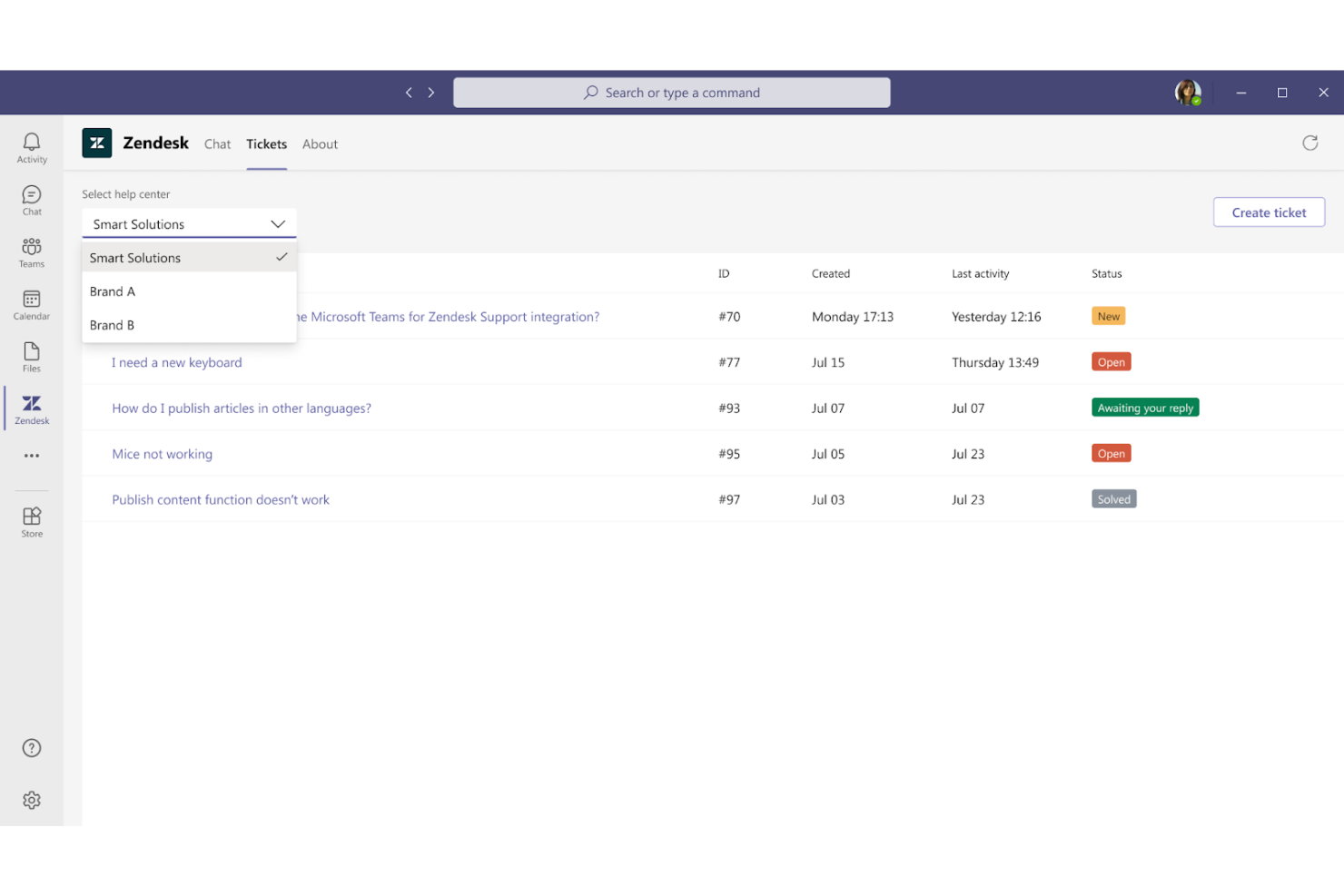
Zendesk est une plateforme de support client conçue pour les entreprises qui souhaitent améliorer leurs opérations de service client. Les équipes d’assistance l’utilisent généralement pour gérer les demandes des clients via plusieurs canaux.
Pourquoi j’ai choisi Zendesk : Zendesk est conçu pour les équipes de support client et propose des fonctionnalités clés comme la gestion des tickets et des appels. La plateforme simplifie les interactions avec les clients en les regroupant dans une vue unique pour votre équipe. Votre équipe peut également suivre et gérer efficacement les problèmes des clients grâce à ses tableaux de bord intuitifs. Ces fonctionnalités, associées aux outils de reporting flexibles de Zendesk, permettent à votre équipe de suivre les performances et d’améliorer la prestation de services au sein d’un seul logiciel.
Fonctionnalités et intégrations remarquables :
Les fonctionnalités comprennent une base de connaissances en libre-service, un support par chat en direct et de puissants outils d’analyse pour surveiller les indicateurs de performance. De plus, Zendesk offre des fonctionnalités d’automatisation pour simplifier les flux de travail.
Les intégrations comprennent Salesforce, Slack, Shopify, Mailchimp, HubSpot, Google Analytics, Trello, QuickBooks, WordPress et Jira.
Pros and Cons
Pros:
- Gestion efficace des tickets
- Rapports personnalisables
- Analyses vocales détaillées
Cons:
- Fonctionnalités avancées limitées
- Formation requise pour la configuration

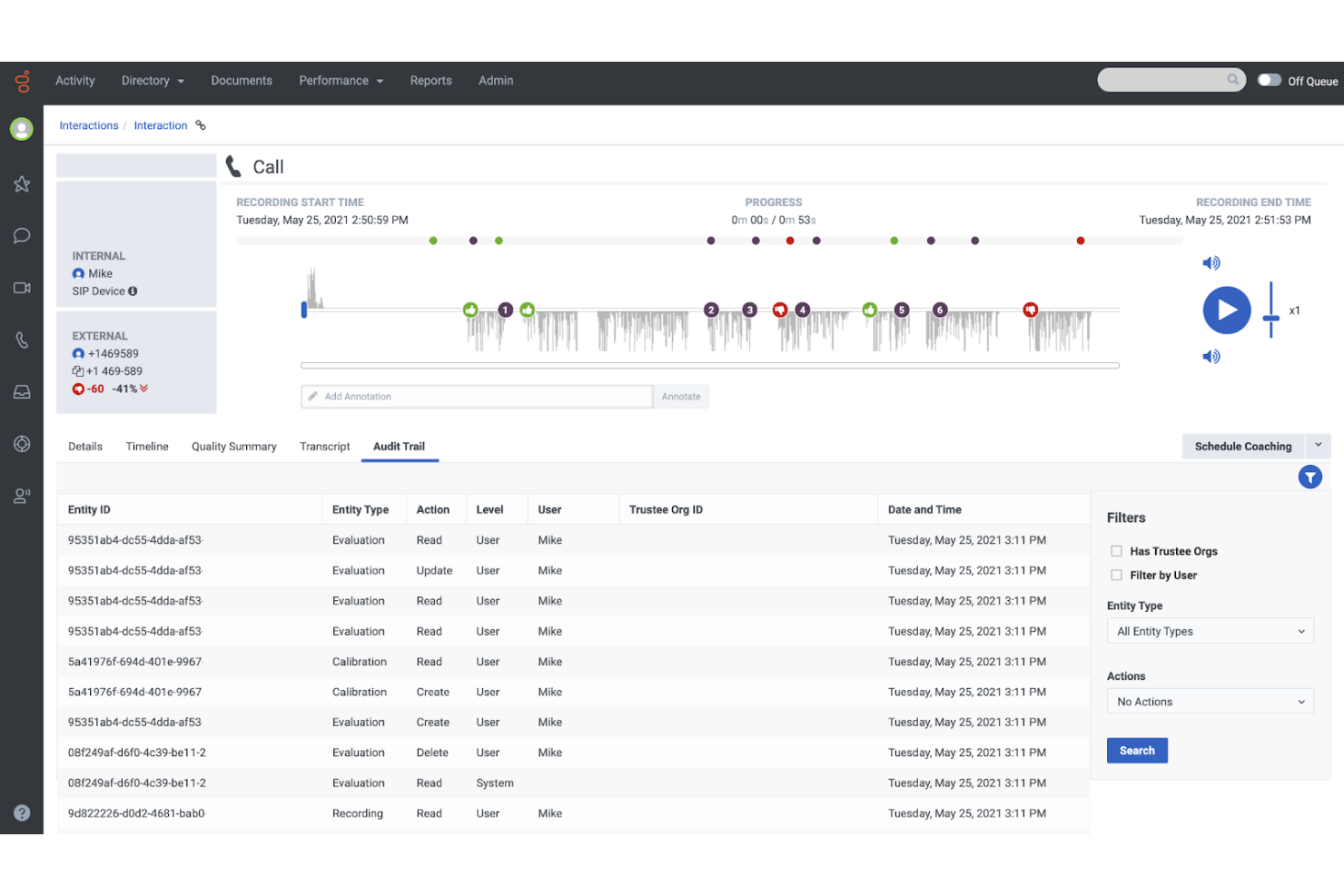
Genesys Cloud CX est une plateforme avancée de centre de contact sur le cloud, conçue pour les entreprises souhaitant améliorer l'expérience client. Elle fournit des outils permettant de gérer les interactions clients sur différents canaux.
Pourquoi j'ai choisi Genesys Cloud CX : Genesys Cloud CX repose sur une architecture native cloud hautement flexible, permettant aux entreprises d’étendre facilement leurs capacités d’engagement client à mesure qu’elles se développent. Elle prend en charge des intégrations transparentes et est capable de gérer de grands volumes d’interactions clients sur différents canaux sans compromettre les performances. De plus, ses fonctionnalités modulaires offrent la possibilité d’ajouter les fonctions nécessaires, s’adaptant ainsi à l’évolution des besoins du service client au fil du temps.
Fonctionnalités et intégrations remarquables :
Fonctionnalités comprenant des interactions fluides sur tous les canaux (voix, chat, e-mail, réseaux sociaux) avec des analyses en temps réel et des tableaux de bord personnalisables pour une analyse approfondie.
Intégrations comprenant Salesforce, Microsoft Teams, Zendesk, ServiceNow, HubSpot, Amazon Web Services, Google Cloud, Oracle NetSuite, Slack et Zoom.
Pros and Cons
Pros:
- Capacités de routage dynamique
- Analyses en temps réel
- Architecture cloud native
Cons:
- Fonctionnalités hors ligne limitées
- Limites de personnalisation
Autres logiciels IVR
Voici quelques autres options de logiciels IVR qui ne figurent pas dans ma sélection, mais qui méritent tout de même votre attention :


Qu’est-ce qu’un logiciel IVR ?
Un logiciel de réponse vocale interactive (IVR) est un système de téléphonie qui permet aux appelants d’utiliser la voix ou le clavier pour effectuer leurs démarches en libre-service et être orientés vers la file d’attente appropriée, sans attendre l’intervention d’un agent. Il identifie l’intention, authentifie les informations de base, déclenche des flux de travail (paiements, vérification de solde, rendez-vous) et propose un rappel lorsque les files d’attente s’allongent.
Comment j'évalue les logiciels IVR
Je divise mon évaluation en deux étapes : les fonctionnalités de base qu’un outil doit absolument offrir — conception du parcours d’appel, logique de routage, et saisie vocale — et les éléments différenciateurs qui comptent le plus pour les équipes de centres de contact.
Fonctionnalités essentielles (Critères incontournables de cette liste)
Lorsque je sélectionne des outils pour ma liste, je note chacun sur une échelle de 0 (n’offre pas la fonctionnalité) à 5 (excelle dans ce domaine) pour chaque fonctionnalité fondamentale mentionnée ci-dessous. Ensuite, je calcule le score total de l’outil en pourcentage. Chaque outil doit obtenir un score total minimum de 65% pour être inclus dans la sélection.
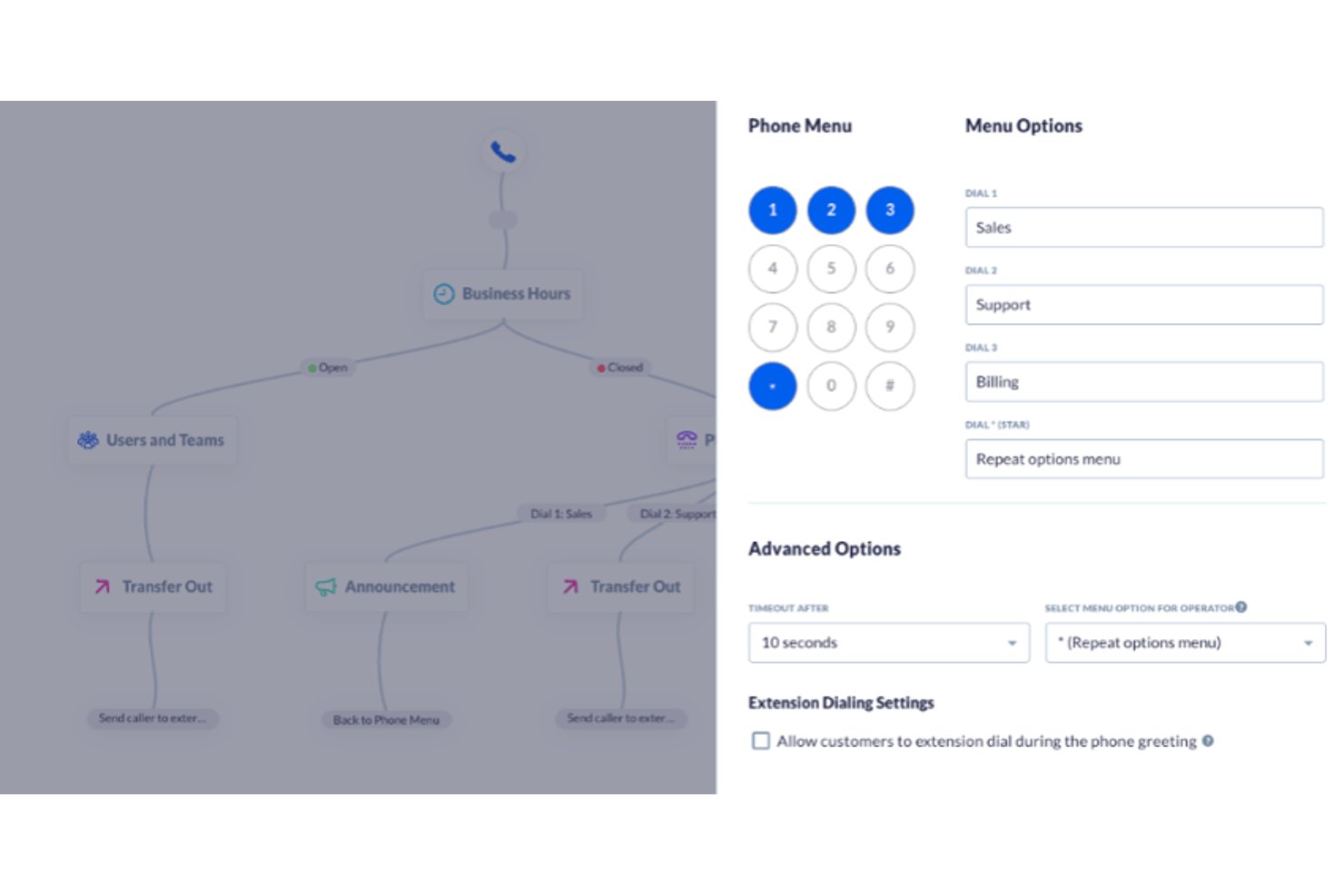
- Conception et édition du parcours d’appel : Je privilégie un éditeur visuel où l’on peut cartographier des menus à embranchements, définir des conditions et publier les mises à jour en direct sans ouvrir un ticket pour les développeurs.
- Gestion de la saisie vocale et DTMF : La reconnaissance vocale et la saisie au clavier sont toutes deux importantes. Je vérifie si les appelants peuvent dire « facturation » ou appuyer sur 2 pour atteindre la même file d’attente.
- Règles de routage intelligent des appels : J’évalue le routage basé sur les compétences, l’horaire, ou les données — comme router les clients VIP vers une équipe fidélisation dédiée.
- Synthèse vocale (TTS) et annonces audio : J’examine la qualité du TTS, la couverture linguistique, et la possibilité d’insérer des variables dynamiques comme un solde de compte dans les messages vocaux.
- Intégrations CRM et données : Un bon IVR extrait les données client pendant l’appel. Je vérifie la présence de connecteurs CRM natifs et d’accès API pour transmettre le contexte lors d’un transfert.
- Analytique et rapports IVR : Les taux d’abandon des menus et les indicateurs de résolution autonome révèlent où les appelants quittent le libre-service. J’analyse la clarté avec laquelle chaque outil met en avant ces informations.
Une fois que j’ai une liste d’outils qui répondent à ces critères, j’examine ce qui distingue chaque plateforme.
Facteurs différenciateurs (ce qui distingue les fournisseurs)
Voici comment je compare les différents prestataires :
Fonctionnalités remarquables
L’IA conversationnelle est, selon moi, le plus grand écart entre les fournisseurs. Certains proposent un dialogue dirigé basique, quand d’autres déploient des voicebots capables de gérer des échanges complexes — comme traiter un retour sans jamais passer par un agent. J’évalue aussi l’IVR visuel, qui permet de basculer depuis un menu téléphonique vers une interface mobile pour des tâches comme la prise de rendez-vous. L’IVR sortant est un autre facteur clé : des rappels de paiement ou de rendez-vous automatisés réduisent les volumes d’appels entrants avant même qu’ils n’atteignent la file.
Au-delà des fonctionnalités
La conformité réglementaire est un paramètre majeur. Si votre IVR gère des paiements par carte, je vérifie la conformité PCI-DSS et la sécurisation de la saisie afin que les informations sensibles ne soient pas enregistrées dans les appels. Le modèle de déploiement compte aussi : les plateformes cloud-native absorbent de hauts volumes simultanés lors des pics saisonniers, quand les options sur site ou hybrides conviennent aux équipes exigeant une localisation stricte des données. J’analyse également la structure tarifaire, car les modèles à la minute ou par poste n’impactent pas de la même manière selon le volume d’appels et la taille de l’équipe.
Comment choisir un logiciel IVR ?
Il est facile de se perdre dans de longues listes de fonctionnalités et des structures tarifaires complexes. Pour vous aider à rester concentré tout au long de votre processus personnalisé de sélection d’un logiciel, voici une liste des facteurs à garder à l’esprit :
| Facteur | Éléments à prendre en compte |
| Évolutivité | La solution peut-elle évoluer avec les besoins de votre équipe ? Tenez compte des futurs volumes d’appels et de vos projets d’expansion. |
| Intégrations | S’intègre-t-elle à votre CRM et à votre logiciel de centre d’appels existants ? Assurez-vous d’une circulation fluide des données entre les systèmes afin d’éviter les silos opérationnels. |
| Personnalisation | Pouvez-vous adapter le système IVR à vos flux de travail et à vos interactions avec les clients ? Recherchez des options flexibles permettant d’effectuer facilement des ajustements. |
| Facilité d’utilisation | Le logiciel est-il intuitif à utiliser et à gérer ? Privilégiez des interfaces conviviales qui réduisent le temps de formation et le nombre d’erreurs. |
| Budget | Quel est le coût total de possession, y compris l’installation, la maintenance et les mises à niveau ? Respecte-t-il vos contraintes financières ? |
| Mesures de sécurité | Des mesures sont-elles en place pour protéger vos données ? Vérifiez le chiffrement, les contrôles d’accès et les audits réguliers. |
Tendances des logiciels IVR
Dans le cadre de mes recherches, j’ai consulté d’innombrables mises à jour de produits, communiqués de presse et journaux de publication provenant de différents fournisseurs de logiciels IVR. Voici quelques-unes des tendances émergentes que je surveille :
- Progrès de la reconnaissance vocale : Une reconnaissance vocale améliorée et des réponses vocales interactives permettent aux utilisateurs d’utiliser les systèmes plus naturellement. Cette tendance améliore la précision de la reconnaissance des différents accents et dialectes, offrant une expérience plus personnalisée.
- Personnalisation fondée sur l’IA : L’IA est utilisée pour adapter les interactions en fonction de l’historique et des préférences des clients. Cette tendance aide les entreprises à proposer un service plus personnalisé, ce qui peut accroître la satisfaction et la fidélité des clients.
- Renforcement de la sécurité : Face à l’augmentation des violations de données, les fournisseurs s’attachent à améliorer les fonctionnalités de sécurité, comme la biométrie vocale. Cette tendance garantit la protection des informations sensibles et offre aux utilisateurs une plus grande tranquillité d’esprit.
- Flexibilité fondée sur le cloud : De nombreuses solutions IVR migrent vers le cloud, offrant une évolutivité et une flexibilité accrues. Cette tendance permet aux entreprises d’adapter leurs capacités de gestion des appels sans investir dans une infrastructure supplémentaire.
- Intégration aux appareils IoT : Certains systèmes IVR commencent à s’intégrer aux appareils de l’Internet des objets (IoT). Cette tendance permet des cas d’utilisation plus innovants, comme l’utilisation de commandes vocales pour contrôler des appareils domotiques ou recueillir des données auprès de capteurs connectés.
Fonctionnalités des logiciels IVR
Lorsque vous choisissez un logiciel IVR, surveillez les fonctionnalités clés suivantes :
- Renforcement de la sécurité : Protège les informations sensibles des clients grâce à des fonctionnalités telles que la biométrie vocale et le chiffrement.
- Flexibilité fondée sur le cloud : Offre une évolutivité et une adaptabilité aux besoins changeants de l’entreprise, sans investissement matériel.
- Routage des appels : Achemine les appels entrants ou les messages de rappel vers le service ou l’agent en direct approprié, améliorant ainsi l’efficacité et les temps de réponse.
- Prise en charge multilingue : Offre des possibilités d’interaction dans plusieurs langues afin de répondre aux besoins de clientèles diversifiées.
- Analyses en temps réel : Fournit des informations sur les habitudes d’appel et les indicateurs de performance afin de contribuer à l’amélioration du service client.
- Flux d’appels personnalisables : Permet aux entreprises de concevoir leurs processus d’appel en fonction de leurs besoins spécifiques et de leurs horaires d’ouverture, améliorant ainsi l’expérience utilisateur.
- Surveillance des transactions : Suit les paiements et les transactions afin de garantir la sécurité et l’exactitude des interactions financières.
Avantages des logiciels IVR
La mise en œuvre d’un logiciel IVR offre plusieurs avantages à votre équipe et à votre entreprise. Voici quelques bénéfices auxquels vous pouvez vous attendre :
- Amélioration de l’expérience client : Des fonctionnalités telles que la reconnaissance vocale et la personnalisation pilotée par l’IA peuvent vous aider à proposer un service plus personnalisé et plus efficace.
- Réduction des coûts : L’automatisation de la gestion des appels et la réduction du besoin en agents humains peuvent diminuer considérablement les coûts opérationnels.
- Renforcement de la sécurité des données : Grâce à des améliorations telles que la biométrie vocale, les informations sensibles de vos clients sont mieux protégées.
- Efficacité accrue : Le routage des appels, la synthèse vocale et les analyses en temps réel aident votre équipe à gérer les volumes élevés dans les files d’attente et à améliorer la rapidité du service.
- Évolutivité : La flexibilité fondée sur le cloud permet à votre entreprise d’augmenter ou de réduire ses services sans coûts d’infrastructure supplémentaires.
- Portée élargie : La prise en charge multilingue vous permet de servir une clientèle mondiale en supprimant les barrières linguistiques.
- Meilleure prise de décision : L’accès à des analyses en temps réel et à des rapports détaillés fournit des informations utiles pour optimiser les opérations et la stratégie.
Coûts et tarifs des logiciels SVI
Le choix d’un logiciel SVI nécessite de comprendre les différents modèles tarifaires et forfaits disponibles. Les coûts varient en fonction des fonctionnalités, de la taille de l’équipe, des modules complémentaires et d’autres facteurs. Le tableau ci-dessous récapitule les forfaits courants, leurs prix moyens et les fonctionnalités généralement incluses dans les solutions logicielles SVI :
Tableau comparatif des forfaits de logiciels SVI
| Type de forfait | Prix moyen | Fonctionnalités courantes |
| Forfait gratuit | $0 | Routage de base des appels clients, analyses limitées et assistance de base. |
| Forfait personnel | $10-$30/utilisateur/mois | Routage des appels, reconnaissance vocale et analyses de base. |
| Forfait professionnel | $40-$70/utilisateur/mois | Routage avancé, prise en charge multilingue et fonctionnalités de sécurité. |
| Forfait entreprise | $80-$150/utilisateur/mois | Flux d’appels personnalisables, personnalisation pilotée par l’IA et analyses en temps réel. |
FAQ sur les logiciels IVR
Voici quelques réponses aux questions fréquentes sur les logiciels IVR :
Quelles sont les limites de l’IVR ?
Les systèmes IVR peuvent avoir des difficultés à comprendre une conversation complexe, des accents inhabituels ou le bruit de fond, ce qui peut entraîner la frustration des appelants et l’acheminement incorrect des appels. La personnalisation limitée constitue un autre défi : si l’IVR ne reconnaît pas les besoins spécifiques des clients ou leurs interactions passées, l’expérience semble générique. Des options de menu trop nombreuses ou déroutantes peuvent inciter les appelants à abandonner l’appel ou à appuyer sur zéro pour joindre un agent, ce qui va à l’encontre de l’objectif de l’automatisation. Pour réduire ces problèmes, examinez régulièrement les rapports de l’IVR, écoutez les enregistrements d’appels et recueillez les commentaires des clients afin d’affiner les parcours d’appel, d’ajouter de la personnalisation et de simplifier les choix. N’oubliez pas : plus votre IVR est intuitif et réactif, meilleure sera la satisfaction client et plus vos agents seront efficaces.
Comment améliorer mon IVR ?
L’amélioration de votre IVR commence par la compréhension des difficultés rencontrées par les clients. Analysez les journaux d’appels pour déterminer où les appelants abandonnent ou appuient sur zéro pour joindre un agent en direct. Gardez les menus courts : limitez les options à l’essentiel et utilisez un langage naturel et simple. Exploitez les données de votre CRM ou des interactions passées pour personnaliser les invites ou l’acheminement. Testez l’IVR avec des utilisateurs novices et expérimentés, puis affinez les scripts en fonction des retours réels. Mettez régulièrement l’IVR à jour pour refléter les évolutions de votre entreprise ou les attentes des clients. Enfin, proposez toujours une option claire et rapide pour joindre un agent humain en cas de problème complexe ou sensible.
Les systèmes IVR peuvent-ils être intégrés à d’autres outils professionnels ?
Oui, les principales plateformes IVR s’intègrent aux CRM, aux logiciels de service client, aux outils de gestion des tickets, aux bases de connaissances et aux systèmes de gestion des effectifs. Ces intégrations permettent à votre IVR d’afficher automatiquement les informations de l’appelant, de reconnaître les clients récurrents et de déclencher des suivis ou des mises à jour de dossiers sans intervention d’un agent. Elles simplifient l’acheminement et le reporting des appels, réduisent la charge de travail des agents et assurent une circulation fluide des données dans l’ensemble de votre environnement technologique. Lorsque vous évaluez des fournisseurs d’IVR, renseignez-vous sur les intégrations prédéfinies, les API disponibles et la prise en charge des normes ouvertes afin de garantir la compatibilité avec vos systèmes actuels.
Quels sont les défis liés à la mise en œuvre d’un logiciel IVR ?
L’adoption d’un système IVR peut être complexe. L’un des principaux défis consiste à cartographier précisément les parcours clients et à concevoir des flux d’appel logiques qui répondent aux besoins réels des appelants. L’intégration technique aux systèmes existants nécessite parfois l’intervention d’une équipe informatique spécialisée et un examen approfondi de la sécurité. La formation du personnel est importante : vous aurez besoin d’agents et de superviseurs qui comprennent les nouveaux processus. Trouver le juste équilibre entre libre-service et assistance en direct implique de déterminer quand proposer l’automatisation et quand orienter l’appel vers un interlocuteur humain afin d’optimiser l’expérience client. La meilleure façon de surmonter ces difficultés consiste à favoriser la collaboration entre les équipes, à prévoir une phase pilote approfondie et à s’engager dans une amélioration continue après le lancement.
Comment mesurer la réussite de votre système IVR ?
Vous pouvez évaluer la réussite de votre IVR en suivant des indicateurs tels que le taux de confinement (le nombre d’appels résolus dans l’IVR sans intervention d’un agent), le taux d’abandon des appels, les scores de satisfaction client (CSAT) et la durée moyenne de traitement. Analysez les moments et les raisons pour lesquels les appelants abandonnent ou demandent à parler à un agent : des taux d’abandon élevés peuvent indiquer des menus déroutants ou des problèmes techniques. Utilisez les outils d’analyse fournis par votre plateforme IVR pour suivre ces tendances dans le temps. Combinez les données chiffrées aux retours directs des clients et des agents afin d’identifier à la fois les points forts et les possibilités d’amélioration.
Quelles sont les bonnes pratiques pour concevoir un flux d’appel IVR ?
Commencez par recenser les besoins les plus fréquents de vos appelants et par créer des parcours simples et logiques pour chacun d’eux. Évitez les arborescences de menus profondes ou trop complexes ; trois à cinq options par menu constituent généralement le meilleur choix. Utilisez un langage clair et convivial ainsi que des invites courtes : les longues explications peuvent frustrer les appelants. Proposez des « sorties de secours » clairement indiquées vers des agents en direct, notamment en cas d’urgence ou de problème complexe. Testez régulièrement votre flux d’appel avec de vrais appelants, et pas uniquement avec votre équipe, afin de détecter les sources de confusion ou les goulots d’étranglement et d’apporter des améliorations fondées sur les retours et les données de performance.
À quelle fréquence dois-je mettre à jour les options de menu de mon système IVR ?
Prévoyez de revoir les options de menu de votre IVR au moins chaque trimestre, ou chaque fois que vous lancez de nouveaux produits, de nouvelles politiques ou de nouveaux services. Des mises à jour régulières garantissent que l’IVR reste exact et pertinent, ce qui réduit les transferts incorrects et la frustration des appelants. Surveillez les journaux d’appels et les canaux de commentaires afin de détecter l’évolution des besoins des appelants, les informations obsolètes ou les plaintes fréquentes concernant certaines options de menu. Votre IVR doit évoluer au même rythme que votre entreprise : sa capacité à s’adapter aux tendances des clients et aux changements internes contribue à maintenir une expérience client fluide et efficace.
Quelles fonctionnalités de sécurité rechercher dans un logiciel IVR ?
La sécurité doit être une priorité, en particulier si vous traitez des données client sensibles ou des paiements. Recherchez un chiffrement des données de bout en bout afin de protéger les informations en transit et au repos. Des contrôles d’authentification sécurisés des utilisateurs, tels que l’accès par mot de passe ou par données biométriques pour les administrateurs, empêchent les modifications non autorisées. L’IVR doit prendre en charge les normes de conformité pertinentes pour votre secteur, comme PCI DSS pour les données de paiement ou HIPAA pour les informations de santé. Des fonctionnalités telles que la biométrie vocale, la journalisation des audits et l’accès fondé sur les rôles peuvent renforcer davantage la protection. Demandez toujours aux fournisseurs leur documentation de sécurité et vérifiez l’existence de certifications ou d’audits réalisés par des tiers.
Quelle est la prochaine étape ?
Pour plus d’informations sur l’optimisation de l’expérience client, abonnez-vous à notre newsletter.