

Les 10 meilleurs logiciels de centre de contacts basés sur le cloud de 2026

10 Sélection des meilleurs logiciels de centre de contact dans le cloud


Dans le monde professionnel actuel, où tout évolue rapidement, la gestion des interactions avec les clients peut représenter un véritable défi. Votre équipe et vous avez besoin d’outils qui permettent de traiter efficacement les demandes sans être ralentis par des systèmes obsolètes. C’est là que les logiciels de centre de contact dans le cloud prennent tout leur sens.
J’ai consacré du temps à tester et à évaluer ces solutions afin de vous proposer une liste impartiale et documentée des meilleures options disponibles. D’après mon expérience, trouver le logiciel adapté peut faire une grande différence pour la productivité de votre équipe et la satisfaction de vos clients.
Dans cet article, vous découvrirez mes meilleurs choix, chacun proposant des fonctionnalités uniques pour répondre à vos besoins spécifiques. Que vous recherchiez l’évolutivité, la conformité ou des fonctionnalités spécialisées, chaque équipe y trouvera une solution adaptée.
Pourquoi faire confiance à nos recommandations de logiciels
Notre équipe teste et évalue des logiciels depuis 2012. En tant que leaders CX nous-mêmes, nous savons à quel point il est difficile — et important — de choisir le bon logiciel.
Pour ce guide, nous avons évalué les outils grâce à des tests pratiques et une recherche indépendante, en notant les outils selon nos critères de sélection.
Nos avis reflètent notre jugement éditorial humain, et non un argumentaire de vente.
Tableau comparatif des logiciels de centre de contact dans le cloud
| Tool | Best For | Trial Info | Price | ||
|---|---|---|---|---|---|
| 1 | Idéal pour le coaching d'agents en temps réel | Démo gratuite disponible | Tarification sur demande | Website | |
| 2 | Idéal pour une intégration facile avec des applications CRM et de support | Essai gratuit de 7 jours | À partir de $30/utilisateur/mois (facturation annuelle) | Website | |
| 3 | Idéal pour l'orchestration personnalisée du parcours client | Démo gratuite disponible | À partir de 15 $/utilisateur/mois (facturé annuellement) | Website | |
| 4 | Idéal pour le support omnicanal des centres de contact | Démo gratuite disponible | À partir de $30/utilisateur/mois (facturé annuellement) | Website | |
| 5 | Meilleurs outils de centre d'appels alimentés par l'IA | Essai gratuit + démo gratuite disponible | À partir de 25 $/utilisateur/mois (facturé annuellement) | Website | |
| 6 | Idéal pour l’intelligence conversationnelle alimentée par l’IA | Essai gratuit de 14 jours disponible | À partir de 19 $/mois (facturé annuellement) | Website | |
| 7 | Idéal pour une solution de centre d'appels simple et évolutive | Démo gratuite disponible | À partir de $15/utilisateur/mois (facturé annuellement) | Website | |
| 8 | Meilleurs outils de suivi et d’analyse des appels | Démo gratuite disponible | À partir de 65$/mois | Website | |
| 9 | Idéal pour la gestion d'appels à distance | Essai gratuit de 7 jours disponible | À partir de $19/utilisateur/mois + $5/utilisateur supplémentaire | Website | |
| 10 | Idéal pour la flexibilité | Essai gratuit disponible | Tarification sur demande | Website |

Avis sur les meilleurs logiciels de centre de contact dans le cloud
Vous pouvez utiliser les présentations succinctes de chaque outil ci-dessous pour comprendre ce qui distingue chacun d’eux des autres logiciels de centre de contact dans le cloud.

Cresta
Idéal pour le coaching d'agents en temps réel

Conçue pour les centres de contact d'entreprise, Cresta est une plateforme d'IA offrant une assistance en temps réel aux agents, des agents autonomes alimentés par l'IA, une intelligence conversationnelle et des workflows automatisés après interaction, sur les canaux vocaux et digitaux.
Pour qui Cresta est-elle la mieux adaptée ?
Cresta convient particulièrement aux équipes de centres de contact d'entreprise dans des secteurs comme les services financiers, l'assurance, la vente au détail et les télécommunications, qui gèrent un volume élevé d'interactions client complexes.
Pourquoi j'ai choisi Cresta
Cresta fait partie de mes premiers choix car j'apprécie particulièrement la façon dont son Agent Assist fournit un coaching comportemental à l'instant même, et non après l'appel. Pendant les interactions en direct, les agents reçoivent des suggestions en temps réel, des rappels de conformité et des conseils contextuels adaptés à la situation réelle de la conversation. J'aime tout particulièrement le Knowledge Agent, qui écoute constamment l'appel et propose des réponses validées par la source sans que les agents aient à effectuer une recherche manuelle. C'est un avantage significatif pour les équipes d'entreprise qui gèrent des appels complexes et critiques à grande échelle.
Fonctionnalités clés de Cresta
- Agent IA : Gère les interactions vocales et digitales entrantes sans intervention humaine, y compris la résolution, les transferts et les escalades.
- Gestion automatisée de la qualité : Évalue toutes les interactions agents selon des critères personnalisables, remplaçant l'échantillonnage manuel des appels.
- Analyste IA : Identifie les tendances, les sujets moteurs et les schémas de résultats sur l'ensemble de votre base de conversations sans requête manuelle.
- Résumé automatique : Génère des notes structurées après appel et les renseigne dans les CRM ou systèmes de ticketing connectés.
Intégrations de Cresta
Cresta s'intègre avec les principales plateformes CCaaS, dont Five9, NICE CXone, Genesys Cloud CX, Talkdesk et Dialpad, ainsi qu'avec Salesforce, Amazon Connect, Twilio et Zoom Contact Center. Cresta fonctionne également au sein de plateformes d'entreprise comme Salesforce Service Cloud pour un accès en temps réel aux données CRM. Le support Zapier n'est pas clairement documenté, et une API est disponible pour des intégrations personnalisées.
Pros and Cons
Pros:
- Évaluation automatique de tous les appels sur des critères personnalisés
- Le coaching en temps réel reçoit des retours positifs des utilisateurs
- Déploiement en quatre à six semaines
Cons:
- L'assistance par la base de connaissances interprète parfois mal l'intention de l'appelant
- La transcription varie avec les appelants ayant un accent
Aircall
Idéal pour une intégration facile avec des applications CRM et de support
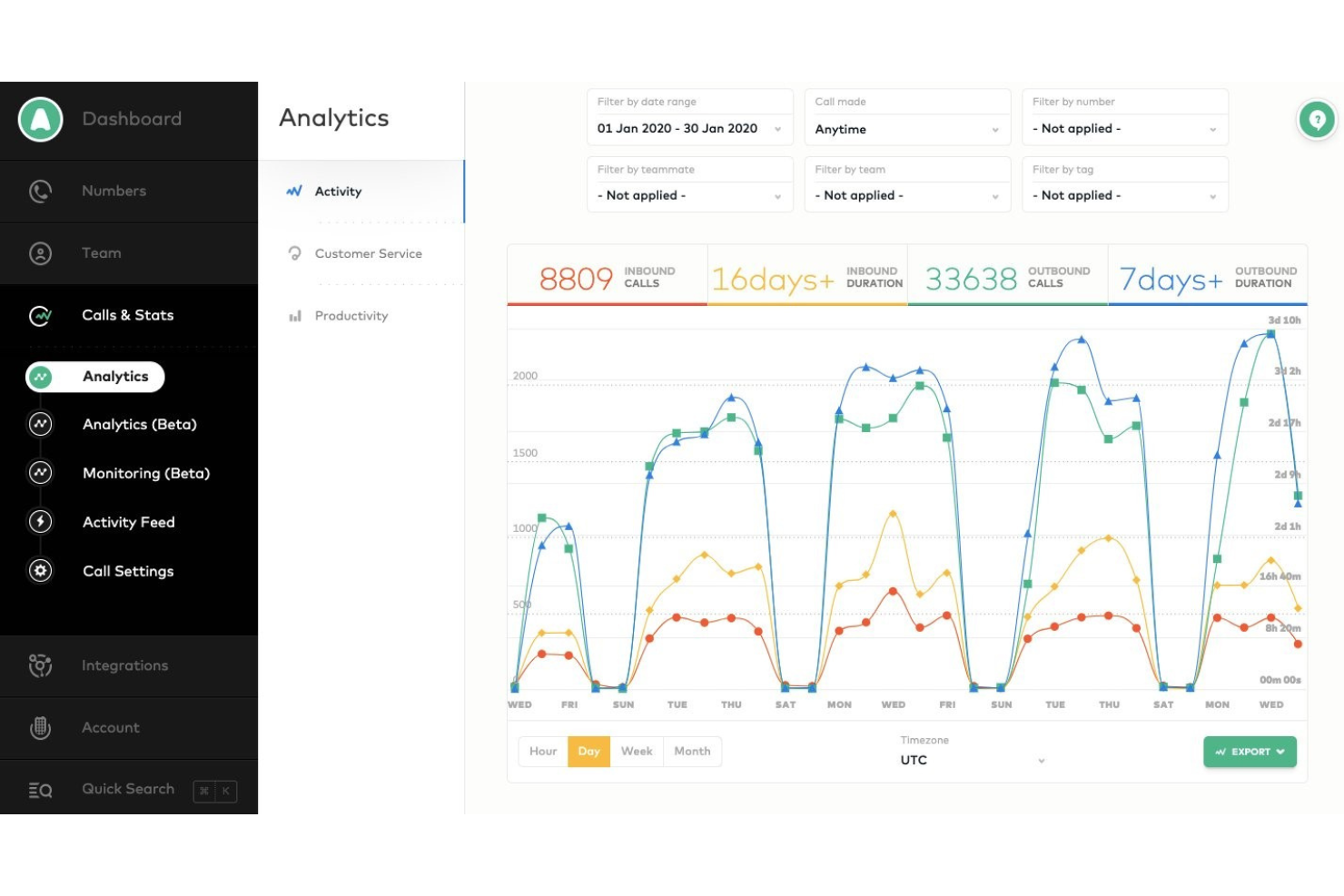
Aircall est un système de centre d'appels cloud qui s'intègre facilement avec les principaux outils CRM et de support afin de rendre l'expérience téléphonique accessible, transparente et collaborative.
Pourquoi j'ai choisi Aircall : Si vous recherchez un système qui s'intègre avec vos outils CRM ou de support, Aircall pourrait vous intéresser. L'intégration de ces systèmes aidera vos équipes commerciales et de support à avoir des interactions clients claires et efficaces. En synchronisant automatiquement les détails des appels avec votre CRM et votre support, Aircall vous fait gagner du temps en évitant d'avoir à naviguer entre plusieurs outils. Tout le monde peut consulter les enregistrements d'appels, vérifier l'historique des comptes et obtenir une vue d'ensemble de chaque conversation.
Aircall est un excellent choix pour les petites et moyennes entreprises ayant besoin d'une solution cloud de centre d'appels qui soit facilement adaptable, évolutive et utilisable en télétravail. Il vous aide, vous et vos agents, à offrir des interactions clients claires et efficaces grâce à des analyses approfondies et en temps réel. Avec Aircall, vous bénéficiez également d’analyses avancées de productivité de centre d’appels et de la possibilité de surveiller l’activité de votre équipe.
Fonctionnalités et intégrations phares d’Aircall
Fonctionnalités : numéros verts et internationaux, outils de conférence téléphonique, messagerie vocale, distribution d’appels, serveur vocal interactif, postes téléphoniques, blocage de numéros, centres d'appels virtuels, messagerie professionnelle par SMS et gestion des files d’attente d’appels.
Intégrations : ActiveCampaign, Odoo CRM, Hiver, Zendesk Sell, Zapier, Copper, Freshdesk, Microsoft Dynamics, Microsoft Teams, Pipedrive, Slack, Sugar CRM, Salesforce, Outreach et monday.com.
Aircall coûte à partir de $40/utilisateur/mois avec une facturation mensuelle pour un minimum de trois utilisateurs, ou $30/utilisateur/mois si facturé annuellement. Aircall propose un essai gratuit de 7 jours pour les nouveaux abonnés.
Pros and Cons
Pros:
- Les utilisateurs bénéficient d'une plateforme centralisée de collaboration.
- Accessible via ordinateur et mobile.
- Il fournit des analyses approfondies de la communication.
Cons:
- Le système peut déconnecter les utilisateurs.
- Peut parfois présenter des bugs.

Nextiva
Idéal pour l'orchestration personnalisée du parcours client
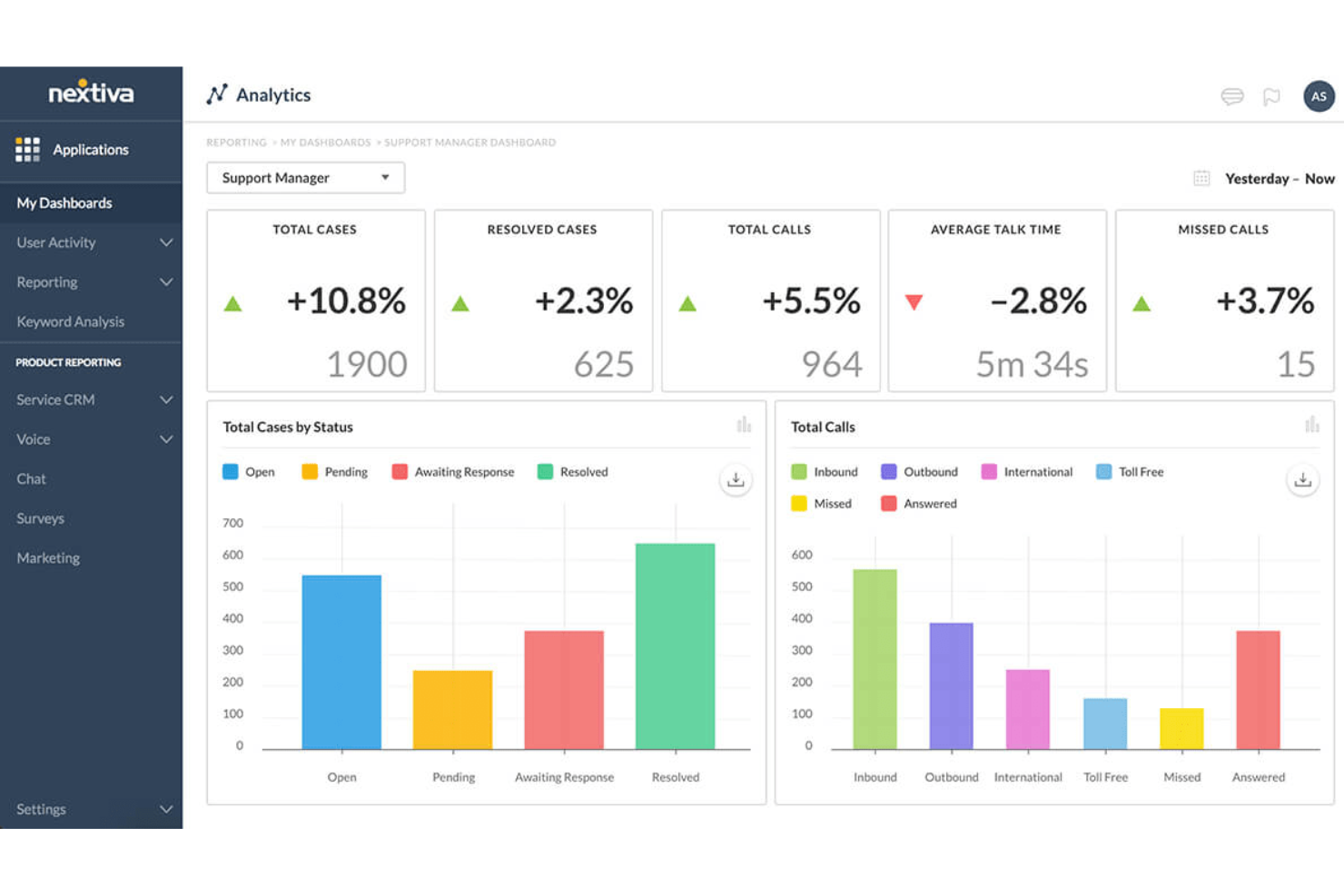
Nextiva propose une plateforme unifiée de gestion de l'expérience client avec un logiciel de centre de contact basé sur le cloud qui inclut l'activation de l'IA, des outils pour agents, des analyses, un routage intelligent, l'orchestration du parcours client et la numérotation sortante.
Pourquoi j'ai choisi Nextiva : L'une de ses fonctionnalités phares réside dans ses capacités avancées en intelligence artificielle. Celles-ci incluent des outils pour agents alimentés par l'IA, comme une base de connaissances, une assistance sécurisée au paiement et une gestion automatisée des décisions. De plus, le routage intelligent de Nextiva garantit que les clients sont connectés aux agents les plus adaptés à leurs besoins.
La plateforme propose également des tableaux de bord en temps réel et des widgets personnalisables fournissant des informations précieuses sur les interactions clients et la performance des agents. Cette approche axée sur les données permet aux entreprises de prendre des décisions éclairées et d'améliorer en continu les opérations de leur centre de contact. En outre, les capacités d'orchestration de parcours de Nextiva, incluant un moteur de workflow et des transitions bot-vers-agent, contribuent à offrir un parcours client fluide et des prochaines étapes efficaces.
Points forts et intégrations de Nextiva
Fonctionnalités incluent la numérotation sortante avec filtrage de prospects et garde-fous TCPA, assurant la conformité et maximisant l'efficacité des campagnes sortantes. La détection de langue, la transcription et la synthèse font également partie de ses fonctionnalités IA, rendant la communication entre des bases clients variées plus facile et plus efficace.
Intégrations : Stripe, PayPal, ShipStation, ShipEngine, Salesforce, HubSpot, Zoho CRM, Oracle, Zendesk, SurveyMonkey, Microsoft Dynamics et bien d'autres.
Pros and Cons
Pros:
- Solution évolutive
- Chatbots IA pour améliorer les workflows du centre d'appels
- Options dynamiques de scripts pour agents
Cons:
- Limitations sur les intégrations
- La configuration initiale peut être complexe
Idéal pour le support omnicanal des centres de contact
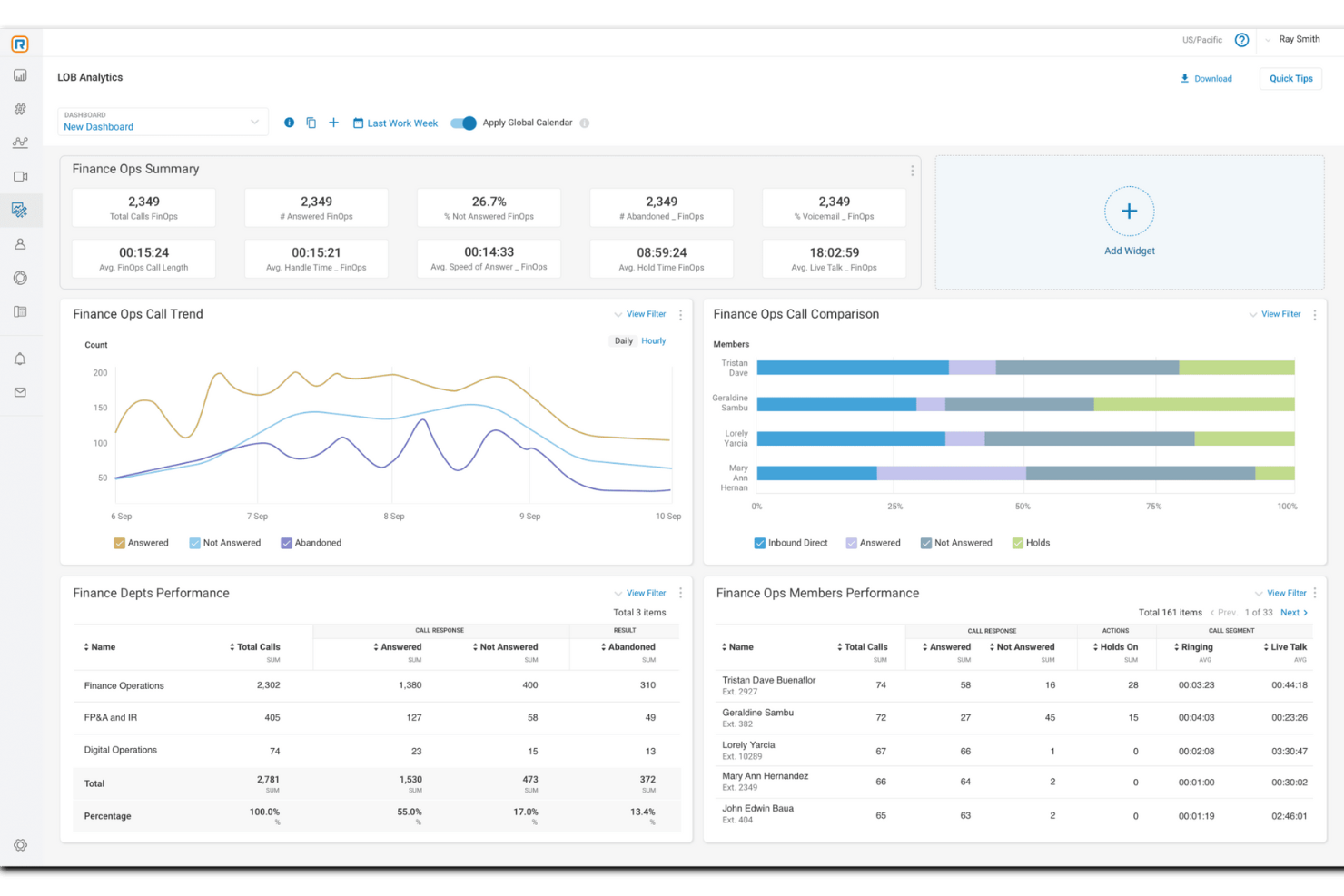
RingCentral est un logiciel de centre de contact complet basé sur le cloud qui offre aux entreprises une suite de solutions, notamment des communications dans le cloud et des systèmes de téléphonie professionnelle.
Pourquoi j'ai choisi RingCentral : La plateforme propose des solutions axées sur l'IA, conçues pour un support omnicanal des centres de contact. Ces fonctionnalités d'automatisation s'adressent aux entreprises de toutes tailles, conçues pour être à la fois conviviales et rapides à mettre en œuvre, répondant aux besoins des organisations recherchant des fonctions avancées et une grande évolutivité. RingCentral s'intègre également à d'autres services de communication, ce qui peut rationaliser les opérations et améliorer l'expérience client.
Les capacités d'automatisation de RingCentral incluent des agents virtuels alimentés par l'IA, le coaching en temps réel et des analyses exploitables pour améliorer l'expérience client et la performance des agents. De plus, le logiciel propose la gestion de la qualité et des effectifs afin de surveiller les performances et de prendre des décisions éclairées sur la productivité.
Points forts et intégrations de RingCentral
Fonctionnalités : gestion omnicanal, routage intelligent, prospection proactive, atténuation des risques de conformité, chiffrement, engagement et gestion des effectifs, profils de compétences des agents, enregistrement d'écran, écoute en double, rapports prédéfinis et analyses détaillées.
Intégrations : Microsoft Teams, Salesforce, Google Workspace, Beetexting, HubSpot, Asana, Zendesk, Appointment Reminder, Aha!, Trello, Zapier, Automator, et plus de 300 autres.
Pros and Cons
Pros:
- S'adapte à toutes tailles et secteurs d'activité
- Automatisation sur de multiples canaux
- Intégration avec des centaines d'applications et de systèmes
Cons:
- Personnalisation et stockage limités sur les forfaits d'entrée de gamme
- Limitations avec certains téléphones de bureau

Meilleurs outils de centre d'appels alimentés par l'IA
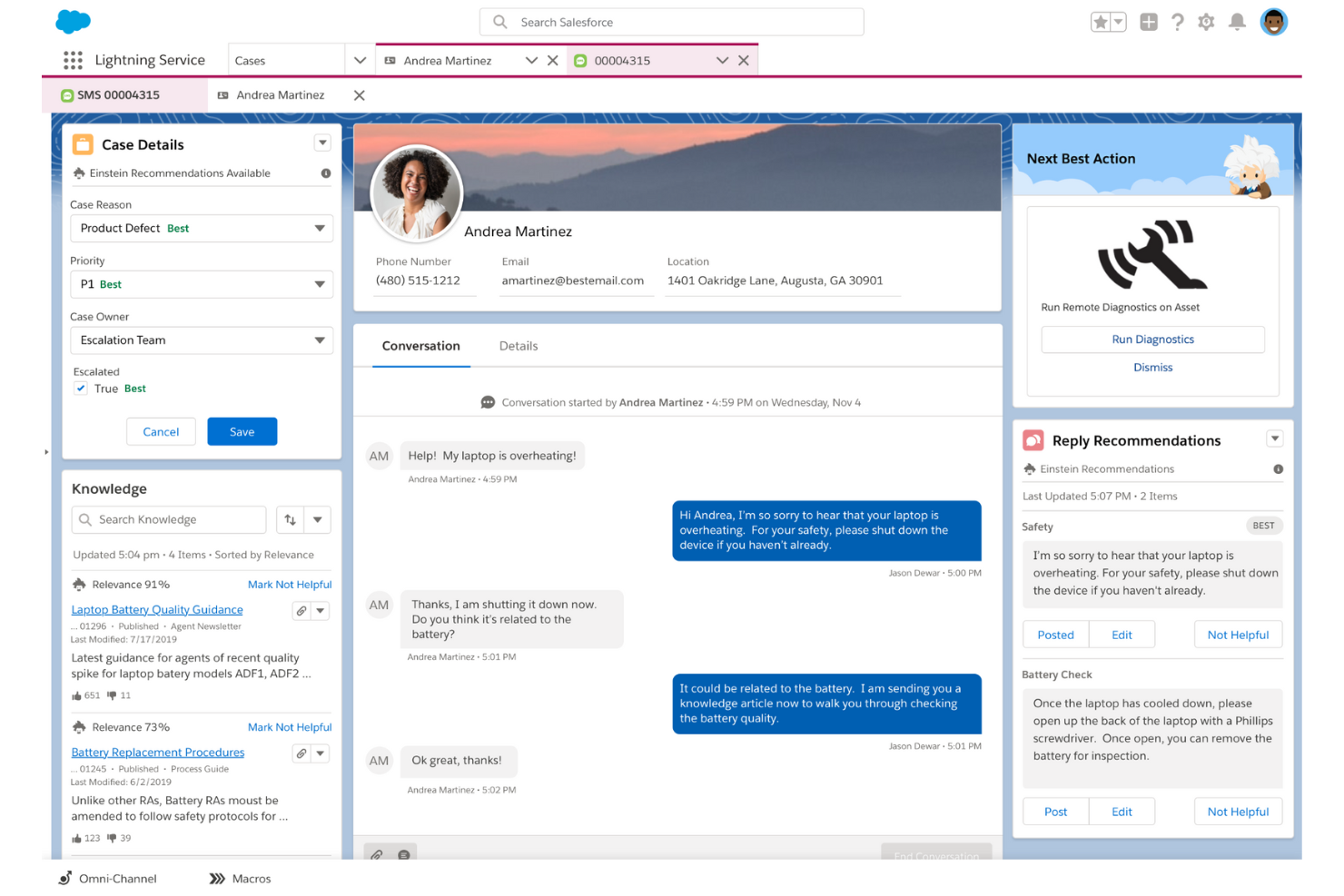
Salesforce Service Cloud utilise l'automatisation et l'IA pour aider les entreprises à interagir avec les clients sur divers canaux d'échange.
Pourquoi j'ai choisi Salesforce Service Cloud : La plateforme fournira à votre entreprise un logiciel de centre d'appels basé sur le cloud, alimenté par l'IA, capable de donner à vos agents des recommandations contextuelles sur les meilleures actions à entreprendre. Le module de démarrage Einstein Next-Best Action, propulsé par l'IA de Salesforce Service Cloud, combiné à l'application Chatter, indiquera à vos agents ce qu'ils doivent faire après avoir suivi les étapes d'un accord, géré les tâches et affiché les fils d'activités. Cela aidera vos agents à trouver des opportunités de ventes additionnelles et croisées à proposer aux clients et à offrir des interactions personnalisées.
Salesforce Service Cloud convient mieux aux grandes entreprises qui ont besoin d'un logiciel de centre d'appels basé sur le cloud leur permettant d'assurer des interactions de haut niveau. Il permet à vos responsables et agents de définir et de mesurer des indicateurs clés de performance essentiels. Les données de gestion de la relation client fournies par Salesforce Service Cloud alimenteront automatiquement le logiciel, complétées par des analyses prédictives pour identifier les problèmes et les risques de perte de clientèle.
Fonctionnalités et intégrations marquantes de Salesforce Service Cloud
Fonctionnalités : automatisation et flux de travail, gestion des dossiers, routage omnicanal, gestion des connaissances, rapports et analyses, gestion des incidents du service client, gestion des tâches, journalisation des appels, enregistrement des appels et réponse vocale interactive.
Intégrations : Freshdesk, CloudTalk, Twilio, Mailchimp, HubSpot CRM, Smartsheet, Aircall, RingCentral Contact Center, Talkative, FullStory et Vidyard.
Le service de centre de contact Salesforce Service Cloud est proposé à partir de 150 $/utilisateur/mois, facturé annuellement. Salesforce Service Cloud propose un essai gratuit de 30 jours pour les nouveaux abonnés.
Pros and Cons
Pros:
- Connexion avec les clients sur plusieurs appareils.
- Très faible indisponibilité.
- Plateforme simple et innovante.
Cons:
- Tarifs élevés.
- Mise en place complexe.
New Product Updates from Agentforce Service (formerly Service Cloud)
Agentforce Service Keeps Full Agentforce Voice Transcripts After Calls
Agentforce Service now shows the full conversation history in post-call transcripts for Agentforce Voice calls within the Service Console, giving agents better context for follow-ups. For more information, visit Salesforce’s official site.
 .
.
Idéal pour l’intelligence conversationnelle alimentée par l’IA
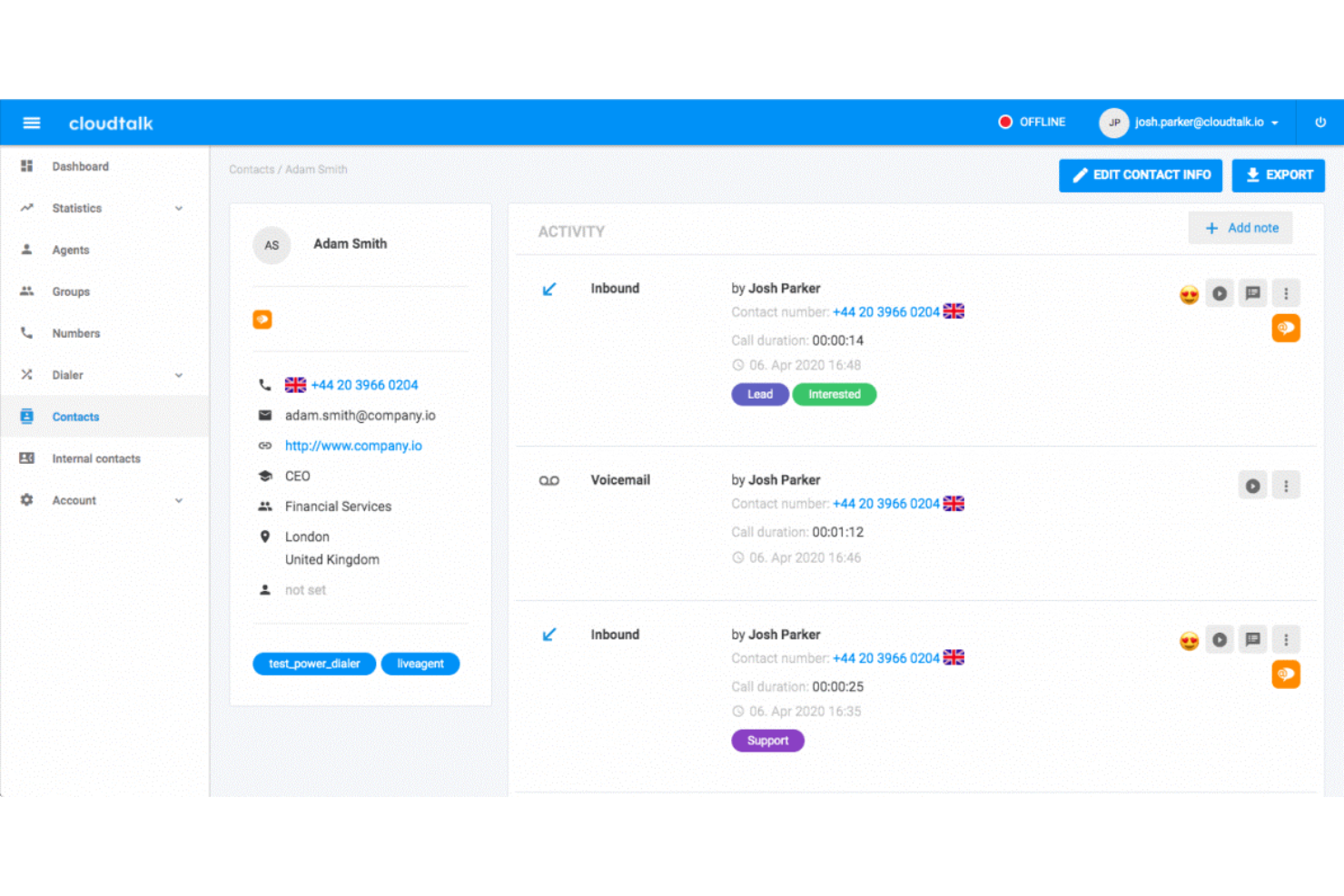
CloudTalk est un logiciel de centre d'appels basé sur le cloud qui élimine la nécessité d'équipements importants pour les centres d'appels. Son installation sans codage le rend accessible à tous les types d'entreprises, quel que soit votre niveau technique.
Pourquoi j'ai choisi CloudTalk : Les équipes commerciales ainsi que celles du support peuvent utiliser ce logiciel grâce à ses fonctionnalités d'appels entrants et sortants. Vous pouvez diriger les appels vers l'agent le plus qualifié en fonction de ses compétences, configurer des files d'attente VIP et utiliser la reconnaissance vocale interactive (IVR) pour permettre aux clients de naviguer dans votre système.
Ce qui rend ce produit unique, c'est la façon dont il utilise l'IA pour améliorer le fonctionnement de votre centre d'appels. Il peut fournir à vos agents des suggestions en temps réel grâce à des prédictions des besoins clients, et il simplifie également divers aspects de vos opérations via l'automatisation.
Fonctionnalités et intégrations principales de CloudTalk
Fonctionnalités : composeur automatique, numéroteur intelligent, extensions personnalisées, appels à trois, transferts d’appels, appel en un clic, campagnes, notes d’appel, étiquetage des appels, concepteur de flux d'appels, files d’attente VIP, agents privilégiés et automatisation des processus.
Intégrations : HubSpot, Zendesk, Intercom, Gong, Pipedrive, Salesforce, Copper CRM, ActiveCampaign, LiveAgent, et Outreach, entre autres. D'autres intégrations peuvent être configurées avec un abonnement payant sur Zapier.
Les forfaits payants commencent à partir de 25 $ par utilisateur et par mois. Un essai gratuit de 14 jours est disponible.
Pros and Cons
Pros:
- Installation facile et retour sur investissement rapide
- L’étiquetage et les notes d’appel fournissent un contexte interne
- L’enregistrement des appels facilite la formation
Cons:
- Le forfait Starter ne propose pas d’analyses avancées
- Pas de support omnicanal

Idéal pour une solution de centre d'appels simple et évolutive
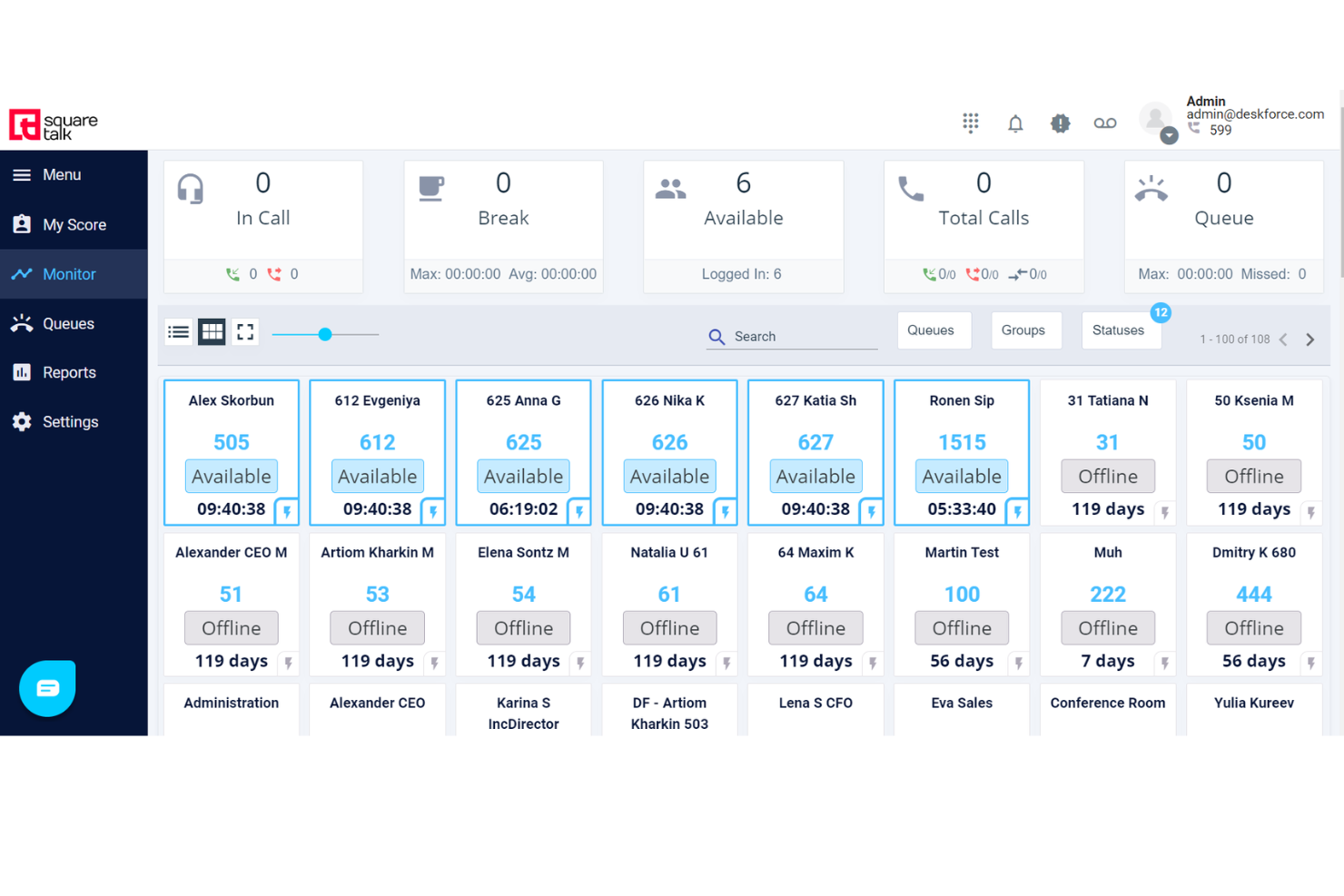
Squaretalk est un logiciel de centre de contact basé sur le cloud qui fournit des outils pour répondre aux besoins de communication des entreprises. Son interface simple et ses forfaits économiques en font une solution idéale pour toute entreprise, des startups aux grandes sociétés.
Pourquoi j'ai choisi Squaretalk : La plateforme offre une automatisation robuste et un design convivial. Par exemple, le composeur prédictif intelligent optimise les opérations d'appel en gérant automatiquement l'attribution des appels selon la disponibilité et les compétences de chaque agent, ce qui permet d'améliorer l'efficacité opérationnelle. Elle propose également des fonctionnalités de gestion des flux de travail, telles que l'attribution des tâches, le suivi de la progression et la collaboration.
De plus, la plateforme Squaretalk est conçue pour la montée en charge, répondant ainsi aux besoins évolutifs d'une entreprise en croissance. L'infrastructure cloud permet de faire évoluer facilement les services, d'ajouter plus d'utilisateurs et d'élargir les fonctionnalités grâce à des modules et intégrations supplémentaires à mesure que les besoins de l'entreprise augmentent.
Principales fonctionnalités et intégrations de Squaretalk
Fonctionnalités incluent la messagerie multicanale, un constructeur de flux de travail personnalisé, une conformité totale, des analyses de données, des rapports, la supervision des appels, l'accès API, une configuration flexible des rôles, la sécurité pour les agents à distance, et plus encore.
Intégrations incluent Salesforce, HubSpot, Freshdesk, Dropbox, Zoho, Zendesk, Mailchimp, WhatsApp, Gmail, Teams, Slack, Discord, WordPress, monday.com, et plus encore.
Pros and Cons
Pros:
- Mise en route rapide
- Interface conviviale
- Adapté à la montée en charge
Cons:
- Certaines intégrations peuvent être complexes
- Légère courbe d'apprentissage pour les fonctionnalités avancées
New Product Updates from Squaretalk
Squaretalk Adds TradeCore Integration for Brokerage Workflows
Squaretalk adds a TradeCore integration that connects customer conversations with BrokerIQ CRM workflows. This helps brokerage teams trigger AI-driven follow-ups, tasks, and other actions from calls and messages. For more information, visit Squaretalk’s official site.
 .
.
Meilleurs outils de suivi et d’analyse des appels
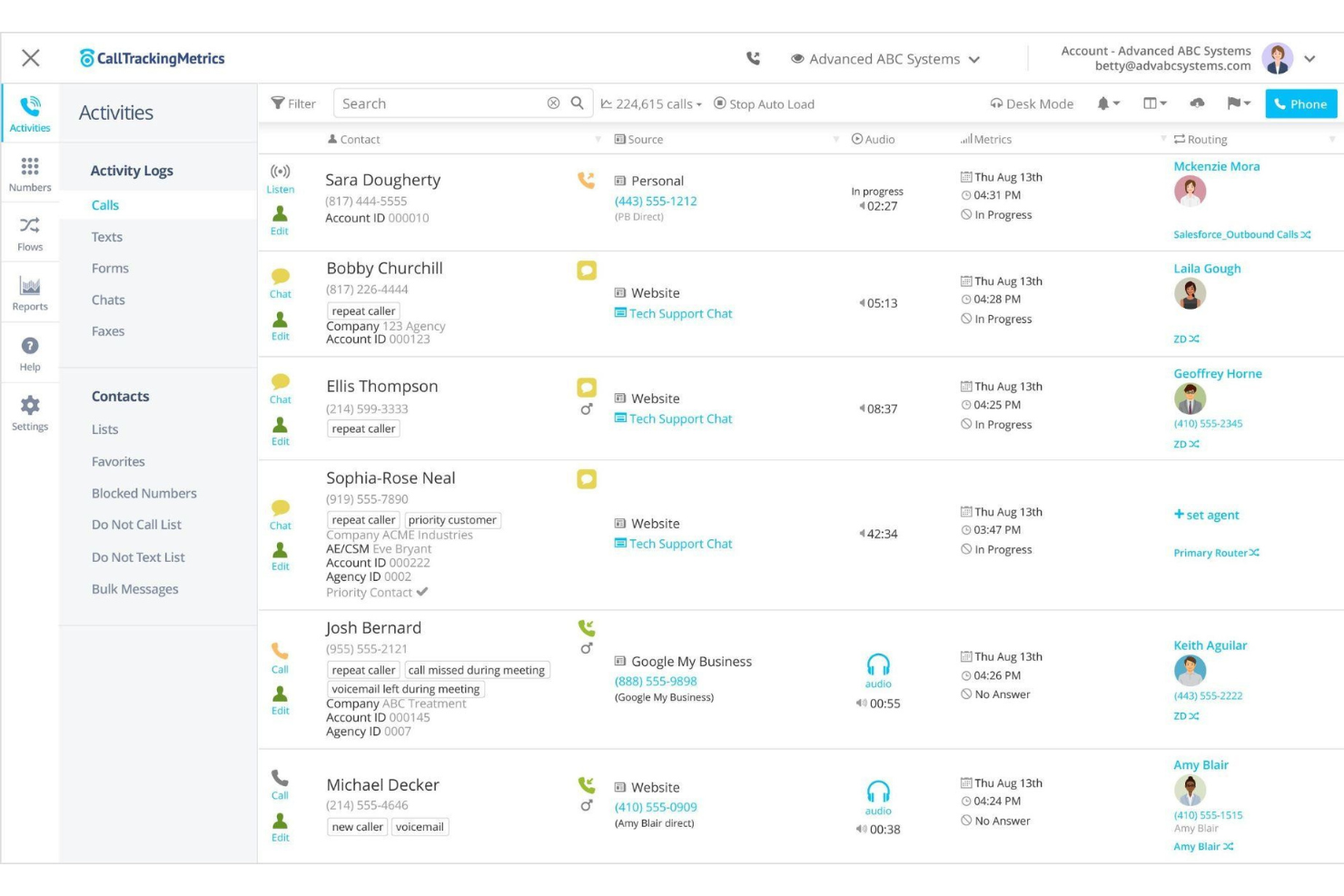
CallTrackingMetrics est un outil de suivi et d’analytique qui aide les entreprises à surveiller quelles interactions et campagnes génèrent des réponses.
Pourquoi j’ai choisi CallTrackingMetrics : Comme son nom l’indique, CallTrackingMetrics suit les analyses essentielles dans votre centre d’appels. CallTrackingMetrics utilise une fonctionnalité appelée Repérage de Mots-Clés qui vous permet de fixer des règles pour que la plateforme détecte certains mots-clés dans la transcription des appels. Vous pouvez ensuite demander au logiciel d’effectuer des actions précises en fonction des mots identifiés. Par exemple, si vous demandez à CallTrackingMetrics de repérer le mot-clé « mauvais numéro », vous pouvez ensuite lui demander de ne pas enregistrer l’appel et de le supprimer de vos archives.
CallTrackingMetrics convient aux entreprises de taille moyenne, telles que les agences, les cabinets de conseil et les spécialistes du marketing à la performance, qui ont besoin du suivi des appels et d’intelligence de conversion pour offrir des expériences personnalisées aux clients. L’outil peut détecter les tendances dans les conversations et automatiser des actions selon ce qu’il détecte, afin d’offrir un service plus rapide. Vous pouvez utiliser CallTrackingMetrics pour identifier les campagnes sortantes qui génèrent le plus de leads et de conversions, puis utiliser ces informations pour automatiser les flux d’appels.
Fonctionnalités et intégrations remarquables de CallTrackingMetrics
Fonctionnalités : insertion dynamique de numéro, suivi des appels, numéros de suivi, enregistrement d’appels, retranscription des appels, scoring des appels, repérage de mots-clés, routage intelligent des appels, gestion des appels, routage géographique et déclencheurs automatisés.
Intégrations : Pipedrive, Salesforce, SendGrid, Mailchimp, Kissmetrics, InstaPage, Zendesk, Zoho CRM, Zapier, Whatagraph, AgencyAnalytics, HubSpot CRM, Looker Studio, Magento et Google Analytics.
CallTrackingMetrics coûte à partir de 39 $/mois plus les frais d’utilisation pour un paiement mensuel ou 36 $/mois plus frais d’utilisation en paiement annuel. CallTrackingMetrics propose un mois d’essai gratuit aux nouveaux abonnés.
Pros and Cons
Pros:
- Très fiable.
- Permet de surveiller facilement les appels.
- Il offre des options de tri très approfondies.
Cons:
- La navigation est difficile.
- Mettre en place l’outil est fastidieux.

Idéal pour la gestion d'appels à distance
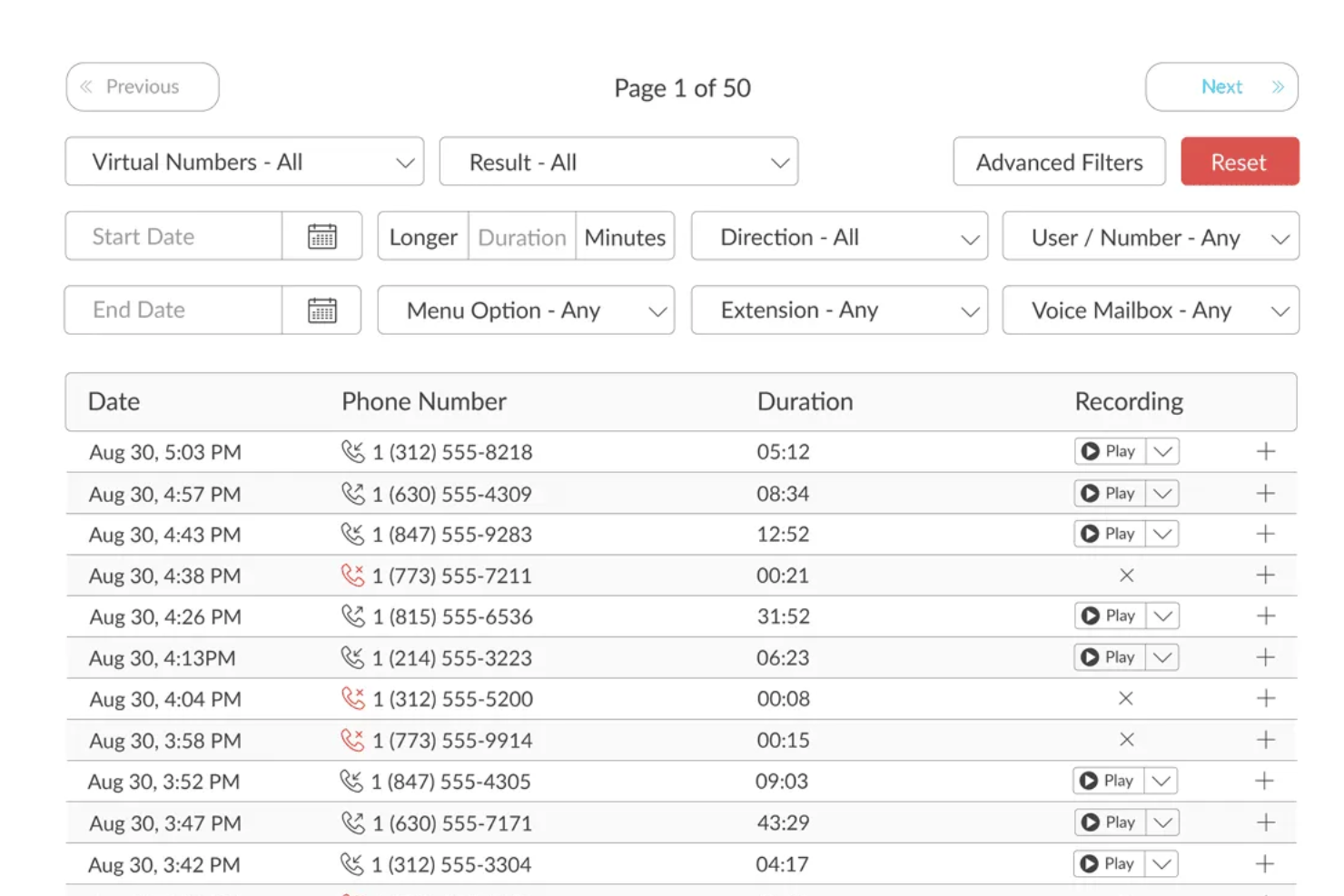
TalkRoute est un système téléphonique virtuel conçu pour les propriétaires d'entreprise et leurs équipes, offrant des outils de communication tels que les appels, les messages texte et les réunions vidéo à travers une seule application. Il comprend des fonctionnalités comme le transfert d'appel, la messagerie vocale, l'enregistrement des appels et des messages d'accueil personnalisables, accessibles sur ordinateur, mobile et via le web. Les utilisateurs peuvent gérer leurs communications en utilisant différents numéros de téléphone, y compris des numéros sans frais, personnalisés et locaux, depuis n'importe quel appareil.
Pourquoi j'ai choisi TalkRoute : L'une des caractéristiques de TalkRoute pour les centres d'appels sortants est son accessibilité multi-appareils. Votre équipe peut passer et recevoir des appels depuis des applications de bureau, web ou mobile. Cette flexibilité signifie que votre équipe n'est pas limitée à un seul endroit et peut travailler de n'importe où, s'assurant ainsi de toujours pouvoir entrer en contact avec les clients ou prospects sans avoir à être physiquement présente à un endroit précis. Ceci est particulièrement avantageux si votre équipe travaille à distance ou doit passer d'un appareil à l'autre au cours de la journée. La possibilité de passer d'un appareil à l'autre peut augmenter la productivité et garantir qu'aucun appel n'est manqué, ce qui contribue à maintenir la satisfaction client et l'efficacité.
TalkRoute Fonctionnalités remarquables et intégrations
Les fonctionnalités incluent l'intégration d'appels, de messages et de réunions, ainsi que le transfert et le routage des appels, garantissant que les appels atteignent les destinataires souhaités sur plusieurs appareils. Elle offre des capacités de messagerie texte prenant en charge SMS et MMS, avec des droits utilisateurs et des notifications par e-mail. La visioconférence permet jusqu'à 100 participants et propose le partage d'écran et de fichiers pour une collaboration facilitée. Des menus personnalisés et des extensions améliorent le routage des appels, tandis que les services de messagerie vocale proposent la transcription et les notifications par e-mail. TalkRoute propose également des options pour les numéros sans frais et personnalisés, le transfert d'appel en direct, l'empilement des appels, les messages d'accueil personnalisés et l'enregistrement des appels avec stockage illimité.
Intégrations proposées avec Google Sheets, HubSpot, Slack, LeadConnector, Asana, Discord, Google Chat, Gmail et LeadSimple CRM. Son intégration avec des applications tierces via Zapier ainsi que sa conformité (par exemple HIPAA) la rendent polyvalente pour de nombreux secteurs d'activité.

Twilio
Idéal pour la flexibilité
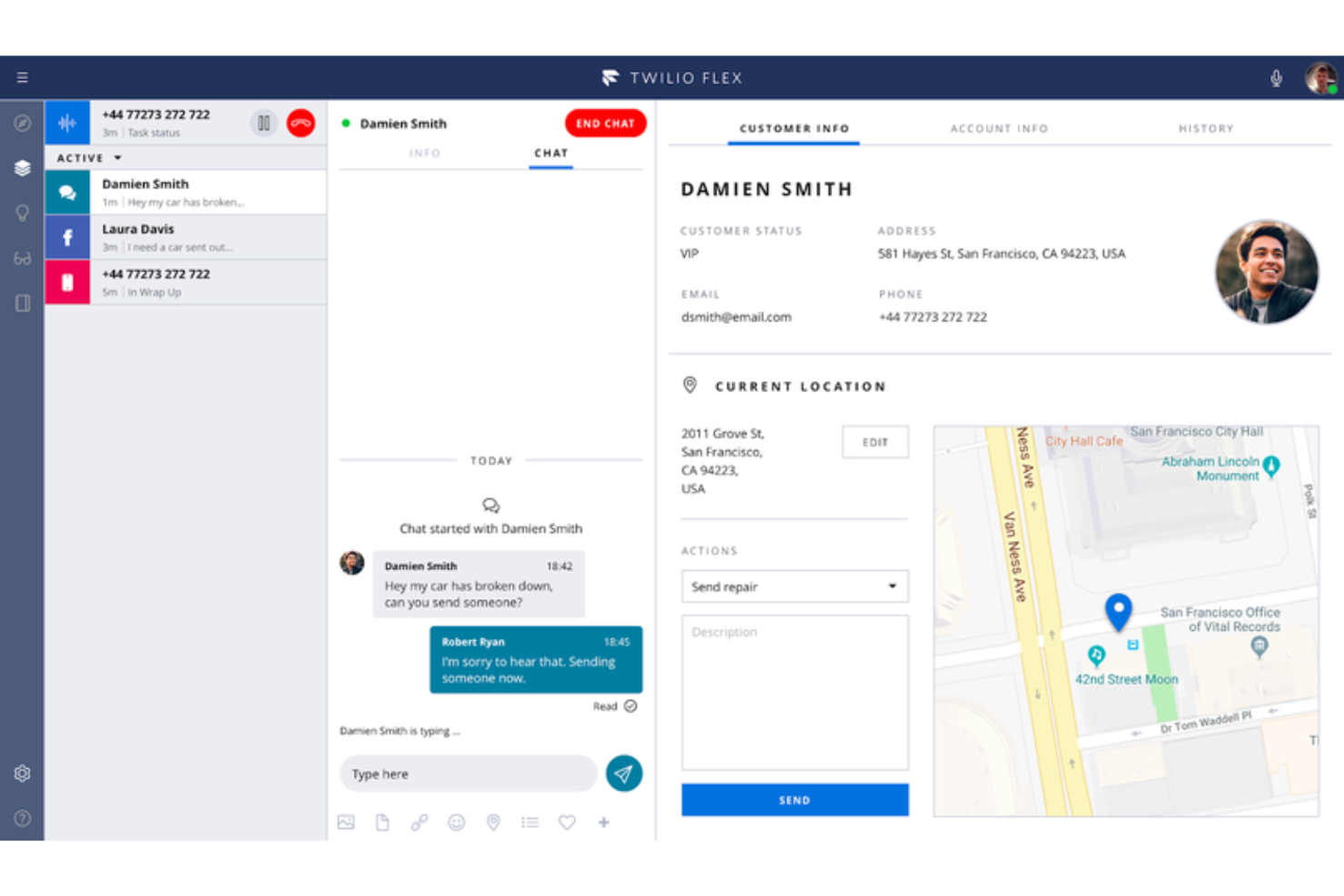
Twilio est une plateforme de centre de contact basée sur le cloud, suffisamment flexible pour évoluer avec les entreprises et s'adapter à des besoins spécifiques.
Pourquoi ai-je choisi Twilio : La plateforme adopte une approche 'fournisseur de contacts en tant que logiciel de service' pour leur logiciel de centre de contact. Twilio vous fournit un kit de développement vocal (SDK) et une API ouverte que vous ou votre équipe de développeurs pouvez utiliser pour créer une solution de centre d'appels adaptée aux besoins de votre organisation. Vous pouvez connecter plusieurs canaux de communication au module centralisé de Twilio, ce qui le rend extrêmement flexible.
Twilio convient à toute entreprise, quelle que soit sa taille, qui a besoin d'une solution de centre de contact lui permettant de créer sa propre plateforme. Il peut permettre à votre société d'utiliser la voix, la VoIP et la messagerie, intégrés à vos propres applications web, bureautiques ou mobiles personnalisées. À mesure que votre utilisation augmente ou diminue, Twilio s'adapte automatiquement à votre entreprise.
Fonctionnalités et intégrations remarquables de Twilio
Fonctionnalités : enregistrement des appels, analyses, gestion de l'attrition, routage des appels, audioconférences et visioconférences, collecte des retours, gestion des communications, chat en direct, répondeur automatique pour messagerie, et gestion des contacts.
Intégrations : monday sales CRM, Freshdesk, HoneyBook, Zendesk, Salesforce, Mailchimp, Slack, HubSpot CRM, Zoho CRM, Quickbooks, Airtable, Zapier, Microsoft Dynamics 365 et AgencyAnalytics.
Twilio est proposé à partir de 1 $/utilisateur/heure ou 150 $/utilisateur, quel que soit l'usage. Twilio propose un essai gratuit jusqu'à 5 000 heures d'utilisateurs actifs.
Pros and Cons
Pros:
- Son tarif est très compétitif par rapport à la concurrence.
- Il peut gérer les communications internationales.
- L'un des meilleurs fournisseurs d'API.
Cons:
- L’ensemble des outils peut sembler écrasant.
- Il aurait besoin de davantage de capacités d’analyses.
Autres logiciels de centre de contact dans le cloud
Voici quelques autres options qui ne figurent pas dans la liste des meilleurs logiciels de centre de contact dans le cloud :
- Zoho Voice
Idéal pour la téléphonie d'entreprise intégrée
- Five9
Idéal pour les appels longue distance
- Bitrix24
Idéal pour ses fonctionnalités CRM intégrées
- Zendesk Suite
Idéal pour ajouter un système de gestion des tickets à un centre d’appels
- GoTo Connect
Idéal pour le filtrage des appels
- Kixie Powercall
Idéal pour ajouter des fonctionnalités de centre d'appels à un CRM
- Dialfire
Idéal pour transformer un navigateur web en centre d'appels
- CallTools
Meilleur composeur prédictif et en mode aperçu
- 3CX
Idéal pour les interactions omnicanales


Comment j’évalue les logiciels de centre de contact cloud
Je divise mon évaluation en deux couches : les fonctionnalités indispensables — routage omnicanal, SVI, diffusion cloud — pour gérer les interactions clients à grande échelle, et les différenciateurs qui distinguent les meilleures plateformes.
Fonctionnalités de base (Essentielles pour cette liste)
Lorsque je sélectionne les outils pour ma liste, j’attribue à chacun une note de 0 (fonctionnalité absente) à 5 (excellence sur ce critère) pour chaque fonctionnalité de base listée ci-dessous. Ensuite, je convertis le score total en pourcentage. Chaque outil doit obtenir un score total minimum de 75 % pour être pris en considération.
- Gestion des interactions omnicanal : Je vérifie si les agents peuvent traiter les appels vocaux, e-mails, chats, SMS et messages sociaux depuis un espace de travail unique — et si le contexte client est conservé lors d’un passage d’un canal à l’autre.
- Architecture native cloud : Toutes les plateformes de cette liste doivent être entièrement basées sur navigateur, sans dépendances sur site, pour permettre aux équipes distribuées de se connecter et gérer les interactions depuis n’importe où.
- Capacités DAC & SVI : J’évalue la façon dont la plateforme dirige les contacts — prise en charge du routage basé sur les compétences, files d’attente par priorité, et arbres SVI configurables permettant à l’appelant de s’auto-dépanner ou d’atteindre le bon agent.
- Rapports en temps réel et historiques : Les superviseurs ont besoin de visibilité en direct sur la file et de données historiques (temps de traitement, SLA, taux d’abandon, etc.), donc j’analyse la richesse des tableaux de bord et les options de personnalisation des rapports.
- Gestion des effectifs et de la qualité : Je cherche des outils natifs de planification, d’enregistrement d’appels et de scoring qualité — ou au minimum des intégrations étroites avec des plateformes dédiées comme Verint ou Calabrio.
- Intégrations CRM & systèmes métiers : La plateforme doit pouvoir se connecter à des CRM comme Salesforce, HubSpot ou ServiceNow, et offrir des API ouvertes pour construire des workflows personnalisés dans votre environnement technologique existant.
Une fois la liste établie, je prends en compte ce qui différencie chaque plateforme.
Facteurs différenciants (Ce qui distingue les éditeurs)
Voici comment je compare et oppose différents fournisseurs :
Fonctionnalités remarquables
L’assistance aux agents fondée sur l’IA est un différenciateur clé — je privilégie les plateformes qui proposent des suggestions d’articles de connaissance ou de réponses en temps réel, pour aider les agents à résoudre plus rapidement des demandes complexes. L’IA conversationnelle et les bots comptent aussi, surtout pour les équipes gérant de gros volumes de questions répétitives en dehors des horaires d’ouverture. J’évalue également la présence d’un module de création de flux (low-code), car les responsables CX doivent souvent ajuster les menus SVI ou la logique de routage sans attendre un développeur.
Au-delà des fonctionnalités
Les certifications de conformité comme HIPAA, PCI-DSS et la conformité RGPD sont essentielles — surtout si vos agents traitent des paiements ou des données médicales. J’analyse aussi la transparence tarifaire : certains éditeurs intègrent la gestion des effectifs et l’analytique dans le forfait de base, d’autres facturent ces modules en option, ce qui peut faire varier le coût total. Les délais de mise en œuvre sont tout aussi cruciaux. J’examine si la plateforme propose un accompagnement au démarrage et des modèles préconfigurés qui permettent une mise en service en quelques semaines plutôt qu’en plusieurs mois.
Comment choisir un logiciel de centre de contact dans le cloud
Il est facile de se perdre dans de longues listes de fonctionnalités et des structures tarifaires complexes. Pour vous aider à rester concentré tout au long de votre processus de sélection logicielle, voici une liste de critères à garder à l’esprit :
| Critère | Points à prendre en compte |
|---|---|
| Évolutivité | Le logiciel peut-il évoluer avec votre entreprise ? Vérifiez qu’il prend en charge l’augmentation du volume d’appels et l’ajout d’utilisateurs sans coûts supplémentaires ni problèmes de performances. |
| Intégrations | Fonctionne-t-il avec vos outils existants, comme votre CRM ou votre messagerie électronique ? Assurez-vous qu’il s’y connecte facilement afin d’éviter les silos de données et les perturbations des flux de travail. |
| Personnalisation | Pouvez-vous adapter le logiciel à vos besoins ? Recherchez des options permettant de modifier les paramètres, les flux de travail et les interfaces utilisateur afin de les adapter aux processus de votre équipe. |
| Facilité d’utilisation | L’interface est-elle intuitive ? Assurez-vous que votre équipe puisse apprendre rapidement à utiliser le système et y naviguer sans formation ni assistance approfondies. |
| Mise en œuvre et intégration | Combien de temps faudra-t-il pour le mettre en place ? Tenez compte du temps et des ressources nécessaires au déploiement et à la formation. Privilégiez les solutions proposant des guides clairs et une assistance. |
| Coût | Quel est le coût total de possession ? Prenez en compte les frais d’abonnement, les modules complémentaires et les éventuels frais cachés. Comparez-les à votre budget et au retour sur investissement potentiel. |
| Mesures de sécurité | Comment le logiciel protège-t-il vos données ? Vérifiez la présence d’un chiffrement, de contrôles d’accès et de la conformité aux réglementations sur la protection des données, comme le RGPD ou le CCPA. |
| Disponibilité de l’assistance | Quelles options d’assistance sont proposées ? Assurez-vous de bénéficier d’une assistance disponible 24 h/24 et 7 j/7 par plusieurs canaux, comme le chat et le téléphone, afin de résoudre rapidement les problèmes lorsqu’ils surviennent. |
Qu’est-ce qu’un logiciel de centre de contact dans le cloud ?
Les logiciels de centre de contact basés sur le cloud sont des outils qui gèrent les interactions avec les clients sur différents canaux comme le téléphone, les e-mails et le chat, le tout hébergé dans le cloud. Les représentants du service client et les équipes d’assistance utilisent principalement ces outils pour améliorer l’expérience client et optimiser l’efficacité des communications.
Des fonctionnalités comme le routage des appels, la prise en charge multicanal et les analyses en temps réel facilitent la gestion des demandes, l’intégration aux systèmes existants et la fourniture d’informations utiles à une meilleure prise de décision. Globalement, ces outils offrent aux entreprises un moyen évolutif et flexible de gérer efficacement les interactions avec les clients.
Fonctionnalités
Lors de la sélection d’un logiciel de centre de contact basé sur le cloud, prêtez attention aux principales fonctionnalités suivantes :
- Routage des appels : dirige les appels entrants vers le bon agent ou service, améliorant ainsi les temps de réponse et la satisfaction des clients.
- Prise en charge multicanal : gère les interactions par téléphone, e-mail et chat, offrant une expérience de service client unifiée.
- Analyses en temps réel : fournit des informations sur les indicateurs de performance, aidant les équipes à prendre des décisions fondées sur les données et à optimiser les opérations.
- Systèmes IVR : automatise la gestion des appels grâce à la réponse vocale interactive, réduisant les temps d’attente et permettant aux agents de se consacrer aux demandes complexes.
- Intégration CRM : se connecte aux outils de gestion de la relation client existants, garantissant un flux de données fluide et un contexte pertinent pour chaque interaction.
- Informations fournies par l’IA : analyse les interactions avec les clients afin de fournir des informations exploitables, améliorant ainsi la prise de décision et l’efficacité.
- Tableaux de bord personnalisables : permettent aux équipes d’adapter leur interface afin de se concentrer sur les indicateurs et les flux de travail pertinents, augmentant ainsi la productivité.
- Transcription automatique des appels : convertit les appels en texte, facilitant la tenue des registres et la conformité aux réglementations du secteur.
- Communication omnicanale : garantit une qualité de service constante sur tous les canaux, améliorant l’expérience client et la fidélité à la marque.
Avantages
La mise en œuvre d’un logiciel de centre de contact basé sur le cloud offre plusieurs avantages à votre équipe et à votre entreprise. Voici quelques bénéfices auxquels vous pouvez vous attendre :
- Efficacité améliorée : le routage automatisé des appels et les systèmes IVR aident les agents à gérer davantage d’interactions avec moins de temps d’inactivité.
- Expérience client améliorée : la prise en charge multicanal garantit que les clients peuvent vous contacter sur leur plateforme préférée, améliorant ainsi leur satisfaction.
- Évolutivité : les solutions cloud évoluent avec votre entreprise, vous permettant d’ajouter des utilisateurs et des fonctionnalités sans investissements importants.
- Décisions fondées sur les données : les analyses en temps réel fournissent des informations sur les performances, vous aidant à optimiser les processus et l’affectation des ressources.
- Meilleure collaboration : l’intégration CRM connecte les équipes aux données pertinentes des clients, favorisant le travail d’équipe et un service éclairé.
- Réduction des coûts : la diminution des besoins en infrastructures physiques et en maintenance réduit les coûts opérationnels, libérant ainsi du budget pour d’autres priorités.
- Flexibilité et travail à distance : l’accès au cloud permet à votre équipe de travailler depuis n’importe où, garantissant la continuité du service et l’adaptabilité.
Coûts et tarification
La sélection d’un logiciel de centre de contact basé sur le cloud nécessite de comprendre les différents modèles et forfaits tarifaires disponibles. Les coûts varient en fonction des fonctionnalités, de la taille de l’équipe, des modules complémentaires et d’autres facteurs. Le tableau ci-dessous résume les forfaits courants, leurs prix moyens et les fonctionnalités généralement incluses dans les solutions logicielles de centre de contact basées sur le cloud :
Tableau comparatif des forfaits pour les logiciels de centre de contact basés sur le cloud
| Type de forfait | Prix moyen | Fonctionnalités courantes |
|---|---|---|
| Forfait gratuit | $0 | Routage basique des appels, prise en charge multicanal limitée et analyses basiques. |
| Forfait personnel | $10-$30/utilisateur/mois | Routage des appels, prise en charge multicanal, intégration CRM et analyses basiques. |
| Forfait professionnel | $40-$70/utilisateur/mois | Routage avancé des appels, prise en charge multicanal complète, intégration CRM et analyses. |
| Forfait entreprise | $80-$150/utilisateur/mois | Fonctionnalités personnalisables, informations fournies par l’IA, analyses complètes et assistance dédiée. |
FAQ sur les logiciels de centre de contact basés sur le cloud
Voici quelques réponses aux questions fréquentes sur les logiciels de centre de contact basés sur le cloud :
Dans quelle mesure les logiciels de centre de contact basés sur le cloud sont-ils sécurisés ?
Les logiciels de centre de contact basés sur le cloud sont généralement sécurisés, les fournisseurs mettant en place des mesures telles que le chiffrement des données, des audits de sécurité réguliers et la conformité à des réglementations comme le RGPD. Cependant, il est essentiel d’évaluer les protocoles de sécurité de chaque fournisseur et de s’assurer qu’ils correspondent aux exigences de votre entreprise. Renseignez-vous sur leurs politiques de protection des données et sur les éventuelles certifications de tiers qu’ils détiennent.
Mon équipe peut-elle travailler à distance avec un logiciel de centre de contact basé sur le cloud ?
Oui, les logiciels de centre de contact basés sur le cloud permettent à votre équipe de travailler depuis n’importe où avec une connexion Internet. Cette flexibilité favorise le travail à distance et garantit la continuité du service, même si votre équipe est répartie sur différents sites. Assurez-vous que le logiciel choisi propose une interface conviviale et un accès mobile afin de faciliter cette fonctionnalité à distance.
Les logiciels de centre de contact basés sur le cloud peuvent-ils s'intégrer aux outils existants ?
Oui, la plupart des logiciels de centre de contact basés sur le cloud peuvent s’intégrer à des outils existants tels que les CRM, les plateformes de messagerie électronique et les applications de chat. Ces intégrations contribuent à rationaliser les flux de travail et garantissent que votre équipe dispose de toutes les informations nécessaires au même endroit. Avant l’achat, vérifiez si le logiciel prend en charge vos outils actuels ou si des intégrations personnalisées sont possibles.
Comment les plateformes de centre de contact cloud gèrent-elles les volumes d'appels élevés ?
Ces plateformes sont généralement conçues pour évoluer dynamiquement en fonction de la demande. Le routage des appels, la mise en file d’attente et les stratégies de débordement sont gérés grâce à des paramètres automatisés ou à des règles définies par l’administrateur. Certains systèmes permettent d’ajuster en temps réel la distribution des appels en fonction de la disponibilité actuelle des agents.
Comment ces systèmes gèrent-ils les pannes ou les interruptions de service ?
Les plateformes fiables utilisent une infrastructure cloud redondante afin de réduire au minimum les temps d’arrêt. Certaines intègrent des systèmes de basculement automatique ou des plans de routage de secours qui s’activent automatiquement. Les utilisateurs sont généralement informés de l’état du service via une page d’état ou des alertes de la plateforme.
