

10 meilleures plateformes logicielles CX comparées pour 2026

12 meilleurs logiciels CX Shortlist


Avec tant de solutions de gestion de l'expérience client disponibles, il est difficile de déterminer laquelle vous convient le mieux. Vous savez que vous souhaitez gérer et standardiser le parcours client, mais il vous faut trouver l'outil idéal. Je suis là pour vous aider ! Dans cet article, je vais vous faciliter la tâche en partageant mes expériences personnelles avec des dizaines d'outils CX, utilisés avec de grandes équipes et sur de nombreux projets, ainsi que mes choix des meilleurs logiciels CX disponibles.
Qu'est-ce qu'un logiciel CX ?
Un logiciel CX, ou logiciel d'expérience client, est un outil numérique qui vous aide à améliorer les interactions avec vos clients. Tous les secteurs utilisent ces plateformes pour gérer, analyser et optimiser chaque point de contact du parcours client. Petites entreprises comme grandes entreprises peuvent utiliser ces outils pour développer des relations solides, accroître la satisfaction et favoriser la fidélité client.
En capturant et analysant les retours clients, le logiciel CX permet de mieux comprendre les besoins des clients, d'assurer la résolution rapide des irritants et de personnaliser les interactions. Cette utilisation stratégique de la technologie influence directement la perception de la marque par le client, jouant ainsi un rôle crucial dans la croissance et la pérennité de l'entreprise.
Comparer les spécifications
| Tool | Best For | Trial Info | Price | ||
|---|---|---|---|---|---|
| 1 | Idéal pour l'analyse de retours à grande échelle | Démo gratuite disponible | Tarification sur demande | Website | |
| 2 | Idéal pour la gestion du support des vendeurs sur marketplace | Essai gratuit de 14 jours disponible | À partir de 19 $/utilisateur/mois (facturé annuellement) | Website | |
| 3 | Idéal pour les tableaux de bord CX basés sur les rôles pilotés par l’IA | Démo gratuite disponible | Tarif sur demande | Website | |
| 4 | Idéal pour des enquêtes conversationnelles | Essai gratuit de 14 jours + démo gratuite disponible | Tarification sur demande | Website | |
| 5 | Idéal pour des enquêtes clients personnalisées | Essai gratuit + offre gratuite + démonstration gratuite disponibles | À partir de $39/mois (facturé annuellement) | Website | |
| 6 | Meilleures analyses clients pilotées par l'IA | Démo gratuite disponible | Tarification sur demande | Website | |
| 7 | Idéal pour entraîner des chatbots IA sur des données personnalisées | Offre gratuite disponible | À partir de $32/mois (facturé annuellement) | Website | |
| 8 | Idéal pour les cartes heuristiques dynamiques | Essai gratuit de 7 jours + offre gratuite disponible | À partir de 9 $/mois (1 utilisateur, facturé annuellement) | Website | |
| 9 | Idéal pour la collecte automatisée d'avis clients sur plusieurs canaux | Essai gratuit de 10 jours disponible | À partir de 55,99 $/mois | Website | |
| 10 | Idéal pour l'évaluation de la santé client en temps réel | Essai gratuit disponible | À partir de $115/mois | Website |


Aperçus des 12 meilleurs logiciels CX

Idéal pour l'analyse de retours à grande échelle
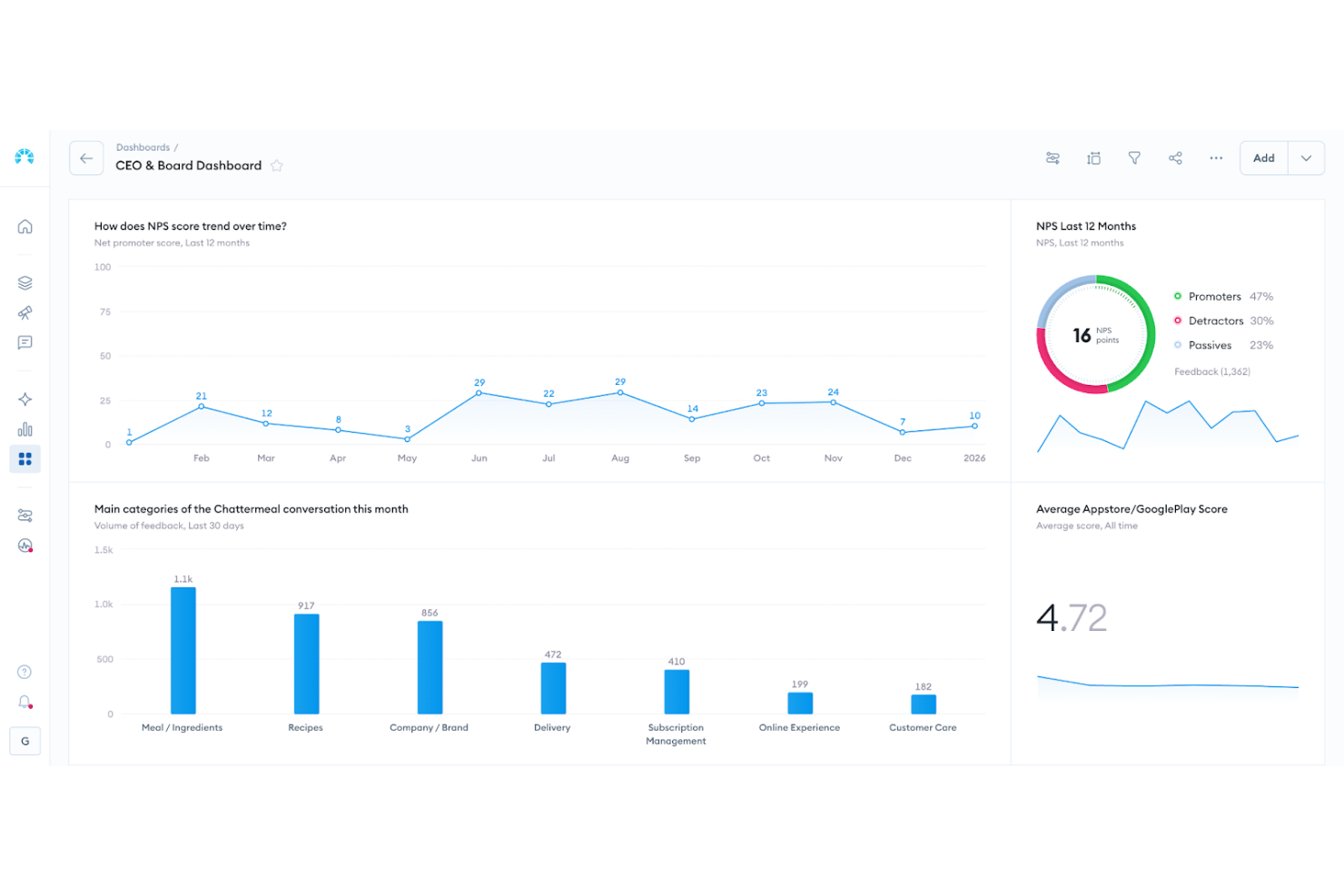
Chattermill est une plateforme d'analyse de la voix du client conçue pour les entreprises souhaitant renforcer leur stratégie d'expérience client. Elle prend en charge les organisations cherchant à exploiter pleinement la valeur des retours clients grâce à une analyse pilotée par l'IA. En centralisant les retours provenant d'enquêtes, d'avis, d'interactions avec le support et d'autres canaux, Chattermill aide les équipes à faire émerger les thèmes clés, détecter les problèmes émergents et s'assurer que les informations importantes ne se perdent pas dans des données fragmentées.
Pourquoi j'ai choisi Chattermill
J'ai choisi Chattermill car il excelle dans la transformation des retours clients en informations exploitables, un aspect crucial pour tout logiciel d'expérience client. Ses analyses pilotées par l'IA se distinguent, permettant à votre équipe de catégoriser et d'interpréter efficacement de grandes quantités de retours. De plus, sa capacité à détecter les tendances et à identifier les problèmes impactant des indicateurs commerciaux tels que le NPS et le CSAT vous assure de rester en avance sur les besoins et attentes des clients. Cette orientation vers les informations concrètes est essentielle pour ceux qui souhaitent améliorer leur cadre d'expérience client.
Fonctionnalités clés de Chattermill
En plus de ses analyses puissantes, Chattermill propose plusieurs autres fonctionnalités qui renforcent son utilité en tant qu'outil CX.
- Analyse des retours clients : Cette fonctionnalité vous permet de centraliser les retours provenant de différents canaux au sein d'une seule plateforme pour une analyse complète.
- Analyse de l'expérience produit : Bénéficiez d'informations sur la manière dont les clients interagissent avec vos produits, afin d'identifier les axes d'amélioration.
- Analyse des données de support : Analysez les interactions avec le support client pour découvrir les tendances et les domaines nécessitant une attention particulière.
- Analyse CX des réseaux sociaux : Surveillez et analysez les interactions sur les réseaux sociaux pour comprendre le ressenti et l'engagement des clients.
Intégrations Chattermill
Les intégrations incluent Zendesk, Trustpilot, Qualtrics, Intercom, Salesforce, HubSpot, Slack, Google Analytics, Shopify et Freshdesk.
Pros and Cons
Pros:
- Suivi du sentiment en temps réel
- Étiquetage thématique piloté par l'IA
- Modèles de sentiment adaptés à l'industrie
Cons:
- Tarification non disponible publiquement
- Peut nécessiter un accompagnement à l'onboarding pour les entreprises

Idéal pour la gestion du support des vendeurs sur marketplace
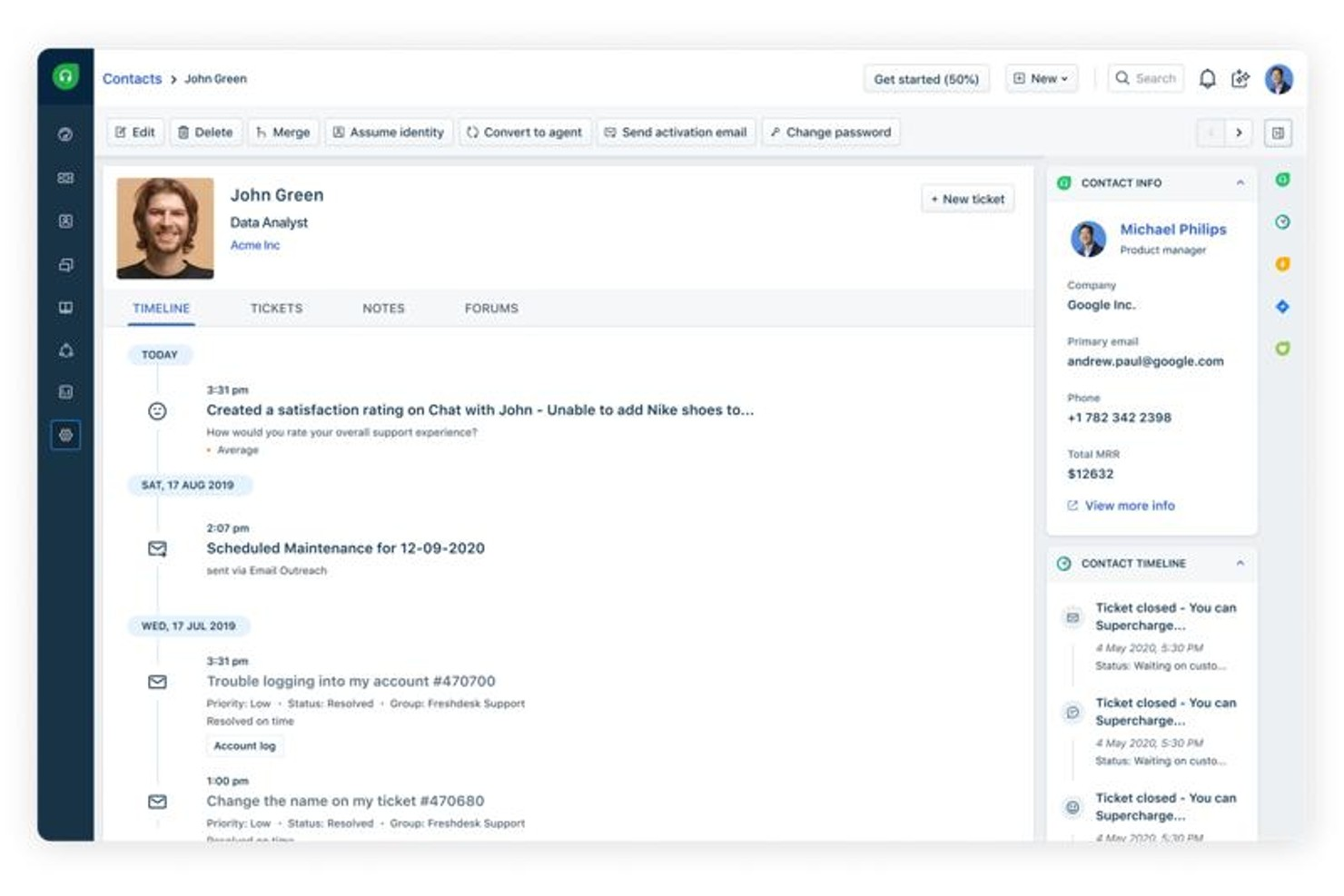
Freshdesk est une plateforme d'assistance client omnicanal qui centralise la gestion des tickets, le chat en direct, le téléphone, l'e-mail et les interactions sur les réseaux sociaux, en plus d'automatisations alimentées par l'IA et d'outils en libre-service.
À qui s'adresse Freshdesk ?
Freshdesk convient particulièrement aux entreprises e-commerce et aux marketplaces de taille moyenne à grande qui recherchent une plateforme de support centralisée couvrant de multiples canaux de contact client.
Pourquoi j'ai choisi Freshdesk
Freshdesk est l'une de mes principales recommandations pour la gestion du support des vendeurs sur marketplace, en raison de sa capacité à gérer la complexité des tickets multipartites. Lorsqu'un litige acheteur est ouvert, les agents disposent de tout le contexte de conversation dans le Command Center, ce qui évite de jongler entre plusieurs onglets pour comparer les propos du vendeur à ceux du client. J'apprécie aussi le routage basé sur les compétences, qui permet d'orienter automatiquement les tickets liés aux litiges vendeurs, problèmes de paiement ou logistique vers l'agent le plus qualifié, plutôt que le premier disponible.
Fonctionnalités clés de Freshdesk
- Freddy AI Copilot : Suggère en temps réel des réponses et des articles de la base de connaissances pertinents aux agents lors des interactions en direct.
- Gestion des SLA : Définissez des objectifs de temps de réponse et de résolution selon le type de ticket, avec déclencheur d’escalade automatique en cas de risque de dépassement de délais.
- Enquêtes CSAT : Envoyez automatiquement des enquêtes de satisfaction après la clôture des tickets pour recueillir le ressenti client sur chaque interaction.
- Portail libre-service : Offrez aux clients un portail personnalisé pour soumettre des tickets, suivre leur statut et consulter des articles d’aide sans contacter d’agent.
Intégrations Freshdesk
Freshdesk propose plus de 1 000 intégrations marketplace, dont Slack, Microsoft Teams, Shopify, Salesforce, Jira, Google Calendar, Google Analytics et Aircall. Il est disponible sur Zapier et offre une API pour les intégrations personnalisées.
Pros and Cons
Pros:
- Couvre e-mail, chat, téléphone et canaux sociaux
- L'écosystème Freshworks partage les données CRM
- Automatisation du routage des tickets prise en charge
Cons:
- Outils de reporting limités sur les formules de base
- Fonctionnalités limitées sur l'application mobile

Idéal pour les tableaux de bord CX basés sur les rôles pilotés par l’IA
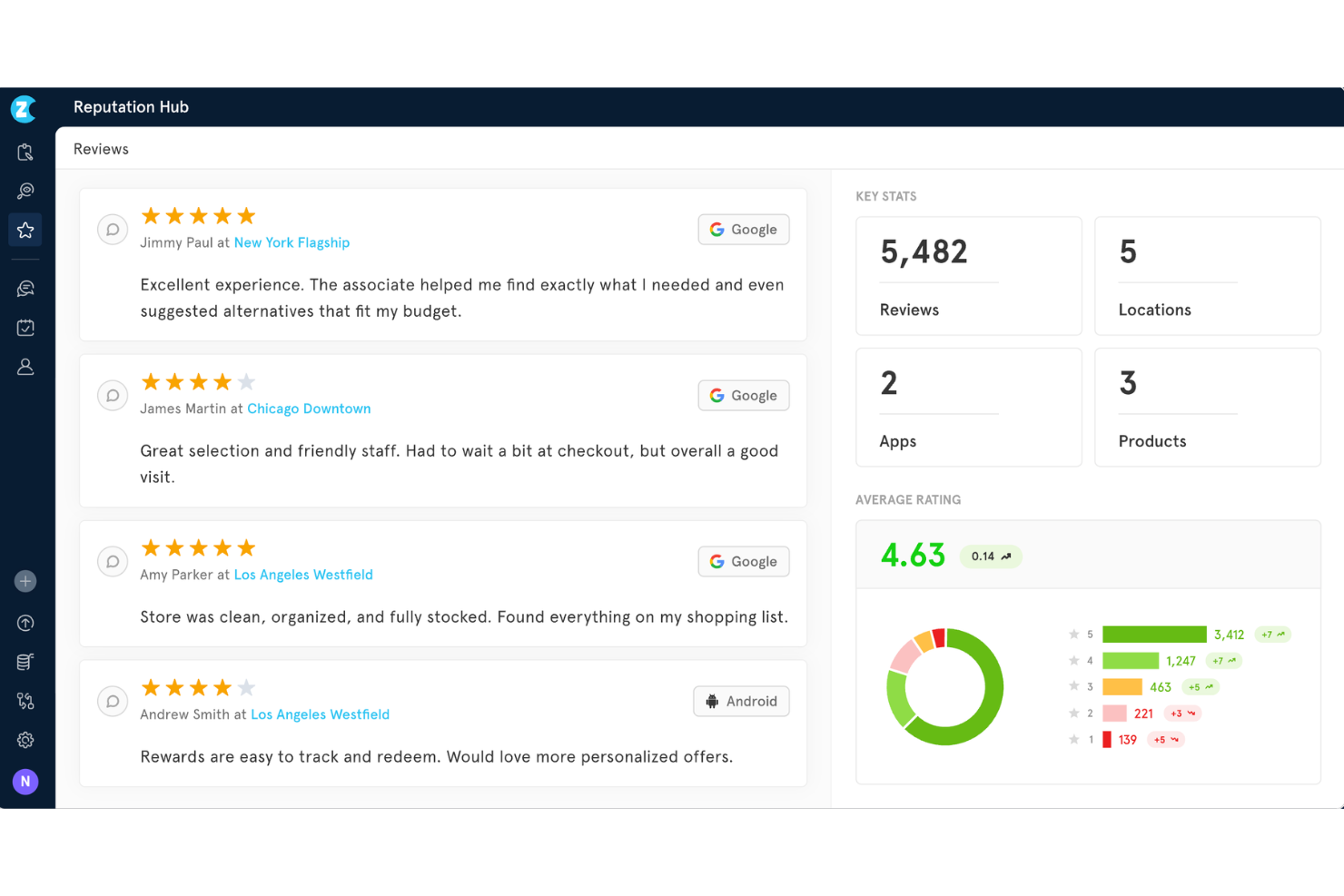
Zonka Feedback est une plateforme d'expérience client (CX) basée sur l'IA qui combine la collecte de feedback omnicanal, des outils d'enquêtes NPS/CSAT/CES, l'analyse de sentiment et des thèmes, la gestion des cas en boucle fermée et des tableaux de bord basés sur les rôles.
Pour qui Zonka Feedback est-il le mieux adapté ?
Zonka Feedback convient aux équipes CX des PME et du mid-market qui ont besoin de gérer les retours clients multi-sites et d'obtenir des analyses pilotées par l'IA sans la complexité d'une solution d'entreprise.
Pourquoi j'ai choisi Zonka Feedback
J'ai inclus Zonka Feedback dans ma sélection car ses tableaux de bord adaptés aux rôles changent réellement la façon dont les différentes équipes consomment les données CX. Un responsable local voit les tendances CSAT de son site, tandis qu'un directeur CX accède à une analyse d'impact alimentée par l'IA reliant directement les thèmes de feedback à l’évolution du NPS. J'apprécie aussi la détection d'anomalies par Agentic AI, qui signale en temps réel les baisses de scores avant qu'elles ne deviennent des risques de churn.
Fonctionnalités principales de Zonka Feedback
- Moteur d'enquête omnicanal : Collectez les retours par e-mail, SMS, WhatsApp, web, application mobile, bornes et QR codes sur une seule plateforme.
- Logique d'enquête avancée : Utilisez les embranchements, la logique de saut et la prise en charge multilingue pour adapter les questions aux segments d'audience.
- Workflows d’automatisation CX : Automatisez les relances, les escalades et l’assignation des cas sur la base de déclencheurs d'enquête spécifiques.
- Conformité de niveau entreprise : Maintenez la sécurité avec la certification ISO 27001, la conformité GDPR, HIPAA et les options de localisation des données.
Intégrations Zonka Feedback
Zonka Feedback offre plus de 20 intégrations natives, dont Salesforce, HubSpot, Pipedrive, Mailchimp, Zendesk, Intercom, Freshdesk, HelpScout, Front, Jira et Slack. Zapier et une API ouverte permettent d'assurer des intégrations personnalisées.
Pros and Cons
Pros:
- Mode borne hors connexion disponible
- L’analyse d’impact fait le lien entre les thèmes de feedback et le NPS
- Les résumés IA identifient automatiquement les tendances
Cons:
- La cartographie du parcours ne propose pas d’outils d’orchestration visuelle
- Scoring prédictif du churn limité

Idéal pour des enquêtes conversationnelles
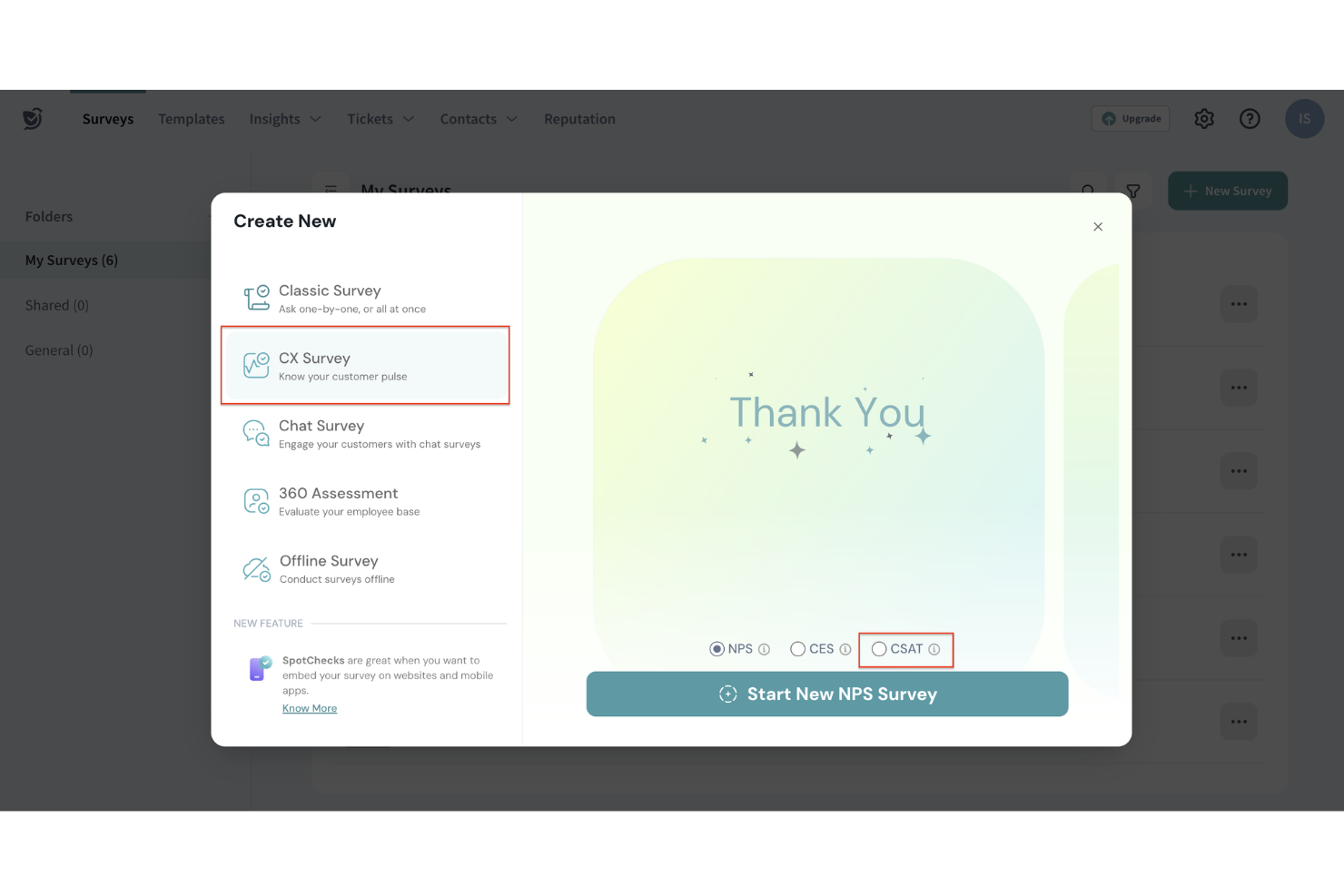
Pour les entreprises souhaitant renforcer leurs stratégies d'expérience client, SurveySparrow propose une plateforme intuitive qui transforme les retours en informations exploitables. Que vous soyez dans le commerce de détail, la santé, ou tout secteur dépendant de la satisfaction client, SurveySparrow peut vous aider à engager votre audience plus efficacement. Cet outil est conçu pour relever le défi de la collecte de retours significatifs et leur traduction en stratégies permettant d'améliorer la fidélité client et la croissance de l'entreprise.
Pourquoi j'ai choisi SurveySparrow
J'ai choisi SurveySparrow car il associe des enquêtes conversationnelles, une question à la fois, afin que vous puissiez gérer l'ensemble de votre stratégie d'écoute client depuis un même endroit. Les analyses alimentées par l'IA via CogniVue fournissent aux entreprises les données nécessaires pour prendre des décisions éclairées rapidement. De plus, le système de ticketing aide à résoudre rapidement les problèmes des clients, garantissant que les retours ne sont pas seulement collectés mais également traités efficacement.
Fonctionnalités clés de SurveySparrow
En plus de ses enquêtes conversationnelles et de ses analyses alimentées par l'IA, SurveySparrow propose également :
- Enquêtes NPS® : Évaluez la fidélité et la satisfaction de vos clients avec des enquêtes Net Promoter Score, faciles à déployer et à analyser.
- Distribution multicanale : Touchez votre public via différents canaux, dont l'e-mail, les réseaux sociaux et les SMS, pour maximiser la participation aux enquêtes.
- Gestion de la réputation : Surveillez et gérez les avis en ligne pour bâtir et maintenir efficacement la réputation de votre marque.
- Enquêtes en marque blanche : Personnalisez vos enquêtes avec votre identité visuelle pour assurer une apparence cohérente et professionnelle.
Intégrations SurveySparrow
Les intégrations incluent Slack, HubSpot, Salesforce, Mailchimp, Google Analytics, Microsoft Dynamics 365, Shopify, Stripe, Zendesk et Intercom. SurveySparrow propose également un accès API pour des intégrations personnalisées, vous permettant d'adapter la plateforme à vos besoins spécifiques.
Pros and Cons
Pros:
- Propose un partage facile via le web, le mobile et l'e-mail.
- Fournit des analyses alimentées par l'IA pour des décisions exploitables.
- Prend en charge plusieurs types de questions pour collecter des retours diversifiés.
Cons:
- Options d'exportation de données limitées, restreignant la flexibilité des rapports.
- La couverture des enquêtes mobiles ou hors ligne peut nécessiter une configuration supplémentaire dans les scénarios de terrain.

Idéal pour des enquêtes clients personnalisées
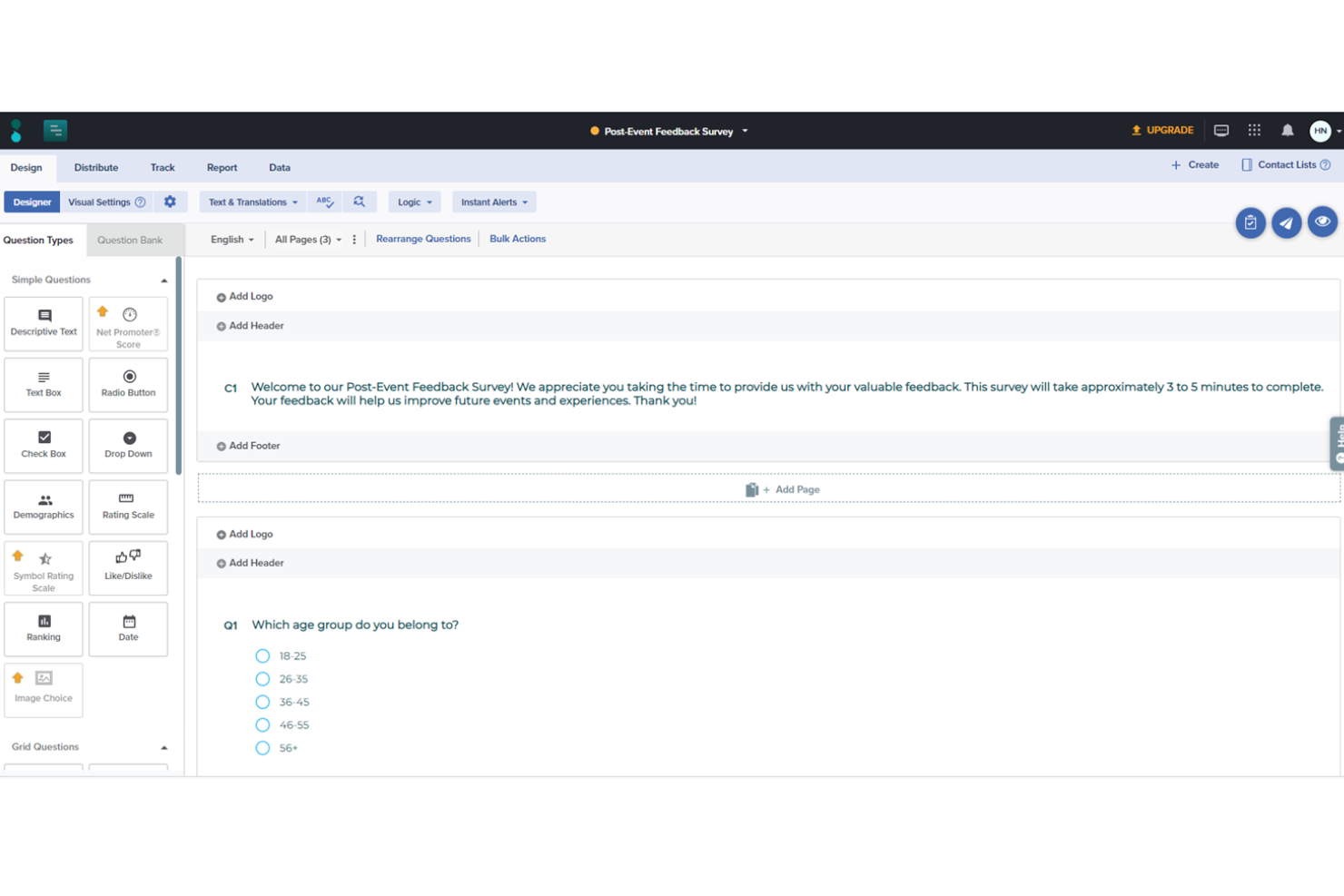
Sogolytics est une plateforme robuste de gestion des enquêtes en ligne et des retours d'information, conçue pour aider les organisations à recueillir, analyser et exploiter les retours des clients, employés et autres parties prenantes. Grâce à une interface intuitive et à des outils analytiques puissants, Sogolytics facilite la création d'enquêtes personnalisées permettant de capter des informations essentielles.
Pourquoi j'ai choisi Sogolytics :
SogoCX, composant de la plateforme Sogolytics, se concentre sur l'amélioration de la satisfaction et de la fidélité client grâce à un tableau de bord interactif qui suit les interactions et les retours des clients à travers de multiples points de contact. Il permet aux entreprises d'identifier les tendances, de mesurer les principaux facteurs du ressenti client et de prendre des mesures proactives pour optimiser l'expérience globale du client. Des fonctionnalités telles que les rappels automatisés et les invitations personnalisées aux enquêtes aident à augmenter les taux de réponse, garantissant des retours abondants et représentatifs.
Fonctionnalités et intégrations remarquables :
Les capacités avancées de conception d'enquêtes de Sogolytics incluent des thèmes personnalisables, des branchements conditionnels et la logique de saut, permettant de créer des enquêtes hautement personnalisées et engageantes. De plus, son puissant moteur analytique fournit des rapports en temps réel, du formatage conditionnel et des analyses croisées pour aider les utilisateurs à interpréter des données complexes.
Les intégrations incluent Salesforce, Microsoft Office, Google Workspace, Zapier, Tableau, HubSpot et Slack.
Pros and Cons
Pros:
- Large choix de types de questions avancées
- Bonnes fonctionnalités de collecte et d’analyse de données
- Diffusion multicanal
Cons:
- La version gratuite peut être trop basique pour certains utilisateurs
- Certaines analyses avancées nécessitent un niveau technique plus élevé
New Product Updates from Sogolytics
Sogolytics Adds Teams and Slack Surveys and Custom Automations
Sogolytics adds native Microsoft Teams and Slack survey distribution, a Custom Automations Builder, Derived Fields, PointClickCare integration, and authenticator-based MFA. These updates expand survey distribution and workflow automation while adding new data management and security capabilities. For more information, visit Sogolytics’ official site.
 .
.
Unwrap
Meilleures analyses clients pilotées par l'IA
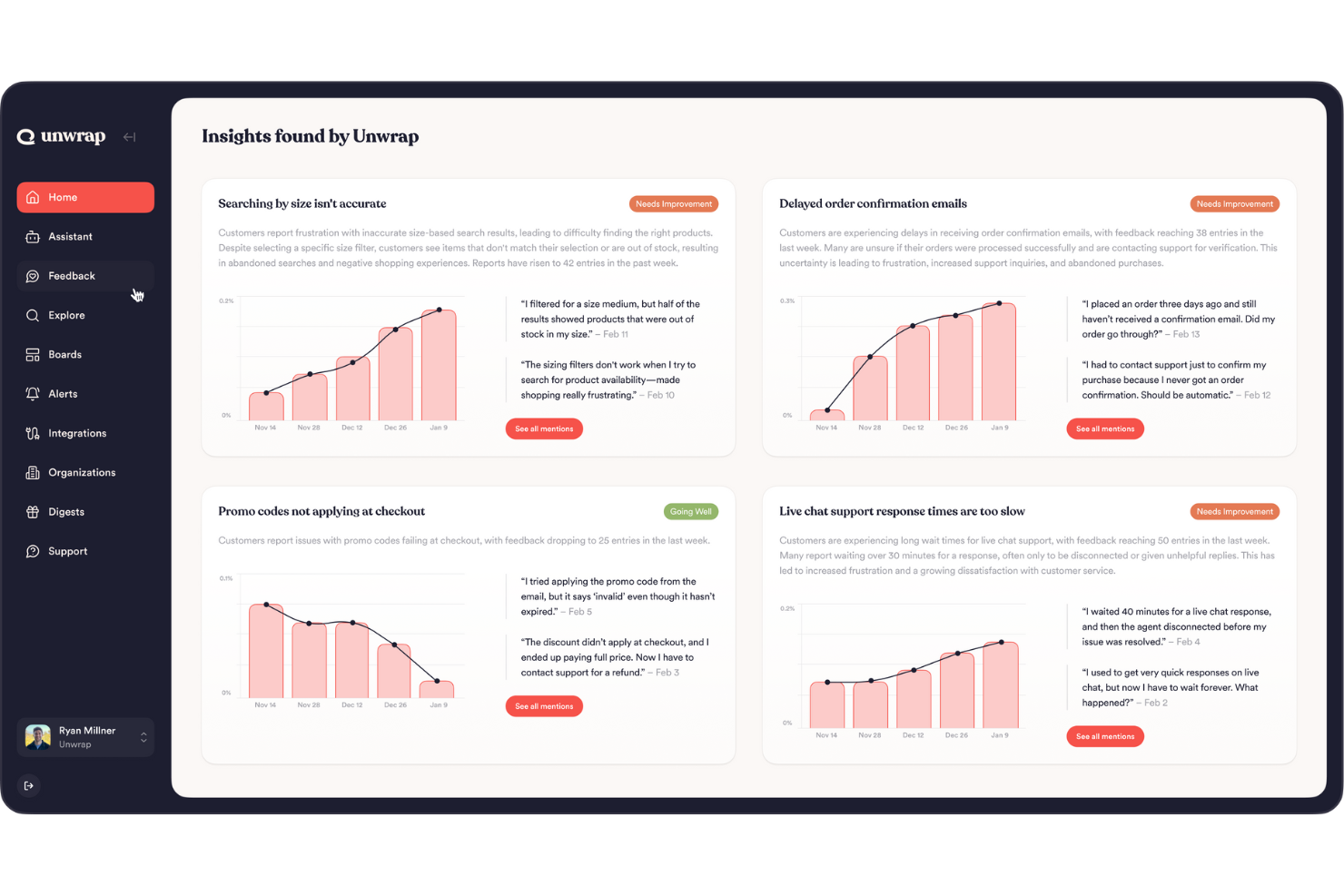
Unwrap est une plateforme avancée d'intelligence client conçue pour transformer la manière dont les entreprises recueillent et exploitent les retours clients. Elle est particulièrement attrayante pour des secteurs tels que la vente au détail, le voyage et les logiciels, où la compréhension des sentiments des clients peut avoir un impact direct sur le développement des produits et la satisfaction clientèle.
Pourquoi j'ai choisi Unwrap
J'ai choisi Unwrap pour sa capacité à fournir des analyses proactives grâce à l'IA, améliorant ainsi la gestion de l'expérience client. Une fonctionnalité remarquable est l'Auto Tagger, qui organise automatiquement les retours en différentes catégories, faisant gagner du temps à votre équipe et réduisant les erreurs manuelles. De plus, l'Assistant de requête en langage naturel permet d'extraire rapidement des informations sans naviguer dans des systèmes complexes, ce qui facilite l'obtention de réponses instantanées. Ces fonctionnalités répondent parfaitement à vos besoins d'une approche axée sur les données pour comprendre les sentiments des clients et améliorer la qualité du service rendu.
Fonctionnalités clés de Unwrap
En plus des fonctionnalités mentionnées ci-dessus, Unwrap propose :
- Tableaux de bord personnalisables : Ils permettent à votre équipe de visualiser les données selon les besoins de votre entreprise, rendant le suivi des indicateurs clés de performance plus aisé.
- Alertes en temps réel : Cette fonction garantit que vous êtes immédiatement informé des retours critiques, permettant des actions rapides lorsque cela est nécessaire.
- Outil de réponse : Favorise l'engagement client en permettant de traiter directement les retours à partir de la plateforme.
- SupportIQ : Offre une vue d'ensemble complète des métriques de performance, vous aidant à évaluer et améliorer les efforts de support client.
Intégrations Unwrap
Les intégrations incluent Salesforce, Zendesk, Intercom, Slack, HubSpot, Mailchimp, Google Analytics, Asana, Trello et Jira.
Pros and Cons
Pros:
- L’analyse des sentiments aide les équipes à quantifier l’évolution du ressenti des utilisateurs au fil du temps.
- Les outils d’IA mettent en avant les tendances émergentes sans avoir à passer manuellement de grands volumes de données en revue.
- Automatise la catégorisation des retours non structurés en groupes signifiants grâce au NLP.
Cons:
- La personnalisation de la taxonomie des retours peut exiger des efforts supplémentaires.
- Des lacunes occasionnelles dans les intégrations natives de la plateforme par rapport à certains concurrents.

Chatbase
Idéal pour entraîner des chatbots IA sur des données personnalisées
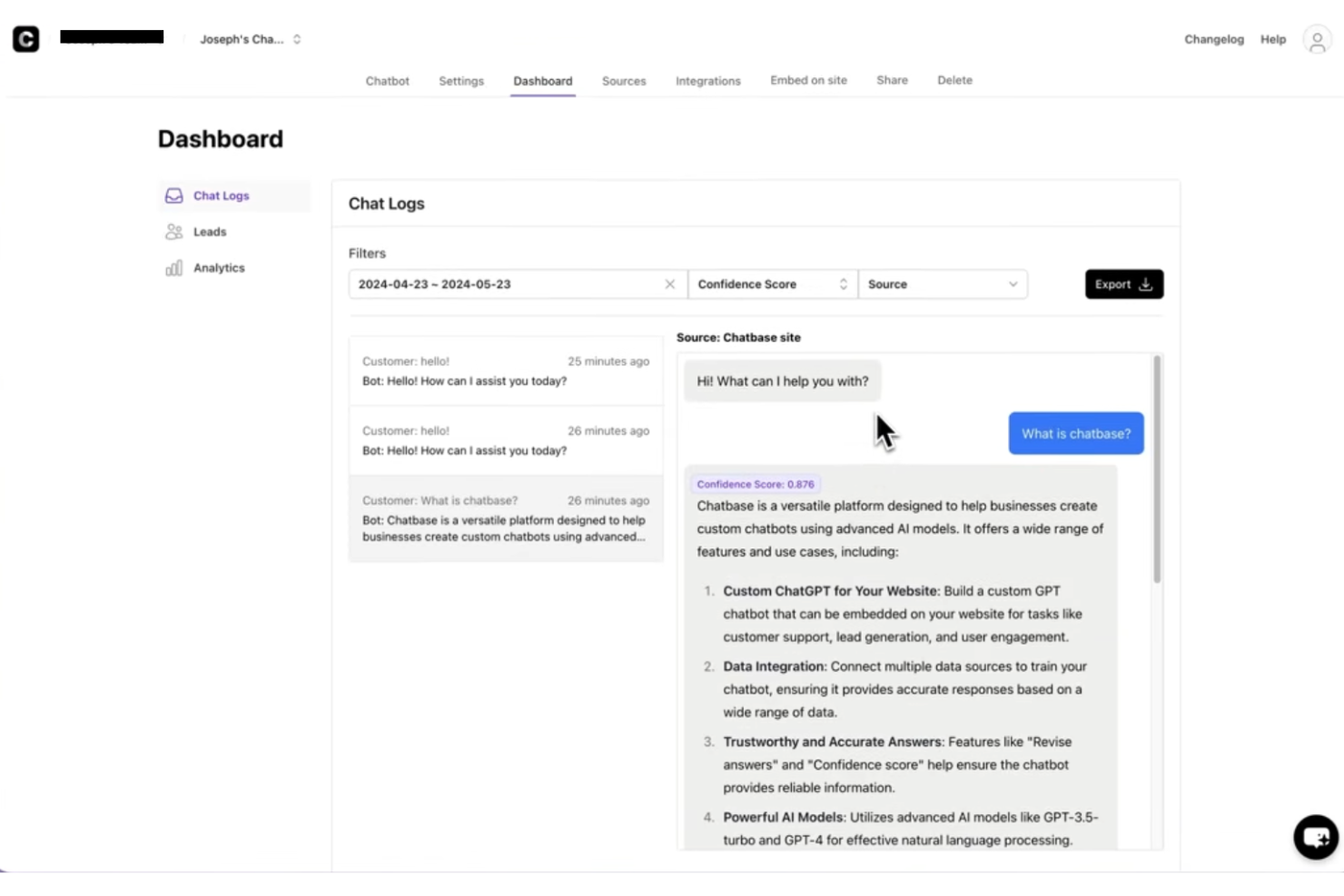
Chatbase est un créateur de chatbot alimenté par l'IA qui vous permet de former des bots conversationnels sur les données de votre organisation, avec une prise en charge du multilingue, des contrôles granulaires et des intégrations pour intégrer le support par chat dans les parcours d’expérience client.
Pour qui Chatbase est-il le mieux adapté ?
Chatbase convient bien aux petites et moyennes entreprises ainsi qu’aux équipes numériques qui souhaitent déployer un chatbot IA entraîné de manière personnalisée sans forte implication des développeurs.
Pourquoi j'ai choisi Chatbase
J’ai sélectionné Chatbase comme l’un des meilleurs en raison de sa gestion de la formation sur des données personnalisées. Vous pouvez lui fournir votre base de connaissances existante, des documents produits, des PDF, des URLs et même des pages Notion, et il utilise ce contenu comme unique source de vérité pour chaque conversation client. J’apprécie que la section Sources vous permette de gérer et mettre à jour les données d’apprentissage au fil du temps, de sorte que l’agent reste à jour sans nécessiter une reconstruction complète. Associez cela à la possibilité de comparer des modèles d’IA pour trouver la meilleure configuration selon votre cas d’utilisation, et vous avez un chatbot vraiment construit autour de votre contenu de support, plutôt qu’un modèle LLM générique.
Fonctionnalités clés de Chatbase
- Journaux de conversation : Consultez les transcriptions complètes des interactions pour surveiller la qualité des réponses et identifier les lacunes de votre base d’apprentissage.
- Formulaires de capture de leads : Collectez les coordonnées de visiteurs directement dans le widget de chat pendant les conversations clients.
- Actions personnalisées : Connectez votre chatbot à des outils externes, afin qu’il puisse récupérer des données en temps réel ou déclencher des workflows au cours d’une conversation.
- Transfert à un agent : Faites passer la conversation à un conseiller humain lorsque le chatbot atteint les limites de ses connaissances.
Intégrations Chatbase
Chatbase offre des intégrations natives avec Make, Zendesk, Notion, Slack, Stripe, Salesforce, et d'autres. Une API est également disponible pour les intégrations personnalisées.
Pros and Cons
Pros:
- Permet de restreindre le bot à des sujets spécifiques
- Exporte l’intégralité des journaux de conversation pour analyse
- Propose un tableau de bord analytique avec décomposition des conversations
Cons:
- Pas de transfert en direct à des agents humains
- Modèles prédéfinis limités pour certains secteurs

Idéal pour les cartes heuristiques dynamiques
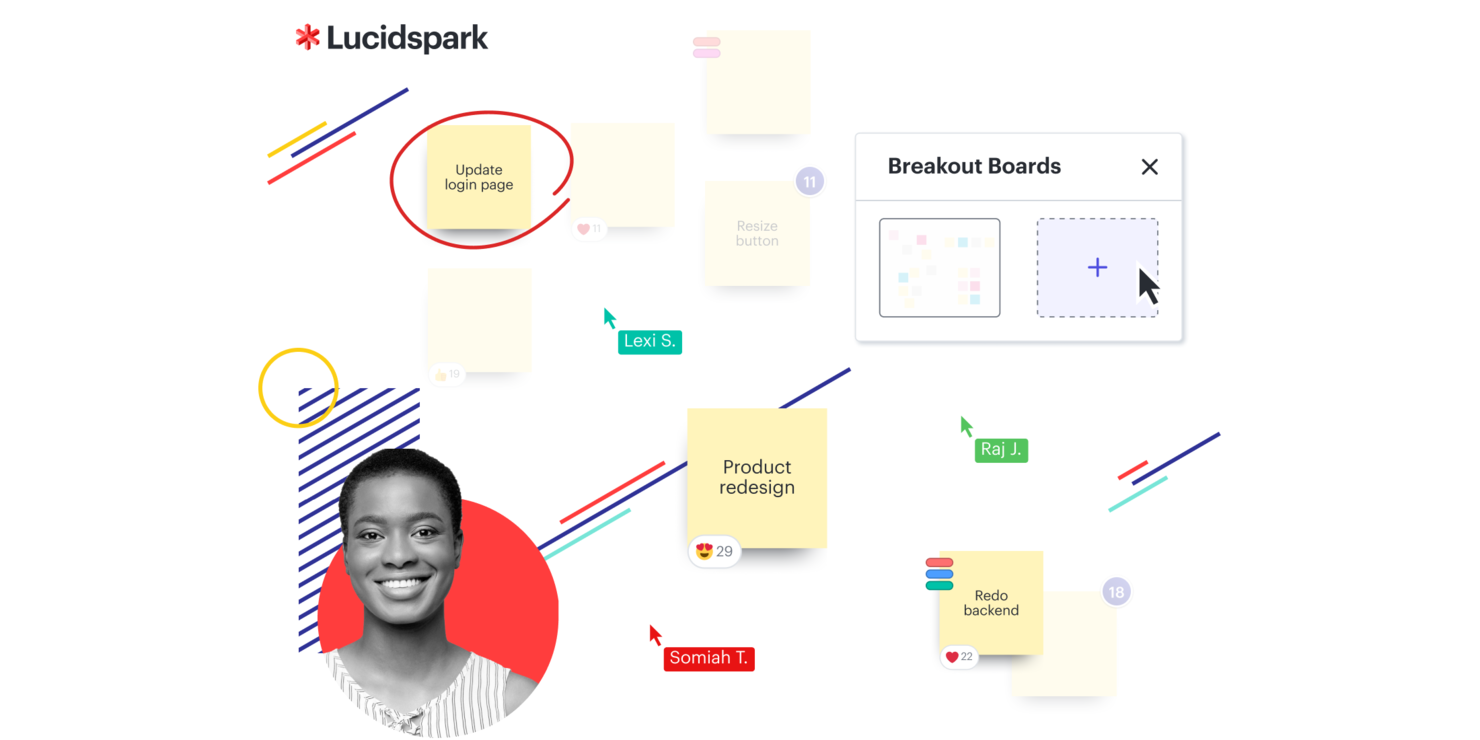
Lucidspark est un tableau blanc virtuel conçu pour favoriser la collaboration d'équipe et l'organisation des idées. Pour les entreprises axées sur l'amélioration de l'expérience client, il facilite les sessions de remue-méninges, la planification de projets et le développement agile. La plateforme aide les équipes à passer de l'idéation à l'exécution tout en répondant aux défis courants de la collaboration et de la prise de décision.
Pourquoi j'ai choisi Lucidspark
J'ai choisi Lucidspark parce qu'il favorise le type de collaboration nécessaire à l'amélioration de l'expérience client. Son canevas infini permet aux équipes de cartographier visuellement les idées et les stratégies, ce qui aide à maintenir une communication claire. Les cartes heuristiques dynamiques facilitent l'organisation et la connexion des idées lors des séances d'idéation. Les intégrations avec des outils comme Slack permettent de garder tout le monde aligné et informé, réduisant ainsi les frictions dans la gestion de projet.
Principales fonctionnalités de Lucidspark
En plus de sa base collaborative, Lucidspark propose plusieurs autres fonctionnalités qui renforcent son utilité en tant que logiciel d'expérience client :
- Contrôles pour l’animateur : Ces outils vous permettent de gérer efficacement les discussions et ateliers, afin de garantir que tout le monde reste concentré.
- Lucid Cards : Cette fonctionnalité permet d’organiser et de hiérarchiser les tâches, optimisant ainsi la gestion de projet.
- Tableaux dynamiques : Vous pouvez les utiliser pour créer des représentations structurées et visuelles de données, ce qui facilite la prise de décision.
- Capacités d’IA : Elles enrichissent les sessions de remue-méninges en suggérant des idées et des liens, stimulant ainsi la créativité.
Intégrations Lucidspark
Les intégrations comprennent Microsoft Graph, Slack, Google Sheets, ServiceNow, Microsoft Teams, Google Drive, Google Meet, Okta, Jira et Asana.
Pros and Cons
Pros:
- Modèles de workflow Kanban disponibles pour les équipes
- Collaboration en temps réel pour les équipes
- S’intègre à Google Drive et Jira
Cons:
- Les formules équipes commencent à partir de 10 $ par mois et par utilisateur
- Facturation annuelle requise pour y accéder

Idéal pour la collecte automatisée d'avis clients sur plusieurs canaux
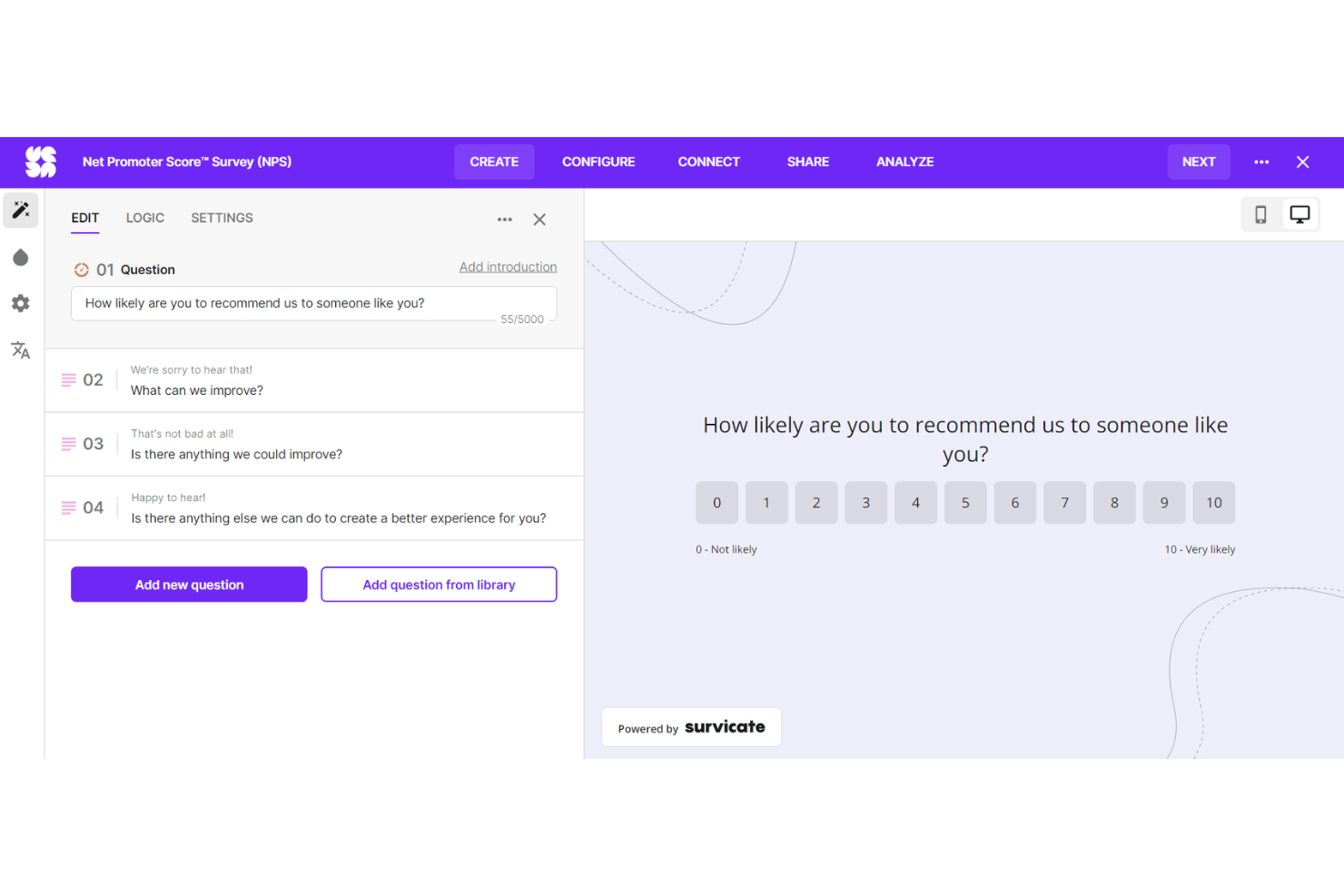
Survicate est un logiciel d'enquête conçu pour recueillir des informations sur l'expérience client et collecter des avis sur de multiples canaux. Il s'intègre à de nombreux outils et fournit un aperçu détaillé des insights clients, ce qui le rend idéal pour les entreprises souhaitant améliorer leur expérience client.
Pourquoi j'ai choisi Survicate :
Survicate est un logiciel CX unique qui vous permet d'évaluer l'expérience client à chaque point de contact grâce à une large gamme d'options de collecte des commentaires, telles que l'e-mail, l'intégration au produit, l'application, votre site web ou par le biais du messager Intercom. Vous n'avez pas besoin de passer du temps et des efforts à trier les flux continus de retour, car la plateforme suit les données et fournit des analyses en temps réel, afin que vous puissiez agir là où c'est le plus nécessaire.
Fonctionnalités et intégrations remarquables :
Survicate propose des fonctionnalités telles que la collecte automatique des retours et recueille des indicateurs clés comme le Net Promoter Score (NPS), le Customer Satisfaction Score (CSAT) et le Customer Effort Score (CES) pour suivre et comprendre la satisfaction et la fidélité des clients. Il existe également plus de 400 modèles d'enquêtes adaptés à un large éventail de projets de recherche utilisateur.
Survicate s'intègre à vos outils existants en un seul clic. Les intégrations comprennent Active Campaign, Drip, FullStory, Google Analytics, HubSpot, Klaviyo, Intercom, MailChimp, Microsoft Teams, Slack, Zendesk et bien d’autres encore.
Pros and Cons
Pros:
- Analyses en temps réel
- Aucune compétence en codage requise
- Modèles d'enquête hautement personnalisables
Cons:
- Le flux continu de réponses clients peut être difficile à gérer
- Courbe d'apprentissage pour les personnes non familières avec la collecte de retours automatisée
New Product Updates from Survicate

Survicate MCP Support Now Available
Survicate now supports MCP, letting teams use AI tools like Claude, ChatGPT, and Slack to explore survey results, analyze responses and insights, and draft new surveys. For more information, visit Survicate's official site.
 .
.
Idéal pour l'évaluation de la santé client en temps réel
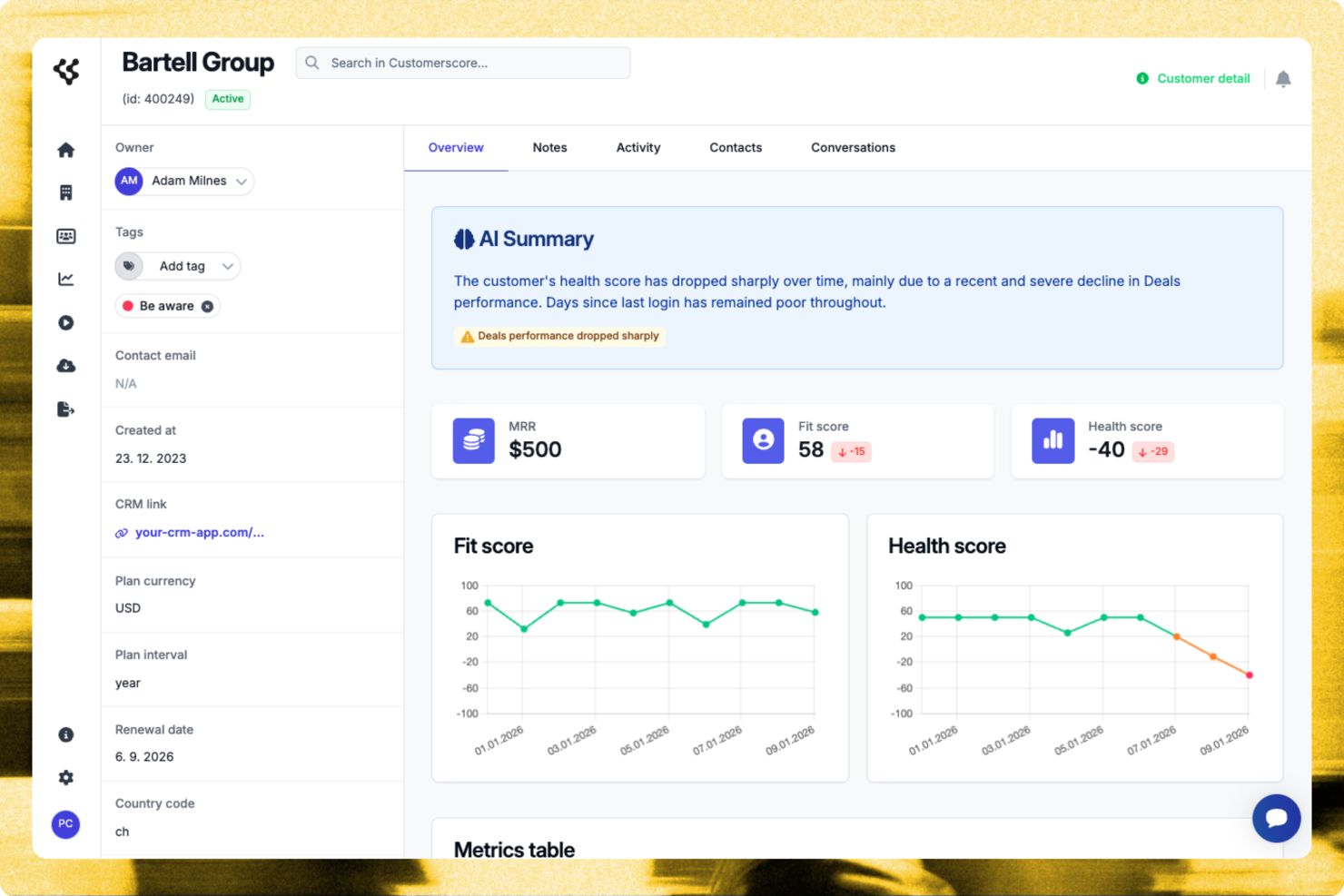
Pour les responsables d'entreprises SaaS souhaitant optimiser leurs relations clients, Customerscore.io propose une solution ciblée pour réduire le taux d'attrition et augmenter les opportunités de vente additionnelle. Conçue pour les équipes de réussite client, cette plateforme fournit des informations exploitables sur le comportement des clients, vous aidant à identifier les comptes prêts à croître et les risques potentiels d'attrition. En s'intégrant à des outils comme Stripe et HubSpot, Customerscore.io permet une consolidation fluide des données, donnant à votre équipe les moyens de prendre des décisions éclairées favorisant la rétention et la croissance du chiffre d'affaires.
Pourquoi j'ai choisi Customerscore.io
J'ai choisi Customerscore.io pour sa capacité unique à fournir un scoring de santé client en temps réel grâce à l'IA, une fonctionnalité qui se distingue dans le domaine des logiciels d'expérience client. Cet outil excelle en proposant des flux de travail automatisés via ses playbooks, vous permettant d'engager vos clients de manière proactive selon leur comportement. De plus, l'analyse prédictive de la plateforme identifie en amont les risques d'attrition, permettant à votre équipe d'agir rapidement pour retenir les clients les plus précieux. En se concentrant sur ces aspects, Customerscore.io répond au besoin crucial d'insights actionnables et de gestion efficace de la clientèle dans l'environnement SaaS concurrentiel actuel.
Principales fonctionnalités de Customerscore.io
En plus de son scoring de santé client en temps réel piloté par l'IA, Customerscore.io propose plusieurs autres fonctionnalités précieuses :
- Tableaux de bord visuels : Ils offrent une vue d'ensemble sur l'état du client, le risque d'attrition et le potentiel de ventes additionnelles, permettant à votre équipe de prendre des décisions fondées sur les données.
- Campagnes automatisées : Gérez plus de 1 000 clients grâce à des flux de travail automatisés, économisant ainsi temps et ressources tout en maintenant une personnalisation de l'engagement.
- Alertes de risque d'attrition : Recevez des avertissements précoces concernant un risque d'attrition, ce qui permet à votre équipe de prendre des mesures proactives pour retenir les clients.
- Identification des opportunités de croissance : Identifiez rapidement les comptes prêts pour une vente additionnelle afin d'aider votre équipe à maximiser le potentiel de revenus.
Intégrations de Customerscore.io
Les intégrations incluent Stripe, HubSpot, Salesforce, Google Analytics, Intercom, Zendesk, Mailchimp, Slack, Segment et Mixpanel.
Pros and Cons
Pros:
- Visibilité claire des risques d'attrition
- Informations exploitables sur les opportunités de vente additionnelle
- Excellentes intégrations CRM natives
Cons:
- Tarification non divulguée publiquement
- Courbe d'apprentissage pour l'analytique
Autres logiciels CXAutres logiciels CX
Voici une liste supplémentaire de logiciels CX que j’ai présélectionnés, mais qui ne figurent pas dans le top 12. Cela vaut vraiment la peine de les consulter.
- UserGuiding
Idéal pour un onboarding utilisateur intuitif
- Nextiva
Idéal pour la gestion de l'expérience client grâce à l'IA
- Dock
Idéal pour créer des portails clients
- Tidio
Meilleur agent de support IA
- Groove
Idéal pour les petites équipes ayant besoin d’une communication client unifiée
- Front
Idéal pour les workflows multi-équipes pilotés par l'IA
- Intercom
Idéal pour les bots personnalisés et la messagerie ciblée
- Uservoice
Idéal pour collecter et analyser les retours clients
- ZOHO CRM Plus
Idéal pour la gestion intégrée de l'expérience client sur différents points de contact
- HubSpot Service Hub
Idéal pour intégrer le service client aux efforts de vente et de marketing
- Salesforce Financial Services Cloud
Idéal pour les grandes organisations ayant besoin de divers outils de gestion client
- Guru
Idéal pour centraliser les connaissances des équipes CX
- Qualtrics CustomerXM
Idéal pour une analyse de données avancée
- Medallia Experience Cloud
Idéal pour une cartographie complète du parcours client


Critères de sélection pour un logiciel CX
Après avoir passé d'innombrables heures à évaluer des dizaines de logiciels de gestion de l'expérience client, je peux attester que tous les outils ne se valent pas. Dans ma quête du meilleur, j'ai recherché des solutions qui se distinguent par leur fonctionnalité de base, leurs caractéristiques clés et leur facilité d'utilisation. Je détaille ci-dessous ces critères.
Fonctionnalités principales
Pour tout outil de gestion de l'expérience client, certaines fonctions doivent être incontournables :
- Cartographie du parcours client : L'outil doit permettre de représenter visuellement les étapes par lesquelles les clients passent lors de leur interaction avec votre entreprise.
- Collecte de retours : La capacité à recueillir les retours via différents canaux (emails, enquêtes, réseaux sociaux, etc.) est cruciale.
- Analyse des données : De puissantes capacités d'analyse sont nécessaires pour exploiter et comprendre les données de feedback.
- Reporting : L'outil doit pouvoir générer des rapports détaillés afin de partager les résultats avec votre équipe.
Caractéristiques clés
Lors du choix d'un outil de gestion de l'expérience client, certaines fonctionnalités font toute la différence :
- Support multicanal : Permet de recueillir des feedbacks de plusieurs sources pour une vision globale de l'expérience client.
- Intégration : L'outil doit pouvoir s'intégrer simplement avec d'autres logiciels comme votre CRM ou votre service d'assistance.
- Personnalisable : Vous devez pouvoir adapter enquêtes, tableaux de bord et rapports à vos besoins spécifiques.
- Alerte en temps réel : Les notifications immédiates concernant les retours clients vous aident à réagir rapidement pour résoudre les problèmes.
Facilité d'utilisation
Enfin, l'expérience utilisateur de l'outil lui-même est un aspect majeur à prendre en compte. Voici ce que je recherchais :
- Interface intuitive : Un bon outil de gestion de l'expérience client doit être facile à naviguer, avec un design épuré et des fonctions clairement identifiées.
- Intégration rapide : L’outil doit permettre une mise en place rapide, avec des instructions claires et, idéalement, des modèles pour démarrer plus vite.
- Scalabilité : L'outil doit pouvoir évoluer avec votre entreprise, en gérant une augmentation du volume de données sans compromettre les performances.
- Support fiable : Un accès à un support client réactif et utile garantit que tout problème technique n’entrave pas le suivi de l’expérience client.
Questions les plus fréquentes sur les logiciels CX
Quels sont les avantages d'utiliser un logiciel de gestion de l’expérience client (CX) ?
Utiliser un logiciel CX offre de nombreux avantages aux entreprises :
- Meilleure compréhension des clients : En collectant et en analysant les retours, les outils CX fournissent des idées sur ce que vos clients apprécient ou non concernant vos services ou produits. Cette connaissance permet d’améliorer vos offres et, à terme, d’augmenter la fidélisation et la satisfaction client.
- Collecte de feedback efficace : Les logiciels CX automatisent la collecte des retours clients sur plusieurs canaux, ce qui fait gagner du temps et accroît la portée de vos actions de feedback.
- Résolution proactive des problèmes : Grâce aux alertes en temps réel, les outils CX permettent aux entreprises d’identifier et de résoudre rapidement les problèmes avant qu’ils ne s’aggravent, évitant ainsi l’insatisfaction client.
- Prise de décisions fondée sur les données : Les données et analyses fournies par les logiciels CX aident à prendre des décisions stratégiques et éclairées.
- Renforcement de la fidélité client : En donnant la priorité à l’expérience client et en évoluant grâce aux commentaires, les entreprises peuvent augmenter la fidélité et la rétention client.
Combien coûte un logiciel CX ?
Le coût d’un logiciel CX varie considérablement selon la complexité de l’outil, le nombre d’utilisateurs et les fonctionnalités requises. Certaines plateformes proposent des versions gratuites, mais celles-ci comportent généralement des limitations.
Quels sont les modèles de tarification typiques pour un logiciel CX ?
La plupart des logiciels CX sont facturés soit au mois et par utilisateur, soit pour un forfait mensuel. Avec la tarification à l’utilisateur/mois, vous payez un montant spécifique pour chaque utilisateur. La tarification au forfait, en revanche, implique le paiement d’un prix mensuel fixe, peu importe le nombre d’utilisateurs.
Quel est l’éventail de prix pour un logiciel CX ?
Les prix des logiciels CX peuvent démarrer à partir de $10/utilisateur/mois et atteindre plusieurs centaines de dollars par mois pour les solutions avancées et destinées aux grandes entreprises.
Quel est le logiciel CX le moins cher et le plus cher ?
Parmi les outils listés, Freshdesk propose l’un des tarifs les plus bas à $15/utilisateur/mois. À l’autre extrême, Qualtrics CustomerXM fait partie des options les plus onéreuses – les prix sont disponibles sur demande en raison de son haut niveau de personnalisation.
Existe-t-il des options gratuites pour un logiciel CX ?
Oui, certains outils de gestion de l’expérience client offrent une version gratuite. Par exemple, Freshdesk propose un plan gratuit avec des fonctionnalités limitées. Wootric offre aussi une formule gratuite mais avec des restrictions quant au nombre d’enquêtes envoyées par mois.
Autres avis sur les logiciels de support
- Logiciel de support
- Bases de connaissances pour helpdesk
- Logiciels de gestion de tickets de service client
- Logiciel de support en ligne
Résumé
Pour conclure, le choix d’un logiciel de gestion de l’expérience client (CX) dépend fortement des besoins spécifiques de votre entreprise, et il n’existe pas de solution universelle. Chaque logiciel propose un éventail unique de fonctionnalités et de capacités destinées à des usages différents, d’où l’importance de bien cerner vos propres exigences.
Points clés à retenir
- Évaluez vos besoins Commencez par identifier les fonctionnalités principales dont votre entreprise a besoin. Cela peut aller de l’analyse de sentiment à des systèmes de gestion de tickets ou à un support omnicanal. Le meilleur logiciel CX pour vous sera celui qui répondra efficacement à ces besoins.
- Considérez la facilité d’utilisation Bien que les fonctionnalités soient importantes, le logiciel doit aussi être facile à utiliser. Une bonne plateforme CX proposera une interface utilisateur intuitive et un support client fiable, vous permettant de profiter pleinement de l’outil sans obstacles inutiles.
- Pensez à la scalabilité future Enfin, tenez compte de l’évolutivité du logiciel. Au fur et à mesure que votre entreprise se développe, vos besoins en CX peuvent évoluer. Le logiciel que vous choisissez doit pouvoir évoluer avec votre entreprise et s'adapter aux attentes changeantes des clients.
Qu’en pensez-vous ?
Si vous connaissez d’autres outils CX que vous pensez devoir figurer dans cette liste, j’aimerais beaucoup connaître vos avis et expériences. Vos retours sont précieux pour rendre ce guide aussi complet et utile que possible, alors n’hésitez pas à me contacter !