
30 Best AI Customer Service Software For CX Professionals

10 Best AI Customer Service Software Shortlist
Here's my pick of the 10 best software from the 30 tools reviewed.


AI customer service software helps support teams automate routine interactions, speed up response times, and scale personalized service without burning out your agents. The best AI-powered tools can help you deliver faster, smarter customer experiences, whether you’re handling high ticket volume, expanding channels, or optimizing for leaner operations.
In this article, I leverage my years of experience in researching and testing a wide array of CX platforms to present a curated list of the top AI customer service software.
Why Trust Our Software Reviews
The Best AI Customer Service Software Summary Table
| Tool | Best For | Trial Info | Price | ||
|---|---|---|---|---|---|
| 1 | Best for AI assisted customer replies | Free trial available | From $25/user/month (billed annually) | Website | |
| 2 | Best for contextual conversation routing | Free demo + 14-day free trial available | From $19/user/month (billed annually) | Website | |
| 3 | Best for cross-team customer request handling | 14-day free trial + free demo available | From $25/seat/month (billed annually) | Website | |
| 4 | Best customer service platform for small businesses | 7-day free trial available | From $24.17/month (billed annually) | Website | |
| 5 | Best for AI-powered workflow automation | 14-day free trial available | From $25/user/month | Website | |
| 6 | Best for enhancing response quality | Free plan + 7-day free trial available | From $12/month | Website | |
| 7 | Best for AI-powered omnichannel service | Free plan available | From $25/user/month (billed annually) | Website | |
| 8 | Best for AI-human collaboration in chat | Free plan available | From $16/month (billed annually) | Website | |
| 9 | Best for AI-driven sentiment analysis | 15-day free trial + free plan | From $7/user/month (billed annually) | Website | |
| 10 | Best AI-powered customer service solution for companies of all sizes | Free trial + free demo available | From $19/agent/month (billed annually) | Website |


-

SupportYourApp
Visit WebsiteThis is an aggregated rating for this tool including ratings from Crozdesk users and ratings from other sites.4.7 -
Freshdesk
Visit WebsiteThis is an aggregated rating for this tool including ratings from Crozdesk users and ratings from other sites.4.4 -
Zendesk
Visit WebsiteThis is an aggregated rating for this tool including ratings from Crozdesk users and ratings from other sites.4.3


Best AI Customer Service Software Reviews
Here’s a brief description of each of the AI customer service apps on my list, showing what it does best, plus screenshots to showcase some of the features.

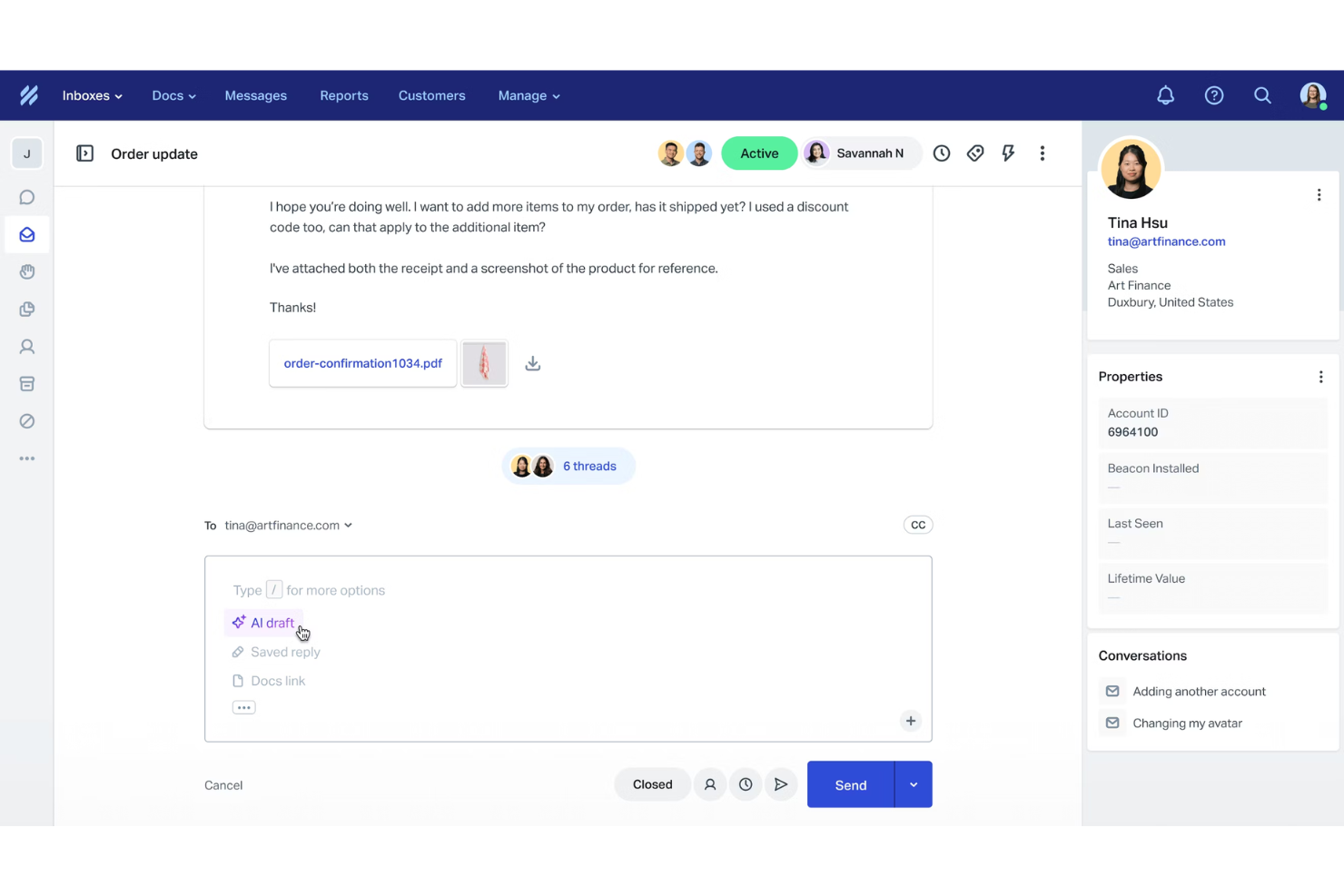
Help Scout is a customer service platform that helps teams manage inbound requests, self-service resources, and live conversations in one place. It offers a clean, user friendly interface, a collaborative shared inbox, and AI tools that support agents without getting in the way of their workflow. With built in email support, live chat, knowledge base tools, and reporting, it gives you a central hub for handling customer inquiries efficiently.
Help Scout’s AI features enhance day to day support by speeding up common tasks. AI Answers can surface instant responses from your knowledge base, giving customers 24/7 access to accurate information. AI Drafts helps agents generate polished replies based on previous interactions and your help articles, while AI Summaries condense long email threads so you can get context quickly. AI Assist also helps refine responses by expanding thoughts, adjusting tone, or translating messages, which can keep communication consistent for your team.
Another notable aspect of Help Scout is its Beacon tool, which serves as an embeddable customer help hub. It gives customers self service access to your help center, past conversations, and AI powered answers. Features like proactive messaging, saved replies, multiple inboxes, and automated workflows round out the experience, helping your team handle volume without sacrificing quality. The customer portal also allows users to revisit previous interactions, which can reduce repetitive questions and keep communication clear.
Integrations include Salesforce, Shopify, HubSpot, Slack, Microsoft Teams, Asana, Zapier, Google Apps, Mailchimp, Jira, Trello, and Stripe.
New Product Updates from Help Scout

Help Scout Enhances Support Management With AI and Integrations
Help Scout introduces smarter routing, WhatsApp and Aircall integrations, and new AI enhancements to help teams manage conversations, automate workflows, and support customers across more channels. For more information, visit Help Scout’s official site.
 .
.

Freshdesk (a product of Freshworks Inc.) includes built in AI capabilities that can support automation and routing within customer service workflows. Freddy AI can be used to assist with tasks such as handling routine inquiries, routing conversations to the appropriate teams, and supporting real time resolution through automated responses. Features like digitized IVR help collect context before conversations are assigned, which can reduce back and forth during handoffs.
The platform supports customer communication across multiple messaging channels, including WhatsApp, Facebook, LINE, Apple Business Chat, as well as website and mobile app messaging. This allows teams to manage conversations from different platforms within a single system, while giving customers flexibility in how they reach out for support.
Freshdesk also offers tools for proactive customer engagement. Based on predefined triggers and user activity, teams can configure messages that notify customers when support is available. This approach can help teams surface assistance at relevant points in the customer journey rather than waiting for inbound requests.
Freshdesk offers a free plan for up to two agents for six months, with paid plans starting at $19 per user per month when billed annually. Select plans include a 14 day free trial.
New Product Updates from Freshdesk

Freshdesk Enhances Contact Data Management and Social Identity Fields
Freshdesk now lets you manage social handles and handle large contact lists with ease, streamlining customer profiles and data tasks. For more information, visit Freshdesk’s official site.

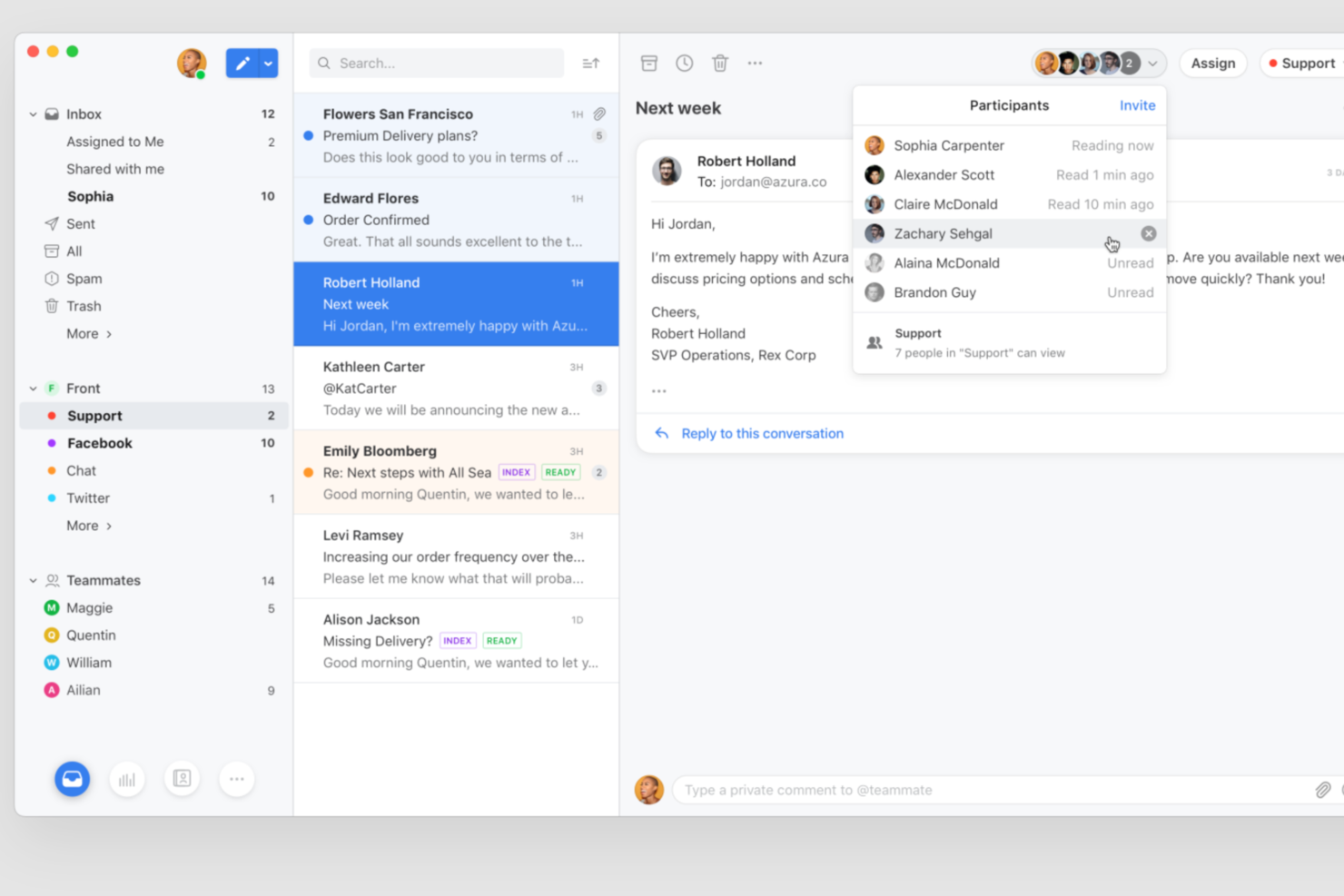
Front brings together shared inbox management and AI-driven automation for customer service teams that need to collaborate across channels. If you’re looking for a solution that helps your team respond faster and keep conversations organized, Front offers tools for routing, tagging, and automating repetitive tasks. It’s especially useful for businesses that want to blend personal customer support with the efficiency of automation.
Who Is Front Best For?
Front is a strong choice for customer support and operations teams in mid-sized to large businesses that need to manage high volumes of customer inquiries collaboratively across multiple channels.
Why I Picked Front
For teams that need to handle customer requests across multiple departments, Front stands out with its collaborative inbox and conversation assignment features. I picked Front because it lets users easily loop in colleagues, share context, and assign messages to the right person or team without losing track of the conversation. The ability to comment internally on threads and set up rules for routing requests ensures that nothing falls through the cracks. This approach helps customer service teams work together efficiently, especially when requests require input from different functions.
Front Key Features
Some other features in Front support a wide range of customer service needs:
- AI-powered canned responses: Use AI to suggest and insert relevant replies, helping your team respond quickly to common questions.
- Analytics and reporting: Track team performance, response times, and customer satisfaction with built-in dashboards and exportable reports.
- Multi-channel messaging: Manage email, SMS, live chat, and social media messages from a single shared inbox.
- SLA management: Set and monitor service level agreements to ensure timely responses and accountability across your team.
Front Integrations
Integrations include ClickUp, Twilio, Salesforce, HubSpot, Slack, Make, CloudTalk, Nicereply, Zoom, and Gainsight.
Pros and Cons
Pros:
- In-app onboarding guides for new users
- AI-powered response suggestions for agents
- Advanced rules for automated message routing
Cons:
- Limited customization for AI workflows
- No free-forever plan available


Tidio is a customer service platform that comes with features that help level up your customer support and in turn generate more sales. Tidio is designed and built for small businesses and trusted by 300,000+ websites worldwide today. It is delightfully easy to set up and use, so you can transform your customer service into a sales machine in no time.
With an easily accessible live chat widget, Tidio makes your business available to your customers 24/7, while AI-powered chatbots engage with them in real-time. The AI chatbot is called Lyro AI and it's designed to provide your current team with support answering common questions, while leaving your people with ample time to deal with more complex requests. If you want to try out this feature, the first 50 Lyro conversations are free.
Additionally, connect Messenger, Instagram, live chat, and email to Tidio multichannel and answer all messages from one place, also on mobile.
Tidio easily integrates with all websites and platforms like WordPress, Shopify, Wix, BigCommerce, and many others.
Tidio is free for 3 operators and up to 100 unique visitors.
Paid plans costs from $25/month and come with a 7-day free trial.
New Product Updates from Tidio

Tidio Expands Lyro AI Across Email and Chat
Tidio expands Lyro AI to email ticketing and enhances its chatbot with Claude 3.0 integration. These updates improve automation across support channels and enhance AI-driven interactions. For more information, visit Tidio’s official site.
 .
.
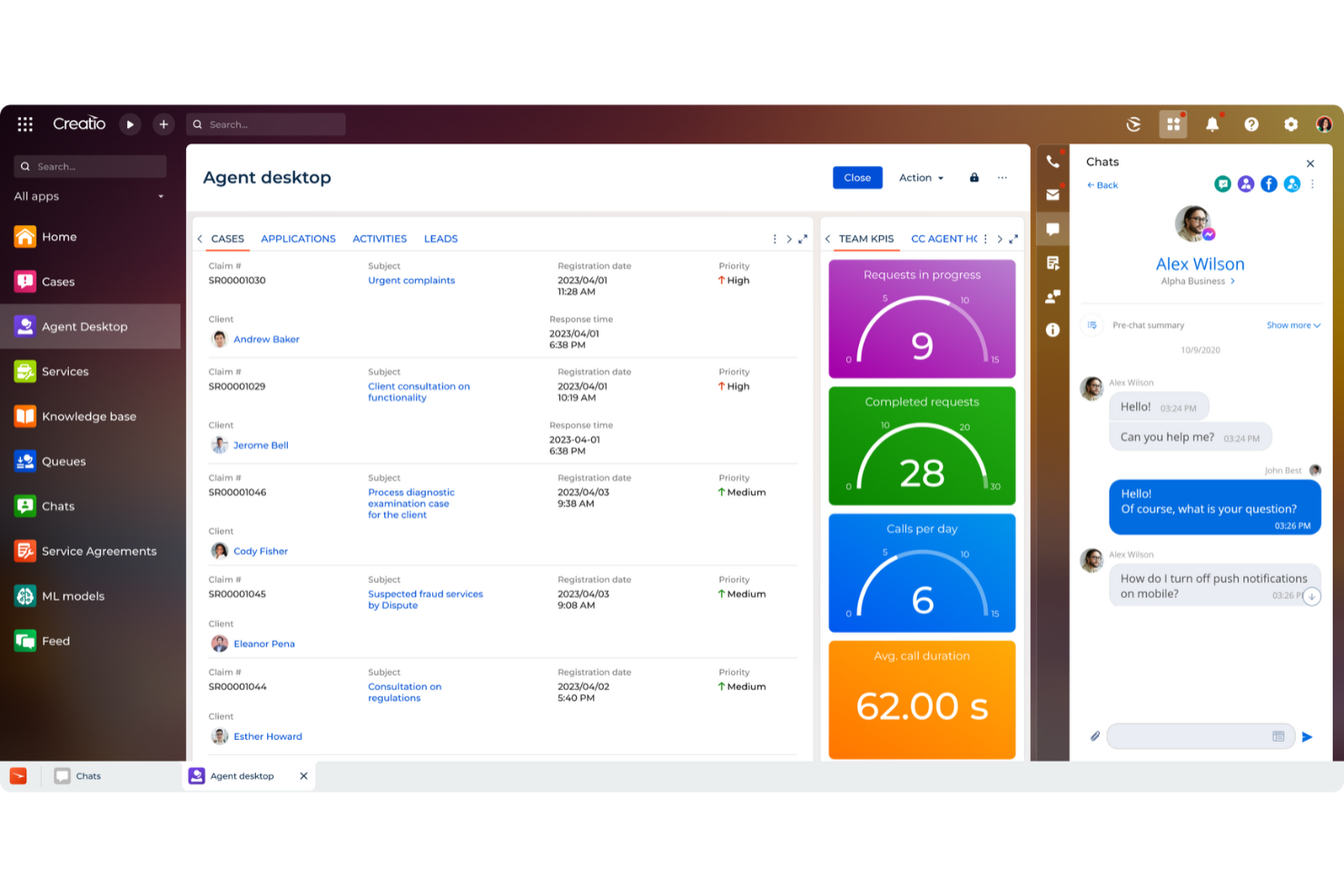
CRM Creatio’s AI Command Center uses advanced natural language processing (NLP) and machine learning capabilities to automate sales, marketing, and service processes. You can use Creatio’s AI tools to analyze customer interactions in real-time, predict service needs, and route cases to the right agents automatically. This helps reduce response times, improves operational efficiency, and ensures your customers get accurate resolutions faster. With its no-code and low-code design environment, even non-technical teams can build and deploy AI-driven workflows without heavy IT support.
CRM Creatio also helps you manage all your customer interactions across multiple channels. It integrates with platforms like Salesforce, HubSpot, Zendesk, QuickBooks, Slack, and Mailchimp, making it easier to centralize data and maintain context across departments. You can personalize customer journeys and synchronize information across your website, support channels, and sales systems, helping your team stay aligned while improving the overall customer experience.
The feature I like the most is Creatio’s AI-powered case management. It can prioritize tickets automatically based on urgency, customer sentiment, and potential impact. Combined with predictive analytics, it flags potential service issues before they escalate and guides agents toward the best next steps. This level of intelligence not only empowers your support team but also helps deliver faster, more personalized service to your customers.
New Product Updates from Creatio CRM

Creatio CRM Expands AI Across Marketing and Collaboration
Creatio CRM introduces AI-assisted landing page generation, template-based email generation, RAG-enabled knowledge governance, a Microsoft Teams personal tab, and AI meeting summaries. These updates help teams create content faster and streamline AI-powered workflows. For more information, visit Creatio’s official site.
 .
.

Grammarly is an AI-powered writing assistant that helps you craft clear, effective communication. It offers real-time suggestions to improve grammar, spelling, punctuation, and style across various platforms.
Grammarly's tone detector is invaluable for customer service teams. It analyzes your message's tone—like formal, friendly, or urgent—ensuring your responses align with your brand's voice and the situation's context. This helps you maintain consistency and build stronger customer relationships.
Another standout feature is Grammarly's generative AI assistance. It can compose drafts, rewrite text, and generate ideas based on your prompts and company style guide, streamlining the writing process. This is particularly useful for handling repetitive queries or creating personalized responses, enhancing efficiency and customer satisfaction.
Integrations include Slack, Outlook, Notion, Chrome, Safari, Firefox, Edge, MS Office, Google Docs, and Gmail.


Hiver is a modern AI customer service software that brings you all the features you need to deliver strong support in a familiar interface resembling your email inbox. You can manage omnichannel conversations (across email, live chat, WhatsApp, voice, SMS, and social media) from a panel on the left-hand side of your screen, where you can also view the status of each query and track the number of open, pending, or resolved tickets at a glance.
Hiver is designed for sleek, modern teams that want to move fast. Given that its email-like interface is familiar to most of us, there isn’t much of a learning curve to the tool. You don’t need extensive training to get started. Setting up the tool takes a few minutes.
The platform’s standout feature is its AI, which is embedded across all touchpoints of the customer support journey. For example, its AI Copilot helps agents respond to customers. It suggests contextual answers, drafts replies, fine-tunes tone, and rephrases messages to keep responses clear and on-brand, drawing from past conversations, internal knowledge, and stored documents.
It also has AI Agents that help you set up autonomous workflows to handle FAQs, send follow-ups, detect thank-you closures, execute multi-step actions like refunds, and classify/route conversations by category, urgency, or sentiment. Additionally, its AI Insights turns every conversation into a learning opportunity. It helps you spot resolution bottlenecks, forecast potential issues, and surface account health risks before they escalate. Predictive models identify trends so teams can act early and continuously improve.
Hiver has integrations available with Aircall, Asana, Jira, Okta, QuickBooks, Salesforce, Slack, WhatsApp, and Zapier and 100+ other platforms.
New Product Updates from Hiver

Hiver Enhances Automation With Smarter Conversation Routing
Hiver introduces SLA targeting, auto-assign outbound conversations, and auto-unassign for agent availability. These updates improve response handling by ensuring conversations are assigned, reassigned, and followed up more efficiently. For more information, visit Hiver’s official site.


Quidget is a no-code AI agent designed to provide 24/7 customer support. It can communicate fluently in over 45 languages and seamlessly transfers complex issues to your team when necessary.
When you're looking for an AI customer service tool that does more than just answer basic queries, Quidget stands out with its ability to learn from your existing content. This feature means the AI can provide more accurate and contextually relevant responses, which is crucial for maintaining the quality of customer interactions. The software is designed to handle repetitive frontline support, freeing up your team to focus on more complex issues.
Another appealing aspect of Quidget is its human handoff feature. When the AI encounters a complex issue it can't solve, it transfers the conversation to a human agent. This AI-human collaboration ensures that customer service is uninterrupted and that your team can step in when their expertise is needed.
Integrations include Euphoric.ai, Zendesk, WhatsApp, and Slack.


Zoho Desk is a comprehensive customer support software designed to help businesses manage customer inquiries and support tickets efficiently. It offers a user-friendly interface, omnichannel support, ticket automation, and advanced analytics tools.
Zoho's AI assistant, Zia, enhances customer service by automating routine tasks, providing sentiment analysis, and offering contextual assistance to both customers and agents. This AI-driven approach not only improves operations but also ensures that customer queries are handled efficiently. The ability of Zia to tag tickets, route them to the appropriate agents, and even notify administrators of difficult situations also improves the overall response and resolution times.
Another notable feature of Zoho Desk is its robust ticket management system, which supports multichannel ticketing from emails, social media, and even instant messaging apps like WhatsApp. This multichannel support ensures that customers can reach out through their preferred communication channels.
Integrations include Google Workspace, Microsoft Office 365, Slack, Jira, Trello, Asana, Dropbox, OneDrive, Box, GitHub, Bitbucket, Zendesk, Salesforce, HubSpot, Intercom, Freshdesk, and other Zoho apps.

Zendesk
Best AI-powered customer service solution for companies of all sizes

Zendesk is an AI-powered customer service solution that’s easy to set up, use, and scale for companies of all sizes. Zendesk serves over 130K global brands across a multitude of industries in over 30 languages. Zendesk is headquartered in San Francisco, and operates offices worldwide It combined the colorful, fun attitude that contemporary startups love with a good product for a more-than-fair price.
Standout features of Zendesk include a robust ticketing system, omnichannel messaging and support, a contact center, easy to use workflow automations, an AI-powered chatbot, out-of-the-box reporting and analytics, and over 1,000 prebilt apps and integrations. They also have a cheaper, fundamentals plan that covers only ticketing, business rules, interaction history, reporting, and dashboards.
Integrations include Asana, Google Workspace, HubSpot, Jira, Microsoft Dynamics, Salesforce, Shopify, Slack, Trello, Zoom, and over 1200 more options on the Zendesk Marketplace.
Zendesk starts at $19/user/month and offers a 30-day free trial. Qualifying early-stage startups get Zendesk free for 6 months.
Other AI Customer Service Software
Here are a few more that didn’t make the top list.
- CloudTalk
For custom call routing
- eDesk
For ecommerce unified inbox management
- SurveySparrow
For conversational surveys
- Chatbase
For creating AI-driven agents
- Custify
For SaaS companies
- Guidde
For creating how-to video guides
- HappyFox
Customizable customer portal
- Nextiva
For AI-powered customer insights
- Kustomer
Visual chatbot builder software
- Balto
For live call center agents
- Jitbit Helpdesk
Ticketing system software
- LiveHelpNow
For omnichannel customer support
- Kayako
For SMBs
- TrueLark
For appointment booking
- Solvvy
Wiki reader
- Ushr
For insurance companies
- Linc
For retail and ecommerce
- AzureDesk
Helpdesk software for larger companies
- Thankful
Customer service analytics software
- 14.ai
Intent-aware customer response engine


Related CX Software Reviews
If you still haven't found what you're looking for here, check out these related customer experience management tools that we've tested and evaluated.
- Customer Service Software
- Help Desk Software
- Call Center Software
- Customer Messaging Platform
- Digital Experience Platform
- Sentiment Analysis Tools
- Customer Tracking Software
- Social Customer Service Software
What Is AI Customer Service Software?
AI customer service software is a tool that uses artificial intelligence to automate and enhance customer support interactions across digital channels. It helps teams deliver faster, more scalable service through features like chatbots, natural language processing, intent recognition, and real-time analytics.
Selection Criteria for AI Customer Service Software
Selecting the right AI customer service software hinges on understanding its functionality and how well it aligns with your specific use cases. So, what do I look for when I select the best AI customer service apps? Here’s a summary of my evaluation criteria:
Core Functionality: (25% of final scoring)
- Automated responses to common inquiries, reducing the need for manual intervention.
- Routing customer queries to the appropriate human agents when needed.
- Gathering and analyzing customer feedback.
- Providing support across various channels (e.g., email, chat, social media).
- Supporting multiple languages.
Additional Standout Features: 25% of total weighting score
- Machine learning to improve chatbot interactions over time.
- Unique integration capabilities with uncommon CRM or ERP systems.
- Advanced analytics features for insights into customer behavior and satisfaction.
- Customizability of the AI tool.
Usability: 10% of total weighting score
- Intuitive dashboards that present data and features.
- Simple process for setting up and customizing chatbots and AI responses.
- An interface design that’s both aesthetically pleasing and easy to navigate.
Onboarding: 10% of total weighting score
- Comprehensive training materials, such as videos and interactive tutorials.
- Step-by-step integration guides.
- Support channels dedicated to new users.
Customer Support: 10% of total weighting score
- Responsiveness and availability of support across multiple channels.
- Depth of knowledge base articles and FAQs for self-service troubleshooting.
- Active user communities for peer support and sharing best practices.
Value For Money: 10% of total weighting score
- Competitive pricing that aligns with the features offered.
- Transparent cost structures with no hidden fees.
- Flexibility in plan options to scale with business growth.
Customer Reviews: 10% of total weighting score
- Consistently high ratings for ease of use and customer support.
- Positive feedback on the tool’s impact on reducing response times and improving customer satisfaction.
- Stories of successful integration and tangible ROI from similar businesses.
How to Choose AI Customer Service Software
Choosing the right AI customer service software can help enhance customer satisfaction, streamline workflows, and ensure that human agents focus on more complex queries.
As you're shortlisting, trialing, and selecting AI customer service software consider the following:
- What problem are you trying to solve - Identify the customer service gap you're trying to fill to clarify the features and functionality the AI customer service software needs to provide.
- Who will need to use it - Who will be using the software and how many licenses will you need? Will it just be the customer service team or the whole organization that will require access? Do you want to prioritize ease of use for all, or speed for your software power users?
- What other tools it needs to work with - Clarify what tools you're replacing, what tools are staying, and the tools you'll need to integrate with, such as accounting, CRM or HR software.
- What outcomes are important - Consider what capability you want to gain, or what you want to improve, and how you will be measuring success. For example, an outcome could be the ability to get greater visibility into performance.
- How it would work within your organization - Consider the software selection alongside your workflows and delivery methodology. Evaluate what's working well, and the areas that are causing issues that need to be addressed.
Trends in AI Customer Service Software
AI customer service software is seeing significant evolution, driven by the need to scale operations and address a growing number of customer issues efficiently. This evolution is marked by several trends, each pointing toward more sophisticated, user-friendly, and efficient customer service solutions.
Rapidly Evolving Features
- Intent Prediction and Proactivity: Tools are increasingly capable of anticipating customer needs and initiating support interactions, evidenced by more sophisticated machine learning models that analyze user behavior and predict future actions.
- Seamless Multi-Channel Support: The integration of support across various platforms (e.g., social media, chat, email) is becoming smoother, with AI managing to maintain context across channels, showing the industry's push towards truly omnichannel experiences.
Most Novel and Unusual Functionality
- Emotion Recognition: Some platforms are beginning to incorporate emotion recognition technologies, analyzing voice tones or text sentiment to tailor responses more effectively to the customer's emotional state.
- AI-Driven Personalization at Scale: Customizing the customer experience based on past interactions, preferences, and behavior, making each engagement feel uniquely tailored to the individual, without manual segmentation.
Most Important and In-Demand Features
- Advanced Natural Language Processing (NLP): This is crucial for understanding and processing complex customer queries, making it a backbone for any AI customer service tool.
- Automated Resolution of Complex Queries: Moving beyond FAQ-based support, AI systems are now resolving intricate issues, reducing the need for human intervention and speeding up response times.
Features Becoming Less Important
- Scripted Chatbots: As AI becomes more sophisticated, the need for rigid, script-based chatbots is diminishing, with a preference for more dynamic, learning-based AI interactions.
- Single-Language Support: In an increasingly global marketplace, tools that only support one language are losing favor compared to multilingual solutions.
These trends reflect the ongoing challenges and opportunities within AI customer service software, emphasizing the importance of adaptability, personalization, and efficiency in modern customer support operations.
Features of AI Customer Service Software
Scaling customer service operations effectively involves leveraging AI customer service software to handle an increasing volume of customer interactions without overburdening the team. Below are the key features to look out for:
- Natural Language Processing (NLP): Understanding customer inquiries in a human-like manner is crucial for interpreting and processing customer requests accurately, ensuring that responses feel personal and relevant.
- Intent Prediction: Anticipates customers' needs by analyzing behaviors like clicks, views, and purchases. This predictive capability enables suggesting next best actions to customers proactively.
- Contextual Routing of Conversations: Directs complex queries to appropriate agents while simpler questions are resolved by the AI chatbot, saving time and resources.
- Multi-channel Support: Enables consistent and efficient customer service across email, chat, social media, and other communication platforms through seamless integration.
- Self-service Options: AI-powered FAQs and knowledge bases reduce the load on human agents and allows customers to find answers quickly.
- Multi-Language Support: Makes your service accessible to a global audience. This is essential for international businesses seeking to provide localized support.
- Scalable Cloud-based Infrastructure: Supports the ability to scale operations up or down based on demand without significant infrastructure changes. This flexibility is vital for managing peak periods and growing customer bases efficiently.
- AI-driven Insights and Analytics: Provides detailed analytics on customer interactions, service performance, and issue resolution metrics, helping you make informed decisions to continually improve service quality.
- Integration Capabilities: Facilitates seamless integration with existing CRM, ERP, and other business systems. This integration ensures a unified view of customer interactions across all touchpoints, enhancing service continuity and personalization.
- Personalization Engine: Customizes interactions based on customer history, preferences, and past issues. Personalized responses increase customer satisfaction and loyalty by making customers feel valued and understood.
Benefits of Customer Service Software
By integrating AI into customer service, businesses can meet and exceed the ever-increasing expectations of their customers. This technology empowers your team to concentrate on nuanced customer needs and relationship building while minimizing repetitive tasks and enhancing response accuracy. Here are five primary advantages of deploying AI customer service software within your organization:
- Enhanced Customer Satisfaction: Delivers personalized and efficient support around the clock. AI customer service software enables instant responses to inquiries and support requests, significantly reducing wait times and improving the overall customer experience.
- Increased Operational Efficiency: Automates routine tasks and inquiries. This allows human agents to focus on more complex and nuanced customer needs, thereby optimizing the use of human resources and reducing operational costs.
- Scalability: Easily handles high volumes of interactions without the need for proportional increases in staff. AI software can scale up or down based on demand, ensuring businesses can efficiently manage peak times or rapid growth without compromising service quality.
- Data-driven Insights: Offers valuable analytics and insights into customer behavior and service performance. These insights enable businesses to make informed decisions, tailor their services to meet customer needs better, and identify opportunities for improvement.
- Improved Resolution Times: Ensures quick and accurate resolution of customer issues. By leveraging AI to understand and prioritize inquiries, businesses can resolve issues faster, often without human intervention, leading to higher customer satisfaction levels.
Cost & Pricing for AI Customer Service Software
With a variety of plan options available, understanding the pricing and features of each can help you make an informed choice that aligns with your needs and budget.
These plans typically range from free versions designed for small businesses or those just starting out, to more advanced, feature-rich packages tailored to larger organizations with complex customer service requirements. Let's explore the common plan options and what they offer.
| Plan Type | Average Price | Common Features |
|---|---|---|
| Free | $0 | Basic AI chatbots, Limited ticket handling, Email support, Access to community forums |
| Basic | $10 - $50/user/month | Enhanced AI chatbots, Multi-channel support, Basic reporting, Integration with CRM systems |
| Professional | $50 - $100/user/month | Advanced AI capabilities, Full multi-channel support, Custom reporting, API access, 24/7 support |
| Enterprise | $100+/user/month | Custom AI solutions, Unlimited ticket handling, Personalized customer support plans, Dedicated manager |
When considering which plan to choose, you should assess the volume of customer inquiries they receive, the complexity of support needed, and the integration capabilities with their existing systems. Each plan offers a different level of support and features, so it's important to align your choice with your organizational needs and growth plans.
FAQs About AI Customer Service Software
Below I’ve provided answers to some FAQs about AI customer service software.
What is AI customer service?
Traditional customer service involves human virtual agents who can handle one customer query at a time. AI customer service builds on the systems of human customer service and customer support and leverages machine learning models to provide efficient customer support at scale.
A great example can be that of chatbots. They handle multiple queries and fetch resolutions based on many data points that have been fed to its system via your CRM and product information. This AI replacement of a human agent saves time and cost involved in manually doing the process while also leading to faster resolution time, leading to happy customers.
If the AI chatbots cannot reach a resolution, they can route the conversation to a real agent, thus resolving most of the generic queries themselves and only sending complex queries to the human team. This helps in optimized utilization of resources and swifter problem solving for generic queries for increased customer satisfaction
How is AI used in customer service?
There are a variety of ways AI functionality can be used in customer service.
Firstly, with intent prediction, AI studies customer clicks, views, and purchases. This helps the AI software figure out the customer’s next requirements and provide hyper-personalized responses in automation.
Secondly, with chatbots, AI can help you scale your customer support by answering generic queries at scale. The chatbot can fetch information snippets from your FAQs and knowledge base and present it in a human-like manner using templates. This helps in saving time and cost from doing it manually and also leads to faster resolution time, leading to happy customers.
Thirdly, with automated conversation routing, AI can route complex conversations that cannot be solved with AI to the appropriate agent group, all in automation.
How do AI chatbots improve customer service?
The primary way that AI technology improves customer service is by increasing the efficiency of customer service operations. Repetitive, basic tasks are routed to chatbots to provide easy answers. The customers who resolve their concerns with the chatbots receive a quick answer. Human customer care agents at the contact center are freed up to respond to concerns that require a greater level of knowledge. With shorter queues for human agents, complex customer concerns receive attention faster, enhancing the user experience through improved response times.
What are the best practices for integrating AI into existing customer service workflows?
When integrating AI into existing customer service workflows, the key is to find a seamless blend that enhances efficiency without sacrificing the personal touch.
- Start with identifying repetitive tasks that AI can handle effectively, such as answering FAQs or routing inquiries.
- Then, ensure the AI system is well-integrated with your CRM to offer personalized assistance by pulling in relevant customer data during interactions.
- Regularly training both your AI and human teams on new updates and ensuring they complement each other is crucial. For instance, AI can handle initial inquiries, but it should smoothly hand off more complex issues to human agents.
This synergy ensures that customers receive the right level of support at every step of their journey
What are the ethical considerations in using AI for customer service?
The ethical considerations in using AI for customer service revolve around transparency, data privacy, and ensuring unbiased, fair treatment of customers. This means being clear with customers when they are interacting with AI and ensuring the AI’s decisions do not discriminate against any group. Ethical AI use also involves regularly reviewing AI decisions for biases and accuracy, maintaining a balance between automation and human touch in customer service to preserve empathy and understanding in more sensitive situations.
What’s Next:
If you're in the process of researching ai customer service software, connect with a SoftwareSelect advisor for free recommendations.
You fill out a form and have a quick chat where they get into the specifics of your needs. Then you'll get a shortlist of software to review. They'll even support you through the entire buying process, including price negotiations.