
25 Best Simple Help Desk Software Of 2026 for Ease of Use

10 Best Simple Help Desk Software Shortlist
Here's my pick of the 10 best software from the 25 tools reviewed.


In the fast-paced world of customer service, you're often juggling multiple tasks and striving to keep your customers satisfied. I understand that challenge. Simple help desk software can make a difference by organizing your inquiries and improving your response times.
I've spent time testing and reviewing various options to bring you an unbiased perspective on the best solutions available. You'll find insights into features, usability, and what makes each tool unique.
In this article, I'll guide you through my top picks, focusing on what helps your team succeed. Whether you're looking to boost efficiency or enhance communication, there's a solution here for you.
Why Trust Our Software Reviews
Best Simple Help Desk Software Summary
This comparison chart summarizes pricing details for my top simple help desk software selections to help you find the best one for your budget and business needs.
| Tool | Best For | Trial Info | Price | ||
|---|---|---|---|---|---|
| 1 | Best customer support solution for diverse issues | Free demo + 14-day free trial available | From $19/user/month (billed annually) | Website | |
| 2 | Best help desk software for businesses of all sizes | 15-day free trial + free plan | From $7/user/month (billed annually) | Website | |
| 3 | Best AI-powered help desk software | Free trial + free demo available | From $19/agent/month (billed annually) | Website | |
| 4 | Best for for advanced help desk features | Free plan available | From $25/user/month (billed annually) | Website | |
| 5 | Best for easy ticket organization | 7-day free trial available | From $24.17/month (billed annually) | Website | |
| 6 | Best for AI-powered personalization | Free trial + free demo available | From $25/user/month (billed annually) | Website | |
| 7 | Best help desk software for ecommerce | 7-day free trial + free demo available | From $10/month | Website | |
| 8 | Best help desk software for Parent-Child ticketing | Free plan + free demo available | From $39.99/month (billed annually) | Website | |
| 9 | Best multilingual help desk software | 14-day free trial available | From $29/user/month (billed annually) | Website | |
| 10 | Best for omnichannel ticket submission | Free trial available | From $478/user/annually | Website |


-

SupportYourApp
Visit WebsiteThis is an aggregated rating for this tool including ratings from Crozdesk users and ratings from other sites.4.7 -
Freshdesk
Visit WebsiteThis is an aggregated rating for this tool including ratings from Crozdesk users and ratings from other sites.4.4 -
Hiver
Visit WebsiteThis is an aggregated rating for this tool including ratings from Crozdesk users and ratings from other sites.4.6


Best Simple Help Desk Software Review
Below are my detailed summaries of the best simple help desk software that made it onto my shortlist. My reviews offer a detailed look at the key features, pros & cons, integrations, and ideal use cases of each tool to help you find the best one for you.


Freshdesk (a product of Freshworks Inc.) is a help desk platform that supports teams managing customer inquiries across multiple communication channels. It can be used to track and resolve a range of customer issues, including those that involve coordination across teams or extended resolution timelines.
Why I picked Freshdesk: I picked Freshdesk for how it handles ticket automation within support workflows. The platform includes tools for automating ticket creation, categorization, and routing, which helps reduce manual steps when managing incoming requests. Freddy AI is available within the platform to assist with these automation tasks as part of the existing workflow. This setup allows support teams to handle inquiries across different channels in a more structured way.
Freshdesk Standout Features and Integrations:
Standout features include multichannel support, which allows teams to manage conversations from different channels within a single workspace. Freshdesk also provides a customer portal where users can view ticket status and access support resources. Configuration options allow teams to adjust workflows and interfaces to align with internal processes and branding guidelines.
Integrations include Google Analytics, Mailchimp, Microsoft Teams, Salesforce, Shopify, Slack, TeamViewer, and WhatsApp. Additional integrations are available through the Freshdesk marketplace, covering areas such as agent productivity, communication, reporting, and analytics.
Pros and Cons
Pros:
- Omnichannel support
- Comprehensive customization
- Can be scaled
Cons:
- No advanced reporting
- Slight learning curve
New Product Updates from Freshdesk

Freshdesk Enhances Contact Data Management and Social Identity Fields
Freshdesk now lets you manage social handles and handle large contact lists with ease, streamlining customer profiles and data tasks. For more information, visit Freshdesk’s official site.


Zoho Desk is a comprehensive help desk solution designed for businesses looking to simplify customer service, improve agent productivity, and foster lasting customer relationships.
Why I picked Zoho Desk: I selected Zoho Desk because it offers a wide range of features that improve customer service operations and help agents work more efficiently. By combining multiple support channels with artificial intelligence tools, Zoho Desk allows for swift and customized responses.
Zoho Desk Standout Features and Integrations:
Standout features include sentiment analysis, which helps agents understand customers' sentiments and identify areas for improvement. Zoho Desk also offers service level agreements (SLAs) to ensure timely issue resolution and contextual support. An advanced response editor ensures consistent and professional communication, while built-in analytics help businesses gain insights and optimize customer service performance.
Zoho Desk integrates with 200+ apps, including Asana, Clearbit, HubSpot, Jira, Mailchimp, Microsoft Teams, Pipedrive, Salesforce, Trello, and 45 native apps like Zoho Analytics.
Pros and Cons
Pros:
- Mobile app
- Customizable workspace
- Data protection compliance
Cons:
- Limited live chat customizations
- No desktop app

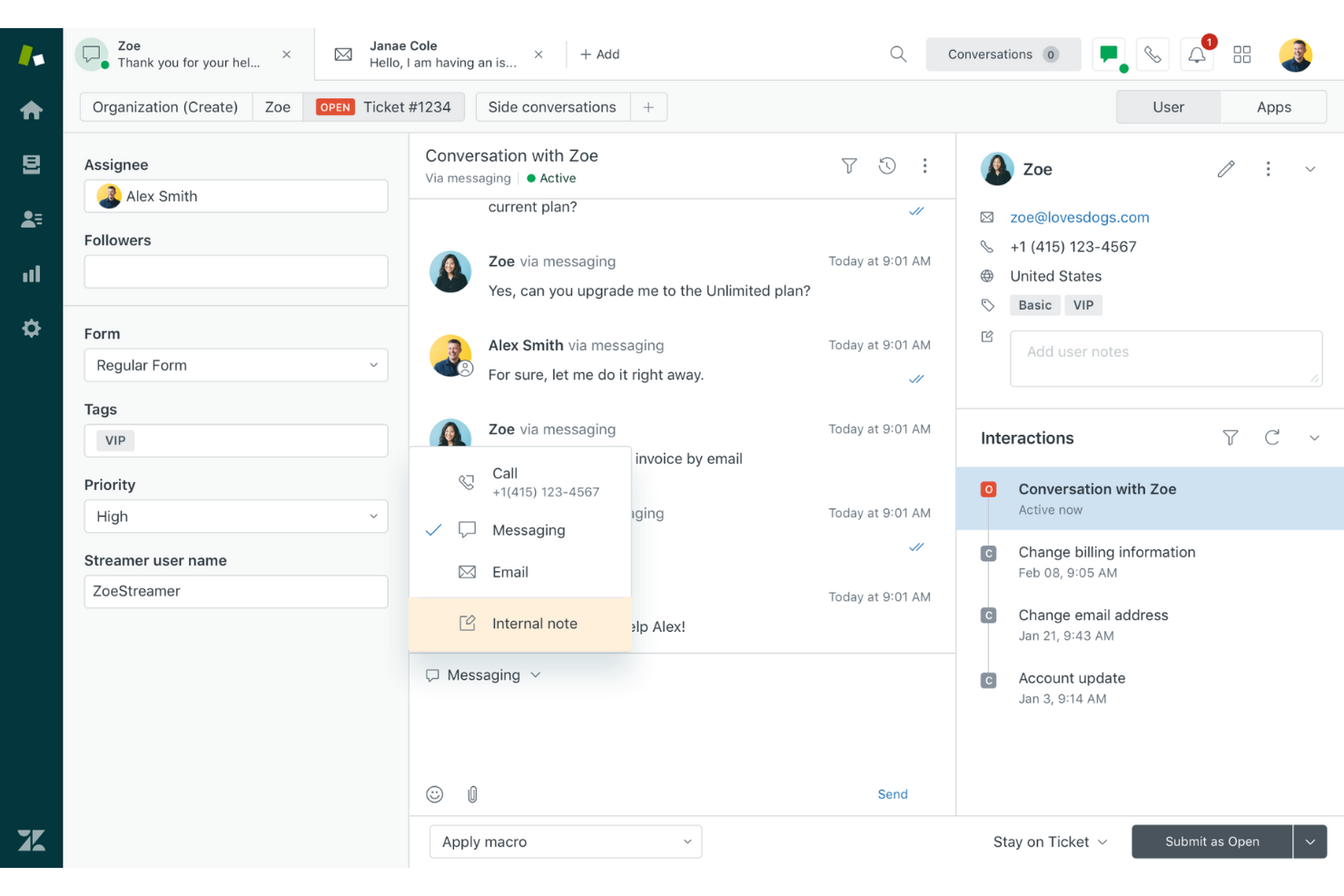
Zendesk offers a user-friendly and adjustable platform for businesses to enhance customer experiences using AI and bots. This platform allows organizations to provide self-service portals, collect valuable insights, and deliver personalized client experiences.
Why I picked Zendesk: I decided to go with Zendesk for its customer support software that offers a wide range of features to enhance client interactions. They have a unified agent workspace that makes it easy for customers to communicate, AI and bots that automate responses for improved productivity, and self-service options that let clients find solutions on their own time.
Zendesk Standout Features and Integrations
Standout features include a comprehensive ticketing system that allows businesses to handle customer inquiries and issues efficiently. With messaging and live chat capabilities, real-time customer engagement is possible. Furthermore, an integrated help center and community forum empower customers to find self-service solutions and actively participate in discussions.
Zendesk Integrates with 1,200+ apps. Telephony and SMS integrations include AI customer service, Dialpad, and Viibe and Ada for support, Klaus and Nicereply for analytics and reporting, and Zendesk-built apps like Bookmarks and Print Ticket History.
Pros and Cons
Pros:
- Includes agent productivity tools
- Extensive integrations
- Omnichannel customer support
Cons:
- Slight learning curve
- Free trial details are not transparent


Hiver is a modern AI-driven help desk solution built for teams that want ease of use without compromising on advanced features. You get all of the important features needed for providing good customer support from a familiar, email-like interface, so there’s virtually no learning curve.
Why I picked Hiver: Teams can manage queries from all channels, like email, live chat, WhatsApp, voice, SMS, and social media from a panel on the left-hand side of your screen. You also get a built-in knowledge base for self-service, detailed analytics to track team performance, and collaboration tools such as notes and shared drafts to make teamwork seamless. Hiver’s support stands out, too. Regardless of which pricing plan you’re on (including the free one), you get access to human-led email and chat support 24x7.
Hiver Standout Features and Integrations:
Standout features include its advanced AI capabilities, which are embedded across all touchpoints of the customer support journey. For example, AI Copilot helps agents respond to customers through contextual answers, reply drafts, and more, while AI Agents help you set up autonomous workflows to handle FAQs, follow-ups, and other actions. It also has AI Insights that use conversations to forecast issues and risks.
Integrations include Aircall, Asana, Jira, Okta, QuickBooks, Salesforce, Slack, WhatsApp, and Zapier and 100+ other platforms.
Pros and Cons
Pros:
- AI features embedded at all stages of customer support journey
- Customer support from real humans available 24/7 via chat or email, across all plans (including free one)
- Helps you schedule CSAT surveys to check on how customers are feeling
Cons:
- Compared to some other platforms, Hiver offers fewer third party integrations
- Mobile experience isn’t as strong as the desktop one
New Product Updates from Hiver

Hiver Introduces AI-Powered Task Creation
Hiver introduces AI-powered task creation for email workflows. This update enables users to extract key details, summarize requests, and trigger actions automatically from incoming emails. For more information, visit Hiver’s official site.


Tidio is an AI-powered customer service platform designed to enhance how you interact with your customers. It offers real-time communication tools and automated support features that make managing customer inquiries easier.
Why I picked Tidio: Tidio’s ticketing system is built to keep your support organized. You can turn emails, chat messages, and social media DMs into tickets, assign them to team members, and set priorities based on urgency. The system also lets you add internal notes and tags, which helps your team stay aligned on customer issues. I also like Tidio’s AI-powered automation, which can scan incoming inquiries and solve common problems in seconds.
Tidio Standout Features and Integrations
Features include canned responses that let your team reply to common questions quickly, saving time and maintaining consistency. The live typing preview shows what customers are typing in real-time, allowing agents to prepare responses before the message is sent.
Integrations include Shopify, WordPress, Squarespace, WIX, Adobe Commerce, BigCommerce, WooCommerce, Google Analytics, Mailchimp, HubSpot, and Zendesk.
Pros and Cons
Pros:
- Provides insights into team performance and customer satisfaction
- Lyro AI handles a significant portion of customer inquiries
- Multichannel support, including for chats, emails, and social media
Cons:
- Limitations when integrating with certain third-party tools
- Many automation features limited to higher tier plans
New Product Updates from Tidio

Tidio Expands Lyro AI Across Email and Chat
Tidio expands Lyro AI to email ticketing and enhances its chatbot with Claude 3.0 integration. These updates improve automation across support channels and enhance AI-driven interactions. For more information, visit Tidio’s official site.
 .
.

Salesforce Service Cloud is a helpdesk software designed to help businesses deliver superior customer service experiences leveraging AI. It allows companies to manage customer support across various channels efficiently, using automation and AI to streamline processes.
Why I picked Salesforce Service Cloud: This software stands out for its AI and automation capabilities, which support a more streamlined workflow and alleviate repetitive tasks for agents. Its AI chatbots and automatic triaging not only save time but also ensure that customer queries are directed to the most qualified agents, enhancing both efficiency and support quality. The drag-and-drop editor for creating a self-service center empowers customers to find solutions independently, further easing the workload on support teams.
Salesforce Service Cloud Standout Features and Integrations
Standout features include a unified service console, giving agents a 360-degree view of customer data and interactions. This holistic view enables more personalized and context-aware support. The platform also integrates seamlessly with other Salesforce products, creating a cohesive ecosystem that improves overall business operations. Its mobile app ensures that agents can provide support from anywhere, maintaining high service standards even on the go.
Integrations include Freshdesk, CloudTalk, Twilio, Brandwatch, Paligo, Mailchimp, HubSpot CRM, Trello, TeamViewer, Smartsheet, Klaviyo, Aircall, Gainsight, and Conversocial.
Pros and Cons
Pros:
- Multiple pricing tiers to support various stages of growth
- Customizable and adaptable to user needs
- Effectively simplifies support procedures
Cons:
- Some usability features are locked to higher-tier plans
- Implementation can be time-consuming


Gorgias Helpdesk is an ecommerce solution that streamlines support tickets, offers personalized customer service by providing quick access to relevant data, and increases conversion rates by engaging potential customers early on.
Why I picked Gorgias: I included Gorgias Helpdesk for its ability to engage with potential customers before they visit the website. This pre-website interaction through ads and posts has been shown to boost sales and enhance the effectiveness of advertising campaigns.
Gorgias Standout Features and Integrations:
Standout features include multichannel support, which offers businesses a convenient way to manage customer interactions across multiple platforms using a single app. With its automated responses, businesses can resolve customer issues faster and focus on more complex problems. Additionally, Gorgias' sales tracking feature enables businesses to measure the impact of their customer support efforts directly on revenue.
Integrations include chat apps like Ada, Certainly, and Chatdesk and SMS apps like Autopilot, Cartloop, Justcall, and TXTFi. Some of the most popular apps include Aircall, Instagram, and Klayvio.
Pros and Cons
Pros:
- Great tagging system
- Mobile app
- Centralized support management
Cons:
- Slight learning curve
- Limited customizations


ProProfs Help Desk Software is a comprehensive customer support solution that streamlines communication and ticket management. It is suitable for businesses of all sizes.
Why I picked ProProfs Help Desk: I included their software for its high level of customization. Users can include their company branding, such as logos, and create custom fields to improve help desk ticketing.
ProProfs Help Desk Standout Features and Integrations:
Standout features include a robust ticket management system designed to efficiently handle all support tickets by routing them to the appropriate agents and prioritizing them accordingly. Unique to this tool is the Parent-Child Ticketing feature, which simplifies complex issues into manageable tasks for different teams to address.
Integrations include Microsoft Dynamics CRM, ProProfs Chat, ProProfs Knowledge Base, and Salesforce.
Pros and Cons
Pros:
- Mobile app
- Customizable interface
- Includes reporting and analytics
Cons:
- No single user plan
- Limited integrations

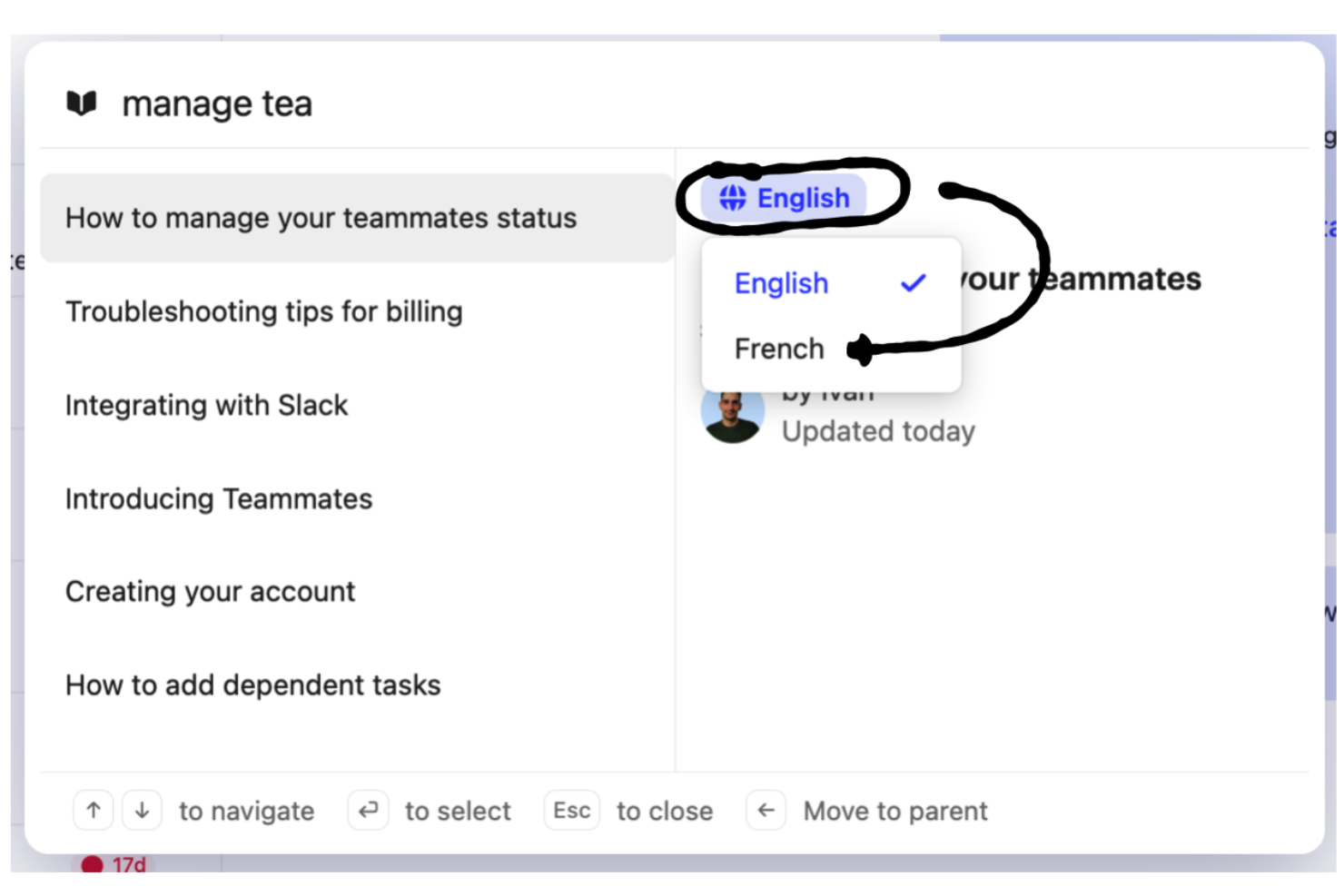
Intercom is a highly advanced help desk that utilizes AI to assist businesses in providing efficient, automated, and personalized customer support on a large scale. Its multilingual support capabilities make it an excellent choice for businesses with a global customer base.
Why I picked Intercom: I chose Intercom because it prioritizes automation in customer support. Its sophisticated automation tools allow businesses to handle repetitive tasks, freeing up time and resources for support teams to focus on more complex and critical issues. This automation extends to providing 24/7 global support by automating answers in 38 languages, even when the support team is not online.
Intercom Standout Features and Integrations:
Standout features include a unified interface and streamlined workflows that enhance productivity for users across all touchpoints. The custom bots have also been tailored to provide personalized and engaging customer interactions, encouraging more conversational and interactive exchanges.
Intercom integrates with over 350 tools, including CRM, email, social media, and databases. Key platforms include Delighted Inc, Helpshelf, Instagram, Jira Cloud, Mailchimp Subscribe, Salesforce, Segment, Stripe, and WhatsApp.
Pros and Cons
Pros:
- Extensive integrations
- Includes reporting and insights
- Advanced support automation
Cons:
- Multilingual support only available in higher-priced plans
- No desktop app

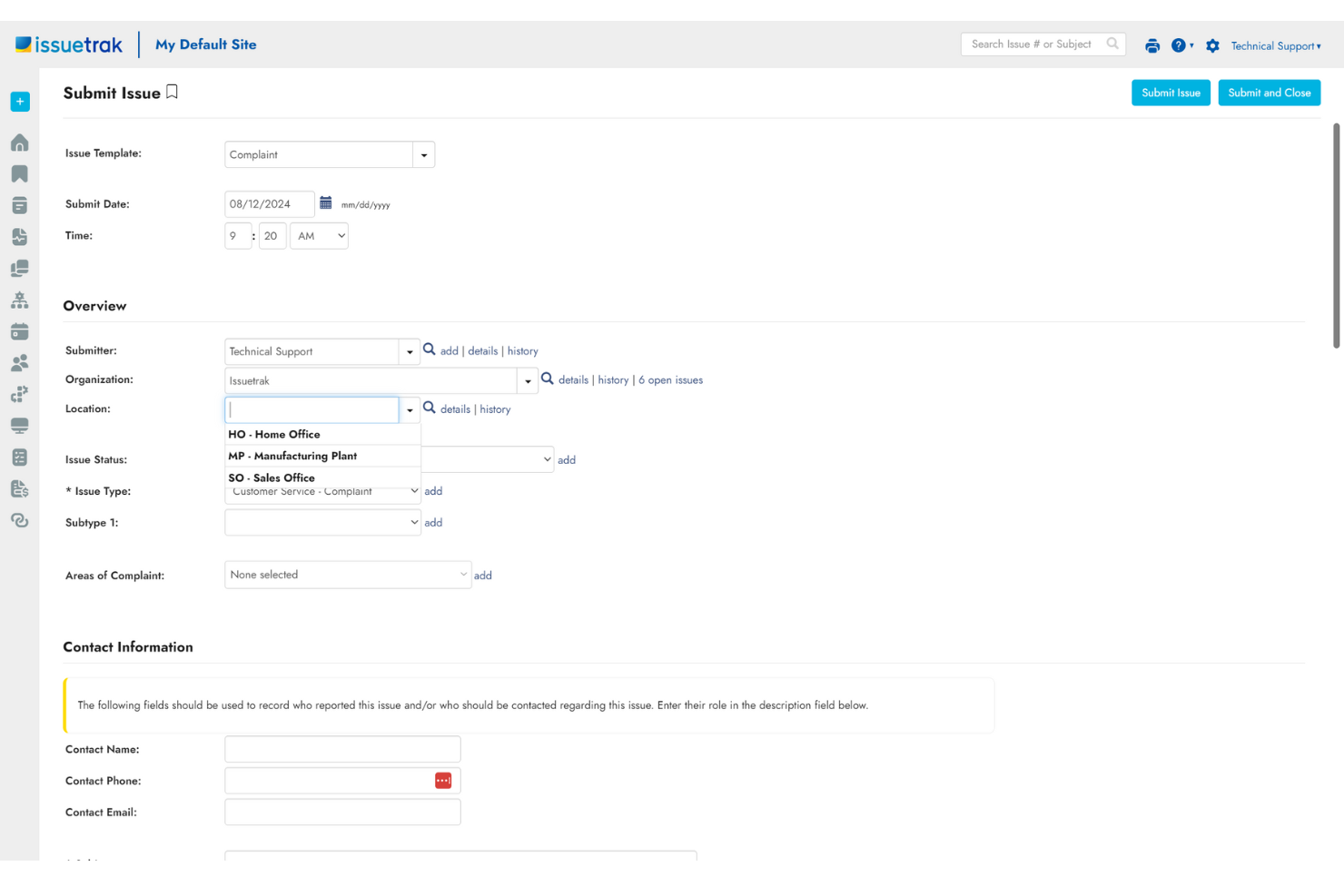
Issuetrak is a ticketing software that provides a platform for help desks and service teams to manage and resolve issues. The software allows users to submit tickets through multiple channels, including email, web forms, or directly within the application.
Why I picked Issuetrak: Issuetrak's help desk software is designed to assist organizations in managing customer support and service requests efficiently. For example, the Issue Hub serves as a centralized location to view, manage, and update tickets with ease. Additionally, the tool's automated round robin issue assignments ensure that tickets are distributed evenly among team members, while task flows provide structured processes for issue resolution.
Issuetrak Standout Features and Integrations:
Standout features include issue tracking, which allows users to report, track, and manage issues from submission to resolution. Issuetrak also offers task management features, a searchable Knowledge Base, and user and organization management controls.
Integrations include Microsoft 365, Google Analytics, Gmail, Salesforce, Power BI, and thousands more through Zapier. You can also access the Issuetrak API for even more connections.
Pros and Cons
Pros:
- Provides at-a-glance dashboard metrics
- Easy-to-use system
- Excellent tech support
Cons:
- Feature sets can be overwhelming
- Some limitations on search functionality
Other Simple Help Desk Software
Here are some additional simple help desk software options that didn’t make it onto my shortlist, but are still worth checking out:
- SysAid
Help desk software for automated IT services
- HappyFox Help Desk
For automated customer support
- LiveAgent
For gamification features
- Front
For personalized customer support
- SAAS First
AI-powered support chatbot
- Zoho Assist
For providing remote access support
- LiveAgent
For gamification features
- monday service
For simple, customizable support workflows
- Help Scout
For intuitive customer service management
- SuperOps
For MSP and IT teams
- eDesk
For centralized ecommerce message management
- HubSpot Service Hub
For deepening customer relationships
- Jira Service Management
For high-velocity service management
- Spiceworks Cloud Help Desk
Free help desk solution
- ManageEngine
For IT help desk management


Simple Help Desk Software Selection Criteria
When selecting the best simple help desk software to include in this list, I considered common buyer needs and pain points like ease of use and integration capabilities. I also used the following framework to keep my evaluation structured and fair:
Core Functionality (25% of total score)
To be considered for inclusion in this list, each solution had to fulfill these common use cases:
- Ticket management
- Email integration
- Customer communication tracking
- Reporting and analytics
- Multi-channel support
Additional Standout Features (25% of total score)
To help further narrow down the competition, I also looked for unique features, such as:
- AI-driven response suggestions
- Customizable automation workflows
- Multilingual support
- Social media integration
- Mobile app functionality
Usability (10% of total score)
To get a sense of the usability of each system, I considered the following:
- Intuitive interface
- Easy navigation
- Customizable dashboards
- Quick setup process
- Minimal training required
Onboarding (10% of total score)
To evaluate the onboarding experience for each platform, I considered the following:
- Availability of training videos
- Interactive product tours
- Access to templates
- Supportive chatbots
- Webinars for new users
Customer Support (10% of total score)
To assess each software provider’s customer support services, I considered the following:
- 24/7 availability
- Response time
- Multichannel support options
- Knowledge base accessibility
- Personalized assistance
Value For Money (10% of total score)
To evaluate the value for money of each platform, I considered the following:
- Competitive pricing
- Flexible subscription plans
- Free trial availability
- Scalability options
- Cost versus features offered
Customer Reviews (10% of total score)
To get a sense of overall customer satisfaction, I considered the following when reading customer reviews:
- User experience feedback
- Support service quality
- Feature satisfaction
- Ease of implementation
- Overall tool reliability
How to Choose Simple Help Desk Software
It’s easy to get bogged down in long feature lists and complex pricing structures. To help you stay focused as you work through your unique software selection process, here’s a checklist of factors to keep in mind:
| Factor | What to Consider |
|---|---|
| Scalability | Consider if the software can grow with your business. Will it handle an increase in tickets or users without extra cost or complexity? |
| Integrations | Check if it connects with your existing tools like CRM systems or email platforms. Seamless integrations can save time and reduce errors. |
| Customizability | Look for options to tailor workflows or dashboards. Ensure it fits your team’s processes without needing extensive development resources. |
| Ease of use | Evaluate if your team can quickly learn the tool. A user-friendly interface reduces training time and increases adoption. |
| Implementation and onboarding | Assess the setup time and resources needed. A smooth onboarding process with adequate support can minimize disruption to your operations. |
| Cost | Compare pricing plans against your budget. Watch for hidden fees or limitations in cheaper plans, like caps on users or features. |
| Security safeguards | Ensure it meets your security standards. Look for data encryption, regular updates, and compliance with regulations like GDPR if applicable. |
| Support availability | Determine the level of support offered. 24/7 support can be crucial if you operate across different time zones or have urgent needs. |
What Is Simple Help Desk Software?
Simple help desk software is a tool designed to manage and organize customer support inquiries efficiently. Customer support teams and service desk professionals typically use these tools to enhance communication and resolve issues swiftly. Ticket management, email integration, and customer communication tracking features help with organizing requests and improving response times. Overall, these tools simplify the support process, making it easier for teams to deliver effective service.
Features
When selecting simple help desk software, keep an eye out for the following key features:
- Ticket management: Organizes customer inquiries into manageable tickets, allowing for efficient tracking and resolution.
- Email integration: Connects with your email platform to centralize support communications and keep everything in one place.
- Customer communication tracking: Logs interactions with customers, providing a complete history to improve service quality.
- Reporting and analytics: Offers insights into support performance and customer satisfaction, helping to identify areas for improvement.
- Multi-channel support: Enables handling of customer inquiries from various channels like email, chat, and social media.
- Customizable automation workflows: Automates repetitive tasks, freeing up time for support agents to focus on complex issues.
- AI-driven response suggestions: Provides suggested replies to common inquiries, speeding up response times.
- Mobile app functionality: Allows support agents to manage tickets on the go, ensuring continuous service.
- Interactive product tours: Guides users through the software's features, enhancing the onboarding experience.
- Social media integration: Connects with social platforms to manage customer interactions across different channels.
Benefits
Implementing simple help desk software provides several benefits for your team and your business. Here are a few you can look forward to:
- Improved efficiency: Ticket management and automation features reduce manual work, allowing your team to focus on more complex tasks.
- Enhanced communication: Centralizing customer interactions through email integration helps maintain clear and consistent communication.
- Better customer satisfaction: Quick response times and comprehensive communication tracking lead to happier customers.
- Informed decision-making: Reporting and analytics offer insights into support performance, helping you make data-driven improvements.
- Multi-channel presence: Supporting inquiries from various channels ensures you meet customers where they are.
- Flexibility and mobility: Mobile app functionality allows your team to manage support tasks from anywhere, maintaining service continuity.
- Ease of onboarding: Interactive product tours and training resources simplify the learning curve for new users.
Costs & Pricing
Selecting simple help desk software requires an understanding of the various pricing models and plans available. Costs vary based on features, team size, add-ons, and more. The table below summarizes common plans, their average prices, and typical features included in simple help desk software solutions:
Plan Comparison Table for Simple Help Desk Software
| Plan Type | Average Price | Common Features |
|---|---|---|
| Free Plan | $0 | Basic ticket management, email integration, and limited reporting. |
| Personal Plan | $5-$25/user/month | Ticket management, email integration, basic analytics, and limited customization options. |
| Business Plan | $30-$60/user/month | Advanced ticket management, multi-channel support, customizable workflows, and detailed reporting. |
| Enterprise Plan | $70-$120/user/month | Comprehensive analytics, full customization, multi-language support, and premium customer support. |
Simple Help Desk Software FAQs
Here are some answers to common questions about simple help desk software:
How can help desk software help my business?
Using help desk software can improve customer service and communication. It centralizes inquiries and support tickets, streamlines communication channels, and offers team coordination and reporting capabilities. Ultimately, it leads to higher customer satisfaction, better team collaboration, and loyalty.
What is the difference between help desk software and a ticketing system?
Switching can be easy if the new software offers data import tools or migration assistance. Before making a switch, ensure the new provider supports data migration from your current system. Plan the transition to minimize downtime and involve your IT team to handle technical aspects. This helps maintain service continuity during the switch.
Do I need technical expertise to set up simple help desk software?
No, you don’t need technical expertise for most simple help desk software. Many solutions are designed for easy setup with guided tutorials or product tours. However, for more complex configurations, involving your IT team might be beneficial. They can help with integrations and customizations, ensuring the software meets your specific needs.
What are the most important elements of a help ticketing system and why?
A helpful ticketing system should have several key features, including various ticket categories, support across multiple channels, support for multiple languages, effective management of the knowledge base, and informative data reporting dashboards.
What’s Next:
If you're in the process of researching simple help desk software, connect with a SoftwareSelect advisor for free recommendations.
You fill out a form and have a quick chat where they get into the specifics of your needs. Then you'll get a shortlist of software to review. They'll even support you through the entire buying process, including price negotiations.