

10 beste Kundenservice-Software für kleine Unternehmen 2026

Auswahlliste der besten Kundendienst-Tools


Bei der großen Auswahl an verschiedenen Kundendienstsoftwarelösungen ist es schwierig herauszufinden, welche für Ihr Kleinunternehmen geeignet ist. Sie wissen, dass Sie eine Software benötigen, die Ihnen hilft, effektiv auf die Bedürfnisse Ihrer Kunden zu reagieren und so deren Zufriedenheit und Loyalität zu steigern. Nun müssen Sie nur noch herausfinden, welche Software am besten geeignet ist.
In diesem Artikel helfe ich Ihnen dabei, die Auswahl zu erleichtern. Ich teile meine Erkenntnisse über die beste Kundendienstsoftware für Kleinunternehmen mit Ihnen, damit Sie Kundenanfragen verfolgen, verwalten, priorisieren und lösen sowie an jedem Kontaktpunkt ein herausragendes Kundenerlebnis bieten können.
Warum Sie unseren Software-Empfehlungen vertrauen können
Unser Team testet und bewertet Software seit 2012. Als CX-Führungskräfte selbst wissen wir, wie schwierig – und wichtig – es ist, die richtige Software auszuwählen.
Für diesen Leitfaden haben wir Tools mithilfe von praktischen Tests und unabhängiger Recherche bewertet und dabei unsere Bewertungskriterien angewendet.
Unsere Bewertungen spiegeln unser menschliches redaktionelles Urteilsvermögen wider, keine Verkaufsstrategie.
Die beste Kundendienstsoftware für Kleinunternehmen: Preisvergleichstabelle
Diese Vergleichstabelle fasst grundlegende Informationen zu jeder meiner ausgewählten Kundendienstsoftwarelösungen für Kleinunternehmen zusammen. Sie können die Preisdetails sowie die Verfügbarkeit kostenloser Testversionen oder Demos direkt nebeneinander vergleichen, um die beste Software für Ihr Budget und Ihre geschäftlichen Anforderungen zu finden.
| Tool | Best For | Trial Info | Price | ||
|---|---|---|---|---|---|
| 1 | Am besten für die Implementierung von Callcenter-Abläufen geeignet | 14-tägige kostenlose Testversion + kostenlose Demo verfügbar | Ab $19/Nutzer/Monat (jährlich abgerechnet) | Website | |
| 2 | Ideal zur Erstellung individueller KI-Chatbots | Kostenloser Plan verfügbar | Ab $32/Monat (jährliche Abrechnung) | Website | |
| 3 | Am besten für KI-gestützte Kundeninteraktionen | 15-tägige kostenlose Testversion + kostenlose Demo verfügbar | Ab 25 $/Benutzer/Monat (jährliche Abrechnung) | Website | |
| 4 | Am besten zur KI-gestützten Überwachung von Ticketsystemen geeignet | 15-tägige kostenlose Testversion + kostenlose Demo verfügbar | Ab $7/Benutzer/Monat (jährliche Abrechnung) | Website | |
| 5 | Ideal für Omnichannel-Posteingangsunterstützung | 14-tägige kostenlose Testphase verfügbar | Ab $16/Nutzer/Monat (jährliche Abrechnung) | Website | |
| 6 | Am besten geeignet für die Automatisierung von KI-Agenten über mehrere Kanäle hinweg | 14-tägige kostenlose Testversion | Ab $19/Benutzer/Monat (jährliche Abrechnung) | Website | |
| 7 | Am besten geeignet für KI-gestütztes Anrufmanagement | 14-tägige kostenlose Testphase verfügbar | Ab $19/Monat (jährliche Abrechnung) | Website | |
| 8 | Am besten für mehrkanalige KI-Chat-Unterstützung | 7-tägige kostenlose Testversion + kostenloser Tarif verfügbar | Ab $24.17/Monat (jährlich abgerechnet) | Website | |
| 9 | Am besten geeignet für Anrufanalysen und Einblicke | Kostenloser Tarif verfügbar | Ab $29/Monat (jährlich abgerechnet) | Website | |
| 10 | Am besten für die Postfach-Zusammenarbeit mit schlanken Support-Teams geeignet | 30-tägige kostenlose Testversion verfügbar | Ab $14/Nutzer/Monat (jährliche Abrechnung) | Website |

Testbericht: Die beste Kundendienstsoftware für Kleinunternehmen
Hier finden Sie kurze Beschreibungen der 10 besten Kundendienstsoftwares für Kleinunternehmen, die es in meine Auswahlliste geschafft haben. Ich habe die bemerkenswerten Funktionen jedes Systems hervorgehoben und einen Screenshot hinzugefügt, damit Sie die Benutzeroberfläche sehen können.
Falls Sie weitere Optionen in Betracht ziehen möchten, habe ich unten außerdem 12 zusätzliche Optionen aufgeführt, mit denen Sie Ihre Kundenprobleme verfolgen können.

Am besten für die Implementierung von Callcenter-Abläufen geeignet
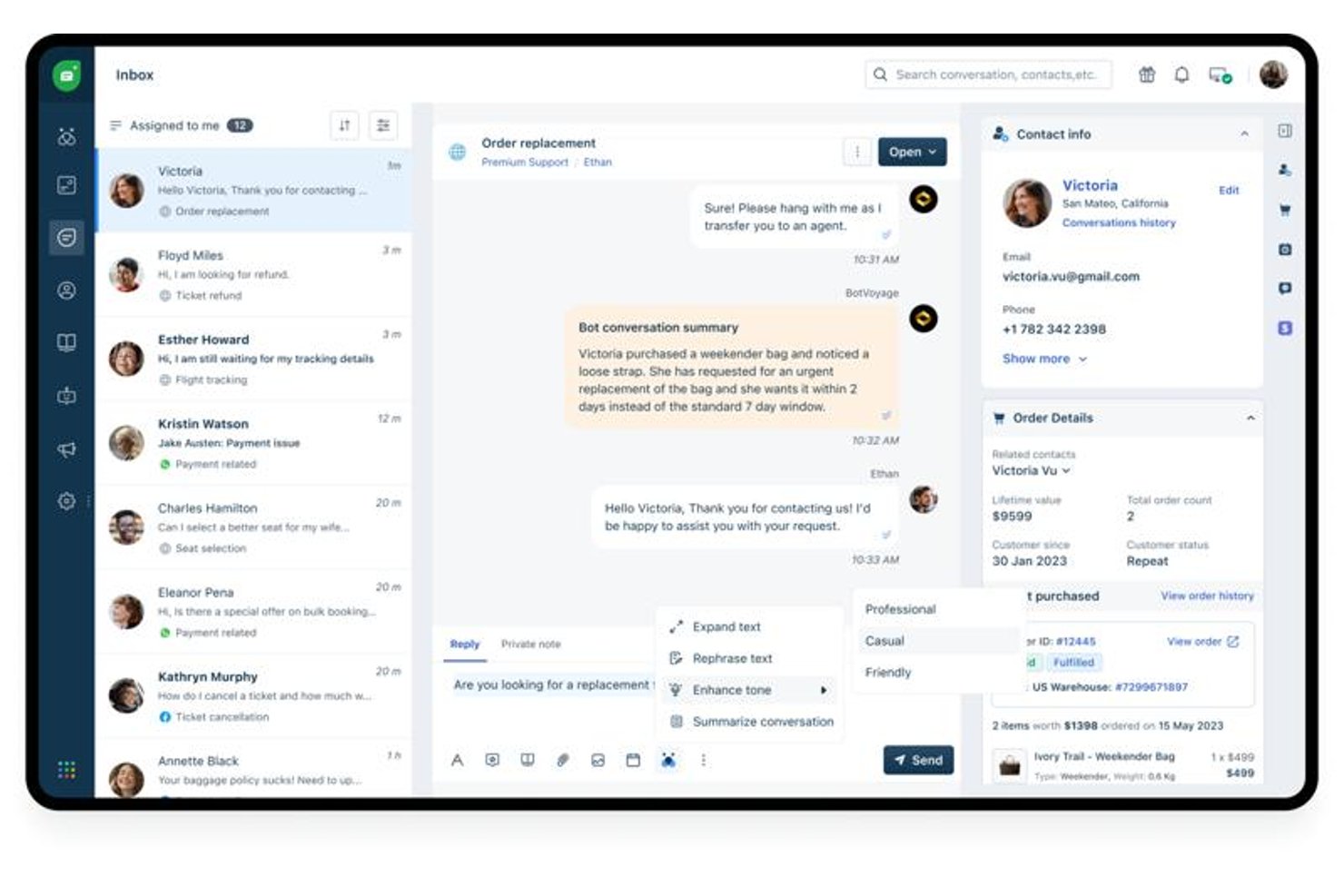
Freshdesk ist eine Omnichannel-Kundenserviceplattform, die E-Mail, Live-Chat, soziale Medien, Sprache und Messaging in einem einzigen Posteingang vereint und integrierte Ticketverwaltung, eine Wissensdatenbank zur Selbstbedienung, Workflow-Automatisierung und KI-gestützte Supporttools bietet.
Für wen eignet sich Freshdesk am besten?
Freshdesk eignet sich für kleine und mittelständische Unternehmen mit schlanken Supportteams, die einen strukturierten, mehrkanaligen Helpdesk benötigen, ohne die Komplexität von Plattformen für Großunternehmen.
Warum ich Freshdesk ausgewählt habe
Ich habe Freshdesk als eine der besten Lösungen ausgewählt, weil sich der Sprachkanal direkt in denselben gemeinsamen Posteingang wie E-Mail, Chat und soziale Medien integrieren lässt. Dadurch müssen Callcenter-Mitarbeiter während ihrer Schicht nicht zwischen verschiedenen Tools wechseln. Besonders gut gefällt mir das kompetenzbasierte Routing, das eingehende Anrufe anhand vordefinierter Kompetenzen automatisch an den am besten geeigneten Mitarbeiter weiterleitet. Die Echtzeit-Sentimentanalyse von Freddy AI Copilot zeigt den Mitarbeitern live, wie sich ein Gespräch entwickelt, sodass sie gegensteuern können, bevor sich die Unterhaltung verschlechtert.
Die wichtigsten Funktionen von Freshdesk
- Gemeinsamer Posteingang: Verwalten Sie E-Mail-, Chat-, Social-Media- und SMS-Unterhaltungen in einem einzigen, übersichtlich organisierten Arbeitsbereich.
- Kundenportal: Bieten Sie Kunden markenbezogene Selbstbedienungsoptionen, Zugriff auf die Wissensdatenbank und Community-Foren.
- Erkennung von Bearbeitungskonflikten: Verhindern Sie doppelte Antworten, indem Mitarbeiter benachrichtigt werden, wenn ein anderes Teammitglied ein Ticket gerade ansieht oder beantwortet.
- Anpassbare Workflows: Erstellen Sie regelbasierte Automatisierungen für Ticketzuweisung, Eskalation und Nachverfolgung, abgestimmt auf die Anforderungen Ihres Teams.
Freshdesk-Integrationen
Freshdesk bietet direkte Integrationen mit Shopify, Slack, HubSpot, Salesforce, Mailchimp, Google Workspace, Microsoft 365, WooCommerce und WhatsApp, lässt sich außerdem mit Zapier verbinden und stellt eine API für benutzerdefinierte Integrationen bereit.
Pros and Cons
Pros:
- Sprachkanal für Callcenter integriert
- KI-Antwortvorschläge verkürzen die Antwortzeit der Mitarbeiter
- Freddy AI fasst Tickets automatisch zusammen
Cons:
- Die Anpassungsmöglichkeiten für Berichte sind in den Tarifen der unteren Preisklassen begrenzt
- Die Komplexität der Einarbeitung nimmt mit zusätzlichen Kanälen zu
New Product Updates from Freshdesk

Freshdesk Adds Voice AI Agents in Freshcaller
Freshdesk introduces Voice AI Agents available through Freshcaller Marketplace apps to handle routine calls and reduce queues. This feature enables automated call handling with real-time, conversational support. For more information, visit Freshdesk's official site.

Chatbase
Ideal zur Erstellung individueller KI-Chatbots
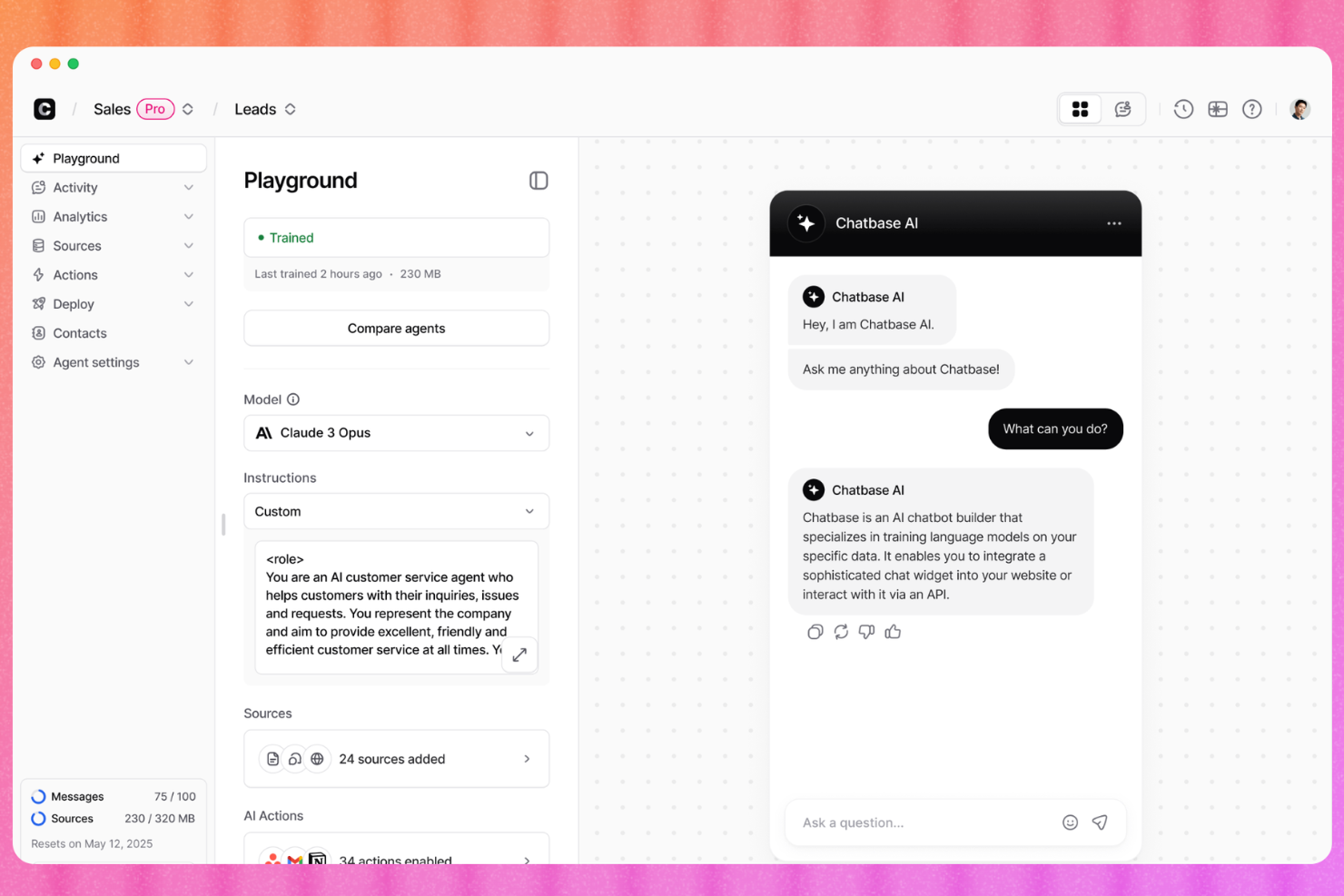
Chatbase ist eine No-Code-Plattform zum Erstellen und Bereitstellen von KI-gesteuerten Kundensupport-Agenten, die auf Ihre eigenen Geschäftsdaten trainiert werden, mit intelligenter Weiterleitung an menschliche Mitarbeitende, Omnichannel-Einsatz und integrierter Analytik.
Für wen ist Chatbase am besten geeignet?
Chatbase eignet sich besonders für kleine Unternehmen und Einzelunternehmer, die den Kundensupport automatisieren möchten, ohne Entwickler einzustellen oder komplexe Software verwalten zu müssen.
Warum habe ich Chatbase ausgewählt?
Ich habe Chatbase als eines der besten Tools ausgewählt, weil die Schulung eines KI-Agenten auf den eigenen Geschäftsdaten ein herausragendes Feature ist. Sie verbinden es mit Ihren bestehenden Quellen, wie PDFs, Hilfedokumenten oder aktuellen CRM- und Auftragsverwaltungsdaten, und der Agent beantwortet Fragen mit diesem spezifischen Wissen. Besonders gut gefallen mir die KI-gestützten Leitplanken, die verhindern, dass der Agent vom Skript abweicht oder falsche Antworten basierend auf Informationen außerhalb Ihrer Datenquellen generiert.
Wichtige Funktionen von Chatbase
- Weiterleitung an Menschen: Leiten Sie Gespräche vom KI-Agenten an einen menschlichen Ansprechpartner weiter, wenn die Frage des Kunden den Rahmen des Bots überschreitet.
- Omnichannel-Einsatz: Binden Sie Ihren KI-Agenten auf Ihrer Website ein oder verbinden Sie ihn zentral mit WhatsApp, Messenger, Slack und E-Mail.
- Gesprächsanalytik: Verfolgen Sie Nachrichtenvolumen, Lösungsraten und unbeantwortete Fragen, um Wissenslücken Ihres Agenten zu identifizieren.
- No-Code-Agentenerstellung: Erstellen, konfigurieren und aktualisieren Sie Ihren KI-Agenten über ein visuelles Dashboard – ganz ohne Programmierkenntnisse.
Chatbase Integrationen
Chatbase bietet Integrationen für mehr als 15 Plattformen, darunter WordPress, Shopify, WhatsApp, Slack, Zendesk sowie Salesforce, Stripe, Calendly, Cal.com, Notion und Messenger. Es ist außerdem über Zapier und Make verfügbar und stellt eine API für individuelle Integrationen bereit.
Pros and Cons
Pros:
- Ein funktionsfähiger Chatbot lässt sich in wenigen Minuten bereitstellen
- Mit KI-Aktionen kann der Bot Aufgaben ausführen
- Unterstützt über 80 Sprachen ohne separaten Aufwand
Cons:
- Kein visueller Flow-Builder für mehrstufige Logik
- Bot erfindet gelegentlich URLs oder Antworten

Am besten für KI-gestützte Kundeninteraktionen
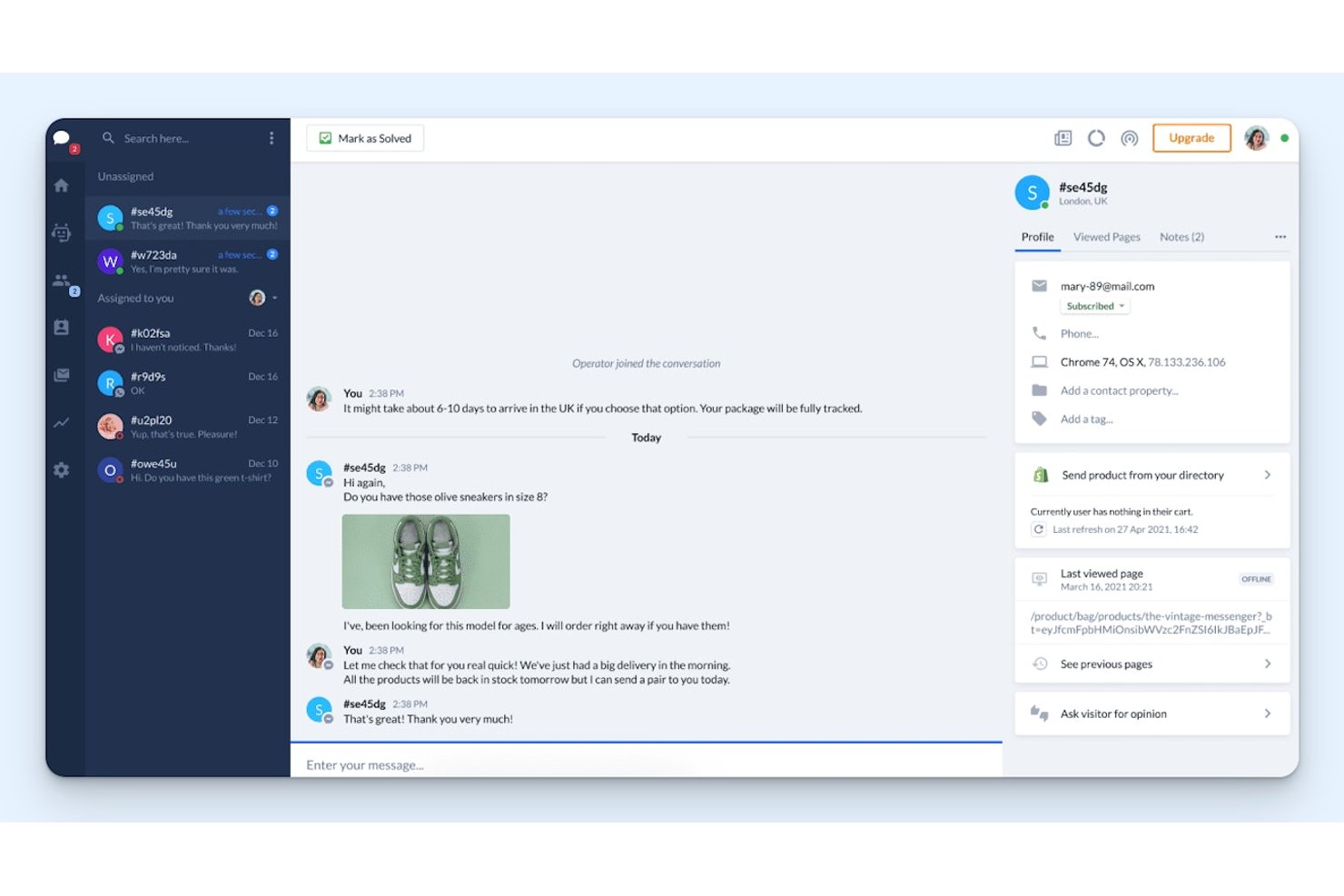
Help Scout ist eine Kundensupport-Plattform, die E-Mail, Echtzeit-Chat, Nachrichten über soziale Medien und eine Wissensdatenbank zur Selbstbedienung in einem gemeinsamen Posteingang für kleine Teams zusammenführt.
Für wen ist Help Scout am besten geeignet?
Help Scout eignet sich besonders gut für kleine bis mittelgroße Teams, die den Großteil ihrer Kundenkommunikation per E-Mail abwickeln und eine unkomplizierte Kundensupport-Lösung mit geringem Verwaltungsaufwand wünschen.
Warum ich Help Scout ausgewählt habe
Help Scout gehört zu den besten Lösungen auf meiner Auswahlliste, weil sich die KI-Funktionen so natürlich in den täglichen Arbeitsablauf kleiner Teams einfügen. Mir gefällt besonders, dass der KI-Assistent Kundendienstmitarbeitern hilft, Antworten direkt im Posteingang zu verfassen, ohne zwischen verschiedenen Tools wechseln zu müssen, während die KI-Zusammenfassung lange Gesprächsverläufe zu einer kurzen Übersicht verdichtet. Der Chatbot für KI-Antworten geht noch einen Schritt weiter und löst routinemäßige Fragen automatisch, bevor sie überhaupt die Warteschlange erreichen.
Wichtige Funktionen von Help Scout
- Gemeinsamer Posteingang und Erkennung paralleler Bearbeitung: Mehrere Kundendienstmitarbeiter können E-Mails gemeinsam mit Aktualisierungen in Echtzeit und internen Notizen verwalten.
- Wissensdatenbank für Dokumentationen: Erstellen Sie ein anpassbares Hilfezentrum zur Selbstbedienung mit Suche, Kategorien und Analysen zu Artikeln.
- Anpassbare Arbeitsabläufe: Erstellen Sie regelbasierte Automatisierungen für Ticketzuweisung, Markierungen, automatische Antworten und SLAs.
- Mobile Anwendung für Kundendienstmitarbeiter: Beantworten Sie Kundengespräche und verwalten Sie Kundendiensttickets direkt über iOS oder Android.
Integrationen von Help Scout
Help Scout bietet direkte Integrationen mit HubSpot, Salesforce, Shopify, Mailchimp, Slack, Jira, Aircall, Asana, WooCommerce und Facebook Messenger. Außerdem lässt es sich mit Zapier verbinden und stellt eine API für benutzerdefinierte Integrationen bereit.
Pros and Cons
Pros:
- KI-Tools sind direkt in den Posteingang integriert
- Der gemeinsame Posteingang unterstützt die gemeinsame Lösung von Kundenanfragen in kleinen Teams
- Die Wissensdatenbank hält sich wiederholende Kundendiensttickets vom Kundendienst fern
Cons:
- Die Berichterstellung bietet nur eingeschränkte Möglichkeiten zur erweiterten Anpassung
- Keine native Unterstützung für Sprach- oder Telefonkanäle
New Product Updates from Help Scout

Help Scout Adds Automatic Conversation Reassignment
Help Scout can now automatically unassign conversations when the assigned teammate has been away long enough, keeping replies moving so others can pick them up. For more information, visit Help Scout's official site.
 .
.
Am besten zur KI-gestützten Überwachung von Ticketsystemen geeignet
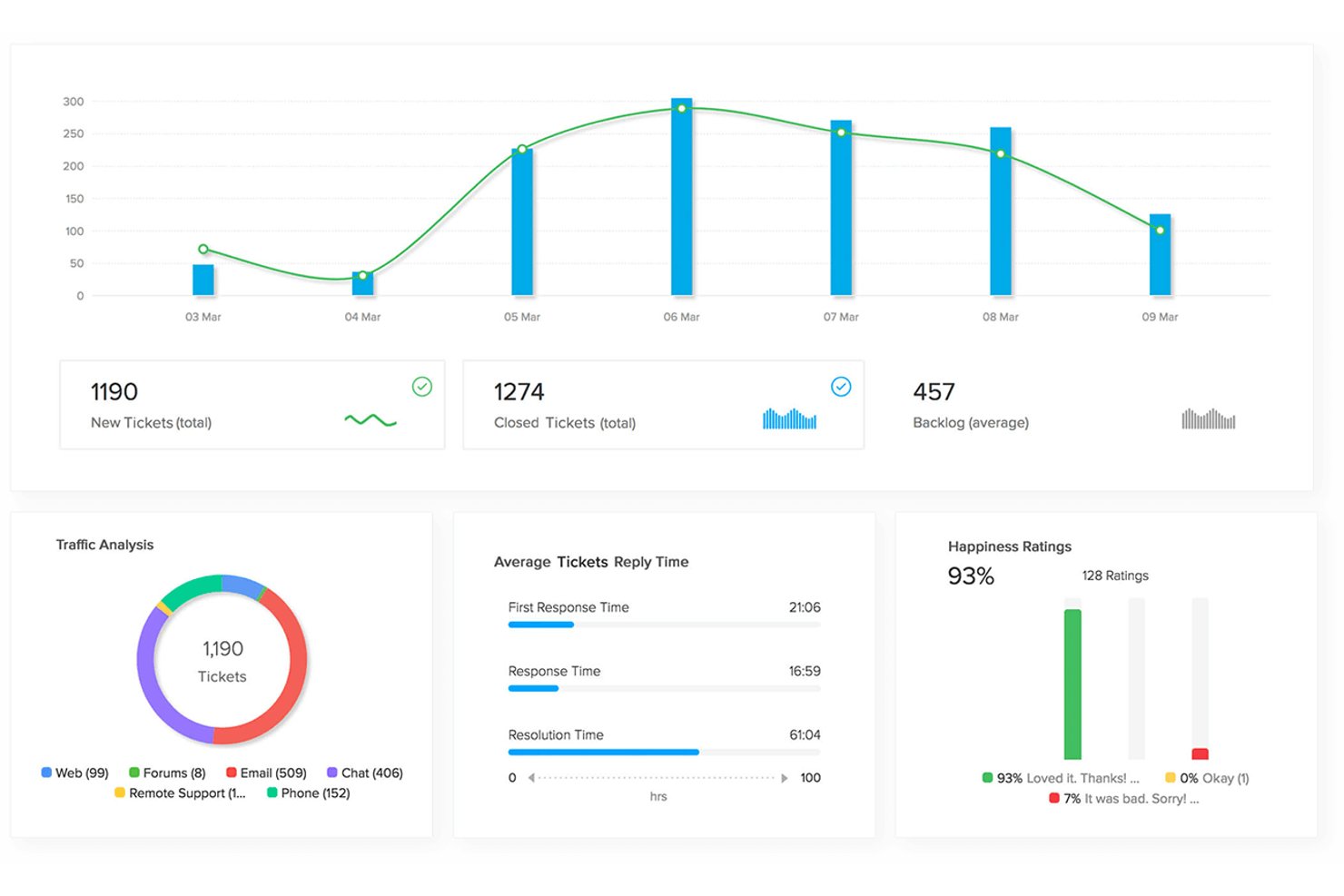
Zoho Desk ist eine kontextbewusste Helpdesk-Plattform, die Kundensupport-Tickets aus E-Mail, sozialen Medien, Live-Chat, Telefon und Messaging-Apps in einem einzigen Arbeitsbereich mit integrierter KI, Automatisierung und Self-Service-Tools bündelt.
Für wen ist Zoho Desk am besten geeignet?
Zoho Desk eignet sich besonders für kleine Unternehmen, die bereits Zoho CRM oder andere Zoho-Apps nutzen und eine tief integrierte, KI-gestützte Support-Plattform wünschen.
Warum ich Zoho Desk ausgewählt habe
Ich habe Zoho Desk als eine der besten Lösungen ausgewählt, weil Zia, die integrierte KI, Ihre Ticket-Warteschlange aktiv überwacht und Anomalien erkennt, bevor sie sich zu Rückständen ausweiten. Zia liest eingehende Tickets, erkennt die Kundenstimmung und versieht Anliegen automatisch mit Tags, sodass mein Team die richtigen Gespräche zuerst priorisieren kann. Außerdem gefällt mir, dass KI-Agenten Routineanfragen von Anfang bis Ende bearbeiten und nur dann an einen Menschen eskalieren, wenn die Situation dies tatsächlich erfordert.
Wichtige Funktionen von Zoho Desk
- Panel mit Kundenkontext: Sehen Sie ein vollständiges Kundenprofil mit CRM-Verlauf, früheren Tickets und Bestelldetails neben jeder Unterhaltung.
- Posteingang für mehrere Kanäle: Verwalten Sie E-Mails, soziale Medien, Live-Chat, Messaging-Apps und Sprachinteraktionen an einem Ort.
- Self-Service-Hilfezentrum: Erstellen und passen Sie eine markengerechte Wissensdatenbank, FAQ und ein Community-Forum für Kunden an.
- Mobile App für Agenten: Ermöglichen Sie Agenten, Tickets auf iOS- oder Android-Geräten unabhängig von ihrem Aufenthaltsort anzuzeigen, zu beantworten und zu verwalten.
Integrationen von Zoho Desk
Zoho Desk bietet native Integrationen mit Zoho CRM, Shopify, Slack, Jira, Microsoft Teams, Trello, Mailchimp, Salesforce, HubSpot und Google Workspace. Für individuelle Integrationen steht eine API zur Verfügung.
Pros and Cons
Pros:
- Zia-KI erkennt automatisch die Stimmung eingehender Tickets
- Kollisionserkennung verhindert doppelte Antworten von Agenten
- No-Code-Chatbot löst Routine-Tickets autonom
Cons:
- Erweiterte KI-Funktionen sind kostenpflichtigen Tarifen vorbehalten
- Die Komplexität der Einrichtung nimmt mit mehreren Kanälen zu

Ideal für Omnichannel-Posteingangsunterstützung
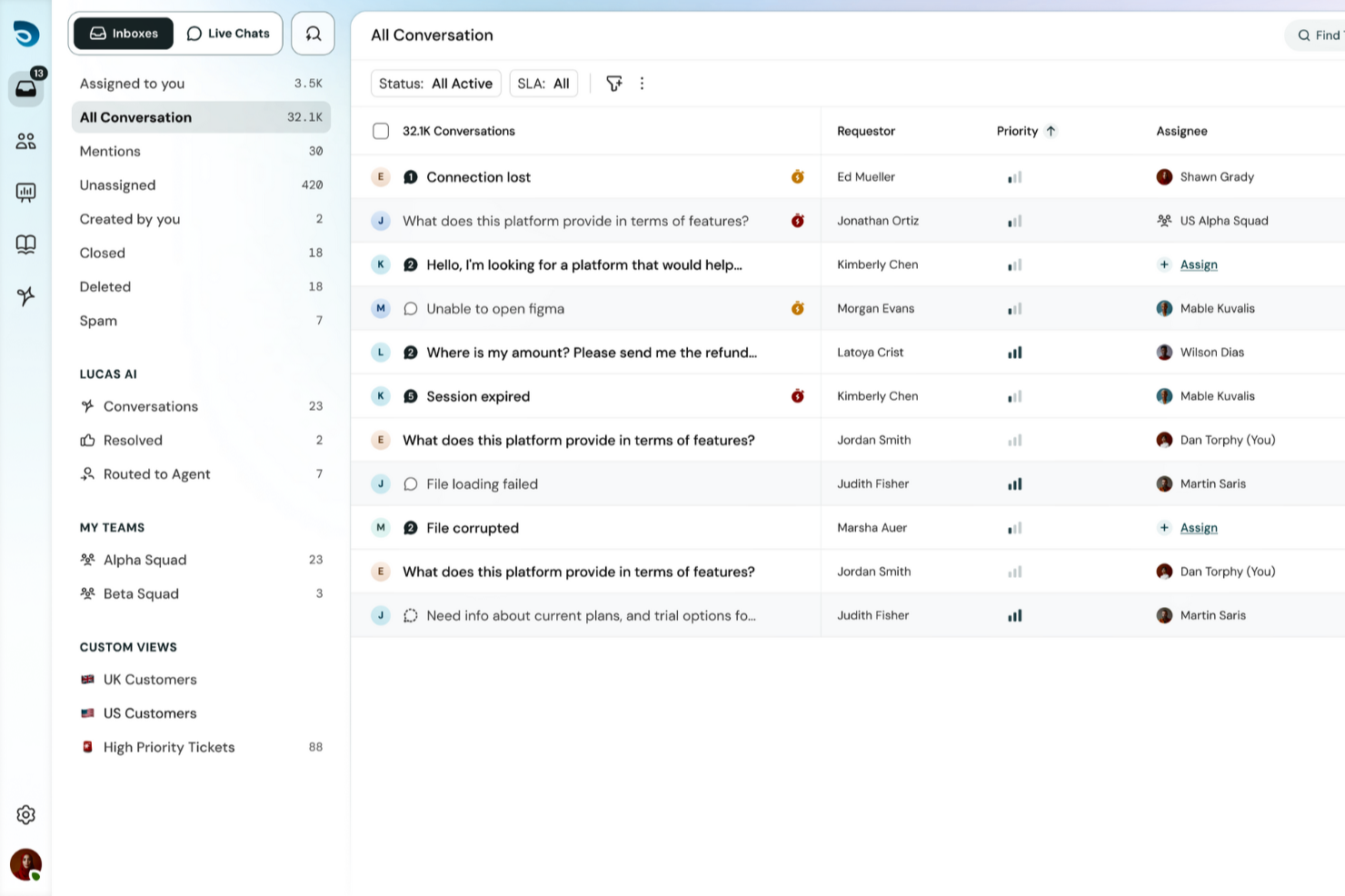
SparrowDesk bietet eine benutzerfreundliche Plattform, die speziell auf kleine Unternehmen zugeschnitten ist, um deren Kundenservice zu verbessern. Durch die Integration von KI-gesteuerten Lösungen unterstützt sie Ihr Team dabei, Kundenanfragen effizient zu bearbeiten und gleichzeitig eine einheitliche Markenstimme zu wahren. Die Möglichkeit, Omnichannel-Interaktionen aus einem einzigen Posteingang zu steuern, löst das Problem fragmentierter Kommunikation und stellt sicher, dass Ihre Kunden zeitnah und konsistent betreut werden.
Warum ich SparrowDesk gewählt habe
Ich habe mich für SparrowDesk aufgrund der einzigartigen Integration von KI-Funktionen entschieden, die gezielt auf die Bedürfnisse kleiner Unternehmen eingehen. Die KI-Kollegin Zoona hebt sich dadurch hervor, dass sie personalisierte Lösungen bietet und die Markenstimme konsequent wahrt. Darüber hinaus hilft die Funktion für Service Level Agreements (SLAs) Ihrem Team, Kundenanforderungen effektiv zu verwalten und zu erfüllen. Diese Funktionen, kombiniert mit dem KI-Copilot, der Agenten mit sofortigen Zusammenfassungen und kontextbezogenen Antworten unterstützt, machen SparrowDesk zur ausgezeichneten Wahl für Unternehmen, die ihren Kundensupport verbessern möchten.
SparrowDesk Kernfunktionen
Neben den herausragenden KI-Fähigkeiten fand ich auch die folgenden Funktionen für kleine Unternehmen besonders wertvoll:
- Interaktive Analysen: Bietet Echtzeitdaten und Einblicke, die Ihrem Team helfen, fundierte Entscheidungen zu treffen und die Servicequalität zu steigern.
- Individuelle Ansichten: Ermöglicht es Ihnen, die Oberfläche an die Vorlieben Ihres Teams anzupassen und damit Workflow und Produktivität zu steigern.
- Mehrsprachiger Support: Stellt sicher, dass Sie mit Kunden in ihrer bevorzugten Sprache kommunizieren können, erweitert Ihre Reichweite und verbessert das Nutzererlebnis.
- Omnichannel-Support: Zentralisiert alle Kundeninteraktionen in einem zentralen Posteingang, was die Verwaltung von Gesprächen über verschiedene Plattformen erleichtert.
SparrowDesk Integrationen
Nativ integrierte Lösungen umfassen Okta, Plumsail Forms und Plumsail Documents. Zusätzliche Integrationen sind möglicherweise über Drittanbieter-Plattformen wie Zapier verfügbar. Eine vollständige Liste der nativen Integrationen stellt SparrowDesk derzeit nicht bereit.
Pros and Cons
Pros:
- KI-Copilot unterstützt bei komplexen Tickets
- Zentraler geteilter Omnichannel-Posteingang
- Anpassbare Analysen mit Echtzeitdaten
Cons:
- API-Dokumentation bietet wenig öffentliche Details
- SLA-Tools erfordern Konfigurationsaufwand

Am besten geeignet für die Automatisierung von KI-Agenten über mehrere Kanäle hinweg
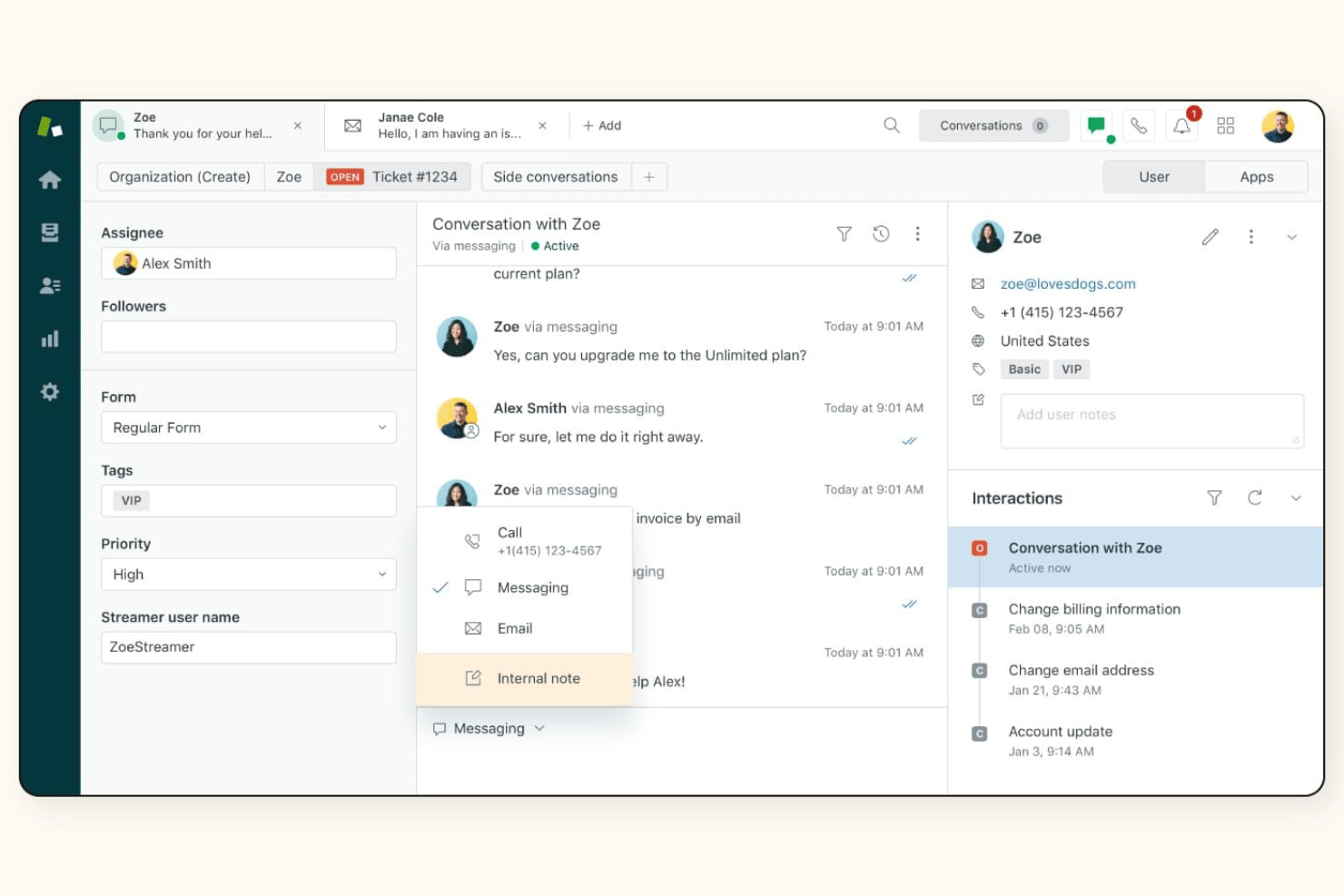
Zendesk Support Suite ist eine Kundenserviceplattform, die Ticketverwaltung, Omnichannel-Messaging, Sprachkommunikation, Wissensdatenbank und KI-gestützte Automatisierung in einem einzigen Arbeitsbereich für Kundenservicemitarbeiter vereint.
Für wen ist Zendesk Support Suite am besten geeignet?
Die Lösung eignet sich hervorragend für wachsende kleine Unternehmen, die über ein gemeinsames Postfach hinausgewachsen sind und einen strukturierten, skalierbaren Supportbetrieb benötigen.
Warum ich Zendesk Support Suite ausgewählt habe
Zendesk Support Suite hat sich einen Platz auf meiner Auswahlliste verdient, weil die KI-Agenten Tickets tatsächlich lösen und nicht nur vorsortieren. Mir gefällt, dass der Aktions-Builder KI-Agenten ermöglicht, während eines Gesprächs Bestelldaten abzurufen oder Datensätze in verbundenen Systemen zu aktualisieren, ohne einen Menschen einzubeziehen. Mit dem Modell für automatisierte Lösungen kann ich genau sehen, wie viele Interaktionen die KI von Anfang bis Ende abschließt – über E-Mail, Chat und Messaging hinweg, alles in einem einzigen Arbeitsbereich.
Wichtige Funktionen von Zendesk Support Suite
- Omnichannel-Arbeitsbereich für Servicemitarbeiter: Führt E-Mail-, Chat-, Social-Media- und Sprachgespräche in einem einheitlichen Posteingang zusammen und ermöglicht so einen optimierten Support.
- Erstellung einer Wissensdatenbank: Ermöglicht das Erstellen, Organisieren und Veröffentlichen von Hilfeartikeln für Kunden und Servicemitarbeiter mit integrierter Kategorisierung und Suche.
- Panel mit Kundenkontext: Zeigt neben aktiven Gesprächen die Ticket-Historie, Bestelldaten und CRM-Details jedes Kunden an und ermöglicht so einen sofortigen Überblick.
- Mobile App für Servicemitarbeiter: Ermöglicht deinem Team, Tickets überall über native iOS- und Android-Apps anzuzeigen, zu aktualisieren und zu beantworten.
Integrationen von Zendesk Support Suite
Zendesk Support Suite bietet native Integrationen mit Shopify, Slack, Salesforce, HubSpot, Jira, Trello, Mailchimp, Google Workspace, Microsoft 365 und WhatsApp. Außerdem lässt sich die Lösung mit Zapier verbinden und verfügt über eine API für individuelle Integrationen.
Pros and Cons
Pros:
- KI-Agenten lösen Tickets ohne menschliches Eingreifen
- Omnichannel-Posteingang deckt mehr als 5 Kommunikationskanäle ab
- Integrierte CSAT- und Berichtsfunktionen ab dem ersten Tag
Cons:
- Die Einrichtung wird mit erweiterten Automatisierungsregeln komplexer
- Für den vollständigen Funktionsumfang der KI sind höhere Tarife erforderlich

Am besten geeignet für KI-gestütztes Anrufmanagement
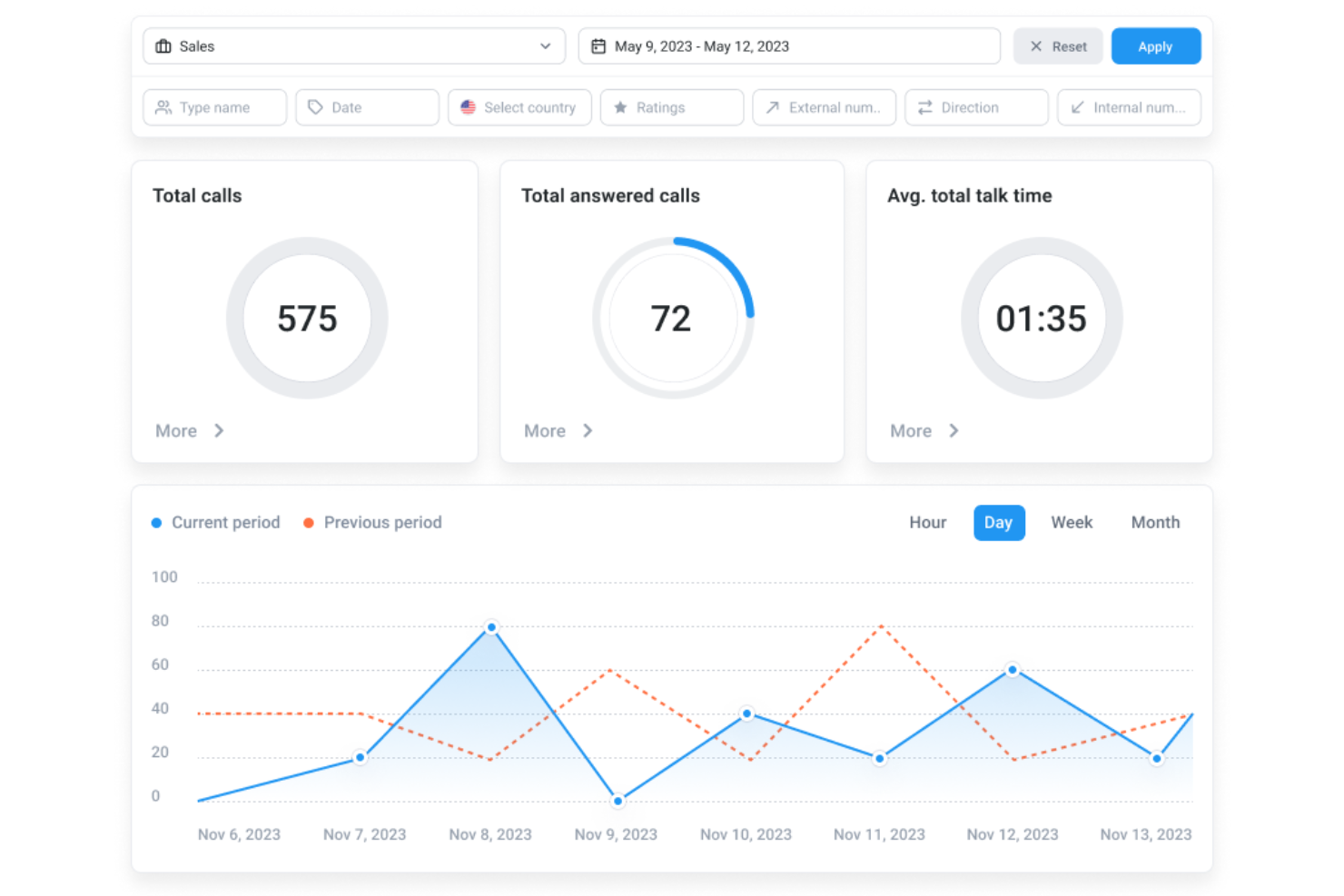
Für Kleinunternehmer, die nach einer zuverlässigen Kundenservice-Lösung suchen, bietet CloudTalk eine praktische Option. Diese cloudbasierte Callcenter-Software hilft Teams dabei, Kundenanrufe effizienter zu verwalten und eignet sich somit für Unternehmen im Einzelhandel, technischen Support und andere serviceorientierte Branchen. Mit KI-gestütztem Telefonsupport und Echtzeitüberwachung ermöglicht CloudTalk Teams, Anrufe konsistent zu bearbeiten und gleichzeitig Personal- sowie Betriebskosten im Griff zu behalten.
Warum ich CloudTalk ausgewählt habe
Ich habe CloudTalk ausgewählt, weil die KI-basierten Funktionen besonders vorteilhaft für kleine Unternehmen sind, die ihren Kundenservice verbessern möchten. Der KI-Wählassistent automatisiert die Wahlvorgänge, verkürzt Wartezeiten und steigert die Produktivität der Agents. Darüber hinaus liefert die KI-Konversationsintelligenz automatische Gesprächszusammenfassungen und Stimmungsanalysen, wodurch verwertbare Einblicke zur Optimierung der Kundenkommunikation entstehen. Diese Funktionen adressieren direkt den Bedarf an effizientem Ressourcenmanagement und hoher Servicequalität – ideal für kleine Unternehmen.
CloudTalk Hauptfunktionen
Neben den KI-Fähigkeiten bietet CloudTalk:
- Anrufmanagement: Individuelles Routing, Sprachdialogsysteme (IVR), Anrufwarteschlangen und Aufzeichnung sorgen für schlanke Kommunikationsabläufe.
- Echtzeitüberwachung: Live-Mithören von Anrufen und Leistungsanalysen helfen, Ihren Service zu steuern und zu verbessern.
- Kommunikationstools: SMS- und WhatsApp-Nachrichten erweitern die Kommunikationsmöglichkeiten Ihres Teams.
- Nummernverwaltung: Lokale Rufnummern in über 160 Ländern ermöglichen internationale Reichweite.
CloudTalk-Integrationen
Integrationen umfassen HubSpot, Salesforce, Zoho, Pipedrive, Zendesk, Intercom, Freshdesk, Help Scout, Microsoft Dynamics und Shopify.
Pros and Cons
Pros:
- KI-gestützte Funktionen verbessern Effizienz und Einblicke bei Anrufen
- Bietet Echtzeitüberwachung und Analysen für das Anrufmanagement
- Anrufanalysen helfen, Leistung und Trends nachzuvollziehen
Cons:
- Gelegentliche Probleme bei der Anrufverbindung werden von Nutzern gemeldet
- Begrenzte Anpassungsmöglichkeiten bei Dashboards

Tidio
Am besten für mehrkanalige KI-Chat-Unterstützung
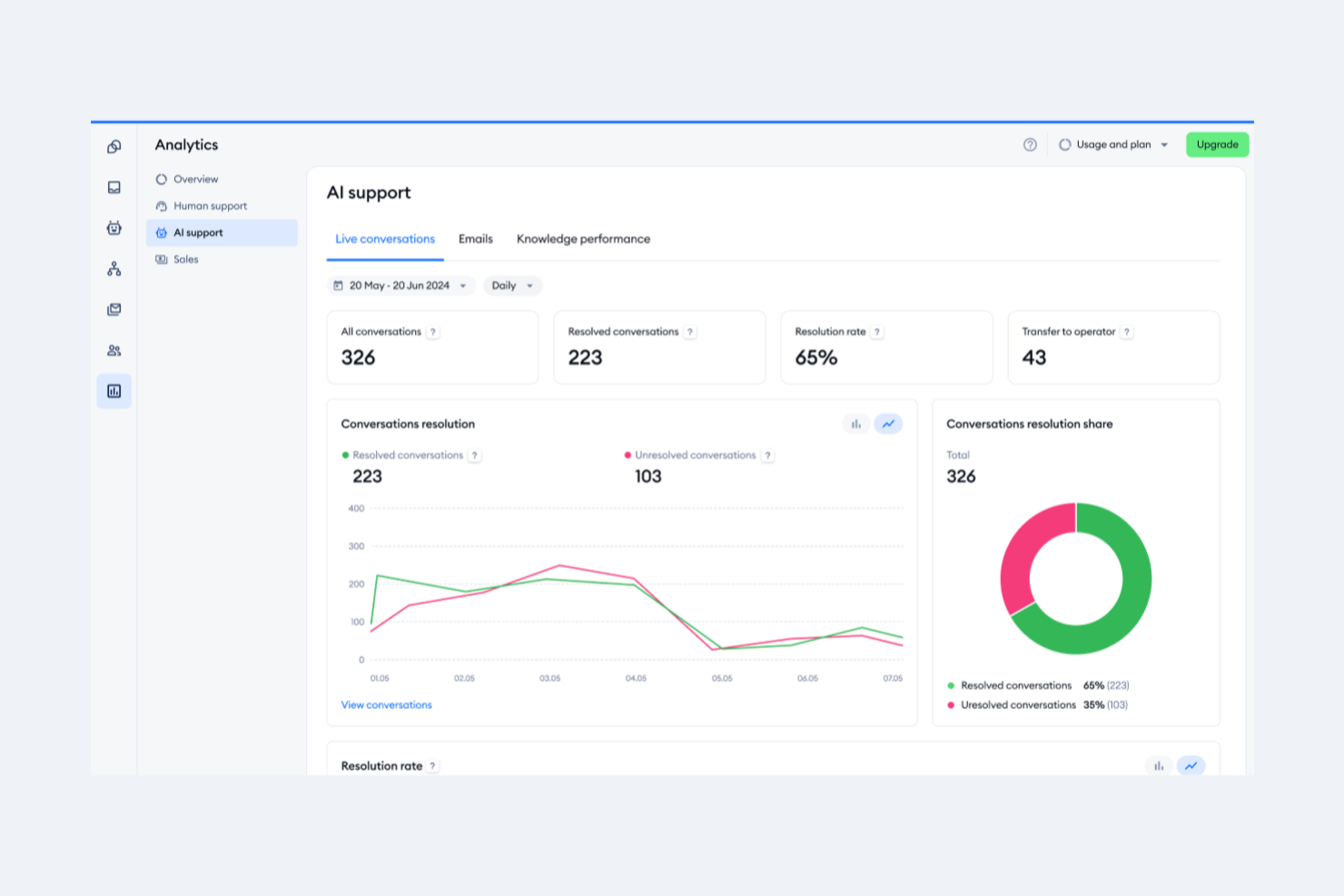
Tidio ist eine Kundenservice-Plattform, die Live-Chat, KI-gestützte Chat-Automatisierung, Helpdesk-Ticketverwaltung und einen mehrkanaligen Posteingang für Teams kleiner Unternehmen in einem Arbeitsbereich vereint.
Für wen ist Tidio am besten geeignet?
Tidio eignet sich besonders für kleine E-Commerce-Unternehmen, insbesondere Shopify-Händler, die Kundenanfragen über Chat- und soziale Kanäle bearbeiten möchten, ohne ein großes Supportteam zu benötigen.
Warum ich mich für Tidio entschieden habe
Tidio steht auf meiner Auswahlliste, weil Lyro, der KI-Agent der Plattform, mehrkanalige Gespräche an einem Ort besonders gut bearbeitet. Mir gefällt, dass Lyro Antworten direkt aus Ihren Hilfeartikeln bezieht und damit über Chat, Instagram, Messenger und WhatsApp antworten kann, ohne dass ein menschlicher Agent bereitstehen muss. In der Praxis bedeutet das, dass mein Team Lyro wiederkehrende Fragen zu Bestellungen und Versand über alle Kanäle hinweg bearbeiten lassen kann, während Agenten nur dann eingreifen, wenn ein Gespräch eine persönliche Betreuung erfordert.
Die wichtigsten Funktionen von Tidio
- Gemeinsamer Teamposteingang: Verwalten Sie eingehende Nachrichten aus E-Mail, Chat, Instagram, Messenger und WhatsApp an einem zentralen Ort.
- Ticketverwaltung und automatische Weiterleitung: Erstellen, weisen Sie Tickets zu und priorisieren Sie sie mithilfe von Regeln und SLA-Verwaltung für eine konsequente Nachverfolgung.
- Chatbot-Builder ohne Programmieraufwand: Entwerfen Sie individuelle Chatbot-Abläufe, um häufige Fragen zu beantworten und wiederkehrende Supportaufgaben zu automatisieren.
- Shopify-Integration: Greifen Sie innerhalb des Live-Chats auf Bestelldetails zu, bearbeiten Sie Rückerstattungen und sehen Sie Warenkörbe ein, um den E-Commerce-Support effizienter zu gestalten.
Tidio-Integrationen
Tidio bietet native Integrationen mit Shopify, WooCommerce, Wix, BigCommerce, HubSpot, Mailchimp, Zendesk, Klaviyo und Facebook Messenger. Die Plattform lässt sich mit Zapier verbinden und stellt eine API für individuelle Integrationen bereit.
Pros and Cons
Pros:
- Die Lyro-KI beantwortet wiederkehrende Fragen automatisch
- Schnell einzurichten, ohne IT-Unterstützung
- Vereinheitlichter Posteingang für Chat, E-Mail und soziale Netzwerke
Cons:
- Berichtstools im Vergleich zu Wettbewerbern eher grundlegend
- Ticketfunktionen weniger ausgereift als bei spezialisierten Helpdesks

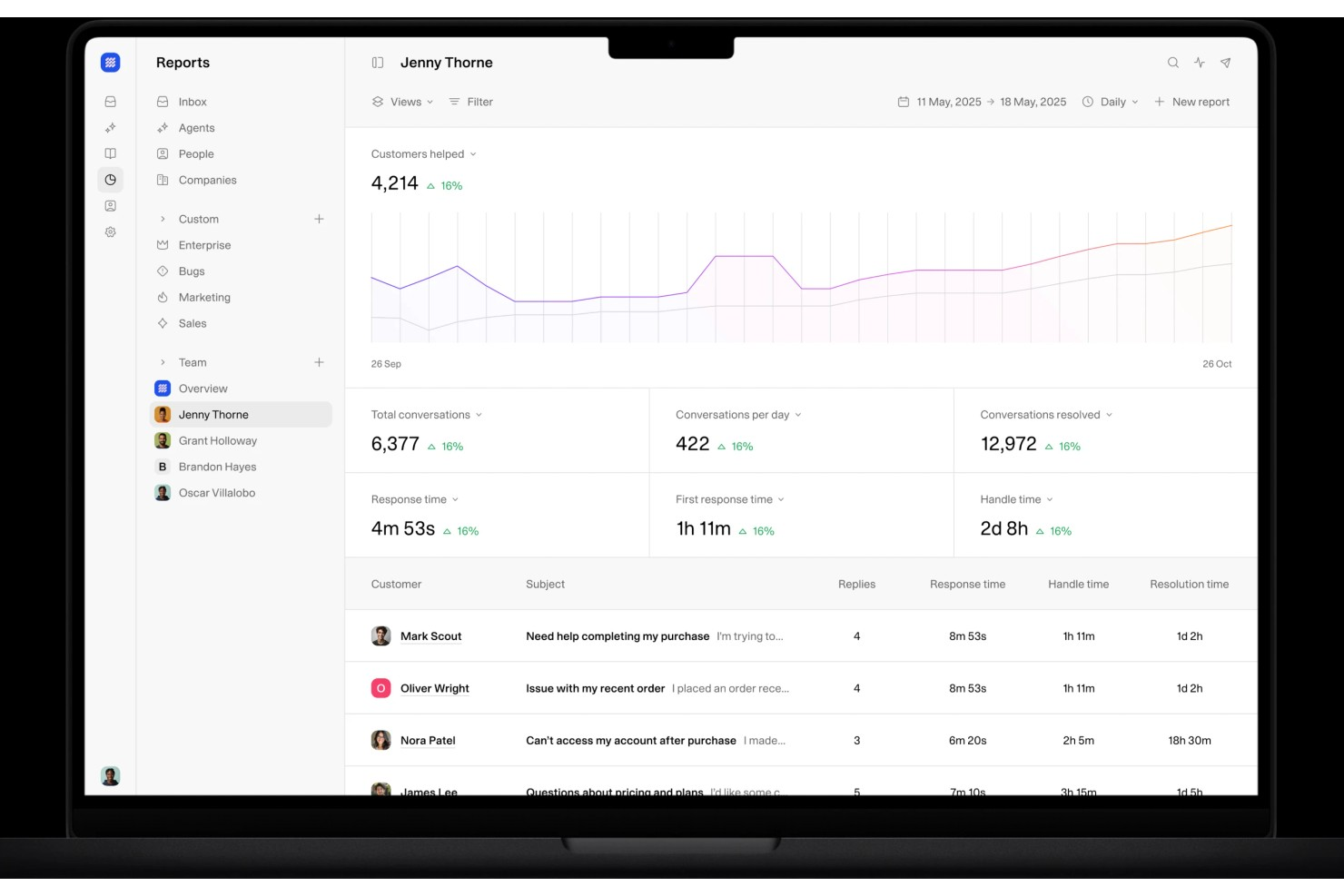
Weav ist eine KI-gestützte Kundenservice-Plattform, die KI-Agenten, ein zentrales Postfach und automatisierte Anfragebeantwortung kombiniert, trainiert mit Ihrer eigenen Produktdokumentation und Support-Historie.
Für wen ist Weav am besten geeignet?
Weav eignet sich besonders für kleine Unternehmensteams, die den Erstkontakt im Kundenservice automatisieren möchten, ohne zusätzliches Support-Personal einzustellen.
Warum ich Weav ausgewählt habe
Ich habe Weav als eine der besten Lösungen ausgewählt, weil das Reporting-Modul kleinen Support-Teams klare Einblicke in das tatsächliche Geschehen bei Kundeninteraktionen gibt. Anstatt Sie mit Rohdaten zu überfluten, ist das Reporting von Weav ergebnisorientiert aufgebaut: Sie können sehen, wo Support-Prozesse unterbrochen werden, welche Anfragetypen Ihre KI-Agenten lösen und wo menschliche Eskalationen am häufigsten auftreten. Zudem gefällt mir, dass das Trainingssystem direkt an diesen Feedback-Zyklus angebunden ist. Wenn sich Muster in den Daten abzeichnen, können Sie neues Material hochladen und der Agent verbessert seine Antworten automatisch.
Wichtige Funktionen von Weav
- Zentrales Postfach: Bündelt Kundengespräche aus Chat und E-Mail in einer Warteschlange, die Ihr Support-Team verwalten kann.
- KI-verfasste Antworten: Der KI-Agent von Weav erstellt Antwortvorschläge auf eingehende Anfragen, die Teammitglieder prüfen, bearbeiten und versenden können.
- Intelligente Routing-Regeln: Leitet eingehende Nachrichten automatisch anhand Ihrer konfigurierten Regeln an das richtige Teammitglied oder die richtige Abteilung weiter.
- Menschliche Übergabe: Ermöglicht es dem KI-Agenten, ein Gespräch während einer Sitzung an einen Live-Agenten zu übergeben, ohne dass der Gesprächsverlauf verloren geht.
Weav-Integrationen
Weav bietet eine kleinere Auswahl an nativen Integrationen, darunter Shopify, Google Drive und Stripe. Es unterstützt außerdem benutzerdefinierte Aktionen, und die REST-API sowie Echtzeit-Webhooks sind ab dem Pro-Plan verfügbar, um individuelle Integrationen zu erstellen.
Pros and Cons
Pros:
- KI lernt aus Ihren gelösten Tickets
- Steuerung von Tonfall und Antworten pro Agent
- Einsatzbereite, trainierte KI-Agenten in wenigen Minuten
Cons:
- Für beste Ergebnisse werden vorhandene Dokumente benötigt
- Kein integrierter Sprach- oder Telefonkanal

Missive
Am besten für die Postfach-Zusammenarbeit mit schlanken Support-Teams geeignet
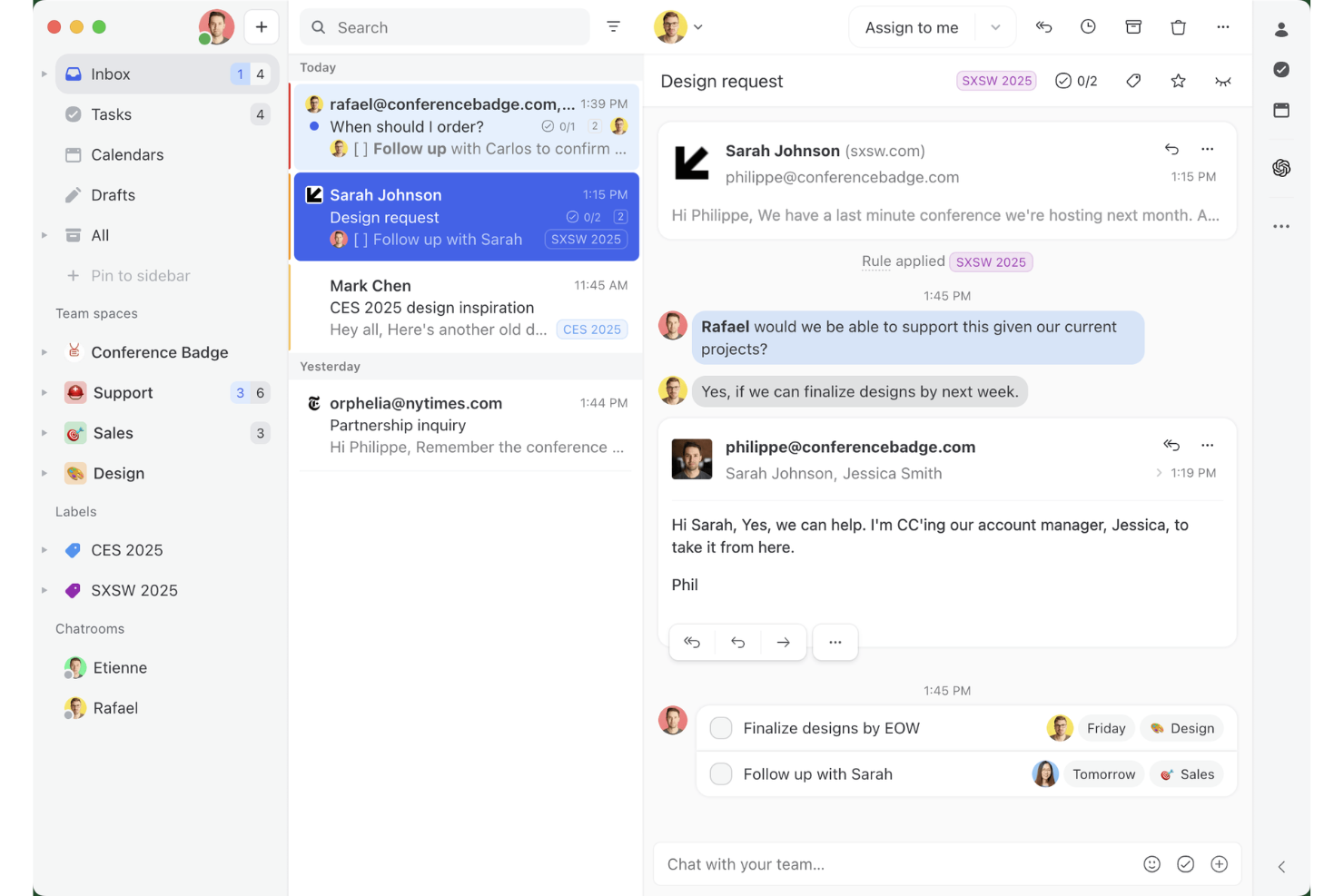
Missive ist eine Plattform für gemeinsam genutzte Postfächer und Team-Messaging, die E-Mail, SMS, WhatsApp, Live-Chat und soziale Messaging-Kanäle in einem einzigen kollaborativen Arbeitsbereich bündelt.
Für wen ist Missive am besten geeignet?
Missive eignet sich besonders für schlanke Support-Teams, die Kundenkonversationen über E-Mail, WhatsApp und soziale Kanäle bearbeiten und eine enge interne Zusammenarbeit benötigen, ohne den Verwaltungsaufwand eines vollständigen Helpdesks.
Warum ich Missive ausgewählt habe
Missive steht auf meiner Auswahlliste, weil die Plattform wirklich konsequent auf die Teamzusammenarbeit in einem gemeinsam genutzten Postfach ausgerichtet ist. Ich schätze besonders, dass mein Team in internen Threads eine Kunden-E-Mail privat besprechen kann, bevor jemand auf „Senden“ klickt. Die Kollisionsvermeidung stellt außerdem sicher, dass zwei Mitarbeitende nicht versehentlich doppelte Antworten an dieselbe Person senden. Die native WhatsApp-Business-Integration (kein Drittanbieter-Konto erforderlich) ist ein echter Vorteil für schlanke Teams, die Kunden mit hohem Messaging-Aufkommen über mehrere Kanäle hinweg in einem Arbeitsbereich betreuen.
Wichtige Funktionen von Missive
- Round-Robin-Zuweisung: Verteilt eingehende Konversationen automatisch per Round-Robin-, Auslastungs- oder Zufallsrouting auf verfügbare Mitarbeitende.
- Vorgefertigte Antworten: Speichert und fügt Vorlagenantworten mit Variablenersetzung ein, damit Antworten im gesamten Team schnell und einheitlich bleiben.
- Missive-MCP-Server: Verbindet externe KI-Clients (wie Claude oder ChatGPT) mit mcp.missiveapp.com, um das Kundenpostfach abzufragen, Kalender zu prüfen und Antworten zu entwerfen – wobei vor dem Senden weiterhin eine menschliche Freigabe erforderlich ist.
- Gastzugang: Lädt externe Mitarbeitende in bestimmte Konversationen ein, ohne ihnen einen kostenpflichtigen Platz zuweisen zu müssen.
- Live-Chat-Widget: Verwaltet Konversationen mit Website-Besuchern direkt im gemeinsam genutzten Postfach neben E-Mail- und sozialen Kanälen.
Missive-Integrationen
Missive bietet mehr als 25 native Integrationen, darunter HubSpot, Shopify, WhatsApp Business, Aircall, Dialpad, Twilio, Google Drive und Dropbox. Außerdem werden individuelle Integrationen über die REST-API, Webhooks, Zapier und den neuen MCP-Server in den Tarifen Productive und Business unterstützt (erfordert die Aktivierung durch einen Administrator).
Pros and Cons
Pros:
- Interne Threads für private Teamdiskussionen
- Native WhatsApp-Business-Integration für Teams enthalten
- Die Kollisionsvermeidung verhindert doppelte Antworten
Cons:
- Keine native, kundenorientierte Wissensdatenbank
- Keine integrierten CSAT- oder Zufriedenheitsumfragen
New Product Updates from Missive
Missive Adds Conversation Pins
Missive now lets you pin key links, decisions, and notes inside a conversation, keeping them accessible in a dedicated Pins section in the Details sidebar. For more information, visit Missive's official site.
 .
.Weitere Tools für das Kundendienstmanagement
Hier sind einige weitere interessante Optionen, die es nicht in meine Auswahlliste der besten Kundendienstsoftwares geschafft haben, aber dennoch einen genaueren Blick wert sind:
- Moxo
Am besten geeignet für das Management von Kundeninteraktionen mit digitalen Workflows
- Front
Am besten geeignet für die abteilungsübergreifende Weiterleitung von Kundenanfragen
- monday service
Am besten für automatische Ticketklassifizierung
- Gorgias
Am besten geeignet für einfachen Kundensupport mit Makro-gesteuerten Antworten
- Talkdesk
Am besten geeignet für Ticketmanagement
- Issuetrak
Am besten geeignet für Omnichannel-Ticket-Einreichungen
- HubSpot Free Service Tools
Am besten für VoIP-Funktionalität direkt von der Plattform
- Hiver
Am besten geeignet für Gmail-basierten Kundensupport
- Quidget
Am besten geeignet zur Automatisierung wiederkehrender Support-Anfragen im Frontoffice
- SAAS First
Am besten geeignet für Live-Vorschläge und Aufgabenautomatisierung
- 14.ai
Am besten geeignet für absichtserkennende KI-Antworten
- Hiver
Ideal für die Integration von KI entlang der gesamten Customer Journey
- LiveAgent
Am besten für hybrides Ticketmanagement
- Aircall
Am besten für die Integration von Helpdesk- und CRM-Telefonsystemen geeignet


Wie ich Kundenservice-Software für kleine Unternehmen bewerte
Ich achte auf zwei Dinge: die grundlegenden Funktionen, die ein kleines Team braucht, um E-Mail-, Chat- und Social-Media-Anfragen zu bewältigen, und die Alleinstellungsmerkmale, die ein Tool von einem anderen unterscheiden.
Kernfunktionen (Grundvoraussetzungen für diese Liste)
Wenn ich Tools für meine Liste auswähle, bewerte ich jedes einzelne auf einer Skala von 0 (bietet die Funktion nicht) bis 5 (hervorragend in diesem Bereich) hinsichtlich jeder unten aufgeführten Kernfunktion. Anschließend rechne ich die Gesamtsumme in einen Prozentwert um. Jedes Tool muss eine Mindestpunktzahl von 65 % erreichen, um überhaupt berücksichtigt zu werden.
- Omnichannel-Posteingang: Ich prüfe, ob E-Mail-, Live-Chat-, Social-Media- und Telefongespräche in einem einzigen Arbeitsbereich landen, statt Agenten zu zwingen, zwischen Plattformen hin- und herzuwechseln.
- Ticket-Management: Routing, Tagging, Prioritätsstufen und SLA-Tracking sind hier entscheidend. Ich schaue mir an, wie ein Tool die Zuteilung regelt, wenn beispielsweise drei Agenten einen Pool von 200 Tickets bearbeiten.
- Wissensdatenbank & Self-Service: Ein gutes Help Center wehrt wiederkehrende Anfragen wie „Wo ist meine Bestellung?“ ab, bevor sie zu Tickets werden. Ich bewerte den Artikel-Editor, die Suchfunktion und das öffentliche Design.
- Automatisierung & Workflows: Kleine Teams sind auf vorgefertigte Antworten, automatische Zuweisungsregeln und Trigger angewiesen, um das Volumen zu bewältigen. Ich achte darauf, wie viele Bedingungen und Aktionen sich hintereinander schalten lassen.
- Reporting & CSAT: Über einfache Mengenauswertungen hinaus prüfe ich, ob das Tool die Erstreaktionszeit, Lösungszeit und die Arbeitsbelastung der Agenten verfolgt und ob man nach Ticketabschluss Zufriedenheitsumfragen senden kann.
- Preise & Einrichtung für kleine Unternehmen: Transparente Preise pro Agent, eine günstige Einstiegskategorie und Self-Service-Onboarding sind für mich wichtig. Tools wie Freshdesk und Zoho Desk bieten kostenlose Starter-Tarife an, während andere wie Help Scout die bezahlten Tarife erschwinglich halten.
Haben Tools diese Kriterien erfüllt, prüfe ich, was jede Plattform einzigartig macht.
Unterscheidungsmerkmale (Was Anbieter auszeichnet)
So vergleiche und kontrastiere ich verschiedene Anbieter:
Herausragende Funktionen
KI-gestützte Funktionen wie Antwortvorschläge und Ticket-Zusammenfassungen können dafür sorgen, dass sich ein dreiköpfiges Team wie ein sechsköpfiges anfühlt. Ich prüfe außerdem, ob ein Tool einen No-Code-Chatbot bietet, der rund um die Uhr FAQs beantwortet – wichtig, wenn nachts niemand erreichbar ist. Ein Kontextpanel, das Bestellhistorie und vergangene Tickets direkt neben der aktuellen Unterhaltung anzeigt, beschleunigt Lösungen. Für Eigentümer, die zwischen Meetings Tickets beantworten, ist eine ausgereifte Mobile-App Gold wert.
Mehr als nur Funktionen
Die Gesamtkosten sind mehr als nur der erste Preis. Ich prüfe, ob zusätzliche Kanäle oder Agenten später einen Sprung auf eine deutlich höhere Preiskategorie erfordern. Auch Integrationen sind entscheidend: Ein Support-Tool, das sich nahtlos an Shopify, HubSpot oder Stripe anbinden lässt, erspart kleinen Teams manuelle Dateneingaben zwischen Systemen. Ich schaue außerdem darauf, wie schnell ein Team startklar ist. Wenn die Einrichtung einen Berater oder wochenlange Konfiguration verlangt, ist das keine gute Lösung für ein fünfköpfiges Unternehmen, das schon diese Woche mit dem Ticket-Management beginnen muss.
So wählen Sie Kundendienstsoftware für Kleinunternehmen aus
Bei langen Funktionslisten und komplexen Preisstrukturen verliert man leicht den Überblick. Damit Sie sich während Ihres individuellen Auswahlprozesses auf das Wesentliche konzentrieren können, finden Sie hier eine Checkliste mit Faktoren, die Sie berücksichtigen sollten:
| Faktor | Was zu beachten ist |
|---|---|
| Skalierbarkeit | Wächst die Software mit Ihrem Unternehmen? Prüfen Sie, ob sie bei wachsendem Team mehr Benutzer oder größere Datenmengen verarbeiten kann. |
| Integrationen | Verbindet sie sich mit Ihren vorhandenen Tools? Überprüfen Sie die Kompatibilität mit Ihrem CRM, Ihrer E-Mail und anderen wichtigen Systemen, um nahtlose Arbeitsabläufe sicherzustellen. |
| Anpassbarkeit | Können Sie die Software an Ihre Prozesse anpassen? Achten Sie auf Möglichkeiten, Arbeitsabläufe, Dashboards und Benutzerberechtigungen an die Anforderungen Ihres Teams anzupassen. |
| Benutzerfreundlichkeit | Ist sie für Ihr Team einfach zu bedienen? Testen Sie die Benutzeroberfläche auf Einfachheit und intuitive Bedienung, um die Schulungszeit zu minimieren und die Akzeptanz zu erhöhen. |
| Implementierung und Einführung | Wie lange dauert es, bis Sie starten können? Bewerten Sie den Einführungsprozess einschließlich verfügbarer Ressourcen wie Anleitungen und Support, um einen reibungslosen Übergang sicherzustellen. |
| Kosten | Passt die Software in Ihr Budget? Vergleichen Sie die Preispläne und achten Sie auf versteckte Gebühren oder langfristige Verträge, die Ihre finanzielle Flexibilität beeinträchtigen könnten. |
| Sicherheitsvorkehrungen | Sind Ihre Daten und Kundeninformationen geschützt? Überprüfen Sie die vorhandenen Sicherheitsmaßnahmen, etwa Verschlüsselung und die Einhaltung von Datenschutzstandards. |
| Supportverfügbarkeit | Ist Hilfe verfügbar, wenn Sie sie benötigen? Berücksichtigen Sie die angebotenen Supportoptionen wie Verfügbarkeit rund um die Uhr, Chat- und Telefonsupport, um bei auftretenden Problemen schnelle Unterstützung sicherzustellen. |
Was ist Kundenservice-Software für kleine Unternehmen?
Kundenservice-Software für kleine Unternehmen ist cloudbasierte SaaS-Software, die Kundenservice-Teams bei der Verwaltung von Supportanfragen und anderer Kommunikation mit Kunden unterstützt. Diese Tools wurden speziell dafür entwickelt, kleinen und mittleren Unternehmen zu helfen, Arbeitsabläufe zu optimieren, sich wiederholende Prozesse zu automatisieren, Anrufe an die passenden Mitarbeiter weiterzuleiten, die Kommunikation bei der Eskalation von Kundenanfragen zu verbessern und die Reaktionszeiten zu verkürzen.
Der Einsatz von Kundenservice-Software kann kleinen Unternehmen helfen, Gemeinkosten zu senken, da kein umfangreiches Kundenservice-Personal erforderlich ist. Gleichzeitig werden Effizienz, Geschwindigkeit und Konsistenz der Antworten verbessert. Außerdem sammeln diese Lösungen nützliche Daten zu den Kundenbedürfnissen, sodass Sie insgesamt einen besseren Kundenservice anbieten können.
Funktionen
Bei der Auswahl von Kundenservice-Software für kleine Unternehmen sollten Sie auf die folgenden wichtigen Funktionen achten:
- Ticketverwaltung: Organisiert Kundenanfragen in überschaubaren Tickets und hilft Teams, Probleme effizienter zu verfolgen und zu lösen.
- Omnichannel-Support: Ermöglicht die Kommunikation mit Kunden über verschiedene Kanäle wie E-Mail, Chat und soziale Medien und gewährleistet so eine gute Erreichbarkeit.
- Berichte und Analysen: Liefert Einblicke in Kundeninteraktionen und die Teamleistung und unterstützt dadurch Entscheidungsfindung und Strategieplanung.
- Anpassbare Arbeitsabläufe: Ermöglicht es Unternehmen, Prozesse an ihre spezifischen Anforderungen anzupassen und so die betriebliche Effizienz zu steigern.
- Integrationsmöglichkeiten: Verbindet sich mit anderen Tools und Systemen, erweitert dadurch den Funktionsumfang und optimiert die Geschäftsabläufe.
- Zugriff über eine mobile App: Bietet unterwegs Zugriff auf Kundeninformationen und Supportaufgaben und erhöht so die Flexibilität bei der Arbeit im Homeoffice oder unterwegs.
- KI-gestützte Einblicke: Nutzt künstliche Intelligenz, um Daten zu analysieren und umsetzbare Erkenntnisse zu liefern, wodurch die Servicequalität verbessert wird.
- Sicherheitsmaßnahmen: Gewährleistet den Datenschutz durch Verschlüsselung und die Einhaltung von Standards und schützt so Kundeninformationen.
- Benutzerfreundliche Oberfläche: Vereinfacht Navigation und Bedienung, verkürzt die Schulungszeit und erhöht die Akzeptanz im Team.
- Kundenservice rund um die Uhr: Bietet jederzeit Unterstützung, gewährleistet schnelle Hilfe und sorgt für die Aufrechterhaltung des Servicebetriebs.
Vorteile
Die Implementierung von Kundenservice-Software für kleine Unternehmen bietet Ihrem Team und Ihrem Unternehmen mehrere Vorteile. Auf Folgendes können Sie sich freuen:
- Höhere Effizienz: Ticketverwaltung und anpassbare Arbeitsabläufe optimieren Prozesse und ermöglichen es Ihrem Team, mehr Anfragen in kürzerer Zeit zu bearbeiten.
- Höhere Kundenzufriedenheit: Omnichannel-Support stellt sicher, dass Kunden Sie über ihre bevorzugte Methode erreichen können, und verbessert dadurch ihre Erfahrung.
- Bessere Entscheidungsfindung: Berichte und Analysen liefern Einblicke in Kundeninteraktionen und ermöglichen die Entwicklung fundierter Strategien.
- Mehr Flexibilität: Der Zugriff über eine mobile App ermöglicht es Ihrem Team, Kundenserviceaufgaben von überall aus zu erledigen, und unterstützt so die Arbeit im Homeoffice.
- Datensicherheit: Starke Sicherheitsmaßnahmen schützen Kundendaten, schaffen Vertrauen und unterstützen die Einhaltung von Vorschriften.
- Kosteneinsparungen: Automatisierung und KI-gestützte Einblicke reduzieren manuelle Aufgaben und senken die Betriebskosten, während die Servicequalität erhalten bleibt.
Trends bei Kundenservice-Software für kleine Unternehmen
Kundenservice-Software wird zunehmend KI-gestützt, automatisiert und kanalübergreifend und hilft kleinen Unternehmen, schnelleren Support zu bieten, ohne ihre Teams deutlich zu vergrößern.
- KI-gestützter Kundenservice: KI-Agenten und Assistenten beantworten zunehmend Routinefragen, fassen Gespräche zusammen, schlagen Antworten vor und unterstützen menschliche Service-Mitarbeiter.
- Intelligentere Selbsthilfe: Wissensdatenbanken, KI-Suche und automatisierter Support helfen Kunden, häufige Probleme ohne Kontakt zu einem Service-Mitarbeiter zu lösen.
- Vereinheitlichter kanalübergreifender Support: Plattformen führen E-Mail, Live-Chat, Messaging, soziale Medien, Sprachkommunikation und andere Kanäle in einem einzigen Kundengespräch zusammen.
- Personalisierterer Support: Die Kundenhistorie und CRM-Daten werden zunehmend genutzt, um den Kontext zu erhalten und Interaktionen über verschiedene Kanäle hinweg zu personalisieren.
- KI mit Übergabe an menschliche Mitarbeiter: Die Automatisierung nimmt zu, aber eine einfache Eskalation an menschliche Service-Mitarbeiter bleibt wichtig – 87 % der befragten Kunden gaben an, dass der Zugang zu einem menschlichen Mitarbeiter unerlässlich ist, wenn Unternehmen GenAI für den Service einsetzen.
Für kleine Unternehmen kombinieren die leistungsfähigsten Kundenservice-Plattformen zunehmend kostengünstige Automatisierung, KI, Selbsthilfe und kanalübergreifenden Support in einem einzigen System.
Kosten und Preise
Die Auswahl einer Kundenservice-Software für kleine Unternehmen erfordert ein Verständnis der verschiedenen verfügbaren Preismodelle und Tarife. Die Kosten variieren je nach Funktionen, Teamgröße, Zusatzoptionen und weiteren Faktoren.
Die folgende Tabelle fasst gängige Tarife, ihre durchschnittlichen Preise und typische enthaltene Funktionen von Kundenservice-Softwarelösungen für kleine Unternehmen zusammen:
Vergleichstabelle für Tarife von Kundenservice-Software für kleine Unternehmen
| Tariftyp | Durchschnittlicher Preis | Häufige Funktionen |
|---|---|---|
| Kostenloser Tarif | $0 | Grundlegende Ticketverwaltung, E-Mail-Support und eingeschränkte Berichte. |
| Persönlicher Tarif | 5-$25/Nutzer/Monat | Mehrkanal-Support, grundlegende Integrationen und einfache Analysen. |
| Geschäftstarif | 30-$60/Nutzer/Monat | Erweiterte Berichte, anpassbare Workflows und Zugriff auf mobile Apps |
| Unternehmenstarif | $70-$120/Nutzer/Monat | KI-gestützte Einblicke, bevorzugter Support, erweiterte Sicherheitsmaßnahmen und umfassende Anpassungsoptionen. |
Häufig gestellte Fragen zu Kundenservice-Software für kleine Unternehmen
Sie fragen sich noch, was Kundenservice-Software ist und wie sie Ihrem kleinen Unternehmen helfen kann? Die Antworten auf häufig gestellte Fragen weisen Ihnen die richtige Richtung: