

Kunden bleiben nicht bei einem einzigen Supportkanal. Sie beginnen möglicherweise ein Gespräch über den Live-Chat, setzen es per E-Mail fort und wenden sich anschließend erneut über soziale Medien an den Kundenservice. Software für Omnichannel-Kundenservice führt diese Interaktionen zusammen, damit Ihr Team sie verwalten kann, ohne den Kontext zu verlieren.
Wie eine aktuelle Umfrage von Gartner ergab, berichteten überwältigende 93 % der Kunden von einer höheren Kundenzufriedenheit (CSAT), wenn sie problemlos von einem Servicekanal zu einem anderen wechseln konnten. Ich habe mehrere dieser Lösungen unabhängig getestet und bewertet. Dieser Leitfaden hilft Ihnen dabei, Ihre Optionen einzugrenzen und die richtige Plattform für Ihr Supportteam zu finden.
Warum Sie unseren Software-Empfehlungen vertrauen können
6,700+
Reviews
20
Industry experts
16+
Evaluation factors
14
Years
Unser Team testet und bewertet Software seit 2012. Als CX-Führungskräfte selbst wissen wir, wie schwierig – und wichtig – es ist, die richtige Software auszuwählen.
Für diesen Leitfaden haben wir Tools mithilfe von praktischen Tests und unabhängiger Recherche bewertet und dabei unsere Bewertungskriterien angewendet.
Unsere Bewertungen spiegeln unser menschliches redaktionelles Urteilsvermögen wider, keine Verkaufsstrategie.
 Gui DrusinaCreative Director
 Tim FisherVP of AI
Vergleichstabelle für Software für Omnichannel-Kundenservice
Diese Vergleichstabelle fasst die Preisinformationen meiner besten Softwareauswahlen für Omnichannel-Kundenservice zusammen:
| Tool | Best For | Trial Info | Price | ||
|---|---|---|---|---|---|
| 1 | Am besten zur Vereinheitlichung von Chat und E-Mail | 14-tägige kostenlose Testversion + kostenloser Tarif + kostenlose Demo | Ab 16 $/Benutzer/Monat (jährlich abgerechnet) | Website | |
| 2 | Am besten für KI-Automatisierung in regulierten Branchen geeignet | 30-tägige kostenlose Testversion | Ab $31/Agent/Monat (jährlich abgerechnet) | Website | |
| 3 | Am besten geeignet für die interne Zusammenarbeit im Kundenservice | Kostenloser Tarif + 7-tägige kostenlose Testversion + kostenlose Demo verfügbar | Ab $25/Nutzer/Monat (jährlich abgerechnet) | Website | |
| 4 | Am besten für zentralisierte Kundeninteraktionen geeignet | 14-tägige kostenlose Testversion verfügbar | Ab 19 $/Benutzer/Monat (jährliche Abrechnung) | Website | |
| 5 | Am besten für organisierte Posteingänge über mehrere Kanäle | 15-tägige kostenlose Testversion verfügbar | Ab $25/Nutzer/Monat (jährlich abgerechnet) | Website | |
| 6 | Am besten für B2B-Kommunikation geeignet | Kostenlose Demo verfügbar | Ab $45/Monat (jährlich abgerechnet) | Website | |
| 7 | Am besten für automatisierte Ticketverteilung | 30-tägige kostenlose Testversion verfügbar | Ab $15/Nutzer/Monat (jährlich abgerechnet) | Website | |
| 8 | Am besten geeignet für einheitliche Kundenkommunikation im E-Commerce | 14-tägige kostenlose Testphase | Ab $39/Mitarbeiter/Monat | Website | |
| 9 | Am besten für intelligente KI-Eskalationen geeignet | Kostenloser Tarif verfügbar | Ab $32/Monat (jährlich abgerechnet) | Website | |
| 10 | Am besten für kollaborative E-Mail-Arbeitsbereiche geeignet | 30-tägige kostenlose Testversion verfügbar | Ab $14/user/month (jährlich abgerechnet) | Website |


Bewertung der besten Software für Omnichannel-Kundenservice
Nachfolgend finden Sie meine ausführlichen Zusammenfassungen der besten Softwarelösungen für Omnichannel-Kundenservice, die es in meine Auswahl geschafft haben. Meine Bewertungen bieten einen detaillierten Einblick in die wichtigsten Funktionen, Vor- und Nachteile, Integrationen und idealen Anwendungsfälle jedes Tools, damit Sie die beste Lösung für Ihre Anforderungen finden.
 Am besten zur Vereinheitlichung von Chat und E-Mail
- 14-tägige kostenlose Testversion + kostenloser Tarif + kostenlose Demo
- Ab 16 $/Benutzer/Monat (jährlich abgerechnet)
Visit WebsiteCustomer Rating:4.6/5
SparrowDesk bietet einen Omnikanal-Posteingang mit allen Gesprächen, Prioritätsstufen, Zuständigen und Statusverfolgung in einer einzigen einheitlichen Ansicht. SparrowDesk ist eine KI-zentrierte Kundenserviceplattform, die E-Mail und Live-Chat in einem gemeinsamen Posteingang vereint und einen KI-Agenten, die Automatisierung von Arbeitsabläufen, eine Wissensdatenbank sowie integrierte CSAT-Berichte bietet.
Für wen eignet sich SparrowDesk am besten?
SparrowDesk eignet sich für Start-ups und wachsende SMBs, die ein hohes Ticketaufkommen über E-Mail und Chat bewältigen müssen, ohne ihr Supportteam zu vergrößern.
Warum ich SparrowDesk ausgewählt habe
SparrowDesk steht auf meiner Auswahlliste, weil es eine bestimmte Aufgabe besonders gut erledigt: Es führt E-Mail und Live-Chat in einem einzigen gemeinsamen Posteingang zusammen, ohne dass Supportmitarbeitende zwischen verschiedenen Kontexten wechseln müssen. Besonders gut gefällt mir Zoona AI, das über 60 % der eingehenden Tickets automatisch löst, indem es aus Ihren vorhandenen Dokumenten, Ihrem Hilfecenter und früheren Gesprächen lernt. Der KI-Assistent kümmert sich anschließend um die verbleibenden Tickets und liefert Supportmitarbeitenden sofortige Gesprächszusammenfassungen und Antwortvorschläge für jedes offene Ticket.
Die wichtigsten Funktionen von SparrowDesk
- Einheitliches Kundenprofil: Sehen Sie einen einzelnen Kundendatensatz mit zusammengeführter Gesprächshistorie aus E-Mail, Chat und integrierten Quellen.
- SLAs und Ticket-Arbeitsabläufe: Verwalten Sie Servicelevel, automatisieren Sie Zuweisungen und steuern Sie das Ticket-Routing mit konfigurierbaren Arbeitsabläufen.
- Integriertes Hilfecenter: Starten Sie eine markengerechte, durchsuchbare Wissensdatenbank für die Selbstbedienung durch Kunden, die auf Ihrer eigenen Dokumentation basiert.
- CSAT-Erfassung und -Berichte: Lösen Sie Zufriedenheitsumfragen nach der Lösung aus und sehen Sie Leistungsübersichten mit Kennzahlen zu Supportmitarbeitenden und Teams.
SparrowDesk-Integrationen
Native Integrationen werden derzeit von SparrowDesk nicht aufgeführt.
Pros and Cons
Pros:
- KI löst Tickets ohne Eingreifen von Supportmitarbeitenden automatisch
- Gemeinsamer Posteingang führt Chat und E-Mail nativ zusammen
- Integrierte CSAT- und Leistungsberichte für Supportmitarbeitende
Cons:
- Begrenzte Kanalunterstützung über Live-Chat und E-Mail hinaus
- Begrenzte native Integrationen
Learn more about SparrowDesk: Am besten für KI-Automatisierung in regulierten Branchen geeignet
- 30-tägige kostenlose Testversion
- Ab $31/Agent/Monat (jährlich abgerechnet)
Visit WebsiteCustomer Rating:4.4/5
Comm100 vereint Kanäle wie Chat, E-Mail und soziale Netzwerke auf einer Plattform. Comm100 ist eine Omnichannel-Kundendienstplattform, die Live-Chat, E-Mail, Sprache, SMS sowie mehr als 12 soziale Netzwerke und Messaging-Kanäle in einer einzigen Agentenkonsole vereint – mit einer integrierten KI-Suite, kanalübergreifender Ticketverwaltung und Unterstützung für die lokale Bereitstellung.
Für wen eignet sich Comm100 am besten?
Comm100 eignet sich besonders für Teams in Großunternehmen und im mittleren Marktsegment aus dem Gesundheitswesen, dem öffentlichen Sektor, dem Finanzwesen und dem Hochschulbereich, die eine KI-gestützte Support-Automatisierung mit strengen Anforderungen an Compliance und Datensouveränität benötigen.
Warum ich Comm100 ausgewählt habe
Ich habe Comm100 als eine der besten Lösungen ausgewählt, weil sein Compliance-Paket auf diesem Niveau wirklich selten ist: SOC 2 Type II, HIPAA mit BAA, PCI DSS, ISO 27001 und TX-RAMP-Zertifizierung sowie eine vollständige lokale Bereitstellung für Teams mit strengen Anforderungen an die Datensouveränität. Außerdem gefällt mir, dass der KI-Agent bis zu 80 % der Anfragen über Chat, SMS, soziale Netzwerke und Sprache autonom löst – und dass reale Fallstudien von Organisationen wie Global Affairs Canada diese Zahl belegen.
Wichtige Funktionen von Comm100
- KI-Agent: Verwendet natürliche Sprachverarbeitung, um Kundenfragen auf Grundlage verbundener Wissensquellen zu beantworten.
- Benutzerdefinierte Aktionen: Konfigurieren Sie den KI-Agenten so, dass er während Gesprächen Aufgaben erledigt, darunter das Buchen von Terminen, das Prüfen von Kontoständen und das Auslösen benutzerdefinierter Workflows.
- Lokale Bereitstellung: Unterstützt die lokale Bereitstellung für Organisationen mit spezifischen Anforderungen an den Speicherort von Daten oder an gesetzliche Vorgaben.
- Berichts-Dashboard: Verfolgen Sie Chatbot-Lösungsquoten, Antwortzeiten von Agenten und Kundenzufriedenheitswerte über ein zentrales Dashboard.
Integrationen von Comm100
Comm100 verfügt über dokumentierte Integrationen mit Salesforce, HubSpot, Microsoft Dynamics 365, Zendesk, ServiceNow, Twilio, Telnyx, Cisco UCCX/UCCE und Webex Contact Center. Außerdem werden Google Drive, SharePoint Online, Confluence Cloud, Calendly, Microsoft Bookings, eine offene API, Webhooks und Zapier unterstützt.
Pros and Cons
Pros:
- Unterstützt konfigurierbare Tonalitäten und Anweisungen in natürlicher Sprache
- Unterstützt SOC 2 Type II, HIPAA, ISO 27001 und DSGVO-Compliance
- Native Unterstützung für Telegram, X, LINE und WeChat
Cons:
- Einige Nutzer berichten von Herausforderungen bei CRM-Integrationen
- Die KI-Antworten hängen von der Qualität der verbundenen Wissensquellen ab
Learn more about Comm100: Am besten geeignet für die interne Zusammenarbeit im Kundenservice
- Kostenloser Tarif + 7-tägige kostenlose Testversion + kostenlose Demo verfügbar
- Ab $25/Nutzer/Monat (jährlich abgerechnet)
Visit WebsiteCustomer Rating:4.7/5
Hiver ermöglicht es Supportteams, Omnichannel-E-Mail-Tickets direkt in Gmail zu verwalten. Hiver ist eine Omnichannel-Kundenserviceplattform, die nativ in Gmail und Outlook ausgeführt wird und E-Mail, Live-Chat, Sprachkommunikation, WhatsApp, SMS und soziale Kanäle in einem einzigen Posteingang mit Ticketverwaltung, Automatisierung und KI-Tools vereint.
Für wen ist Hiver am besten geeignet?
Hiver eignet sich für kleine bis mittelgroße Supportteams, die einen kollaborativen, direkt im Posteingang integrierten Helpdesk ohne die Komplexität einer dedizierten Unternehmensplattform wünschen.
Warum ich Hiver ausgewählt habe
Ich habe Hiver in meine Top-Auswahl aufgenommen, weil keine andere Omnichannel-Plattform eine vergleichbare interne Zusammenarbeitsebene bietet. Agenten können private Notizen zu Unterhaltungen hinterlassen, um Kontext zu teilen oder um Hilfe zu bitten, und sicherstellen, dass sofort der richtige Teamkollege einbezogen wird. Besonders nützlich finde ich, dass diese Funktionen nativ in Gmail integriert sind, sodass kein Kontextwechsel erforderlich ist, wenn ein laufendes Ticket eine zweite Meinung oder eine Eskalation benötigt.
Die wichtigsten Funktionen von Hiver
- Omnichannel-Posteingang: Vereint E-Mail, Live-Chat, SMS, WhatsApp, Slack, Sprachkommunikation und soziale Nachrichten in einem einzigen Arbeitsbereich.
- KI-Assistent: Erstellt Antwortentwürfe, fasst Tickets zusammen und schlägt Agenten über verbundene Kanäle hinweg nächste Schritte vor.
- Kundenportal: Bietet Kunden ein sicheres, markengerechtes Portal, über das sie den Ticketstatus verfolgen und neue Anfragen einreichen können.
- Help-Center-Ersteller: Ermöglicht die Erstellung und Verwaltung einer öffentlichen Wissensdatenbank mit KI-gestützten Vorschlägen für Artikel.
Hiver-Integrationen
Hiver bietet native Integrationen mit Aircall, Asana, Jira, Okta, QuickBooks, Salesforce, Slack, WhatsApp und Zapier sowie mit über 100 weiteren Plattformen.
Pros and Cons
Pros:
- Läuft nativ in Gmail und Outlook
- Kundensupport durch echte Menschen rund um die Uhr verfügbar
- Deckt E-Mail, Chat, SMS, WhatsApp und Sprachkommunikation ab
Cons:
- Weniger Integrationen von Drittanbietern
- Die mobile Nutzung ist nicht so leistungsstark wie die Desktop-Version
Learn more about Hiver: Am besten für zentralisierte Kundeninteraktionen geeignet
- 14-tägige kostenlose Testversion verfügbar
- Ab 19 $/Benutzer/Monat (jährliche Abrechnung)
Visit WebsiteCustomer Rating:4.4/5
Freshdesk bietet eine Omnikanal-Posteingangsansicht mit KI-gestützten Gesprächszusammenfassungen, Tools zur Verbesserung des Gesprächstons und Kundendetails zu Bestellungen in einer einheitlichen Benutzeroberfläche für Agenten. Freshdesk ist eine KI-gestützte Omnikanal-Kundenserviceplattform, die E-Mail-, Chat-, Sprach-, Social-Media- und Messaging-Kanäle in einem einzigen Arbeitsbereich für Agenten zusammenführt – mit integrierter Ticketverwaltung, intelligenter Weiterleitung und Freddy AI für autonome Lösungen und Unterstützung für Agenten.
Für wen ist Freshdesk am besten geeignet?
Freshdesk eignet sich besonders gut für Supportteams im gehobenen Mittelstand und in Unternehmen, die große Mengen an Kundeninteraktionen über mehrere digitale und sprachbasierte Kanäle verwalten.
Warum ich Freshdesk ausgewählt habe
Freshdesk steht auf meiner Auswahlliste, weil die Befehlszentrale jede Kundenunterhaltung (E-Mail, Chat, WhatsApp, Sprache, Instagram) in einem einzigen Arbeitsbereich zusammenführt, ohne dass Agenten zwischen verschiedenen Tools wechseln müssen. Besonders gut gefällt mir, dass der Freddy AI Agent direkt in diesem Arbeitsbereich integriert ist und einen erheblichen Teil der Anfragen autonom löst, bevor sie einen Live-Agenten erreichen. Dadurch kann mein Team ein größeres Volumen bearbeiten, ohne zusätzliche Tabs zu öffnen oder mitten im Gespräch die Plattform zu wechseln.
Wichtige Funktionen von Freshdesk
- Wissensdatenbank und Kundenportal: Agenten und Kunden greifen direkt über das Helpcenter auf Artikel, häufig gestellte Fragen und Foren zu.
- Omnikanal-Analyse-Dashboard: Verfolgen Sie CSAT, SLA, Tickettrends und die Produktivität der Agenten in Echtzeit über alle verbundenen Kanäle hinweg.
- Weiterleitung nach Fähigkeiten und SLA: Weist Tickets automatisch anhand von Fachkenntnissen und Service-Level-Vereinbarungen den passenden Agenten zu.
- Mehrsprachiger Helpdesk: Unterstützt Kunden in mehreren Sprachen mit lokalisierten Portalen und Arbeitsabläufen für Agenten.
Freshdesk-Integrationen
Freshdesk Omni bietet mehr als 100 native Integrationen, darunter Salesforce, HubSpot, Slack, Shopify, Microsoft Teams, Jira, Mailchimp, Zoom, Google Workspace und WhatsApp. Für individuelle Integrationen steht eine API zur Verfügung.
Pros and Cons
Pros:
- Szenarioautomatisierung reduziert den manuellen Arbeitsaufwand
- Einheitlicher Posteingang umfasst nativ mehr als sieben Kanäle
- Integrierte CSAT- und NPS-Umfragetools
Cons:
- Erweiterte KI-Funktionen sind erst in höheren Tarifen verfügbar
- Die Einrichtung des Sprachkanals kann komplex sein
Learn more about Freshdesk: Am besten für organisierte Posteingänge über mehrere Kanäle
- 15-tägige kostenlose Testversion verfügbar
- Ab $25/Nutzer/Monat (jährlich abgerechnet)
Visit WebsiteCustomer Rating:4.5/5
Help Scout bietet eine Posteingangsansicht für mehrere Kanäle mit KI-Unterstützung beim Erstellen von Entwürfen, Kundenprofilen und Gesprächsverläufen für einen optimierten Support. Help Scout ist eine Kundensupport-Plattform, die E-Mail, Live-Chat, soziale Nachrichten und Interaktionen mit der Wissensdatenbank in einer gemeinsamen Posteingangsumgebung für Supportteams vereint.
Für wen ist Help Scout am besten geeignet?
Help Scout eignet sich besonders für kleine bis mittelgroße Unternehmen mit wachsenden Supportteams, die über gemeinsam genutzte E-Mail-Posteingänge hinausgehen müssen.
Warum ich Help Scout ausgewählt habe
Ich habe Help Scout als eines der besten Tools ausgewählt, weil kein anderes Posteingangstool die Organisation über mehrere Kanäle hinweg ähnlich gut beherrscht. Die Kollisionserkennung verhindert, dass zwei Mitarbeitende gleichzeitig auf denselben Kunden antworten, und benutzerdefinierte Ansichten ermöglichen es meinem Team, Unterhaltungen auf einen Blick nach Kanal, Tag oder Status zu sortieren. Beacon vereint Live-Chat und den Zugriff auf die Wissensdatenbank in einem einzigen einbettbaren Hub, sodass Kunden Antworten finden oder eine Unterhaltung beginnen können, ohne die Seite verlassen zu müssen.
Die wichtigsten Funktionen von Help Scout
- KI-gestützte Funktionen zum Erstellen und Zusammenfassen von Entwürfen: Mitarbeitende können mithilfe der integrierten KI-Unterstützung schnell Antworten über mehrere Kanäle hinweg erstellen oder zusammenfassen.
- Wissensdatenbank für mehrere Kanäle (Docs): Erstellen, organisieren und veröffentlichen Sie Hilfeartikel zur Selbstbedienung im Web und in Chat-Kanälen.
- Erweiterte Workflow-Automatisierung: Richten Sie Regeln ein, um Unterhaltungen basierend auf Kanal, Schlüsselwörtern oder Kundeneigenschaften zuzuweisen, mit Tags zu versehen oder zu eskalieren.
- CSAT- und NPS-Umfragen ab Werk: Erfassen, verfolgen und melden Sie die Kundenzufriedenheit direkt im Arbeitsbereich der Mitarbeitenden.
Integrationen von Help Scout
Help Scout bietet native Integrationen mit HubSpot, Salesforce, Slack, Mailchimp, Shopify, Jira und Aircall, lässt sich mit Zapier verbinden und verfügt über eine API für benutzerdefinierte Integrationen.
Pros and Cons
Pros:
- Integrierte KI-Tools für schnellere Antworten
- Integriert Chat und Selbstbedienung gemeinsam
- Einfache Bündelung von Nachrichten aus mehreren Kanälen
Cons:
- Keine native Unterstützung für einen Telefonkanal
- Begrenzte Anpassungsmöglichkeiten in den unteren Tarifen
Learn more about Help Scout: Am besten für B2B-Kommunikation geeignet
- Kostenlose Demo verfügbar
- Ab $45/Monat (jährlich abgerechnet)
Visit WebsiteCustomer Rating:4.5/5
TeamSupport unterstützt B2B-Teams mit einer detaillierten Kundenprofilseite, die Diagramme zu offenen und geschlossenen Tickets, eine CDI-Bewertung, Umsatzdaten und den aktuellen Ticketverlauf enthält. TeamSupport ist eine auf B2B ausgerichtete Kundensupport-Plattform, die Ticketverwaltung, Live-Chat, SMS und Messaging zusammen mit kundenbezogenen Kontoinformationen und KI-gestützten Tools in einem einzigen Arbeitsbereich für Supportmitarbeiter vereint.
Für wen ist TeamSupport am besten geeignet?
TeamSupport eignet sich besonders für mittelständische B2B-Technologie- und SaaS-Unternehmen, deren Supportteams Konten mit mehreren Ansprechpartnern statt einzelne Verbraucher betreuen.
Warum ich mich für TeamSupport entschieden habe
TeamSupport hat sich einen Platz auf meiner Auswahlliste verdient, weil kein anderes Omnichannel-Supporttool, das ich verwendet habe, die Kommunikation auf Kontoebene auf dieselbe Weise verfolgt. Der Kundenbelastungsindex überwacht die Stimmung und das Engagement in jeder Unterhaltung, sodass mein Team gefährdete Konten erkennen kann, bevor eine Verlängerung auf dem Spiel steht. Mir gefällt außerdem, dass Tickets kontobezogen und nicht nur kontaktbezogen über mehrere Kanäle hinweg gebündelt werden. Dadurch geht nichts verloren, wenn mehrere Ansprechpartner desselben Unternehmens beteiligt sind.
Die wichtigsten Funktionen von TeamSupport
- Messaging und Live-Chat: Kommunizieren Sie mit Kunden über Chat, SMS, WhatsApp und Facebook Messenger in einem einzigen Arbeitsbereich.
- Integration mit Geschäftssystemen: Stellen Sie native Verbindungen zu Salesforce, HubSpot, Microsoft Teams und JIRA her, um Daten zu synchronisieren und Arbeitsabläufe zu koordinieren.
- Wissensdatenbank und Kundenportal: Veröffentlichen Sie Ressourcen für Kunden und zeigen Sie Supportmitarbeitern relevante Artikel direkt in der Supportoberfläche an.
- Erweiterte Analysen und Berichte: Nutzen Sie Dashboards zur kanalübergreifenden Überwachung von CSAT, SLAs und der Leistung von Supportmitarbeitern.
TeamSupport-Integrationen
TeamSupport bietet native Integrationen mit Salesforce, HubSpot, Jira, Microsoft Teams und Slack sowie eine API für benutzerdefinierte Integrationen.
Pros and Cons
Pros:
- Echtzeit-Einblicke in die Stimmungslage
- Anpassbares Kunden-Self-Service-Portal
- KI-gestützte Ticketautomatisierung
Cons:
- Eingeschränkte native Unterstützung für Social-Media-Kanäle
- Eingeschränkter Funktionsumfang der mobilen App
Learn more about TeamSupport: Am besten für automatisierte Ticketverteilung
- 30-tägige kostenlose Testversion verfügbar
- Ab $15/Nutzer/Monat (jährlich abgerechnet)
Visit WebsiteCustomer Rating:4.6/5
LiveAgent bietet eine einheitliche Oberfläche zur Ticketverwaltung, in der alle Kundensupport-Tickets mit Status, Wichtigkeit und Details zur Agentenzuweisung angezeigt werden. LiveAgent ist eine Helpdesk- und Omnichannel-Kundenserviceplattform, die E-Mail-, Live-Chat-, Sprach- und Social-Messaging-Kanäle in einem einzigen Arbeitsbereich für Agenten vereint – mit integriertem Ticketing, einem nativen Callcenter und Automatisierungstools.
Für wen eignet sich LiveAgent am besten?
LiveAgent eignet sich hervorragend für Supportteams in kleinen und mittleren Unternehmen sowie im gehobenen Mittelstand, die eine Abdeckung mehrerer Kanäle – E-Mail, Chat, Telefon und soziale Netzwerke – benötigen, ohne die Komplexität oder Kosten von Unternehmensplattformen.
Warum ich LiveAgent ausgewählt habe
Ich habe LiveAgent in meine Top-Auswahl aufgenommen, weil die automatisierte Ticketverteilung weit über eine grundlegende zyklische Zuweisung hinausgeht. Eingehende Tickets werden automatisch anhand der Abteilung, der Fähigkeiten des Agenten und der aktuellen Auslastung weitergeleitet, sodass ein Chat zu einem Rechnungsproblem nicht in einer Warteschlange des technischen Supports landet. Außerdem gefällt mir, dass SLA-Regeln automatische Neuzuweisungen auslösen können, wenn ein Ticket zu lange unbearbeitet bleibt. So bleiben die Antwortzeiten unter Kontrolle, ohne dass manuell eingegriffen werden muss.
Die wichtigsten Funktionen von LiveAgent
- Hybrider Ticketverlauf: Führt Gespräche aus E-Mail, Chat, Telefon und sozialen Netzwerken für jeden Kunden in einem einzigen Ticket zusammen.
- Integriertes Callcenter: Bietet IVR, Warteschlangen für Anrufe, Aufzeichnung laufender Gespräche und telefonischen Support direkt innerhalb der Plattform.
- Integration der Wissensdatenbank: Bietet sowohl interne als auch öffentliche Wissensdatenbanken mit anpassbaren Portalen und Self-Service-Tools.
- Berichte über mehrere Kanäle: Stellt vorgefertigte Dashboards bereit, die Tickets, Agenten, SLAs und Kundenfeedback über alle unterstützten Kanäle hinweg erfassen.
LiveAgent-Integrationen
LiveAgent bietet native Integrationen mit Slack, Facebook, Instagram, WhatsApp, Shopify, Salesforce, Google Analytics, Mailchimp und Zapier sowie eine API für benutzerdefinierte Integrationen.
Pros and Cons
Pros:
- Integriertes Callcenter ohne zusätzliche Kosten
- Enthält KI-Tools zur Unterstützung beim Verfassen von Antworten
- Leistungsstarke SLA-Automatisierung über alle Kanäle hinweg
Cons:
- Einige Nutzer empfinden die Benutzeroberfläche als veraltet
- Social-Media-Kanäle sind auf höherpreisige Tarife beschränkt
Learn more about LiveAgent: Am besten geeignet für einheitliche Kundenkommunikation im E-Commerce
- 14-tägige kostenlose Testphase
- Ab $39/Mitarbeiter/Monat
Visit WebsiteCustomer Rating:4.4/5
eDesk organisiert E-Commerce-Kundenanfragen aus Marktplätzen und Online-Shops. Für Online-Händler, die ihren Kundensupport verbessern möchten, bietet eDesk eine praxisorientierte Helpdesk-Lösung, die Nachrichten aus mehreren Vertriebskanälen bündelt. Entwickelt für E-Commerce-Teams, automatisiert es routinemäßige Supportaufgaben und stellt Reporting-Tools zur Verfügung, um die Antwortleistung zu überwachen. Dank Integrationen mit vielen Plattformen hilft eDesk Teams, Kundenanfragen effizienter zu verwalten und durchgängige Support-Workflows sicherzustellen.
Warum ich eDesk gewählt habe
Ich habe mich für eDesk entschieden, weil es die Kommunikation mit E-Commerce-Kunden über Marktplätze und Online-Shops hinweg vereinheitlicht und so Teams die Verwaltung des Supports über mehrere Verkaufskanäle hinweg erleichtert. Mithilfe der Automatisierungstools wird die manuelle Bearbeitung routinemäßiger Aufgaben reduziert, sodass sich Mitarbeiter auf komplexere Kundenanliegen konzentrieren können. Die integrierten Pre-Sales-Tools unterstützen E-Commerce-Teams zudem dabei, Produktanfragen zu beantworten und Kaufentscheidungen zu erleichtern.
eDesk Hauptfunktionen
Neben den herausragenden Funktionen bietet eDesk weitere wertvolle Features:
- KI-Chatbot: Bietet rund um die Uhr automatisierte Unterstützung, spricht Besucher an und unterstützt Kundenanfragen.
- Bewertungsmanagement: Automatisiert die Anfrage von Bewertungen zufriedener Kunden, um den Markenruf zu stärken.
- Insights & Berichte: Liefert Echtzeitanalysen zu Supportkennzahlen und Kundeninteraktionen, um die Betriebsabläufe zu optimieren.
- Mehrsprachige Unterstützung: Ermöglicht internationale E-Commerce-Aktivitäten dank Unterstützung verschiedener Sprachen.
eDesk Integrationen
Zu den Integrationen gehören Amazon, eBay, Walmart, Shopify, Magento, WooCommerce, Facebook, WhatsApp, Instagram und Google Shopping.
Pros and Cons
Pros:
- Integriert detaillierte Bestelldaten für besseren Kundenservice
- Speziell für große Mengen an E-Commerce-Anfragen ausgelegt
- KI-gestützte Automatisierungen verbessern die Antwort-Effizienz
Cons:
- Vor allem für E-Commerce entwickelt, weniger flexibel für andere Branchen
- Berichtsanpassung ist für komplexere Analysen eingeschränkt
Learn more about eDesk: Am besten für intelligente KI-Eskalationen geeignet
- Kostenloser Tarif verfügbar
- Ab $32/Monat (jährlich abgerechnet)
Visit WebsiteCustomer Rating:4.4/5
Chatbase ermöglicht es Benutzern, benutzerdefinierte server- oder clientseitige Aktionen mit konfigurierbaren API-Einstellungen und einem Live-Chat-Vorschaufenster zu erstellen. Chatbase ist eine KI-gestützte Plattform, die Ihrem Team dabei hilft, konsistenten, kanalübergreifenden Kundensupport durch intelligente virtuelle Agenten bereitzustellen. Sie setzt autonome Support-Agenten über Chat-, E-Mail-, Sprach- und Social-Media-Nachrichtenkanäle hinweg ein und verfügt über ein integriertes Supportsystem für die Zusammenarbeit zwischen KI und Menschen.
Für wen ist Chatbase am besten geeignet?
Chatbase eignet sich besonders für kleine und mittelständische Unternehmen, die KI-gestützte Support-Agenten ohne Entwicklungsteam einsetzen möchten.
Warum ich Chatbase ausgewählt habe
Ich habe Chatbase als eine der besten Lösungen ausgewählt, weil die Eskalationslogik der KI wirklich präzise ist. Mit der Funktion „Leitplanken“ kann ich genau festlegen, welche Themen der Agent bearbeitet und welche er an einen Menschen weiterleitet, etwa indem Erstattungsanfragen direkt an den Abrechnungssupport weitergeleitet werden. Besonders gut gefällt mir, dass das Supportmodul den vollständigen Gesprächsverlauf beibehält, wenn diese Übergabe erfolgt. So können meine menschlichen Agenten das Gespräch mit dem gesamten Kontext an der richtigen Stelle fortsetzen, statt bei null anzufangen.
Wichtige Funktionen von Chatbase
- Bereitstellung über mehrere Kanäle: Starten Sie Support-Agenten in Website-Chats, per E-Mail, über Sprachkanäle, WhatsApp, Messenger, Instagram und Slack.
- Builder für Arbeitsabläufe: Erstellen Sie Schritt-für-Schritt-Arbeitsabläufe in natürlicher Sprache, um Aktionen und Antworten der Agenten zu automatisieren.
- Supportmodul: Verwalten Sie Kundengespräche in einem gemeinsamen Posteingang mit Agentenzuweisung und Gesprächsverlauf.
- Analyseübersicht: Überwachen Sie Gesprächsthemen, Stimmung und Trends über alle unterstützten Kanäle hinweg.
Integrationen von Chatbase
Chatbase bietet integrierte Verbindungen mit Shopify, Stripe, WhatsApp, Slack, Messenger und Notion. Für individuelle Integrationen steht eine API zur Verfügung.
Pros and Cons
Pros:
- Einfache Konfiguration von Aktionen
- Stellt Agenten über mehr als 7 Kanäle hinweg bereit
- Mehrstufige Antworten ohne Code automatisieren
Cons:
- Erfordert Schulungen zur Optimierung
- Begrenzte native Unterstützung für Sprachkanäle
Learn more about Chatbase: 10Am besten für kollaborative E-Mail-Arbeitsbereiche geeignet
Missive
- 30-tägige kostenlose Testversion verfügbar
- Ab $14/user/month (jährlich abgerechnet)
Visit WebsiteCustomer Rating:4.8/5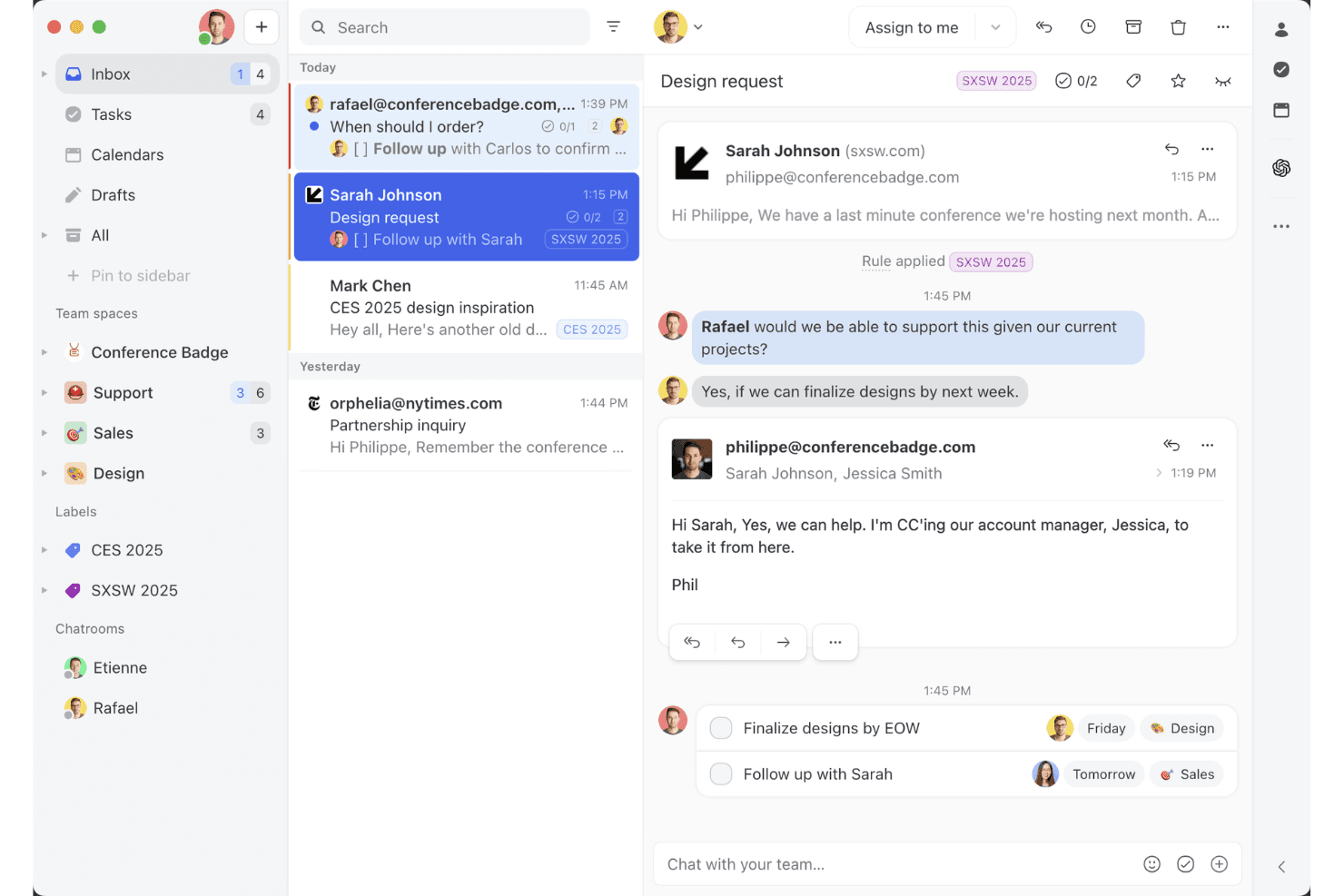
Die gemeinsame Posteingangsansicht von Missive zeigt, wie Teams an E-Mail-Verläufen zusammenarbeiten, Aufgaben zuweisen und Kundenunterhaltungen in einem Arbeitsbereich verwalten können. Missive ist ein kollaborativer, kanalübergreifender Posteingang, der E-Mail, SMS, WhatsApp, Messenger, Instagram und Live-Chat in einem einzigen gemeinsamen Arbeitsbereich mit integrierter Teamkommunikation, KI-gestützter Weiterleitung und kanalübergreifender Automatisierung vereint.
Für wen eignet sich Missive am besten?
Missive eignet sich besonders für kleine und mittlere Unternehmen sowie mittelständische Teams, die Kundenkommunikation über E-Mail, SMS und soziale Kanäle bearbeiten und direkt im Posteingang integrierte Zusammenarbeit wünschen.
Warum ich Missive ausgewählt habe
Ich habe Missive in meine Top-Auswahl aufgenommen, weil das Modell des kollaborativen Posteingangs etwas leistet, was die meisten kanalübergreifenden Tools nicht bieten: Es platziert die Teamdiskussion direkt im Kundenunterhaltungsverlauf. Dadurch können Mitarbeitende einen Spezialisten hinzuziehen oder mitten in einer Antwort eskalieren, ohne zu Slack wechseln zu müssen. Außerdem gefällt mir, wie die KI-gestützte Weiterleitung eingehende Nachrichten über alle verbundenen Kanäle gleichzeitig nach Stimmung und Sprache klassifiziert, unabhängig davon, ob es sich um WhatsApp, SMS oder Instagram-Direktnachrichten handelt. Diese einheitliche Regelanwendung über mehrere Kanäle hinweg ist in dieser Preisklasse wirklich selten.
Wichtige Funktionen von Missive
- Standardantworten: Vorgefertigte Antwortvorlagen mit variablen Feldern ermöglichen es Mitarbeitenden, konsistente und markengerechte Nachrichten über E-Mail, SMS und WhatsApp zu senden, ohne sie von Grund auf neu zu schreiben.
- Zusammenführung von Unterhaltungen: Nachrichtenverläufe desselben Kunden aus verschiedenen Kanälen können manuell zu einem Verlauf zusammengeführt werden, sodass die vollständige Interaktionshistorie in einer einzigen Ansicht erhalten bleibt.
- Regeln für die automatische Zuweisung: Unterhaltungen werden mithilfe einer Rundlauf-, Wenigst-belastet- oder Zufallslogik auf Mitarbeitende verteilt, wodurch die manuelle Vorsortierung für Teamleitungen reduziert wird.
- Missive-MCP-Server: Externe KI-Tools wie Claude oder ChatGPT können verbunden werden, um Kundenservice-Verläufe abzufragen, Kalender zu prüfen und Antworten zu entwerfen – wobei vor dem Versand weiterhin eine Überprüfung durch Mitarbeitende erforderlich ist.
Missive-Integrationen
Missive lässt sich mit HubSpot, Salesforce, Shopify, Aircall, Dialpad, Twilio und Zapier integrieren. Die REST-API und Webhooks unterstützen benutzerdefinierte Integrationen. Zusätzlich ist der neue MCP-Server in den Tarifen Productive und Business verfügbar (erfordert die Aktivierung durch einen Administrator).
Pros and Cons
Pros:
- Alle Kanäle in einem Posteingang vereint
- Integrierter Team-Chat in jeder Unterhaltung
- Flexible, KI-gestützte kanalübergreifende Weiterleitung
Cons:
- Kein integrierter KI-Chatbot zur Anfrageabwehr
- Keine nativen Umfragen zur Kundenzufriedenheit
Learn more about Missive:
Weitere Software für Omnichannel-Kundenservice
Hier sind einige weitere Optionen für Software für Omnichannel-Kundenservice, die es nicht in meine Auswahl geschafft haben, aber dennoch einen Blick wert sind:
- 11TidioAm besten geeignet für einen KI-gestützten Assistenten
- 12FrontIdeal zur Überwachung der Nachrichtenqualität
- 13IntercomAm besten für Start-ups geeignet
- 14Bright PatternAm besten geeignet für KI-gestützte Einblicke
- 15TalkdeskAm besten für Callcenter geeignet
- 16KustomerAm besten geeignet für CRM-Integration
- 17Assembled AIAm besten für intelligente Fallweiterleitungssysteme
- 18SprinklrAm besten für Social-Media-Support geeignet
- 19CrescendoAm besten geeignet für die Generierung umsetzbarer Gesprächsdaten
- 20FreshworksAm besten für Benutzerfreundlichkeit
Wie ich Omnichannel-Kundenservice-Software bewerte
Wenn ein Kunde mit dem Chat beginnt und auf einen Anruf eskaliert, erwarte ich, dass ein Agentendatensatz ihn begleitet – das ist der Grundstandard, den ich überprüfe, bevor ich abwäge, was eine Plattform besonders macht.
Kernfunktionalität (Grundvoraussetzungen für diese Liste)
Wenn ich Tools für meine Liste auswähle, bewerte ich jedes einzelne auf einer Skala von 0 (bietet die Funktion nicht an) bis 5 (übertrifft in diesem Bereich) für jede unten aufgeführte Kernfunktionalität. Anschließend berechne ich die Gesamtpunktzahl des Tools als Prozentsatz. Jedes Tool muss eine Mindestgesamtpunktzahl von 75 % erreichen, um in die Auswahl aufgenommen zu werden.
- Multi-Channel-Posteingang: Ich prüfe, ob E-Mail, Chat, Social, SMS und Telefonanrufe alle in einem Agentenarbeitsbereich eingehen – sodass Mitarbeitende nicht zwischen Browser-Tabs wechseln müssen.
- Vereinheitlichtes Kundenprofil: Jedes Tool sollte die vollständige Interaktionshistorie eines Kunden kanalübergreifend in einer Ansicht anzeigen, einschließlich früherer Tickets, Käufe und Notizen.
- Omnichannel-Routing & -Zuweisung: Ich schaue darauf, wie Gespräche zugewiesen werden – ob die Plattform skillbasiertes Routing, SLA-Priorisierungsregeln und Lastverteilung über alle Kanäle hinweg unterstützt.
- Kanalübergreifendes Ticketing: Ein Kunde, der im Chat startet und per E-Mail nachfasst, sollte ein einziges Ticket behalten – so bleibt der gesamte Kontext für jeden Agenten, der das Ticket übernimmt, erhalten.
- Automatisierung & KI-Unterstützung: Ich bewerte, ob Workflow-Trigger, Chatbots und KI-Funktionen wie Antwortvorschläge oder automatisches Tagging über alle angebundenen Kanäle hinweg funktionieren.
- Kanalübergreifende Analytik: Dashboards sollten Kennzahlen wie CSAT, Erstreaktionszeit und Lösungsquote kanalübergreifend zusammenführen, statt sie zu isolieren.
Sobald ich eine Liste von Tools habe, die die Kriterien erfüllen, schaue ich, was jede Plattform besonders macht.
Differenzierende Faktoren (Was Anbieter unterscheidet)
So vergleiche und kontrastiere ich verschiedene Anbieter:
Herausragende Funktionen
Proaktive Nachrichten sind mir besonders wichtig. Plattformen, die Chats oder SMS durch Warenkorbabbruch oder Onboarding-Meilensteine automatisch auslösen, verschieben den Support von reaktiv zu strategisch. Ich bewerte auch, ob eine integrierte Wissensdatenbank KI-gestützte Artikel Agenten während des Gesprächs vorschlägt und ein Self-Service-Portal für Kunden betreibt. Für Contact-Center-Leitungen, die große Teams verwalten, können native Workforce-Management-Tools für Schichtplanung und Volumenprognosen den Bedarf an einer zusätzlichen WFM-Plattform beseitigen.
Über die Funktionen hinaus
Die Integrationsfähigkeit prüfe ich als Erstes. Eine Plattform, die sich nativ mit Ihrem CRM- und E-Commerce-System verbindet, ermöglicht es Agenten, Bestellstatus oder Kontodetails abzurufen, ohne das Tool zu wechseln. Ich schaue auch genau auf die Gesamtkosten, insbesondere ob KI-Funktionen, Premium-Kanäle wie WhatsApp oder API-Nutzung Zusatzkosten verursachen, die den Preis im großen Maßstab erhöhen. Für Teams in regulierten Branchen wie Gesundheitswesen oder Finanzen können Compliance-Zertifizierungen wie HIPAA oder PCI-DSS die Auswahl deutlich einschränken.
So wählen Sie Software für Omnichannel-Kundenservice aus
Bei der Auswahl von Software für Omnichannel-Kundenservice sollten Sie darauf achten, wie gut sie Ihre wichtigsten Supportkanäle, Kundendaten und Arbeitsabläufe miteinander verbindet. Sie sollte Ihren Mitarbeitern den nötigen Kontext bereitstellen, damit sie Gespräche bearbeiten können, ohne dass Kunden sich wiederholen müssen.
Berücksichtigen Sie diese Faktoren:
| Zu berücksichtigen | Was Priorität haben sollte |
|---|---|
| Zu berücksichtigenPrimärer Kanal | Was Priorität haben sollteUmfassende Unterstützung für Ihre Kanäle mit dem höchsten Volumen. Wenn der Telefonkanal die meisten Gespräche generiert, sollten Funktionen für Contact Center Priorität haben. Wenn es sich um Nachrichten handelt, sollten WhatsApp, SMS, soziale Medien und Live-Chat Priorität haben. |
| Zu berücksichtigenTeamgröße | Was Priorität haben sollteFunktionen, die zur Arbeitsweise Ihres Teams passen. Kleine Teams benötigen möglicherweise nur einen einheitlichen Posteingang und eine einfache Weiterleitung. Größere Teams benötigen möglicherweise eine kompetenzbasierte Weiterleitung, Berechtigungen, Qualitätssicherung, Personalmanagement und erweiterte Berichte. |
| Zu berücksichtigenKundenvolumen | Was Priorität haben sollteAutomatisierung und Weiterleitung, die Ihr Supportvolumen bewältigen können. Teams mit höherem Volumen sollten automatisierte Weiterleitung, Warteschlangenverwaltung, KI und Tools priorisieren, die die sich wiederholende Arbeit der Mitarbeiter reduzieren. |
| Zu berücksichtigenKomplexität des Supports | Was Priorität haben sollteTools zur Verwaltung von Übergaben und Eskalationen. Wenn Fälle regelmäßig zwischen Mitarbeitern oder Abteilungen weitergeleitet werden, sollten gemeinsamer Kundenkontext, interne Zusammenarbeit und Eskalationsabläufe Priorität haben. |
| Zu berücksichtigenBranche | Was Priorität haben sollteFunktionen, die die Anforderungen Ihrer Branche erfüllen. E-Commerce-Teams benötigen möglicherweise Bestelldaten und Commerce-Integrationen, während regulierte Branchen möglicherweise höhere Anforderungen an Sicherheit, Compliance und Prüfkontrollen haben. |
Trends bei Omnichannel-Kundenservice-Software
Für meine Recherche habe ich unzählige Produktupdates, Pressemitteilungen und Versionsprotokolle verschiedener Anbieter von Multichannel-Kundenservice-Software ausgewertet. Hier sind einige der aufkommenden Trends, die ich im Auge behalte:
- KI-gestützte Personalisierung: Viele Anbieter nutzen KI, um personalisierte Kundeninteraktionen anzubieten. Dieser Trend nimmt zu, da Unternehmen bestrebt sind, Erlebnisse auf die individuellen Bedürfnisse ihrer Kunden zuzuschneiden. So kann KI beispielsweise die gesamte Interaktionshistorie eines Kunden analysieren, um personalisierte Antworten vorzuschlagen und eine kontinuierliche Betreuung sicherzustellen.
- Spracherkennungstechnologie: Spracherkennung wird immer häufiger eingesetzt und ermöglicht es Kunden, freihändig mit Diensten zu interagieren. Dieser Trend verbessert die Barrierefreiheit und den Komfort. Einige Anbieter integrieren Sprachbefehle in ihre Plattformen für eine bessere Kundenbindung.
- Proaktive Kundenbindung: Tools entwickeln sich dahingehend, Kunden anzusprechen, bevor diese sich mit Problemen an den Support wenden. Dieser Trend umfasst den Einsatz von Datenanalysen, um Kundenbedürfnisse vorherzusagen und proaktiv Lösungen anzubieten. Dadurch werden die Zufriedenheit verbessert und Supportanfragen reduziert.
- Omnichannel-Analysen: Anbieter konzentrieren sich darauf, Erkenntnisse bereitzustellen, die es Unternehmen ermöglichen, das Kundenverhalten und die Kundenpräferenzen über verschiedene Plattformen hinweg zu verstehen, Strategien zu verfeinern und Dienstleistungen zu verbessern.
- Video-Chat-Support: Video-Chats gewinnen als Support-Tool an Bedeutung und bieten eine persönlichere Betreuung. Sie sind bei komplexen Problemen hilfreich, bei denen eine visuelle Anleitung erforderlich ist. Einige Anbieter integrieren diese Funktion, um Kundeninteraktionen zu verbessern.
Was ist Omnichannel-Kundenservice-Software?
Omnichannel-Kundenservice-Software ist ein Tool, mit dem Unternehmen Kundeninteraktionen verwalten können, die über mehrere Kommunikationskanäle hinweg nahtlos über eine einzige Plattform erfolgen. Kundenservice- und Supportteams nutzen diese Tools im Allgemeinen, um Reaktionszeiten zu verkürzen und einen konsistenten Support bereitzustellen.
Funktionen wie KI-gestützte Personalisierung, proaktive Kundenbindung und Omnichannel-Analysen helfen dabei, Kundenerlebnisse individuell anzupassen, Bedürfnisse vorherzusagen und Verhalten zu verstehen. Insgesamt steigern diese Tools die Kundenzufriedenheit, indem sie über alle Kanäle hinweg einen effizienten und personalisierten Service gewährleisten.
Funktionen von Omnichannel-Kundenservice-Software
Achten Sie bei der Auswahl von Omnichannel-Kundenservice-Software auf die folgenden wichtigen Funktionen:
- KI-gestützte Personalisierung: Diese Funktion nutzt KI, um Interaktionen auf Grundlage von Kundendaten individuell anzupassen. Dadurch wird das Kundenerlebnis verbessert, da Gespräche relevanter gestaltet werden.
- Erweiterte Anrufweiterleitung: Leitet Anrufe an den am besten geeigneten Mitarbeiter weiter, verkürzt dadurch die Reaktionszeiten und stellt sicher, dass Kunden schnell die benötigte Hilfe erhalten.
- Multichannel-Analysen: Liefert Erkenntnisse über alle Kommunikationskanäle hinweg und hilft Unternehmen, das Kundenverhalten zu verstehen und Servicestrategien zu optimieren.
- Proaktive Kundenbindung: Nutzt Daten, um Kundenbedürfnisse vorherzusehen und Lösungen anzubieten, bevor Probleme auftreten. Dadurch werden Supportanfragen reduziert und die Zufriedenheit gesteigert.
- Einheitliche Kundenzeitleiste: Fasst alle Interaktionen aus verschiedenen Kanälen in einer einzigen Ansicht zusammen und bietet Mitarbeitern den nötigen Kontext, um fundierten und personalisierten Support zu leisten.
- Video-Chat-Support: Bietet eine persönlichere Möglichkeit, Kunden zu unterstützen, und ist besonders bei komplexen Problemen hilfreich, die eine visuelle Anleitung erfordern.
- Anpassbare Dashboards: Ermöglicht es Teams, ihren Arbeitsbereich an ihre Bedürfnisse anzupassen, wodurch Effizienz und Konzentration verbessert werden.
- Workflow-Automatisierung: Vereinfacht wiederkehrende Aufgaben und gibt Ihrem Team mehr Zeit, sich um komplexere Kundeninteraktionen zu kümmern.
- Mehrsprachiger Support: Ermöglicht die Kommunikation mit einer vielfältigen Kundenbasis, erweitert die Reichweite und verbessert die Barrierefreiheit.
- Sicherheitsvorkehrungen: Schützt Kundendaten durch die Einhaltung von Branchenstandards und trägt dazu bei, Vertrauen und Zuverlässigkeit zu wahren.
Vorteile von Omnichannel-Kundenservice-Software
Die Implementierung von Omnichannel-Kundenservice-Software, einschließlich Lösungen für sozialen Kundenservice, bietet Ihrem Team und Ihrem Unternehmen mehrere Vorteile. Hier sind einige davon, auf die Sie sich freuen können:
- Verbesserte Kundenzufriedenheit: Kunden erhalten über alle Kanäle hinweg zeitnahe, relevante und konsistente Unterstützung, was ihr Gesamterlebnis und folglich die Kundenbindung verbessert.
- Höhere Effizienz: Workflow-Automatisierung und intelligente Anrufweiterleitung helfen Ihrem Team, mehr Interaktionen mit weniger Aufwand zu bearbeiten, und steigern so die Produktivität.
- Bessere Einblicke: Kanalübergreifende Analysen bieten einen umfassenden Überblick über das Kundenverhalten und ermöglichen datengestützte Entscheidungen, die die Servicequalität verbessern.
- Stärkere Personalisierung: KI-gestützte Funktionen passen Interaktionen an die individuellen Präferenzen der Kunden an und machen die Kommunikation bedeutungsvoller und effektiver.
- Kosteneinsparungen: Unternehmen können Betriebskosten senken, indem sie den Bedarf an mehreren Plattformen reduzieren und die Ressourcenverteilung optimieren.
- Größere Reichweite: Mehrsprachige Unterstützung und Optionen für Videochats ermöglichen es Ihnen, mit einem breiteren Publikum in Kontakt zu treten und Ihren Kundenstamm zu erweitern.
- Höhere Sicherheit: Die Einhaltung von Branchenstandards stellt sicher, dass Kundendaten geschützt sind, und schafft Vertrauen und Zuverlässigkeit.
Kosten und Preise von Software für kanalübergreifenden Kundenservice
Bei der Auswahl von Software für kanalübergreifenden Kundenservice ist es wichtig, die verschiedenen verfügbaren Preismodelle und Tarife zu verstehen. Die Kosten variieren je nach Funktionen, Teamgröße, Zusatzoptionen und weiteren Faktoren. Die folgende Tabelle fasst gängige Tarife, ihre durchschnittlichen Preise und typische Funktionen von Lösungen für kanalübergreifenden Kundensupport zusammen:
Vergleichstabelle für Software für kanalübergreifenden Kundenservice
| Tariftyp | Durchschnittlicher Preis | Häufige Funktionen |
| Kostenloser Tarif | $0 | Grundlegende Ticketverwaltung, E-Mail-Support und eingeschränkte Analysen. |
| Persönlicher Tarif | $5-$25/Benutzer/Monat | E-Mail- und Chat-Support, grundlegende Berichte und eingeschränkte Anpassungsmöglichkeiten. |
| Geschäftstarif | $30-$75/ Benutzer/Monat | Unterstützung über mehrere Kanäle, Workflow-Automatisierung und erweiterte Berichtstools. |
| Unternehmenstarif | $80-$150/ Benutzer/Monat | Umfassende Anpassungsmöglichkeiten, KI-gestützte Analysen und persönliche Betreuung durch einen Kundenbetreuer. |
Häufig gestellte Fragen zur Omnichannel-Kundenservice-Software
Hier finden Sie Antworten auf häufige Fragen zu Omnichannel-Kundenservice-Software:
Was ist der Unterschied zwischen Omnichannel- und Multichannel-Kundenservice?
Multichannel-Kundenservice bietet Support über mehrere Kanäle, während Omnichannel-Kundenservice diese Kanäle zu einem durchgängigen Erlebnis verbindet. Wenn ein Kunde beispielsweise den Live-Chat startet und später anruft, muss er sein Anliegen beim Multichannel-Support möglicherweise erneut erklären. Beim Omnichannel-Support kann der Telefonmitarbeiter den vorherigen Chat sehen und dort weitermachen, wo das Gespräch aufgehört hat.
Wie viele Kanäle sollte eine Omnichannel-Kundenservice-Plattform unterstützen?
Es gibt keine ideale Anzahl. Eine Omnichannel-Plattform sollte die Kanäle unterstützen, die Ihre Kunden tatsächlich nutzen, und sie miteinander verbinden, damit Mitarbeiter zwischen Gesprächen wechseln können, ohne den Kontext zu verlieren. Für viele Unternehmen bedeutet das, mit E-Mail, Live-Chat, Telefon sowie sozialen Netzwerken oder Messaging-Apps zu beginnen.
Welche Kanäle sollten in einer Omnichannel-Strategie enthalten sein?
Prüfen Sie, wo Kunden Sie bereits kontaktieren, und priorisieren Sie die Kanäle mit der höchsten Nachfrage. Für viele Teams gehören dazu E-Mail, Telefon, Live-Chat, soziale Medien, SMS und Messaging-Apps wie WhatsApp – Ihre Kanalkombination sollte jedoch Ihre Kunden widerspiegeln.
Müssen Sie Ihr CRM ersetzen, um Omnichannel-Kundenservice zu implementieren?
Normalerweise nicht. Eine gute Omnichannel-Plattform sollte sich in Ihr bestehendes CRM integrieren lassen, damit Mitarbeiter neben den Support-Gesprächen auf Kundendaten zugreifen können. Entscheidend ist die Qualität der Integration: Prüfen Sie, welche Daten synchronisiert werden, ob Aktualisierungen in Echtzeit erfolgen und ob Mitarbeiter auf die benötigten Informationen zugreifen können, ohne zwischen Systemen wechseln zu müssen.
Was ist der größte Nachteil von Omnichannel-Kundenservice-Software?
Der größte Nachteil von Omnichannel-Software ist die Komplexität der Implementierung. Sie erfordert ein gut koordiniertes System, das über mehrere Kanäle hinweg funktioniert. Ein Omnichannel-Ansatz kann in Organisationen, in denen Datensilos bestehen, schwierig umzusetzen sein. Die Sicherstellung konsistenter Kundenerlebnisse an allen Kontaktpunkten kann eine Herausforderung darstellen, insbesondere wenn die passende Technologie und die richtigen Prozesse fehlen.
Wie implementiert man Omnichannel-Kundenservice?
Um Omnichannel-Kundenservice zu implementieren, beginnen Sie damit, die Erwartungen Ihrer Kunden zu verstehen und die Kanäle zu identifizieren, die Sie nutzen werden (Tipp: Sehen Sie sich an, welche Kanäle Ihre Kunden verwenden). Investieren Sie in die passende Technologie zur Unterstützung dieser Kanäle und bilden Sie Ihr Team weiter, damit es sie effektiv bedienen kann. Erwägen Sie außerdem, Self-Service-Optionen einzurichten, und stellen Sie während des gesamten Prozesses die Sicherheit der Kundendaten sicher.
Was sind die 4 C des Omnichannel-Kundenservice?
Die 4 C des Omnichannel-Kundenservice sind Kundenerlebnis, Kontext, Inhalte und Zusammenarbeit. Diese Elemente wirken zusammen, um über alle Kanäle hinweg ein einheitliches und ansprechendes Kundenerlebnis zu schaffen und sicherzustellen, dass Interaktionen relevant und konsistent sind.
Wie verbessert Omnichannel-Software die Kundenzufriedenheit (CSAT)?
Omnichannel-Kundenservice-Software verbessert die Kundenzufriedenheit, indem sie konsistenten Support über mehrere Kanäle bietet und dadurch persönlichere und effizientere Interaktionen ermöglicht. Funktionen wie proaktive Kontaktaufnahme und einheitliche Kundenzeitleisten sorgen dafür, dass Kunden zeitnahe und relevante Unterstützung erhalten, wodurch ihr Gesamterlebnis verbessert wird.