

10 beste Softwarelösungen für E-Mail-Management im Kundenservice 2026

10 Beste Software-Lösungen für das E-Mail-Management im Kundenservice


Du jonglierst mit zahlreichen Anfragen, versuchst die Antwortzeiten niedrig zu halten und sicherzustellen, dass sich jeder Kunde gehört fühlt. Das ist eine große Herausforderung – genau hier kommt E-Mail-Management-Software für den Kundenservice ins Spiel.
Diese Tools helfen deinem Team dabei, den Überblick zu behalten, schneller zu antworten und das gesamte Kundenerlebnis zu verbessern. Meiner Erfahrung nach sind sie ein echter Game-Changer für Effizienz und Zufriedenheit.
Ich habe viele dieser Lösungen unabhängig getestet und bewertet. Mein Ziel ist es, dir eine neutrale Übersicht über die besten verfügbaren Optionen zu geben. Hier findest du eine sorgfältig recherchierte Liste mit Top-Empfehlungen, die auf deine Herausforderungen eingehen und deinem Team die Arbeit erleichtern. Lass uns in die Lösungen eintauchen, die verändern könnten, wie du Kundeninteraktionen managst.
Warum Sie unseren Software-Empfehlungen vertrauen können
Unser Team testet und bewertet Software seit 2012. Als CX-Führungskräfte selbst wissen wir, wie schwierig – und wichtig – es ist, die richtige Software auszuwählen.
Für diesen Leitfaden haben wir Tools mithilfe von praktischen Tests und unabhängiger Recherche bewertet und dabei unsere Bewertungskriterien angewendet.
Unsere Bewertungen spiegeln unser menschliches redaktionelles Urteilsvermögen wider, keine Verkaufsstrategie.
Vergleichstabelle der besten Software-Lösungen für das E-Mail-Management im Kundenservice
| Tool | Best For | Trial Info | Price | ||
|---|---|---|---|---|---|
| 1 | Am besten geeignet für Service-Desks von kleinen Unternehmen | Kostenlose Demo + 14-tägige kostenlose Testphase verfügbar | Ab $19/Nutzer/Monat (jährliche Abrechnung) | Website | |
| 2 | Am besten für Kundensupport und -erlebnis geeignet | Kostenlose Testversion verfügbar | Ab $25/Benutzer/Monat (jährlich abgerechnet) | Website | |
| 3 | Am besten für die Zusammenarbeit von Teams in gemeinsamen Posteingängen geeignet | 30-tägige kostenlose Testversion verfügbar | Ab 14 $/Nutzer/Monat (jährliche Abrechnung) | Website | |
| 4 | Am besten geeignet für KI-gestützte E-Mail-Verwaltung | Kostenloser Tarif verfügbar | Ab $25/Nutzer/Monat (jährlich abgerechnet) | Website | |
| 5 | Am besten geeignet für die Integration mit Altsystemen | Kostenlose Testphase + kostenlose Demo verfügbar | Ab $25/Nutzer/Monat (jährliche Abrechnung) | Website | |
| 6 | Am besten mit integrierter Analytik | 15-tägige kostenlose Testphase + kostenloser Tarif | Ab $7/Nutzer/Monat (jährliche Abrechnung) | Website | |
| 7 | Bestes E-Mail-Management-Tool für Startups | 14-tägige kostenlose Testversion verfügbar | Ab $19/Nutzer/Monat (jährliche Abrechnung) | Website | |
| 8 | Beste Kundenservice-Software zur Verwaltung von Multikanal-Kommunikation | 7-tägige kostenlose Testversion + kostenloser Plan verfügbar | Ab $25/Nutzer/Monat | Website | |
| 9 | Am besten für eine vereinheitlichte Inbox für Kundenoperationen | 14-tägige kostenlose Testversion | Ab $25/Nutzer/Monat (jährliche Abrechnung) | Website | |
| 10 | Am besten für kundenorientierte Helpdesks | 14-tägige kostenlose Testphase | Ab $24/Agent/Monat (jährliche Abrechnung) | Website |


Überblick über die 10 besten E-Mail-Management-Software für den Kundenservice
Hier findest du eine kurze Beschreibung jeder der besten E-Mail-Management-Systeme auf meiner Liste, inklusive ihrer Stärken sowie Screenshots, die einige Features zeigen.

Am besten geeignet für Service-Desks von kleinen Unternehmen
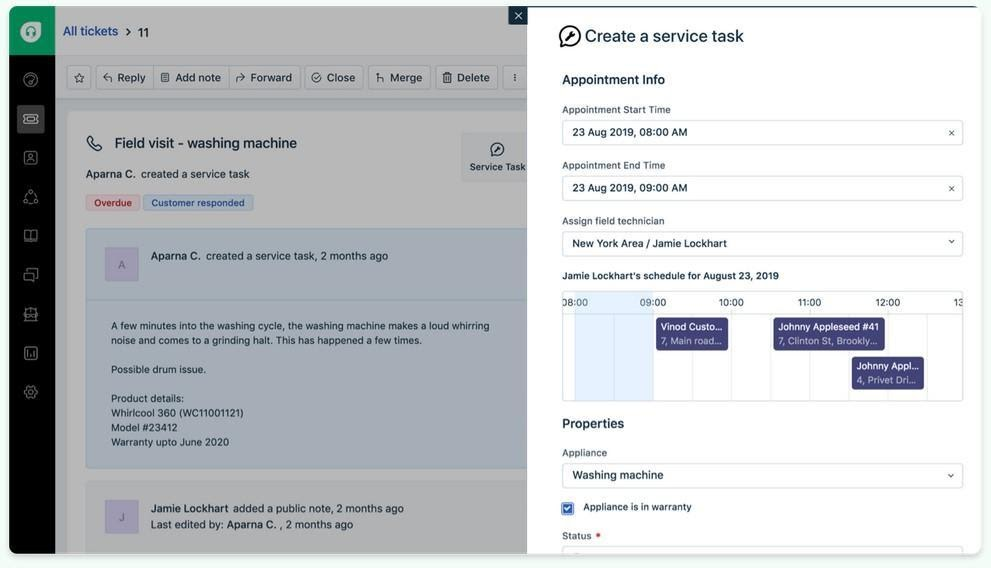
Freshdesk (ein Produkt von Freshworks Inc.) ist eine Kundenservice-Plattform, die für Teams entwickelt wurde, die eine unkomplizierte Möglichkeit suchen, Kundenanfragen zu verwalten. Im Mittelpunkt stehen ticketbasierte Workflows, die Nachrichten aus verschiedenen Kanälen unterstützen und den Teams helfen, die Kommunikation in einem einzigen System übersichtlich zu organisieren.
Warum ich Freshdesk gewählt habe: Ich habe Freshdesk wegen seiner Benutzeroberfläche ausgewählt, die so strukturiert ist, dass alltägliche Supportaufgaben leichter nachzuvollziehen sind. Beim Verwalten eingehender Anfragen hilft das Ticketsystem, Gespräche zu organisieren und deren Status zu verfolgen, ohne dass mehrere Tools nötig sind. Zudem ist Freddy AI integriert, die beim Formulieren von Antworten und Zusammentragen von Ticketinhalten innerhalb des bestehenden Workflows unterstützt. Die Fähigkeit, Anfragen aus E-Mails, Telefon und sozialen Kanälen an einem Ort zu bearbeiten, fördert konsistentere Antworten über alle Kanäle hinweg. Anpassbare Dashboards bieten zusätzlichen Überblick über Arbeitslast und Aktivitäten bei Antworten.
Herausragende Funktionen & Integrationen:
Funktionen umfassen ein Ticketsystem, das Teams dabei hilft, Kundenanfragen zu organisieren, zu priorisieren und zu lösen. Der Multi-Channel-Support ermöglicht es, Nachrichten verschiedener Plattformen innerhalb desselben Workflows zu bearbeiten.
Integrationen sind unter anderem Werkzeuge wie Slack, Microsoft Teams, Salesforce, Shopify, Google Workspace, Trello, Asana, Mailchimp, Dropbox und HubSpot. Dadurch lässt sich der Support mit Tools zur Zusammenarbeit, CRM und Produktivität verbinden.
Pros and Cons
Pros:
- Multi-Channel-Unterstützung
- Effizientes Ticket-Management
- Übersichtliche, einfach nachvollziehbare Ticket-Workflows
Cons:
- Eingeschränkte erweiterte Berichte
- Erfordert häufige Aktualisierungen
New Product Updates from Freshdesk

Freshdesk Adds Voice AI Agents in Freshcaller
Freshdesk introduces Voice AI Agents available through Freshcaller Marketplace apps to handle routine calls and reduce queues. This feature enables automated call handling with real-time, conversational support. For more information, visit Freshdesk's official site.

Am besten für Kundensupport und -erlebnis geeignet
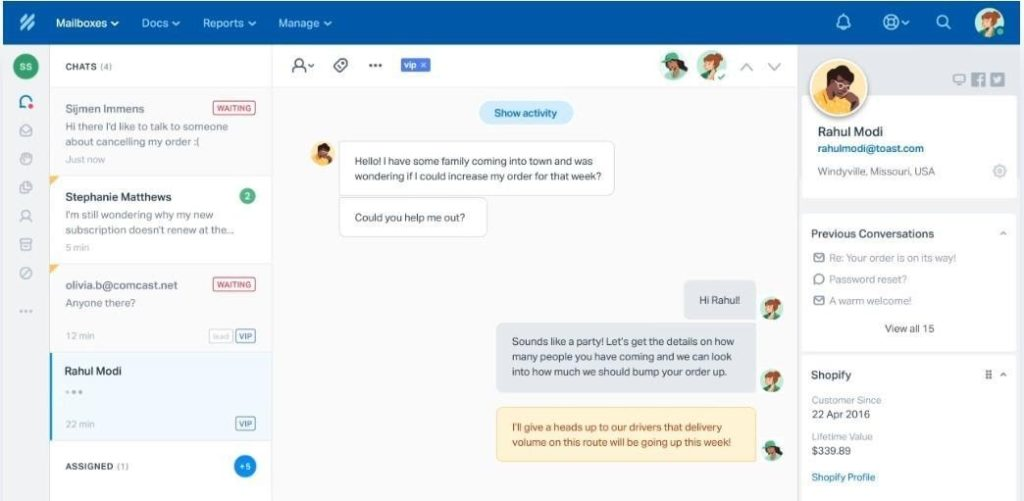
Help Scout ist eine Kundensupport-Plattform, die sich an kleine und mittelständische Unternehmen richtet, die personalisierten Kundenservice bieten möchten. Der Schwerpunkt liegt auf der Verwaltung von Kunden-E-Mails sowie Tools für eine effiziente Kommunikation und Betreuung.
Warum ich Help Scout ausgewählt habe: Es überzeugt durch personalisierten Support mit Funktionen, die auf die Interaktion und Zufriedenheit der Kunden ausgerichtet sind. Der gemeinsame Posteingang ermöglicht es Ihrem Team, E-Mails kollaborativ zu verwalten, sodass nichts übersehen wird. Die Kundenprofile von Help Scout liefern Ihrem Team für jede Interaktion den nötigen Kontext und verbessern so das Support-Erlebnis. Mithilfe der Berichtsfunktionen können Sie die Performance überwachen und die Effizienz Ihres Teams steigern.
Herausragende Funktionen & Integrationen:
Funktionen umfassen einen gemeinsamen Posteingang, der die kollaborative Verwaltung von E-Mails ermöglicht. Kundenprofile bieten für jede Interaktion den nötigen Kontext und erleichtern so einen personalisierten Service. Die Berichtstools überwachen die Leistung und helfen, die Effizienz des Teams zu verbessern.
Integrationen umfassen Slack, HubSpot, Salesforce, Mailchimp, Shopify, WordPress, WooCommerce, Magento, Google Workspace und Trello.
Pros and Cons
Pros:
- Einfache Zusammenarbeit im Team
- Detaillierte Kundenprofile
- Starker Fokus auf Kundeninteraktion
Cons:
- Begrenzte Automatisierungsfunktionen
- Erfordert regelmäßige Schulungen
New Product Updates from Help Scout

Help Scout Adds Automatic Conversation Reassignment
Help Scout can now automatically unassign conversations when the assigned teammate has been away long enough, keeping replies moving so others can pick them up. For more information, visit Help Scout's official site.
 .
.
Missive
Am besten für die Zusammenarbeit von Teams in gemeinsamen Posteingängen geeignet
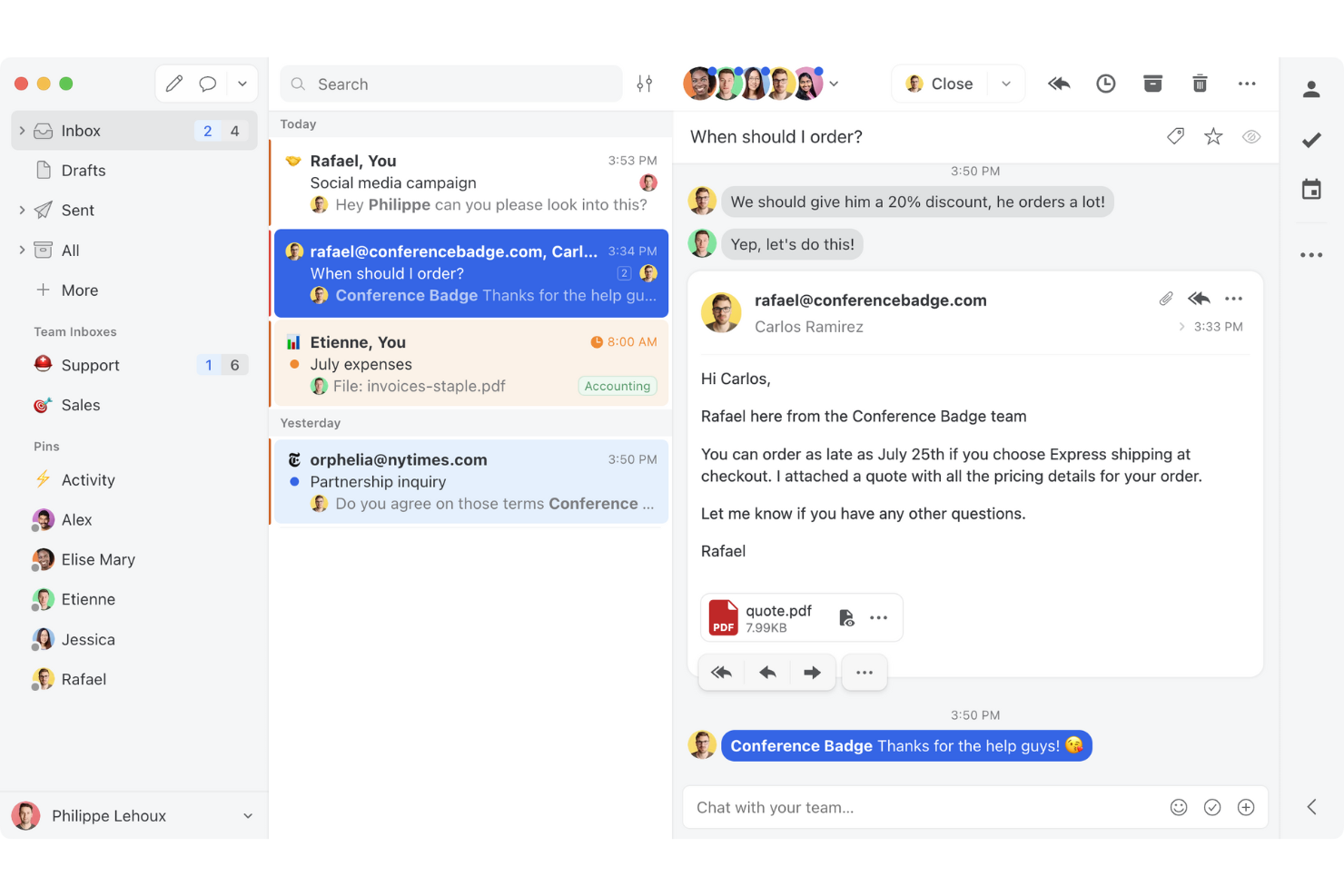
Missive ist eine kollaborative Plattform zur E-Mail-Verwaltung, die gemeinsame Posteingänge, Nachrichten über mehrere Kanäle, interne Thread-Kommunikation und KI-gestützte Automatisierung in einem einzigen Arbeitsbereich für kundenorientierte Teams vereint.
Für wen ist Missive am besten geeignet?
Missive eignet sich besonders gut für kleine bis mittelgroße Kundensupport-Teams, die gemeinsam ein hohes E-Mail-Aufkommen bearbeiten und darauf angewiesen sind, dass ihr gesamtes Team in einem gemeinsamen Posteingang arbeitet.
Warum ich Missive ausgewählt habe
Missive gehört zu den besten Lösungen auf meiner Auswahlliste, weil die Zusammenarbeit im gemeinsamen Posteingang wirklich einzigartig in dieser Kategorie ist. Ich finde es großartig, dass mehrere Mitarbeitende in Echtzeit gemeinsam eine einzige Antwort bearbeiten können, sodass eine erfahrene Supportkraft eingreifen und einen Entwurf perfektionieren kann, bevor er den Kunden überhaupt erreicht. Interne Threads ermöglichen es meinem Team, direkt im E-Mail-Thread über die richtige Antwort zu diskutieren, ohne dass CC-Ketten oder ein Hin und Her in Slack erforderlich sind.
Die wichtigsten Funktionen von Missive
- Posteingang für mehrere Kanäle: Missive bündelt E-Mail, WhatsApp, SMS, Facebook Messenger, Instagram-Direktnachrichten und Live-Chat in einem einzigen gemeinsamen Arbeitsbereich.
- KI-gestützte Automatisierungsregeln: Die Regel-Engine von Missive erkennt Stimmung, Fristen und Spam, um automatisierte Aktionen wie Eskalationen, Labels und die Erstellung von Aufgaben auszulösen.
- Seitenleiste für CRM und E-Commerce: Native Integrationen mit HubSpot, Salesforce, Pipedrive und Shopify zeigen Kundenhistorie und Deal-Daten direkt neben den E-Mail-Threads an.
- Ausgewogene automatische Aufgabenzuweisung: Unterhaltungen können mithilfe von Methoden wie dem Round-Robin-Verfahren, der Zuweisung an die am wenigsten ausgelastete Person, der Zuweisung an alle gleichzeitig oder der zufälligen Verteilung an Mitarbeitende weitergeleitet werden.
- Missive MCP Server: Externe KI-Tools wie Claude oder ChatGPT können verbunden werden, um Kundendienst-E-Mail-Threads abzufragen, Kalender zu überprüfen und Antworten zu entwerfen – wobei vor dem Versand weiterhin eine Prüfung durch Mitarbeitende erforderlich ist.
Missive-Integrationen
Missive bietet native Integrationen mit HubSpot, Salesforce, Pipedrive, Close, Shopify, ChargeDesk, Asana, ClickUp und Google Drive. Außerdem stehen eine offene REST-API mit Webhooks, eine Zapier-Anbindung für benutzerdefinierte Workflows sowie der neue MCP Server in den Tarifen Productive und Business zur Verfügung (erfordert die Aktivierung durch einen Administrator).
Pros and Cons
Pros:
- Teams können Antworten in Echtzeit gemeinsam bearbeiten
- Interner Chat nur für E-Mails macht unübersichtliche CC-Ketten überflüssig
- KI-gestützte Regeln automatisieren Tagging und Eskalationen
Cons:
- Kein natives Tool für CSAT- oder Zufriedenheitsumfragen
- Die SLA-Verfolgung ist auf eine manuelle Regelkonfiguration angewiesen
New Product Updates from Missive
Missive Adds Conversation Pins
Missive now lets you pin key links, decisions, and notes inside a conversation, keeping them accessible in a dedicated Pins section in the Details sidebar. For more information, visit Missive's official site.
 .
.
Hiver
Am besten geeignet für KI-gestützte E-Mail-Verwaltung
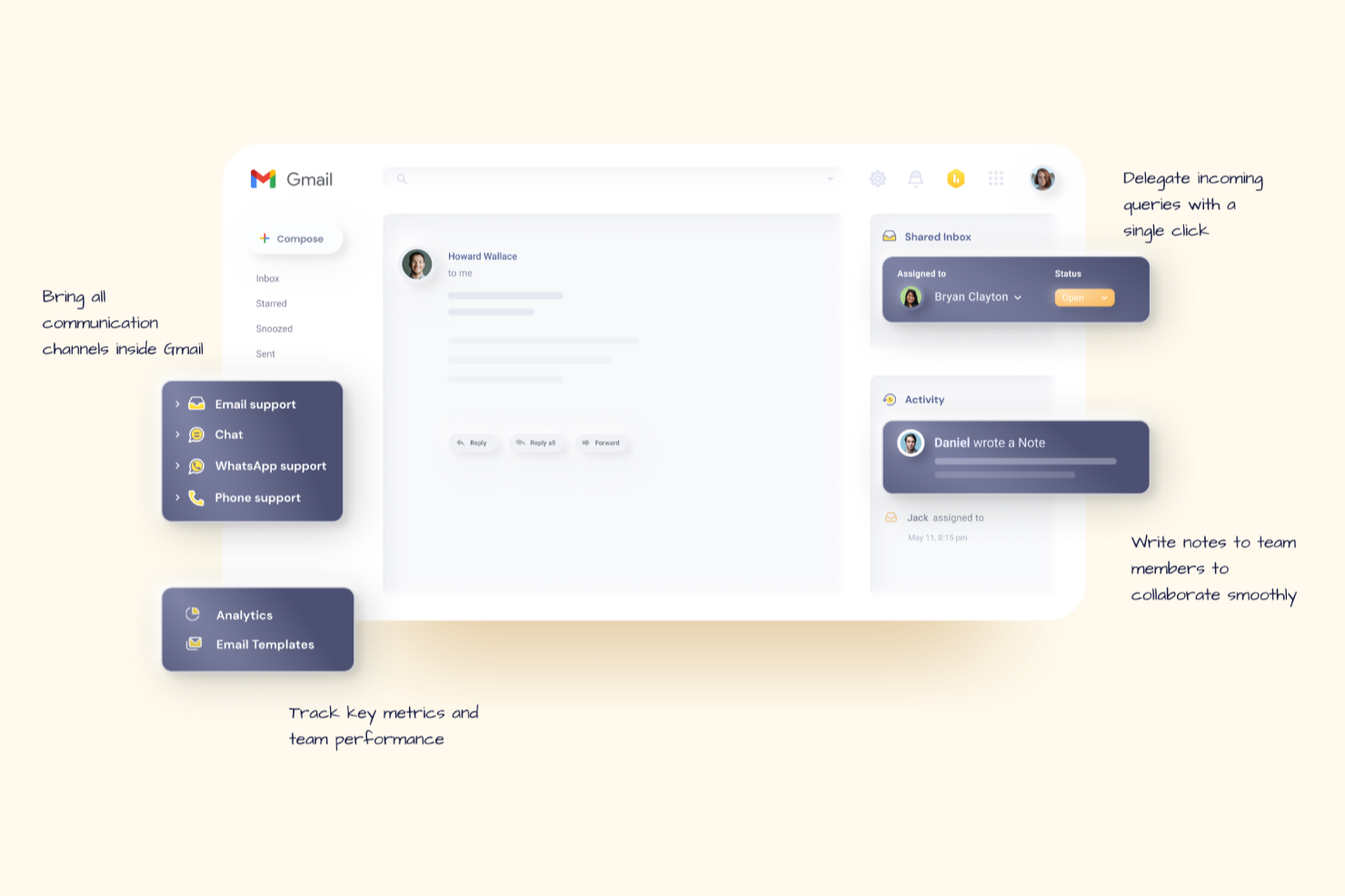
Hiver ist eine moderne, KI-gestützte Kundenservice-Plattform, die Teams hilft, Kunden-E-Mails mühelos zu verwalten. Sie ermöglicht Teams, alle ihre Kundendienstkanäle über ein Bedienfeld auf der linken Seite zu steuern und erhält so einen vollständigen Überblick über laufende, offene und erledigte Konversationen für jeden Kanal.
Warum ich Hiver gewählt habe: Hiver eignet sich für schnell agierende Teams, die die leistungsstarken Funktionen eines vollwertigen Helpdesk-Tools wünschen, jedoch ohne dessen Komplexität und Ballast. Es gibt ein gemeinsames Postfach zum Zuweisen und Nachverfolgen von Anfragen sowie Kollaborationstools wie Notizen, @Erwähnungen und geteilte Entwürfe, die das Team auf Kurs halten. Sie erhalten Workflow-Automatisierungen und SLA-Management für pünktliche Antworten sowie detaillierte Analysen zur Überwachung der Leistung und Kundenzufriedenheit. Die Wissensdatenbank hilft Agenten, sich mit häufig gestellten Fragen nicht wiederholt auseinandersetzen zu müssen.
Herausragende Funktionen & Integrationen:
Funktionen beinhalten Hiver AI, das KI-Funktionen über alle Kontaktpunkte im Kundenservice hinweg bereitstellt. Zum Beispiel unterstützt der AI Copilot Agenten mit kontextbezogenen Antworten, Antwortentwürfen und mehr, während AI Agents Ihnen helfen, autonome Workflows zur Bearbeitung von FAQs, Folgeanfragen und weiteren Aufgaben aufzusetzen. Zusätzlich bietet Hiver AI Insights, die Konversationen dazu nutzen, Probleme und Risiken vorherzusagen.
Integrationen bestehen unter anderem mit Aircall, Asana, Jira, Okta, QuickBooks, Salesforce, Slack, WhatsApp und Zapier sowie über 100 weiteren Plattformen.
Pros and Cons
Pros:
- Starke interne Kollaborationsfunktionen
- Kundenservice durch echte Menschen rund um die Uhr per Chat oder E-Mail - bei allen Tarifen (auch im Gratis-Tarif)
- KI-Funktionen an allen Stationen der Kundenservice-Reise integriert
Cons:
- Das mobile Erlebnis ist nicht so stark wie auf dem Desktop
- Im Vergleich zu einigen anderen Plattformen bietet Hiver weniger Integrationen von Drittanbietern
New Product Updates from Hiver

Hiver Brings Chat Widget Support to Mobile Apps
Hiver now lets you embed the Hiver Chat Widget in iOS, Android, React Native, and Flutter apps so customers can start chats without leaving your app. For more information, visit Hiver's official site.

Am besten geeignet für die Integration mit Altsystemen

Salesforce Service Cloud ist eine Kundenservice-Plattform, die speziell für große Unternehmen entwickelt wurde, um deren Kundensupport zu verbessern. Sie erleichtert das Fallmanagement, automatisiert Workflows und bietet kanalübergreifenden Support, um die Serviceeffizienz zu steigern.
Warum ich Salesforce Service Cloud gewählt habe: Mit Fokus auf große Unternehmen bietet sie umfangreiche Anpassungsmöglichkeiten, um komplexen Geschäftsanforderungen gerecht zu werden. Ihr Fallmanagement-System verarbeitet hohe Volumina an Kundenanfragen effizient. Die Automatisierungsfunktionen der Plattform helfen, manuelle Aufgaben zu reduzieren, sodass Ihr Team sich auf die Lösung von Kundenproblemen konzentrieren kann. Darüber hinaus liefern die Analytics-Tools wertvolle Einblicke, die eine bessere Entscheidungsfindung ermöglichen.
Hervorstechende Funktionen & Integrationen:
Funktionen umfassen ein umfassendes Fallmanagement-System, das Kundenanfragen von Anfang bis Ende verfolgt. Die Plattform bietet Automatisierungstools, die helfen, sich wiederholende Aufgaben zu reduzieren. Ihre Analysefunktionen ermöglichen tiefe Einblicke in Kundeninteraktionen und die Service-Performance.
Integrationen umfassen Slack, Microsoft Teams, Google Workspace, Mailchimp, HubSpot, Zendesk, Dropbox, QuickBooks, Asana und Trello.
Pros and Cons
Pros:
- Hochgradig anpassbare Benutzeroberfläche
- Starke Community-Unterstützung
- Skalierbar für wachsende Unternehmen
Cons:
- Ausgeprägte Lernkurve
- Erfordert umfangreiche Anpassungen
New Product Updates from Agentforce Service (formerly Service Cloud)
Agentforce Service Keeps Full Agentforce Voice Transcripts After Calls
Agentforce Service now shows the full conversation history in post-call transcripts for Agentforce Voice calls within the Service Console, giving agents better context for follow-ups. For more information, visit Salesforce’s official site.
 .
.
Am besten mit integrierter Analytik
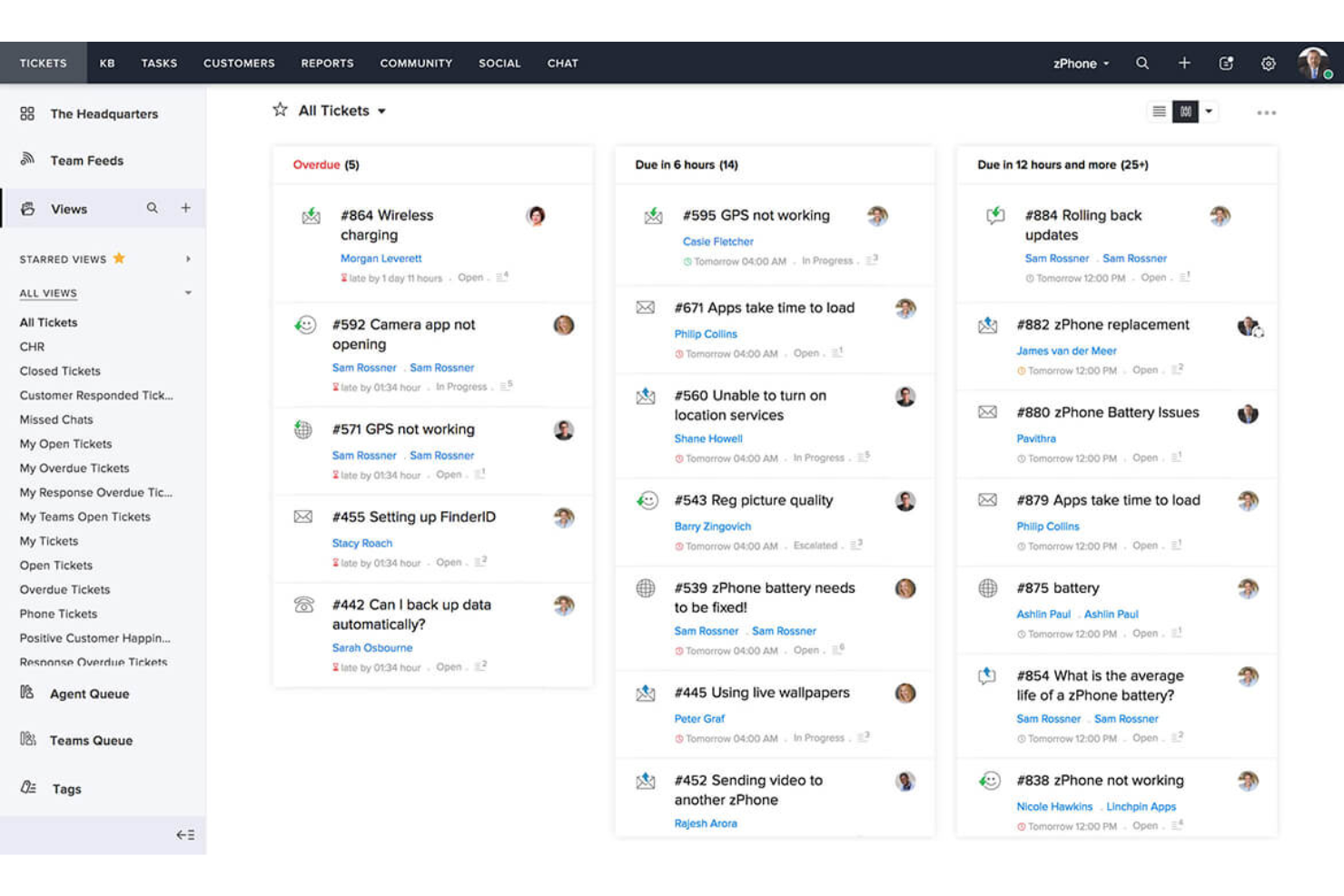
Zoho Desk ist eine Kundenservice-Plattform, die speziell für kleine Unternehmen entwickelt wurde und ihnen hilft, Support-Tickets und Kundenanfragen effizient zu verwalten. Sie bietet Tools für Ticketmanagement, Kommunikation über mehrere Kanäle und Kundeneinblicke, um den Service zu verbessern.
Warum ich Zoho Desk ausgewählt habe: Ideal für kleine Unternehmen aufgrund der erschwinglichen Preisgestaltung und der einfachen Einrichtung. Die Plattform stellt ein unkompliziertes Ticketingsystem zur Verfügung, mit dem Ihr Team Kundenanfragen verfolgen und lösen kann. Dank der Multi-Channel-Unterstützung können Sie Anfragen per E-Mail, über soziale Medien und Telefon an einem Ort bearbeiten. Die integrierte Analytik liefert Einblicke in die Teamleistung und unterstützt Sie dabei, fundierte Entscheidungen zu treffen.
Herausragende Funktionen & Integrationen:
Funktionen beinhalten ein einfaches Ticketingsystem, das Kundenanfragen effizient organisiert. Die Multi-Channel-Unterstützung ermöglicht die Verwaltung von E-Mail-, Social-Media- und Telefonanfragen an einem Ort. Die Analysetools bieten Einblicke in die Teamleistung und Kundenzufriedenheit.
Integrationen umfassen Slack, Microsoft Teams, Shopify, Zoho CRM, Google Workspace, Mailchimp, Trello, Asana, QuickBooks und Salesforce.
Pros and Cons
Pros:
- Einfach anpassbare Workflows
- Erschwinglich für kleine Unternehmen
- Multi-Channel-Unterstützung
Cons:
- Einfache Berichtswerkzeuge
- Begrenzte Offline-Funktionalitäten

Zendesk
Bestes E-Mail-Management-Tool für Startups
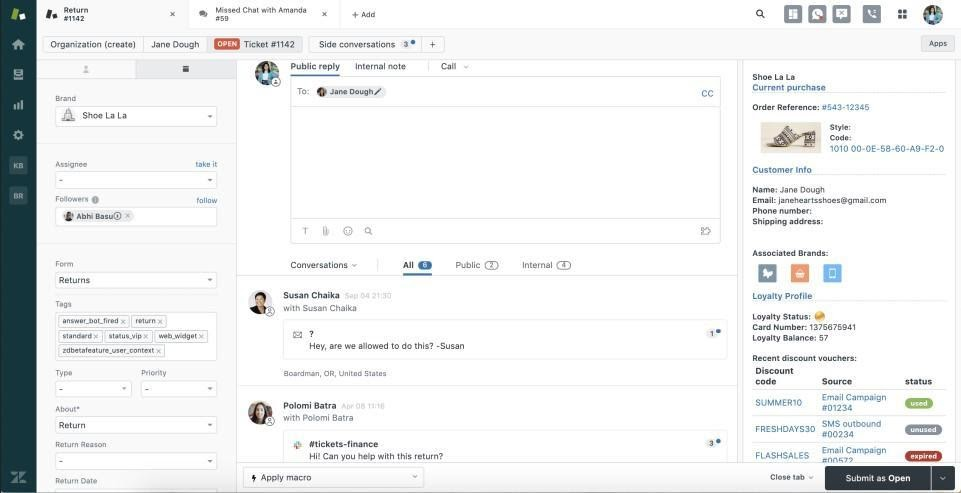
Zendesk ist eine Kundenservice-Plattform, die für Unternehmen jeder Größe entwickelt wurde und skalierbare Lösungen zur Verwaltung von Kundenanfragen bietet. Sie stellt Werkzeuge für Ticketing, Support und Kundenkommunikation bereit, um eine effiziente Kommunikation und Servicebereitstellung zu ermöglichen.
Warum ich Zendesk gewählt habe: Die Lösung bietet Skalierbarkeit und ist damit ideal für wachsende Unternehmen, die ein flexibles Support-System benötigen. Das Ticketsystem hilft Ihrem Team, Kundenanfragen effizient zu verwalten. Mit anpassbaren Workflows können Sie die Plattform auf die spezifischen Bedürfnisse Ihres Unternehmens zuschneiden. Die Analyse-Tools bieten Einblicke in Kundeninteraktionen und helfen dabei, Ihre Support-Prozesse zu optimieren.
Hervorstechende Funktionen & Integrationen:
Funktionen umfassen ein umfassendes Ticketsystem, das Kundenanfragen effizient organisiert. Anpassbare Workflows ermöglichen es Ihnen, die Plattform an Ihr Unternehmen anzupassen. Analyse-Tools liefern Einblicke in Kundeninteraktionen und Serviceleistungen.
Integrationen umfassen Salesforce, Slack, Google Workspace, Shopify, Mailchimp, Trello, Asana, HubSpot, Microsoft Teams und SurveyMonkey.
Pros and Cons
Pros:
- Effizientes Ticketsystem
- Unterstützt Multikanal-Kommunikation
- Hervorragend skalierbar für wachsende Unternehmen
Cons:
- Die Einrichtung kann komplex sein
- Eingeschränkte Offline-Funktionalität
New Product Updates from Zendesk
Zendesk Adds Email AI Replies and Predictive Routing
Zendesk’s latest email AI agents update brings configurable knowledge and welcome replies and adds predictive routing for email tickets, so you can tailor your automated emails and get inquiries resolved faster. For more information, visit Zendesk’s official site.

Tidio
Beste Kundenservice-Software zur Verwaltung von Multikanal-Kommunikation
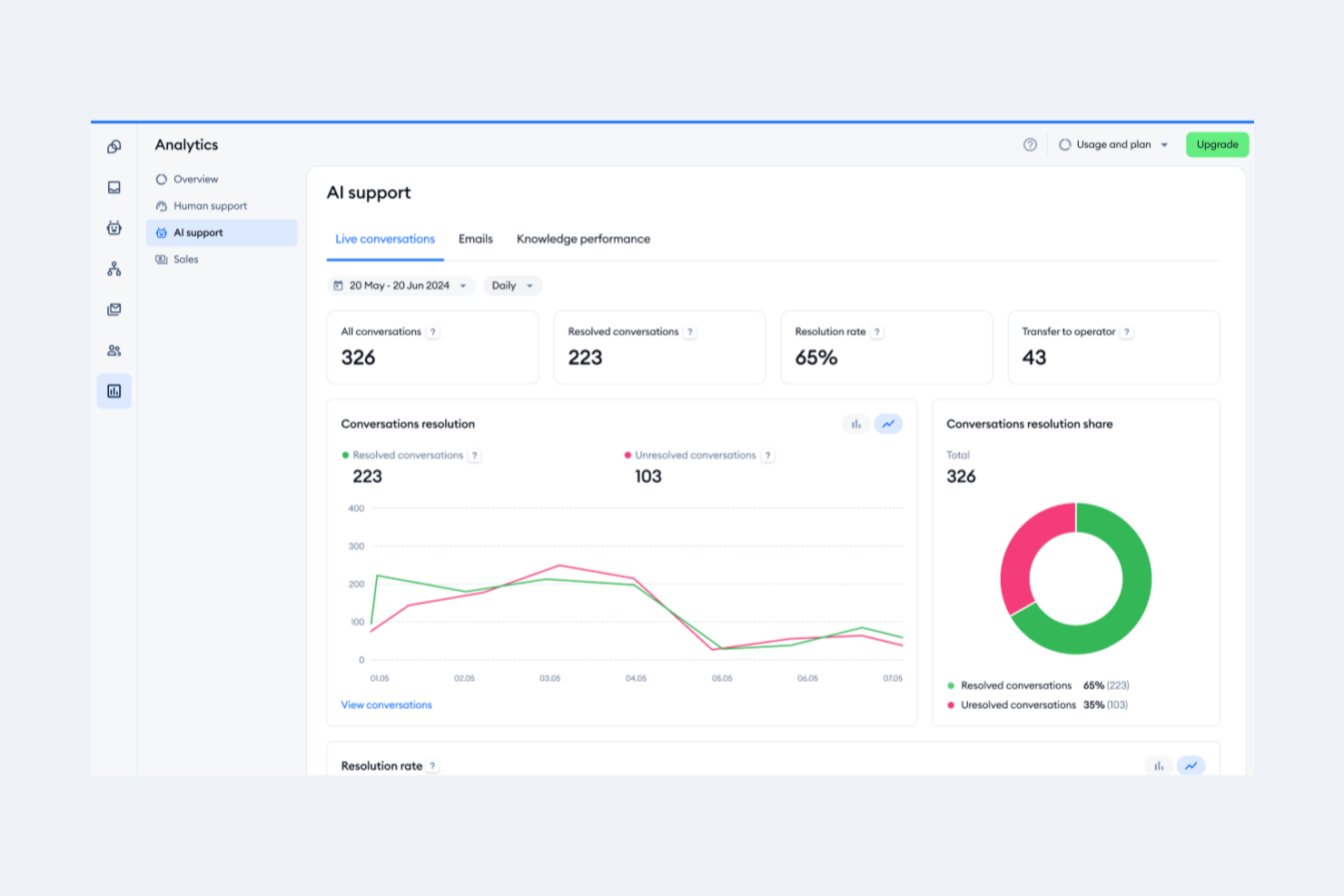
Tidio ist eine Kundenkommunikationsplattform, die sich hauptsächlich an kleine und mittelgroße Unternehmen richtet, die ihre Live-Chat-Support-Funktionen verbessern möchten. Sie bietet Live-Chat, Chatbots und E-Mail-Management, um Unternehmen dabei zu unterstützen, effektiver mit ihren Kunden zu interagieren.
Warum ich Tidio ausgewählt habe: Die Plattform zeichnet sich durch ihren Live-Chat-Support aus und ermöglicht eine Interaktion in Echtzeit mit Ihren Website-Besuchern. Die anpassbaren Chat-Widgets erlauben es, das Erscheinungsbild Ihrer Marke zu übernehmen und so das Nutzererlebnis zu verbessern. Die Chatbots von Tidio automatisieren Antworten, sodass Ihr Team sich auf komplexere Anfragen konzentrieren kann. Durch die Integration von E-Mails werden alle Kundenkommunikationen an einem Ort verwaltet.
Herausragende Funktionen & Integrationen:
Funktionen sind unter anderem anpassbare Chat-Widgets, die mit dem Markenimage harmonieren. Die Chatbots der Plattform automatisieren Routineantworten, sodass Ihr Team sich auf anspruchsvollere Themen konzentrieren kann. Tidio lässt sich außerdem mit E-Mails integrieren, wodurch eine zentrale Verwaltung aller Kundenkommunikationen möglich wird.
Integrationen umfassen Shopify, WordPress, Mailchimp, HubSpot, Zendesk, Google Analytics, Facebook Messenger, Instagram, Wix und Squarespace.
Pros and Cons
Pros:
- Einfache Einrichtung
- Zentralisierte Kommunikationsverwaltung
- Effiziente Chatbot-Automatisierung
Cons:
- Begrenzte Anpassungsmöglichkeiten
- Einfache E-Mail-Verwaltungstools

Front
Am besten für eine vereinheitlichte Inbox für Kundenoperationen
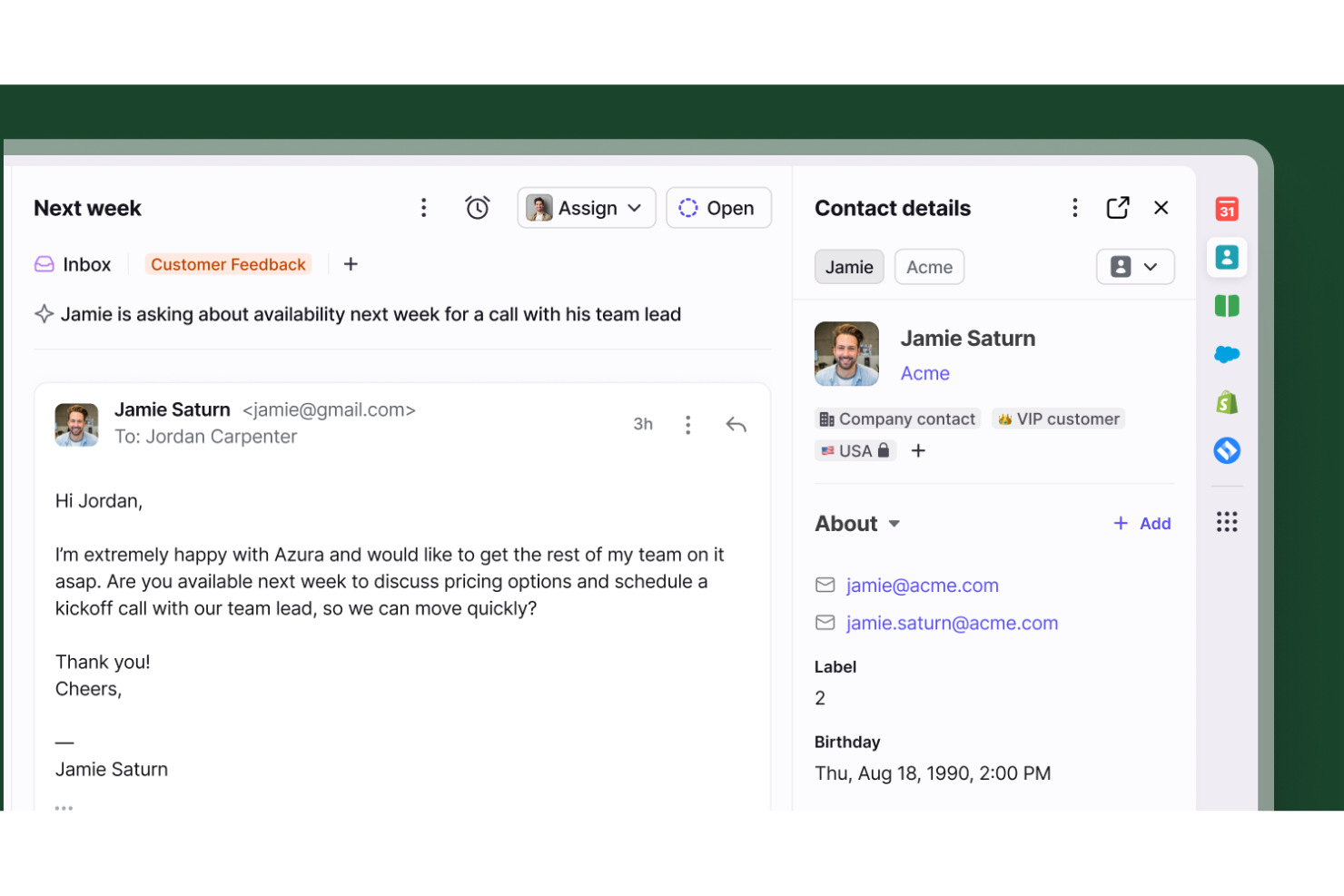
Front dient als zentraler, kollaborativer Arbeitsplatz, der separate Posteingänge und verpasste Folgeaktivitäten für Kundendienstteams eliminiert. Es ist speziell für Organisationen konzipiert, die Kundenkommunikation nahtlos über mehrere Personen oder Abteilungen hinweg koordinieren müssen und dabei alle perfekt aufeinander abstimmen möchten.
Für wen ist Front am besten geeignet?
Front ist ideal für mittelgroße bis große Unternehmen, die ein hohes Aufkommen an Kundenanfragen verwalten und zur Bearbeitung stark auf abteilungsübergreifende Zusammenarbeit angewiesen sind.
Warum ich Front ausgewählt habe
Ich habe Front wegen seiner außergewöhnlichen Fähigkeit ausgewählt, komplexe Multi-Team-Workflows zu bewältigen. Es ermöglicht Ihnen, Konversationen verschiedenen Abteilungen zuzuweisen, benutzerdefinierte Routingregeln festzulegen und geteilte Arbeitsbereiche zu nutzen, damit alle informiert bleiben. Die integrierte Übergabe von Konversationen und das interne Kommentieren ermöglichen es Teams, hinter den Kulissen zusammenzuarbeiten, ohne den Kontext zu verlieren – so sind immer die passenden Experten in jede Kundeninteraktion einbezogen.
Wichtige Funktionen von Front
Weitere herausragende Funktionen, die den Kundenservice unterstützen, sind unter anderem:
- SLA-Management: Vereinbaren und verfolgen Sie Service-Level-Agreements zur Durchsetzung von Verantwortlichkeiten und für zeitnahe Antworten auf jede Anfrage.
- Kollisions-Erkennung: Erhalten Sie Echtzeit-Benachrichtigungen, wenn mehrere Mitarbeitende denselben Thread anzeigen oder eine Antwort verfassen, wodurch doppelte Arbeit zuverlässig vermieden wird.
- Analysen und Berichte: Greifen Sie auf detaillierte Kennzahlen zur Teamleistung, durchschnittlichen Antwortzeiten und Konversationstrends zu, um Ihre Support-Abläufe kontinuierlich zu optimieren.
- Omnichannel-Messaging: Bündeln Sie E-Mail, Live-Chat, SMS und Social-Media-Kanäle in einer einzigen Oberfläche – für einen vollständigen 360-Grad-Blick auf den Kunden.
Front-Integrationen
Integrationen umfassen Salesforce, HubSpot, Asana, Jira, Aircall, Slack, Shopify, Intercom, Dialpad und ClickUp.
Pros and Cons
Pros:
- Abteilungsübergreifende Zusammenarbeit
- Verhindert doppelte Antworten von Agenten
- Vereint persönliche und geteilte E-Mails
Cons:
- Mobile App bietet weniger Funktionen als Desktop
- Analyse-Funktionen nur in höheren Tarifen verfügbar

HappyFox
Am besten für kundenorientierte Helpdesks
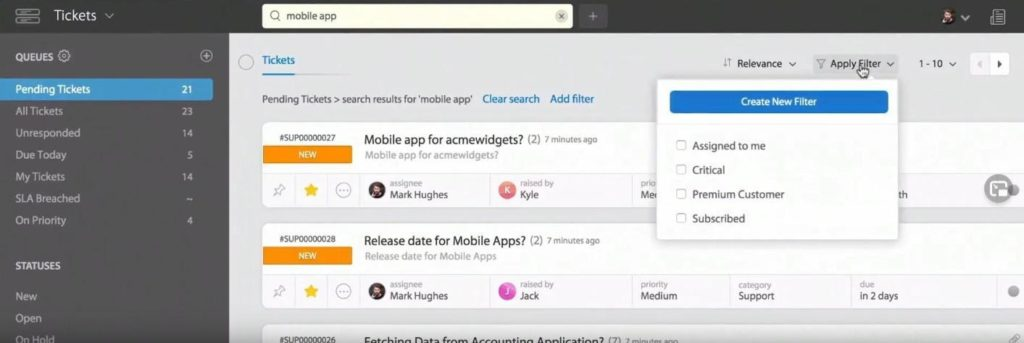
HappyFox ist eine Helpdesk-Software, die Unternehmen unterstützt, ihre Ticketverwaltung und Kundensupport-Prozesse zu optimieren. Sie hilft Teams dabei, Kundenanfragen effizient zu organisieren, nachzuverfolgen und zu beantworten und bietet einen strukturierten Ansatz für das Management von Support-Tickets.
Warum ich HappyFox gewählt habe: Es ist ideal für Unternehmen, die starke Fähigkeiten im Bereich der Ticketverwaltung benötigen. Die Software ermöglicht es Ihrem Team, Tickets zu kategorisieren und zu priorisieren, sodass kritische Anliegen zuerst bearbeitet werden. Mit automatisierten Workflows können Sie Tickets anhand vordefinierter Regeln zuweisen und so den manuellen Aufwand reduzieren. Die Berichtswerkzeuge liefern Einblicke in die Support-Leistung und unterstützen datenbasierte Entscheidungen.
Hervorstechende Funktionen & Integrationen:
Funktionen sind unter anderem automatisierte Workflows, die die Zuweisung und Bearbeitung von Tickets optimieren. Die Möglichkeit, Tickets zu kategorisieren und zu priorisieren, hilft Ihrem Team, sich auf dringende Anliegen zu konzentrieren. Berichtswerkzeuge bieten Einblicke in die Support-Performance und helfen, Verbesserungsbereiche zu erkennen.
Integrationen umfassen Slack, Salesforce, Shopify, QuickBooks, Jira, Mailchimp, Google Workspace, HubSpot, Microsoft Teams und Trello.
Pros and Cons
Pros:
- Starke Ticketkategorisierung
- Effiziente Workflow-Automatisierung
- Einfacher Eskalationsprozess
Cons:
- Eingeschränkte mobile App-Funktionalität
- Kann ressourcenintensiv sein
Weitere Software-Optionen für das E-Mail-Management im Kundenservice
Wenn du noch weitere E-Mail-Management-Tools suchst, habe ich noch mehr für dich.
- monday service
Am besten für zentrales E-Mail-Management
- Issuetrak
Am besten für Omnichannel-Ticket-Erfassung
- Pega
E schnelle Reaktion auf große E-Mail-Mengen
- SAAS First
Am besten für KI-generierte Antworten
- TeamSupport
Am besten für das Management von E-Mails in Aktivitäten
- SparrowDesk
Am besten zur Automatisierung von Kundeninteraktionen geeignet


Wie ich Software für das Management von Kundenservice-E-Mails bewerte
Ich bewerte diese Tools auf zwei Ebenen: ob sie die Grundlagen eines gemeinsamen Posteingangs abdecken – Ticketzuweisung, Kollisionsvermeidung, SLA – und wodurch sich die einzelnen Anbieter für CX-Teams im großen Maßstab unterscheiden.
Kernfunktionen (Muss-Kriterien für diese Liste)
Wenn ich Tools für meine Liste auswähle, bewerte ich jedes auf einer Skala von 0 (bietet die Funktionalität nicht) bis 5 (in diesem Bereich herausragend) hinsichtlich jeder unten aufgeführten Kernfunktion. Anschließend berechne ich die Gesamtpunktzahl des Tools in Prozent. Jedes Tool muss eine Mindestgesamtpunktzahl von 65% erreichen, um für die Aufnahme in Betracht zu kommen.
- Gemeinsamer Team-Posteingang: Ich prüfe, ob mehrere Agenten aus demselben Posteingang arbeiten können und ob eine Echtzeit-Kollisionsvermeidung vorhanden ist, damit nicht zwei Personen gleichzeitig auf dieselbe Kundenanfrage antworten.
- Ticket-Zuweisung & Routing: Hier ist entscheidend, ob ein Tool eine regelbasierte Zuweisung unterstützt – etwa, ob Abrechnungsanfragen einem bestimmten Team zugeteilt oder Aufgaben gleichmäßig auf Agents in einer Schicht verteilt werden.
- E-Mail-Automatisierung & Regeln: Ich achte auf Auslöser für Workflows, Textbausteine und automatische Tagging-Mechanismen, die repetitive Aufgaben wie Empfangsbestätigungen oder das Weiterleiten von E-Mails mit bestimmten Schlüsselwörtern übernehmen.
- Interne Kollaborations-Tools: Gute Tools erlauben es, interne Notizen zu hinterlassen, Teammitglieder mit @ zu erwähnen und Nebenunterhaltungen im Thread zu starten, ohne dass der Kunde davon etwas sieht.
- SLA- & Antwortverfolgung: Ich bewerte, ob sich SLA-Richtlinien nach Priorität oder Kundensegment einrichten lassen, ob es Benachrichtigungen bei Verstößen gibt und ob Berichte zu Erstreaktions- und Lösungszeiten erstellt werden können.
- Kundenkontext & -verlauf: Die Agentenansicht sollte vergangene Konversationen, Kontaktdaten und relevante Kontoinformationen anzeigen, damit das Team nicht immer wieder dieselben Informationen vom Kunden abfragen muss.
Nachdem ich eine Liste mit Tools erreiche, die diese Kriterien erfüllen, untersuche ich, wodurch sich jede Plattform auszeichnet.
Unterscheidungsmerkmale (Was Anbieter voneinander abhebt)
So vergleiche und bewerte ich die verschiedenen Anbieter:
Herausragende Funktionen
KI-gestützte Antwortvorschläge sind ein großer Vorteil – ich achte darauf, ob Agenten kontextbezogene Antwortvorschläge erhalten, die tatsächlich Zeit bei wiederkehrenden Fragen wie Bestellstatus sparen. Eine integrierte Wissensdatenbank ist ebenfalls von Vorteil, da die Agenten dadurch relevante Hilfsartikel direkt in Antworten einfügen können. Zudem bewerte ich integrierte CSAT- oder CES-Umfragen, die an einzelne Gespräche geknüpft sind, denn nur durch die Verknüpfung von Zufriedenheitswerten mit bestimmten Agenten und Ticketarten erhalten Teamleiter datengestützte Erkenntnisse, die allgemeine Umfragen nach dem Kontakt nicht bieten.
Über die Funktionen hinaus
Die Integrationstiefe ist wichtig – ich prüfe, ob ein Tool native Schnittstellen zu CRMs wie Salesforce oder HubSpot und zu E-Commerce-Plattformen wie Shopify bietet, da Support-Teams Informationen zu Bestellungen und Accounts benötigen, ohne ständig zwischen Tabs zu wechseln. Skalierbarkeit ist ein weiterer Faktor, insbesondere ob die Plattform mehrere Marken oder Abteilungen in separaten Posteingängen unterstützt, wenn das Team wächst. Außerdem bewerte ich die Unterstützung bei der Migration, denn der Wechsel von einem geteilten Gmail- oder Outlook-Postfach auf eine spezialisierte Plattform kann scheitern, wenn der Anbieter keine Importtools und Onboarding-Anleitungen bereitstellt.
Wie du die richtige E-Mail-Management-Software für den Kundenservice auswählst
Schnell verliert man den Überblick bei langen Funktionslisten und komplizierten Preisstrukturen. Damit du im Auswahlprozess nicht den Fokus verlierst, findest du hier eine Checkliste mit wichtigen Faktoren, die du berücksichtigen solltest:
| Faktor | Was beachten? |
|---|---|
| Skalierbarkeit | Stelle sicher, dass die Software mit deinem Team mitwachsen kann und steigende E-Mail-Volumina sowie Benutzerzahlen problemlos bewältigt. |
| Integrationen | Achte darauf, dass die Software sich mit bereits genutzten Tools wie CRM-Systemen und Helpdesk-Software verknüpfen lässt. |
| Anpassungsfähigkeit | Prüfe, ob sich Workflows, Dashboards und Funktionen individuell an die Bedürfnisse deines Teams anpassen lassen. |
| Benutzerfreundlichkeit | Überlege, wie intuitiv die Bedienung ist und wie schnell dein Team mit dem Tool vertraut wird. |
| Budget | Bewerte, ob die Preisgestaltung in dein Budget passt und ob versteckte Kosten oder Zusatzgebühren anfallen. |
| Sicherheitsmaßnahmen | Vergewissere dich, dass die Software über starke Datenschutzmaßnahmen zum Schutz deiner Kundendaten verfügt. |
| Support-Optionen | Suche nach 24/7-Support, mehreren Kontaktmöglichkeiten und Zugriff auf eine umfassende Wissensdatenbank. |
| Analytik | Stelle sicher, dass das Tool Berichte und Auswertungen liefert, um die Leistung deines Teams und Kundeninteraktionen zu überwachen. |
Trends bei E-Mail-Management-Software für den Kundenservice
In meinen Recherchen habe ich unzählige Produktaktualisierungen, Pressemitteilungen und Release-Logs verschiedener Anbieter von E-Mail-Management-Software für den Kundenservice ausgewertet. Hier sind einige der aufkommenden Trends, die ich im Auge behalte:
- KI-gesteuerte Personalisierung: Künstliche Intelligenz wird eingesetzt, um Kundeninteraktionen basierend auf bisherigen Verhaltensweisen und Präferenzen individuell anzupassen. Dieser Trend hilft Unternehmen, relevanteren Support zu bieten und die Kundenzufriedenheit zu steigern. Anbieter wie Zendesk haben KI integriert, um personalisierte Antworten vorzuschlagen.
- Integration von Omnichannel-Support: Unternehmen bewegen sich hin zu Plattformen, die E-Mail mit anderen Kommunikationskanälen wie Social Media und Live-Chat vereinen. Diese Integration bietet ein einheitliches Kundenerlebnis und ermöglicht es, alle Interaktionen an einem Ort zu verwalten. Freshdesk ist ein Beispiel für eine Plattform, die diesen Trend verfolgt.
- Echtzeit-Analysen: Die Analyse von Daten in Echtzeit wird immer wichtiger, um die Effizienz des Kundenservice zu steigern. Diese Analysen liefern Einblicke in die Team-Performance und Kundeninteraktionen, sobald sie stattfinden, und ermöglichen schnelle Entscheidungen. Plattformen wie Salesforce Service Cloud bieten diese Funktionen an.
- Funktionen für die Zusammenarbeit im Homeoffice: Da immer mehr Teams remote arbeiten, steigt die Nachfrage nach Tools, die die Zusammenarbeit fördern. Funktionen wie gemeinsame Posteingänge und interne Kommentare ermöglichen effektive Teamarbeit – unabhängig vom Standort. Front ist bekannt für seine ausgeprägten Funktionen zur Zusammenarbeit auf Distanz.
- Fokus auf Benutzerfreundlichkeit: Es wird immer mehr Wert auf ein intuitives Design und einfache Bedienbarkeit gelegt, um die Einarbeitungszeit zu verkürzen und die Akzeptanz zu steigern. Software mit klaren Oberflächen und benutzerfreundlicher Navigation wird für Unternehmen zunehmend wichtiger. Help Scout ist bekannt für sein Engagement für eine hervorragende Nutzererfahrung.
Was ist eine E-Mail-Management-Software für den Kundenservice?
Eine E-Mail-Management-Software für den Kundenservice ist ein Tool, das Unternehmen dabei unterstützt, Kundenanfragen, die per E-Mail eingehen, zu verwalten und zu organisieren. Solche Tools kommen typischerweise in Support-Teams zum Einsatz und bieten einen Mehrwert, indem sie die Antwortzeiten verbessern und eine konsistente Kommunikation sicherstellen.
Funktionen wie Ticketmanagement, Echtzeit-Analysen und Omnichannel-Support helfen dabei, Anfragen zu organisieren, Leistungen auszuwerten und integrierte Interaktionen mit Kunden bereitzustellen. Insgesamt erhöhen diese Tools die Effizienz und Wirksamkeit des Kundenservice.
Funktionen einer E-Mail-Management-Software für den Kundenservice
Bei der Auswahl einer E-Mail-Management-Software für den Kundenservice sollten Sie auf folgende wichtige Funktionen achten:
- Ticketmanagement: Organisiert Kundenanfragen in übersichtliche Tickets, sodass nichts übersehen wird.
- Omnichannel-Support: Integriert verschiedene Kommunikationskanäle und ermöglicht reibungslose Kundeninteraktionen über die Plattformen hinweg.
- Echtzeit-Analysen: Bietet Einblicke in die Teamleistung und Kundeninteraktionen, sodass schnelle Anpassungen und Verbesserungen möglich sind.
- Anpassbare Workflows: Erlaubt es Teams, Abläufe individuell an die eigenen Geschäftsanforderungen anzupassen und so die Effizienz zu steigern.
- KI-gesteuerte Personalisierung: Verwendet KI, um Antworten auf Basis der Kundenhistorie individuell anzupassen und so Zufriedenheit und Engagement zu erhöhen.
- Gemeinsame Posteingänge: Erleichtert die Zusammenarbeit, da mehrere Teammitglieder E-Mails in einem einheitlichen Posteingang verwalten können.
- Automatisierungstools: Reduziert manuelle Aufgaben, indem sich wiederkehrende Prozesse wie Antworten und Ticketzuweisungen automatisieren lassen.
- Kundenprofile: Bietet detaillierte Einblicke zu jedem Kunden, um Service zu personalisieren und die Servicequalität zu steigern.
- Reporting-Tools: Ermöglicht das Erfassen und Auswerten von Leistungskennzahlen, was bei strategischen Entscheidungen und der Leistungsoptimierung unterstützt.
- Sicherheitsmaßnahmen: Schützt Kundendaten mit zuverlässigen Sicherheitsmechanismen und stellt Vertrauen sowie Compliance sicher.
Vorteile einer E-Mail-Management-Software für den Kundenservice
Die Einführung einer E-Mail-Management-Software für den Kundenservice bietet Ihnen und Ihrem Team zahlreiche Vorteile. Hier sind einige, auf die Sie sich freuen können:
- Verbesserte Reaktionszeiten: Automatisierungstools helfen Ihrem Team, schneller auf Kundenanfragen zu reagieren und so die Kundenzufriedenheit zu steigern.
- Verbesserte Zusammenarbeit: Gemeinsame Posteingänge und interne Kommentarfunktionen erleichtern Ihrem Team die gemeinsame Bearbeitung von Kundenanliegen.
- Bessere Kundeneinblicke: Kundenprofile und Analysen in Echtzeit liefern wertvolle Informationen, damit Sie den Support individuell anpassen können.
- Gesteigerte Effizienz: Ticketmanagement und anpassbare Workflows optimieren Prozesse und reduzieren die Arbeitsbelastung Ihres Teams.
- Konsistente Kommunikation: Omnichannel-Support stellt sicher, dass Kunden über alle Kanäle hinweg einen einheitlichen Service erhalten und sich ihr Erlebnis verbessert.
- Datenbasierte Entscheidungen: Berichtstools und Analysen bieten Einblicke in die Leistung und unterstützen bei strategischer Planung und Verbesserungen.
- Verbesserte KPIs: Verbesserte Kennzahlen zur Kundenzufriedenheit wie CSAT, NPS und CES helfen, die Zufriedenheit zu messen, Erfahrungen zu verbessern und die Kundenbindung zu stärken.
Kosten und Preise für E-Mail-Management-Software im Kundenservice
Die Auswahl einer E-Mail-Management-Software für den Kundenservice erfordert ein Verständnis der verschiedenen verfügbaren Preismodelle und Tarife. Die Kosten variieren je nach Funktionen, Teamgröße, Zusatzoptionen und weiteren Faktoren. Die folgende Tabelle fasst gängige Tarife, deren Durchschnittspreise und typische enthaltene Features in Lösungen für das E-Mail-Management im Kundenservice zusammen:
Tarifvergleichstabelle für E-Mail-Management-Software im Kundenservice
| Tarifart | Durchschnittlicher Preis | Typische Funktionen |
|---|---|---|
| Gratis-Tarif | $0 | Grundlegendes Ticketmanagement, eingeschränkter E-Mail-Support und Basisberichte. |
| Persönlicher Tarif | $5-$25/Nutzer/Monat | Ticketmanagement, E-Mail-Support, begrenzte Anpassungsmöglichkeiten und Basis-Analysen. |
| Business-Tarif | $30-$75/Nutzer/Monat | Erweitertes Ticketing, Multi-Channel-Support, anpassbare Workflows und Analysen in Echtzeit. |
| Enterprise-Tarif | $80-$150/Nutzer/Monat | Vollständige Individualisierung, erweiterte Berichterstattung, KI-gestützte Einblicke und dediziertes Account-Management. |