

10 beste Kundensupport-Softwarelösungen 2026

10 Beste Kundenservice-Software: Die Top-Liste


Kundenservice-Software hilft Ihrem Team dabei, ein hohes Anfrageaufkommen zu bewältigen, den Kontakt über verschiedene Kanäle hinweg konsistent zu halten und Tickets zu lösen, ohne den menschlichen Faktor zu verlieren. Diese Plattformen sind darauf ausgelegt, Arbeitsabläufe zu vereinfachen, wiederkehrende Aufgaben zu automatisieren und Ihren Mitarbeitenden den nötigen Kontext zu bieten, um schneller und persönlicher Hilfe zu leisten.
Ich habe diese Tools auf Basis von Benutzerfreundlichkeit, Automatisierungsfunktionen, Integrationen, Skalierbarkeit und Reporting bewertet. Dieser Leitfaden stellt die beste Kundenservice-Software für verschiedene Teamgrößen und Supportmodelle vor, damit Sie eine Lösung wählen können, die zu Ihren Servicezielen passt und den Umgang mit Kundenanfragen nachhaltig verbessert.
Warum Sie unseren Software-Empfehlungen vertrauen können
Unser Team testet und bewertet Software seit 2012. Als CX-Führungskräfte selbst wissen wir, wie schwierig – und wichtig – es ist, die richtige Software auszuwählen.
Für diesen Leitfaden haben wir Tools mithilfe von praktischen Tests und unabhängiger Recherche bewertet und dabei unsere Bewertungskriterien angewendet.
Unsere Bewertungen spiegeln unser menschliches redaktionelles Urteilsvermögen wider, keine Verkaufsstrategie.
Beste Kundenservice-Software: Preisvergleich
Diese Vergleichstabelle fasst die wichtigsten Details zu meinen Top-Auswahlmöglichkeiten für Kundenservice-Software zusammen. Sie können Preisdetails sowie die Verfügbarkeit von kostenlosen Testversionen oder Demos direkt vergleichen, um die passende Software für Budget und Geschäftsziele zu finden.
| Tool | Best For | Trial Info | Price | ||
|---|---|---|---|---|---|
| 1 | Am besten geeignet für die Zusammenarbeit mit externen Beteiligten | Kostenlose Demo + 14-tägige kostenlose Testversion verfügbar | Ab $19/Nutzer/Monat (jährlich abgerechnet) | Website | |
| 2 | Am besten für Echtzeitberichte und Analysen | Kostenlose Demo verfügbar | Ab $30/Nutzer/Monat (jährlich abgerechnet) | Website | |
| 3 | Beste Kundensupport-Software für Unternehmen | 15-tägige kostenlose Testphase + Gratis-Tarif | Ab $7/Nutzer/Monat (jährliche Abrechnung) | Website | |
| 4 | Am besten geeignet für menschzentrierten Support | Kostenlose Testversion verfügbar | Ab $25/Nutzer/Monat (jährliche Abrechnung) | Website | |
| 5 | Am besten für vom gesamten Team erstellte Antworten geeignet | 30-tägige kostenlose Testversion verfügbar | Ab 14 $/Nutzer/Monat (jährliche Abrechnung) | Website | |
| 6 | Am besten für mehrsprachigen KI-Kundensupport | 7-tägige kostenlose Testphase + kostenloser Tarif verfügbar | Ab $25/Nutzer/Monat | Website | |
| 7 | Am besten geeignet wegen der benutzerfreundlichen und anpassbaren Oberfläche | 15-tägige kostenlose Testversion verfügbar | Ab $7/Operator/Monat | Website | |
| 8 | Ideal zur Gestaltung personalisierter Erlebnisse mit KI | Kostenlose Testversion + kostenlose Demo verfügbar | Ab $25/Nutzer/Monat (jährliche Abrechnung) | Website | |
| 9 | Am besten für Konversationsanalysen | Kostenloser Plan verfügbar | Ab $29/Monat (jährliche Abrechnung) | Website | |
| 10 | Am besten für SaaS-Unternehmen | Kostenlose Demo verfügbar | Preise auf Anfrage | Website |

Übersichten der 20 besten Kundenservice-Softwarelösungen
Im Folgenden finden Sie kurze Beschreibungen meiner Top-Auswahl an Kundenservice-Softwarelösungen.

Am besten geeignet für die Zusammenarbeit mit externen Beteiligten
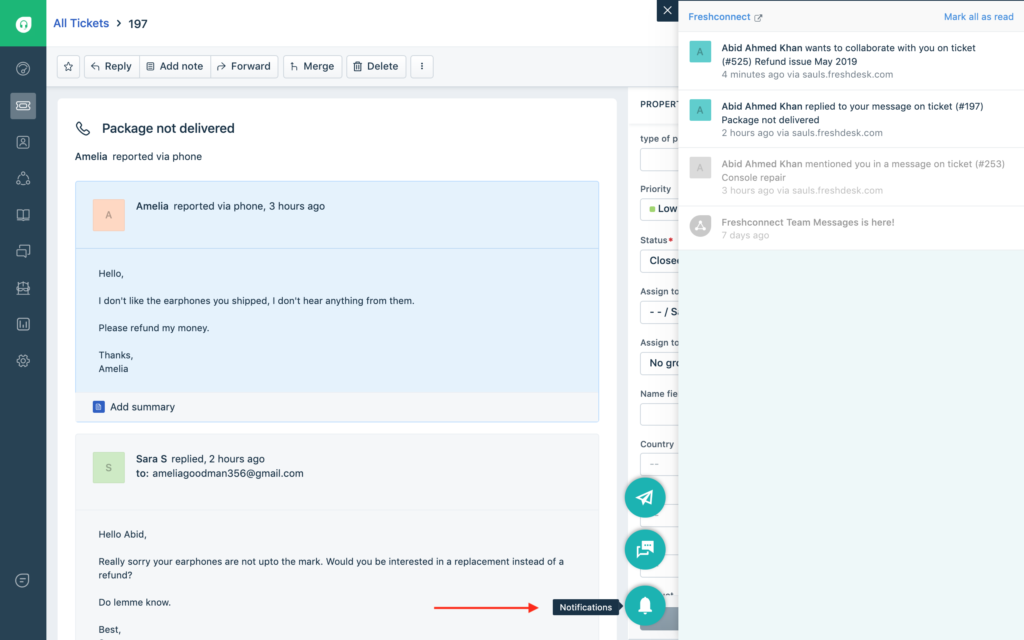
Freshdesk (ein Produkt von Freshworks Inc.) ist eine Kundendienstplattform, die Teams dabei unterstützt, Kundeninteraktionen in verschiedenen Größenordnungen zu verwalten. Sie vereint strukturiertes Ticket-Management, Automatisierung, Sprachunterstützung und Analysen, damit Teams Aktivitäten nachverfolgen und Konsistenz über Regionen und Kanäle hinweg gewährleisten können.
Warum ich Freshdesk gewählt habe
Ich habe Freshdesk aufgrund seiner Unterstützung für die Zusammenarbeit mit externen Beteiligten ausgewählt. Die Plattform bietet eine Kollaborateur-Rolle, mit der Partner oder Dienstleister an Ticket-Konversationen teilnehmen können, ohne vollständigen Agentenzugang zu erhalten. Diese Lösung ermöglicht es, Kontext und Updates zu teilen, während interne Arbeitsabläufe geschützt bleiben. Die Integration mit Tools wie Microsoft Teams erlaubt zudem, Ticket-Aktualisierungen und Diskussionen direkt in den bereits genutzten Kollaborationstools Ihres Teams zu führen.
Wichtige Funktionen von Freshdesk
Neben der Förderung der Zusammenarbeit mit externen Beteiligten bietet Freshdesk weitere Schlüsselfunktionen, die den täglichen Kundenservice unterstützen:
- Freddy AI: Integrierte KI-Tools unterstützen Aufgaben wie Antwortentwürfe und Ticketbearbeitung, um manuellen Aufwand innerhalb bestehender Supportabläufe zu verringern.
- Self-Service-Tools: Eine mehrsprachige Wissensdatenbank ermöglicht es Kunden, eigenständig nach Antworten zu suchen, während Community-Foren und Versionierung von Artikeln dem Team dabei helfen, Informationen aktuell und korrekt zu halten.
- Kompetenzbasierte Ticket-Zuweisung: Eingehende Anfragen werden basierend auf festgelegten Kompetenzen den passenden Agenten zugewiesen, sodass Anliegen an das relevanteste Fachwissen weitergeleitet werden.
- Sicherheitsfunktionen: Umfasst rollenbasierte Zugriffskontrolle, Single Sign-On, JWT-Authentifizierung und IP-Whitelisting, um den Zugriff zu steuern und Support-Daten zu schützen.
Freshdesk-Integrationen
Zu den Integrationen gehören Shopify, Slack, Microsoft Teams, Playvox, Google Kalender, Trello, Jira, HubSpot, Salesforce und Mailchimp.
Pros and Cons
Pros:
- Effektiver Prozess zur Erstellung und Einreichung von Tickets
- Einheitliches Ticketsystem verbessert Nachverfolgung und Reaktionszeiten
- KI-gestützte Automatisierung steigert die Effizienz und reduziert manuellen Aufwand
Cons:
- Die mobile App ist umständlich und wenig intuitiv gestaltet
- Begrenzte Wirksamkeit für größere Unternehmen, die keine KI nutzen
New Product Updates from Freshdesk

Freshdesk Adds Voice AI Agents in Freshcaller
Freshdesk introduces Voice AI Agents available through Freshcaller Marketplace apps to handle routine calls and reduce queues. This feature enables automated call handling with real-time, conversational support. For more information, visit Freshdesk's official site.

Am besten für Echtzeitberichte und Analysen
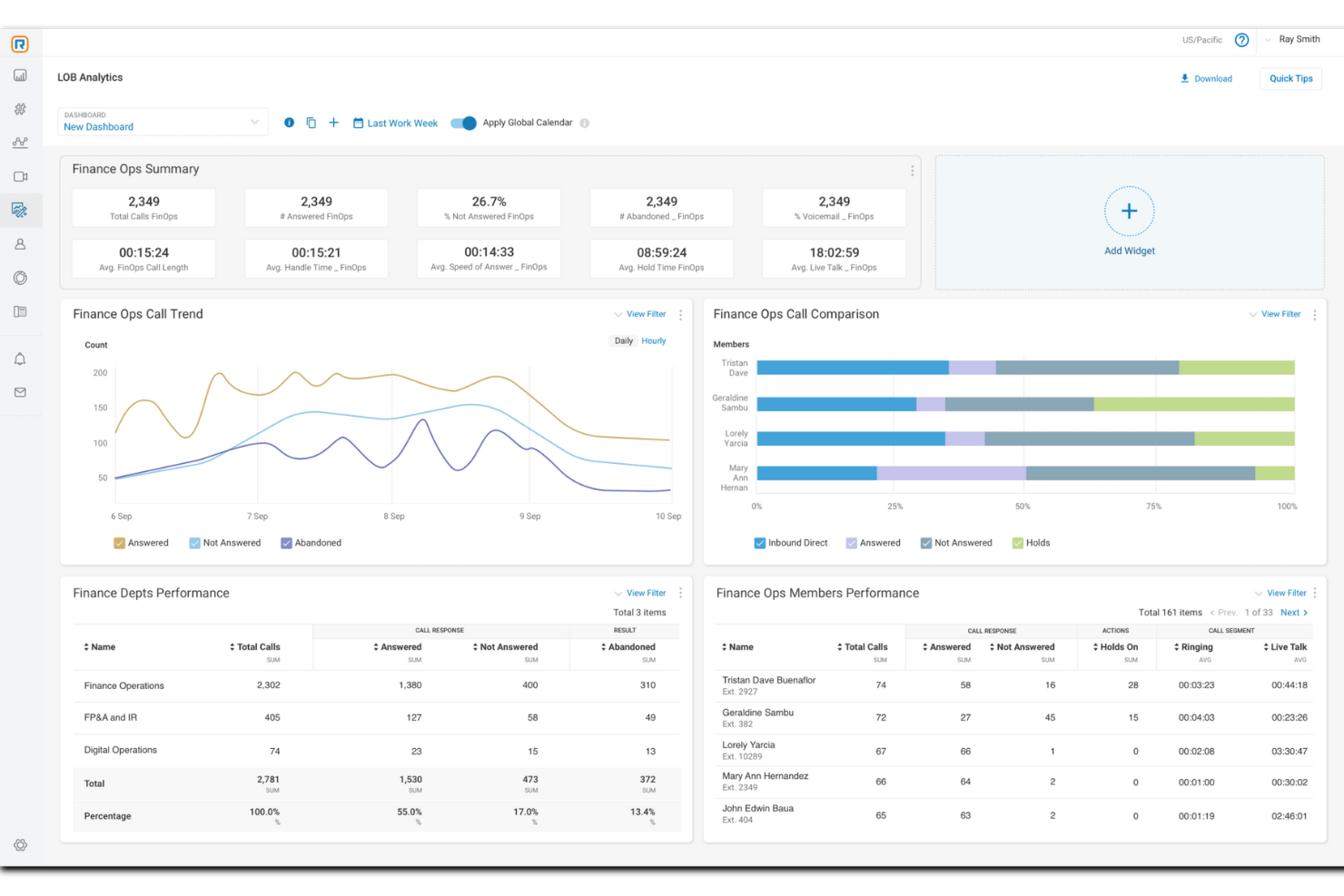
Für Unternehmen, die ihre Kundenservicefähigkeiten verbessern möchten, bietet RingCentral eine vielseitige Lösung, die darauf ausgelegt ist, Kommunikation und Kundenzufriedenheit zu steigern. Diese Software eignet sich ideal für Organisationen verschiedenster Branchen, die eine Integration von Self-Service- und Live-Support-Optionen benötigen, um unterschiedlichen Kundenanforderungen gerecht zu werden. Durch den Einsatz von KI-gestützten Tools und die Anbindung an mehrere Kanäle löst RingCentral Herausforderungen im Management von Kundeninteraktionen und ermöglicht Ihrem Team, einen persönlichen und effizienten Service zu bieten.
Warum ich RingCentral ausgewählt habe
Ich habe mich für RingCentral wegen seiner herausragenden Echtzeit-Berichts- und Analysefunktionen entschieden, die für jede Organisation, die ihren Kundenservice optimieren möchte, unerlässlich sind. Die anpassbaren Echtzeit-Dashboards ermöglichen es, Warteschlangen und Agentenleistungen zu überwachen und liefern umsetzbare Erkenntnisse für eine effiziente Personalplanung und SLA-Management. Zusätzlich analysiert die Conversation-Intelligence-Funktion Interaktionen, um Trends zu erkennen und die Kundenzufriedenheit zu steigern. Durch umfassende Berichte mit über 200 vorgefertigten Auswertungen stattet RingCentral Ihr Team mit den Werkzeugen aus, die für fundierte, datenbasierte Entscheidungen zur Verbesserung der Servicequalität nötig sind.
Zentrale Funktionen von RingCentral
Neben den Funktionen für Echtzeitberichte und Analysen bietet RingCentral eine Vielzahl von Features, die auf die Anforderungen von Kundenserviceteams zugeschnitten sind.
- Self-Service-Tools: Ermöglichen Sie Ihren Kunden die eigenständige Lösung von Problemen mit automatisierten Systemen wie Chatbots und interaktiver Sprachführung (IVR), um die Effizienz zu steigern und den Personalbedarf zu reduzieren.
- Live-Chat: Fördern Sie die Echtzeit-Kommunikation zwischen Ihren Agenten und Kunden für sofortige Unterstützung und eine persönliche Note bei jeder Interaktion.
- Fähigkeitsbasierte Weiterleitung: Leiten Sie Kundenanfragen automatisch an die qualifiziertesten Mitarbeitenden weiter, damit Anliegen von Fachkräften mit entsprechender Expertise bearbeitet werden.
- CRM-Integration: Verbinden Sie sich nahtlos mit bestehenden Customer-Relationship-Management-Systemen, um auf Kundenprofile und -historie zuzugreifen, was personalisierten Service und schnellere Problemlösung ermöglicht.
RingCentral-Integrationen
Zu den Integrationen zählen Salesforce, Microsoft Teams, Google Workspace, HubSpot, Zendesk, Slack, ServiceNow, Box, Okta und DocuSign.
Pros and Cons
Pros:
- Effektive Anrufweiterleitung verbessert Reaktionszeit und Effizienz
- Leistungsstarke Analysen liefern verwertbare Erkenntnisse für die Entscheidungsfindung
- Hohe Zuverlässigkeit mit 99,999% Betriebszeit garantiert ständige Verfügbarkeit
Cons:
- Einrichtungsprozess ohne Unterstützung mit steiler Lernkurve
- Mehr sofort einsatzbereite Optionen für unterschiedliche Anforderungen gewünscht

Beste Kundensupport-Software für Unternehmen
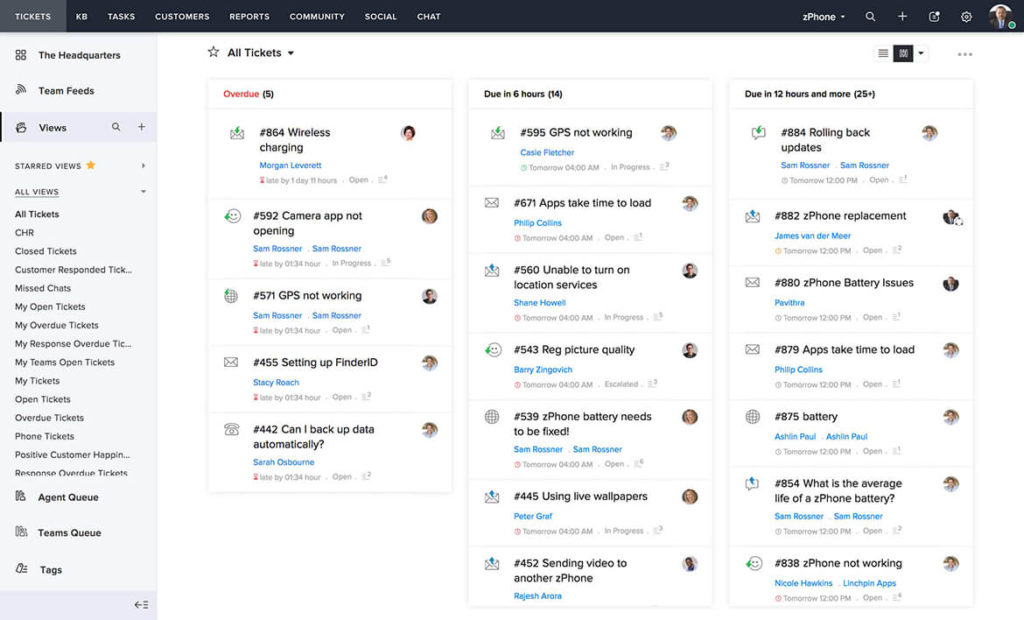
Für diejenigen, die eine Kundensupport-Lösung suchen, die sich in bestehende Systeme integriert und gleichzeitig den Datenschutz priorisiert, ist Zoho Desk eine Überlegung wert. Dieses Tool richtet sich an Unternehmen jeder Größe und bietet Funktionen wie Omnichannel-Support und Automatisierung, um Ihre Serviceprozesse zu verbessern. Mit einer benutzerfreundlichen Oberfläche und einem starken Fokus auf Sicherheit ermöglicht Zoho Desk Ihrem Team, außergewöhnlichen Support zu leisten und dauerhafte Kundenbeziehungen aufzubauen.
Warum ich Zoho Desk ausgewählt habe
Ich habe Zoho Desk als beste Kundensupport-Software für Unternehmen gewählt, da sie eine Mischung aus innovativen Funktionen bietet, die speziell auf die Anforderungen von Großunternehmen zugeschnitten sind. Der Omnichannel-Support ermöglicht es Ihrem Team, über 10 Kommunikationskanäle von einer einzigen Oberfläche aus zu verwalten, sodass nahtlose Kundeninteraktionen über E-Mail, Telefon, Social Media und Live-Chat gewährleistet sind. Die Integration von Zia AI, einem KI-Assistenten, verbessert den Support, indem Agenten beim Verfassen von Antworten unterstützt werden und ein 24/7-Kundenservice bereitgestellt wird. Darüber hinaus sorgen die Automatisierungsfunktionen für reibungslose Abläufe wie Ticketzuweisungen und Workflow-Automatisierung, sodass Ihr Team sich auf wichtigere Aufgaben konzentrieren kann.
Zoho Desk – Schlüsselfunktionen
Zusätzlich zu den unternehmensspezifischen Fähigkeiten bietet Zoho Desk Funktionen, die Ihr Kundensupport-Erlebnis verbessern.
- Self-Service-Optionen: Ermöglichen Sie Ihren Kunden, eigenständig Lösungen zu finden – dank einer umfassenden Wissensdatenbank und Community-Foren.
- Produktivitätstools für Agenten: Straffen Sie die Ticketverwaltung und Zusammenarbeit mithilfe von Funktionen, die den Arbeitsablauf Ihres Teams optimieren.
- Anpassungsmöglichkeiten: Passen Sie die Plattform an Ihre spezifischen Geschäftsbedürfnisse an – inklusive Mehrsprachigkeit und individuellen Modulen.
- Berichte und Dashboards: Greifen Sie auf mehr als 30 integrierte Berichte und Dashboards zu, um umsetzbare, datenbasierte Einblicke zu erhalten.
Zoho Desk Integrationen
Zu den Integrationen zählen Zoho CRM, Zoho BugTracker, Zoho Books, Zoho Projects, Zoho Analytics, Zoho SalesIQ, Zoho Campaigns, Zoho Meetings, Zoho Creator und Zoho People.
Pros and Cons
Pros:
- Effektive KI-Funktionen helfen beim Ticketmanagement
- Intuitive mobile Apps erhöhen Zugänglichkeit und Effizienz
- Multikanal-Kommunikation unterstützt vielfältige Kundeninteraktionen
Cons:
- Keine dedizierte Arbeitsbereich-App für Agenten vorhanden
- Manche Nutzer finden das Layout auf kleineren Bildschirmen verwirrend

Am besten geeignet für menschzentrierten Support
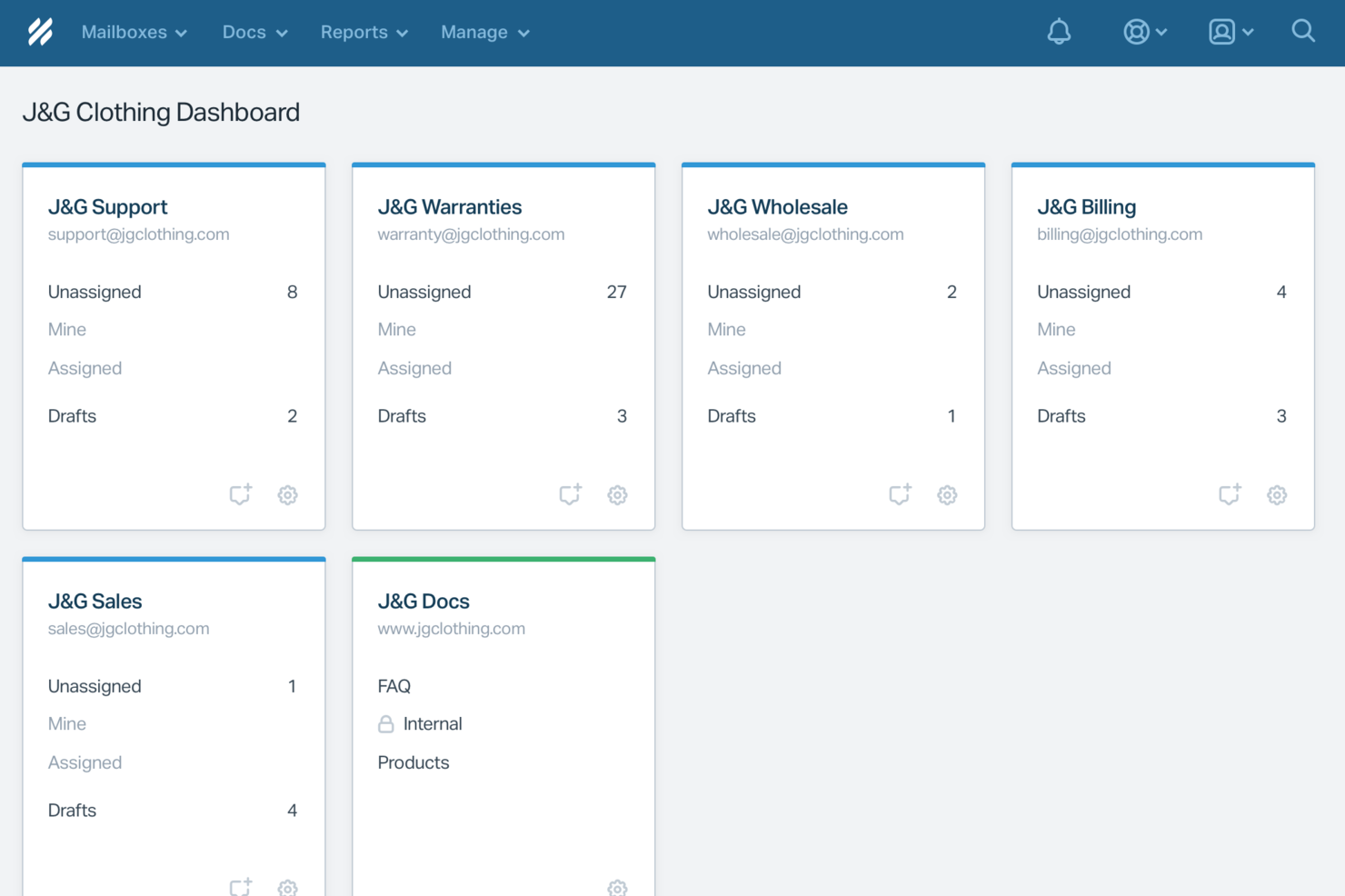
Help Scout ist eine Kundensupport-Softwarelösung, die für Unternehmen entwickelt wurde, die Wert auf persönliche Kundeninteraktionen legen. Sie ist besonders attraktiv für kleine und mittelständische Unternehmen, die beim Skalieren ihres Supports den persönlichen Kontakt bewahren möchten. Mit Funktionen zur Automatisierung routinemäßiger Aufgaben und zur Verbesserung der Teamzusammenarbeit adressiert Help Scout das Bedürfnis nach effizientem Kundenservice, ohne bei der Qualität der Kundeninteraktionen Kompromisse einzugehen.
Warum ich Help Scout gewählt habe
Ich habe Help Scout wegen seiner einzigartigen Fähigkeit ausgewählt, KI-gesteuerte Automatisierung mit menschzentriertem Support zu verbinden. Damit ist es ideal für Teams, die Kundenanfragen schnell bearbeiten und dennoch eine persönliche Note bewahren möchten. Die geteilte Posteingangsfunktion ermöglicht es Ihrem Team, nahtlos zusammenzuarbeiten, sodass keine Kundenanfrage unbeantwortet bleibt. Zusätzlich erlauben die proaktiven Messaging-Tools der Plattform, Kunden mit zeitnahen Updates und Feedback-Anfragen aktiv anzusprechen – ein entscheidender Beitrag zu effektiver Kommunikation im Kundensupport.
Wichtige Funktionen von Help Scout
Zusätzlich zu den herausragenden Eigenschaften habe ich mehrere weitere Funktionen gefunden, die seinen Nutzen für Kundensupport-Teams erhöhen:
- Help Center: Ermöglicht es Ihren Kunden, eigenständig Antworten zu finden und entlastet damit Ihr Support-Team.
- Individuelle Workflows: Erlaubt die Automatisierung wiederkehrender Aufgaben, sodass sich Ihr Team auf komplexere Anliegen konzentrieren kann.
- Leistungsanalysen: Bietet Einblicke in die Reaktionszeiten und Effizienz Ihres Teams und unterstützt Sie so bei fundierten Entscheidungen zur Serviceoptimierung.
- Multikanal-Support: Integriert verschiedene Kommunikationskanäle, sodass Sie Kundeninteraktionen über eine einzige Plattform verwalten können.
Help Scout Integrationen
Integrationen umfassen Salesforce, Shopify, WhatsApp, Slack, Stripe, Trello, Mailchimp, Google Apps, ActiveCampaign und Asana. Zusätzlich können individuelle Integrationen mithilfe der Help Scout API oder über die Anbindung weiterer Apps via Zapier erstellt werden.
Pros and Cons
Pros:
- KI-Antworten lösen häufige Anfragen ohne Zutun von Agenten
- Nahtlose Übergabe erhält den Gesprächskontext für Agenten
- Integrierte Wissensdatenbank ermöglicht präzise, automatisierte Antworten
Cons:
- Kein eigenständiger Chatbot außerhalb des Help Scout-Ökosystems
- Wirksamkeit der KI hängt stark von der Qualität der Wissensdatenbank ab
New Product Updates from Help Scout

Help Scout Adds Automatic Conversation Reassignment
Help Scout can now automatically unassign conversations when the assigned teammate has been away long enough, keeping replies moving so others can pick them up. For more information, visit Help Scout's official site.
 .
.
Missive
Am besten für vom gesamten Team erstellte Antworten geeignet
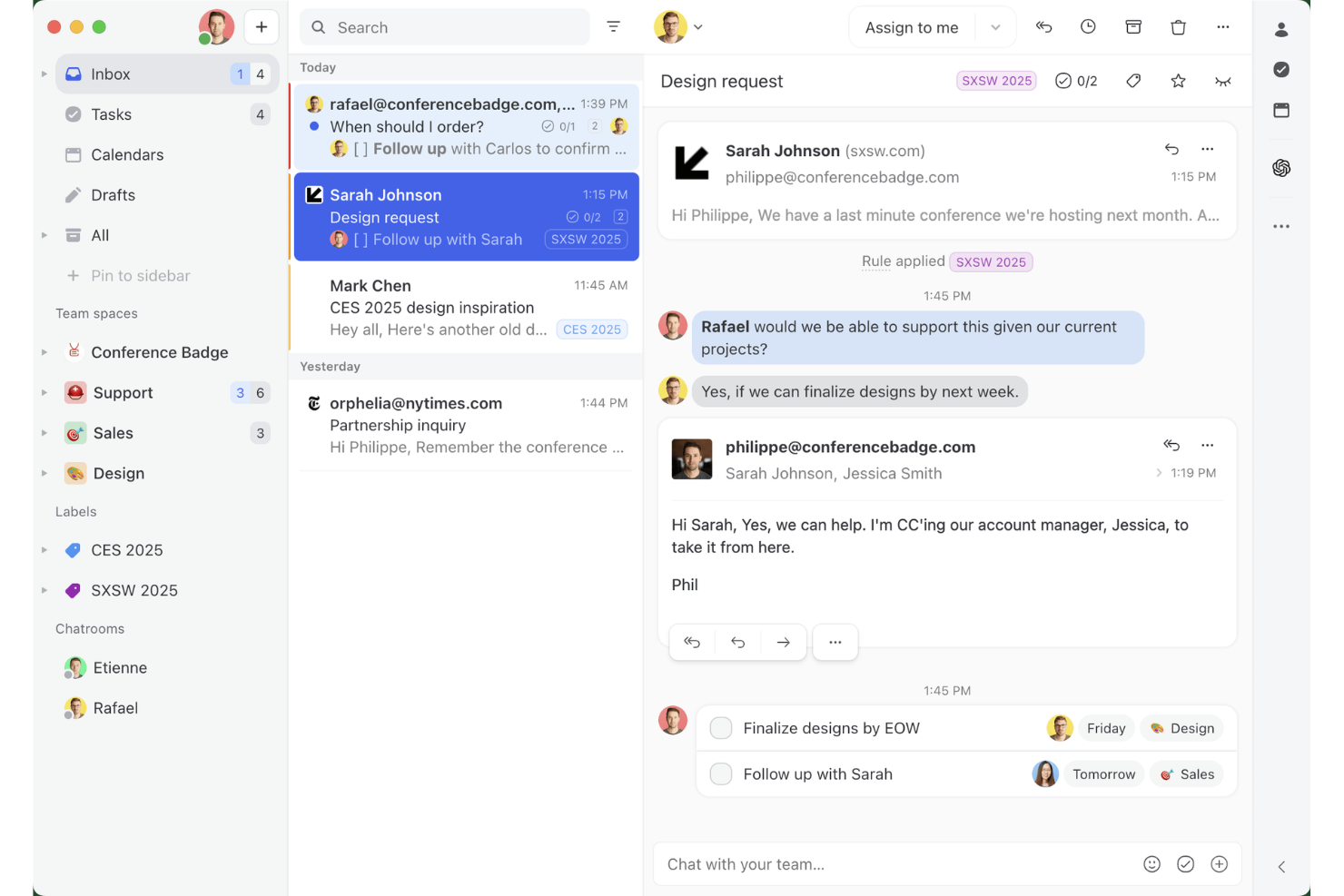
Missive ist ein gemeinsamer Posteingang und eine gemeinsame E-Mail-Plattform, die E-Mail, SMS, WhatsApp, Echtzeit-Chat und soziale Messaging-Kanäle in einem Arbeitsbereich vereint – mit integriertem Team-Chat, internen Threads und KI-gestützten Funktionen zum Erstellen von Entwürfen.
Für wen ist Missive am besten geeignet?
Missive eignet sich besonders für kleine und mittelgroße Support-Teams, die den Großteil ihrer Kundeninteraktionen per E-Mail abwickeln und möchten, dass jedes Teammitglied an der Erstellung der passenden Antwort beteiligt ist.
Warum ich Missive ausgewählt habe
Missive hat sich einen Platz auf meiner Auswahlliste verdient, weil die Plattform gemeinsam erstellte Antworten wirklich unterstützt: Mehrere Mitarbeitende können in Echtzeit gemeinsam an einer einzigen ausgehenden E-Mail arbeiten. Dabei sind interne Threads direkt an die Unterhaltung angehängt, sodass das gesamte Team vor dem Versand seine Meinung einbringen kann. Außerdem gefällt mir, dass Vorschläge für KI-Entwürfe den vollständigen Gesprächskontext berücksichtigen und ein Teammitglied den Entwurf weiter verfeinern kann, bevor er den Kunden erreicht. Eine solche kollaborative Arbeitsweise ist bei einem gemeinsamen Posteingang selten.
Die wichtigsten Funktionen von Missive
- Kanalübergreifender Posteingang: Fasst E-Mail, SMS, WhatsApp, Instagram-Direktnachrichten, Facebook Messenger und Echtzeit-Chat in einem gemeinsamen Arbeitsbereich zusammen.
- Regelbasierte Automatisierungs-Engine: Unterstützt bis zu 1.000 Regeln mit Auslösern, Bedingungen und Aktionen über alle verbundenen Kanäle hinweg.
- KI-gestützte Posteingangsregeln: Verwendet KI-Bedingungen, um Stimmung, Sprache und Absicht zu erkennen und so automatische Beschriftungen, Weiterleitungen und die Erstellung von Entwürfen zu ermöglichen.
- Vorformulierte Antworten mit variablen Feldern: Ermöglicht es Mitarbeitenden, vorformulierte Antwortvorlagen zu speichern und einzufügen, wobei kundenspezifische Details automatisch ausgefüllt werden.
- Missive MCP Server: Verbindet externe KI-Tools wie Claude oder ChatGPT, um Support-Unterhaltungen abzufragen, Kalender zu prüfen und Antworten zu entwerfen – wobei vor dem Versand weiterhin eine Überprüfung durch Mitarbeitende erforderlich ist.
Missive-Integrationen
Missive bietet mehr als 25 standardmäßige Integrationen, darunter HubSpot, Salesforce, Shopify, Aircall, Dialpad, Zoom, Twilio, WhatsApp Business, Facebook Messenger und Instagram Direct. Außerdem werden eine offene REST-API, Webhooks, benutzerdefinierte Kanalintegrationen, Zapier sowie der neue MCP Server in den Tarifen Productive und Business unterstützt (erfordert die Aktivierung durch einen Administrator).
Pros and Cons
Pros:
- Gemeinsames Bearbeiten ausgehender E-Mails in Echtzeit
- Kanalübergreifender Posteingang vereint E-Mail und Messaging
- KI-gestützte Entwürfe mit vollständigem Gesprächskontext
Cons:
- Keine kundenorientierte Wissensdatenbank enthalten
- Keine integrierten CSAT- oder NPS-Umfragen
New Product Updates from Missive
Missive Adds Conversation Pins
Missive now lets you pin key links, decisions, and notes inside a conversation, keeping them accessible in a dedicated Pins section in the Details sidebar. For more information, visit Missive's official site.
 .
.
Tidio
Am besten für mehrsprachigen KI-Kundensupport

Tidio richtet sich an Unternehmen, die ihren Kundenservice durch die Automatisierung repetitiver Aufgaben und die Verbesserung der Interaktionsqualität optimieren möchten. Mit Tools wie dem Lyro AI-Agenten werden Routineanfragen bearbeitet, sodass sich Ihr Team auf sinnvollere Gespräche konzentrieren kann. Die Live-Chat- und Helpdesk-Funktionen von Tidio sorgen für reibungslose Supportprozesse und helfen Ihnen, eine hohe Kundenzufriedenheit aufrechtzuerhalten.
Warum ich Tidio gewählt habe
Ich habe Tidio aufgrund seines herausragenden mehrsprachigen KI-Kundensupports ausgewählt – ein entscheidendes Merkmal für Unternehmen, die über verschiedene Sprachräume hinweg kommunizieren möchten. Tidio’s KI-Chatbot Lyro übersetzt und antwortet in mehreren Sprachen, sodass Ihr Team mit Kunden aus unterschiedlichen Regionen ohne Sprachbarrieren kommunizieren kann. Die Echtzeit-Übersetzungsfunktion zusammen mit anpassbaren Chat-Widgets ermöglicht eine reibungslose Kommunikation und richtet sich an eine globale Kundschaft. Diese Fähigkeiten steigern die Kundenzufriedenheit und die Effizienz Ihrer Supportprozesse, was Tidio zu einer zuverlässigen Wahl für Unternehmen macht, die umfassende mehrsprachige Supportlösungen suchen.
Zentrale Funktionen von Tidio
Neben seinen mehrsprachigen Fähigkeiten bietet Tidio eine Reihe von Funktionen, die Ihre Kundensupport-Erfahrung verbessern.
- Live-Chat: Treten Sie in Echtzeit mit Ihren Kunden über anpassbare Chat-Widgets in Kontakt, die Sie an die Ästhetik und Präferenzen Ihrer Marke anpassen können.
- Ticket-System: Verwalten Sie Kundenanfragen effizient, indem Sie E-Mails und Nachrichten in Tickets umwandeln und so sicherstellen, dass keine Anfrage unbeantwortet bleibt.
- Automatisierte Workflows: Richten Sie automatisierte Antworten und Aktionen für häufig gestellte Fragen und Routineaufgaben ein und verschaffen Sie Ihrem Team so Zeit für komplexere Anliegen.
- Integration mit E-Commerce-Plattformen: Verbinden Sie sich nahtlos mit Plattformen wie Shopify, um Bestellungen direkt über das Chat-Interface zu verwalten und so einen optimierten Supportprozess für Ihren Online-Shop zu ermöglichen.
Tidio-Integrationen
Zu den Integrationen gehören Shopify, WordPress, HubSpot, Squarespace, Jimdo, Webydo, Drupal, Shift4Shop, Site123 und Salesforce.
Pros and Cons
Pros:
- KI-Chatbot unterstützt 12 Sprachen
- Unterstützt E-Mail, Chat, Messenger, Instagram und WhatsApp
- Automatisierte Workflows reduzieren repetitive Aufgaben für Support-Teams
Cons:
- Probleme mit der Stabilität der mobilen App erschweren den Support unterwegs
- Keine detaillierte Flow-Analytics für Chatbots

Am besten geeignet wegen der benutzerfreundlichen und anpassbaren Oberfläche
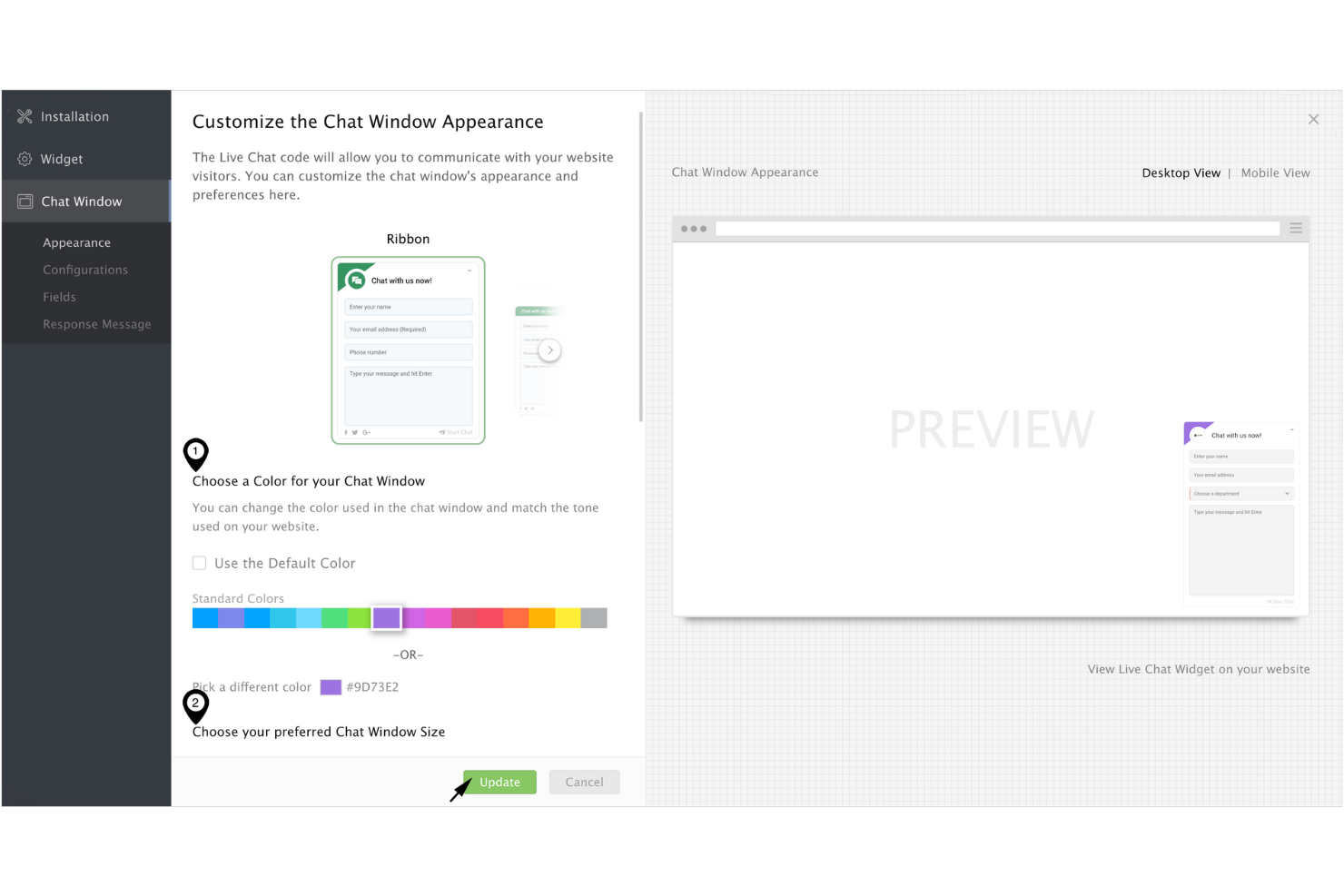
Wenn Sie Ihren Kundenservice auf das nächste Level heben möchten, bietet Zoho SalesIQ eine maßgeschneiderte Lösung, die sich perfekt an Ihre Bedürfnisse anpasst. Diese Plattform wurde für Unternehmen entwickelt, die ihre Kundeninteraktionen verbessern wollen, und stellt Werkzeuge wie Live-Chat und Besucher-Tracking bereit, um proaktives Engagement zu fördern. Durch die Priorisierung des Datenschutzes und die Gewährleistung der Datensicherheit ermöglicht Zoho SalesIQ Ihrem Team, mit Kunden in Kontakt zu treten, ohne deren Vertrauen zu gefährden.
Warum ich Zoho SalesIQ ausgewählt habe
Ich habe mich für Zoho SalesIQ entschieden, weil es eine benutzerfreundliche und anpassbare Oberfläche bietet und damit eine überzeugende Wahl für Kundensupport-Software darstellt. Die Plattform ermöglicht es Ihnen, Funktionen wie Live-Chat und Chatbot-Fähigkeiten individuell auf Ihre geschäftlichen Anforderungen abzustimmen, sodass sowohl Ihr Team als auch Ihre Kunden von einer intuitiven Benutzererfahrung profitieren. Die Integration in verschiedene Systeme, wie etwa Zoho CRM, personalisiert Kundeninteraktionen zusätzlich, indem sie bereicherte Einblicke und nahtlose Kommunikation ermöglicht. Außerdem stärkt Zoho SalesIQ durch die Nutzung eigener Tracking-Tools zum Schutz von Kundendaten das Vertrauen und die Zuverlässigkeit in Ihren Support-Prozessen.
Wichtige Funktionen von Zoho SalesIQ
Neben der anpassbaren Benutzeroberfläche bietet Zoho SalesIQ eine Reihe von Funktionen, die Ihre Möglichkeiten im Kundenservice erweitern.
- Echtzeit-Besucher-Tracking: Mit dieser Funktion können Sie die Aktivitäten der Besucher auf Ihrer Website überwachen und analysieren, um Erkenntnisse zu gewinnen, die Ihre Support-Interaktionen gezielt verbessern.
- Automatische Lead-Bewertung: Zoho SalesIQ bewertet Leads automatisch anhand ihres Verhaltens und ihrer Interaktionen, sodass Ihr Team Follow-ups effizienter priorisieren kann.
- Codeloser Chatbot-Builder: Mit diesem Tool können Sie Chatbots ohne Programmierkenntnisse erstellen, um rund um die Uhr Unterstützung zu bieten und häufige Anfragen problemlos zu bearbeiten.
- Multi-Channel-Integration: Sie können über verschiedene Plattformen wie WhatsApp und Instagram mit Kunden kommunizieren und so einen reibungslosen Austausch über alle Kanäle hinweg gewährleisten.
Zoho SalesIQ Integrationen
Integrationen umfassen WordPress, GoDaddy, Zoho CRM, Zoho Desk, OpenAI, Zendesk, Mailchimp und Salesforce.
Pros and Cons
Pros:
- Effektives Besucher-Tracking steigert die Kundeninteraktion
- Anpassbare Chat-Widgets ermöglichen individuelle Nutzererlebnisse
- Kostenlose In-App-Anrufe für schnellen Kundensupport
Cons:
- Einige Nutzer empfinden die Chatbot-Funktionalität als eingeschränkt
- Benachrichtigungen in der mobilen App können unzuverlässig sein

Ideal zur Gestaltung personalisierter Erlebnisse mit KI
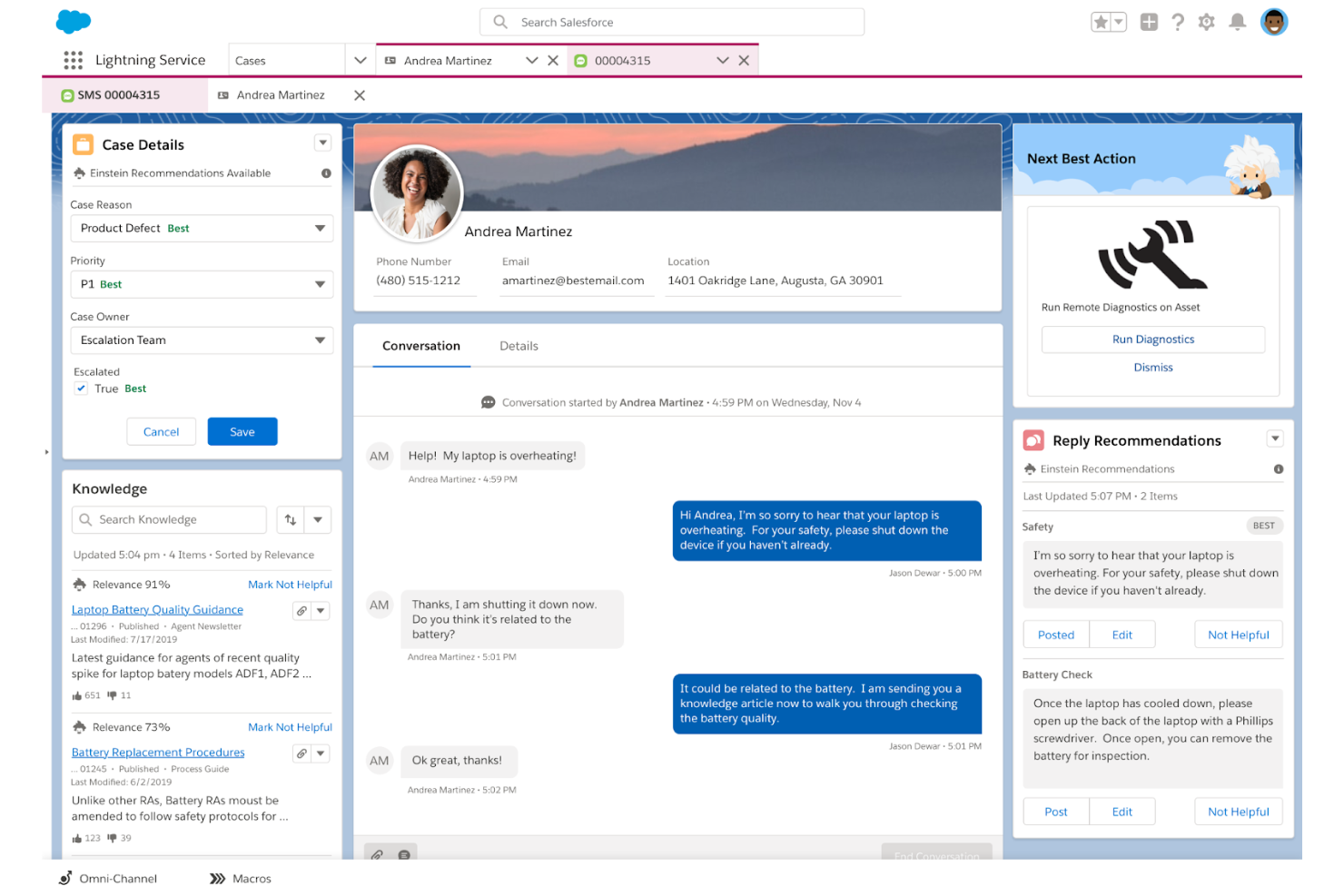
Salesforce Service Cloud richtet sich an Unternehmen, die ihre Kundeninteraktionen verbessern und Supportaufgaben optimieren möchten. Durch Werkzeuge zur Fallbearbeitung und die Ansprache über verschiedene Kanäle spricht es Branchen an, die Wert auf personalisierte Kundenerlebnisse legen. KI-gestützte Einblicke helfen Ihrem Team, Reaktionszeiten zu verkürzen und Serviceeffizienz zu steigern – und damit typische Herausforderungen im Kundenservice zu bewältigen.
Warum ich Salesforce Service Cloud gewählt habe
Ich habe mich für Salesforce Service Cloud entschieden, weil es mithilfe von KI personalisierte Erlebnisse schafft – ein entscheidender Vorteil für Unternehmen, die ihren Kundensupport verbessern wollen. Mit intelligenten Analysen und Vorschlägen liefert Ihr Team individuelle Interaktionen, die auf die spezifischen Bedürfnisse der Kunden eingehen. Funktionen wie Einstein Bots automatisieren Routinegespräche und entlasten Ihr Team für komplexe Anliegen, während prädiktive Analysen wertvolle Einblicke in das Kundenverhalten ermöglichen. Diese Tools personalisieren nicht nur die Customer Journey, sondern erhöhen auch die Effizienz – und machen Salesforce Service Cloud zur idealen Wahl für Unternehmen, die ihren Kundenservice auf das nächste Level heben wollen.
Wichtige Funktionen von Salesforce Service Cloud
Neben der Schaffung personalisierter Erlebnisse mit KI bietet Salesforce Service Cloud mehrere Schlüsselfunktionen, die den Kundenservice verbessern:
- Omni-Channel-Routing: Diese Funktion leitet Kundenanfragen an die geeignetsten Mitarbeiter über verschiedene Kanäle weiter, was effiziente Bearbeitung und schnelle Antworten ermöglicht.
- Service-Konsole: Bietet eine zentrale Benutzeroberfläche, über die Mitarbeitende Kundeninteraktionen nahtlos verwalten und alle nötigen Informationen an einem Ort abrufen können.
- Wissensdatenbank: Dient als zentrales Verzeichnis für Artikel und häufig gestellte Fragen, sodass Kunden eigenständig Antworten finden und sich die Anzahl an Supporttickets verringert.
- Social-Media-Integration: Ermöglicht Ihrem Team, auch über soziale Kanäle mit Kunden zu interagieren und die Reichweite des Supports zu erhöhen.
Salesforce Service Cloud Integrationen
Zu den Integrationen gehören Service Cloud Voice, Data Cloud, Slack, Jira, LinkedIn, QuickBooks, MailChimp, Dropbox, Google Workspace und DocuSign.
Pros and Cons
Pros:
- Benutzerfreundliche Oberfläche mit anpassbaren Dashboards
- Bietet einen umfassenden Überblick über Kundenanliegen und Fallmanagement
- Große Community und zahlreiche Anleitungen für den Support
Cons:
- Herausforderungen bei der Anpassung durch restriktive Omni-Funktionen
- Kein einfaches Round-Robin-Fallrouting, komplexe Programmierung notwendig
New Product Updates from Agentforce Service (formerly Service Cloud)
Agentforce Service Keeps Full Agentforce Voice Transcripts After Calls
Agentforce Service now shows the full conversation history in post-call transcripts for Agentforce Voice calls within the Service Console, giving agents better context for follow-ups. For more information, visit Salesforce’s official site.
 .
.
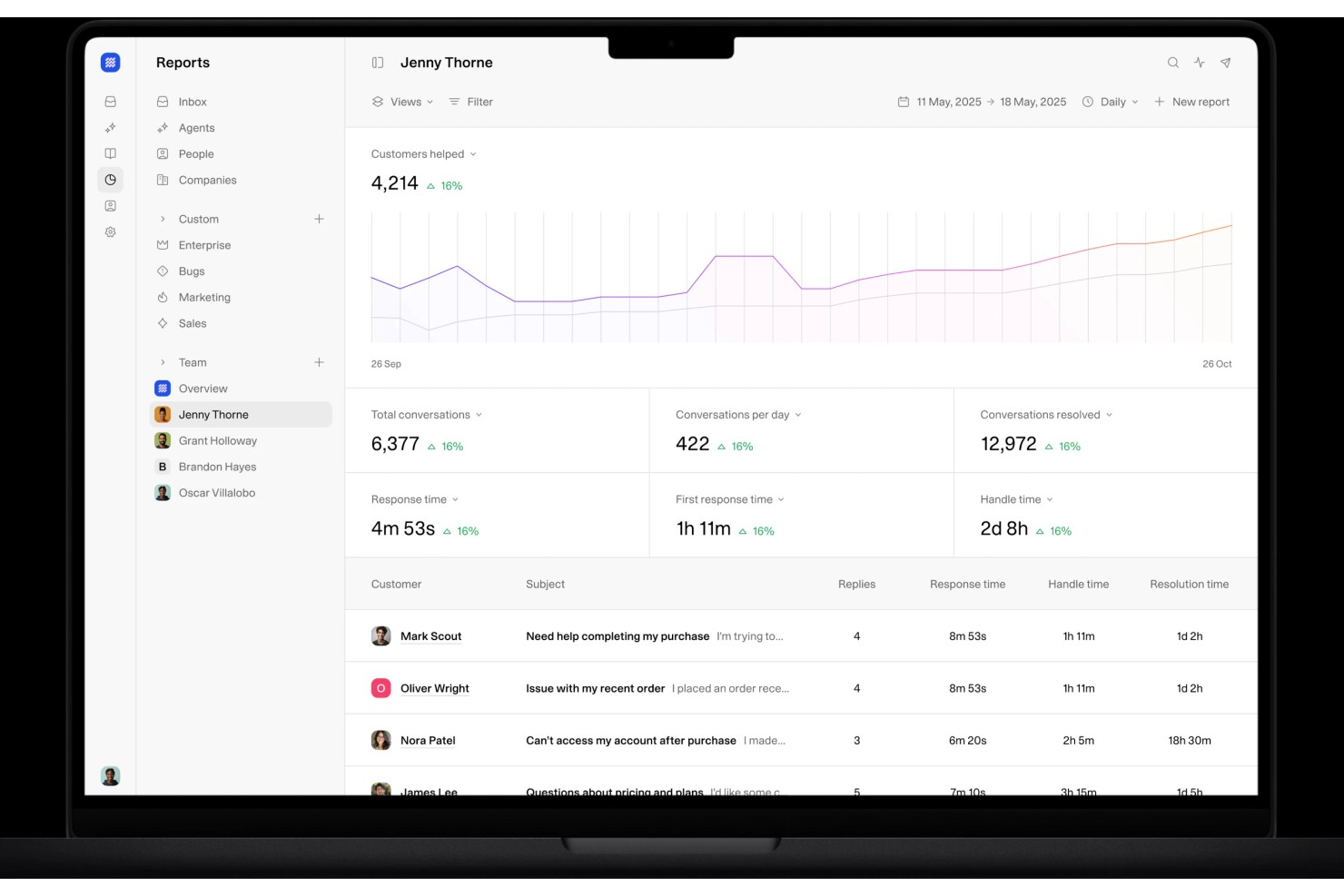
Weav ist eine KI-gestützte Kundenservice-Plattform, die KI-Agents, ein gemeinsames Postfach, Chatbots und Wissensschulungstools kombiniert, um Kundenanfragen mit minimalem menschlichem Eingreifen zu bearbeiten und zu lösen.
Für wen ist Weav am besten geeignet?
Weav eignet sich besonders für kleine bis mittelgroße E-Commerce- und SaaS-Teams, die eine große Anzahl von Support-Tickets automatisieren möchten, ohne ihr Support-Team personell aufzustocken.
Warum habe ich Weav ausgewählt?
Ich habe Weav als eine der besten Lösungen ausgewählt, weil es Berichterstattung und kontinuierliches Lernvermögen aus Gesprächen nutzt, um Muster in den Kundeninteraktionen aufzudecken. Das Reporting-Modul von Weav verfolgt die Ergebnisse aller gelösten Tickets, und die KI analysiert diese Interaktionen kontinuierlich, um ihre Antworten zu verbessern. Das bedeutet, Ihr Team erhält ständig ein aktuelles Bild davon, was Kunden fragen, wo Lösungen erfolgreich sind und wo es Lücken gibt – direkt aus echten Gesprächsdaten.
Wichtige Funktionen von Weav
- KI-Agents: Setzen Sie KI-Agents ein, die mit Ihrem Produktwissen trainiert wurden, um eingehende Kundenanfragen automatisch und ohne menschliches Zutun zu lösen.
- Vereintes Postfach: Verwalten Sie alle Kundenkonversationen in einem gemeinsamen Postfach, in dem KI- und menschliche Agents zusammen im selben Thread arbeiten.
- Wissensschulung: Trainieren Sie die Weav-KI mit nur einem Klick, indem Sie sie auf Ihre Website, Hilfedokumente oder hochgeladene Dateien verweisen.
- Weiterleitungsregeln: Legen Sie Bedingungen fest, die ungelöste Anfragen automatisch vom KI-Agent an den passenden menschlichen Agent weiterleiten.
Weav-Integrationen
Weav bietet eine kleinere Auswahl an nativen Integrationen, darunter Shopify, Google Drive und Stripe. Es unterstützt zudem benutzerdefinierte Aktionen, und seine REST-API sowie Echtzeit-Webhooks stehen ab dem Pro-Tarif für den Aufbau individueller Integrationen zur Verfügung.
Pros and Cons
Pros:
- Quellenprüfung wird mit Antworten angezeigt
- Website-Synchronisation trainiert Agents automatisch
- Kontrolle über Tonfall und Antworten pro Agent
Cons:
- Wenige native Drittanbieter-Integrationen
- Kostenloser Plan begrenzt KI auf 20 Nachrichten

Custify
Am besten für SaaS-Unternehmen
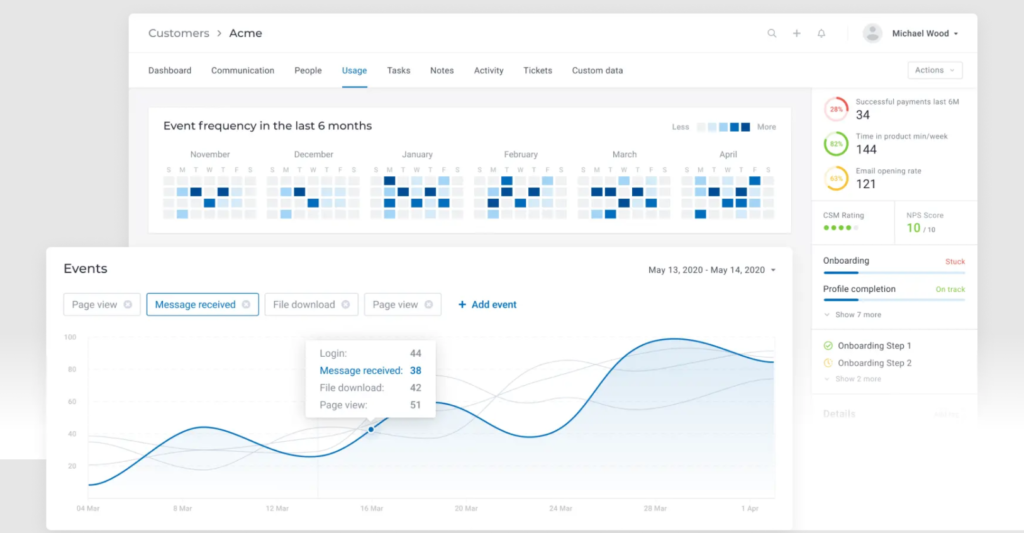
Für diejenigen, die eine auf die speziellen Anforderungen von SaaS-Unternehmen zugeschnittene Kundensupport-Lösung suchen, ist Custify ein unschätzbarer Partner bei der Optimierung von Kundenbindung und -engagement. Custify wurde entwickelt, um Kundendaten zu zentralisieren und Arbeitsabläufe zu vereinfachen, und bietet umsetzbare Einblicke, die Ihr Team befähigen, sich auf wertschöpfende Interaktionen zu konzentrieren, anstatt sich in manuellen Prozessen zu verlieren. Egal, ob Sie die Produktnutzung steigern oder Upselling-Möglichkeiten identifizieren möchten – die datengesteuerte Plattform von Custify verwandelt Customer Success in einen strategischen Vorteil und hilft Ihnen dabei, zufriedene Kunden zu lebenslangen Fürsprechern zu machen.
Warum ich Custify gewählt habe
Ich habe mich für Custify entschieden, weil es gezielt auf die spezifischen Anforderungen von SaaS-Unternehmen eingeht, insbesondere im Bereich Kundensupport. Die Customer 360-Funktion von Custify bietet einen umfassenden Überblick über Kundendaten und ermöglicht es Ihnen, die Produktnutzung und Kundenlebenszyklen zu überwachen. Durch die Automatisierungsfunktionen werden tägliche Abläufe vereinfacht, Ihr Team von manuellen Aufgaben entlastet und sie können sich auf wertvolle Kundeninteraktionen konzentrieren. Durch das Erkennen von Upselling-Möglichkeiten und das proaktive Bereitstellen von Unterstützung via Aufgaben und Benachrichtigungen ermöglicht Custify Ihrem Team, die Kundenbindung zu stärken und die Abwanderung zu reduzieren – ein strategischer Vorteil für jedes SaaS-Unternehmen.
Custify Hauptfunktionen
Neben dem starken Fokus auf SaaS-Unternehmen bietet Custify eine Reihe von Funktionen, die die Möglichkeiten im Kundensupport erweitern:
- Kunden-Health-Scoring: Überwacht den Kundenstatus in Echtzeit anhand verschiedener Kennzahlen, sodass Ihr Team potenzielle Probleme frühzeitig erkennen und verhindern kann, dass Kunden abwandern.
- Kundenreise-Mapping: Visualisiert Kundeninteraktionen, damit Sie wichtige Kontaktpunkte identifizieren und Ihre Engagement-Strategien optimieren können.
- Reporting und Analysen: Liefert umfassende Einblicke in Customer-Success-Kennzahlen und unterstützt Ihr Team dabei, fundierte, datenbasierte Entscheidungen zu treffen.
- Kundensegmentierung: Ermöglicht es, Kommunikation und Support je nach spezifischen Kundengruppen gezielt anzupassen und so die Effektivität Ihrer Ansprache zu erhöhen.
Custify Integrationen
Zu den Integrationen gehören Salesforce, Intercom, HubSpot, Freshdesk, Stripe, Help Scout, Recurly, Zendesk Support, Microsoft Teams und Slack.
Pros and Cons
Pros:
- Zentralisiert Daten zur Verbesserung von Kundenkenntnis und Kommunikation
- Verbessert die Kundenbindung und optimiert betriebliche Abläufe erheblich
- Bietet klare Einblicke für Upselling-Möglichkeiten und steigert so den Umsatz
Cons:
- Manche Nutzer berichten gelegentlich von Problemen bei der Datensynchronisierung
- Begrenzte Unterstützung für Geschäftsmodelle außerhalb von SaaS
Weitere Kundenservice-Tools, die einen Blick wert sind
Hier sind weitere empfehlenswerte Optionen für das Management von Kundenservice, die es nicht auf meine Shortlist geschafft haben, aber dennoch eine nähere Betrachtung wert sind:
- Groove
Am besten für Integrationen geeignet
- Front
Am besten für abteilungsübergreifende Workflow-Automatisierung
- HappyFox
Am besten für Echtzeit-Kundenbindung
- UseResponse
Am besten für zentrale Kommunikation
- Kustomer
Am besten für die Sicherheit von Kundendaten geeignet
- Issuetrak
Am besten geeignet für Mehrkanal-Ticketerfassung
- Guru
Am besten für KI-gestützte Vorschläge für Wissensdatenbanken
- Front
Am besten geeignet für Team-E-Mail-Management
- SAAS First
Am besten geeignet für Omnichannel-Support
- Hiver
Am besten geeignet für KI-gesteuerte Kundeninteraktionen
- LiveAgent
Am besten für Ticket-Management
- Zendesk
Am besten geeignet für KI-gestützte Ticket-Automatisierung
- Zoho Assist
Am besten geeignet für Remote-Support-Zugriffe
- OneDesk
Am besten geeignet für integrierte Helpdesk-Lösungen
- SparrowDesk
Am besten geeignet für Omnichannel-Posteingang


Wie ich Kundensupport-Software bewerte
Ich unterteile meine Bewertung in grundlegende Kriterien – wie Omnichannel-Ticketing und Workflow-Automatisierung – sowie in Unterscheidungsmerkmale, die zeigen, wie gut ein Tool zu Ihrem tatsächlichen Supportmodell passt.
Kernfunktionen (Mindestanforderungen für diese Liste)
Wenn ich Tools für meine Liste auswähle, bewerte ich jedes davon auf einer Skala von 0 (bietet diese Funktion nicht) bis 5 (übertrifft in diesem Bereich) hinsichtlich jeder unten aufgeführten Kernfunktion. Anschließend berechne ich die Gesamtpunktzahl des Tools als Prozentsatz. Jedes Tool muss eine Mindest-Gesamtpunktzahl von 75 % erreichen, um für die Aufnahme in Betracht zu kommen.
- Ticket-Management: Ich bewerte, wie jedes Tool den gesamten Ticket-Lebenszyklus abdeckt – Erstellung, Zuordnung, Priorisierung, Zusammenführung und Lösung – in realen Support-Queues mit unterschiedlicher Komplexität.
- Omnichannel-Support: Jede Plattform sollte E-Mail, Chat, Telefon, Social Media und Messaging-Kanäle zusammenführen, sodass Agenten nicht zwischen getrennten Dashboards wechseln müssen, um einem Kunden zu helfen.
- Wissensdatenbank & Self-Service: Ich achte auf kundenorientierte Help Center mit Artikel-Kategorisierung, Suchfunktion und Feedback-Schleifen, die tatsächlich das Ticketaufkommen reduzieren.
- Automatisierung & Workflows: Routing-Regeln, SLA-Auslöser und Eskalationspfade sind hier wichtig – ich prüfe, ob Teams Workflows wie die automatische Zuordnung von Abrechnungstickets zu einer spezialisierten Queue einrichten können.
- Berichte & Analysen: Dashboards sollten Support-KPIs wie Erstreaktionszeit, Lösungszeit, CSAT-Scores und Agentenauslastung anzeigen, ohne dass manuelle Exporte oder Umgehungslösungen erforderlich sind.
- Zusammenarbeit & Agenten-Tools: Ich betrachte, wie Agenten bei komplexen Anliegen zusammenarbeiten – Funktionen wie interne Notizen, Kollisionswarnungen und Seitengespräche zwischen Support- und Produktteams.
Wenn ich eine Liste von Tools habe, die diese Kriterien erfüllen, schaue ich, was jede Plattform besonders macht.
Unterscheidende Faktoren (Was Anbieter unterscheidet)
So vergleiche und differenziere ich Anbieter:
Herausragende Funktionen
KI-gestützte Unterstützung ist ein großes Unterscheidungsmerkmal – ich prüfe, ob ein Tool Antworten vorschlagen, lange Tickets zusammenfassen oder relevante Wissensdatenbank-Artikel für die Agenten im Gespräch empfehlen kann. Ein Kundenkontext-Panel ist dabei genauso wichtig, da Agenten bei Rücksendungen oder Abrechnungsproblemen Bestellhistorie und vergangene Interaktionen auf einen Blick sehen müssen, ohne das Tab zu wechseln. Ebenso bewerte ich No-Code-Chatbot-Builder, mit denen Teams häufige Fragen wie Passwortzurücksetzungen oder Versand-Anfragen abfangen können, bevor sie einen Agenten erreichen.
Mehr als nur Funktionen
Integrations-Tiefe ist eines der ersten Dinge, die ich prüfe – Ihr Support-Tool muss mit Ihrem CRM, Ihrer E-Commerce-Plattform und mit internen Kommunikationstools wie Slack oder Microsoft Teams verbunden werden können. Sicherheit und Compliance sind besonders wichtig, vor allem für Teams, die sensible Daten verarbeiten, wo SOC 2-, DSGVO- oder HIPAA-Konformität entscheidend für die Auswahl eines Anbieters sein kann. Außerdem bewerte ich, wie gut jede Plattform zu konkreten Team-Strukturen passt – sei es ein B2B-SaaS-Team, das Eskalationen managt, oder ein E-Commerce-Unternehmen mit hohem Ticket-Aufkommen täglich.
Was ist Kundenservice-Software?
Kundenservice-Software ist eine Plattform, die Unternehmen dabei unterstützt, Anfragen von Kunden über mehrere Kanäle hinweg zu verfolgen, zu verwalten und zu lösen. Sie verbessert die Effizienz und Konsistenz in den Antworten und wird eingesetzt, um das Ticket-Management zu vereinfachen, Self-Service zu ermöglichen und die gesamte Kundenerfahrung zu optimieren.
Wie wähle ich die passende Kundenservice-Software?
Angesichts langer Funktionslisten und komplexer Preisstrukturen fällt es leicht, den Überblick zu verlieren. Damit Sie den Auswahlprozess fokussiert angehen können, finden Sie hier eine Checkliste wichtiger Aspekte, die Sie berücksichtigen sollten:
| Faktor | Worauf Sie achten sollten |
|---|---|
| Skalierbarkeit | Stellen Sie sicher, dass die Software mit Ihrem Unternehmen mitwachsen kann. Achten Sie darauf, dass sie steigende Ticketvolumina und mehr Nutzer ohne Leistungsabfall bewältigt. |
| Integrationen | Prüfen Sie die Kompatibilität mit bestehenden Tools wie CRM-Systemen, E-Mail-Plattformen und sozialen Netzwerken. Reibungslose Integrationen steigern Effizienz und erleichtern Datenflüsse. |
| Anpassbarkeit | Wählen Sie eine Software, mit der Sie Workflows, Dashboards und Auswertungen gezielt auf die Bedürfnisse Ihres Teams zuschneiden können. |
| Benutzerfreundlichkeit | Setzen Sie auf eine intuitive Oberfläche, die wenig Schulungsaufwand erfordert. Ihr Team sollte das System schnell bedienen und Aufgaben effizient erledigen können. |
| Budget | Betrachten Sie die Gesamtkosten, inklusive Einrichtung und laufender Gebühren. Stellen Sie sicher, dass alle nötigen Funktionen im finanziellen Rahmen enthalten sind. |
| Sicherheitsmaßnahmen | Achten Sie auf starke Sicherheitsstandards wie Datenverschlüsselung und die Einhaltung von Richtlinien wie der DSGVO. So schützen Sie Kundendaten und bewahren das Vertrauen Ihrer Kunden. |
Zukünftige Trends bei Kundenservice-Software
Im Laufe meiner Recherche habe ich zahllose Produktupdates, Pressemitteilungen und Release-Notes verschiedener Anbieter ausgewertet. Hier sind einige der aktuellen Entwicklungen, die ich besonders aufmerksam verfolge:
- KI und Automatisierung im Kundenservice: Unternehmen nutzen KI, um Kundeninteraktionen zu analysieren und Trends vorherzusagen. Das hilft Teams, Kundenbedürfnisse besser zu verstehen und datenbasierte Entscheidungen zu treffen. Anbieter wie Zendesk setzen KI ein, um umsetzbare Erkenntnisse aus Supportdaten zu liefern.
- Omnichannel-Support: Immer mehr Unternehmen möchten mit Kunden über verschiedene Kanäle hinweg einheitlich kommunizieren. Dieser Trend ermöglicht reibungslose Übergänge zwischen Plattformen und sorgt für konsistente Kundenerlebnisse. Freshdesk bietet eine starke Omnichannel-Erfahrung.
- Self-Service-Optionen: Kunden bevorzugen es zunehmend, Probleme selbstständig zu lösen. Tools bieten inzwischen umfangreiche Wissensdatenbanken und Community-Foren, um diese Nachfrage zu bedienen. Zoho Desk verbessert den Self-Service durch detaillierte Wissensartikel.
- Personalisierung von Kundenerlebnissen: Individuell auf Kundenpräferenzen zugeschnittene Unterstützung wird immer wichtiger. Personalisierung kann die Kundenzufriedenheit und -treue steigern. Tools wie Salesforce Service Cloud nutzen Daten, um Kundenerfahrungen zu personalisieren.
- Remote-Support-Tools: Da immer mehr Teams remote arbeiten, gewinnen Tools für Fernwartung und Support an Bedeutung. Funktionen wie Bildschirmfreigabe und Fernzugriff werden essenziell. Zoho Assist konzentriert sich auf Lösungen für den Fernsupport.
Funktionen von Kundenservice-Software
Achten Sie bei der Auswahl von Kundenservice-Software auf die folgenden Schlüsselfunktionen:
- Ticketverwaltung: Bearbeiten Sie Kundenanfragen, indem Sie Support-Tickets erstellen, organisieren und verfolgen. Sie behalten jede Anfrage strukturiert im Blick und stellen sicher, dass nichts verloren geht.
- Multichannel-Support: Bieten Sie Hilfe über Kanäle wie E-Mail, Chat, soziale Medien und Telefon an. Treffen Sie Kunden dort, wo sie sich aufhalten, und bündeln Sie Unterhaltungen in einem praktischen Hub.
- Wissensdatenbank-Verwaltung: Erstellen und verwalten Sie eine Bibliothek mit Hilfeartikeln und FAQs. Das ermöglicht es Kunden, eigenständig Probleme zu lösen, und reduziert wiederkehrende Tickets für Ihr Team.
- Automatisierungstools: Nutzen Sie Regeln und Auslöser, um Tickets automatisch zuzuweisen, Antworten zu versenden oder dringende Fälle weiterzuleiten. Das spart Zeit bei wiederkehrenden Aufgaben und sorgt dafür, dass der Support auch bei viel Betrieb reibungslos läuft.
- Berichtswesen und Analyse: Verfolgen Sie wichtige Kennzahlen wie Antwortzeiten, Ticketvolumen und Kundenzufriedenheit. Diese Erkenntnisse helfen, Trends zu erkennen und Prozesse auf Basis realer Daten zu verbessern.
- Zusammenarbeitsfunktionen: Arbeiten Sie im Team an komplexen Tickets mithilfe interner Notizen, Tagging oder gemeinsamer Postfächer. So bleibt jeder informiert, und Kunden erhalten keine widersprüchlichen Antworten.
- Integrationsfähigkeit: Verbinden Sie die Software mit Ihrem CRM, Ihrer E-Commerce-Plattform oder anderen bestehenden Tools. So greifen Sie schnell auf relevante Kundendaten zu und arbeiten effizienter.
- Self-Service-Portale: Stellen Sie Kunden einen Bereich zur Verfügung, in dem sie ihre Tickets einsehen, Status abrufen oder Hilferessourcen finden können. Das entlastet Ihr Team und gestaltet den Support-Prozess benutzerfreundlicher.
- SLA-Management: Legen Sie Service Level Agreements fest, überwachen und setzen Sie diese durch. So halten Sie Versprechen zu Reaktions- oder Lösungszeiten ein, ohne auf Erinnerungen oder Notizzettel angewiesen zu sein.
- Anpassungsoptionen: Passen Sie Formulare, Workflows und Dashboards an die Anforderungen Ihres Unternehmens an. So müssen Sie sich nicht mit einem Einheitssystem zufriedengeben, sondern machen es zu Ihrer individuellen Lösung.
Häufige KI-Funktionen von Kundenservice-Software
Zusätzlich zu den oben genannten Standardfunktionen integrieren viele dieser Lösungen KI-Funktionen wie:
- KI-basierte Chatbots: Beantworten Sie sofort häufig gestellte Kundenfragen und übernehmen Sie Routinetätigkeiten, sodass Ihr Team sich um komplexere Anliegen kümmern kann. Dank natürlicher Sprachverarbeitung verstehen und reagieren diese Bots ähnlich wie ein Mensch.
- Automatisierte Ticketklassifizierung: Neue Tickets werden sofort nach Thema, Dringlichkeit oder Stimmung sortiert. Die KI analysiert den Nachrichtenkontext und leitet jede Anfrage an den passenden Mitarbeiter oder das richtige Team weiter—ganz ohne manuelle Sortierung.
- Predictive Analytics: Erkennen Sie Support-Trends und Kundenbedürfnisse, bevor Probleme eskalieren. Die KI analysiert Supportmuster, sodass Sie Ressourcen proaktiv planen und Probleme frühzeitig erkennen können.
- Stimmungsanalyse: Ermitteln Sie automatisch die Stimmung hinter Kundenmeldungen. So können Sie Unterhaltungen von frustrierten Nutzern priorisieren und Probleme angehen, bevor sie sich verschärfen.
- KI-gestützte Wissenbasis-Empfehlungen: Empfehlen Sie Kunden oder Mitarbeitenden in Echtzeit passende Artikel, basierend auf dem Ticketinhalt. Das verkürzt die Lösungszeit und sorgt für zufriedenere Nutzer.
- Automatisierte Antwortgenerierung: Erstellen Sie auf Basis von Machine Learning Antwortvorschläge für Supportmitarbeitende. So können Sie Nachrichten schneller prüfen, anpassen und versenden, während Sie einen konsistenten Ton und eine hohe Qualität gewährleisten.
Vorteile von Kundensupport-Software
Die Einführung einer Kundensupport-Software bringt zahlreiche Vorteile für Ihr Team und Ihr Unternehmen mit sich. Hier sind einige, auf die Sie sich freuen können:
- Schnellere Reaktionszeiten: Echtzeit-Kommunikationsfunktionen wie Live-Chat helfen Ihrem Team, Kundenanfragen zügig zu bearbeiten.
- Höhere Kundenzufriedenheit: Self-Service-Portale und KI-basierte Erkenntnisse ermöglichen es den Nutzern, leicht Antworten zu finden und personalisierten Support zu erhalten.
- Effizienterer Ressourceneinsatz: Automatisierungen im Kundensupport übernehmen repetitive Aufgaben, sodass sich Ihr Team auf komplexere Kundenanliegen konzentrieren kann.
- Konsistente Kundenerfahrung: Omnichannel-Support-Tools stellen sicher, dass Kunden auf allen Plattformen dasselbe Serviceniveau erhalten.
- Bessere Datennutzung: Integrationen binden bestehende Systeme ein und ermöglichen fundiertere Entscheidungen durch umfassenden Datenzugriff.
- Höhere Teamproduktivität: Individuell anpassbare Workflows und Ticket-Management helfen, Aufgaben effektiv zu organisieren und zu priorisieren.
- Verbesserte Kommunikation und Zusammenarbeit: Erleichtert es Ihrem CX-Team, effizient zusammenzuarbeiten und Kunden gezielt zu unterstützen.
- Skalierbarkeit für Wachstum: Softwarelösungen wachsen mit Ihrem Unternehmen und bewältigen steigende Kundeninteraktionen, während Ihr Team wächst.
Kosten und Preisgestaltung von Kundensupport-Software
Die Auswahl der passenden Kundensupport-Software erfordert ein Verständnis der verschiedenen Preismodelle und verfügbaren Tarife. Die Kosten variieren je nach Funktionen, Teamgröße, Zusatzoptionen und mehr. Die folgende Tabelle fasst gängige Tarife, deren Durchschnittspreise und typische enthaltene Funktionen von Kundensupport-Softwarelösungen zusammen:
Vergleichstabelle für Tarife von Kundensupport-Software
| Tarifart | Durchschnittspreis | Häufige Funktionen |
|---|---|---|
| Gratis-Tarif | $0 | Basis-Ticketing, E-Mail-Support und eingeschränktes Reporting. |
| Persönlicher Tarif | $5-$25/user/month | E-Mail-Support, Basisberichte und eingeschränkte Integrationen. |
| Business-Tarif | $30-$60/user/month | Multikanal-Support, erweiterte Berichte, Automatisierungstools und anpassbare Workflows. |
| Enterprise-Tarif | $70-$150/user/month | Vollständiger Funktionsumfang, erweiterte Sicherheit, dedizierter Support und unbegrenzte Integrationen. |
- Software für das Kundenerlebnismanagement
- Kundenservice-Automatisierung
- Kundenservice-Chat-Software für kleine Unternehmen
- Kundenservice-E-Mail-Management-Software
- Kundenservice-Ticketing-Software
- Kundendatenbank-Software
- Soziale Kundenservice-Software
Was halten Sie von diesen Kundenservice-Tools?
Ich hoffe, dass meine Bewertung Ihnen die spannende und breite Auswahl an Kundensupport-Plattformen nähergebracht hat. Es gibt kein einziges bestes Tool, da es wirklich auf die Mitglieder Ihres Kundensupport-Teams und Ihr Geschäftsmodell ankommt. Aber ich hoffe, ich konnte Ihnen einen Überblick über die verschiedenen Support-Softwares geben, sodass Sie eine informierte Entscheidung für Ihr Unternehmen treffen können.
Sie können sich für den Newsletter von The CX Lead anmelden, um stets über die neuesten Trends und Erkenntnisse im Bereich Customer Experience von führenden Branchenexpert:innen informiert zu bleiben.