
19 beste NPS-Software & Umfragetools 2026

20 Beste Net Promoter Score Software – Übersicht
Here's my pick of the 20 best software from the 19 tools reviewed.


Net Promoter Score (NPS) Software hilft CX-Teams dabei, die Kundenzufriedenheit einzuholen, zu analysieren und darauf zu reagieren – und so echten Mehrwert für das Unternehmen zu schaffen. Wenn Sie sich mit NPS-Umfragetools beschäftigen, steht oft im Raum, dass Ihre Daten unzuverlässig erscheinen, Sie zwar Werte sammeln, aber Schwierigkeiten haben, daraus Handlungen abzuleiten oder Sie im Umfrage-Spam feststecken. Vielleicht stehen Sie ebenfalls unter Druck, Feedbacks mit dem Umsatz zu verknüpfen.
Mit mehr als einem Jahrzehnt Erfahrung im CX-Bereich habe ich gesehen, wie schnell Feedback verloren geht, falsch interpretiert oder schlicht ignoriert wird. Die passende Software verschickt nicht nur Umfragen; sie hilft, Rückmeldungen auszuwerten und Erkenntnisse zu gewinnen, die die Kundenbindung, das Wachstum und Produktentscheidungen beeinflussen.
In diesem Artikel habe ich die besten NPS-Software-Lösungen und Umfragetools getestet, damit Sie Feedback in großem Umfang erheben, Abwanderungsrisiken früh erkennen und die Kundenloyalität verbessern können. Egal, ob Sie erst einsteigen oder ein nicht überzeugendes Tool ersetzen möchten – hier finden Sie praktische, erfahrungsbasierte Empfehlungen.
Was ist NPS Software?
Net Promoter Score (NPS) Software ist ein Tool, das Kundenmeinungen sammelt und analysiert, um zu berechnen, wie viele Ihrer Kunden zu aktiven Befürwortern Ihrer Marke, Ihrer Produkte oder Dienstleistungen zählen. Sie wird eingesetzt, um die Kundenzufriedenheit zu messen, Trends zu erkennen und das Kundenerlebnis an entscheidenden Berührungspunkten zu verbessern.
Mit NPS-Tools können Sie die Kundenloyalität und den generellen Zustand Ihrer Marke im Zeitverlauf analysieren.
Table of Contents
- Beste Software Shortlist
- Was ist NPS-Software?
- Überblick über die 10 besten NPS-Tools
- Spezifikationen vergleichen
- Weitere Optionen
- Auswahlkriterien für die beste Net Promoter Score Software
- FAQs
- Weitere Software für Kundenfeedback
- Verstehen Sie Ihre Kunden besser mit der besten Net Promoter Score Software
Vergleichstabelle: Die besten Net Promoter Score Software-Lösungen
Diese Vergleichstabelle fasst die wichtigsten Details zu meinen NPS-Software-Favoriten übersichtlich zusammen. Sie können Preise sowie die Verfügbarkeit von kostenlosen Testversionen oder Demos nebeneinander vergleichen, um die beste Software für Ihr Budget und Ihre Anforderungen zu finden.
| Tool | Best For | Trial Info | Price | ||
|---|---|---|---|---|---|
| 1 | Beste NPS-Umfrageerstellung mit KI | Kostenlose 14-tägige Testphase + kostenlose Demo verfügbar | Preise auf Anfrage | Website | |
| 2 | Am besten geeignet für anpassbares NPS über einfache Umfragen hinaus | 7-tägige kostenlose Testphase + kostenlose Demo verfügbar | Ab $55/Nutzer/Monat | Website | |
| 3 | Beste Onboarding-Software für Nutzer mit integrierten NPS- und In-App-Umfragen | Kostenlose Testversion + kostenlose Demo verfügbar | Ab $111/Monat (jährlich abgerechnet) | Website | |
| 4 | Beste NPS-Umfragen mit integrierten Workflows | Kostenlose 10-tägige Testversion verfügbar | Ab $55.99/Monat | Website | |
| 5 | Am besten für ansprechende mobile Umfragen | Kostenloser Tarif verfügbar | Ab $19/Monat | Website | |
| 6 | Am besten geeignet für benutzerdefiniert ausgelöste NPS-Umfragen | 14-tägige kostenlose Testphase + kostenloser Plan + kostenlose Demo verfügbar | Ab $25/Monat (jährliche Abrechnung) | Website | |
| 7 | Beste Net Promoter Score-Software mit kostenlosem Tarif | Kostenloser Tarif verfügbar | Ab $30/Nutzer/Monat (jährliche Abrechnung) | Website | |
| 8 | Beste NPS-Software, um Ihre Umfragen in verschiedene Sprachen zu übersetzen | Kostenlose Testversion für bis zu 100 Antworten | Ab $49/Monat/bis zu 300 Antworten | Website | |
| 9 | Beste schlanke Option für benutzerfreundliche NPS-Software | 14-tägige kostenlose Testversion | Ab $39/Monat/bis zu 100 Antworten | Website | |
| 10 | Am besten geeignet für Umfragen, Popups, Seitenleisten- und In-App-Umfragen. | Kostenloser Plan + kostenlose Demo verfügbar | Ab $19.99/Monat (jährlich abgerechnet) | Website | |
| 11 | Am besten geeignet für kontextbezogenes Feedback, z. B. aus welchem Kanal die Befragten kommen | Kostenlose Demo verfügbar | Preise auf Anfrage | Website | |
| 12 | Am besten geeignet, um Kundenfeedback mittels KI in großem Umfang zu erfassen und zu analysieren | 14-tägige kostenlose Testphase + kostenloser Plan verfügbar | Ab $175/Monat (jährlich abgerechnet) | Website | |
| 13 | Beste NPS-Software für den Zugriff auf mehrere Feedback-Kanäle: E-Mail, SMS, In-App und auf der Website | Kostenlose Demo verfügbar | Ab $299/Monat | Website | |
| 14 | Am besten geeignet für optionale offene Fragen nach dem NPS | 30-tägige kostenlose Testphase | Ab $19/Monat | Website | |
| 15 | Beste NPS-Software für kleine Unternehmen und Start-ups | Kostenlose Demo verfügbar | Preise auf Anfrage | Website | |
| 16 | Am besten geeignet für B2B-Unternehmen, die schnell NPS-Umfragen erstellen und bereitstellen möchten | Kostenloser Tarif verfügbar | Ab $19,50/Monat (jährliche Abrechnung) | Website | |
| 17 | Am besten geeignet für das Sammeln von Echtzeit-Insights | Kostenloser Plan + kostenlose Demo verfügbar | Ab $174/Monat (jährlich abgerechnet) | Website | |
| 18 | Am besten geeignet für die Verteilung von NPS-Umfragen über mehrere Kanäle | Kostenlose Testphase + kostenloser Plan + kostenlose Demo verfügbar | Ab $39/Monat (jährliche Abrechnung) | Website | |
| 19 | Am besten geeignet für die automatisierte Sammlung von Kundenfeedback | Kostenlose Demo verfügbar | Preise auf Anfrage | Website |

-

SupportYourApp
Visit WebsiteThis is an aggregated rating for this tool including ratings from Crozdesk users and ratings from other sites.4.7 -
Freshdesk
Visit WebsiteThis is an aggregated rating for this tool including ratings from Crozdesk users and ratings from other sites.4.4 -
Zendesk
Visit WebsiteThis is an aggregated rating for this tool including ratings from Crozdesk users and ratings from other sites.4.3





Überblick: Die 20 besten NPS Software-Lösungen
Hier finden Sie kurze Beschreibungen meiner 20 Top-Empfehlungen für Net Promoter Score Software, inklusive Screenshots und der wichtigsten Features. Zusätzlich habe ich unten noch weitere, empfehlenswerte Alternativen für Sie zusammengestellt.

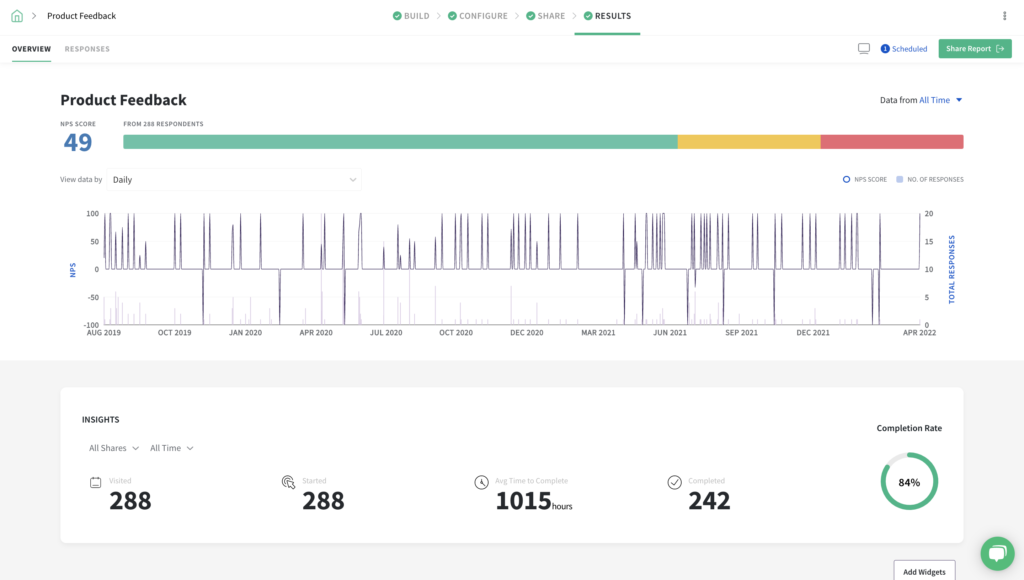
SurveySparrow bietet eine dynamische Net Promoter Score Software-Lösung, die sich an eine Vielzahl von Branchen richtet. Dieses Tool ist besonders attraktiv für Organisationen, die die Kundentreue und -zufriedenheit durch anpassbare Umfragen und Echtzeit-Datenanalysen verbessern möchten. Ganz gleich, ob Sie im Gesundheitswesen, im Bildungssektor, im Einzelhandel oder in einer anderen Branche tätig sind, stellt SurveySparrow die nötigen Ressourcen zur Verfügung, um Kundenerlebnisse zu verstehen und zu optimieren. Die Software lässt sich in bestehende Systeme integrieren und bietet eine benutzerfreundliche Oberfläche für kontinuierliche Interaktion.
Warum ich SurveySparrow gewählt habe
Ich habe mich für SurveySparrow aufgrund der KI-gestützten Umfragefunktion entschieden, die im Bereich der Net Promoter Score Software hervorsticht. Mit dieser Funktion lassen sich effizient anpassbare Umfragen erstellen: In Sekunden werden bis zu 10 Fragen generiert, in unterschiedlichen Formaten wie Multiple-Choice oder offenen Fragen. Die Integration mit CRM-Systemen ermöglicht eine tiefere Datenanalyse, sodass Ihr Team aus dem Kundenfeedback umsetzbare Erkenntnisse gewinnen kann. Zusätzlich erleichtern Multikanal-Freigabeoptionen die Reichweite Ihrer Zielgruppe, wodurch ein umfassendes Feedback eingeholt wird, das zu spürbaren Verbesserungen der Kundenzufriedenheit führt.
SurveySparrow Hauptfunktionen
Neben den KI-gestützten Umfragefunktionen bietet SurveySparrow eine Reihe weiterer Features, die das Tool zu einer vielseitigen Wahl für Net Promoter Score Software machen.
- Konversationelle Umfragen: Verwandeln Sie Umfragen in ansprechende, dialogorientierte Erlebnisse, um die Rücklaufquoten zu steigern und aufschlussreicheres Feedback zu erhalten.
- Executive Dashboard: Visualisieren Sie Umfragedaten mit verschiedenen Diagrammtypen, um ein tieferes Verständnis des Kundenfeedbacks und von Trends zu gewinnen.
- Ticket-Management: Wandeln Sie Umfrageantworten in umsetzbare Aufgaben um, sodass Ihr Team Kundenfeedback effektiv priorisieren und bearbeiten kann.
- Workflows & Automatisierungen: Optimieren Sie Prozesse, indem Sie Aktionen basierend auf Umfrageantworten automatisieren, um eine pünktliche Nachverfolgung und Aufgabenabschlüsse sicherzustellen.
SurveySparrow Integrationen
Zu den Integrationen zählen Salesforce, HubSpot, Zendesk, Mailchimp, Slack, Google Sheets, Microsoft Teams, Intercom, Freshdesk und Shopify.
Pros and Cons
Pros:
- Konversationelle Umfragen führen meist zu höheren NPS-Antwortquoten
- Eingebettete NPS-Flows innerhalb von Produkt- oder UX-Kontexten werden unterstützt
- Nahtlose Integration mit CRM- und Kollaborations-Tools
Cons:
- Analytics-Tiefe – besonders bei groß angelegten NPS-Programmen – ist begrenzt
- Komplexe Logik kann zu Beginn für nicht-technische Nutzer verwirrend sein

Alchemer
Am besten geeignet für anpassbares NPS über einfache Umfragen hinaus
Alchemer bietet eine flexible Plattform für Teams, die Kundenfeedback durch Net Promoter Score (NPS)-Umfragen erfassen, analysieren und darauf reagieren möchten. Sie eignet sich besonders für Unternehmen, die Umfrage-Workflows individuell anpassen und Rückmeldungen in bestehende Geschäftssysteme integrieren wollen. Wenn Sie nach einer Lösung suchen, die sich an komplexe Anforderungen anpasst und fortgeschrittenes Reporting unterstützt, ist Alchemer eine Überlegung wert.
Für wen ist Alchemer am besten geeignet?
Alchemer ist ideal für mittelgroße bis große Organisationen, die erweiterte Anpassungs- und Integrationsmöglichkeiten für Umfragen benötigen, um Teams aus den Bereichen Kundenerfahrung, Produkt oder Betrieb zu unterstützen.
Warum ich Alchemer gewählt habe
Wenn ich eine Net Promoter Score (NPS) Software brauche, die sich einfach in meinen restlichen Technologie-Stack einfügt, hebt sich Alchemer durch seine umfangreichen Integrationsmöglichkeiten hervor. Mit Unterstützung für über 400 Geschäftssysteme kann ich den Fluss von NPS-Daten in CRM-, Marketing- und Analyseplattformen automatisieren, ohne manuelle Arbeit. Dieses Maß an Konnektivität erlaubt es mir, in Echtzeit Folgeaktionen oder Benachrichtigungen entsprechend den NPS-Antworten auszulösen. Ich schätze auch, dass die Integrationen von Alchemer dabei helfen, Feedback zentral zu bündeln, sodass Erkenntnisse leichter im Team geteilt werden können.
Alchemer Hauptfunktionen
Weitere Funktionen von Alchemer, die NPS-Programme unterstützen, sind unter anderem:
- NPS-Umfragevorlagen: Vorgefertigte Vorlagen ermöglichen das schnelle Starten von Net Promoter Score (NPS) Umfragen und die individuelle Anpassung an Ihre Marke.
- Rollenbasierte Zugriffskontrollen: Weisen Sie Benutzern je nach Rolle Berechtigungen zu, sodass sensible Feedbackdaten nur für die richtigen Teammitglieder zugänglich sind.
- Automatisierter Umfrageversand: Planen und versenden Sie NPS-Umfragen über verschiedene Kanäle, darunter E-Mail, SMS und Weblinks.
- Erweiterte Reporting-Dashboards: Visualisieren Sie NPS-Trends und segmentieren Sie Ergebnisse nach Kundengruppe, Produkt oder Region für eine tiefere Analyse.
Alchemer Integrationen
Integrationen umfassen Salesforce, Microsoft Dynamics 365, HubSpot, Zendesk, Slack, Power BI, Tableau, Snowflake, Marketo und Google Sheets.
Pros and Cons
Pros:
- SAML 2.0 Single Sign-on für sicheren Zugriff
- Erweiterte Umfragelogik und Verzweigungsoptionen
- Echtzeit-Tracking und Benachrichtigung über NPS-Antworten
Cons:
- Einige erweiterte Analysen erfordern höhere Tarifstufen
- Die Anpassung von Umfragen kann für neue Nutzer komplex sein

Beste Onboarding-Software für Nutzer mit integrierten NPS- und In-App-Umfragen
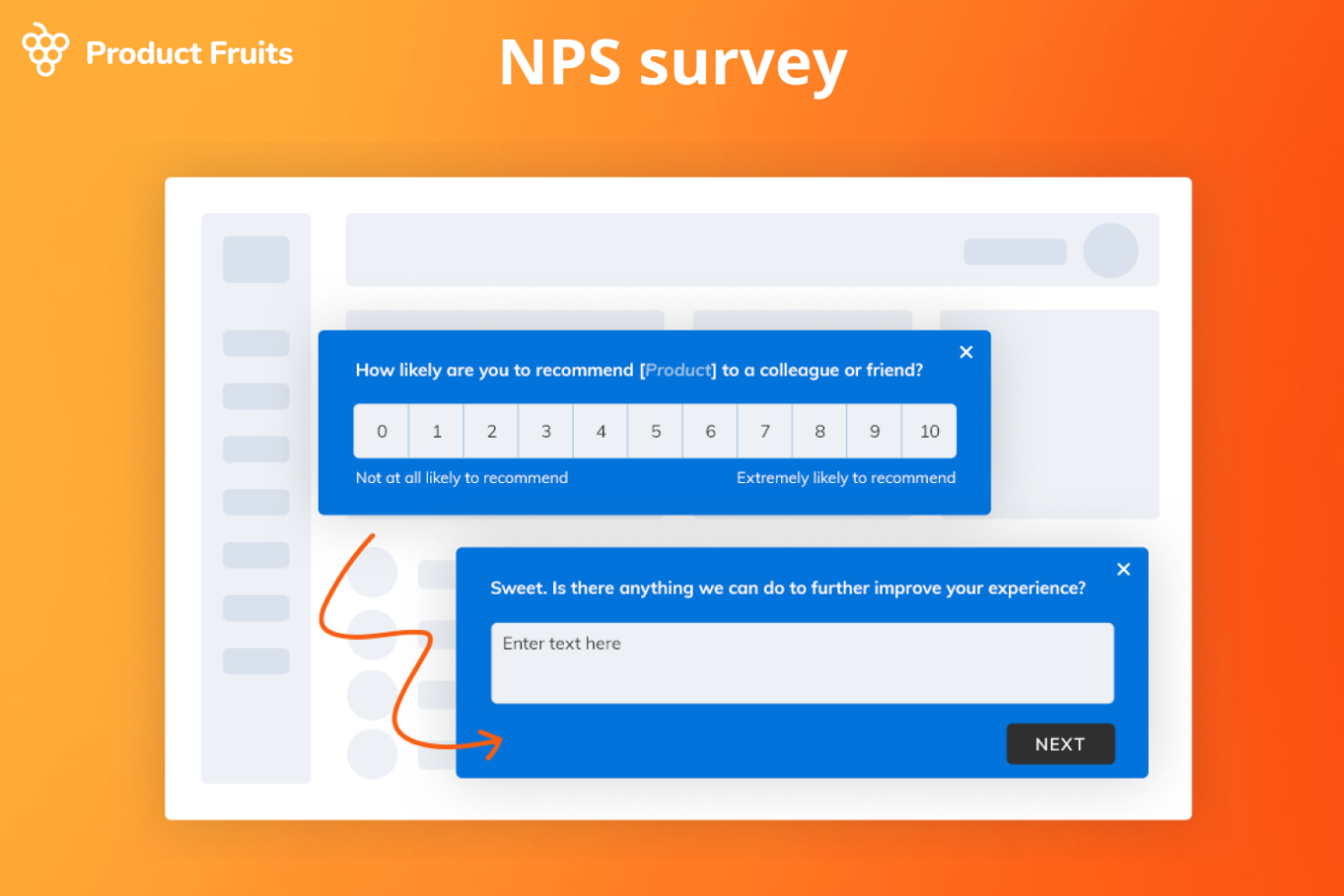
Product Fruits ist eine Benutzer-Onboarding-Plattform, die eine Vielzahl von Funktionen bietet, um Nutzer durch Anwendungen zu führen und sie zur Durchführung notwendiger Schritte zu motivieren, mit dem Ziel, die Produktaktivierungsraten, Konversionen, NPS-Werte und die Anzahl der Supportanfragen zu verbessern.
Warum ich Product Fruits gewählt habe: Ich habe Product Fruits ausgewählt, weil man darüber NPS-Umfragen erstellen und bereitstellen, Feedback sammeln und dieses zentrale Repository nutzen kann, um die Zufriedenheit zu messen und wertvolle Erkenntnisse zu gewinnen. Im Gegensatz zu anderen Tools, die dies ebenfalls ermöglichen, geht Product Fruits einen Schritt weiter und erlaubt es, das Design der Umfragen so anzupassen, dass sie zur Marke passen und persönlicher wirken. Während Ihre Nutzer antworten, können Sie diese Antworten in Echtzeit auf dem Analysetool-Dashboard verfolgen oder die Daten in Ihr CRM übertragen.
Herausragende Funktionen und Integrationen:
Diese Plattform zeichnet sich aus, weil sie eine breite Palette an Funktionen bietet, darunter Touren, Checklisten, Hinweise, Umfragen, Supportoptionen, Feedbacktools, Ankündigungen und eine Wissensdatenbank. Sie bietet außerdem benutzerdefinierte Ereignisse, KI-gestützte Texte und Sicherheitsmaßnahmen und ist so ein vielseitiges Tool zur Verbesserung des Kundenerlebnisses.
Zu den weiteren Schlüsselfunktionen gehören interaktive Rundgänge, die Nutzer durch eine Anwendung führen, In-App-NPS- & Umfragefunktionen sowie Hinweise, die kontextbezogene Informationen bereitstellen. Die Plattform bietet zudem Umfragen zur Feedbacksammlung, Supportoptionen wie Live-Chat und E-Mail sowie eine Wissensdatenbank für Self-Service-Ressourcen.
Integrationen umfassen mixpanel, Heap, Google Analytics, Slack, Smartlook, Segment, customer.io und HubSpot.
Pros and Cons
Pros:
- In-App-Umfragen erfassen Nutzerstimmung im Nutzungskontext
- Verbindet Onboarding-Anleitungen, Checklisten und NPS-Erfassung
- Einfache Einrichtung—keine Programmierkenntnisse für die Implementierung erforderlich
Cons:
- Begrenzte Analysentiefe bei groß angelegten NPS-Programmen
- Die Anpassung des Umfragedesigns ist recht begrenzt


Survicate ist ein Online-Umfrage-Tool zur Messung von NPS, CSAT, CES und anderen Kundendienst-Kennzahlen. Es verfügt über anpassbare Umfragen, mit denen Sie Farben, Schriftarten und Layouts ändern und Ihre Umfrage individuell gestalten können. Survicate ermöglicht es Ihnen, Umfragen basierend auf dem Verhalten von Kunden zu automatisieren, etwa bei Exit-Intents, Dauer von Webseiten-Besuchen und Scroll-Geschwindigkeit auf der Website.
Warum ich Survicate ausgewählt habe: Das Verständnis Ihrer NPS-Daten kann Ihnen Hinweise geben, wie Sie Ihre Produkte und Services verbessern können, und Survicate verfügt über ein integriertes Analyse-Feature, das Sie dabei unterstützt. Es ermöglicht Ihnen, die Abschlussraten von NPS-Umfragen über verschiedene Kanäle hinweg anzuzeigen, sodass Sie wissen, welche Kanäle keine Kundenreaktionen hervorrufen. Zudem automatisieren die integrierten Workflows von Survicate die Erhebung der NPS-Daten und die Nachverfolgung, indem Umfragen ausgelöst, Teilnehmende basierend auf ihren Bewertungen segmentiert und das Feedback in CRM-, E-Mail- oder Aufgabenmanagement-Tools integriert wird.
Hervorstechende Funktionen und Integrationen:
Zu den hervorstechenden Funktionen zählen verschiedene Methoden zur Verteilung von Umfragen, darunter das Teilen von Links, E-Mail und eingebettete Formulare. Zusätzlich bietet Survicate eine logisch verzweigte Fragestruktur, mit der Sie personalisierte, zielgerichtete Umfragen erstellen können.
Die Software enthält zudem ein Feedback-Hub, in dem alle gesammelten Rückmeldungen an einem Ort angezeigt werden, sodass Teammitglieder die Daten analysieren und umsetzbare Schlüsse ziehen können.
Integrationen umfassen Mailchimp, Marketo, Microsoft Teams und Google Analytics.
Pros and Cons
Pros:
- Multi-Channel-NPS-Unterstützung erreicht Nutzer über Web/E-Mail/App
- Starke Segmentierung und Filter helfen bei der Analyse der NPS-Ergebnisse
- Erlaubt das Einbetten von Umfragen in Produkte oder Webseiten für Kontext
Cons:
- Fortgeschrittene Logik und individuelle Workflows erfordern Einrichtungsaufwand
- Einige Analyse-Visualisierungsoptionen wirken einfach
New Product Updates from Survicate

Survicate Adds Language Selector Inside Surveys
Survicate introduces a language selector inside surveys, allowing respondents to switch languages directly. This improves user comfort and helps increase response rates. For more information, visit Survicate's official site.
 .
.
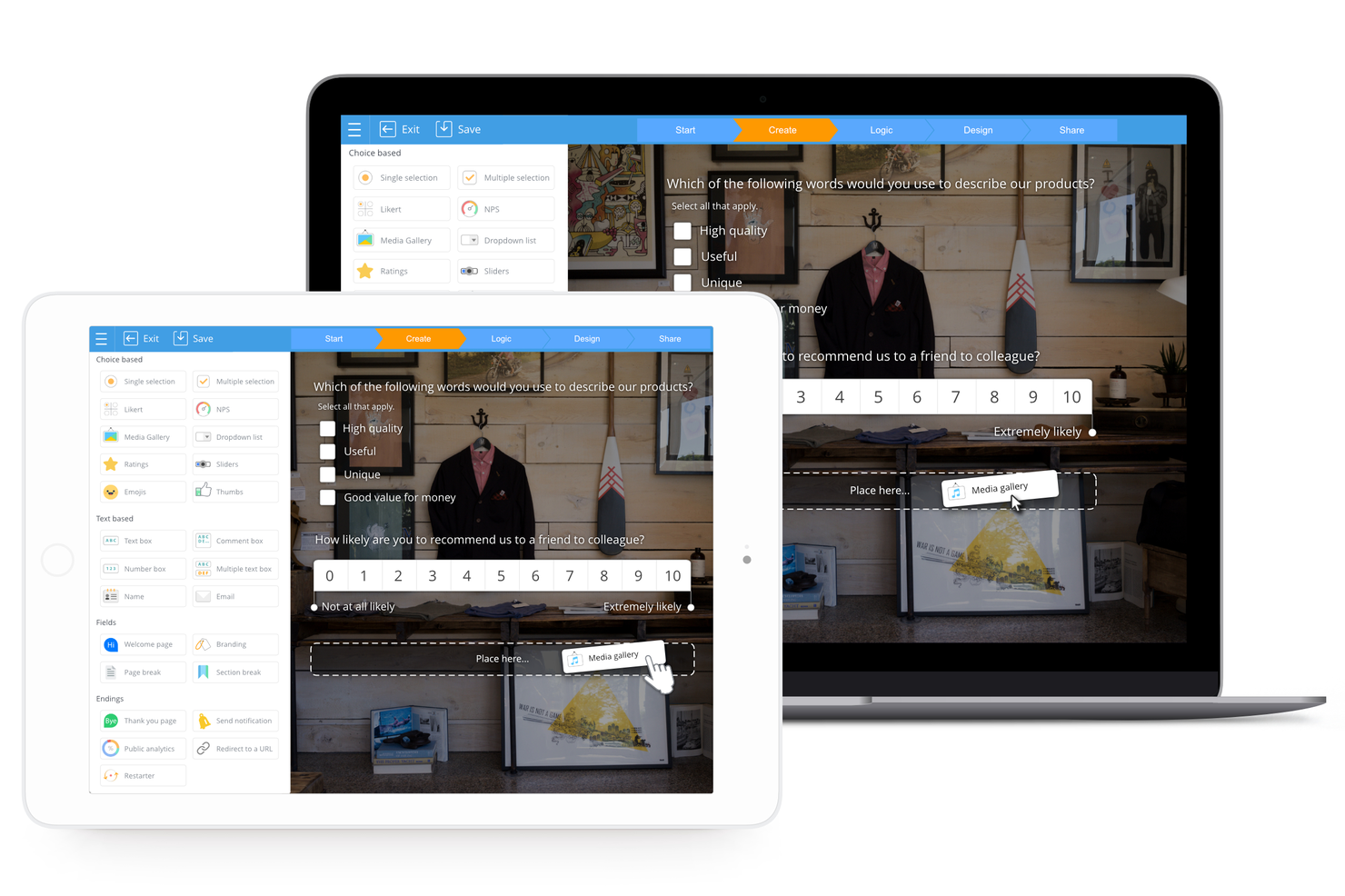
SurveyLegend ist eine webbasierte Plattform zur Erstellung, Verteilung und Analyse von Umfragen, Formularen und Abstimmungen. Der Fokus auf mobiloptimiertes Design und interaktive Elemente macht sie zu einer geeigneten Wahl, um ansprechende Umfragen auf mobilen Geräten durchzuführen – insbesondere für die wachsende Anzahl von Nutzern, die Inhalte unterwegs konsumieren möchten.
Warum ich SurveyLegend gewählt habe: Ich habe SurveyLegend aufgrund der benutzerfreundlichen Oberfläche ausgewählt, die die Erstellung optisch ansprechender und interaktiver Umfragen sowohl am Desktop als auch auf mobilen Geräten vereinfacht. Was SurveyLegend auszeichnet, ist der starke Fokus auf Designästhetik: So können gebrandete Umfragen mit einer Vielzahl von Fragetypen und Feldern erstellt werden, wie Bildauswahl und Datei-Uploads. Ich denke, SurveyLegend eignet sich am besten für mobilfreundliche, ansprechende Umfragen , da die mobile Optimierung eine reibungslose Nutzererfahrung für Befragte auf Smartphones oder Tablets sicherstellt. Dies kann die Rücklaufquoten erhöhen und die Qualität des erhaltenen Feedbacks steigern.
Hervorstechende Funktionen und Integrationen:
Funktionen umfassen elegante, vorgefertigte Vorlagen, Sprachlokalisierung, Offline-Datenerfassung sowie weitreichende Anpassungsmöglichkeiten inklusive individueller Markenintegration und Fragen-Formatierung, bedingter Logik sowie anpassbaren Buttons und Symbolen.
Integrationen gibt es mit Google Drive, Dropbox, Mailchimp und Salesforce sowie sozialen Medien wie Facebook und Twitter zur Umfrageverbreitung.
Pros and Cons
Pros:
- Sehr visuelle und mobiloptimierte Umfrageerfahrung für NPS
- Schnelles Einrichten von einfachen, stilvollen NPS-Umfragen
- Übersichtliche Benutzeroberfläche unterstützt auch Nutzer ohne Umfrageerfahrung
Cons:
- Logik, Verzweigungen und Segmentierung eingeschränkt
- Skalierbarkeit und Rollenverwaltung weniger ausgeprägt

Am besten geeignet für benutzerdefiniert ausgelöste NPS-Umfragen
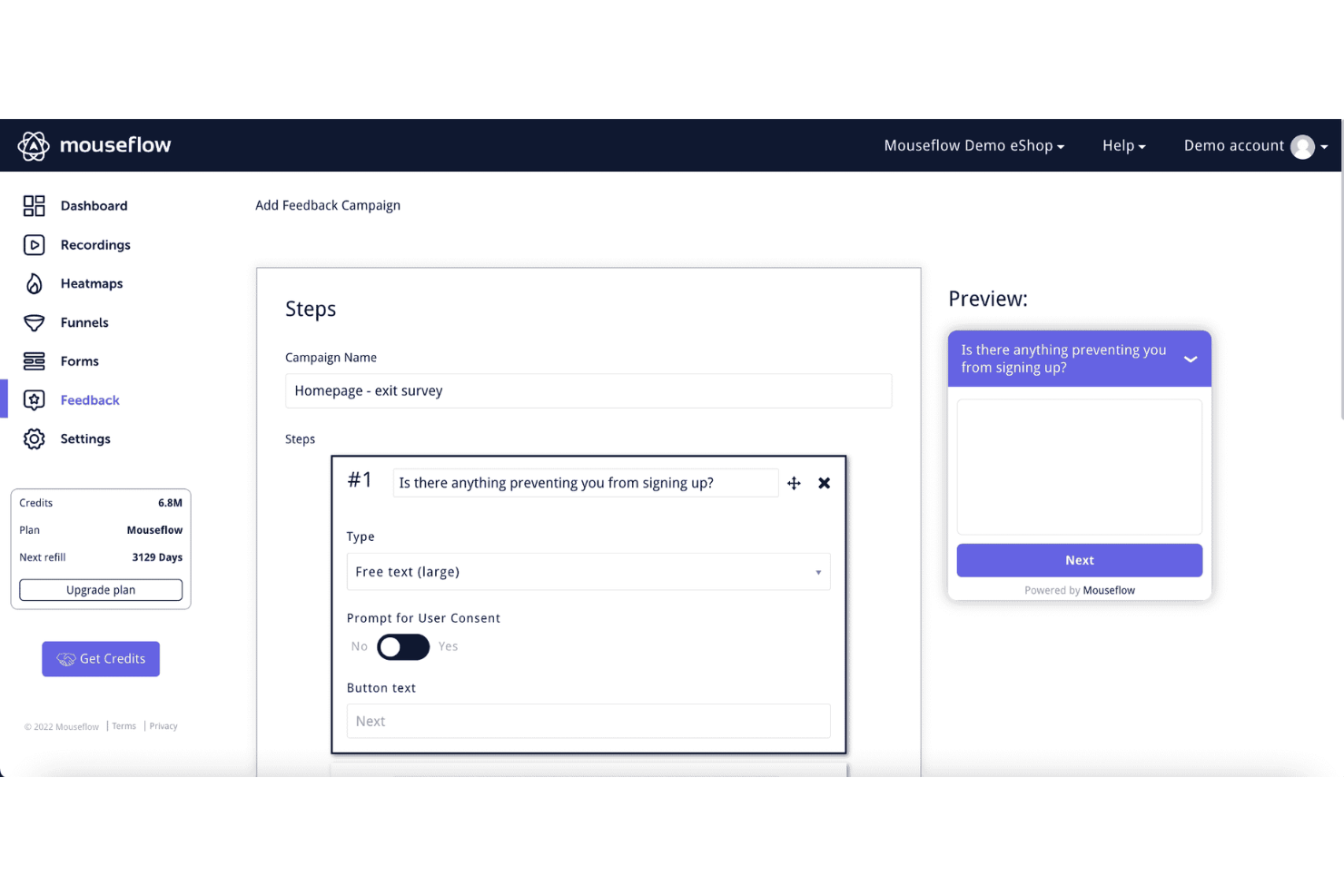
Mouseflow ist ein umfassendes Analysetool, das tiefe Einblicke in das Nutzerverhalten auf Websites bietet. Es stellt eine Vielzahl von Funktionen bereit, darunter Sitzungsaufzeichnungen, Heatmaps, Conversion-Trichter, Formularanalysen und Werkzeuge für Nutzerfeedback. Durch das Erfassen von Nutzerinteraktionen und deren Visualisierung in Berichten und Aufzeichnungen ermöglicht Mouseflow Unternehmen, zu verstehen, wie Besucher durch ihre Websites navigieren.
Warum ich Mouseflow gewählt habe: Das Tool ermöglicht die Erstellung von benutzerdefinierten, auslöserbasierten Umfragen, die strategisch an verschiedenen Kontaktpunkten der Nutzerreise platziert werden können. Es unterstützt verschiedene Umfragetypen wie NPS, Multiple Choice, Freitext und Bewertungsskalen, wodurch Unternehmen präzises und kontextbezogenes Feedback einholen können – ein direkter Beitrag zur genauen Ermittlung des Net Promoter Score (NPS).
Herausragende Funktionen und Integrationen von Mouseflow:
Funktionen, die die Feedback-Werkzeuge von Mouseflow ergänzen, beinhalten Sitzungsaufzeichnungen, mit denen Unternehmen einzelne Nutzer-Sessions als Video ansehen können, und Heatmaps, die eine visuelle Darstellung des Nutzerengagements bieten und die am meisten sowie am wenigsten genutzten Bereiche einer Webseite hervorheben.
Integrationen umfassen HubSpot, AB Tasty, Convert Experiences, BigCommerce, WooCommerce, Google Analytics, Google Tag Manager, Zendesk, Omniconvert, Adobe Target, Shopify, Intercom, WordPress und weitere.
Pros and Cons
Pros:
- Gut für das Einbinden von NPS- und Feedback-Widgets an UX-relevanten Stellen.
- Anwender berichten, es hilft, das 'Warum' hinter niedrigen NPS-Werten aufzudecken
- Kombiniert Verhaltensanalyse (Heatmaps, Sitzungsaufzeichnungen) mit Feedback-Tools
Cons:
- Einrichtung und Filterung können für nicht-analytische Teams komplex werden
- Umfrage-/Feedbackmodule verfügen über keine erweiterten Funktionen

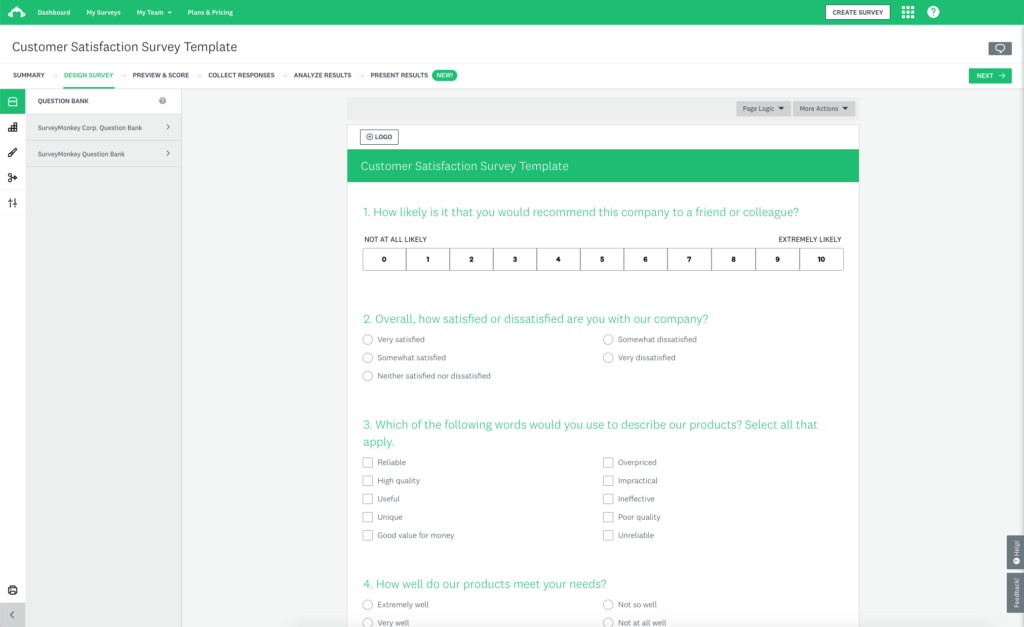
SurveyMonkey ist ein umfassendes Umfragetool, das einen kostenlosen Tarif mit sofort einsatzbereiten Umfragen anbietet, um Ihnen den Einstieg zu erleichtern. Im Rahmen des kostenlosen Tarifs können Sie eine Umfrage mit bis zu 10 Fragen erstellen und bis zu 100 Antworten pro Umfrage sammeln.
Warum ich SurveyMonkey gewählt habe: Der kostenlose Tarif beinhaltet viele hilfreiche Funktionen, für die man bei anderen Umfragetools bezahlen muss, darunter Sprunglogik, Datenexporte, eine Auswahl an Fragetypen, grundlegende Analyse- und Berichtsfunktionen sowie einfache Visualisierungen, die das Verständnis Ihrer Daten erleichtern. Sie können zusammenfassende Statistiken wie Antwortanzahl und -prozente einsehen.
Gut gefällt mir auch, dass Sie die Net Promoter Score-Software von SurveyMonkey mit Salesforce integrieren können, um Ihr Salesforce-Dashboard durch NPS-Berechnungen zu erweitern.
Herausragende Funktionen und Integrationen von SurveyMonkey:
SurveyMonkey ist eine ausgezeichnete Net Promoter Score-Software, weil sie es ermöglicht, Kunden direkt nach der Nutzung Ihres Produkts um Feedback zu bitten. Sie können SurveyMonkey in Ihre Website integrieren, um den NPS zu erheben, ohne das Einkaufserlebnis der Kunden zu stören. SurveyMonkey erlaubt Ihnen außerdem, eine bestimmte Kundendemografie anzusprechen, um den NPS einer bestimmten Kundengruppe zu messen.
Mit SurveyMonkey können Sie zudem Metadaten über Website-Benutzer wie Browsertyp, Standort und Gerät erfassen, um das Online-Erlebnis Ihrer Kunden zu optimieren.
Integrationen umfassen Slack, Microsoft Teams, Akita, Freshservice, HubSpot, Zendesk, Google Sheets, Google Analytics, Adobe Analytics, A/B Tasty, Zoho CRM, Gainsight und Salesforce.
Pros and Cons
Pros:
- Riesige Vorlagen- und Fragetypbibliothek
- Einfache Verteilung per Weblink, E-Mail-Einladung oder Panel
- Starke Logikverzweigungen und Analysen für NPS und mehr
Cons:
- Kostenloser Tarif sehr eingeschränkt in Umfragetiefe und Analysen
- Oberfläche eher auf allgemeine Nutzung als auf NPS-Workflows ausgelegt

Beste NPS-Software, um Ihre Umfragen in verschiedene Sprachen zu übersetzen
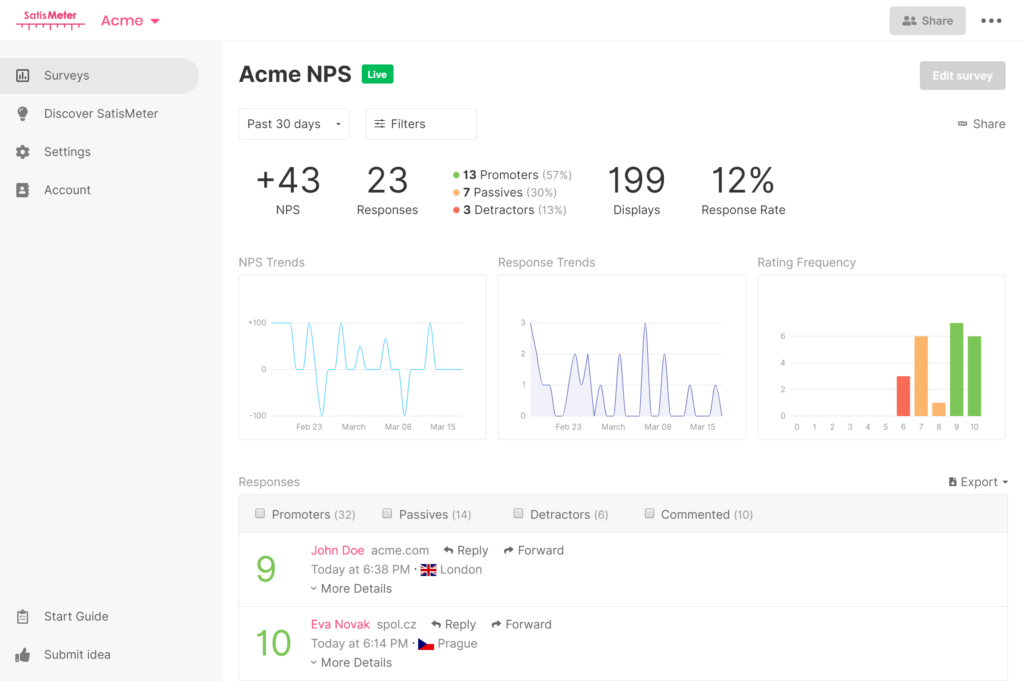
SatisMeter ist ein Tool zur Erfassung von Feedback zur Messung der Kundenzufriedenheit an verschiedenen Kontaktpunkten. Es bietet vorgefertigte Vorlagen, mit denen Sie schnell Umfragen für CES, NPS, CSAT oder PMF starten können. Mit SatisMeter können Sie automatisierte, wiederkehrende Umfragen erstellen, um Zeit zu sparen und gleichzeitig die Kundenzufriedenheit kontinuierlich zu messen.
Warum ich SatisMeter ausgewählt habe: Nicht alle Kunden sprechen oder lesen Englisch, und SatisMeter ist die beste NPS-Software, wenn Sie Ihre Umfragen in verschiedene Sprachen übersetzen möchten. SatisMeter übersetzt Umfragen automatisch, abhängig von den Spracheinstellungen des Gerätes, das Ihre Kunden verwenden, sodass Sie Kunden mit unterschiedlichen Nationalitäten und Sprachpräferenzen befragen können. Sie können eine Umfrage auch manuell übersetzen, um gezielt bestimmte Kundendemografien anzusprechen.
SatisMeter: Herausragende Funktionen und Integrationen:
Kürzlich hinzugefügte Funktionen umfassen benutzerspezifische Berechtigungen pro Projekt, die Option, mehrere Antworten auszuwählen, neue Datenfilter pro Quartal, eine Verzögerungsauslösung für Umfragen, einen Ereignisauslöser für Umfragen und ein Overlay-Pop-up.
Integrationen sind verfügbar mit anderen Kundenzufriedenheitstools, darunter Salesforce, CustomerGauge, Bigcommerce, Productboard und Slack. Sie können SatisMeter mit einem kostenpflichtigen Zapier-Konto verbinden, um Zugang zu Premium-Apps zu erhalten.
Pros and Cons
Pros:
- Übersichtliches Tool zur Echtzeit-Verfolgung von NPS, CSAT und Feedback
- Nutzer loben die schnellen Support-Antworten und regelmäßigen Plattform-Updates
- Umfragen lassen sich einfach in Apps oder über Weblinks einbetten
Cons:
- Erweiterte Segmentierung/individuelle Berichtserstellung wirkt eingeschränkt
- Tagging- und Problemklassifizierungsfunktionen fehlen

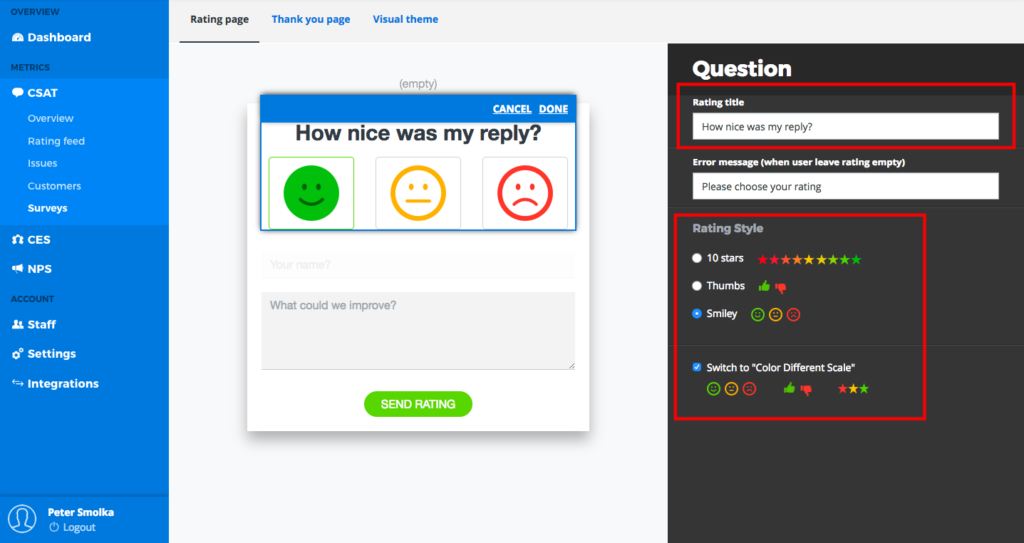
Die Software von Nicereply hilft Ihnen, Umfragen mit nur einem Klick zu erstellen und an Kunden zu senden, um CES-, CSAT- und NPS-Werte zu messen. Nicereply-Umfragen bieten Anpassungsoptionen wie die Verwendung Ihrer Farben, Schriftarten und Ihres Logos, um die Markentreue zu fördern.
Warum ich Nicereply ausgewählt habe: Wenn E-Mail Ihr Hauptkommunikationsmittel mit Kunden ist, ist Nicereply die beste NPS-Software, weil Sie Ihre NPS-Umfrage in Ihre E-Mail-Signatur einfügen können. Das Besondere an diesem Feature ist, dass Sie nach jeder Interaktion das Kundenfeedback messen können. Durch die Nutzung der NPS-Umfrage in der Signatur kann zudem die Umfrage-Antwortrate verbessert werden, da Kunden eher auf eine E-Mail-Antwort reagieren als auf eine E-Mail, die nur zu einer NPS-Umfrage auffordert.
Herausragende Funktionen und Integrationen von Nicereply:
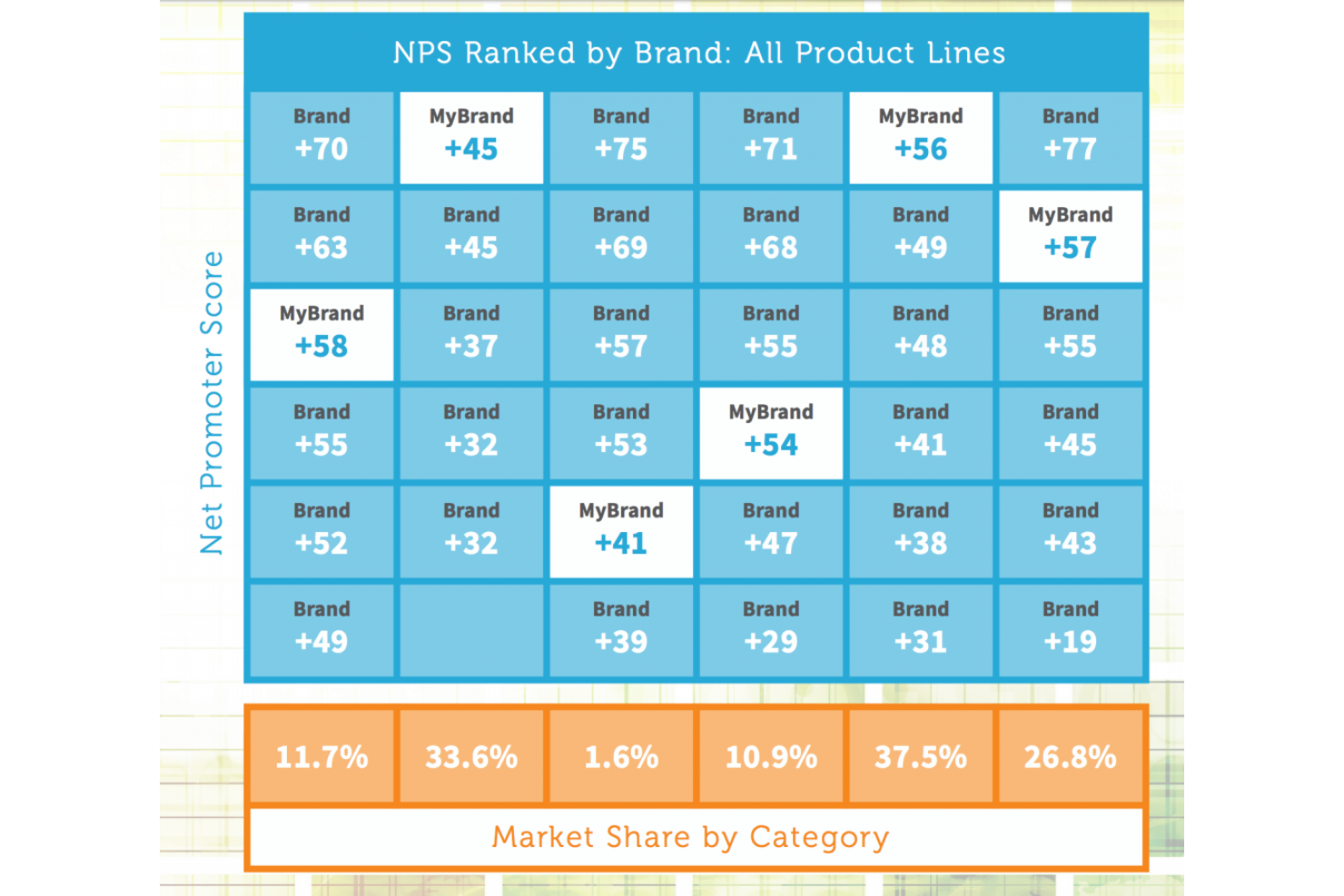
Es gibt eine Kundensynchronisationsfunktion, die automatisch Feedback einem Kundenprofil zuordnet, damit Sie die Rückmeldungen besser nachvollziehen können. Nicereply verfügt zudem über ein Net-Promoter-Score-Ranking, das Ihren NPS-Wert automatisch mit den Top-Performern Ihrer Branche vergleicht.
Integrationen umfassen Zendesk, LiveAgent, Freshdesk, Front, PipeDrive, HelpScout, Dixa, Aircall, Evaluagent, Kustomer, Gladly, Mailchimp, Daktela, Gmail, Microsoft Outlook und Cloudtalk.
Pros and Cons
Pros:
- Sehr intuitive Oberfläche, minimale Schulung erforderlich
- Lässt sich nahtlos in Support-/E-Mail-Workflows für NPS einbetten
- Klares Trendtracking auf Agenten-, Team- und Unternehmensebene
Cons:
- Einige Nutzer bemängeln mangelnde Flexibilität bei Gewichtungs-/Bewertungslogik
- Branding/Anpassung eingeschränkt

Am besten geeignet für Umfragen, Popups, Seitenleisten- und In-App-Umfragen.
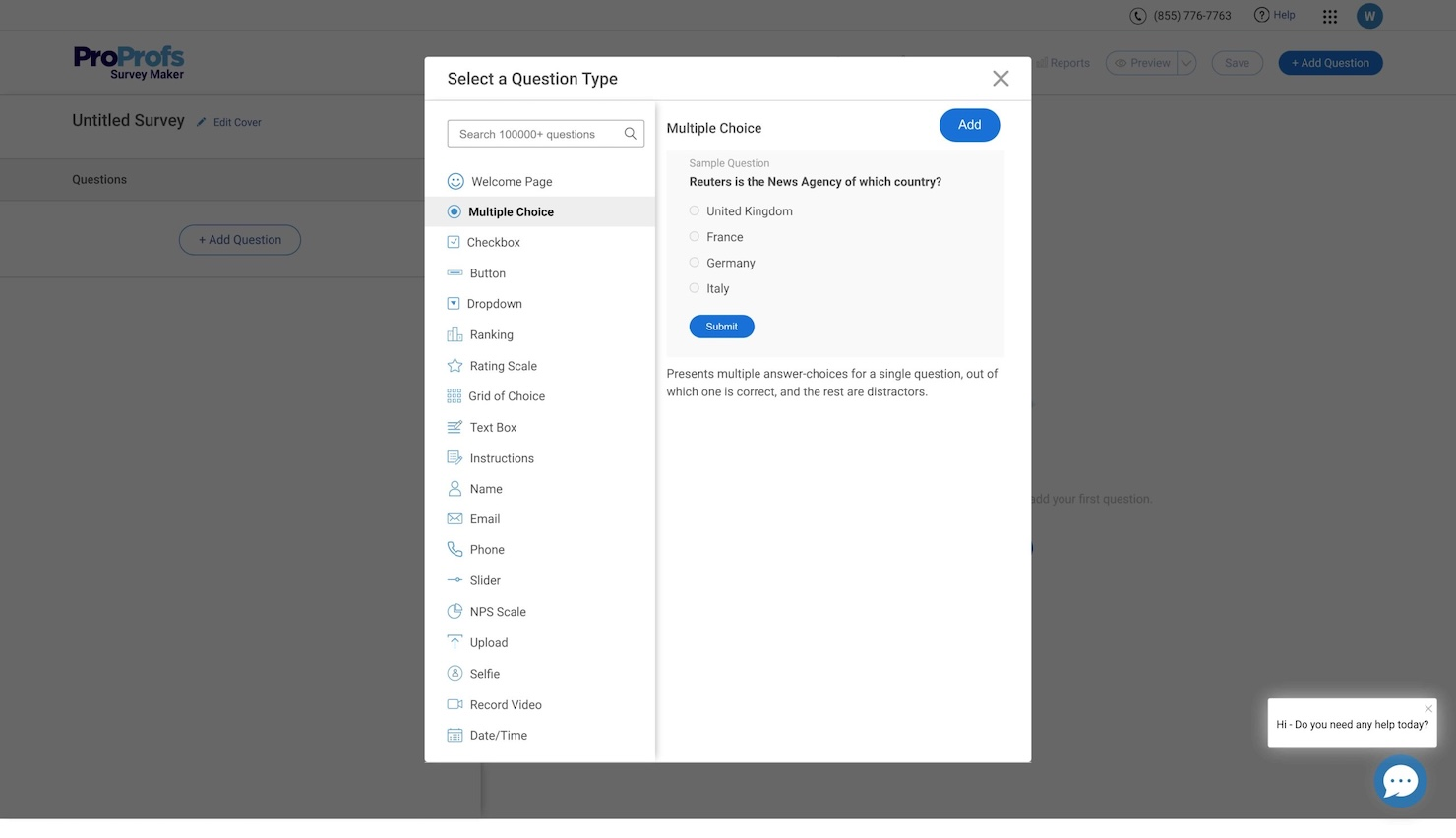
ProProfs Survey Maker ermöglicht es Ihrem Team, Feedback-Tools über standardmäßige E-Mail-Umfragen hinaus einzusetzen – dazu zählen Umfragen, Pop-ups, Seitenleisten und In-App-Fragebögen. Damit erfassen Sie Kundenstimmungen in entscheidenden Momenten und verwandeln sie in umsetzbare Loyalitätsmetriken wie den NPS.
Warum ich ProProfs Survey Maker gewählt habe: Ich habe mich für ProProfs Survey Maker entschieden, weil es sich durch eingebettete Feedback-Trigger auszeichnet – Pop-ups, Seitenleisten, In-App-Umfragen und gezielte Umfragen. Das macht das Tool besonders stark, wenn Sie in Echtzeit Feedback von Website-Besuchern oder Produktnutzern und nicht nur über geplante E-Mail-Umfragen benötigen. Für Teams, die wertvolle kontextspezifische Einblicke sammeln und den NPS an den Berührungspunkten und nicht in Kampagnen nach dem Batch-Prinzip messen möchten, passt dieses Tool hervorragend.
Herausragende Funktionen & Integrationen
Funktionen umfassen anpassbare Website-Intercept- und Seitenleisten-Tabs, In-App-Umfrage-Trigger, Popup- und Embed-Logik, einsatzbereite NPS-/CSAT-/CES-Vorlagen, unbegrenzte integrierte Umfragen und Antworten sowie Dashboards in Echtzeit mit Segmentierung nach Antworttyp.
Integrationen umfassen Google Sheets, Zapier, SSO sowie API/Webhooks für individuelle Workflows.
Pros and Cons
Pros:
- Ermöglicht das Ausspielen von Website-Pop-ups und Seitenleisten-Umfragen
- Unterstützt NPS, CSAT und CES mit integrierten Vorlagen
- In-App- und Intercept-Trigger erfassen Verhalten im entscheidenden Moment
Cons:
- Tiefe Analysen und individuelle Visualisierungsmöglichkeiten begrenzt
- Enterprise-Governance (z.B. Rollen, komplexe Logik) weniger ausgereift

Podium
Am besten geeignet für kontextbezogenes Feedback, z. B. aus welchem Kanal die Befragten kommen
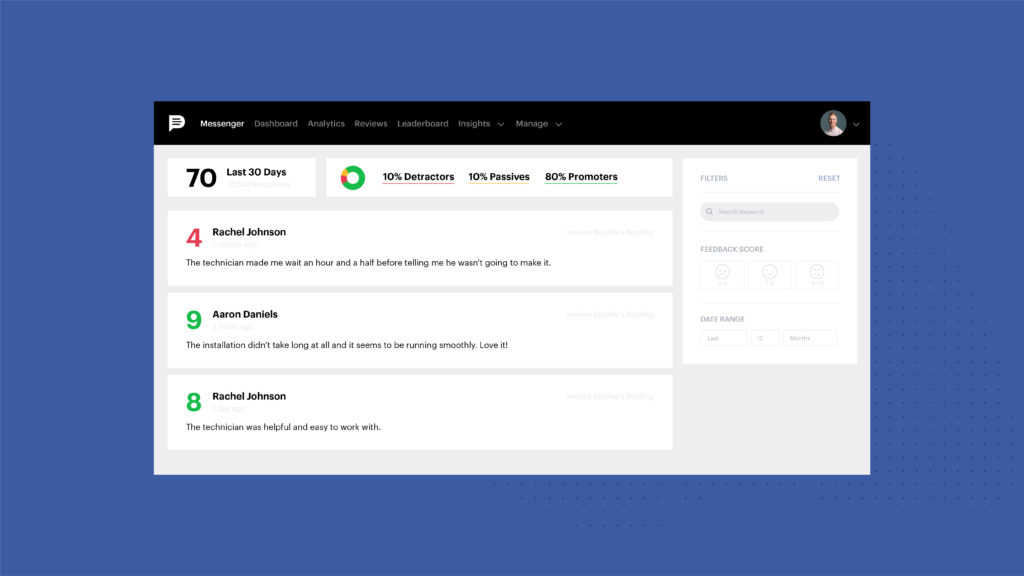
Podium ist eine Plattform für Kundenkommunikation und Zahlungen. Sie können Podium nutzen, um Kundenbewertungen zu generieren und zu analysieren, was Ihnen dabei hilft, Ihren Ruf zu verbessern.
Warum ich Podium ausgewählt habe: Wenn Sie Kundenanliegen, die Ihren NPS beeinträchtigen, sofort lösen möchten, ist Podium aufgrund seines In-App-Messagingsystems die beste NPS-Software. Mit Podium können Sie Kundenfeedback in einem Dashboard einsehen und Kundenanliegen schnell zur Lösung an Teammitglieder weiterleiten. Sie können Podium verwenden, um Kundenfeedback und Bewertungen aus verschiedenen Kanälen abzurufen und umgehend darauf zu reagieren. Zudem können Sie mit Podium auf Kundenfeedback antworten, um die Kundenzufriedenheit zu erhöhen.
Hervorstechende Funktionen und Integrationen von Podium:
Es bietet eine Marketingfunktion, mit der Sie SMS-Marketing nutzen können, um mehr Verkäufe zu generieren. Podium ermöglicht es Ihnen außerdem, Kundenprofile zu erstellen und Kundenaktivitäten zu dokumentieren, sodass Sie wissen, was Ihre Kunden tun und welche Produkte oder Dienstleistungen sie anziehen.
Integrationen sind verfügbar mit weiteren Kundenservice- und Produktivitätstools, darunter ServiceTitan, Salesforce, Airtable und Calendly.
Pros and Cons
Pros:
- Erfasst NPS und Bewertungen direkt über SMS- und mobile Kanäle
- Stark für Unternehmen, die Feedback unterwegs benötigen
- Hilft, Feedback in Bewertungserstellung und lokalen Ruf zu überführen
Cons:
- Komplexere Umfragelogik und Verzweigungen sind eingeschränkt
- Analysefunktionen und Segmentierung weniger ausgereift als bei umfangreichen NPS-Plattformen

Sprig
Am besten geeignet, um Kundenfeedback mittels KI in großem Umfang zu erfassen und zu analysieren
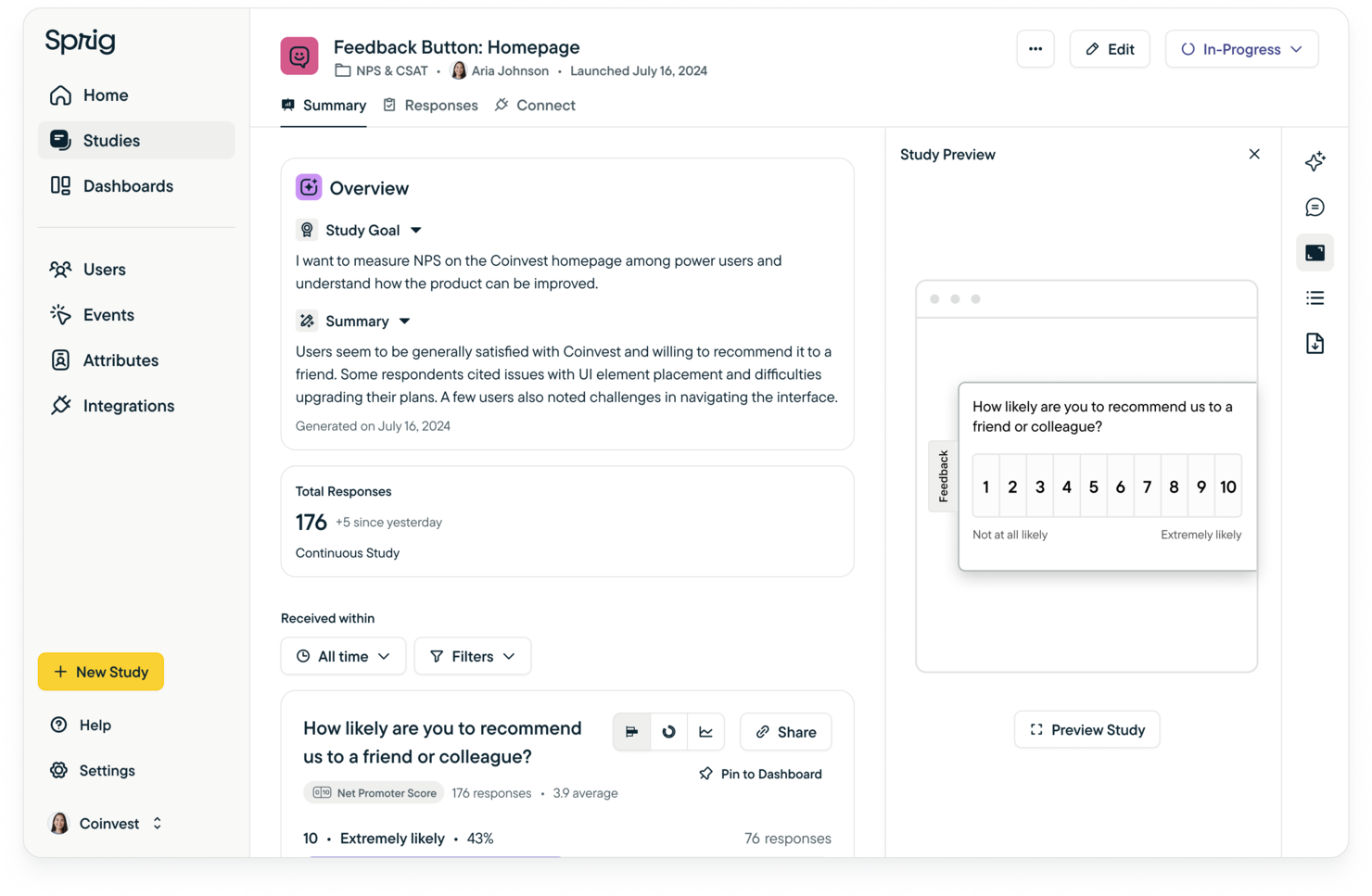
Sprig ist eine Customer-Experience-Plattform, die Teams dabei unterstützt, Kundenfeedback durch automatisierte Umfragen zu verstehen. Sie ermöglicht es Unternehmen, in Echtzeit Einblicke in die Kundenzufriedenheit und -loyalität zu gewinnen. Teams nutzen sie, um Verbesserungsbereiche zu identifizieren und basierend auf dem gesammelten Feedback umsetzbare Veränderungen voranzutreiben.
Warum ich Sprig ausgewählt habe: Sprig hilft Ihrem Team, Kundenfeedback mithilfe von KI zu analysieren, um die wichtigsten Trends und Erkenntnisse hervorzuheben. Die KI-gesteuerte Feedbackanalyse ermöglicht es Ihnen, schnell zu verstehen, was gut funktioniert und was Aufmerksamkeit erfordert. Sie erhalten klare, umsetzbare Vorschläge basierend auf dem Echtzeit-Feedback Ihrer Kunden.
Die KI der Software macht es einfach, große Mengen an Kundenfeedback zu analysieren und die Verbesserungen zu priorisieren, die den größten Einfluss haben. Die Fähigkeit, rohe Umfragedaten in aussagekräftige Erkenntnisse im großen Maßstab umzuwandeln, hilft Ihrem Team, schneller bessere Entscheidungen zu treffen. Mit Sprig sammeln Sie nicht einfach nur Feedback – Sie erhalten klare, umsetzbare Schritte zur Steigerung der Kundenloyalität und -zufriedenheit.
Herausragende Funktionen und Integrationen:
Funktionen umfassen KI-gesteuerte Feedbackanalyse, Echtzeit-Kundenumfragen und automatisiertes Reporting über Kundenzufriedenheit und Loyalität. Ihr Team kann schnell Feedback sammeln und auf KI-gestützte Vorschläge reagieren. Die Berichte von Sprig heben Bereiche hervor, die sofortige Aufmerksamkeit zur Steigerung der Zufriedenheit erfordern.
Integrationen umfassen Mixpanel, Amplitude, Jira, Slack, Segment, Google Analytics und Optimizely.
Pros and Cons
Pros:
- In-Produkt-Umfragen erfassen Feedback in Echtzeit
- KI-gestützte Analyse fasst offene Antworten schnell zusammen
- Vereint Umfragen, Replays und Heatmaps in einer Ansicht
Cons:
- Umfragezentrierte Logik und NPS-Workflows weniger ausgereift
- Kleinere Teams könnten Einrichtung und Segmentierung als überwältigend empfinden

CustomerSure
Beste NPS-Software für den Zugriff auf mehrere Feedback-Kanäle: E-Mail, SMS, In-App und auf der Website

CustomerSure ist eine Kundenumfrage-Plattform, mit der Sie Umfragen über verschiedene Kanäle versenden können, darunter Ihre Website, mobile App, E-Mail oder SMS.
Warum ich CustomerSure ausgewählt habe: Sie können damit Echtzeit-Benachrichtigungen zum Net Promoter Score einrichten. Außerdem lassen sich tägliche oder wöchentliche Zusammenfassungen relevanter Kundenhinweise verschicken, sodass Mitarbeitende und Stakeholder stets über die aktuellen NPS-Werte informiert sind.
Herausragende Funktionen und Integrationen von CustomerSure:
CustomerSure ist eine ausgezeichnete Net Promoter Score Software dank seiner Funktion zur Historie von Feedbacks. Neben der Einsicht Ihrer NPS-Werte können Sie auch weitere wertvolle Daten wie die Anzahl der zurückgesendeten Umfragen sehen, sodass Sie Ihr Zustellungssystem für Umfragen optimieren können. Außerdem lässt sich CustomerSure dazu nutzen, Kundenprobleme zu kategorisieren, um die Hauptursachen für unzufriedene Kunden gezielt zu beheben.
Integrationen sind mit ERP-Systemen, Aufgabenverwaltungstools, ERP-Systemen und Helpdesk-Plattformen verfügbar, wobei keine spezifischen Softwareplattformen genannt werden. Sie bieten auch eine API für zusätzliche bidirektionale Integrationen nach Bedarf an.
Pros and Cons
Pros:
- Sehr übersichtliche, intuitive Benutzeroberfläche, die von Nutzern gelobt wird
- Starke Feedback-to-Action-Workflows unterstützen NPS-Programme
- Gute Segmentierungs- und Filtermöglichkeiten für aussagekräftige Erkenntnisse
Cons:
- Kann für kleine, einfache Feedbackbedürfnisse überdimensioniert wirken
- Einige Analyse- und Berichtsanpassungen sind eingeschränkt

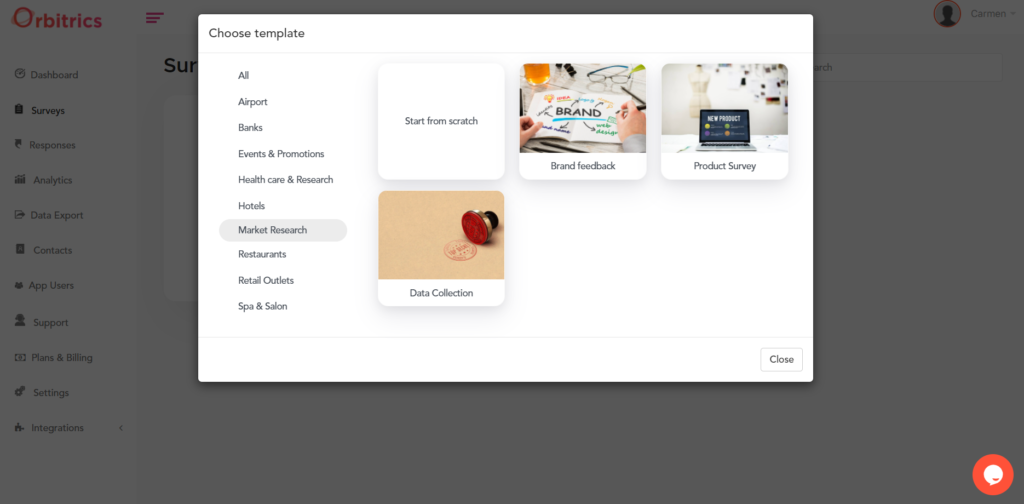
Orbitrics (früher FeedbacQ) ist eine Plattform für Kundenfeedback-Management, die NPS-Werte mithilfe verschiedener Kundenzufriedenheitsumfragen berechnen kann.
Warum ich mich für Orbitrics entschieden habe: Sie können auf 15 Umfragevorlagen zugreifen oder Ihre eigene von Grund auf neu erstellen. Es gibt Vorlagen für gängige Kundengruppen wie Mitarbeiterzufriedenheitsumfragen, Umfragen zum Einzelhandelserlebnis und Feedbacksammlungen zu Dienstleistungen.
Hervorstechende Funktionen und Integrationen von Orbitrics:
Zu den wichtigsten Funktionen von Orbitrics zählen Offline-Zugriff, umfassende Analysen, personalisierte Angebote und Werbeaktionen, verschiedene Fragetypen, mehrsprachige Unterstützung, die Integration von Bildern und Videos in Umfragen, vollständig anpassbares Branding, E-Mail-Berichte sowie die Unterstützung verschiedener Smart-Geräte (iOS, Android und Web).
Integrationen sind mit Hunderten von Drittanbieter-Tools möglich, wenn Sie Orbitrics mit einem kostenpflichtigen Zapier-Konto verbinden. Beachten Sie, dass die Slack- und Webhook-Integrationen ein Platinum-Premiumkonto erfordern.
Pros and Cons
Pros:
- Multi-Channel-Feedback über Web, Mobilgerät und E-Mail
- Echtzeit-Dashboards zeigen Zufriedenheitstrends schnell auf
- Sammelt und visualisiert Stimmungsdaten an verschiedenen Kontaktpunkten
Cons:
- Detaillierte Analysen erfordern manuelle Konfiguration und Aufwand
- Einige Nutzer berichten, dass das UX veraltet wirkt

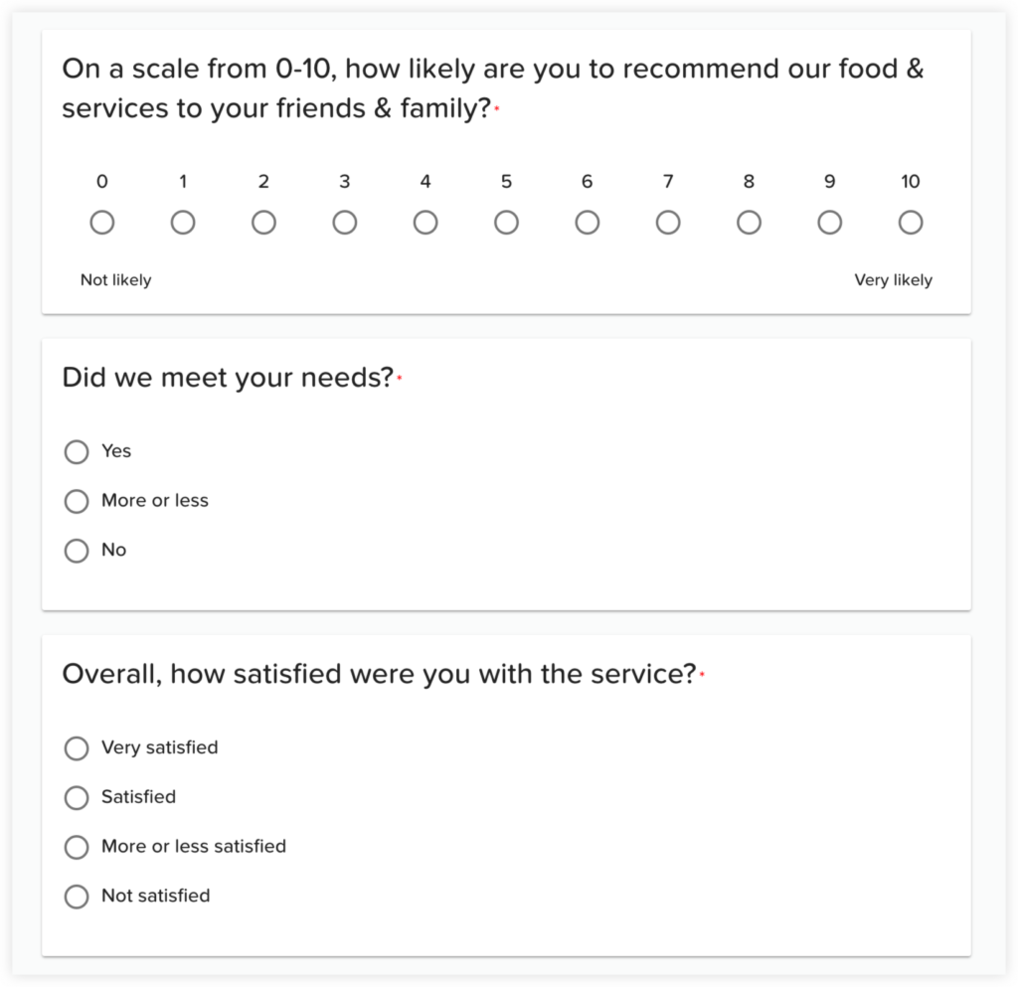
InputKit ist eine Software für das Management von Kundenerfahrungen, mit der Sie automatisierte Umfragen nach einer Kundenerfahrung oder Interaktion, wie dem Abschluss eines Kaufs oder der Erstellung eines Kontos, erstellen können.
Warum ich InputKit ausgewählt habe: Mit InputKit können Sie Ihre NPS-, CES- oder CSAT-Werte messen, um gezielte Verbesserungen vorzunehmen und eine bessere Kundenerfahrung zu bieten. Sie können personalisierte Fragen gestalten und so sicherstellen, dass Sie Ihre Umfragen optimal an jede Kundensituation anpassen.
Herausragende Funktionen und Integrationen von InputKit:
Neben Kundenbewertungen erfasst Ihr NPS auch die Meinung Ihrer Mitarbeitenden zu ihrem Arbeitsplatz, und InputKit kann Ihnen dabei helfen, einzuschätzen, wie Ihre Mitarbeitenden ihren Arbeitsplatz bewerten. Mit InputKit können Sie herausfinden, was an Ihrem Arbeitsplatz passiert, und Bereiche identifizieren, in denen Verbesserungsbedarf besteht. Darüber hinaus unterstützt InputKit Sie dabei, Mitarbeitende für das von ihnen gebotene Kundenerlebnis verantwortlich zu machen und ein Vergütungs- oder Prämienpaket auf Basis ihrer Leistung anzupassen.
Integrationen sind mit anderen Tools für Kundenservice und Feedback-Management wie Salesforce, Microsoft Dynamics und Xero verfügbar. Sie können InputKit mit einem kostenpflichtigen Zapier-Konto verbinden, um Zugriff auf Premium-Apps und Tools zu erhalten.
Pros and Cons
Pros:
- Sehr einfache Benutzeroberfläche ermöglicht schnelle Umfrageeinrichtung
- Echtzeit-Feedbacksammlung über mehrere Kanäle
- Überprüfungs- und Empfehlungsfunktionen sind in die Plattform integriert
Cons:
- Erweiterte Umfragelogik und Filterung wirken eingeschränkt
- Analyse-Tiefe geringer als bei umfangreichen Forschungsplattformen
Jotform
Am besten geeignet für B2B-Unternehmen, die schnell NPS-Umfragen erstellen und bereitstellen möchten
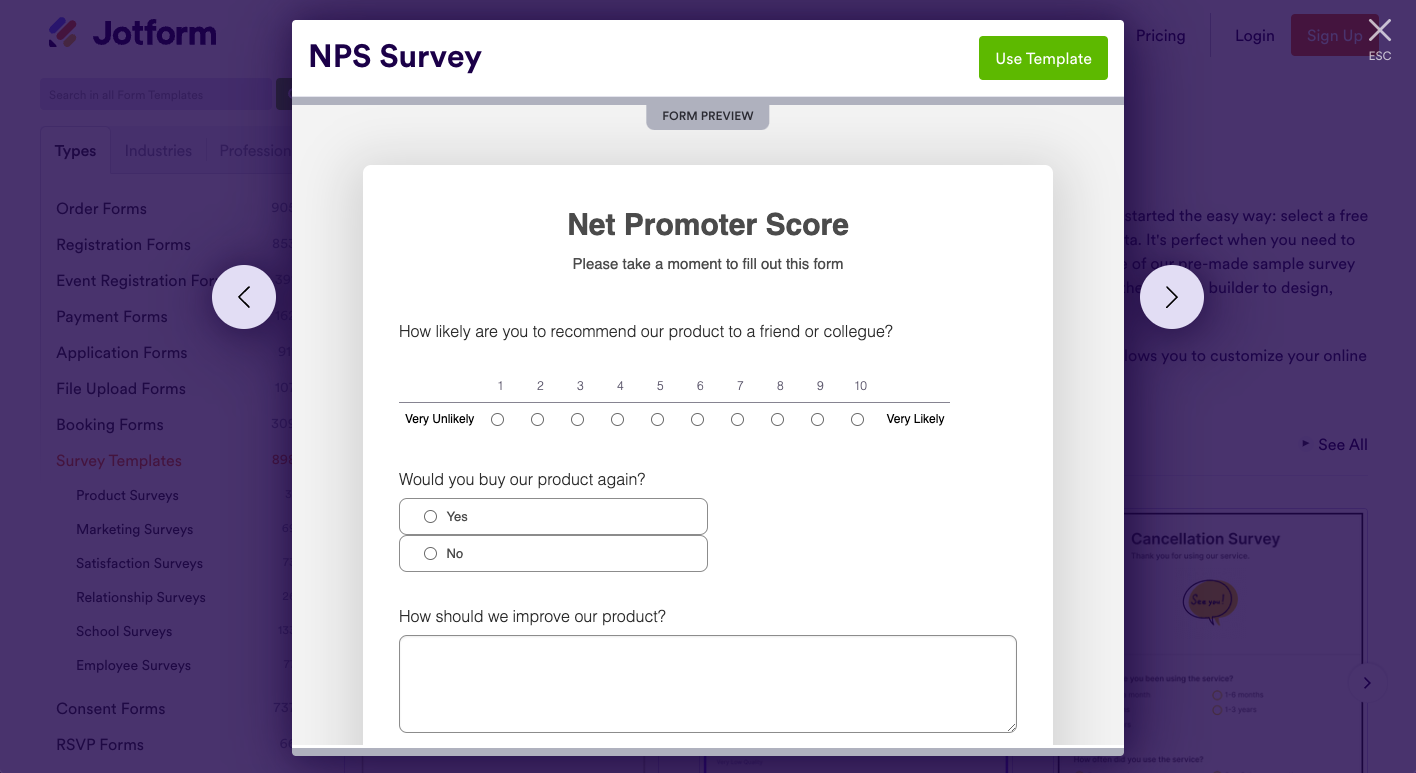
Jotform Enterprise ist ein Online-Formularersteller, der verschiedene Umfragearten zu unterschiedlichsten Themen und Zwecken der Datenerhebung ermöglicht. In einem Gespräch mit Kumar Vaibhav Tanwar, Gründer der Clickworthy Digital Marketing Agency und seit über 4 Jahren Jotform-Nutzer, hob er einige bedeutende Vorteile hervor: “Die Datenverschlüsselung von Jotform hat uns Ruhe verschafft. Die Formulare erlauben bedingte Logik und bieten viele Feldtypen, einschließlich Datei-Upload und E-Signatur. Es fungiert als zuverlässiger Einstiegsschritt in unserem Workflow.”
Warum ich Jotform Enterprise gewählt habe: Die Software besticht durch ihre robusten Sicherheitsfunktionen und strengen Compliance-Standards. Ich war beeindruckt von der Fähigkeit, strikte Anforderungen an Datenschutz und Datensicherheit durchzusetzen. Zu den Funktionen gehören sichere Datenspeicherung, Ende-zu-Ende-Verschlüsselung und hohe Compliance-Standards (einschließlich HIPAA und DSGVO). Das macht sie zur ersten Wahl für Unternehmen in stark regulierten Branchen wie Finanzen, Gesundheitswesen und öffentliche Verwaltung.
Herausragende Funktionen und Integrationen:
Die Software basiert hauptsächlich auf Vorlagen. Hat man sich für eine entschieden, kann man mit dem Jotform Enterprise Form Builder das Umfrageformular gestalten, formatieren und anpassen. Zu den Parametern, die anpassbar sind, zählen Text, Feldtypen, voreingestellte Optionen, Eintragslimits und die Möglichkeit, Felder als optional festzulegen.
Sie können Fragen hinzufügen, bedingte Logik einrichten und eigene Umfragen über verschiedene Kanäle wie E-Mail, Business-Apps und Websites teilen. Nach der Verteilung können Sie sofort mit dem Sammeln von Antworten beginnen.
Beim Umfrageformat können Sie das für Ihre Anforderungen passende wählen, von klassischen bis hin zu Kartenformularen. Letztere nutzen Jotform Cards, ein Format, das pro Seite nur eine Frage anzeigt und die Rücklaufquote erhöhen soll.
Neben vordefinierten Umfragevorlagen bietet Jotform Enterprise alles, was Sie benötigen, um Formulare von Grund auf zu erstellen, darunter einen App-Builder, einen Berichtsgenerator, Freigabeworkflows und smarte PDFs.
Integrationen sind verfügbar mit Box, OneDrive, Airtable, Google Drive, PayPal Business, Google Sheets, Google Calendar, Slack, HubSpot, monday.com und anderen Apps.
Pros and Cons
Pros:
- Drag-and-Drop-Builder vereinfacht die Erstellung von NPS-Umfragen
- Lässt sich in Formulare, Zahlungs- und Umfrageworkflows integrieren
- Unterstützt Offline-Datenerfassung und mobile Optimierung
Cons:
- Die Analysefunktionen für NPS-Programme sind noch recht grundlegend
- Das Einrichten von bedingter Logik kann zusätzliche Einarbeitung erfordern

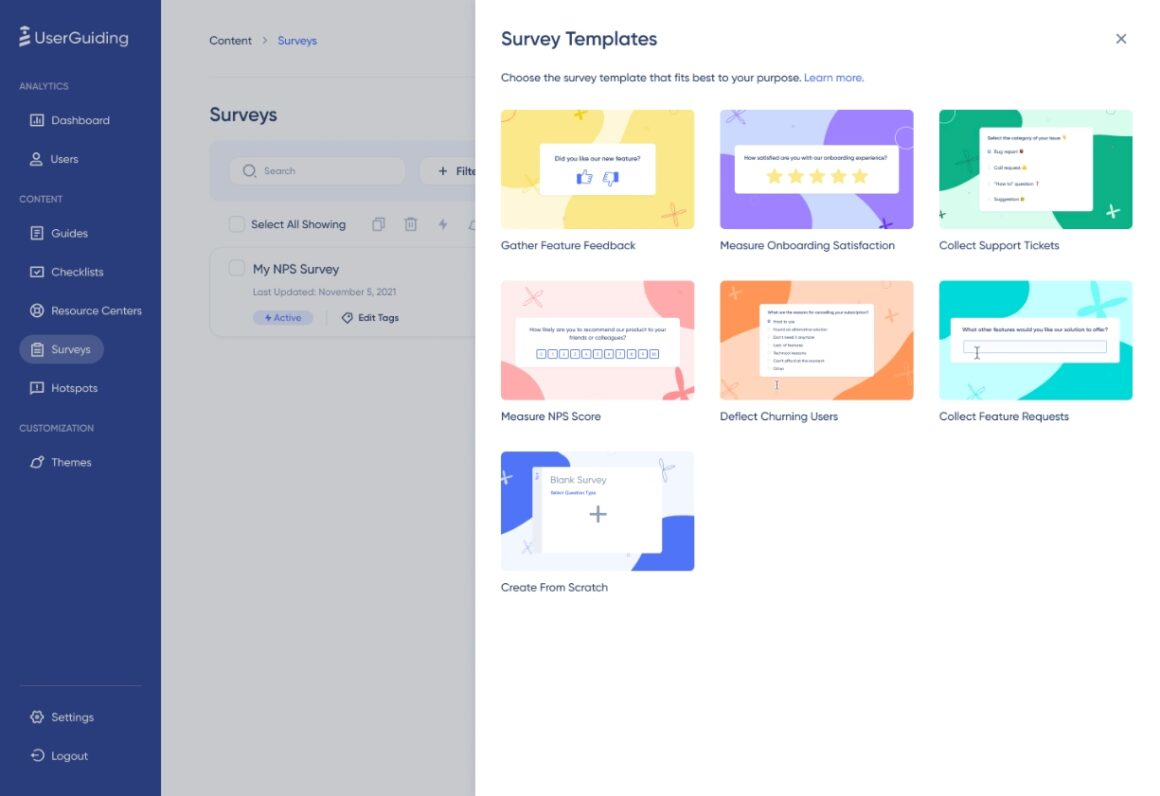
UserGuiding ist eine Customer-Success-Software, mit der Sie interaktive Rundgänge durch Ihre Produkte erstellen können. Sie hilft Ihnen außerdem, Kundenfeedback über Mikro-Umfragen zu sammeln, die NPS-Daten in Echtzeit liefern.
Warum ich UserGuiding ausgewählt habe: Diese Software hat mich wegen ihrer Echtzeit-Berichterstattung überzeugt. Während Kunden Ihre Umfragen ausfüllen, erhalten Sie die Ergebnisse im Analyse-Dashboard und können etwaige Probleme frühzeitig erkennen. Ich schätze, dass die Umfragen für Kunden schnell und einfach sind, was die Rücklaufquote wahrscheinlich verbessert.
Neben der Feedbacksammlung kann die Software das Onboarding neuer Nutzer und die Kundenadaption digitaler Produkte unterstützen. Sie können Produkttouren einrichten, bei denen Nutzer verschiedene Produktfunktionen und -merkmale kennenlernen. So entlasten Sie Ihr CX-Team und sorgen für ein besseres Nutzererlebnis.
Herausragende Funktionen und Integrationen von UserGuiding:
Funktionen umfassen die Bibliothek mit vorgefertigten Vorlagen, mit der Sie schnell eine Umfrage für Ihre Kunden erstellen können. Sie können auch ganz einfach eine eigene Umfrage gestalten, da das System komplett ohne Programmierung auskommt. Nachdem Sie genug Informationen gesammelt haben, können Sie die Daten auf Ihren Computer herunterladen und in anderer Software weiterverwenden.
Integrationen enthalten Mixpanel, Segment, Intercom, Slack, Google Analytics, Google Tag Manager, Woopra und HubSpot.
Pros and Cons
Pros:
- Schnelle Einrichtung; Onboarding- und NPS-Workflows einfach startbar
- Stark für Teams, die Produktadoption und NPS-Tracking kombinieren
- Intuitive Benutzeroberfläche und minimaler technischer Aufwand
Cons:
- NPS-fokussierte Logik und Analytik noch ausbaufähig
- Einige weiterführende Anpassungen (Branding, Berichte) sind eingeschränkt

Sogolytics
Am besten geeignet für die Verteilung von NPS-Umfragen über mehrere Kanäle
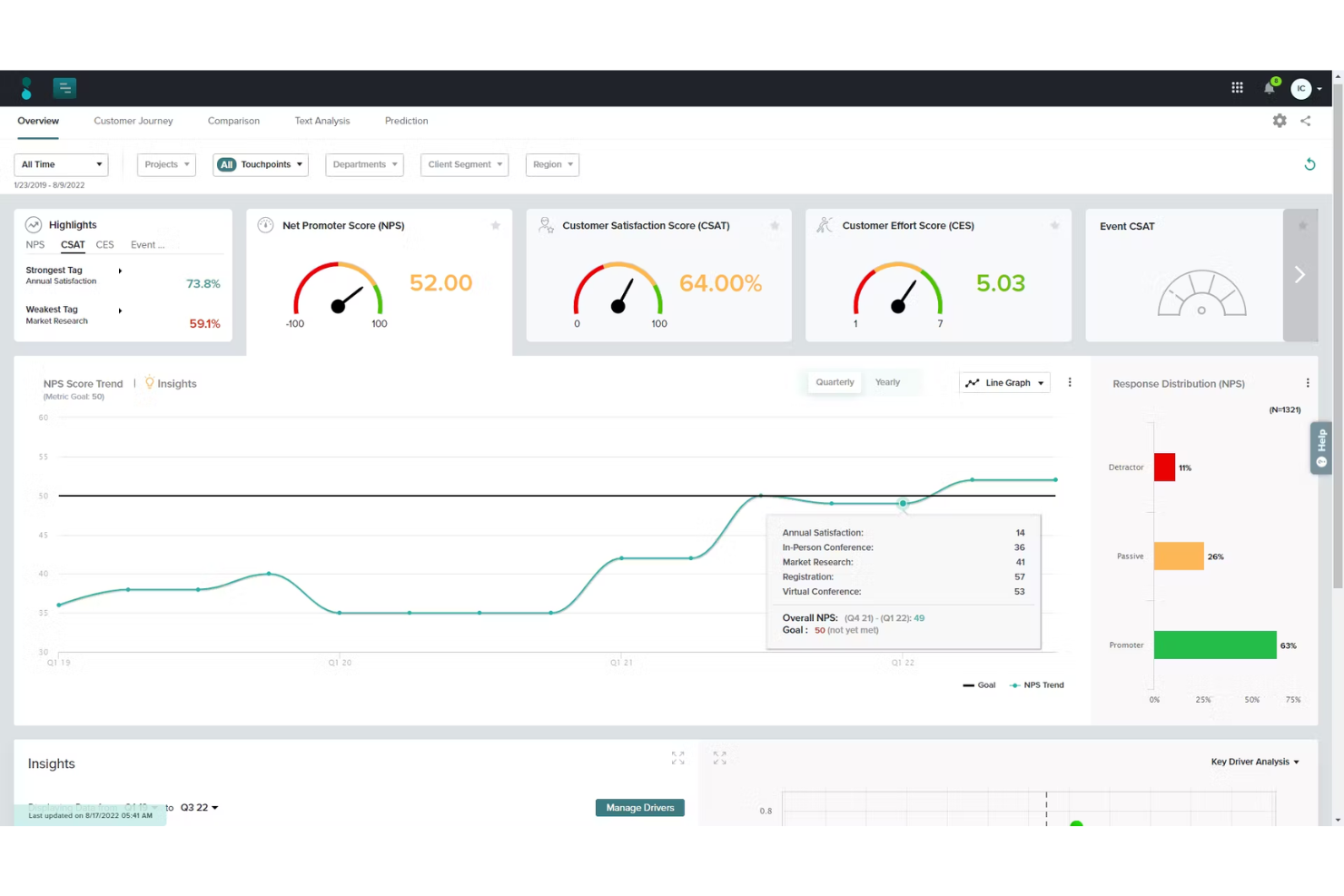
Sogolytics ist eine fortschrittliche Online-Plattform für Umfragen und Feedback-Management, die Unternehmen dabei unterstützt, wertvolle Einblicke durch verschiedene Arten von Umfragen zu gewinnen. Sie bietet eine umfassende Lösung zum Erstellen, Verteilen und Analysieren von Umfragen und ermöglicht Organisationen, datenbasierte Entscheidungen zu treffen.
Warum ich Sogolytics ausgewählt habe: Sogolytics überzeugt durch seine leistungsstarken Funktionen, die speziell für das NPS-Tracking und die Analyse entwickelt wurden. Die Plattform ermöglicht die Erstellung individualisierter NPS-Umfragen, die über verschiedene Kanäle verteilt werden können. Zudem bietet sie Echtzeit-Reporting und Analysen, sodass Unternehmen ihren NPS in Echtzeit überwachen und schnell auf Feedback reagieren können. Die Möglichkeit, die Befragten nach ihren NPS-Bewertungen zu segmentieren, hilft Organisationen dabei, Promotoren, Passive und Kritiker zu identifizieren, was gezielte Nachfassaktionen und personalisierte Engagement-Strategien ermöglicht.
Sogolytics Herausragende Funktionen und Integrationen:
Funktionen umfassen erweiterte Umfragelogik, Multi-Channel-Verteilung, Echtzeit-Analysen, automatische Erinnerungen, anpassbare Umfragevorlagen, Optionen für anonyme Umfragen, Stimmungsanalysen, Tools zur Erstellung von Quizzen und detaillierte Berichte.
Integrationen umfassen Salesforce, Zapier, Google Analytics, Slack, Microsoft Teams, HubSpot und Mailchimp.
Pros and Cons
Pros:
- Starke Logik und Verzweigungen für komplexe Umfragen
- Multi-Channel-Verteilung umfasst Mobilgeräte, E-Mail, Web
- Leistungsstarke Analysen und Segmentierung für handlungsorientierte Einblicke
Cons:
- Layout der Benutzeroberfläche kann überladen und veraltet wirken
- Einige erweiterte Funktionen erfordern erheblichen Einrichtungsaufwand

Velaris
Am besten geeignet für die automatisierte Sammlung von Kundenfeedback
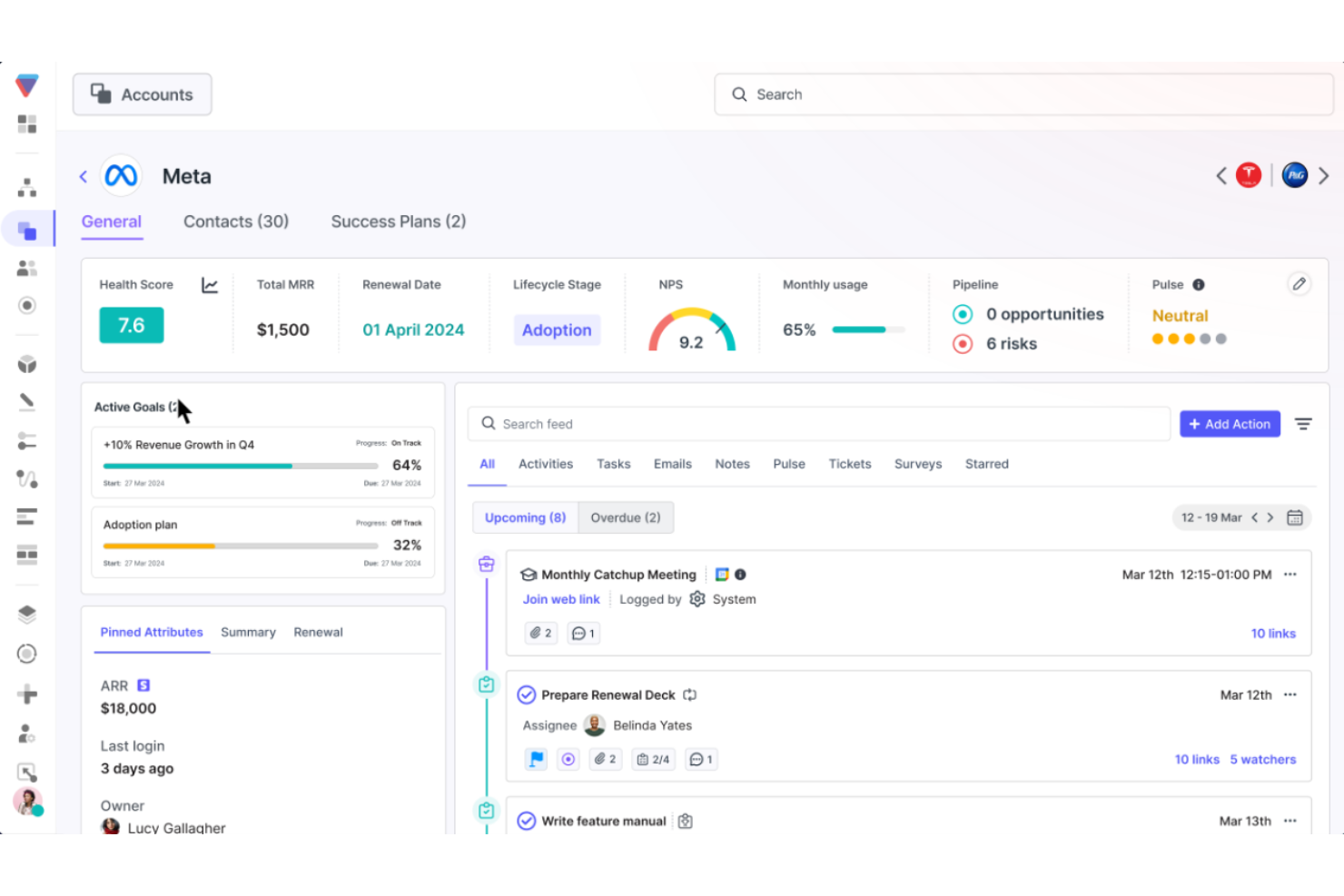

Velaris ist eine Customer-Success-Plattform, die speziell für Customer-Success-Manager, Führungskräfte und CS-Leiter entwickelt wurde und Tools für KI-gestützte Analysen, Automatisierung, Produktivität sowie Kundenkommunikation bietet.
Warum ich Velaris ausgewählt habe: Velaris zeichnet sich als Net-Promoter-Score-Software durch seine anpassbaren In-App-Umfragen aus. Sie können diese Umfragen individuell an Ihr Branding anpassen, sodass Ihre Kunden ein nahtloses Erlebnis haben. Diese Personalisierung erhöht die Rücklaufquoten und liefert genauere Einblicke in die Kundenloyalität.
Zusätzlich bietet Velaris Automatisierungsfunktionen, mit denen Sie Umfragen und Folge-E-Mails basierend auf bestimmten Auslösern oder Zeitplänen terminieren können. So wird eine rechtzeitige Feedback-Erfassung ohne manuellen Aufwand gewährleistet, sodass sich Ihr Team auf die Analyse der Ergebnisse und die Umsetzung von Verbesserungen konzentrieren kann.
Herausragende Funktionen und Integrationen:
Funktionen umfassen Segmentierungsoptionen, mit denen Sie gezielt bestimmte Kundengruppen mit maßgeschneiderten Umfragen ansprechen können, Echtzeit-Feedbackanalyse, um Trends und Verbesserungsbedarf schnell zu erkennen, sowie proaktive Benachrichtigungen, die Ihr Team bei signifikanten Veränderungen der Kundenzufriedenheit alarmieren und so ein schnelles Handeln zur Problemlösung ermöglichen.
Integrationen umfassen HubSpot, Salesforce, Slack, Microsoft Teams, Intercom, MailChimp, Outlook, Google Drive und Jira.
Pros and Cons
Pros:
- Kundendaten und Feedback werden zentral in einer Ansicht gebündelt
- Automatisierung unterstützt Folgemaßnahmen nach NPS-Antworten
- Starke Segmentierung und Gesundheitsbewertung für Feedbackgruppen
Cons:
- Anpassung des Dashboards und Oberflächenoptionen sind eingeschränkt
- Einrichtung erfordert mehr interne Ressourcen für den vollen Nutzen
Auswahlkriterien für Net Promoter Score Software
Um die besten Net Promoter Score Software-Lösungen für diese Liste auszuwählen, habe ich typische Kundenanforderungen und Schmerzpunkte wie die Integrationsfähigkeit mit bestehenden Systemen und die Anpassbarkeit von Umfragen berücksichtigt. Zudem habe ich nach folgendem strukturierten und fairen Schema ausgewertet:
Kernfunktionen (25 % der Gesamtbewertung)
- Kundenfeedback sammeln
- Kundenloyalität messen
- Feedback-Trends analysieren
- Kundendaten segmentieren
- Detaillierte Berichte erstellen
Weitere herausragende Funktionen (25 % der Gesamtbewertung)
- Echtzeit-Feedbackanalyse
- Predictive Analytics
- Anpassbare Umfragevorlagen
- Mehrsprachige Unterstützung
- Erweiterte Tools zur Datenvisualisierung
Benutzerfreundlichkeit (10 % der Gesamtbewertung)
- Intuitives Interface-Design
- Einfache Navigation
- Klare Datenpräsentation
- Responsives Design für mobile Nutzung
- Minimale Lernkurve
Onboarding (10% der Gesamtpunktzahl)
- Verfügbarkeit von Trainingsvideos
- Interaktive Produkttouren
- Zugang zu Webinaren und Workshops
- Umfassende Benutzerdokumentation
- Effizienter Datenmigrationsprozess
Kundensupport (10% der Gesamtpunktzahl)
- 24/7 erreichbarer Kundensupport
- Live-Chat und telefonischer Support
- Umfangreiche Wissensdatenbank
- Reaktionsschnelles Kundenserviceteam
- Verfügbarkeit von persönlichen Account-Managern
Preis-Leistungs-Verhältnis (10% der Gesamtpunktzahl)
- Konkurrenzfähige Preismodelle
- Transparente Preisstruktur
- Rabatte bei langfristigen Verpflichtungen
- Kostenlose Testoptionen
- Umfangreicher Funktionsumfang auf allen Preisstufen
Kundenbewertungen (10% der Gesamtpunktzahl)
- Hohe Kundenzufriedenheitsbewertungen
- Positives Feedback zur Benutzerfreundlichkeit
- Konsistentes Lob für Leistung
- Starke Empfehlungen von Nutzern
- Hohe Verlängerungs- und Bindungsraten
So wählen Sie eine Net Promoter Score Software aus
Es ist leicht, sich in endlosen Funktionslisten und komplexen Preisstrukturen zu verlieren. Damit Sie während Ihres individuellen Auswahlprozesses den Überblick behalten, finden Sie hier eine Checkliste mit wichtigen Faktoren:
| Faktor | Was Sie beachten sollten |
|---|---|
| Skalierbarkeit | Kann die Software mit Ihrem Unternehmen wachsen? Suchen Sie nach Lösungen, die steigende Datenmengen und Nutzerzahlen ohne Leistungseinbußen verarbeiten können. |
| Integrationen | Lässt sich die Software mit Ihren bestehenden Systemen wie CRM oder Helpdesk-Software integrieren? Sorgen Sie für einen nahtlosen Datenfluss zwischen den Plattformen, um manuelle Datenerfassung zu vermeiden. |
| Anpassbarkeit | Können Sie die Software an Ihre spezifischen Anforderungen anpassen? Prüfen Sie, ob sie benutzerdefinierte Umfragen, Ihr Branding und Berichte unterstützt, die zu Ihrem Arbeitsablauf passen. |
| Benutzerfreundlichkeit | Ist die Software für Ihr Team intuitiv? Eine komplizierte Benutzeroberfläche kann die Akzeptanz erschweren. Wählen Sie benutzerfreundliche Lösungen mit klarer Navigation. |
| Implementierung und Onboarding | Wie lange dauert es, bis Sie startklar sind? Bewerten Sie den Support und die Schulungsangebote des Anbieters, um einen reibungslosen Start zu gewährleisten. |
| Kosten | Gibt es versteckte Gebühren? Vergleichen Sie die Preismodelle und achten Sie auf Mehrkosten für zusätzliche Nutzer oder Funktionen. |
| Sicherheitsmaßnahmen | Wie schützt die Software Ihre Daten? Stellen Sie sicher, dass sie branchenspezifische Standards einhält und Verschlüsselung sowie Zugriffskontrollen bietet. |
| Supportverfügbarkeit | Welchen Support bietet der Anbieter? Berücksichtigen Sie die Erreichbarkeit des Kundenservice und technischen Supports, wenn Probleme auftreten. |
Funktionen von Net Promoter Score Software
Wenn Sie eine Net Promoter Score Software auswählen, achten Sie besonders auf folgende Schlüsselfunktionen:
- Umfrageanpassung: Erstellen, ändern und gestalten Sie Umfragen so, dass sie zur Stimme und zum Stil Ihres Unternehmens passen. So können Sie leichter eine Verbindung zu Ihrem Publikum herstellen und gezielt die Erkenntnisse sammeln, die für Sie am wichtigsten sind.
- Multi-Kanal-Verteilung: Versenden Sie Umfragen per E-Mail, SMS, Web oder In-App-Benachrichtigungen, um Nutzer überall dort zu erreichen, wo sie sind, und Ihre Rücklaufquoten zu maximieren.
- Echtzeit-Analysen: Erhalten Sie Feedback live, sobald es eingeht. So können Sie Trends frühzeitig erkennen und umgehend auf Erkenntnisse reagieren. Dies hilft dabei, Probleme schnell anzugehen und das Kundenerlebnis zu verbessern.
- Automatisierte Follow-up-Workflows: Richten Sie Auslöser ein, um automatisch auf Kritiker, Passive oder Fürsprecher zu reagieren. Dieser automatisierte Ansatz ermöglicht Ihnen zeitnahe Antworten und zeigt Ihren Kunden, dass Ihnen ihre Meinung wichtig ist.
- Antwortsegmentierung: Teilen Sie Daten nach Kundentyp, Segment, Region oder anderen Kategorien auf, um zu verstehen, wie verschiedene Gruppen empfinden, und passen Sie Ihre Strategien gezielt an.
- Historische Nachverfolgung: Verfolgen Sie NPS-Werte im Zeitverlauf, sodass Sie Veränderungen leicht erkennen, die Auswirkungen Ihrer Maßnahmen verstehen und Ihre Fortschritte feiern können.
- Datenintegration: Verbinden Sie NPS-Daten mit Ihrem CRM, Helpdesk oder Marketing-Plattformen, um eine umfassendere Sicht auf die Customer Journey zu erhalten und Gelerntes leichter umzusetzen.
- Berechtigungssteuerung: Entscheiden Sie, wer in Ihrem Team Umfragedaten einsehen oder verwalten darf – so bleiben sensible Informationen sicher und nur in den richtigen Händen.
Häufige KI-Funktionen von Net Promoter Score Software
Über die oben beschriebenen Standardfunktionen hinaus integrieren viele dieser Lösungen zunehmend Künstliche Intelligenz mit folgenden Möglichkeiten:
- Stimmungsanalyse: Offene Antworten in Umfragen werden automatisch ausgewertet, um herauszufinden, ob das Feedback positiv, negativ oder neutral ist. Das spart Zeit und hebt Erkenntnisse hervor, die ansonsten vielleicht übersehen worden wären.
- Vorhersage von Kündigungsrisiken: KI erkennt Kunden, die mit hoher Wahrscheinlichkeit abwandern werden, sodass Sie proaktive Maßnahmen zur Kundenbindung ergreifen können, bevor es zu spät ist.
- Automatisierte Themenextraktion: KI gruppiert Feedback nach gemeinsamen Themen, damit Sie Ursachen hinter Ihren NPS-Werten erkennen und gezielt Verbesserungen priorisieren können.
- KI-gestützte Antwortvorschläge: Erhalten Sie Empfehlungen für Folgeaktionen zu unterschiedlichen Arten von Feedback, damit Sie auf sinnvolle Weise mit Kunden interagieren – ohne an Ihrer Vorgehensweise zu zweifeln.
- Textzusammenfassung: Ausführliche Kundenkommentare werden in kurze, leicht verständliche Erkenntnisse verwandelt, damit Sie stets den Überblick behalten, ohne in Daten zu versinken.
Vorteile von Net Promoter Score Software
Die Implementierung von Net Promoter Score Software bietet für Ihr Team und Ihr Unternehmen zahlreiche Vorteile. Auf einige davon können Sie sich freuen:
- Datenbasierte Erkenntnisse: Die Software unterstützt fundierte Entscheidungen, indem sie Erkenntnisse auf Basis von Kundenfeedback und -bewertungen liefert.
- Verbesserte Zusammenarbeit: Sie fördert die Teamarbeit, da mehrere Benutzer am Kundenfeedback und an der Strategie mitwirken können.
- Kundensegmentierung: Feedback kann nach Kundentyp segmentiert werden, um unterschiedliche Kundenbedürfnisse besser zu verstehen.
- Benutzerfreundliche Oberfläche: Eine intuitive Gestaltung ermöglicht es Teammitgliedern, die Software einfach zu bedienen und effizient zu nutzen.
- Integrationsfähigkeit: Die Software lässt sich in bestehende Tools integrieren und fügt sich somit nahtlos in vorhandene Arbeitsabläufe ein.
- Skalierbarkeit: Sie unterstützt das Wachstum Ihres Unternehmens, indem sie wachsende Mengen an Feedback und Kundendaten problemlos verarbeitet.
- Strategische Ausrichtung: Die Software stellt sicher, dass die Bemühungen Ihres Teams auf strategische Geschäftsziele ausgerichtet bleiben und der Fokus auf Kennzahlen zur Kundenzufriedenheit gewahrt wird.
Kosten und Preise von Net Promoter Score Software
Bei der Auswahl von Net Promoter Score Software ist es wichtig, die verschiedenen verfügbaren Preismodelle und Tarife zu verstehen. Die Kosten variieren je nach Funktionsumfang, Teamgröße, Zusatzfunktionen und mehr. Die folgende Tabelle fasst gängige Tarife, ihre Durchschnittspreise und die typischen Funktionen zusammen, die in Net Promoter Score Software enthalten sind:
Tarifvergleichstabelle für Net Promoter Score Software
| Tarifart | Durchschnittlicher Preis | Typische Funktionen |
|---|---|---|
| Gratis-Tarif | $0 | Basis-Umfrageerstellung, begrenzte Anzahl an Antworten, grundlegende Analysen. |
| Persönlicher Tarif | $10-$30/user/month | Individuelles Branding, mittlere Rücklaufgrenzen, grundlegende Integrationen. |
| Business-Tarif | $50-$100/user/month | Erweiterte Analysen, Kollaborationstools für Teams, priorisierter Support. |
| Enterprise-Tarif | Individuelle Preisgestaltung | Voller API-Zugang, dedizierter Support, erweiterte Benutzerverwaltung und SSO-Optionen. |
FAQ: Alles über NPS und Kundenzufriedenheit
Suchen Sie weitere Informationen zum Kundenfeedback-Prozess und dazu, wie Sie die Kundenzufriedenheit messen können? Hier finden Sie Antworten auf häufige Fragen:
Wie können Sie Net Promoter Score-Daten nutzen?
Sie können NPS-Daten nutzen, um loyale Kunden zu identifizieren, Ursachen für Unzufriedenheit aufzudecken und Verbesserungen im Unternehmen voranzutreiben. Die meisten NPS-Umfragetools helfen Ihnen dabei, Folgeaktionen für Kritiker zu automatisieren, Fürsprecher zu feiern und interne Warnungen für risikobehaftete Konten einzurichten. Durch die Analyse von Kommentaren und der Aufschlüsselung der Ergebnisse lassen sich umsetzbare Erkenntnisse mit Produkt-, Support- und Führungsteams teilen. Wenn Sie NPS-Daten mit bestimmten Kundenreisen verknüpfen, können Sie genau feststellen, an welchen Stellen Erlebnisse scheitern, sodass Sie Probleme schnell angehen und die Auswirkungen von Veränderungen im Zeitverlauf messen können.
Gibt es ein kostenloses NPS-Tool?
Ja, es gibt mehrere NPS-Softwarelösungen, die dauerhaft kostenlose Tarife oder Testversionen anbieten. Damit können Sie in der Regel einfache NPS-Umfragen erstellen, sie per E-Mail oder Web verteilen und Feedback-Dashboards in Echtzeit ansehen. Beliebte Plattformen wie SurveyMonkey, Hotjar und Startquestion bieten kostenlose Optionen an, aber beachten Sie, dass die Gratis-Tarife die Häufigkeit, das Antwortvolumen, Branding-Möglichkeiten und Datenexport einschränken können. Wenn Sie NPS-Tools für Ihr Team bewerten, probieren Sie mehrere aus, um festzustellen, welches am besten zu Ihrem Workflow, Ihren Datenanforderungen und zukünftigen Integrationsplänen passt.rnrnWenn Sie nach einer analogen Lösung suchen, ist das ursprüngliche kostenlose Net Promoter Score-Tool ein Rechner, gefolgt von einer Excel-Tabelle.
Wie integriere ich NPS-Software in mein CRM- oder Helpdesk-System?
Die meisten führenden NPS-Plattformen ermöglichen eine unkomplizierte Integration mit wichtigen CRM- oder Helpdesk-Systemen und bieten native Verbindungen zu Salesforce, HubSpot, Zendesk, Intercom und weiteren. Durch die Integration können Sie NPS-Umfragen nach Supportkontakten oder an wichtigen Punkten der Kundenreise auslösen, Antworten direkt im Kundenprofil speichern und automatisierte Workflows basierend auf den Umfrageergebnissen erstellen. Einige Tools bieten APIs oder arbeiten mit Middleware wie Zapier oder Make, wenn Sie komplexere oder individuellere Anbindungen benötigen. Prüfen Sie vor der Wahl einer Plattform den Katalog an vorgefertigten Integrationen und ob die Einrichtung Programmierkenntnisse oder spezielle technische Unterstützung erfordert.
Worauf sollte ich achten, wenn ich NPS-Software für mein Team auswähle?
Setzen Sie auf Software, mit der Sie Umfragen schnell und einfach erstellen und starten können und die genügend Flexibilität bei den Vorlagen für verschiedene Berührungspunkte bietet. Achten Sie auf umfangreiche Analysen, die das Aufschlüsseln der Ergebnisse nach Kundensegment, Journey-Phase oder Kanal ermöglichen. Leistungsfähige Integration erlaubt die Verbindung der NPS-Daten mit CRM-, Helpdesk- oder BI-Tools, sodass Ihr gesamtes Team damit arbeiten kann. Funktionen wie Workflow-Automatisierung, Closed-Loop-Feedback-Tools und rollenbasierte Dashboards helfen beim Ausbau Ihres CX-Programms. Prüfen Sie Supportressourcen, Sicherheitszertifikate, Individualisierungsmöglichkeiten für das Branding sowie, wie gut sich das Preismodell an Ihr erwartetes Nutzungsverhalten anpasst.
Was sind Best Practices, um die Rücklaufquote bei NPS-Umfragen zu erhöhen?
Um höhere Rücklaufquoten bei NPS-Umfragen zu erzielen:rnu003culu003ern tu003cliu003eHalten Sie Ihre Umfragen kurz – idealerweise eine bis zwei Fragen –, sodass sie auf jedem Gerät schnell beantwortet werden können.u003c/liu003ern tu003cliu003ePersonalisieren Sie die Ansprache, indem Sie den Namen des Kunden sowie dessen aktuelle Interaktion mit Ihrer Marke erwähnen.u003c/liu003ern tu003cliu003eUmfragen per E-Mail erzielen meist bessere Ergebnisse, wenn sie zeitnah nach einem Schlüsselerlebnis, wie einem Kauf oder Supportkontakt, versendet werden.u003c/liu003ern tu003cliu003eErklären Sie, warum Sie um Feedback bitten und wie Sie die Ergebnisse zur Verbesserung des Kundenerlebnisses nutzen.u003c/liu003ern tu003cliu003eSie können auch mit unterschiedlichen Betreffzeilen, Erinnerungsschreiben für Nicht-Antwortende und In-App-Widgets für mehr Beteiligung experimentieren.u003c/liu003ernu003c/ulu003ernu0026nbsp;
Wie kann NPS-Software dabei helfen, den Feedback-Kreis zu schließen?
NPS-Plattformen unterstützen Sie dabei, den Feedback-Kreis zu schließen, indem sie negative Rückmeldungen automatisch für eine Nachverfolgung markieren, Tickets zuweisen und Erinnerungen an Ihr CX-Team senden. Viele Tools ermöglichen es, Workflows zu erstellen, damit Kritiker individuell angesprochen werden oder Manager über dringende Anliegen informiert werden. Sie können SLAs für die Reaktionszeiten festlegen und verfolgen, welche Kontakte bearbeitet wurden oder noch eskaliert werden müssen. Das Schließen des Feedback-Kreises verbessert nicht nur die Kundenzufriedenheit, sondern zeigt Ihren Kunden auch, dass ihr Feedback zu echten Veränderungen führt und damit Loyalität sowie Weiterempfehlungen fördert.
Kann NPS-Software Trends im Zeitverlauf verfolgen und Antworten segmentieren?
Ja, die meisten NPS-Tools bieten zeitbasierte Analysen, sodass Sie verfolgen können, wie sich die Werte von Monat zu Monat oder nach wichtigen Initiativen verändern. Eine fortgeschrittene Segmentierung erlaubt Ihnen, Antworten nach Produktlinie, Region, Team oder Kundenpersona zu filtern – so erkennen Sie genau, welche Bereiche sich verbessern und wo noch Handlungsbedarf besteht. Diese Erkenntnisse lassen sich in Dashboards visualisieren, für weitere Analysen exportieren oder in vierteljährliche Geschäftsberichte einfließen. Durch kontinuierliches Tracking und Segmentierung können Sie den ROI Ihrer Customer-Experience-Maßnahmen belegen und Ressourcen gezielt auf die wichtigsten Loyalitätstreiber konzentrieren.
Weitere Software für Kundenfeedback
NPS-Software ist nicht das einzige Tool, das es sich anzuschauen lohnt. Während Sie hier sind, finden Sie vielleicht genau das, was Sie suchen, in diesen anderen Feedback-Umfrage-Tools:
- Kundenfeedback-Software
- Online-Umfrage-Software
- Kundenerfahrungsmanagement-Software
- Umfrage-Analyse-Software
- Kostenlose Umfrage-Tools
Verstehen Sie Ihre Kunden besser mit der besten Net-Promoter-Score-Software
NPS-Berichte können Ihnen helfen, die Mitarbeiterzufriedenheit zu messen, zufriedene Kunden zu identifizieren und unzufriedene Kunden ausfindig zu machen. Jede Umfrageantwort kann genutzt werden, um eine umsetzbare Erkenntnis zur Förderung loyaler Kunden zu gewinnen.
Vergessen Sie nicht, sich für den The CX Lead Newsletter anzumelden. Wir halten Sie über die neuesten CX-Trends auf dem Laufenden, inklusive Tipps und How-To-Artikeln von Branchenexperten.