

Les 10 meilleurs logiciels de centre d’appels pour entreprises en 2026

10 Sélection des meilleurs logiciels de centre d'appels pour entreprises


Choisir le logiciel de centre d'appels pour entreprises adapté parmi d'innombrables options peut être décourageant. Vous avez besoin d'une solution qui facilite non seulement une communication efficace avec les clients sur différents canaux, mais qui fournit également des analyses pertinentes pour améliorer la qualité du service — et vous devez trouver celle qui convient à votre équipe. Je suis là pour vous aider. Dans cet article, je m'appuie sur mon expérience de l'évaluation de nombreux outils SaaS pour établir une sélection des meilleurs logiciels de centre d'appels pour entreprises.
Qu'est-ce qu'un logiciel de centre d'appels pour entreprise ?
Un logiciel de centre d'appels pour entreprise est un outil destiné à gérer les opérations de service client à grande échelle. Il s'adresse aux entreprises qui souhaitent améliorer leur système d'assistance client en fournissant une interface unifiée pour gérer les communications entrantes et sortantes sur plusieurs canaux de communication. Ce logiciel comprend généralement des fonctionnalités telles que la distribution automatique des appels, le serveur vocal interactif, l'enregistrement des appels, les analyses en temps réel et l'intégration avec d'autres systèmes professionnels (CRM, logiciel de centre d'assistance).
L'objectif est de garantir une prestation de services efficace aux grandes organisations qui ont besoin de solutions robustes et évolutives pour favoriser l'engagement des clients. Ces entreprises utilisent ce logiciel pour organiser les communications avec les clients, garantir une résolution rapide des demandes et maintenir un niveau élevé de satisfaction client. Elles bénéficient ainsi d'une meilleure efficacité opérationnelle, d'une fidélité accrue des clients et de la possibilité d'adopter des approches fondées sur les données pour améliorer les services et optimiser les performances.
Pourquoi faire confiance à nos recommandations de logiciels
Notre équipe teste et évalue des logiciels depuis 2012. En tant que leaders CX nous-mêmes, nous savons à quel point il est difficile — et important — de choisir le bon logiciel.
Pour ce guide, nous avons évalué les outils grâce à des tests pratiques et une recherche indépendante, en notant les outils selon nos critères de sélection.
Nos avis reflètent notre jugement éditorial humain, et non un argumentaire de vente.
Résumé du meilleur logiciel de centre de contact d’entreprise
| Tool | Best For | Trial Info | Price | ||
|---|---|---|---|---|---|
| 1 | Meilleur logiciel de centre d'appels pour les entreprises doté d'une gestion de la main-d'œuvre | Démo gratuite disponible | À partir de $15/utilisateur/mois (facturé annuellement) | Website | |
| 2 | Idéal pour le coaching d'agents en temps réel | Démo gratuite disponible | Tarification sur demande | Website | |
| 3 | Meilleur logiciel de centre d'appels d'entreprise pour le routage omnicanal | Démo gratuite disponible | À partir de 30 $/utilisateur/mois (facturation annuelle) | Website | |
| 4 | Idéal pour un support alimenté par l'IA | Essai gratuit + démo gratuite disponible | À partir de $25/utilisateur/mois (facturé annuellement) | Website | |
| 5 | Meilleur logiciel de centre d'appels pour entreprises avec intelligence conversationnelle alimentée par l'IA | Essai gratuit de 14 jours disponible | À partir de 19$/mois (facturé annuellement) | Website | |
| 6 | Meilleur logiciel de centre d'appels d'entreprise pour les appels sortants et SMS | Démo gratuite disponible | À partir de 15 $/utilisateur/mois (facturé annuellement) | Website | |
| 7 | Meilleur logiciel de centre d'appels pour l'entreprise avec assistance alimentée par l'IA | Démo gratuite disponible | À partir de $85/utilisateur/mois | Website | |
| 8 | Meilleur logiciel de centre d'appels d'entreprise pour l'engagement client | Essai gratuit disponible | Tarification sur demande | Website | |
| 9 | Meilleur logiciel de centre d’appels d’entreprise pour la technologie d’intelligence vocale assistée par l’IA | Essai gratuit de 14 jours disponible | À partir de $15/mois (facturé annuellement) | Website | |
| 10 | Idéal pour une solution cloud à la demande avec intelligence artificielle avancée | Démo gratuite disponible | Tarification sur demande | Website |
Présentation des 20 meilleurs logiciels de centre de contact d’entreprise
Voici une brève description de chaque logiciel de centre de contact d’entreprise, présentant le meilleur cas d’utilisation de chaque outil, ses fonctionnalités remarquables, ainsi que certains avantages et inconvénients. J’ai également inclus des captures d’écran pour vous donner un aperçu de leur interface utilisateur.

Nextiva
Meilleur logiciel de centre d'appels pour les entreprises doté d'une gestion de la main-d'œuvre

Nextiva est une plateforme unifiée de gestion de l'expérience client qui offre une suite complète d'outils et de fonctionnalités pour améliorer les interactions avec les clients. Son logiciel de centre d'appels constitue une solution conçue pour aider les agents à offrir de meilleures expériences.
Pourquoi j'ai choisi Nextiva : J'apprécie son composeur automatique alimenté par l'IA, qui propose des modes de numérotation prédictifs, en rafale et progressifs. Ces modes minimisent les temps d'inactivité et augmentent la productivité des agents en composant automatiquement les numéros et en reliant les appels répondus aux agents disponibles. La plateforme prend également en charge le routage omnicanal, permettant aux entreprises de gérer les interactions clients à travers divers canaux, tels que l'e-mail, le chat et les réseaux sociaux, en plus des appels vocaux.
De plus, Nextiva dispose de capacités avancées de gestion de la main-d'œuvre. Cela inclut des outils pour la planification, la prévision et le suivi en temps réel de la performance des agents. En collectant et en analysant les données, Nextiva aide les entreprises à identifier les périodes de pointe et à optimiser les niveaux de personnel, garantissant que des agents sont toujours disponibles lorsque nécessaire.
Fonctionnalités et intégrations phares de Nextiva
Fonctionnalités : SVI avancé, routage des appels personnalisable, chatbots alimentés par l'IA, scripts dynamiques, assistants virtuels intelligents, enregistrement et supervision des appels, tableaux de bord en temps réel, analyses vocales et textuelles, traitement des paiements sécurisé et analyse du sentiment.
Intégrations : Zoho CRM, Zendesk, Salesforce, HubSpot, Microsoft Teams, Microsoft Outlook, Slack, ServiceNow, QuickBooks, SugarCRM, NetSuite et Oracle Sales Cloud.
Pros and Cons
Pros:
- Fonctionnalités d'analyses et de rapports détaillés
- Fonctionnalités de collaboration d'équipe
- Fonctionnalités IA pour les tâches répétitives
Cons:
- Les fonctionnalités avancées peuvent être compliquées à configurer
- De nombreuses intégrations clés ne sont disponibles qu'avec des forfaits supérieurs

Cresta
Idéal pour le coaching d'agents en temps réel

Cresta est une plateforme de centre de contact native à l'IA qui réunit l'assistance en temps réel pour les agents, l'intelligence conversationnelle, la gestion de la qualité, le coaching automatisé et des agents virtuels alimentés par l'IA pour les canaux vocaux et numériques.
À qui s'adresse Cresta ?
Cresta convient particulièrement aux centres de contact d'entreprise dans des secteurs tels que les services financiers, l'assurance, les télécommunications et le commerce de détail, qui gèrent des opérations de support vocal et numérique à grande échelle.
Pourquoi j'ai choisi Cresta
J'ai inclus Cresta dans mes meilleures sélections car son coaching en temps réel va bien au-delà des simples alertes et rappels. Pendant les appels en direct, le moteur de guidage comportemental de Cresta propose des indices contextuels et des suggestions d'actions adaptées à ce qui est réellement dit, et non à partir de scripts génériques. J'apprécie aussi la manière dont l'Agent de Connaissance fournit instantanément des réponses fondées sur des sources au cours d'une conversation, ce qui évite aux agents de naviguer entre plusieurs systèmes en plein appel. Cette combinaison de coaching comportemental en direct et de récupération de connaissances pendant la conversation distingue Cresta des outils qui ne font qu'analyser la performance après coup.
Fonctionnalités clés de Cresta
- Résumés d'appels générés par l'IA : Cresta génère des résumés structurés à l'issue de chaque interaction, capturant les thèmes clés, les résultats et les actions à entreprendre sans prise de notes manuelle.
- Constructeur de flux de travail Opera : Un outil sans code qui permet aux équipes opérationnelles de configurer et déployer des modèles IA, des déclencheurs de coaching et des règles d'automatisation sans assistance des ingénieurs.
- Analyste IA : Une interface en langage naturel permettant aux managers d'interroger les données conversationnelles pour mettre en lumière des tendances, des schémas et des écarts de performance sur l'ensemble du centre de contact.
- Agent IA : Un agent virtuel qui gère les interactions vocales et numériques automatisées, et transmet à un agent humain lorsque la conversation nécessite une intervention humaine.
Intégrations de Cresta
Cresta s'intègre aux plateformes de centre de contact d'entreprise comme Salesforce Service Cloud ou Genesys. Sa page d'intégrations mentionne des connexions de téléphonie et chat avec Five9, Amazon Connect et NICE, ainsi que des plateformes CRM et CCaaS comme Salesforce, Genesys, NICE et Twilio. Les clients de Zoom Contact Center peuvent aussi déployer l'intégration voix en temps réel de Cresta. Cresta se connecte également à des plateformes CRM et centres de contact leaders, notamment Zendesk et Amazon Connect, ainsi qu'à des outils de données comme Databricks. Une API est disponible pour des intégrations personnalisées.
Pros and Cons
Pros:
- Toutes les conversations sont notées sans effort manuel
- Des suggestions de coaching apparaissent en temps réel durant les appels
- Les agents humains et IA bénéficient d'une supervision cohérente
Cons:
- L'assistance basée sur la connaissance peut mal interpréter l'intention de l'appelant
- Nécessite une équipe dédiée à l'optimisation de l'IA

Meilleur logiciel de centre d'appels d'entreprise pour le routage omnicanal
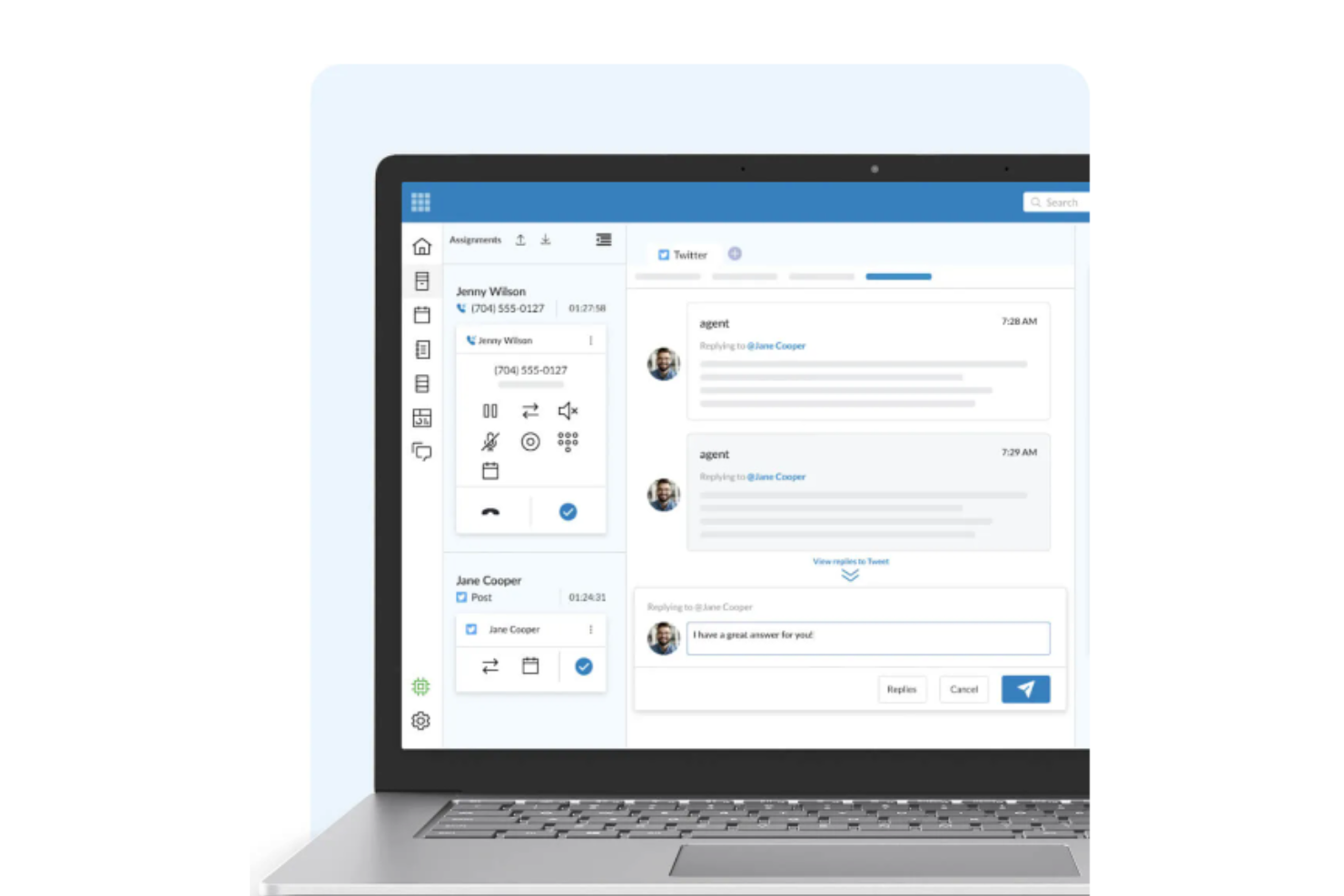
RingCentral Contact Center est une solution de service client basée sur le cloud qui offre aux entreprises une plateforme permettant de gérer les interactions clients à travers divers canaux de communication, dont la voix, le chat, l'e-mail et les réseaux sociaux.
Pourquoi j'ai choisi RingCentral : J'ai choisi RingCentral Contact Center pour cette liste car il prend en charge plus de 30 canaux numériques, y compris les principales applications de messagerie mobile et de réseaux sociaux, et propose une plateforme unique et intégrée pour tous les canaux. Les clients peuvent résoudre leurs problèmes par téléphone avec des agents en direct ou via des outils en libre-service et des chatbots alimentés par l'IA.
De plus, RingCentral Contact Center propose un centre de contact à priorité IA nommé RingCX, qui est facile à utiliser et à déployer, ainsi qu'une solution plus avancée pour les déploiements d'entreprise à grande échelle. La plateforme utilise également des systèmes de RVI pour déterminer l'objet des appels entrants à travers des questions et réponses automatisées, puis transmet les réponses aux répartiteurs automatiques d'appels pour un aiguillage adéquat et une attribution efficace aux agents. En outre, RingCentral Contact Center facilite le service client grâce à des fonctionnalités telles que le routage omnicanal, la distribution automatique des appels, la réponse vocale interactive, le composeur automatique et la gestion de l'engagement des collaborateurs.
Caractéristiques et intégrations remarquables de RingCentral Contact Center
Fonctionnalités : agrégation des avis pour l'analyse et l'évaluation, routage basé sur les compétences, routage des messageries vocales, rappel automatique, déviation d'appel, outils de gestion de campagne, appels mixtes, gestion des risques de non-conformité, gestion de listes, capacités de gestion du personnel, enregistrement et supervision des appels.
Intégrations : Salesforce, Microsoft Dynamics, Oracle Service Cloud, ServiceNow, Zendesk, SAP Cloud for Customer (C4C), NetSuite, Microsoft Teams, SugarCRM et MailChimp.
Pros and Cons
Pros:
- Notifications par email pour les appels et messages vocaux manqués
- Excellente qualité vocale
- Possibilité de transférer les appels entrants
- Notifications par email pour les appels et messages vocaux manqués
- Excellente qualité vocale
- Possibilité de transférer les appels entrants
Cons:
- Absence d'identification et de blocage des appels SPAM
- Latence occasionnelle du programme
- Absence d'identification et de blocage des appels SPAM
- Latence occasionnelle du programme

Idéal pour un support alimenté par l'IA

Salesforce Service Cloud est une application de service et support client qui offre aux entreprises une gamme d'outils pour gérer les interactions et les dossiers de support client sur plusieurs canaux. La plateforme est conçue pour donner aux agents de service une vue complète du client et de son historique, faciliter une résolution plus rapide des dossiers et améliorer la satisfaction client.
Pourquoi j'ai choisi Salesforce Service Cloud : Salesforce Service accroît l'efficacité du service et permet de développer un support efficace en offrant une assistance personnalisée et basée sur l'IA aux clients sur divers canaux. Elle facilite la gestion des interactions de service par e-mail, téléphone, applications de messagerie, sites Experience Cloud, chat et SMS.
De plus, la plateforme est conçue pour acheminer les dossiers vers l'agent de service le plus approprié et propose des recommandations et actions intelligentes sur la base des données CRM intégrées provenant de la plateforme Einstein AI. La fonctionnalité de gestion des dossiers de Service Cloud équipe également les agents des données et outils nécessaires pour accompagner les clients sur n'importe quel canal et automatise la distribution des dossiers pour accélérer et améliorer la précision des résolutions.
Fonctionnalités et intégrations phares de Salesforce Service Cloud
Fonctionnalités incluant des capacités de reporting et d'analyse, une base de connaissances, le support mobile et des outils de gestion de services sur le terrain permettant aux entreprises de planifier et gérer des rendez-vous de services sur site, d'attribuer des ordres de travail, de suivre la localisation des techniciens et d'optimiser la prestation de service.
Intégrations avec la suite Salesforce, y compris Sales Cloud, Marketing Cloud, Commerce Cloud, Health Cloud, Financial Services Cloud et Experience Cloud. Salesforce Service Cloud s'intègre également avec Trello, Mailchimp, HubSpot CRM et Freshdesk.
Pros and Cons
Pros:
- Fournit une vue centralisée des données client
- Crée des interactions client personnalisées
- Interface facile à utiliser
Cons:
- Rencontre quelques problèmes d'intégration des e-mails
- Subit parfois des interruptions de service
New Product Updates from Agentforce Service (formerly Service Cloud)
Agentforce Service Keeps Full Agentforce Voice Transcripts After Calls
Agentforce Service now shows the full conversation history in post-call transcripts for Agentforce Voice calls within the Service Console, giving agents better context for follow-ups. For more information, visit Salesforce’s official site.
 .
.
Meilleur logiciel de centre d'appels pour entreprises avec intelligence conversationnelle alimentée par l'IA

CloudTalk est un logiciel de centre d'appels doté d'un ensemble de fonctionnalités complètes, adapté aux besoins des grandes entreprises et des organisations à grande échelle. Il facilite les appels de vente et de support, entrants comme sortants, et propose des capacités d'automatisation et d'IA pour alléger, rationaliser et garantir la cohérence des processus.
Pourquoi j'ai choisi CloudTalk : Ce logiciel offre des fonctionnalités solides pour vous aider à gérer de grands volumes d'appels, comme les files d'attente VIP, les extensions personnalisées et le transfert d'appels. Mais ce qui le distingue vraiment, c'est la façon dont il utilise l'IA pour améliorer vos opérations.
Les analyses basées sur l'IA vous aident à interpréter les données de performance de votre centre d'appels et fournissent à vos agents des suggestions utiles et opportunes. Elles contribuent à anticiper les besoins des clients afin de vous permettre d'adopter une approche plus proactive.
Fonctionnalités et intégrations phares de CloudTalk
Fonctionnalités : composeur automatique, composeur intelligent, extensions personnalisées, appels à trois, transferts d'appels, clic-pour-appeler, campagnes, notes d'appel, étiquetage des appels, concepteur de flux d'appels, files d'attente VIP, agents préférés et automatisation des workflows.
Intégrations : HubSpot, Zendesk, Intercom, Gong, Pipedrive, Salesforce, Copper CRM, ActiveCampaign, LiveAgent et Outreach, entre autres. Des intégrations supplémentaires peuvent être configurées avec un compte Zapier payant.
Pros and Cons
Pros:
- Vue client 360° complète
- Installation facile et mise en service rapide
- Interface conviviale
Cons:
- Absence de support omnicanal
- Options de personnalisation limitées

Meilleur logiciel de centre d'appels d'entreprise pour les appels sortants et SMS
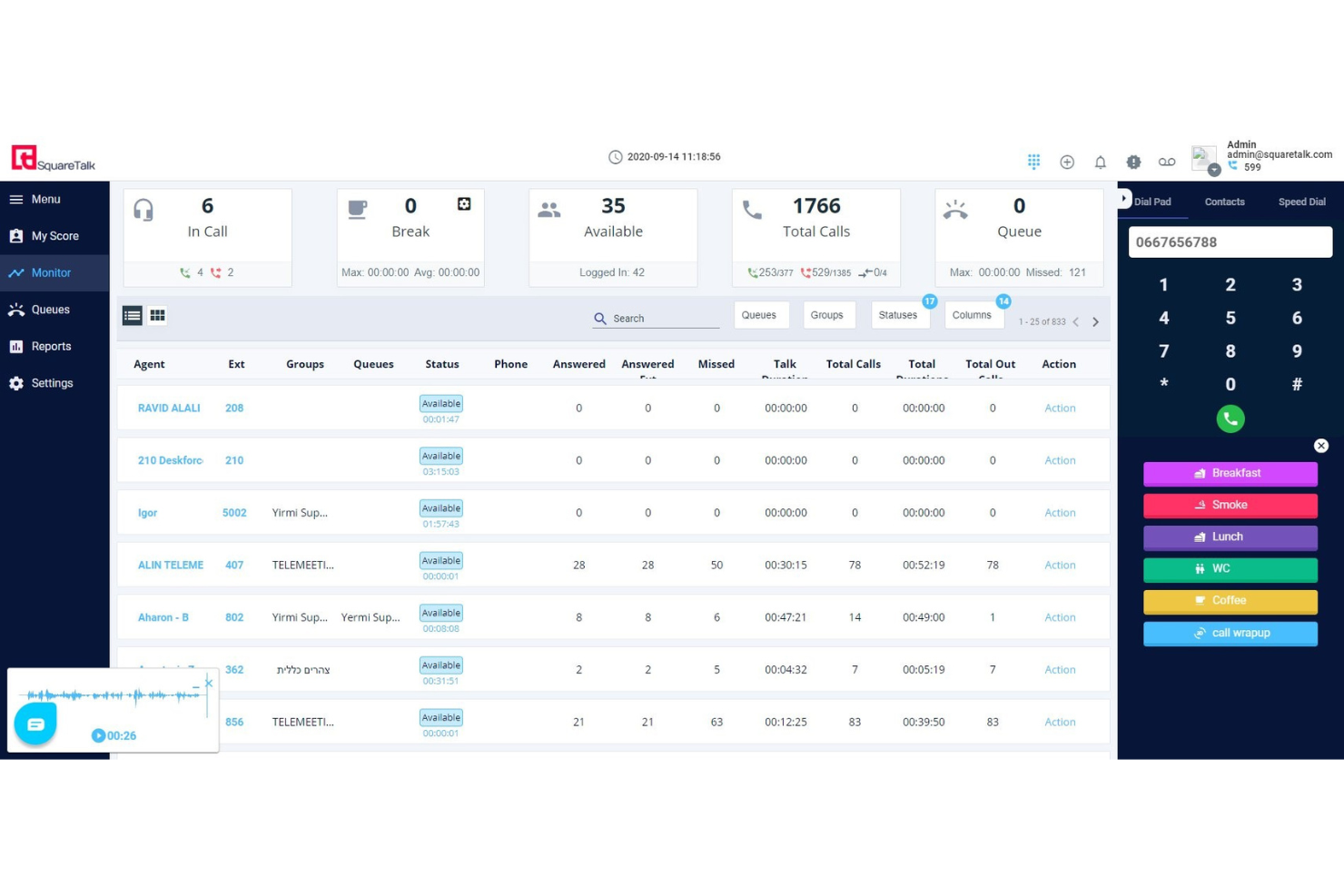
Squaretalk est un logiciel de centre de contact de niveau entreprise qui facilite à la fois les appels sortants et les communications par SMS.
Pourquoi j'ai choisi Squaretalk : J'ai ajouté ce logiciel à ma liste en raison de sa flexibilité à gérer à la fois les activités d'appel et de SMS. Votre équipe peut automatiser les campagnes d'envoi de SMS, envoyer des textos de rappel et même recueillir des retours via des enquêtes diffusées par SMS. Tout cela en plus d'une plateforme de vente sortante à fort volume.
Des outils intelligents comme le routage basé sur les compétences garantissent que chaque appel est pris en charge par le meilleur agent possible, et la mise en file d'attente des appels et des rappels assure des réponses rapides et bien priorisées. Le logiciel de centre de contact est basé sur le cloud et accessible aussi bien en bureau qu'à distance. La sécurité est une priorité majeure pour l'entreprise, et les documents de conformité comme le RGPD et d'autres standards de sécurité sont publiquement disponibles pour les acheteurs potentiels.
Fonctionnalités et intégrations phares de Squaretalk
Fonctionnalités : composeur prédictif intelligent, gestion des SMS, workflows personnalisés, gestion des contacts, transfert de fichiers, gestion des prospects, partage des contacts, enregistrement des appels, suivi, qualification et rapports comparatifs.
Intégrations : Zendesk, Telegram, Freshdesk, Zoho, Hubspot, Salesforce, Mailchimp et Microsoft Teams.
Pros and Cons
Pros:
- Mesures de sécurité de haut niveau
- Interface conviviale et intuitive
- Fonctionnalités avancées de reporting et d'analyse
Cons:
- Aucune application mobile disponible
- Options de personnalisation limitées
New Product Updates from Squaretalk
Squaretalk Adds TradeCore Integration for Brokerage Workflows
Squaretalk adds a TradeCore integration that connects customer conversations with BrokerIQ CRM workflows. This helps brokerage teams trigger AI-driven follow-ups, tasks, and other actions from calls and messages. For more information, visit Squaretalk’s official site.
 .
.
Talkdesk
Meilleur logiciel de centre d'appels pour l'entreprise avec assistance alimentée par l'IA

Talkdesk est une solution de centre d'appels flexible qui permet aux entreprises d'adapter leurs opérations de centre d'appels à leurs besoins spécifiques.
Pourquoi j'ai choisi Talkdesk : L'un des aspects intéressants de Talkdesk est son utilisation de la technologie de traitement du langage naturel (NLP), qui permet à la plateforme d'analyser et de comprendre les conversations avec les clients en temps réel. Cela permet à Talkdesk de catégoriser automatiquement les interactions, d'aiguiller les demandes vers l'agent le plus adapté et de fournir une analyse du ressenti en temps réel afin d'aider les agents à mieux comprendre l'état d'esprit et le ressenti du client.
De plus, les solutions alimentées par l'IA de Talkdesk permettent une interaction prédictive, permettant ainsi aux entreprises de contacter les clients de manière proactive et de résoudre les problèmes potentiels avant qu'ils ne surviennent.
Talkdesk propose une variété d'options de routage et de hiérarchisation, notamment le routage basé sur les compétences, le routage prioritaire et un routage intelligent des appels basé sur les informations et l'historique du client. Il s'intègre également à divers outils CRM, solutions de helpdesk et autres outils professionnels.
Fonctionnalités et intégrations principales de Talkdesk
Fonctionnalités incluent des outils de gestion des effectifs, des outils de collaboration entre employés, l'engagement omnicanal, l'analyse de l'expérience client, des tableaux de bord en temps réel, la gestion des connaissances, l'entraînement de l'IA, l'accès API, la gestion de la qualité, l'enregistrement d'écran et la gestion de la performance.
Intégrations incluent Freshdesk, Gong.io, Keap, LiveChat, Nimble, OnePageCRM, Pipedrive, Salesforce, Shift, Slack, Userlike, Zendesk et Zoho CRM.
Pros and Cons
Pros:
- Options avancées de routage et de priorisation
- Capacités de communication omnicanal
- Plateforme hautement personnalisable
Cons:
- Capacités limitées pour le reporting et l'analytique
- Courbe d'apprentissage abrupte pour les nouveaux utilisateurs

Twilio
Meilleur logiciel de centre d'appels d'entreprise pour l'engagement client

Twilio est une plateforme de centre d'appels pour les entreprises et les développeurs. Les utilisateurs peuvent utiliser les API de communication de Twilio pour envoyer un message texte, démarrer un chat ou passer un appel avec les clients.
Pourquoi j'ai choisi Twilio : Twilio est une plateforme de données clients (CDP) qui permet aux entreprises de collecter, d'unifier et d'activer les données clients issues de diverses sources. Elle propose une vue client unique, permettant aux entreprises de mieux comprendre leurs clients et de créer des expériences personnalisées. Grâce à des API et des intégrations faciles à utiliser, Twilio aide les entreprises à adopter une approche basée sur les données pour l'engagement client.
La plateforme Twilio est idéale pour les entreprises qui gèrent de grands volumes d'interactions clients à travers divers canaux. Avec des fonctionnalités remarquables telles que des API flexibles, la distribution automatique des appels et des rapports en temps réel, Twilio permet aux centres d'appels d'optimiser leurs opérations et d'offrir d'excellentes expériences client.
Fonctionnalités et intégrations remarquables de Twilio
Fonctionnalités : synthèse vocale, transcription d'appels, gestion de l'activité des agents, rappel en file d'attente, transferts d'appels, routage d'appels, bot de reconnaissance vocale, assistance vocale intelligente, audioconférence et conférence vocale, et surveillance des appels.
Intégrations : NetSuite Oracle, Pipedream, Replicant, Symbl, Zendesk et Zapier.
Pros and Cons
Pros:
- Formules tarifaires flexibles
- Nombreuses intégrations
- Excellentes fonctionnalités de reporting
Cons:
- Nécessite des connaissances en API
- Support client limité

Dialpad
Meilleur logiciel de centre d’appels d’entreprise pour la technologie d’intelligence vocale assistée par l’IA

Dialpad est une plateforme de communication basée sur le cloud qui propose une gamme d’outils de voix, de vidéo et de messagerie pour aider les entreprises à améliorer leur expérience client. Elle offre une plateforme unique pour gérer votre équipe, les interactions avec les clients, les appels, les réunions et les messages.
Pourquoi j’ai choisi Dialpad : Le meilleur aspect de Dialpad est l’assistance qu’il offre aux agents de support. L’IA intégrée transcrit les appels et fournit des informations en temps réel aux agents pendant les appels. Par exemple, elle informe l’agent s’il parle trop vite.
De plus, Dialpad propose plusieurs fonctionnalités utiles pour les responsables, telles que l’analyse en temps réel du ressenti client, permettant aux managers d’identifier quel agent a besoin d’aide. Il propose également des résumés d’appels pour aider les managers à évaluer la performance des agents.
Fonctionnalités et intégrations phares de Dialpad
Fonctionnalités : routage d’appels flexible, réponse vocale interactive, analyse vocale en temps réel, messagerie vocale et rappel automatisés, analyse du ressenti des appelants en direct, coaching en temps réel et gestion de la qualité.
Intégrations : AutoReach, Clio, DataGrail, Domo, Gong, HappyFox, Helpwise, HubSpot, Intercom, Kizen, Microsoft Teams, Recruitly, Salesforce, Wingman et Zapier.
Pros and Cons
Pros:
- Aide les managers à fournir des retours en temps réel aux agents
- Interface simple et moderne
- S’intègre aux outils professionnels populaires
Cons:
- Peu d’options de personnalisation du routage des appels
- Problèmes de connectivité occasionnels

Idéal pour une solution cloud à la demande avec intelligence artificielle avancée

Autres options
Voici quelques autres options intéressantes qui ne figurent pas dans la liste des meilleurs logiciels de centre de contact d’entreprise :
- Genesys Cloud CX
Meilleur logiciel de centre d'appels d'entreprise pour la gestion de l'engagement des effectifs
- NiCE CXone
Meilleur logiciel de centre d'appels d'entreprise pour la gestion de l'expérience client omnicanale
- Five9
Meilleur logiciel d'entreprise pour centre d'appels basé sur le cloud
- Avaya Experience Platform
Meilleur logiciel de centre d'appels d'entreprise pour les besoins d'automatisation et d'auto-service
- Exotel
Meilleur logiciel de centre d'appels pour entreprises dans divers secteurs
- Ameyo
Meilleur logiciel de centre d'appels d'entreprise pour les campagnes d'appels sortants
- LiveVox
Meilleur logiciel de centre d'appels d'entreprise pour des options de reporting personnalisables
- Altitude Xperience
Meilleur logiciel de centre d'appels d'entreprise pour des parcours clients personnalisés
- Aspect Unified IP Contact Center
Meilleur logiciel de centre d'appels d'entreprise pour les communications entrantes et sortantes
- LiveAgent
Meilleur logiciel d'entreprise pour centre d'appels et gestion de service client


Comment j'évalue les logiciels de centre d'appels d'entreprise
De la gestion de milliers d'appels entrants à l'accompagnement d'équipes d'agents répartis, je divise mon évaluation en exigences de base que chaque outil doit remplir et les éléments différenciateurs qui distinguent les leaders.
Fonctionnalités essentielles (indispensables pour cette liste)
Lorsque je sélectionne des outils pour ma liste, j'attribue à chacun une note de 0 (ne propose pas la fonctionnalité) à 5 (excellente maîtrise dans ce domaine) pour chacune des fonctionnalités clés listées ci-dessous. Ensuite, je calcule le score total de l'outil en pourcentage. Chaque outil doit obtenir un score total minimum de 65% pour être pris en considération.
- Routage ACD et SVI : J'évalue comment chaque plateforme gère le routage basé sur les compétences, la gestion des files d'attente prioritaires et la conception des flux SVI — par exemple, la possibilité de diriger les demandes de facturation vers des agents spécialisés tandis que le surplus va vers une file d'attente générale.
- Engagement omnicanal : Je recherche un espace de travail unifié pour les agents où voix, chat, e-mail, SMS et canaux sociaux partagent le contexte, afin que les agents bénéficient de l’ensemble de l’historique d’interaction peu importe comment le client a contacté le service.
- Optimisation des effectifs : La planification, la gestion de la qualité et l'enregistrement des appels sont pris en compte ici. Je vérifie si les superviseurs peuvent noter les appels, construire des plannings d'agents en fonction du volume prévisionnel et prodiguer du coaching à partir d'une interface unique.
- Analytique en temps réel et historique : Les tableaux de bord en direct affichant la profondeur des files d'attente et le statut des agents comptent tout autant que les rapports historiques sur les SLA et le CSAT. J’examine le caractère personnalisable de la couche de reporting pour les directeurs des opérations suivant les KPI sur plusieurs sites.
- Capacités IA et automatisation : Je prends en compte si la plateforme propose un SVI conversationnel, des agents virtuels, de l'assistance agent ou des résumés de fin d’appel automatisés — des fonctions qui réduisent la répétitivité et permettent aux agents de se consacrer aux interactions complexes.
- Intégrations CRM et d’entreprise : Ici, j’évalue la profondeur des connecteurs avec des plateformes comme Salesforce, Microsoft Dynamics et ServiceNow, ainsi que l’ouverture des API et l’étendue du marketplace pour une intégration dans l’écosystème existant.
Une fois la liste d’outils répondant à ces critères établie, j’examine ce qui distingue chaque plateforme.
Facteurs différenciateurs (ce qui distingue les fournisseurs)
Voici comment je compare et différencie les éditeurs :
Fonctionnalités remarquables
Les fonctions copilote IA générative sont un facteur différenciateur important. J’évalue si la plateforme propose des suggestions de réponses en temps réel et génère automatiquement des résumés d’appel, ce qui réduit fortement le travail post-appel. L’intelligence de conversation compte tout autant — je recherche des outils capables d’analyser 100% des interactions pour détecter le ressenti et les risques de non-conformité, pas seulement un échantillon aléatoire pour la qualité. Un concepteur de flux low-code se démarque également. Les équipes CX capables de modifier les menus SVI ou la logique de routage sans solliciter les développeurs peuvent itérer plus rapidement sur l’expérience client.
Au-delà des fonctionnalités
La sécurité et les certifications de conformité pèsent lourdement — je vérifie la présence de la conformité SOC 2 Type II, PCI-DSS et HIPAA, en particulier lorsque le centre de contact traite des données de paiement ou des informations de santé. Le support à la mise en œuvre est tout aussi crucial. Migrer d'un ACD sur site hérité vers une plateforme cloud est un projet complexe, donc j’évalue si les fournisseurs proposent des architectes de solution dédiés et des outils de migration. J’examine aussi la flexibilité commerciale, notamment si la tarification s’adapte de manière prévisible lors de pics saisonniers ou pour les sièges de partenaires BPO.
Questions fréquemment posées
Ci-dessous, j’ai répondu aux questions les plus fréquemment posées sur les logiciels de centre de contact d’entreprise.
Qu’est-ce qu’un logiciel de centre de contact d’entreprise ?
Un logiciel de centre de contact d’entreprise est une solution logicielle qui aide les entreprises à gérer leurs opérations de service client entrantes et sortantes. Il fournit une plateforme intégrée permettant de gérer les interactions avec les clients sur plusieurs canaux, notamment la voix, les e-mails, le chat et les réseaux sociaux. Il existe également des solutions logicielles sur site, cloud et hybrides, selon les exigences de l’entreprise.
Vous ne gérez pas une grande entreprise ? \u003ca href=\u0022https://thecxlead.com/tools/best-call-center-software-for-small-business/\u0022\u003eUn logiciel de centre d’appels pour les petites entreprises\u003c/a\u003e pourrait mieux répondre à vos besoins.
Quels sont les avantages d’un logiciel de centre d’appels ?
Les logiciels de centre d’appels offrent plusieurs avantages, notamment :
\u003col\u003e
\t\u003cli\u003e\u003cstrong\u003eAmélioration de l’expérience client\u003c/strong\u003e : les logiciels de centre d’appels permettent aux entreprises de traiter rapidement et efficacement les demandes, problèmes et réclamations des clients, ce qui améliore l’expérience client globale.\u003c/li\u003e
\t\u003cli\u003e\u003cstrong\u003eAccroissement de l’efficacité et de la productivité\u003c/strong\u003e : grâce à des fonctionnalités telles que la distribution automatique des appels (ACD) et le serveur vocal interactif (IVR), les logiciels de centre d’appels peuvent acheminer les appels vers l’agent le plus approprié, réduire les temps d’attente et accroître l’efficacité du traitement des appels.\u003c/li\u003e
\t\u003cli\u003e\u003cstrong\u003eMeilleure gestion et analyse des données\u003c/strong\u003e : les logiciels de centre d’appels fournissent des outils d’analyse et de reporting qui aident les entreprises à suivre et analyser les données d’appels, en fournissant des informations sur le comportement des clients, les performances des agents et les performances globales du centre d’appels.\u003c/li\u003e
\t\u003cli\u003e\u003cstrong\u003eAmélioration de la gestion des effectifs\u003c/strong\u003e : les logiciels de centre d’appels aident à gérer et à optimiser les niveaux d’effectifs, la planification des équipes et les autres tâches de gestion des effectifs, afin de garantir un fonctionnement optimal du centre d’appels.\u003c/li\u003e
\t\u003cli\u003e\u003cstrong\u003ePrise en charge omnicanale\u003c/strong\u003e : les logiciels de centre d’appels permettent aux entreprises de fournir une assistance via différents canaux, notamment le système téléphonique, les e-mails, le chat et les réseaux sociaux.\u003c/li\u003e
\t\u003cli\u003e\u003cstrong\u003eRéduction des coûts\u003c/strong\u003e : en automatisant l’acheminement des appels et les autres processus du centre d’appels, les logiciels de centre d’appels peuvent réduire le besoin d’interventions manuelles, ce qui permet à l’entreprise de réaliser des économies.\u003c/li\u003e
\t\u003cli\u003e\u003cstrong\u003eIntégration avec d’autres systèmes professionnels\u003c/strong\u003e : les logiciels de centre d’appels peuvent s’intégrer à d’autres systèmes professionnels, tels que les outils de CRM, de centre d’assistance ou d’automatisation du marketing, afin de fournir une expérience client fluide et d’améliorer l’efficacité globale de l’entreprise.\u003c/li\u003e
\u003c/ol\u003e
Quelles sont les principales fonctionnalités d’un logiciel de centre d’appels ?
Les fonctionnalités essentielles d’un logiciel de centre d’appels sont les suivantes :
\u003col\u003e
\t\u003cli\u003e\u003cstrong\u003eDistribution automatique des appels (ACD)\u003c/strong\u003e : l’ACD achemine automatiquement les appels entrants vers l’agent le plus approprié en fonction de sa disponibilité, de ses compétences et de sa charge de travail.\u003c/li\u003e
\t\u003cli\u003e\u003cstrong\u003eServeur vocal interactif (IVR)\u003c/strong\u003e : l’IVR permet aux clients d’interagir avec un système automatisé à l’aide de commandes vocales ou de touches afin d’être mis en relation avec l’agent le plus approprié ou d’accéder à une option en libre-service.\u003c/li\u003e
\t\u003cli\u003e\u003cstrong\u003eEnregistrement des appels\u003c/strong\u003e : l’enregistrement des appels permet aux entreprises d’enregistrer et de stocker les interactions avec les clients à des fins d’assurance qualité et de formation.\u003c/li\u003e
\t\u003cli\u003e\u003cstrong\u003eAnalyse et reporting\u003c/strong\u003e : cette fonctionnalité fournit des outils d’analyse et de reporting qui aident les entreprises à suivre et analyser les données d’appels, en fournissant des informations sur le comportement des clients, les performances des agents et les performances globales du centre d’appels.\u003c/li\u003e
\t\u003cli\u003e\u003cstrong\u003ePrise en charge multicanale\u003c/strong\u003e : les logiciels de centre d’appels permettent aux entreprises de fournir une assistance via différents canaux, notamment le téléphone, les e-mails, le chat et les réseaux sociaux.\u003c/li\u003e
\t\u003cli\u003e\u003cstrong\u003eSurveillance en temps réel\u003c/strong\u003e : la surveillance en temps réel permet aux superviseurs de suivre et de gérer les performances des agents en temps réel, en fournissant des retours immédiats et un accompagnement pour améliorer leurs performances.\u003c/li\u003e
\t\u003cli\u003e\u003cstrong\u003eMise en file d’attente et rappel\u003c/strong\u003e : la mise en file d’attente permet aux entreprises de gérer les volumes d’appels élevés, tandis que les fonctionnalités de rappel permettent aux clients de demander à être rappelés par un agent lorsqu’il est disponible.\u003c/li\u003e
\t\u003cli\u003ca href=\u0022https://thecxlead.com/tools/best-outbound-call-center-software/\u0022\u003e\u003cstrong\u003eAppels sortants\u003c/strong\u003e\u003c/a\u003e : les fonctionnalités d’appels sortants permettent aux centres d’appels de contacter les clients, par exemple pour des ventes, des suivis ou des rappels de rendez-vous.\u003c/li\u003e
\u003c/ol\u003e
Choisissez l’outil le mieux adapté à vos besoins
Chaque logiciel de centre d’appels présenté dans cet article fournit les fonctionnalités essentielles dont les centres d’appels ont besoin pour prospérer. En même temps, ils offrent des fonctionnalités uniques qui les distinguent des autres. Le logiciel que vous choisirez devra donc dépendre des besoins spécifiques de votre entreprise.
J’espère que cette liste vous a aidé dans votre recherche d’un logiciel de centre d’appels pour entreprise. Si vous souhaitez en savoir plus sur ce type d’outils ou obtenir les dernières informations sur l’expérience client, inscrivez-vous à la newsletter The CX Lead.
Liste d’outils associée : Meilleur logiciel de centre d’appels entrants