

I 10 migliori software di help desk in sede recensiti nel 2026

Miglior elenco di software per l'assistenza in sede


Il software per l'assistenza in sede aiuta i team IT e CX a gestire il supporto clienti mantenendo il pieno controllo sui dati, sull'infrastruttura e sulla personalizzazione. È ideale per le organizzazioni con rigorosi requisiti di conformità o per i team che devono adattare flussi di lavoro, autorizzazioni e integrazioni ai sistemi interni. Questi strumenti centralizzano la gestione dei ticket, automatizzano le attività e semplificano la comunicazione, mantenendo al contempo i dati sensibili al sicuro nelle vostre mani.
Ho esaminato e testato le principali soluzioni di assistenza in sede sulla base della sicurezza dei dati, della flessibilità di implementazione, della facilità d'uso, del livello di personalizzazione e del valore complessivo. Questa guida analizza le mie scelte principali, ciò che distingue ciascuna soluzione e come scegliere quella più adatta alle dimensioni, alla complessità e ai requisiti di controllo del vostro team.
Perché fidarsi dei nostri consigli sui software
Il nostro team testa e recensisce software dal 2012. In quanto leader CX noi stessi, sappiamo quanto sia difficile — e importante — scegliere il software giusto.
Per questa guida, abbiamo valutato gli strumenti attraverso test pratici e ricerche indipendenti, assegnando un punteggio agli strumenti in base ai nostri criteri di selezione.
Le nostre recensioni riflettono il nostro giudizio editoriale umano, non un discorso di vendita.
Riepilogo dei migliori software per l'assistenza in sede
Di seguito sono riportati i miei riepiloghi dettagliati dei migliori software per l’assistenza in sede inclusi nel mio elenco. Le mie recensioni offrono un’analisi approfondita delle caratteristiche principali, dei pro e contro, delle integrazioni e dei casi d’uso ideali di ogni strumento, per aiutarvi a trovare quello più adatto alle vostre esigenze.
| Tool | Best For | Trial Info | Price | ||
|---|---|---|---|---|---|
| 1 | Miglior portale self-service personalizzabile | Prova gratuita di 14 giorni | Prezzo su richiesta | Website | |
| 2 | La scelta migliore per il feedback della community | Prova gratuita di 14 giorni + demo gratuita disponibile | Da $49/agente/mese (fatturazione annuale) | Website | |
| 3 | Ideale per la gestione centralizzata dei ticket | Prova gratuita disponibile | A partire da $478/utente/anno | Website | |
| 4 | Ideale per grandi organizzazioni | Prova gratuita di 14 giorni + demo gratuita disponibile | Da $39/utente/mese | Website | |
| 5 | Ideale per piccoli team | Demo gratuita disponibile | Da $29/mese | Website | |
| 6 | Ideale per la gestione dei servizi IT | Prova gratuita di 30 giorni | Da $24.95/mese | Website | |
| 7 | Ideale per l'hosting autonomo | Prova gratuita di 21 giorni | Da $699 (fatturazione annuale) | Website | |
| 8 | Ideale per un prezzo conveniente | Prova gratuita disponibile | Da €30/mese | Website | |
| 9 | Ideale per la conformità sulla privacy | Prova gratuita di 14 giorni | Da $15/utente/mese (fatturato annualmente) | Website | |
| 10 | Ideale per flussi di lavoro personalizzati | Demo gratuita disponibile | Prezzo su richiesta | Website |

Recensione dei migliori software per l'assistenza in sede
Di seguito sono riportati i miei riepiloghi dettagliati dei migliori software per l’assistenza in sede inclusi nel mio elenco. Le mie recensioni offrono un’analisi approfondita delle caratteristiche principali, dei pro e contro, delle integrazioni e dei casi d’uso ideali di ogni strumento, per aiutarvi a trovare quello più adatto alle vostre esigenze.
SysAid
Miglior portale self-service personalizzabile
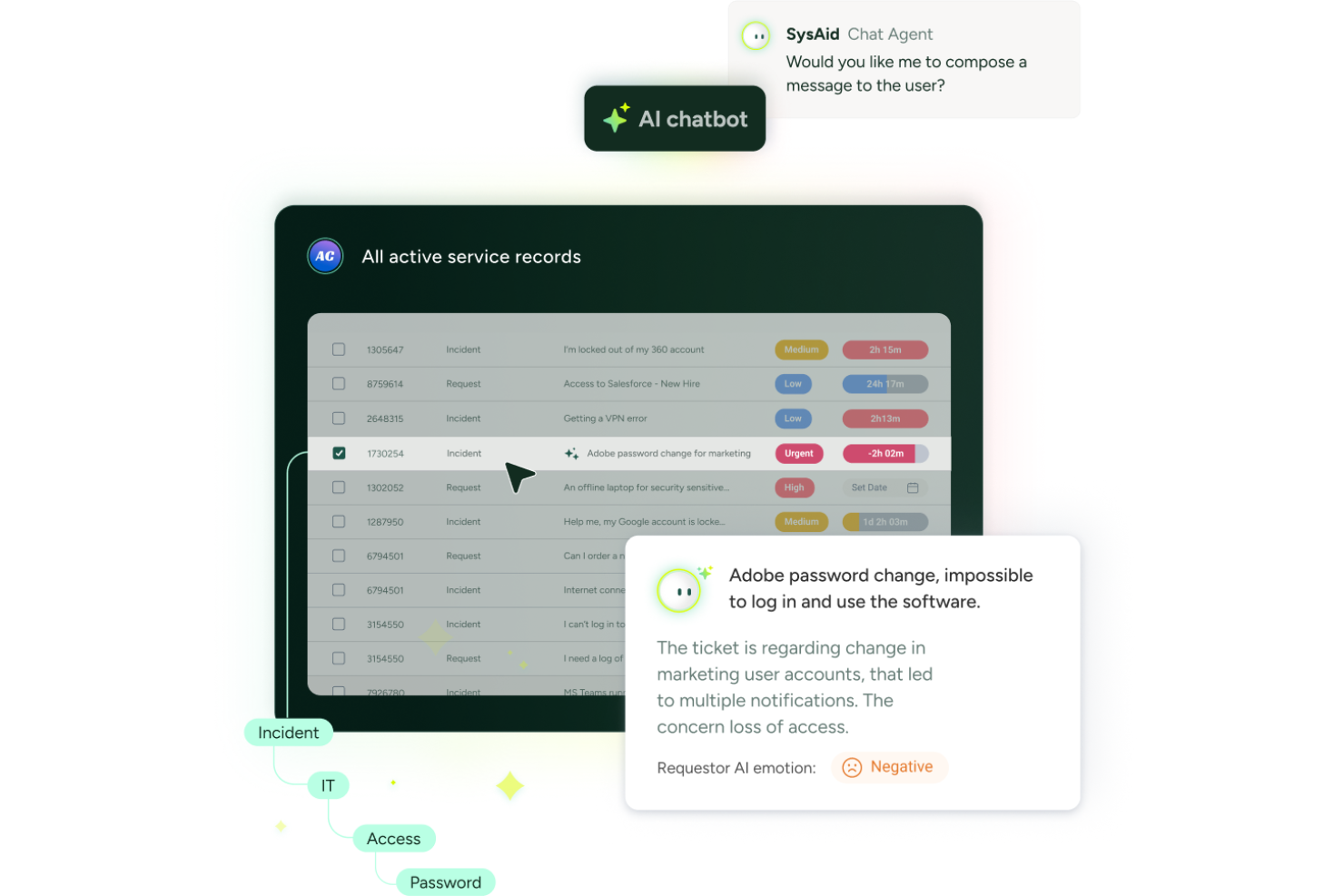
SysAid offre un software helpdesk on-premise progettato per team IT che necessitano di controllo sui propri dati e sui flussi di lavoro. È una scelta solida per le organizzazioni in settori regolamentati o per chi ha requisiti di sicurezza rigorosi. Con un focus su automazione, personalizzazione e gestione delle risorse IT, SysAid aiuta i team a gestire i ticket, tracciare le risorse e ottimizzare le operazioni di servizio da un'unica piattaforma.
Per chi è SysAid?
SysAid è particolarmente adatto ad organizzazioni di medie e grandi dimensioni con team IT dedicati che richiedono un'implementazione on-premise e avanzati controlli di gestione dei servizi.
Perché ho scelto SysAid
Per i team che desiderano responsabilizzare gli utenti e ridurre il volume dei ticket, ho scelto SysAid grazie al suo portale self-service altamente personalizzabile. Il portale consente di adattare aspetto, contenuti e workflow al branding e ai processi della propria organizzazione, un aspetto fondamentale per ambienti on-premise dove il controllo è determinante. Apprezzo la possibilità di creare una knowledge base, automatizzare le richieste comuni e fornire agli utenti accesso diretto alle risorse IT, tutto da un portale completamente gestito internamente. Questo livello di personalizzazione aiuta i team IT a offrire un'esperienza di supporto più coerente e user-friendly.
Caratteristiche principali di SysAid
Altre funzionalità che rendono SysAid una scelta forte per il software helpdesk on-premise includono:
- Instradamento automatico dei ticket: Assegna i ticket in arrivo al tecnico o team corretto in base a regole e categorie predefinite.
- Gestione delle risorse IT: Traccia risorse hardware e software in tutta l'organizzazione, compresi stato del ciclo di vita e proprietà.
- Strumenti di controllo remoto: Accedi e risolvi i problemi dei dispositivi degli utenti direttamente dall'interfaccia helpdesk senza lasciare la postazione.
- Reportistica personalizzata e analisi: Crea e programma report per monitorare la performance del service desk, le tendenze dei ticket e i parametri di conformità.
Integrazioni di SysAid
Le integrazioni includono Microsoft Teams, Jira, SAP, Salesforce, ilert, LDAP, Active Directory, email, Workato e Moveworks. È inoltre disponibile un'API per integrazioni personalizzate.
Pros and Cons
Pros:
- Gestione delle modifiche e tracciabilità delle risorse integrata
- Personalizzazione dell'interfaccia senza codice per amministratori non tecnici
- La segnalazione rapida dei ticket tramite hotkey velocizza la reportistica
Cons:
- La ricerca nella knowledge base può restituire risultati non rilevanti
- Integrazioni limitate out-of-the-box con strumenti di terze parti
New Product Updates from SysAid

SysAid Adds Bulk Contract Import
SysAid added bulk contract import to License Manager Essentials, letting admins upload a CSV template, validate entries, and create multiple contracts at once. For more information, visit SysAid's official site.

La scelta migliore per il feedback della community

UseResponse è un software help desk on-premise progettato per i team che danno valore all'interazione e al feedback della community. Combina ticketing, raccolta feedback e forum di supporto per aumentare il coinvolgimento dei clienti.
Perché ho scelto UseResponse: Eccelle nella raccolta dei feedback dalla community, fondamentale per i team che desiderano allineare i propri servizi alle esigenze dei clienti. Il software include un modulo di feedback in cui gli utenti finali possono condividere idee e suggerimenti, aiutandoti a dare priorità ai miglioramenti in base ai contributi diretti. Inoltre, la funzione forum di supporto consente agli utenti di aiutarsi a vicenda, riducendo i ticket di supporto e favorendo un senso di comunità.
Funzionalità principali & integrazioni:
Funzionalità includono una knowledge base che permette al tuo team di creare e condividere informazioni con gli utenti. Gli strumenti di automazione semplificano le attività ripetitive, aumentando l'efficienza del team. Inoltre, i widget personalizzabili ti consentono di integrare opzioni di feedback e supporto direttamente nel tuo sito.
Integrazioni includono Slack, Microsoft Teams, Jira, Salesforce, Zendesk, Trello, Google Workspace, Microsoft Outlook, Dropbox e Asana.
Pros and Cons
Pros:
- Dà priorità ai miglioramenti suggeriti dai clienti
- Widget di feedback personalizzabili
- Strumenti di automazione che aumentano l'efficienza
Cons:
- Analisi avanzate limitate
- Non ideale per team piccoli

Ideale per la gestione centralizzata dei ticket
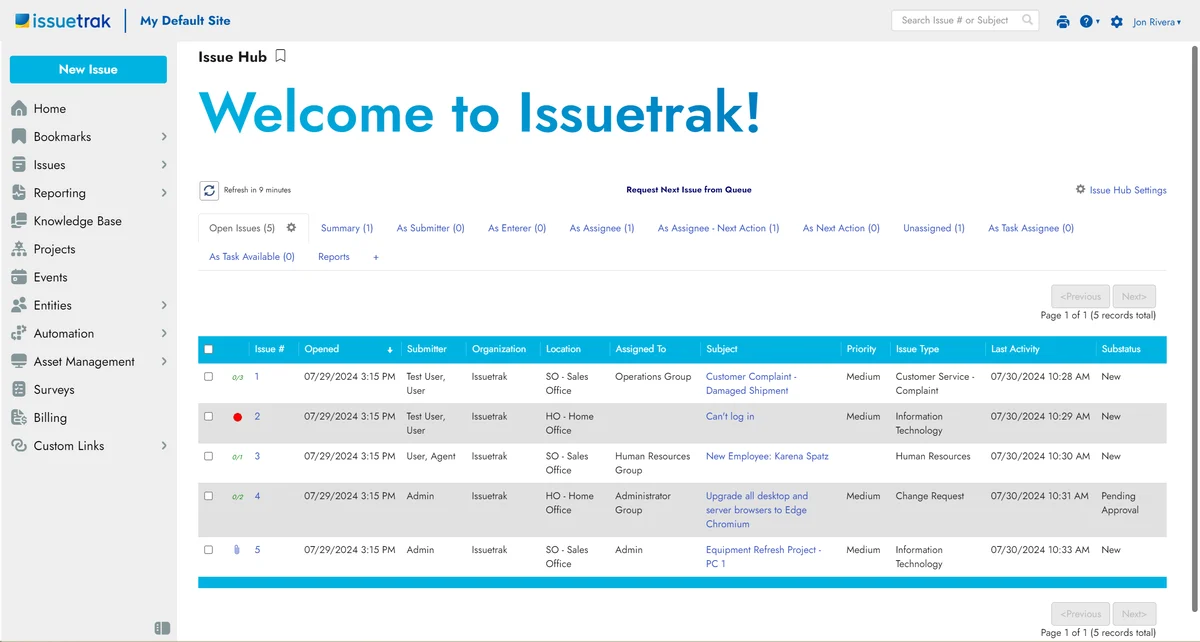
Issuetrak è una soluzione versatile per il service desk che si rivolge ad aziende di tutte le dimensioni, offrendo una suite completa di funzionalità per gestire il supporto clienti e il ticketing. Grazie alla possibilità di essere distribuito on-premises, Issuetrak offre alle organizzazioni il controllo sulle proprie operazioni di help desk, garantendo sicurezza dei dati e personalizzazione per soddisfare esigenze specifiche.
Perché ho scelto Issuetrak: Un aspetto che mi ha colpito di questo software è la sua capacità di gestione centralizzata dei ticket, che permette di gestire le segnalazioni provenienti da più canali. L'Issue Hub centralizzato semplifica il monitoraggio e la gestione dei ticket di supporto, assicurando che nulla sfugga al controllo. Inoltre, grazie all'assegnazione automatica dei ticket tramite round robin, questi vengono distribuiti equamente tra i membri del team senza necessità di interventi manuali. I flussi di lavoro collaborativi consentono al team di lavorare insieme in modo efficiente, riducendo il tempo necessario per risolvere i problemi.
Funzionalità e integrazioni principali:
Le funzionalità includono la gestione degli asset, che aiuta a tenere traccia di tutte le risorse hardware e software. Le notifiche ti tengono aggiornato sugli sviluppi dei ticket, assicurando che il team sia sempre informato sugli ultimi aggiornamenti. I report personalizzabili consentono di generare analisi mirate alle proprie esigenze, aiutando a prendere decisioni informate sulle attività di supporto.
Le integrazioni includono Issuetrak API, Zapier, Slack, Microsoft (inclusi Azure AD), Salesforce, Webforms, Chat, Gmail, Analytics e Identity Management.
Pros and Cons
Pros:
- Interfaccia semplice da usare e facile da configurare
- Prezzi convenienti e opzioni di distribuzione flessibili
- Funzionalità avanzate per help desk e automazione dei flussi di lavoro
Cons:
- Supporto limitato alle applicazioni mobili rispetto a quelle desktop
- Leggera curva di apprendimento per alcune funzionalità di gestione utenti e processi di configurazione

Deskpro
Ideale per grandi organizzazioni
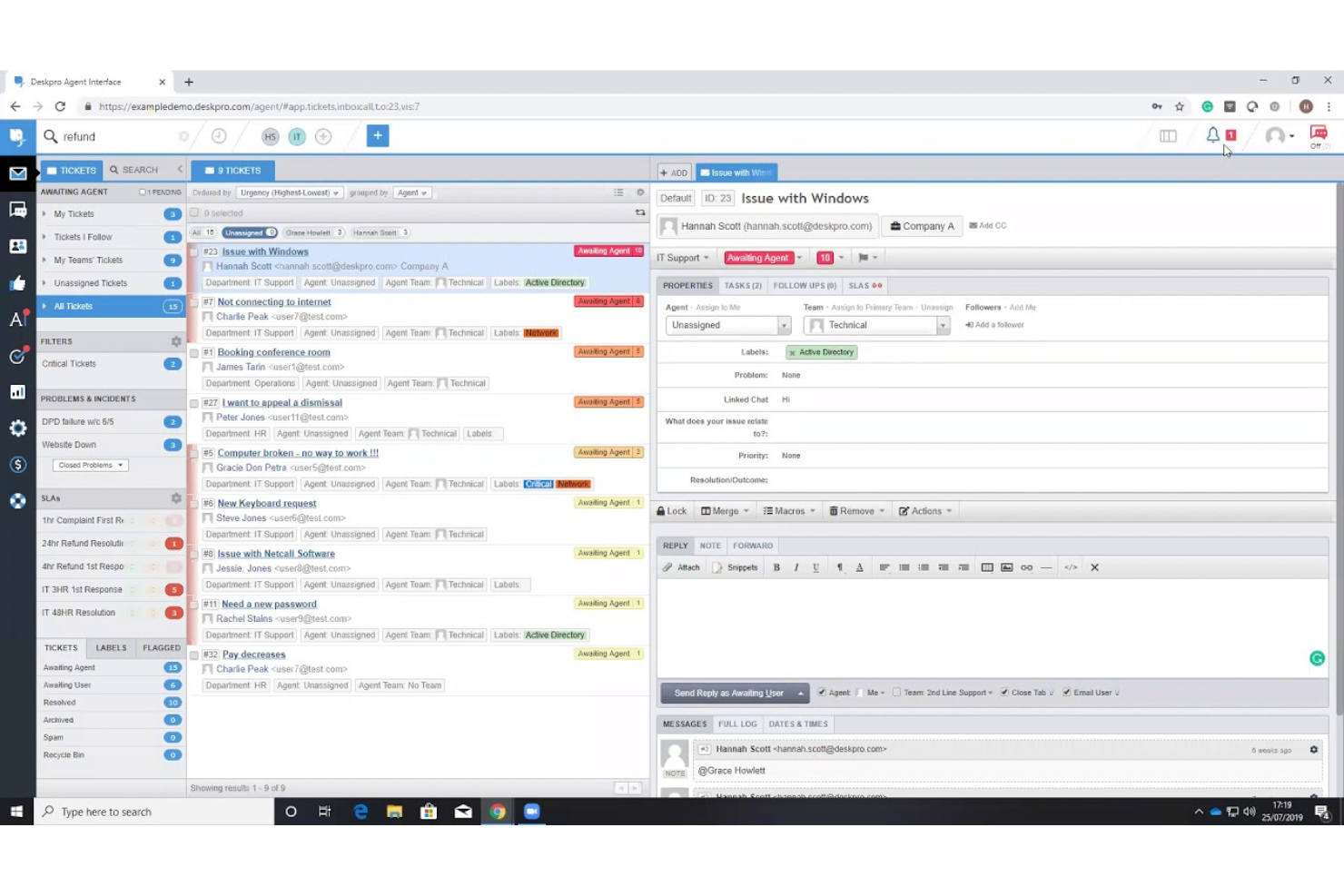
Deskpro è un software di help desk on-premise progettato per grandi organizzazioni che desiderano gestire operazioni di supporto complesse. Offre funzionalità come ticketing, automazione e reportistica per ottimizzare il servizio clienti.
Perché ho scelto Deskpro: È pensato per grandi organizzazioni che necessitano di soluzioni scalabili. Il supporto multicanale del software consente al tuo team di gestire le richieste provenienti da diverse piattaforme in modo efficiente. Grazie a strumenti di reportistica avanzati, puoi ottenere informazioni sulle prestazioni del team e sulla soddisfazione dei clienti. L'interfaccia personalizzabile ti permette di adattare il sistema alle specifiche esigenze della tua organizzazione.
Funzionalità e integrazioni principali:
Funzionalità includono una dashboard in tempo reale che offre una panoramica delle operazioni di supporto. La funzione di base di conoscenza consente di creare e condividere informazioni sia internamente che esternamente. Inoltre, Deskpro offre SLA personalizzabili per aiutarti a mantenere gli standard di servizio.
Le integrazioni includono Salesforce, Slack, Microsoft Teams, Jira, Trello, Google Workspace, Microsoft Outlook, Zendesk, Dropbox e QuickBooks.
Pros and Cons
Pros:
- Supporto multicanale
- Interfaccia personalizzabile
- Dashboard in tempo reale
Cons:
- Processo di configurazione complesso
- Funzionalità limitate dell'app mobile

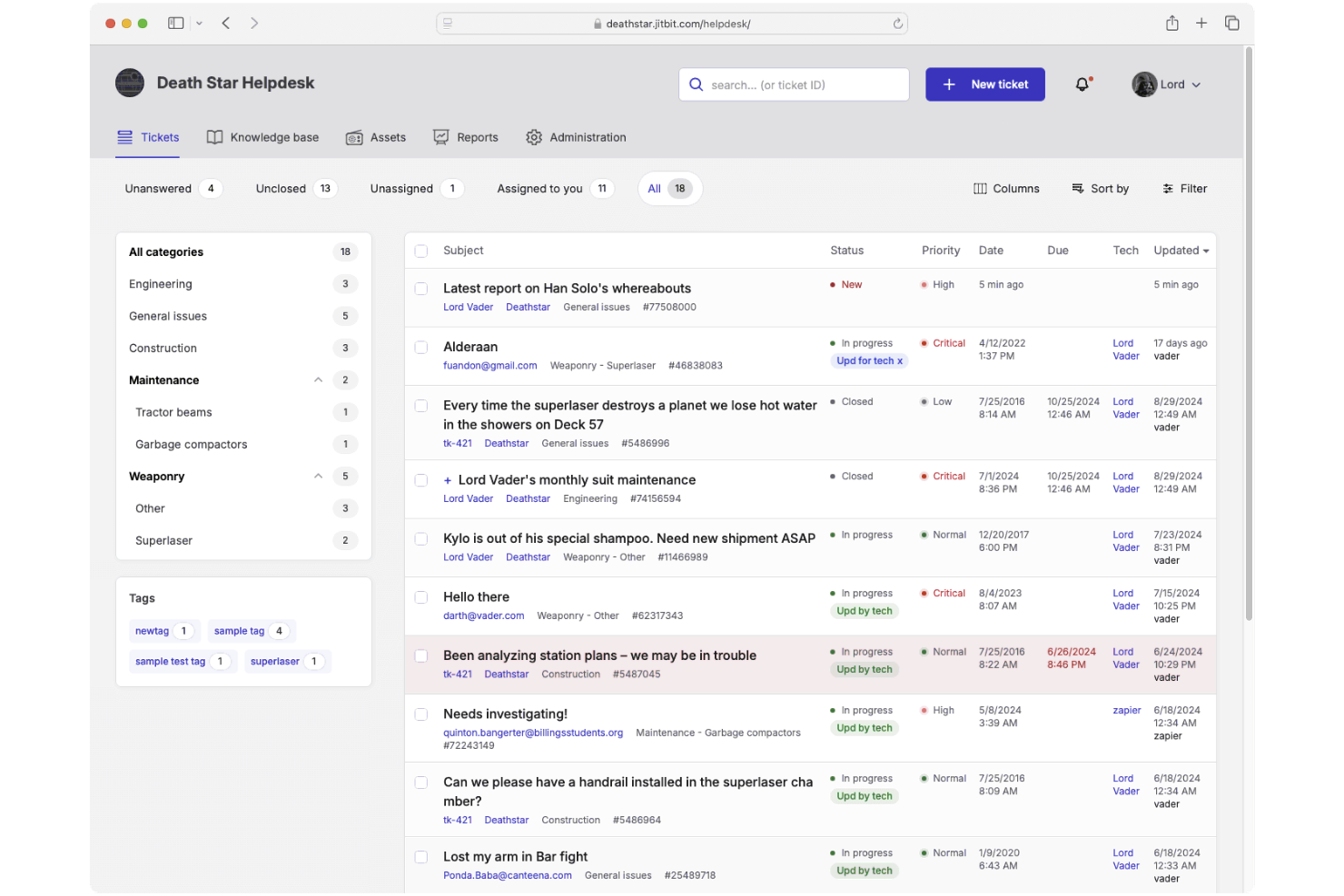
JitBit è un sistema di ticketing help desk on-premises progettato per i team di supporto. Fornisce funzioni essenziali come il tracciamento degli incidenti e la gestione delle risorse per migliorare il flusso di lavoro del tuo team.
Perché ho scelto JitBit: È pensato per piccoli team che necessitano di una soluzione semplice. Le funzionalità includono l'integrazione email bidirezionale che trasforma le email in ticket e una base di conoscenza personalizzabile per gli utenti. Grazie alle regole di automazione puoi ottimizzare le attività ripetitive, rendendolo ideale per piccoli team focalizzati sull'efficienza. Gli aggiornamenti in tempo reale e il design intuitivo del software sono particolarmente adatti a chi ha bisogno di adattarsi rapidamente.
Funzionalità e integrazioni principali:
Funzionalità includono aggiornamenti dei ticket in tempo reale, app mobili per iOS e Android e una base di conoscenza personalizzabile. Il sistema consente il tracciamento degli incidenti e la gestione delle risorse, garantendo al team di gestire le richieste in modo efficiente. Strumenti di reportistica integrati e personalizzati ti aiutano a monitorare efficacemente le prestazioni del team.
Integrazioni includono Active Directory, Google Apps, Slack, Microsoft Teams, Azure, Salesforce, Jira, Dropbox, Trello e Zapier.
Pros and Cons
Pros:
- Strumenti di reportistica personalizzabili
- Integrazione email avanzata
- Adatto a piccoli team IT
Cons:
- Richiede configurazione tecnica
- Interfaccia utente basilare

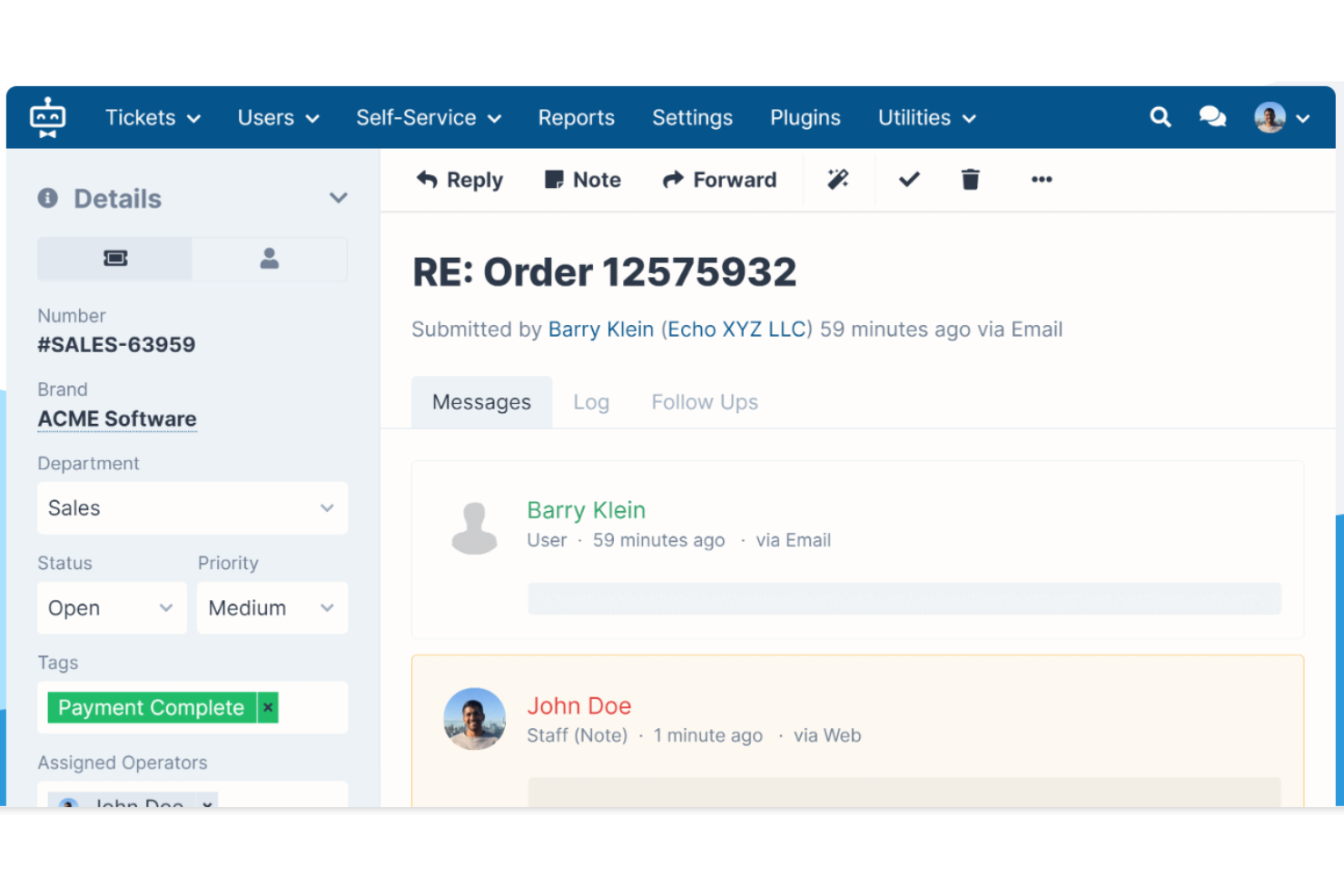
SupportPal è un software di help desk on-premise progettato per i team ITSM. Offre funzionalità essenziali come la gestione dei ticket, l'automazione e i portali self-service per ottimizzare il supporto SaaS. Inoltre, include backup per garantire la sicurezza e l'affidabilità dei dati.
Perché ho scelto SupportPal: Eccelle nella gestione dei servizi IT con funzionalità che semplificano i processi del tuo team. Il software include l'assegnazione automatica dei ticket, che fa risparmiare tempo indirizzando i problemi al membro del team più adatto. Puoi personalizzare i campi dei ticket per adattarli al tuo flusso di lavoro, assicurandoti che nulla venga trascurato. Il portale self-service consente agli utenti di trovare soluzioni in autonomia, riducendo il carico sul tuo team.
Funzionalità e integrazioni principali:
Funzionalità includono una suite completa di reportistica che permette di monitorare le prestazioni del team e i livelli di servizio. Il software offre una funzione di knowledge base che aiuta il team a documentare soluzioni a problemi comuni. Inoltre, la funzionalità di supporto multi-brand consente di gestire diversi marchi da un'unica interfaccia.
Integrazioni includono Slack, Microsoft Teams, Twilio, Discord, LDAP, Google Analytics, Amazon S3, WHMCS, Mollie e Stripe.
Pros and Cons
Pros:
- Campi ticket personalizzabili
- Strumenti di reportistica completi
- Supporto multi-brand
Cons:
- App mobile basilare
- Non ideale per piccoli team

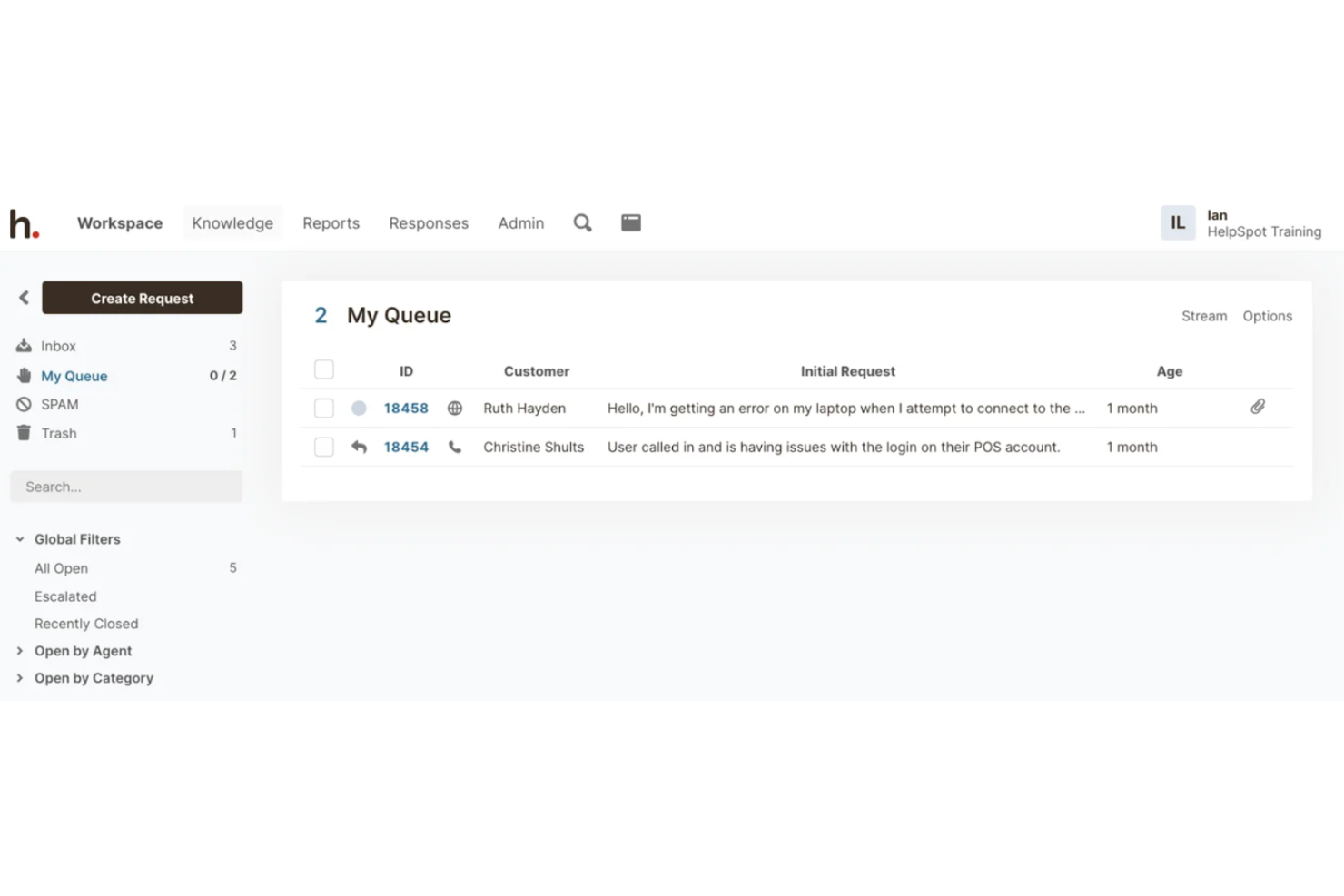
HelpSpot è un software help desk on-premise progettato per le aziende che preferiscono l'hosting autonomo per avere un maggiore controllo sui propri dati. Offre funzionalità come gestione dei ticket, reportistica e un portale self-service per migliorare il supporto clienti.
Perché ho scelto HelpSpot: Offre un'opzione di self-hosting che consente il pieno controllo sui dati, ideale per le organizzazioni attente alla privacy. Il sistema di gestione dei ticket permette di monitorare e risolvere le problematiche in modo efficiente. Gli strumenti di reportistica personalizzabili aiutano ad analizzare le prestazioni del supporto e individuare aree di miglioramento. Grazie al portale self-service, i tuoi clienti possono trovare risposte alle domande riducendo il carico sul team di supporto.
Caratteristiche distintive e integrazioni:
Funzionalità includono l'instradamento automatico dei ticket, che garantisce che i problemi vengano assegnati tempestivamente ai membri giusti del team. La funzione di knowledge base aiuta il team a documentare soluzioni e condividere informazioni. Inoltre, HelpSpot offre campi e moduli personalizzabili, consentendo di adattare il sistema alle esigenze specifiche.
Integrazioni includono Slack, Microsoft Teams, Google Workspace, Microsoft Outlook, Salesforce, Jira, Zendesk, Dropbox e QuickBooks.
Pros and Cons
Pros:
- Controllo avanzato dei dati
- Gestione efficiente dei ticket
- Portale self-service
Cons:
- Interfaccia utente di base
- Non ideale per piccoli team

Ideale per un prezzo conveniente
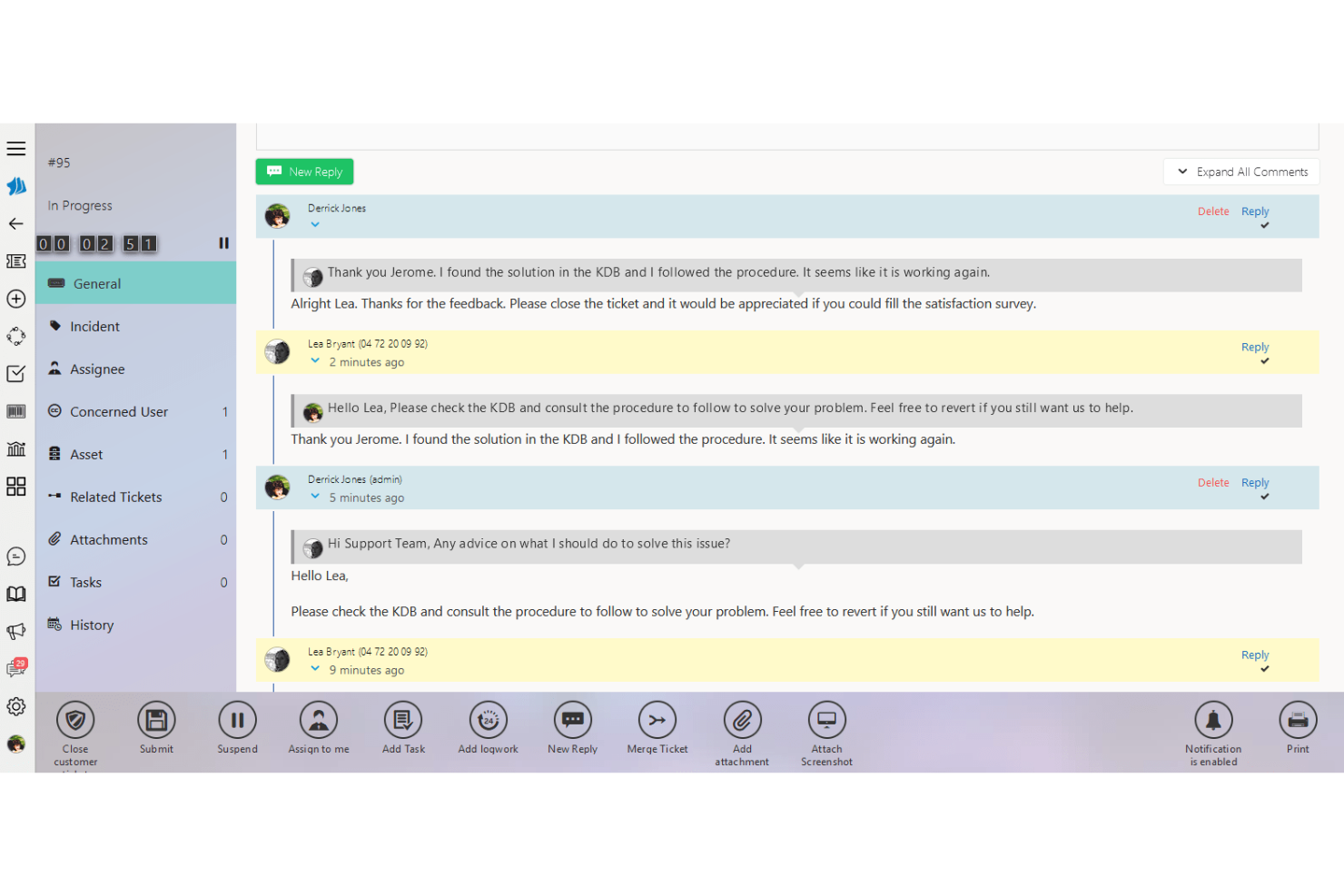
SimplyDesk è un software help desk on-premise progettato per i reparti IT e i team di assistenza clienti. Offre funzionalità chiave come la gestione dei ticket e la comunicazione multicanale per ottimizzare le operazioni di supporto.
Perché ho scelto SimplyDesk: È particolarmente indicato per i team che cercano una soluzione economica. Il software include funzionalità personalizzabili di gestione degli utenti e del catalogo dei servizi, offrendo flessibilità per diverse esigenze aziendali. Grazie all'integrazione con Active Directory, la creazione degli utenti e il single sign-on diventano semplici. Le funzionalità di personalizzazione multi-brand e multiprodotto lo rendono adattabile a varie strutture organizzative.
Funzionalità e integrazioni principali:
Funzionalità includono un portale self-service che consente ai clienti di trovare autonomamente le risposte. La funzione di gestione dei contratti di servizio aiuta a monitorare le interazioni con i clienti e la fatturazione. Inoltre, l'integrazione con la telefonia IP migliora l'efficienza nella comunicazione del tuo team.
Integrazioni includono Active Directory, telefonia IP e piattaforme di comunicazione multicanale.
Pros and Cons
Pros:
- Flessibilità del catalogo servizi
- Gestione efficiente dei ticket
- Integrazione con la telefonia IP
Cons:
- Integrazioni limitate con terze parti
- Non ideale per grandi aziende

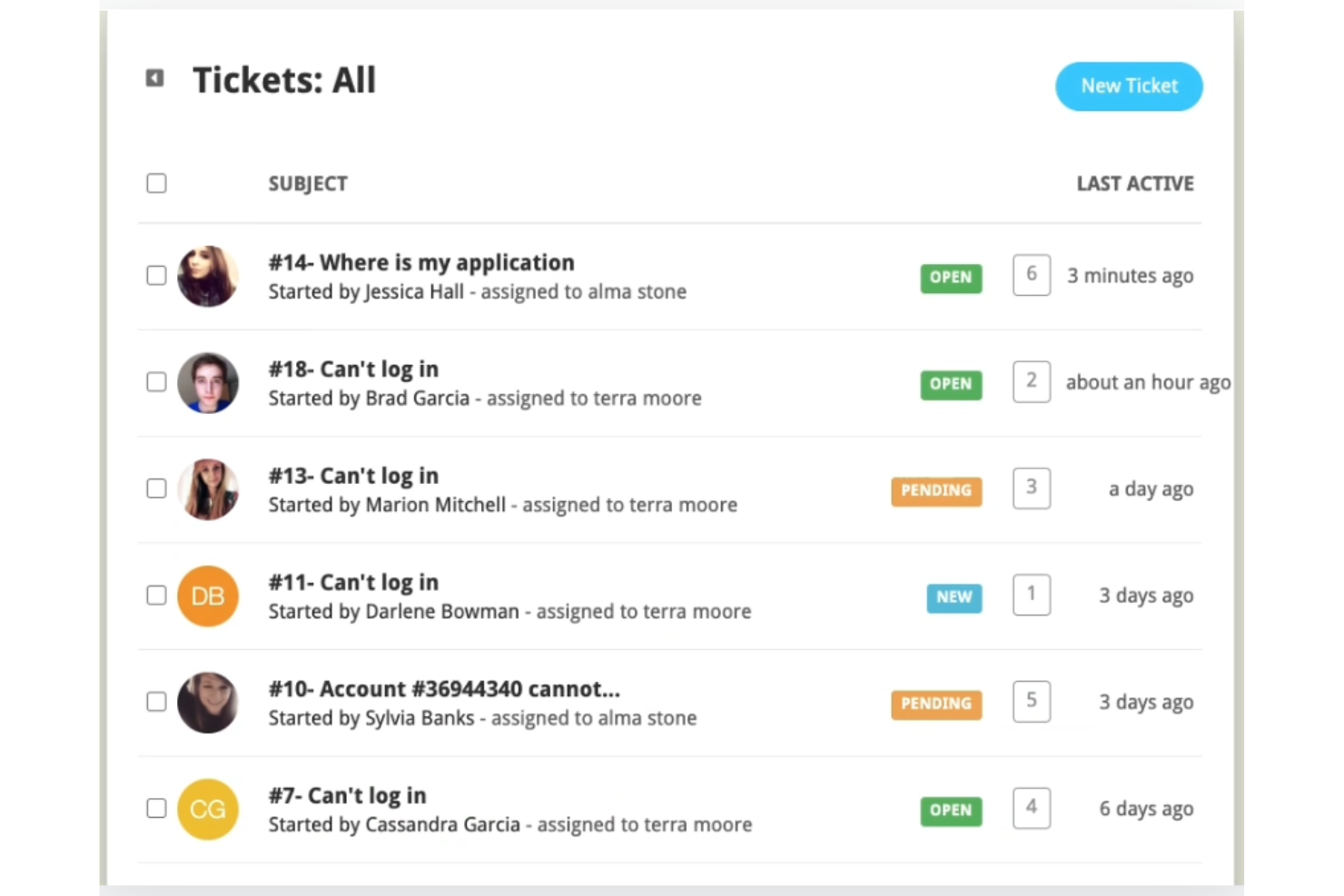
Helpy Pro è una soluzione help desk on-premise pensata per le aziende che danno priorità alla privacy dei dati. Serve alle aziende che devono gestire il supporto clienti garantendo la conformità alle normative sulla privacy.
Perché ho scelto Helpy Pro: È ideale per i team che puntano alla conformità sulla privacy. Grazie a funzionalità come il self-hosting, hai il controllo sulla posizione dei tuoi dati, assicurando il rispetto delle normative. Il software supporta help desk multilingua, rendendolo adatto a team internazionali. I forum di supporto comunitari integrati aggiungono valore permettendo ai clienti di trovare risposte in autonomia.
Funzionalità e integrazioni principali:
Funzionalità includono moduli ticket personalizzabili, smistamento automatico dei ticket e un forum di supporto comunitario. Helpy Pro offre il supporto multilingua, fondamentale per aziende globali. La funzione knowledge base consente di creare un portale self-service per i clienti.
Integrazioni includono Slack, Twilio, Mailgun, Mandrill, SendGrid, SparkPost, Whatsapp, Facebook Messenger, Jira e Zapier.
Pros and Cons
Pros:
- Sistema di ticketing personalizzabile
- Forum comunitario
- Ideale per team internazionali
Cons:
- Personalizzazione avanzata limitata
- Non ideale per grandi imprese


ServiceTonic è un software di help desk on-premise progettato per la gestione dei servizi IT e per i team di supporto clienti. Offre funzioni essenziali come il ticketing, la gestione degli asset e l'automazione per migliorare l'erogazione dei servizi.
Perché ho scelto ServiceTonic: Si distingue per i suoi flussi di lavoro personalizzati adattabili ai processi del tuo team. Il designer di workflow drag-and-drop del software permette di costruire processi su misura per le esigenze aziendali. Grazie alle sue capacità di automazione puoi ridurre le attività manuali e aumentare l'efficienza. La possibilità di creare campi e moduli personalizzati assicura che lo strumento si adatti a settori e requisiti diversi.
Funzionalità e integrazioni di spicco:
Funzionalità includono un portale self-service che consente ai clienti di risolvere autonomamente i propri problemi. La gestione degli accordi sul livello di servizio (SLA) aiuta a monitorare e garantire gli standard di performance. Inoltre, il software mette a disposizione una knowledge base che facilita la condivisione delle informazioni all'interno del team.
Integrazioni includono Microsoft Active Directory, LDAP, Outlook, Gmail, Microsoft Teams, Slack, Zapier, Salesforce, Google Calendar e Azure.
Pros and Cons
Pros:
- Gestione SLA avanzata
- Adattabile a diversi settori
- Capacità di automazione estese
Cons:
- Richiede competenze tecniche
- Strumenti di reportistica basilari
- Non ideale per principianti
- Funzionalità limitate dell'app mobile
Altro
Ecco alcune altre opzioni di software per l’assistenza in sede che non sono state incluse nel mio elenco, ma che vale comunque la pena valutare:
- Wowdesk
Ideale per il supporto multilingue
- Output Desk
Ideale per interfaccia facile da usare
- ManageEngine ServiceDesk Plus
Ideale per l'allineamento ITIL
- OneDesk
Ideale per la gestione dei progetti


Che cos'è il software per l'assistenza in sede?
Il software per l'assistenza in sede è ospitato sui server della vostra organizzazione, offrendovi il pieno controllo sui dati, sulla sicurezza e sulla personalizzazione. Aiuta i team IT e di assistenza a gestire i ticket, monitorare i problemi e mantenere la conformità. È ideale per le organizzazioni con rigorosi requisiti di privacy o normativi.
Come valuto il software help desk on-premise
Valuto ogni strumento su due livelli: i requisiti di base che un sistema di ticketing self-hosted deve soddisfare e i fattori differenzianti che lo rendono adatto al vostro ambiente.
Funzionalità di base (Requisiti fondamentali per questa lista)
Queste funzionalità di base rappresentano i criteri di accettazione per l'inclusione nella mia lista di software help desk on-premise:
- Distribuzione Self-Hosted: Verifico se una piattaforma può essere installata sui vostri server, VM o cloud privato. Strumenti come ManageEngine e Zammad supportano Linux, Windows e Docker.
- Sistema di gestione ticket: Ogni strumento deve fornire il monitoraggio completo del ciclo di vita (creazione, assegnazione, prioritizzazione e risoluzione) per consentire agli operatori di gestire le code senza perdere il contesto.
- Raccolta ticket multicanale: Cerco una raccolta unificata da email, portali web e API almeno, poiché gli utenti finali si aspettano di poter inviare richieste da più canali.
- SLA e automazione dei workflow: Regole di escalation, calendari di orario lavorativo e instradamento automatico sono fondamentali, soprattutto per i team che gestiscono ticket tra turni o sedi regionali.
- Knowledge base e portale self-service: Una knowledge base ricercabile abbinata a un portale per gli utenti consente ai dipendenti di risolvere problemi comuni, come il reset delle password, prima ancora di creare un ticket.
- Accesso basato su ruoli e reportistica: Valuto quanto siano granulari i permessi e se i dashboard mettono in evidenza metriche come il tempo di prima risposta e l'età degli arretrati senza dover ricorrere a query personalizzate.
Attribuisco a ciascun fornitore un punteggio da 0 (non offre la funzionalità) a 5 (eccelle in quest'area) per ciascun criterio.
I fornitori devono raggiungere una media minima per essere considerati nella mia lista. Da lì, valuto cosa distingue ogni piattaforma.
Fattori differenzianti (Cosa distingue i fornitori)
Dopo aver selezionato la mia lista, ecco come confronto e metto in relazione i diversi fornitori nell'area del software help desk on-premise:
Funzionalità distintive
L'integrazione nativa con Active Directory o LDAP è un elemento di rilievo, poiché la maggior parte dei team IT desidera sfruttare i controlli di accesso e i gruppi già esistenti per onboarding e permessi. Verifico anche la presenza di asset management e configuration management integrati, perché gli strumenti che collegano strettamente i ticket all'hardware o ai dispositivi utente riducono i problemi in vista di audit o compliance. Per le organizzazioni in ambienti regolamentati o con workflow complessi, i moduli dei processi ITIL e l'accesso al codice sorgente (per personalizzazione o audit) possono fare la differenza in base alle esigenze interne.
Oltre le funzionalità
Compliance e sovranità dei dati sono fondamentali. I team del settore sanitario o pubblico hanno bisogno di supporto per deployment isolati e logging che sia valido durante revisioni HIPAA o FedRAMP. Anche la struttura delle licenze è molto importante. Valuto se un fornitore addebita per agente, per server o offre agenti illimitati, dato che ciò incide sui costi nel lungo periodo man mano che il team cresce. Esamino anche quanto un fornitore aggiorna il suo prodotto on-premise: alcuni si sono spostati sul cloud, il che può significare aggiornamenti meno frequenti e un futuro incerto per chi sceglie il self-hosted.
Come scegliere il software per l'assistenza in sede
È facile perdersi in lunghi elenchi di funzionalità e strutture di prezzo complesse. Per aiutarvi a rimanere concentrati mentre affrontate il vostro processo di selezione del software, ecco un elenco di fattori da tenere presenti:
| Fattore | Cosa considerare |
| Scalabilità | Assicuratevi che il software possa crescere insieme alla vostra attività. Valutate se è in grado di gestire un volume maggiore di ticket e utenti aggiuntivi senza compromettere le prestazioni. |
| Integrazioni | Verificate se il software si integra con gli strumenti che il vostro team utilizza già, come Slack, Jira o i sistemi CRM, per semplificare i flussi di lavoro e migliorare l'efficienza. |
| Personalizzazione | Cercate un software che vi permetta di adattare flussi di lavoro, moduli e dashboard ai processi e ai requisiti del vostro team. |
| Facilità d'uso | Scegliete un software con un'interfaccia intuitiva che riduca al minimo la curva di apprendimento per i nuovi utenti e aiuti il vostro team a diventare rapidamente operativo. |
| Budget | Considerate il costo totale, comprese eventuali commissioni nascoste per componenti aggiuntivi o aggiornamenti, e assicuratevi che sia compatibile con i limiti del vostro budget. |
| Misure di sicurezza | Valutate le funzionalità di sicurezza del software per proteggere i dati sensibili, come la crittografia, i controlli degli accessi e la conformità agli standard del settore. |
| Opzioni di assistenza | Esaminate la disponibilità e la qualità dell'assistenza clienti, compresi la chat dal vivo, il supporto telefonico e le risorse online, per assicurarvi di poter ricevere aiuto quando necessario. |
| Funzionalità di reportistica | Assicuratevi che il software offra solidi strumenti di reportistica per aiutarvi a monitorare le metriche delle prestazioni e ottenere informazioni sulle attività di assistenza. |
Tendenze nei software di help desk on-premise
Nella mia ricerca, ho raccolto innumerevoli aggiornamenti dei prodotti, comunicati stampa e registri delle versioni di diversi fornitori di software di help desk on-premise. Ecco alcune delle tendenze emergenti che sto tenendo d’occhio:
- Analisi basate sull’intelligenza artificiale: gli strumenti di help desk basati sull’intelligenza artificiale analizzano i dati dei ticket e prevedono le tendenze. Questo aiuta i team ad affrontare proattivamente i problemi prima che si aggravino. Ad esempio, alcuni strumenti offrono ora approfondimenti basati sull’intelligenza artificiale per migliorare i tempi di risposta e la soddisfazione dei clienti.
- Miglioramenti del self-service: sempre più strumenti potenziano i portali self-service con guide interattive e funzionalità di ricerca intelligente. Questo consente ai clienti di trovare autonomamente le risposte, riducendo il carico di lavoro dei team di assistenza. I fornitori si concentrano sul rendere questi portali più intuitivi e completi.
- Canali di comunicazione unificati: si sta puntando a integrare tutti i canali di comunicazione in un’unica visualizzazione. Questo aiuta i team di assistenza a gestire le interazioni con i clienti in modo più efficace, riunendo e-mail, chat e chiamate in un unico luogo e migliorando il coordinamento delle risposte.
- Adattamenti al lavoro da remoto: poiché sempre più team lavorano da remoto, il software di help desk si sta evolvendo per supportare forze lavoro distribuite. Le funzionalità che facilitano la collaborazione da remoto, come dashboard condivise e supporto video, sono sempre più diffuse.
- Attenzione alla privacy dei dati: con l’inasprimento delle normative sui dati, i fornitori stanno dando maggiore importanza ai controlli sulla privacy. Le soluzioni on-premise vengono progettate con funzionalità di sicurezza avanzate, consentendo alle aziende di rispettare normative come il GDPR e mantenere al contempo il controllo sui propri dati.
Funzionalità dei software di help desk on-premise
Quando scegli un software di help desk on-premise, presta attenzione alle seguenti funzionalità chiave:
- Gestione dei ticket: monitora e organizza le richieste di assistenza per garantire risposte tempestive.
- Monitoraggio degli incidenti: monitora e registra gli incidenti per aiutare a individuare schemi ricorrenti e prevenire problemi futuri.
- Base di conoscenza: archivia informazioni e soluzioni ai problemi comuni, consentendo agli utenti di trovare autonomamente le risposte.
- Flussi di lavoro personalizzati: consente ai team di adattare i processi alle proprie esigenze specifiche e migliorare l’efficienza.
- Supporto multicanale: integra diversi canali di comunicazione, come e-mail e chat, in un’unica piattaforma per un migliore coordinamento.
- Portale self-service: consente ai clienti di risolvere autonomamente i problemi, riducendo il carico di lavoro dei team di assistenza.
- Strumenti di automazione: semplificano le attività ripetitive, liberando tempo da dedicare ai problemi più complessi.
- Controlli sulla privacy dei dati: garantiscono la conformità alle normative sui dati, offrendo maggiore sicurezza e controllo sulle informazioni.
- Strumenti di reportistica: forniscono informazioni sulle prestazioni del team e sulla soddisfazione dei clienti per orientare le attività di miglioramento.
- Gestione delle risorse: tiene traccia delle risorse aziendali, contribuendo a un’allocazione e una manutenzione efficienti.
Vantaggi dei software di help desk on-premise
L’implementazione di un software di help desk on-premise offre diversi vantaggi al tuo team e alla tua azienda. Ecco alcuni dei benefici che puoi aspettarti:
- Controllo dei dati: mantieni al sicuro le informazioni sensibili ospitando i dati sui tuoi server e garantendo la conformità alle normative sulla privacy.
- Personalizzazione: adatta i flussi di lavoro, i moduli e le interfacce alle esigenze specifiche del tuo team, migliorando l’efficienza complessiva.
- Tempi di risposta migliorati: utilizza gli strumenti di gestione dei ticket e di automazione per gestire rapidamente le richieste e ridurre i tempi di attesa dei clienti.
- Collaborazione migliorata: il supporto multicanale e i canali di comunicazione unificati aiutano il tuo team a coordinare le risposte su piattaforme diverse.
- Prevedibilità dei costi: evita i costi ricorrenti degli abbonamenti optando per un acquisto una tantum, così da ottenere una pianificazione di bilancio più prevedibile.
- Scalabilità: espandi il sistema con la crescita della tua azienda, assicurandoti che possa gestire una domanda maggiore senza compromettere le prestazioni.
- Autonomia dei clienti: offri portali self-service e basi di conoscenza che consentano ai clienti di trovare autonomamente le soluzioni, riducendo il carico di lavoro del team di assistenza.
Costi e prezzi dei software di help desk on-premise
La scelta di un software di help desk on-premise richiede la comprensione dei diversi modelli e piani tariffari disponibili. I costi variano in base alle funzionalità, alle dimensioni del team, ai componenti aggiuntivi e ad altri fattori. La tabella seguente riassume i piani comuni, i relativi prezzi medi e le funzionalità tipicamente incluse nelle soluzioni software di help desk on-premise:
Tabella comparativa dei piani per il software di assistenza in sede
| Tipo di piano | Prezzo medio | Funzionalità comuni |
| Piano gratuito | $0 | Gestione di base dei ticket, assistenza via e-mail e base di conoscenze. |
| Piano personale | $10-$30/ utente/mese | Gestione dei ticket, monitoraggio degli incidenti e strumenti di reportistica di base. |
| Piano aziendale | $40-$70/ utente/mese | Reportistica avanzata, assistenza multicanale e flussi di lavoro personalizzabili. |
| Piano per grandi aziende | $80-$120/ utente/mese | Personalizzazione completa, gestione delle risorse e funzionalità di sicurezza avanzate. |
Domande frequenti sul software di assistenza in sede
Ecco alcune risposte alle domande più comuni sul software di assistenza in sede:
Qual è la differenza tra l'assistenza software e l'help desk?
L’assistenza software si occupa di problemi tecnici complessi che richiedono competenze specialistiche, mentre un help desk risponde ai problemi e alle richieste di base degli utenti. Gli help desk offrono un’assistenza iniziale e possono inoltrare i problemi all’assistenza software, se necessario. Comprendere questa distinzione aiuta ad allocare le risorse in modo efficiente.
Come funziona il software di help desk?
Il software di help desk organizza le richieste di assistenza accettandole, monitorandole e gestendole in modo efficiente. Spesso include funzionalità come basi di conoscenze, portali self-service e strumenti di reportistica. La scelta del software più adatto dipende dalle esigenze specifiche del team e dalla complessità dell’assistenza richiesta.
Qual è il software di help desk più comune?
Tra i software di help desk più comuni figurano opzioni popolari come Zendesk, Freshdesk e Jira Service Desk. Queste soluzioni sono ampiamente utilizzate grazie alle loro funzionalità complete e alla facilità d’uso, e soddisfano le esigenze di aziende di diverse dimensioni e con differenti necessità di assistenza.
Qual è la funzione principale di un help desk IT?
Un help desk IT gestisce i problemi dei dipendenti e le richieste di servizio, fungendo da principale canale di comunicazione tra gli utenti e il reparto IT. Svolge un ruolo fondamentale nell’erogazione dei servizi IT, garantendo che i problemi degli utenti vengano affrontati in modo tempestivo ed efficiente.
Quanto è sicuro un software di assistenza in sede?
Il software di assistenza in sede offre una maggiore sicurezza poiché ospita i dati sui propri server. Questa configurazione consente di implementare controlli rigorosi degli accessi e di rispettare le normative sulla privacy dei dati, aspetti fondamentali per le aziende che gestiscono informazioni sensibili.
Un software di assistenza in sede può supportare i team da remoto?
Sì, molte soluzioni di assistenza in sede includono oggi funzionalità che agevolano il lavoro da remoto, come dashboard condivise e assistenza video. Questi strumenti consentono al team di collaborare in modo efficace, anche quando lavora da sedi diverse.
Quali sono i prossimi passi?
Iscriviti alla nostra newsletter per ricevere gli ultimi approfondimenti sulla CX, guide pratiche, strategie e risorse dai principali esperti del settore della CX.