

I migliori chatbot IA per il servizio clienti automatizzano l'assistenza su larga scala, rispondendo alle domande frequenti, riducendo il volume dei ticket e lasciando agli operatori più tempo per gestire i problemi complessi. Vuoi un chatbot che ti aiuti a fornire risposte rapide e coerenti alle semplici richieste dei clienti, ma devi capire quale opzione garantisca risultati migliori per i tuoi clienti e operatori.
In questo articolo, utilizzo la mia esperienza nel campo della CX per esaminare e selezionare i migliori chatbot IA, aiutando i team del servizio clienti a lavorare in modo più efficace e a offrire assistenza ai clienti 24 ore su 24.
Perché fidarsi dei nostri consigli sui software
6,700+
Reviews
20
Industry experts
16+
Evaluation factors
14
Years
Il nostro team testa e recensisce software dal 2012. In quanto leader CX noi stessi, sappiamo quanto sia difficile — e importante — scegliere il software giusto.
Per questa guida, abbiamo valutato gli strumenti attraverso test pratici e ricerche indipendenti, assegnando un punteggio agli strumenti in base ai nostri criteri di selezione.
Le nostre recensioni riflettono il nostro giudizio editoriale umano, non un discorso di vendita.
 Gui DrusinaCreative Director
 Tim FisherVP of AI
Tabella comparativa: chatbot IA per il servizio clienti
Questa tabella comparativa riassume la mia selezione dei migliori chatbot IA per il servizio clienti:
| Tool | Best For | Trial Info | Price | ||
|---|---|---|---|---|---|
| 1 | Ideale per la guida degli operatori basata sull'AI | Demo gratuita disponibile | Prezzo su richiesta | Website | |
| 2 | Ideale per triage dei ticket alimentato da IA | Prova gratuita di 14 giorni + demo gratuita disponibile | Da $19/agente/mese (fatturazione annuale) | Website | |
| 3 | Ideale per l'auto-risoluzione su più canali | Prova gratuita disponibile | A partire da $16/utente/mese (fatturazione annuale) | Website | |
| 4 | Ideale per automazione dei flussi di lavoro tramite AI agentica | Piano gratuito disponibile | Prezzo su richiesta | Website | |
| 5 | Ideale per l'integrazione con i principali marketplace | Prova gratuita di 14 giorni | A partire da $39/agente/mese | Website | |
| 6 | Ideale per una rigorosa conformità aziendale in materia di sicurezza | Non disponibile | Prezzi su richiesta | Website | |
| 7 | Ideale per l'assistenza e-commerce dei marchi Shopify | Prova gratuita di 30 giorni + demo gratuita disponibile | A partire da $40/mese | Website | |
| 8 | Ideale per il controllo degli agenti IA di livello aziendale | Demo gratuita disponibile | Prezzi su richiesta | Website | |
| 9 | Ideale per la voce e la trascrizione delle chiamate basate sull'IA | È disponibile una prova gratuita | A partire da $30/licenza/mese (fatturato annualmente) | Website | |
| 10 | Ideale per un'implementazione rapida | Prova gratuita di 30 giorni | A partire da $199/mese | Website |


Recensioni dei migliori chatbot IA per il servizio clienti
Ecco le mie recensioni approfondite dei 20 migliori chatbot IA per il servizio clienti inclusi nel mio elenco.
 Ideale per la guida degli operatori basata sull'AI
- Demo gratuita disponibile
- Prezzo su richiesta
Visit WebsiteCustomer Rating:5/5
Cresta utilizza l'AI per automatizzare il supporto e migliorare le interazioni con i clienti. Cresta è una piattaforma di assistenza clienti basata sull'AI che combina agenti AI autonomi, assistenza agli operatori in tempo reale e intelligence sulle conversazioni per aiutare le organizzazioni ad automatizzare il supporto e migliorare le interazioni con i clienti tramite voce, chat, SMS e canali digitali.
Per chi è più adatta Cresta?
Cresta è particolarmente adatta ai contact center di grandi aziende e del mercato intermedio nei settori dei servizi finanziari, delle assicurazioni, delle telecomunicazioni e della vendita al dettaglio, che gestiscono grandi volumi di conversazioni con i clienti e desiderano migliorare sia l'automazione sia le prestazioni degli operatori.
Perché ho scelto Cresta
Ho scelto Cresta perché colma il divario tra l'automazione basata sull'AI e l'assistenza umana. Sebbene i suoi agenti AI possano gestire autonomamente le richieste di routine dei clienti, la piattaforma fornisce inoltre indicazioni in tempo reale agli operatori durante le conversazioni in corso. Ciò consente alle organizzazioni di automatizzare le richieste ripetitive, aiutando al contempo gli operatori umani a fornire un servizio più coerente e accurato quando si presentano problemi complessi. Mi piace anche il fatto che Cresta combini l'intelligence sulle conversazioni, la gestione della qualità e l'automazione dei flussi di lavoro in un'unica piattaforma, invece di richiedere diverse soluzioni mirate.
Funzionalità principali di Cresta
- Agente AI: Automatizza le interazioni con i clienti tramite voce, chat e canali di messaggistica, gestendo le richieste comuni senza l'intervento degli operatori.
- Riepilogo automatico: Genera automaticamente riepiloghi e note delle conversazioni, riducendo il lavoro successivo alla chiamata e l'impegno amministrativo.
- Gestione della qualità: Valuta le interazioni con i clienti in base a criteri predefiniti e fornisce analisi automatizzate dei punteggi su larga scala.
- Motore di orchestrazione Opera: Consente ai team di creare, gestire e ottimizzare flussi di lavoro basati sull'AI e percorsi conversazionali tramite un'interfaccia senza codice.
Integrazioni di Cresta
Cresta si integra con Salesforce, ServiceNow, Microsoft Dynamics 365, Zendesk, Amazon Connect, Twilio, Five9, Genesys, NICE, HubSpot, Marketo e Databricks. Fornisce inoltre accesso API per integrazioni personalizzate e l'automazione dei flussi di lavoro aziendali.
Pros and Cons
Pros:
- Gli agenti AI automatizzano le interazioni con i clienti
- La guida in tempo reale migliora le prestazioni degli operatori
- Gestione automatizzata della qualità su larga scala
Cons:
- Particolarmente adatta alle organizzazioni più grandi
- Le raccomandazioni dell'AI possono richiedere la supervisione umana
Learn more about Cresta: Ideale per triage dei ticket alimentato da IA
- Prova gratuita di 14 giorni + demo gratuita disponibile
- Da $19/agente/mese (fatturazione annuale)
Visit WebsiteCustomer Rating:4.4/5
Freshservice offre un repository centralizzato di informazioni e soluzioni per i problemi IT più comuni. Freshdesk è una piattaforma di assistenza clienti creata per i team di supporto di aziende di tutte le dimensioni che desiderano automatizzare le conversazioni, risolvere i ticket più rapidamente e offrire esperienze coerenti su chat, email e canali social utilizzando strumenti alimentati dall'IA.
Per chi è ideale Freshdesk?
Freshdesk è adatto ai team di supporto in crescita che gestiscono un elevato volume di ticket su più canali e necessitano di strumenti di intelligenza artificiale per mantenere tempi di risposta e carichi di lavoro gestibili.
Perché ho scelto Freshdesk
Freshdesk merita un posto nella mia shortlist per l'efficacia con cui Freddy AI gestisce in automatico il triage dei ticket. Apprezzo in particolare la funzione di auto-triage, che analizza i ticket in arrivo e compila automaticamente campi come priorità, categoria e tipo senza alcun intervento manuale degli agenti. Freddy AI Copilot prioritizza i ticket in base al sentimento del cliente, permettendo così al mio team di individuare rapidamente le conversazioni che richiedono attenzione immediata. Questo permette agli agenti di dedicare più tempo alla risoluzione delle problematiche invece che alla classificazione.
Caratteristiche principali di Freshdesk
- Freddy AI Agent: Un bot IA che gestisce direttamente le richieste dei clienti su chat ed email senza coinvolgimento degli agenti.
- Assegnazione dei ticket basata sulle competenze: Smista automaticamente i ticket agli agenti in base alle loro specifiche competenze ed esperienze.
- Freddy AI Insights: Genera report su tendenze di supporto, modelli di ticket e performance del team per individuare lacune operative.
- Base di conoscenza: Un portale self-service multilingue dove i clienti possono trovare risposte alle domande più comuni senza contattare il supporto.
Integrazioni Freshdesk
Le integrazioni includono Playvox, Slack, MS Teams, Shopify, Salesforce, Jira, Tata, Jupiter, Springer e Workato.
Pros and Cons
Pros:
- Capacità di gestione degli asset
- Funzionalità di automazione robuste per ridurre le attività manuali
- Dispone di un costruttore di bot conversazionali senza codice per una facile implementazione
Cons:
- Freddy AI è una funzionalità aggiuntiva a pagamento
- Alcuni ritengono complesse le funzionalità di reportistica avanzata
Learn more about Freshdesk: Ideale per l'auto-risoluzione su più canali
- Prova gratuita disponibile
- A partire da $16/utente/mese (fatturazione annuale)
Visit WebsiteCustomer Rating:4.6/5
Il chatbot di SparrowDesk guida gli utenti con risposte amichevoli e automatiche. SparrowDesk è una piattaforma di assistenza clienti alimentata dall'IA, progettata per i team di supporto e le aziende che desiderano automatizzare le risposte, risolvere le richieste più rapidamente e gestire le conversazioni su più canali senza sacrificare qualità o coerenza.
Per Chi È Meglio SparrowDesk?
SparrowDesk è la scelta ideale per team di supporto di medie e grandi dimensioni che gestiscono un elevato volume di richieste clienti su diversi canali e hanno bisogno dell'IA per risolverle automaticamente.
Perché Ho Scelto SparrowDesk
Ho inserito SparrowDesk nella mia selezione perché gestisce molto bene l'auto-risoluzione su più canali senza richiedere un intervento umano costante. Mi piace che utilizzi l'IA per chiudere automaticamente le richieste comuni—come lo stato degli ordini, il reset della password o l'aggiornamento dell'account—su chat, email e social in un unico flusso unificato. Il mio team può impostare regole di risoluzione per ogni canale, così il bot non si limita a deviare i ticket ma li chiude effettivamente fornendo una risposta confermata. Questo controllo specifico per canale sull'automazione della risoluzione è vantaggioso negli ambienti di supporto ad alto volume.
Funzionalità Chiave di SparrowDesk
- Rilevamento dell'intento tramite IA: Identifica lo scopo di ogni messaggio del cliente per indirizzarlo o rispondervi automaticamente con l'azione corretta.
- Passaggio all'agente umano: Trasferisce la conversazione dal chatbot IA a un agente umano quando la richiesta supera le capacità di risoluzione del bot.
- Libreria di risposte predefinite: Archivia risposte pre-approvate che l'IA può utilizzare per rispondere in modo coerente alle domande frequenti.
- Cruscotto di analisi delle conversazioni: Monitora metriche sulle prestazioni del chatbot come tasso di risoluzione, tempo di risposta e frequenza di escalation.
Integrazioni di SparrowDesk
Le integrazioni includono Attio, Zapier, SurveySparrow, HubSpot e Okta.
Pros and Cons
Pros:
- AI Copilot assiste gli agenti con suggerimenti intelligenti sulle bozze.
- Il supporto multilingue soddisfa un pubblico globale.
- La casella di posta omnicanale centralizza la comunicazione su tutte le piattaforme.
Cons:
- La dipendenza dall'IA potrebbe non adattarsi a tutti gli stili di assistenza clienti.
- Le integrazioni native limitate potrebbero ostacolare la piena connettività.
Learn more about SparrowDesk: Ideale per automazione dei flussi di lavoro tramite AI agentica
- Piano gratuito disponibile
- Prezzo su richiesta
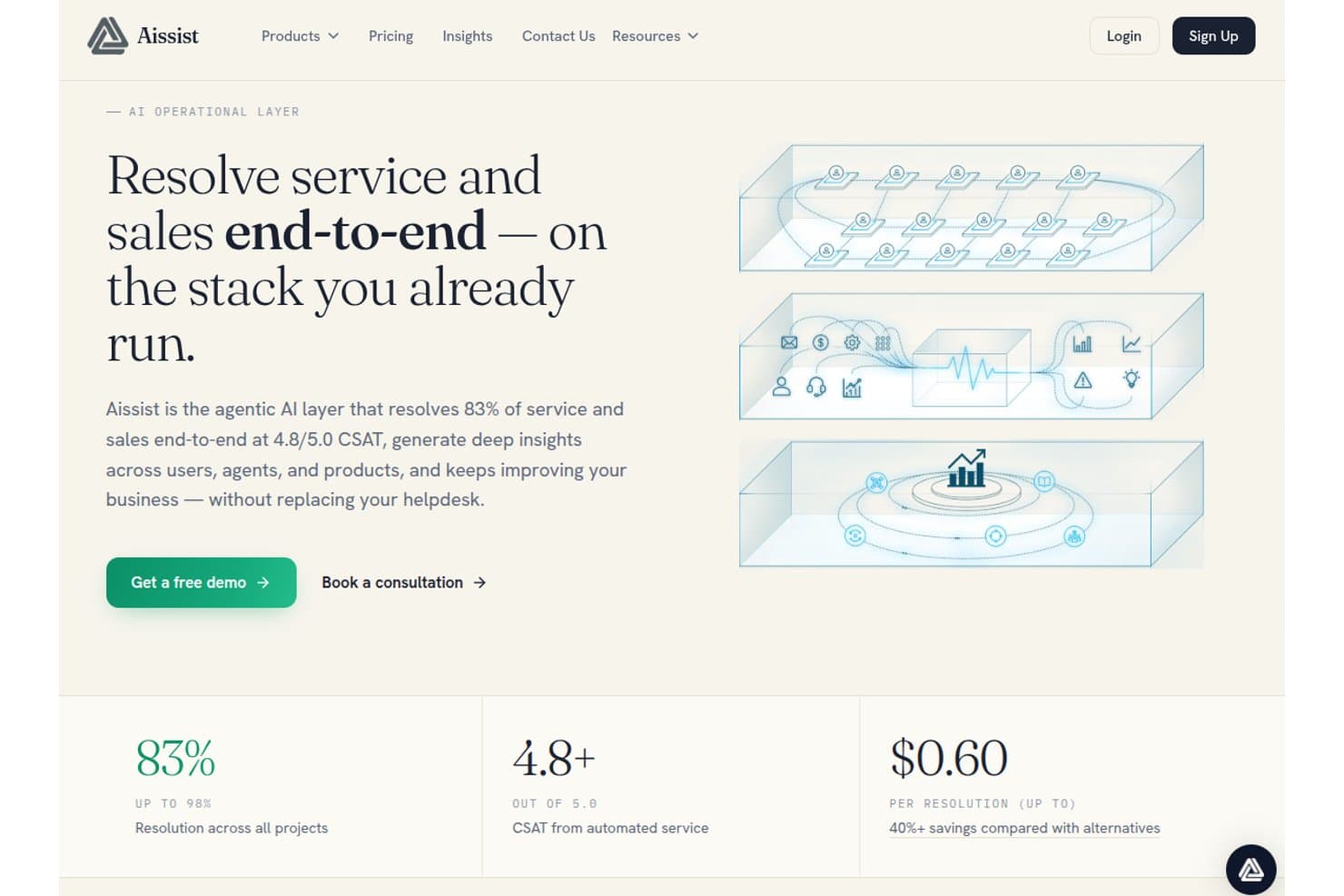
Aissist offre uno strato AI agentico che risolve l’83% delle richieste di servizio e vendita end-to-end con un CSAT di 4,8/5,0 a $0,60 per risoluzione. Aissist è una piattaforma AI multi-agente per team di assistenza clienti che distribuisce agenti digitali per gestire conversazioni, automatizzare flussi di lavoro dei ticket e intervenire su helpdesk, CRM e canali di messaggistica.
Per chi è ideale Aissist?
Aissist è adatta ai team di supporto di aziende in crescita che devono automatizzare un elevato volume di ticket senza sostituire la propria infrastruttura di helpdesk esistente.
Perché ho scelto Aissist
Ho scelto Aissist come una delle migliori perché la sua architettura multi-agente AgentMesh va oltre i chatbot tradizionali. Dove la maggior parte dei bot risponde a una domanda e chiude il ciclo, gli agenti digitali di Aissist etichettano i ticket, aggiornano i record ed effettuano escalation dei casi in un unico ciclo automatizzato. Particolarmente interessante il modulo Evolve, che rileva modelli nelle conversazioni in tempo reale e ottimizza continuamente il comportamento dell’AI senza intervento manuale.
Caratteristiche principali di Aissist
- Pulse analytics e reportistica: Monitora metriche chiave di performance, trend e qualità degli agenti su tutte le interazioni con i clienti.
- Supporto multilingua: Rileva e risponde automaticamente in oltre 65 lingue per una copertura globale.
- Gestione conversazioni omnicanale: Gestisce le conversazioni con i clienti su chat, email, WhatsApp, SMS e social in un’unica piattaforma.
- Motore di ingestione della conoscenza: Acquisisce documenti aziendali, ticket passati e contenuti di supporto per risposte AI fondate e coerenti con il brand.
Integrazioni di Aissist
Aissist offre integrazioni native con Zendesk, Intercom, Salesforce, Freshdesk, Gorgias, HubSpot, Kustomer, Front, Shopify, WooCommerce e Magento, e fornisce un’API per integrazioni personalizzate.
Pros and Cons
Pros:
- AgentMesh gestisce flussi di lavoro a più step in autonomia
- Auto-ottimizzazione continua dai modelli di conversazione in tempo reale
- Si integra contemporaneamente su messaggistica, email e chat
Cons:
- La dashboard di analytics è poco approfondita per team enterprise
- La complessità di configurazione aumenta con setup di agenti più ampi
Learn more about Aissist: Ideale per l'integrazione con i principali marketplace
- Prova gratuita di 14 giorni
- A partire da $39/agente/mese
Visit WebsiteCustomer Rating:4.4/5
Il widget di chat di eDesk consente ai clienti di avviare conversazioni e accedere facilmente ai link di supporto. eDesk è una piattaforma di assistenza clienti alimentata da AI, creata per le aziende di e-commerce che devono gestire alti volumi di supporto su più canali e marketplace.
Per Chi è Ideale eDesk?
eDesk è particolarmente adatto alle aziende di e-commerce che vendono su più marketplace online e che necessitano di un hub centralizzato per il supporto clienti.
Perché Ho Scelto eDesk
eDesk merita un posto nella mia shortlist per la sua efficacia nella gestione del supporto clienti su marketplace principali come Amazon, eBay e Walmart da un'unica casella di posta. Mi piace il fatto che importi automaticamente i dati degli ordini insieme a ogni messaggio del cliente, evitando al mio team di dover cambiare scheda per cercare i dettagli dell'acquisto prima di rispondere. Le risposte suggerite dall'AI sono addestrate su contesti specifici dell'e-commerce, quindi sono più adatte alle interazioni dei marketplace rispetto agli scenari di supporto generici. Trovo anche particolarmente utili le risposte automatiche sullo stato degli ordini, che riducono drasticamente i ticket ripetitivi del tipo 'dov'è il mio ordine?' su larga scala.
Funzionalità Principali di eDesk
- Rilevamento della sentiment AI: Identifica automaticamente il tono emotivo dei messaggi in arrivo per aiutare a dare priorità ai ticket urgenti o di clienti insoddisfatti.
- Widget di chat live: Permette di inserire una finestra di chat direttamente sul tuo negozio online per gestire conversazioni con i clienti in tempo reale.
- Casella smart: Raggruppa i messaggi correlati dello stesso cliente su diversi canali in un'unica conversazione.
- Reportistica delle performance: Monitora tempi di risposta degli agenti, tassi di risoluzione e punteggi di soddisfazione dei clienti in una dashboard integrata.
Integrazioni eDesk
Le integrazioni includono Amazon, eBay, Walmart, Shopify, WooCommerce, BigCommerce, Mirakl ed Etsy.
Pros and Cons
Pros:
- Progettato per gestire grandi volumi di richieste e-commerce
- Le automazioni basate su AI migliorano l'efficienza delle risposte
- Integra dati d'ordine approfonditi per un servizio clienti migliore
Cons:
- Principalmente creato per l'e-commerce, meno flessibile per altri settori
- La personalizzazione della reportistica è limitata per analisi complesse
Learn more about eDesk: Ideale per una rigorosa conformità aziendale in materia di sicurezza
- Non disponibile
- Prezzi su richiesta
Visit WebsiteCustomer Rating:4.8/5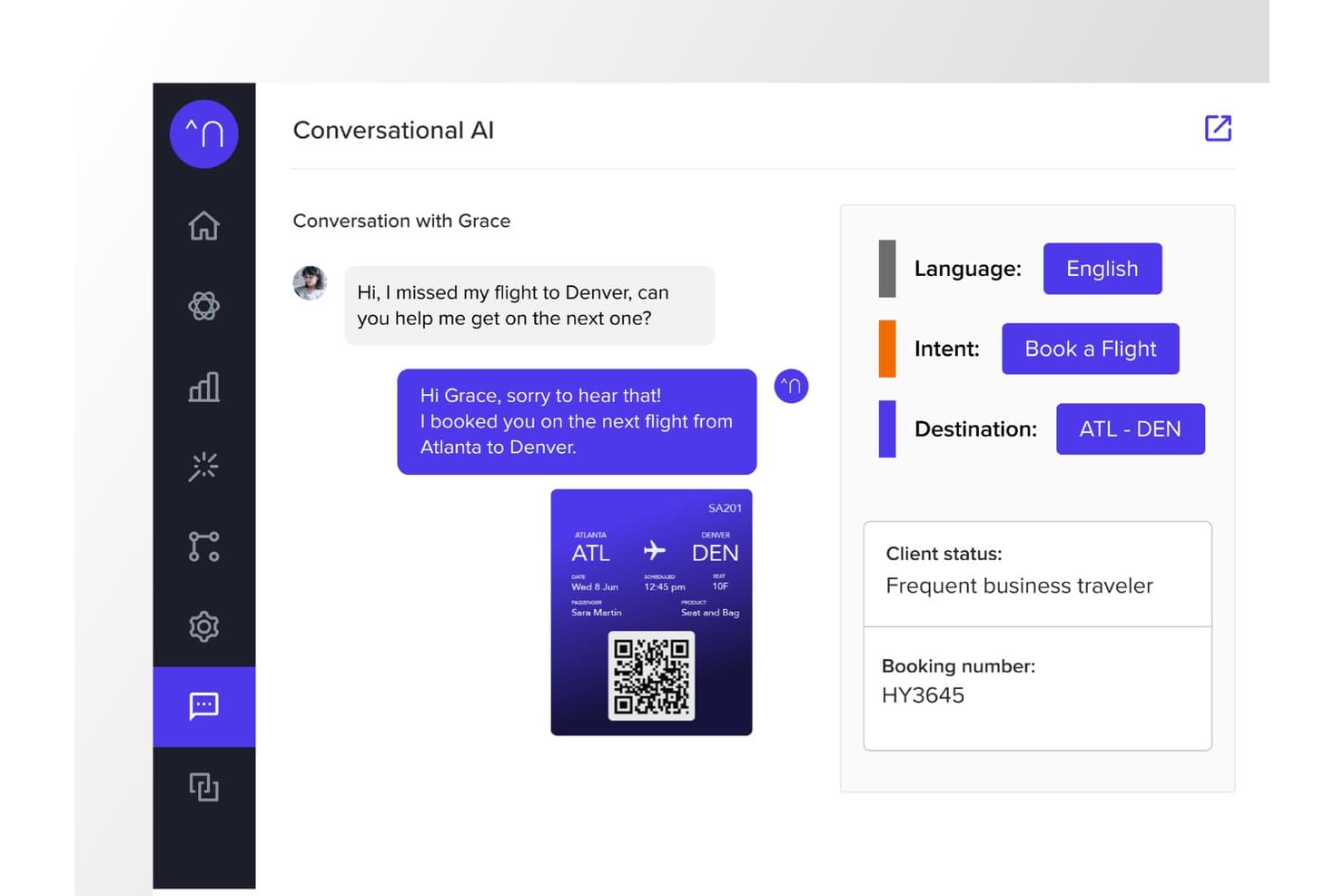
Netomi offre un'interfaccia conversazionale basata sull'IA che rileva automaticamente l'intento del cliente, la lingua e la destinazione per riprenotare in tempo reale i voli persi. Netomi è una piattaforma di IA agentica aziendale per il servizio clienti che combina agenti IA autonomi, supporto di co-pilota per gli operatori umani e implementazione omnicanale su chat, e-mail, voce, SMS e app di messaggistica.
Per chi è più adatto Netomi?
Netomi è particolarmente adatto alle grandi aziende di settori regolamentati come servizi finanziari, viaggi, assicurazioni e telecomunicazioni, che gestiscono volumi elevati di interazioni.
Perché ho scelto Netomi
Ho scelto Netomi come una delle soluzioni migliori perché le sue credenziali di conformità in materia di sicurezza vanno ben oltre un semplice requisito formale. La piattaforma dispone delle certificazioni SOC 2 Type II, ISO 27001, HIPAA e PCI DSS, con controlli di governance integrati direttamente nell'architettura. Apprezzo in particolare il suo approccio all''IA generativa autorizzata': misure di protezione per gli argomenti, difese contro l'iniezione di prompt e controlli di responsabilità vengono eseguiti prima di ogni azione dell'IA, anziché essere aggiunti in un secondo momento a un modello LLM standard.
Funzionalità principali di Netomi
- Acquisizione in tempo reale di conoscenze da più fonti: acquisisce e sintetizza automaticamente contenuti da documenti, URL, file e basi di conoscenza.
- Implementazione omnicanale: offre assistenza clienti tramite sito web, app mobile, e-mail, SMS e i principali canali di messaggistica.
- Integrazioni native con i sistemi di assistenza: si connette immediatamente a Zendesk, Salesforce, Kustomer, ServiceNow, Genesys, NICE e altre piattaforme CX.
- Valutazione del livello di affidabilità con logica di ripiego: assegna livelli di affidabilità alle risposte e attiva flussi di lavoro alternativi personalizzabili quando non vengono raggiunte le soglie di certezza.
Integrazioni di Netomi
Netomi offre integrazioni native con Zendesk, Salesforce, Kustomer, ServiceNow, Genesys, NICE, Five9, Amazon Connect, Cisco e LivePerson. È disponibile un'API per le integrazioni personalizzate.
Pros and Cons
Pros:
- Conformità a più certificazioni, tra cui HIPAA e PCI DSS
- Gli agenti IA autonomi gestiscono risoluzioni complesse in più fasi
- Le misure di protezione integrate per gli argomenti impediscono risposte dell'IA non in linea con il marchio
Cons:
- La complessità dell'implementazione può creare difficoltà ai team più piccoli o alle aziende del mercato medio
- Processo di avvio autonomo limitato senza supporto di livello aziendale
Learn more about Netomi: Ideale per l'assistenza e-commerce dei marchi Shopify
- Prova gratuita di 30 giorni + demo gratuita disponibile
- A partire da $40/mese
Visit WebsiteCustomer Rating:4.6/5
Gorgias offre una casella di posta per l'assistenza clienti con dettagli sui ticket, profilo del cliente e risposte assistite dall'IA in un'interfaccia di helpdesk unificata. Gorgias è una piattaforma di chatbot basata sull'IA e di helpdesk focalizzata sull'e-commerce che combina un agente conversazionale basato sull'IA, una casella di posta omnicanale e azioni di gestione degli ordini per gestire l'assistenza clienti tramite chat, e-mail, social, SMS e WhatsApp.
A chi è più adatto Gorgias?
Gorgias è particolarmente adatto ai marchi di e-commerce di medie dimensioni che operano su Shopify, BigCommerce o Magento e necessitano di un'assistenza clienti basata sull'IA e sui dati del proprio negozio.
Perché ho scelto Gorgias
Gorgias si è guadagnato un posto nel mio elenco ristretto perché il suo agente IA è addestrato specificamente sulle conversazioni di e-commerce, non su dati generici relativi all'assistenza. Mi piace molto il fatto che possa annullare ordini, applicare codici sconto e gestire abbonamenti direttamente all'interno di una conversazione, senza dover passare a una scheda separata per accedere al backend. L'assistente allo shopping coinvolge inoltre in modo proattivo gli acquirenti con consigli personalizzati sui prodotti, trasformando quella che sarebbe un'interazione di assistenza in un'opportunità di vendita.
Funzionalità principali di Gorgias
- Casella di posta omnicanale: Gestisci l'assistenza tramite e-mail, chat, social, SMS e WhatsApp da un unico spazio di lavoro.
- Integrazioni native per l'e-commerce: Collegati direttamente a Shopify, BigCommerce, Magento e WooCommerce per accedere in tempo reale ai dati sugli ordini e sui clienti.
- Report sull'attribuzione dei ricavi: Tieni traccia delle vendite generate dalle interazioni con l'assistenza clienti e dalle conversazioni con gli agenti.
- Instradamento automatico dei ticket: Usa l'intento e le regole per assegnare automaticamente i ticket all'agente o al percorso di escalation appropriato.
Integrazioni di Gorgias
Gorgias offre oltre 300 integrazioni native, tra cui Shopify, BigCommerce, Magento, WooCommerce, Klaviyo, Yotpo, Attentive, Recharge e Loop Returns. È disponibile un'API per le integrazioni personalizzate.
Pros and Cons
Pros:
- L'agente IA risolve i ticket senza intervento umano
- Gestisce le azioni sugli ordini direttamente nella chat
- L'assistente allo shopping proattivo trasforma l'assistenza in vendite
Cons:
- Valore limitato al di fuori dei casi d'uso dell'e-commerce
- I report non offrono dati sufficientemente dettagliati sulle metriche non legate ai ricavi
Learn more about Gorgias: 8Ideale per il controllo degli agenti IA di livello aziendale
Ada
- Demo gratuita disponibile
- Prezzi su richiesta
Visit WebsiteCustomer Rating:4.7/5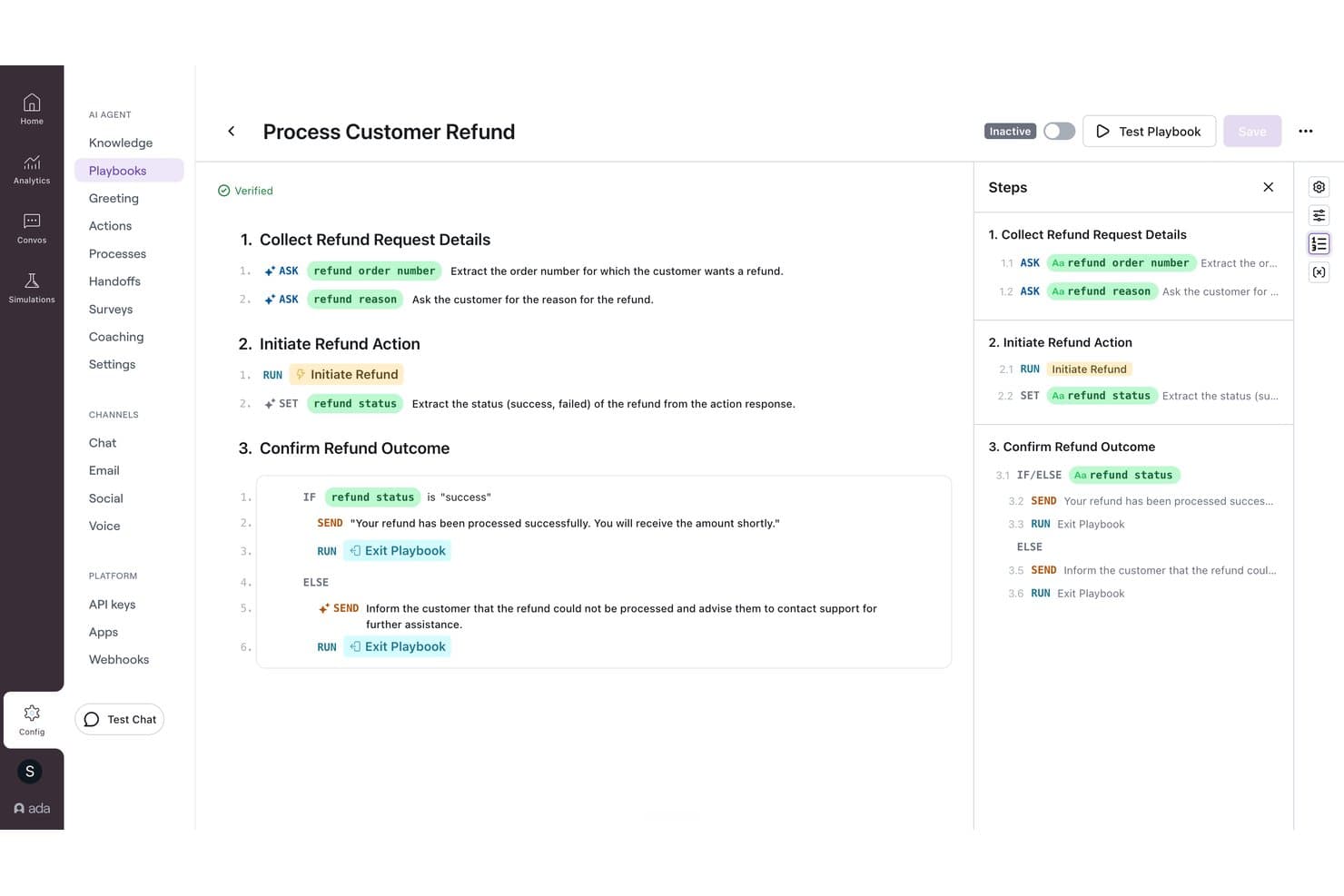
Ada offre un generatore visivo di manuali operativi che automatizza i flussi di lavoro per i rimborsi ai clienti tramite logica condizionale e azioni IA dettagliate passo dopo passo. Ada è una piattaforma aziendale di assistenza clienti basata sull'IA che distribuisce agenti IA attraverso i canali vocali, chat, email e messaggistica utilizzando un motore di ragionamento multi-LLM, con integrazioni native con i sistemi di help desk e funzionalità integrate per il passaggio a un operatore umano.
Per chi è più adatta Ada?
Ada è particolarmente adatta alle grandi aziende che gestiscono centinaia di migliaia di interazioni con i clienti ogni anno su più canali di assistenza.
Perché ho scelto Ada
Ada si è guadagnata un posto nella mia rosa di candidati grazie al livello di controllo che offre ai team CX sul comportamento dell'agente IA. Apprezzo in particolare il sistema dei manuali operativi, che consente ai responsabili di perfezionare le risposte dell'IA analizzando le conversazioni con prestazioni insufficienti e applicando feedback senza dover scrivere codice. Il motore di ragionamento di Ada coordina inoltre modelli di OpenAI, Anthropic e Amazon Bedrock, con accordi di conservazione zero dei dati presso tutti i fornitori, un aspetto molto importante quando si gestiscono dati sensibili dei clienti su larga scala.
Funzionalità principali di Ada
- Distribuzione omnicanale: Configura agenti IA su canali vocali, chat, email, SMS, WhatsApp, Messenger e canali integrati nell'app da un'unica piattaforma.
- Acquisizione tramite Knowledge API: Integra i tuoi sistemi di documentazione utilizzando la Knowledge API per il recupero dinamico delle risposte.
- Conformità aziendale: Include le certificazioni SOC 2, GDPR, HIPAA e PCI DSS per supportare i settori regolamentati.
- Controlli degli accessi basati sui ruoli: Gestisci le autorizzazioni di agenti, amministratori e revisori per una gestione sicura e scalabile dei team.
Integrazioni di Ada
Ada offre integrazioni native con Zendesk, Salesforce, ServiceNow, Freshworks, Genesys, Dixa, Gladly, Kustomer, NICE CXone, Twilio Flex e Amazon Connect. È disponibile un'API per le integrazioni personalizzate.
Pros and Cons
Pros:
- Controllo granulare del comportamento dell'IA tramite manuali operativi
- Motore multi-LLM con conservazione zero dei dati
- Distribuzione omnicanale su canali vocali e di messaggistica
Cons:
- Configurazione iniziale complessa per i team di assistenza più piccoli
- La granularità dei report è inferiore a quella di alcuni concorrenti
Learn more about Ada: Ideale per la voce e la trascrizione delle chiamate basate sull'IA
- È disponibile una prova gratuita
- A partire da $30/licenza/mese (fatturato annualmente)
Visit WebsiteCustomer Rating:4.3/5
Aircall offre una casella di posta unificata con gestione delle chiamate in tempo reale, schede informative dal CRM e riepiloghi delle conversazioni basati sull'IA per i team di assistenza. Aircall è una piattaforma per call center basata sul cloud che combina agenti vocali IA, agenti IA per la messaggistica via SMS e WhatsApp, trascrizione delle chiamate e intelligenza conversazionale in tempo reale per i team del servizio clienti.
Per chi è più adatto Aircall?
Aircall è particolarmente adatto ai team dei centri di contatto e alle attività di assistenza clienti in cui la voce è il principale canale di servizio.
Perché ho scelto Aircall
Aircall è entrato nella mia rosa di candidati soprattutto per il modo in cui la sua IA gestisce le conversazioni vocali dall'inizio alla fine. Apprezzo il fatto che la trascrizione delle chiamate raggiunga almeno l'85% di accuratezza e che AI Assist mostri automaticamente gli argomenti principali, il sentiment e il rapporto tra tempo di conversazione e tempo di ascolto dopo ogni chiamata, senza bisogno di alcuna revisione manuale. Gli agenti vocali IA possono risolvere autonomamente le domande frequenti in entrata e trasferire i chiamanti a un agente umano, con il contesto completo della conversazione già acquisito.
Funzionalità principali di Aircall
- Instradamento intelligente delle chiamate: indirizza le chiamate agli agenti in base alle competenze, alla disponibilità o alla cronologia del cliente nei team distribuiti.
- Integrazione con Salesforce Service Cloud Voice: integra voce, trascrizioni e riepiloghi IA delle chiamate nella console Salesforce.
- Analytics+: offre una cronologia illimitata delle chiamate, filtri avanzati e monitoraggio delle chiamate in tempo reale per i responsabili.
- Applicazioni per telefono virtuale: fornisce applicazioni per desktop, web, Android e iOS, così gli agenti possono gestire le chiamate da qualsiasi dispositivo.
Integrazioni di Aircall
Aircall offre oltre 250 integrazioni native, tra cui Salesforce, HubSpot, Zendesk, Intercom, Freshdesk, Microsoft Teams, Shopify, Slack, Pipedrive, Zoho CRM e un'API per integrazioni personalizzate.
Pros and Cons
Pros:
- L'accuratezza della trascrizione IA raggiunge costantemente l'85%
- Gli agenti vocali IA risolvono autonomamente le chiamate in entrata
- Il rilevamento del sentiment in tempo reale segnala i chiamanti a rischio
Cons:
- IA debole per la chat web e la messaggistica
- Non è un chatbot autonomo per il self-service
 10Ideale per un'implementazione rapida
My AskAI
- Prova gratuita di 30 giorni
- A partire da $199/mese
Visit WebsiteCustomer Rating:4.5/5
My AskAI offre una funzionalità di autoapprendimento che genera automaticamente articoli tramite l'AI e consente agli utenti di controllare il tono di voce e lo stato di pubblicazione da un'unica area delle impostazioni. My AskAI è un agente di assistenza clienti basato sull'intelligenza artificiale che si integra con il sistema di assistenza esistente, acquisendo conoscenze da documenti, URL e ticket precedenti per gestire e rispondere automaticamente alle conversazioni di supporto in arrivo.
Per chi è più adatto My AskAI?
È una soluzione particolarmente adatta ai team di assistenza di aziende SaaS ed e-commerce di piccole e medie dimensioni che desiderano ridurre i ticket tramite l'AI senza sostituire la configurazione attuale del sistema di assistenza.
Perché ho scelto My AskAI
My AskAI si è guadagnato un posto nella mia selezione perché consente di essere operativi in tempi davvero rapidi. Lo collego a un account Zendesk o Intercom esistente, gli indico l'URL di un centro assistenza e, entro un'ora, sta già elaborando risposte reali ai ticket, senza bisogno di interventi da parte degli sviluppatori. Apprezzo in particolare la modalità di risposta in bozza, che consente all'AI di suggerire risposte che gli agenti revisionano prima dell'invio, permettendo ai team di acquisire fiducia prima di passare a risposte completamente autonome.
Funzionalità principali di My AskAI
- Acquisizione della base di conoscenza: Si collega a centri assistenza, Google Drive, Notion e URL per basare le risposte su contenuti aziendali verificati.
- Implementazione multicanale: Funziona con widget web, e-mail e Shopify e si integra direttamente con le principali piattaforme di assistenza.
- Miglioramenti tramite autoapprendimento: Analizza i ticket inoltrati agli operatori e le risposte umane per ottimizzare automaticamente le risposte future.
- Analisi delle conversazioni: Mostra nella dashboard informazioni sulla riduzione dei ticket, sulle domande frequenti e sulle metriche delle prestazioni.
Integrazioni di My AskAI
My AskAI offre integrazioni native con Zendesk, Intercom, Gorgias, Freshdesk, HubSpot e Freshchat.
Pros and Cons
Pros:
- Documentazione di supporto per l'onboarding approfondito
- La modalità di risposta in bozza aumenta gradualmente la fiducia degli agenti
- Evidenzia le domande senza risposta per individuare le lacune nella base di conoscenza
Cons:
- Funzionalità limitate per creare bot destinati a flussi conversazionali complessi
- La profondità delle analisi è inferiore a quella dei concorrenti di livello enterprise
Learn more about My AskAI:
Altri chatbot IA per il servizio clienti
Ecco alcune altre piattaforme di intelligenza artificiale conversazionale che non sono entrate nel mio elenco dei migliori software per chatbot, ma che vale comunque la pena esaminare più da vicino:
- 11Comm100Ideale per l'automazione IA nei settori regolamentati
- 12ChatbaseIdeale per agenti IA addestrati sui propri dati
- 13Gradient LabsIdeale per collegare chatbot a dati privati
- 14CrafterQIdeale per la gestione delle risposte guidate dal sentiment
- 15WeavIdeale per integrare chatbot nelle app mobile
- 16Robin Autonomous ITIdeale per automatizzare i flussi di lavoro di risoluzione dei ticket
- 17StonlyIdeale per la condivisione personalizzata delle conoscenze
- 18HiverIdeale per automazione guidata dall’IA
- 19ZendeskIdeale per l'automazione dei flussi di lavoro senza codice
- 20HoratioIdeale per il supporto clienti multilingue
- 21Zoho DeskIdeale per interazioni con i clienti guidate dall’IA
- 22Zoho SalesIQIdeale per l’analisi dei visitatori
- 23TidioIdeale per automatizzare le richieste dei clienti
- 24ConversicaIdeale per la risoluzione immediata dei problemi dei clienti
- 25FrontIdeale per il controllo qualità automatizzato
- 26monday serviceIdeale per dashboard di servizio personalizzabili
- 27IntercomIdeale per richieste clienti avanzate tramite IA
- 28KommunicateIdeale per il supporto multilingue
- 29CoSupport AIIdeale per automatizzare le richieste dei clienti
- 30ChatfuelLa soluzione migliore per la qualificazione dei potenziali clienti incentrata su WhatsApp
- 31Assembled AIIdeale per l'instradamento intelligente dei casi
- 32DriftIdeale per il coinvolgimento clienti in tempo reale
- 33ForethoughtIdeale per la gestione delle richieste dei clienti
- 34GuruIdeale per accesso alla conoscenza guidato dall’IA
- 35IBM Watson AssistantIdeale per comprendere il contesto delle conversazioni
- 36UshurIdeale per interazioni clienti in tempo reale
- 37QuidgetIdeale per automatizzare le richieste di routine
- 38SAAS FirstIdeale per l’assistenza clienti AI 24/7
- 39CompassIdeale per assistenza chat AI in tempo reale
- 40EvlyIdeale per la configurazione personalizzata della voce del brand
Recensioni correlate dei software per la CX
Se non hai ancora trovato quello che cerchi, dai un'occhiata a questi strumenti correlati per la gestione dell'esperienza cliente che abbiamo testato e valutato.
- Software per il servizio clienti
- Software per l'assistenza tecnica
- Software per il centro assistenza
- Piattaforma di messaggistica per i clienti
- Piattaforma per l'esperienza digitale
- Strumenti di analisi del sentiment
Che cos'è un chatbot IA per il servizio clienti?
Un chatbot IA per il servizio clienti è un software che utilizza l'elaborazione del linguaggio naturale e modelli linguistici di grandi dimensioni per automatizzare l'assistenza tramite chat sul web, applicazioni mobili e canali di messaggistica. Questi sistemi si collegano direttamente ai database back-end e agli strumenti di gestione delle relazioni con i clienti per comprendere l'intento degli utenti e rispondere a domande articolate in più passaggi.
A differenza dei tradizionali strumenti basati su regole, i moderni agenti IA analizzano il contesto per gestire flussi di lavoro come la verifica dello stato degli account o l'elaborazione delle modifiche ai piani. Quando una richiesta supera i parametri stabiliti, il software trasferisce direttamente al team di assistenza l'intera cronologia della conversazione.
Come scegliere un chatbot IA per il servizio clienti
La scelta di un chatbot IA richiede di valutare quanto bene il software si integri con il tuo stack tecnologico e gestisca le operazioni di assistenza. Concentrati sulle funzionalità che incidono sulla velocità di risoluzione e sull'efficienza del team.
| Fattori chiave | Cosa considerare |
|---|---|
| Fattori chiaveObiettivi aziendali | Cosa considerareRisposte rapide: scegli un software con sincronizzazioni dirette alla base di conoscenza, in grado di acquisire i documenti di assistenza per rispondere alle domande frequenti ripetitive. Gestione di attività complesse: seleziona strumenti con connessioni webhook che aggiornano i record degli account, elaborano i rimborsi o modificano i piani di abbonamento. Supporto agli utenti globali: scegli piattaforme che offrano la traduzione automatica, il routing su più fusi orari e la copertura di chat ed e-mail. |
| Fattori chiaveIntegrazioni e importazione della base di conoscenza | Cosa considerareVerifica le connessioni dirette al CRM, agli strumenti di gestione dei ticket e ai database interni. Il bot deve acquisire gli articoli della guida e i log delle API per eseguire azioni come gli aggiornamenti dei piani. |
| Fattori chiaveConfigurazione e manutenzione | Cosa considerareValuta l'impegno necessario per addestrare le regole del modello, aggiornare le fonti della conoscenza e gestire le prestazioni continuative senza risorse di ingegneria. |
| Fattori chiaveInstradamento delle conversazioni | Cosa considerareVerifica come il sistema gestisce le richieste complesse. Durante le escalation, il bot dovrebbe trasferire agli operatori dell'assistenza il contesto completo della conversazione. |
| Fattori chiaveSicurezza e conformità | Cosa considerareAssicurati che la piattaforma soddisfi standard come SOC 2 e GDPR. Devi proteggere i dati dei clienti durante le interazioni automatizzate. |
Come valuto i chatbot AI per il servizio clienti
La mia valutazione si suddivide in due livelli: requisiti di base, come la deviazione dei ticket FAQ e la gestione delle controversie di fatturazione, e i fattori distintivi che differenziano gli strumenti.
Funzionalità di base (Requisiti indispensabili per questa lista)
Queste capacità fondamentali rappresentano i criteri di accettazione per essere inclusi nella mia lista di chatbot AI per il servizio clienti:
- Motore di IA Conversazionale: Valuto se il bot gestisce le richieste multi-turno in modo naturale (come un cliente che chiede un rimborso e poi cambia ordine a conversazione in corso) invece di costringere su percorsi a menu rigidi.
- Ingestione della Base di Conoscenza: Ogni strumento dovrebbe attingere da documenti guida esistenti, PDF o URL, così le risposte rimangono ancorate ai contenuti di supporto reali invece di richiedere la scrittura manuale di ogni risposta.
- Implementazione Omnicanale: Verifico quali canali copre il bot (es. widget web, mobile, WhatsApp, Messenger, SMS, email) e se la configurazione rimane unificata su tutti.
- Passaggio all’Agente Umano: Un cliente che contesta un addebito non dovrebbe dover ripetere le informazioni durante il trasferimento. Cerco il trasferimento completo del contesto, la cronologia della chat e regole di instradamento intelligente durante l’escalation.
- Integrazioni con CRM & Helpdesk: Valuto le connessioni native con piattaforme come Zendesk, Salesforce, Intercom e Freshdesk, oltre a verificare se il bot può avviare azioni come la creazione di ticket o la ricerca di ordini.
- Analisi & Reportistica delle Prestazioni: I dashboard devono mostrare tasso di deviazione, tasso di risoluzione, CSAT e richieste senza risposta così il tuo team può evidenziare lacune nei contenuti e misurare l’impatto reale del bot.
Valuto ciascun fornitore su una scala da 0 (non offre la funzionalità) a 5 (eccelle in questa area) per ogni criterio.
I fornitori devono raggiungere un punteggio medio minimo per essere presi in considerazione per l’inclusione nella mia lista. Da lì, considero cosa rende unica ogni piattaforma.
Fattori differenzianti (Cosa distingue i fornitori)
Una volta selezionata la mia lista, ecco come confronto e paragono i diversi fornitori nell’ambito dei chatbot AI per il servizio clienti:
Caratteristiche distintive
Il supporto multilingue conta davvero per i team con pubblici globali, quindi cerco bot che riconoscono e rispondono nativamente in decine di lingue. Gli strumenti con azioni generative, come l’attivazione di rimborsi o l’invio di aggiornamenti sugli ordini direttamente dalla chat, si distinguono per gestire più dei soli FAQ di base. Verifico anche quanto sia robusto il builder no-code, perché i setup senza codice permettono di modificare i flussi, i prompt e le regole di sicurezza del bot senza dover coinvolgere l’ingegneria. Le barriere AI e i controlli di sicurezza del brand sono importanti per mantenere l’esperienza cliente conforme e coerente col messaggio, soprattutto nei settori regolamentati.
Oltre le funzionalità
La struttura dei prezzi è un grande elemento di differenziazione. Alcuni fornitori addebitano per risoluzione, altri usano modelli per utente o a tariffa fissa, quindi valuto quale approccio si allinea meglio con il volume di supporto e la traiettoria di crescita. Un altro aspetto fondamentale è la conformità e la sicurezza dei dati. Verifico la presenza della certificazione SOC 2 Type II, dell’adeguatezza GDPR e se il fornitore permette di escludere le conversazioni dall’addestramento dei modelli LLM. Anche il time-to-value conta. Un bot che richiede mesi per il deployment ritarda il ROI previsto, quindi considero le risorse di onboarding e se template pre-configurati accelerano il lancio.
Tendenze dei chatbot AI per il servizio clienti
Le tendenze più recenti nella tecnologia dei chatbot AI sono trainate dalla necessità di risolvere sfide specifiche nelle operazioni di servizio clienti. Di seguito, esamino le principali tendenze che plasmano il futuro dei chatbot AI.
- Risposte dotate di intelligenza emotiva: le funzionalità avanzate di elaborazione del linguaggio naturale (NLP) consentono ai chatbot di comprendere e rispondere al tono emotivo delle richieste dei clienti. Questa evoluzione risponde alla necessità di interazioni con i clienti più empatiche e pertinenti al contesto, portando a tassi di soddisfazione più elevati.
- Interfacce conversazionali abilitate alla voce: l'integrazione del riconoscimento vocale consente agli utenti di interagire con i chatbot utilizzando il linguaggio naturale, rendendo la tecnologia più accessibile e in linea con l'uso dei dispositivi ad attivazione vocale.
- Etica dell'AI e mitigazione dei pregiudizi: le pratiche di AI etica possono contrastare i pregiudizi nelle interazioni con i chatbot. Ciò riflette una crescente consapevolezza delle implicazioni etiche dell'AI e una risposta a esse, garantendo che i chatbot trattino tutti gli utenti in modo equo e senza pregiudizi.
- Iperautomazione dei processi di servizio clienti: oltre alle semplici domande, i chatbot AI vengono utilizzati per automatizzare flussi di lavoro complessi del servizio clienti. Ciò include l'integrazione con i sistemi di back-end per svolgere attività come l'elaborazione degli ordini, la programmazione degli appuntamenti e la risoluzione dei problemi senza intervento umano.
- Apprendimento e adattamento continui: i chatbot in grado di imparare da ogni interazione e adattare le proprie risposte nel tempo sono molto richiesti. Questa funzionalità garantisce che il servizio fornito dai chatbot diventi più accurato ed efficiente, rispondendo alla necessità di un miglioramento continuo della qualità del servizio clienti.
Funzionalità dei chatbot AI per il servizio clienti
Quando scegli un chatbot AI per il servizio clienti, presta attenzione alle seguenti funzionalità chiave:
- Disponibilità 24 ore su 24, 7 giorni su 7: gestisci le richieste dei clienti in qualsiasi momento del giorno o della notte, assicurandoti che ricevano sempre assistenza, anche durante le festività o al di fuori dell'orario lavorativo.
- Supporto omnicanale: interagisci con gli utenti su più piattaforme, come siti web, social media e app di messaggistica, così da poter raggiungere i clienti ovunque preferiscano interagire.
- Tempi di risposta immediati: fornisci risposte rapide e in tempo reale alle domande comuni, aiutando i clienti a risolvere i problemi senza la tradizionale attesa.
- Escalation fluida: trasferisci facilmente le conversazioni agli operatori umani quando le situazioni si complicano, così i clienti non si sentiranno mai bloccati a parlare con un robot quando hanno bisogno di una persona reale.
- Flussi di lavoro personalizzabili: adatta i flussi delle conversazioni ai servizi specifici della tua azienda, consentendoti di personalizzare l'approccio del chatbot per offrire esperienze utente migliori.
- Interfaccia intuitiva: offri al tuo team e ai tuoi clienti un'esperienza intuitiva e facile da navigare, che non richieda un dottorato in tecnologia per essere utilizzata.
- Gestione sicura dei dati: proteggi i dati dei clienti con funzionalità di sicurezza integrate, come la crittografia e la conformità agli standard sulla privacy, mantenendo al sicuro le informazioni di tutti.
- Analisi dettagliate: monitora metriche chiave come i tempi di risposta, i punteggi di soddisfazione dei clienti e i volumi delle chat, così da poter migliorare continuamente il servizio.
Funzionalità AI comuni dei chatbot AI per il servizio clienti
Oltre alle funzionalità standard dei chatbot AI per il servizio clienti elencate sopra, molte di queste soluzioni stanno integrando l'AI con funzionalità come:
- Elaborazione del linguaggio naturale: Comprendere il linguaggio conversazionale, in modo che il chatbot possa interpretare le domande dei clienti, anche quando vengono poste in modi insoliti o inaspettati.
- Analisi del sentiment: Rilevare in tempo reale lo stato d'animo dei clienti, consentendo al chatbot di adattare il proprio tono o di inoltrare le problematiche in base alle emozioni dei clienti.
- Suggerimenti predittivi: Anticipare ciò di cui i clienti potrebbero avere bisogno in base al loro comportamento e alle conversazioni precedenti, fornendo un'assistenza pertinente senza che venga richiesta.
- Apprendimento e miglioramento automatizzati: Imparare continuamente da ogni interazione, in modo che il chatbot diventi nel tempo più intelligente ed efficace nel rispondere alle domande.
- Conservazione del contesto: Ricordare i dettagli delle interazioni precedenti, così i clienti non devono ripetersi e possono riprendere le conversazioni esattamente da dove le avevano interrotte.
Vantaggi dei chatbot AI per il servizio clienti
Automatizzando le interazioni e fornendo risposte tempestive e intelligenti, i chatbot AI hanno trasformato il modo in cui le aziende gestiscono il servizio clienti, così come il modo in cui i clienti interagiscono con le imprese. Ecco cinque vantaggi principali dell'implementazione di questa tecnologia:
- Risposta immediata: Forniscono risposte in tempo reale alle richieste dei clienti, riducendo significativamente il tempo che i clienti trascorrono in attesa di risposte e migliorando la soddisfazione complessiva.
- Scalabilità: I chatbot AI possono gestire un numero crescente di richieste senza la necessità di risorse aggiuntive, consentendo alle aziende di gestire in modo efficiente i picchi della domanda di servizio clienti.
- Efficienza dei costi: Automatizzando le richieste di routine, i chatbot riducono il carico di lavoro degli operatori umani e abbassano i costi operativi associati all'assistenza clienti.
- Esperienze personalizzate: I chatbot AI possono adattare le conversazioni in base ai dati dei clienti, offrendo consigli e assistenza personalizzati che migliorano il percorso del cliente.
- Riduzione degli errori umani: Automatizzare le risposte alle domande frequenti e alle richieste di routine non solo accelera il servizio, ma riduce anche al minimo la possibilità che vengano comunicate ai clienti informazioni errate.
I chatbot AI per il servizio clienti rappresentano un passo avanti significativo verso la creazione di operazioni aziendali più dinamiche, efficienti e incentrate sul cliente. Grazie alla loro capacità di adattarsi, imparare e fornire valore a ogni punto di contatto, questi chatbot non sono soltanto una tendenza, ma una componente fondamentale delle moderne strategie di servizio clienti.
Costi e prezzi dei chatbot AI per il servizio clienti
Il mercato dei chatbot AI per il servizio clienti offre diverse opzioni di piano per soddisfare esigenze e budget aziendali differenti. Di seguito analizziamo le opzioni di piano più comuni e i relativi prezzi per aiutarti a prendere una decisione informata.
| Tipo di piano | Prezzo medio | Funzionalità comuni |
|---|---|---|
| Tipo di pianoGratuito | Prezzo medio$0 | Funzionalità comuniFunzionalità di base del chatbot, interazioni mensili limitate, assistenza della comunità, analisi di base |
| Tipo di pianoBase | Prezzo medio$20 - $50/ mese | Funzionalità comuniBase più: progettazione del chatbot personalizzabile, più interazioni al mese, assistenza via e-mail |
| Tipo di pianoProfessionale | Prezzo medio$100 - $500/ mese | Funzionalità comuniBase più: capacità di integrazione, analisi avanzate, assistenza prioritaria |
| Tipo di pianoAziendale | Prezzo medio$1000+/mese | Funzionalità comuniProfessionale più: opzioni di sviluppo personalizzato, addestramento del modello AI, assistenza 24/7, interazioni illimitate |
Ogni piano è adatto a diverse fasi della crescita aziendale, dalle realtà che stanno appena esplorando le soluzioni di chatbot AI alle grandi imprese che necessitano di funzionalità sofisticate e personalizzate. Nella scelta di un piano, considera non solo le esigenze attuali della tua azienda, ma anche la crescita futura, assicurandoti che la soluzione scelta possa adattarsi all'evoluzione delle tue esigenze di servizio clienti.
Chatbot di IA per le domande frequenti del servizio clienti
Ecco le risposte alle domande che ricevo più spesso sull’IA, sui migliori chatbot di IA e sul servizio clienti in generale.
Come scelgo il chatbot di IA giusto per i miei canali di assistenza?
Inizia elencando i tuoi attuali canali di assistenza (chat, e-mail, social) e i tipi di richieste. Cerca chatbot di IA che supportino i tuoi canali e si integrino con il tuo CRM o sistema di assistenza. Valuta gli SLA dei fornitori, il supporto multilingue e la flessibilità del generatore di flussi. Chiedi casi di studio del settore anziché demo generiche e verifica la conformità a standard come il GDPR e l’HIPAA per proteggere i dati dei clienti.
Quali integrazioni dovrei cercare nei chatbot per il servizio clienti?
Dai priorità alle integrazioni API con il tuo CRM, sistema di assistenza, chat dal vivo e base di conoscenze. Verifica anche la disponibilità di casella di posta condivisa, calendario, gestione dei ticket e connessioni con l’e-commerce. Un’integrazione fluida garantisce che i tuoi agenti di IA tengano traccia delle richieste di tracciamento degli ordini, personalizzino le interazioni e automatizzino efficacemente i flussi di lavoro senza ulteriori complicazioni per il tuo team.
Come posso garantire che il mio chatbot di IA offra esperienze personalizzate ai clienti?
Addestra i tuoi chatbot basati sull’IA utilizzando i dati del CRM e i riscontri. Crea librerie dettagliate degli intenti con NLU ed elaborazione del linguaggio naturale per associare consigli sui prodotti alla cronologia degli acquisti. Esamina regolarmente le trascrizioni del bot per perfezionare le risposte. L’IA conversazionale avanzata riconosce i clienti che ritornano nelle app di messaggistica, così da personalizzare i saluti e offrire un’assistenza pertinente.
Quanto tempo occorre per implementare un chatbot di IA in un ambiente tipico di servizio clienti?
La maggior parte delle implementazioni di chatbot di IA richiede da 2 a 8 settimane, a seconda del volume di richieste di assistenza e delle esigenze di integrazione. I semplici bot per le domande frequenti possono essere attivati in pochi giorni, mentre le implementazioni complesse e multicanale possono richiedere test e addestramento. Coinvolgi tempestivamente sia i team CX sia quelli IT per accelerare l’inserimento e ridurre gli imprevisti.
In che modo i chatbot basati sull'IA e sull'apprendimento automatico differiscono dai chatbot basati su regole?
I chatbot di IA utilizzano l’elaborazione del linguaggio naturale e l’apprendimento automatico per comprendere e rispondere alle domande dei clienti, anche quando le domande sono formulate in modi nuovi. I bot basati su regole seguono alberi decisionali preimpostati e riconoscono solo parole chiave o frasi specifiche. Per i responsabili della CX, i chatbot di IA sono più efficaci nel gestire la varietà, mentre i bot basati su regole sono più semplici ma meno flessibili.
Come posso misurare il ROI dell'utilizzo di un chatbot basato sull'IA per il servizio clienti?
Misura il ROI monitorando la riduzione dei ticket di assistenza, la diminuzione dei tempi di risposta e il carico di lavoro degli agenti prima e dopo l’implementazione del chatbot. Misura anche la soddisfazione dei clienti e i punteggi NPS. Utilizza i risparmi sui costi (meno agenti, tempi di gestione più brevi) e il miglioramento della fidelizzazione come indicatori finanziari chiave per il tuo caso aziendale.
Come si crea un chatbot per il servizio clienti?
Per creare un chatbot aziendale per il servizio clienti, inizia collegando il tuo CRM e le basi di conoscenze a una piattaforma di IA conversazionale di livello aziendale. Quindi, mappa i flussi di lavoro degli intenti dei clienti ad alto volume e imposta regole rigorose per trasferire agli agenti le richieste complesse. Infine, testa le risposte verificando l’accuratezza degli intenti, stabilisci i parametri di sicurezza per la privacy dei dati e implementa il chatbot nei tuoi principali canali digitali.
Posso utilizzare ChatGPT per il servizio clienti?
Sì, puoi utilizzare l’API di OpenAI o istanze LLM aziendali per alimentare la tua infrastruttura di servizio clienti, a condizione di collegarle ai dati proprietari della tua azienda tramite la generazione aumentata dal recupero (RAG). Tuttavia, ChatGPT per i consumatori non dispone di integrazioni in tempo reale con i tuoi database e sistemi di gestione dei ticket, creando rischi per la sicurezza dei dati. Senza rigorosi controlli di sicurezza, gli output non controllati degli LLM possono inoltre generare allucinazioni, portare a dettagli imprecisi sugli account e danneggiare la fiducia nel marchio.
Come vengono utilizzati i chatbot di IA nel servizio clienti?
I team CX implementano chatbot di IA per risolvere i ticket di routine di primo livello, gestire le richieste sui saldi degli account e guidare la risoluzione autonoma dei problemi 24 ore su 24. Le implementazioni avanzate utilizzano l’analisi del sentiment per rilevare i clienti frustrati e inoltrare immediatamente gli account ad alta priorità agli agenti in carne e ossa. Questi sistemi riassumono inoltre il contesto dei ticket precedenti per i rappresentanti umani, riducendo il tempo medio di gestione nei centri di contatto omnicanale.