

10 migliori software per il servizio clienti per il 2026

10 Migliori Software per il Servizio Clienti: Shortlist


Il software per il servizio clienti aiuta i team di CX e supporto a offrire un servizio rapido, personalizzato e omnicanale che possa crescere insieme all’azienda. Un ottimo servizio clienti non consiste solo nel rispondere più velocemente ai ticket. Si tratta di costruire fiducia, ridurre le frizioni, migliorare la produttività degli operatori e creare esperienze che i tuoi clienti ricorderanno.
E oggi tutto questo è più importante che mai: l’88% dei clienti ha una maggiore probabilità di effettuare un acquisto ripetuto dopo un’esperienza di servizio superiore, secondo il report State of the Connected Customer di Salesforce.
Che tu stia gestendo volumi di ticket in crescita, canali frammentati o risorse limitate, trovare il giusto software per il servizio clienti è fondamentale. In questa guida, ho valutato e recensito gli strumenti da una prospettiva CX — dando priorità all’usabilità nel mondo reale, all’automazione, alla collaborazione e all’impatto misurabile.
Perché fidarsi dei nostri consigli sui software
Il nostro team testa e recensisce software dal 2012. In quanto leader CX noi stessi, sappiamo quanto sia difficile — e importante — scegliere il software giusto.
Per questa guida, abbiamo valutato gli strumenti attraverso test pratici e ricerche indipendenti, assegnando un punteggio agli strumenti in base ai nostri criteri di selezione.
Le nostre recensioni riflettono il nostro giudizio editoriale umano, non un discorso di vendita.
Migliori Software per il Servizio Clienti: Tabella Comparativa dei Prezzi
Questa tabella comparativa riepiloga le informazioni principali riguardo ciascuna delle mie migliori scelte di software per il servizio clienti. Puoi visualizzare dettagli sui prezzi e la disponibilità di prove gratuite o demo fianco a fianco, per aiutarti a trovare il giusto software per le tue esigenze di budget e aziendali.
| Tool | Best For | Trial Info | Price | ||
|---|---|---|---|---|---|
| 1 | Ideale per le integrazioni con terze parti | Prova gratuita di 14 giorni + demo gratuita disponibile | Da $19/agente/mese (fatturato annualmente) | Website | |
| 2 | Ideale per unificare email e chat | Prova gratuita disponibile | Da $16/utente/mese (fatturazione annuale) | Website | |
| 3 | Ideale per knowledge base self-service | Demo gratuita disponibile | Da $40/mese (5 utenti) | Website | |
| 4 | Ideale per la gestione della casella di posta assistita dall'IA | Piano gratuito disponibile | Da $25/utente/mese (fatturato annualmente) | Website | |
| 5 | Ideale per aziende SaaS e di intelligenza artificiale | Demo gratuita disponibile | A partire da $45/mese (con fatturazione annuale) | Website | |
| 6 | Ideale per assistenza clienti omnicanale potenziata dall’IA | Piano gratuito + prova gratuita di 7 giorni + demo gratuita disponibile | Da $25/utente/mese (fatturato annualmente) | Website | |
| 7 | Ideale per il supporto clienti end-to-end basato sull'IA | Prova gratuita di 30 giorni | A partire da $31/agente/mese (con fatturazione annuale) | Website | |
| 8 | Ideale per l'automazione delle attività di supporto ecommerce | Prova gratuita di 14 giorni | A partire da $39/agente/mese | Website | |
| 9 | Miglior software di assistenza clienti tutto-in-uno | Prova gratuita di 14 giorni + demo gratuita disponibile | A partire da $19/agente/mese (fatturato annualmente) | Website | |
| 10 | Ideale per automazione del supporto clienti tramite IA | Piano gratuito disponibile | Da $32/mese (fatturato annualmente) | Website |


Recensioni dei Migliori Software per il Servizio Clienti
Ecco brevi descrizioni delle mie 20 migliori scelte di software per il servizio clienti disponibili oggi. Ho incluso i migliori casi d’uso, descrizioni delle funzionalità, informazioni sui prezzi e anche screenshot per mostrare l’esperienza utente dove possibile.
Inoltre, trovi altre opzioni bonus qui sotto se desideri considerare ulteriori soluzioni.

Ideale per le integrazioni con terze parti
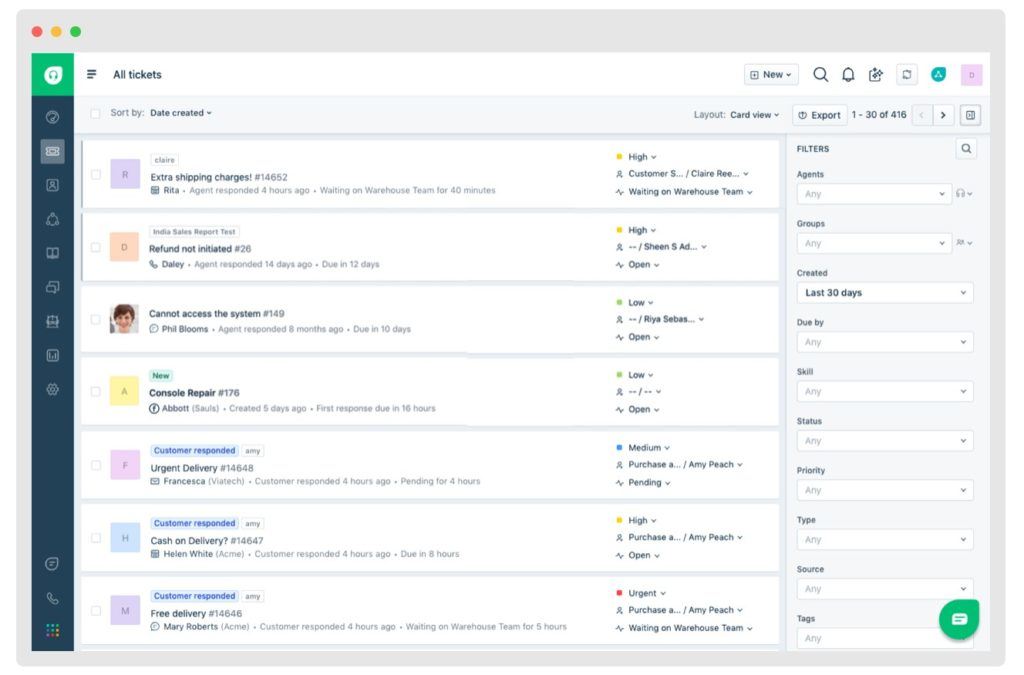
Freshdesk è una piattaforma di assistenza clienti basata sul cloud progettata per i team di supporto di aziende di tutte le dimensioni che hanno bisogno di gestire conversazioni con i clienti, automatizzare attività ripetitive e offrire supporto su più canali da un'unica postazione.
Per Chi è Meglio Freshdesk?
Freshdesk è adatto ad aziende in crescita e team di supporto di medie dimensioni che necessitano di un helpdesk scalabile e multicanale senza una curva di apprendimento troppo ripida.
Perché Ho Scelto Freshdesk
Freshdesk si è guadagnato un posto nella mia shortlist per la facilità con cui si integra con gli strumenti che i team di supporto utilizzano già. Il Marketplace di Freshdesk offre oltre 1.000 app, che coprono tutto, dai CRM come Salesforce e HubSpot fino a piattaforme di ecommerce come Shopify—così il mio team può consultare i dati degli ordini dei clienti o la cronologia degli account direttamente in un ticket senza dover cambiare scheda. Mi piace anche che molte di queste integrazioni siano no-code, quindi posso configurarle senza l'intervento di uno sviluppatore. Questa flessibilità rende Freshdesk una scelta pratica per i team che gestiscono sistemi di supporto complessi.
Funzionalità Principali di Freshdesk
- Freddy AI Copilot: Un assistente AI che aiuta gli agenti a scrivere risposte, riassumere fili di ticket e suggerire soluzioni durante le interazioni dal vivo.
- Assegnazione dei ticket basata sulle competenze: Smista automaticamente i ticket in arrivo agli agenti in base alle loro specifiche competenze o aree di esperienza.
- Politiche SLA multiple: Permette di impostare diversi accordi a livello di servizio per differenti segmenti di clientela, prodotti o tipi di ticket.
- Forum della comunità: Uno spazio integrato dove i clienti possono porre domande, condividere risposte e aiutarsi a vicenda a risolvere problemi comuni.
Integrazioni di Freshdesk
Le integrazioni includono Slack, MS Teams, Shopify, Salesforce, Jira, Playvox e Workato e puoi anche connetterti con app esterne usando connettori preconfigurati e API flessibili.
Pros and Cons
Pros:
- Fornisce strumenti di reportistica e analisi avanzati per approfondimenti
- Offre un'interfaccia intuitiva che semplifica il flusso di lavoro
- Integra l'automazione basata su AI per una gestione efficiente dei ticket
Cons:
- Le opzioni di personalizzazione sono limitate, ostacolando una piena personalizzazione
- Il processo di creazione dell'account e login può risultare macchinoso per gli utenti

Ideale per unificare email e chat
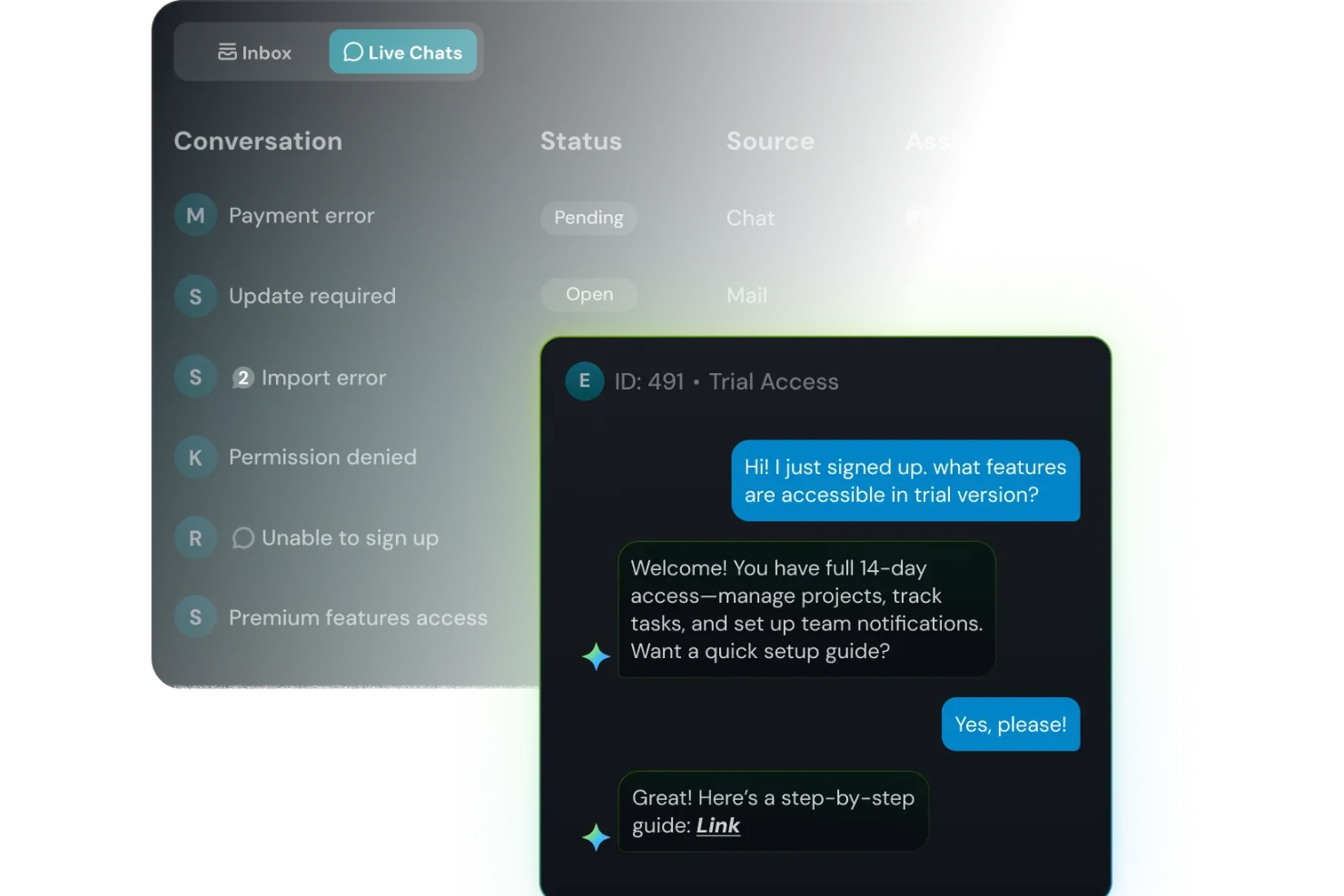
SparrowDesk riunisce il supporto via email e chat in un'unica piattaforma, aiutando i team di assistenza clienti a gestire le conversazioni e risolvere i problemi senza dover passare da uno strumento all'altro.
Per chi è ideale SparrowDesk?
SparrowDesk è adatto a team di supporto di piccole e medie dimensioni che gestiscono la comunicazione con i clienti via email e chat.
Perché ho scelto SparrowDesk
SparrowDesk si è guadagnato un posto nella mia lista ristretta perché mantiene email e chat dal vivo in un'unica casella di posta unificata—così il mio team non deve cambiare scheda per recuperare una conversazione. Mi piace che le email in arrivo vengano automaticamente convertite in ticket, il che significa che nulla passa inosservato quando il volume aumenta. La casella condivisa permette anche agli agenti di lasciare note interne sulle discussioni, così il contesto resta con la conversazione invece di perdersi in un thread Slack separato.
Caratteristiche principali di SparrowDesk
- Assegnazione e instradamento dei ticket: Assegna automaticamente i ticket in arrivo all'agente o al team giusto in base a regole predefinite.
- Risposte predefinite: Salva e riutilizza risposte già scritte per gestire più rapidamente le domande frequenti dei clienti.
- Storico delle conversazioni con il cliente: Accedi a un registro completo delle interazioni passate con un cliente su tutti i ticket precedenti.
- Rilevamento collisioni: Ricevi notifiche in tempo reale quando due agenti visualizzano o rispondono allo stesso ticket contemporaneamente.
Integrazioni di SparrowDesk
Le integrazioni includono Attio, Zapier, SurveySparrow, HubSpot e Okta.
Pros and Cons
Pros:
- Agenti IA progettati per risolvere automaticamente molti ticket ripetitivi
- Le funzionalità Copilot riassumono lunghe conversazioni all'interno della casella dell'agente
- Il builder di workflow senza codice automatizza l'instradamento e le notifiche
Cons:
- I canali attualmente si concentrano su email e chat live, non su voce o social
- Integrazioni native limitate possono ostacolare la connettività senza interruzioni

Ideale per knowledge base self-service
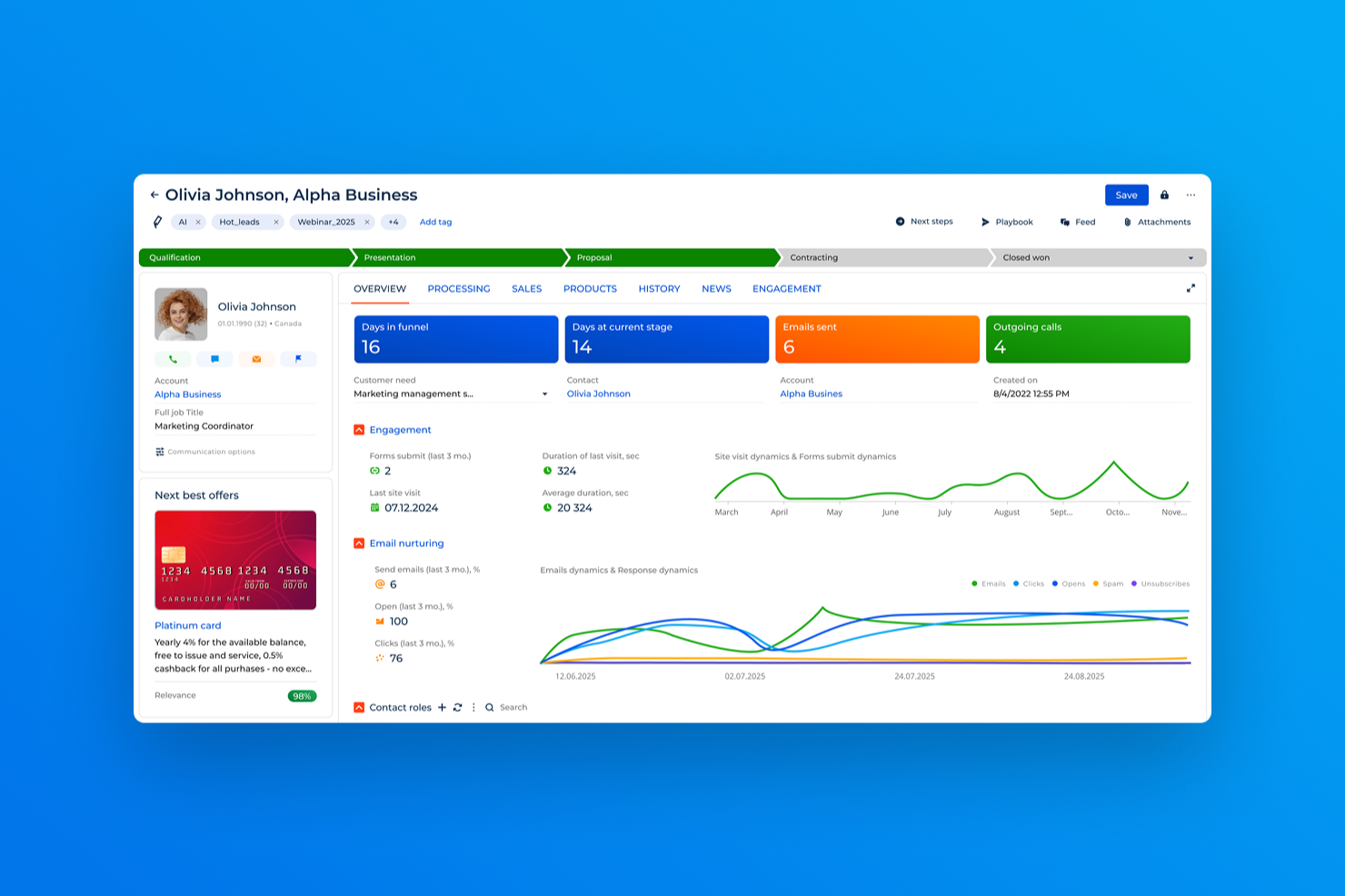
Creatio CRM è una piattaforma di customer service no-code progettata per medie e grandi aziende che desiderano automatizzare i flussi di lavoro di supporto, gestire comunicazioni omnicanale e offrire esperienze di servizio personalizzate.
Per chi è consigliato Creatio CRM?
Creatio CRM è indicato per i team di servizio da medi a enterprise che hanno bisogno di una piattaforma altamente personalizzabile senza dipendere fortemente da risorse di sviluppo.
Perché ho scelto Creatio CRM
Ho scelto Creatio CRM tra i migliori perché la sua knowledge base è integrata direttamente nel portale self-service rivolto ai clienti. I clienti possono cercare risposte alle domande frequenti, trovare modelli di documenti e consultare informazioni di riferimento senza mai contattare un operatore. La knowledge base è accessibile 24/7 tramite il portale, in modo che il vostro team non debba rispondere continuamente alle stesse domande ripetitive. Inoltre, l'instradamento dei casi basato su intelligenza artificiale di Creatio determina automaticamente il gruppo di servizio e l'assegnatario corretto per le richieste in arrivo, così gli operatori passano meno tempo a smistare e più tempo a risolvere i problemi.
Funzionalità principali di Creatio CRM
- Gestione dei casi omnicanale: Registra, monitora e gestisci le richieste clienti provenienti da email, chat, telefono e canali social in un'unica area di lavoro.
- Monitoraggio SLA: Tieni traccia automaticamente delle scadenze degli accordi di servizio, segnala possibili violazioni e attiva workflow di escalation prima che la scadenza venga superata.
- Costruttore di workflow no-code: Crea e modifica i flussi di risoluzione dei casi, i layout delle pagine e i modelli dati senza scrivere codice.
- Gestione ordini di lavoro per assistenza sul campo: Assegna automaticamente gli ordini di lavoro ai tecnici in base a competenze, disponibilità e posizione.
Integrazioni di Creatio CRM
Le integrazioni includono Salesforce, Dynamics 365, Zendesk, HubSpot, Zoho e Pega.
Pros and Cons
Pros:
- Personalizzazione low-code per adattare i workflow alle esigenze aziendali
- Automazione dei workflow con intelligenza artificiale che riduce la gestione manuale dei ticket
- Gestione casi omnicanale su email, chat, telefono, social
Cons:
- Prezzo e componenti aggiuntivi possono aumentare il costo totale
- Le funzionalità avanzate potrebbero richiedere tempi di configurazione significativi
New Product Updates from Creatio CRM

Creatio CRM Adds AI, WhatsApp, Analytics, and Design Updates
Creatio CRM adds expanded AI app development tools, native WhatsApp support, new analytics, and visual design tools. These updates extend app building, customer communication, reporting, and customization workflows. For more information, visit Creatio CRM’s official site.

Ideale per la gestione della casella di posta assistita dall'IA
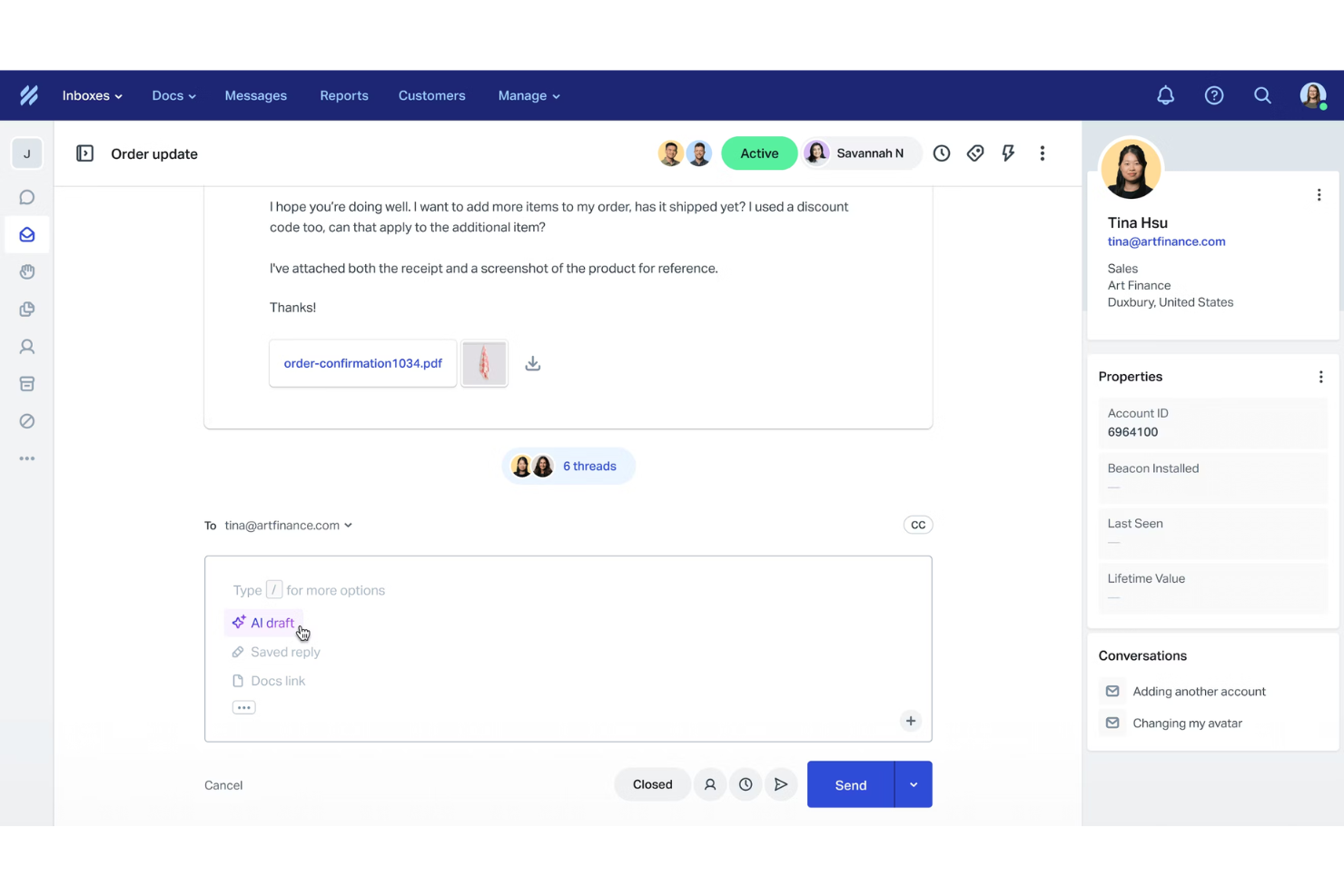
Help Scout offre ai team di supporto una casella di posta condivisa, strumenti di automazione e gestione dei clienti che aiutano le piccole imprese e le aziende in crescita a fornire un servizio rapido e personalizzato tramite e-mail, chat e canali di assistenza autonoma.
Per chi è più indicato Help Scout?
Help Scout è una soluzione ideale per team di supporto di piccole e medie dimensioni che gestiscono grandi volumi di e-mail dei clienti e hanno bisogno di una casella di posta pulita e collaborativa, senza la complessità dei sistemi di gestione dei ticket aziendali.
Perché ho scelto Help Scout
Help Scout si è guadagnato un posto nella mia lista ristretta grazie a quanto bene le sue funzionalità di IA si integrano nel normale flusso di gestione della casella di posta. Apprezzo particolarmente le bozze IA, che forniscono al mio team una risposta pronta per l'invio, basata sulla nostra base di conoscenza, con un solo clic: senza cambiare scheda né cercare il contesto. La funzione di riepilogo IA è altrettanto utile: quando una conversazione con un cliente è andata avanti e indietro una dozzina di volte, posso recuperare il contesto essenziale in pochi secondi e passare direttamente alla risoluzione. Le risposte IA gestiscono automaticamente le richieste di routine e la piattaforma segnala un tasso medio di risoluzione del 73% senza l'intervento degli operatori.
Funzionalità principali di Help Scout
- Flussi di lavoro: Configura regole automatiche per assegnare, applicare tag o stabilire la priorità delle conversazioni in base alle condizioni definite.
- Risposte salvate: Salva risposte predefinite alle domande frequenti che gli operatori possono inserire direttamente in una risposta.
- Profili dei clienti: Importa i dati di contatto e la cronologia delle conversazioni dalle app collegate in un'unica visualizzazione per ogni cliente.
- Report della documentazione: Monitora le visualizzazioni degli articoli, le ricerche senza risultati e le lacune nei contenuti della base di conoscenza per individuare miglioramenti dell'assistenza autonoma.
Integrazioni di Help Scout
Le integrazioni includono Salesforce, Shopify, HubSpot, Jira, Slack, Stripe, WhatsApp, Mailchimp, FullStory e WooCommerce.
Pros and Cons
Pros:
- Facile consolidamento dei messaggi multicanale
- Reportistica e analisi complete
- Strumenti di IA integrati per risposte più rapide
Cons:
- Alcune funzionalità avanzate sono disponibili nei piani superiori
- Personalizzazione limitata nei piani inferiori
New Product Updates from Help Scout

Help Scout Adds Automatic Conversation Reassignment
Help Scout can now automatically unassign conversations when the assigned teammate has been away long enough, keeping replies moving so others can pick them up. For more information, visit Help Scout's official site.
 .
.
Ideale per aziende SaaS e di intelligenza artificiale
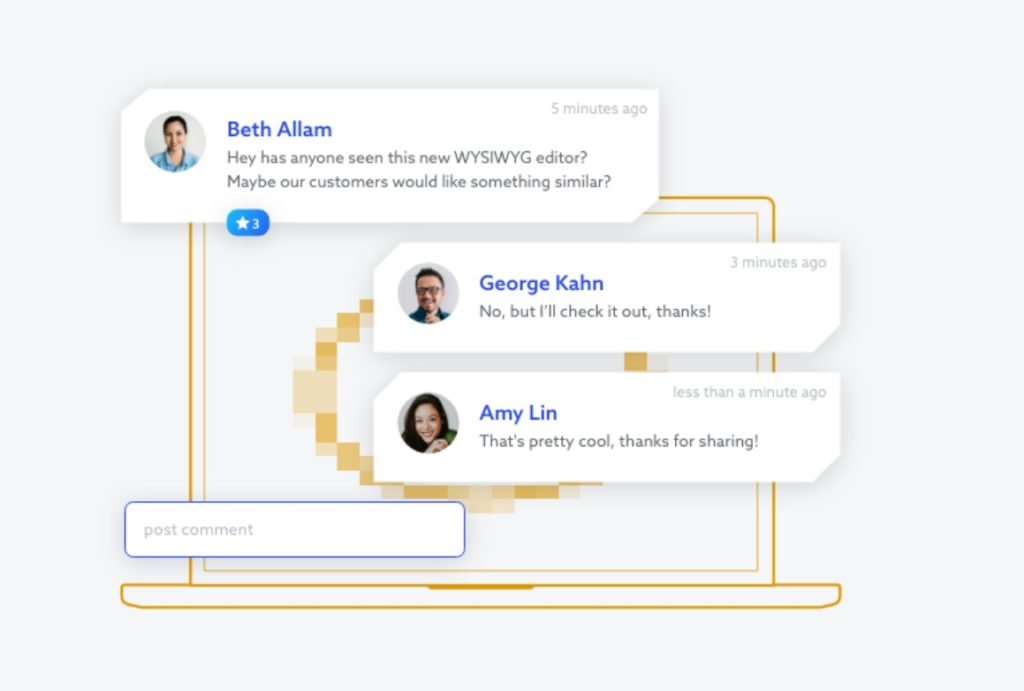
TeamSupport è una piattaforma di assistenza clienti per aziende SaaS, di intelligenza artificiale e altre aziende tecnologiche B2B che gestiscono rapporti complessi con i clienti, aiutando i team di assistenza a gestire le richieste, collaborare internamente e fornire supporto tecnico attraverso più canali.
Per chi è più adatto TeamSupport?
TeamSupport è particolarmente adatto alle aziende SaaS, di intelligenza artificiale e ad altre aziende tecnologiche B2B i cui team di assistenza gestiscono rapporti continuativi con i clienti anziché interazioni occasionali con i consumatori.
Perché ho scelto TeamSupport
Ho scelto TeamSupport come una delle soluzioni migliori perché è una delle poche piattaforme di assistenza clienti realmente progettate per strutture di account B2B, anziché per singole interazioni con i consumatori. La maggior parte degli strumenti organizza le richieste in base al contatto; TeamSupport le organizza in base all'account, così il mio team può visualizzare in un'unica schermata ogni problema aperto, conversazione ed escalation associati a una singola organizzazione cliente. Apprezzo anche il Customer Distress Index, che utilizza l'analisi del sentiment su tutti i punti di contatto per segnalare gli account a rischio prima che una conversazione sul rinnovo prenda una brutta piega. Anche la funzione Water Cooler mi è davvero utile: consente agli operatori di collaborare sulle richieste più complesse senza uscire dalla piattaforma, evitando che le conoscenze condivise restino isolate.
Funzionalità principali di TeamSupport
- Prioritizzazione intelligente delle richieste: Classifica e ordina le richieste in base alla gravità, al rischio per i ricavi e al sentiment del cliente, anziché considerare soltanto il tempo trascorso nella coda.
- Agente IA: Gestisce ininterrottamente le domande di routine dei clienti e trasferisce automaticamente i problemi complessi agli operatori umani.
- Base di conoscenza self-service: Offre ai clienti una risorsa consultabile per trovare autonomamente le risposte, riducendo il volume delle richieste in entrata.
- Valutazione della priorità dei bug: Associa le richieste a problemi specifici del prodotto e assegna loro un punteggio in base all'impatto, aiutando i team di sviluppo a concentrarsi sulle correzioni più importanti.
Integrazioni di TeamSupport
TeamSupport si integra con SAP, Salesforce, Hubspot, Jira, Basecamp, Zendesk, Microsoft Dynamics e molti altri strumenti.
Pros and Cons
Pros:
- La base di conoscenza è utile per la documentazione destinata ai clienti
- Il solido database clienti supporta una gestione completa dei clienti
- L'interfaccia intuitiva facilita la navigazione e l'utilizzo
Cons:
- Gli utenti segnalano una funzione di ricerca lenta che riduce l'efficienza
- Le funzionalità dell'applicazione mobile sono limitate

Hiver
Ideale per assistenza clienti omnicanale potenziata dall’IA

Per i team che desiderano migliorare le operazioni di assistenza clienti, Hiver offre una soluzione che si integra direttamente con Gmail per ottimizzare la gestione delle email e l’assistenza su più canali. Progettato per aumentare la collaborazione e l’efficienza, consente di gestire email, chat dal vivo e ticket di supporto tutto in un’unica piattaforma. Con funzionalità come flussi di lavoro automatizzati e analisi approfondite, Hiver aiuta a offrire un servizio personalizzato, risultando ideale per settori come tecnologia, sanità ed educazione.
Perché ho scelto Hiver
Ho scelto Hiver perché eccelle nell’assistenza clienti omnicanale supportata dall’IA, unificando diversi canali di comunicazione in un’unica interfaccia. Con la sua casella di posta omnicanale, il tuo team può gestire senza interruzioni email, chat, voce e WhatsApp, riducendo la complessità dovuta all’uso di più strumenti. L’AI Copilot di Hiver aiuta nella stesura delle risposte e nell’analisi del sentiment, migliorando precisione e rapidità delle interazioni con i clienti. Inoltre, l’automazione dei flussi di lavoro e l’analisi offrono spunti preziosi sulle interazioni, aiutandoti a ottimizzare le operazioni e migliorare la qualità del servizio erogato.
Funzionalità principali di Hiver
Oltre al servizio omnicanale potenziato dall’IA, Hiver mette a disposizione una gamma di funzionalità sviluppate per rafforzare le capacità di assistenza del tuo team.
- Avvisi di collisione: previeni risposte duplicate notificando ai membri del team quando qualcun altro sta già rispondendo alla stessa richiesta del cliente.
- Bozze condivise: collabora in tempo reale permettendo a più membri del team di modificare e revisionare le bozze delle email prima dell’invio.
- Gestione SLA: imposta obiettivi specifici sui tempi di risposta e monitora la conformità per garantire che il team soddisfi le aspettative della clientela.
- Flussi di approvazione: semplifica il processo di revisione e approvazione delle risposte, assicurando qualità e coerenza nella comunicazione.
Integrazioni di Hiver
Le integrazioni includono Salesforce, HubSpot, Shopify, Jira, WhatsApp, Aircall, Slack, Netsuite, QuickBooks e Okta.
Pros and Cons
Pros:
- Gli avvisi di collisione prevengono risposte duplicate da parte dei membri del team
- AI Copilot assiste nella stesura delle risposte e nell’analisi del sentiment
- La gestione SLA garantisce risposte puntuali e monitora la conformità
Cons:
- L’esperienza mobile non è all’altezza di quella desktop
- Il processo di cancellazione dell’abbonamento è complesso per l’utente
New Product Updates from Hiver

Hiver Brings Chat Widget Support to Mobile Apps
Hiver now lets you embed the Hiver Chat Widget in iOS, Android, React Native, and Flutter apps so customers can start chats without leaving your app. For more information, visit Hiver's official site.

Comm100
Ideale per il supporto clienti end-to-end basato sull'IA
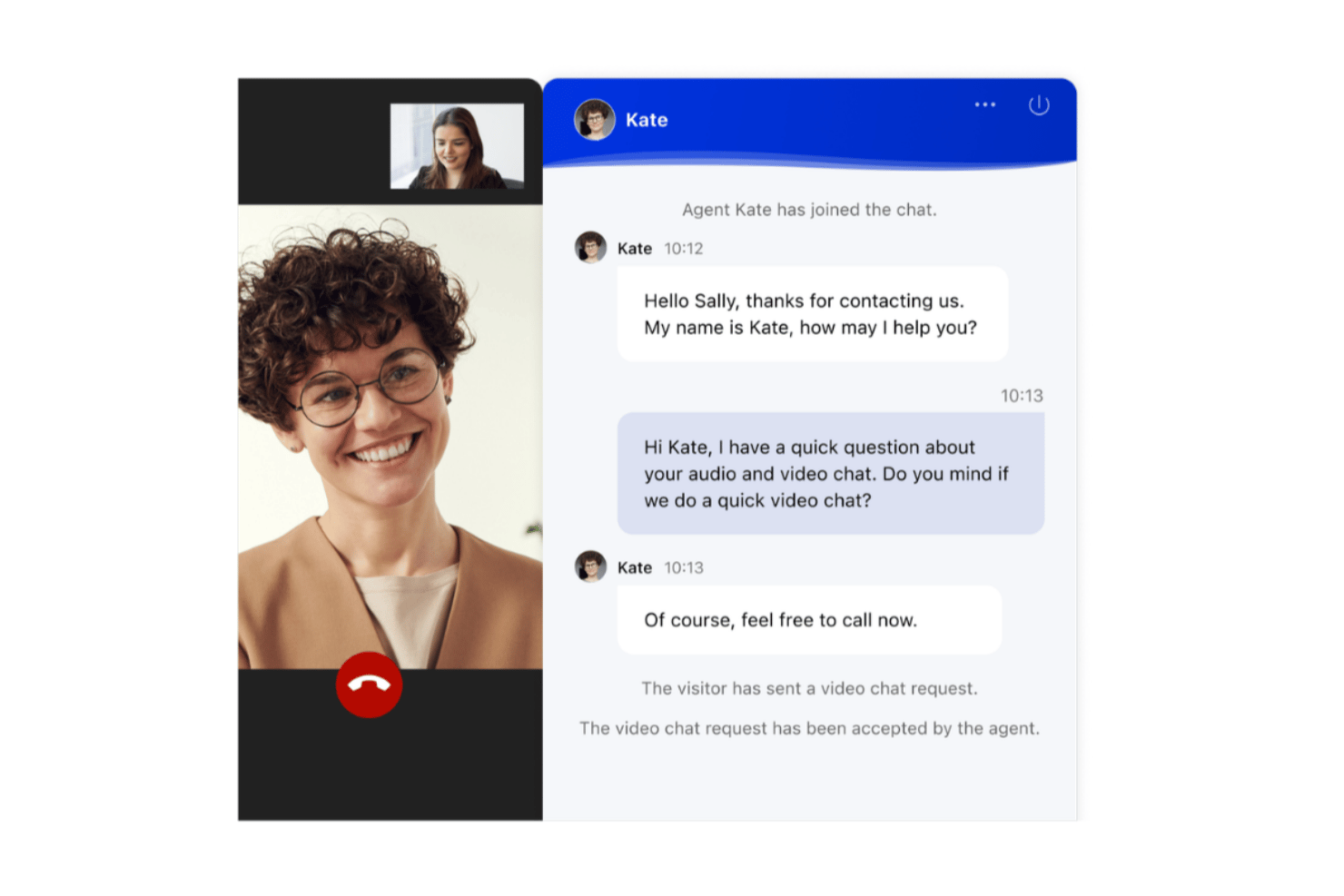
Comm100 è una piattaforma software per il servizio clienti che riunisce chat dal vivo, gestione dei ticket, e-mail, voce, messaggistica sui social e un agente IA autonomo in un'unica console per gli agenti.
Per chi è più adatto Comm100?
Comm100 è una soluzione particolarmente adatta ai team di settori regolamentati, come istruzione superiore, enti governativi, sanità e servizi finanziari, che necessitano di un supporto basato sull'IA su una dozzina o più di canali senza sacrificare la conformità o il controllo dei dati.
Perché ho scelto Comm100
Comm100 si è guadagnato un posto nella mia lista ristretta perché il suo agente IA risolve autonomamente fino all'80% dei ticket in arrivo, una percentuale supportata da implementazioni reali presso Canadian Blood Services e Global Affairs Canada. Mi ha inoltre colpito il modo in cui unifica più di 12 canali, tra cui voce nativa, WhatsApp ed e-mail, in un'unica console per gli agenti con lo storico completo delle conversazioni. Quando l'IA effettua un'escalation, trasferisce la conversazione a un agente umano mantenendo intatto il contesto completo, così non è necessario ripetere le informazioni e non si perde nulla.
Funzionalità principali di Comm100
- Instradamento basato sulle competenze: Indirizza le conversazioni in arrivo agli agenti in base al reparto, alle competenze, all'anzianità e alla disponibilità in tempo reale nella coda.
- Traduzione in tempo reale: Traduce automaticamente le conversazioni in chat dal vivo in oltre 90 lingue, consentendo agli agenti di assistere i clienti nella loro lingua madre.
- Sondaggi CSAT e NPS post-chat: Raccoglie il feedback dei clienti subito dopo le interazioni utilizzando scale di valutazione configurabili, campi di testo e domande a menu a discesa.
- Implementazione on-premise: Consente alle organizzazioni regolamentate di ospitare l'intera piattaforma sulla propria infrastruttura per ottenere il pieno controllo sulla sovranità dei dati e sulla conformità.
Integrazioni di Comm100
Comm100 offre integrazioni documentate con Salesforce, HubSpot, Microsoft Dynamics 365, ServiceNow, Zendesk, Optimove, Ellucian, SharePoint Online, Google Drive e Confluence Cloud. Supporta inoltre un'API REST aperta, webhook e Zapier.
Pros and Cons
Pros:
- L'agente IA risolve la maggior parte delle richieste di supporto
- Implementazione on-premise per esigenze di conformità rigorose
- Supporto multilingue con traduzione delle chat in tempo reale
Cons:
- Gli utenti segnalano difficoltà di mappatura durante l'integrazione con il CRM
- Stabilità limitata durante la connessione di strumenti di terze parti

eDesk
Ideale per l'automazione delle attività di supporto ecommerce
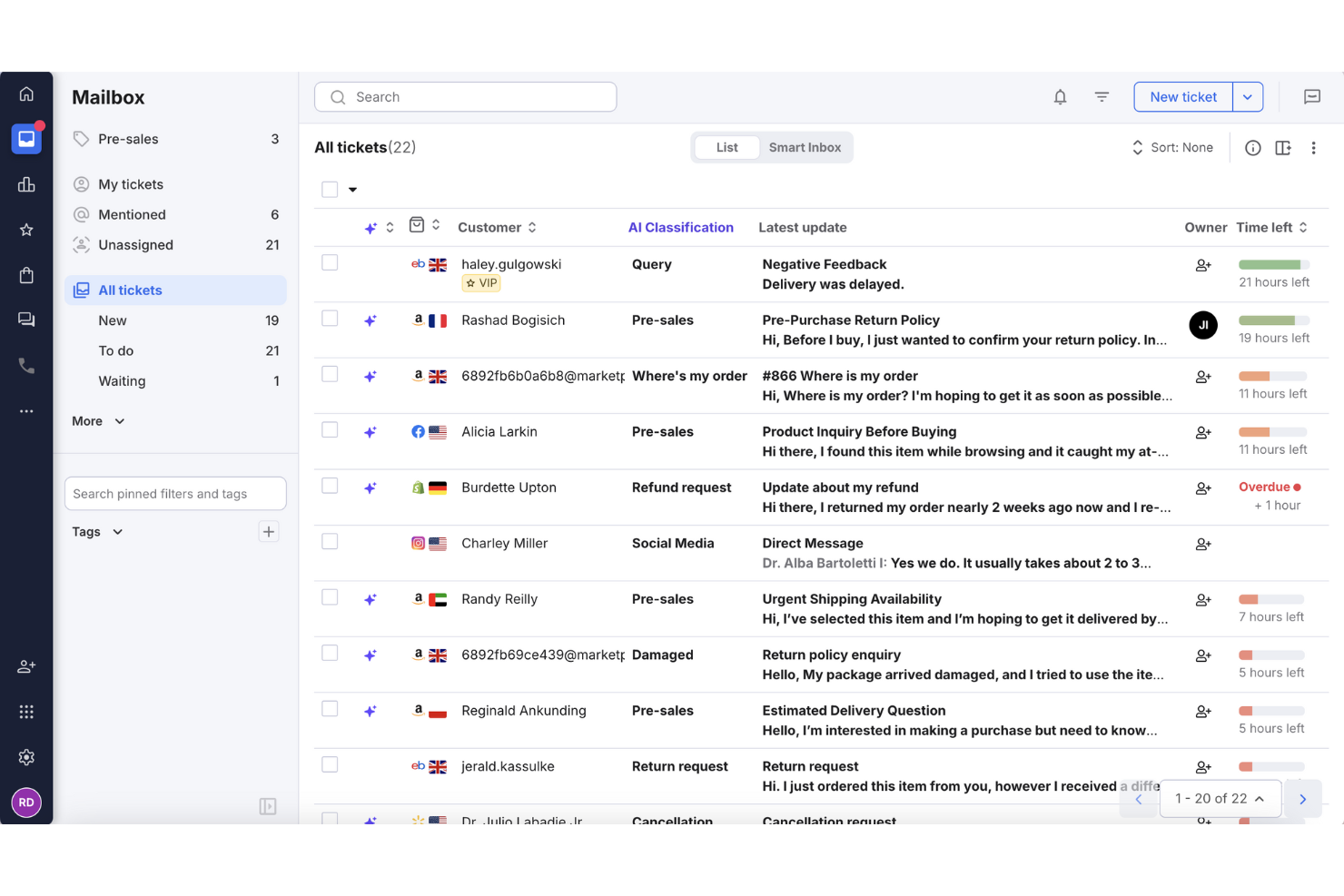
eDesk è una piattaforma di assistenza clienti creata per i team di ecommerce che devono gestire il supporto su più marketplace, automatizzare le attività ripetitive e avere sempre a portata di mano i dati sugli ordini.
Per chi è più adatto eDesk?
eDesk è particolarmente indicato per le aziende di ecommerce che vendono su diversi marketplace online e necessitano di un centro di supporto centralizzato per gestire grandi volumi di richieste da parte dei clienti.
Perché ho scelto eDesk
eDesk si guadagna un posto nella mia shortlist grazie alla sua eccellente gestione dell'automazione per i team di supporto ecommerce che affrontano richieste ripetitive e ad alto volume. Apprezzo in particolare il risponditore automatico alimentato dall'AI, che risolve le domande più comuni—come lo stato degli ordini e le richieste di reso—senza intervento dell'operatore. Il mio team usa anche lo smistamento intelligente dei ticket, che assegna automaticamente le richieste in arrivo in base al canale, alla lingua o al tipo di problema, riducendo la gestione manuale. Le regole di automazione sono abbastanza flessibili da gestire scenari reali di ecommerce, come l'invio automatico di follow-up dopo la conferma di consegna.
Funzionalità principali di eDesk
- Posta in arrivo unificata multicanale: Gestisci i messaggi dei clienti da Amazon, eBay, Shopify e oltre 300 altri canali in un solo workspace, con dettagli su ordini e spedizioni integrati in ogni ticket.
- Monitoraggio SLA: Tieni sotto controllo la conformità ai tempi di risposta su ogni canale e individua eventuali lacune di copertura prima che influenzino la soddisfazione del cliente.
- Vista cliente: Accedi alla cronologia completa degli ordini, delle interazioni e dei ticket di ogni cliente in un unico luogo per fornire agli operatori il contesto necessario a risolvere i problemi.
- Report CSAT: Monitora i punteggi di soddisfazione del cliente insieme a quelli delle performance degli operatori e ai parametri delle performance dell'AI per individuare le aree in cui migliorare la qualità del supporto.
Integrazioni di eDesk
Le integrazioni includono Amazon, eBay, Shopify, Walmart, Magento, WooCommerce, BigCommerce, Facebook, Instagram e WhatsApp.
Pros and Cons
Pros:
- Centralizza i messaggi dei clienti da marketplace e store
- Risposte del supporto clienti rapide ed efficaci
- Progettato per gestire grandi volumi di richieste ecommerce
Cons:
- Non offre un supporto voce/telefonico approfondito nativamente
- Personalizzazione dei report limitata per analisi complesse
New Product Updates from eDesk
eDesk Adds Galeria and Kaufland Support in Spain and Netherlands
eDesk adds support for Galeria, Kaufland Spain, and Kaufland Netherlands marketplaces. These integrations bring more European buyer messages into eDesk with routing, templates, AI insights, and automated translation. For more information, visit eDesk’s official site.
 .
.
Zendesk
Miglior software di assistenza clienti tutto-in-uno
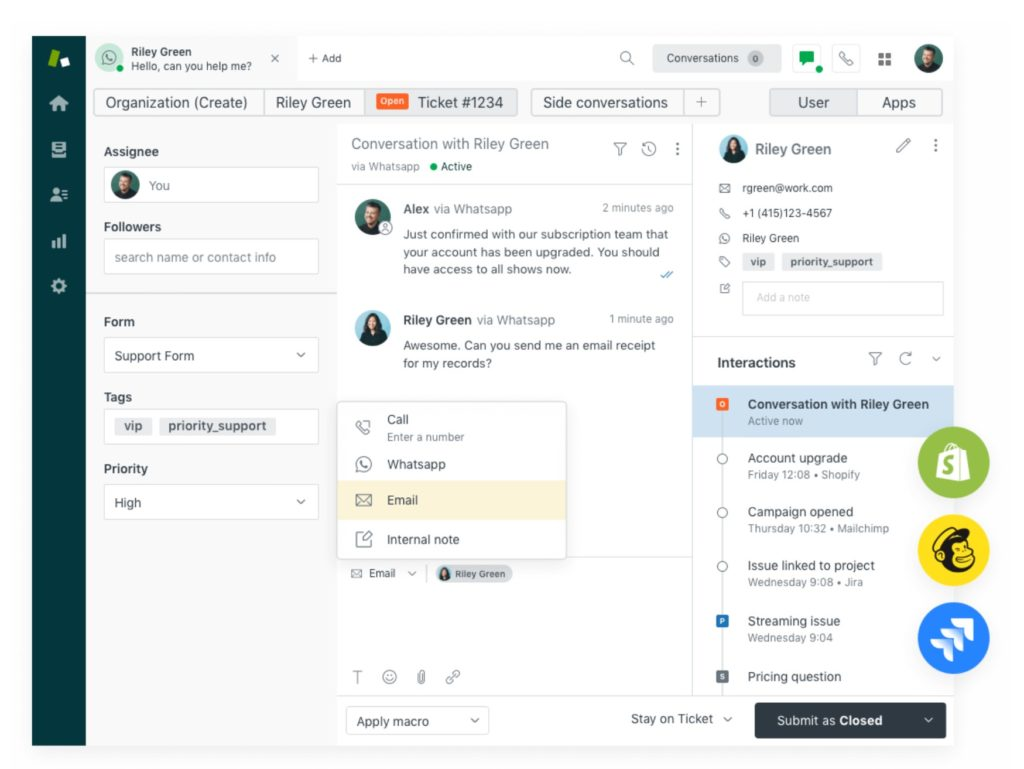
Zendesk offre ai team di supporto aziendali di ogni dimensione una piattaforma unificata per gestire le conversazioni con i clienti, automatizzare la creazione dei ticket e fornire un servizio coerente su email, chat, telefono e canali social.
Per chi è ideale Zendesk?
Zendesk è particolarmente indicato per aziende in crescita e di livello enterprise che necessitano di una piattaforma di supporto scalabile per gestire grandi volumi di interazioni con i clienti su molteplici canali.
Perché ho scelto Zendesk
Zendesk si è guadagnato il suo posto perché copre ogni livello del servizio clienti in un’unica piattaforma, senza obbligarti ad assemblare strumenti separati. Apprezzo il modo in cui la Agent Workspace integra email, voce, messaggistica e canali social in un’unica vista unificata, così che gli agenti non perdano mai il contesto durante una conversazione. L’instradamento omnicanale assegna automaticamente i ticket all’agente giusto in base a disponibilità e carico di lavoro, una vera differenza operativa su larga scala. Copilot e altri agenti AI gestiscono richieste complesse e suggeriscono risposte in tempo reale, permettendo al mio team di risolvere più ticket senza aumentare l’organico.
Funzionalità principali di Zendesk
- Costruttore di knowledge base: Crea e gestisci un centro assistenza self-service dove i clienti possono trovare risposte alle domande frequenti senza contattare il supporto.
- Report e dashboard personalizzabili: Crea report per monitorare il volume dei ticket, le prestazioni degli agenti e la soddisfazione dei clienti su tutta la tua operazione di supporto.
- Trigger e automazioni: Imposta flussi di lavoro basati su regole che aggiornano, inoltrano o chiudono automaticamente i ticket in base alle condizioni definite.
- Sondaggi sulla soddisfazione del cliente (CSAT): Invia sondaggi automatici post-interazione per raccogliere feedback e misurare la qualità del servizio a livello di ticket.
Integrazioni Zendesk
Le integrazioni includono Slack, Shopify, Google Play Reviews, Harvest, Trustpilot, Pipedrive, Sprout Social, ChannelReply, Amazon ed eBay.
Pros and Cons
Pros:
- Supporto omnicanale per unificare le interazioni con i clienti
- Offre automazioni per ridurre le attività di supporto ripetitive
- Fornisce approfondimenti dettagliati tramite analisi personalizzabili
Cons:
- Query di ricerca dei ticket limitate
- Può essere difficile dare priorità alle richieste
New Product Updates from Zendesk
Zendesk Adds Email AI Replies and Predictive Routing
Zendesk’s latest email AI agents update brings configurable knowledge and welcome replies and adds predictive routing for email tickets, so you can tailor your automated emails and get inquiries resolved faster. For more information, visit Zendesk’s official site.

Chatbase
Ideale per automazione del supporto clienti tramite IA
Chatbase è una piattaforma basata sull'intelligenza artificiale pensata per i team di assistenza clienti e le aziende che vogliono automatizzare il supporto, ridurre i tempi di risposta e gestire elevati volumi di richieste con chatbot intelligenti.
Per chi è ideale Chatbase?
Chatbase è una soluzione ideale per piccole e medie imprese che desiderano implementare chatbot AI per il supporto clienti senza la necessità di un team di ingegneri dedicato.
Perché ho scelto Chatbase
Ho scelto Chatbase tra i migliori per come gestisce l’intero ciclo dell’automazione del supporto basata su intelligenza artificiale: dall’addestramento dell’agente sui dati aziendali, fino alla possibilità di compiere azioni reali all'interno dei sistemi collegati. Apprezzo che l’agente possa fare cose come aggiornare un abbonamento cliente o cambiare un’indirizzo di spedizione direttamente, non solo rispondere alle domande. Trovo inoltre molto utile la funzione di escalation intelligente: basta scrivere istruzioni in linguaggio naturale per definire quando l’IA deve passare la richiesta ad un umano, così il mio team non viene sommerso dai ticket che il bot potrebbe risolvere. La possibilità di confrontare diversi modelli AI all’interno della piattaforma mi permette anche di ottimizzare le prestazioni dell’agente in base agli specifici scenari di supporto.
Funzionalità principali di Chatbase
- Supporto multilingue: Rileva e risponde in oltre 80 lingue utilizzando l’IA generativa, così il tuo agente può servire una clientela globale senza bisogno di traduzioni manuali.
- Distribuzione omnicanale: Implementa il tuo agente AI su chat del sito web, WhatsApp, Slack ed email da un’unica piattaforma.
- Reportistica avanzata: Monitora le prestazioni dell’agente, i tassi di risoluzione e i dati di coinvolgimento dei clienti tramite una dashboard di analisi integrata.
- Widget chat personalizzabile (whitelabel): Rimuovi il marchio Chatbase dal widget della chat per mantenere una continuità con il tuo brand.
Integrazioni Chatbase
Le integrazioni includono Zendesk, Notion, Slack, Stripe, Salesforce, Cal.com, Calendly, WhatsApp, Messenger e Make.
Pros and Cons
Pros:
- Supporta oltre 80 lingue per ampliare la portata e la soddisfazione dei clienti a livello globale
- Consente un facile confronto tra modelli AI per ottimizzare le prestazioni
- La funzione di escalation intelligente gestisce efficacemente le richieste complesse dei clienti
Cons:
- Analisi CRM avanzate limitate
- La configurazione iniziale dell'IA richiede tempo
Altri Software per il Servizio Clienti
Ecco alcune altre valide opzioni che non sono rientrate nella shortlist dei migliori software per il servizio clienti, ma che meritano comunque di essere prese in considerazione:
- Zoho Desk
Ideale per l'automazione del servizio clienti
- LiveAgent
Ideale per la comunicazione clienti multicanale
- Agentforce Service (formerly Service Cloud)
Ideale per grandi aziende
- Weav
Ideale per co-pilota AI nelle chat con i clienti
- Missive
Ideale per la collaborazione sulla posta in arrivo tra i team di supporto
- Desk365
Ideale per Microsoft Teams
- Custify
Ideale per aziende SaaS
- Tidio
Migliore tracciamento dei visitatori in tempo reale per siti web
- Guidde
Ideale per guide video basate sull’IA
- Front
Ideale per la collaborazione tra team sui ticket
- HappyFox
Miglior portale clienti personalizzabile
- monday service
Ideale per flussi di lavoro di assistenza clienti personalizzabili
- Kustomer
Miglior chatbot IA senza codice
- CoSupport AI
Ideale per configurazione AI senza codice
- LiveHelpNow
Le migliori funzionalità potenziate dall'IA
- Kayako
Ideale per le PMI
- Crescendo
Ideale per la conoscenza conversazionale guidata dall’AI
- Front
Ideale per la categorizzazione e l'instradamento dei ticket
- SAAS First
Ideale per la comunicazione omnicanale
- EverHelp
Il migliore per il supporto multilingue in oltre 30 lingue
- Compass
Ideale per walkthrough interattivi
- 14.ai
Il miglior motore di risposta ai clienti basato sull’intento
- Zoho Assist
Ideale per accesso remoto e risoluzione dei problemi


Cos’è il Software per il Servizio Clienti?
Il software per il servizio clienti è una piattaforma che centralizza e automatizza la gestione del supporto clienti attraverso diversi canali. Semplifica attività come la gestione dei ticket, la chat dal vivo e la raccolta di feedback, aiutando i team a risolvere i problemi in modo efficiente e a fornire un servizio costante e di alta qualità.
Come valuto i software per l'assistenza clienti
Divido la valutazione in due livelli: i requisiti di base che uno strumento deve soddisfare—gestione dei ticket omnicanale, instradamento e self-service—e gli elementi distintivi, come l'assistenza tramite AI e la profondità dei report, che differenziano gli strumenti migliori.
Funzionalità fondamentali (requisiti minimi per questo elenco)
Quando seleziono gli strumenti da inserire nel mio elenco, assegno a ciascuno un punteggio su una scala da 0 (non offre la funzionalità) a 5 (eccelle in quest'area) per ogni funzionalità fondamentale elencata di seguito. Poi converto il punteggio totale dello strumento in una percentuale. Ogni strumento deve raggiungere un punteggio totale minimo del 75% per essere preso in considerazione.
- Gestione dei ticket: valuto quanto bene una piattaforma tiene traccia dei ticket dalla creazione alla risoluzione, incluso il supporto per le policy SLA, i campi personalizzati, i livelli di priorità e flussi di lavoro come l'unione di richieste duplicate.
- Supporto omnicanale: ogni strumento dovrebbe unificare le conversazioni provenienti da e-mail, chat dal vivo, social network, app di messaggistica e telefono in un'unica area di lavoro per gli operatori, così da evitare che debbano passare da una scheda all'altra.
- Base di conoscenza e self-service: cerco la possibilità di pubblicare un centro assistenza rivolto ai clienti, con articoli categorizzati, funzionalità di ricerca e meccanismi di feedback che segnalino i contenuti obsoleti.
- Automazione e instradamento: l'instradamento intelligente è importante—che si tratti di assegnazione basata sulle competenze, distribuzione a rotazione o escalation basate su trigger che trasferiscono automaticamente un ticket VIP a un operatore senior.
- Reportistica e analisi: i pannelli di controllo che coprono il volume dei ticket, il tempo di prima risposta, il tempo di risoluzione e i punteggi CSAT sono il punto di partenza. Verifico se i report sono personalizzabili o limitati a visualizzazioni predefinite.
- CRM e contesto del cliente: valuto se gli operatori possono visualizzare la cronologia completa delle interazioni del cliente, i dettagli dell'account e gli acquisti precedenti direttamente nella visualizzazione del ticket, senza dover passare a un sistema separato.
Una volta ottenuto un elenco di strumenti che soddisfano i criteri, considero ciò che distingue ciascuna piattaforma.
Elementi distintivi (ciò che differenzia i fornitori)
Ecco come confronto i diversi fornitori:
Funzionalità di spicco
I chatbot basati sull'AI generativa possono risolvere richieste comuni—come verificare lo stato di un ordine o reimpostare una password—senza l'intervento di un operatore, il che li rende una funzionalità fondamentale nella mia valutazione. L'assistenza agli operatori tramite AI la completa, redigendo risposte e riassumendo lunghe conversazioni nei ticket, facendo risparmiare tempo agli operatori nei casi complessi. Valuto anche le funzionalità di gestione della forza lavoro, soprattutto gli strumenti di previsione che aiutano i responsabili dei team a pianificare il personale in base a picchi di volume prevedibili, come il lancio di prodotti o i cicli di fatturazione.
Oltre le funzionalità
L'ecosistema delle integrazioni è molto importante in questo ambito. Verifico se una piattaforma si connette nativamente a strumenti come Salesforce, Shopify o Slack, poiché i team di assistenza lavorano raramente in modo isolato. Anche la trasparenza dei prezzi è un fattore che considero: alcuni fornitori nascondono i costi dei componenti aggiuntivi basati sull'AI o dei minuti voce dietro preventivi personalizzati, rendendo più difficile la pianificazione del budget per i team in crescita. Valuto inoltre la scalabilità della distribuzione, in particolare se la piattaforma supporta configurazioni multi-brand o multilingue, poiché i team che gestiscono diverse linee di prodotto hanno bisogno di questa flessibilità fin dal primo giorno.
Come Scegliere il Software per il Servizio Clienti
È facile perdersi tra lunghe liste di funzionalità e strutture di prezzo complesse. Per aiutarti a restare focalizzato durante il tuo processo di selezione del software, ecco un elenco di fattori da tenere presente:
| Fattore | Cosa Considerare |
|---|---|
| Scalabilità | Assicurati che il software possa crescere insieme al tuo team. Cerca piani e funzionalità flessibili che si adattino all'espansione della tua azienda. |
| Integrazioni | Verifica la compatibilità con gli strumenti esistenti come CRM e piattaforme email. Questo consente di risparmiare tempo e ridurre le interruzioni. |
| Personalizzazione | Considera quanto sia possibile adattare il software ai tuoi flussi di lavoro. Campi e dashboard personalizzati sono utili. |
| Facilità d'Uso | Cerca interfacce intuitive e una navigazione semplice per ridurre al minimo i tempi di formazione del tuo team. |
| Budget | Allinea i costi del software ai tuoi vincoli finanziari. Considera i costi totali, incluse eventuali spese nascoste ed upgrade. |
| Garanzie di Sicurezza | Assicurati che il software comprenda robuste misure di sicurezza per proteggere i dati dei clienti, come la crittografia e la conformità alle normative. |
| Opzioni di Supporto | Valuta i tipi di supporto disponibili, come chat dal vivo o assistenza telefonica, per supportare il tuo team quando necessario. |
| Strumenti di Reportistica | Scegli software che offrano analisi approfondite e reportistica per aiutarti a monitorare le prestazioni e individuare tendenze. |
Ecco alcuni aspetti da considerare quando si valuta un software per il servizio clienti:
- Quali sono i principali canali di comunicazione del tuo team? Se la comunicazione tramite social media è la norma per la tua azienda, valuta l'acquisto di un software specializzato per il servizio clienti sui social.
- Qual è la struttura del tuo sistema di assistenza clienti e come si integrerà il software?
- Stai cercando una soluzione help desk, una soluzione service hub o un software per contact center?
- Il tuo team potrebbe beneficiare dell'implementazione di chatbot per il servizio clienti?
- Un'azienda di outsourcing per il servizio clienti potrebbe essere l'opzione migliore?
- Qual è il tuo budget e quali sono le funzionalità irrinunciabili?
- Quali integrazioni sono assolutamente necessarie?
Tendenze nei Software per il Servizio Clienti
Nelle mie ricerche, ho consultato innumerevoli aggiornamenti di prodotto, comunicati stampa e log di rilascio da diversi fornitori di software per il servizio clienti. Ecco alcune delle tendenze emergenti che sto monitorando:
- Intelligenza artificiale e automazione nel servizio clienti: Gli strumenti di intelligenza artificiale vengono impiegati per analizzare le interazioni con i clienti e offrire approfondimenti utili. Questo aiuta i team a comprendere meglio le esigenze dei clienti e a migliorare il servizio. Ad esempio, alcuni fornitori utilizzano l'IA per prevedere i punteggi di soddisfazione della clientela.
- Tecnologia di riconoscimento vocale: Sempre più software integrano il riconoscimento vocale per gestire le richieste dei clienti. Questa tendenza è utile per le aziende che ricevono un grande volume di chiamate e vogliono automatizzare alcune delle prime interazioni.
- Esperienze omnicanale: Offrire un'esperienza coerente su tutti i punti di contatto con il cliente sta diventando uno standard. Le aziende si concentrano sull'integrazione di chat, email, telefono e supporto sui social media in un'unica piattaforma per aumentare il coinvolgimento dei clienti.
- Miglioramenti al self-service: La richiesta di opzioni self-service da parte dei clienti è in aumento. I fornitori stanno migliorando le knowledge base e i forum della community per aiutare i clienti a trovare risposte senza assistenza da parte degli operatori, riducendo il carico sul supporto.
- Commercio conversazionale: Utilizzo di app di messaggistica, chatbot, assistenti vocali o altre piattaforme conversazionali per interagire con i clienti e facilitare gli acquisti. Unisce comunicazione e shopping permettendo ai clienti di fare domande, ottenere consigli e completare transazioni interamente tramite chat o interfaccia vocale.
Funzionalità del Software per il Servizio Clienti
Quando scegli un software per il servizio clienti, fai attenzione alle seguenti funzionalità chiave:
- Supporto omnicanale: Gestisci le conversazioni con i clienti su più canali—come email, chat, social media e telefono—tutto in un unico posto. Questo mantiene il tuo team organizzato, ti aiuta a rispondere più velocemente e permette ai clienti di contattarti nel modo che preferiscono.
- Gestione dei ticket: Trasforma automaticamente le richieste dei clienti in ticket tracciabili. Assegna, dai priorità e risolvi ogni richiesta in modo efficiente così che nulla vada perso e tutti ricevano l’aiuto di cui hanno bisogno.
- Integrazione base di conoscenza: Crea e mantieni una libreria self-service di FAQ e guide. Questo dà ai clienti la possibilità di trovare rapidamente risposte in autonomia e riduce il carico di lavoro del tuo team di supporto.
- Strumenti di automazione: Imposta regole per automatizzare i compiti più comuni, come l’assegnazione dei ticket o l’invio di email di follow-up. In questo modo snellisci i lavori ripetitivi e offri un servizio coerente e puntuale.
- Raccolta feedback clienti: Raccogli feedback direttamente tramite sondaggi o sistemi di valutazione integrati nel software. Usa questi dati per individuare tendenze, migliorare i processi e dimostrare ai clienti che tieni alla loro opinione.
- Reportistica e analisi: Accedi a dashboard in tempo reale e report dettagliati che monitorano metriche chiave come i tempi di risposta e la soddisfazione del cliente. Questi dati ti aiutano a individuare opportunità di miglioramento e a celebrare i successi del team.
- Funzioni di collaborazione: Usa caselle di posta condivise, note interne o strumenti di chat di gruppo per collaborare con i colleghi. Questo rende facile coinvolgere l’esperto giusto e risolvere più velocemente problemi complessi.
- Workflow personalizzabili: Adatta i workflow alle esigenze operative del tuo team, sia che servano categorie di ticket specifiche, processi di approvazione o moduli personalizzati. Questa flessibilità permette al software di adattarsi al tuo modo di lavorare, non il contrario.
- Capacità di integrazione: Collega il tuo software di assistenza clienti con altri strumenti—come sistemi CRM o piattaforme e-commerce—per avere tutti i dati del cliente a portata di mano e semplificare il tuo lavoro.
- Funzionalità di sicurezza: Proteggi le informazioni sensibili dei clienti con permessi, crittografia e log di controllo. Questo tutela sia la tua azienda che la fiducia dei tuoi clienti.
Funzionalità AI comuni dei software di assistenza clienti
Oltre alle funzionalità standard dei software di assistenza clienti elencate sopra, molte di queste soluzioni stanno integrando l’AI con funzionalità come:
- Chatbot alimentati dall’AI: Offri risposte immediate alle domande dei clienti tramite chatbot intelligenti sempre attivi. Questo ti aiuta a gestire grandi volumi senza sovraccaricare il team.
- Analisi del sentiment: Analizza automaticamente i messaggi per valutare emozioni e urgenza dei clienti. In questo modo il tuo team può dare priorità ai clienti insoddisfatti e intervenire prima che i problemi si aggravino.
- Analisi predittiva: Usa l’AI per anticipare le esigenze dei clienti, come prevedere quali ticket potrebbero peggiorare o quali clienti potrebbero cambiare fornitore. Questo ti permette di agire in anticipo per aumentare soddisfazione e fidelizzazione.
- Assegnazione automatica dei ticket: Lascia che sia l’AI ad assegnare i ticket in arrivo al team o all’agente più adatto secondo argomento, lingua o complessità. Questo assicura risposte più rapide e precise.
- Suggerimenti di risposta intelligenti: Ricevi proposte di risposta generate dall’AI o raccomandazioni di articoli della base di conoscenza durante le conversazioni dal vivo. In questo modo si velocizzano i tempi di risposta mantenendo la qualità.
- Analisi vocale: Usa l’AI per trascrivere le chiamate e analizzarne il tono, permettendoti di ricavare insight utili dal supporto telefonico e formare il tuo team in modo più efficace.
Vantaggi del software di assistenza clienti
L’implementazione di un software di assistenza clienti offre numerosi vantaggi al tuo team e alla tua azienda. Ecco alcuni benefici a cui puoi aspirare:
- Efficienza migliorata: Gli strumenti di automazione gestiscono le attività ripetitive, consentendo al tuo team di concentrarsi su problematiche dei clienti più complesse.
- Soddisfazione del cliente aumentata: Funzionalità come la chat dal vivo e la gestione dei ticket garantiscono risposte rapide e organizzate alle richieste dei clienti.
- Maggiori informazioni: Analisi e reportistica offrono approfondimenti basati sui dati sulle performance del team e sulle interazioni con i clienti.
- Più opzioni di self-service: Una knowledge base consente ai clienti di trovare soluzioni in autonomia, riducendo il carico di lavoro sul tuo team di supporto.
- Esperienza cliente coerente: Il supporto omnicanale integra diverse piattaforme di comunicazione, assicurando ai clienti un servizio coerente indipendentemente dal canale utilizzato.
- Relazioni più forti con i clienti: La mappatura del customer journey aiuta a identificare punti critici e opportunità, migliorando il servizio complessivo e la fidelizzazione del cliente.
- Miglioramento della soddisfazione: Quando i problemi vengono risolti più velocemente e in modo più efficace, i clienti si sentono valorizzati e sono più propensi a rimanere fedeli.
- Efficienza e collaborazione tra i team: Con strumenti centralizzati, i team possono collaborare senza intoppi, condividere aggiornamenti e risolvere le problematiche più rapidamente.
Costi e Prezzi dei Software di Customer Service
La selezione di un software di customer service richiede la comprensione dei vari modelli di prezzo e dei piani disponibili. I costi variano in base alle funzionalità, alla dimensione del team, agli add-on e altro ancora. La tabella qui sotto riassume i piani più comuni, i prezzi medi e le funzionalità tipiche incluse nelle soluzioni di software per l'assistenza clienti:
Tabella Comparativa dei Piani per Software di Customer Service
| Tipo di Piano | Prezzo Medio | Funzionalità Comuni |
|---|---|---|
| Piano Gratuito | $0 | Gestione base dei ticket, supporto via email e accesso a una knowledge base. |
| Piano Personale | $5-$25/ utente/mese | Chat dal vivo, automazione di base, analisi e report limitati. |
| Piano Business | $30-$60/ utente/mese | Gestione avanzata dei ticket, supporto multicanale e dashboard personalizzabili. |
| Piano Enterprise | $70-$150/ utente/mese | Automazione completa, suite di analisi completa e opzioni di supporto personalizzate. |
Software di Customer Service: Storie di Successo dei Clienti
L'implementazione di software per l'assistenza clienti ha portato a miglioramenti significativi per varie aziende in diversi settori. Ecco alcune storie di successo rilevanti:
Kawasaki Engines
Kawasaki Engines ha utilizzato le soluzioni di customer service di Salesforce per unificare i propri dati, ottenendo sostanziali miglioramenti nella produttività del team e nella soddisfazione del cliente. Secondo un case study pubblicato da Salesforce, centralizzando le informazioni, Kawasaki ha migliorato i propri punteggi CSAT (Customer Satisfaction), dimostrando come una gestione integrata dei dati possa elevare la qualità del servizio.
Amica
Amica, compagnia assicurativa, ha adottato HyperIntelligence di MicroStrategy per velocizzare l'accesso ai dati da parte dei propri rappresentanti. Secondo una storia di successo sul sito di MicroStrategy, questa integrazione ha permesso loro di offrire un servizio clienti eccezionale e mantenere un tasso di fidelizzazione del 98%, dimostrando il ruolo di una gestione efficiente dei dati nel rafforzare la lealtà della clientela.
Hubo
Hubo, rivenditore di articoli per il miglioramento della casa, ha utilizzato un software di customer service per integrare nuovi prodotti e fornitori dieci volte più velocemente. Secondo Informatica, questa efficienza ha consentito di pianificare un'espansione da 50.000 a 1 milione di SKU di prodotti previsti in cinque anni, dimostrando come processi semplificati possano sostenere una crescita aziendale significativa.
Questi esempi dimostrano come un'implementazione efficace di software per il customer service possa aumentare l'efficienza, migliorare la soddisfazione del cliente e guidare una crescita significativa del business.
Software di Assistenza Clienti: Domande Frequenti
Ecco alcune risposte alle domande frequenti sui principali argomenti riguardanti il software di assistenza clienti:
Come posso integrare il software di assistenza clienti con i miei sistemi aziendali esistenti?
L’integrazione del software di assistenza clienti con i sistemi aziendali esistenti si basa sull’utilizzo di API e piattaforme di integrazione di terze parti. Molte piattaforme di assistenza clienti offrono integrazioni native con i principali sistemi CRM, piattaforme email, social media e altro ancora, garantendo un flusso di dati senza interruzioni tra i tuoi strumenti aziendali.
La chiave di una integrazione di successo è comprendere le capacità API del tuo software e utilizzare piattaforme di integrazione per collegare efficacemente i tuoi strumenti.
Qual è il tempo medio di configurazione per un software di assistenza clienti?
Per mia esperienza, il tempo medio di implementazione di un software di assistenza clienti varia in base alla piattaforma e alle dimensioni dell’azienda. La maggior parte degli strumenti in cloud può essere operativa entro un giorno per i piccoli team, ma le organizzazioni più grandi o le implementazioni aziendali con integrazioni personalizzate possono richiedere diverse settimane. Chiedi al tuo fornitore delle risorse di onboarding, del supporto e delle best practice per ridurre al minimo le interruzioni durante la fase di implementazione.
Quali funzionalità del software di assistenza clienti aiutano a prevenire il burnout degli operatori?
Le funzionalità che aiutano a prevenire il burnout degli operatori includono l’instradamento automatico dei ticket, i suggerimenti basati sull’IA, strumenti di collaborazione e automazione dei flussi di lavoro. Questi strumenti riducono le attività ripetitive e fanno sì che agli operatori non sia assegnato un carico eccessivo. L’accesso a una knowledge base interna e una distribuzione intelligente dei carichi di lavoro aiutano inoltre a mantenere il team informato, efficiente e supportato.
Quali sono le metriche di assistenza clienti più importanti da monitorare?
Utilizzare metriche definite ti aiuterà a misurare il successo o l’insuccesso delle prestazioni del team di supporto clienti. Generalmente si suddividono in due categorie principali: operative ed esperienziali.
Ecco un elenco delle metriche di assistenza clienti più importanti che dovresti monitorare per garantire il successo:
Metrica operative di assistenza clienti:
- Tassi di abbandono dei clienti
- Tasso complessivo di risoluzione
- Tasso di risoluzione al primo contatto
- Riaperture dei ticket
- Tempo di prima risposta
- Tempo medio di risoluzione
- Volume dei ticket
- Contatti per problema
- Backlog dei ticket
- Tasso di fidelizzazione dei clienti
- Tasso di risposta alle chiamate
- Metriche sui social media
Metriche esperienziali di assistenza clienti:
- Net Promoter Score (NPS)
- Customer Effort Score (CES)
- Customer Satisfaction Score (CSAT)
Esistono software di assistenza clienti gratuiti?
Freshdesk e Zoho CRM sono esempi di software di assistenza clienti gratuiti. Tuttavia, entrambi limitano il numero di membri del team che si possono aggiungere nel piano gratuito prima di dover passare a un pacchetto premium. Per startup e piccole imprese, un software gratuito può essere sufficiente. Tuttavia, in genere, quando si cresce, si desiderano quelle funzionalità avanzate disponibili solo nei piani a pagamento.
Come posso misurare il ROI e l’impatto dell’implementazione di un software di assistenza clienti?
Per misurare il ROI di un nuovo software di assistenza clienti, monitora i cambiamenti nella produttività del team, nei tempi di prima risposta, nei tassi di risoluzione e nei punteggi di soddisfazione del cliente prima e dopo la messa in funzione. Confronta i costi del supporto e il volume dei ticket gestiti. Sonda regolarmente sia i clienti che gli operatori per ottenere feedback su efficienza e miglioramenti dell’esperienza.
Le piccole imprese e le startup hanno bisogno di strumenti di assistenza clienti?
Sì! Direi che sono proprio le piccole imprese ad averne più bisogno.
Quando lavori con team ridotti e risorse limitate, uno strumento di assistenza clienti diventa il tuo moltiplicatore di forza. Ti aiuta a rimanere organizzato, rispondere più velocemente e offrire supporto costante senza sfiancare la tua squadra. Inoltre, le prime impressioni contano. Le aziende nelle prime fasi che puntano su un’esperienza cliente eccellente costruiscono relazioni di maggiore fedeltà e si distinguono dalla concorrenza.
Il giusto software di assistenza clienti può crescere con te, offrendo automazione, strumenti di knowledge base e supporto omnicanale senza il costo di livello enterprise. In altre parole: non serve una squadra enorme per offrire un servizio di alto livello.
Come valuto i fornitori di software di assistenza clienti per partnership di lungo termine?
Valuta i fornitori per partnership a lungo termine osservando la loro esperienza nel supporto clienti, la frequenza degli aggiornamenti, la community degli utenti e la trasparenza delle roadmap. Chiedi referenze di altri clienti e casi di studio. Considera anche SLA, garanzie di uptime e l’impegno del fornitore nella formazione continua e nel supporto al tuo team.
Quali sono i diversi tipi di software di assistenza clienti?
Esistono diversi tipi di software di assistenza clienti, ognuno dei quali si occupa di un aspetto specifico dell’esperienza di supporto.
- Knowledge base consentono ai clienti di trovare risposte in autonomia tramite articoli ricercabili.
- Live chat e strumenti di messaggistica come WhatsApp o le chat in-app ti permettono di offrire supporto in tempo reale.
- Software di help desk organizza email e ticket affinché nulla vada perso.
- CRM offre al team una visione completa della storia di ogni cliente.
- Se la tua azienda ha bisogno di supporto telefonico, piattaforme di call center lo rendono più efficiente con registrazione delle chiamate e ticketing.
- Strumenti di monitoraggio dei social media possono tracciare le menzioni del brand.
- Strumenti di sondaggio raccolgono feedback diretti e consentono miglioramenti in crescita.
Come influisce l’IA nei software di assistenza clienti sui flussi di lavoro di un team?
Le funzionalità di intelligenza artificiale nei software di assistenza clienti possono semplificare notevolmente i flussi di lavoro degli operatori. Gli strumenti di IA possono taggare automaticamente i ticket, generare suggerimenti di risposta e persino risolvere richieste semplici senza l’intervento umano. Ciò consente al team di concentrarsi su interazioni complesse e di alto valore, migliorando la soddisfazione lavorativa e le risoluzioni per i clienti.
Recensioni correlate di software CX
Se non hai ancora trovato quello che cerchi qui, dai un'occhiata a questi strumenti di gestione dell'esperienza del cliente che abbiamo testato e valutato.
- Software per Help Desk
- Software per Call Center
- Piattaforma di Messaggistica per Clienti
- Piattaforma di Esperienza Digitale
- Strumenti di Analisi del Sentimento
- Software di Gestione dell'Esperienza del Cliente
Il Servizio Clienti Equivale alla Fedeltà del Cliente
Il miglior software per il servizio clienti permette al tuo team di soddisfare le esigenze dei clienti senza sovraccaricare i singoli operatori. Sistemi automatici e database di tracciamento fanno risparmiare tempo prezioso che puoi dedicare ai clienti. Più tempo trascorri con la clientela, più la tua attività cresce. Opportunità, profitti, vendite e relazioni traggono tutti beneficio da un'attenzione maggiore alle necessità dei clienti.
Se hai trovato utile questo articolo, valuta di iscriverti alla nostra newsletter CX Lead. Ti invieremo gli ultimi aggiornamenti sulle tendenze che interessano i professionisti dell'esperienza del cliente, compresi suggerimenti e trucchi per ottimizzare il tuo servizio clienti e superare i tuoi maggiori concorrenti.