

Recensione di Freshdesk: vantaggi, svantaggi, funzionalità e prezzi spiegati
Freshdesk offre un'assistenza clienti basata sull'intelligenza artificiale, facile da implementare e scalabile per i team in crescita. Scopri se garantisce l'efficienza e la flessibilità di cui i moderni team di supporto hanno bisogno.

Recensiamo gli strumenti in modo indipendente e le commissioni aiutano a finanziare i nostri test. Consulta la nostra politica di trasparenza, la nostra metodologia o suggerisci uno strumento.
Freshdesk is an AI-powered customer support software designed to help teams manage tickets, automate workflows, and deliver consistent service across channels. For customer support managers juggling high ticket volumes, shifting priorities, and the need for clear reporting, Freshdesk offers a balance of usability and flexibility. This review covers Freshdesk’s features, use cases, pros and cons, and pricing to help you decide if it fits your team’s support needs.
Freshdesk Evaluation Summary

4.4/5
- From $19/user/month (billed annually)
- 14-day free trial
Perché fidarsi dei nostri consigli sui software
6,700+
Reviews
20
Industry experts
16+
Evaluation factors
14
Years
Il nostro team testa e recensisce software dal 2012. In quanto leader CX noi stessi, sappiamo quanto sia difficile — e importante — scegliere il software giusto.
Per questa guida, abbiamo valutato gli strumenti attraverso test pratici e ricerche indipendenti, assegnando un punteggio agli strumenti in base ai nostri criteri di selezione.
Le nostre recensioni riflettono il nostro giudizio editoriale umano, non un discorso di vendita.
 Gui DrusinaCreative Director
 Tim FisherVP of AI
Freshdesk Overview
When judging customer support software, Freshdesk stands out for its approachable user interface, quick onboarding, and strong ticket automation. It centralizes conversations from multiple channels into a single workspace, allowing teams to manage tickets, collaborate through internal notes and threads, and resolve issues faster. It includes automation tools for routing tickets, prioritizing requests, enforcing SLAs, and streamlining repetitive support workflows.
One of Freshdesk’s most distinctive features is Freddy AI, which includes AI agents that can automatically resolve routine support requests and an AI Copilot that assists human agents with summaries, reply suggestions, and insights to improve resolution speed.
Pros
- Omnichannel ticketing includes email, chat, phone, and social.
- AI tools assist agents with suggestions and insights.
- Easy-to-use interface with minimal training required.
Cons
- Reporting dashboards offer limited customization options.
- Mobile app lacks features available on desktop.
- Most AI features are limited to higher-tier plans.
Is Freshdesk Right For Your Needs?
Who Would be a Good Fit for Freshdesk?
Freshdesk is a strong choice for teams that need help desk software with multichannel ticketing, straightforward automation, and quick onboarding without heavy IT involvement. Its flexible pricing and day-pass model make it accessible for seasonal or growing teams, while its AI features help support agents manage high ticket volumes. Industries and roles that rely on fast, consistent customer communication and easy-to-deploy support tools will find Freshdesk especially useful.
- Ecommerce Support TeamsFreshdesk’s omnichannel ticketing helps manage inquiries from multiple sales channels, marketplaces, and order-related customer requests efficiently.
- SaaS StartupsAffordable plans (including a free one), AI tools, and easy setup suit fast-growing, resource-limited teams needing scalable customer support infrastructure.
- Retail Customer ServicePhone, chat, and messaging integrations through the Freshworks platform support high-volume customer requests across multiple locations.
- Managed Service Providers (MSPs)MSPs can track client issues, prioritize requests, and automate routing across different technical support teams.
- IT Help DesksAutomated ticket routing, SLAs, and knowledge base features streamline internal service requests and improve resolution times.
- Travel and Hospitality Support TeamsHotels, airlines, and travel agencies can manage booking questions, cancellations, and service requests across multiple communication channels.
Who Would be a Bad Fit for Freshdesk?
Freshdesk may not suit organizations with highly complex operational workflows, specialized industry requirements, or extensive customization needs. Teams requiring deep enterprise configuration, heavy reporting customization, or industry-specific compliance features may prefer more specialized service platforms.
- Very Large EnterprisesOrganizations with highly complex workflow requirements may need more customizable enterprise platforms.
- Financial ServicesHighly regulated environments may require additional compliance validation and advanced governance capabilities.
- Healthcare ProvidersOrganizations managing protected health information should confirm HIPAA compliance requirements and configuration options.
- Field Service OperationsFreshdesk does not include built-in field technician dispatch functionality or on-site service management tools.
- B2B Account ManagementCompanies requiring deep account-level case management may prefer platforms with integrated CRM-centric workflows.
- Government AgenciesPublic sector organizations may require specific security certifications, data residency options, or procurement frameworks that should be verified before deployment.
Come Testiamo e Valutiamo gli Strumenti
Abbiamo passato anni a costruire, perfezionare e migliorare il nostro sistema di valutazione e testing dei software. Il nostro schema è progettato per cogliere tutte le sfumature nella selezione del software e per valutare ciò che rende uno strumento efficace, concentrandosi sugli aspetti critici nel processo decisionale. Qui sotto puoi vedere esattamente come funziona il nostro processo di testing e valutazione su sette criteri. Ci permette di offrire una valutazione imparziale del software basata su funzionalità principali, caratteristiche distintive, facilità d’uso, onboarding, supporto clienti, integrazioni, recensioni clienti e rapporto qualità/prezzo.
Funzionalità Principali (25% del punteggio finale)
Il punto di partenza della nostra valutazione sono sempre le funzionalità fondamentali dello strumento. Possiede le funzioni di base che un utente si aspetta? Alcune di queste funzionalità sono disponibili solo con piani più costosi? In sostanza, ci aspettiamo che uno strumento sia competitivo rispetto ai suoi concorrenti principali.
Caratteristiche Distintive (25% del punteggio finale)
Successivamente, valutiamo le funzionalità particolari e distintive che vanno oltre le funzionalità standard solitamente presenti in strumenti simili. Un punteggio elevato riflette funzionalità specializzate o uniche che rendono il prodotto più veloce, efficiente o che offrono valore aggiunto all’utente. Valutiamo anche quanto sia facile integrare lo strumento con altri strumenti tipicamente presenti nel tech stack, per ampliare le funzionalità e l’utilità del software. Ottengono il punteggio migliore gli strumenti che offrono numerose integrazioni native, connessioni di terze parti e accesso API per creare integrazioni personalizzate.
Facilità d’Uso (10% del punteggio finale)
Consideriamo quanto sia rapido e intuitivo eseguire le attività core usando lo strumento. Un software con un alto punteggio è ben progettato, intuitivo all’uso, offre app mobili, mette a disposizione modelli e semplifica attività relativamente complesse.
Onboarding (10% del punteggio finale)
Sappiamo quanto sia importante l’adozione rapida da parte del team per una nuova piattaforma, quindi valutiamo la facilità di apprendimento e utilizzo dello strumento con una formazione minima. Valutiamo quanto velocemente un membro del team può iniziare a usare lo strumento senza esperienza. Le soluzioni con punteggio elevato richiedono poco o nessun supporto.
Supporto Clienti (10% del punteggio finale)
Valutiamo quanto sia semplice ricevere assistenza via telefono, chat dal vivo o knowledge base. Gli strumenti e le aziende che offrono supporto in tempo reale ottengono il punteggio migliore, mentre i chatbot hanno il punteggio più basso.
Recensioni Clienti (10% del punteggio finale)
Oltre alla nostra valutazione interna, prendiamo in considerazione il net promoter score dei clienti attuali e passati. Analizziamo la probabilità che, potendo scegliere, selezionino di nuovo lo strumento per le sue funzionalità core. Un software con punteggio elevato riflette un alto net promoter score dai clienti attuali o passati.
Rapporto Qualità/Prezzo (10% del punteggio finale)
Infine, tenendo conto di tutti gli altri criteri, analizziamo il prezzo medio dei piani entry level rispetto alle funzionalità principali e consideriamo il valore delle altre metriche di valutazione. Il software che offre di più, a meno, otterrà un punteggio maggiore.
Core Features
Omnichannel Ticketing:
Manage customer inquiries from email, chat, phone, and social channels in one unified inbox. This ticketing system centralizes conversations and reduces missed or duplicate tickets.
AI-Powered Automations:
Automate repetitive tasks like ticket assignment, categorization, and follow-ups using Freshdesk’s Freddy AI. This helps teams respond faster and maintain consistent workflows.
Self-Service Portal:
Create a branded knowledge base and community forums for customers to find answers independently. This reduces ticket volume and empowers users to resolve common issues.
SLA Management:
Set and track service level agreements for response and resolution times. Freshdesk automatically flags tickets at risk of breaching SLAs, helping teams prioritize urgent issues.
Collision Detection:
See when another agent is viewing or responding to the same ticket in real time. This prevents duplicate replies and improves team coordination.
Custom Ticket Fields:
Add custom fields to tickets to capture industry- or business-specific information. This allows for more tailored reporting and workflow automation.

Standout Features
Day Passes
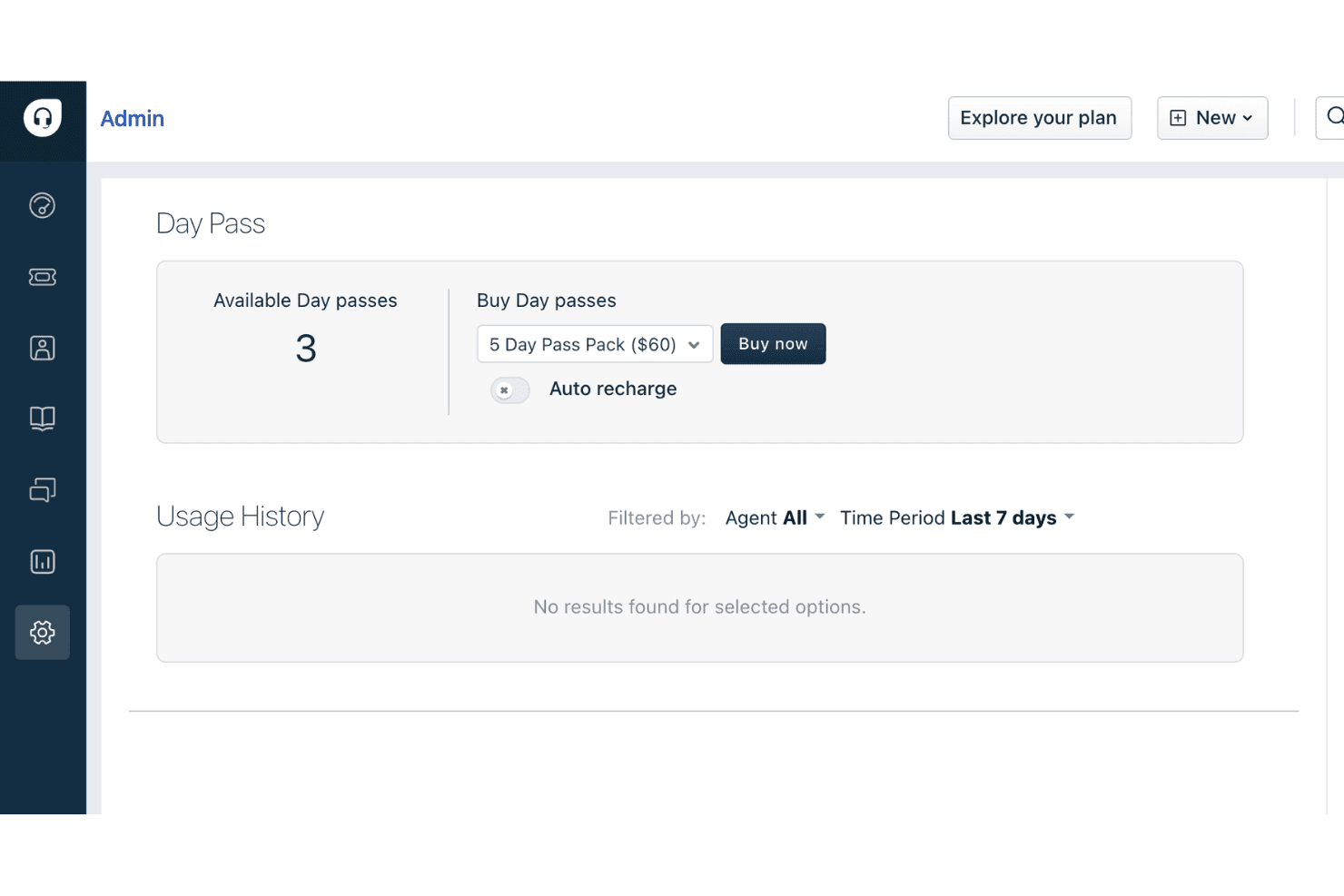
Day passes let you add temporary agents for short-term spikes in support demand without upgrading your plan. This is especially useful for seasonal businesses or special events that need extra help only occasionally.
Canned Forms
Canned forms allow you to create pre-filled response templates for common customer queries. This speeds up agent replies and ensures consistent, accurate information is shared with customers.
Ease of Use
Freshdesk is widely recognized for its user-friendly, clean interface and intuitive navigation, making it easy for new agents to get started with minimal training. Users often highlight the clear ticket views, drag-and-drop workflow automations, and straightforward setup process. The platform’s guided onboarding and in-app tips help teams configure features quickly, while the logical layout reduces confusion even as ticket volumes grow. This focus on usability makes Freshdesk accessible for teams with varying technical backgrounds.

Onboarding
Freshdesk offers a smooth onboarding experience with step-by-step setup guides, interactive product tours, and a robust knowledge base. Many users mention that the initial configuration is straightforward, with helpful prompts and clear documentation. Live chat support and community forums are available for troubleshooting, which helps new teams resolve questions quickly. This combination of in-app guidance and accessible resources allows most teams to start handling tickets and customizing workflows within days, not weeks.

Customer Support
Freshdesk provides multiple support channels, including email, live chat, and a detailed help center. Some users note that response times can vary, especially on lower-tier plans. Despite this, many appreciate the thorough documentation and active community forum for self-service troubleshooting.

Integrations
Freshdesk integrates with Slack, Shopify, Salesforce, WhatsApp, Mailchimp, Jira, Microsoft Teams, Google Workspace, Zoom, and Trello, among others.
Freshdesk also offers a robust API and connects with third-party integration tools like Zapier for expanded automation and connectivity.

Value for Money
Freshdesk is often praised for its flexible pricing plans, offering a free plan and affordable entry-level tiers that include essential features. Users find the day pass option and scalable plans cost-effective, especially for small businesses or teams with fluctuating support needs. Higher tiers add advanced automation and reporting, justifying the increased cost for growing organizations.
- Free Version: Ticketing, knowledge base, and prebuilt reports for 1–2 agents for up to six months.
- Growth: Adds automation tools, expanded help desk capabilities, and additional collaboration features.
- Pro: Adds advanced features like analytics, multiple SLA policies, skill-based routing, and enhanced workflow automation.
- Enterprise: Adds advanced security, sandbox testing, audit logs, and deeper customization for large teams.

Freshdesk Specs
- Analytics: Yes
- API: Yes
- Batch Permissions & Access: No
- Call Integration: Yes
- Chat: Yes
- Contact Management: Yes
- Contact Sharing: Yes
- CRM Integration: Yes
- Customer Management: Yes
- Customer Service: Yes
- Dashboard: Yes
- Data Export: Yes
- Data Import: Yes
- Data Visualization: Yes
- Email Integration: Yes
- Escalation Management: No
- External Integrations: Yes
- Instant Chat Integration: Yes
- Knowledge Base: Yes
- Lead Management: No
- Lead Scoring: No
- Multi-User: Yes
- Notifications: Yes
- Real-time Alerts: Yes
- Scheduling: Yes
- Self-service Portal: Yes
- Social Media Integration: Yes
- Support Forum: Yes
- Third-Party Plugins/Add-Ons: Yes
- Ticket Management: Yes
- Workflow Management: Yes
Freshdesk FAQs
Freshdesk Company Overview & History
Freshdesk is a flagship product of Freshworks Inc., a global software company headquartered in San Mateo, California. Freshworks employs thousands worldwide and offers a suite of business software, including Freshservice, Freshsales, and Freshchat. Freshdesk is trusted by over 74,000 businesses, with notable clients like Bridgestone, Tata Digital, S&P Global, Klarna, Forbes, PepsiCo, and Pearson. Freshworks went public in 2021 and reported $838.8 million in revenue for 2025, with a net income of $183.7 million.
Freshdesk Major Milestones
- 2010: Freshdesk founded in Chennai, India.
- 2011: Freshdesk product officially launched.
- 2018: Freshworks surpasses $100 million in annual recurring revenue.
- 2021: Freshworks goes public on NASDAQ, raising over $1 billion in its IPO.
- 2025: Freshworks reports $838.8 million in annual revenue and achieves profitability.