

Recensione di monday CRM: pro, contro, funzionalità e prezzi
monday CRM offre un'interfaccia flessibile e intuitiva che consente al tuo team di gestire le relazioni con i clienti in modo più efficace rispetto a molti strumenti CRM tradizionali.

Recensiamo gli strumenti in modo indipendente e le commissioni aiutano a finanziare i nostri test. Consulta la nostra politica di trasparenza, la nostra metodologia o suggerisci uno strumento.
monday CRM is a customer relationship management (CRM) software that helps teams manage contacts, pipelines, and customer touchpoints in one place. It’s best suited for customer-facing teams in service, success, or account management roles, especially in fast-moving SaaS, tech, or B2B environments. Its biggest value is helping your team stay on top of follow-ups, handoffs, and ongoing customer relationships.
In this review, I’ll walk through monday CRM's key features, pros and cons, best and worst use cases, pricing, and more. Whether you're looking to improve your team's productivity or better understand customer needs, this review has the insights you need.
monday CRM Evaluation Summary

4.6/5
- From $18/user/month
- 14-day free trial; Free demo available
Perché fidarsi dei nostri consigli sui software
6,700+
Reviews
20
Industry experts
16+
Evaluation factors
14
Years
Il nostro team testa e recensisce software dal 2012. In quanto leader CX noi stessi, sappiamo quanto sia difficile — e importante — scegliere il software giusto.
Per questa guida, abbiamo valutato gli strumenti attraverso test pratici e ricerche indipendenti, assegnando un punteggio agli strumenti in base ai nostri criteri di selezione.
Le nostre recensioni riflettono il nostro giudizio editoriale umano, non un discorso di vendita.
 Gui DrusinaCreative Director
 Tim FisherVP of AI
monday CRM Overview
Pros
- You can build and adjust pipelines without needing technical help.
- It’s easy to track tasks, emails, and contact history in one place.
- Automation features save your team time on repetitive tasks and streamline daily work.
Cons
- It can feel overwhelming with too many features for new users.
- Reporting feels limited if your team needs deeper performance or trend analysis.
- You can't manage complex sales territories or multi-layered account hierarchies.
Is monday CRM Right For Your Needs?
Who Would be a Good Fit for monday CRM?
\u003cspan style=\u0022font-weight: 400;\u0022\u003eSe il tuo team lavora in un ruolo dinamico a contatto con i clienti e ha bisogno di qualcosa di semplice, visivo e personalizzabile, monday CRM è un’ottima soluzione. È ideale per i team che si occupano di assistenza, vendite o gestione degli account e vogliono monitorare contatti, conversazioni e follow-up senza una curva di apprendimento ripida. Otterrai rapidamente valore senza aver bisogno di un amministratore a tempo pieno per gestire il sistema, e i modelli predefiniti rendono la configurazione ancora più semplice.\u003c/span\u003e\r\n\u003ch3\u003e\u003cb\u003eMigliori casi d’uso per monday CRM\u003c/b\u003e\u003c/h3\u003e
- Customer Support TeamsYou can track tickets, manage handoffs, and log follow-ups all in one easy-to-navigate board.
- Sales Operations TeamsYou can build lightweight sales pipelines and reporting without relying on complex CRM tools.
- Small BusinessesSetup is quick, and you won’t need IT to change your workflows or customize fields.
- Account ManagementIt helps your team stay on top of renewals, upsells, and check-ins without switching tools.
- SaaS CompaniesYou can manage leads, onboard customers, and monitor ongoing relationships without bloated features.
- Marketing AgenciesIt’s easy to track client requests, campaign status, and deliverables across multiple accounts.
Who Would be a Bad Fit for monday CRM?
\u003cspan style=\u0022font-weight: 400;\u0022\u003eSe il tuo team ha bisogno di report complessi, previsioni dettagliate o funzionalità avanzate per le operazioni di vendita, monday CRM non sarà sufficiente. Non è progettato per grandi team di vendita aziendali, settori regolamentati o aziende che si affidano al monitoraggio delle trattative su più livelli. Ti sentirai limitato se i tuoi flussi di lavoro dipendono da modelli di ricavi personalizzati, dalla gestione dei territori o da integrazioni approfondite con sistemi legacy.\u003c/span\u003e\r\n\u003ch3\u003e\u003cb\u003ePeggiori casi d’uso per monday CRM\u003c/b\u003e\u003c/h3\u003e
- Enterprise Sales TeamsIt doesn’t support layered pipelines, custom quote logic, or robust forecasting out of the box.
- Financial Services FirmsYou can’t enforce the strict compliance controls needed for sensitive customer data.
- Call CentersThere’s no native telephony, queueing, or call activity tracking built in.
- Healthcare ProvidersIt lacks HIPAA compliance and patient-specific tracking features.
- Franchise OperationsYou can’t segment and report across multiple locations or sales territories easily.
- Manufacturing FirmsIts features aren't tailored for supply chain and production management.
Come Testiamo e Valutiamo gli Strumenti
Abbiamo passato anni a costruire, perfezionare e migliorare il nostro sistema di valutazione e testing dei software. Il nostro schema è progettato per cogliere tutte le sfumature nella selezione del software e per valutare ciò che rende uno strumento efficace, concentrandosi sugli aspetti critici nel processo decisionale. Qui sotto puoi vedere esattamente come funziona il nostro processo di testing e valutazione su sette criteri. Ci permette di offrire una valutazione imparziale del software basata su funzionalità principali, caratteristiche distintive, facilità d’uso, onboarding, supporto clienti, integrazioni, recensioni clienti e rapporto qualità/prezzo.
Funzionalità Principali (25% del punteggio finale)
Il punto di partenza della nostra valutazione sono sempre le funzionalità fondamentali dello strumento. Possiede le funzioni di base che un utente si aspetta? Alcune di queste funzionalità sono disponibili solo con piani più costosi? In sostanza, ci aspettiamo che uno strumento sia competitivo rispetto ai suoi concorrenti principali.
Caratteristiche Distintive (25% del punteggio finale)
Successivamente, valutiamo le funzionalità particolari e distintive che vanno oltre le funzionalità standard solitamente presenti in strumenti simili. Un punteggio elevato riflette funzionalità specializzate o uniche che rendono il prodotto più veloce, efficiente o che offrono valore aggiunto all’utente. Valutiamo anche quanto sia facile integrare lo strumento con altri strumenti tipicamente presenti nel tech stack, per ampliare le funzionalità e l’utilità del software. Ottengono il punteggio migliore gli strumenti che offrono numerose integrazioni native, connessioni di terze parti e accesso API per creare integrazioni personalizzate.
Facilità d’Uso (10% del punteggio finale)
Consideriamo quanto sia rapido e intuitivo eseguire le attività core usando lo strumento. Un software con un alto punteggio è ben progettato, intuitivo all’uso, offre app mobili, mette a disposizione modelli e semplifica attività relativamente complesse.
Onboarding (10% del punteggio finale)
Sappiamo quanto sia importante l’adozione rapida da parte del team per una nuova piattaforma, quindi valutiamo la facilità di apprendimento e utilizzo dello strumento con una formazione minima. Valutiamo quanto velocemente un membro del team può iniziare a usare lo strumento senza esperienza. Le soluzioni con punteggio elevato richiedono poco o nessun supporto.
Supporto Clienti (10% del punteggio finale)
Valutiamo quanto sia semplice ricevere assistenza via telefono, chat dal vivo o knowledge base. Gli strumenti e le aziende che offrono supporto in tempo reale ottengono il punteggio migliore, mentre i chatbot hanno il punteggio più basso.
Recensioni Clienti (10% del punteggio finale)
Oltre alla nostra valutazione interna, prendiamo in considerazione il net promoter score dei clienti attuali e passati. Analizziamo la probabilità che, potendo scegliere, selezionino di nuovo lo strumento per le sue funzionalità core. Un software con punteggio elevato riflette un alto net promoter score dai clienti attuali o passati.
Rapporto Qualità/Prezzo (10% del punteggio finale)
Infine, tenendo conto di tutti gli altri criteri, analizziamo il prezzo medio dei piani entry level rispetto alle funzionalità principali e consideriamo il valore delle altre metriche di valutazione. Il software che offre di più, a meno, otterrà un punteggio maggiore.
Core Features
Contact Management: You can store and manage all your customer information in one place, making it easy to access and update. This feature helps your team keep track of interactions and build better customer relationships.
Pipeline Management: Track your sales process with visual pipelines that show where each deal stands. This helps your team prioritize tasks and focus on closing deals efficiently.
Task Management: Assign and manage tasks within your team to ensure everyone knows what needs doing and when. It keeps your projects on track and ensures accountability.
Automation: Automate repetitive tasks like follow-up emails and reminders, saving your team time for more important work. This feature boosts productivity and reduces errors.
Reporting and Analytics: Generate reports to analyze your team's performance and make data-driven decisions. It helps you understand your sales trends and improve strategies.
Customizable Dashboards: Create dashboards that fit your team's specific needs, displaying relevant data at a glance. This enhances your team's ability to monitor and react to key metrics quickly.

Standout Features
Visual Workflow Builder: Design and customize workflows with an intuitive drag-and-drop interface. This allows your team to create processes that fit your unique business needs without any coding.
Time Tracking: Monitor how much time your team spends on different tasks and projects. This feature helps you understand productivity levels and manage resources effectively.
Ease of Use
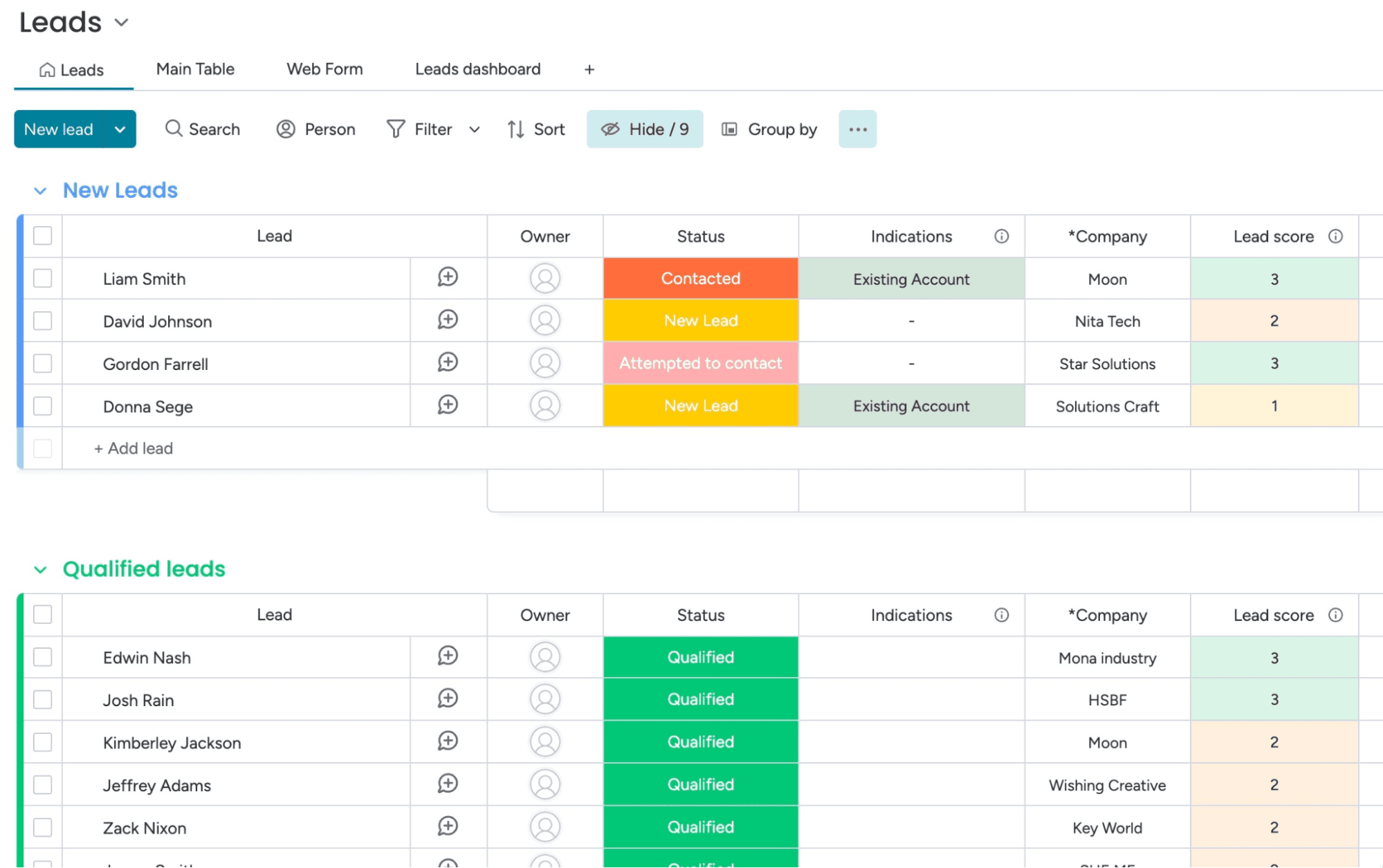
monday CRM is known for its intuitive and user-friendly interface, making it easy for your team to get started without extensive training. The visual layout and drag-and-drop workflow builder simplify complex processes, allowing you to customize your workspace effortlessly.
Its responsive design ensures a smooth experience across devices, so your team can manage tasks on the go. Users often appreciate the straightforward navigation and clear organization of features, which enhances productivity and reduces the learning curve.

Onboarding
monday CRM offers a straightforward onboarding process, with guided tutorials and helpful resources that make it easy for your team to get started. The platform provides a wealth of documentation and video guides that walk you through setting up your workspace.
Users often find value in the responsive support team, which is available to assist with any questions or issues. While some users may find the initial setup a bit complex, the available resources help smooth the transition and ensure a quicker time to value.

Customer Support
monday CRM provides a range of support options that help your team resolve issues quickly. Users appreciate the responsive email and chat support, which often addresses questions efficiently.
The platform also offers a comprehensive help center with articles and FAQs that guide you through common challenges. While some users feel response times could be faster, the quality of support and available resources generally meet the needs of most teams, ensuring you can keep your work on track. Plus, monday.com has an active community for those who like to find their own answers or get tips from power-users.

Integrations
monday CRM integrates natively with Slack, Google Workspace, Gmail, Microsoft Teams, Zoom, Outlook, Zoom, HubSpot, LinkedIn, Stripe, PandaDoc, Trello, and Salesforce. monday CRM also offers an API and connects with third-party integration tools like Zapier.
Value for Money
monday CRM pricing offers strong value, especially if your team wants something easy to use without sacrificing flexibility. Although there is no free plan, monday CRM does offer a 14-day free trial.
You get a lot at the lower tiers, including automation and reporting tools that work well for small to midsize teams. Higher plans add more control, but smaller teams won’t need Enterprise to get full use out of it.
- Basic Plan: Contact management, boards, and limited automations
- Standard Plan: Activity tracking, custom pipelines, and calendar view
- Pro Plan: Sales forecasting, advanced reporting, and higher automation limits
- Enterprise Plan: Admin controls, multi-level permissions, and enterprise-grade security features

New Product Updates from monday CRM
 Opens new window
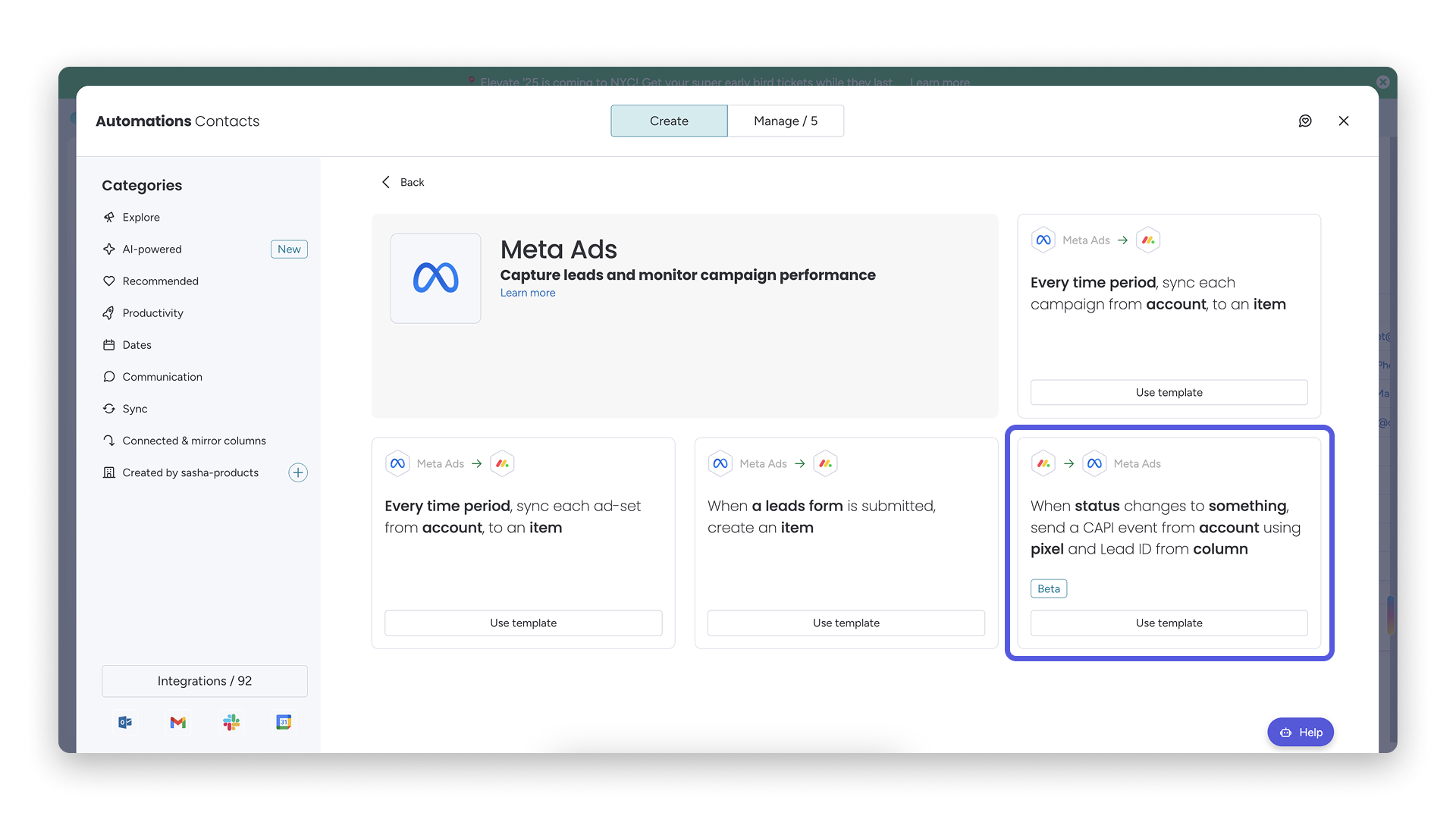
monday CRM Adds Meta Conversions API Integration
monday CRM has added an easier way to connect Meta Conversions API so you can sync lead status back to Meta. This helps you improve targeting and conversion performance with minimal setup effort. Highlights include:
- Meta Conversions API Integration: Connect monday CRM with Meta to share lead status updates automatically.
- Lead Status Sync: Send CRM lead status changes back to Meta to improve campaign targeting and conversion tracking.
- Automation Recipe: Configure the integration quickly using the new built-in Meta automation recipe.
Visit monday CRM's official site for more details.
monday CRM Specs
- 2-Factor Authentication: No
- API: Yes
- Calendar Management: Yes
- Call Tracking: No
- Campaign Management: No
- Click-to-Dial: No
- Contact Management: Yes
- Contact Sharing: No
- Custom Data Forms: Yes
- Customer Management: Yes
- Dashboard: Yes
- Data Export: Yes
- Data Import: Yes
- Data Visualization: Yes
- Email Integration: Yes
- External Integrations: Yes
- File Sharing: Yes
- File Transfer: Yes
- Google Apps Integration: Yes
- Lead Management: Yes
- Lead Scoring: Yes
- Marketing Automation: Yes
- Mobile App: No
- Multi-User: Yes
- Notifications: Yes
- Pipeline Management: Yes
- Sales Automation: Yes
- Scheduling: Yes
- Social-Media Integration: Yes
- Task Scheduling/Tracking: Yes
- Third-Party Plugins/Add-Ons: Yes
monday CRM FAQs
monday CRM Company Overview & History
monday.com, founded by Roy Mann, Eran Zinman, and Eran Kampf, is headquartered in Tel Aviv, Israel. It operates monday work management (for project management), monday CRM, monday service (a help desk and service management tool), and monday dev (for product development and engineering teams).
Founded in 2012, it went public on Nasdaq in June 2021, rapidly grew to over 1,850 employees, and surpassed US $1 billion in ARR by 2024. The company is known for its customizable no-code tools and supports more than 225,000 customers worldwide.
monday CRM Major Milestones
- 2012: Founded as dapulse in Tel Aviv after spinning off from Wix.
- 2014: Platform launched to the public.
- 2017: Rebranded from dapulse to monday.com
- 2019: Raised US $150 million in Series D funding; valued at US $1.9 billion. Achieved unicorn status.
- 2021: Became publicly traded on Nasdaq.
- 2022: Launch of monday Sales CRM, offering fully customizable no-code CRM workflows.
- 2023: Released monday CRM integration in Microsoft Teams for in-app pipeline access
- 2024: monday.com reached over $1 billion in annual recurring revenue.
Qual è il prossimo passo?
Iscriviti alla nostra newsletter per ricevere gli ultimi approfondimenti sul CX, guide pratiche, strategie e risorse dai migliori esperti del settore CX.