

Recensione di Shelf: vantaggi, svantaggi, funzionalità e prezzi
Shelf si distingue per il suo design intuitivo e le funzionalità basate sull'IA, che lo rendono una scelta eccellente per i team alla ricerca di una gestione efficiente della base di conoscenza.

Recensiamo gli strumenti in modo indipendente e le commissioni aiutano a finanziare i nostri test. Consulta la nostra politica di trasparenza, la nostra metodologia o suggerisci uno strumento.
Shelf is a helpdesk knowledge base built for support teams that need agents to find accurate answers fast during live customer interactions. I'd choose it over something like Confluence if your priority is giving frontline agents quick, search-driven access to verified content, rather than managing a general documentation wiki that wasn't designed around support workflows in the first place.
Shelf Evaluation Summary

4.7/5
- Pricing upon request
- Free demo available
Perché fidarsi dei nostri consigli sui software
6,700+
Reviews
20
Industry experts
16+
Evaluation factors
14
Years
Il nostro team testa e recensisce software dal 2012. In quanto leader CX noi stessi, sappiamo quanto sia difficile — e importante — scegliere il software giusto.
Per questa guida, abbiamo valutato gli strumenti attraverso test pratici e ricerche indipendenti, assegnando un punteggio agli strumenti in base ai nostri criteri di selezione.
Le nostre recensioni riflettono il nostro giudizio editoriale umano, non un discorso di vendita.
 Gui DrusinaCreative Director
 Tim FisherVP of AI
Shelf Overview
In my opinion, Shelf is a solid choice for teams that need an intuitive helpdesk knowledge base. It excels in key features and ease of use, making it a good fit for tech-savvy teams in fast-paced environments. While its onboarding could be smoother, its standout features like AI-driven search make up for it. Compared to competitors like Guru or Zendesk, Shelf offers better user satisfaction according to user reviews and feature utilization, but might not be the best for those on a tight budget. If you're looking for a tool that balances functionality and support team, Shelf is worth considering.
Pros
- Quickly find answers with Shelf's powerful search function capabilities.
- Intuitive, user-friendly interface.
- Version control features for access to the latest, most accurate content.
Cons
- Setup process for advanced permissions may be a bit time-consuming.
- Sharp learning curve with its advanced features, such as deep categorization rules.
- Occasional issues with content archiving and management.
Is Shelf Right For Your Needs?
Who Would be a Good Fit for Shelf?
Shelf is great for tech-savvy teams in fast-paced industries like SaaS and retail, where quick access to information is paramount. Your customer support department will find its machine learning driven search invaluable for reducing response times. Teams that appreciate customization will also benefit from Shelf's flexible setup, which you can tailor to fit your specific workflows. Its intuitive interface makes it easy for your team to navigate, even in high-pressure environments.
- Tech StartupsShelf helps your startup manage rapid growth by organizing information efficiently and ensuring smooth knowledge sharing between new and existing team members.
- Retail Support TeamsYour team can quickly find product details, handle seasonal surges, and respond to customer queries, enhancing service and customer satisfaction.
- Large EnterprisesShelf scales well, meeting the needs of large organizations with its robust content management system.
- Customer Service DepartmentsYour department benefits from quick information retrieval. Its real-time search capabilities provide immediate agent assistance, drastically cutting average handle time (AHT) in a high-volume call center environment, thereby improving customer satisfaction.
- IT HelpdesksShelf's AI-driven search aids your support team in resolving technical issues faster by instantly presenting accurate solutions from technical docs and wikis like Confluence.
- Knowledge Management RolesShelf's customization options let you structure knowledge bases to fit specific organizational needs, centralizing multiple sources (including Dropbox and Microsoft SharePoint files) into a single location.
Who Would be a Bad Fit for Shelf?
Shelf might not suit small businesses or teams with limited tech skills, as its advanced features could be overwhelming. If your team lacks the IT resources for a detailed onboarding process, you might struggle with Shelf's initial setup. Industries that require minimal customization might find Shelf's options excessive and not cost-effective. Additionally, if your customer support relies on immediate assistance, Shelf's occasional delays in support response might not meet your needs.
- Small BusinessesShelf's advanced features might be too complex for your small team to manage effectively, particularly if you lack dedicated IT resources. Organizations with fewer than 10 employees may find the platform over-engineered for their simple documentation needs.
- Non-Tech IndustriesIf your industry isn't tech-oriented and your team lacks digital literacy, Shelf's features could overwhelm your team despite its user-friendly design. Traditional industries with paper-based processes may face significant challenges when implementing a sophisticated cloud-based knowledge management platform.
- Low-Tech TeamsYour team might find Shelf's features and AI-powered capabilities challenging without strong technical skills or dedicated IT support for troubleshooting. Organizations with no experience in using cloud-based platforms will need to invest heavily in training personnel in handling complex document management systems such as Shelf.
- Budget-Conscious DepartmentsIf you're looking to cut costs, Shelf's pricing model and implementation requirements might not align with your financial goals.
- Simple OperationsFor operations that don't need extensive customization, complex workflows, or advanced AI features, Shelf's capabilities may be unnecessary.
- Immediate Support NeedsIf your team needs quick support responses, Shelf's occasional delays might hinder your efficiency.
Come Testiamo e Valutiamo gli Strumenti
Abbiamo passato anni a costruire, perfezionare e migliorare il nostro sistema di valutazione e testing dei software. Il nostro schema è progettato per cogliere tutte le sfumature nella selezione del software e per valutare ciò che rende uno strumento efficace, concentrandosi sugli aspetti critici nel processo decisionale. Qui sotto puoi vedere esattamente come funziona il nostro processo di testing e valutazione su sette criteri. Ci permette di offrire una valutazione imparziale del software basata su funzionalità principali, caratteristiche distintive, facilità d’uso, onboarding, supporto clienti, integrazioni, recensioni clienti e rapporto qualità/prezzo.
Funzionalità Principali (25% del punteggio finale)
Il punto di partenza della nostra valutazione sono sempre le funzionalità fondamentali dello strumento. Possiede le funzioni di base che un utente si aspetta? Alcune di queste funzionalità sono disponibili solo con piani più costosi? In sostanza, ci aspettiamo che uno strumento sia competitivo rispetto ai suoi concorrenti principali.
Caratteristiche Distintive (25% del punteggio finale)
Successivamente, valutiamo le funzionalità particolari e distintive che vanno oltre le funzionalità standard solitamente presenti in strumenti simili. Un punteggio elevato riflette funzionalità specializzate o uniche che rendono il prodotto più veloce, efficiente o che offrono valore aggiunto all’utente. Valutiamo anche quanto sia facile integrare lo strumento con altri strumenti tipicamente presenti nel tech stack, per ampliare le funzionalità e l’utilità del software. Ottengono il punteggio migliore gli strumenti che offrono numerose integrazioni native, connessioni di terze parti e accesso API per creare integrazioni personalizzate.
Facilità d’Uso (10% del punteggio finale)
Consideriamo quanto sia rapido e intuitivo eseguire le attività core usando lo strumento. Un software con un alto punteggio è ben progettato, intuitivo all’uso, offre app mobili, mette a disposizione modelli e semplifica attività relativamente complesse.
Onboarding (10% del punteggio finale)
Sappiamo quanto sia importante l’adozione rapida da parte del team per una nuova piattaforma, quindi valutiamo la facilità di apprendimento e utilizzo dello strumento con una formazione minima. Valutiamo quanto velocemente un membro del team può iniziare a usare lo strumento senza esperienza. Le soluzioni con punteggio elevato richiedono poco o nessun supporto.
Supporto Clienti (10% del punteggio finale)
Valutiamo quanto sia semplice ricevere assistenza via telefono, chat dal vivo o knowledge base. Gli strumenti e le aziende che offrono supporto in tempo reale ottengono il punteggio migliore, mentre i chatbot hanno il punteggio più basso.
Recensioni Clienti (10% del punteggio finale)
Oltre alla nostra valutazione interna, prendiamo in considerazione il net promoter score dei clienti attuali e passati. Analizziamo la probabilità che, potendo scegliere, selezionino di nuovo lo strumento per le sue funzionalità core. Un software con punteggio elevato riflette un alto net promoter score dai clienti attuali o passati.
Rapporto Qualità/Prezzo (10% del punteggio finale)
Infine, tenendo conto di tutti gli altri criteri, analizziamo il prezzo medio dei piani entry level rispetto alle funzionalità principali e consideriamo il valore delle altre metriche di valutazione. Il software che offre di più, a meno, otterrà un punteggio maggiore.
Core Features
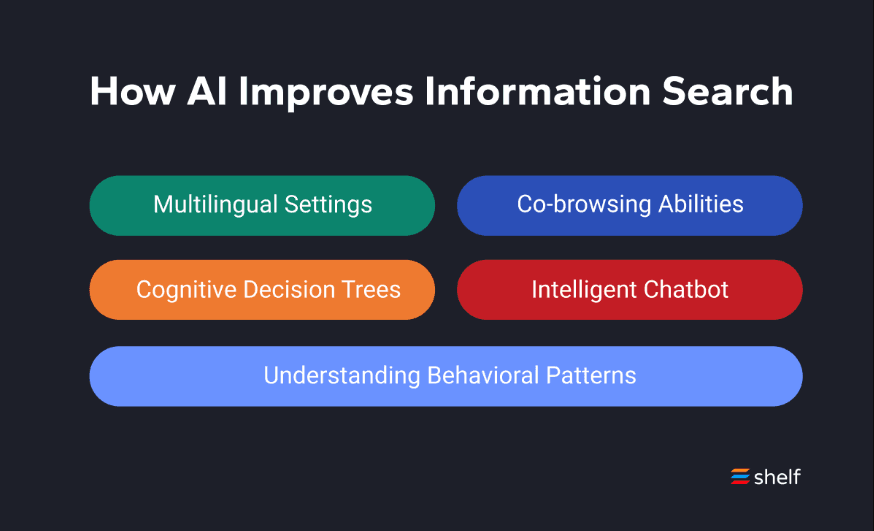
AI-Driven Search: This feature helps your team find information quickly by using artificial intelligence and machine learning to deliver relevant results through real-time processing. It stands out by leveraging natural language queries for intuitive discovery, reducing the time spent looking for answers.
Customizable Knowledge Base: You can tailor the knowledge base to fit the end user’s specific needs with flexible permissions, workflows, and categorization, offering flexibility in organization and presentation. This customization enhances how your team accesses and manages information.
User-Friendly Interface: Shelf's intuitive design makes it easy for your team to navigate and use daily with minimal training. You'll appreciate how straightforward it is to train new team members and maintain consistency across your organization.
Content Management: Easily organize, update, and manage your content to keep it current and useful through document management and version control. This feature ensures your team always has access to the latest information, with archiving for historical records and compliance.
Collaboration Tools: Your team can collaborate seamlessly on content creation and updates through real-time editing and notifications, improving teamwork and consistency. It helps maintain a cohesive knowledge base with built-in approval workflows and templates for standardization.
Analytics and Reporting: Gain insights into how your knowledge base is used with built-in analytics and metrics tracking. This data helps you optimize content and improve your team's efficiency.
Ease of Use
Shelf is user-friendly, thanks to its intuitive interface that makes navigation a breeze for your team. The straightforward design ensures that even new users can quickly get up to speed with minimal training. Compared to other software like Zandesk and Confluence, Shelf offers a smoother experience with its cloud-based architecture, though some users might find the initial setup slightly challenging without proper onboarding support and templates. The AI-driven search function further enhances usability by delivering quick and relevant results with real-time processing, saving your team time and effort. Overall, it balances powerful features with an accessible design, making it a strong choice for organizations prioritizing ease of use and user experience.

Integrations
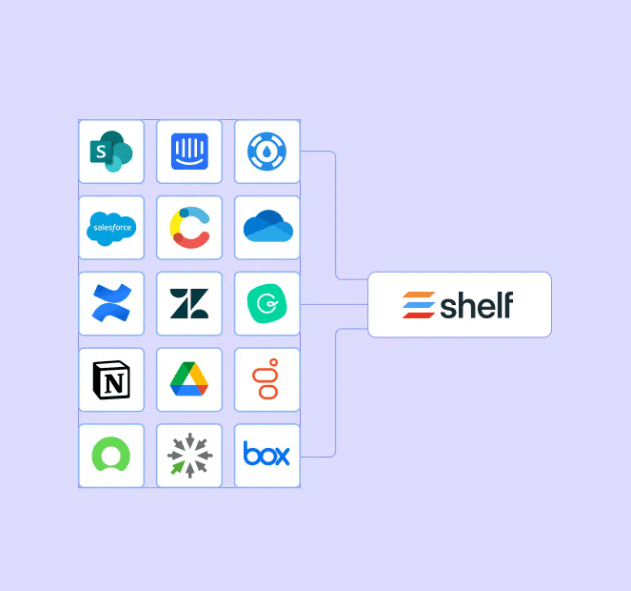
Shelf integrates with SharePoint, Salesforce, Confluence, Slack, Notion, ServiceNow, Intercom, Contentful, Zendesk, Google Drive, Dropbox, Microsoft OneDrive, and Box, providing comprehensive connectivity with enterprise tools.
Shelf also offers an API and connects with third-party integration tools, providing flexibility for custom solutions and seamless integration with existing workflows and CRM systems.
Shelf Specs
- API: Yes
- Chat: No
- Contact Management: No
- Contact Sharing: No
- Data Export: Yes
- Data Import: Yes
- Document Comparison: No
- Email Integration: Yes
- External Integrations: Yes
- File Sharing: Yes
- File Transfer: No
- History/Version Control: No
- Multi-User: Yes
- Notifications: Yes
- Project Management: No


