

As a customer experience manager, you're constantly juggling the demands of improving satisfaction and reducing costs. It's not easy to meet customer expectations while managing resources efficiently. That's where customer self-service software comes in. It empowers your customers to find answers on their own, freeing up your team's time for more complex issues.
I've tested and reviewed various software solutions to help you find the best fit for your needs. In my experience, the right tool can make a significant difference. I'll share unbiased reviews of my top picks, focusing on how they can address your specific challenges. Let's explore the options that can truly support your team and help elevate your customer service strategy.
Why Trust Our Software Recommendations
6,700+
Reviews
20
Industry experts
16+
Evaluation factors
14
Years
Our team has been testing and reviewing software since 2012. As CX leaders ourselves, we know how difficult—and important—it is to choose the right software.
For this guide, we evaluated tools using hands-on testing and independent research, scoring tools using our selection criteria.
Our reviews reflect our human editorial judgment, not a sales pitch.
Customer Self-Service Software Comparison Table
This comparison table summarizes pricing details for my top customer self-service software selections:
| Tool | Best For | Trial Info | Price | ||
|---|---|---|---|---|---|
| 1 | Best with real-time chat support | Free plan available | From $25/user/month (billed annually) | Website | |
| 2 | Best with multilingual AI agent support | 7-day free trial + free plan + free demo available | From $32/month (billed annually) | Website | |
| 3 | Best with AI-powered agent coaching capabilities | Free demo available | Pricing upon request | Website | |
| 4 | Best for AI-fueled, chat-based support | 14-day free trial + free demo available | From $9.6/month | Website | |
| 5 | Best for small business needs | 14-day free trial | From $19/month | Website | |
| 6 | Best with no-code automation flows | Free plan available; 7-day free trial | From $24.17/month (billed annually) | Website | |
| 7 | Best for AI-based multi-channel support | 14-day free trial + free demo available | From $26.1/user/month (billed annually) | Website | |
| 8 | Best for AI-managed customer journeys | Free demo available | Pricing upon request | Website | |
| 9 | Best for AI-backed, developer-focused teams | Free plan + free demo available | Pricing upon request | Website | |
| 10 | Best for AI-guided CRM and customer engagement | 14-day free trial | From $20/user/month | Website |


Best Customer Self-Service Software Review
Below are my detailed summaries of the best customer self-service software that made it onto my shortlist. My reviews offer a detailed look at the key features, pros and cons, integrations, and ideal use cases of each tool to help you find the best one for you.
 Best with real-time chat support
- Free plan available
- From $25/user/month (billed annually)
Visit WebsiteCustomer Rating:4.5/5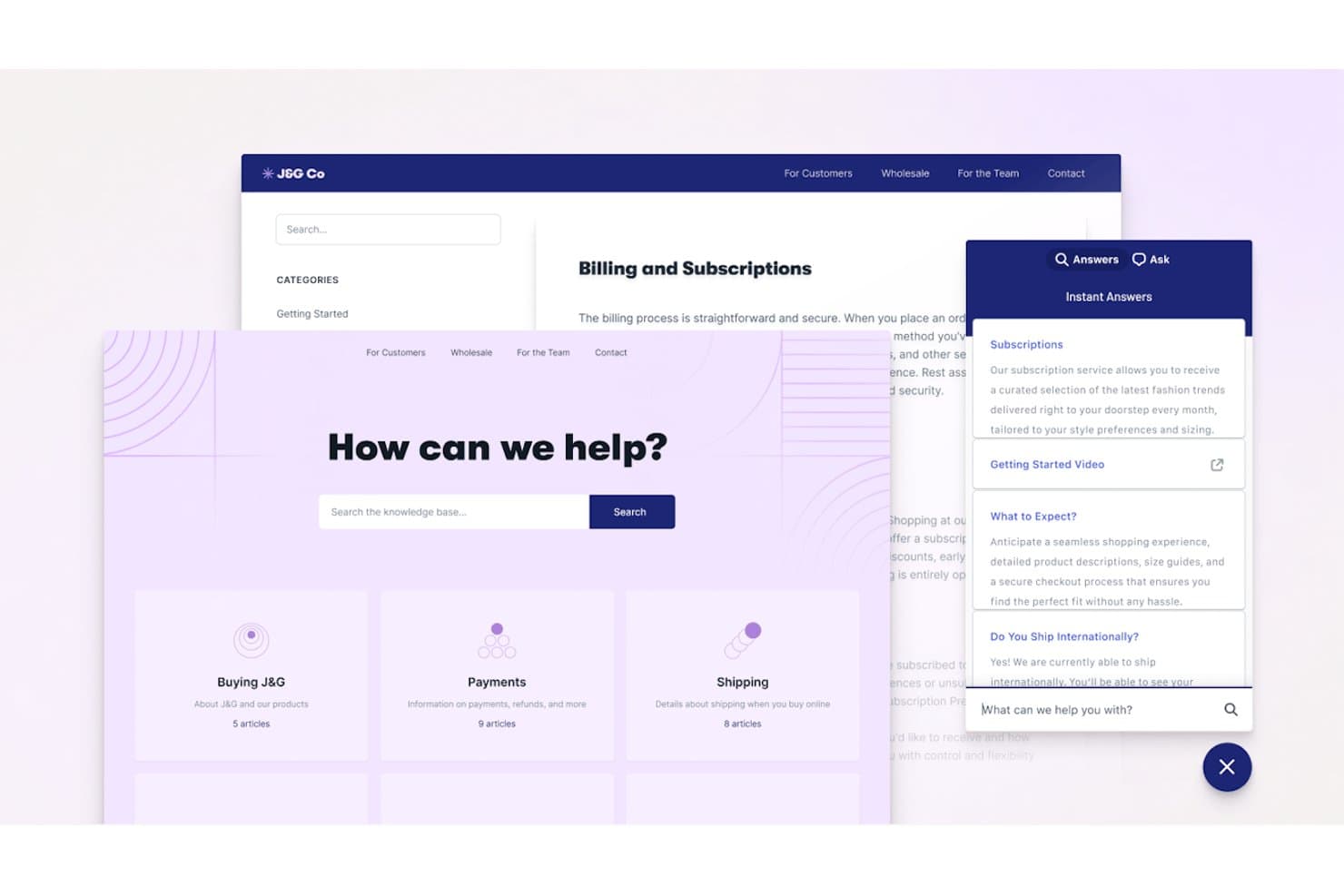
Help Scout offers a knowledge base and AI-powered instant answers widget to help customers self-serve with subscriptions, shipping, and billing topics. Help Scout is a customer support and self-service platform that combines a shared inbox, an embeddable knowledge base widget, Docs (help center), and an AI-powered chatbot for automated customer query resolution.
Who Is Help Scout Best For?
Help Scout is a strong fit for SMB and mid-market SaaS teams that want self-service and live chat support managed from a single, straightforward platform.
Why I Picked Help Scout
I picked Help Scout as one of the best because its Beacon widget blends real-time chat and self-service in a way I find genuinely smart. Before a customer types a single message, Beacon proactively surfaces relevant Docs articles. Live chat only appears when agents are online, so customers never start a conversation that goes unanswered. AI Answers handles the rest autonomously, resolving questions directly from your knowledge base without agent involvement.
Help Scout Key Features
- Docs knowledge base: Build unlimited knowledge bases with categories, custom branding, and powerful search.
- Workflows automation: Set up rules to automatically route, tag, or assign conversations based on triggers you define.
- Multi-channel inbox: Manage customer messages from email, WhatsApp, Instagram, Messenger, SMS, and voice in one shared workspace.
- In-app messaging: Send targeted announcements, onboarding tips, and satisfaction surveys directly inside your product or website.
Help Scout Integrations
Help Scout offers native integrations with Salesforce, HubSpot, Slack, Jira, Shopify, Mailchimp, Aircall, Google Workspace, Trello, and Zapier. An API is available for custom integrations.
Pros and Cons
Pros:
- Docs is fast to build and publish
- AI Answers resolves tickets without agent involvement
- Beacon surfaces help articles before chat opens
Cons:
- Knowledge base lacks native multi-language capabilities
- Deflection analytics are basic compared to competitors
Learn more about Help Scout: Best with multilingual AI agent support
- 7-day free trial + free plan + free demo available
- From $32/month (billed annually)
Visit WebsiteCustomer Rating:4.4/5
Chatbase homepage highlighting its AI agent builder for creating and deploying automated customer support experiences. Chatbase is an AI chatbot platform designed for businesses and support teams who want to automate customer self service, reduce repetitive inquiries, and deliver instant, accurate answers across digital channels.
Who Is Chatbase Best For?
Chatbase suits support teams and businesses that want to automate customer interactions and provide instant answers across multiple digital channels.
Why I Picked Chatbase
I picked Chatbase as one of the best because I can train its AI agents on my own content and have them respond in over 95 languages. My team uses Chatbase to support customers in their preferred language, which is especially useful for global audiences. I also like that the platform automatically detects the user's language and switches responses accordingly.
Chatbase Key Features
- Custom chatbot builder: Create AI chatbots tailored to your brand and knowledge base.
- File and URL upload: Train bots using PDFs, text files, or website URLs for accurate responses.
- Widget customization: Adjust the look and feel of the chat widget to match your site.
- Conversation analytics: Track user interactions and chatbot performance with built-in analytics tools.
Chatbase Integrations
Integrations include Make, Zendesk, Notion, Slack, Stripe, Salesforce, Cal.com, Calendly, WhatsApp, and Messenger. An API is also available for custom integrations.
Pros and Cons
Pros:
- Enables direct integration with popular business tools
- Provides detailed analytics on chatbot conversations
- Allows training bots with custom files and URLs
Cons:
- Branding removal only on higher-tier plans
- Limited advanced workflow automation options
Learn more about Chatbase: Best with AI-powered agent coaching capabilities
- Free demo available
- Pricing upon request
Visit WebsiteCustomer Rating:5/5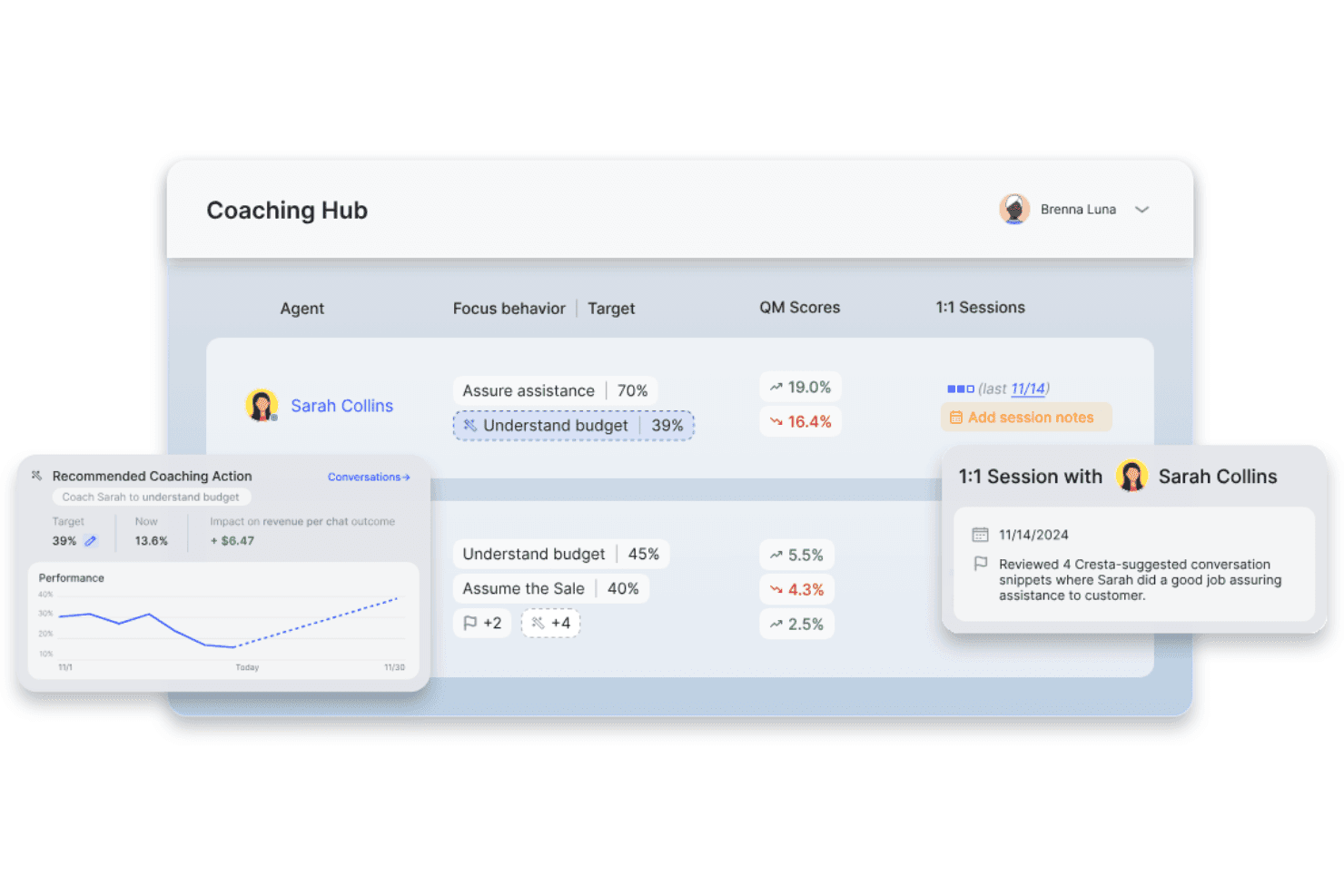
Cresta displays a virtual call center coaching hub with agent performance metrics, coaching recommendations, and quality management scores. Cresta is an AI-powered customer self-service platform that combines conversational AI agents, enterprise knowledge search, and intelligent automation to help businesses resolve customer inquiries across voice and digital channels.
Who Is Cresta Best For?
Cresta suits enterprise contact centers and customer support teams looking to optimize large-scale, omnichannel service operations with AI-powered automation.
Why I Picked Cresta
I picked Cresta as one of the best because my team benefits from live AI-powered agent coaching capabilities that suggest responses in real time, surface knowledge, and help us drive measurable ticket deflection across channels.
Cresta Key Features
- Omnichannel deployment: Connects with voice, chat, SMS, WhatsApp, and web channels for unified support automation.
- Knowledge Agent integration: AI searches and surfaces relevant knowledge base content in real time during conversations.
- Advanced analytics dashboard: Tracks ticket deflection rates, customer interactions, and performance insights across channels.
- CRM and CCaaS integrations: Seamlessly connects with Salesforce, Zendesk, AWS Connect, and other enterprise platforms.
Cresta Integrations
Cresta offers native integrations with Salesforce, Twilio, Pipedrive, BigCommerce, Five9, Zendesk, and more. An API is available for custom integrations.
Pros and Cons
Pros:
- AI agent containment across channels
- Advanced conversational analytics and insights
- Real-time agent coaching from AI
Cons:
- Limited knowledge base authoring features
- No branded customer self-service portal
Learn more about Cresta: Best for AI-fueled, chat-based support
- 14-day free trial + free demo available
- From $9.6/month
Visit WebsiteCustomer Rating:4.8/5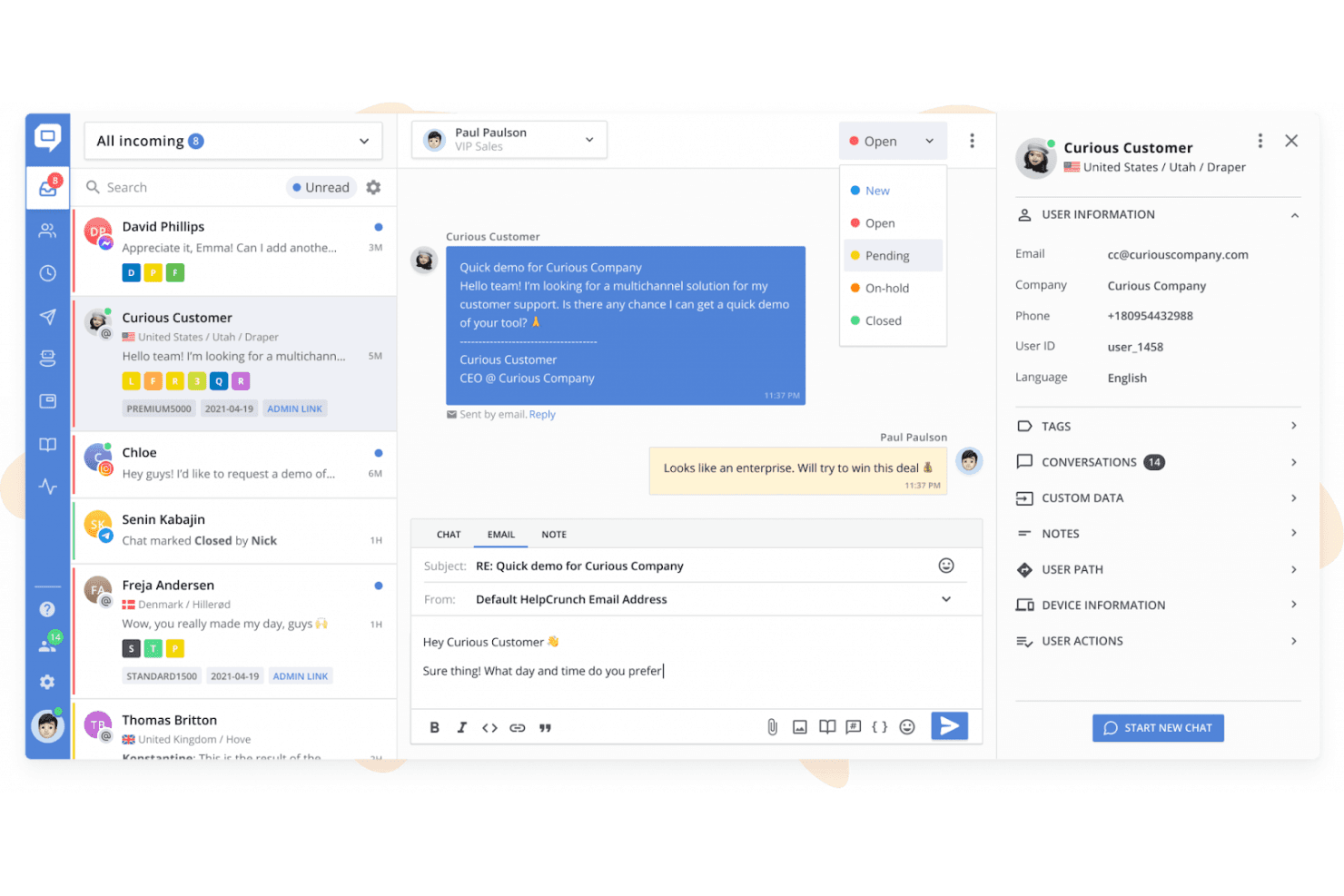
HelpCrunch’s shared inbox brings customer chats, email outreach, conversation statuses, and customer details into one workspace. HelpCrunch is an omnichannel customer support platform that combines live chat, a multilingual knowledge base, AI agents, chatbot flows, and a shared inbox across channels like WhatsApp, Messenger, and Telegram.
Who Is HelpCrunch Best For?
HelpCrunch is a strong fit for small and mid-sized businesses that need an affordable, all-in-one support platform without the overhead of enterprise tools like Intercom or Zendesk.
Why I Picked HelpCrunch
HelpCrunch earns its spot as one of the best on my shortlist because I love how AI Agents are trained on your knowledge base articles and custom answers, resolving common questions 24/7 without agent involvement. The KB embeds directly inside the chat widget, so customers get contextual article suggestions mid-conversation rather than being redirected to a separate help center. I've also found that the AI-driven self-service extends across WhatsApp, Telegram, and Messenger without extra configuration.
HelpCrunch Key Features
- Multilingual knowledge base: Create and manage help content in multiple languages with one-click language switching.
- Advanced customization options: Personalize widget appearance and knowledge base branding using custom CSS and JavaScript.
- Shared inbox for omnichannel support: Route, organize, and manage conversations from email, WhatsApp, Messenger, Telegram, and more in one unified inbox.
- Built-in analytics and reporting: Monitor help center usage, chat volume, resolution rates, and content performance from built-in dashboards.
HelpCrunch Integrations
HelpCrunch offers native integrations with Slack, WhatsApp, Facebook Messenger, Instagram, Telegram, and HubSpot, and provides an API for custom integrations.
Pros and Cons
Pros:
- Multi-language knowledge base with one-click switching
- Knowledge base embeds inside the chat widget
- AI agents resolve tickets without agent handoff
Cons:
- Reporting lacks advanced deflection rate modeling
- No community forum or peer discussion boards
Learn more about HelpCrunch:
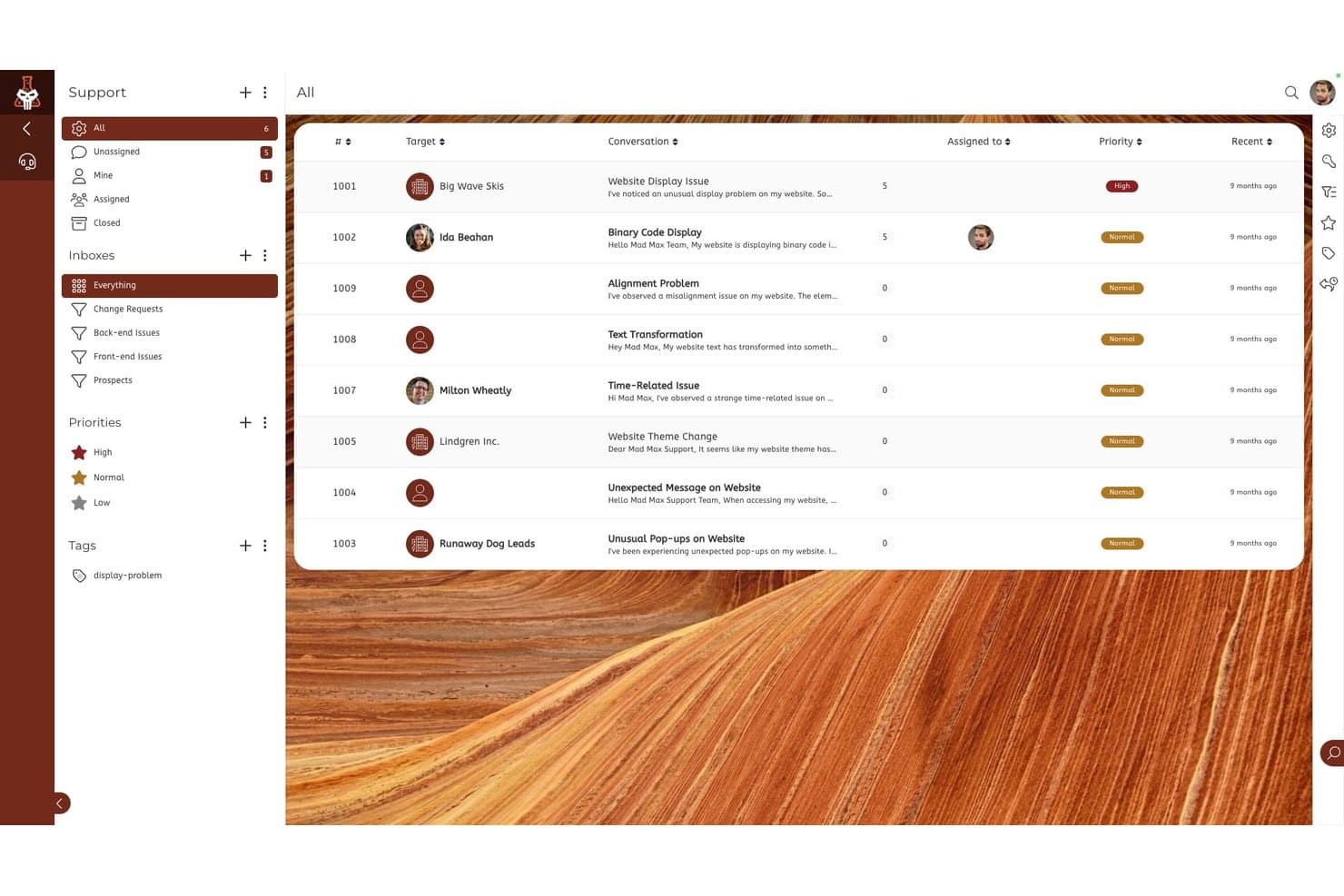
SuiteDash offers a support ticket management view with prioritized conversations, inbox categories, and assignee tracking for customer service teams. SuiteDash is an all-in-one business management platform that combines a white-labeled client portal, support ticketing, file exchange, invoicing, appointment scheduling, and secure messaging in a single flat-rate workspace.
Who Is SuiteDash Best For?
SuiteDash fits small service-based businesses and agencies that manage ongoing client relationships and want to replace multiple point solutions with one platform.
Why I Picked SuiteDash
I've included SuiteDash in my top picks because it packs deep client self-service tools into a flat-rate workspace built for small teams. Its FLOWs onboarding toolkit lets clients complete multi-step intake processes without any back-and-forth, and the white-labeled portal lets them submit support tickets, pay invoices, and share files under your brand. In practice, that means I can set up the portal once and let clients handle intake, payments, and file requests entirely on their own schedule.
SuiteDash Key Features
- Support tickets toolkit: Lets customers submit, track, and manage support requests within the branded portal.
- Community forum module: Creates dedicated online spaces for peer-to-peer discussions and client engagement.
- White-label mobile app: Offers a custom-branded mobile app experience for clients to access their portal on the go.
- Role-based permissions and portals: Enables different client, team, and contractor experiences within one workspace for granular access control.
SuiteDash Integrations
Native integrations are not clearly documented. SuiteDash provides an API for custom integrations.
Pros and Cons
Pros:
- Supports ticket submission within client portal
- Built-in client onboarding via FLOWs automation
- White-labeled portal with full branding control
Cons:
- Knowledge base tools are very limited
- No native AI chatbot functionality
Learn more about SuiteDash: Best with no-code automation flows
- Free plan available; 7-day free trial
- From $24.17/month (billed annually)
Visit WebsiteCustomer Rating:4.7/5
Tidio inbox view showing live chat conversations, ticket management, and customer details panel in a unified support dashboard. Tidio brings live chat, AI chatbots, and automation together in one platform for businesses looking to offer instant, always-on customer support. It’s a strong fit for ecommerce stores, SaaS companies, and service teams that want to reduce repetitive questions and help customers find answers on their own. With its focus on automation and multi-channel support, Tidio helps teams handle high volumes of inquiries without overwhelming agents.
Who Is Tidio Best For?
Tidio is a good fit for small to midsize ecommerce businesses and service teams that want to automate customer support and provide instant answers across multiple channels.
Why I Picked Tidio
For teams that want to automate customer support without coding, Tidio stands out with its no-code automation flows. I picked Tidio because its visual flow builder lets you design chatbot conversations and automated responses using a simple drag-and-drop interface. This means you can set up self-service options for FAQs, order tracking, or lead capture without needing developer resources. The ability to quickly launch and adjust automation flows makes it easy to keep your self-service experience up to date as customer needs change.
Tidio Key Features
Some other features in Tidio that support customer self service include:
- Live chat widget: Add a customizable chat widget to your website so customers can reach out or find answers instantly.
- AI-powered Lyro chatbot: Use an AI chatbot that can answer customer questions using your knowledge base and past conversations.
- Multi-channel inbox: Manage conversations from live chat, email, Messenger, Instagram, and WhatsApp in a single unified inbox.
- Pre-built chatbot templates: Choose from a library of ready-made chatbot templates for common support scenarios like order tracking, appointment booking, and FAQs.
Tidio Integrations
Integrations include Shopify, WooCommerce, WordPress, Zendesk, Salesforce, HubSpot, Messenger, Instagram, WhatsApp, and Intercom.
Pros and Cons
Pros:
- Includes real-time visitor tracking and analytics
- Provides AI-powered responses for common questions
- Integrates natively with major ecommerce platforms
Cons:
- Reporting features lack advanced segmentation
- Chatbot customization options can feel restrictive
Learn more about Tidio: Best for AI-based multi-channel support
- 14-day free trial + free demo available
- From $26.1/user/month (billed annually)
Visit WebsiteCustomer Rating:4.7/5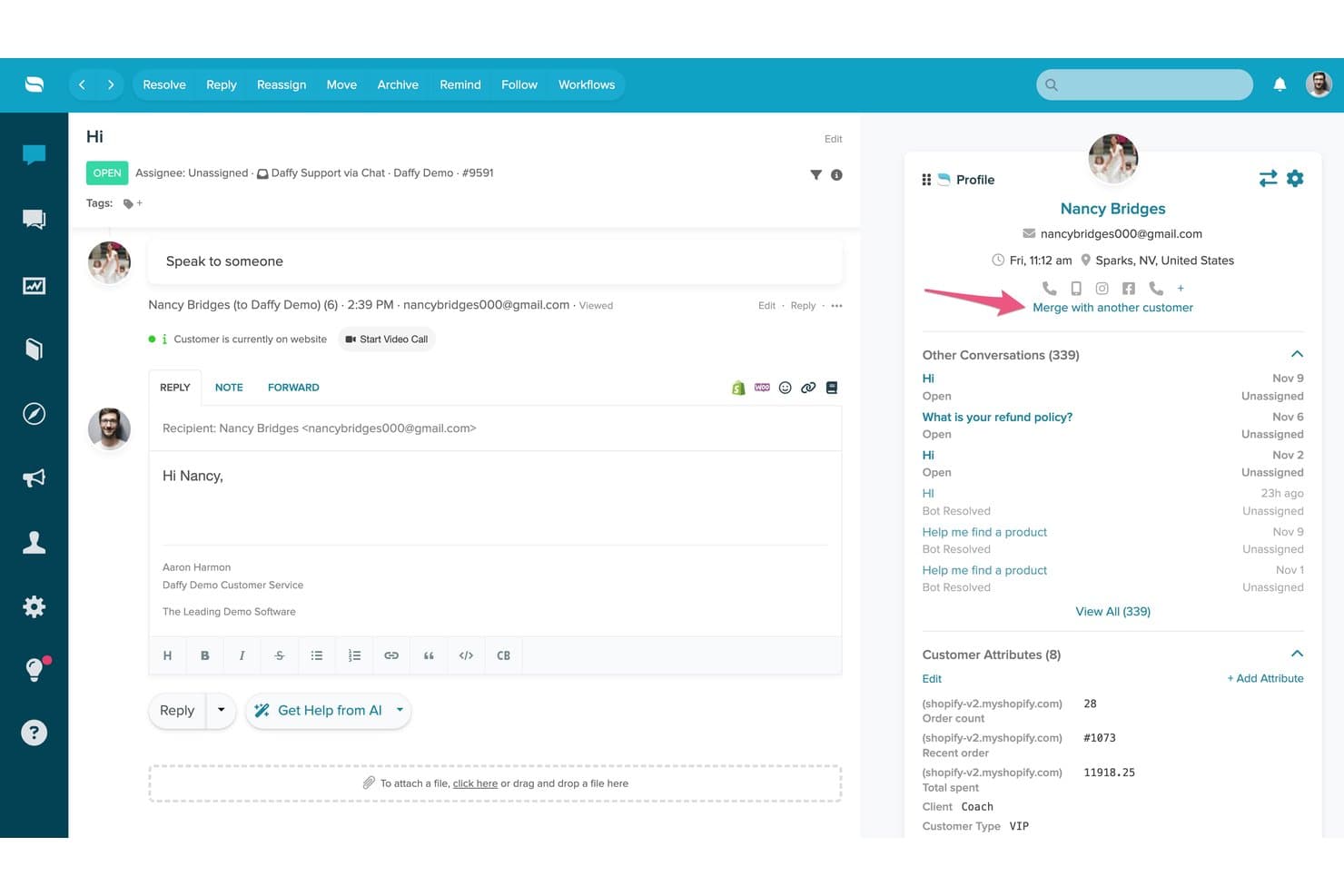
Re:amaze offers a unified customer conversation view with profile details, conversation history, and a reply editor featuring AI assistance tools. Re:amaze is a helpdesk and customer messaging platform that combines a multi-channel shared inbox, AI-powered chatbots, a self-service FAQ/Help Center, and live chat into a single support interface.
Who Is Re:amaze Best For?
Re:amaze is a strong fit for small to mid-sized ecommerce businesses that need to manage customer support across multiple channels from one place.
Why I Picked Re:amaze
Re:amaze earns its spot as one of the best on my shortlist because its AI Agent is trained directly on your FAQ content, which means it can resolve customer questions autonomously across chat, SMS, email, and social channels without agent involvement. I particularly like how the embedded chat widget surfaces relevant FAQ articles before a customer even submits a message. The AI Intents feature (Pro and above) adds another layer by recognizing customer intent and routing or responding accordingly.
Re:amaze Key Features
- Customizable FAQ and help center: Create, organize, and publish searchable articles to support customer self-service.
- Multi-brand management: Manage support operations for multiple brands or stores from a single account.
- Proactive automated cues: Trigger targeted, automated messages based on user behavior or conditions.
- Real-time live dashboard: Monitor customer activity, conversations, and staff engagement across all channels as it happens.
Re:amaze Integrations
Re:amaze offers native integrations with Shopify, BigCommerce, WooCommerce, Stripe, Instagram, Facebook, Twitter, SMS, and Slack, and provides an API for custom integrations.
Pros and Cons
Pros:
- Help center and live chat included natively
- Multi-channel inbox covers email, social, and SMS
- AI agent resolves tickets without human involvement
Cons:
- Knowledge base has limited multilingual support
- Reporting lacks depth vs. dedicated platforms
Learn more about Re:amaze: Best for AI-managed customer journeys
- Free demo available
- Pricing upon request
Visit WebsiteCustomer Rating:4.5/5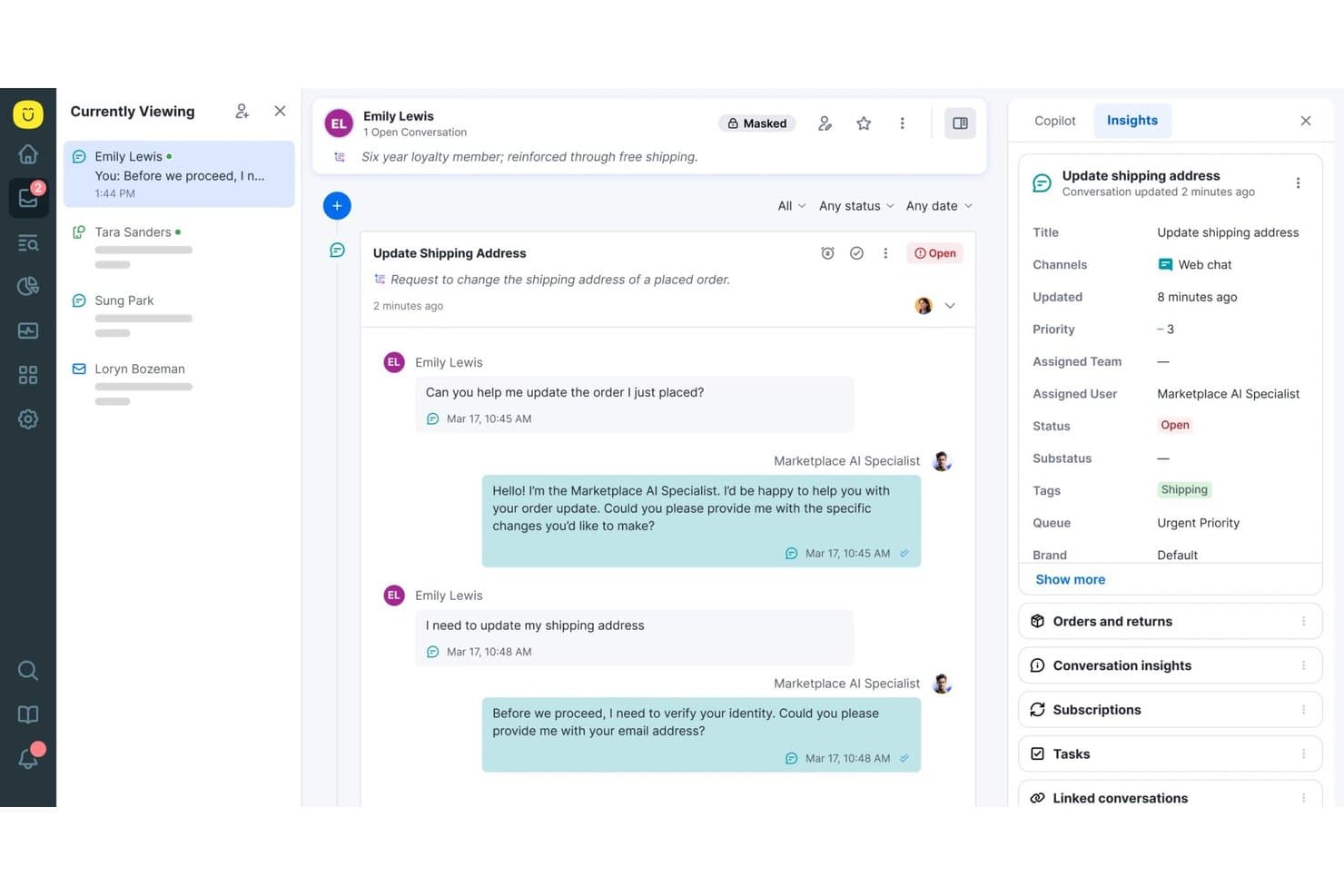
Kustomer offers a unified conversation view with AI-assisted support, real-time customer insights, and conversation tagging for streamlined self-service workflows. Kustomer is an AI-native customer service CRM platform that combines a self-service knowledge base, a branded customer portal, omnichannel AI agents, and automated workflows for managing customer interactions at scale.
Who Is Kustomer Best For?
Kustomer is a strong fit for mid-market to enterprise B2C brands with high support volumes that need AI-driven self-service across multiple digital channels.
Why I Picked Kustomer
Kustomer earns its spot as one of the best on my shortlist because of how its Concierge AI agent handles self-service end-to-end. I love that it doesn't just answer questions but executes actions, like processing a return or updating an order, without handing off to a human agent. The AI Reasoning Engine makes every decision traceable, so I can see exactly why a customer received a specific resolution, which is rare at this level of automation.
Kustomer Key Features
- Omnichannel customer timeline: Stores every customer interaction from all channels in a single, unified timeline.
- Custom objects and workflows: Lets you build complex routing, automation, and business rules tailored to your support process.
- Public and private knowledge base: Offers both a customer-facing help center and an internal reference library with access controls.
- AI-powered analytics and team pulse: Delivers real-time dashboards, usage metrics, and sentiment analysis for team and content performance.
Kustomer Integrations
Kustomer offers native integrations with Salesforce, Shopify, Slack, Facebook, Instagram, WhatsApp, and more, and provides an API for custom integrations.
Pros and Cons
Pros:
- Highly configurable workflows for complex operations
- Omnichannel conversation history in one timeline
- AI agent autonomously completes customer actions
Cons:
- Enterprise implementation requires significant technical resources
- Reporting dashboards need more granular filters
Learn more about Kustomer: Best for AI-backed, developer-focused teams
- Free plan + free demo available
- Pricing upon request
Visit WebsiteCustomer Rating:4.5/5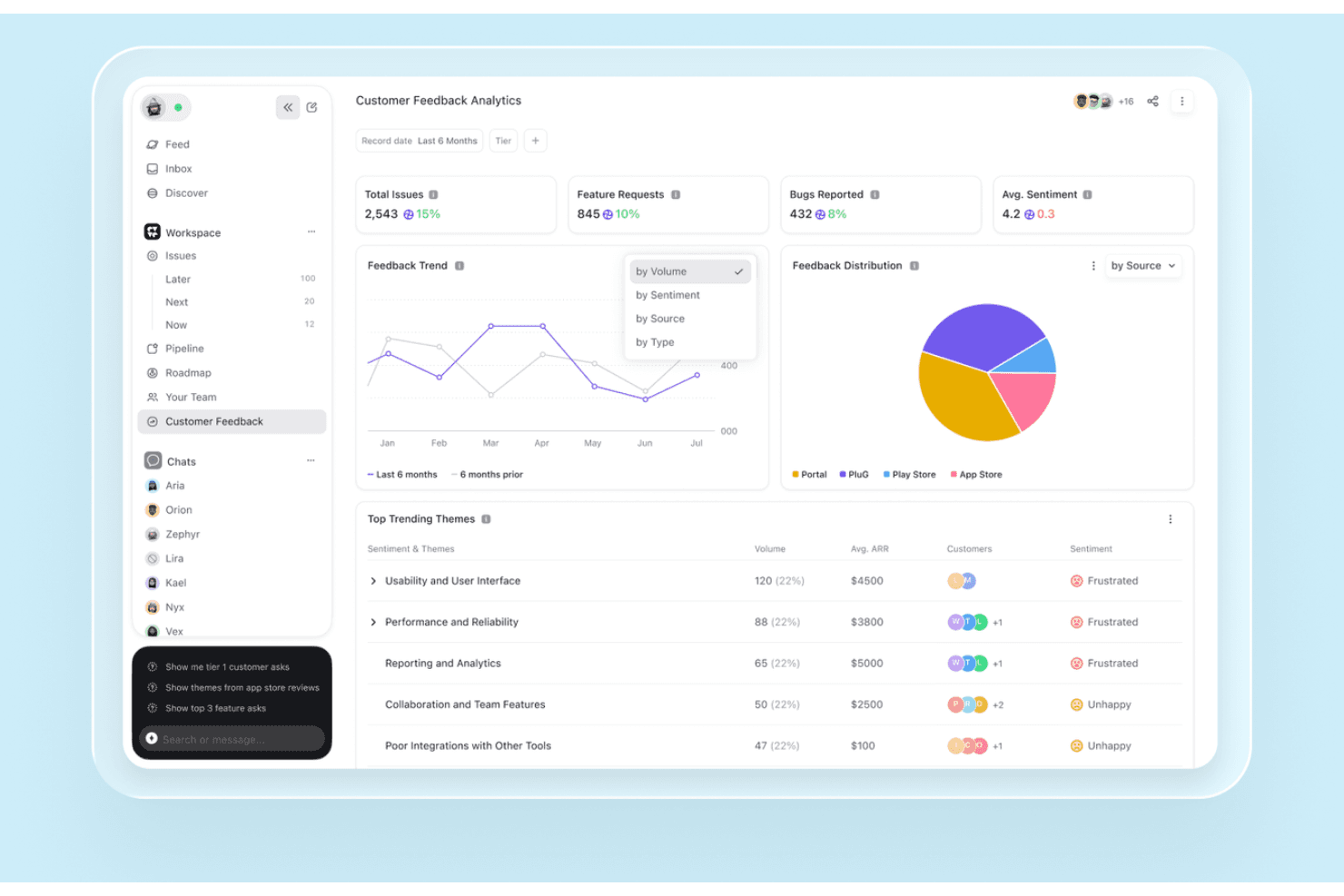
DevRev’s Customer Feedback Analytics dashboard tracks feedback trends, feature requests, reported bugs, sentiment, and recurring customer themes. DevRev is an AI-powered customer support and self-service platform that combines a knowledge base, conversational AI agents, a customer portal, and federated live-data search across connected enterprise systems into a single unified workspace.
Who Is DevRev Best For?
DevRev is a strong fit for SaaS and tech companies where support, product, and engineering teams need to work from a shared view of customer issues.
Why I Picked DevRev
I picked DevRev because its Agent Studio lets me build AI agents that autonomously resolve tickets and take real actions, with no coding required. What really sets it apart is how every resolved ticket connects directly to a product part or engineering work item, so my team can see exactly which customer issues drive the most product decisions. The live AirSync layer means search results pull from current data across CRM records, tickets, docs, and meeting notes, not stale snapshots.
DevRev Key Features
- PLuG widget: Embeds automated support and AI-powered responses directly into your website or app.
- Customer portal: Lets customers log in to submit, track, and manage tickets or provide feedback in a branded environment.
- AirSync data connectors: Syncs structured and unstructured data from tools like Jira, Salesforce, and Google Drive for unified search and context.
- Observe App: Monitors customer behavior, feedback, and sentiment with built-in analytics for experience teams.
DevRev Integrations
DevRev offers native integrations with Jira, Salesforce, Slack, GitHub, Google Drive, Notion, and Twilio, and provides an API for custom integrations.
Pros and Cons
Pros:
- Federated live search across all connected tools
- Connects support tickets directly to engineering workstreams
- AI agents resolve tickets without human input
Cons:
- Knowledge base tooling less mature than competitors
- Steeper onboarding for non-technical CX teams
Learn more about DevRev: Best for AI-guided CRM and customer engagement
- 14-day free trial
- From $20/user/month
Visit WebsiteCustomer Rating:4.4/5
HubSpot Service Hub centralizes ticketing, feedback, and customer support. HubSpot Service Hub is an AI-guided customer service platform designed for businesses looking to boost their customer support through CRM integration. It serves a wide range of industries by offering tools for ticketing, customer feedback, and knowledge base management.
Why I picked HubSpot Service Hub: Its strong CRM integration makes it ideal for businesses that want a unified view of customer interactions. It also offers a knowledge base feature, allowing you to create and share valuable insights with customers. These capabilities make it a solid choice for improving customer service operations.
Standout Features and Integrations:
Features include a customer feedback tool that lets you gather insights directly from your users. The knowledge base feature helps your team create and share helpful articles. HubSpot Service Hub also offers a ticketing system to manage customer inquiries efficiently.
Integrations include Salesforce, Slack, Zapier, Mailchimp, Shopify, WordPress, and more.
Pros and Cons
Pros:
- Scalable for growing businesses
- Easy knowledge base setup
- Customizable reporting features
Cons:
- Mandatory, expensive onboarding fees
- Advanced features gated by high tiers
Learn more about HubSpot Service Hub:
Other Customer Self-Service Software
Here are some additional customer self-service software options that didn’t make it onto my shortlist, but are still worth checking out:
- 11EngagewareBest for AI-enabled support in regulated fields
- 12KnackBest for AI-powered custom portal creation
- 13BettermodeBest for community engagement
- 14Salesforce Agentforce ServiceBest for AI-driven enterprise support
- 15StonlyBest for AI-supported interactive guides
- 16TeamSupportBest for B2B, AI-assisted customer support
- 17CustifyBest for proactive customer retention
- 18GainsightBest for customer success management
- 19LiveHelpNowBest for extensive help desk tools
- 20WalkMeBest for user onboarding assistance
- 21Zoho DeskBest for integrated CRM features
- 22FreshworksBest intuitive ticketing system
- 23ZendeskBest for scalable support solutions
- 24LiveAgent Best for real-time chat support
Related Reviews
How I Evaluate Customer Self Service Software
I split my evaluation into baseline must-haves—like searchable knowledge bases and ticket deflection analytics—and the differentiators that separate good tools from great ones for your team.
Core Functionality (Table Stakes For This List)
When I'm selecting tools for my list, I rank each one on a scale from 0 (does not offer the functionality) to 5 (excels in this area) for each core functionality listed below. Then, I calculate the tool's total score into a percentage. Each tool needs to achieve a minimum total score of 65% to be considered for inclusion.
- Knowledge Base Publishing: I evaluate the article editor, category structure, and publishing workflow—things like version control and access permissions that keep help content accurate and organized.
- Self-Service Customer Portal: Each tool's portal should let customers log in to track open tickets, view account details, and manage their profile without reaching out to your team.
- AI Chatbot or Virtual Agent: I check whether the bot can pull answers from your knowledge base, handle multi-turn conversations, and hand off to a live agent with full context when it hits a wall.
- Search & Content Discovery: Good search goes beyond keyword matching. I look for relevance ranking, suggested results, and typo tolerance so customers actually find what they need on the first try.
- Multi-Channel Deployment: Your self-service tools should reach customers where they already are. I evaluate whether the platform supports web widgets, mobile, and messaging apps like WhatsApp or Messenger.
- Analytics & Deflection Reporting: Metrics like deflection rate, failed searches, and article performance tell you what's working. I look at how each tool surfaces these insights and whether you can build custom reports.
Once I have a list of tools that meet this criteria, I consider what sets each platform apart.
Differentiating Factors (What Sets Vendors Apart)
Here's how I compare and contrast different vendors:
Standout Features
A no-code bot builder matters because it puts conversation design in the hands of your CX team, not developers. I also look for personalization capabilities—tools that tailor portal views or chatbot responses based on a customer's product tier or past interactions create a noticeably better experience. Community forums are another differentiator, giving customers a space to crowdsource answers and reduce reliance on your published content.
Beyond Features
Integration depth is one of the first things I check. Your self-service portal needs to pull live data from your CRM or ticketing system so customers can view order status or billing details without waiting on an agent. I also evaluate how quickly a team can go live—migration tooling for importing existing help articles and pre-built bot templates can cut weeks off implementation. For teams serving a global customer base, multi-language support across both the knowledge base and chatbot is a major deciding factor.
How To Choose Customer Self-Service Software
It's easy to get bogged down in long feature lists and complex pricing structures. To help you stay focused as you work through your unique software selection process, here's a checklist of factors to keep in mind:
| Factor | What To Consider |
|---|---|
| FactorScalability | What To ConsiderCan the software grow with your business? Consider user limits and storage capacity. Look for flexible plans that accommodate your growth without hefty cost increases. |
| FactorIntegrations | What To ConsiderDoes it connect with your current tools? Check for compatibility with CRM systems, email platforms, and other software you use daily. Avoid tools that isolate your data. |
| FactorCustomizability | What To ConsiderCan you tailor the software to fit your workflows? Look for options to customize user interfaces and workflows to match your team's processes. |
| FactorEase of use | What To ConsiderIs the software intuitive? See if team members can navigate it without extensive training. A user-friendly interface can save time and reduce frustration. |
| FactorImplementation and onboarding | What To ConsiderHow long will it take to get up and running? Consider the resources you'll need for setup and training. Look for tools with guided onboarding and support. |
| FactorCost | What To ConsiderHow does the pricing align with your budget? Consider not just the ticket price but hidden costs such as training or premium support. |
| FactorSecurity safeguards | What To ConsiderHow does the software protect your data? Look for encryption, regular security updates, and compliance with industry standards to keep your information safe. |
| FactorSupport availability | What To ConsiderWhat help is available when you need it? Check if there's 24/7 support, dedicated account managers, or community forums to assist you when issues arise. |
What Is Customer Self-Service Software?
Customer self-service software gives customers ways to find answers, solve problems, and complete routine tasks without contacting a support agent. It can include knowledge bases, customer portals, AI agents, FAQs, community forums, IVR, and mobile self-service.
Modern platforms can also use customer and account data to provide more relevant answers, automate routine requests, and move customers to an agent when human support is needed. The goal isn’t to eliminate assisted support, but to let customers handle straightforward issues themselves while keeping agents available for more complex problems.
Key Customer Self-Service Channels
Customer self-service can happen across several channels, depending on what customers need to do and how they prefer to get help. The strongest setups usually combine multiple options rather than relying on a single channel.
AI Agents
AI agents can interpret customer questions, find relevant information, and handle routine requests without an agent stepping in. More advanced tools can use customer context and intent to guide responses or complete actions such as checking an order or updating account details.
Knowledge Bases
Knowledge bases give customers searchable access to how-to guides, troubleshooting steps, policies, and product documentation. Articles can also include videos, screenshots, and diagrams when a visual explanation is more useful than text alone.
Customer Portals
Customer portals give customers a secure, personalized place to access support and manage routine tasks. Depending on the platform, a portal might focus on submitting and tracking support requests or offer broader self-service for managing account details, orders, subscriptions, billing, documents, and other services.
The right portal type depends on what customers actually need to accomplish. A simple support portal may be enough for ticket visibility and knowledge access, while more complex customer relationships may require authenticated, account-specific workflows.
FAQs
FAQs provide quick answers to common, straightforward questions. They work best for issues that don’t require troubleshooting, customer-specific information, or several steps to resolve.
Community Forums
Community forums let customers ask questions and learn from other users. They’re particularly useful when customers have varied use cases and can benefit from solutions or advice shared by experienced users.
Interactive Voice Response (IVR)
IVR lets customers use phone menus or voice commands to find information and complete simple requests without immediately speaking with an agent. It can also collect information before routing more complex issues to the right support team.
Mobile Self-Service
Mobile apps can give customers access to account management, support content, order tracking, service requests, and other self-service workflows from their phones.
How to Measure Customer Self-Service Success
Self-service shouldn’t be judged by how many customers use it, but by whether they actually resolve their issues. Track a combination of efficiency and customer outcome metrics:
| Metric | What It Tells You |
|---|---|
| MetricSelf-service resolution rate | What It Tells YouHow often customers solve an issue without agent assistance |
| MetricDeflection rate | What It Tells YouHow many potential support contacts are avoided through self-service |
| MetricEscalation rate | What It Tells YouHow often self-service interactions still require an agent |
| MetricSearch success rate | What It Tells YouWhether customers find useful answers when searching your support content |
| MetricTime to resolution | What It Tells YouHow quickly customers resolve issues through self-service |
| MetricCustomer satisfaction (CSAT) | What It Tells YouWhether customers are satisfied with the self-service experience |
| MetricCost per resolution | What It Tells YouHow efficiently self-service resolves issues compared with agent- assisted support |
| MetricAverage handle time (AHT) | What It Tells YouWhether self-service reduces the time agents spend resolving issues that still require human support |
Don’t optimize for deflection alone. A customer abandoning an unsuccessful search may look like a deflected ticket, but the problem hasn’t been solved. Pair deflection with resolution, escalation, and satisfaction to get a clearer picture of whether self-service is actually working.
How to Implement Customer Self-Service Software
A good rollout starts with the problems customers actually want to solve themselves, not with turning on every available feature. Use this checklist to keep implementation focused:
| ✓ | Before launching customer self-service… |
|---|---|
| ✓☐ | Before launching customer self-service…Identify high-volume requests that customers can realistically resolve without agent assistance. |
| ✓☐ | Before launching customer self-service…Audit your existing content for outdated, duplicate, or missing information before moving it into the new system. |
| ✓☐ | Before launching customer self-service…Define escalation paths so customers can reach an agent when self-service can’t resolve the issue. |
| ✓☐ | Before launching customer self-service…Connect the right customer data from your CRM, help desk, account, or product systems where needed. |
| ✓☐ | Before launching customer self-service…Test the customer experience across search, AI answers, permissions, mobile access, and agent handoffs. |
| ✓☐ | Before launching customer self-service…Set baseline metrics for resolution, deflection, escalation, and CSAT before launch. |
| ✓☐ | Before launching customer self-service…Improve after launch using failed searches, unresolved questions, and escalations to identify gaps in your self-service experience. |
Start with a limited set of well-defined use cases and expand from there. A smaller self-service experience that reliably solves customer problems is more useful than a large one filled with incomplete or outdated answers.
Know When to Escalate to Human Support
Self-service needs clear limits. Set escalation rules so customers reach an agent when automation is unlikely to resolve the issue.
| Escalation Trigger | What Should Happen |
|---|---|
| Escalation TriggerLow AI confidence | What Should HappenRoute the interaction to an agent rather than presenting an uncertain answer. |
| Escalation TriggerRepeated failed attempts | What Should HappenEscalate after unsuccessful searches, chatbot responses, or repeated rephrasing of the same request. |
| Escalation TriggerNegative sentiment | What Should HappenPrioritize handoff when language indicates frustration, urgency, or dissatisfaction. |
| Escalation TriggerSensitive requests | What Should HappenRoute issues involving security, disputes, cancellations, or complex billing to an appropriate agent or team. |
| Escalation TriggerAccount-specific complexity | What Should HappenEscalate when resolution requires permissions, judgment, or actions the self-service system can’t perform. |
During the handoff, preserve the conversation history, search terms, content viewed, actions attempted, and reason for escalation so the customer doesn’t have to start again.
Then monitor escalation rates and repeat contacts by issue type. If the same requests repeatedly reach agents, that’s a signal to improve the underlying content, AI response, or automated workflow.
Features
When selecting customer self-service software, keep an eye out for the following key features:
- Knowledge base management: Create, organize, search, and update help articles, FAQs, guides, videos, diagrams, and other support content.
- AI-assisted content creation: Use generative AI to draft, summarize, translate, or update knowledge content and identify potential content gaps.
- AI agents and chatbots: Answer questions, identify customer intent, retrieve relevant information, and automate routine support requests.
- Customer portals: Give customers a secure place to manage accounts, track requests, access documents, and find personalized support information.
- Service catalogs: Let customers browse available services and submit standardized requests through predefined forms and workflows.
- Omnichannel self-service: Make self-service available across web, mobile, messaging, chat, and other customer touchpoints.
- Search and content discovery: Help customers quickly surface relevant answers through search, filters, recommendations, and contextual results.
- Escalation and agent handoff: Transfer unresolved issues to a support agent while preserving the context of what the customer has already tried.
- Analytics and reporting: Track searches, resolutions, deflection, escalations, content performance, and other indicators of self-service effectiveness.
- Integrations: Connect self-service with CRM, help desk, account, product, and other systems needed to provide accurate customer-specific information.
Benefits
Implementing customer self-service software provides several benefits for your team and your business. Here are a few you can look forward to:
- Reduced support workload: By enabling customers to find answers through knowledge bases and chatbots, your team spends less time on repetitive troubleshooting.
- Improved customer satisfaction: Quick access to self-service solutions via community forums and self-service portals can elevate the user experience and build customer loyalty.
- Cost savings: Automation and efficient ticketing systems lower operational costs by minimizing the need for extensive customer support staff.
- Increased efficiency: Real-time notifications and integration capabilities help provide smooth operations and quick in-app responses to customer needs.
- Better decision-making: Analytics and reporting provide insights into customer behavior and support interactions, helping you refine your strategies.
- Improved accessibility: Multi-lingual support gives access to all customer regions, expanding your reach and improving service inclusivity.
Costs & Pricing
Selecting customer self-service software requires an understanding of the various pricing models and plans available. Costs vary based on features, team size, add-ons, and more. The table below summarizes common plans, their average prices, and typical features included in customer self-service software solutions:
Plan Comparison Table
| Plan Type | Average Price | Common Features |
|---|---|---|
| Plan TypeFree Plan | Average Price$0 | Common FeaturesBasic knowledge base, limited support, and community forums. |
| Plan TypePersonal Plan | Average Price$12-$49/user/month | Common FeaturesChat support, ticketing system, and basic analytics. |
| Plan TypeBusiness Plan | Average Price$30-$75/user/month | Common FeaturesAdvanced customization, integration capabilities, and multi-lingual support. |
| Plan TypeEnterprise Plan | Average Price$80-$3600/month | Common FeaturesFull-featured platform, dedicated account manager, and custom analytics. |
Customer Self-Service Software FAQs
Here are some answers to common questions about customer self-service software:
How do I know if my business needs customer self-service software?
If your team is overwhelmed with support requests, customer self-service software can help. It allows customers to find answers on their own, reducing the burden on your staff. Consider it if you want to improve response times and customer satisfaction. Even small businesses can benefit if they frequently handle repetitive inquiries.
Can customer self-service software integrate with my existing systems?
Yes, most customer help desk software offers integration capabilities. Check if the software supports your CRM, email, or other business tools. Integrations support smooth data flow and operational efficiency. It’s important for maintaining consistency and maximizing the software’s value across your organization.
How secure is customer self-service software?
Security varies by provider, but strong safeguards are the norm. Look for features such as data encryption, regular updates, and compliance with standards such as GDPR. Before choosing a tool, assess its security measures to help protect your customer data. This is especially important for industries handling sensitive information.
What should I consider when switching to customer self-service software?
Consider the transition process, including data migration and team training. Choose a provider that offers support during onboarding to minimize disruptions. Evaluate how the software aligns with your current workflows. Planning the switch carefully can help your team adapt smoothly and maximize the benefits of the new tool.
What’s the Difference Between Customer and Employee Self-Service Portals?
Customer self-service portals are built for external customers to find answers, manage accounts, track requests, and complete routine support tasks. Employee self-service portals are internal-facing and typically give employees access to HR, payroll, IT support, company policies, and workplace service requests.
How Do You Calculate the ROI of Customer Self-Service Software?
Compare the cost of implementing and running the software with changes in support costs and customer outcomes. Look at metrics such as ticket deflection, self-service resolution rates, cost per resolution, agent workload, and customer satisfaction. The goal isn’t simply to reduce ticket volume. Savings only represent real ROI if customers are successfully resolving their issues rather than abandoning self-service and seeking help elsewhere.