

18 Best Healthcare Call Center Software in 2026

Best Healthcare Call Center Software Shortlist


Healthcare call center software helps your team manage patient calls, appointment scheduling, and follow-ups across multiple channels while staying compliant with healthcare regulations. If you’re looking for ways to improve patient communication, boost staff efficiency, reduce manual errors, or scale operations across locations, finding the right call center platform matters. Choosing a solution designed for healthcare means you can support secure, timely, and compassionate interactions every day.
In this guide, you’ll find trusted options for healthcare contact centers—so you can confidently compare features, integrations, and unique strengths to choose what’s right for your organization.
Why Trust Our Software Recommendations
Our team has been testing and reviewing software since 2012. As CX leaders ourselves, we know how difficult—and important—it is to choose the right software.
For this guide, we evaluated tools using hands-on testing and independent research, scoring tools using our selection criteria.
Our reviews reflect our human editorial judgment, not a sales pitch.
Best Healthcare Call Center Software Summary
This comparison chart summarizes pricing details for my top healthcare call center software selections to help you find the best one for your budget and business needs.
| Tool | Best For | Trial Info | Price | ||
|---|---|---|---|---|---|
| 1 | Best for custom call flows | 14-day free trial | From $25/user/month (billed annually) | Website | |
| 2 | Best for voice intelligence | 14-day free trial + free demo available | Pricing upon request | Website | |
| 3 | Best for AI-driven analytics | Not available | From $110/agent/month | Website | |
| 4 | Best for cloud contact centers | Free demo available | From $119/seat/month | Website | |
| 5 | Best for omni-channel support | Free demo available | From $75/user/month (billed annually) | Website | |
| 6 | Best for easy integration | Free demo available | From $85/user/month | Website | |
| 7 | Best for large-scale operations | Free demo available | Pricing upon request | Website | |
| 8 | Best for nurse triage services | Free demo available | Pricing upon request | Website | |
| 9 | Best for call reporting | Free demo available | Pricing upon request | Website | |
| 10 | Best for patient engagement | Free demo available | Pricing upon request | Website |
Best Healthcare Call Center Software Reviews
Below are my detailed summaries of the best healthcare call center software that made it onto my shortlist. My reviews offer a detailed look at the features, integrations, and best use cases of each platform to help you find the best one for you.

Best for custom call flows
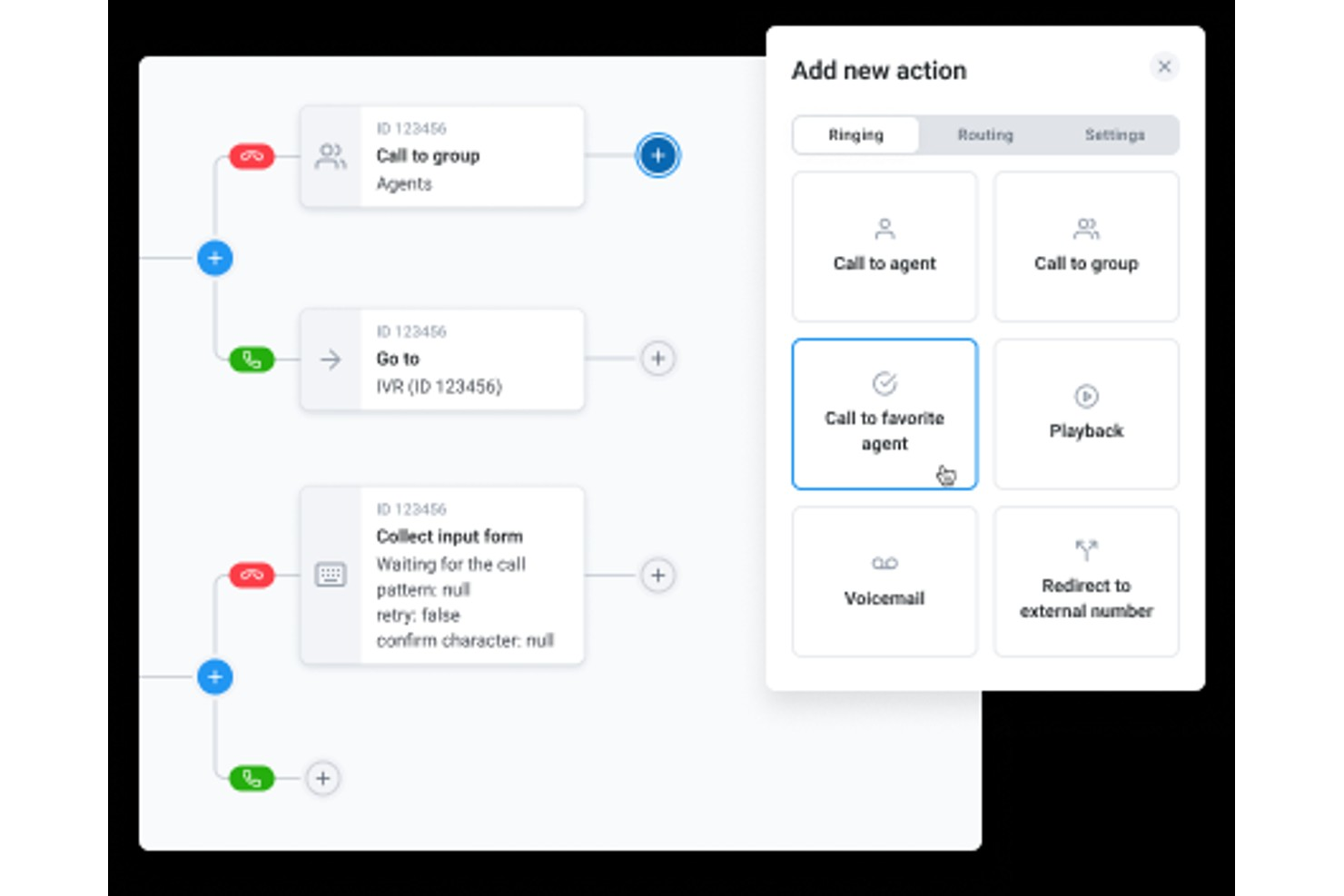
CloudTalk is a cloud-based call center platform for healthcare providers, featuring HIPAA-compliant calling, IVR call routing, AI conversation intelligence, real-time monitoring, and EHR integrations.
Who Is CloudTalk Best For?
CloudTalk is a good fit for healthcare organizations that need a cloud-based call center with compliance built in, ranging from small clinics to multi-location hospital networks.
Why I Picked CloudTalk
I picked CloudTalk as one of the best for custom call flows because of its visual call flow designer, which lets you build inbound routing logic without touching a line of code. On the Essential plan and above, you get access to custom flow options that go beyond basic menus, including condition-based routing, skill-based routing, and routing based on caller information. In a healthcare environment, that means you can route urgent calls differently from appointment requests, or send after-hours callers straight to an on-call line, all without relying on a developer to reconfigure your setup.
CloudTalk Key Features
- AI Conversation Intelligence: Transcribes calls, detects sentiment, and generates post-call summaries for every patient interaction.
- Call recording: Records and stores inbound and outbound calls, with playback available directly from the agent dashboard.
- AI Voice Agent: Handles inbound requests like appointment scheduling and FAQs without requiring a live agent.
- Real-time analytics dashboard: Shows live call queue data, agent activity, and wait times across your call center.
CloudTalk offers more than 100 native integrations, including Salesforce, HubSpot, Zendesk, Pipedrive, Intercom, Zoho CRM, Microsoft Teams, Freshdesk, Help Scout, and Shopify. It connects with Zapier, and an API supports custom integrations.
Pros and Cons
Pros:
- AI voice agents answer after-hours patient calls
- EHR connectivity via API for patient records
- Built-in HIPAA compliance with end-to-end encryption
Cons:
- No video feature for telehealth conversations
- Call quality drops during peak hours
New Product Updates from CloudTalk
CloudTalk Adds Campaign Statistics to MCP
CloudTalk adds campaign statistics to MCP with funnel, call, conversion, disposition, and duration metrics. This helps reporting assistants review campaign performance using read-only aggregate data. For more information, visit CloudTalk’s official site.
 .
.
Dialpad
Best for voice intelligence
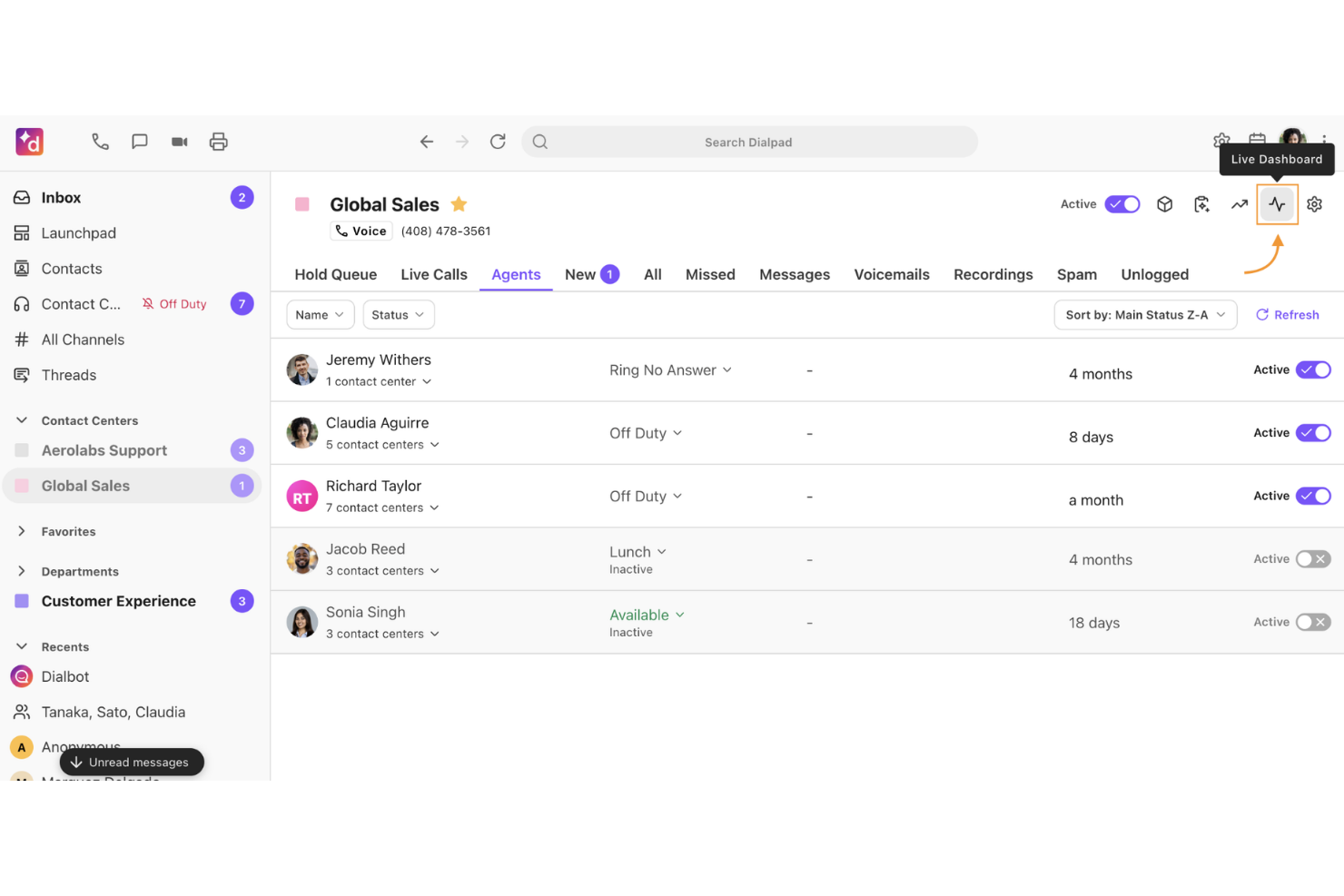
Dialpad is a cloud-based healthcare call center solution that offers AI-powered call transcriptions, real-time speech analytics, call routing, and automated quality monitoring features.
Who Is Dialpad Best For?
Dialpad suits healthcare call centers that want advanced speech AI for conversational analysis, quality assurance, and compliance monitoring.
Why I Picked Dialpad
I picked Dialpad as one of the best because I use its live voice transcription and real-time sentiment tracking to flag patient escalations right as they happen. I like being able to review AI-generated call summaries for agent coaching and compliance audits.
Dialpad Key Features
- Omnichannel messaging: Manage patient calls, SMS, and chat conversations from a unified interface.
- Call routing and IVR: Route patients to the right department or agent using customizable rules.
- Shared team inbox: Centralize inbound messages and voicemails for team-based follow-up.
- Agent performance dashboards: Monitor call metrics, agent status, and queue trends in real time.
Dialpad Integrations
Dialpad offers native integrations with Salesforce, Epic, Microsoft Teams, Google Workspace, Zendesk, HubSpot, Slack, Okta, ServiceNow, and Zoom. An API is available for custom integrations.
Pros and Cons
Pros:
- HIPAA-compliant voice analytics and storage
- Automated call summaries for patient interactions
- Real-time AI call sentiment analysis
Cons:
- Reporting customization can be complex
- Transcription accuracy varies with accents

Best for AI-driven analytics
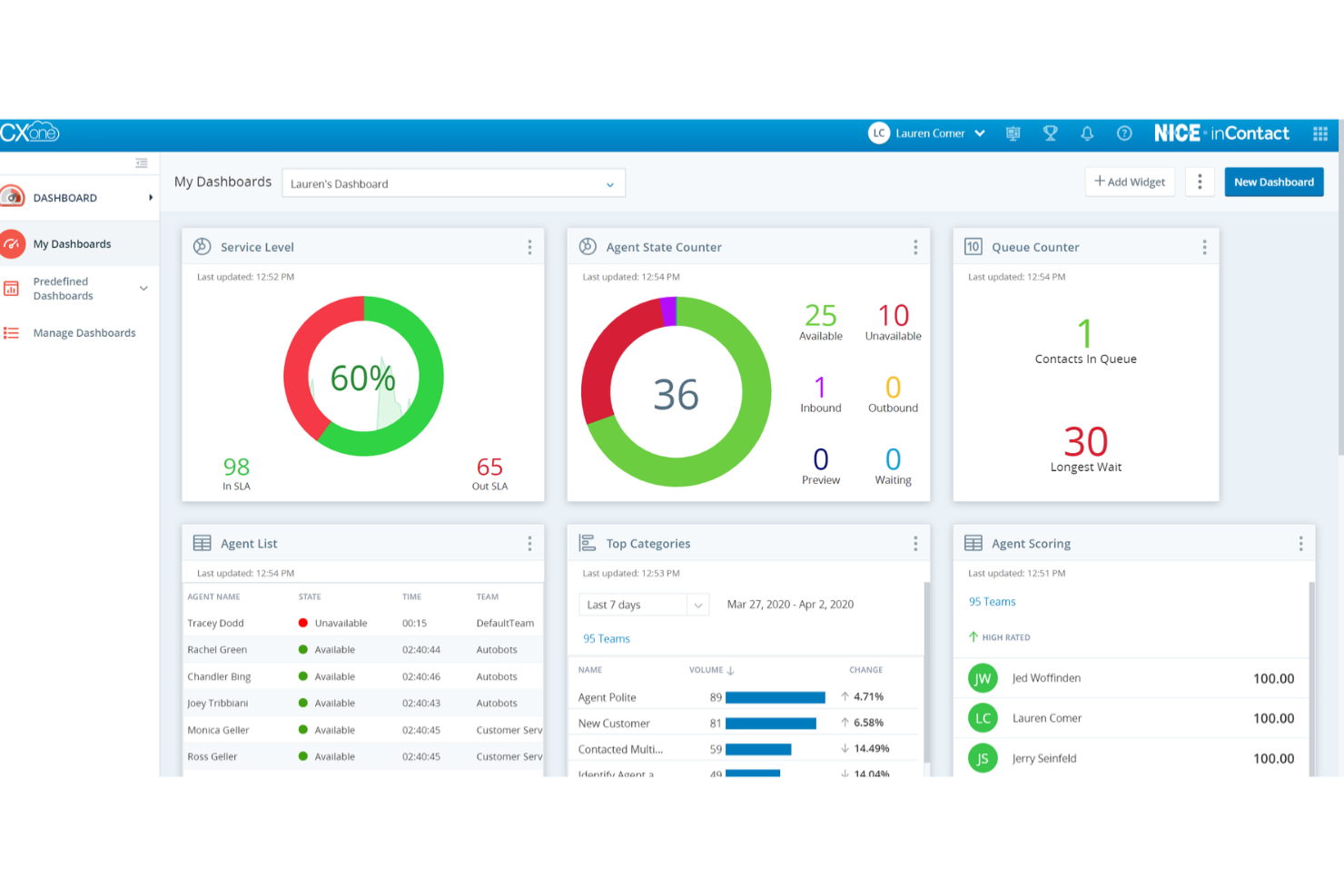
NICE CXone is a cloud-based healthcare call center platform for managing voice, chat, social messaging, workforce engagement, and patient communications in one solution.
Who Is NICE CXone Best For?
NICE CXone works well for enterprise healthcare organizations that need advanced analytics and automation across large, multi-channel contact centers.
Why I Picked NICE CXone
I picked NICE CXone as one of the best because its conversational AI agents and analytics surface patient sentiment and performance patterns automatically. I like using its real-time speech analytics and predictive behavioral routing to improve outcomes in high-volume healthcare call centers.
NICE CXone Key Features
- Omnichannel routing: Directs patient contacts across voice, chat, email, and SMS in one agent interface.
- Workforce management: Schedules, monitors, and optimizes call center staffing for healthcare teams.
- Quality management tools: Supports call recording, monitoring, and scoring for compliance and training.
- Automated patient surveys: Collects feedback post-interaction through configurable digital surveys.
NICE CXone Integrations
NICE CXone offers native integrations with AWS, Snowflake, SAP, Microsoft Dynamics, ServiceNow, and more, and provides an API for custom integrations.
Pros and Cons
Pros:
- Advanced compliance and security management
- Customizable IVR for complex healthcare routing
- Real-time patient sentiment analysis
Cons:
- Some features require initial configuration work
- The reporting interface can be difficult to navigate
Five9
Best for cloud contact centers
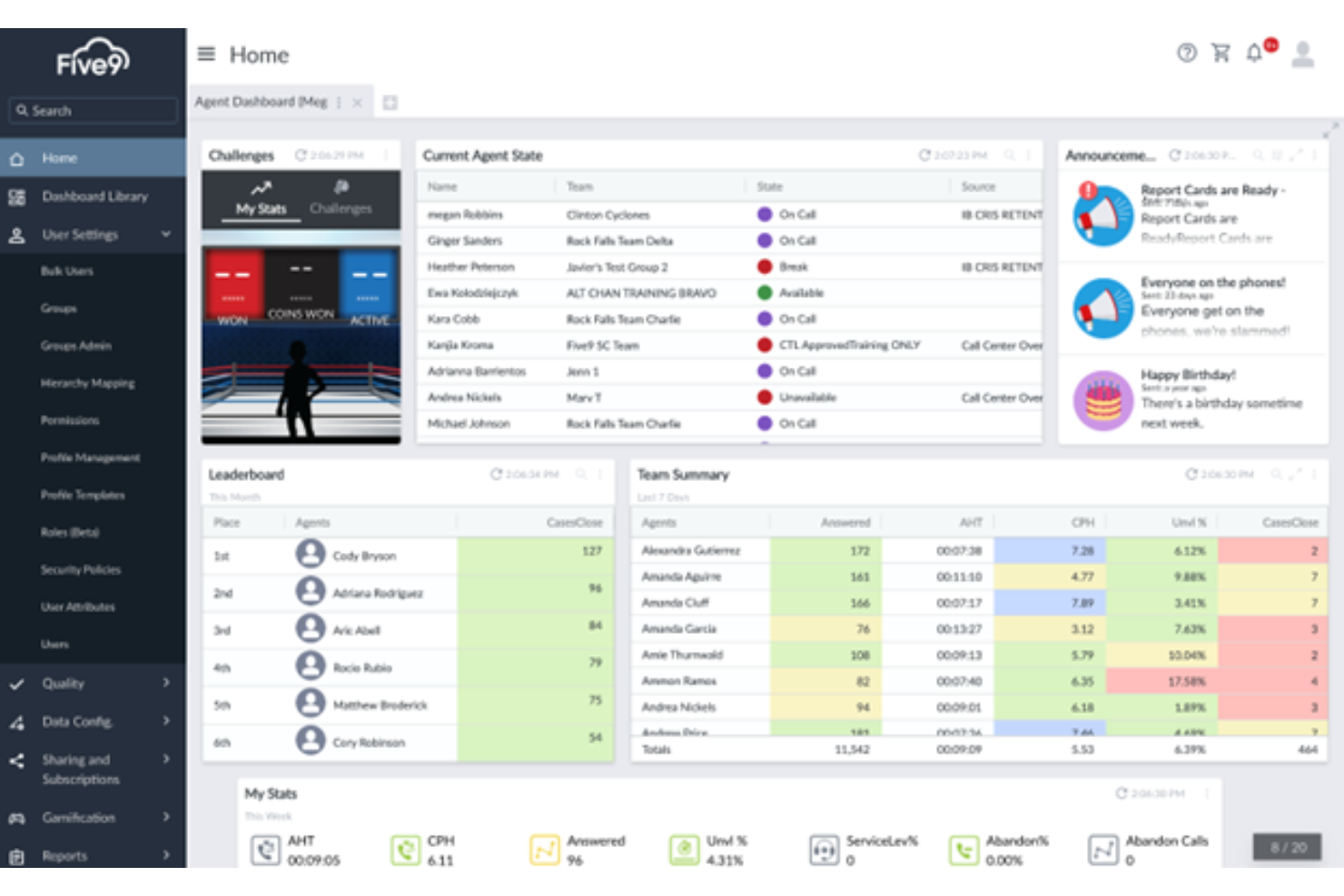
Five9 is a cloud-based contact center software designed for healthcare organizations to manage inbound and outbound calls, patient communications, omnichannel routing, and workforce optimization in one platform.
Who Is Five9 Best For?
Five9 suits mid-sized and large healthcare organizations needing a scalable, cloud-first solution for patient communication and call center operations.
Why I Picked Five9
I picked Five9 as one of the best because it delivers purpose-built healthcare call center tools with secure, cloud-based voice, SMS, and chat conversations. I like the proactive patient engagement options and intelligent agent scripting for handling complex patient inquiries.
Five9 Key Features
- Omnichannel desktop: Unifies phone, email, chat, and SMS in a single interface for agents.
- Agent assist AI: Offers real-time prompts and suggestions during patient calls.
- Quality management suite: Enables call recording, evaluation, and coaching within the platform.
- Predictive dialer: Automates high-volume patient outbound call campaigns.
Five9 Integrations
Five9 offers native integrations with Microsoft Teams, Nextiva, Zoom, and RingCentral. An API is available for custom integrations.
Pros and Cons
Pros:
- Workforce optimization for healthcare agents
- HIPAA-compliant patient data workflows
- Native AI for call routing and queues
Cons:
- Reporting tools require initial customization
- An omnichannel setup can be time-consuming
Genesys
Best for omni-channel support
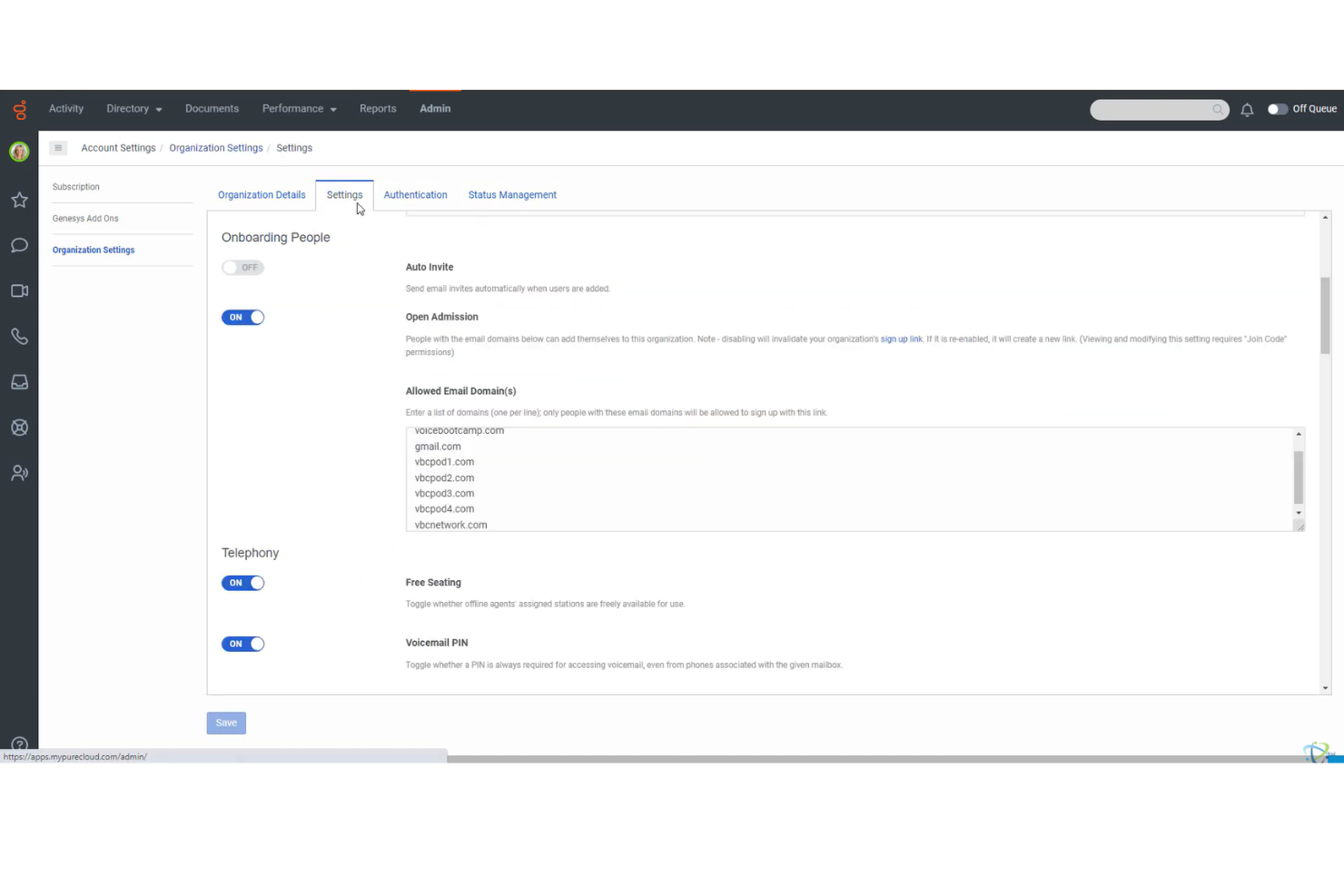
Genesys is a healthcare call center platform that brings together modern communication tools into a single solution designed to elevate the customer experience for patients
Who Is Genesys Best For?
Genesys is a strong option for healthcare networks and hospitals that need to unify patient communications across phone, chat, and digital channels.
Why I Picked Genesys
I picked Genesys as one of the best because it brings voice, SMS, email, and chat together in a single console. In my experience, this lets staff manage patient interactions from any channel without switching systems. I also like its real-time journey mapping tools.
Genesys Key Features
- Advanced IVR customization: Build and update call flows to fit clinical processes and scheduling rules.
- HIPAA-compliant communication tools: Support secure patient data handling for all voice and digital interactions.
- Automated callback management: Let patients request callbacks to reduce hold times and improve contact rates.
- Agent scripting interface: Provide agents with dynamic prompts to support appointment booking and triage scenarios.
Genesys Integrations
Genesys offers native integrations with Brightmetrics, Cartesia Sonic TTS, Centrical, Gryphon AI, Mediabriz, and more, plus it has an API for custom integrations.
Pros and Cons
Pros:
- HIPAA-compliant chat and voice channels
- Omnichannel agent workspace for clinical staff
- Customizable IVR for patient-specific routing
Cons:
- Some features require additional configuration work
- The reporting interface can be difficult to navigate

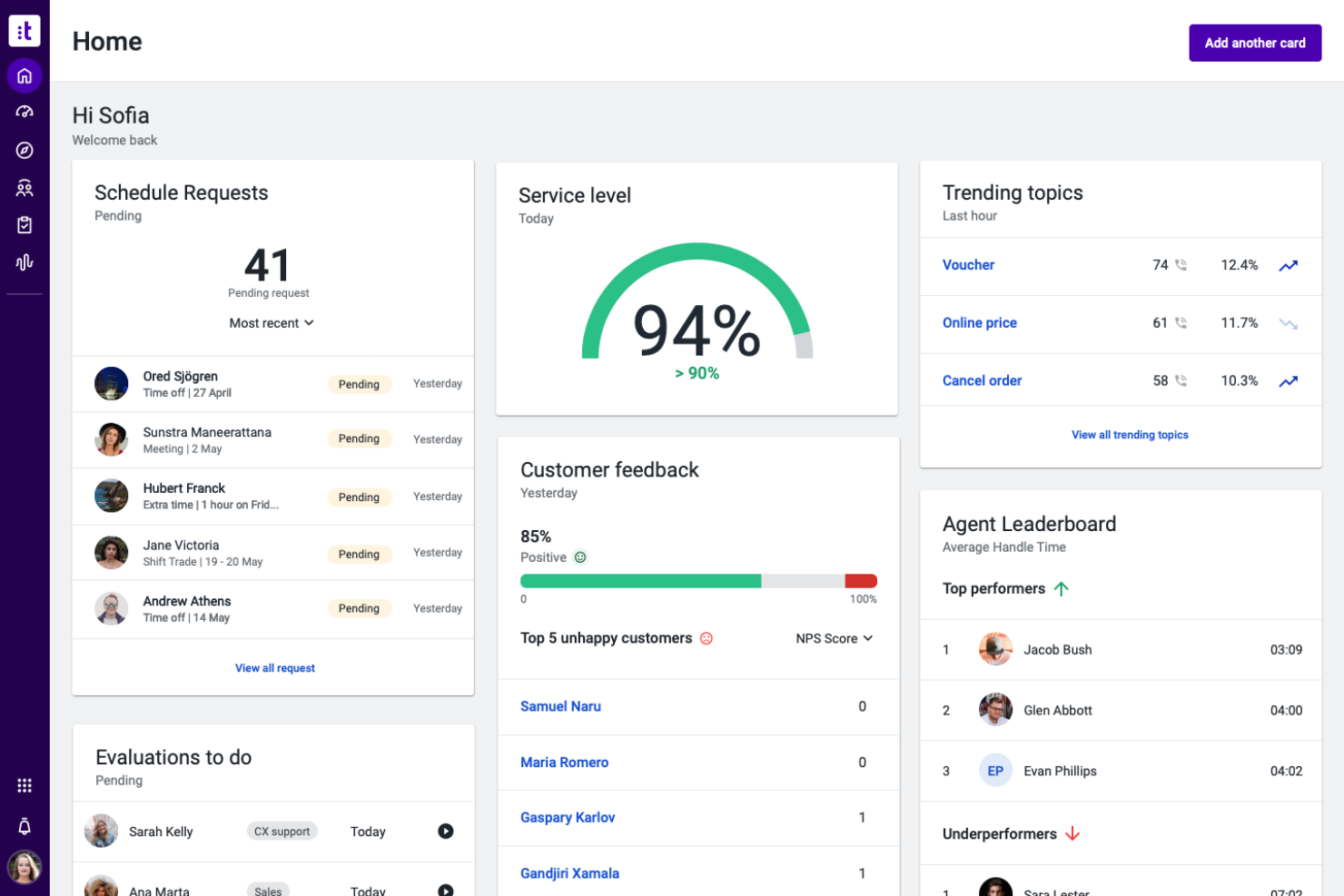
Talkdesk is a cloud-based healthcare call center software that offers patient scheduling tools, omnichannel routing, AI-powered agent assistance, and specialized modules for managing clinical and administrative interactions.
Who Is Talkdesk Best For?
Talkdesk suits healthcare providers and service organizations that need quick deployment and interoperability with existing EHR or CRM systems.
Why I Picked Talkdesk
I picked Talkdesk as one of the best because I can quickly connect its suite to EHRs, CRMs, and telehealth apps with pre-built connectors. I like the dedicated healthcare modules for patient outreach and appointment management. Easy integration keeps my team focused on patient care.
Talkdesk Key Features
- Omnichannel patient communications: Manage voice, SMS, chat, and email from one console.
- AI-powered virtual agent: Automate routine patient questions and appointment scheduling.
- Quality management suite: Monitor and evaluate agent interactions for compliance.
- Real-time analytics dashboard: View call metrics, queue status, and agent performance live.
Talkdesk Integrations
Talkdesk offers native integrations with Salesforce, Epic, Microsoft Teams, Zendesk, ServiceNow, Google Workspace, Slack, HubSpot, Zoom, and Microsoft Dynamics 365. An API is available for custom integrations.
Pros and Cons
Pros:
- Real-time AI support for agent conversations
- HIPAA-compliant workflows for healthcare agents
- Highly specialized patient journey mapping tools
Cons:
- Reporting customization requires expert configuration
- Omnichannel routing setup can be complex

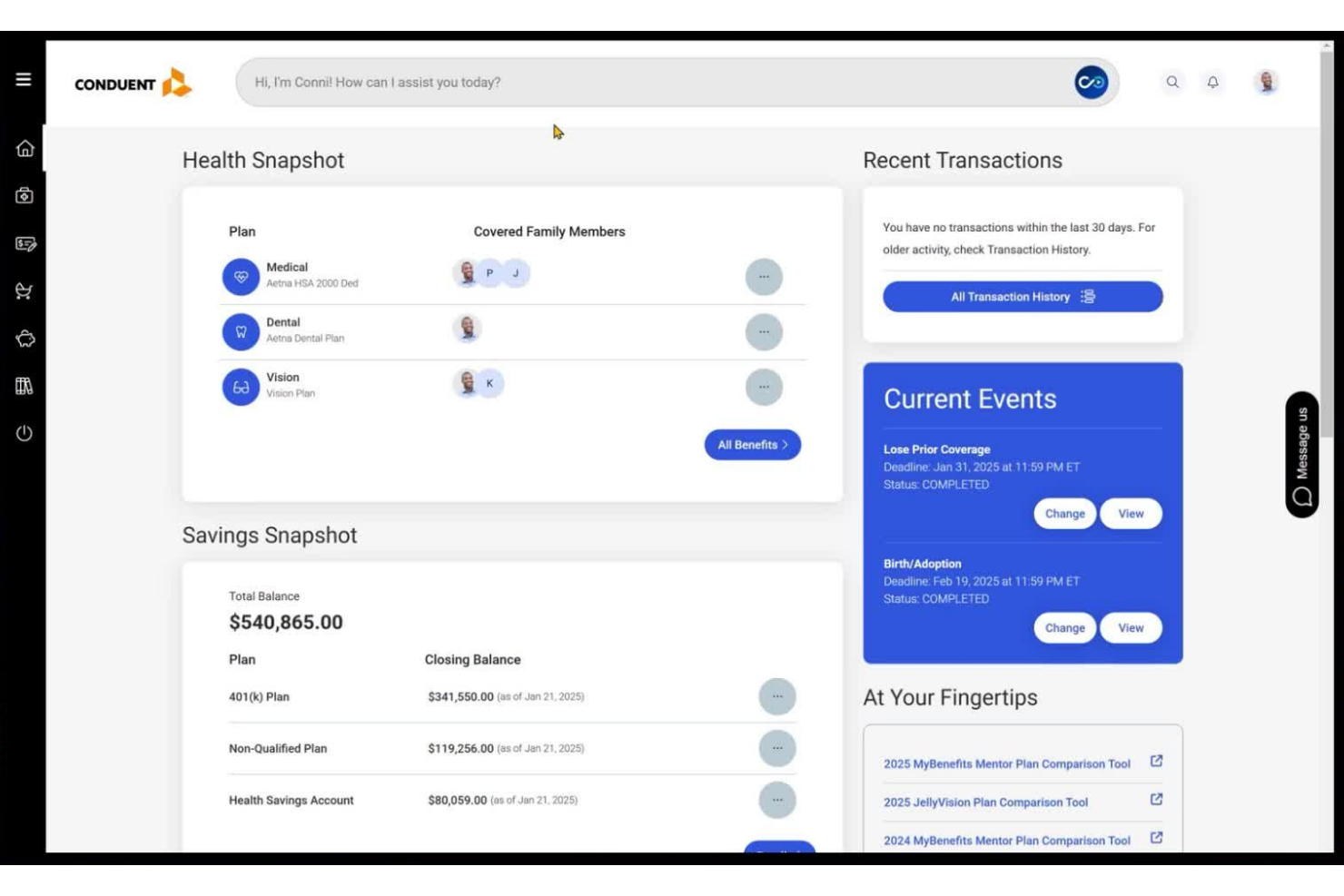
Conduent is a cloud-based healthcare call center platform offering omnichannel communication, digital patient engagement, automated workflows, and analytics for large-scale healthcare service operations.
Who Is Conduent Best For?
Conduent suits enterprise healthcare organizations that need to centralize high-volume patient communications and manage complex operational workflows across multiple locations.
Why I Picked Conduent
I picked Conduent because its workflow automation helps drop the abandonment rate when handling high call volumes across multiple sites. I like having real-time reporting and customizable agent dashboards.
Conduent Key Features
- Secure document exchange: Lets agents send and receive patient documents within the platform.
- AI-powered virtual assistant: Deploys conversational chatbots to handle routine patient inquiries using natural language processing.
- Compliance tracking tools: Monitors regulatory requirements for healthcare contact centers.
- Integrated quality monitoring: Includes tools to review and score agent interactions.
Conduent Integrations
Native integrations are not publicly listed.
Pros and Cons
Pros:
- Advanced AI virtual assistant for call routing
- Supports omnichannel communication across large teams
- HIPAA-compliant platform for protected health information
Cons:
- Implementation times are longer than the industry average
- Reporting customization is limited for end users

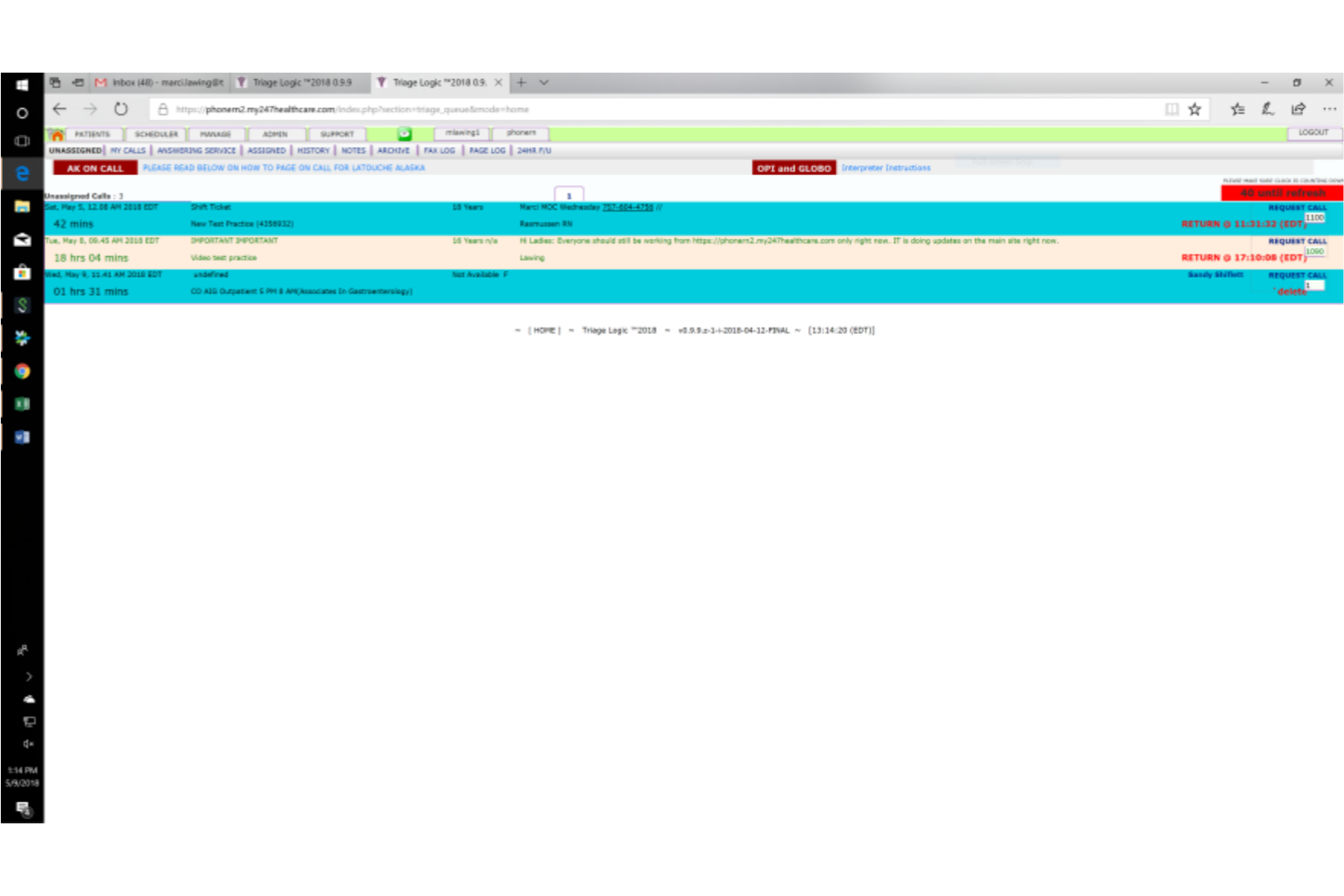
TriageLogic is a healthcare call center software that specializes in nurse triage management, providing tools for telephone nurse triage, symptom-based protocols, patient documentation, and customizable call workflows.
Who Is TriageLogic Best For?
TriageLogic is a strong choice for hospitals, medical groups, and physician practices that require specialized nurse triage management and clinical call support.
Why I Picked TriageLogic
I picked TriageLogic as one of the best because I can rely on its nurse triage protocols and after-hours call center support, purpose-built for medical teams. I use its symptom-based assessment tools and real-time clinical documentation to handle urgent patient calls efficiently.
TriageLogic Key Features
- Customizable script libraries: Lets teams tailor call-handling protocols to suit varying clinical specializations.
- Patient call tracking dashboard: Tracks call volume, response times, and open triage cases in one view.
- Secure messaging: Supports HIPAA-compliant communication between nurses, providers, and staff.
- Reporting and analytics tools: Provides data on triage outcomes and case follow-up for operational monitoring.
TriageLogic Integrations
Native integrations are not publicly listed.
Pros and Cons
Pros:
- HIPAA-compliant messaging between team members
- Specialized after-hours nurse call support
- Built-in Schmitt-Thompson nurse triage protocols
Cons:
- Reporting tools require manual configuration
- Limited patient engagement channels beyond phone

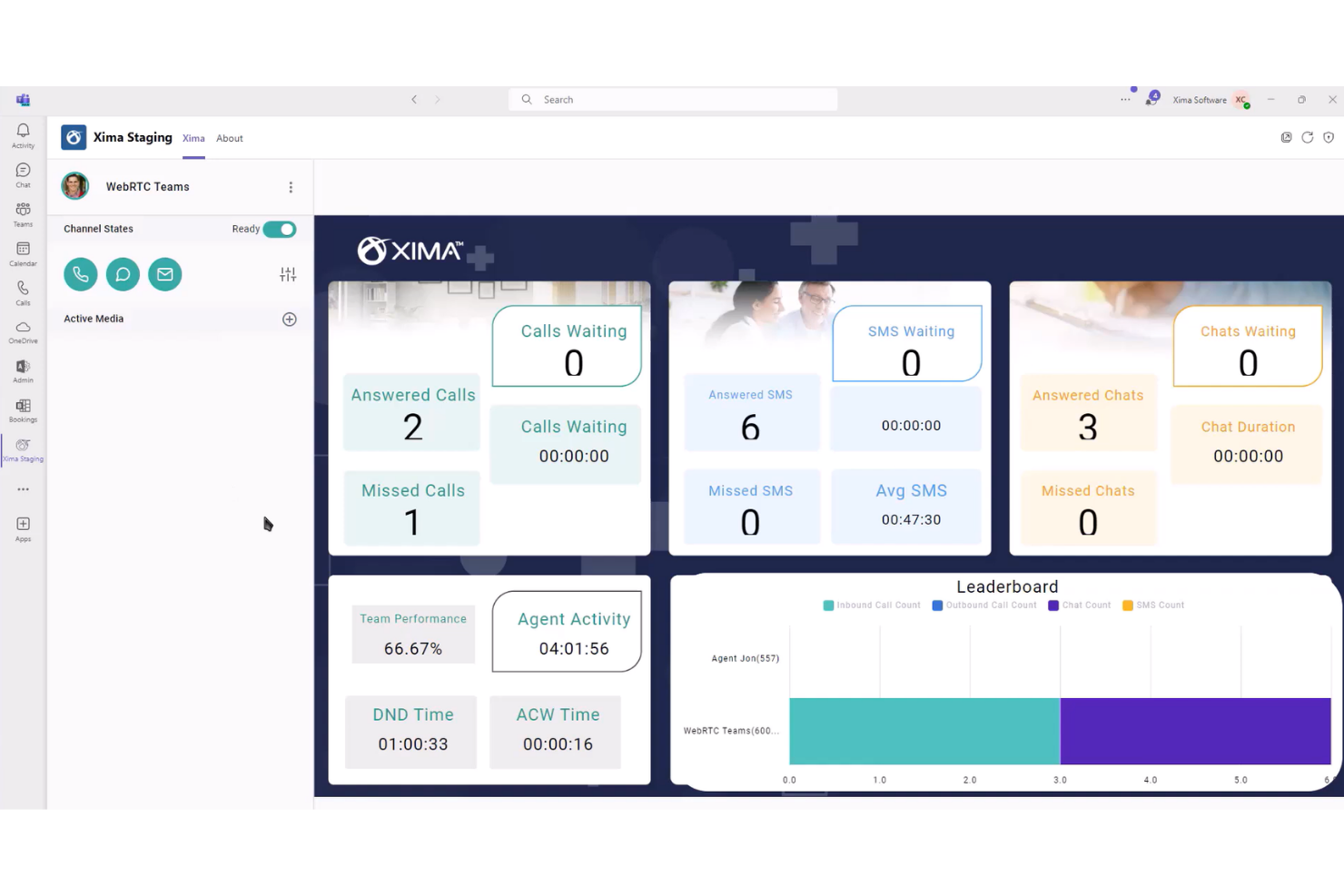
Xima is a healthcare call center software solution focused on detailed call reporting, live call dashboards, and customizable analytics for tracking patient communication data.
Who Is Xima Best For?
Xima is a good fit for healthcare call center managers who need advanced call reporting and analytics for compliance and quality assurance.
Why I Picked Xima
I picked Xima as one of the best because I rely on its customizable call reporting to analyze call volumes, durations, and outcomes in real time. I like how the historical reporting lets me track agent performance and compliance for healthcare environments.
Xima Key Features
- Live wallboards: Display real-time call center stats for teams and supervisors.
- Skill-based routing: Automatically directs calls based on agent expertise and availability.
- Custom alerting: Sends notifications for missed calls or SLA breaches.
- Historical call playback: Lets teams review and audit recorded calls.
Xima Integrations
Xima integrates with Oracle, HubSpot, Connectwise, Microsoft Teams, and 70+ EHR solutions. It also offers an API for custom integrations.
Pros and Cons
Pros:
- Historical call recording and playback available
- Detailed call outcome and agent performance tracking
- Real-time dashboards for live call center visibility
Cons:
- Setup and customization can require IT involvement
- Limited omnichannel support beyond phone calls

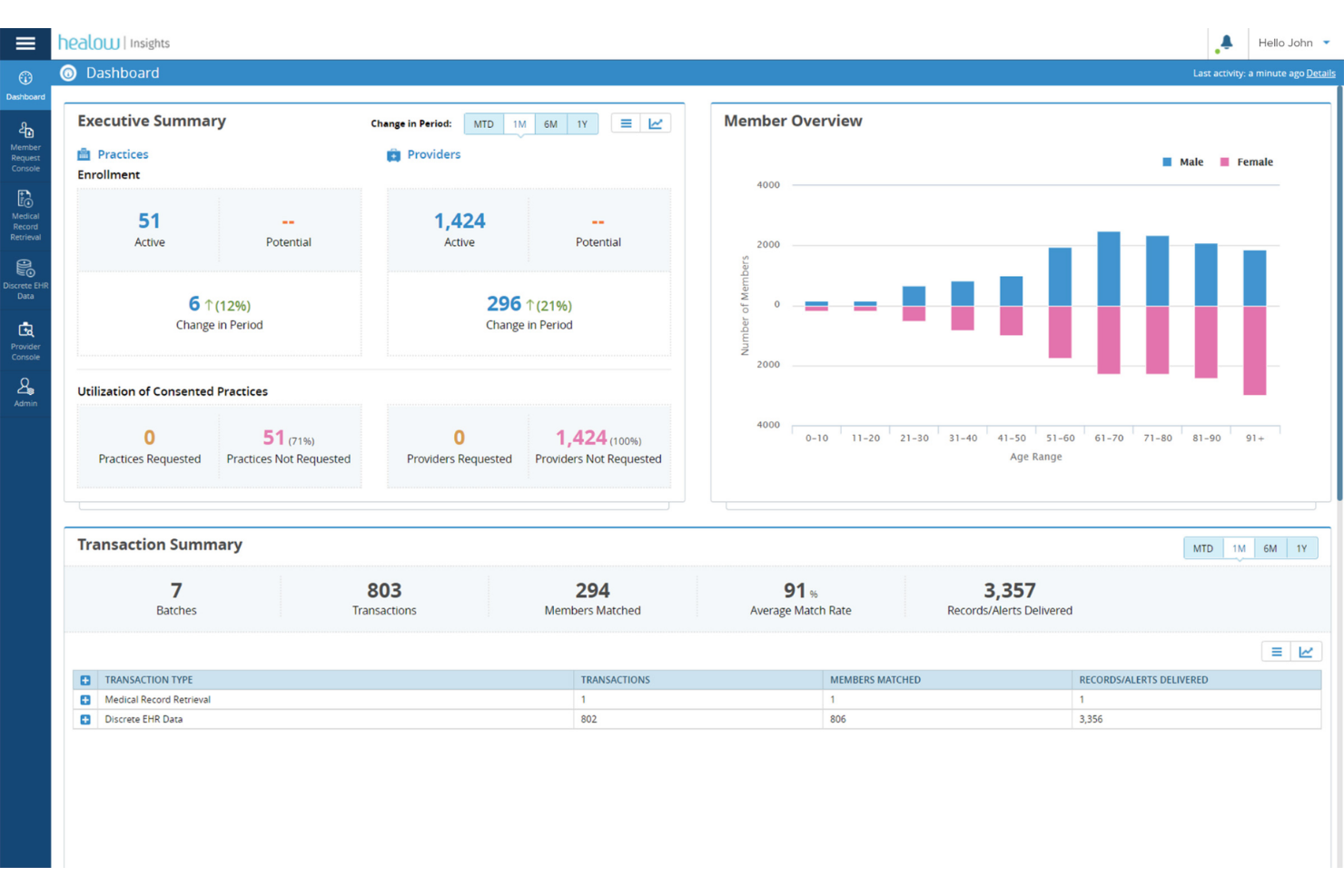
healow Genie is a cloud-based healthcare call center software for practices and clinics, combining patient communication tools, automated outreach, appointment scheduling, and secure messaging.
Who Is healow Genie Best For?
healow Genie is ideal for healthcare providers and clinics looking to centralize patient engagement through digital communication and scheduling features.
Why I Picked healow Genie
I picked healow Genie as one of the best because I use it to send patient appointment reminders, personalized outreach, and secure messages right from the platform. I like how it combines real-time chat, email, and SMS in one place for multi-channel engagement.
healow Genie Key Features
- Visual call queue dashboard: See all incoming and waiting calls in real time.
- Call recording: Record calls for quality assurance and staff training.
- Automatic patient call distribution: Route calls to agents based on custom criteria.
- Integrated EHR access: View and update patient records during calls.
healow Genie Integrations
Native integrations are not publicly listed.
Pros and Cons
Pros:
- Automated patient callbacks and reminders supported
- One-click patient record access during calls
- The appointment dashboard shows the call queue status
Cons:
- No live chat support with patients
- Reporting options are limited for supervisors
Other Healthcare Call Center Software
Here are some additional healthcare call center software options that didn’t make it onto my shortlist, but are still worth checking out:
- Nextiva
For unified communications
- JustCall
For remote team management
- QliqSOFT
For secure patient messaging
- Hyro
For conversational AI
- Sequence Health
For patient acquisition
- Authenticx
For customer interaction insights
- Plura
For AI-driven scheduling
- Foundever
For multilingual support


How I Evaluate Healthcare Call Center Software
I evaluate tools in two layers: the baseline every platform must meet—think HIPAA BAA coverage, live EHR lookup during patient calls—and the differentiators that determine the right fit.
Core Functionality (Table Stakes For This List)
When I'm selecting tools for my list, I rank each one on a scale from 0 (does not offer the functionality) to 5 (excels in this area) for each core functionality listed below. Then, I calculate the tool's total score into a percentage. Each tool needs to achieve a minimum total score of 55% to be considered for inclusion.
- HIPAA-Compliant Communications: I check for a signed BAA, end-to-end encryption across voice and digital channels, secure call recording storage, and PHI-safe data handling with audit logs.
- EHR/EMR Integration: Agents need real-time patient context on screen. I look for native connections with major EHRs like Epic, Oracle Health, and athenahealth with bidirectional data sync.
- Omnichannel Patient Engagement: Patients reach out via phone, SMS, chat, and email. I evaluate whether the platform unifies interaction history across all channels into one patient timeline.
- Intelligent Call Routing & IVR: Healthcare call centers juggle scheduling, billing, triage, and referrals. I look for skills-based routing and configurable IVR trees built for these distinct service lines.
- Appointment Scheduling Workflows: I evaluate whether agents can book, reschedule, and confirm appointments directly from the call interface, along with automated reminders to reduce no-shows.
- Healthcare Analytics & Reporting: Standard call metrics aren't enough here. I look for dashboards that track healthcare-specific KPIs like call abandonment by service line and first-call resolution.
Once I have a list of tools that meet this criteria, I consider what sets each platform apart.
Differentiating Factors (What Sets Vendors Apart)
Here's how I compare and contrast different vendors:
Standout Features
I pay close attention to AI-powered nurse triage, where the platform assesses symptom urgency and routes calls to clinical staff without manual handoffs. Multilingual patient support is another area I evaluate—real-time translation and bilingual agent routing let contact centers serve diverse populations without third-party interpreter delays. Population health outreach rounds out my comparison, especially automated campaigns for preventive care reminders and chronic condition follow-ups tied to patient risk cohorts.
Beyond Features
Healthcare ecosystem integrations matter a lot here. I check whether platforms support HL7 and FHIR standards, since that determines how cleanly patient data flows between the call center and clinical systems. Implementation experience is equally important—I look for vendors with dedicated healthcare onboarding teams who've deployed across multi-site hospital networks. Scalability across service lines also factors into my evaluation, particularly whether one platform can handle scheduling, triage, billing, and pharmacy calls without spinning up separate instances.
How to Choose Healthcare Call Center Software
It’s easy to get bogged down in long feature lists and complex pricing structures. To help you stay focused as you work through your unique software selection process, here’s a checklist of factors to keep in mind:
| Factor | What to Consider |
|---|---|
| Scalability | Can the platform handle anticipated patient call volumes as your practice grows? Check if adding users, departments, or locations requires extra fees. |
| Integrations | Does it connect natively with your EHR, scheduling tools, and other key systems? Assess whether data flows easily between your core healthcare platforms. |
| Ease of use | How intuitive is the daily workflow for agents and supervisors? Test with non-technical users and ask about training time for new team members. |
| Implementation and onboarding | What is the typical setup time from contract to go-live? Look for resources like onboarding checklists, dedicated specialists, or migration support. |
| Cost | Are there hidden fees for add-ons, usage, or support? Calculate total monthly and annual spend based on the features required for your call center. |
| Security safeguards | Does the tool comply with HIPAA or other relevant data privacy requirements? Verify certifications and ask about audit logs and data encryption. |
| Support availability | Do you need 24/7 support, or will standard business hours suffice? Clarify response time SLAs and escalation processes for urgent issues. |
| Customizability | Can you tailor call flows, dashboards, and reporting to match your team’s processes? Evaluate what configuration is available without custom development. |
What is a Healthcare Call Center Software?
Healthcare call center software is a digital platforms that help medical organizations manage, track, and handle patient phone interactions. These systems support staff with self-service patient portals, intelligent call routing, patient lookup, and secure communication. They play a key role in coordinating appointments, relaying information, and ensuring efficient, compliant service across healthcare teams.
Features of Healthcare Call Center Software
When selecting healthcare call center software, keep an eye out for the following key features:
- Call routing: Automatically directs incoming calls to the appropriate department or agent based on preset criteria, ensuring patients reach the right contact quickly.
- Patient information lookup: Allows agents to access patient records, appointment histories, and other key information in real time during calls for informed conversations.
- Appointment scheduling: Lets staff schedule, reschedule, and confirm appointments during calls, often with calendar syncing and automated reminders.
- Call recording: Records phone interactions for quality assurance, compliance, and later review, helping managers train staff and resolve disputes.
- Queue management: Shows live call queues and wait times, helping supervisors allocate staff and manage high-volume periods more efficiently.
- Analytics and reporting: Offers dashboards and reports to track call volume, agent performance, resolution times, and trends, supporting data-driven improvements.
- Automated reminders and notifications: Send automated voice, SMS, or email reminders to reduce no-shows and keep patients informed about appointments or follow-up actions.
- Secure messaging: Provides HIPAA-compliant communication channels for sharing sensitive information with patients or between staff within the platform.
- IVR (Interactive voice response): Lets callers interact with menus using voice or keypad prompts, streamlining processes like appointment confirmations or transferring to the right team.
- Multi-channel support: Allows staff to handle patient interactions across phone, email, SMS, and sometimes web chat, centralizing communication and tracking.
Benefits of Healthcare Call Center Software
Implementing healthcare call center software provides several benefits for your team and your business. Here are a few you can look forward to:
- Faster patient response: Automated routing and real-time caller information let your team quickly connect patients to the right staff member.
- Improved appointment management: Built-in scheduling tools reduce no-shows and help keep appointment calendars accurate and up to date.
- Higher patient satisfaction: Features like secure messaging and automated reminders create a more convenient and informed patient experience.
- Greater compliance and security: HIPAA-compliant messaging and recording features help ensure patient information stays protected and auditable.
- Smarter resource allocation: Queue management and analytics dashboards reveal high-volume periods and help supervisors balance agent workloads efficiently.
- Actionable insights: Reporting tools highlight missed calls, wait times, and recurring issues, helping you refine workflows and identify areas for improvement.
Costs & Pricing of Healthcare Call Center Software
Selecting healthcare call center software requires an understanding of the various pricing models and plans available. Costs vary based on features, team size, add-ons, and more. The table below summarizes common plans, their average prices, and typical features included in healthcare call center software solutions:
Plan Comparison Table for Healthcare Call Center Software
| Plan Type | Average Price | Common Features |
|---|---|---|
| Free Plan | $0 | Basic call routing, limited call logs, email support, and minimal analytics. |
| Personal Plan | $15-$30/user/month | Inbound and outbound calling, appointment scheduling, basic reporting, and user training resources. |
| Business Plan | $30-$60/user/month | Advanced call routing, analytics dashboards, integration options, secure messaging, and priority customer support. |
| Enterprise Plan | $60-$120/user/month | Customizable workflows, bulk user management, enhanced security, dedicated onboarding, and SLA-backed support. |
Healthcare Call Center Software FAQs
Here are some answers to common questions about healthcare call center software:
What integrations should I look for in healthcare call center software?
Look for integrations with your EHR, practice management, and scheduling systems. Connecting these tools lets you pull up patient information, automate appointment reminders, and keep communication records up to date without manual effort.
Can healthcare call center software support HIPAA compliance?
Yes, most solutions offer features to help you comply with HIPAA and other privacy regulations, such as data encryption, access controls, audit trails, and secure messaging. Always confirm compliance requirements with your vendor.
How quickly can a healthcare call center software be implemented?
Implementation times vary but often range from a few days for cloud-based options to several weeks for customized solutions. Factors like data migration, training, and integration with your current systems can affect onboarding times.
Is training required to use healthcare call center software?
Most platforms are designed to be user-friendly, but some staff training is usually needed, especially for more advanced features. Many vendors offer onboarding support, help centers, and training videos to help teams get up to speed.
What reporting tools are typically included?
Expect dashboards showing call volume, wait times, agent activity, and missed call rates. These tools help you spot trends, optimize staffing, and monitor service quality. Some systems also generate compliance or audit-ready reports.