

10 beste cloudbasierte Kundenkontaktcenter-Softwarelösungen 2026

10 Auswahl der besten cloudbasierten Kontaktcenter-Software


In der heutigen schnelllebigen Geschäftswelt kann die Verwaltung von Kundeninteraktionen eine echte Herausforderung sein. Sie und Ihr Team benötigen Tools, mit denen sich Anfragen effizient bearbeiten lassen, ohne durch veraltete Systeme ausgebremst zu werden. Genau hier kommt cloudbasierte Kontaktcenter-Software ins Spiel.
Ich habe Zeit damit verbracht, diese Lösungen zu testen und zu bewerten, um Ihnen eine unvoreingenommene und sorgfältig recherchierte Liste der besten verfügbaren Optionen zu bieten. Meiner Erfahrung nach kann die Wahl der richtigen Software einen erheblichen Unterschied für die Produktivität Ihres Teams und die Kundenzufriedenheit bewirken.
In diesem Artikel finden Sie meine Top-Empfehlungen, die jeweils einzigartige Funktionen für Ihre spezifischen Anforderungen bieten. Ganz gleich, ob Sie nach Skalierbarkeit, Compliance oder speziellen Funktionen suchen – hier ist für jedes Team etwas dabei.
Warum Sie unseren Software-Empfehlungen vertrauen können
Unser Team testet und bewertet Software seit 2012. Als CX-Führungskräfte selbst wissen wir, wie schwierig – und wichtig – es ist, die richtige Software auszuwählen.
Für diesen Leitfaden haben wir Tools mithilfe von praktischen Tests und unabhängiger Recherche bewertet und dabei unsere Bewertungskriterien angewendet.
Unsere Bewertungen spiegeln unser menschliches redaktionelles Urteilsvermögen wider, keine Verkaufsstrategie.
Vergleichstabelle für cloudbasierte Kontaktcenter-Software
| Tool | Best For | Trial Info | Price | ||
|---|---|---|---|---|---|
| 1 | Am besten geeignet für personalisierte Journey-Orchestrierung | Kostenlose Demo verfügbar | Ab $15/Nutzer/Monat (jährliche Abrechnung) | Website | |
| 2 | Am besten geeignet für Echtzeit-Coaching von Agenten | Kostenlose Demo verfügbar | Preise auf Anfrage | Website | |
| 3 | Am besten geeignet für die einfache Integration mit CRM- und Helpdesk-Apps | 7-tägige kostenlose Testversion | Ab $30/Nutzer/Monat (jährliche Abrechnung) | Website | |
| 4 | Am besten geeignet für Omnichannel-Contact-Center-Unterstützung | Kostenlose Demo verfügbar | Ab $30/Nutzer/Monat (jährliche Abrechnung) | Website | |
| 5 | Beste KI-gestützte Callcenter-Tools | Kostenlose Testphase + kostenlose Demo verfügbar | Ab $25 pro Nutzer/Monat (jährlich abgerechnet) | Website | |
| 6 | Am besten mit KI-gestützter Gesprächsanalyse | 14-tägige kostenlose Testversion verfügbar | Ab $19/Monat (jährliche Abrechnung) | Website | |
| 7 | Am besten für eine einfache, skalierbare Callcenter-Lösung | Kostenlose Demo verfügbar | Ab $15/Nutzer/Monat (jährliche Abrechnung) | Website | |
| 8 | Bestes Tool für Anruf-Tracking und -Analyse | Kostenlose Demo verfügbar | Ab $65/Monat | Website | |
| 9 | Am besten für das Management von Anrufen aus der Ferne | 7-tägige kostenlose Testversion verfügbar | Ab $19/Nutzer/Monat + $5/zusätzlicher Nutzer | Website | |
| 10 | Am besten für Flexibilität | Kostenlose Testphase verfügbar | Preis auf Anfrage | Website |

Bewertungen der besten cloudbasierten Kontaktcenter-Software
Mithilfe der einfachen Übersichten zu den einzelnen Tools können Sie nachvollziehen, wodurch sich jedes Tool von anderer cloudbasierter Kontaktcenter-Software abhebt.

Nextiva
Am besten geeignet für personalisierte Journey-Orchestrierung
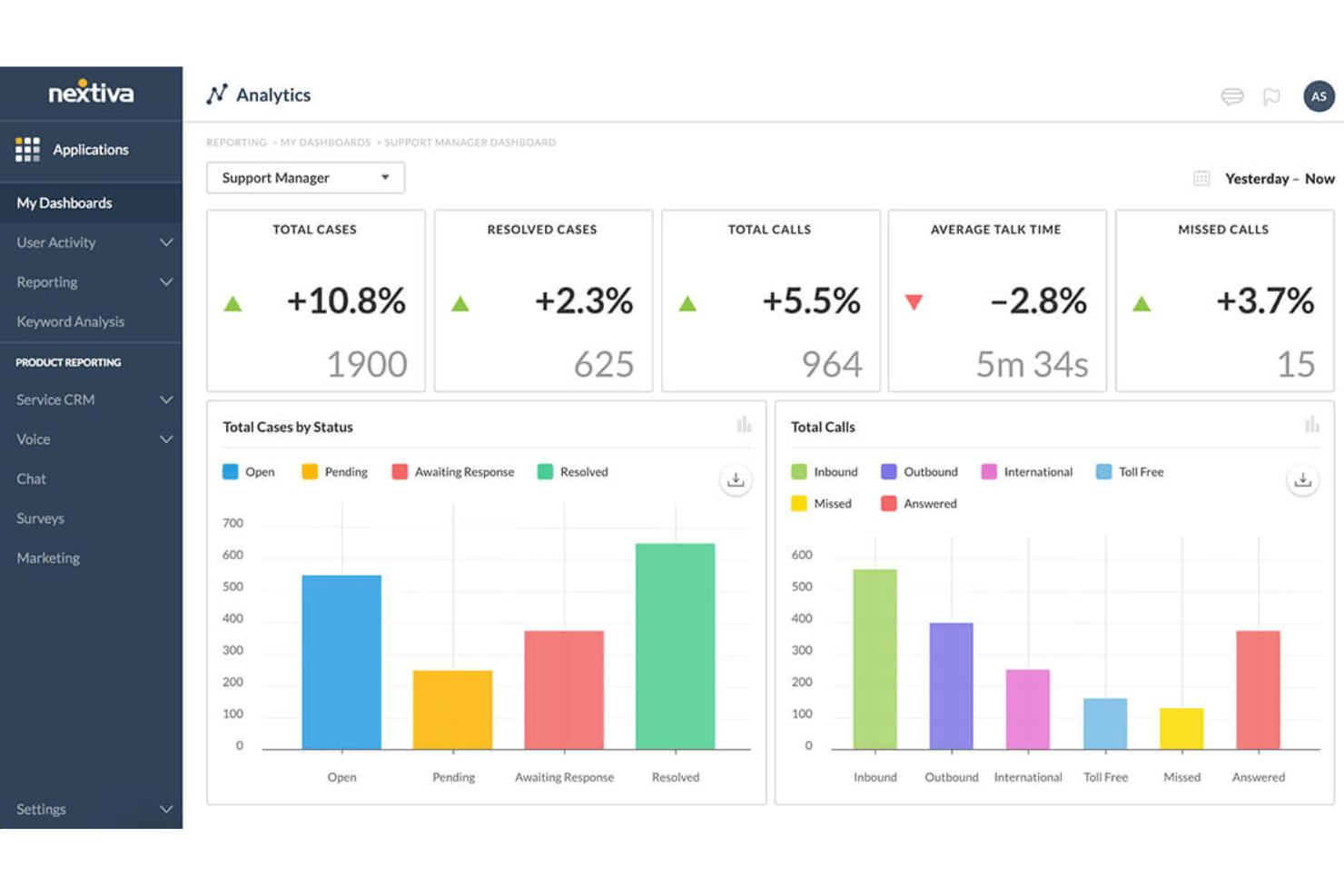
Nextiva bietet eine einheitliche Plattform für das Management von Kundenerlebnissen mit cloudbasierter Contact-Center-Software, die KI-Unterstützung, Agenten-Tools, Analysen, intelligente Weiterleitung, Journey Orchestration und Outbound-Dialing umfasst.
Warum ich Nextiva ausgewählt habe: Eines der herausragenden Merkmale sind die fortschrittlichen KI-Funktionen. Diese umfassen KI-gestützte Agenten-Tools wie eine Wissensdatenbank, sichere Zahlungsunterstützung und automatische Abschlusserkennung. Zudem stellt Nextivas intelligente Weiterleitung sicher, dass Kunden entsprechend ihrer Bedürfnisse mit den am besten geeigneten Agenten verbunden werden.
Die Plattform bietet außerdem Echtzeit-Dashboards und anpassbare Widgets, die wertvolle Einblicke in Kundeninteraktionen und die Leistung der Agenten liefern. Dieser datengesteuerte Ansatz ermöglicht es Unternehmen, fundierte Entscheidungen zu treffen und die Abläufe im Contact Center kontinuierlich zu verbessern. Darüber hinaus sorgen Nextivas Journey-Orchestration-Funktionen, einschließlich Workflow-Engine und Übergängen vom Bot zum Agenten, für eine reibungslose Customer Journey und die nächsten Schritte.
Herausragende Funktionen und Integrationen von Nextiva
Funktionen umfassen ausgehende Anrufe mit Lead-Filterung und TCPA-Schutzmechanismen, die die Einhaltung gesetzlicher Vorschriften gewährleisten und die Effektivität von Outbound-Kampagnen maximieren. Spracherkennung, Transkription und Zusammenfassung sind ebenfalls Bestandteil der KI-Funktionen, was die Kommunikation mit vielfältigen Kundenstämmen einfacher und wirkungsvoller macht.
Integrationen umfassen Stripe, PayPal, ShipStation, ShipEngine, Salesforce, HubSpot, Zoho CRM, Oracle, Zendesk, SurveyMonkey, Microsoft Dynamics und mehr.
Pros and Cons
Pros:
- Eine skalierbare Lösung
- KI-Chatbots zur Verbesserung von Callcenter-Abläufen
- Dynamische Agenten-Scripting-Optionen
Cons:
- Einschränkungen bei Integrationen
- Die Ersteinrichtung kann komplex sein

Cresta
Am besten geeignet für Echtzeit-Coaching von Agenten

Entwickelt für Unternehmens-Contact-Center, ist Cresta eine KI-Plattform, die Echtzeit-Unterstützung für Mitarbeitende, autonome KI-Agenten, Gesprächsanalyse und automatisierte Nachbearbeitungs-Workflows über Sprach- und digitale Kanäle bietet.
Für wen ist Cresta am besten geeignet?
Cresta eignet sich besonders für Contact-Center-Teams in Branchen wie Finanzdienstleistungen, Versicherungen, Einzelhandel und Telekommunikation, die große Mengen an komplexen Kundeninteraktionen bewältigen.
Warum ich Cresta ausgewählt habe
Cresta ist eine meiner Top-Empfehlungen, weil mir gefällt, wie Agent Assist Verhaltenscoaching direkt im Moment bietet – nicht erst nach dem Anruf. Während der Live-Interaktion erhalten Mitarbeitende Echtzeit-Tipps, Compliance-Erinnerungen und kontextbezogene Hinweise, die genau auf das Gespräch zugeschnitten sind. Besonders gefällt mir der Knowledge Agent, der das Gespräch kontinuierlich mitverfolgt und quellenbasierte Antworten anzeigt, ohne dass Mitarbeitende manuell suchen müssen. Das verschafft großen Teams einen echten Vorteil, wenn sie komplexe, kritische Anrufe in großem Umfang bearbeiten müssen.
Wichtige Funktionen von Cresta
- KI-Agent: Bearbeitet eingehende Sprach- und digitale Interaktionen eigenständig, inklusive Problemlösung, Weiterleitung und Eskalation – ganz ohne menschliche Beteiligung.
- Automatisiertes Qualitätsmanagement: Bewertet sämtliche Interaktionen anhand individuell anpassbarer Kriterien und ersetzt damit die manuelle Stichprobenkontrolle.
- KI-Analyst: Erkennt Trends, Themen-Treiber und Ergebnis-Muster in allen Gesprächsdaten, ganz ohne manuelle Analyse.
- Auto-Zusammenfassung: Erstellt strukturierte Notizen nach dem Gespräch und überträgt diese in angebundene CRM- oder Ticketsysteme.
Cresta-Integrationen
Cresta integriert sich mit führenden CCaaS-Plattformen wie Five9, NICE CXone, Genesys Cloud CX, Talkdesk und Dialpad, ebenso wie Salesforce, Amazon Connect, Twilio und Zoom Contact Center. Zudem arbeitet Cresta direkt in Unternehmensplattformen wie Salesforce Service Cloud und ermöglicht so den Zugriff auf CRM-Daten in Echtzeit. Eine Zapier-Unterstützung ist nicht klar dokumentiert, aber eine API für individuelle Integrationen ist verfügbar.
Pros and Cons
Pros:
- Automatische Bewertung aller Anrufe nach individuellen Kriterien
- Echtzeit-Coaching erhält positives Nutzerfeedback
- Implementierung in vier bis sechs Wochen möglich
Cons:
- Knowledge Assist missinterpretiert manchmal die Absicht von Anrufenden
- Transkription variiert bei Anrufern mit Akzent
Aircall
Am besten geeignet für die einfache Integration mit CRM- und Helpdesk-Apps
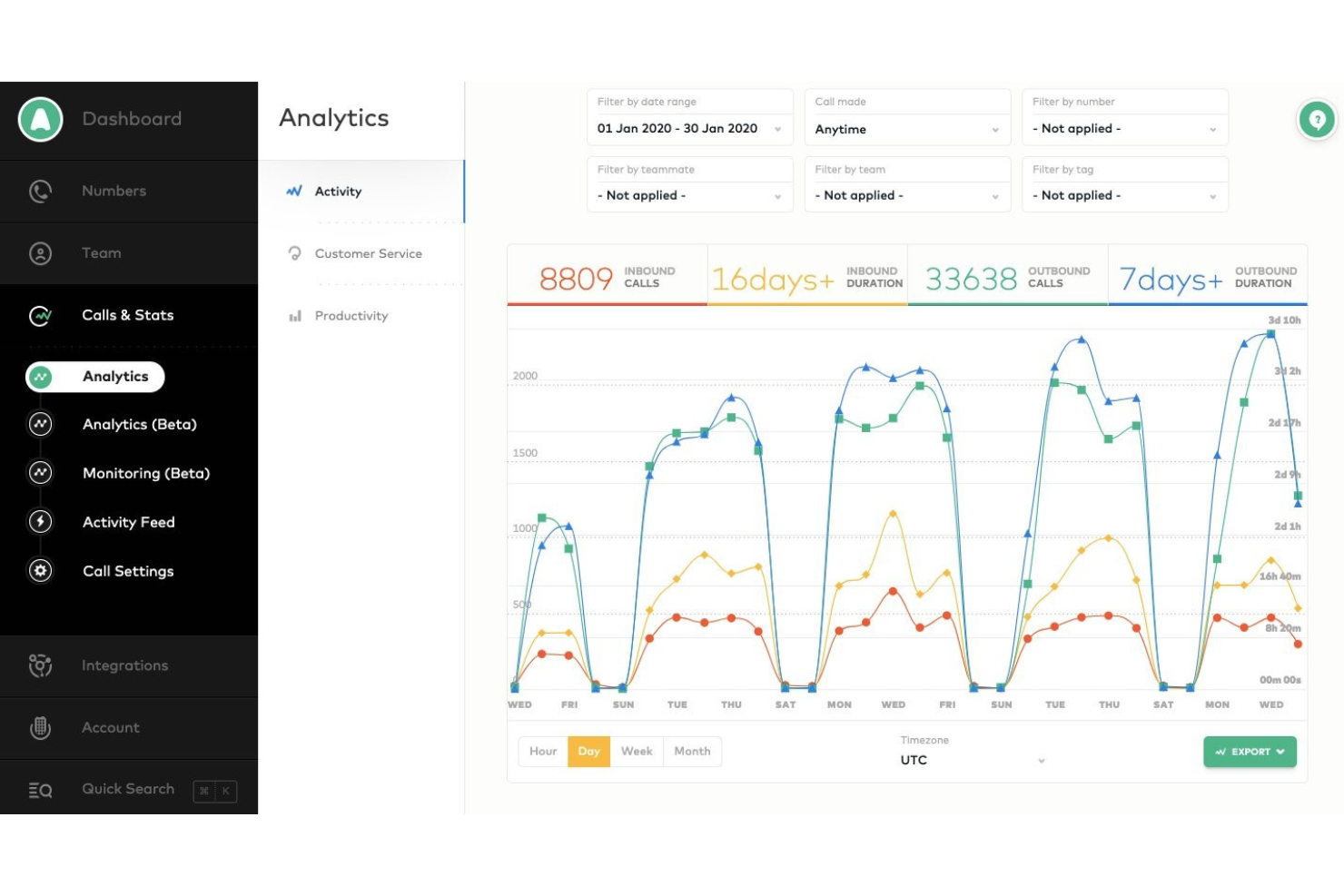
Aircall ist ein cloudbasiertes Callcenter-System, das sich leicht mit führenden CRM- und Helpdesk-Tools integrieren lässt, um das Telefonerlebnis zugänglich, transparent und kollaborativ zu gestalten.
Warum ich Aircall gewählt habe: Wenn Sie nach einem System suchen, das sich mit Ihren CRM- oder Helpdesk-Tools integrieren lässt, sollten Sie Aircall in Betracht ziehen. Durch die Integration dieser Systeme können Ihre Vertriebs- und Supportteams klare und effiziente Kundeninteraktionen führen. Da Aircall Anrufdetails automatisch mit Ihrem CRM und Helpdesk synchronisiert, sparen Ihre Agenten Zeit und müssen nicht ständig zwischen verschiedenen Tools wechseln. Jeder kann Anrufaufzeichnungen einsehen, Kontohistorien prüfen und erhält einen vollständigen Überblick über jede Konversation.
Aircall ist eine hervorragende Wahl für kleine oder mittlere Unternehmen, die eine cloudbasierte Callcenter-Lösung benötigen, die einfach anpassbar, skalierbar und für den Einsatz in Remote-Arbeitsumgebungen geeignet ist. Es unterstützt Sie und Ihre Agenten dabei, durch tiefe Einblicke und Echtzeit-Analysen klare und effiziente Kundeninteraktionen zu bieten. Mit Aircall erhalten Sie außerdem fortschrittliche Produktivitätsanalysen für das Callcenter sowie die Möglichkeit, die Teamaktivität zu überwachen.
Herausragende Funktionen und Integrationen von Aircall
Funktionen umfassen gebührenfreie und internationale Nummern, Telefonkonferenz-Tools, Voicemail, Anrufweiterleitung, interaktives Sprachmenü, Durchwahlen, Blocklisten-Nummern, virtuelle Callcenter, SMS-Geschäftsnachrichten und Anrufwarteschlangen.
Integrationen umfassen ActiveCampaign, Odoo CRM, Hiver, Zendesk Sell, Zapier, Copper, Freshdesk, Microsoft Dynamics, Microsoft Teams, Pipedrive, Slack, Sugar CRM, Salesforce, Outreach und monday.com.
Aircall kostet ab $40/Nutzer/Monat bei monatlicher Zahlung für mindestens drei Nutzer oder $30/Nutzer/Monat bei jährlicher Zahlung. Neukunden erhalten eine kostenlose 7-tägige Testversion.
Pros and Cons
Pros:
- Bietet eine zentrale Plattform für Zusammenarbeit.
- Über Desktop und Mobilgerät zugänglich.
- Bietet tiefe Einblicke in die Kommunikation.
Cons:
- Das System kann Nutzer abmelden.
- Kann gelegentlich fehlerhaft sein.
Am besten geeignet für Omnichannel-Contact-Center-Unterstützung
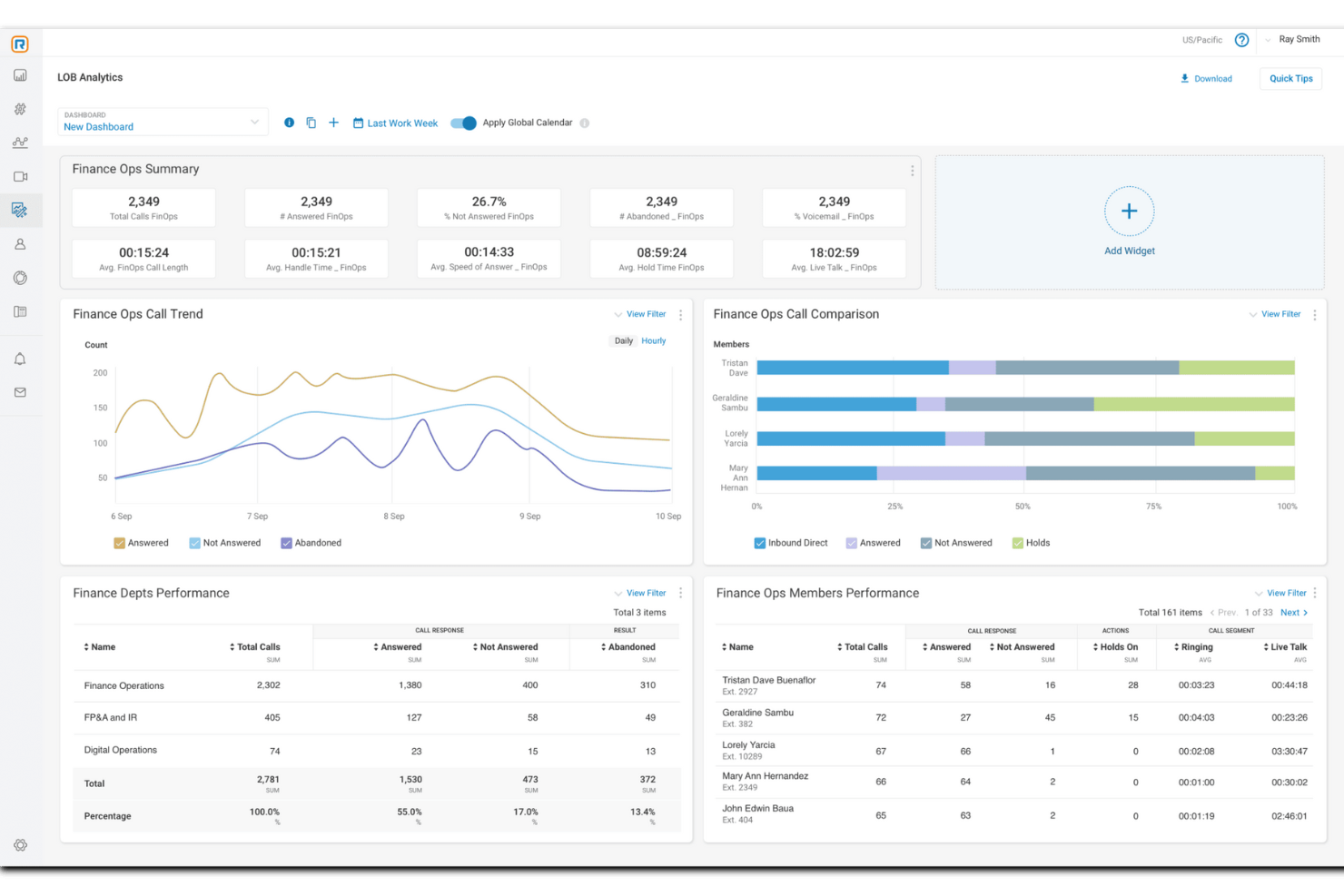
RingCentral ist eine umfassende Cloud-basierte Contact-Center-Software, die Unternehmen eine Suite von Lösungen bietet, darunter Cloud-Kommunikation und Geschäftstelefonsysteme.
Warum ich RingCentral gewählt habe: Die Plattform bietet KI-basierte Lösungen, die speziell für Omnichannel-Contact-Center-Unterstützung entwickelt wurden. Diese Automatisierungsfunktionen richten sich an Unternehmen jeder Größe, sind benutzerfreundlich und schnell implementierbar und somit ideal für Organisationen, die Wert auf fortschrittliche Funktionen und Skalierbarkeit legen. RingCentral lässt sich zudem mit anderen Kommunikationsdiensten integrieren, was Prozesse optimiert und Kundenerlebnisse verbessert.
Die Automatisierungsfunktionen von RingCentral umfassen KI-gestützte virtuelle Agenten, Coaching in Echtzeit und umsetzbare Einblicke, um Kundenerlebnisse und die Leistungen der Mitarbeitenden zu verbessern. Darüber hinaus bietet die Software Qualitäts- und Workforce-Management, um die Leistung zu überwachen und fundierte Entscheidungen über die Produktivität zu treffen.
Herausragende Funktionen und Integrationen von RingCentral
Funktionen umfassen Omnichannel-Funktionalitäten, intelligente Weiterleitung, proaktives Outreach, Risikominderung bezüglich Compliance, Verschlüsselung, Einbindung und Management der Arbeitskräfte, Kompetenzprofile für Agents, Bildschirmaufzeichnung, Dual Listening, vorgefertigte Berichte und detaillierte Analysen.
Integrationen umfassen Microsoft Teams, Salesforce, Google Workspace, Beetexting, HubSpot, Asana, Zendesk, Appointment Reminder, Aha!, Trello, Zapier, Automator und über 300 weitere.
Pros and Cons
Pros:
- Anpassungsfähig an Unternehmen jeder Größe und Branche
- Automatisierung über mehrere Kanäle hinweg
- Integrationen mit Hunderten von Apps und Systemen
Cons:
- Begrenzte Anpassungsmöglichkeiten und Speicher auf Einstiegsplänen
- Einschränkungen bei bestimmten Tischtelefonen

Beste KI-gestützte Callcenter-Tools
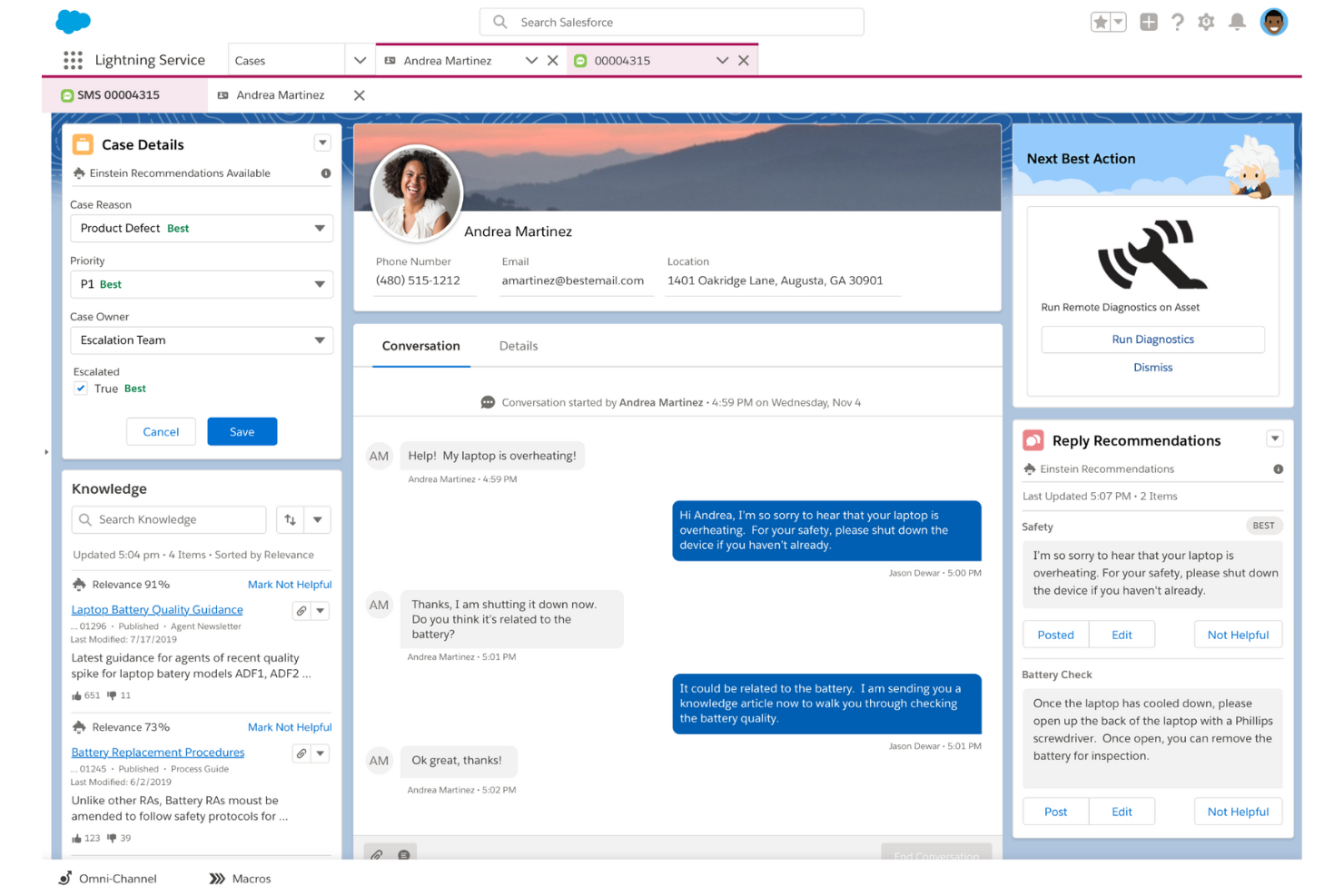
Salesforce Service Cloud nutzt Automatisierung und KI, um Unternehmen dabei zu unterstützen, mit Kunden über verschiedene Interaktionskanäle in Kontakt zu treten.
Warum ich Salesforce Service Cloud ausgewählt habe: Die Plattform bietet Ihrem Unternehmen eine KI-gestützte, cloudbasierte Callcenter-Software, die Ihren Mitarbeitenden kontextabhängige Empfehlungen für optimale Handlungsschritte gibt. Der KI-basierte Einstein Next-Best-Action-Starter von Salesforce Service Cloud, kombiniert mit der Chatter-App der Plattform, zeigt Ihren Mitarbeitenden, was sie nach der Verfolgung von Geschäftsphasen, Aufgabenverwaltung und Anzeige von Aktivitätenfeeds tun sollten. Dadurch können Ihre Mitarbeitenden sinnvolle Zusatz- und Kreuzverkäufe identifizieren und personalisierte Interaktionen anbieten.
Salesforce Service Cloud eignet sich besonders für größere Unternehmen, die cloudbasierte Callcenter-Software benötigen, um hochwertige Interaktionen zu ermöglichen. Es bietet Ihren Managern und Agenten die Möglichkeit, wichtige KPIs zu setzen und zu messen. Die von Salesforce Service Cloud bereitgestellten CRM-Daten füllen die Software automatisch mit vorausschauenden Analysen, um Probleme und Abwanderungsrisiken zu erkennen.
Hervorragende Funktionen und Integrationen von Salesforce Service Cloud
Funktionen umfassen Automatisierung und Workflows, Fallmanagement, Omnichannel-Routing, Wissensmanagement, Berichte und Analysen, Incident-Management für den Kundendienst, Aufgabenverwaltung, Anrufprotokollierung, Anrufaufzeichnung und interaktive Sprachdialogsysteme.
Integrationen beinhalten Freshdesk, CloudTalk, Twilio, Mailchimp, HubSpot CRM, Smartsheet, Aircall, RingCentral Contact Center, Talkative, FullStory und Vidyard.
Der Contact-Center-Service von Salesforce Service Cloud kostet ab $150 pro Nutzer und Monat bei jährlicher Abrechnung. Salesforce Service Cloud bietet neuen Abonnenten eine kostenlose 30-tägige Testphase.
Pros and Cons
Pros:
- Verbindet sich mit Kunden über mehrere Geräte.
- Sehr geringe Ausfallzeiten.
- Einfache und innovative Plattform.
Cons:
- Teure Preisgestaltung.
- Schwierig einzurichten.
New Product Updates from Agentforce Service (formerly Service Cloud)
Agentforce Service Keeps Full Agentforce Voice Transcripts After Calls
Agentforce Service now shows the full conversation history in post-call transcripts for Agentforce Voice calls within the Service Console, giving agents better context for follow-ups. For more information, visit Salesforce’s official site.
 .
.
Am besten mit KI-gestützter Gesprächsanalyse
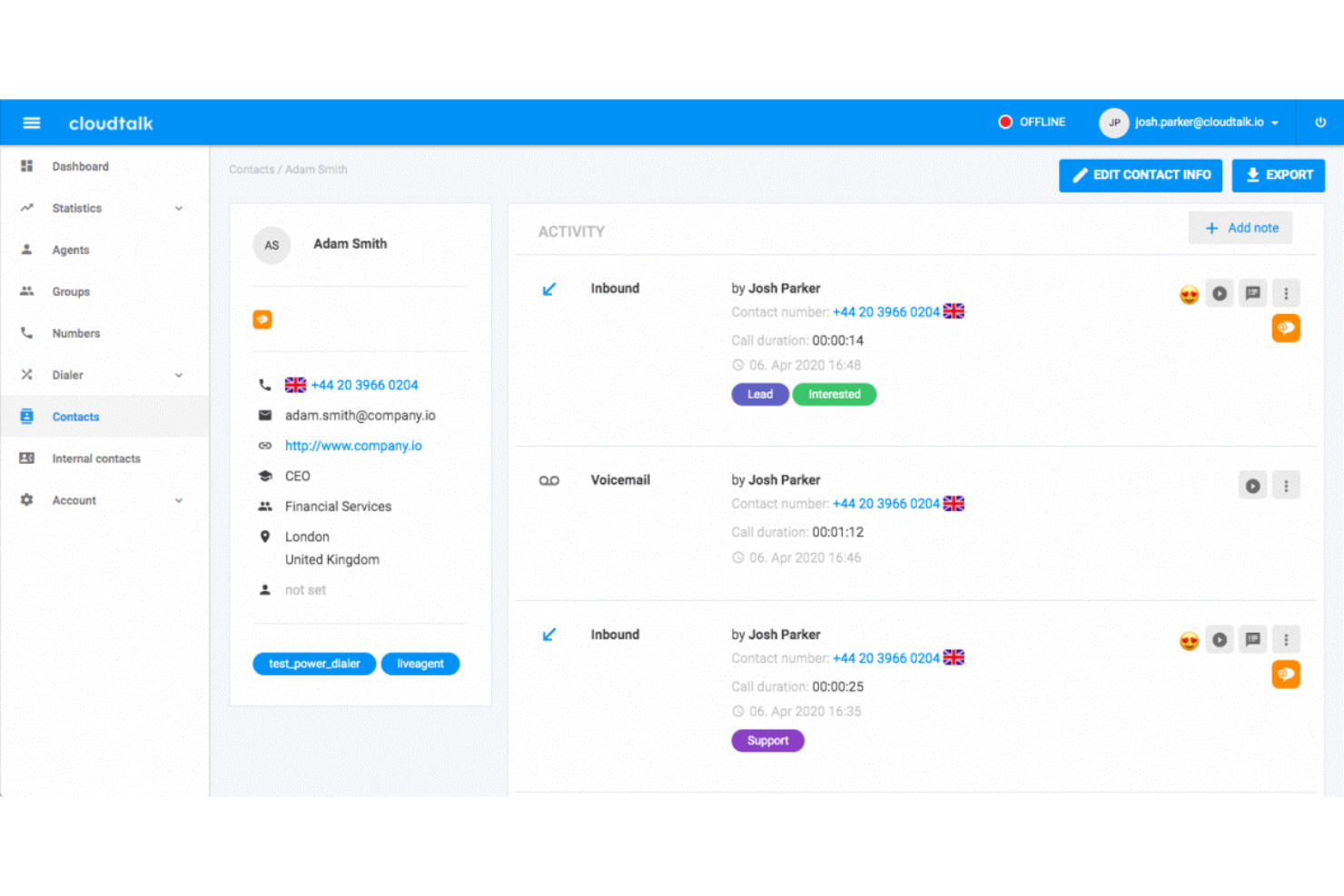
CloudTalk ist eine cloudbasierte Callcenter-Software, die den Bedarf an umfangreicher Callcenter-Ausstattung überflüssig macht. Ihre codefreie Einrichtung macht sie für alle Arten von Unternehmen attraktiv, unabhängig von ihren technischen Möglichkeiten.
Warum ich mich für CloudTalk entschieden habe: Sowohl Vertriebs- als auch Supportteams können diese Software durch ihre Funktionen für ein- und ausgehende Anrufe einsetzen. Sie können Anrufe je nach den Fähigkeiten des Agenten weiterleiten, VIP-Warteschlangen einrichten und die interaktive Spracherkennung (IVR) nutzen, damit Kund:innen Ihr System selbstständig navigieren können.
Das Besondere an diesem Produkt ist sein Einsatz von KI zur Verbesserung Ihrer Callcenter-Abläufe. Es kann Ihren Mitarbeitenden rechtzeitig Vorschläge auf Grundlage von Prognosen der Kundenbedürfnisse liefern und verschiedene Aspekte Ihrer Abläufe durch Automatisierung optimieren.
CloudTalk Besonderheiten und Integrationen
Funktionen umfassen Power Dialer, Smart Dialer, benutzerdefinierte Durchwahlen, 3-Wege-Gespräche, Anrufweiterleitungen, Click-to-Call, Kampagnen, Anrufnotizen, Anruf-Tagging, Call Flow Designer, VIP-Warteschlangen, bevorzugte Agent:innen und Workflow-Automatisierung.
Integrationen beinhalten HubSpot, Zendesk, Intercom, Gong, Pipedrive, Salesforce, Copper CRM, ActiveCampaign, LiveAgent und Outreach sowie weitere. Zusätzliche Integrationen können mit einem kostenpflichtigen Zapier-Konto eingerichtet werden.
Bezahlte Tarife starten ab $25 pro Nutzer:in und Monat. Eine 14-tägige kostenlose Testversion ist verfügbar.
Pros and Cons
Pros:
- Einfache Einrichtung und schnelle Wertschöpfung
- Anruf-Tagging und Notizen bieten internen Kontext
- Anrufaufzeichnung erleichtert das Training
Cons:
- Einstiegsplan enthält keine erweiterten Analysen
- Keine Omnichannel-Unterstützung
New Product Updates from CloudTalk
CloudTalk Adds Campaign Statistics to MCP
CloudTalk adds campaign statistics to MCP with funnel, call, conversion, disposition, and duration metrics. This helps reporting assistants review campaign performance using read-only aggregate data. For more information, visit CloudTalk’s official site.
 .
.
Am besten für eine einfache, skalierbare Callcenter-Lösung
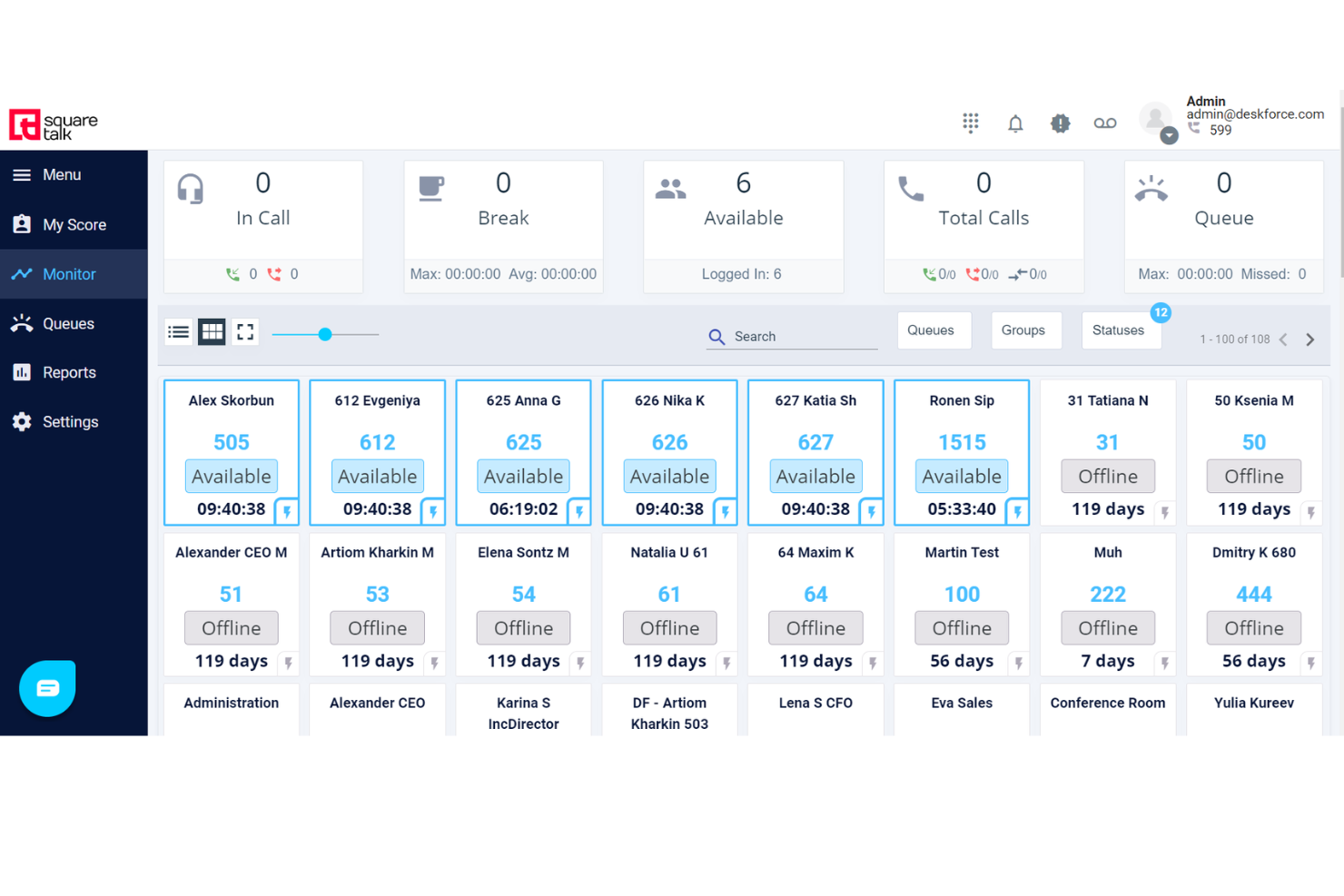
Squaretalk ist eine cloudbasierte Contact-Center-Software, die Werkzeuge zur Unterstützung geschäftlicher Kommunikationsanforderungen bereitstellt. Die einfache Benutzeroberfläche und die preisgünstigen Tarife machen sie ideal für Unternehmen jeder Größe, von Startups bis zu großen Konzernen.
Warum ich Squaretalk ausgewählt habe: Die Plattform bietet ausgefeilte Automatisierung und eine benutzerfreundliche Gestaltung. Zum Beispiel optimiert der intelligente prädiktive Dialer den Anrufbetrieb, indem er automatisch die Anrufverteilung auf Basis der Verfügbarkeit und Qualifikation der Agenten steuert, was die betriebliche Effizienz verbessert. Außerdem gibt es Funktionen für das Workflow-Management wie Aufgabenverteilung, Fortschrittsüberwachung und Zusammenarbeit.
Darüber hinaus ist die Plattform von Squaretalk auf Skalierbarkeit ausgelegt und kann den sich wandelnden Anforderungen eines wachsenden Unternehmens gerecht werden. Die cloudbasierte Infrastruktur erlaubt eine unkomplizierte Erweiterung der Dienste, das Hinzufügen weiterer Nutzer sowie die Erweiterung von Funktionen durch zusätzliche Module und Integrationen, wenn der Bedarf des Unternehmens steigt.
Squaretalk: Herausragende Funktionen und Integrationen
Funktionen umfassen Multi-Channel-Messaging, einen benutzerdefinierten Workflow-Builder, vollständige Compliance, Datenanalysen, Berichte, Anrufüberwachung, API-Zugang, flexible Rollen-Konfiguration, sichere Remote-Agenten und mehr.
Integrationen umfassen Salesforce, HubSpot, Freshdesk, Dropbox, Zoho, Zendesk, Mailchimp, WhatsApp, Gmail, Teams, Slack, Discord, WordPress, monday.com und weitere.
Pros and Cons
Pros:
- Schnelle Einrichtung
- Benutzerfreundliche Oberfläche
- Skalierbar
Cons:
- Integrationen mit einigen Tools können komplex sein
- Leichte Lernkurve für fortgeschrittene Funktionen
New Product Updates from Squaretalk
Squaretalk Adds TradeCore Integration for Brokerage Workflows
Squaretalk adds a TradeCore integration that connects customer conversations with BrokerIQ CRM workflows. This helps brokerage teams trigger AI-driven follow-ups, tasks, and other actions from calls and messages. For more information, visit Squaretalk’s official site.
 .
.
Bestes Tool für Anruf-Tracking und -Analyse
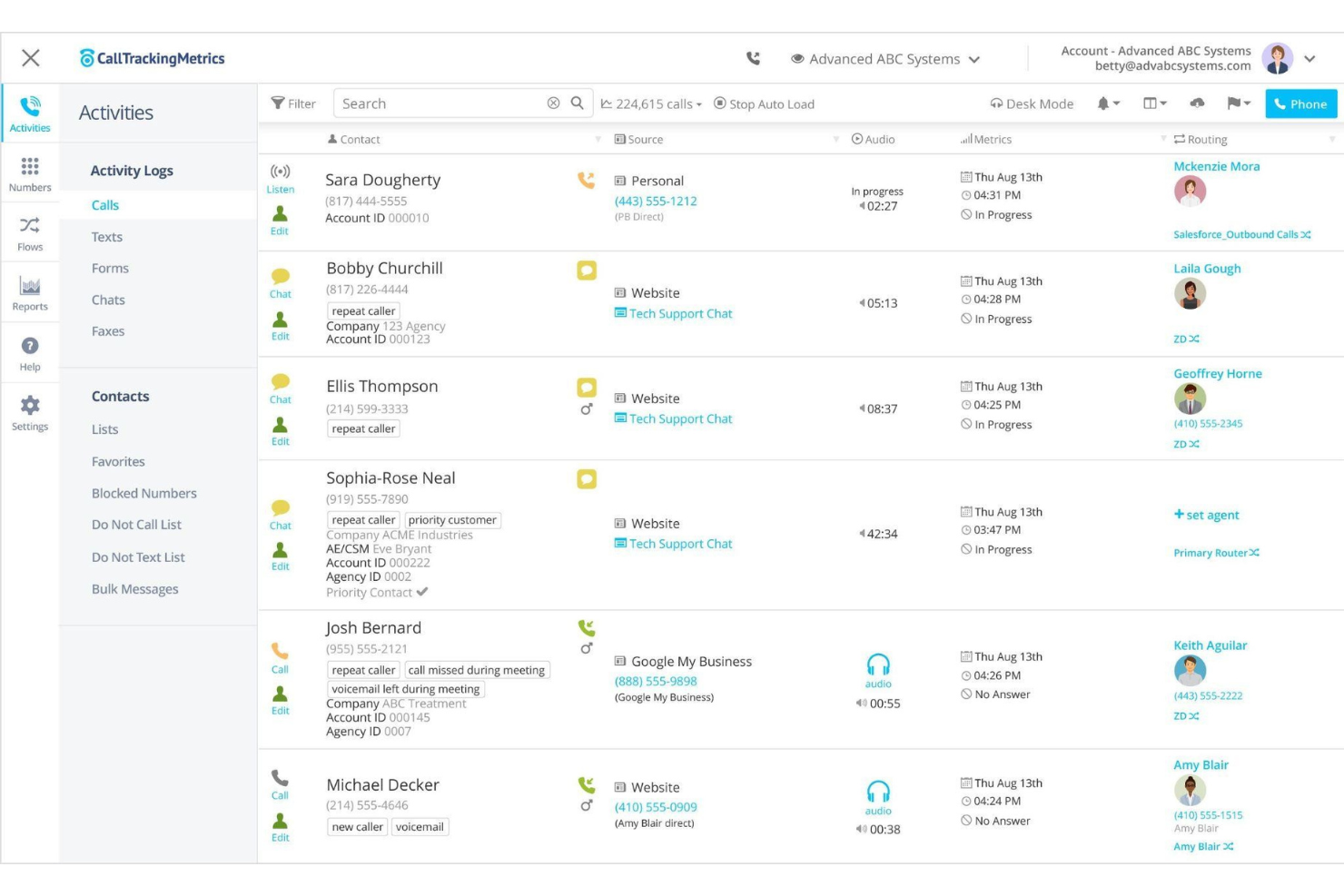
CallTrackingMetrics ist ein Tracking- und Analysetool, das Unternehmen hilft, zu überwachen, welche Interaktionen und Kampagnen Reaktionen erzeugen.
Warum ich CallTrackingMetrics ausgewählt habe: Wie der Name schon andeutet, verfolgt CallTrackingMetrics entscheidende Analysedaten in Ihrem Callcenter. CallTrackingMetrics nutzt eine Funktion namens Keyword Spotting, die es Ihnen ermöglicht, Regeln festzulegen, damit die Plattform bestimmte Schlüsselwörter in Anruf-Transkriptionen erkennt. Anschließend können Sie der Software vorgeben, entsprechend der identifizierten Schlüsselwörter bestimmte Aktionen auszuführen. Zum Beispiel können Sie CallTrackingMetrics anweisen, das Schlüsselwort „falsche Nummer“ zu erkennen, sodass der Anruf nicht protokolliert und aus Ihren Aufzeichnungen gelöscht wird.
CallTrackingMetrics eignet sich für mittelständische Unternehmen wie Agenturen, Beratungen und Performance-Marketer, die Anruf-Tracking und Conversion-Intelligenz benötigen, um personalisierte Kundenerlebnisse zu bieten. Es kann Gesprächstrends erkennen und Aktionen automatisiert ausführen, um einen schnelleren Service zu bieten. Sie können CallTrackingMetrics nutzen, um ausgehende Kampagnen zu identifizieren, die die meisten Leads und Konversionen generieren, und diese Informationen verwenden, um Anrufabläufe zu automatisieren.
CallTrackingMetrics: Hervorstechende Funktionen und Integrationen
Funktionen umfassen dynamische Nummerneinbindung, Anruf-Tracking, Trackingnummern, Anrufaufzeichnungen, Anruftranskriptionen, Anrufbewertung, Keyword Spotting, intelligente Anrufweiterleitung, Anrufmanagement, geografische Weiterleitung und automatisierte Auslöser.
Integrationen umfassen Pipedrive, Salesforce, SendGrid, Mailchimp, Kissmetrics, InstaPage, Zendesk, Zoho CRM, Zapier, Whatagraph, AgencyAnalytics, HubSpot CRM, Looker Studio, Magento und Google Analytics.
CallTrackingMetrics kostet ab $39/Monat zuzüglich Nutzungsgebühren bei monatlicher Zahlung oder $36/Monat zuzüglich Nutzungsgebühren bei jährlicher Abrechnung. CallTrackingMetrics bietet neuen Abonnenten einen kostenlosen Probemonat an.
Pros and Cons
Pros:
- Sehr zuverlässig.
- Überwacht Anrufe einfach.
- Bietet umfangreiche Sortieroptionen.
Cons:
- Schwierig zu navigieren.
- Die Einrichtung des Tools ist mühsam.

Am besten für das Management von Anrufen aus der Ferne
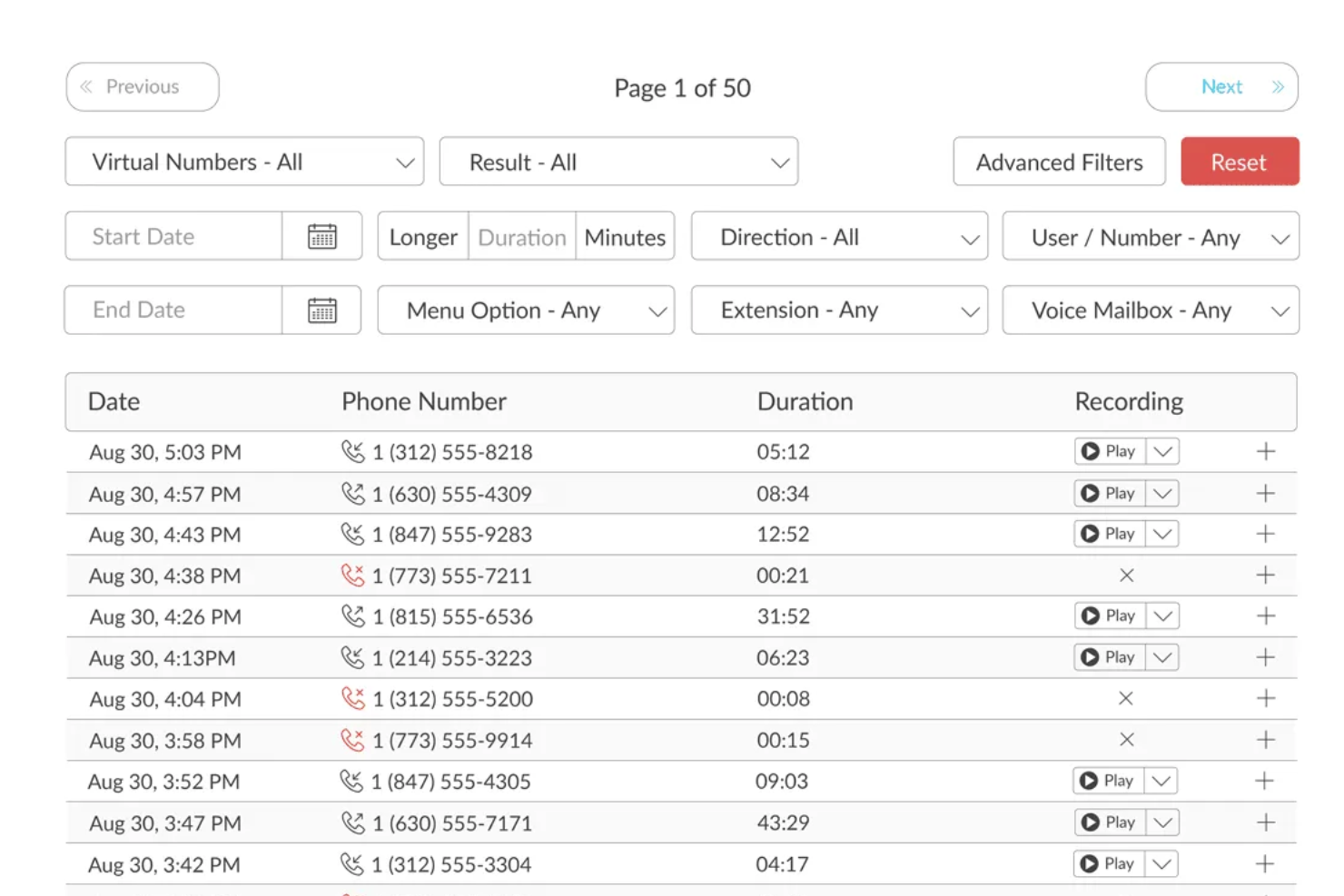
TalkRoute ist ein virtuelles Telefonsystem, das sich an Geschäftsinhaber und deren Teams richtet und Kommunikationstools wie Anrufe, Textnachrichten und Videokonferenzen über eine einzige App bereitstellt. Es umfasst Funktionen wie Anrufweiterleitung, Voicemail, Anrufaufzeichnung und anpassbare Begrüßungen, die auf Desktop-, Mobil- und Webplattformen zugänglich sind. Nutzer können die Kommunikation über verschiedene Telefonnummern verwalten, darunter gebührenfreie, Wunsch- und lokale Nummern, von jedem Gerät aus.
Warum ich TalkRoute ausgewählt habe: Eine der Stärken von TalkRoute für Outbound-Callcenter ist seine Erreichbarkeit über mehrere Geräte. Ihr Team kann Anrufe tätigen und entgegennehmen über Desktop-, Web- oder mobile Apps. Diese Flexibilität bedeutet, dass Ihr Team nicht an einen Standort gebunden ist und von überall aus arbeiten kann, sodass es jederzeit mit Kunden oder Klienten in Kontakt treten kann, ohne physisch an einem bestimmten Ort anwesend zu sein. Dies ist besonders vorteilhaft, wenn Ihr Team remote arbeitet oder tagsüber zwischen Geräten wechseln muss. Die Möglichkeit, Geräte zu wechseln, kann die Produktivität steigern und sicherstellen, dass keine Anrufe verpasst werden, was zur Wahrung der Kundenzufriedenheit und Effizienz beiträgt.
TalkRoute Herausragende Funktionen und Integrationen
Funktionen umfassen integrierte Anrufe, Nachrichten und Meetings sowie Anrufweiterleitung und -routing, sodass Anrufe die gewünschten Empfänger auf mehreren Geräten erreichen. Es bietet Möglichkeiten zum Versand von Textnachrichten, die SMS und MMS unterstützen, einschließlich Benutzerrechten und E-Mail-Benachrichtigungen. Videokonferenzen unterstützen bis zu 100 Teilnehmer und ermöglichen Bildschirm- sowie Dateifreigabe für bessere Zusammenarbeit. Individuelle Menüs und Durchwahlen helfen bei der effizienten Anrufsteuerung, während Voicemail-Dienste Transkription und E-Mail-Benachrichtigungen bieten. TalkRoute stellt außerdem Optionen für gebührenfreie und Wunsch-Telefonnummern, Live-Call-Transfer, Call Stacking, individuelle Begrüßungen und Anrufaufzeichnung mit unbegrenztem Speicher zur Verfügung.
Integrationen umfassen Google Sheets, HubSpot, Slack, LeadConnector, Asana, Discord, Google Chat, Gmail und LeadSimple CRM. Die Integration mit Drittanbieter-Apps über Zapier sowie die Einhaltung von Bestimmungen wie HIPAA machen es für verschiedene Branchen vielseitig einsetzbar.

Twilio
Am besten für Flexibilität
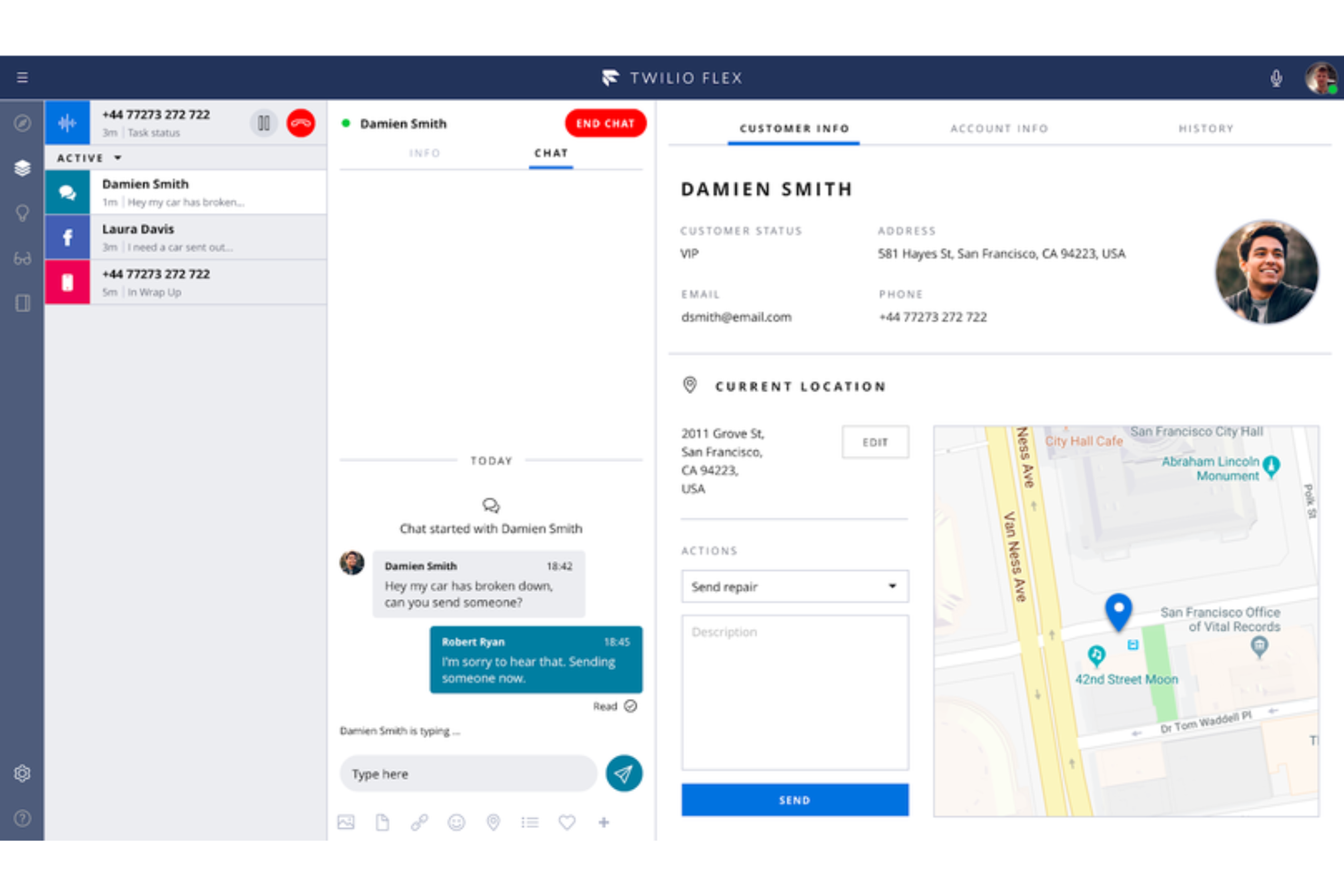
Twilio ist eine cloudbasierte Contact-Center-Plattform, die flexibel genug ist, um mit Unternehmen zu wachsen und sich an individuelle Anforderungen anzupassen.
Warum ich Twilio ausgewählt habe: Die Plattform nutzt einen softwarebasierten Ansatz als Contact-Center-as-a-Service. Twilio stellt Ihnen ein Voice SDK und eine offene API zur Verfügung, mit denen Sie oder Ihr Entwicklerteam eine Callcenter-Lösung schaffen können, die den Anforderungen Ihrer Organisation entspricht. Sie können mehrere Kommunikationskanäle mit Twilios zentralem Modul verbinden, was die Plattform äußerst flexibel macht.
Twilio passt zu Unternehmen jeder Größe, die eine Contact-Center-Lösung benötigen, mit der sie ihre eigene Plattform erstellen können. Es ermöglicht Ihrem Unternehmen, Sprach-, VoIP- und Messaging-Interaktionen in Ihre eigene Web-, Desktop- oder Mobilsoftware einzubetten. Wenn sich Ihr Nutzungsverhalten ändert, skaliert Twilio automatisch mit Ihrem Unternehmen mit.
Twilio: Herausragende Funktionen und Integrationen
Funktionen umfassen Anrufaufzeichnung, Analysen, Churn-Management, Anrufweiterleitung, Audio- und Videokonferenzen, Feedback-Erhebung, Kommunikationsmanagement, Live-Chat, Messenger-Autoresponder und Kontaktverwaltung.
Integrationen sind u.a. monday sales CRM, Freshdesk, HoneyBook, Zendesk, Salesforce, Mailchimp, Slack, HubSpot CRM, Zoho CRM, Quickbooks, Airtable, Zapier, Microsoft Dynamics 365 und AgencyAnalytics.
Twilio kostet ab $1/Nutzer/Stunde oder $150/Nutzer unabhängig von der Nutzung. Twilio bietet eine kostenlose Testphase für bis zu 5.000 aktive Nutzerstunden an.
Pros and Cons
Pros:
- Im Vergleich zur Konkurrenz gut bepreist.
- Kann internationale Kommunikation abwickeln.
- Einer der besten API-Anbieter.
Cons:
- Das Toolset kann überwältigend sein.
- Es werden mehr Analysefunktionen benötigt.
Weitere cloudbasierte Kontaktcenter-Software
Hier sind einige weitere Optionen, die es nicht in die Liste der besten cloudbasierten Kontaktcenter-Software geschafft haben:
- Zoho Voice
Am besten für integrierte Geschäftstelefonie
- Five9
Am besten für Ferngespräche
- Bitrix24
Am besten für integrierte CRM-Funktionen
- Zendesk Suite
Am besten geeignet, um ein Ticketsystem zu einem Callcenter hinzuzufügen
- GoTo Connect
Am besten für Anruffilterung geeignet
- Kixie Powercall
Am besten geeignet, um Callcenter-Funktionen zu CRMs hinzuzufügen
- Dialfire
Am besten geeignet, um einen Webbrowser in ein Callcenter zu verwandeln
- CallTools
Er prädiktiver Dialer und Vorschau-Dialer
- 3CX
Am besten für Omnichannel-Interaktionen


Wie ich cloudbasierte Contact Center Software bewerte
Ich teile meine Bewertung in zwei Ebenen auf: unverzichtbare Funktionen – Omnichannel-Routing, IVR, Cloud-Bereitstellung – für die Abwicklung von Kundeninteraktionen in großem Maßstab, sowie Differenzierungsmerkmale, die die besten Plattformen hervorheben.
Kernfunktionen (Grundvoraussetzungen für diese Liste)
Bei der Auswahl der Tools für meine Liste bewerte ich jedes einzelne auf einer Skala von 0 (bietet die Funktion nicht) bis 5 (hervorragend in diesem Bereich) für jede nachfolgend aufgeführte Kernfunktionalität. Danach berechne ich die Gesamtpunktzahl des Tools in Prozent. Jedes Tool muss mindestens eine Gesamtpunktzahl von 75% erreichen, um berücksichtigt zu werden.
- Omnichannel-Interaktionsmanagement: Ich prüfe, ob Agenten Sprache, E-Mail, Chat, SMS und Social-Messages aus einem Arbeitsbereich heraus bearbeiten können – und ob der Kundenkontext erhalten bleibt, wenn ein Gespräch zwischen den Kanälen wechselt.
- Cloud-native Architektur: Jede Plattform auf dieser Liste sollte vollständig browserbasiert und ohne lokale Abhängigkeiten funktionieren, sodass verteilte Teams sich einloggen und von überall aus Interaktionen entgegennehmen können.
- ACD- & IVR-Funktionen: Ich bewerte, wie die Plattform Kontakte weiterleitet – ob sie skillbasiertes Routing, Prioritätswarteschlangen und konfigurierbare IVR-Bäume unterstützt, die es Anrufern ermöglichen, sich selbst zu helfen oder direkt zum richtigen Agenten zu gelangen.
- Echtzeit- & historische Berichte: Teamleiter brauchen Live-Einblick in Warteschlangen sowie historische Daten zu Bearbeitungszeiten, SLAs und Abbruchraten. Deshalb sehe ich mir die Tiefe der Dashboards und die Anpassungsoptionen für Berichte an.
- Workforce- & Qualitätsmanagement: Ich achte auf native Planungstools, Gesprächsaufzeichnung und QM-Bewertungsfunktionen – oder zumindest auf eine enge Integration mit spezialisierten WFM-Plattformen wie Verint oder Calabrio.
- CRM- & Business-System-Integrationen: Die Plattform sollte eine Verbindung zu CRMs wie Salesforce, HubSpot oder ServiceNow herstellen, zudem offene APIs für die Integration individueller Workflows in Ihren bestehenden Technologie-Stack bieten.
Sobald ich eine Liste von Tools habe, die diese Kriterien erfüllen, prüfe ich, was die einzelnen Plattformen besonders macht.
Differenzierungsmerkmale (Was Anbieter unterscheidet)
So vergleiche und kontrastiere ich verschiedene Anbieter:
Herausragende Funktionen
KI-gestützte Agentenunterstützung ist ein entscheidendes Unterscheidungsmerkmal – ich suche nach Plattformen, die relevante Wissensartikel einblenden und Antwortvorschläge in Echtzeit anbieten, damit Agenten komplexe Problemlösungen schneller bewältigen. Konversationelle KI und Bots sind ebenfalls wichtig, insbesondere bei Teams, die ein hohes Volumen an sich wiederholenden Fragen außerhalb der Geschäftszeiten bearbeiten. Ich bewerte außerdem, ob eine Plattform einen Low-Code-Flow-Builder enthält, da CX-Verantwortliche oft IVR-Menüs oder Routing-Logik spontan anpassen müssen, ohne auf einen Entwickler zu warten.
Über die Funktionen hinaus
Compliance-Zertifizierungen wie HIPAA, PCI-DSS und DSGVO-Bereitschaft stehen besonders im Fokus – vor allem, wenn Ihre Agenten Zahlungsdaten oder Gesundheitsdaten bearbeiten. Ich prüfe außerdem die Preistransparenz, da einige Anbieter WFM und Analytik in Basisplänen bündeln und andere diese als kostenpflichtiges Add-on berechnen, was den Gesamtpreis deutlich beeinflussen kann. Auch die Implementierungszeit ist entscheidend. Ich schaue, ob eine Plattform geführte Onboardings und vorgefertigte Templates bietet, die Teams ermöglichen, in wenigen Wochen und nicht erst in Monaten live zu gehen.
So wählen Sie cloudbasierte Kontaktcenter-Software aus
Bei langen Funktionslisten und komplexen Preisstrukturen verliert man leicht den Überblick. Damit Sie sich bei der Auswahl der für Sie passenden Software auf das Wesentliche konzentrieren können, finden Sie hier eine Checkliste mit Faktoren, die Sie berücksichtigen sollten:
| Faktor | Was Sie berücksichtigen sollten |
|---|---|
| Skalierbarkeit | Kann die Software mit Ihrem Unternehmen wachsen? Prüfen Sie, ob sie steigende Anrufvolumen und zusätzliche Benutzer ohne zusätzliche Kosten oder Leistungseinbußen unterstützt. |
| Integrationen | Funktioniert sie mit Ihren bestehenden Tools wie CRM oder E-Mail? Stellen Sie sicher, dass sie sich problemlos verbinden lässt, um Datensilos und Unterbrechungen in den Arbeitsabläufen zu vermeiden. |
| Anpassbarkeit | Können Sie die Software an Ihre Anforderungen anpassen? Achten Sie auf Optionen zur Anpassung von Einstellungen, Arbeitsabläufen und Benutzeroberflächen an die Prozesse Ihres Teams. |
| Benutzerfreundlichkeit | Ist die Benutzeroberfläche intuitiv? Stellen Sie sicher, dass Ihr Team das System ohne umfangreiche Schulungen oder Unterstützung schnell erlernen und bedienen kann. |
| Implementierung und Einarbeitung | Wie lange dauert die Einrichtung? Berücksichtigen Sie den Zeit- und Ressourcenaufwand für Bereitstellung und Schulung. Achten Sie auf Lösungen mit verständlichen Anleitungen und Support. |
| Kosten | Wie hoch sind die Gesamtbetriebskosten? Berücksichtigen Sie Abonnementgebühren, Zusatzfunktionen und etwaige versteckte Kosten. Vergleichen Sie diese mit Ihrem Budget und dem potenziellen ROI. |
| Sicherheitsvorkehrungen | Wie schützt die Software Ihre Daten? Achten Sie auf Verschlüsselung, Zugriffskontrollen und die Einhaltung von Datenschutzbestimmungen wie der DSGVO oder CCPA. |
| Verfügbarkeit des Supports | Welche Supportoptionen werden angeboten? Stellen Sie sicher, dass rund um die Uhr Unterstützung über mehrere Kanäle wie Chat und Telefon verfügbar ist, damit auftretende Probleme schnell gelöst werden können. |
Was ist cloudbasierte Kontaktcenter-Software?
Cloudbasierte Kontaktcenter-Software ist eine Lösung, die Kundeninteraktionen über verschiedene Kanäle wie Telefon, E-Mail und Chat verwaltet und vollständig in der Cloud gehostet wird. Kundenservice- und Supportteams verwenden diese Lösungen hauptsächlich, um das Kundenerlebnis zu verbessern und die Kommunikationseffizienz zu steigern.
Funktionen wie Anrufweiterleitung, Unterstützung mehrerer Kanäle und Echtzeitanalysen helfen bei der Verwaltung von Anfragen, der Integration in bestehende Systeme und der Bereitstellung von Erkenntnissen für bessere Entscheidungen. Insgesamt bieten diese Lösungen Unternehmen eine skalierbare und flexible Möglichkeit, Kundeninteraktionen effektiv zu verwalten.
Funktionen
Achten Sie bei der Auswahl einer cloudbasierten Kontaktcenter-Software auf die folgenden wichtigen Funktionen:
- Anrufweiterleitung: Leitet eingehende Anrufe an den richtigen Agenten oder die zuständige Abteilung weiter und verbessert dadurch Reaktionszeiten und Kundenzufriedenheit.
- Unterstützung mehrerer Kanäle: Verwaltet Interaktionen über Telefon, E-Mail und Chat und sorgt für ein einheitliches Kundenserviceerlebnis.
- Echtzeitanalysen: Liefert Einblicke in Leistungskennzahlen, unterstützt Teams bei datenbasierten Entscheidungen und optimiert Abläufe.
- IVR-Systeme: Automatisieren die Anrufbearbeitung mit interaktiver Sprachsteuerung, verkürzen Wartezeiten und entlasten Agenten bei komplexen Anfragen.
- CRM-Integration: Verbindet sich mit vorhandenen Kundenbeziehungsmanagement-Tools und gewährleistet einen nahtlosen Datenfluss sowie den nötigen Kontext für jede Interaktion.
- AI-gestützte Einblicke: Analysieren Kundeninteraktionen, um verwertbare Erkenntnisse bereitzustellen und dadurch Entscheidungsfindung und Effizienz zu verbessern.
- Anpassbare Übersichten: Ermöglichen Teams, ihre Benutzeroberfläche auf relevante Kennzahlen und Arbeitsabläufe auszurichten und dadurch die Produktivität zu steigern.
- Automatische Anruftranskription: Wandelt Anrufe in Text um und unterstützt dadurch die Dokumentation sowie die Einhaltung branchenspezifischer Vorschriften.
- Omnichannel-Kommunikation: Gewährleistet eine gleichbleibende Servicequalität über alle Kanäle hinweg und verbessert dadurch das Kundenerlebnis und die Markentreue.
Vorteile
Die Implementierung cloudbasierter Kontaktcenter-Software bietet Ihrem Team und Ihrem Unternehmen mehrere Vorteile. Auf Folgendes können Sie sich freuen:
- Höhere Effizienz: Automatisierte Anrufweiterleitung und IVR-Systeme helfen Agenten, mehr Interaktionen mit weniger Ausfallzeiten zu bearbeiten.
- Verbessertes Kundenerlebnis: Die Unterstützung mehrerer Kanäle stellt sicher, dass Kunden Sie über ihre bevorzugte Plattform erreichen können, und steigert dadurch die Zufriedenheit.
- Skalierbarkeit: Cloud-Lösungen wachsen mit Ihrem Unternehmen, sodass Sie Benutzer und Funktionen ohne große Investitionen hinzufügen können.
- Datenbasierte Entscheidungen: Echtzeitanalysen liefern Einblicke in die Leistung und helfen Ihnen, Prozesse und Ressourcenzuweisung zu optimieren.
- Bessere Zusammenarbeit: Die CRM-Integration verbindet Teams mit relevanten Kundendaten und fördert Teamarbeit sowie einen fundierten Kundenservice.
- Kosteneinsparungen: Der geringere Bedarf an physischer Infrastruktur und Wartung senkt die Betriebskosten und schafft Budget für andere Prioritäten.
- Flexibilität und ortsunabhängiges Arbeiten: Der Cloud-Zugriff ermöglicht Ihrem Team, von überall aus zu arbeiten, und gewährleistet einen kontinuierlichen Service sowie Anpassungsfähigkeit.
Kosten & Preise
Die Auswahl einer cloudbasierten Kontaktcenter-Software setzt ein Verständnis der verschiedenen verfügbaren Preismodelle und Tarife voraus. Die Kosten variieren je nach Funktionen, Teamgröße, Zusatzoptionen und weiteren Faktoren. Die folgende Tabelle fasst gängige Tarife, ihre Durchschnittspreise und typische enthaltene Funktionen von cloudbasierten Kontaktcenter-Softwarelösungen zusammen:
Vergleichstabelle der Tarife für cloudbasierte Kontaktcenter-Software
| Tarifart | Durchschnittspreis | Übliche Funktionen |
|---|---|---|
| Kostenloser Tarif | $0 | Grundlegende Anrufweiterleitung, eingeschränkte Unterstützung mehrerer Kanäle und grundlegende Analysen. |
| Persönlicher Tarif | $10-$30/Benutzer/Monat | Anrufweiterleitung, Unterstützung mehrerer Kanäle, CRM-Integration und grundlegende Analysen. |
| Geschäftstarif | $40-$70/Benutzer/Monat | Erweiterte Anrufweiterleitung, vollständige Unterstützung mehrerer Kanäle, CRM-Integration und Analysen. |
| Unternehmenstarif | $80-$150/Benutzer/Monat | Anpassbare Funktionen, AI-gestützte Einblicke, vollständige Analysen und dedizierte Unterstützung. |
Häufig gestellte Fragen zu cloudbasierter Kontaktcenter-Software
Hier finden Sie Antworten auf häufig gestellte Fragen zu cloudbasierter Kontaktcenter-Software:
Wie sicher ist cloudbasierte Kontaktcenter-Software?
Cloudbasierte Kontaktcenter-Software ist im Allgemeinen sicher, da Anbieter Maßnahmen wie Datenverschlüsselung, regelmäßige Sicherheitsprüfungen und die Einhaltung von Vorschriften wie der DSGVO umsetzen. Dennoch ist es wichtig, die Sicherheitsprotokolle jedes Anbieters zu prüfen und sicherzustellen, dass sie den Anforderungen Ihres Unternehmens entsprechen. Fragen Sie nach den Datenschutzrichtlinien und den Zertifizierungen durch Dritte, über die der Anbieter verfügt.
Kann mein Team mit cloudbasierter Kontaktcenter-Software remote arbeiten?
Ja, cloudbasierte Kontaktcenter-Software ermöglicht Ihrem Team, von überall mit Internetverbindung zu arbeiten. Diese Flexibilität unterstützt Remote-Arbeitsmodelle und gewährleistet einen kontinuierlichen Service, selbst wenn Ihr Team auf verschiedene Standorte verteilt ist. Stellen Sie sicher, dass die von Ihnen ausgewählte Software eine benutzerfreundliche Oberfläche und mobilen Zugriff bietet, um diese Möglichkeit zur Remote-Arbeit zu unterstützen.
Kann cloudbasierte Kontaktcenter-Software in bestehende Tools integriert werden?
Ja, die meisten cloudbasierten Kontaktcenter-Softwarelösungen lassen sich in bestehende Tools wie CRMs, E-Mail-Plattformen und Chat-Anwendungen integrieren. Diese Integrationen helfen, Arbeitsabläufe zu optimieren und sicherzustellen, dass Ihr Team an einem Ort Zugriff auf alle erforderlichen Informationen hat. Prüfen Sie vor dem Kauf, ob die Software Ihre aktuellen Tools unterstützt oder individuelle Integrationen möglich sind.
Wie bewältigen Cloud-Kontaktcenter-Plattformen ein hohes Anrufaufkommen?
Diese Plattformen sind in der Regel darauf ausgelegt, je nach Bedarf dynamisch skaliert zu werden. Anrufweiterleitung, Warteschlangen und Strategien zur Überlaufverwaltung werden über automatisierte Einstellungen oder von Administratoren festgelegte Regeln gesteuert. Einige Systeme ermöglichen Anpassungen der Anrufverteilung in Echtzeit auf Grundlage der aktuellen Verfügbarkeit der Agenten.
Wie gehen diese Systeme mit Ausfällen oder Dienstunterbrechungen um?
Zuverlässige Plattformen nutzen redundante Cloud-Infrastrukturen, um Ausfallzeiten zu minimieren. Einige verfügen über integrierte Ausfallsicherungssysteme oder Pläne für alternative Weiterleitungen, die automatisch aktiviert werden. Benutzer werden in der Regel über eine Statusseite oder Plattformbenachrichtigungen über den Dienststatus informiert.
