

10 beste Personalmanagement-Software für Callcenter im Jahr 2026

10 Auswahl der besten Personalmanagement-Software für Callcenter


Software für das Personalmanagement im Callcenter hilft Ihnen bei der Personaleinsatzplanung, der Nachfrageprognose und dabei, Service-Level-Ziele zu erreichen. Diese Tools wurden entwickelt, um Effizienz und Kundenerlebnis auszubalancieren. Sie erleichtern die Verwaltung von Dienstplänen, die Überwachung der Leistung und die Anpassung an Anrufvolumen in Echtzeit, ohne Ihre Mitarbeitenden zu überlasten.
Ich habe diese Plattformen anhand der Genauigkeit ihrer Prognosen, der Planungsfunktionen und der Benutzerfreundlichkeit getestet und bewertet. Dieser Leitfaden stellt die besten Lösungen für das Personalmanagement im Callcenter vor, damit Sie eine Lösung finden, die zu Ihrem Kontaktvolumen, Ihrem Supportmodell und Ihrer Teamgröße passt.
Warum Sie unseren Software-Empfehlungen vertrauen können
Unser Team testet und bewertet Software seit 2012. Als CX-Führungskräfte selbst wissen wir, wie schwierig – und wichtig – es ist, die richtige Software auszuwählen.
Für diesen Leitfaden haben wir Tools mithilfe von praktischen Tests und unabhängiger Recherche bewertet und dabei unsere Bewertungskriterien angewendet.
Unsere Bewertungen spiegeln unser menschliches redaktionelles Urteilsvermögen wider, keine Verkaufsstrategie.
Vergleichstabelle: Personalmanagement-Software für Callcenter
Diese Vergleichstabelle fasst grundlegende Informationen zu jeder meiner besten Auswahlen an Personalmanagement-Software für Callcenter zusammen.
| Tool | Best For | Trial Info | Price | ||
|---|---|---|---|---|---|
| 1 | Am besten geeignet für WFM-Lösungen als Add-On | Kostenlose Demo verfügbar | Ab $30/Nutzer/Monat (jährliche Abrechnung) | Website | |
| 2 | Am besten für Omnichannel-Support geeignet | Kostenlose Testversion + kostenlose Demo verfügbar | Ab $25/Nutzer/Monat (jährliche Abrechnung) | Website | |
| 3 | Am besten geeignet für skillbasierte Aufgabenorganisation | 14-tägige kostenlose Testversion + kostenlose Demo verfügbar | Ab $19/Agent/Monat (jährlich abgerechnet) | Website | |
| 4 | Am besten geeignet für integrierte Callcenter- und Kundenservice-Lösungen | 14-tägige kostenlose Testphase verfügbar | Ab $19/Monat (jährlich abgerechnet) | Website | |
| 5 | Am besten geeignet für eine vereinfachte Mitarbeiterschichtplanung | Kostenlose 21-Tage-Testversion + kostenlose Demo verfügbar | Ab $2,93/Nutzer/Monat (jährliche Abrechnung) | Website | |
| 6 | Am besten geeignet für Tools zur Mitarbeiterbindung | Kostenlose Demo verfügbar | Preis auf Anfrage | Website | |
| 7 | Am besten für effiziente Anrufweiterleitung | 7-tägige kostenlose Testphase verfügbar | Ab $19/Nutzer/Monat + $5/zusätzlicher Nutzer | Website | |
| 8 | Am besten geeignet für mitarbeiterorientiertes Workforce Management | Kostenlose Demo verfügbar | Ab $85/Nutzer/Monat | Website | |
| 9 | Am besten geeignet, um qualifiziertes Personal zu gewinnen, zu fördern und zu binden | Kostenlose Demo verfügbar | Ab $85/Nutzer/Monat (jährliche Abrechnung) | Website | |
| 10 | Am besten geeignet für den virtuellen und mobilen Contact-Center-Support | Kostenlose Demo verfügbar | Preise auf Anfrage | Website |

Übersicht über die 20 besten Personalmanagement-Softwarelösungen für Callcenter
Hier finden Sie eine kurze Beschreibung jeder Software für das Personalmanagement im Callcenter. Dabei werden der beste Anwendungsfall, die wichtigsten Funktionen sowie einige Vor- und Nachteile der jeweiligen Lösung vorgestellt. Außerdem habe ich Screenshots eingefügt, damit Sie sich einen Eindruck von der Benutzeroberfläche verschaffen können.
Am besten geeignet für WFM-Lösungen als Add-On
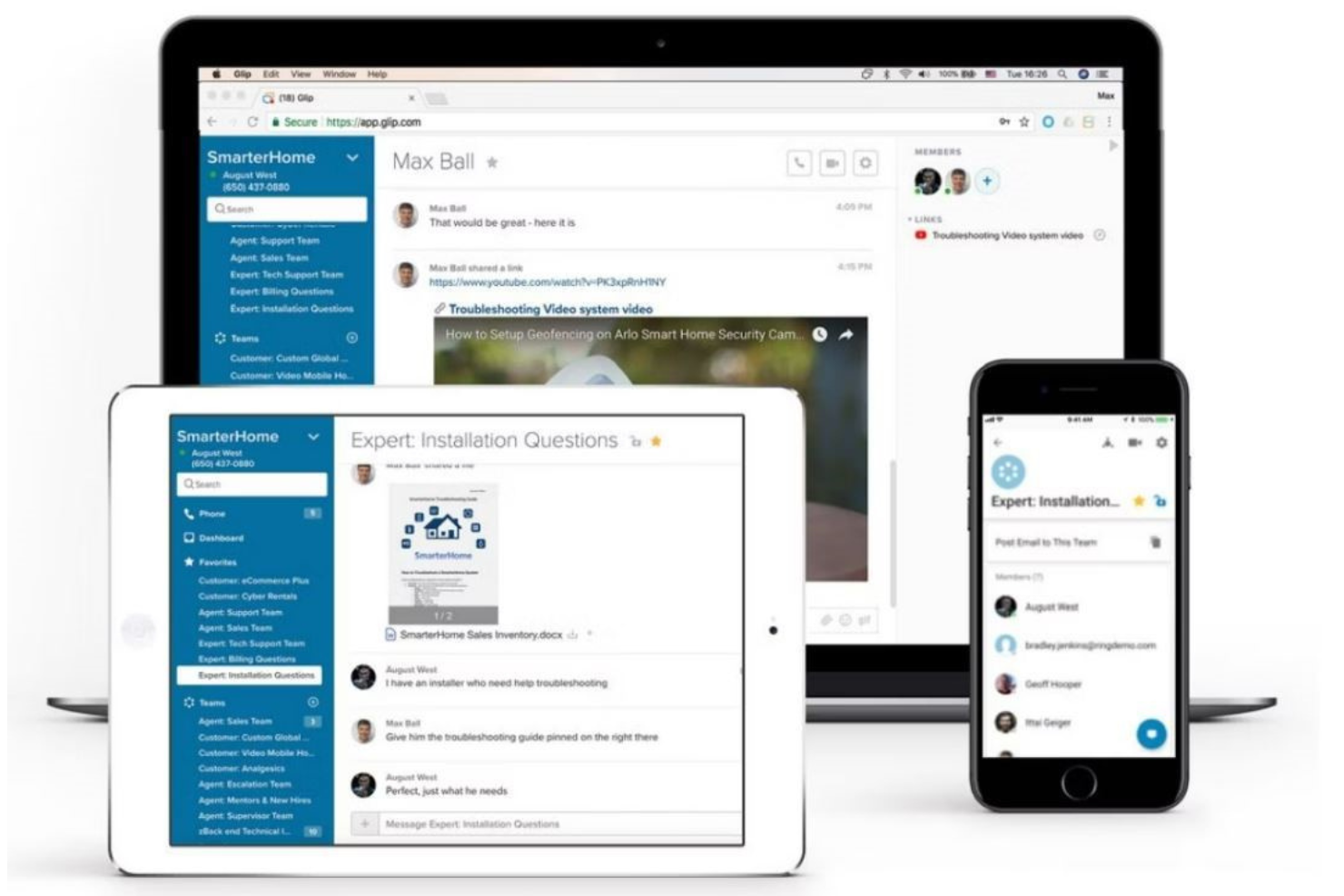
RingCentral Contact Center ist eine anpassbare Lösung für größere Unternehmen mit komplexen Anforderungen und konzentriert sich auf das Management von Kundeninteraktionen über verschiedene Kanäle hinweg. Es wurde für Teams entwickelt, die die Zusammenarbeit verbessern und die Effizienz durch fortschrittliche Routing- und Workforce-Management-Tools steigern möchten.
Warum ich mich für RingCentral Contact Center entschieden habe: Es bietet KI-gestützte Funktionen, die die globale Teamzusammenarbeit unterstützen, wie z. B. Omnichannel-Routing und virtuelle Agenten. Diese Tools helfen Ihrem Team, Kundeninteraktionen nahtlos über verschiedene Plattformen hinweg zu verwalten. Der Service ist individuell anpassbar, sodass Sie ihn auf Ihre speziellen Geschäftsanforderungen zuschneiden können. Dank der Integrationsmöglichkeiten kann Ihr Team effizient mit bestehenden CRMs und Anwendungen arbeiten.
Hervorstechende Funktionen & Integrationen:
Funktionen umfassen Omnichannel-Routing, mit dem Sie Kundeninteraktionen kanalübergreifend verwalten können. KI-gesteuerte virtuelle Agenten bieten automatisierten Support und entlasten so Ihr Team bei komplexeren Aufgaben. Umsetzbare Einblicke geben datenbasierte Empfehlungen zur Verbesserung des Kundenservices.
Integrationen umfassen Salesforce, Microsoft Teams, Zendesk, ServiceNow, Google Workspace, Microsoft 365, Oracle, SAP, SugarCRM und HubSpot.
Pros and Cons
Pros:
- Kann mit jedem Gerät verbunden werden
- Tools für Mitarbeitereinbindung
- Leistungsstarke Kundenserviceplattform
Cons:
- Workforce-Management ist nicht der Schwerpunkt
- Begrenzte Self-Service-Optionen

Am besten für Omnichannel-Support geeignet
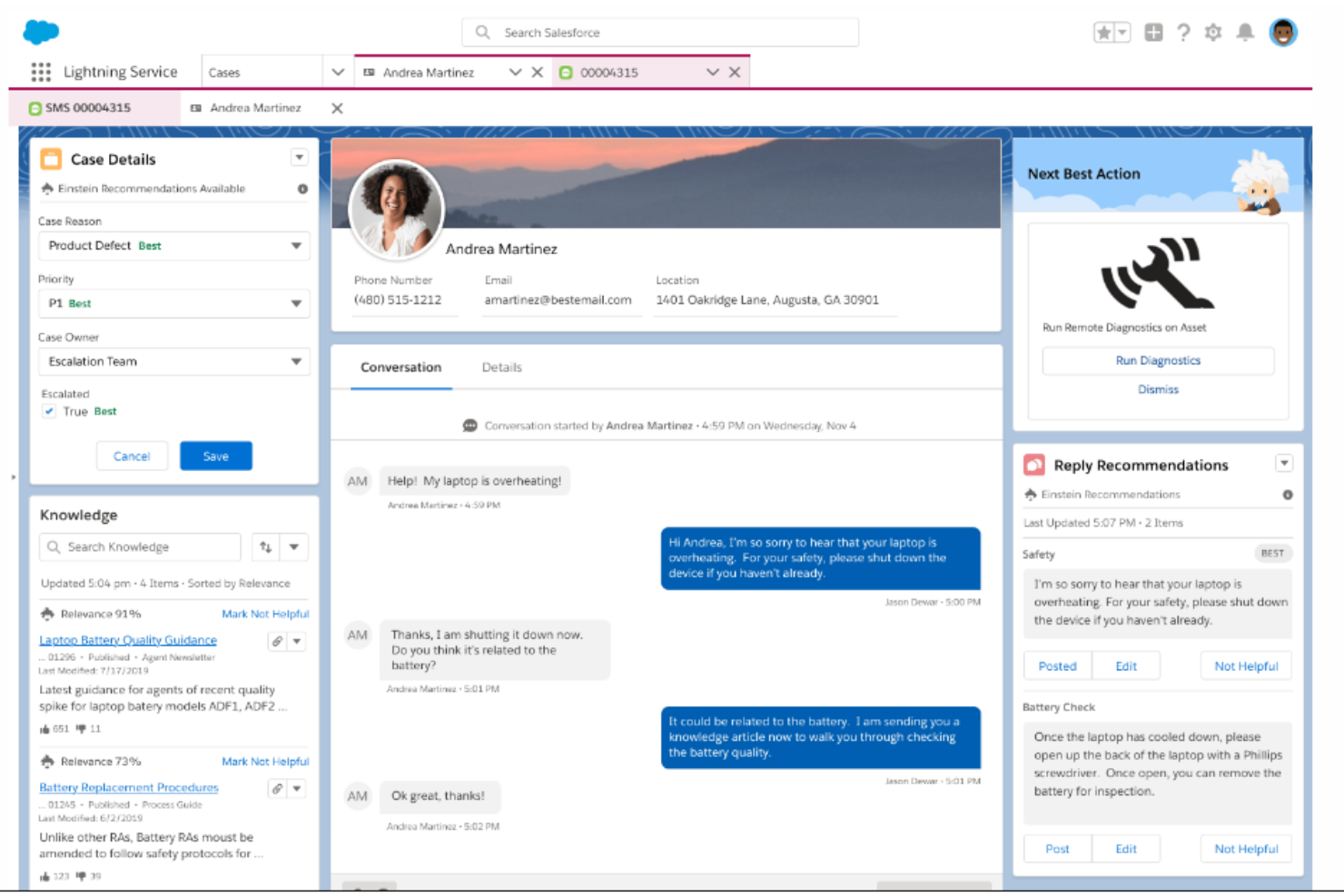
Salesforce Service Cloud ist eine Kundenservice-Plattform, die für Unternehmen jeder Größe entwickelt wurde und sich darauf konzentriert, den Kundensupport durch integrierte CRM-Funktionen zu verbessern. Sie unterstützt Ihr Team dabei, einen personalisierten Service zu bieten, indem Kundendaten genutzt und Workflows automatisiert werden.
Warum ich Salesforce Service Cloud gewählt habe: Die Plattform überzeugt durch ihre starke CRM-Integration, die es Ihrem Team erleichtert, auf Kundeninformationen zuzugreifen und diese zu nutzen. Funktionen wie Fallmanagement und Service-Analysen bieten wertvolle Einblicke in Kundeninteraktionen. Die Automatisierungstools der Plattform optimieren sich wiederholende Aufgaben, sodass Ihr Team sich auf komplexe Sachverhalte konzentrieren kann. Dank ihrer Skalierbarkeit wächst sie mit den Bedürfnissen Ihres Unternehmens.
Besondere Funktionen & Integrationen:
Funktionen umfassen das Fallmanagement, das Kundeninteraktionen organisiert und nachverfolgt. Service-Analysen liefern Einblicke in die Leistung und Kundenzufriedenheit. Automatisierungstools unterstützen Ihr Team dabei, wiederkehrende Aufgaben effizient zu bearbeiten.
Integrationen umfassen Slack, Microsoft Teams, Google Workspace, QuickBooks, Mailchimp, Dropbox, DocuSign, HubSpot, SAP und Zendesk.
Pros and Cons
Pros:
- Benutzerfreundliche Oberfläche
- Bietet guten Kundensupport
- Bietet zentrale Informationsspeicherung
Cons:
- Hohe Lernkurve für neue Nutzer
- Begrenzte Anpassungsmöglichkeiten
New Product Updates from Agentforce Service (formerly Service Cloud)
Agentforce Service Keeps Full Agentforce Voice Transcripts After Calls
Agentforce Service now shows the full conversation history in post-call transcripts for Agentforce Voice calls within the Service Console, giving agents better context for follow-ups. For more information, visit Salesforce’s official site.
 .
.
Zendesk
Am besten geeignet für skillbasierte Aufgabenorganisation
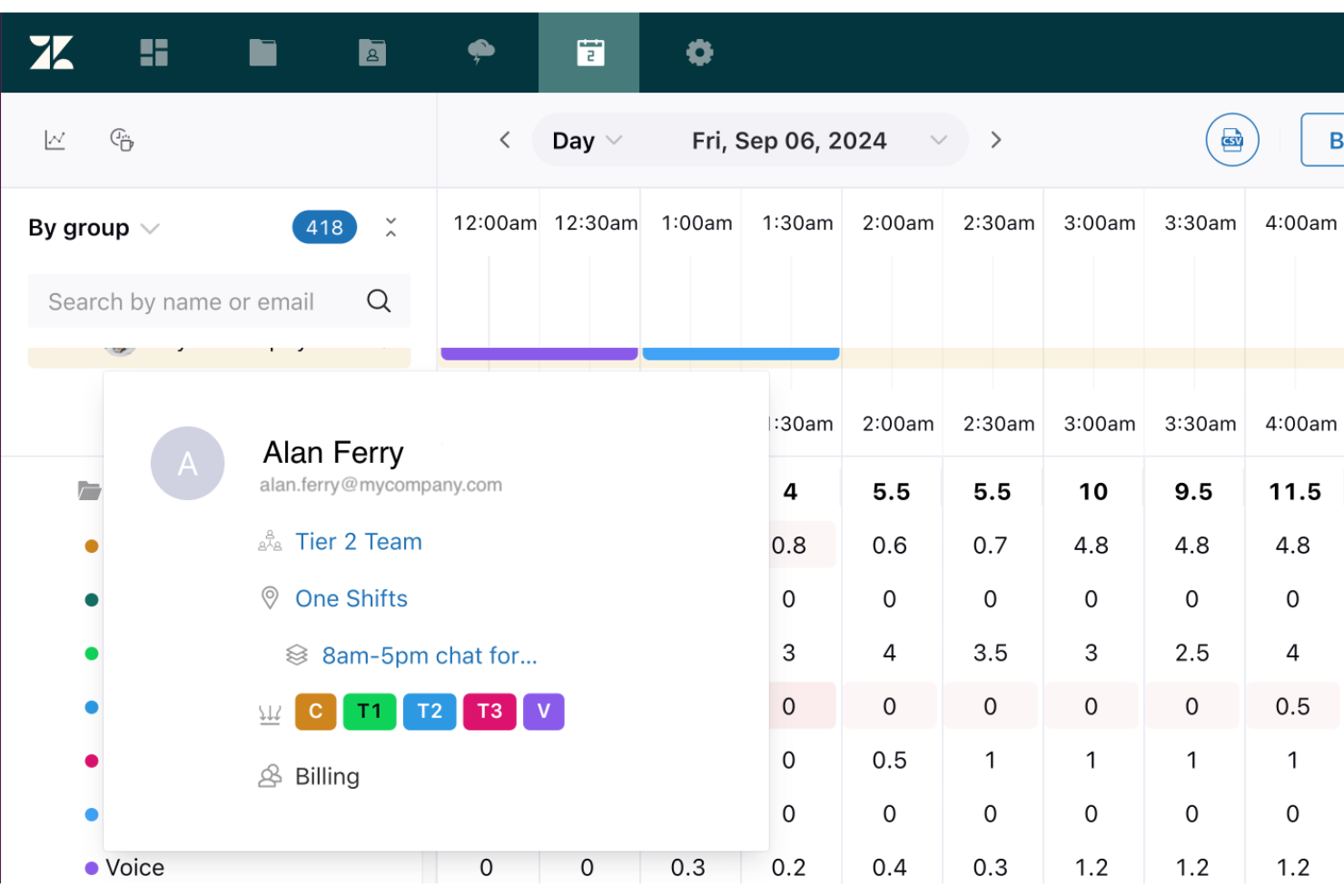
Zendesk ist eine Kundendienstplattform, die auch Funktionen für das Workforce Management in Callcentern bietet. Sie wurde entwickelt, um bei der Planung, Einsatzplanung und Überwachung der Aktivitäten Ihres Teams zu helfen und sicherzustellen, dass die richtigen Agenten die passenden Aufgaben entsprechend ihrer Fähigkeiten und Verfügbarkeit übernehmen.
Warum ich Zendesk ausgewählt habe: Ich habe Zendesk wegen seiner Fähigkeit ausgewählt, klassische Kundenservice-Tools mit integrierten Workforce-Management-Funktionen zu kombinieren. Mit der Unterstützung für Prognosen und Einsatzplanung auf Basis historischer Daten lässt sich die Abdeckung in Spitzenzeiten leichter sicherstellen. Arbeiten können außerdem nach der Expertise der Agenten segmentiert werden, was sowohl die Effizienz als auch die Servicequalität verbessert. Mit dem Echtzeit-Monitoring lassen sich zudem schnell Anpassungen vornehmen, um die Leistung auf Kurs zu halten.
Herausragende Funktionen & Integrationen:
Funktionen umfassen Tools für Workforce-Planung und Einsatzplanung, skillbasierte Arbeitssegmentierung sowie Echtzeit-Leistungsüberwachung. Usability-Tools für Agenten ermöglichen es, Dienstpläne selbst zu verwalten, freie Tage zu beantragen und Leistungskennzahlen zentral einzusehen.
Integrationen sind Google Sheets, Gmail, Salesforce, Slack, Microsoft Teams, Jira, Shopify, Hootsuite, Mailchimp, PandaDoc, Nicereply und TypeGenie.
Pros and Cons
Pros:
- Vereint Kundenservice und WFM in einer Plattform
- Starke Optionen für skillbasierte Aufgabenverteilung
- Umfassender Integrationsmarktplatz
Cons:
- Könnte für kleine Teams komplexer sein als notwendig
- Einige WFM-Funktionen erfordern zusätzliche Einrichtung und Konfiguration
New Product Updates from Zendesk
Zendesk Adds Email AI Replies and Predictive Routing
Zendesk’s latest email AI agents update brings configurable knowledge and welcome replies and adds predictive routing for email tickets, so you can tailor your automated emails and get inquiries resolved faster. For more information, visit Zendesk’s official site.

Am besten geeignet für integrierte Callcenter- und Kundenservice-Lösungen
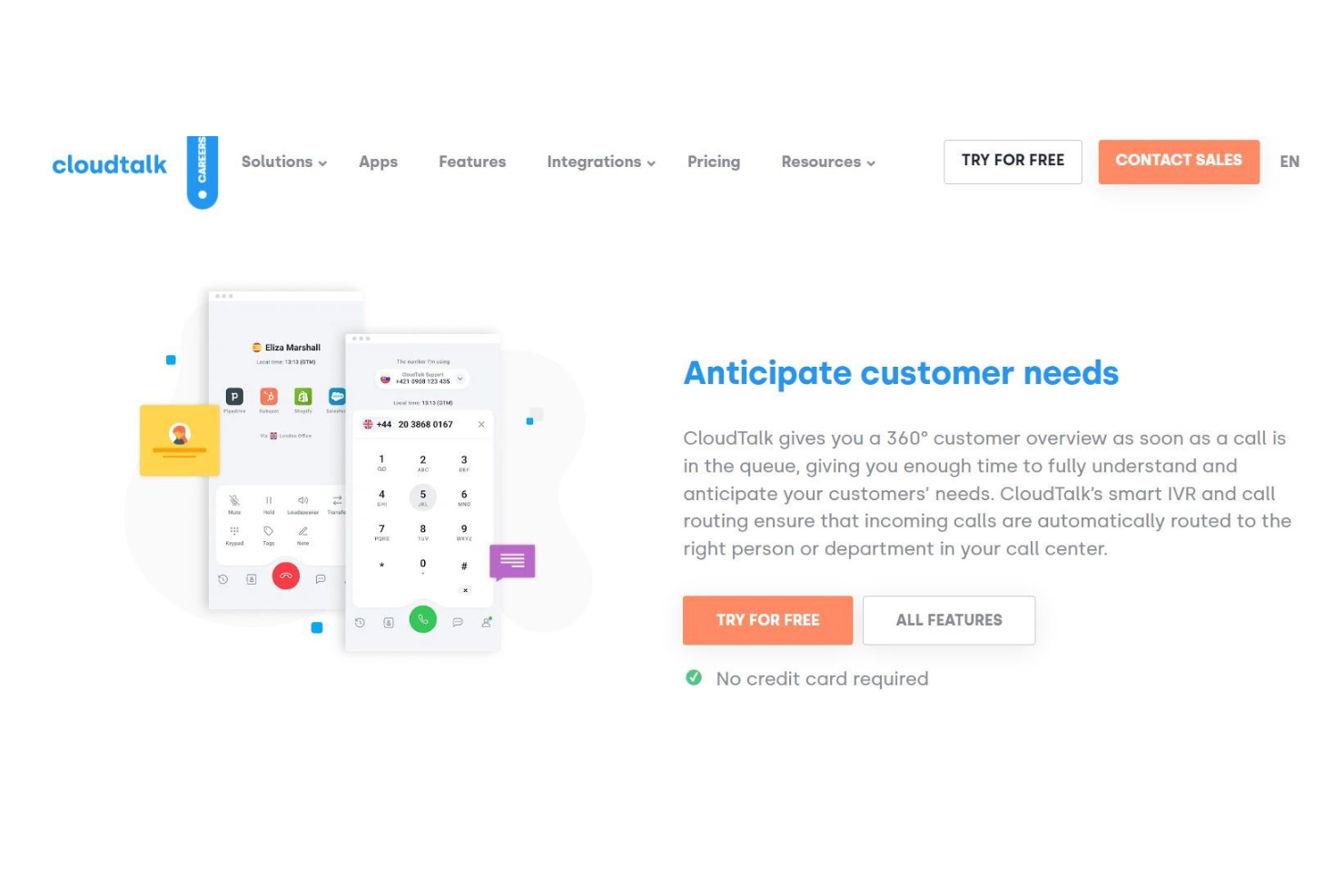
CloudTalk ist eine cloudbasierte Callcenter-Lösung, die speziell für kleine und mittelständische Unternehmen entwickelt wurde und sich darauf konzentriert, Kommunikation und Kundenservice zu verbessern. Sie bietet eine Vielzahl von Funktionen, die eine effiziente Gesprächsabwicklung und ein effektives Management der Kundeninteraktion unterstützen.
Warum ich CloudTalk gewählt habe: Es richtet sich gezielt an kleine und mittlere Teams und bietet eine unkomplizierte Einrichtung sowie eine benutzerfreundliche Oberfläche. Funktionen wie Anrufwarteschlangen und intelligentes Routing helfen Ihrem Team, Anrufe effektiv zu verwalten. Die Analysewerkzeuge liefern Einblicke in die Gesprächsleistung und Kundenzufriedenheit. Die skalierbaren Preispläne machen es zu einer attraktiven Option für wachsende Unternehmen.
Hervorstechende Funktionen & Integrationen:
Funktionen sind unter anderem Anrufwarteschlangen, die eingehende Anrufe effizient verwalten. Intelligentes Routing sorgt dafür, dass Anrufe schnell an den richtigen Ansprechpartner weitergeleitet werden. Analyse-Tools geben Ihnen Einblicke in die Gesprächsleistung und unterstützen Sie dabei, den Kundenservice zu verbessern.
Integrationen umfassen Pipedrive, HubSpot, Zendesk, Intercom, Shopify, Freshdesk, Help Scout, Slack, Microsoft Teams und Google Kontakte.
Pros and Cons
Pros:
- Kundenorientierte Werkzeuge
- Benutzerfreundliche Oberfläche
- Detaillierte Leistungsdaten für Agenten
Cons:
- Dashboard benötigt bessere Übersicht
- Nicht alle generierten Telefonnummern sind gültig

Agendrix
Am besten geeignet für eine vereinfachte Mitarbeiterschichtplanung
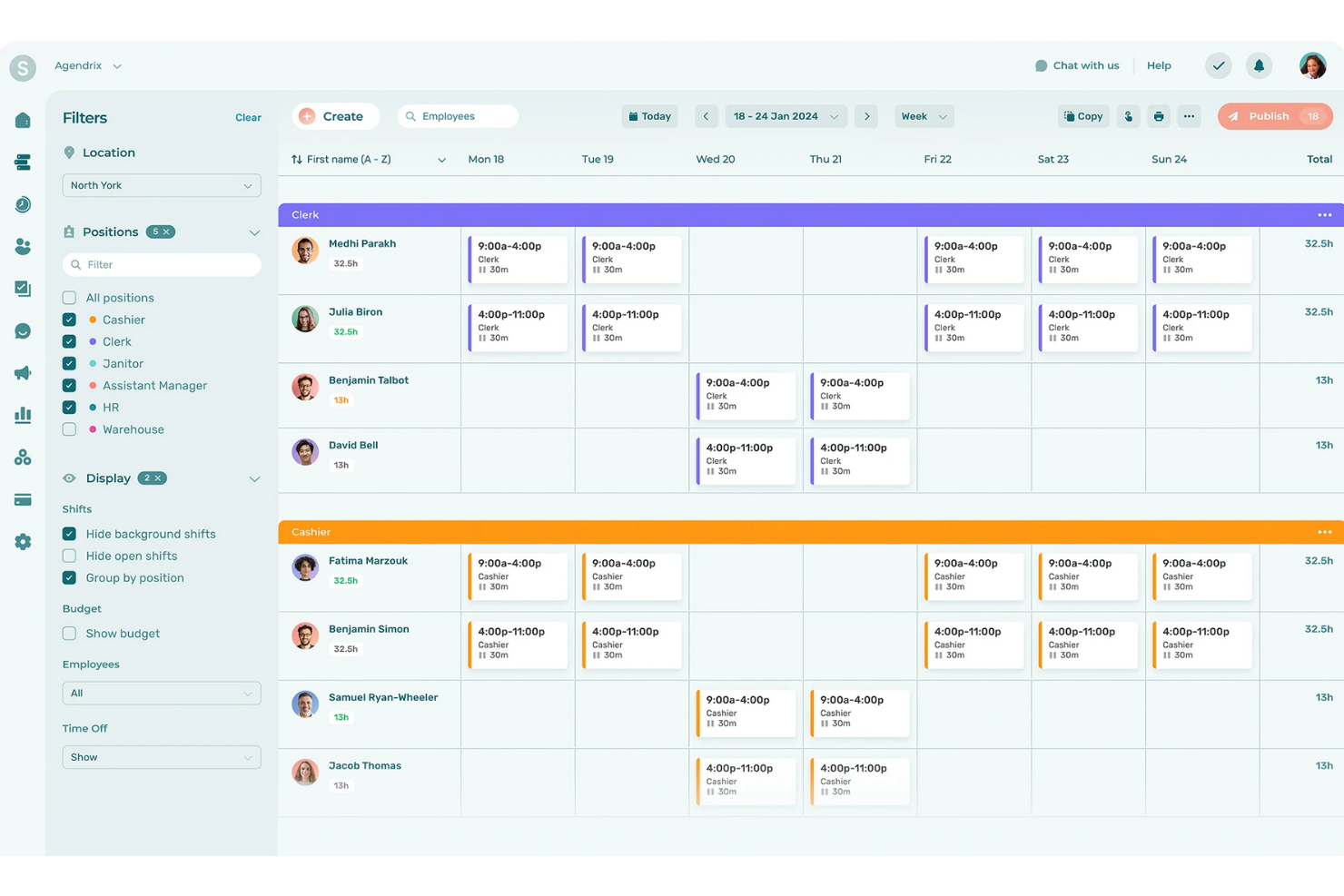
Für Callcenter, die ihr Workforce-Management optimieren möchten, bietet Agendrix eine einzigartige Mischung aus effizienter Einsatzplanung und HR-Management-Tools, die speziell auf die dynamischen Anforderungen von Schichtarbeitsumgebungen zugeschnitten sind. Besonders attraktiv könnten für Sie die Integrationsmöglichkeiten mit Plattformen wie QuickBooks und ADP Workforce Now sein, da diese die Lohnabrechnung und Anwesenheitsverfolgung vereinfachen. Indem es Herausforderungen wie die Verwaltung der Verfügbarkeit von Mitarbeitenden, Urlaubsanträge und Schichtzuweisungen adressiert, stellt Agendrix Ihrem Team die nötigen Werkzeuge zur Verfügung, um Produktivität und Kommunikation im gesamten Unternehmen zu verbessern.
Warum ich Agendrix ausgewählt habe
Ich habe Agendrix wegen seiner herausragenden Fähigkeit gewählt, die Mitarbeitereinsatzplanung und das Zeitmanagement in Callcentern zu vereinfachen. Die automatisierte Schichtzuweisungsfunktion sorgt dafür, dass Ihr Team immer optimal besetzt ist, während die geolokalisierte Zeiterfassung eine präzise Anwesenheitskontrolle ermöglicht. Darüber hinaus erweitert die mehrsprachige Unterstützung von Agendrix die Einsatzmöglichkeiten, was die Software zu einer vielseitigen Wahl für vielfältige Callcenter-Teams macht.
Agendrix Hauptfunktionen
Neben der Einsatzplanung von Mitarbeitenden bietet Agendrix:
- Mitarbeiter-Onboarding: Vereinfacht die Integration neuer Mitarbeitender in Ihr Team mit umfassenden Onboarding-Tools.
- Dokumentenmanagement: Ermöglicht eine effiziente Organisation und das schnelle Auffinden wichtiger HR-Dokumente, was Konformität und Zugänglichkeit sicherstellt.
- Leistungsmanagement: Unterstützt Leistungsbeurteilungen und Feedback, damit Sie hohe Standards im gesamten Team aufrechterhalten können.
- Mobile Apps: Bietet iOS- und Android-Apps, mit denen Ihr Team jederzeit und überall vernetzt und informiert bleibt.
Agendrix Integrationen
Integrationen umfassen QuickBooks, ADP Workforce Now, Lightspeed und Payworks.
Pros and Cons
Pros:
- Self-Service-Funktionen für Mitarbeitende entlasten das Management und reduzieren administrative Aufgaben
- Schichtbestätigungen verringern Ausfälle und Kommunikationsfehler
- Mobiloptimiertes Design ermöglicht Zugriff auf Einsatzpläne von überall
Cons:
- Berichtsfunktionen weniger fortschrittlich als bei manchen Wettbewerbern
- Einige Lohnabrechnungs-Integrationen erfordern manuelle Anpassungen

Am besten geeignet für Tools zur Mitarbeiterbindung
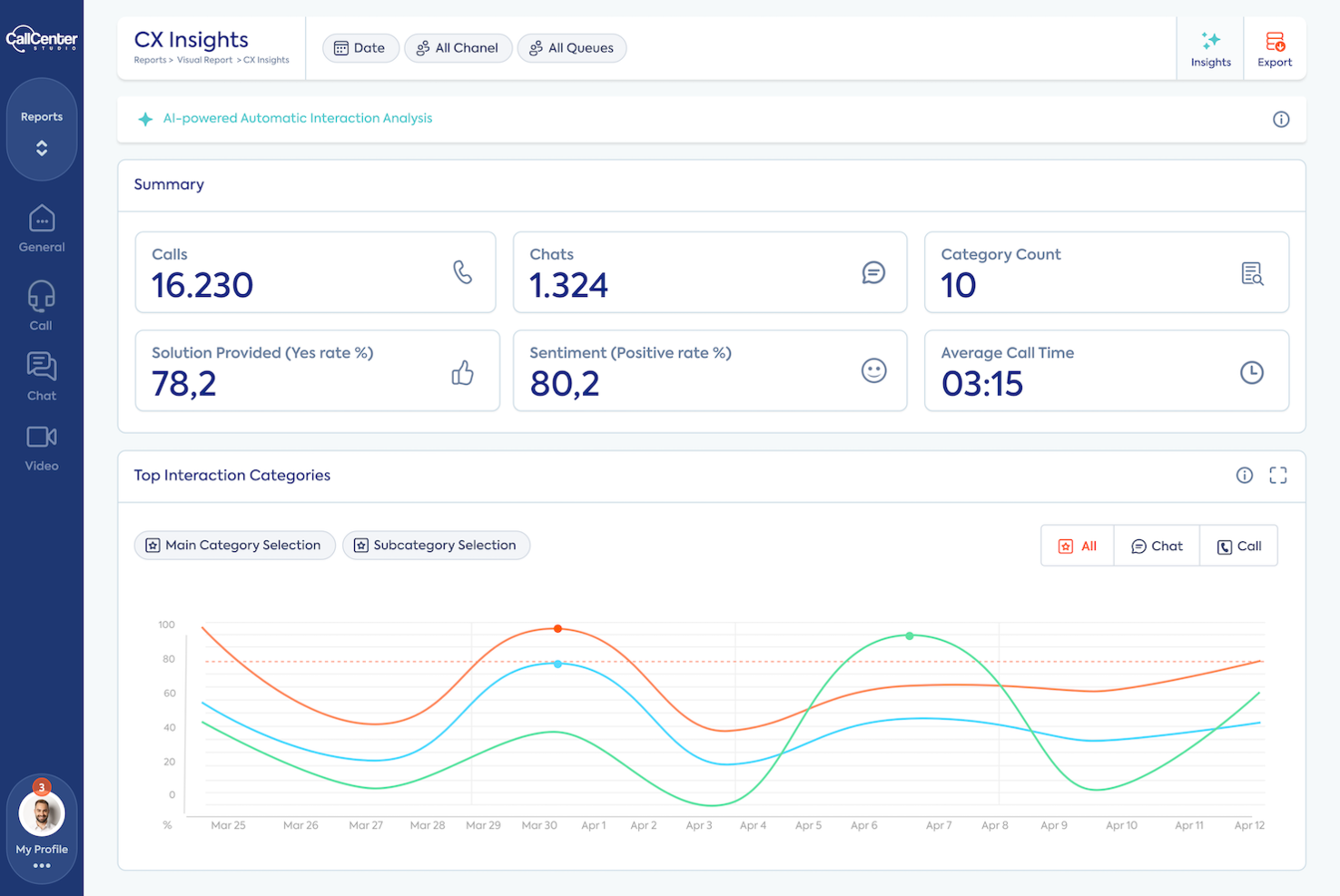
Call Center Studio ist eine cloudbasierte Contact-Center-Software, die das Workforce Management und die Kundenbindung für Unternehmen jeder Größe verbessert. Entwickelt, um umfassende Lösungen zu bieten, umfasst sie Funktionen wie eingehende und ausgehende Kontaktmöglichkeiten, Tools für die Mitarbeiterbindung und automatisierte Kundenservice-Optionen.
Warum ich Call Center Studio ausgewählt habe:
Ein Grund, warum ich Call Center Studio als Top-Auswahl für Callcenter Workforce-Management-Software gewählt habe, ist die Workforce Engagement Platform. Diese Plattform beinhaltet Leistungsmanagement, Qualitätsmanagement und Agenten-Coaching-Tools, die dazu beitragen, die Effizienz der Belegschaft zu optimieren und die Servicequalität zu verbessern. Fortschrittliche Analysen bieten Einblicke in Kundenerlebnisse und unterstützen eine datengesteuerte Entscheidungsfindung.
Ein weiterer überzeugender Grund ist die Unterstützung für Omnichannel-Kommunikation. Mit Call Center Studio können Unternehmen über verschiedene Kanäle wie Messaging, E-Mail und Live-Chat mit ihren Kunden interagieren. Diese Flexibilität gewährleistet Kundenzufriedenheit und ein konsistentes Erlebnis auf allen Plattformen. Außerdem automatisieren integrierte KI-Tools die Kundeninteraktionen und verbessern so den betrieblichen Ablauf.
Herausragende Funktionen & Integrationen:
Funktionen umfassen intelligente Anrufverteilung, die eingehende und ausgehende Anrufe verwaltet und so schnelle Verbindungen zwischen Kunden und geeigneten Agenten sicherstellt. Die Plattform überzeugt außerdem mit KI-gestützter Omnichannel-Kommunikation, die verschiedene Kanäle der Kundeninteraktion auf einer einzigen Plattform verwaltet und dadurch die betriebliche Effizienz steigert. Call Center Studio bietet leistungsstarke Berichts- und Leistungsüberwachungstools, die Echtzeitdaten und Kennzahlen für ein effizientes Performance Monitoring bereitstellen.
Integrationen umfassen WhatsApp, Messenger, Telegram, E-Mail, SMS, Zendesk, Salesforce, Oracle, Dialogflow, Freshdesk, Hubspot und Instagram Messenger.
Pros and Cons
Pros:
- Umfangreiche Reporting- und Analysefunktionen
- Flexible Bereitstellung: Cloud-, SaaS-Optionen
- Reaktionsschneller Support und Unterstützung bei der Implementierung
Cons:
- Gelegentliche UI-Komplexität für nicht-technische Nutzer
- Prognosen bei hoher Auslastung manchmal weniger präzise

Am besten für effiziente Anrufweiterleitung
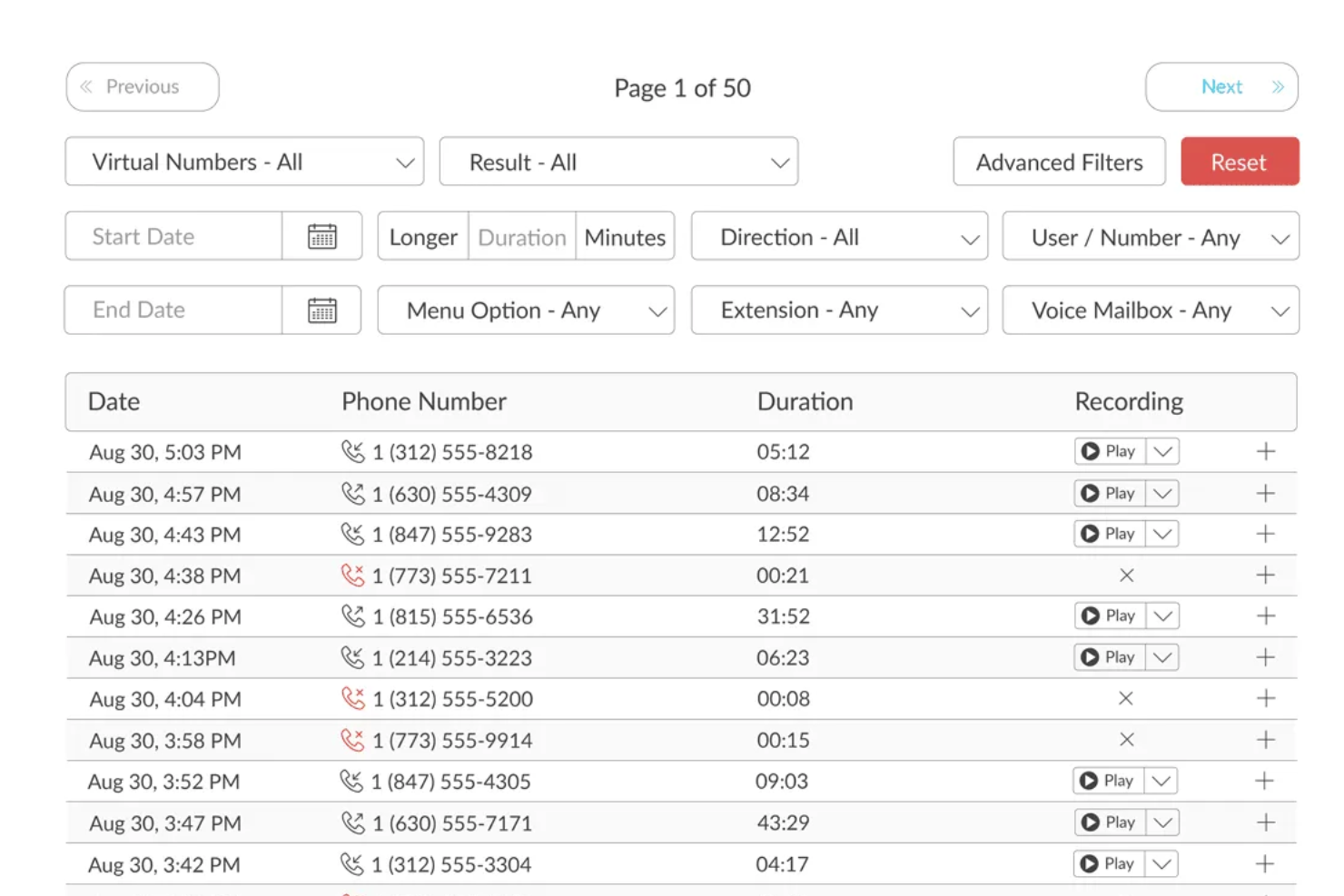
TalkRoute ist ein virtuelles Telefonsystem, das darauf ausgelegt ist, Ihre Unternehmenskommunikation zu vereinheitlichen. Sie können damit Anrufe über Ihre bestehenden Geräte tätigen und empfangen, was Flexibilität und Mobilität gewährleistet. Neben Sprachanrufen unterstützt Talkroute auch Textnachrichten und Videomeetings und bietet somit eine umfassende Kommunikationslösung für Unternehmen.
Warum ich TalkRoute ausgewählt habe: Ein überzeugendes Merkmal von Talkroute ist die Call-Stacking-Funktion. Dadurch werden mehrere eingehende Anrufe gleichzeitig bearbeitet, sodass Ihre Anrufer nie ein Besetztzeichen hören. Für ein Callcenter bedeutet dies eine höhere Kundenzufriedenheit und kürzere Wartezeiten. Ein weiterer Vorteil sind die anpassbaren Anrufmenüs. Sie können mehrstufige automatische Vermittlungen einrichten, um Anrufer gezielt an die passende Abteilung oder den richtigen Teammitarbeiter weiterzuleiten, was die Anrufweiterleitung noch effizienter macht.
Hervorstechende Funktionen & Integrationen:
Funktionen umfassen Anrufweiterleitung, Textnachrichten, Videomeetings, Desktop- und mobile Apps, Live-Anrufübertragung, individuelle Begrüßungen, Einstellungen für Betriebszeiten, Benutzerberechtigungen, Anpassung der Anruferkennung, detaillierte Berichte, Wartemusik und Voicemail-Transkription.
Integrationen umfassen Zapier, wodurch Verbindungen zu tausenden von Anwendungen möglich sind.
Pros and Cons
Pros:
- Stetige Gesprächsqualität und Zuverlässigkeit
- Preiswerter Service, besonders für kleine Unternehmen
- Lässt sich gut in bestehende Abläufe integrieren und ermöglicht die Nutzung bestehender Mobiltelefone
Cons:
- Einige Anwender wünschen sich umfangreichere Funktionen
- Zusätzliche Kosten für weitere Telefonnummern und Nutzer

Talkdesk
Am besten geeignet für mitarbeiterorientiertes Workforce Management
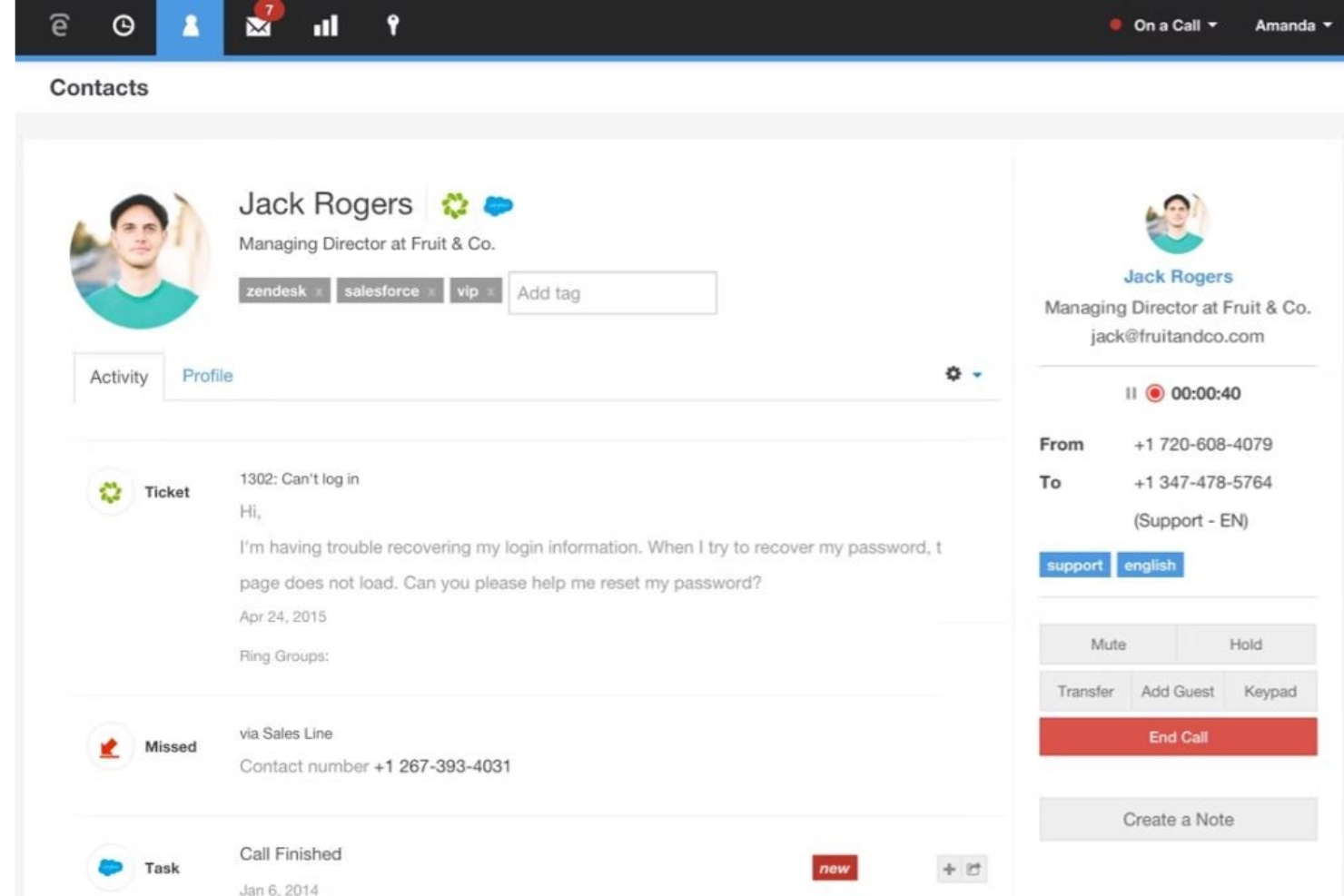
Talkdesk ist eine cloudbasierte Contact-Center-Software, die für Unternehmen entwickelt wurde, die Kundeninteraktionen durch fortschrittliche Analysen und Automatisierung verbessern möchten. Die Hauptnutzer sind mittlere bis große Unternehmen, die ihre Effizienz im Kundenservice steigern wollen.
Warum ich Talkdesk gewählt habe: Es bietet KI-gestützte Einblicke, mit denen Ihr Team datenbasierte Entscheidungen treffen kann. Funktionen wie Stimmungsanalyse und prädiktive Analytik liefern wertvolles Feedback zu Kundeninteraktionen. Die Automatisierungsmöglichkeiten der Plattform reduzieren manuelle Aufgaben, sodass sich Ihr Team auf komplexere Anliegen konzentrieren kann. Dank der Skalierbarkeit kann die Lösung den wachsenden Anforderungen Ihres Unternehmens gerecht werden.
Herausragende Funktionen & Integrationen:
Funktionen umfassen Stimmungsanalysen, die Kundenemotionen während der Interaktion bewerten. Prädiktive Analysen antizipieren Kundenbedürfnisse und verbessern die Servicebereitstellung. Automatisierungstools vereinfachen repetitive Aufgaben und entlasten Ihr Team.
Integrationen umfassen Salesforce, Microsoft Dynamics, Zendesk, Slack, HubSpot, Shopify, ServiceNow, Google Workspace, Microsoft Teams und Zoho CRM.
Pros and Cons
Pros:
- Anpassbare Metriken auf dem Dashboard
- Einfache Nutzerverfolgung
- Übersichtliche, einfache Benutzeroberfläche
Cons:
- Verzögerungen bei der Ticketerstellung
- Gelegentliche Fehler

Am besten geeignet, um qualifiziertes Personal zu gewinnen, zu fördern und zu binden
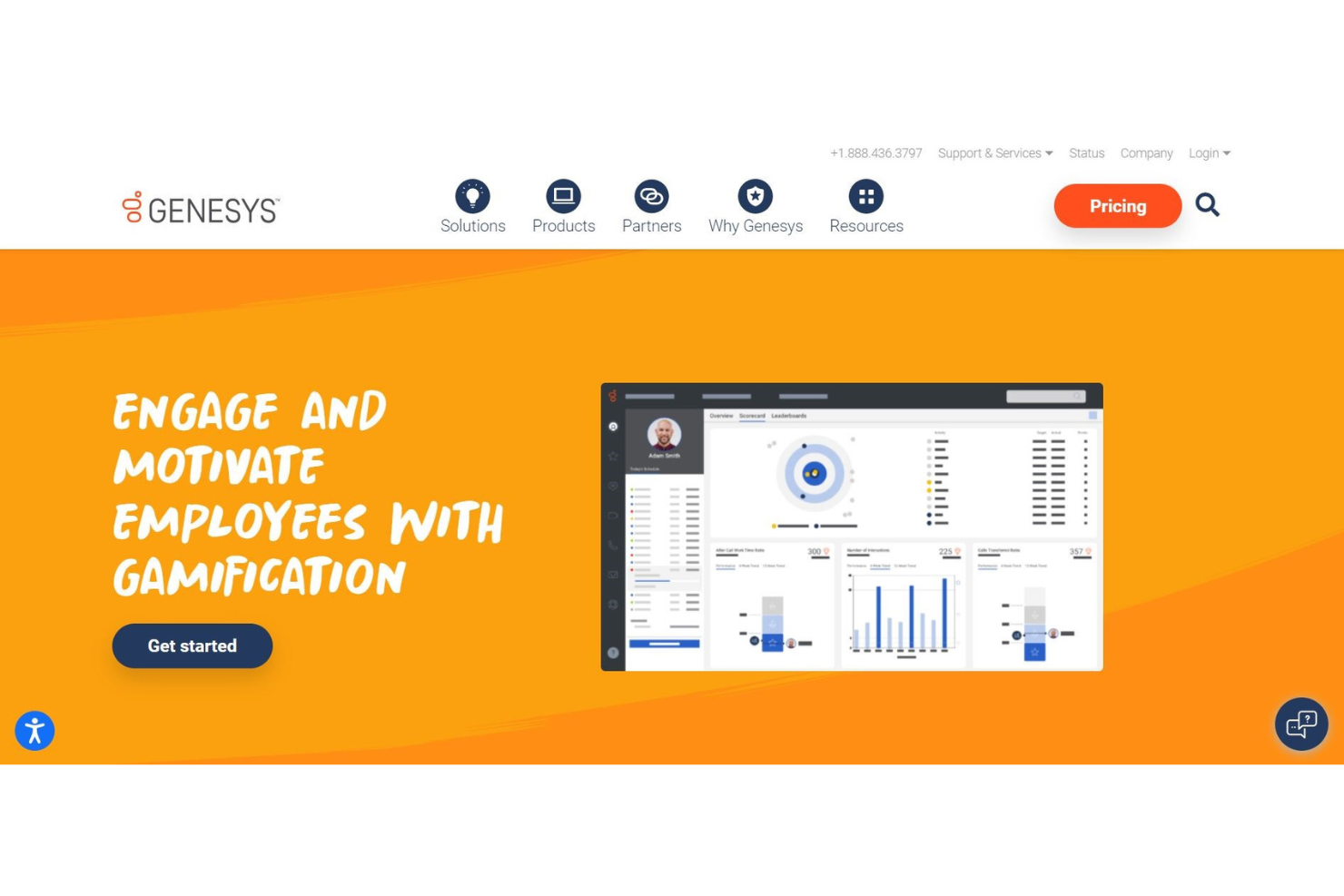
Genesys Cloud CX ist eine Customer-Experience-Plattform, die darauf ausgelegt ist, Unternehmen dabei zu unterstützen, ihre Interaktionsmöglichkeiten über mehrere Kanäle hinweg zu verbessern. Sie richtet sich an mittelgroße bis große Unternehmen und bietet Werkzeuge zur Verwaltung von Kundeninteraktionen sowie zur Optimierung der Servicebereitstellung.
Warum ich mich für Genesys Cloud CX entschieden habe: Die Plattform überzeugt durch ihre Omnichannel-Unterstützung und ermöglicht es Ihrem Team, Kundeninteraktionen nahtlos über Telefon, Chat, E-Mail und soziale Medien hinweg zu managen. Echtzeit-Dashboards liefern Einblicke in die Kundeninteraktionen. Durch flexible Bereitstellungsoptionen lässt sich Genesys Cloud CX an unterschiedliche geschäftliche Anforderungen anpassen. Die Skalierbarkeit sorgt dafür, dass die Lösung mit Ihrem Unternehmen wächst und steigende Anforderungen bewältigt.
Hervorstechende Funktionen & Integrationen:
Funktionen wie Echtzeit-Dashboards bieten visuelle Einblicke in Kundeninteraktionen und Leistungskennzahlen. Tools für das Workforce Management helfen, Personalressourcen und Dienstpläne zu optimieren. Die Plattform bietet zudem Anrufaufzeichnung und Qualitätsmanagement zur Sicherstellung hoher Service-Standards.
Integrationen umfassen Salesforce, Microsoft Teams, Zendesk, ServiceNow, Oracle, SAP, HubSpot, Google Workspace, Slack und Zoom.
Pros and Cons
Pros:
- Funktionen werden ständig verbessert
- Webbasierte Verwaltung
- Der Onboarding-Prozess ist einfach
Cons:
- Chat ist nicht PCI-konform
- Geringfügige Verzögerung in Echtzeit-Anzeigen

Ameyo
Am besten geeignet für den virtuellen und mobilen Contact-Center-Support
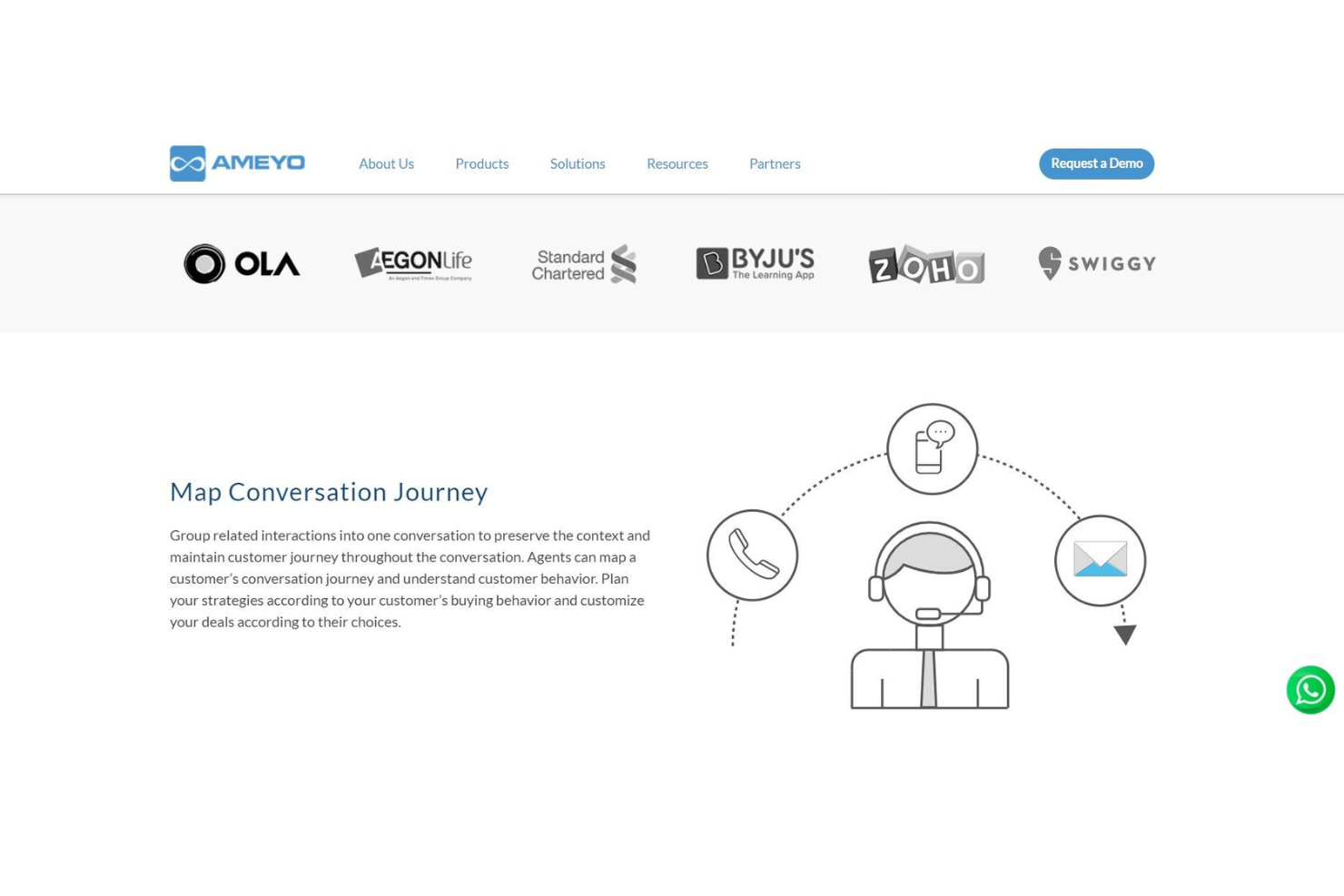
Ameyo ist eine Callcenter-Softwarelösung, die für Unternehmen entwickelt wurde, die sich auf die Verbesserung des Kundenengagements und der Kundenerfahrung konzentrieren. Sie bedient eine Vielzahl von Branchen, indem sie Werkzeuge zur Verwaltung von Kundeninteraktionen und zur Verbesserung der Servicequalität bereitstellt.
Warum ich Ameyo gewählt habe: Die Lösung überzeugt durch hervorragendes Kundenengagement und bietet Funktionen, mit denen Ihr Team effektiv mit Kunden interagieren kann. Die Plattform stellt Werkzeuge wie Omnichannel-Support und Customer Journey Mapping zur Verfügung, die entscheidend für die Aufrechterhaltung einer hohen Kundenzufriedenheit sind. Flexible Bereitstellungsoptionen sorgen dafür, dass sie sich an die Bedürfnisse Ihres Unternehmens anpassen kann. Die Anpassungsfähigkeit ermöglicht es Ihnen, die Software auf Ihre spezifischen Anforderungen zuzuschneiden.
Herausragende Funktionen & Integrationen:
Funktionen umfassen Omnichannel-Support, sodass Ihr Team Interaktionen über mehrere Kanäle hinweg verwalten kann. Customer Journey Mapping hilft Ihnen, das Kundenerlebnis zu verstehen und zu verbessern. Echtzeit-Analysen liefern Erkenntnisse, die bei Entscheidungen und der Strategieplanung unterstützen.
Integrationen umfassen Salesforce, Microsoft Dynamics, Zendesk, Freshdesk, SugarCRM, Oracle, SAP, ServiceNow, HubSpot und Zoho CRM.
Pros and Cons
Pros:
- Kontrolle über Pausen, Kampagnen und Aktivitäten der Agenten
- Keine Schulung erforderlich
- Einfache, benutzerfreundliche Werkzeuge
Cons:
- Anrufaufzeichnungen werden nach 30 Tagen gelöscht
- Berichtserstellung ist komplex
Wann Sie Personalmanagement im Callcenter einsetzen sollten
Software für das Personalmanagement im Callcenter hilft Ihnen, Anrufvolumen zu prognostizieren, Mitarbeitende einzuplanen und sicherzustellen, dass zur richtigen Zeit die richtigen Personen im Dienst sind – ganz ohne Rätselraten. Das Ergebnis: weniger Versorgungslücken, geringere Überstundenkosten und ein Team, das nicht ständig aufholen muss. Wenn Ihnen eines der folgenden Szenarien bekannt vorkommt, ist es wahrscheinlich an der Zeit, WFM in Ihre Systemlandschaft aufzunehmen:
- Ihr Team erstellt Dienstpläne in Tabellenkalkulationen: Angenommen, Sie verwalten mehr als 50 Mitarbeitende über mehrere Schichten hinweg und setzen alles in Excel zusammen. WFM automatisiert Prognosen und die Dienstplanerstellung, verkürzt die Erstellungszeit von Stunden auf Minuten und reduziert Versorgungslücken.
- Sie verfehlen Ihre Service-Level-Ziele regelmäßig: Wenn Ihre Abbruchraten steigen und die Wartezeiten während der Spitzenzeiten über zwei Minuten hinausgehen, liegt wahrscheinlich ein Problem bei der Personalverteilung vor und nicht bei der Anzahl der Mitarbeitenden. WFM stimmt die Verfügbarkeit der Mitarbeitenden auf die tatsächliche Nachfrage ab, damit SLAs eingehalten werden.
- Die Verwaltung von Abwesenheitsanträgen wird zu einer Vollzeitaufgabe: Wenn Mitarbeitende Anträge per E-Mail oder auf Papier einreichen, werden Genehmigungen schnell übersehen und kurzfristige Lücken führen zu hektischen Umplanungen. WFM zentralisiert Anträge und prüft vor der Genehmigung automatisch die Abdeckung, sodass nichts untergeht.
- In ruhigen Stunden sind Sie überbesetzt, in Stoßzeiten unterbesetzt: Wenn Sie um 10 Uhr für untätige Mitarbeitende bezahlen, während die Warteschlangen um 14 Uhr überlaufen, entspricht Ihre Planung nicht den tatsächlichen Anrufmustern. WFM nutzt historische Daten, um Schichten zu erstellen, die der Nachfrage folgen, und reduziert so Verschwendung.
- Es dauert Tage, Leistungstrends zu erkennen: Wenn Sie auf einen Wochenbericht warten müssen, um zu erfahren, dass eine Warteschlange am Dienstag schlecht ausgelastet war, reagieren Sie immer zu spät. WFM stellt Echtzeitdaten bereit, sodass Sie die Personalbesetzung anpassen oder Probleme erkennen können, bevor sie sich auf Ihren CSAT-Wert auswirken.
Weitere Optionen
Hier sind einige weitere lohnenswerte Optionen, die es nicht in die Liste der besten Personalmanagement-Softwarelösungen für Callcenter geschafft haben:
- Five9
E automatisierte, intelligent gesteuerte Lösung für das Workforce Management
- Bitrix24
Am besten für HR-Automatisierung und Zusammenarbeit
- Cisco Unified Contact Center Express
Am besten geeignet für Workforce-Optimierung
- Playvox
Am besten geeignet für präzise Personaleinsatz- und Schichtplanung
- Alvaria Workforce
Am besten geeignet für die Anlagenplanung
- PanTerra Networks
Am besten geeignet für vielseitige Teams mit mobilen, Remote- und hybriden Verwaltungsfähigkeiten
- ZIWO
Am besten geeignet zur Integration mit all Ihren wichtigen Drittanbieter-Tools
- MaxContact
Am besten für Omnichannel-Kundeninteraktion geeignet
- Insightful
Am besten geeignet für Einblicke in Echtzeit-Aktivitäten der Belegschaft
- Monitask
Am besten für die Echtzeitüberwachung von Mitarbeitenden
- LiveAgent
Am besten geeignet für Callcenter und Helpdesk in einem
- Nextiva
Am besten geeignet für KI-gestütztes Callcenter-Management
- Sharpen
Er agentenzentrierter Ansatz für Personalbesetzung mit vereinfachten Warteschlangen-Interaktionen


Wie ich Callcenter-Personaleinsatzplanung Software bewerte
Ich betrachte jedes Tool aus zwei Perspektiven: Die Grundfunktionen, die unbedingt vorhanden sein müssen—wie genaue Prognosen und Echtzeit-Compliance—und die Alleinstellungsmerkmale, die gute Tools von den wirklich passenden unterscheiden.
Kernfunktionen (Grundvoraussetzungen für diese Liste)
Bei der Auswahl der Tools für meine Liste bewerte ich jedes einzelne auf einer Skala von 0 (bietet die Funktionalität nicht) bis 5 (hervorragend in diesem Bereich) anhand jeder unten aufgeführten Kernfunktionalität. Danach rechne ich die Gesamtpunktzahl des Tools in einen Prozentsatz um. Jedes Tool muss mindestens eine Gesamtbewertung von 65% erreichen, um berücksichtigt zu werden.
- Bedarfsprognose-Engine: Ich prüfe, ob das Tool anhand historischer Interaktionsdaten Personalbedarfsprognosen erstellen kann, zum Beispiel, ob Montagmorgen-Spitzen nach einer Produkteinführung vorhergesagt werden können.
- Automatische Dienstplanerstellung: Jedes Tool sollte optimierte Schichtpläne auf Basis von Fähigkeiten, Schichtregeln und SLA-Zielen erstellen können, anstatt Planer zu zwingen, Agenten manuell einzuteilen.
- Tools für das Management innerhalb eines Tages: Echtzeit-Compliance-Überwachung und untertägige Neu-Prognosen sind hier besonders wichtig, besonders bei unerwarteten Volumenschwankungen, wenn Agenten schnell neu eingesetzt werden müssen.
- Omnikanal-Personaleinsatzplanung: Ich prüfe, ob Prognose und Planung über Voice hinaus auch Chat, E-Mail und Messaging mit ordentlicher gleichzeitiger Bearbeitung abdecken.
- Mitarbeiter-Self-Service: Agenten sollten in der Lage sein, über ein Portal oder eine mobile App Dienstpläne einzusehen, Urlaub einzureichen und Schichten zu tauschen, ohne für jede Änderung einen Vorgesetzten einbeziehen zu müssen.
- WFM-Reporting & Analytics: Ich achte auf Dashboards, die Compliance-Quoten, Prognosegenauigkeit und Shrinkage-Trends anzeigen, damit WFM-Analysten Schwachstellen in den Dienstplänen gezielt identifizieren können.
Nachdem ich eine Auswahl an Tools habe, die dieses Kriterium erfüllen, schaue ich mir an, was die jeweilige Plattform besonders macht.
Unterscheidungsmerkmale (Was Anbieter voneinander abhebt)
So vergleiche und unterscheide ich die verschiedenen Anbieter:
Herausragende Funktionen
Langfristige Kapazitätsplanung ist für mich essenziell. Tools, die Fluktuationsraten, Einstellungsprozesse und saisonale Trends modellieren, helfen Führungskräften, den Personalbedarf Monate im Voraus zu planen, statt nur von Quartal zu Quartal zu reagieren. Ich achte außerdem auf Schichtwunschsysteme, bei denen Agenten Schichtpräferenzen angeben und das System die Zuteilung nach Dienstalter oder Leistung vornimmt. Das ist eine praktische Methode, die Fluktuation zu senken. Auch KI-gestützte Prognosen sind mir wichtig—ich suche nach Modellen, die pro Warteschlange automatisch den passenden Algorithmus auswählen und sich über die Zeit verbessern, statt auf eine einzige Methode zu vertrauen.
Über Funktionen hinaus
Ich beginne mit dem Integrations-Ökosystem. Ein WFM-Tool braucht native Konnektoren zu Ihrer CCaaS-Plattform—egal ob Genesys, Five9 oder Amazon Connect—damit Prognosedaten direkt aus den Warteschlangen-Metriken statt über CSV-Uploads bezogen werden. Auch Compliance-Funktionen sind entscheidend, insbesondere wenn ein Betrieb mehrere Regionen mit unterschiedlichen Überstundenregelungen und Arbeitszeitgesetzen abdeckt. Die Preisstruktur prüfe ich ebenfalls genau. Manche Anbieter rechnen nach Modulen ab. Ein Team, das nur Prognose und Planung benötigt, sollte nicht die komplette Suite kaufen müssen, um starten zu können.
So wählen Sie Personalmanagement-Software für Callcenter aus
Es ist leicht, sich in langen Funktionslisten und komplexen Preisstrukturen zu verlieren. Damit Sie bei der Auswahl Ihrer individuellen WFM-Software den Überblick behalten, finden Sie hier eine Checkliste mit Faktoren, die Sie berücksichtigen sollten:
| Faktor | Was zu beachten ist |
|---|---|
| Skalierbarkeit | Stellen Sie sicher, dass die Software mit Ihrem Team wachsen kann. Achten Sie auf Lösungen mit flexiblen Tarifen, die bei wachsendem Unternehmen ein höheres Anrufvolumen und zusätzliche Benutzer unterstützen können. |
| Integrationen | Prüfen Sie, ob sich die Software in Ihre bestehenden Tools wie CRM-, E-Mail- und Chatsysteme integrieren lässt. Eine nahtlose Integration kann die Effizienz steigern und Unterbrechungen im Arbeitsablauf reduzieren. |
| Anpassbarkeit | Entscheiden Sie sich für Software, mit der Sie Funktionen an Ihre spezifischen Anforderungen anpassen können. Individuelle Dashboards und Berichte können dabei helfen, einzigartige geschäftliche Herausforderungen zu bewältigen und Abläufe zu verbessern. |
| Benutzerfreundlichkeit | Wählen Sie eine Plattform mit einer intuitiven Benutzeroberfläche, in die sich Ihr Team schnell einarbeiten kann. Eine steile Lernkurve kann die Einführung verzögern und die Gesamtproduktivität verringern. |
| Budget | Berücksichtigen Sie die Gesamtkosten einschließlich Einrichtung und möglicher versteckter Gebühren. Stellen Sie sicher, dass die Software in Ihr Budget passt und gleichzeitig die notwendigen Funktionen für Ihre Anforderungen bietet. |
| Sicherheitsvorkehrungen | Geben Sie Software mit robusten Sicherheitsfunktionen zum Schutz sensibler Daten den Vorrang. Achten Sie auf Verschlüsselung, Benutzerauthentifizierung und die Einhaltung von Branchenstandards. |
| Support | Bewerten Sie den Umfang des verfügbaren Kundensupports. Der Zugang zu Support rund um die Uhr, Schulungsressourcen und einem festen Account Manager kann entscheidend für eine reibungslose Nutzung sein. |
| Leistungskennzahlen | Achten Sie auf Lösungen mit detaillierten Analyse- und Berichtsfunktionen. Das Verständnis von Leistungskennzahlen kann Ihnen helfen, Prozesse zu optimieren und die Kundenzufriedenheit zu steigern. |
Trends bei Software für das Workforce-Management in Callcentern
Für meine Recherche habe ich unzählige Produktaktualisierungen, Pressemitteilungen und Versionsprotokolle verschiedener Anbieter von Software für das Workforce-Management in Callcentern ausgewertet. Hier sind einige der aufkommenden Trends, die ich im Blick behalte:
- KI-gestützte Analysen: KI verbessert die Datenanalyse, indem sie prädiktive Erkenntnisse und Unterstützung für Entscheidungen in Echtzeit bereitstellt. Dies hilft Managern, die Personalbesetzung zu optimieren und die Kundenzufriedenheit zu steigern. Einige WFM-Tools stellen außerdem sicher, dass Anrufe an Mitarbeiter mit den passenden Fähigkeiten weitergeleitet werden. Unternehmen wie Genesys integrieren KI, um präzisere Prognosewerkzeuge anzubieten.
- Migration in die Cloud: Immer mehr Unternehmen verlagern ihre Callcenter-Abläufe in die Cloud, um Flexibilität zu gewinnen und Kosten zu sparen. Cloudbasierte Lösungen ermöglichen Remote-Arbeit und eine bessere Skalierbarkeit. Anbieter wie Five9 treiben diesen Wandel mit leistungsfähigen Cloud-Plattformen voran.
- Tools zur Mitarbeiterbindung: Lösungen umfassen inzwischen Funktionen zur Steigerung der Motivation und Produktivität von Mitarbeitern, etwa Gamification und Leistungsfeedback. Dieser Trend konzentriert sich darauf, die Fluktuationsrate zu senken und die Servicequalität zu verbessern. Playvox bietet beispielsweise Tools, um Callcenter-Mitarbeiter einzubinden und zu motivieren.
- Omnichannel-Support: Die Bereitstellung konsistenter Kundenerlebnisse über mehrere Kanäle hinweg wird zunehmend zum Standard. Dieser Trend ist entscheidend, um Kundenerwartungen zu erfüllen und den Service zu verbessern. Plattformen wie Talkdesk erweitern ihr Angebot um Unterstützung für Sprache, Chat, E-Mail und soziale Medien.
- Zusammenarbeit in Echtzeit: Tools, die eine sofortige Kommunikation und Zusammenarbeit zwischen Teammitgliedern ermöglichen, werden immer beliebter. Dies führt zu einer schnelleren Problemlösung und einer besseren Teamarbeit. Lösungen wie PanTerra Networks integrieren Funktionen zur Unterstützung der Zusammenarbeit in Echtzeit.
Was ist Software für das Workforce-Management in Callcentern?
Software für das Workforce-Management in Callcentern ist ein Tool, das Contact-Center-Teams dabei unterstützt, den Bedarf zu prognostizieren, Mitarbeiter für die Verwaltung ausgehender Anrufe einzuplanen und die Leistung zu verfolgen. Sie wird eingesetzt, um die Personalbesetzung zu optimieren, Wartezeiten zu verkürzen und das Serviceniveau im Inbound- und Outbound-Support zu verbessern.
Funktionen von Software für das Workforce-Management in Callcentern
Achten Sie bei der Auswahl von Software für das Workforce-Management in Callcentern auf die folgenden wichtigen Funktionen:
- Prognose und Planung: Prognostizieren Sie den Personalbedarf und planen Sie die Schichten entsprechend. So stellen Sie sicher, dass immer genügend Agenten zur Bearbeitung des Anrufaufkommens verfügbar sind, wodurch sich Wartezeiten verkürzen und die Kundenzufriedenheit steigt.
- Echtzeitüberwachung: Verfolgen Sie die Leistung der Agenten und die Aktivitäten im Callcenter in Echtzeit. So können Sie schnell auf Spitzen beim Anrufaufkommen reagieren oder bei Bedarf sofortige Anpassungen an den Dienstplänen vornehmen.
- Erfassung von Arbeitszeit und Anwesenheit: Erfassen Sie automatisch die Arbeitsbeginnzeiten, Arbeitsendzeiten und Pausenzeiten der Agenten. Dies gewährleistet eine korrekte Lohnabrechnung und erleichtert die Einhaltung arbeitsrechtlicher Vorschriften.
- Einhaltungsmanagement: Überwachen Sie, ob die Agenten ihre geplanten Schichten und Pausenzeiten einhalten. So können Sie Probleme wie Verspätungen oder ungeplante Abwesenheiten erkennen und beheben.
- Intraday-Management: Passen Sie Prognosen und Dienstpläne im Laufe des Tages an veränderte Anrufmuster an. Bei einem unerwarteten Anstieg der Anrufe können Sie schnell zusätzliches Personal neu zuweisen oder einberufen.
- Berichte und Analysen: Greifen Sie auf detaillierte Berichte zur Produktivität der Agenten, zu Servicelevels und zur Wirksamkeit der Dienstpläne zu. Diese Daten helfen Ihnen, Trends zu erkennen, Engpässe zu identifizieren und fundierte Entscheidungen für die künftige Planung zu treffen.
- Urlaubs- und Abwesenheitsmanagement: Ermöglichen Sie Agenten, Freistellungen zu beantragen, und erfassen Sie alle Abwesenheiten an einem zentralen Ort. Das vereinfacht Genehmigungen und stellt sicher, dass die Dienstpläne aktualisiert werden, sodass es nie zu einer Unterbesetzung kommt.
- Unterstützung mehrerer Kanäle: Verwalten Sie die Personalplanung für Telefon, Chat, E-Mail und andere Kommunikationskanäle innerhalb einer einzigen Plattform. So können Sie Ihr Team unabhängig davon ausbalancieren, wie Kunden Kontakt aufnehmen möchten.
- Portale zur Selbstbedienung: Ermöglichen Sie Agenten, ihre Dienstpläne einzusehen, Schichten zu tauschen und Freistellungen zu beantragen, ohne einen Vorgesetzten ausfindig machen zu müssen. Das bedeutet weniger Verwaltungsaufwand für Sie und mehr Kontrolle für die Agenten.
Gängige KI-Funktionen von Software für das Personalmanagement in Callcentern
Über die oben aufgeführten Standardfunktionen von Software für das Personalmanagement in Callcentern hinaus integrieren viele dieser Lösungen KI mit Funktionen wie:
- KI-gestützte Prognosen: Nutzen Sie maschinelles Lernen, um historische Anrufmuster zu analysieren und den Personalbedarf genauer vorherzusagen. So vermeiden Sie eine Über- oder Unterbesetzung – selbst in unvorhersehbaren Zeiten.
- Intelligente Intraday-Anpassungen: Empfehlen oder implementieren Sie automatisch Änderungen an den Dienstplänen im Laufe des Tages auf Grundlage des Echtzeitbedarfs, damit Sie von einem plötzlichen Anstieg oder Rückgang der Anrufe nicht überrascht werden.
- Automatisierte Dienstplanoptimierung: Ermitteln Sie mithilfe von KI-Algorithmen die bestmöglichen Dienstpläne für Agenten und das Unternehmen, wobei Präferenzen, arbeitsrechtliche Vorschriften und erwartete Anrufvolumen berücksichtigt werden.
- KI-gestützte Leistungsanalysen: Decken Sie mithilfe fortschrittlicher Analysen verborgene Trends bei der Leistung der Agenten oder bei Kundeninteraktionen auf. So können Sie Schulungsmöglichkeiten leichter erkennen oder besonders leistungsstarke Mitarbeiter auszeichnen.
- Intelligente Abwesenheitsprognose: Analysieren Sie Muster, um mögliche Fehlzeiten vorherzusehen und Dienstpläne proaktiv anzupassen, bevor die Produktivität beeinträchtigt wird.
- Verarbeitung natürlicher Sprache (NLP) für Portale zur Selbstbedienung: Ermöglichen Sie Agenten, mithilfe einer natürlichen, dialogorientierten Sprache mit Planungstools zu interagieren – dadurch werden Portale zur Selbstbedienung intuitiver und benutzerfreundlicher.
Vorteile von Software für das Personalmanagement in Callcentern
Wenn Sie denken: „Aber warum kann ich für die Planung der Agenten nicht einfach Tabellenkalkulationen verwenden?“, kann ich das nachvollziehen. Die Implementierung von Software für das Personalmanagement in Callcentern bietet Ihrem Team und Ihrem Unternehmen jedoch mehrere Vorteile, die über das hinausgehen, was eine statische Tabelle leisten kann. Hier sind einige Vorteile, auf die Sie sich freuen können:
- Verbesserte Effizienz: Automatisierte Planung und Prognosen reduzieren manuelle Aufgaben und helfen dabei, Ressourcen effektiver zuzuweisen.
- Verbesserte Kundenerfahrung: Die Unterstützung mehrerer Kanäle gewährleistet konsistente Interaktionen über verschiedene Kommunikationsplattformen hinweg und steigert die Kundenzufriedenheit.
- Bessere Entscheidungsfindung: KI-gestützte Erkenntnisse und Leistungsanalysen liefern datengestützte Empfehlungen zur Optimierung der Abläufe.
- Höhere Produktivität der Agenten: Instrumente zur Mitarbeiterbindung wie spielerische Elemente motivieren Ihr Team und stärken die Arbeitsmoral.
- Kosteneinsparungen: Präzise Prognosen und Dienstpläne helfen bei der Steuerung des Personalbestands und reduzieren unnötige Personalkosten. Laut Verint verzeichnen deren Kunden durch die Einführung von Tools zur Workforce-Planung eine durchschnittliche Verringerung der Überstundenkosten um 30%.
- Einhaltung des Dienstplans: Verfolgung der Anwesenheitsquoten im Zeitverlauf, einschließlich Nichterscheinen, Schichttausch und PTO.
WFM-Software für Callcenter Implementierung Herausforderungen & Lösungen
Die Implementierung einer Personaleinsatzmanagement-Lösung (WFM) in einem Callcenter kann die Effizienz erheblich steigern, bringt jedoch auch Hindernisse mit sich. Im Folgenden werden drei häufige Herausforderungen und ihre Lösungen vorgestellt, um eine reibungslose Implementierung sicherzustellen.
- Widerstand gegen Veränderungen: Mitarbeiter und Manager zögern möglicherweise, neue WFM-Software einzuführen, weil sie eine zu hohe Komplexität oder Auswirkungen auf ihre Arbeitsplätze befürchten.
- Lösung: Kommunizieren Sie die Vorteile klar, bieten Sie praxisnahe Schulungen an und beziehen Sie die Mitarbeiter in den Implementierungsprozess ein, um ihre Akzeptanz zu erhöhen.
- Integration in bestehende Systeme: WFM-Software muss nahtlos mit CRM-, Lohnabrechnungs- und anderen Tools zusammenarbeiten, was schwierig sein kann, wenn Systeme veraltet oder inkompatibel sind.
- Lösung: Wählen Sie eine WFM-Lösung mit umfassenden Integrationsmöglichkeiten, arbeiten Sie eng mit den IT-Teams zusammen und testen Sie die Integrationen schrittweise vor der vollständigen Einführung.
- Probleme mit Datengenauigkeit und Prognosen: Eine fehlerhafte Dateneingabe oder falsche Konfigurationen können zu ungenauen Personalprognosen und ineffizienter Einsatzplanung führen.
- Lösung: Stellen Sie eine saubere Datenmigration sicher, führen Sie gründliche Tests durch und optimieren Sie die Prognosemodelle kontinuierlich anhand historischer Daten und Echtzeitdaten.
Preismodelle für Callcenter- WFM-Software
Bei der Auswahl einer Personaleinsatzmanagement-Software für Callcenter ist es wichtig, die verschiedenen verfügbaren Preismodelle und Tarife zu verstehen. Die Kosten variieren je nach Funktionen, Teamgröße, Zusatzoptionen und weiteren Faktoren. Die folgende Tabelle fasst gängige Tarife, ihre Durchschnittspreise und typische Funktionen zusammen, die in Lösungen für Personaleinsatzmanagement-Software in Callcentern enthalten sind:
Vergleichstabelle der Tarife für Personaleinsatzmanagement-Software in Callcentern
| Tariftyp | Durchschnittlicher Preis | Übliche Funktionen |
|---|---|---|
| Kostenloser Tarif | $0/user/month | Grundlegende Einsatzplanung, Anruferfassung und eingeschränkte Berichterstattung. |
| Persönlicher Tarif | $10-$30/user/month | Einsatzplanung, Anrufaufzeichnung, Leistungsanalysen und eingeschränkte Integrationen. |
| Geschäftstarif | $40-$70/user/month | Erweiterte Einsatzplanung, Echtzeitüberwachung, KI-Einblicke und umfassende Berichterstattung. |
| Unternehmenstarif | $80-$150/user/month | Omnichannel-Unterstützung, erweiterte Analysen, benutzerdefinierte Dashboards und vollständige Integrationen. |
Sie können diese Werte mit den durchschnittlichen Callcenter-Kosten vergleichen und ihnen gegenüberstellen, um zu entscheiden, wie Sie vorgehen möchten.
Andere fragen auch
Haben Sie noch offene Fragen zu Personalmanagement-Software für Callcenter? Diese Antworten auf häufig gestellte Fragen sind ein guter Ausgangspunkt:
Wie kann Personalmanagement-Software dazu beitragen, das Burnout-Risiko von Agenten in Callcentern zu reduzieren?
Personalmanagement-Software hilft, das Burnout-Risiko von Agenten zu reduzieren, indem sie eine faire und ausgewogene Einsatzplanung automatisiert und sicherstellt, dass niemand über Schichten und Wochen hinweg überlastet wird. Diese Tools überwachen die Arbeitsauslastung und warnen Sie vor Mustern, die zu Erschöpfung führen. Mit präzisen Prognosen vermeiden Sie chronische Unterbesetzung während Stoßzeiten, sodass Ihr Team nicht ständig zusätzliche Arbeit auffangen muss. Flexible Funktionen ermöglichen es Agenten, bevorzugte Schichten anzufordern, mit Kollegen zu tauschen oder ihre Verfügbarkeit per Selbstverwaltung zu verwalten, was die Vereinbarkeit von Berufs- und Privatleben verbessert. Mit der Zeit führt dies zu höherem Engagement, geringerer Fluktuation und einem belastbareren Callcenter-Team.
Wie genau sind die Prognosefunktionen von Personalmanagement-Software bei der Bewältigung von Spitzen im Anrufvolumen?
Die meisten Personalmanagement-Plattformen nutzen historische Daten, Muster und sogar saisonale Faktoren, um äußerst genaue Prognosen für das tägliche Anrufvolumen zu erstellen. In der Regel funktionieren sie gut, solange Ihre Daten aktuell sind und die Modelle regelmäßig feinjustiert werden. Bei plötzlichen Spitzen aufgrund von Werbeaktionen, Ausfällen oder Nachrichtenereignissen kann die Genauigkeit abnehmen, wenn Sie diese Faktoren nicht eingeben. Fortschrittliche Lösungen ermöglichen es Ihnen, Prognosen manuell anzupassen oder in Echtzeit „Was-wäre-wenn“-Szenarien auszulösen, sodass Sie Ihre Personalbesetzung bei unerwarteten Ereignissen schnell anpassen können. Die Überprüfung der Prognoseergebnisse nach jeder Spitze verbessert außerdem die zukünftige Genauigkeit.
Welche Aufgaben übernimmt Personalmanagement in einem Callcenter?
Personalmanagement-Software plant die Einsätze von Callcenter-Agenten, prognostiziert das eingehende Anrufvolumen und verfolgt die Produktivität in Echtzeit. Sie hilft Ihnen sicherzustellen, dass die richtige Anzahl von Agenten mit den passenden Fähigkeiten bei Bedarf verfügbar ist, was zu besserem Kundenservice und kürzeren Wartezeiten führt. Personalmanagement-Software überwacht außerdem die Einhaltung von Vorgaben, misst Leistungskennzahlen und automatisiert routinemäßige Verwaltungsaufgaben, sodass Sie weniger Zeit mit manueller Planung und mehr Zeit mit der Optimierung von Ergebnissen verbringen. Sie verschafft Ihnen eine bessere Kontrolle über die Arbeitskosten und unterstützt gleichzeitig die Einhaltung von Vorschriften oder Tarifvereinbarungen.
Was sind die 6 zentralen Bestandteile von WFM?
Die sechs zentralen Bestandteile von WFM in einem Callcenter sind Prognose, Einsatzplanung, Echtzeit-Einhaltung, untertägiges Management, Berichte und Analysen sowie die Erfassung von Arbeitszeit und Anwesenheit. Die Prognose sagt das Anrufvolumen voraus, sodass Sie vorausschauend planen können; die Einsatzplanung weist Schichten effizient zu; die Echtzeit-Einhaltung verfolgt, ob Agenten sich an die Pläne halten; das untertägige Management ermöglicht es Ihnen, die Personalbesetzung flexibel anzupassen; Analysen helfen Ihnen, Trends oder Probleme zu erkennen; und die Arbeitszeit- und Anwesenheitserfassung automatisiert Stundenzettel, wodurch Fehler und Probleme bei der Lohnabrechnung reduziert werden. Wenn Sie diese Bereiche beherrschen, können Sie Service und Effizienz ausbalancieren.
Was ist der Unterschied zwischen Personalmanagement und Personaloptimierung?
Personalmanagement (WFM) und Personaloptimierung (WFO) sind eng miteinander verbunden, erfüllen jedoch innerhalb eines Callcenters oder Contactcenters unterschiedliche Zwecke.
Beim Personalmanagement geht es darum, die richtige Anzahl von Agenten zur richtigen Zeit am richtigen Ort einzusetzen. Dazu gehören die Prognose des Anrufvolumens, die Erstellung von Schichtplänen, das untertägige Management, die Erfassung der Anwesenheit sowie die Sicherstellung der Verfügbarkeit von Agenten und der Einhaltung arbeitsrechtlicher Vorgaben. Es bildet das operative Rückgrat, das dafür sorgt, dass Ihr Team pünktlich und innerhalb des Budgets arbeitet.
Die Personaloptimierung geht einen Schritt weiter. Sie integriert WFM in eine umfassendere Strategie, die auch Qualitätsmanagement, Leistungsanalysen, Sprachanalysen und Coaching umfasst. Das Ziel besteht nicht nur darin, die Personalbesetzung effizient zu gestalten, sondern das Serviceerlebnis kontinuierlich zu verbessern, die Kosten der Leistungserbringung zu senken und das Mitarbeitererlebnis zu steigern.
Man kann es sich so vorstellen: WFM sorgt dafür, dass Ihre Agenten pünktlich zur Arbeit erscheinen. WFO hilft ihnen – und Ihrem Betrieb –, jeden Tag bessere Leistungen zu erbringen.
Wer sollte Personalmanagement-Lösungen in einem Callcenter einsetzen?
Jede Führungskraft eines Callcenters, die mehr als eine Handvoll Agenten verwaltet, sollte WFM-Lösungen einsetzen. Wenn das Anrufvolumen und die Komplexität der Personalplanung zunehmen, wird die manuelle Einsatzplanung schnell unüberschaubar. Wenn Sie mehrere Schichten, unterschiedliche Geschäftszeiten sowie Remote- oder hybride Teams haben oder flexible Arbeitsmuster anbieten möchten, helfen Ihnen WFM-Tools bei der Bewältigung dieser Komplexität. Sie sind auch für wachsende Center wertvoll, die Kosten optimieren, strenge Service-Level-Ziele erfüllen oder Arbeitsgesetze und Tarifvereinbarungen einhalten müssen.
Wie misst man den ROI von Personalmanagement-Software?
Messen Sie den ROI, indem Sie Einsparungen bei den Personalkosten, weniger Überstunden, eine höhere Genauigkeit der Einsatzplanung und bessere Servicekennzahlen den Ausgaben für Ihre Personalmanagement-Software gegenüberstellen. Viele Callcenter erzielen einen ROI durch eine geringere Fluktuation von Agenten, weniger Zeitaufwand für manuelle Verwaltungsaufgaben und eine bessere Fähigkeit, SLAs zu erfüllen. Sie können außerdem KPIs wie die Einhaltung der Einsatzplanung, die durchschnittliche Bearbeitungszeit und die Kundenzufriedenheit vor und nach der Einführung von WFM verfolgen. Die Auswertung dieser Datenpunkte vermittelt Ihnen ein klares Bild der finanziellen und operativen Auswirkungen insgesamt.
Welche Best Practices gibt es für Personalmanagement-Software in Callcentern?
Nutzen Sie die Echtzeitüberwachung regelmäßig, um Einsatzpläne schnell anzupassen und Service-Level aufrechtzuerhalten. Überprüfen Sie die Prognosegenauigkeit nach Spitzenzeiten oder besonderen Ereignissen. Holen Sie regelmäßig Feedback von Agenten ein und berücksichtigen Sie deren Präferenzen nach Möglichkeit bei der Schichtplanung. Verknüpfen Sie Ihre Personalmanagement-Software mit Telefon-, CRM- und Helpdesk-Tools, um einheitliche Erkenntnisse zu erhalten, und bieten Sie sowohl Führungskräften als auch Agenten fortlaufende Schulungen an. Diese Maßnahmen helfen Ihnen, eine zuverlässigere Abdeckung, weniger Abwesenheiten und eine höhere Teammoral zu erreichen.