

Bei der großen Auswahl an Helpdesk-Softwarelösungen ist es schwierig herauszufinden, welche am besten zu Ihren Anforderungen passt — insbesondere, wenn Sie unbedingt kostenlose Helpdesk-Software verwenden möchten. Sie wissen, dass Sie eine Software benötigen, die Sie bei der Verwaltung wichtiger Supportaufgaben und der effizienten Bearbeitung von Kundenanfragen unterstützt, müssen aber noch herausfinden, welches System am besten geeignet ist.
In diesem Artikel helfe ich Ihnen dabei, diese Entscheidung zu erleichtern, indem ich meine Erkenntnisse über die beste kostenlose Helpdesk-Software für die Bearbeitung von Kundensupportanfragen teile, ohne Ihr Budget zu belasten.
Warum Sie unseren Software-Empfehlungen vertrauen können
6,700+
Reviews
20
Industry experts
16+
Evaluation factors
14
Years
Unser Team testet und bewertet Software seit 2012. Als CX-Führungskräfte selbst wissen wir, wie schwierig – und wichtig – es ist, die richtige Software auszuwählen.
Für diesen Leitfaden haben wir Tools mithilfe von praktischen Tests und unabhängiger Recherche bewertet und dabei unsere Bewertungskriterien angewendet.
Unsere Bewertungen spiegeln unser menschliches redaktionelles Urteilsvermögen wider, keine Verkaufsstrategie.
 Gui DrusinaCreative Director
 Tim FisherVP of AI
Vergleichstabelle: Kostenlose Helpdesk-Software
Diese Vergleichstabelle fasst die Preisinformationen meiner besten kostenlosen Helpdesk-Software-Empfehlungen zusammen.
| Tool | Best For | Trial Info | Price | ||
|---|---|---|---|---|---|
| 1 | Am besten geeignet für Omnichannel-Kundenservice-Software | 15-tägige kostenlose Testversion + Gratis-Tarif | Ab $7/Benutzer/Monat (jährliche Abrechnung) | Website | |
| 2 | Am besten geeignet für die kollaborative Bearbeitung von E-Mail-basierten Tickets | 30-tägige kostenlose Testversion verfügbar | Ab $14/Benutzer/Monat (jährlich abgerechnet) | Website | |
| 3 | Am besten für KI-gesteuerte Ticket-Automatisierung | 14-tägige kostenlose Testversion verfügbar | Ab $16/Nutzer/Monat (jährliche Abrechnung) | Website | |
| 4 | Am besten geeignet wegen 15 Jahren Markterfahrung | Kostenlose Demo verfügbar | Preise auf Anfrage | Website | |
| 5 | Am besten geeignet für die Kombination aus Live-Support und Chatbots | 7-tägige kostenlose Testphase + kostenloser Tarif verfügbar | Ab $25/Nutzer/Monat | Website | |
| 6 | Am besten geeignet für Zusammenarbeit | Kostenloser Plan + kostenlose Demo verfügbar | Ab $29/Nutzer/Monat | Website | |
| 7 | Am besten geeignet für KI-gestütztes Ticketmanagement | Kostenlose Testphase verfügbar | Ab $26/Sitz/Monat (mindestens 3 Sitze) | Website | |
| 8 | Am besten geeignet für mehrere Service-Level-Vereinbarungen | Kostenloser Tarif verfügbar | Kostenlos nutzbar | Website | |
| 9 | Am besten für automatisierte Ticket-Qualitätssicherung | 14-tägige kostenlose Testversion | Ab $25/Nutzer/Monat (bei jährlicher Abrechnung) | Website | |
| 10 | Bestes Chat-Widget für Websites und Apps | Kostenlose 14-tägige Testphase + kostenlose Demo verfügbar | Ab $29/Nutzer/Monat (jährliche Abrechnung) | Website |


Tests der besten kostenlosen Helpdesk-Software
Hier finden Sie eine kurze Beschreibung jeder kostenlosen Helpdesk-Software, die den besten Anwendungsfall jedes Tools, einige bemerkenswerte Funktionen und Screenshots vorstellt, um einen Eindruck von der Benutzeroberfläche zu vermitteln.
 Am besten geeignet für Omnichannel-Kundenservice-Software
- 15-tägige kostenlose Testversion + Gratis-Tarif
- Ab $7/Benutzer/Monat (jährliche Abrechnung)
Visit WebsiteCustomer Rating:4.4/5
Das Zoho Desk Dashboard zeigt Ihnen, welche Tickets momentan bearbeitet werden. Zoho Desk ist eine cloudbasierte Helpdesk-Lösung, die Ihnen hilft, Support-Tickets über ein Kundenservice-Portal zu verwalten. Die Software sammelt Interaktionen, die per E-Mail, Telefon, Chat, soziale Medien oder Formulare eingehen. Zu den Funktionen gehören Ticketzuweisung, Benachrichtigungsregeln, Service-Eskalationen und zeitbasierte Aktionen.
Sie können Workflow-Regeln festlegen, um den Bedarf an manueller Eingabe zu reduzieren, Berichte planen und die Kundenzufriedenheit messen. Ein grafisches Dashboard erleichtert die Analyse der Zufriedenheitswerte. Darüber hinaus kann das System angepasst werden, indem Sie Registerkarten umbenennen, neue Abteilungen hinzufügen oder E-Mail-Vorlagen individualisieren.
Dieses Tool lässt sich in Geschäftsanwendungen wie Google Workspace, ScreenMagic, Jira, Slack und Salesforce integrieren.
Zoho Desk bietet einen kostenlosen Tarif für bis zu drei Agenten.
Learn more about Zoho Desk: Am besten geeignet für die kollaborative Bearbeitung von E-Mail-basierten Tickets
- 30-tägige kostenlose Testversion verfügbar
- Ab $14/Benutzer/Monat (jährlich abgerechnet)
Visit WebsiteCustomer Rating:4.8/5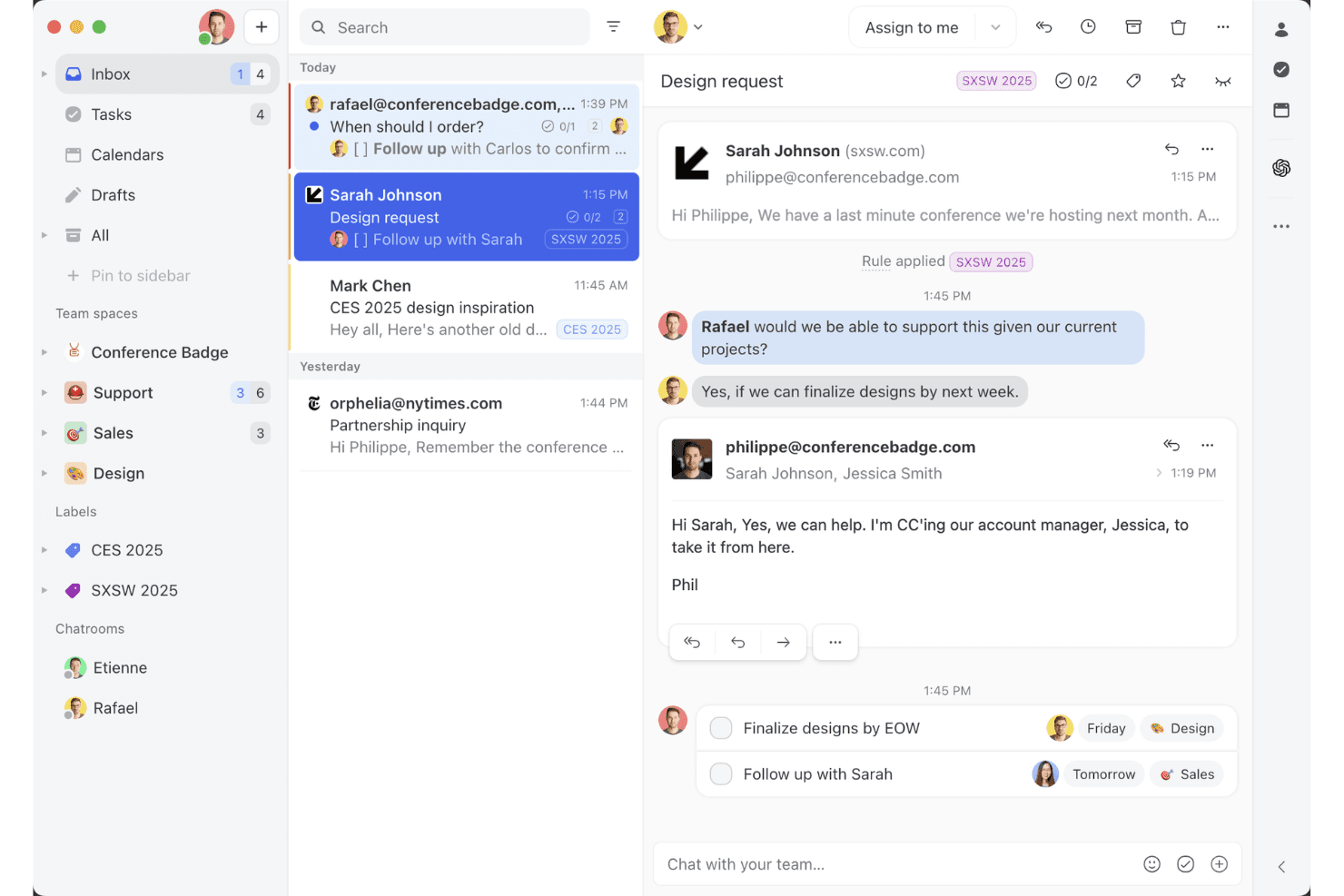
Die Ansicht des gemeinsamen Missive-Posteingangs zeigt, wie Teams in einem Arbeitsbereich gemeinsam an E-Mail-Threads arbeiten, Aufgaben zuweisen und Kundenkonversationen verwalten können. Missive ist eine kollaborative Team-Posteingangsplattform für mehrere Kanäle, die E-Mail-, SMS-, WhatsApp-, Social-Messaging-, Live-Chat- und Sprachkonversationen zentralisiert und leistungsstarke Funktionen für Zuweisungen, Automatisierung und die Zusammenarbeit von Mitarbeitenden in Echtzeit bietet.
Für wen ist Missive am besten geeignet?
Für Teams, die einen kollaborativen gemeinsamen Posteingang wünschen, der Kundenkonversationen über mehrere Kanäle in einer vertrauten Benutzeroberfläche im E-Mail-Stil zentralisiert.
Warum ich Missive ausgewählt habe
Ich habe Missive ausgewählt, weil es CX-Teams, die mehrere Kanäle verwalten, die kollaborative Bearbeitung von E-Mail-basierten Tickets erleichtert. Ich nutze Funktionen wie das gemeinsame Erstellen von Entwürfen in Echtzeit und den internen Chat in Konversationen. Dadurch kann mein Team Fälle ohne E-Mail-Chaos lösen. Zuweisungen, regelbasierte Weiterleitung und Posteingänge für mehrere Kanäle sorgen dafür, dass alles sichtbar und umsetzbar bleibt.
Die wichtigsten Funktionen von Missive
- Posteingang für mehrere Kanäle: Zentralisiert E-Mail-, SMS-, WhatsApp-, Instagram-, Messenger-, Live-Chat- und Sprachkonversationen in einem Arbeitsbereich.
- Regelbasierte Automatisierung: Ermöglicht bis zu 1.000 benutzerdefinierte Regeln für Weiterleitungen, automatische Markierungen, Eskalationen und automatische Antworten.
- Missive-MCP-Server: Verbindet externe KI-Clients wie Claude oder ChatGPT mit mcp.missiveapp.com, um CX-Konversationen zu durchsuchen, Kalender zu prüfen und Antworten zu entwerfen – wobei vor dem Senden weiterhin eine menschliche Genehmigung erforderlich ist.
- Echtzeit-Auditprotokolle: Erfasst jede Aktion und Zuweisung in Konversationen mit vollständigen Protokollen zu Benutzern und Zeitstempeln.
- Mobile und Desktop-Apps: Bietet native Apps für iOS, Android, macOS und Windows sowie vollständige Funktionsgleichheit im Web für den Zugriff unterwegs.
Missive-Integrationen
Missive bietet mehr als 25 native Integrationen, darunter Aircall, HubSpot, Salesforce, Asana, Trello, ClickUp, Notion, Dialpad, Shopify, Stripe, Google Drive, Dropbox und Zapier. Die Tarife Productive und Business schalten außerdem den Zugriff auf eine benutzerdefinierte REST-API sowie den neuen MCP-Server frei, sobald dieser von einem Administrator aktiviert wurde.
Was ist kostenlos?
Missive bietet eine 30-tägige kostenlose Testversion, die alle Funktionen freischaltet, stellt jedoch keinen dauerhaft kostenlosen Tarif bereit. Nach Ablauf der Testversion müssen Sie einen kostenpflichtigen Tarif auswählen, um die Plattform weiterhin nutzen zu können.
Pros and Cons
Pros:
- Echter gemeinsamer Posteingang für Nachrichten über mehrere Kanäle
- Teamchat in Echtzeit zu jeder Konversation
- Gastzugriff für externe Mitarbeitende
Cons:
- Kein dauerhaft kostenloser Tarif verfügbar
- Keine native Wissensdatenbank und kein CSAT
Learn more about Missive: Am besten für KI-gesteuerte Ticket-Automatisierung
- 14-tägige kostenlose Testversion verfügbar
- Ab $16/Nutzer/Monat (jährliche Abrechnung)
Visit WebsiteCustomer Rating:4.6/5
Der Omnichannel-Posteingang von SparrowDesk zentralisiert Kundenkonversationen, Ticketstatus, Prioritätsstufen und Zuweisungen an Agenten in einem Dashboard. Für alle, die eine kostenlose Helpdesk-Software suchen, bietet SparrowDesk eine interessante Option mit KI-gesteuerten Funktionen, die darauf ausgelegt sind, einen Großteil der Support-Tickets zu automatisieren. Wenn Ihr Unternehmen darauf abzielt, die Effizienz im Kundensupport zu steigern, ermöglicht diese Plattform eine schnelle Einrichtung und leistungsstarke KI-Agenten, die Anfragen sofort lösen und somit für Konsistenz sorgen und Antwortzeiten verkürzen. Mit SparrowDesk können Sie die Herausforderungen der Verwaltung von Kundeninteraktionen über verschiedene Kanäle meistern und so ein nahtloses Erlebnis für Ihr Team und Ihre Kunden sicherstellen.
Warum ich SparrowDesk ausgewählt habe
Ich habe mich für SparrowDesk aufgrund seiner einzigartigen Fähigkeit entschieden, Support-Tickets durch KI-Agenten zu automatisieren – besonders attraktiv für alle, die nach kostenloser Helpdesk-Software suchen. Diese Automatisierung reduziert nicht nur die Arbeitsbelastung Ihres Support-Teams, sondern sorgt auch dafür, dass Kundenanfragen schnell und zuverlässig bearbeitet werden. Darüber hinaus ermöglicht die Omnichannel-Kommunikationsfunktion der Plattform, E-Mails und Chats in einem einzigen Posteingang zu verwalten, wodurch die Effizienz Ihrer Supportprozesse verbessert wird. Diese Eigenschaften machen SparrowDesk zu einem starken Kandidaten für Unternehmen, die ihre Kundenbetreuung optimieren möchten.
SparrowDesk Hauptfunktionen
Zusätzlich zur Automatisierung und Omnichannel-Kommunikation sind mir auch folgende Funktionen positiv aufgefallen:
- KI-Copilot: Unterstützt Agenten mit sofortigen Zusammenfassungen und kontextbezogenen Antworten, damit diese schnell auf relevante Informationen zugreifen können.
- Service Level Agreements (SLAs): Ermöglicht das Festlegen und Nachverfolgen von Leistungskennzahlen, um sicherzustellen, dass Ihr Team Kundenerwartungen erfüllt.
- Mehrsprachige Unterstützung: Erlaubt die Kommunikation mit Kunden in verschiedenen Sprachen, erweitert Ihre Reichweite und steigert die Kundenzufriedenheit.
- Anpassbare Ansichten: Ermöglicht es, das Dashboard nach individuellen Bedürfnissen zu gestalten und so ein personalisiertes Nutzererlebnis zu bieten.
SparrowDesk Integrationen
Derzeit sind von SparrowDesk keine nativen Integrationen aufgeführt.
Pros and Cons
Pros:
- KI-Agenten verringern manuellen Arbeitsaufwand bei Tickets
- Omnichannel-Posteingang zentralisiert Kundenkonversationen
- SLA-Tracking unterstützt messbare Support-Leistung
Cons:
- Es gibt keinen dauerhaft kostenlosen Tarif
- Keine öffentlich gelisteten nativen Integrationen
Learn more about SparrowDesk: Am besten geeignet wegen 15 Jahren Markterfahrung
- Kostenlose Demo verfügbar
- Preise auf Anfrage
Visit WebsiteCustomer Rating:4.2/5
ServiceDesk Plus stellt ein einheitliches Dashboard zur Verfügung, das verschiedene Daten und Analysen umfasst, einschließlich SLA-Verstößen und Änderungsanfragen. ServiceDesk Plus ist die umfassende Service-Management-Software für Unternehmen von ManageEngine. Sie bietet eine breite Palette an IT-Lösungen, die IT-Service-Management (ITSM)-Workflows, No-Code-Anpassungen, erweiterte Berichterstellung, native Integrationen und intelligente Automatisierung unterstützen.
Eines der Hauptmerkmale von ServiceDesk Plus sind die 13 verschiedenen ITIL4-kompatiblen Praktiken, darunter Incident Management, Change Enablement und Request Management, mit denen Sie Ihre Abläufe optimieren können. Die Software verfügt außerdem über umfassende Funktionen für das Problemmanagement, die IT-Support-Teams die Möglichkeit geben, Probleme zu kategorisieren, zu analysieren und zu lösen. Außerdem werden ähnliche oder sich wiederholende Probleme erkannt, sodass Tickets deutlich schneller geschlossen werden können.
Das Change-Management-System der Plattform ist ein weiteres Merkmal, das IT-Teams dabei unterstützt, Änderungen mit geringerem Risiko umzusetzen – dank besser strukturierten Planungs-, Genehmigungs- und Implementierungsprozessen. ServiceDesk Plus verfügt ebenfalls über ein integriertes Wissensmanagementsystem, eine virtuelle Assistentenfunktion und KI-Fähigkeiten.
Auf der Nutzerseite bietet die Plattform Selbstbedienungsportale, über die Anfragen erstellt und deren Status verfolgt werden können. Außerdem gibt es einen Live-Chat für Echtzeit-Support, eine Wissensdatenbank, in der Lösungen für häufig auftretende Probleme dokumentiert werden können, sowie mobile Helpdesk-Apps, mit denen Sie jederzeit Support erhalten können.
Weitere Funktionen von ServiceDesk Plus sind die automatische Ticketzuweisung und die Erstellung von Eskalationsregeln zur Vermeidung von SLA-Verstößen.
Learn more about ManageEngine ServiceDesk Plus: Am besten geeignet für die Kombination aus Live-Support und Chatbots
- 7-tägige kostenlose Testphase + kostenloser Tarif verfügbar
- Ab $25/Nutzer/Monat
Visit WebsiteCustomer Rating:4.7/5
Mit dem Drag&Drop-Editor von Tidio können Nutzer Chatbots für verschiedene Workflows erstellen, abhängig von Auslösern und Bedingungen. Tidio ist eine Live-Chat-Softwarelösung, die Support-Teams dabei unterstützt, auf die Bedürfnisse und Anfragen von Kunden einzugehen. Die cloudbasierte Plattform umfasst ein Ticketsystem, eine Wissensdatenbank, einen Chatbot-Builder und ein Live-Chat-Tool. Sie liefert detaillierte Einblicke in Kundeninteraktionen und hilft Kundenerfahrungsteams, Verbesserungsmöglichkeiten zu identifizieren.
Die Plattform von Tidio wurde entwickelt, um Teams im Kundenservice das Management aller Aspekte der Customer Journey zu erleichtern – vom ersten Kontakt bis zur Problemlösung. Die Chatbots automatisieren wiederkehrende Aufgaben wie die Bereitstellung von Informationen zur Produktverfügbarkeit oder die Beantwortung häufiger Fragen, sodass Nutzer einen 24/7-Kundensupport bieten können.
Tidio bietet zudem Unterstützung durch menschliche Agenten, die bei der Lösung komplexerer Probleme hilft. Die Live-Chat-Funktion kann Daten verfolgen und das Verhalten der Kunden analysieren, was dazu beiträgt, das Kundenerlebnis zu verbessern. Außerdem können Sie mit dieser Funktion proaktiv auf Kunden zugehen und ihnen Hilfe anbieten, noch bevor sie danach fragen. Das Ticketsystem von Tidio ermöglicht es Ihnen darüber hinaus, Anfragen zu priorisieren und sicherzustellen, dass alle Kunden eine rechtzeitige Antwort erhalten.
Tidio bietet über 25 Integrationen, darunter auch die E-Mail-Integration, die sich für mehrere Postfächer eignet. Zu den Integrationen gehören Zendesk, Google Analytics, Pipedrive, Mailchimp, OpenCart und tausende weitere über Zapier.
Die Preise für Tidio beginnen bei $25/Monat und beinhalten eine 7-tägige kostenlose Testphase.
Learn more about Tidio: Am besten geeignet für Zusammenarbeit
- Kostenloser Plan + kostenlose Demo verfügbar
- Ab $29/Nutzer/Monat
Visit WebsiteCustomer Rating:4.6/5
Arbeiten Sie gemeinsam an Support-Tickets im geteilten HelpDesk-Posteingang. HelpDesk ist eine benutzerfreundliche Software mit allen Funktionen, die Sie zur Verwaltung des Supports benötigen. Das Tool vereint E-Mail, Messaging und Chat in einem einzigen Dashboard, sodass Sie einfach auf Kommunikation reagieren können. Und es bietet jedem Agenten volle Einsicht in die Supporthistorie des Kunden, um Kontext zu den jeweiligen Anliegen zu liefern.
Ich schätze besonders die Funktionen zur Zusammenarbeit. Sie ermöglichen es Agenten, andere Personen in einem Beitrag zu markieren, um sich Spezialistenhilfe zu holen. Dabei sind diese Unterhaltungen klar als privat gekennzeichnet, sodass klar ist, dass der Kunde sie nicht einsehen kann. Zudem sehen Agenten einfach, wenn bereits jemand an einem Ticket arbeitet, um Doppelbearbeitungen zu vermeiden.
Das Tool bietet verschiedene Automatisierungsfunktionen, die den Support beschleunigen. Besonders praktisch ist, dass Sie Antworten basierend auf Schlüsselwörtern in der Nachricht automatisieren können. Zum Beispiel können Sie, wenn der Text das Wort 'Rückgabe' enthält, automatisch eine Nachricht mit Anleitung zur Antragsstellung versenden.
Weitere zeitsparende Features sind die Möglichkeit, Antwortvorlagen zu erstellen und Aktionen gesammelt auszuführen. HelpDesk lässt sich mit Zapier verbinden, um Integrationen zu ermöglichen.
Die Team-Variante kostet $34 pro Agent und Monat. Unbegrenzte Betrachter-Rollen sind inklusive. Eine kostenlose Testversion kann auf der Webseite angefordert werden.
Learn more about HelpDesk: Am besten geeignet für KI-gestütztes Ticketmanagement
- Kostenlose Testphase verfügbar
- Ab $26/Sitz/Monat (mindestens 3 Sitze)
Visit WebsiteCustomer Rating:4.6/5
Das Ticket-Dashboard von monday Service bietet eine Übersicht über Tickets und weitere wichtige Kennzahlen. monday Service ist eine vielseitige Service-Management-Plattform, die darauf ausgelegt ist, servicebezogene Arbeitsabläufe in Abteilungen wie IT, HR, Rechtsabteilung, Beschaffung und Kundensupport zu verbessern. Sie ist hochgradig anpassbar und ermöglicht durch No-Code-Automatisierung die Automatisierung wiederkehrender Aufgaben, sodass Sie sich auf strategischere Tätigkeiten konzentrieren können.
Die KI-gestützte Automatisierung verbessert das Ticketmanagement, indem Tickets automatisch nach Priorität, Abteilung und Dringlichkeit getaggt und weitergeleitet werden, wodurch eine zeitnahe Bearbeitung sichergestellt wird. Die Möglichkeit, Workflows individuell anzupassen, macht es außerdem einfach, die Plattform auf die spezifischen Bedürfnisse Ihres CX-Teams auszurichten und Ihre Prozesse effizienter zu gestalten.
Mit Funktionen für die Echtzeitkommunikation können Sie Tickets kommentieren, Dateien teilen und sich gegenseitig über den Fortschritt von Kundenanliegen auf dem Laufenden halten, sodass alle Beteiligten bestens informiert sind. Die Integration der Plattform mit anderen Tools wie Slack, Microsoft Teams und E-Mail hilft zudem, die Kommunikation zu bündeln.
monday Service bietet eine 14-tägige kostenlose Testphase.
Learn more about monday service: Am besten geeignet für mehrere Service-Level-Vereinbarungen
- Kostenloser Tarif verfügbar
- Kostenlos nutzbar
Visit WebsiteCustomer Rating:4.7/5
Raiseaticket bietet leistungsstarke Funktionen auf einer kostenlosen Plattform. Raiseaticket ist eine cloudbasierte Helpdesk-Plattform, die die Kommunikation zwischen Kunden und Support-Mitarbeitern organisiert. Die Software bietet Workflows, um überfüllte Postfächer und unbeantwortete Supportanfragen zu vermeiden. Außerdem liefert sie datengestützte Leistungsanalysen, Datenzusammenfassungen und messbare Kennzahlen.
Sie können Tickets Teams oder einzelnen Agenten zuweisen, Dateien anhängen, Notizen hinzufügen und die für jedes Ticket aufgewendete Zeit verfolgen. Sowohl per E-Mail als auch über das Portal eingehende Kommunikationen können über ein einheitliches System verwaltet werden. Mit Raiseaticket können Sie verschiedene SLAs für unterschiedliche Kunden erstellen.
Raiseaticket bietet einen kostenlosen Tarif, der eine umfassende Palette an Funktionen beinhaltet.
Learn more about Raiseaticket: Am besten für automatisierte Ticket-Qualitätssicherung
- 14-tägige kostenlose Testversion
- Ab $25/Nutzer/Monat (bei jährlicher Abrechnung)
Visit WebsiteCustomer Rating:4.6/5
Arbeiten Sie in Echtzeit gemeinsam an E-Mails im geteilten Postfach von Front – weisen Sie Konversationen zu, holen Sie Teammitglieder dazu und sehen Sie, wer gerade liest oder antwortet, alles an einem Ort. Front bietet geteilte Postfächer und Kollaborationsfunktionen für Teams, die nach einer modernen Helpdesk-Lösung suchen. Es ist für Unternehmen konzipiert, die Kundenkommunikation über E-Mail, Chat und soziale Kanäle an einem Ort verwalten möchten. Wenn Sie ein Tool benötigen, das Ihrem Team hilft, Supportanfragen effizient zu organisieren, zuzuweisen und zu beantworten, ist Front eine Überlegung wert.
Für wen ist Front am besten geeignet?
Front eignet sich besonders für Kundenservice- und Supportteams in kleinen bis mittelständischen Unternehmen, die eine große Anzahl von Kundenanfragen über verschiedene Kanäle verwalten müssen.
Warum ich Front ausgewählt habe
Qualitätssicherung hat für Supportteams, die hohe Standards bei jeder Kundeninteraktion wahren möchten, höchste Priorität. Ich habe Front ausgewählt, weil es automatisierte Werkzeuge zur Qualitätssicherung von Tickets bietet, die Gespräche auf Ton, Vollständigkeit und Einhaltung interner Richtlinien überprüfen. Mit Funktionen wie regelbasierten Qualitätsprüfungen und Konversationsanalysen können Teams Tickets, die besondere Aufmerksamkeit oder Coaching benötigen, schnell identifizieren. Diese Automatisierung stellt sicher, dass jede Antwort den Standards Ihres Teams entspricht, ohne dass jede Anfrage manuell überprüft werden muss.
Hauptfunktionen von Front
Weitere Funktionen in Front, die Teams dabei unterstützen, Supportanfragen effizient zu verwalten, sind:
- Verwaltung geteilter Postfächer: Organisieren und weisen Sie eingehende Nachrichten aus verschiedenen Kanälen in einem zentralen Posteingang den richtigen Teammitgliedern zu.
- Kollisionserkennung: Erhalten Sie Echtzeit-Benachrichtigungen, wenn ein anderes Teammitglied dieselbe Konversation ansieht oder beantwortet, um doppelte Antworten zu vermeiden.
- Vorgefertigte Antworten: Speichern und verwenden Sie Nachrichtenvorlagen für häufig gestellte Fragen, um Antworten zu beschleunigen und Konsistenz zu gewährleisten.
- Analysen und Berichte: Verfolgen Sie Metriken wie Antwortzeiten, Gesprächsvolumen und Teamleistung mit integrierten Dashboards und Berichten.
Front-Integrationen
Zu den Integrationen gehören Salesforce, Slack, Shopify, Aircall, Asana, Pipedrive, Twitter (X), Microsoft Outlook 365, Dialpad und Todoist.
Kostenloses Angebot?
Front bietet eine kostenlose 14-tägige Testversion des Professional-Tarifs. Nach Ablauf der Probezeit ist ein kostenpflichtiges Abonnement erforderlich, es gibt keinen dauerhaft kostenlosen Tarif.
Pros and Cons
Pros:
- Geteiltes Postfach unterstützt Zusammenarbeit im Team in Echtzeit
- Automatisierungsregeln für Ticketweiterleitung und -tagging
- KI-Funktionen zum Entwerfen, Zusammenfassen und Übersetzen
Cons:
- Ticket-System bietet keine fortgeschrittenen Sortier- oder Exportoptionen
- Sprachsupport erfordert Drittanbieter-Integrationen
Learn more about Front: 10Bestes Chat-Widget für Websites und Apps
Intercom
- Kostenlose 14-tägige Testphase + kostenlose Demo verfügbar
- Ab $29/Nutzer/Monat (jährliche Abrechnung)
Visit WebsiteCustomer Rating:4.4/5
Das Intercom-Helpdesk-Postfach bietet Mitarbeitern essenziellen Kontext. Es ermöglicht Kunden, Ihr Support-Team direkt aus Ihrem Produkt oder von Ihrer Website sowie über Kanäle wie soziale Medien und E-Mail zu kontaktieren. Gleichzeitig können Support-Mitarbeiter auf wichtige Kundeninformationen wie vergangene Konversationen und Problemdetails zugreifen. Hervorzuheben sind besonders die vielfältigen Self-Service-Optionen.
Sie können Ressourcen zu Ihrem Chat-Widget hinzufügen und sogar anpassen, was angezeigt wird – je nachdem, welche Seite aufgerufen wurde. Oder Sie nutzen die proaktive Unterstützungsfunktion, um Kundenprobleme zu lösen, bevor sie überhaupt auftreten. Beispielsweise können Sie automatisierte Nachrichten versenden, wenn Nutzer eine bestimmte Aktion durchführen, etwa eine gewisse Zeit auf einer bestimmten Seite verbringen.
Weitere Self-Service-Optionen umfassen die Möglichkeit, Produkt-Touren zu erstellen, damit Nutzer die Funktionen schnell kennenlernen, sowie automatisierte Nachrichten, die gesendet werden, wenn Kunden Anzeichen zeigen, Schwierigkeiten mit Ihrem Produkt zu haben.
Das Tool verfügt auch über zahlreiche Funktionen, die den Live-Support effizienter machen. Dazu gehören ein Helpdesk-Ticketsystem, Zusammenarbeit, Ticket-Routing und vorgefertigte Antwortvorlagen.
Intercom bietet für sehr kleine Unternehmen einen Starter-Tarif für $74 pro Monat bei jährlicher Abrechnung. Größere Unternehmen sollten das Vertriebsteam für Preisinformationen kontaktieren.
Weitere kostenlose Helpdesk-Software
Hier sind einige weitere Helpdesk-Softwareoptionen, die ebenfalls kostenlose Tarife oder Testversionen anbieten. Auch wenn diese Tools es nicht auf meine Auswahlliste geschafft haben, lohnt es sich dennoch, sie anzusehen:
- 11ProProfs Help DeskAm besten geeignet für eine CX-Gemeinschafts-Inbox
- 12Spiceworks Help DeskBeste Helpdesk-Software für IT-Teams
- 13ManageEngine ServiceDesk PlusAm besten für IT-Support
- 14Jira Service ManagementAm besten für fortgeschrittene Anpassungsmöglichkeiten
- 15Odoo HelpdeskIdeal für eine Kanban-Übersicht der Kundenservice-Aktivitäten
- 16GladlyHelpdesk-Lösung mit erweiterten Telefoniefunktionen
- 17FrontAm besten für kollaborativen Kundendienst
- 18ngDeskIdeal für die Kombination von Vertrieb, Support und Marketing
- 1914.aiBeste intentionserkennende Kundenantwort-Engine
- 20HiverIdeal, um Gmail in ein Helpdesk zu verwandeln
- 21LiveAgentAm besten geeignet für ein beliebtes Chat-Widget
- 22LiveChatBeste kostenlose Helpdesk-Software für Callcenter
- 23Help ScoutAm besten geeignet für die Erstellung proaktiver Kontakt-Automatisierungen
- 24ZendeskHelpdesk mit erweiterten Servicefunktionen
- 25Zoho AssistIdeal für die Bereitstellung von Remote-Support
- 26FreshdeskAm besten geeignet für integriertes Ticketing über E-Mail und soziale Medien
Have an account? Log In
Wie ich kostenlose Helpdesk-Software bewerte
Ich bewerte kostenlose Helpdesk-Tools auf zwei Ebenen: die Grundanforderungen, die jedes Tool erfüllen muss – wie echtes Ticketing und einen dauerhaft kostenlosen Tarif – sowie die Faktoren, die ein Tool besser geeignet machen als ein anderes.
Kernfunktionen (Grundvoraussetzungen für diese Liste)
Bei der Auswahl der Tools für meine Liste bewerte ich jedes einzelne auf einer Skala von 0 (bietet die Funktion nicht) bis 5 (überzeugt in diesem Bereich) für jede unten aufgeführte Kernfunktionalität. Anschließend rechne ich die Gesamtpunktzahl in einen Prozentsatz um. Jedes Tool muss mindestens eine Gesamtpunktzahl von 65 % erreichen, um in die Auswahl zu kommen.
- Verfügbarkeit eines kostenlosen Tarifs: Ich prüfe, ob jedes Tool eine dauerhaft kostenlose Stufe anbietet – nicht nur einen 14- oder 30-tägigen Testzeitraum – die einem kleinen Support-Team echten, fortlaufenden Zugang zu den wichtigsten Helpdesk-Funktionen bietet.
- Ticket-Management: Jedes Tool sollte es Agenten ermöglichen, Tickets zu erstellen, zuzuweisen, zu priorisieren und bis zur Lösung zu verfolgen – mit Optionen wie Tags, Stati und benutzerdefinierten Feldern, um eine wachsende Warteschlange zu organisieren.
- Multikanal-Posteingang: Ich achte darauf, dass Tools Kundennachrichten mindestens aus E-Mail und einem weiteren Kanal – wie Chat oder Webformular – in eine gemeinsame Warteschlange ziehen, damit Agenten nicht zwischen Plattformen wechseln müssen.
- Zusammenarbeit im Team: Support liegt selten bei einer Person, deshalb prüfe ich, ob Agenten interne Notizen hinterlassen, Tickets übergeben oder mit rollenbasierten Berechtigungen die Arbeit im Team aufteilen können.
- Wissensdatenbank oder Self-Service: Ich suche nach einer kundenorientierten FAQ-Seite oder Wissensdatenbank, auf der Teams Antworten auf häufig gestellte Fragen wie Versandrichtlinien oder Schritte zur Kontoerstellung veröffentlichen, um das Ticketaufkommen zu reduzieren.
- Reporting & SLA-Tracking: Basiskennzahlen zu Ticketvolumen, erster Antwortzeit und Lösungsdauer helfen Teamleitern, Engpässe zu erkennen. Daher bewerte ich, welche Berichtsfunktionen der kostenlose Tarif bietet.
Wenn ich eine Liste von Tools habe, die diese Kriterien erfüllen, schaue ich mir an, was jede Plattform besonders macht.
Unterscheidungsmerkmale (Was Anbieter voneinander abhebt)
So vergleiche und kontrastiere ich verschiedene Anbieter:
Herausragende Funktionen
KI-gestützte Funktionen wie automatische Ticketzuordnung und Antwortvorschläge machen einen echten Unterschied, wenn ein Zwei-Personen-Team täglich dutzende Tickets bearbeitet. Ich achte auch auf ein Live-Chat-Widget, das Agenten neben E-Mail-Tickets verwalten können – diesen Kanal erwarten Kunden zunehmend. Auch integrierte CSAT-Umfragen sind wichtig, da sie Teamleitenden ermöglichen, die Servicequalität direkt nach einer Lösung zu messen, ohne ein separates Umfragetool einzubinden.
Mehr als nur Funktionen
Der Aufstieg von einem kostenlosen zu einem kostenpflichtigen Tarif ist entscheidend – ich prüfe, ob ein Tool den Wechsel auf höhere Stufen ermöglicht, ohne dass Daten migriert oder das Team neu geschult werden muss. Integrationen sind ebenso wichtig. Ein kostenloses Helpdesk, das sich mit Ihrem CRM oder Slack verbindet, sorgt dafür, dass Agenten an einem Ort arbeiten und nicht Details zwischen Tabs kopieren müssen. Ich analysiere auch die Onboarding-Ressourcen, da kostenlose Tarife selten dedizierten Support umfassen. Gute Dokumentation, Community-Foren und In-App-Anleitungen entscheiden über einen reibungslosen oder stockenden Start.
So wählen Sie kostenlose Helpdesk-Software aus
Komplexe Funktionslisten und Preisstrukturen können es schwierig machen, herauszufinden, was Sie tatsächlich von einer kostenlosen Helpdesk-Software erhalten. Damit Sie sich bei der Auswahl Ihrer Software auf das Wesentliche konzentrieren können, sollten Sie folgende Faktoren berücksichtigen:
| Faktor | Zu berücksichtigende Punkte |
|---|---|
| FaktorUmfang des kostenlosen Angebots | Zu berücksichtigende PunktePrüfen Sie, was im kostenlosen Tarif enthalten ist. Stellen Sie sicher, dass wichtige Funktionen wie Ticketverwaltung und Omnichannel-Support ohne versteckte Kosten abgedeckt sind. |
| FaktorSkalierbarkeit | Zu berücksichtigende PunkteÜberlegen Sie, ob die Software mit Ihrem Team wachsen kann. Achten Sie auf Optionen, die bei wachsenden Anforderungen nahtlose Upgrades auf kostenpflichtige Tarife ermöglichen. |
| FaktorIntegrationen | Zu berücksichtigende PunktePrüfen Sie die Kompatibilität mit Ihren bestehenden Tools wie CRM oder E-Mail. Eine nahtlose Integration kann Ihrem Team Zeit sparen und den manuellen Arbeitsaufwand reduzieren. |
| FaktorBenutzerfreundlichkeit | Zu berücksichtigende PunkteStellen Sie sicher, dass die Benutzeroberfläche intuitiv und einfach zu navigieren ist. Ein benutzerfreundliches Design minimiert den Schulungsaufwand und hilft Ihrem Team, sich schnell einzuarbeiten. |
| FaktorSupportoptionen | Zu berücksichtigende PunkteBewerten Sie den Kundensupport, der kostenlosen Nutzern zur Verfügung steht. Achten Sie auf Live-Chat, E-Mail-Support und umfassende Anleitungen, die Ihr Team bei Bedarf unterstützen. |
| FaktorAnpassungsmöglichkeiten | Zu berücksichtigende PunkteBestimmen Sie den Umfang der angebotenen Anpassungsmöglichkeiten. Wenn Sie die Software an Ihre Arbeitsabläufe anpassen können, kann dies die Produktivität steigern und die Prozesse Ihres Teams besser unterstützen. |
| FaktorBenutzerbeschränkungen | Zu berücksichtigende PunktePrüfen Sie, ob die Anzahl der Nutzer im kostenlosen Tarif begrenzt ist. Stellen Sie sicher, dass die Begrenzung für Ihre Teamgröße ausreicht, ohne ein Upgrade zu erzwingen. |
| FaktorSicherheit | Zu berücksichtigende PunkteBewerten Sie die bereitgestellten Sicherheitsfunktionen. Stellen Sie sicher, dass Maßnahmen zum Datenschutz wie Verschlüsselung und die Einhaltung von Branchenstandards zum Schutz von Kundendaten vorhanden sind. |
Was ist kostenlose Helpdesk-Software?
Kostenlose Helpdesk-Software umfasst cloudbasierte Tools, die Kundensupportteams dabei helfen, Kundenanfragen zu organisieren, zu verfolgen und zu lösen – ohne monatliche Kosten.
Diese kostenlosen SaaS-Lösungen decken die grundlegenden Funktionen einer Helpdesk-Software ab, die Sie erwarten würden, darunter ein Ticketsystem zur Nachverfolgung von Problemen, grundlegende Automatisierungsfunktionen für sich wiederholende Aufgaben sowie Kommunikationstools, mit denen Kundendienstteams bei Tickets zusammenarbeiten oder diese bei Bedarf eskalieren können. Sie bieten eine kostengünstige Möglichkeit, die Effizienz Ihrer Kundendienstabläufe zu steigern, ohne zusätzliche monatliche Kosten zu verursachen.
Funktionen
Sehen wir uns die Funktionen an, die häufig in Helpdesk-Software zu finden sind, und welche davon normalerweise in kostenlosen bzw. kostenpflichtigen Tarifen enthalten sind.
Typische Funktionen kostenloser Helpdesk-Software
- Ticketverwaltung: Organisiert Kundenanfragen in überschaubare Tickets, die sich einfach nachverfolgen und lösen lassen.
- E-Mail-Integration: Verbindet Ihre E-Mail mit dem Helpdesk-Tool, um die Kommunikation mit Kunden zu optimieren.
- Erstellung einer Wissensdatenbank: Ermöglicht Ihnen, eine Sammlung von häufig gestellten Fragen und Anleitungen für den Self-Service-Support zu erstellen.
- Omnichannel-Support: Ermöglicht die Bearbeitung von Anfragen aus verschiedenen Kanälen wie E-Mail, Chat und sozialen Medien.
- Grundlegende Berichte: Liefert mit einfachen Berichten zum Ticketstatus und zu Antwortzeiten Einblicke in die Supportleistung.
Typische Funktionen kostenpflichtiger Helpdesk-Software
- Erweiterte Analysen: Bieten detaillierte Einblicke in die Teamleistung und Kennzahlen zur Kundenzufriedenheit.
- KI-gestützter Chatbot: Automatisiert Antworten auf häufige Fragen und schafft Supportmitarbeitern Freiräume für komplexe Probleme.
- Anpassbare Dashboards: Ermöglichen es Ihnen, die Benutzeroberfläche so anzupassen, dass für Ihr Team relevante Kennzahlen und Erkenntnisse angezeigt werden.
- Integration sozialer Medien: Ermöglicht die direkte Verwaltung von Kundeninteraktionen auf Plattformen wie Facebook und Twitter.
- Mehrsprachiger Support: Ermöglicht Kundensupport in mehreren Sprachen und erweitert dadurch die globale Reichweite.
Vorteile
Die Implementierung einer kostenlosen Helpdesk-Software bietet Ihrem Team und Ihrem Unternehmen mehrere Vorteile. Hier sind einige, auf die Sie sich freuen können:
- Kostengünstige Lösung: Bietet wichtige Supportfunktionen ohne Budgetaufwand und ist daher ideal für Start-ups und kleine Unternehmen.
- Verbesserte Organisation: Die Ticketverwaltung hilft dabei, Kundenanfragen zu organisieren, sodass Ihr Team Anfragen effizienter bearbeiten kann.
- Verbesserte Kommunikation: Die E-Mail-Integration stellt sicher, dass alle Kundeninteraktionen an einem Ort gebündelt sind, und ermöglicht dadurch eine bessere Kommunikation.
- Optionen zur Selbstbedienung: Eine Wissensdatenbank ermöglicht es Kunden, selbstständig Antworten zu finden, und entlastet dadurch Ihr Supportteam.
- Schnelle Einrichtung: Benutzerfreundliche Oberflächen und eine einfache Einarbeitung ermöglichen es Ihrem Team, die Software mit minimalem Schulungsaufwand zu nutzen.
- Skalierbarkeit: Viele Tools bieten Upgrade-Optionen, sodass Sie die Lösung mit dem Wachstum Ihres Unternehmens skalieren können, ohne anfängliche Daten zu verlieren.
- Support über mehrere Kanäle: Die Bearbeitung von Anfragen aus verschiedenen Plattformen stellt sicher, dass keine Kundenanfrage unbeachtet bleibt, und verbessert die Servicequalität.
Kosten und Preise
Mir ist bewusst, dass Sie zu diesem Artikel gekommen sind, um nach den besten kostenlosen Helpdesk-Softwareoptionen zu suchen. Da kostenlose Tarife jedoch nur einen begrenzten Funktionsumfang bieten, ist es gut möglich, dass Sie Ihren Tarif in Zukunft erweitern müssen.
Die folgende Tabelle fasst gängige Tarife, ihre durchschnittlichen Preise und typische Funktionen zusammen, die in Helpdesk-Softwarelösungen enthalten sind:
Vergleichstabelle der Tarife für Helpdesk-Software
| Tarifart | Durchschnittlicher Preis | Übliche Funktionen |
|---|---|---|
| TarifartKostenloser Tarif | Durchschnittlicher Preis$0 | Übliche FunktionenGrundlegende Ticketverwaltung, E-Mail-Support und eine begrenzte Wissensdatenbank. |
| TarifartPersönlicher Tarif | Durchschnittlicher Preis$5-$25/Benutzer/Monat | Übliche FunktionenErweiterte Ticketverwaltung, grundlegende Berichte und Integrationen mit E-Mail- und Chat-Plattformen. |
| TarifartGeschäftstarif | Durchschnittlicher Preis$30-$60/Benutzer/Monat | Übliche FunktionenAnpassbare Dashboards, Support über mehrere Kanäle sowie erweiterte Analyse- und Berichtsfunktionen. |
| TarifartUnternehmenstarif | Durchschnittlicher Preis$70-$100/Benutzer/Monat | Übliche FunktionenKI-gestützte Funktionen, erweiterte Sicherheitsoptionen sowie dedizierte Kontoverwaltung und Support. |
FAQs zu kostenloser Helpdesk-Software
Hier finden Sie Antworten auf einige häufig gestellte Fragen zu kostenloser Helpdesk-Software.
Kann kostenlose Helpdesk-Software in andere Tools integriert werden?
Ja, viele kostenlose Helpdesk-Tools bieten Integrationen mit anderer Software wie E-Mail-Plattformen und CRM-Systemen. Diese Integrationen tragen zur Optimierung des Arbeitsablaufs Ihres Teams bei, indem sie verschiedene Systeme miteinander verbinden. So lassen sich Kundeninteraktionen einfacher verwalten, ohne zwischen Anwendungen wechseln zu müssen.
Wie funktioniert kostenlose Helpdesk-Software?
Kostenlose Helpdesk-Software bietet viele der gleichen Funktionen wie kostenpflichtige Helpdesk-Software. Bei diesen Tools handelt es sich häufig um Einstiegstarife, die um höherpreisige Optionen erweitert werden können, sobald Sie mehr Funktionalität oder Benutzer benötigen. Einige der Tools auf dieser Liste bieten Freemium-Tarife an (also dauerhaft kostenlos), während andere eine kostenlose Testversion für einen festgelegten Zeitraum anbieten.
Wie sicher ist kostenlose Helpdesk-Software?
Kostenlose Helpdesk-Software umfasst häufig grundlegende Sicherheitsfunktionen wie Datenverschlüsselung und sichere Zugriffskontrollen. Für fortschrittlichere Sicherheitsoptionen müssen Sie jedoch möglicherweise kostenpflichtige Tarife in Betracht ziehen. Prüfen Sie stets die Sicherheitsrichtlinien des Anbieters, um sicherzustellen, dass sie die Anforderungen Ihres Unternehmens erfüllen.
Gibt es bei kostenlosen Tarifen eine Begrenzung der Benutzeranzahl?
Die meisten kostenlosen Helpdesk-Softwarelösungen begrenzen die Anzahl der Benutzer oder Agenten. Diese Begrenzung variiert je nach Anbieter. Daher ist es wichtig, die Spezifikationen jedes Tools zu prüfen, um sicherzustellen, dass es zur Größe Ihres Teams passt, ohne ein Upgrade zu erfordern.
Welche Art von Support steht kostenlosen Benutzern zur Verfügung?
Der Support für kostenlose Benutzer umfasst in der Regel den Zugang zu Online-Ressourcen wie FAQs, Wissensdatenbanken und Community-Foren. Einige Anbieter bieten möglicherweise Support per E-Mail an, während Live-Chat- und Telefonsupport in der Regel kostenpflichtigen Tarifen vorbehalten sind.
Bietet kostenlose Helpdesk-Software Anpassungsmöglichkeiten?
Kostenlose Helpdesk-Software bietet häufig grundlegende Anpassungsmöglichkeiten, beispielsweise das Ändern von Ticketfeldern oder die Anpassung des Erscheinungsbilds der Benutzeroberfläche an Ihre Marke. Für umfangreichere Anpassungen müssen Sie möglicherweise auf einen kostenpflichtigen Tarif upgraden, der eine umfassendere Personalisierung an Ihre geschäftlichen Anforderungen ermöglicht.