

10 Meilleurs logiciels de support client de 2026

10 Liste des meilleurs logiciels de support client


Un logiciel de support client aide votre équipe à gérer un grand volume de demandes, à maintenir la cohérence sur tous les canaux et à clôturer les tickets sans perdre la dimension humaine. Ces plateformes sont conçues pour simplifier les flux de travail, automatiser les tâches répétitives et fournir à vos agents le contexte nécessaire pour offrir un support plus rapide et personnalisé.
J'ai évalué ces outils selon leur facilité d'utilisation, leurs fonctionnalités d'automatisation, leurs intégrations, leur évolutivité et leurs rapports. Ce guide détaille les meilleurs logiciels de support client selon la taille des équipes et les modèles de support, afin que vous puissiez choisir une plateforme qui s'aligne sur vos objectifs d'expérience client et contribue à transformer la gestion de vos interactions clients.
Pourquoi faire confiance à nos recommandations de logiciels
Notre équipe teste et évalue des logiciels depuis 2012. En tant que leaders CX nous-mêmes, nous savons à quel point il est difficile — et important — de choisir le bon logiciel.
Pour ce guide, nous avons évalué les outils grâce à des tests pratiques et une recherche indépendante, en notant les outils selon nos critères de sélection.
Nos avis reflètent notre jugement éditorial humain, et non un argumentaire de vente.
Meilleur logiciel de support client : tableau comparatif des prix
Ce tableau comparatif résume les informations de base sur chacune de mes meilleures sélections de logiciels de support client. Comparez les prix et la disponibilité de versions d’essai ou de démonstrations côte à côte pour choisir la solution la mieux adaptée à votre budget et à votre entreprise.
| Tool | Best For | Trial Info | Price | ||
|---|---|---|---|---|---|
| 1 | Idéal pour collaborer avec des parties prenantes externes | Démo gratuite + essai gratuit de 14 jours disponibles | À partir de 19 $/utilisateur/mois (facturé annuellement) | Website | |
| 2 | Idéal pour le reporting et l’analyse en temps réel | Démo gratuite disponible | À partir de $30/utilisateur/mois (facturation annuelle) | Website | |
| 3 | Meilleur logiciel de support client pour les entreprises | Essai gratuit de 15 jours + offre gratuite | À partir de 7 $/utilisateur/mois (facturation annuelle) | Website | |
| 4 | Idéal pour un support centré sur l’humain | Essai gratuit disponible | À partir de $25/utilisateur/mois (facturation annuelle) | Website | |
| 5 | Idéal pour les réponses rédigées par toute l’équipe | Essai gratuit de 30 jours disponible | À partir de 14$/utilisateur/mois (facturation annuelle) | Website | |
| 6 | Idéal pour un support client IA multilingue | Essai gratuit de 7 jours + forfait gratuit disponible | À partir de $25/utilisateur/mois | Website | |
| 7 | Idéal pour son interface personnalisable et facile à utiliser | Essai gratuit de 15 jours disponible | À partir de $7/opérateur/mois | Website | |
| 8 | Idéal pour créer des expériences personnalisées avec l'IA | Essai gratuit + démo gratuite disponibles | À partir de $25/utilisateur/mois (facturé annuellement) | Website | |
| 9 | Idéal pour l'analyse des conversations | Offre gratuite disponible | À partir de 29 $/mois (facturé annuellement) | Website | |
| 10 | Idéal pour les entreprises SaaS | Démo gratuite disponible | Tarifs sur demande | Website |

Aperçus des 20 meilleurs logiciels de service client
Vous trouverez ci-dessous une brève description de mes principales sélections de logiciels de support client.

Idéal pour collaborer avec des parties prenantes externes
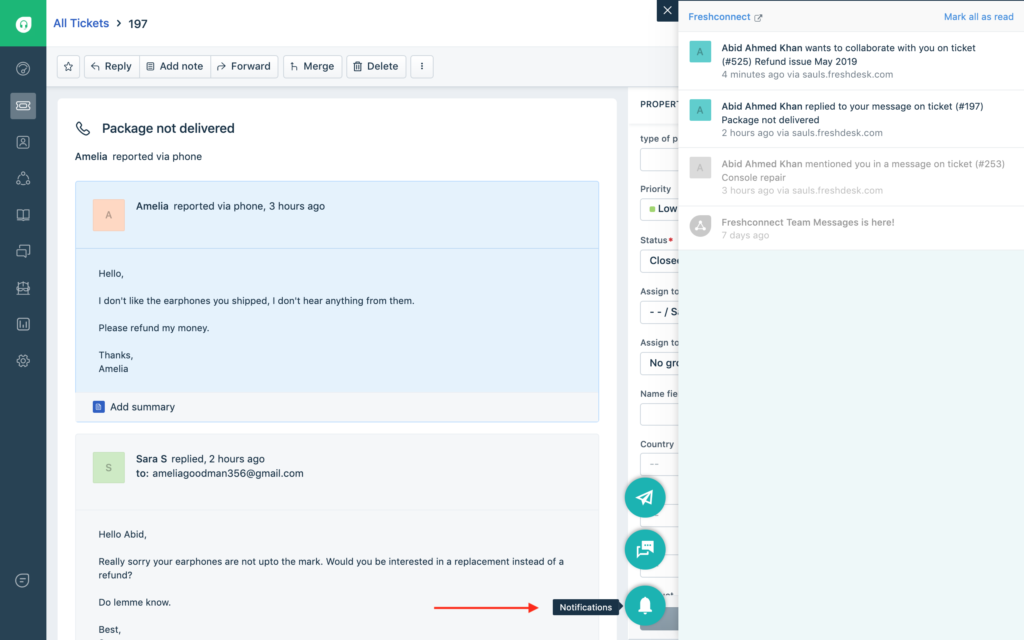
Freshdesk (un produit de Freshworks Inc.) est une plateforme de service client conçue pour soutenir les équipes qui gèrent des interactions clients à différentes échelles. Elle combine une gestion structurée des tickets, l'automatisation, le support multilingue et l'analyse pour aider les équipes à suivre l'activité et à maintenir la cohérence entre les régions et les canaux.
Pourquoi j'ai choisi Freshdesk
J'ai sélectionné Freshdesk pour sa capacité à faciliter la collaboration avec des parties prenantes externes. La plateforme inclut un rôle Collaborateur qui permet aux partenaires ou fournisseurs de participer aux conversations sur les tickets sans avoir un accès complet en tant qu'agent. Cette configuration vous permet de partager du contexte et des mises à jour tout en gardant le contrôle sur les processus internes. L'intégration avec des outils comme Microsoft Teams permet également de garder les mises à jour de tickets et les discussions au sein des outils de collaboration déjà utilisés par votre équipe.
Fonctionnalités clés de Freshdesk
En plus de favoriser la collaboration avec les parties prenantes externes, Freshdesk propose plusieurs autres fonctionnalités essentielles pour les opérations quotidiennes du service client :
- Freddy AI : Des outils d'intelligence artificielle intégrés assistent dans la rédaction des réponses et la gestion des tickets, aidant les équipes à réduire les efforts manuels dans les flux de travail de support existants.
- Outils en libre-service : Une base de connaissances multilingue permet aux clients de rechercher des réponses de manière autonome, tandis que les forums communautaires et la gestion des versions d'articles aident les équipes à maintenir une information précise et à jour.
- Attribution des tickets basée sur les compétences : Oriente les demandes entrantes vers les agents en fonction des compétences définies à l'avance, afin d'associer les problèmes à l'expertise la plus pertinente.
- Fonctionnalités de sécurité : Inclut le contrôle d'accès basé sur les rôles, l'authentification unique, l'authentification JWT et le filtrage IP pour aider à gérer les accès et à protéger les données du support client.
Intégrations de Freshdesk
Les intégrations incluent Shopify, Slack, Microsoft Teams, Playvox, Google Calendar, Trello, Jira, HubSpot, Salesforce et Mailchimp.
Pros and Cons
Pros:
- Processus efficace de création et de soumission de tickets
- Le système de gestion des tickets unifié améliore le suivi et les délais de réponse
- L'automatisation basée sur l'IA améliore l'efficacité et réduit le travail manuel
Cons:
- L'application mobile peut être compliquée et manque d'une conception intuitive
- Efficacité limitée pour les grandes organisations qui n'utilisent pas l'IA
New Product Updates from Freshdesk

Freshdesk Adds Voice AI Agents in Freshcaller
Freshdesk introduces Voice AI Agents available through Freshcaller Marketplace apps to handle routine calls and reduce queues. This feature enables automated call handling with real-time, conversational support. For more information, visit Freshdesk's official site.

Idéal pour le reporting et l’analyse en temps réel
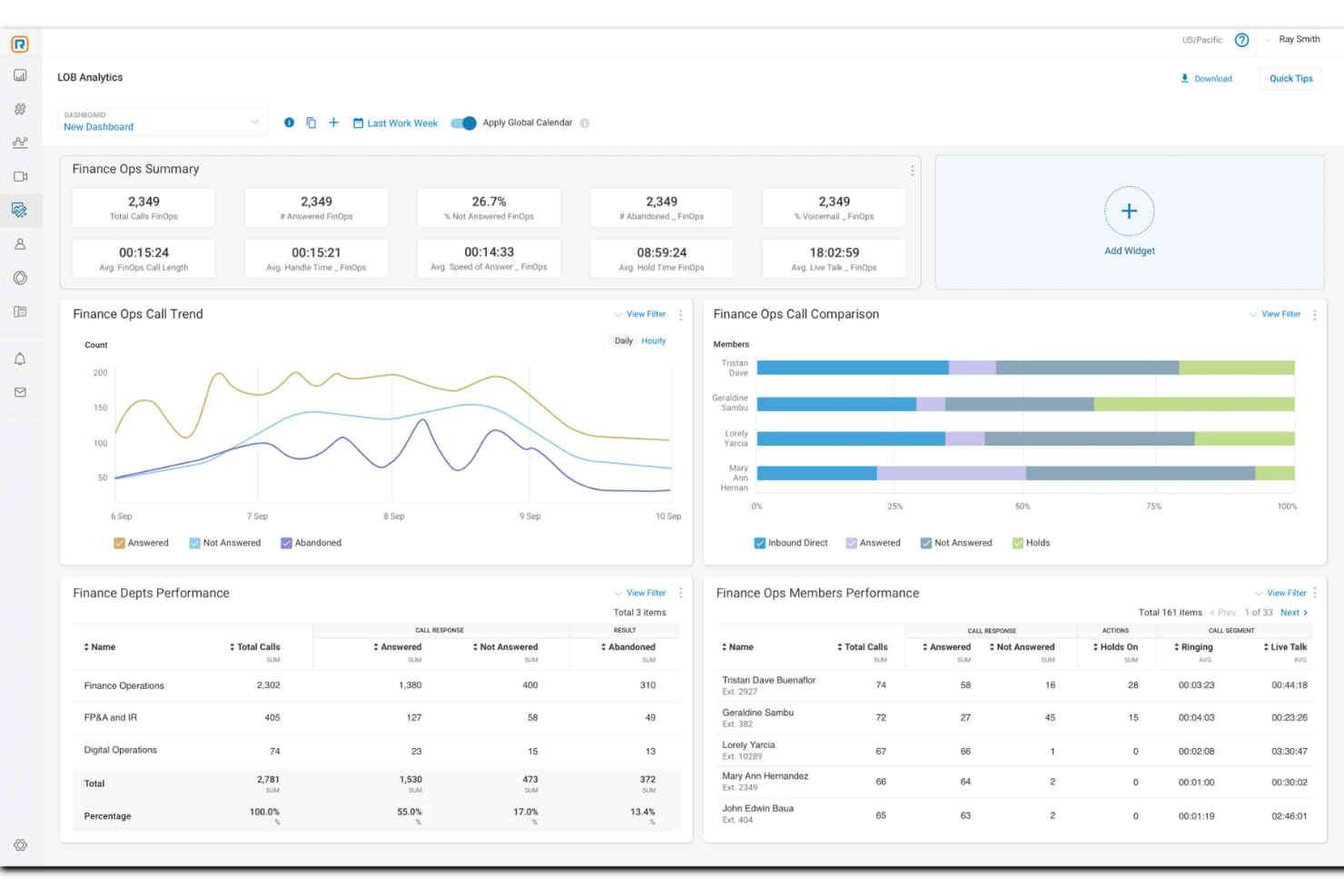
Pour les entreprises cherchant à améliorer leurs capacités de support client, RingCentral propose une solution polyvalente conçue pour optimiser la communication et la satisfaction. Ce logiciel est idéal pour les organisations de divers secteurs ayant besoin d'intégrer des options en libre-service et d'assistance en direct afin de répondre à une large gamme de besoins clients. Grâce à l'intégration d'outils alimentés par l'IA et une connectivité multicanale, RingCentral relève les défis liés à la gestion des interactions client, permettant à votre équipe de fournir un service personnalisé et efficace.
Pourquoi j'ai choisi RingCentral
J'ai choisi RingCentral pour ses solides capacités de reporting et d'analyse en temps réel, essentielles pour toute organisation souhaitant optimiser son support client. Les tableaux de bord personnalisables en temps réel permettent de surveiller les files d'attente et la performance des agents, fournissant des informations exploitables pour une gestion efficace du personnel et des engagements de service (SLA). De plus, la fonction d'intelligence conversationnelle analyse les interactions afin d’identifier des tendances et d’améliorer la satisfaction client. En proposant plus de 200 rapports pré-construits pour un reporting complet, RingCentral équipe votre équipe des outils nécessaires pour prendre des décisions éclairées et fondées sur les données, renforçant ainsi la qualité du service offert.
Fonctionnalités clés de RingCentral
En plus de ses capacités de reporting et d'analyse en temps réel, RingCentral propose une variété de fonctionnalités adaptées aux besoins des équipes de support client.
- Outils en libre-service : Donnez à vos clients les moyens de résoudre eux-mêmes leurs problèmes grâce à des systèmes automatisés comme les chatbots et la réponse vocale interactive (IVR), améliorant ainsi l'efficacité et réduisant les besoins en personnel.
- Chat en direct : Facilitez la communication en temps réel entre vos agents et vos clients pour une assistance immédiate et une approche personnalisée de chaque interaction.
- Routage basé sur les compétences : Dirigez automatiquement les demandes clients vers les agents les plus qualifiés, garantissant que les problématiques sont traitées par du personnel disposant de l'expertise adéquate.
- Intégration CRM : Connectez-vous aisément à vos systèmes de gestion de la relation client existants pour accéder aux profils et à l’historique des clients, permettant ainsi un service plus personnalisé et une résolution rapide des problèmes.
Intégrations de RingCentral
Les intégrations incluent Salesforce, Microsoft Teams, Google Workspace, HubSpot, Zendesk, Slack, ServiceNow, Box, Okta et DocuSign.
Pros and Cons
Pros:
- Le routage efficace des appels améliore le temps de réponse et l'efficacité
- Des analyses puissantes fournissent des données exploitables pour la prise de décision
- Fiabilité élevée avec un temps de disponibilité de 99,999 %, assurant une accessibilité constante
Cons:
- Le processus de configuration présente une courbe d'apprentissage élevée sans accompagnement
- Des options supplémentaires prêtes à l’emploi souhaitées pour répondre à des besoins variés

Meilleur logiciel de support client pour les entreprises
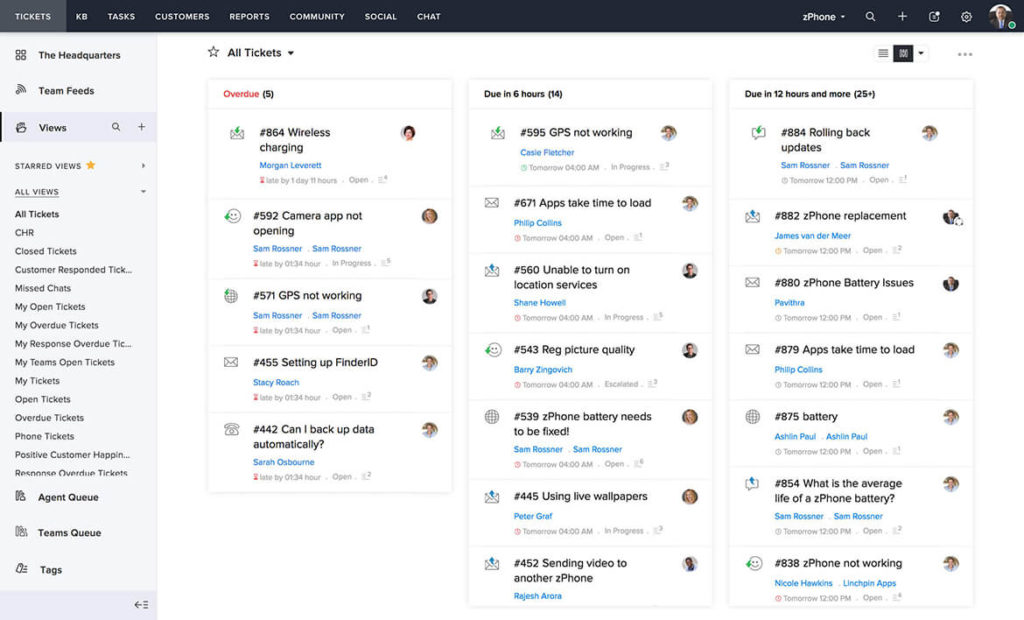
Pour ceux qui recherchent une solution de support client qui s'intègre à vos systèmes existants tout en donnant la priorité à la protection des données, Zoho Desk mérite d'être envisagé. Cet outil s'adresse aux entreprises de toutes tailles et propose des fonctionnalités telles que le support omnicanal et l'automatisation pour améliorer vos opérations de service. Avec une interface conviviale et une forte priorité donnée à la sécurité, Zoho Desk permet à votre équipe d'offrir un support exceptionnel et de bâtir des relations clients durables.
Pourquoi j'ai choisi Zoho Desk
J'ai choisi Zoho Desk comme le meilleur logiciel de support client pour les entreprises, car il offre un mélange de fonctionnalités innovantes adaptées aux besoins des grandes organisations. Son support omnicanal permet à votre équipe de gérer plus de 10 canaux de communication depuis une seule interface, assurant des interactions clients fluides par e-mail, téléphone, réseaux sociaux et chat en direct. L'intégration de Zia AI, un assistant basé sur l'intelligence artificielle, améliore le support en aidant les agents à élaborer des réponses et en offrant un service client 24h/24 et 7j/7. De plus, ses capacités d'automatisation rationalisent des processus tels que l'attribution des tickets et l'automatisation des flux de travail, permettant à votre équipe de se concentrer sur des tâches plus importantes.
Fonctionnalités clés de Zoho Desk
En plus de ses capacités axées sur les entreprises, Zoho Desk propose des fonctionnalités qui optimisent votre expérience de support client.
- Options d'auto-assistance : Offrez à vos clients la possibilité de trouver des solutions eux-mêmes grâce à une base de connaissances complète et des forums communautaires.
- Outils de productivité pour les agents : Simplifiez la gestion des tickets et la collaboration avec des fonctionnalités conçues pour améliorer le flux de travail de votre équipe.
- Personnalisation : Adaptez la plateforme à vos besoins spécifiques grâce au support multilingue et aux modules personnalisés.
- Rapports et tableaux de bord : Accédez à plus de 30 rapports et tableaux de bord préintégrés pour obtenir des informations exploitables et guidées par les données.
Intégrations de Zoho Desk
Les intégrations incluent Zoho CRM, Zoho BugTracker, Zoho Books, Zoho Projects, Zoho Analytics, Zoho SalesIQ, Zoho Campaigns, Zoho Meetings, Zoho Creator et Zoho People.
Pros and Cons
Pros:
- Des capacités d'IA efficaces aident à la gestion des tickets
- Des applications mobiles intuitives améliorent l'accessibilité et l'efficacité
- La communication multicanal prend en charge des interactions client variées
Cons:
- Absence d'une application dédiée à l'espace de travail pour les agents
- Certains utilisateurs trouvent la mise en page confuse sur les petits écrans

Idéal pour un support centré sur l’humain
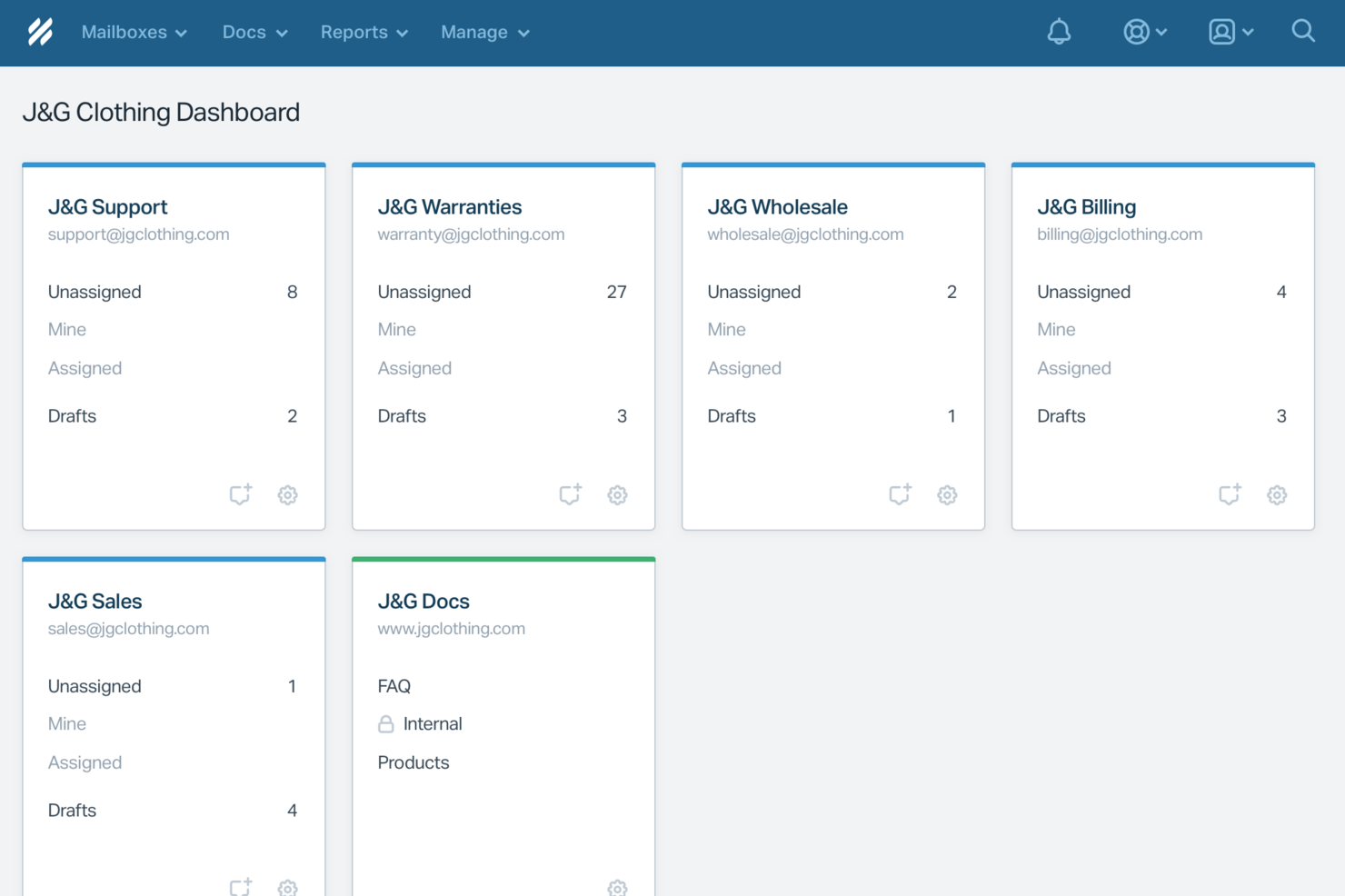
Help Scout est un logiciel de support client conçu pour les entreprises qui valorisent les interactions personnalisées avec leurs clients. Il séduit particulièrement les petites et moyennes entreprises cherchant à conserver une approche humaine tout en développant leurs opérations de support. Grâce à des fonctionnalités qui automatisent les tâches répétitives et améliorent la collaboration en équipe, Help Scout répond au besoin d’un service client efficace sans compromettre la qualité des échanges avec les clients.
Pourquoi j'ai choisi Help Scout
J'ai choisi Help Scout pour sa capacité unique à associer l’automatisation pilotée par l’IA à un support centré sur l’humain, ce qui le rend idéal pour les équipes souhaitant répondre rapidement aux demandes clients tout en préservant une touche personnalisée. Sa boîte de réception partagée permet à votre équipe de collaborer harmonieusement, garantissant qu’aucune question client ne reste sans réponse. De plus, les outils de messagerie proactive de la plateforme vous permettent d’engager vos clients via des mises à jour opportunes et des demandes de retours, répondant ainsi directement au besoin de communication efficace dans le support client.
Fonctionnalités clés de Help Scout
En plus de ses points forts, j’ai également relevé plusieurs autres fonctionnalités qui renforcent son utilité pour le support client :
- Centre d’aide : Permet à vos clients de trouver les réponses par eux-mêmes, réduisant ainsi la charge de travail de votre équipe de support.
- Flux de travail personnalisés : Vous donne la possibilité d’automatiser les tâches répétitives afin que votre équipe puisse se concentrer sur des problèmes plus complexes.
- Analyses de performance : Fournit des données sur les temps de réponse et l’efficacité de votre équipe, vous aidant à prendre des décisions éclairées pour améliorer le service.
- Support multicanal : Intègre divers canaux de communication afin de gérer les interactions clients depuis une seule plateforme.
Intégrations de Help Scout
Les intégrations incluent Salesforce, Shopify, WhatsApp, Slack, Stripe, Trello, Mailchimp, Google Apps, ActiveCampaign et Asana. Des intégrations personnalisées peuvent également être créées via l’API Help Scout ou en connectant d'autres applications via Zapier.
Pros and Cons
Pros:
- Les réponses IA résolvent les demandes courantes sans intervention d’un agent
- La transition fluide préserve le contexte des conversations pour les agents
- La base de connaissances intégrée permet des réponses automatiques précises
Cons:
- Ne fonctionne pas comme un chatbot autonome en dehors de l’écosystème Help Scout
- L’efficacité de l’IA dépend fortement de la qualité de la base de connaissances
New Product Updates from Help Scout

Help Scout Adds Automatic Conversation Reassignment
Help Scout can now automatically unassign conversations when the assigned teammate has been away long enough, keeping replies moving so others can pick them up. For more information, visit Help Scout's official site.
 .
.
Missive
Idéal pour les réponses rédigées par toute l’équipe
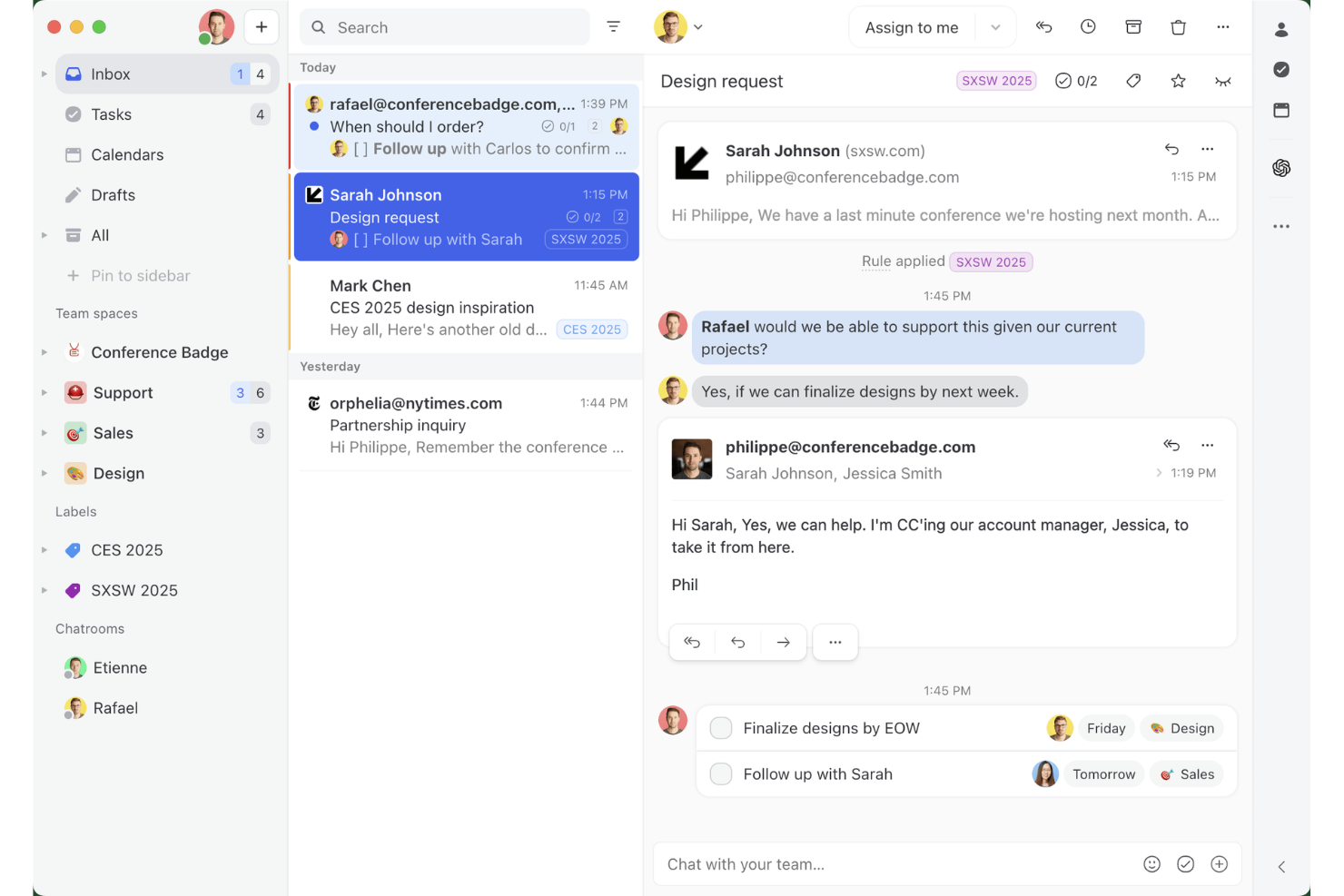
Missive est une boîte de réception collaborative et une plateforme d’e-mails partagés qui unifie les e-mails, les SMS, WhatsApp, le chat en direct et les canaux de messagerie sociale dans un seul espace de travail, avec un chat d’équipe intégré, des fils de discussion internes et des outils de rédaction assistée par l’IA.
À qui Missive convient-elle le mieux ?
Missive convient particulièrement aux équipes d’assistance de petite et moyenne taille qui gèrent la plupart des interactions avec leurs clients par e-mail et souhaitent que chaque coéquipier participe à la formulation de la réponse appropriée.
Pourquoi ai-je choisi Missive ?
Missive figure sur ma liste restreinte grâce à son soutien particulièrement efficace à la rédaction collaborative des réponses : plusieurs agents peuvent rédiger ensemble un même e-mail sortant en temps réel, avec des fils internes directement associés à la conversation afin que toute l’équipe puisse donner son avis avant l’envoi. J’apprécie également le fait que les suggestions de brouillons générées par l’IA prennent en compte l’intégralité du contexte de la conversation et qu’un coéquipier puisse encore affiner le brouillon avant qu’il ne parvienne au client. Ce type de boucle collaborative est rare dans un outil de boîte de réception partagée.
Fonctionnalités principales de Missive
- Boîte de réception unifiée omnicanale : Regroupe les e-mails, les SMS, WhatsApp, les messages directs Instagram, Facebook Messenger et le chat en direct dans un espace de travail partagé.
- Moteur d’automatisation basé sur des règles : Prend en charge jusqu’à 1 000 règles avec des déclencheurs, des conditions et des actions sur tous les canaux connectés.
- Règles de boîte de réception alimentées par l’IA : Utilise des conditions d’IA pour détecter le sentiment, la langue et l’intention afin d’automatiser l’étiquetage, l’acheminement et la création de brouillons.
- Réponses prédéfinies avec champs variables : Permet aux agents d’enregistrer et d’insérer des modèles de réponse préécrits qui renseignent automatiquement les informations propres à chaque client.
- Serveur MCP de Missive : Connecte des outils d’IA externes (comme Claude ou ChatGPT) pour interroger les fils d’assistance, consulter les calendriers et rédiger des réponses, tout en exigeant une vérification par un agent avant l’envoi.
Intégrations de Missive
Missive propose plus de 25 intégrations natives, notamment HubSpot, Salesforce, Shopify, Aircall, Dialpad, Zoom, Twilio, WhatsApp Business, Facebook Messenger et Instagram Direct. La plateforme prend également en charge une API REST ouverte, les webhooks, les intégrations de canaux personnalisées, Zapier et son nouveau serveur MCP avec les forfaits Productive et Business (activation par un administrateur requise).
Pros and Cons
Pros:
- Co-rédaction en temps réel des e-mails sortants
- La boîte de réception omnicanale unifie les e-mails et la messagerie
- Rédaction assistée par l’IA avec le contexte complet de la conversation
Cons:
- Aucune base de connaissances destinée aux clients n’est incluse
- Absence d’enquêtes CSAT ou NPS intégrées
New Product Updates from Missive
Missive Adds Conversation Pins
Missive now lets you pin key links, decisions, and notes inside a conversation, keeping them accessible in a dedicated Pins section in the Details sidebar. For more information, visit Missive's official site.
 .
.
Tidio
Idéal pour un support client IA multilingue

Tidio s'adresse aux entreprises souhaitant améliorer leur service client en automatisant les tâches répétitives et en optimisant la qualité des interactions. Grâce à des outils comme l'agent Lyro IA, il gère les demandes courantes, permettant à votre équipe de se concentrer sur des conversations à plus forte valeur ajoutée. Les fonctionnalités de chat en direct et de service d'assistance de Tidio assurent la fluidité de vos processus de support, afin de maintenir une haute satisfaction client.
Pourquoi j'ai choisi Tidio
J'ai choisi Tidio pour son support client IA multilingue remarquable, indispensable pour les entreprises souhaitant communiquer dans des environnements linguistiques variés. Le chatbot IA de Tidio, Lyro, traduit et répond dans plusieurs langues, garantissant à votre équipe de pouvoir échanger avec des clients de différentes régions sans barrière de langue. La traduction en temps réel, associée à des widgets de chat personnalisables, permet une communication fluide, s'adressant ainsi à une clientèle internationale. Ces atouts renforcent la satisfaction des clients et la qualité du support, faisant de Tidio un choix fiable pour les entreprises à la recherche de solutions d'assistance multilingues complètes.
Principales fonctionnalités de Tidio
En plus de ses capacités multilingues, Tidio propose toute une gamme de fonctionnalités qui enrichissent l'expérience de support client.
- Chat en direct : Interagissez en temps réel avec vos clients grâce à des widgets de chat personnalisables adaptés à l'identité visuelle et aux préférences de votre marque.
- Système de tickets : Gérez efficacement les demandes clients en convertissant les e-mails et messages en tickets afin de ne laisser aucune question sans réponse.
- Workflows d'automatisation : Mettez en place des réponses et actions automatiques pour les questions fréquentes et les tâches courantes, libérant ainsi du temps pour les problématiques plus complexes.
- Intégration avec les plateformes e-commerce : Connectez-vous facilement à des plateformes comme Shopify pour gérer les commandes directement via l'interface de chat, offrant ainsi un processus d'assistance optimisé pour votre boutique en ligne.
Intégrations Tidio
Les intégrations incluent Shopify, WordPress, HubSpot, Squarespace, Jimdo, Webydo, Drupal, Shift4Shop, Site123 et Salesforce.
Pros and Cons
Pros:
- Le chatbot IA prend en charge 12 langues
- Supporte l'e-mail, le chat, Messenger, Instagram et WhatsApp
- Les workflows d'automatisation réduisent les tâches répétitives pour les équipes support
Cons:
- Des problèmes de stabilité de l'application mobile affectent le support en déplacement
- Pas d'analyses détaillées des flux pour les chatbots

Idéal pour son interface personnalisable et facile à utiliser

Lorsque vous souhaitez améliorer votre support client, Zoho SalesIQ offre une solution sur mesure qui s’adapte parfaitement à vos besoins. Cette plateforme est conçue pour les entreprises qui souhaitent enrichir leurs interactions clients, en proposant des outils comme le chat en direct et le suivi des visiteurs pour favoriser une approche proactive. En accordant la priorité à la confidentialité des utilisateurs et en assurant la sécurité des données, Zoho SalesIQ permet à votre équipe de se connecter avec les clients sans compromettre leur confiance.
Pourquoi j’ai choisi Zoho SalesIQ
J’ai choisi Zoho SalesIQ pour son interface personnalisable et facile à utiliser, faisant de ce logiciel une option attrayante pour le support client. La plateforme permet d’adapter des fonctionnalités telles que le chat en direct et les chatbots à vos besoins spécifiques, garantissant une expérience intuitive aussi bien pour votre équipe que pour les clients. Son intégration avec divers systèmes, tels que Zoho CRM, permet de personnaliser davantage les interactions en fournissant des informations enrichies et une communication fluide. De plus, l’engagement de Zoho SalesIQ envers la confidentialité, grâce à ses propres outils de suivi pour sécuriser les données client, instaure la confiance et fiabilité dans vos opérations de support.
Fonctionnalités clés de Zoho SalesIQ
En plus de son interface personnalisable, Zoho SalesIQ propose un éventail de fonctionnalités qui renforcent vos capacités de support client.
- Suivi des visiteurs en temps réel : Cette fonctionnalité vous permet de surveiller et d’analyser l’activité des visiteurs sur votre site web, fournissant des informations précieuses pour adapter vos interactions.
- Évaluation automatique des prospects : Zoho SalesIQ classe automatiquement les prospects en fonction de leur comportement et de leur engagement, permettant à votre équipe de mieux prioriser les relances.
- Créateur de chatbot sans code : Cet outil vous permet de créer des chatbots sans programmation, offrant un support 24h/24 et traitant facilement les questions courantes.
- Intégration multi-canal : Vous pouvez communiquer avec les clients via différentes plateformes, comme WhatsApp et Instagram, assurant une communication fluide sur tous les canaux.
Intégrations de Zoho SalesIQ
Les intégrations disponibles comprennent WordPress, GoDaddy, Zoho CRM, Zoho Desk, OpenAI, Zendesk, Mailchimp et Salesforce.
Pros and Cons
Pros:
- Le suivi efficace des visiteurs enrichit l’engagement client
- Les widgets de chat personnalisables offrent des expériences adaptées aux utilisateurs
- Appels gratuits depuis l'application pour un support client rapide
Cons:
- Certains utilisateurs trouvent la fonctionnalité chatbot limitée
- Les notifications sur l’application mobile peuvent être peu fiables

Idéal pour créer des expériences personnalisées avec l'IA
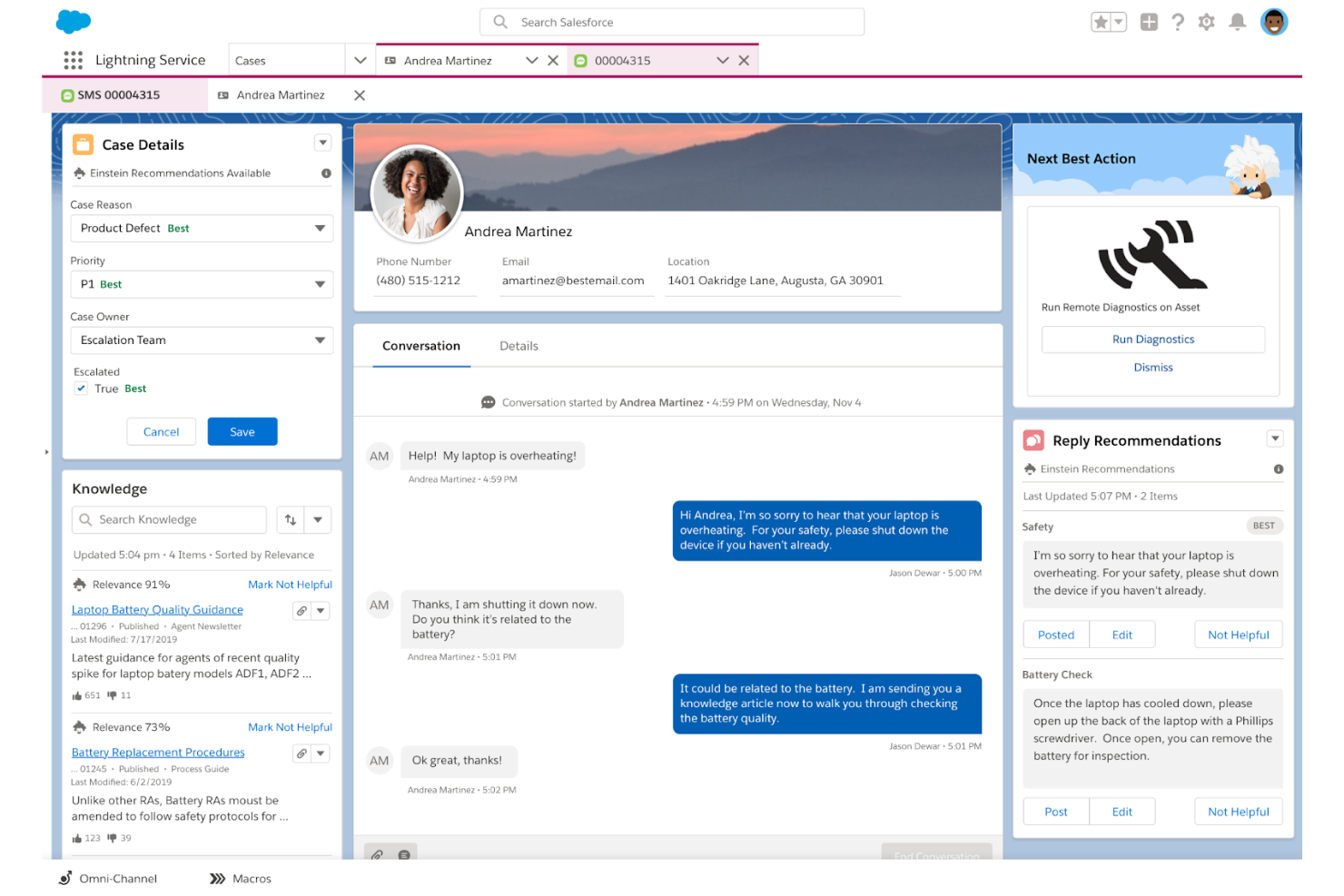
Salesforce Service Cloud s'adresse aux entreprises souhaitant améliorer les interactions client et rationaliser les tâches de support. En fournissant des outils pour gérer les dossiers et interagir sur plusieurs canaux, il séduit les secteurs qui valorisent les expériences personnalisées. Les analyses pilotées par l'IA de la plateforme aident votre équipe à réduire les délais de réponse et à accroître l'efficacité du service, répondant ainsi aux défis courants du support client.
Pourquoi j'ai choisi Salesforce Service Cloud
J'ai choisi Salesforce Service Cloud pour sa capacité à créer des expériences personnalisées grâce à l'IA, ce qui est essentiel pour les entreprises désireuses d'améliorer leur support client. Grâce à des analyses intelligentes et des suggestions adaptées, votre équipe peut offrir des interactions sur mesure qui résonnent auprès des clients, en répondant à leurs besoins spécifiques. Des fonctionnalités comme Einstein Bots automatisent les conversations de routine, libérant ainsi votre équipe pour se concentrer sur des sujets plus complexes, tandis que l'analyse prédictive fournit des informations précieuses sur le comportement client. Ces outils permettent non seulement de personnaliser le parcours client, mais aussi d'accroître l'efficacité, faisant de Salesforce Service Cloud un choix remarquable pour ceux qui cherchent à améliorer leur support client.
Fonctionnalités clés de Salesforce Service Cloud
En plus de la personnalisation de l'expérience avec l'IA, Salesforce Service Cloud propose plusieurs fonctionnalités clés qui renforcent le support client :
- Routage omnicanal : Cette fonctionnalité oriente les demandes clients vers les agents les plus qualifiés sur divers canaux, garantissant une gestion efficace et des réponses rapides.
- Console de service : Offre une interface unifiée aux agents, leur permettant de gérer sans effort les interactions client et d'accéder à toutes les informations nécessaires en un seul endroit.
- Base de connaissances : Sert de référentiel centralisé d'articles et de FAQ, permettant aux clients de trouver des réponses de façon autonome et de réduire le volume des tickets de support.
- Intégration des médias sociaux : Permet à votre équipe d'échanger avec les clients via les réseaux sociaux, renforçant l'engagement client et élargissant votre champ d'action support.
Intégrations Salesforce Service Cloud
Les intégrations incluent Service Cloud Voice, Data Cloud, Slack, Jira, LinkedIn, QuickBooks, MailChimp, Dropbox, Google Workspace et DocuSign.
Pros and Cons
Pros:
- Interface conviviale avec tableaux de bord personnalisables
- Fournit une vision complète des problématiques clients et de la gestion des dossiers
- Communauté solide et nombreuses ressources pédagogiques pour le support
Cons:
- Défis de personnalisation liés à la fonction Omni restrictive
- Pas d'attribution de dossier en simple rotation, nécessite une programmation complexe
New Product Updates from Agentforce Service (formerly Service Cloud)
Agentforce Service Keeps Full Agentforce Voice Transcripts After Calls
Agentforce Service now shows the full conversation history in post-call transcripts for Agentforce Voice calls within the Service Console, giving agents better context for follow-ups. For more information, visit Salesforce’s official site.
 .
.
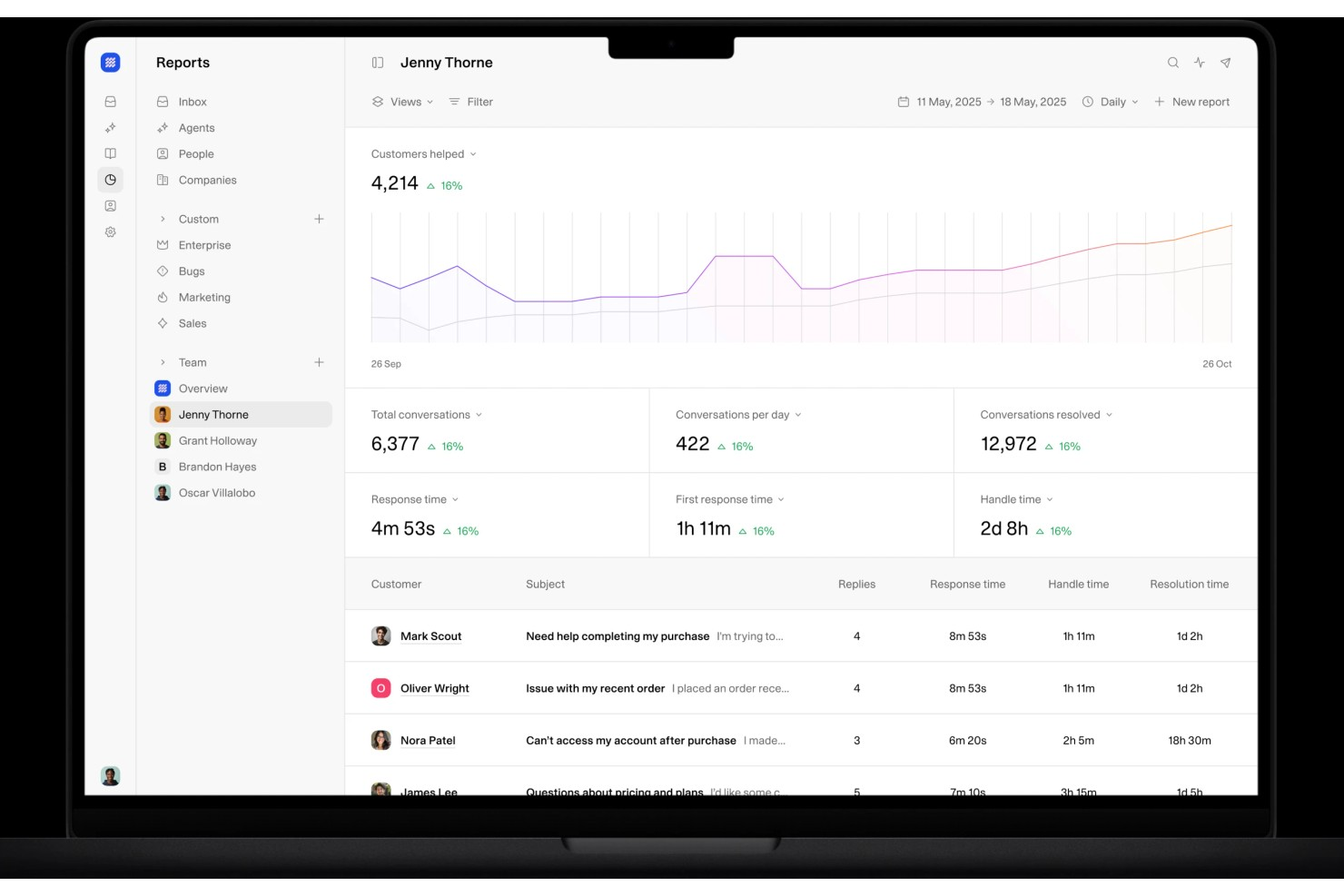
Weav est une plateforme de support client alimentée par l'IA qui combine des agents IA, une boîte de réception partagée, des chatbots et des outils de formation aux connaissances pour traiter et résoudre les tickets clients avec un minimum d'intervention humaine.
À qui s'adresse Weav ?
Weav convient aux équipes e-commerce et SaaS de petite à moyenne taille qui souhaitent automatiser un grand volume de tickets de support sans augmenter leurs effectifs dédiés au support.
Pourquoi j'ai choisi Weav
J'ai choisi Weav parmi les meilleurs pour la façon dont il utilise les rapports et l'apprentissage continu des conversations pour faire ressortir les tendances parmi les interactions clients. Le module de rapports de Weav suit les résultats de chaque ticket résolu, et son IA analyse en permanence ces interactions pour affiner ses réponses. Cela permet à votre équipe d'obtenir une vision en temps réel des questions posées par les clients, des résolutions efficaces et des points à améliorer, directement à partir des données de vraies conversations.
Fonctionnalités clés de Weav
- Agents IA : Déployez des agents IA formés sur la base de votre savoir produit pour résoudre automatiquement les tickets clients entrants sans intervention humaine.
- Boîte de réception unifiée : Gérez toutes les conversations clients dans une boîte de réception partagée où agents IA et humains collaborent sur le même fil.
- Formation aux connaissances : Formez l'IA de Weav en un clic en l'orientant vers votre site web, vos documents d'aide ou des fichiers téléchargés.
- Règles d'escalade : Définissez des conditions pour transférer automatiquement les tickets non résolus de l'IA au bon agent humain.
Intégrations Weav
Weav propose un nombre limité d'intégrations natives, dont Shopify, Google Drive et Stripe. Il prend également en charge des actions personnalisées, et son API REST ainsi que ses webhooks en temps réel sont disponibles sur les forfaits Pro et supérieurs pour la création d'intégrations personnalisées.
Pros and Cons
Pros:
- Sources vérifiées affichées avec les réponses
- Synchronisation du site web pour former automatiquement les agents
- Contrôles du ton et des réponses par agent
Cons:
- Peu d'intégrations tierces natives
- Le forfait gratuit limite l'IA à 20 messages

Custify
Idéal pour les entreprises SaaS

Pour ceux qui recherchent une solution de support client adaptée aux besoins uniques des entreprises SaaS, Custify s'impose comme un partenaire précieux dans votre quête d'optimisation de l'engagement et de la fidélisation client. Conçu pour centraliser les données clients et rationaliser les flux de travail, Custify propose des analyses exploitables qui permettent à votre équipe de se concentrer sur les interactions à forte valeur ajoutée plutôt que de s'enliser dans des processus manuels. Que votre objectif soit d'améliorer l'adoption du produit ou d'identifier des opportunités de montée en gamme, la plateforme pilotée par les données de Custify transforme la réussite client en un atout stratégique, vous aidant à transformer des clients satisfaits en véritables ambassadeurs.
Pourquoi j'ai choisi Custify
J'ai choisi Custify car il excelle à répondre aux besoins spécifiques des entreprises SaaS, notamment en matière de support client. La fonctionnalité Customer 360 de Custify offre une vue complète des données clients, vous permettant de suivre l'adoption du produit et les cycles de vie client. Ses capacités d'automatisation rationalisent les opérations quotidiennes, libérant votre équipe des tâches manuelles pour leur permettre de se concentrer sur les interactions clients à forte valeur ajoutée. En identifiant les opportunités de montée en gamme et en fournissant un support proactif via des tâches et des alertes, Custify permet à votre équipe d'améliorer l'engagement client et de réduire le taux de résiliation, ce qui en fait un atout stratégique pour toute entreprise SaaS.
Fonctionnalités clés de Custify
En plus de mettre l'accent sur les entreprises SaaS, Custify propose une gamme de fonctionnalités qui renforcent les capacités de support client :
- Scorage de la santé client : Suit la santé des clients en temps réel à partir de divers indicateurs, permettant à votre équipe d'anticiper et d'agir avant que les problèmes ne mènent à une résiliation.
- Cartographie du parcours client : Visualise les interactions clients, vous aidant à identifier les points de contact clés et à optimiser vos stratégies d'engagement.
- Rapports et analyses : Fournit des analyses complètes sur les indicateurs de réussite client, aidant votre équipe à prendre des décisions éclairées et fondées sur les données.
- Segmentation client : Permet d'adapter vos communications et efforts de support selon des critères clients précis, optimisant ainsi l'efficacité de vos actions.
Intégrations Custify
Les intégrations incluent Salesforce, Intercom, HubSpot, Freshdesk, Stripe, Help Scout, Recurly, Zendesk Support, Microsoft Teams et Slack.
Pros and Cons
Pros:
- Centralise les données pour affiner les connaissances clients et les communications
- Améliore significativement l'engagement client et l'efficacité opérationnelle
- Fournit des analyses claires pour les opportunités de montée en gamme, augmentant ainsi les revenus
Cons:
- Certains utilisateurs rencontrent des problèmes occasionnels de synchronisation des données
- Support limité pour les modèles d'entreprise non SaaS
Autres outils de support client à considérer
Voici quelques autres options intéressantes pour la gestion du service client qui n’ont pas été retenues dans ma sélection principale, mais qui méritent d’être examinées de plus près :
- Groove
Idéal pour les intégrations
- Front
Idéal pour l'automatisation des workflows inter-équipes
- HappyFox
Idéal pour l'engagement client en temps réel
- UseResponse
Idéal pour la communication centralisée
- Kustomer
Idéal pour la sécurité des données clients
- Issuetrak
Idéal pour la gestion de tickets multicanaux
- Guru
Idéal pour les suggestions de base de connaissances alimentées par l'IA
- Front
Idéal pour la gestion des emails en équipe
- SAAS First
Idéal pour le support omnicanal
- Hiver
Idéal pour les interactions client propulsées par l'IA
- LiveAgent
Idéal pour la gestion des tickets
- Zendesk
Idéal pour l’automatisation des tickets par IA
- Zoho Assist
Idéal pour offrir un support à distance
- OneDesk
Idéal pour les solutions de service d’assistance intégrées
- SparrowDesk
Idéal pour la boîte de réception omnicanale


Comment j'évalue les logiciels de support client
Je divise mon évaluation en critères de base — comme le ticketing omnicanal et l'automatisation des flux de travail — et en facteurs différenciateurs qui révèlent la capacité d'un outil à s'adapter au véritable modèle de support de votre équipe.
Fonctionnalités principales (Critères indispensables pour cette liste)
Lorsque je sélectionne des outils pour ma liste, j'attribue à chacun une note de 0 (ne propose pas la fonctionnalité) à 5 (excellent dans ce domaine) pour chaque fonctionnalité principale mentionnée ci-dessous. Ensuite, je calcule le score total de chaque outil en pourcentage. Chaque outil doit atteindre un score total minimum de 75 % pour être pris en compte.
- Gestion des tickets : J’évalue la façon dont chaque outil gère l'ensemble du cycle de vie du ticket — création, attribution, priorisation, fusion et résolution — sur de vraies files de support avec des niveaux de complexité variés.
- Support omnicanal : Chaque plateforme doit unifier les canaux email, chat, téléphone, réseaux sociaux et messagerie afin que les agents n’aient pas à jongler entre des tableaux de bord déconnectés pour assister un même client.
- Base de connaissances et libre-service : Je recherche des centres d'aide orientés client, avec catégorisation des articles, recherche et boucles de feedback qui réduisent réellement le volume de tickets entrants.
- Automatisation et flux de travail : Je me penche sur les règles de routage, déclencheurs SLA et parcours d’escalade — je vérifie si les équipes peuvent créer des workflows, comme l’assignation automatique des tickets de facturation à une file spécialisée.
- Rapports et analyses : Les tableaux de bord doivent faire remonter les indicateurs clés du support comme le temps de première réponse, le temps de résolution, le score CSAT et la charge de travail des agents, sans nécessiter d’exportations manuelles ou de solutions de contournement.
- Collaboration et outils pour agents : J’examine comment les agents collaborent sur des problèmes complexes — fonctionnalités comme les notes internes, la détection de collision ou les conversations parallèles entre les équipes support et produit.
Une fois que j’ai une liste d’outils répondant à ces critères, j’examine ce qui distingue chaque plateforme.
Facteurs de différenciation (Ce qui distingue les éditeurs)
Voici comment je compare et distingue les différents éditeurs :
Fonctionnalités remarquables
L’assistance alimentée par IA est un facteur clé de différenciation : j’évalue si un outil peut rédiger des réponses, résumer des fils de tickets longs ou suggérer aux agents des articles pertinents de la base de connaissances au cours d’une conversation. Un panneau contextuel client a aussi beaucoup d’importance, car un agent gérant un retour ou un litige de facturation a besoin de voir l’historique de commandes et les interactions passées sans changer d’onglet. J’évalue également les créateurs de chatbots sans code, qui permettent aux équipes de détourner les questions récurrentes comme les réinitialisations de mot de passe ou les demandes d’expédition avant qu’elles n’arrivent à un agent.
Au-delà des fonctionnalités
La profondeur d’intégration est l’un des premiers points que je vérifie : votre solution de support doit se connecter à votre CRM, à votre plateforme e-commerce et à vos outils de communication interne comme Slack ou Microsoft Teams. La sécurité et la conformité ont également un poids important, en particulier pour les équipes manipulant des données sensibles où l’attestation SOC 2, la conformité RGPD ou la préparation HIPAA peuvent décider de la pertinence d’un éditeur. J’examine aussi l’adéquation de chaque plateforme à des structures d’équipe spécifiques, que ce soit une équipe SaaS B2B gérant des escalades ou une opération e-commerce à fort volume traitant des centaines de tickets par jour.
Qu'est-ce qu'un logiciel de support client ?
Un logiciel de support client est une plateforme qui aide les entreprises à suivre, gérer et résoudre les demandes des clients sur plusieurs canaux. Il améliore l'efficacité et la cohérence des réponses et sert à simplifier la gestion des tickets, à permettre l'auto-assistance et à optimiser l'expérience client globale.
Comment choisir un logiciel de support client
Il est facile de se perdre dans des listes de fonctionnalités longues et dans des tarifs complexes. Pour vous aider à garder le cap lors de votre processus de sélection, voici une liste de points clés à garder à l'esprit :
| Critère | À considérer |
|---|---|
| Évolutivité | Assurez-vous que le logiciel peut évoluer avec votre entreprise. Privilégiez les solutions capables de gérer une augmentation du volume de tickets et du nombre d'utilisateurs sans perte de performance. |
| Intégrations | Vérifiez la compatibilité avec vos outils existants comme les systèmes CRM, les messageries électroniques et les réseaux sociaux. Une intégration fluide favorise l'efficacité et une meilleure circulation des données. |
| Personnalisation | Choisissez un logiciel permettant d'adapter les flux de travail, les tableaux de bord et les rapports aux besoins spécifiques de votre équipe. |
| Facilité d'utilisation | Optez pour une interface intuitive qui nécessite peu de formation. Vos collaborateurs doivent pouvoir naviguer rapidement dans le système et effectuer leurs tâches efficacement. |
| Budget | Prenez en compte le coût total, y compris les frais de mise en place et de fonctionnement. Assurez-vous que le logiciel propose les fonctionnalités nécessaires tout en respectant vos contraintes budgétaires. |
| Sécurité | Préférez des mesures de sécurité robustes, comme le chiffrement des données et la conformité aux normes type RGPD. Protégez les données de vos clients pour maintenir leur confiance. |
Tendances futures des logiciels de service client
Au cours de mes recherches, j'ai consulté de nombreuses mises à jour produits, communiqués de presse et notes de versions provenant de divers éditeurs de logiciels de support client. Voici quelques tendances émergentes que je surveille de près :
- IA et automatisation dans le service client : Les entreprises exploitent l’IA pour analyser les interactions clients et prédire les tendances. Cela aide les équipes à mieux comprendre les besoins des clients et à prendre des décisions basées sur les données. Des fournisseurs comme Zendesk utilisent l’IA pour offrir des analyses exploitables à partir des données de support.
- Support omnicanal : De plus en plus d’entreprises souhaitent interagir avec leurs clients sur différents canaux de façon unifiée. Cette tendance facilite des transitions fluides entre les plateformes et offre une expérience client cohérente. Freshdesk propose une forte expérience omnicanale.
- Options libre-service : Les clients préfèrent de plus en plus résoudre leurs problèmes eux-mêmes. Les outils offrent désormais de vastes bases de connaissances et des forums communautaires pour répondre à cette demande. Zoho Desk améliore le libre-service grâce à des articles détaillés.
- Personnalisation de l’expérience client : Adapter les interactions de support aux préférences individuelles des clients devient indispensable. La personnalisation peut renforcer la satisfaction et la fidélité des clients. Des outils comme Salesforce Service Cloud utilisent les données pour personnaliser l’expérience client.
- Outils de support à distance : Avec davantage d’équipes travaillant à distance, les outils permettant le dépannage et le support à distance se développent. Des fonctionnalités comme le partage d’écran ou l’accès distant deviennent essentielles. Zoho Assist se concentre sur des solutions de support à distance.
Fonctionnalités des logiciels de support client
Lors du choix d’un logiciel de support client, soyez attentif aux fonctionnalités clés suivantes :
- Gestion des tickets : Gérez les demandes des clients en créant, organisant et suivant les requêtes de support. Vous bénéficiez ainsi d’un suivi structuré de chaque problème de bout en bout, pour qu’aucune demande ne passe à la trappe.
- Support multicanal : Offrez de l’aide sur plusieurs canaux comme l’email, le chat, les réseaux sociaux ou le téléphone. Vous rencontrez les clients là où ils se trouvent déjà, tout en centralisant les échanges dans un espace pratique unique.
- Gestion de la base de connaissances : Créez et gérez une bibliothèque d’articles d’aide et de FAQ. Cela donne aux clients les moyens de résoudre leurs problèmes seuls et réduit le nombre de tickets répétitifs pour votre équipe.
- Outils d’automatisation : Utilisez des règles et des déclencheurs pour attribuer automatiquement des tickets, envoyer des réponses ou escalader les cas urgents. Vous gagnez ainsi du temps sur les tâches répétitives et garantissez un support fluide même en cas de pic d’activité.
- Rapports et analyses : Suivez des indicateurs clés comme les délais de réponse, le volume de tickets ou la satisfaction client. Ces données vous aident à repérer des tendances et à améliorer vos processus de support sur la base de vrais chiffres.
- Fonctionnalités de collaboration : Permettez à votre équipe de travailler ensemble sur des tickets complexes via des notes internes, des tags ou des boîtes de réception partagées. Tout le monde reste informé, évitant ainsi les messages contradictoires pour le client.
- Capacités d’intégration : Connectez le logiciel à votre CRM, plateforme e-commerce ou autres outils utilisés. Vous accédez ainsi rapidement à des informations clients pertinentes et gagnez en efficacité.
- Portails en libre-service : Offrez aux clients un espace où consulter leurs tickets, vérifier leur statut ou trouver des ressources d’aide. Cela allège la charge de votre équipe et rend le support plus agréable pour vos utilisateurs.
- Gestion des SLA : Définissez, suivez et appliquez des accords de niveau de service. Vous pouvez ainsi garantir vos engagements de réponse ou de résolution, sans dépendre de votre mémoire ou de post-it.
- Options de personnalisation : Adaptez les formulaires, processus et tableaux de bord à vos besoins spécifiques. Vous n’avez donc pas à vous contenter d’un système générique — il devient véritablement le vôtre.
Fonctionnalités IA courantes dans les logiciels de support client
Au-delà des fonctionnalités classiques listées ci-dessus, de nombreuses solutions intègrent l’IA avec des fonctions telles que :
- Chatbots alimentés par l’IA : Répondez instantanément aux questions fréquentes des clients et gérez les tâches courantes, libérant votre équipe pour les problèmes plus complexes. Ces bots utilisent le traitement du langage naturel pour comprendre et répondre comme un humain.
- Classement automatique des tickets : Triez instantanément les nouvelles demandes par sujet, urgence ou ressenti. L’IA analyse le contexte du message et envoie chaque requête au bon agent ou à la bonne équipe — sans tri manuel.
- Analytique prédictive : Anticipez les tendances de support et les besoins clients avant qu’ils ne prennent de l’ampleur. L’IA examine les schémas de support pour vous aider à planifier les ressources de façon proactive et détecter plus tôt les problèmes.
- Analyse du ressenti : Évaluez automatiquement l’état d’esprit derrière les messages clients. Vous pouvez ainsi prioriser les conversations avec les utilisateurs frustrés et intervenir avant que les situations ne s’aggravent.
- Suggestions de la base de connaissances assistées par l’IA : Recommandez en temps réel des articles pertinents aux clients ou aux agents, en fonction du contenu du ticket. Cela diminue le temps de résolution et améliore la satisfaction générale.
- Génération automatisée des réponses : Rédigez des réponses suggérées pour les agents grâce à l’apprentissage automatique. Vous pouvez relire, modifier et envoyer plus vite, en assurant un ton et une qualité cohérents dans chaque message.
Avantages des logiciels de support client
Mettre en place un logiciel de support client apporte plusieurs avantages à votre équipe et à votre entreprise. Voici quelques bénéfices auxquels vous pouvez vous attendre :
- Des temps de réponse plus rapides : Les fonctions de communication en temps réel comme le chat en direct aident votre équipe à répondre plus rapidement aux questions des clients.
- Satisfaction client améliorée : Les portails en libre-service et les analyses pilotées par l’IA permettent aux utilisateurs de trouver facilement des réponses et de recevoir un accompagnement personnalisé.
- Efficacité accrue des ressources : Les automatisations du support client prennent en charge les tâches répétitives, ce qui permet à votre équipe de se consacrer à des besoins clients plus complexes.
- Expérience client cohérente : Les outils de support omnicanal garantissent que les clients reçoivent le même niveau de service sur toutes les plateformes.
- Meilleure exploitation des données : Les capacités d’intégration se connectent à vos systèmes existants, permettant une prise de décision plus éclairée grâce à un accès complet aux données.
- Productivité accrue de l’équipe : Les workflows personnalisables et la gestion des tickets permettent d’organiser et de hiérarchiser efficacement les tâches.
- Communication et collaboration renforcées : Facilitez la collaboration au sein de votre équipe CX et l’assistance efficace aux clients.
- Scalabilité pour la croissance : Les solutions logicielles peuvent évoluer avec votre entreprise, gérant davantage d’interactions clients à mesure que votre équipe s’agrandit.
Coûts et tarification des logiciels de support client
Le choix d’un logiciel de support client nécessite de comprendre les différents modèles de tarification et formules disponibles. Les coûts varient en fonction des fonctionnalités, de la taille de l’équipe, des modules complémentaires, etc. Le tableau ci-dessous résume les formules courantes, leur prix moyen ainsi que les principales fonctionnalités incluses dans les solutions de support client :
Tableau comparatif des formules de logiciels de support client
| Type de formule | Prix moyen | Fonctionnalités courantes |
|---|---|---|
| Formule gratuite | $0 | Gestion basique des tickets, support par e-mail et rapports limités. |
| Formule personnelle | $5-$25/user/month | Support par e-mail, rapports de base et intégrations limitées. |
| Formule entreprise | $30-$60/user/month | Support multicanal, rapports avancés, outils d’automatisation et workflows personnalisables. |
| Formule grande entreprise | $70-$150/user/month | Ensemble complet de fonctionnalités, sécurité avancée, support dédié et intégrations illimitées. |
Foire Aux Questions sur les Logiciels d’Assistance Client
Si vous avez encore des questions sur les logiciels d’assistance client, pas d’inquiétude. Voici les réponses à des questions fréquemment posées qui devraient vous aider à y voir plus clair.
Comment l’IA et l’automatisation peuvent-elles améliorer le service client ?
L’IA et l’automatisation peuvent accélérer le service client en orientant les tickets, en répondant automatiquement aux questions fréquentes et en fournissant des ressources de libre-service instantanées. Vous pouvez utiliser des chatbots pour répondre aux FAQ, mettre en place des workflows automatisés pour les tâches répétitives, et utiliser l’IA pour suggérer des solutions pertinentes aux agents. Cela réduit non seulement le temps de réponse mais libère aussi votre équipe pour traiter les cas complexes, améliorant ainsi la satisfaction client et la productivité des agents.
Quelles fonctionnalités de collaboration d’équipe existent dans les logiciels de service client ?
La plupart des plateformes d’assistance permettent à votre équipe d’assigner des tickets, de partager des notes internes et de @mentionner des collègues pour obtenir rapidement leur avis. Certains outils proposent des boîtes de réception partagées, un chat en temps réel et la détection de doublons pour éviter le travail en double. Recherchez des fonctions telles que le partage de fichiers, des fils de discussion et des listes de tâches pour faciliter la coordination et accélérer la résolution des problèmes clients.
Comment choisir le meilleur logiciel d’assistance client pour mon organisation ?
Commencez par dresser la liste des fonctionnalités indispensables et des plateformes que votre équipe utilise déjà. Privilégiez les outils adaptés à votre volume de demandes, bien intégrés à votre CRM ou à vos applications de communication existantes, et offrant des options de personnalisation selon vos processus spécifiques. Essayez des démos ou des versions d’essai gratuites pour vérifier si l’interface est facile pour les agents et les administrateurs. Pensez au support du fournisseur, aux rapports et à la fiabilité, afin que le logiciel puisse évoluer avec votre équipe.
Quelles intégrations rechercher dans un logiciel d’assistance client pour mon équipe ?
Recherchez une intégration avec votre CRM, vos applications de chat/messagerie, votre centre d’aide, votre base de connaissances et vos outils de gestion des effectifs. Connecter le logiciel de support à vos plateformes email, centre d’appels et solutions d’analyse fait gagner du temps à votre équipe et garantit une vision complète de chaque client. Privilégiez les logiciels disposant de fortes capacités API, pour automatiser des tâches et synchroniser vos systèmes au fil de l’évolution de vos besoins.
Comment les logiciels d’assistance client facilitent-ils l’intégration et la formation des agents ?
De nombreuses plateformes proposent des bases de connaissances intégrées, des workflows guidés et des suggestions de scripts pour aider les nouveaux agents à apprendre rapidement. Vous pouvez attribuer des modules de formation ou utiliser les notes internes pour partager les meilleures pratiques directement dans la vue du ticket. Les outils de reporting aident les managers à détecter les besoins de coaching et à suivre les progrès, facilitant ainsi le développement continu des agents de manière plus fluide et efficace.
Quels indicateurs devrais-je suivre avec un logiciel d’assistance client ?
Vous tirerez le meilleur parti en suivant le temps de première réponse, le temps de résolution des tickets, la satisfaction client (CSAT), et la productivité des agents. Surveillez les tendances du volume de tickets, les arriérés et les taux d’escalade pour détecter les problèmes en amont. Utilisez les rapports intégrés pour repérer les tendances et identifier les axes de formation ou d’amélioration des workflows, aidant ainsi votre équipe à offrir un excellent service à grande échelle.
Existe-t-il des logiciels d’assistance client gratuits ?
Oui, certains fournisseurs de logiciels d’assistance client proposent des offres gratuites, également appelées plans freemium. Cependant, ces offres sont généralement considérées comme une première étape pour vous permettre de découvrir la solution, avec l’espoir que vous passerez à une offre payante pour accéder à des fonctionnalités plus avancées.
Autres types de logiciels d’assistance
Cet article présente des options générales et polyvalentes de logiciels d’assistance client, chacune avec ses points forts et ses limites. Cependant, notre site propose aussi des articles qui explorent en détail des types particuliers de logiciels de service client. Si vous recherchez quelque chose de plus spécifique, ces ressources pourraient vous être utiles.
- Logiciel de gestion de l'expérience client
- Automatisation du service client
- Logiciel de conversation pour le service client pour petites entreprises
- Logiciel de gestion des e-mails du service client
- Logiciel de gestion des tickets du service client
- Logiciel de base de données clients
- Logiciel de service client sur les réseaux sociaux
Que pensez-vous de ces outils de service client ?
J’espère que mon analyse vous a permis de prendre conscience de la diversité et du dynamisme des plateformes de support client proposées sur le marché. Il n’existe pas d’outil parfait, car tout dépend de la composition de votre équipe et du modèle de votre entreprise. Mais j’espère avoir mis en lumière les différents logiciels de support à votre disposition pour vous aider à faire un choix éclairé pour votre entreprise.
Vous pouvez vous abonner à la newsletter The CX Lead pour rester informé(e) des dernières tendances et analyses sur l’expérience client proposées par les plus grands experts du secteur.