

Les 10 meilleurs logiciels de centre d’assistance par e-mail de 2026

10 Sélection des meilleurs logiciels de centre d’assistance par e-mail


Les logiciels de centre d’assistance par e-mail aident les équipes d’assistance à gérer rapidement, méthodiquement et de manière responsable un volume important d’e-mails clients. Si vous êtes submergé par des e-mails non suivis ou si vous avez du mal à hiérarchiser les réponses, les outils de centre d’assistance par e-mail peuvent vous aider à simplifier la gestion des tickets, à améliorer les délais de réponse et à rester organisé à mesure que votre équipe se développe.
J’ai présélectionné ces meilleurs logiciels de centre d’assistance par e-mail après avoir personnellement testé et étudié leur capacité à transformer des boîtes de réception désordonnées en flux de travail gérables, en mettant l’accent sur les fonctionnalités qui répondent aux besoins des agents de première ligne comme des responsables du service client.
Qu’est-ce qu’un logiciel de centre d’assistance par e-mail ?
Un logiciel de centre d’assistance par e-mail est un outil qui aide les équipes d’assistance à gérer, suivre et traiter les demandes des clients par e-mail. Il simplifie la communication en centralisant les messages, en automatisant les flux de travail et en améliorant la visibilité au sein de l’équipe.
Pourquoi faire confiance à nos recommandations de logiciels
Notre équipe teste et évalue des logiciels depuis 2012. En tant que leaders CX nous-mêmes, nous savons à quel point il est difficile — et important — de choisir le bon logiciel.
Pour ce guide, nous avons évalué les outils grâce à des tests pratiques et une recherche indépendante, en notant les outils selon nos critères de sélection.
Nos avis reflètent notre jugement éditorial humain, et non un argumentaire de vente.
Résumé des meilleurs logiciels de centre d’assistance par e-mail
| Tool | Best For | Trial Info | Price | ||
|---|---|---|---|---|---|
| 1 | Idéal pour un système robuste de gestion des tickets | Démo gratuite + essai gratuit de 14 jours disponible | À partir de $19/utilisateur/mois (facturé annuellement) | Website | |
| 2 | Meilleure automatisation d’e-mails en tickets | Essai gratuit de 14 jours | Tarification sur demande | Website | |
| 3 | Idéal pour les boîtes de réception centralisées d’e-mails et de chats | Essai gratuit de 14 jours disponible | À partir de $16/utilisateur/mois (facturé annuellement) | Website | |
| 4 | Idéal pour offrir un support client alimenté par l’IA | Offre gratuite disponible | À partir de $25/utilisateur/mois (facturé annuellement) | Website | |
| 5 | Idéal pour combiner l'IA avec le support humain | Essai gratuit disponible | À partir de $25/utilisateur/mois (facturé annuellement) | Website | |
| 6 | Idéal pour collaborer et partager des informations en temps réel | Essai gratuit de 15 jours + plan gratuit | À partir de $7/utilisateur/mois (facturé annuellement) | Website | |
| 7 | Idéal pour la corédaction d’e-mails en équipe | Essai gratuit de 30 jours disponible | À partir de $14/utilisateur/mois (facturation annuelle) | Website | |
| 8 | Idéal pour l’automatisation des tâches de support e-commerce | Essai gratuit de 14 jours | À partir de 39 $/agent/mois | Website | |
| 9 | Idéal pour une organisation intelligente des tickets | Essai gratuit de 7 jours + formule gratuite disponible | À partir de $25/utilisateur/mois | Website | |
| 10 | Idéal pour le suivi des incidents | Essai gratuit de 14 jours | Tarification sur demande | Website |


Présentation des 20 meilleurs logiciels de centre d’assistance par e-mail
\u003cspan style=\u0022font-weight: 400\u0022\u003eVous pouvez utiliser les présentations simples de chaque outil ci-dessous pour comprendre en quoi chacun se distingue des autres logiciels de centre d’assistance par e-mail.\u003c/span\u003e

Idéal pour un système robuste de gestion des tickets
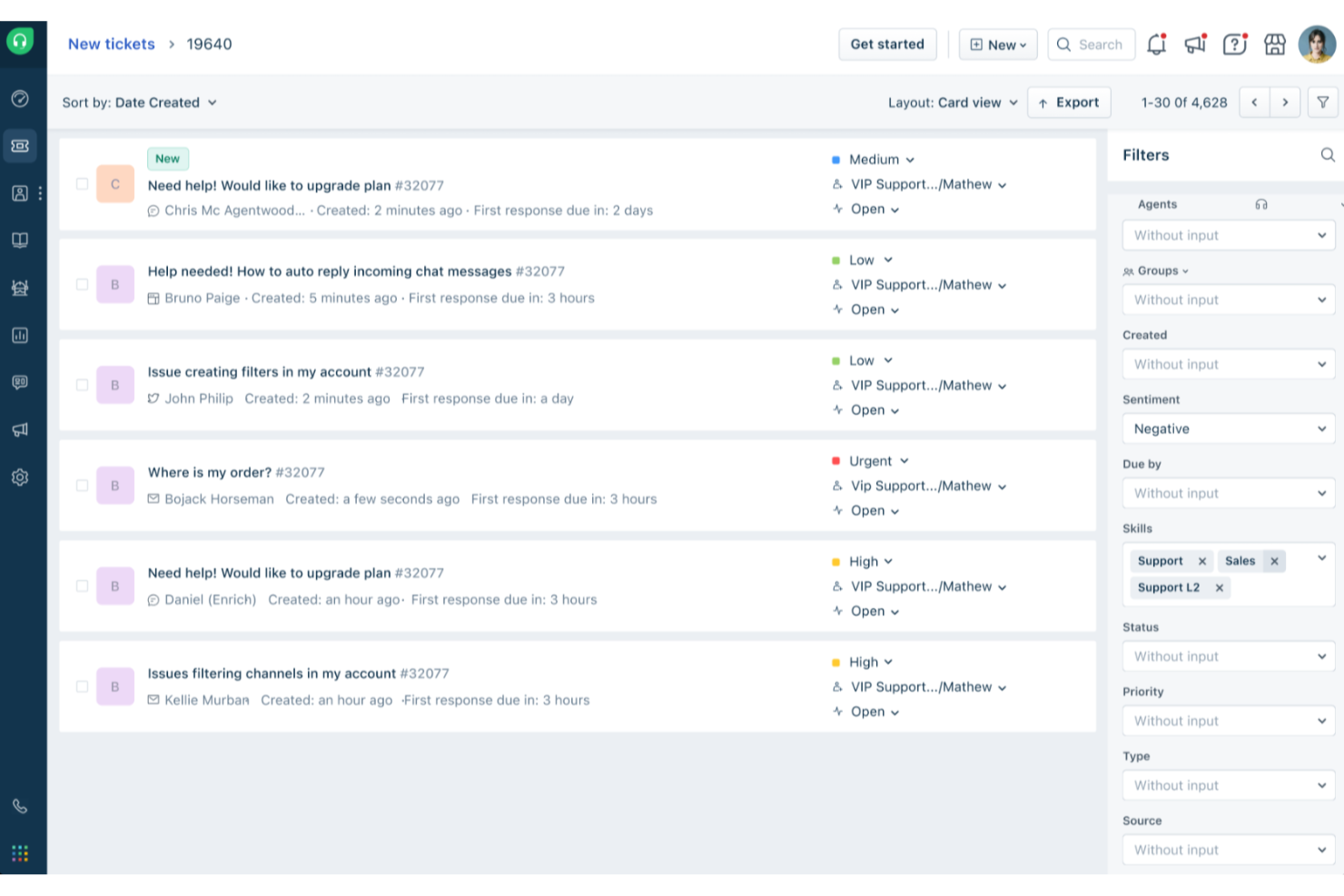
Freshdesk (un produit de Freshworks Inc.) est une plateforme de support axée sur l'email, conçue pour aider les équipes à gérer les demandes clients de manière plus structurée. Elle convertit les emails entrants en tickets de support, permettant ainsi aux équipes de suivre les conversations, de prioriser les demandes et de maintenir la cohérence à mesure que le volume de tickets augmente.
Pourquoi j'ai choisi Freshdesk
J'ai choisi Freshdesk pour ses fonctionnalités de gestion de tickets adaptées aux flux de travail de support par email. Des fonctionnalités telles que la boîte de réception partagée et la gestion des tickets parents-enfants aident les équipes à traiter les problèmes liés et les dépendances sans perdre le contexte. Freddy AI est intégré à la plateforme pour assister dans des tâches telles que la gestion des tickets et le soutien aux flux de travail, ce qui peut réduire la répétitivité des tâches manuelles. Ensemble, ces outils facilitent l'organisation et la collaboration au sein des équipes support lorsqu'elles doivent traiter des volumes élevés de demandes par email.
Principales fonctionnalités de Freshdesk
En plus de son système de gestion de tickets robuste, Freshdesk offre une variété de fonctionnalités qui optimisent le fonctionnement de la boîte de réception pour votre équipe.
- Portail client : Cette fonctionnalité permet à vos clients de soumettre des tickets et d'accéder à des ressources en autonomie, favorisant ainsi l'indépendance et allégeant la charge de votre équipe support.
- Analyses et rapports : Fournit une analyse à la demande de métriques clés comme la satisfaction client et le temps de première réponse, vous aidant à suivre les performances et à identifier des axes d'amélioration.
- Outils en libre-service : Comprend une base de connaissances multilingue et des forums communautaires, permettant aux clients de trouver rapidement et efficacement des réponses.
- Routage et automatisation des SLA : Rationalise les flux de travail en automatisant l'attribution des tickets et les suivis, permettant à vos agents de se concentrer sur les demandes critiques.
Intégrations Freshdesk
Les intégrations incluent Microsoft Teams, Slack, WhatsApp, Google Drive, Shopify, Mailchimp, Trello, Salesforce, Jira et HubSpot.
Pros and Cons
Pros:
- Les outils d'automatisation rationalisent la gestion des tickets et améliorent l'organisation
- Options d'auto-assistance pour les clients, y compris une base de connaissances
- L'automatisation alimentée par l'IA améliore les temps de réponse et la satisfaction client
Cons:
- La base de connaissances multilingue n'est disponible que dans les formules de niveau supérieur
- La création de rapports personnalisés peut nécessiter des compétences avancées ou un forfait supérieur
New Product Updates from Freshdesk

Freshdesk Adds Voice AI Agents in Freshcaller
Freshdesk introduces Voice AI Agents available through Freshcaller Marketplace apps to handle routine calls and reduce queues. This feature enables automated call handling with real-time, conversational support. For more information, visit Freshdesk's official site.

SysAid
Meilleure automatisation d’e-mails en tickets
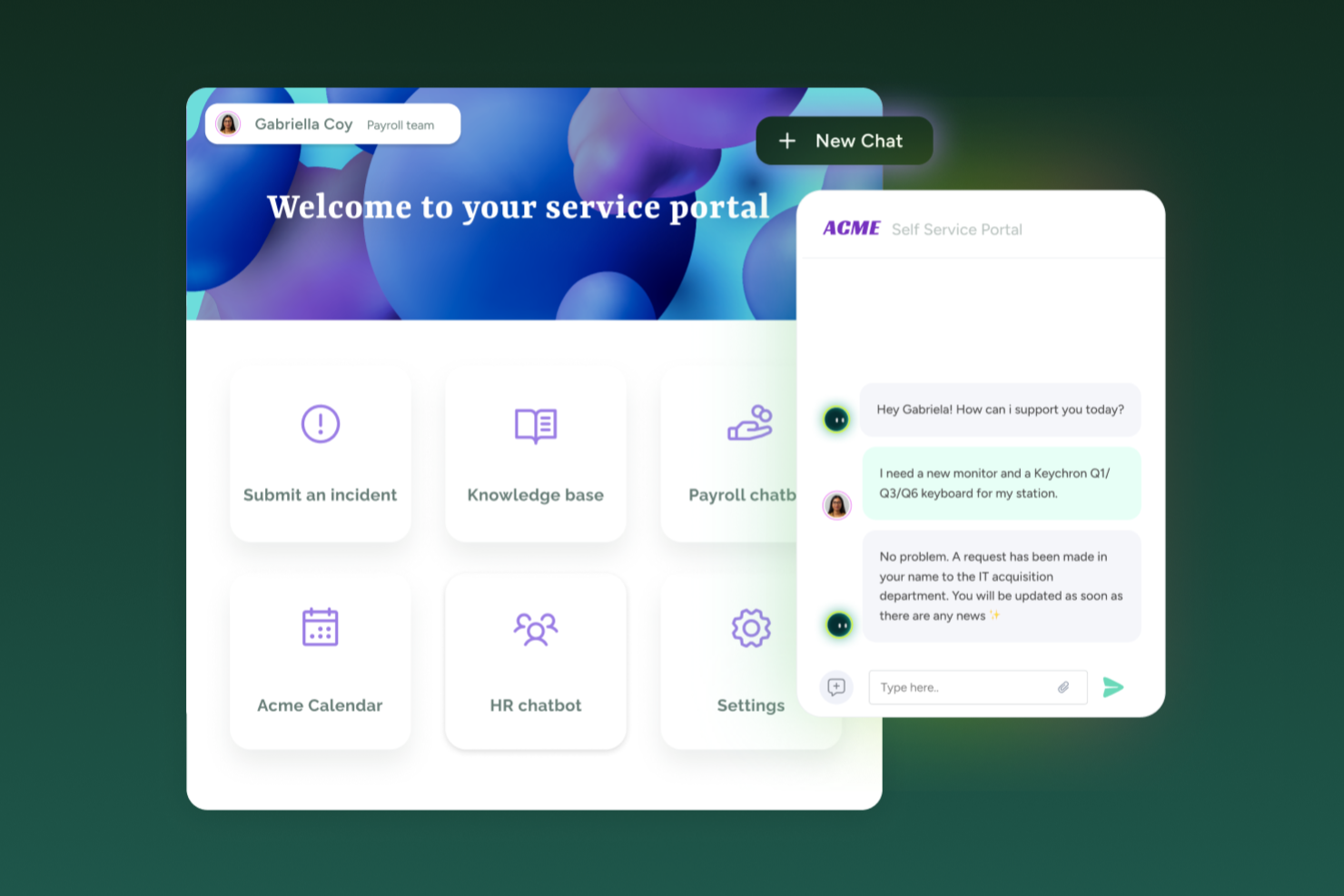
SysAid réunit le service d’assistance et la gestion des services informatiques (ITSM) d’une manière adaptée aux équipes IT qui gèrent à la fois les demandes de support par email, le suivi des actifs et l’orientation des demandes. Si vous avez besoin d’un outil de help desk qui prend en charge la gestion de tickets provenant d’e-mails entrants, des portails en libre-service et des flux ITSM, que vous soyez une entreprise de taille moyenne ou une grande organisation, SysAid fournit un système unique pour gérer les demandes de service, les actifs et la charge de tickets.
Pourquoi j’ai choisi SysAid
J’ai choisi SysAid car il prend en charge la création automatique de tickets à partir des emails entrants, chaque message de support étant converti en une demande de service suivie avec classification et routage intégrés. Cela permet de s’assurer que les demandes de support envoyées par email ne sont pas oubliées ou négligées, ce qui est crucial si l’email reste un canal d’entrée principal pour vos utilisateurs. Ses fonctionnalités d’automatisation, notamment le routage basé sur des règles et la priorisation des tickets, permettent à votre équipe de traiter les demandes de façon plus cohérente. J’apprécie également que SysAid offre à la fois les fonctionnalités essentielles d’un help desk et des processus ITSM avancés, le rendant adapté aux équipes dont les besoins en gestion des services sont appelés à évoluer.
Fonctionnalités clés de SysAid
En plus de la transformation des e-mails en tickets et l’automatisation du routage, voici d’autres atouts :
- Portail libre-service : Permet aux utilisateurs finaux de soumettre directement leurs demandes de service via un portail web, réduisant ainsi le recours aux demandes par email ou téléphone.
- Gestion des actifs : Vous permet de suivre les actifs matériels et logiciels, de les associer à des tickets, et de consulter l’historique complet de chaque actif.
- Rapports & Analyses : Propose des rapports et tableaux de bord prêts à l’emploi pour suivre le volume des tickets, les temps de résolution et le cycle de vie des actifs ; utiles pour évaluer la performance et planifier des améliorations.
- Gestion des incidents : Permet de traiter et résoudre les incidents efficacement grâce à une interface fluide favorisant des temps de réponse rapides.
Intégrations SysAid
Les intégrations incluent Microsoft 365, Salesforce, Slack, Google Workspace, Microsoft Dynamics 365, Zendesk, QuickBooks, Shopify, ServiceNow et Zoom.
Pros and Cons
Pros:
- L’automatisation par IA réduit significativement les tâches informatiques répétitives.
- SysAid propose une intégration email puissante pour une création de tickets efficace.
- La plateforme offre des capacités complètes de gestion des actifs.
Cons:
- L’expérience sur l’application mobile manque de fonctionnalités complètes.
- Lorsque les fonctionnalités sont mal configurées, les automatisations et les workflows SLA peuvent devenir complexes et déroutants pour les agents.
New Product Updates from SysAid

SysAid Adds Bulk Contract Import
SysAid added bulk contract import to License Manager Essentials, letting admins upload a CSV template, validate entries, and create multiple contracts at once. For more information, visit SysAid's official site.

Idéal pour les boîtes de réception centralisées d’e-mails et de chats
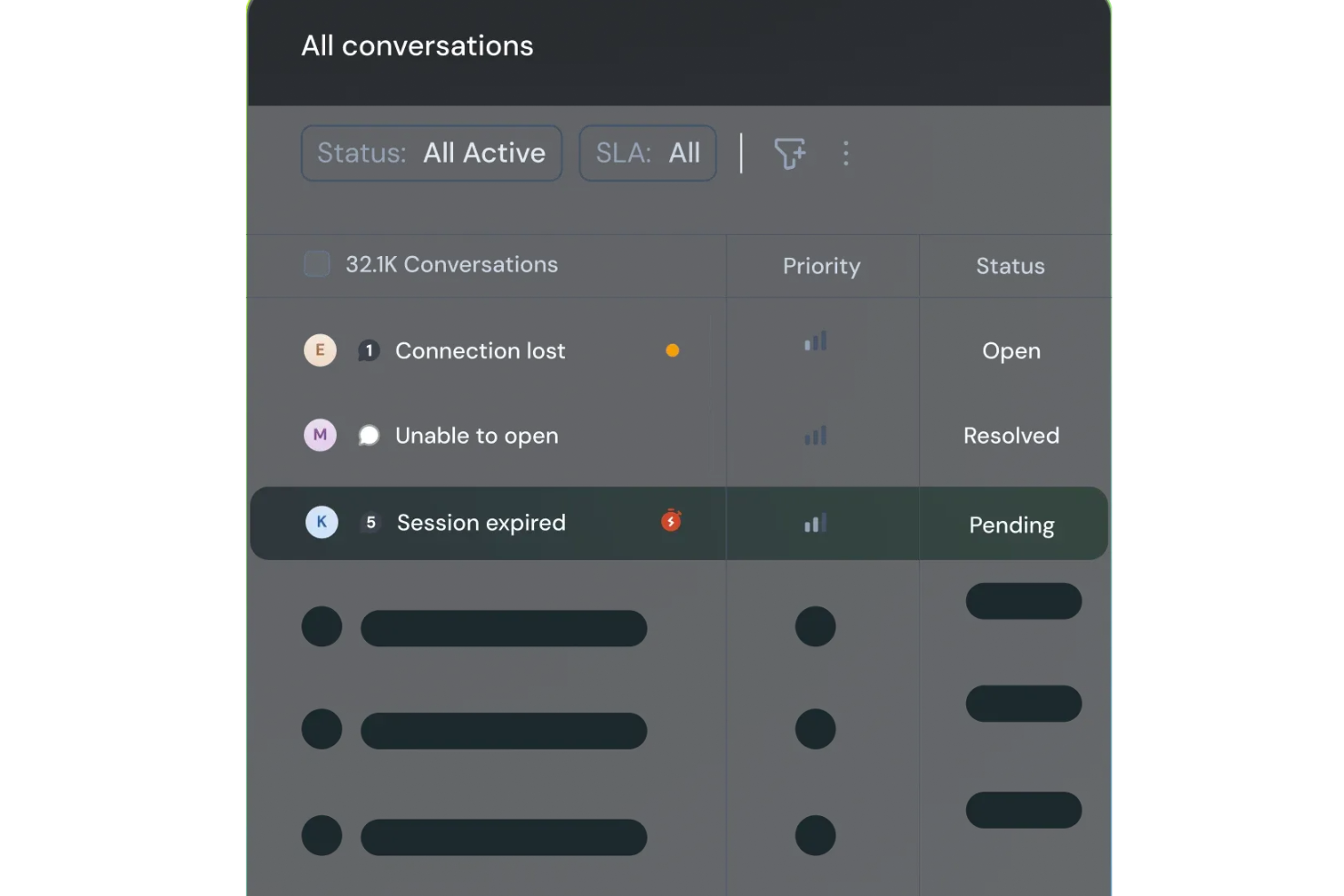
SparrowDesk est une plateforme de service client alimentée par l'IA, conçue pour améliorer la productivité des équipes et la satisfaction client grâce à ses fonctionnalités intelligentes. Adaptée aux entreprises cherchant à rationaliser leurs canaux de support, elle propose une boîte de réception unifiée qui regroupe les communications par e-mail et chat, répondant ainsi efficacement au besoin d'une gestion efficace des tickets et de délais de réponse rapides.
Pourquoi j'ai choisi SparrowDesk
J'ai choisi SparrowDesk pour ses capacités remarquables alimentées par l'IA qui améliorent directement la gestion des e-mails. L'agent Luna AI de la plateforme résout automatiquement une grande partie des demandes des clients, permettant ainsi à votre équipe de se concentrer sur les problématiques plus complexes. La boîte de réception centralisée est une autre fonctionnalité que j'apprécie, car elle regroupe toutes les communications, permettant une gestion fluide des interactions par e-mail et chat. De plus, l'AI Copilot assiste les agents avec des résumés instantanés et des suggestions de brouillons intelligentes, ce qui permet de réduire significativement les délais de réponse et d'améliorer la qualité du support.
Fonctionnalités clés de SparrowDesk
En plus de ses capacités basées sur l'IA, SparrowDesk propose plusieurs autres fonctionnalités qui renforcent son utilité en tant que logiciel de support par e-mail :
- Accords de niveau de service (SLA) : Établit des objectifs de réponse et de résolution afin de garantir un support rapide pour vos clients.
- Gestion des horaires d'ouverture : Gère automatiquement les attentes des clients et l'acheminement des tickets selon vos horaires de travail définis.
- Macros d'action rapide : Automatise les tâches répétitives, fait gagner du temps à votre équipe et assure la cohérence des réponses.
- Analyses interactives : Fournit des informations en temps réel sur la performance de l'équipe et les tendances clients pour faciliter la prise de décision.
Intégrations SparrowDesk
Aucune intégration native n’est actuellement listée par SparrowDesk.
Pros and Cons
Pros:
- Une boîte de réception unifiée pour les e-mails et le chat en direct évite la fragmentation des canaux et permet à votre équipe de travailler en un seul endroit.
- Un constructeur de flux de travail sans code simplifie l'acheminement, l'étiquetage et les règles d'escalade sans ressources d'ingénierie.
- Des tableaux de bord et rapports en temps réel donnent de la visibilité sur le respect des SLA et la charge de travail des agents.
Cons:
- La forte orientation IA peut nécessiter davantage de configuration initiale.
- Ne prend pas en charge les canaux autres que l'e-mail et le chat.

Hiver
Idéal pour offrir un support client alimenté par l’IA
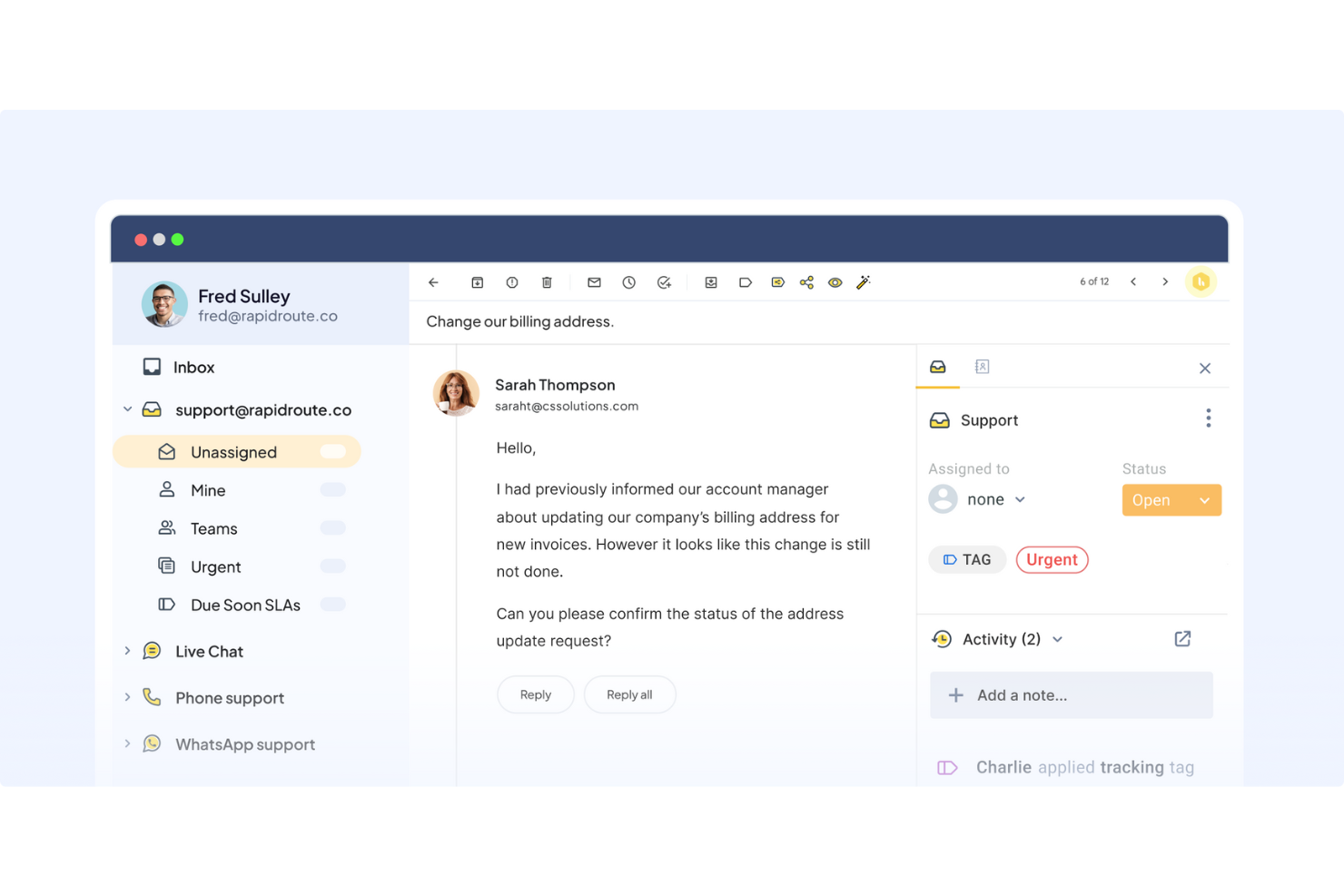
Hiver est une plateforme moderne de service client alimentée par l’IA qui rend le support client par e-mail simple et efficace. Elle regroupe toutes vos demandes clients dans une interface familière, semblable à une boîte mail, où vous pouvez attribuer des tickets, suivre leur progression et collaborer avec vos collègues en temps réel.
Pourquoi j’ai choisi Hiver : Les capacités d’IA de Hiver en font un excellent choix pour les équipes souhaitant maximiser leur efficacité et offrir un support de grande qualité même avec des ressources limitées. L’IA prend en charge une grande partie de la charge de travail. Par exemple, l’IA Copilot aide les agents à répondre aux clients en suggérant des réponses contextuelles, en rédigeant des réponses, en ajustant le ton et en reformulant les messages pour que les réponses restent claires et sur la marque, en s’appuyant sur les conversations passées, la base de connaissances interne et les documents stockés.
Ses Agents IA vous aident à configurer des workflows autonomes pour gérer les FAQs, envoyer des relances, détecter les fins de conversation par remerciement, exécuter des actions en plusieurs étapes comme les remboursements et classer ou rediriger les conversations selon la catégorie, l’urgence ou le ressenti. Hiver propose également des Insights IA qui transforment chaque conversation en opportunité d’apprentissage. Cela vous aide à repérer les goulots d’étranglement liés à la résolution, anticiper les problèmes potentiels et détecter les risques concernant la santé des comptes avant qu’ils ne s’aggravent. Les modèles prédictifs identifient les tendances pour permettre aux équipes d’agir en amont et de s’améliorer en continu.
Fonctionnalités et intégrations phares de Hiver
Fonctionnalités : boîte de réception partagée pour attribuer et suivre les demandes, outils de collaboration comme les notes, les @mentions et les brouillons partagés permettant d’aligner l’équipe. Il propose aussi des automatisations de workflow et la gestion des SLA pour garantir des réponses rapides, ainsi qu’une analyse détaillée des performances et de la satisfaction client. La base de connaissances permet aux agents d’éviter de traiter les demandes récurrentes les plus fréquentes.
Intégrations : Aircall, Asana, Jira, Okta, QuickBooks, Salesforce, Slack, WhatsApp, Zapier, et plus de 100 autres plateformes.
Pros and Cons
Pros:
- Support client assuré par de vraies personnes disponible 24h/24, 7j/7 par chat ou e-mail, sur tous les forfaits (y compris la version gratuite)
- L’IA intervient à toutes les étapes du parcours support client
- Excellentes fonctionnalités de collaboration interne
Cons:
- L’expérience sur mobile n’est pas aussi performante que sur ordinateur
- Par rapport à d’autres plateformes, Hiver propose moins d’intégrations tierces
New Product Updates from Hiver

Hiver Brings Chat Widget Support to Mobile Apps
Hiver now lets you embed the Hiver Chat Widget in iOS, Android, React Native, and Flutter apps so customers can start chats without leaving your app. For more information, visit Hiver's official site.

Idéal pour combiner l'IA avec le support humain
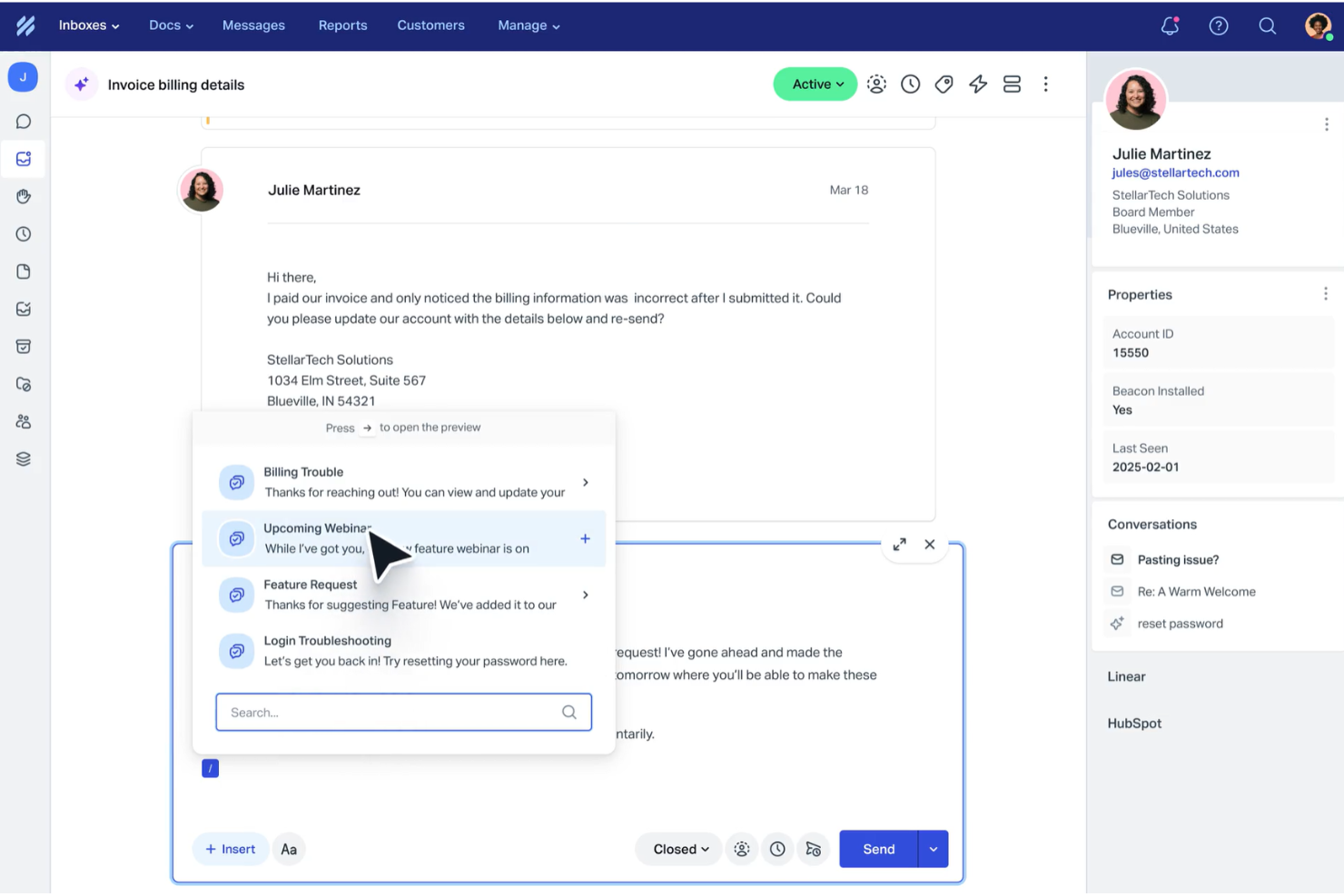
Help Scout est conçu pour les entreprises souhaitant améliorer leur expérience de support client grâce à une combinaison d'IA et d'interaction humaine. En automatisant les tâches routinières et en offrant une boîte de réception partagée pour la collaboration d'équipe, Help Scout répond aux défis tels que la communication désorganisée et les temps de réponse lents, ce qui en fait un outil précieux pour renforcer la satisfaction client.
Pourquoi j'ai choisi Help Scout
J'ai choisi Help Scout pour sa capacité à combiner l'IA avec le support humain, ce qui en fait un excellent choix pour les équipes de divers secteurs. Sa fonctionnalité de boîte de réception partagée permet à votre équipe de collaborer et garantit que toutes les communications avec les clients sont organisées et accessibles. De plus, le chatbot IA prend en charge une grande partie des demandes routinières, libérant ainsi votre équipe afin qu'elle puisse se concentrer sur des problèmes plus complexes. Cette combinaison de fonctionnalités permet de gérer un grand volume de requêtes sans sacrifier la qualité du service.
Fonctionnalités clés de Help Scout
En plus de sa boîte de réception partagée et de son chatbot IA, Help Scout propose plusieurs autres fonctionnalités utiles à votre équipe :
- Centre d'aide : Cette fonctionnalité vous permet de créer un portail en libre-service où les clients peuvent trouver des réponses aux questions fréquentes, réduisant ainsi la charge de travail de votre support.
- Workflows automatisés : Vous pouvez mettre en place des règles d'automatisation pour simplifier la gestion de votre boîte mail, en veillant à ce qu'aucun e-mail important ne soit manqué.
- Réponses enregistrées : Cette fonction permet à votre équipe de répondre rapidement aux questions fréquentes, améliorant ainsi les délais de réponse et la cohérence.
- Messages dans l'application : Échangez directement avec vos clients au sein de votre produit pour offrir une assistance à l'intégration, recueillir des retours et partager des mises à jour.
Intégrations Help Scout
Help Scout offre un large choix d'intégrations natives qui renforcent ses fonctionnalités, y compris Salesforce, Shopify, Slack, HubSpot, Mailchimp, Jira, Trello, Google Apps, WooCommerce et WordPress.
Pros and Cons
Pros:
- Le chatbot IA gère efficacement les demandes clients courantes.
- Fournit des analyses détaillées pour le suivi et l'amélioration des performances.
- Propose une base de connaissances robuste pour un support en libre-service.
Cons:
- Options de personnalisation avancées limitées par rapport aux concurrents.
- Ne prend pas en charge les canaux en temps réel comme WhatsApp et les appels vocaux.
New Product Updates from Help Scout

Help Scout Adds Automatic Conversation Reassignment
Help Scout can now automatically unassign conversations when the assigned teammate has been away long enough, keeping replies moving so others can pick them up. For more information, visit Help Scout's official site.
 .
.
Idéal pour collaborer et partager des informations en temps réel

Zoho Desk est un logiciel de service d'assistance alimenté par l'IA qui aide les utilisateurs à gérer les conversations clients par e-mail, téléphone, chat et réseaux sociaux.
Pourquoi j'ai choisi Zoho Desk : Il dispose d'un assistant virtuel intelligent appelé Zia, qui automatise plusieurs tâches. Par exemple, il peut catégoriser les tickets, suggérer des solutions aux requêtes et prédire les niveaux de satisfaction client.
Zoho Desk propose également des fonctionnalités pour vos agents de support, responsables et clients. Par exemple, des fonctions en libre-service telles que la base de connaissances et la communauté aident les clients à trouver leurs réponses eux-mêmes, tandis que les fonctionnalités de rapports et d'analyses aident les responsables à analyser la performance des agents de support.
Un autre grand atout du logiciel est son intégration native avec d'autres applications Zoho telles que Zoho CRM, Zoho SalesIQ, Zoho Analytics et plus encore. Cela permet aux entreprises de créer un centre unifié pour les données clients et le support, et facilite la collaboration entre différentes équipes.
Fonctionnalités et intégrations remarquables de Zoho Desk
Fonctionnalités incluent la gestion des tickets, l'auto-étiquetage des tickets, l'analyse de sentiment, les notifications Zia, le tableau de bord Zia, l'assistant de réponse, des outils en libre-service, l'intégration CRM, les fonctions personnalisées, les SDK, marketplace et plateforme, les API, les rapports et tableaux de bord, le suivi du temps, centre d'aide multi-marques, le mappage de domaine, et la gestion des utilisateurs et des accès.
Intégrations incluent Twilio, RingCentral, Amazon Connect, Ozonetel, Exotel, Knowlarity, Jive, sipgate, JustCall, ringover, et d'autres options logicielles.
Pros and Cons
Pros:
- Propose un large éventail de fonctionnalités
- Nombreuses options de personnalisation
- Interface épurée et intuitive, facile à naviguer
Cons:
- Rapports limités dans les offres d'entrée de gamme
- Courbe d'apprentissage pour les fonctionnalités avancées

Missive
Idéal pour la corédaction d’e-mails en équipe
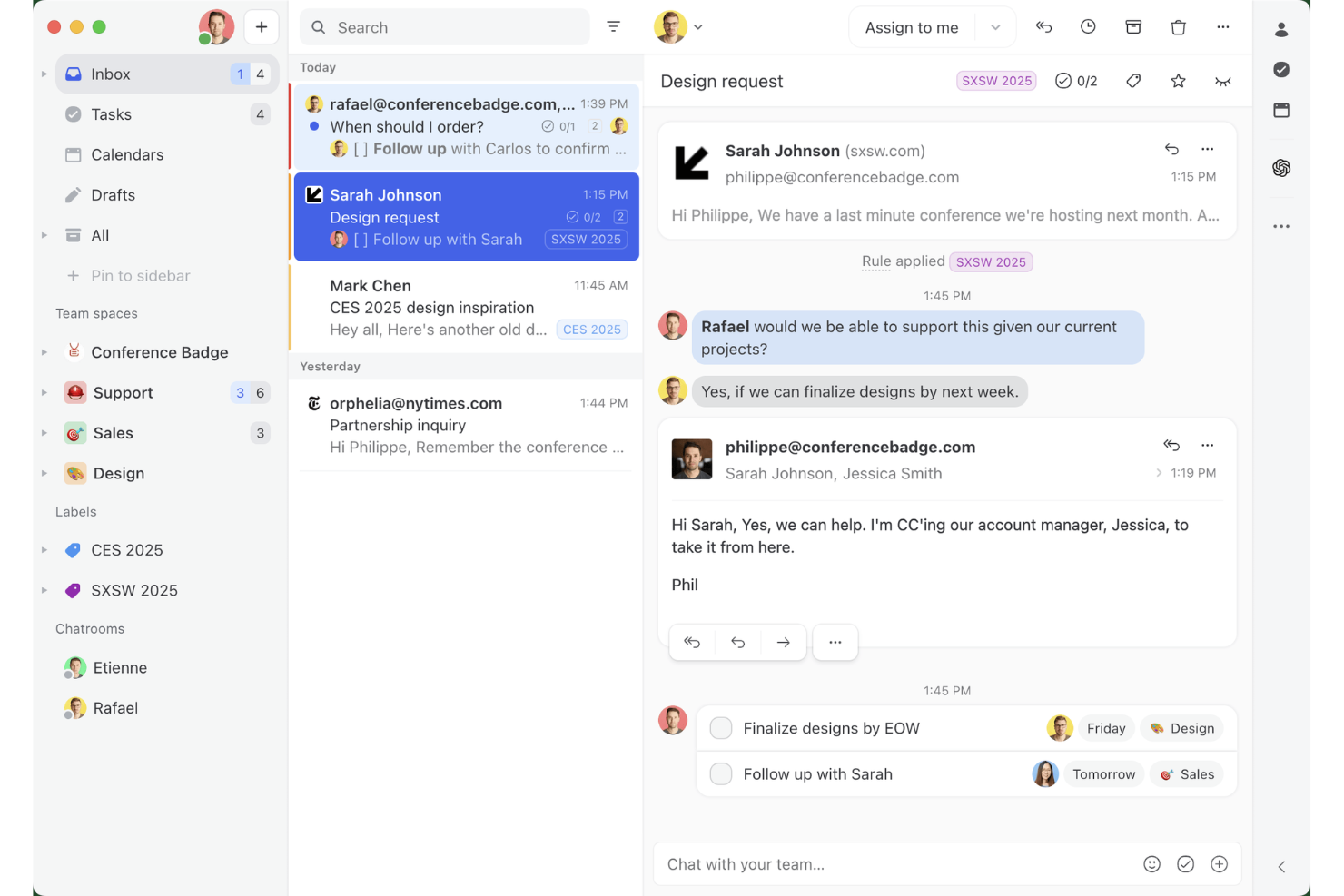
Missive est une plateforme de boîte de réception partagée collaborative qui combine la gestion des e-mails multicanaux, les fils de discussion internes d’équipe, les règles d’acheminement alimentées par l’IA et la corédaction en temps réel sur les canaux d’e-mail, WhatsApp, SMS et de messagerie sociale.
À qui Missive convient-elle le mieux ?
Missive convient parfaitement aux équipes d’assistance petites à moyennes qui ont besoin que plusieurs agents collaborent sur des files d’e-mails partagées sans les contraintes d’un système formel de gestion des tickets.
Pourquoi j’ai choisi Missive
J’ai inclus Missive dans ma sélection principale, car c’est le seul outil de centre d’assistance par e-mail permettant à plusieurs agents de corédiger une même réponse en temps réel, ce qui est important lorsqu’un problème client complexe nécessite l’intervention de deux personnes avant tout envoi. Son système de détection des collisions indique qui consulte ou saisit activement du contenu dans une conversation, afin que votre équipe cesse d’envoyer des réponses en double. Les règles d’IA ajoutent un acheminement sensible au contenu, en signalant automatiquement les messages urgents ou négatifs.
Fonctionnalités principales de Missive
- Réponses prédéfinies : Enregistrez et réutilisez des réponses modèles avec la prise en charge de variables pour des messages personnalisés et cohérents au sein de votre équipe.
- Équilibrage de la charge de travail : Distribuez automatiquement les conversations entrantes selon des méthodes d’attribution en rotation, à l’agent le moins occupé, à tous les agents simultanément ou de manière aléatoire.
- Règles d’IA : Automatismes sensibles au contenu qui analysent le sens des messages afin de déclencher l’ajout d’étiquettes, l’escalade ou la création de brouillons en fonction de l’intention ou du sentiment.
- Serveur MCP de Missive : Connectez des clients d’IA externes (comme Claude ou ChatGPT) pour interroger les données du centre d’assistance par e-mail, consulter les calendriers et rédiger des réponses, tout en exigeant une vérification humaine avant l’envoi.
- Boîte de réception multicanal : Gérez les e-mails, WhatsApp, les SMS, Facebook Messenger et les messages privés Instagram depuis une seule boîte de réception partagée.
Intégrations de Missive
Missive propose des intégrations natives avec Salesforce, HubSpot, Pipedrive, Shopify, Asana, ClickUp, Trello, Todoist, WhatsApp Business et Twilio pour les SMS. La plateforme prend également en charge une API REST, les webhooks, Zapier ainsi que son nouveau serveur MCP avec les forfaits Productive et Business (activation par un administrateur requise).
Pros and Cons
Pros:
- Corédaction d’e-mails collaborative en temps réel pour les équipes
- Acheminement et suggestions de réponses alimentés par l’IA disponibles
- Une boîte de réception unifiée couvrant les e-mails et les canaux de messagerie
Cons:
- Aucun identifiant de ticket traditionnel ni suivi du cycle de vie
- Les rapports avancés nécessitent un forfait supérieur
New Product Updates from Missive
Missive Adds Conversation Pins
Missive now lets you pin key links, decisions, and notes inside a conversation, keeping them accessible in a dedicated Pins section in the Details sidebar. For more information, visit Missive's official site.
 .
.
eDesk
Idéal pour l’automatisation des tâches de support e-commerce
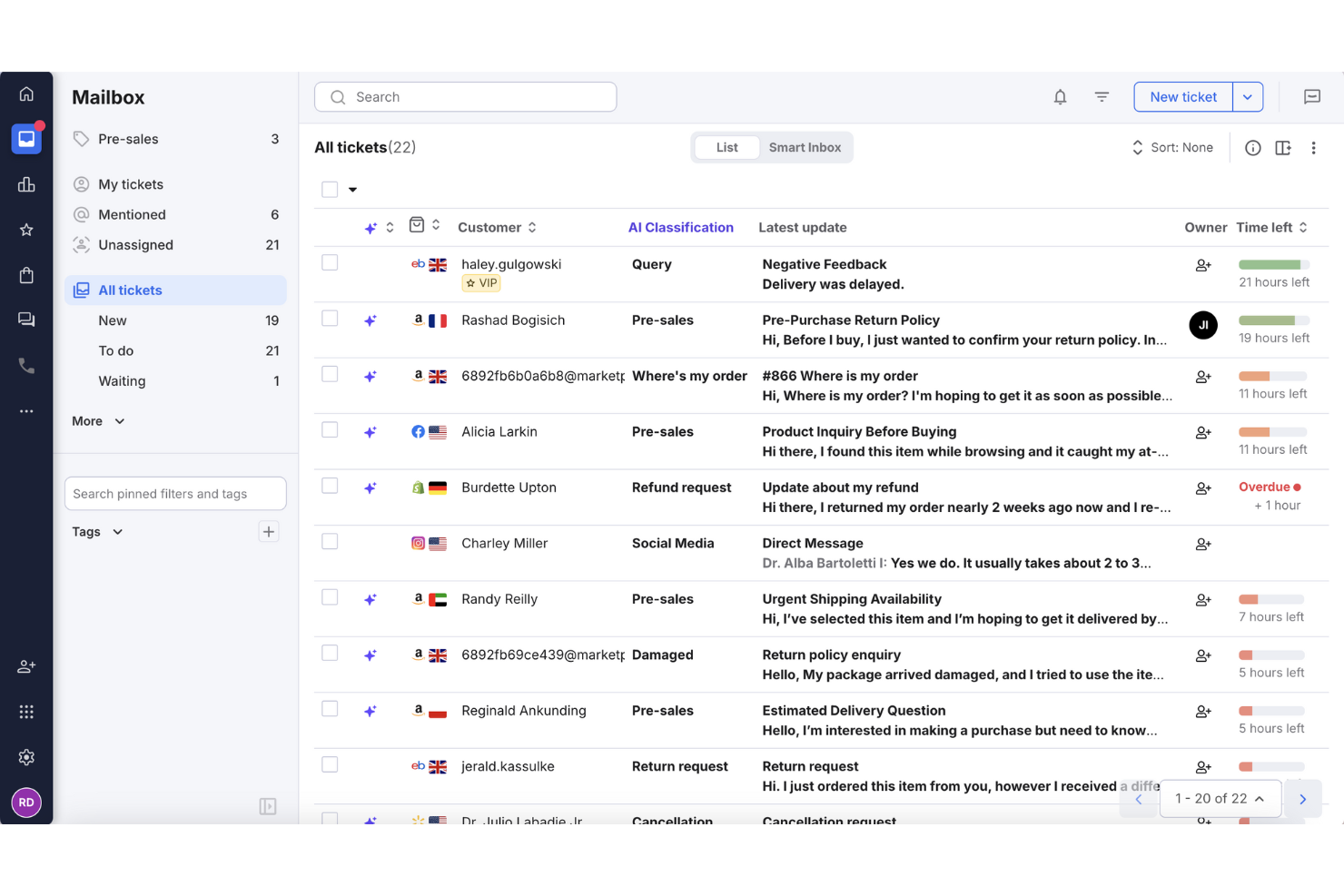
Pour les entreprises de commerce électronique à la recherche d'un moyen efficace de gérer les demandes clients, eDesk s'impose comme une solution sur mesure. Sa plateforme alimentée par l'IA centralise la communication de plusieurs canaux dans une seule boîte de réception, facilitant ainsi une réponse rapide de la part de votre équipe. Conçu spécifiquement pour l’eCommerce, eDesk améliore non seulement la satisfaction client mais optimise également les opérations de support, répondant à la problématique courante de la gestion de forts volumes d’interactions clients.
Pourquoi j’ai choisi eDesk
J’ai choisi eDesk pour sa capacité à automatiser les tâches de support routinières, un critère essentiel pour les entreprises gérant de gros volumes de demandes. Cette automatisation est soutenue par des fonctionnalités telles qu’un chatbot disponible 24/7 qui permet de répondre aux questions fréquentes à tout moment. eDesk s’intègre également à de nombreux canaux de vente en ligne, simplifiant la gestion des conversations client et le support lié aux commandes sur une seule interface.
Fonctionnalités clés d’eDesk
En plus de ses puissantes capacités d’automatisation, eDesk propose :
- Boîte de réception unifiée : Centralise les messages de plus de 300 canaux, dont les principales places de marché et réseaux sociaux.
- Rapports en temps réel : Fournit des analyses sur les indicateurs de performance, vous aidant à optimiser vos opérations de support.
- Automatisation alimentée par l’IA : Automatise les réponses aux demandes courantes, libérant votre équipe pour gérer les problèmes plus complexes.
- Workflows personnalisables : Permet à votre équipe de créer des processus adaptés aux besoins spécifiques de votre entreprise.
Intégrations eDesk
Intégrations disponibles avec Amazon, eBay, Walmart, Shopify, Magento, Facebook, WhatsApp, Etsy, BigCommerce et WooCommerce.
Pros and Cons
Pros:
- Assistance chatbot disponible 24/7 pour gérer les questions de base
- L’automatisation IA réduit les tâches de support répétitives
- Intègre des données de commande enrichies pour un meilleur service client
Cons:
- Principalement conçu pour le e-commerce, moins flexible pour d’autres secteurs
- La personnalisation des rapports est limitée pour l’analyse avancée
New Product Updates from eDesk
eDesk Adds Galeria and Kaufland Support in Spain and Netherlands
eDesk adds support for Galeria, Kaufland Spain, and Kaufland Netherlands marketplaces. These integrations bring more European buyer messages into eDesk with routing, templates, AI insights, and automated translation. For more information, visit eDesk’s official site.
 .
.
Tidio
Idéal pour une organisation intelligente des tickets
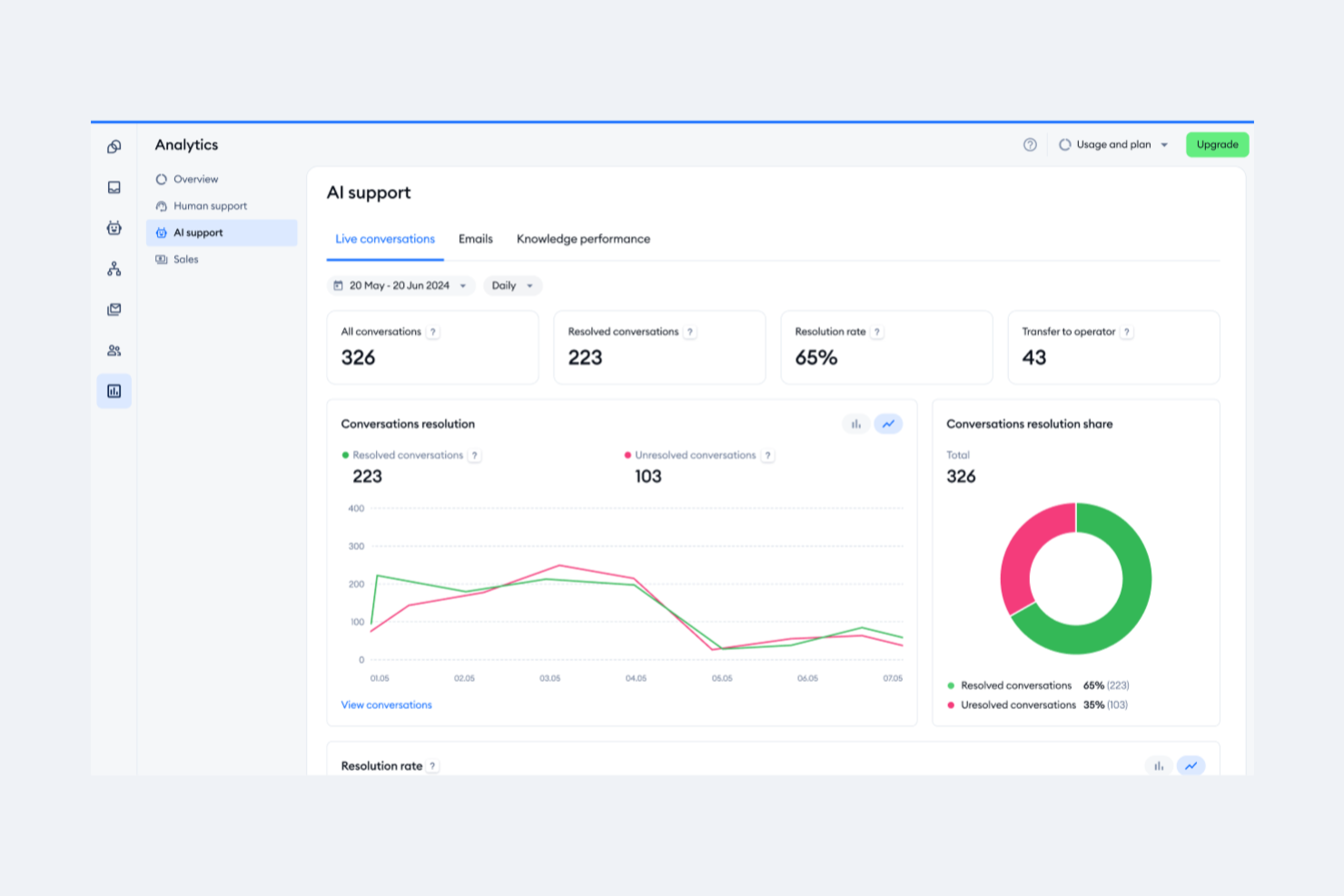
Tidio est une plateforme de support client qui combine un chat en direct, l'automatisation par IA et des outils de helpdesk basés sur l’email. Elle est conçue pour aider les équipes à gérer les conversations client sur plusieurs canaux à partir d’un seul tableau de bord.
Pourquoi j’ai choisi Tidio : Ce que j’apprécie, c’est son système intelligent de gestion des tickets. Vous pouvez transformer les emails, chats et messages sur les réseaux sociaux en tickets, les attribuer à des collègues, définir des priorités et suivre leur statut. Le système prend en charge le marquage, les notes internes et les vues personnalisées, permettant à votre équipe de filtrer et d’organiser les tickets selon des conditions spécifiques.
Une autre raison pour laquelle j’ai choisi Tidio est l’automatisation des emails alimentée par IA. L’agent IA Lyro gère les demandes client routinières en analysant les emails entrants et en répondant aux problématiques récurrentes. Si l’IA ne peut pas résoudre la demande, elle transfère la conversation à votre équipe en conservant le contexte.
Fonctionnalités et intégrations phares de Tidio
Fonctionnalités : réponses prédéfinies, vues personnalisées des tickets, gestion du dossier indésirable, réponses automatiques, mises à jour du statut des tickets, fusion de tickets, personnalisation de l’adresse de l’expéditeur, priorisation des tickets, notes internes, étiquetage des tickets, enquêtes de satisfaction client et politiques SLA.
Intégrations : Shopify, WordPress, Squarespace, WIX, Adobe Commerce, BigCommerce, WooCommerce, Google Analytics, Mailchimp, HubSpot et Zendesk.
Pros and Cons
Pros:
- Support multicanal incluant chats, emails et réseaux sociaux
- Lyro IA gère une grande partie des demandes client
- Fournit des informations sur la performance de l’équipe et la satisfaction client
Cons:
- De nombreuses fonctionnalités d’automatisation réservées aux formules supérieures
- Des limitations lors de l’intégration avec certains outils tiers

Halo
Idéal pour le suivi des incidents
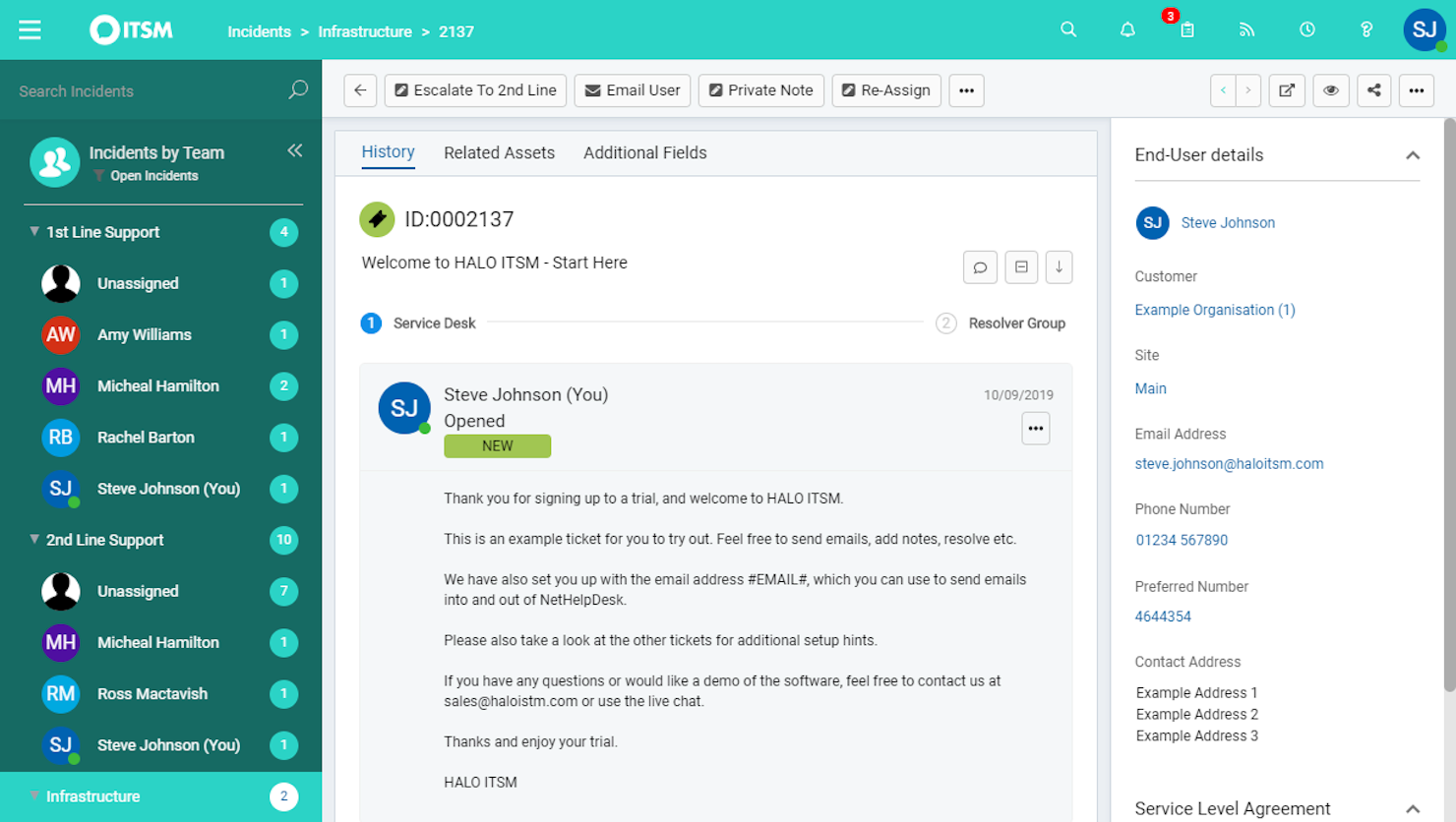
HaloITSM est une plateforme polyvalente de gestion des services informatiques qui facilite le traitement efficace des processus informatiques. Elle propose une suite d'outils pour améliorer la prestation de services, ce qui en fait un excellent choix pour les équipes souhaitant renforcer leurs capacités de support.
Pourquoi j'ai choisi HaloITSM : J'ai choisi HaloITSM pour ses solides fonctionnalités de gestion des incidents. Cette fonctionnalité permet à votre équipe de suivre et de résoudre les problèmes, ce qui est essentiel pour assurer un support de haute qualité. De plus, les notifications par e-mail de la plateforme tiennent tout le monde informé, réduisant ainsi les risques de manquer des mises à jour importantes.
Une autre raison de choisir HaloITSM est son excellent système de base de connaissances. Cette fonctionnalité permet à votre équipe de créer et de gérer des articles de support, aidant les utilisateurs à trouver rapidement des solutions sans avoir à envoyer de nombreux e-mails. Elle favorise une approche proactive du service client, ce qui vous permet de réduire le volume des demandes entrantes.
Fonctionnalités remarquables et intégrations :
Les fonctionnalités comprennent un catalogue de services permettant aux utilisateurs de faire des demandes en toute simplicité, garantissant ainsi que toutes les requêtes soient suivies et traitées. Ses capacités de gestion des actifs vous aident à suivre vos ressources informatiques, offrant une visibilité sur vos ressources. De plus, la fonctionnalité de gestion des changements vous permet de gérer les modifications de manière systématique, minimisant ainsi les perturbations de vos services.
Les intégrations incluent RingCentral, Xero, Slack, Salesforce, TeamViewer, Cisco Webex, QuickBooks Online, Jira, AnyDesk, Azure Active Directory, Lansweeper et Splashtop.
Pros and Cons
Pros:
- Fonctionnalités de gestion des actifs
- Routage automatisé des tickets
- Outils de reporting détaillés
Cons:
- Ralentissements occasionnels des performances
- Fonctionnalités mobiles limitées
Autres options
\u003cspan style=\u0022font-weight: 400\u0022\u003eVoici quelques autres options qui ne figurent pas dans la liste des meilleurs logiciels de centre d’assistance par e-mail :\u003c/span\u003e
- Vision Helpdesk
Idéal pour le support multicanal
- monday service
Idéal pour centraliser les communications par email
- Gorgias
Idéal pour l'intégration avec d'autres plateformes e-commerce
- Assembled AI
Idéal pour la prévision par apprentissage automatique
- Issuetrak
Idéal pour le suivi et la gestion des problèmes
- Froged
Idéal pour la communication omnicanale
- TOPdesk
Idéal pour la visualisation de données en temps réel
- Front
Idéal pour améliorer la collaboration et la communication d'équipe
- Jira Service Desk
Idéal pour connecter l'assistance client, les opérations informatiques et les équipes métier
- HelpSpot
Idéal pour les équipes ayant besoin de nombreuses options de personnalisation
- Rescue
Meilleur logiciel de planification pour centres d'appels pour la gestion en temps réel des agents
- Front
Idéal pour l'automatisation et la gestion des communications
- NinjaOne
Idéal pour la gestion des actifs help desk
- LiveAgent
Idéal pour améliorer la motivation et la performance des agents grâce à la gamification
- Zendesk
Idéal pour créer une expérience client omnicanale


Comment j'évalue les logiciels de service d'assistance par e-mail
Je divise mon évaluation en deux niveaux : le socle de base que chaque outil doit respecter — boîte de réception partagée, routage des tickets, suivi des SLA — et les éléments différenciateurs qui déterminent la meilleure adéquation pour votre équipe.
Fonctionnalités de base (Indispensables pour cette liste)
Lorsque je sélectionne des outils pour ma liste, j'attribue à chacun une note de 0 (la fonctionnalité n'est pas proposée) à 5 (excellent dans ce domaine) pour chaque fonctionnalité de base mentionnée ci-dessous. Ensuite, je calcule le score total de l'outil en pourcentage. Chaque outil doit obtenir un score total minimum de 65 % pour être considéré.
- Boîte de réception e-mail partagée : Je vérifie si l'outil centralise plusieurs adresses d'assistance (par ex. support@, billing@, returns@) dans un espace de travail unique où les agents peuvent consulter et répondre sans se gêner mutuellement.
- Conversion de tickets & enchaînement des conversations : Chaque e-mail entrant doit être automatiquement converti en un ticket traçable avec un identifiant unique, une conversation filée complète, et des statuts clairs afin qu'aucune demande ne soit oubliée.
- Règles d'assignation et de routage : J'évalue la manière dont la plateforme distribue les tickets — qu'il s'agisse d'un routage en tourniquet, basé sur les compétences, ou de règles conditionnelles comme l'envoi des demandes de clients VIP vers une file d'attente dédiée à des agents seniors.
- Réponses pré-enregistrées & macros : Les réponses sauvegardées et les macros multi-étapes sont importantes ici. Je recherche la présence de variables dynamiques (nom du client, numéro de commande) et des bibliothèques de modèles partagés que les équipes peuvent gérer de manière centralisée.
- Outils de collaboration interne : Des fonctionnalités comme les notes privées, les @mentions et la détection de collision permettent aux agents de solliciter des collègues ou de signaler une demande de remboursement délicate, sans que le client n'ait accès aux échanges internes.
- SLA e-mail & rapports : J'analyse si la plateforme suit le temps de première réponse, le temps de résolution, et le respect des SLA par boîte de réception ou par équipe, ainsi que la personnalisation des tableaux de bord permettant d'identifier les points de blocage.
Une fois ma liste restreinte aux outils qui remplissent ces critères, j'examine ce qui distingue chaque plateforme.
Éléments différenciateurs (Ce qui distingue les fournisseurs)
Voici comment je compare et différencie les autres solutions :
Fonctionnalités remarquables
Les suggestions de réponses alimentées par l'IA font réellement la différence. Lorsqu'un agent ouvre une demande courante, comme une réinitialisation de mot de passe, une réponse pré-rédigée permet de gagner de précieuses minutes à grande échelle. J'évalue également si l'outil affiche une colonne de contexte client — anciens tickets, détails du compte, historique de commande — directement à côté du fil de discussion actif. Une base de connaissances intégrée est également un atout que je vérifie. Elle permet aux agents d'insérer des articles d'aide directement dans la conversation et de désengorger le support en anticipant les questions récurrentes.
Au-delà des fonctionnalités
L'écosystème d'intégration prend ici toute son importance. Je regarde si l'outil se connecte nativement aux plateformes CRM et e-commerce déjà utilisées par votre équipe — Salesforce, HubSpot, Shopify — pour éviter que les agents n'aient à jongler entre plusieurs onglets pour retrouver le statut d'une commande. La structure tarifaire est un autre critère que j'analyse attentivement, notamment si le coût par agent reste raisonnable à mesure que votre équipe d'assistance dépasse cinq ou dix membres. Je prends aussi en compte la taille de l'effectif, car une startup de trois personnes partageant une boîte Gmail n'a pas les mêmes besoins qu’une équipe de 50 agents gérant des SLA différenciés.
Comment choisir un logiciel de centre d’assistance par e-mail
Il est facile de se perdre dans de longues listes de fonctionnalités et des structures tarifaires complexes. Pour vous aider à rester concentré tout au long de votre processus spécifique de sélection de logiciels, voici une liste des facteurs à garder à l’esprit lors du choix d’un outil de centre d’assistance par e-mail :
| Facteur | Éléments à prendre en compte |
|---|---|
| Évolutivité | Assurez-vous que le logiciel peut évoluer avec votre entreprise, gérer l’augmentation du volume d’e-mails et l’agrandissement des équipes d’agents sans compromettre ses performances. |
| Intégrations | Vérifiez si le logiciel s’intègre à vos outils existants, tels que votre CRM, votre solution de discussion et vos plateformes de réseaux sociaux, afin de créer un système d’assistance cohérent. |
| Personnalisation | Recherchez des options permettant d’adapter les flux de travail, les tableaux de bord et les rôles utilisateurs aux besoins et processus spécifiques de votre équipe. |
| Facilité d’utilisation | Évaluez l’interface utilisateur et la navigation afin de vous assurer que votre équipe peut rapidement être opérationnelle sans formation approfondie. |
| Budget | Comparez les forfaits tarifaires et vérifiez quelles fonctionnalités sont incluses à chaque niveau. Prenez en compte le coût total de possession, y compris les frais cachés ou les coûts supplémentaires éventuels. |
| Mesures de sécurité | Vérifiez que le logiciel respecte les réglementations relatives à la protection des données et propose des fonctionnalités telles que le chiffrement et les contrôles d’accès pour protéger les données clients. |
| Options d’assistance | Tenez compte de la disponibilité et de la qualité du service client, notamment de l’assistance 24 h/24 et 7 j/7, de la diversité des canaux de contact et des ressources d’auto-assistance. |
| Outils de création de rapports | Examinez les capacités d’analyse et de création de rapports afin de vous assurer que vous pouvez suivre les indicateurs de performance et obtenir des informations sur les interactions avec les clients. |
Tendances des logiciels de centre d’assistance par e-mail
Dans le cadre de mes recherches, j’ai consulté d’innombrables mises à jour de produits, communiqués de presse et journaux de publication provenant de différents fournisseurs de logiciels de service d’assistance par e-mail. Voici quelques-unes des tendances émergentes que je surveille :
- Intelligence artificielle et apprentissage automatique : L’intelligence artificielle devient essentielle pour prévoir les besoins des clients et automatiser les réponses, les logiciels de service d’assistance basés sur l’IA intégrant de plus en plus ces fonctionnalités au cœur du processus d’assistance. Des outils comme Zoho Desk utilisent l’IA pour fournir des informations et automatiser les tâches répétitives, permettant ainsi à votre équipe de se concentrer sur les problèmes complexes.
- Assistance omnicanale : Les clients souhaitent pouvoir vous contacter par différents canaux. Les logiciels de service d’assistance par e-mail intègrent désormais le chat, les réseaux sociaux et l’assistance vocale, ce qui permet aux équipes de gérer toutes les interactions au même endroit.
- Portails en libre-service : Les entreprises permettent à leurs clients de résoudre eux-mêmes leurs problèmes. Des logiciels comme Freshdesk proposent des options complètes de libre-service, réduisant la charge de travail des équipes d’assistance et améliorant les délais de réponse.
- Fonctionnalités de personnalisation : La personnalisation des interactions avec les clients est essentielle. Certains outils proposent désormais des options permettant d’adapter les réponses en fonction de l’historique et des préférences des clients, améliorant ainsi l’expérience client globale.
- Analyses avancées : Les entreprises ont besoin d’informations sur les interactions avec leurs clients. Les nouvelles fonctionnalités d’analyse aident les équipes à suivre les indicateurs de performance et à identifier les tendances, ce qui facilite l’amélioration de la qualité du service.
Fonctionnalités des logiciels de service d’assistance par e-mail
Lorsque vous choisissez un logiciel de service d’assistance par e-mail, soyez attentif aux fonctionnalités clés suivantes :
- Gestion des tickets multicanale : Organisez, suivez et résolvez efficacement les demandes des clients reçues par e-mail, chat et réseaux sociaux, le tout depuis un tableau de bord bien organisé. Vous pouvez dire adieu à la gestion de plusieurs onglets ou aux messages importants qui passent inaperçus.
- Attribution automatisée des tickets : Acheminez automatiquement les tickets entrants vers le membre de l’équipe ou le service approprié en fonction des règles que vous avez définies. Votre flux de travail reste ainsi fluide et les demandes parviennent immédiatement à la bonne personne.
- Réponses prédéfinies : Enregistrez et envoyez des réponses préécrites aux questions fréquentes afin de ne pas devoir rédiger la même chose encore et encore. Cela accélère les délais de réponse et garantit une communication précise et cohérente avec votre marque à chaque fois.
- Outils de collaboration : Identifiez vos coéquipiers, laissez des notes internes ou faites remonter les tickets complexes. Ces fonctionnalités permettent à chacun de rester informé, sans avoir à transférer des e-mails ni à perdre du temps à suivre les mises à jour.
- Suivi de l’historique client : Accédez instantanément à l’ensemble des conversations précédentes et des anciens tickets de chaque client. Ce contexte vous permet de personnaliser vos réponses et d’éviter que le client ait à se répéter.
- Rapports et analyses robustes : Suivez des indicateurs de performance tels que les délais de réponse, les taux de résolution et la satisfaction client. Utilisez ces informations pour affiner la stratégie d’assistance de votre équipe (et peut-être même vous en vanter).
- Intégration d’un portail en libre-service : Proposez aux clients un portail facilement accessible contenant des FAQ, des guides et la possibilité de soumettre de nouveaux tickets. Cela réduit la pression sur votre boîte de réception et permet aux clients de trouver eux-mêmes une solution la plupart du temps.
- Gestion des accords de niveau de service (SLA) : Configurez et surveillez les SLA pour vous assurer que votre équipe respecte les délais de réponse et de résolution. Vous pouvez repérer les goulots d’étranglement et maintenir des standards d’assistance client très élevés.
- Champs de ticket personnalisables : Adaptez les informations que vous recueillez et suivez dans chaque ticket aux besoins de votre entreprise. Il vous est ainsi plus facile de catégoriser les problèmes spécifiques et d’en rendre compte.
- Fonctionnalités de sécurité et de conformité : Protégez les données sensibles de vos clients grâce aux autorisations utilisateur, au chiffrement, aux pistes d’audit et aux options de conformité telles que la prise en charge du RGPD. Vous préservez ainsi la confiance tout en limitant les complications.
Avantages des logiciels de service d’assistance par e-mail
La mise en place d’un logiciel de service d’assistance par e-mail offre plusieurs avantages à votre équipe et à votre entreprise. Voici quelques-uns de ceux dont vous pouvez bénéficier :
- Temps de réponse améliorés : L’automatisation des tâches et la gestion des interactions grâce à une assistance omnicanale aident votre équipe à répondre plus rapidement aux clients.
- Satisfaction client accrue : La mise à disposition d’interactions personnalisées et d’options en libre-service contribue à offrir une expérience client plus satisfaisante.
- Efficacité accrue : Les outils d’automatisation et les informations fondées sur l’IA réduisent le travail manuel, permettant à votre équipe de se concentrer sur les problèmes clients plus complexes.
- Meilleure gestion des données : Les fonctions d’analyse avancée et d’intégration vous aident à suivre les performances et à obtenir des informations sur les interactions avec les clients.
- Évolutivité : Les options de personnalisation et l’accessibilité mobile permettent au logiciel d’évoluer avec votre entreprise et de s’adapter à l’évolution de vos besoins.
- Réduction des coûts : La réduction du recours aux processus manuels et l’amélioration de l’efficacité peuvent faire gagner du temps et de l’argent à votre entreprise.
- Sécurité renforcée : Les mesures de protection de la sécurité protègent les données des clients, garantissant la conformité aux réglementations et renforçant la confiance de vos utilisateurs.
Options de mise en œuvre pour un service d’assistance par e-mail
Lors de la mise en place d’un service d’assistance par e-mail, les entreprises doivent évaluer des facteurs clés tels que les exigences techniques, les options de personnalisation et les modèles de déploiement. Le choix de la bonne méthode de mise en œuvre garantit une assistance client fluide, une évolutivité et une efficacité opérationnelle.
Exigences techniques
Avant de déployer un service d’assistance par e-mail, tenez compte des éléments suivants :
- Compatibilité avec l’infrastructure – Assurez-vous que le logiciel s’intègre aux systèmes de messagerie existants (par exemple, Outlook, Gmail) et aux outils de gestion de la relation client (CRM).
- Fonctions d’automatisation – Recherchez des fonctionnalités telles que l’acheminement des tickets, les réponses automatiques et l’automatisation des flux de travail afin d’améliorer l’efficacité.
- Sécurité & conformité – Vérifiez les normes de chiffrement, les politiques de conservation des données et la conformité aux réglementations (par exemple, le RGPD, HIPAA).
Possibilités de personnalisation
- Image de marque & personnalisation – Choisissez un logiciel permettant de personnaliser les modèles d’e-mails, les signatures et les réponses aux couleurs de votre marque.
- Configuration des flux de travail – Possibilité d’adapter les catégories de tickets, les règles d’escalade et les rôles des utilisateurs aux besoins de l’organisation.
- Options d’intégration – Assurez-vous de la compatibilité avec les outils tiers, tels que le chat en direct, les bases de connaissances et les tableaux de bord de rapports.
Modèles de déploiement
Les organisations peuvent choisir parmi différentes méthodes de déploiement en fonction de leur budget, de leurs ressources informatiques et de leurs objectifs commerciaux :
a. Service d’assistance dans le cloud
- Avantages : Mise en place rapide, mises à jour automatiques, accès à distance et coûts initiaux réduits.
- Inconvénients : Personnalisation limitée, dépendance à la connexion Internet et frais d’abonnement récurrents.
b. Service d’assistance sur site
- Avantages : Contrôle accru de la sécurité, de la propriété des données et de la personnalisation.
- Inconvénients : Nécessite des ressources informatiques dédiées, des coûts initiaux plus élevés et une maintenance continue.
c. Déploiement hybride
- Avantages : Combine l’accessibilité du cloud au contrôle d’une installation sur site, offrant une grande flexibilité aux entreprises soumises à des exigences de conformité.
- Inconvénients : Mise en place plus complexe et éventuelles difficultés d’intégration.
En évaluant ces facteurs, les entreprises peuvent sélectionner la meilleure stratégie de mise en œuvre pour leur service d’assistance par e-mail, garantissant une assistance client efficace et des opérations fluides.
Coûts et tarifs des logiciels de service d’assistance par e-mail
Le choix d’un logiciel de service d’assistance par e-mail nécessite de comprendre les différents modèles tarifaires et forfaits disponibles. Les coûts varient en fonction des fonctionnalités, de la taille de l’équipe, des modules complémentaires et d’autres facteurs. Le tableau ci-dessous récapitule les forfaits courants, leurs prix moyens et les fonctionnalités généralement incluses dans les solutions logicielles de service d’assistance par e-mail :
Tableau comparatif des forfaits des logiciels de centre d’assistance par e-mail
| Type de forfait | Prix moyen | Fonctionnalités courantes |
|---|---|---|
| Forfait gratuit | $0 | Gestion basique des tickets, assistance par e-mail et rapports limités. |
| Forfait personnel | $5-$25/utilisateur/mois | Gestion des e-mails, automatisation de base et intégration de l’assistance client. |
| Forfait professionnel | $30-$50/utilisateur/mois | Automatisation avancée, assistance multicanal et analyses détaillées. |
| Forfait entreprise | $60-$100/utilisateur/mois | Flux de travail personnalisés, informations issues de l’IA et assistance client premium. |
Questions fréquentes
Vous avez des questions générales sur le fonctionnement des logiciels de centre d’assistance par e-mail ? Ces réponses aux questions fréquemment posées (FAQ) devraient vous orienter dans la bonne direction :
Quelles mesures de sécurité et de conformité un logiciel de centre d’assistance par e-mail doit-il intégrer ?
Vous devriez rechercher un logiciel de centre d’assistance qui propose un chiffrement de bout en bout, des contrôles d’accès robustes, des journaux d’audit détaillés et des sauvegardes automatiques. Assurez-vous qu’il prend en charge les normes de conformité pertinentes pour votre secteur, comme le RGPD, la norme PCI DSS ou la loi HIPAA, en particulier si vous traitez des données sensibles de clients. Les certifications des fournisseurs et les mises à jour de sécurité régulières sont également importantes pour protéger les informations des clients et des agents.
Comment un logiciel de centre d’assistance par e-mail gère-t-il les e-mails indésirables et les spams ?
La plupart des outils de centre d’assistance par e-mail intègrent des filtres anti-spam et permettent de définir des règles personnalisées. Vous pouvez signaler les spams présumés ou les acheminer automatiquement vers des dossiers spécifiques. Pour les centres d’appels, cela signifie que les agents passent moins de temps à trier les messages non pertinents et davantage à résoudre les problèmes réels des clients. Vous pouvez également ajouter des adresses à des listes blanches ou noires afin d’améliorer la précision.
Comment puis-je mesurer les performances des agents à l’aide d’un logiciel de centre d’assistance par e-mail ?
Vous pouvez suivre les performances des agents à l’aide de mesures telles que le délai de résolution des tickets, le délai de première réponse, les scores de satisfaction client et le volume d’e-mails traité. La plupart des plateformes proposent des tableaux de bord et des rapports en temps réel, afin que vous puissiez identifier les besoins de formation, récompenser les meilleurs éléments et gérer efficacement les charges de travail. Beaucoup s’intègrent également à des outils de gestion des effectifs pour offrir une vue complète de la productivité de l’équipe.
Quelles intégrations dois-je rechercher dans un logiciel de centre d’assistance par e-mail pour mon centre d’appels ?
Recherchez un logiciel qui s’intègre à votre CRM, à vos systèmes téléphoniques de centre d’appels, à votre chat en direct et à vos outils de gestion des effectifs. Cela vous aide à maintenir la cohérence des données clients entre les canaux, à automatiser les tâches répétitives et à améliorer le flux de travail de votre équipe. La prise en charge des API et les connecteurs prêts à l’emploi pour des plateformes comme Salesforce, Zendesk ou Microsoft Teams sont particulièrement utiles.
Un logiciel de centre d’assistance par e-mail peut-il prendre en charge le service client omnicanal dans mon centre de contacts ?
Oui, de nombreuses solutions de centre d’assistance par e-mail proposent des fonctionnalités omnicanales, vous permettant de gérer les e-mails, les chats, les réseaux sociaux et les appels depuis une interface unique. Cela aide les agents à fournir des réponses cohérentes et permet aux clients de vous contacter facilement via leur canal préféré. L’intégration à votre CRM et à votre système de gestion des tickets garantit que toutes les interactions sont suivies au même endroit.
Comment les fonctionnalités d’automatisation des outils de centre d’assistance par e-mail améliorent-elles l’efficacité de mon équipe ?
Les fonctionnalités d’automatisation, comme l’acheminement automatique des tickets, les réponses prédéfinies et les rappels relatifs aux SLA, accélèrent les flux de travail courants et réduisent le travail manuel. Vous pouvez définir des règles pour attribuer les tickets en fonction de la disponibilité ou de l’expertise, faire remonter automatiquement les problèmes non résolus et déclencher des alertes pour les demandes urgentes. Cela aide votre équipe à hiérarchiser les tâches à forte valeur ajoutée et permet aux agents de se concentrer sur les besoins clients plus complexes.
Autres avis sur les logiciels de centre d’assistance
Vous recherchez un autre type de logiciel de centre d’assistance ? Vous pouvez également consulter ces autres listes des 10 meilleurs logiciels :
- Logiciels de centre d’assistance : évalués et comparés
- Logiciels de centre d’assistance pour les petites entreprises
- Bases de connaissances de centre d’assistance pour le service client
- Logiciels de centre d’assistance en ligne
- Logiciels de centre d’assistance simples et faciles à utiliser
- Logiciels de centre d’assistance interne
- Logiciels de centre d’assistance pour les entreprises
- Logiciels de centre d’assistance dans le cloud
- Meilleurs logiciels de centre d’assistance gratuits
Conclusion
Aujourd’hui, les clients attendent plus qu’un bon produit ou service. Ils souhaitent également bénéficier d’une excellente expérience d’assistance, ce qui peut être un facteur important dans leur décision d’acheter chez vous ou non.
J’espère que mon évaluation des meilleurs logiciels de centre d’assistance par e-mail vous a aidé dans vos recherches. Si vous souhaitez en savoir plus sur l’amélioration de votre expérience client, inscrivez-vous à notre newsletter.