

Le 10 migliori alternative a Kixie per le chiamate di vendita nel 2026

Elenco delle migliori alternative a Kixie


Una valida alternativa a Kixie offre chiamate VoIP affidabili, un efficiente dialer per le vendite e integrazioni fluide con il CRM, oltre a funzionalità flessibili che si adattano al flusso di lavoro del tuo team. Se stai cercando un'alternativa a Kixie, probabilmente hai bisogno di una soluzione per call center o di un dialer audio facile da configurare, che supporti le chiamate su più linee e cresca insieme alla tua attività. Le piattaforme moderne includono anche dialer paralleli, bot e strumenti per le chiamate a freddo, aiutando ogni rappresentante commerciale a entrare in contatto più rapidamente con un numero maggiore di potenziali clienti. In questo elenco troverai le migliori opzioni di software VoIP, che offrono una qualità delle chiamate affidabile, automazione dei flussi di lavoro e strumenti di vendita avanzati progettati per migliorare le prestazioni del team, così potrai confrontare gli aspetti più importanti e scegliere la soluzione più adatta al tuo team commerciale o di supporto.
Che cos'è Kixie?
Kixie è una piattaforma software VoIP basata sul cloud, progettata per consentire ai team commerciali e di supporto di effettuare, ricevere e gestire chiamate direttamente dai computer o dai dispositivi mobili. Offre funzionalità come la registrazione automatica delle chiamate, le integrazioni con il CRM, l'analisi delle chiamate e la composizione automatica avanzata. Kixie aiuta le aziende a semplificare le chiamate in entrata e in uscita, monitorare le prestazioni e connettersi ai clienti in modo più efficiente, tutto attraverso un'unica interfaccia intuitiva.
Perché fidarsi dei nostri consigli sui software
Il nostro team testa e recensisce software dal 2012. In quanto leader CX noi stessi, sappiamo quanto sia difficile — e importante — scegliere il software giusto.
Per questa guida, abbiamo valutato gli strumenti attraverso test pratici e ricerche indipendenti, assegnando un punteggio agli strumenti in base ai nostri criteri di selezione.
Le nostre recensioni riflettono il nostro giudizio editoriale umano, non un discorso di vendita.
Tabella di confronto dei software alternativi a Kixie
Questa tabella di confronto riassume i dettagli sui prezzi delle mie migliori selezioni di software alternativi a Kixie:
| Tool | Best For | Trial Info | Price | ||
|---|---|---|---|---|---|
| 1 | Ideale per chiamate aziendali e collaborazione | Demo gratuita disponibile | Da $15/utente/mese (fatturazione annuale) | Website | |
| 2 | Ideale per instradamento chiamate e analisi | Prova gratuita di 14 giorni | Da $25/utente/mese (fatturato annualmente) | Website | |
| 3 | Ideale per supporto omnicanale scalabile | Demo gratuita | Da $75/utente/mese (fatturazione annuale) | Website | |
| 4 | Ideale per esperienze cliente guidate dall’IA | Demo gratuita | Da $110/utente/mese | Website | |
| 5 | Ideale per il compositore predittivo e la reportistica | Demo gratuita | From $119/user/month | Website | |
| 6 | Ideale per il tracciamento delle chiamate e le integrazioni | Prova gratuita di 14 giorni + demo gratuita | Da $29/utente/mese (fatturazione annuale) | Website | |
| 7 | Ideale per supporto omnicanale con voce | Prova gratuita + demo gratuita disponibile | Da $19/agente/mese (fatturazione annuale) | Website | |
| 8 | Ideale per automazione AI nel contact center | Demo gratuita disponibile | Da $85/utente/mese | Website | |
| 9 | Ideale per contact center con automazione SMS | 7 giorni di prova gratuita + demo gratuita disponibile | Da $30/utente/trimestre | Website | |
| 10 | Ideale per soluzioni di contact center personalizzabili | Demo gratuita disponibile | Prezzi su richiesta | Website |
Recensioni delle alternative a Kixie
Di seguito trovi i miei riepiloghi dettagliati delle migliori alternative a Kixie incluse nel mio elenco. Le mie recensioni offrono uno sguardo approfondito sulle funzionalità, le integrazioni e i prezzi di ogni software, per aiutarti a trovare quello più adatto alle tue esigenze.

Nextiva
Ideale per chiamate aziendali e collaborazione
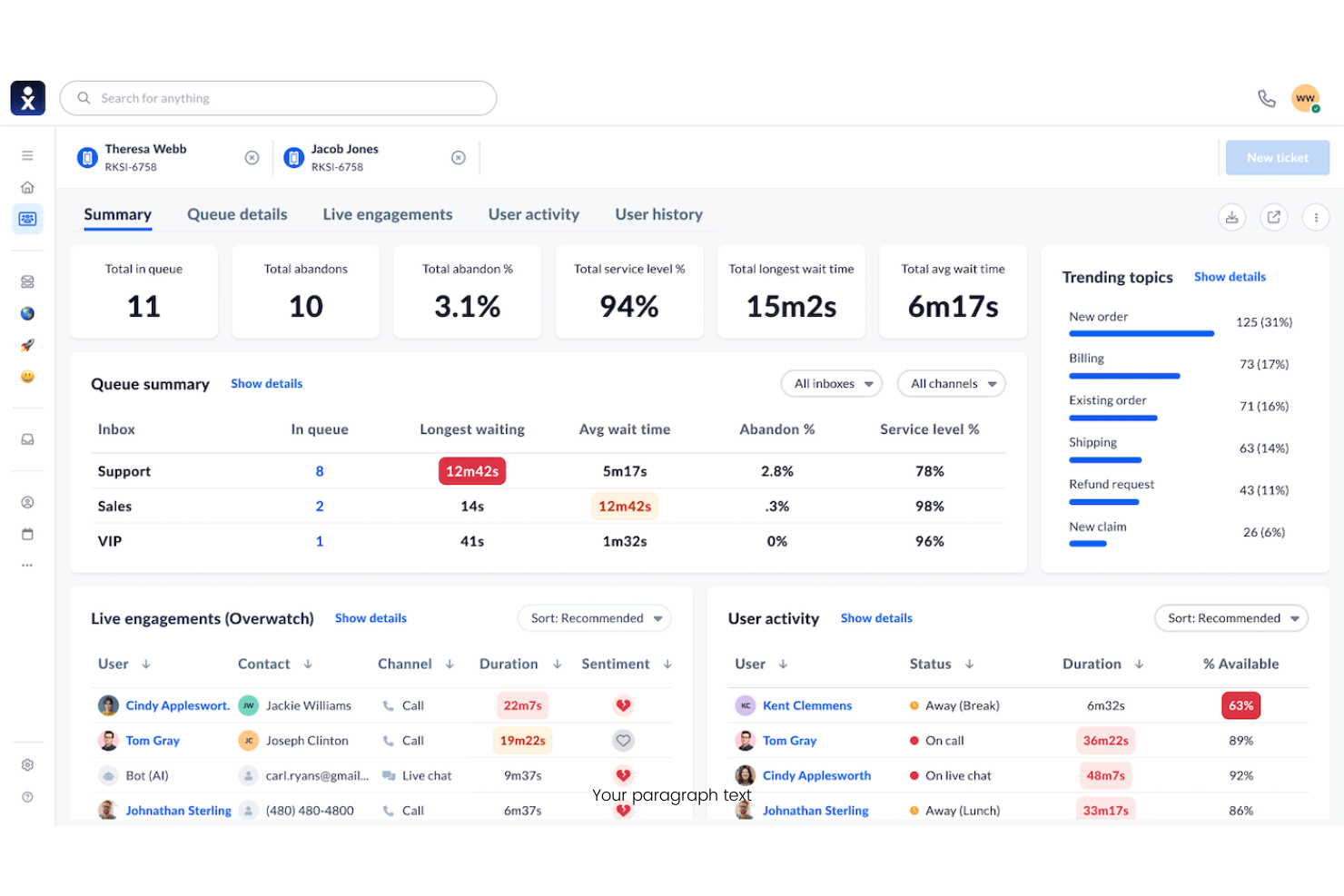
Nextiva è un sistema telefonico aziendale basato su cloud progettato per i team che desiderano unificare chiamate, messaggi e video in un'unica piattaforma. Penso che sia una soluzione valida per le piccole e medie imprese che desiderano semplificare le comunicazioni e gestire le interazioni con i clienti da qualsiasi luogo.
Per chi è ideale Nextiva?
Piccole e medie imprese che desiderano chiamate, messaggistica e video unificati in un'unica piattaforma.
Perché Nextiva è una valida alternativa a Kixie
Ho scelto Nextiva perché riunisce chiamate, messaggistica di team e riunioni video in una sola app—così il mio team non deve gestire strumenti separati per le comunicazioni interne ed esterne. Apprezzo in particolare la funzione Call Pop, che mostra i dati del cliente sullo schermo non appena arriva una chiamata, fornendo agli operatori il contesto prima ancora di rispondere. Il risponditore automatico di Nextiva permette inoltre di impostare le regole di instradamento delle chiamate senza bisogno di supporto IT, il che è importante quando la struttura del team cambia spesso. Per le aziende che vogliono una piattaforma unica per la collaborazione interna e le chiamate con i clienti, Nextiva soddisfa entrambe le esigenze in modo eccellente.
Funzionalità principali di Nextiva
- Segreteria telefonica via email: Invia le registrazioni dei messaggi vocali direttamente nella tua casella di posta, così gli operatori possono ascoltare e rispondere senza dover accedere a un sistema separato.
- Code di chiamata: Mantiene i chiamanti in attesa e li smista all'operatore disponibile successivo quando il team è occupato.
- Presenza in tempo reale: Visualizza quali membri del team sono disponibili, in chiamata o assenti, così gli operatori possono trasferire le chiamate o collaborare senza dover indovinare.
- Fax online: Spedisce e riceve fax tramite la piattaforma senza hardware aggiuntivo, mantenendo tutte le comunicazioni aziendali in un unico posto.
Integrazioni Nextiva
Le integrazioni includono Salesforce, HubSpot, Microsoft Teams, Zendesk, Google Workspace, Oracle NetSuite, Microsoft Dynamics, ServiceNow, Zoho e altre ancora.
Pros and Cons
Pros:
- Call Pop mostra le informazioni del chiamante prima di rispondere
- La segreteria telefonica via email rende i messaggi accessibili ovunque
- La presenza in tempo reale aiuta nel coordinamento del team
Cons:
- La registrazione delle chiamate non è presente in tutti i piani
- Le tariffe per le chiamate internazionali possono essere elevate

Ideale per instradamento chiamate e analisi
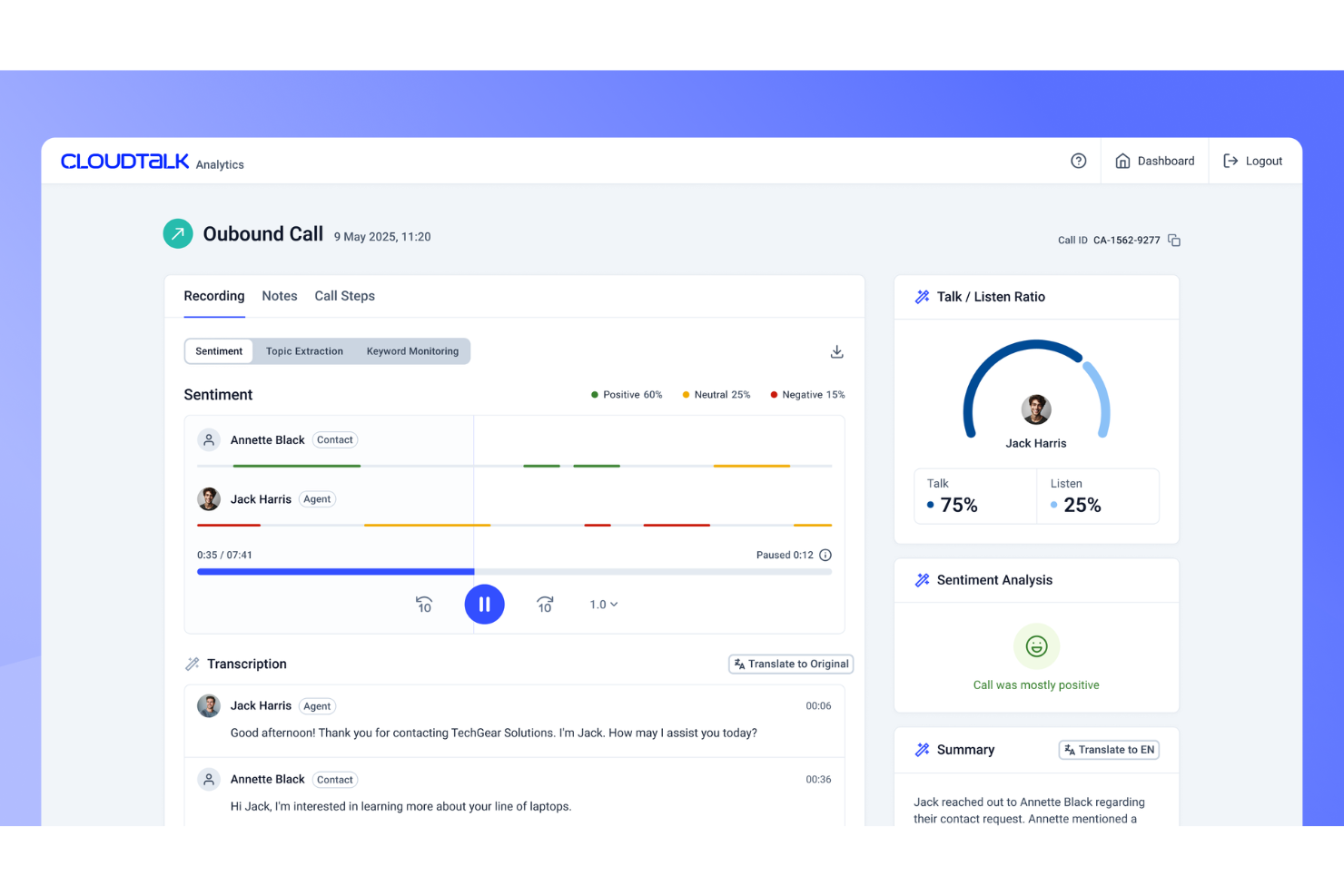
CloudTalk è una piattaforma VoIP basata su cloud pensata per i team di vendita e assistenza che necessitano di una gestione avanzata delle chiamate e di strumenti di analisi. Se desideri flussi di chiamata personalizzabili e integrazioni approfondite con i CRM per migliorare le conversazioni con i clienti, CloudTalk merita sicuramente attenzione.
A Chi È Destinato CloudTalk?
Team di vendita e centri di assistenza clienti che necessitano di routing avanzato delle chiamate e strumenti di analisi.
Perché CloudTalk è una Buona Alternativa a Kixie
Ho scelto CloudTalk perché il suo sistema di instradamento delle chiamate e di analisi è più approfondito rispetto alla maggior parte degli strumenti VoIP disponibili a questo prezzo. Mi piace particolarmente la funzione di accodamento intelligente delle chiamate, che mi consente di impostare regole di instradamento basate sulle competenze degli agenti, sulla loro disponibilità o sulla cronologia dei chiamanti—così i clienti vengono sempre indirizzati alla persona giusta. Utilizzo anche il dashboard di analisi in tempo reale di CloudTalk per monitorare il volume delle chiamate, i tempi di attesa e le prestazioni degli agenti senza dover esaminare report manualmente. In pratica, ciò significa che il mio team può individuare i colli di bottiglia e adattare rapidamente i flussi di lavoro.
Funzionalità Principali di CloudTalk
- Power dialer: Effettua automaticamente chiamate in sequenza a un elenco di contatti, riducendo il tempo di composizione manuale per i team di vendita outbound.
- Registrazione delle chiamate: Registra le chiamate in entrata e uscita per il controllo qualità e la formazione degli agenti.
- Risposta vocale interattiva (IVR): Permette ai chiamanti di navigare in un menu per raggiungere il reparto o l'agente giusto senza trasferimenti manuali.
- Messaggio in segreteria istantaneo: Consente agli agenti di lasciare un messaggio preregistrato con un solo clic invece di registrarne uno ogni volta.
Integrazioni di CloudTalk
Le integrazioni includono HubSpot, Salesforce, Zendesk, Pipedrive, Intercom, Zoho CRM, Microsoft Teams, Freshdesk, Help Scout, Shopify e altre ancora.
Pros and Cons
Pros:
- Instradamento avanzato delle chiamate con regole personalizzabili
- Dashboard di analisi in tempo reale per il monitoraggio delle chiamate
- Power dialer per chiamate outbound ad alto volume
Cons:
- Gli utenti segnalano occasionali problemi di qualità delle chiamate
- La memorizzazione delle registrazioni delle chiamate ha limiti mensili
New Product Updates from CloudTalk
CloudTalk Adds Campaign Statistics to MCP
CloudTalk adds campaign statistics to MCP with funnel, call, conversion, disposition, and duration metrics. This helps reporting assistants review campaign performance using read-only aggregate data. For more information, visit CloudTalk’s official site.
 .
.
Ideale per supporto omnicanale scalabile

Genesys Cloud CX è una piattaforma cloud per contact center progettata per le aziende che desiderano unificare voce, chat, email e canali social in un unico posto. La ritengo una scelta solida per organizzazioni di medie e grandi dimensioni che necessitano di instradamento avanzato, analisi e coinvolgimento del cliente guidato dall'intelligenza artificiale.
Per chi è ideale Genesys Cloud CX?
Grandi imprese e contact center globali che necessitano di un coinvolgimento cliente unificato e alimentato dall’intelligenza artificiale su più canali.
Perché Genesys Cloud CX è una valida alternativa a Kixie
Ho scelto Genesys Cloud CX perché gestisce l’intera suite del contact center—voce, canali digitali, intelligenza artificiale e gestione del personale—da un’unica piattaforma. Quello che trovo più utile è il motore di instradamento intelligente, che utilizza dati del cliente in tempo reale per abbinare i chiamanti all’agente giusto in base a competenze, storico e intento. Apprezzo anche gli strumenti integrati di gestione del percorso cliente, che consentono al mio team di tracciare e agire sul comportamento dei clienti su più touchpoint prima ancora che la chiamata sia collegata. Per team che gestiscono grandi volumi di interazioni tra più canali, questo livello di orchestrazione è raro da trovare in un solo strumento.
Funzionalità principali di Genesys Cloud CX
- Copilota per agenti: Fornisce suggerimenti in tempo reale tramite intelligenza artificiale agli agenti durante le interazioni dal vivo per guidare risposte e prossime azioni.
- Coinvolgimento predittivo: Utilizza l’intelligenza artificiale per identificare il momento giusto in cui contattare proattivamente i visitatori online con offerte o supporto mirati.
- Co-browse: Consente agli agenti di visualizzare e interagire con il browser del cliente in tempo reale per risolvere problemi in modo visivo.
- Previsione e pianificazione della forza lavoro: Genera orari degli agenti basati su volumi di interazione previsti per mantenere il personale in linea con la domanda.
Integrazioni Genesys Cloud CX
Le integrazioni includono Salesforce, Microsoft Teams, Zendesk, ServiceNow, Microsoft Dynamics 365, Slack, Zoom, Oracle Service Cloud, Google Cloud e altre.
Pros and Cons
Pros:
- Architettura cloud-native altamente scalabile
- La gestione della qualità collega le revisioni alle prestazioni degli agenti
- Instradamento guidato da eventi consente decisioni a bassa latenza
Cons:
- Le politiche di conservazione dei dati storici limitano l'analisi a lungo termine
- Le impostazioni amministrative sono distribuite su più livelli di configurazione

Ideale per esperienze cliente guidate dall’IA
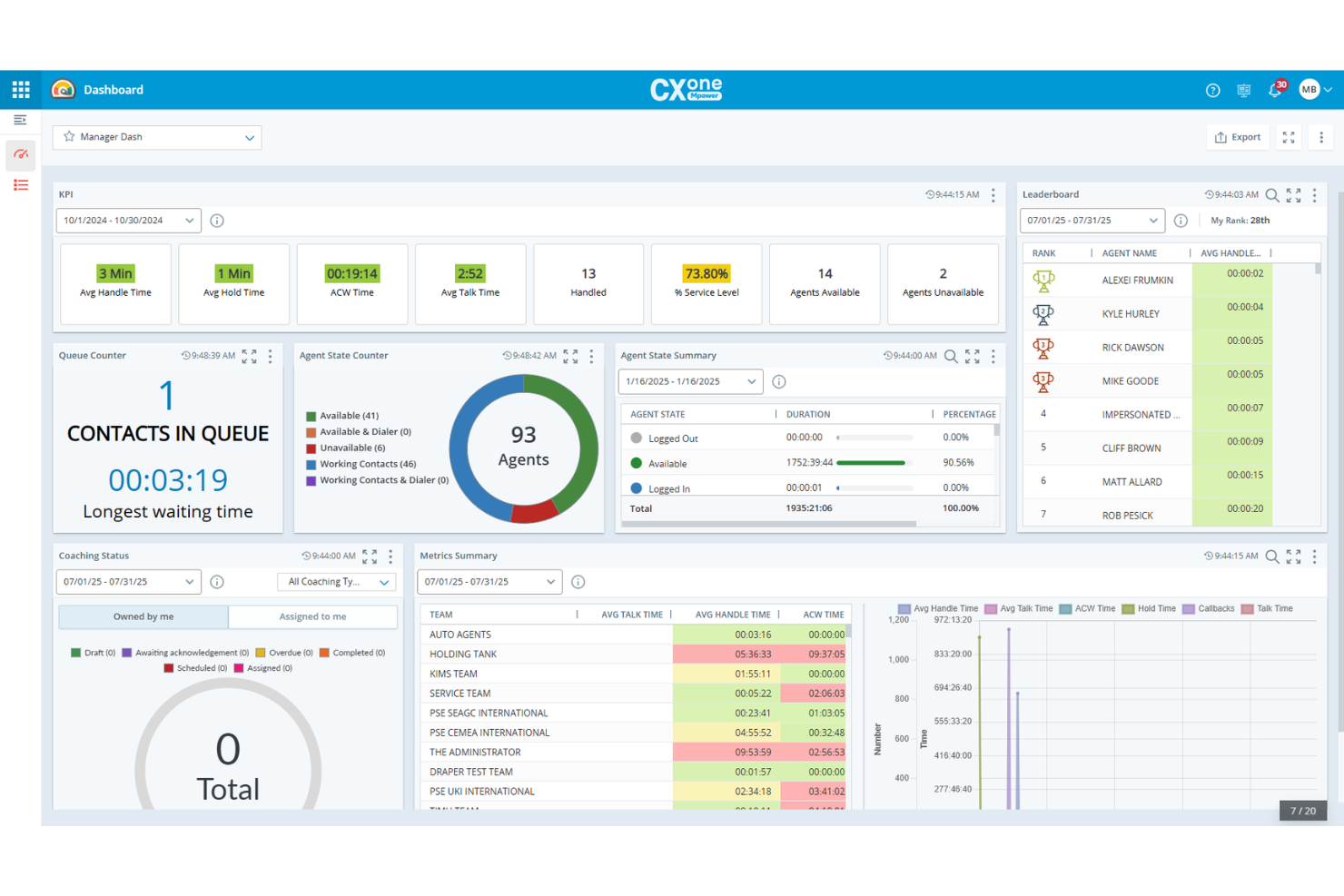
NiCE CXone è una piattaforma di contact center basata su cloud progettata per le aziende che devono gestire le interazioni con i clienti tramite voce, chat, email e canali social. Ritengo che sia una scelta valida per i team che desiderano un instradamento avanzato, ottimizzazione della forza lavoro e approfondimenti guidati dall'IA per migliorare l'esperienza cliente.
Per chi è più adatto NiCE CXone?
Grandi team di assistenza clienti in settori regolamentati che necessitano di funzionalità di contact center omnicanale.
Perché NiCE CXone è una valida alternativa a Kixie
Ho scelto NiCE CXone perché gestisce le interazioni omnicanale con i clienti in modo molto più avanzato rispetto alle semplici chiamate VoIP di base. Il mio team utilizza il motore di instradamento basato su IA per indirizzare contatti tramite voce, chat ed email in base alle competenze degli agenti e alla cronologia del cliente, riducendo così trasferimenti e contatti ripetuti. Faccio inoltre affidamento sugli strumenti di gestione della forza lavoro per prevedere le esigenze di personale e pianificare gli agenti in tempo reale. Per i contact center che devono coordinare ampi team su più canali, NiCE CXone offre il controllo operativo necessario per lavorare su larga scala.
Funzionalità principali di NiCE CXone
- Analisi delle interazioni: Analizza il 100% delle interazioni vocali e digitali tramite IA per evidenziare trend, sentiment e approfondimenti sulle prestazioni degli agenti.
- Gestione della qualità: Valuta automaticamente le interazioni degli agenti con valutazioni assegnate dall’IA e flussi di lavoro per il coaching integrato.
- IVR e automazione self-service: Consente ai clienti di risolvere i problemi tramite self-service telefonico automatizzato con instradamento intelligente e deviazione delle chiamate.
- Coinvolgimento in uscita: Gestisce campagne outbound proattive su canali vocali e digitali con controlli di conformità e composizione predittiva.
Integrazioni NiCE CXone
Le integrazioni includono Salesforce, SharePoint, Zendesk, Confluence, Microsoft Teams, Oracle Service Cloud, ServiceNow, Microsoft Dynamics 365, Google Workspace e altri.
Pros and Cons
Pros:
- IA in tempo reale supporta gli agenti con insight su sentiment
- Strumenti di workforce management collegano pianificazione e controllo qualità
- Implementazione flessibile su più canali
Cons:
- La modifica degli script e della logica di instradamento tramite Studio può essere lenta
- La personalizzazione dei report è limitata senza soluzioni alternative
Five9
Ideale per il compositore predittivo e la reportistica
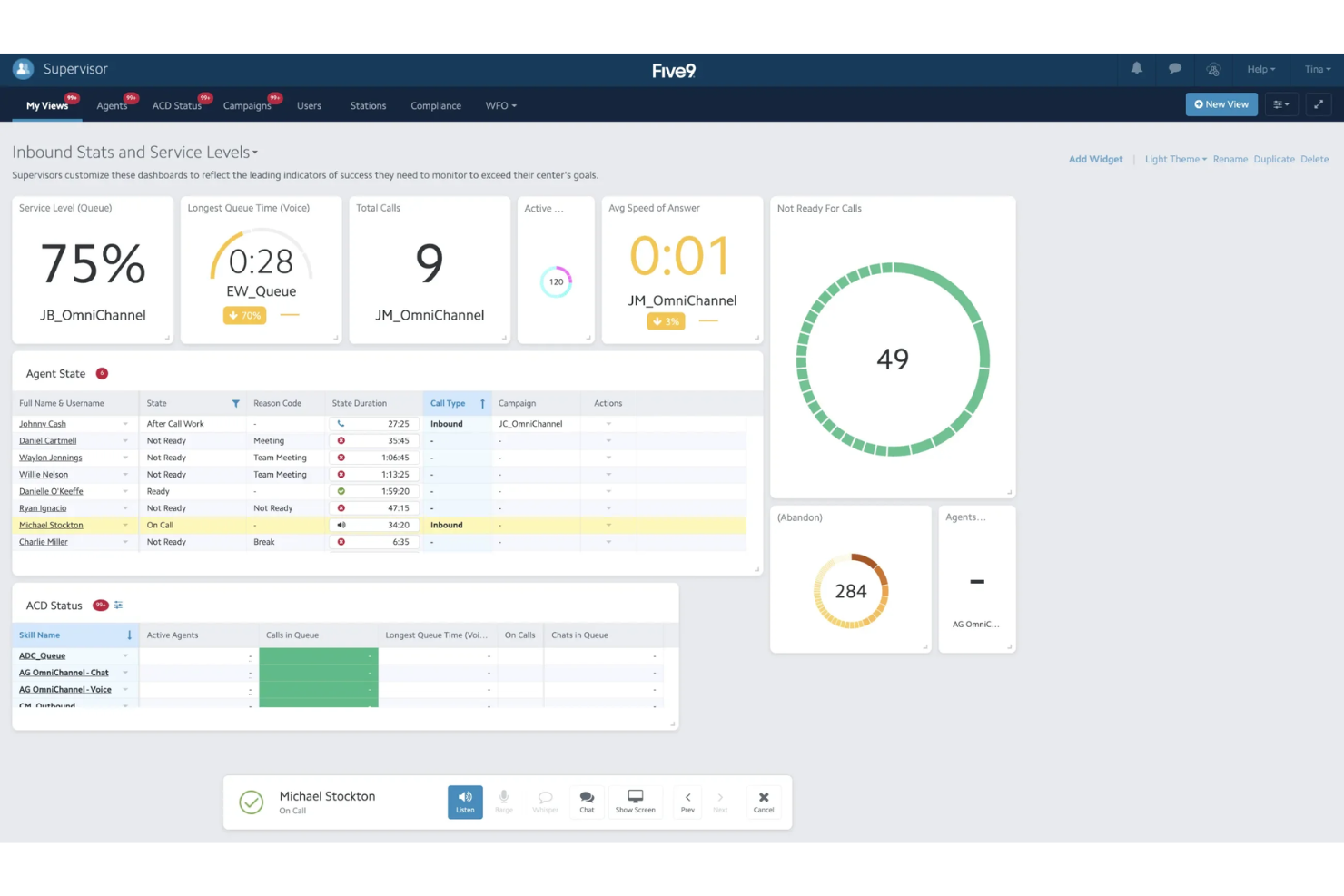
Five9 è una piattaforma cloud per contact center progettata per le aziende che necessitano di instradamento avanzato delle chiamate, compositore predittivo e analisi in tempo reale. Penso sia una scelta ideale per i team di vendita e assistenza che vogliono gestire grandi volumi di chiamate e migliorare la produttività degli agenti.
Per chi è più indicato Five9?
Team di vendita e assistenza in organizzazioni di medie e grandi dimensioni che hanno bisogno di gestire le chiamate in modo avanzato e di integrazioni CRM.
Perché Five9 è una buona alternativa a Kixie
Ho scelto Five9 per il suo compositore predittivo, che regola automaticamente il ritmo delle chiamate in base alla disponibilità degli agenti e ai tassi di connessione—una funzione che fa davvero la differenza quando il mio team gestisce campagne outbound ad alto volume. Mi affido anche all'instradamento intelligente delle chiamate per abbinare i contatti in entrata con l'agente giusto a seconda delle competenze, della cronologia e della priorità. Le integrazioni CRM di Five9 con Salesforce e altre piattaforme permettono al mio team di recuperare le schede cliente durante la chiamata senza cambiare scheda. Per i team che devono aumentare le chiamate in uscita senza sacrificare la qualità di quelle in entrata, Five9 gestisce entrambe le cose molto bene.
Funzionalità principali di Five9
- Builder IVR visivo: Progetta e implementa flussi di chiamata self-service tramite un'interfaccia drag-and-drop.
- Desktop agente: Fornisce agli agenti una vista unificata dei dati cliente, dei controlli di chiamata e della cronologia delle interazioni su un'unica schermata.
- Reportistica in tempo reale: Monitora le code delle chiamate, lo stato degli agenti e le KPI attraverso dashboard personalizzabili.
- Instradamento omnicanale: Gestisce interazioni vocali, email, chat e social da un'unica coda.
Integrazioni di Five9
Le integrazioni includono Salesforce, Microsoft Teams, ServiceNow, Oracle, Zendesk, Microsoft Dynamics 365, NetSuite, Zoom, Slack e altre ancora.
Pros and Cons
Pros:
- Il compositore predittivo si adatta alla disponibilità degli agenti
- Dashboard in tempo reale monitorano le metriche di performance
- Le integrazioni CRM approfondite riducono il cambio di contesto per gli agenti
Cons:
- L'interfaccia può risultare poco intuitiva per i nuovi utenti
- L'integrazione con sistemi legacy richiede sforzo tecnico

JustCall
Ideale per il tracciamento delle chiamate e le integrazioni
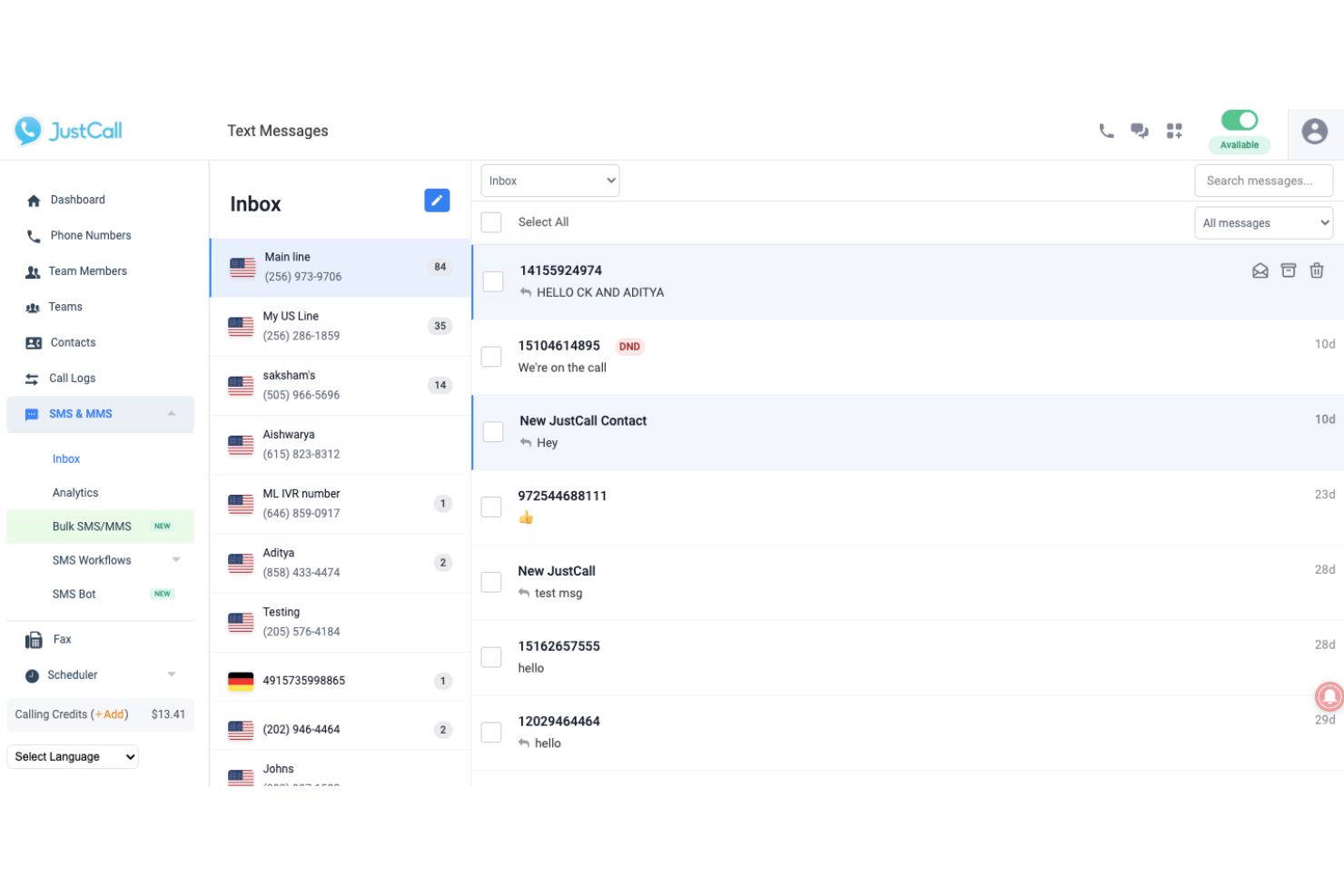
JustCall è un sistema telefonico basato sul cloud pensato per i team di vendita e assistenza che desiderano gestire chiamate, SMS e messaggi vocali da un'unica piattaforma. Ritengo sia una soluzione ideale per le aziende che necessitano di routing avanzato delle chiamate, analisi dettagliate e integrazioni con i principali CRM per semplificare le comunicazioni con i clienti.
Per chi è ideale JustCall?
Team di vendita e assistenza di aziende in crescita che desiderano valutazione e coaching delle chiamate basati su intelligenza artificiale.
Perché JustCall è una valida alternativa a Kixie
Ho scelto JustCall perché il suo sistema di valutazione delle chiamate con intelligenza artificiale analizza automaticamente ogni chiamata in base a una griglia personalizzata, così posso individuare opportunità di coaching senza dover ascoltare manualmente le registrazioni. Mi affido anche ai riassunti delle chiamate generati dall'IA, che trascrivono e sintetizzano le conversazioni in tempo reale e si sincronizzano direttamente con il mio CRM. In pratica, ciò permette alla mia squadra di dedicare meno tempo alle note sulle chiamate e più tempo all’analisi degli insight. Per i team che desiderano un coaching strutturato e guidato dai dati integrato nel sistema telefonico, JustCall offre questa funzione in modo nativo.
Funzionalità principali di JustCall
- IVR / menu delle chiamate: consente ai chiamanti di navigare in un menu interattivo per raggiungere il team corretto o accedere a informazioni prima di parlare con un agente.
- Sondaggio post-chiamata: invia automaticamente un sondaggio dopo ogni chiamata per raccogliere feedback dei clienti sulle performance degli agenti.
- Assistenza agente: fornisce suggerimenti di script e indicazioni in tempo reale agli agenti durante le chiamate per ridurre i tempi di gestione.
- Workflow SMS: attiva l’invio automatico di messaggi di testo in base a condizioni specifiche, come i promemoria di appuntamento o le sequenze di follow-up.
Integrazioni JustCall
Le integrazioni comprendono Salesforce, HubSpot, Pipedrive, ActiveCampaign, Slack, Intercom, Help Scout, Zoho CRM, Zendesk e altri.
Pros and Cons
Pros:
- La valutazione AI delle chiamate evidenzia opportunità di coaching
- Workflow SMS automatizzati per i follow-up
- I sondaggi post-chiamata raccolgono feedback immediato
Cons:
- Le integrazioni talvolta richiedono una risoluzione manuale dei problemi
- Automazione limitata delle campagne SMS in uscita

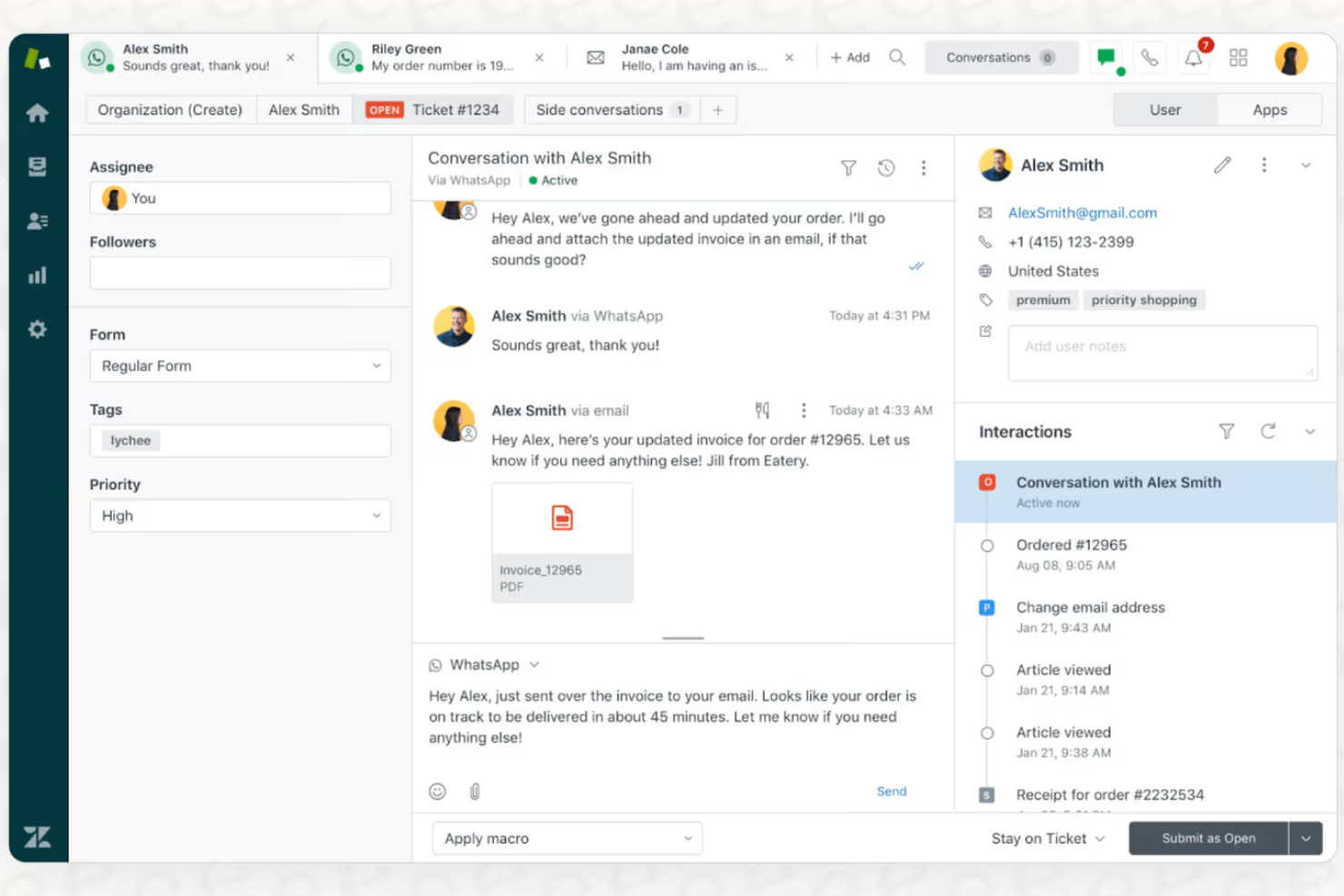
Zendesk Voice unisce chiamate e gestione dei ticket in un'unica piattaforma, risultando una soluzione ideale per i team di supporto che desiderano gestire voce, chat ed email da un'unica area di lavoro. Se stai cercando una soluzione che colleghi direttamente le conversazioni telefoniche ai dati dei clienti e ai flussi di lavoro, Zendesk merita attenzione.
Per chi è ideale Zendesk?
Team di supporto in aziende di medie e grandi dimensioni che necessitano di un servizio clienti omnicanale con voce e ticketing integrati.
Perché Zendesk è una buona alternativa a Kixie
Ho scelto Zendesk Voice perché integra il supporto telefonico nello stesso ambiente in cui il mio team gestisce email, chat e messaggistica—così gli operatori non devono mai cambiare scheda per avere il quadro completo del cliente durante una chiamata. Trovo particolarmente utile il copilota vocale, che fornisce suggerimenti in tempo reale agli agenti durante la chiamata, aiutandoli a risolvere i problemi più velocemente senza mettere i clienti in attesa. Mi affido inoltre alla trascrizione e al riepilogo automatici delle chiamate, che vengono inseriti direttamente nell'area di lavoro degli agenti, minimizzando i tempi di chiusura pratica. Per i team che necessitano di una forte integrazione tra voce, ticketing e flussi di lavoro omnicanale, questo livello di integrazione è difficile da eguagliare.
Funzionalità principali di Zendesk
- Instradamento IVR: Instrada le chiamate in arrivo tramite un sistema di risposta vocale interattiva basato sugli input del chiamante, con opzioni per instradamento a gruppi, prioritario, in caso di overflow e fuori orario.
- Richiesta di richiamata: Permette ai chiamanti di uscire dalla coda d'attesa e richiedere una richiamata invece di attendere.
- Conferenza telefonica: Collega più partecipanti in una singola chiamata, con rilevamento dei tempi d'attesa integrato.
- Reportistica cross-canale: Confronta le prestazioni delle chiamate rispetto a email, chat e messaggistica in un'unica vista analitica.
Integrazioni Zendesk
Le integrazioni includono Slack, Shopify, Google Play Reviews, Harvest, Pipedrive, ChannelReply, Trustpilot, Sprout Social, Amazon e altri ancora.
Pros and Cons
Pros:
- Ticketing omnicanale che collega le chiamate a tutti i canali
- Registrazione delle chiamate integrata con trascrizioni ricercabili
- Opzioni avanzate di IVR e instradamento delle chiamate
Cons:
- Le funzionalità vocali richiedono piani di livello superiore
- Automazione limitata delle chiamate in uscita

Talkdesk è una piattaforma di contact center basata su cloud creata per le aziende che desiderano combinare l’automazione guidata dall’IA con canali vocali e digitali flessibili. La considero una soluzione perfetta per team di settori come retail, sanità e servizi finanziari che necessitano di un instradamento avanzato delle chiamate, analisi in tempo reale e flussi di lavoro personalizzabili.
Per chi è più indicato Talkdesk?
Grandi team di assistenza clienti in settori regolamentati come sanità, retail e servizi finanziari.
Perché Talkdesk è una valida alternativa a Kixie
Ho scelto Talkdesk perché la sua automazione basata su IA va ben oltre la gestione base delle chiamate—Talkdesk Autopilot può risolvere problemi comuni dei clienti senza il coinvolgimento di un operatore, alleggerendo i flussi di supporto ad alto volume. Apprezzo anche la funzionalità Agenti IA, che offre coaching in tempo reale e suggerimenti per la prossima azione migliore durante le chiamate. Per i team di settori regolamentati, considero particolarmente utili gli strumenti integrati per la compliance e la gestione della forza lavoro, fondamentali per mantenere la qualità su larga scala.
Funzionalità principali di Talkdesk
- Click-to-call: Effettua chiamate in uscita direttamente da un CRM, helpdesk o sito web con un solo clic.
- Distribuzione automatica delle chiamate (ACD): Instrada le chiamate in entrata in base ai dati del chiamante, selezione IVR, orari di lavoro e competenze degli agenti.
- Intercettazione chiamata: Consente ai supervisor di entrare nelle chiamate in corso per parlare direttamente sia con l’agente che con il cliente.
- Flussi di lavoro automatizzati: Attiva azioni post-chiamata come il popolamento del CRM con le registrazioni e i dati delle interazioni.
Integrazioni Talkdesk
Le integrazioni includono Salesforce, Zendesk, Microsoft Teams, ServiceNow, HubSpot, Microsoft Dynamics 365, Zoom, Slack e altre ancora.
Pros and Cons
Pros:
- Instradamento e automazione delle chiamate tramite IA
- Trascrizione e analisi delle chiamate in tempo reale
- Compliance integrata per settori regolamentati
Cons:
- Ritardi occasionali nelle risposte del supporto clienti
- Alcune funzionalità avanzate richiedono componenti aggiuntivi
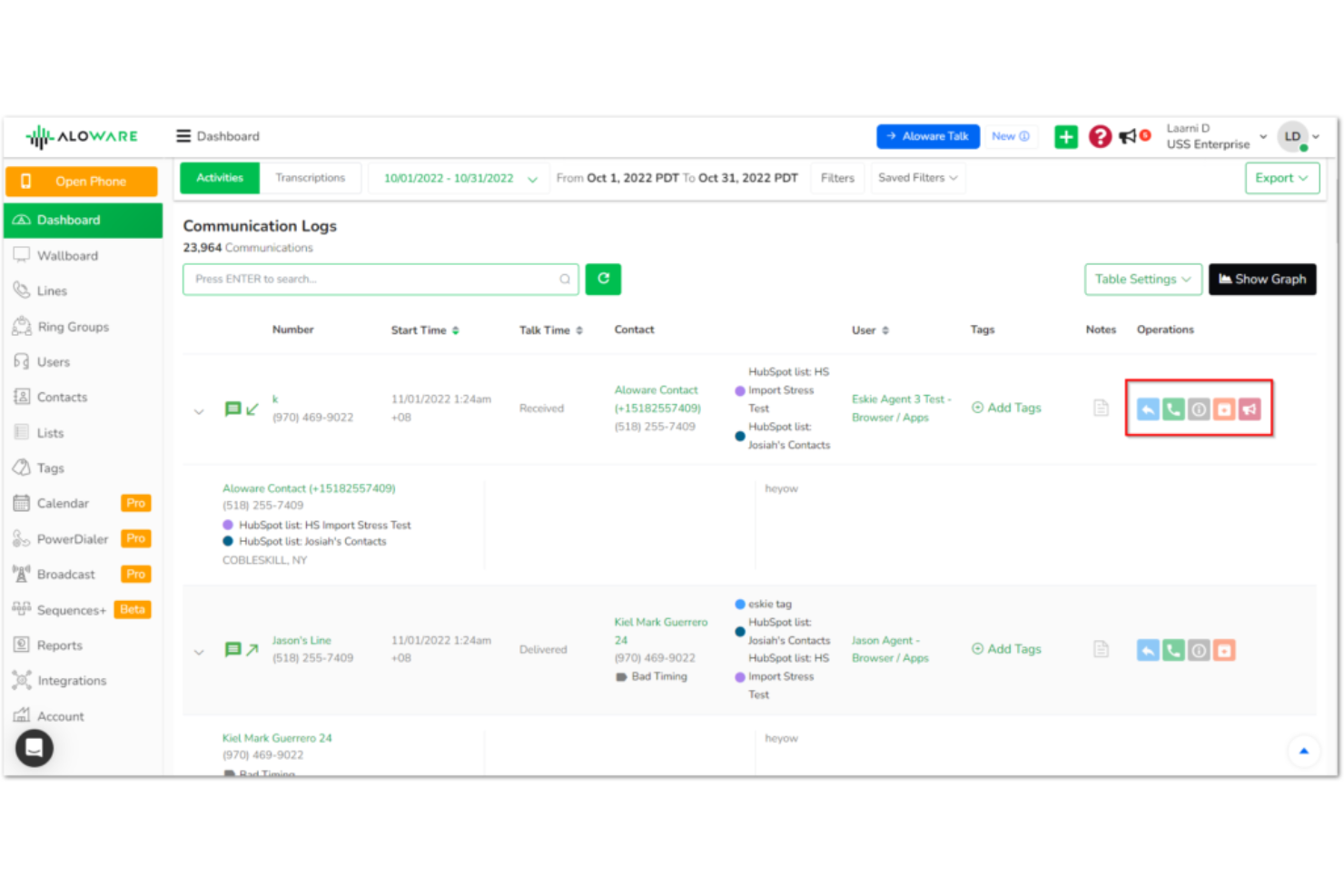
Aloware è una piattaforma di contact center basata su cloud progettata per team di vendita e assistenza che desiderano unire chiamate, messaggi di testo e automazione in un unico luogo. Penso che sia una soluzione ideale per le aziende che vogliono aumentare il coinvolgimento dei clienti grazie all’integrazione nativa di SMS e CRM.
Per chi è più adatto Aloware?
Team di vendita e assistenza in piccole e medie imprese che desiderano chiamate, messaggistica e automazione in un’unica piattaforma.
Perché Aloware è una valida alternativa a Kixie
Ho scelto Aloware perché riunisce chiamate, SMS e automazione in modo studiato appositamente per i team di vendita che gestiscono grandi volumi di contatti. Quello che trovo più utile è iPlus, il dialer potenziato dall’IA di Aloware, che mette in coda e chiama automaticamente i contatti dalle liste CRM, così il mio team passa più tempo a parlare invece che a comporre numeri. Apprezzo anche l’automazione SMS integrata, che mi permette di impostare sequenze di messaggi attivate da eventi nel CRM—cosa che Kixie non gestisce in modo altrettanto nativo. In pratica, il mio team può lanciare campagne coordinate di chiamate e SMS da una sola piattaforma senza dover collegare strumenti diversi.
Funzionalità principali di Aloware
- Monitoraggio chiamate: consente ai supervisori di osservare le chiamate in tempo reale e intervenire per supportare gli agenti senza interrompere la conversazione.
- Casella unificata: raccoglie chiamate, SMS, email e fax in un’unica interfaccia, così gli agenti gestiscono tutti i canali senza dover cambiare strumento.
- Trascrizione chiamate: trascrive automaticamente le chiamate e archivia il testo direttamente nel tuo CRM per una rapida revisione e analisi.
- Chiamata da modulo web: trasforma le richieste dai form web in chiamate in uscita istantanee, collegando subito il tuo team ai nuovi lead appena mostrano interesse.
Integrazioni Aloware
Le integrazioni includono HubSpot, Salesforce, HighLevel, Pipedrive, Zoho, Guesty, Gong, Facebook, Slack, Zapier e altro ancora.
Pros and Cons
Pros:
- Automazione SMS integrata per i follow-up
- LocalTouch ruota gli ID chiamante per le attività di outreach
- Strumenti di conformità TCPA e HIPAA inclusi
Cons:
- Strumenti di reportistica datati e limitati
- Bug e prestazioni lente durante le chiamate o l’uso dell’app


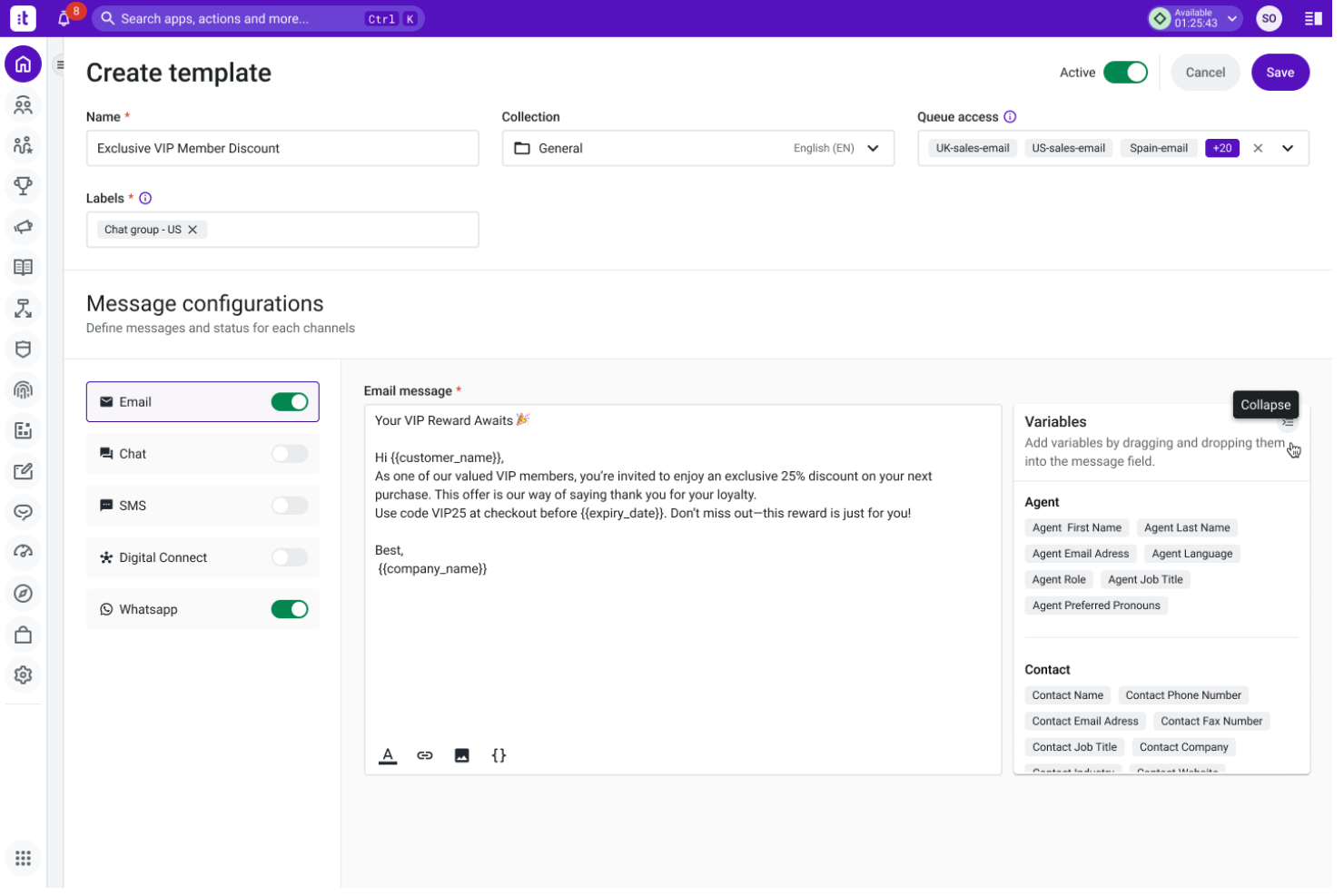
NobelBiz è una piattaforma cloud per contact center progettata per le aziende che desiderano gestire canali vocali e digitali in un unico luogo. La considero particolarmente adatta ai team che operano in settori regolamentati e che necessitano di funzionalità avanzate di instradamento delle chiamate, strumenti di conformità e supporto omnicanale.
Per chi è più adatto NobelBiz?
Team di contact center in settori regolamentati che hanno bisogno di conformità avanzata e di comunicazione omnicanale.
Perché NobelBiz è una valida alternativa a Kixie
La conformità è l'aspetto che distingue davvero NobelBiz. L'ho scelto perché va ben oltre la semplice chiamata: è stato progettato per contact center che operano in ambienti regolamentati dove normative come TCPA, HIPAA e PCI-DSS non sono opzionali. Il sistema Call Guard TCPA Compliance Ecosystem è una vera risorsa: offre ai team interfacce di composizione separate per scenari con e senza consenso, così gli operatori non devono indovinare cosa sia permesso. Apprezzo anche la funzione LocalTouch, che ruota automaticamente i numeri identificativi locali in base alla persona chiamata, aiutando le squadre outbound a migliorare i tassi di risposta senza gestione manuale dei numeri.
Funzionalità principali di NobelBiz
- Compositore predittivo: Chiama automaticamente più numeri contemporaneamente e collega l'operatore solo quando una persona risponde, riducendo i tempi morti tra le chiamate.
- IVR scripting: Permette di creare menu per le chiamate in entrata con script collegati, messaggi e regole di instradamento che possono essere pianificati e aggiornati senza il supporto di sviluppatori.
- Gestione qualità: Registra chiamate in entrata e in uscita con strumenti di ricerca e recupero, così i supervisori possono esaminare le interazioni per formazione e conformità.
- Dashboard omnicanale 360: Centralizza voce, SMS, email, WhatsApp e canali social in un'unica interfaccia web per gli agenti, che possono così lavorare senza cambiare scheda.
Integrazioni di NobelBiz
Al momento non sono elencate integrazioni native.
Pros and Cons
Pros:
- Strumenti di conformità TCPA e HIPAA integrati
- La funzione LocalTouch ruota automaticamente i numeri identificativi del chiamante
- Lo scripting IVR è flessibile e self-service
Cons:
- Gli strumenti di reportistica possono sembrare datati
- Nessuna automazione SMS marketing integrata
Altre alternative a Kixie
Ecco alcune ulteriori alternative a Kixie che non sono state incluse nel mio elenco, ma che vale comunque la pena prendere in considerazione:


Come Valuto le Alternative a Kixie
Valuto le alternative a Kixie su due livelli: le funzionalità fondamentali, come il power dialing e la sincronizzazione con il CRM, e i fattori differenzianti—come il coaching AI e la copertura globale—che distinguono le opzioni migliori.
Funzionalità di Base (Requisiti Fondamentali per Questa Lista)
Quando seleziono gli strumenti per la mia lista, valuto ognuno su una scala da 0 (non offre la funzionalità) a 5 (eccelle in questo ambito) per ciascuna delle funzioni base elencate di seguito. Successivamente, converto il punteggio totale dello strumento in una percentuale. Ogni strumento deve raggiungere un punteggio totale minimo del 65% per essere preso in considerazione per l'inclusione.
- Chiamate Vocali Cloud: Controllo la presenza di un VoIP affidabile con la disponibilità di numeri locali e internazionali, poiché i team CX spesso hanno bisogno di gestire l’instradamento in entrata e le chiamate in uscita su più regioni.
- Power/Auto Dialer: Che si tratti di una campagna di retention o di una sequenza di follow-up, cerco modalità di chiamata che permettano agli agenti di scorrere le liste di chiamata senza inserimento manuale dei numeri.
- Integrazione con CRM: Uno strumento ottiene un punteggio più alto quando sincronizza nativamente l'attività delle chiamate, le note e gli esiti con CRM come Salesforce, HubSpot o Zoho senza middleware aggiuntivi.
- SMS & Messaggistica Multicanale: L'invio e la ricezione di SMS sono la base, ma valuto anche se la piattaforma supporta canali come WhatsApp o messaggi vocali per una comunicazione più ampia con i clienti.
- Registrazione delle Chiamate & Analitiche: Esamino le capacità di registrazione insieme alla profondità dei report—schede di valutazione degli agenti, tracciamento degli esiti delle chiamate e dashboard a livello di team influiscono tutti su questo punteggio.
- AI & Conversation Intelligence: Funzionalità come trascrizione automatica, rilevamento del sentiment e riepiloghi post-chiamata sono importanti qui, specialmente per i team che effettuano revisioni QA su larga scala.
Una volta che ho una lista di strumenti che soddisfano questi criteri, considero cosa rende unica ciascuna piattaforma.
Fattori di Differenziazione (Cosa Distingue i Fornitori)
Ecco come confronto e metto a confronto i diversi fornitori:
Funzionalità Distintive
Il supporto in tempo reale per l’agente è un fattore di grande differenziazione: cerco piattaforme che forniscano suggerimenti live e indicazioni per gestire le obiezioni durante le chiamate, cosa che fa realmente la differenza soprattutto per gli agenti meno esperti che gestiscono escalation. L’instradamento intelligente delle chiamate è altrettanto importante; i team che gestiscono un alto volume di chiamate in entrata hanno bisogno di instradamento basato sulle competenze e IVR multilivello per mettere rapidamente i clienti in contatto con la persona giusta. Valuto anche la funzione di chiamata con presenza locale, poiché abbinare l’ID chiamante al prefisso del destinatario può aumentare sensibilmente il tasso di risposta nelle campagne di retention e win-back in uscita.
Oltre le Funzionalità
La conformità è un punto fondamentale: verifico se le piattaforme supportano TCPA, GDPR e flussi di consenso alla registrazione delle chiamate, soprattutto per i team che operano in regioni con normative sulla privacy differenti. Anche la profondità dell’integrazione è attentamente considerata. Uno strumento che si collega al CRM ma non al servizio clienti (Zendesk, Intercom, Freshdesk) crea lacune nella cronologia cliente. Analizzo anche la trasparenza dei prezzi, cercando strutture chiare per utente senza costi nascosti per la fornitura dei numeri o l’accesso alle integrazioni.
Perché cercare un'alternativa a Kixie?
Sebbene Kixie sia una buona scelta tra i software VoIP, ci sono diversi motivi per cui alcuni utenti cercano soluzioni alternative. Potresti essere alla ricerca di un'alternativa a Kixie perché…
- Hai bisogno di analisi e reportistica delle chiamate più avanzate
- Il tuo team richiede integrazioni più approfondite con il CRM
- Desideri funzionalità di coaching sulle chiamate basate sull'IA
- Riscontri problemi di qualità delle chiamate in determinate regioni
- Hai bisogno di opzioni più flessibili per l'automazione degli SMS
Se ti riconosci in una di queste situazioni, sei nel posto giusto. Il mio elenco contiene diverse opzioni di software VoIP più adatte ai team che affrontano queste difficoltà con Kixie e sono alla ricerca di soluzioni alternative.
Funzionalità principali di Kixie
Ecco alcune delle funzionalità principali di Kixie, che ti aiuteranno a mettere a confronto ciò che offrono le soluzioni alternative:
- Composizione automatica: Compone automaticamente i numeri degli elenchi di contatti, aiutando i team di vendita a raggiungere più potenziali clienti in meno tempo e riducendo gli errori di composizione manuale.
- Chiamata con un clic: Consente agli utenti di effettuare chiamate direttamente dal proprio CRM o browser con un solo clic, semplificando i flussi di lavoro delle chiamate in uscita.
- Composizione con numero locale: Mostra al destinatario un numero di telefono locale, aumentando il tasso di risposta e rafforzando la fiducia dei potenziali clienti.
- Integrazione con il CRM: Sincronizza l'attività delle chiamate, le note e le registrazioni con i CRM più diffusi, come HubSpot, Salesforce e Pipedrive, per una gestione unificata dei dati.
- Registrazione delle chiamate: Registra le chiamate in entrata e in uscita per garantire la qualità, la formazione e la conformità normativa.
- Messaggio vocale pre-registrato: Consente agli utenti di lasciare un messaggio vocale pre-registrato con un clic, risparmiando tempo sui messaggi ripetitivi.
- Messaggistica SMS: Consente di inviare e ricevere messaggi di testo direttamente dalla piattaforma Kixie, supportando le attività di contatto su più canali.
- Analisi delle chiamate: Fornisce report dettagliati sull'attività delle chiamate, sui risultati e sulle prestazioni degli operatori per orientare il coaching e la strategia.
- Registrazione automatica delle chiamate: Registra automaticamente ogni chiamata e messaggio di testo nel CRM collegato, riducendo l'inserimento manuale dei dati da parte dei rappresentanti.
- Coaching durante le chiamate: Consente ai responsabili di ascoltare, sussurrare indicazioni o intervenire nelle chiamate in corso per supportare gli operatori in tempo reale.