

I 10 migliori software di help desk cloud recensiti per il 2026

10 Elenco dei migliori software per help desk cloud


In qualità di responsabile dell'esperienza cliente, conosci le sfide quotidiane legate al mantenimento dell'efficienza del tuo team e della soddisfazione dei clienti. Un software per help desk cloud può essere una vera salvezza: ti aiuta a gestire i ticket, monitorare i problemi e migliorare i tempi di risposta. Secondo la mia esperienza, il software giusto fa davvero la differenza.
Ho testato e recensito diverse soluzioni per offrirti una panoramica imparziale delle migliori opzioni disponibili. Stai per scoprire quali strumenti possono aiutare il tuo team a eccellere e a raggiungere i tuoi obiettivi di assistenza clienti. In questo articolo analizzerò le scelte migliori, evidenziandone i punti di forza e gli aspetti che le distinguono. Troviamo insieme la soluzione più adatta alle tue esigenze.
Perché fidarsi dei nostri consigli sui software
Il nostro team testa e recensisce software dal 2012. In quanto leader CX noi stessi, sappiamo quanto sia difficile — e importante — scegliere il software giusto.
Per questa guida, abbiamo valutato gli strumenti attraverso test pratici e ricerche indipendenti, assegnando un punteggio agli strumenti in base ai nostri criteri di selezione.
Le nostre recensioni riflettono il nostro giudizio editoriale umano, non un discorso di vendita.
Riepilogo dei migliori software per help desk cloud
| Tool | Best For | Trial Info | Price | ||
|---|---|---|---|---|---|
| 1 | Ideale per la gestione dei servizi IT guidata dall'AI | Prova gratuita di 14 giorni + demo gratuita disponibile | A partire da $19/utente/mese (fatturazione annuale) | Website | |
| 2 | Ideale per analisi dell'helpdesk potenziate da AI | Prova gratuita di 14 giorni + demo gratuita disponibile | Da $19/agente/mese (fatturazione annuale) | Website | |
| 3 | Ideale per la gestione pratica dei servizi IT | Prova gratuita di 14 giorni | Prezzo su richiesta | Website | |
| 4 | Ideale per la risoluzione automatica dei ticket con priorità all’AI | Prova gratuita disponibile | Da $16/utente/mese (fatturazione annuale) | Website | |
| 5 | Ideale per assistenza clienti potenziata dall'intelligenza artificiale | Prova gratuita di 30 giorni disponibile | Da $15/utente/mese | Website | |
| 6 | Ideale per la creazione personalizzabile di chatbot AI | Piano gratuito disponibile | Da $32/mese (fatturazione annuale) | Website | |
| 7 | Ideale con un costruttore di flussi di lavoro automatizzati | Prova gratuita di 15 giorni + demo gratuita disponibile | A partire da $7/utente/mese (fatturato annualmente) | Website | |
| 8 | Ideale per la gestione dell’assistenza ecommerce multicanale | Prova gratuita di 14 giorni | Da $39/agente/mese | Website | |
| 9 | Ideale per assistenza guidata dal contesto dell’utente | Piano gratuito disponibile | Da $29/mese (fatturazione annuale) | Website | |
| 10 | Ideale per ticketing centralizzato omnicanale e gestione dei dati dei clienti | Prova gratuita di 14 giorni + demo gratuita disponibile | A partire da $19/agente/mese (fatturazione annuale) | Website |


Panoramica dei 10 migliori software per help desk cloud
Ecco una breve descrizione di ciascun software per help desk cloud, con il relativo caso d’uso migliore, le funzionalità più interessanti e alcuni pro e contro. Ho incluso anche schermate per offrirti una panoramica visiva dell’interfaccia utente.
Ideale per la gestione dei servizi IT guidata dall'AI

Freshservice è una soluzione di gestione dei servizi IT (ITSM) basata su cloud che consente alle organizzazioni di migliorare le proprie operazioni IT e fornire un supporto migliore agli utenti. In quanto software helpdesk completo, Freshservice offre una suite di strumenti progettati per gestire incidenti, richieste di servizio, problemi, cambiamenti e asset IT
Freshservice si distingue per il suo approccio alla gestione dei servizi IT basato sull'intelligenza artificiale. Uno dei suoi punti di forza principali risiede nelle capacità di automazione intelligente, che sfruttano l'intelligenza artificiale per semplificare le attività di routine e migliorare l'efficienza. L'agente virtuale potenziato dall'AI, Freddy, assiste gli utenti fornendo risposte istantanee alle domande più comuni, guidandoli attraverso opzioni di self-service e automatizzando la creazione e l'instradamento dei ticket.
Inoltre, Freshservice utilizza algoritmi di machine learning per analizzare i dati storici, prevedere le tendenze degli incidenti e raccomandare azioni preventive per evitare potenziali problematiche. La gestione automatizzata dei workflow permette anche la creazione di flussi di lavoro personalizzati che possono avviare automaticamente determinate azioni in base a condizioni predefinite, riducendo l'intervento manuale ed aumentando l'efficienza.
Funzionalità e integrazioni principali di Freshservice
Le funzionalità includono la gestione degli incidenti, gestione dei problemi, gestione delle richieste di servizio, gestione degli asset, portale self-service, knowledge base, gestione dei fornitori, gestione dei contratti, catalogo dei servizi e supporto multicanale.
Le integrazioni includono Jira, Slack, Microsoft Teams, Google Workspace, Azure DevOps, Zapier, Okta, AWS, Zendesk, Dropbox, Trello, Salesforce e ServiceNow.
Pros and Cons
Pros:
- Robuste funzionalità di automazione
- Funzionalità di gestione degli asset
- App mobile per supporto in mobilità
Cons:
- Le opzioni di personalizzazione sono limitate
- Le funzionalità di gestione dei progetti potrebbero essere migliorate
New Product Updates from Freshservice
 Experience)
Freshservice Introduces a Reimagined IT Asset Management (ITAM) Experience
Freshservice introduces a reimagined IT Asset Management (ITAM) experience with continuous infrastructure discovery, dependency mapping, IPAM, and Software License Management. This update helps teams improve asset visibility and manage connected IT environments more effectively. For more information, visit Freshservice’s official site.

Ideale per analisi dell'helpdesk potenziate da AI

Freshdesk (un prodotto di Freshworks Inc.) è una piattaforma di assistenza clienti basata su cloud sviluppata da Freshworks. Fornisce strumenti che aiutano le aziende a gestire le richieste dei clienti e monitorare l'attività di supporto su diversi canali. La piattaforma include analisi che i team possono utilizzare per esaminare i dati delle interazioni e tracciare le tendenze legate alla qualità del supporto.
Il sistema di gestione dei ticket di Freshdesk converte le richieste provenienti da email, telefono, chat, social network e moduli web in ticket, consentendo ai team di gestire le richieste all'interno di un unico flusso di lavoro. Gli strumenti di automazione possono essere utilizzati per assegnare i ticket in base a condizioni predefinite, segnalare tempestivamente le problematiche non risolte e inviare notifiche di follow-up, aiutando i team a gestire il carico di lavoro in modo più coerente. Freddy AI è disponibile all'interno della piattaforma per assistere in questi flussi di lavoro, come il supporto nella gestione e nell'analisi dei ticket nei processi esistenti.
Freshdesk include anche un portale self-service che permette ai clienti di cercare informazioni tramite una knowledge base e forum della community. Queste risorse danno ai clienti la possibilità di trovare risposte in autonomia e possono contribuire a ridurre il numero di richieste che richiedono l'intervento diretto di un agente.
Caratteristiche e integrazioni principali di Freshdesk
Funzionalità includono automazione dei flussi di lavoro, strumenti di collaborazione, un'app mobile, forum della community, chat dal vivo, opzioni di personalizzazione, supporto multilingua, accesso API, assegnazione dei ticket, sondaggi di soddisfazione, monitoraggio del tempo e unione dei ticket.
Integrazioni disponibili con Mailchimp, Microsoft Teams, Salesforce, Shopify, Slack, WhatsApp e altri strumenti accessibili tramite il marketplace di Freshdesk.
Pros and Cons
Pros:
- Gestione robusta dei ticket
- Portale di supporto personalizzabile
- Funzionalità di reportistica e analisi
Cons:
- La knowledge base multilingue è limitata ai piani di livello superiore
- Può richiedere tempo per apprendere tutte le funzionalità
New Product Updates from Freshdesk

Freshdesk Adds Voice AI Agents in Freshcaller
Freshdesk introduces Voice AI Agents available through Freshcaller Marketplace apps to handle routine calls and reduce queues. This feature enables automated call handling with real-time, conversational support. For more information, visit Freshdesk's official site.
SysAid
Ideale per la gestione pratica dei servizi IT
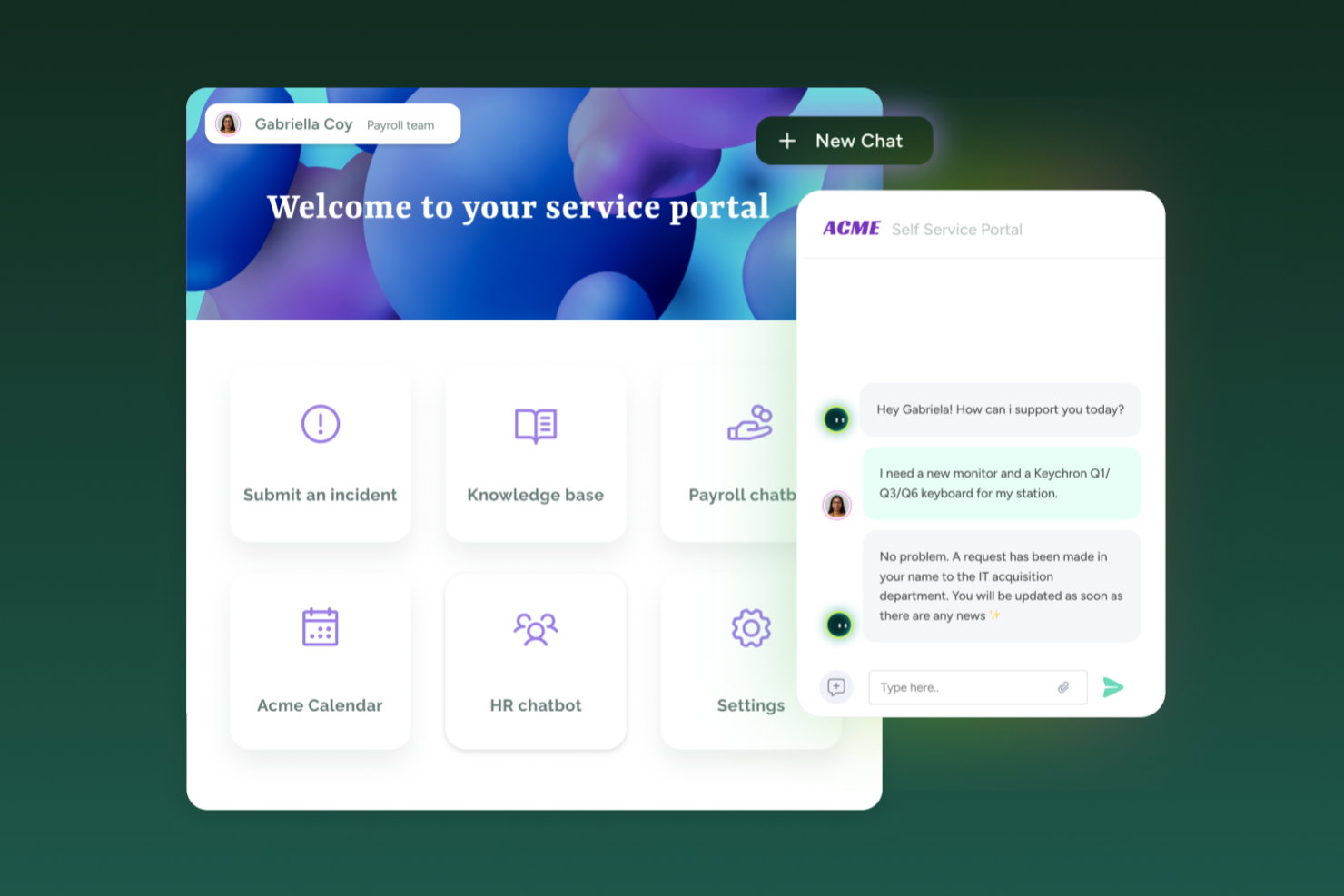
SysAid è un software di help desk AI-first progettato specificamente per i team IT. Supporta la gestione dei ticket, la risoluzione dei problemi e la gestione degli asset, offrendo anche strumenti di automazione per aiutarti a semplificare e standardizzare i processi del service desk.
Una delle cose che mi ha colpito di questa piattaforma sono le sue capacità di automazione self-service. Questo include il reset automatico delle password e l'invio di richieste con un solo clic, che permettono ai dipendenti di risolvere autonomamente i problemi IT più comuni. Di conseguenza, il tuo team IT può dedicare meno tempo alla gestione di richieste ripetitive e concentrarsi maggiormente su attività tecniche e strategiche.
Sebbene SysAid offra una soluzione cloud, può anche essere implementato come soluzione on-premise, opzione che può risultare importante se hai requisiti infrastrutturali o di conformità più stringenti. Sono previsti supporto tecnico e formazione per aiutare il tuo team ad adottare la piattaforma in modo efficiente. Oltre al supporto IT, la piattaforma può essere utilizzata anche da team HR o da fornitori sanitari che necessitano di workflow di gestione del servizio strutturati.
Caratteristiche e integrazioni di SysAid
Le funzionalità includono automazione di task e ticket, escalation automatizzata, portale self-service, knowledge base, builder di workflow drag-and-drop, gestione degli asset, audit trail, project management e gestione dei problemi.
Le integrazioni includono Azure, Google Workspace, Jira, Microsoft Teams, Office 365, OneLogin SSO, Oomnitza, Slack, Worksafe App e Zapier.
Pros and Cons
Pros:
- Facile da implementare
- Include automazione delle attività
- Si integra con la gestione dei servizi IT (ITSM)
Cons:
- Personalizzazioni limitate
- Prezzi non trasparenti
New Product Updates from SysAid

SysAid Adds Bulk Contract Import
SysAid added bulk contract import to License Manager Essentials, letting admins upload a CSV template, validate entries, and create multiple contracts at once. For more information, visit SysAid's official site.

Ideale per la risoluzione automatica dei ticket con priorità all’AI
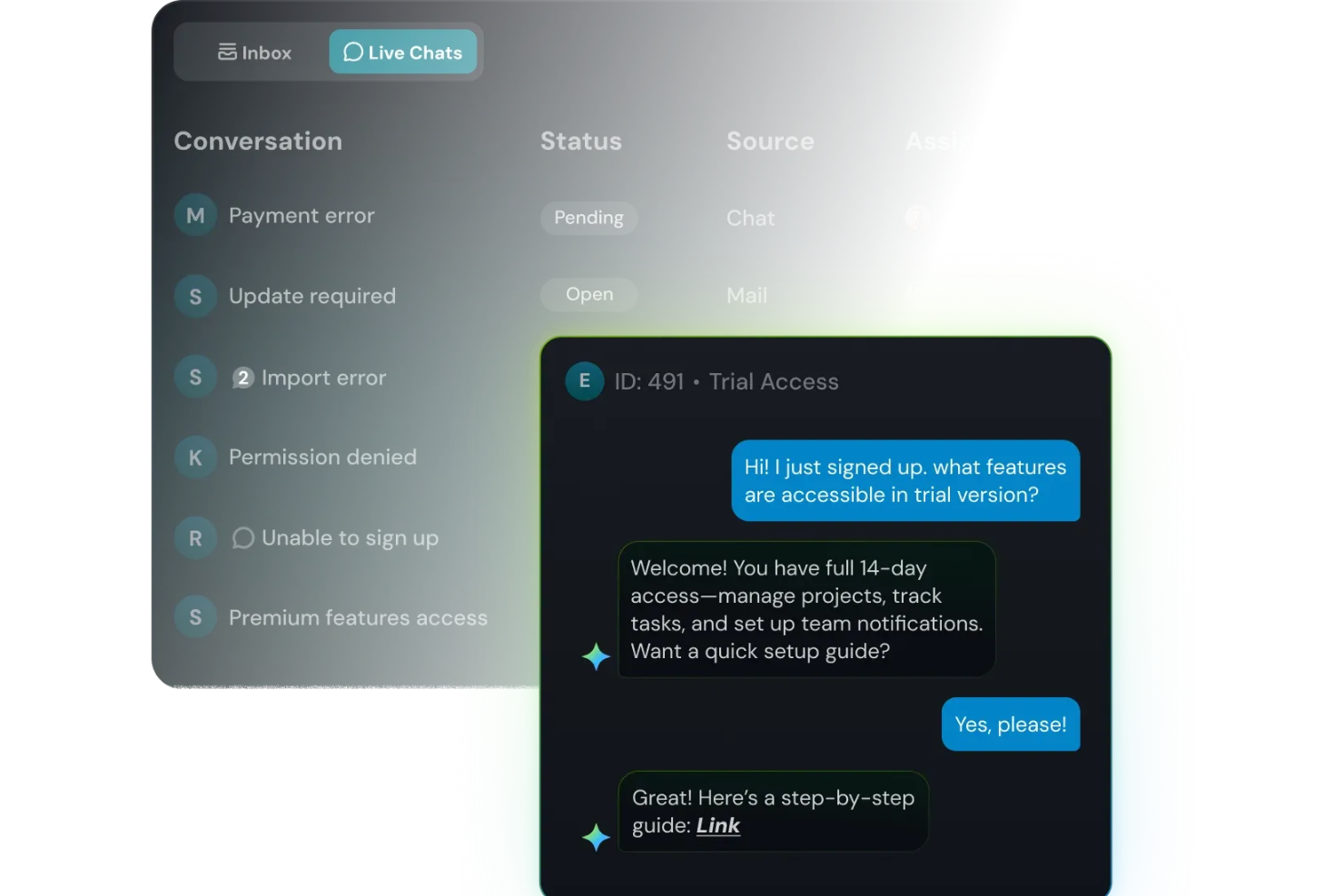
SparrowDesk è pensato per i team di supporto che si trovano ad affrontare un flusso costante di richieste dei clienti e sono alla ricerca di un help desk arricchito dall’AI che non costringa a destreggiarsi tra diversi strumenti. Se gestisci il servizio clienti in un’azienda in crescita—che sia SaaS, e-commerce, fintech o in un altro settore dinamico—apprezzerai come SparrowDesk unisce email e live chat in un'unica casella di posta e utilizza il suo agente AI 'Luna' per gestire i ticket di routine, così il tuo team può concentrarsi sulle questioni più complesse.
Perché ho scelto SparrowDesk
Ho scelto SparrowDesk per la sua eccezionale capacità di automatizzare il servizio clienti tramite soluzioni guidate dall’AI, pensate per ambienti helpdesk cloud. Grazie all’agente AI Luna, in grado di risolvere la maggior parte delle richieste, il tuo team può dedicarsi alle esigenze più complesse dei clienti. Inoltre, la casella di posta omnicanale unifica le comunicazioni provenienti da varie piattaforme, assicurando che nessun messaggio venga perso. L’intelligente AI Copilot assiste ulteriormente gli agenti fornendo suggerimenti in tempo reale, migliorando così accuratezza e rapidità delle risposte.
Funzionalità principali di SparrowDesk
Oltre all’automazione AI, SparrowDesk offre una serie di funzionalità che ne aumentano l’utilità come software helpdesk cloud:
- Accordi sul livello di servizio (SLA): Imposta obiettivi chiari di risposta e risoluzione per mantenere elevati standard di servizio clienti.
- Gestione orari lavorativi: Configura gli orari operativi per allineare le aspettative dei clienti e ottimizzare l’assegnazione dei ticket.
- Macro per azioni rapide: Automatizza le attività ripetitive per risparmiare tempo e migliorare l’efficienza del flusso di lavoro.
- Analisi interattive: Utilizza dashboard in tempo reale per ottenere insight sulle performance del team e sulle tendenze delle interazioni con i clienti.
Integrazioni di SparrowDesk
Attualmente SparrowDesk non elenca integrazioni native.
Pros and Cons
Pros:
- Agenti AI progettati per risolvere automaticamente molti ticket ripetitivi
- Le funzioni Copilot riassumono lunghi scambi di messaggi direttamente nella casella dell’agente
- Il builder di workflow senza codice automatizza l’assegnazione e le notifiche
Cons:
- Attualmente i canali sono focalizzati su email e live chat, non su voce o social
- Integrazioni native limitate potrebbero ostacolare la connettività senza interruzioni

Ideale per assistenza clienti potenziata dall'intelligenza artificiale
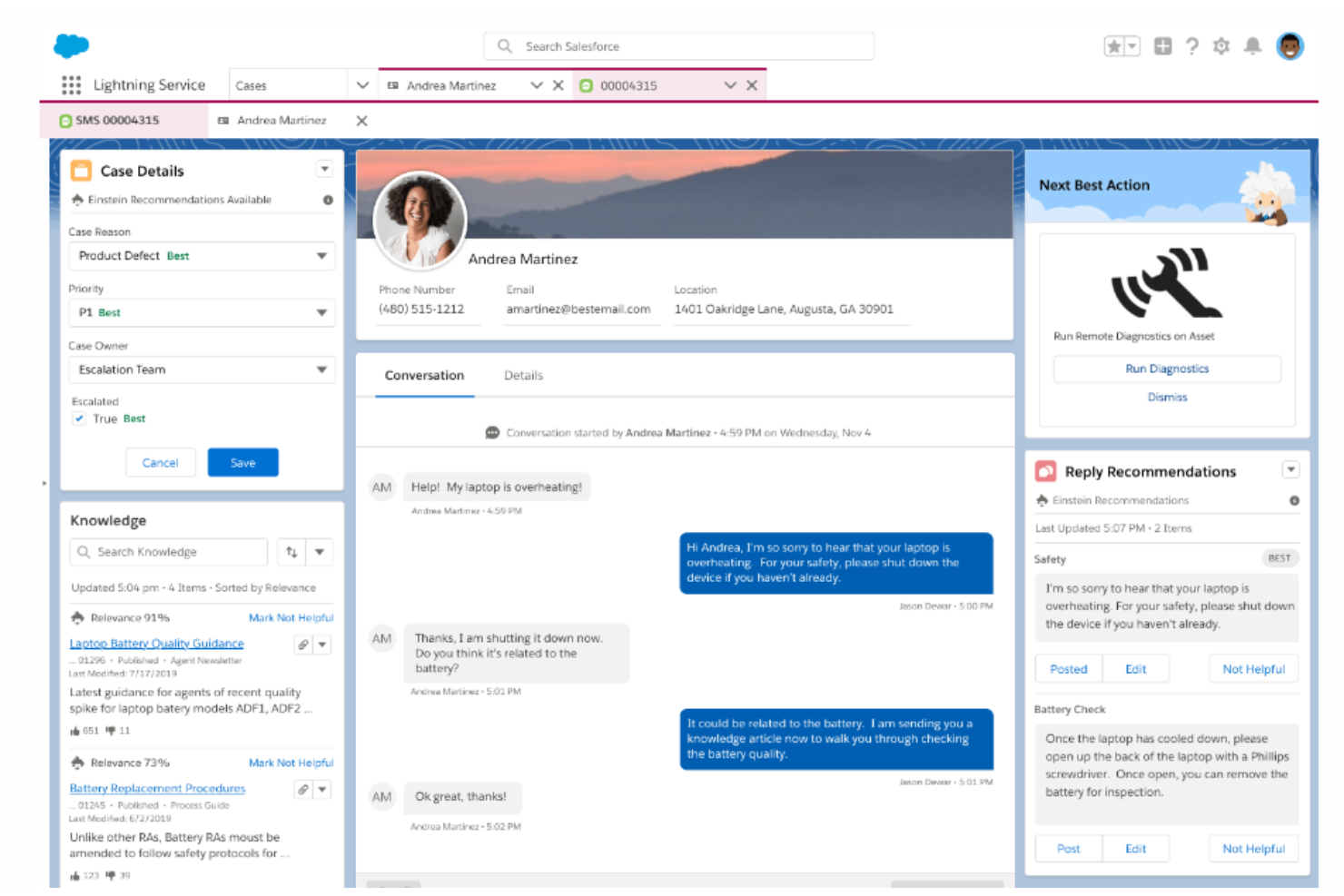
Salesforce Service Cloud è un software di assistenza clienti e un'applicazione di supporto che offre alle aziende una piattaforma per instaurare relazioni di marketing personalizzate con ogni cliente attraverso diversi canali e dispositivi. Consente alle organizzazioni di fornire un servizio più intelligente, veloce e personalizzato gestendo i casi e le conversazioni con i clienti.
La piattaforma offre una suite di strumenti che permettono alle aziende di gestire le interazioni di supporto clienti su vari canali. Ad esempio, dispone di funzionalità di gestione dei casi, permettendo agli operatori di tracciare e risolvere i problemi dei clienti. Salesforce Service Cloud include inoltre una base di conoscenza per archiviare e recuperare soluzioni a problemi comuni, utilizzabile sia dai clienti che dal personale di supporto.
Inoltre, Salesforce Service Cloud offre la possibilità di automatizzare attività di routine, come l'instradamento e l'escalation dei casi, per migliorare l'efficienza dei team di assistenza. Lo strumento utilizza anche tecnologie AI per fornire approfondimenti predittivi analizzando i dati dei clienti, le interazioni storiche e le informazioni contestuali, al fine di identificare schemi, tendenze e potenziali problemi, permettendo alle aziende di anticipare le esigenze dei clienti, ottimizzare le operazioni di servizio e affrontare proattivamente le loro richieste.
Funzionalità e integrazioni principali di Salesforce Service Cloud
Le funzionalità includono community self-service, strumenti per la gestione di contratti di servizio e diritti, e analisi dei servizi. Salesforce Service Cloud si integra inoltre con i canali social media per monitorare e rispondere alle richieste, ai commenti e ai reclami dei clienti sulle piattaforme social.
Le integrazioni includono SurveyMonkey, Tableau, Genesys, Trello, Mailchimp, Freshdesk, HubSpot CRM e la suite Salesforce, inclusi Sales Cloud e Marketing Cloud.
Pros and Cons
Pros:
- Fornisce una gestione efficiente dei casi
- Sistema facile da usare
- Aiuta a personalizzare l'interazione con il cliente
Cons:
- Curva di apprendimento ripida per i nuovi utenti
- Difficoltà nell'integrazione con sistemi di terze parti
New Product Updates from Agentforce Service (formerly Service Cloud)
Agentforce Service Keeps Full Agentforce Voice Transcripts After Calls
Agentforce Service now shows the full conversation history in post-call transcripts for Agentforce Voice calls within the Service Console, giving agents better context for follow-ups. For more information, visit Salesforce’s official site.
 .
.
Chatbase
Ideale per la creazione personalizzabile di chatbot AI
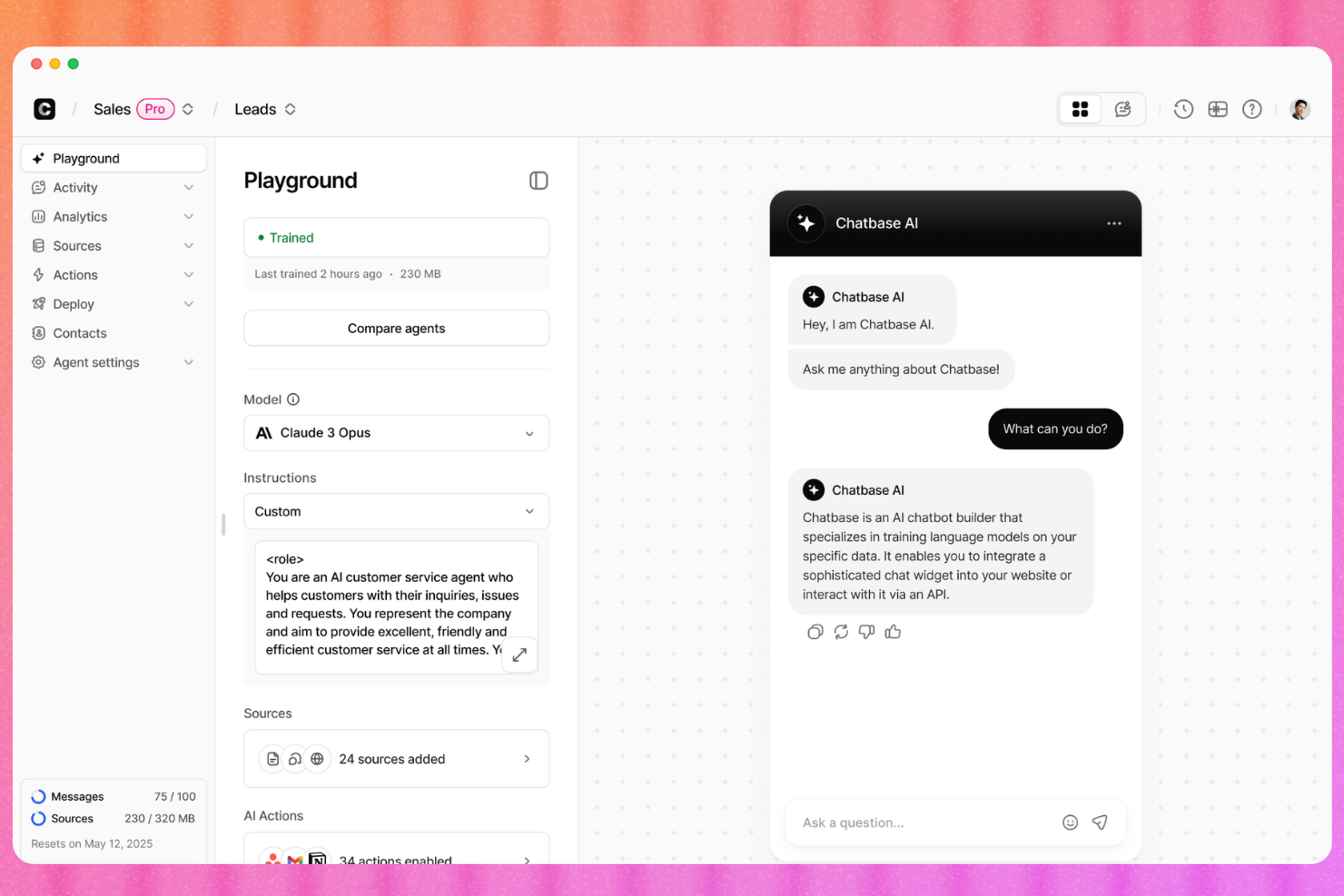
Chatbase è un costruttore di chatbot AI per il supporto clienti che ti permette di addestrare agenti sui dati della tua azienda, distribuirli su diversi canali e indirizzare le problematiche complesse agli operatori umani tramite live chat o ticket su helpdesk.
Per chi è Chatbase?
Chatbase è particolarmente adatto a piccole e medie imprese che desiderano automatizzare il supporto clienti con l'IA senza dover creare un chatbot da zero.
Perché ho scelto Chatbase
Ho incluso Chatbase tra le mie scelte migliori perché ti offre un vero controllo su come appare, parla e si comporta il tuo agente di supporto AI. Apprezzo la possibilità di configurare tono e limiti dell’agente con un linguaggio semplice e testare modelli AI differenti nel playground per trovare quello più adatto. L’opzione white label consente inoltre di eliminare completamente il marchio Chatbase, facendo sì che l’agente sembri parte integrante del prodotto.
Caratteristiche principali di Chatbase
- Passaggio all’operatore umano: Instrada le conversazioni non risolte direttamente a un operatore umano nella finestra della chat.
- Analisi delle conversazioni: Monitora il volume delle chat, le domande senza risposta e i punteggi di soddisfazione da una dashboard centrale.
- Supporto multilingue: Rileva e risponde automaticamente in oltre 80 lingue senza configurazione manuale.
- Fonti dati personalizzate: Carica PDF, URL o testo semplice per costruire la base di conoscenza del chatbot.
Integrazioni di Chatbase
Chatbase offre integrazioni native con WhatsApp, Slack, Instagram, Facebook Messenger, Zendesk, Salesforce, Shopify, Stripe, Notion, Calendly e Cal.com. Si collega anche a Zapier e Make, e dispone di un’API per integrazioni personalizzate.
Pros and Cons
Pros:
- Crea un chatbot senza codice in pochi minuti
- Scegli tra diversi fornitori di LLM
- Supporta nativamente oltre 80 lingue
Cons:
- Nessun builder visivo per il flusso delle conversazioni
- Potrebbe richiedere un po' di addestramento del modello chat

Ideale con un costruttore di flussi di lavoro automatizzati
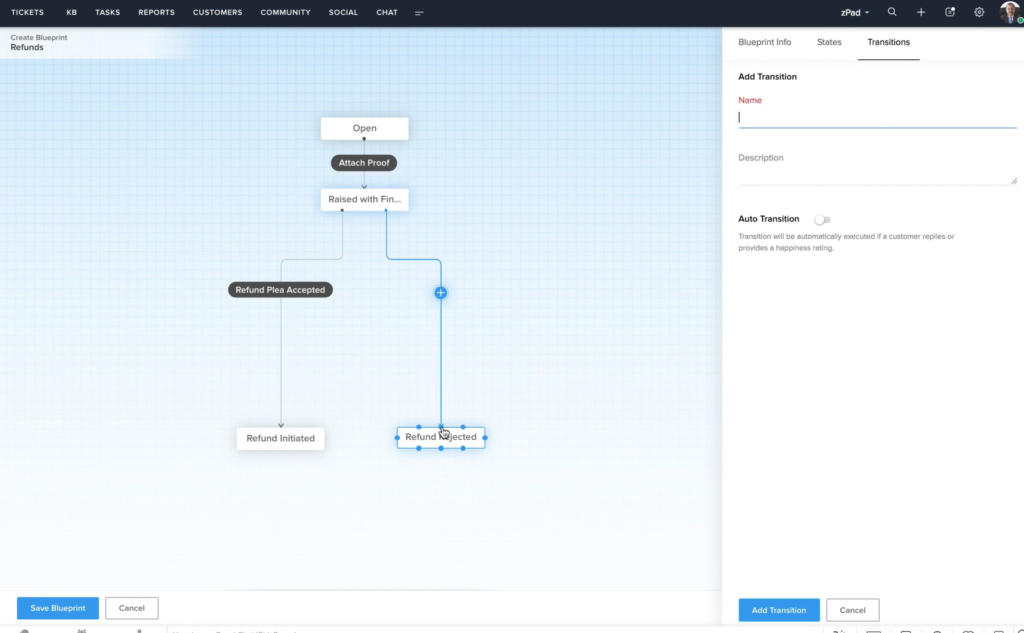
Zoho Desk è un software di help desk che facilita le operazioni di assistenza clienti su più canali. Puoi collegare diversi canali di comunicazione al sistema, tra cui email, social media, chat web e chiamate vocali. Si distingue per la capacità di creare flussi di lavoro automatizzati, supportando il tuo team nel ridurre le attività manuali. L'ho aggiunto alla mia lista dopo aver valutato la sua abilità nel semplificare le operazioni di assistenza clienti e aumentare la produttività degli operatori.
I flussi di lavoro automatizzati del software permettono di creare le migliori pratiche per gli operatori nella gestione delle richieste comuni. Questo è utile per garantire un'esperienza coerente ai clienti e anche per rendere più veloce l'apprendimento dei nuovi assunti. Il costruttore di flussi di lavoro è un'interfaccia intuitiva con drag-and-drop. Puoi impostare azioni e risultati specifici, in base a condizioni predefinite.
Inoltre, la piattaforma offre altre funzionalità chiave per supportare il tuo team di assistenza clienti. Queste includono risorse per il self-service, strumenti di collaborazione tra team, reportistica e integrazione con altri strumenti aziendali.
Funzionalità e integrazioni principali di Zoho Desk
Le funzionalità includono gestione dei ticket, auto-tag dei ticket, analisi del sentiment, notifiche Zia, dashboard Zia, assistente alle risposte, strumenti di self-service, integrazione CRM, funzioni personalizzate, SDK, marketplace e piattaforma, API, report e dashboard, monitoraggio del tempo, centro assistenza multi-brand, mappatura dei domini, gestione degli utenti e degli accessi.
Le integrazioni includono Twilio, RingCentral, Amazon Connect, Ozonetel, Exotel, Knowlarity, Jive, sipgate, JustCall, ringover e altre opzioni software.
Pros and Cons
Pros:
- Ampie opzioni di personalizzazione
- Interfaccia pulita e intuitiva, facile da navigare
- Integrazione con altre app Zoho
Cons:
- Reportistica limitata nei piani di fascia bassa
- Opzioni di branding limitate per i portali clienti

eDesk
Ideale per la gestione dell’assistenza ecommerce multicanale
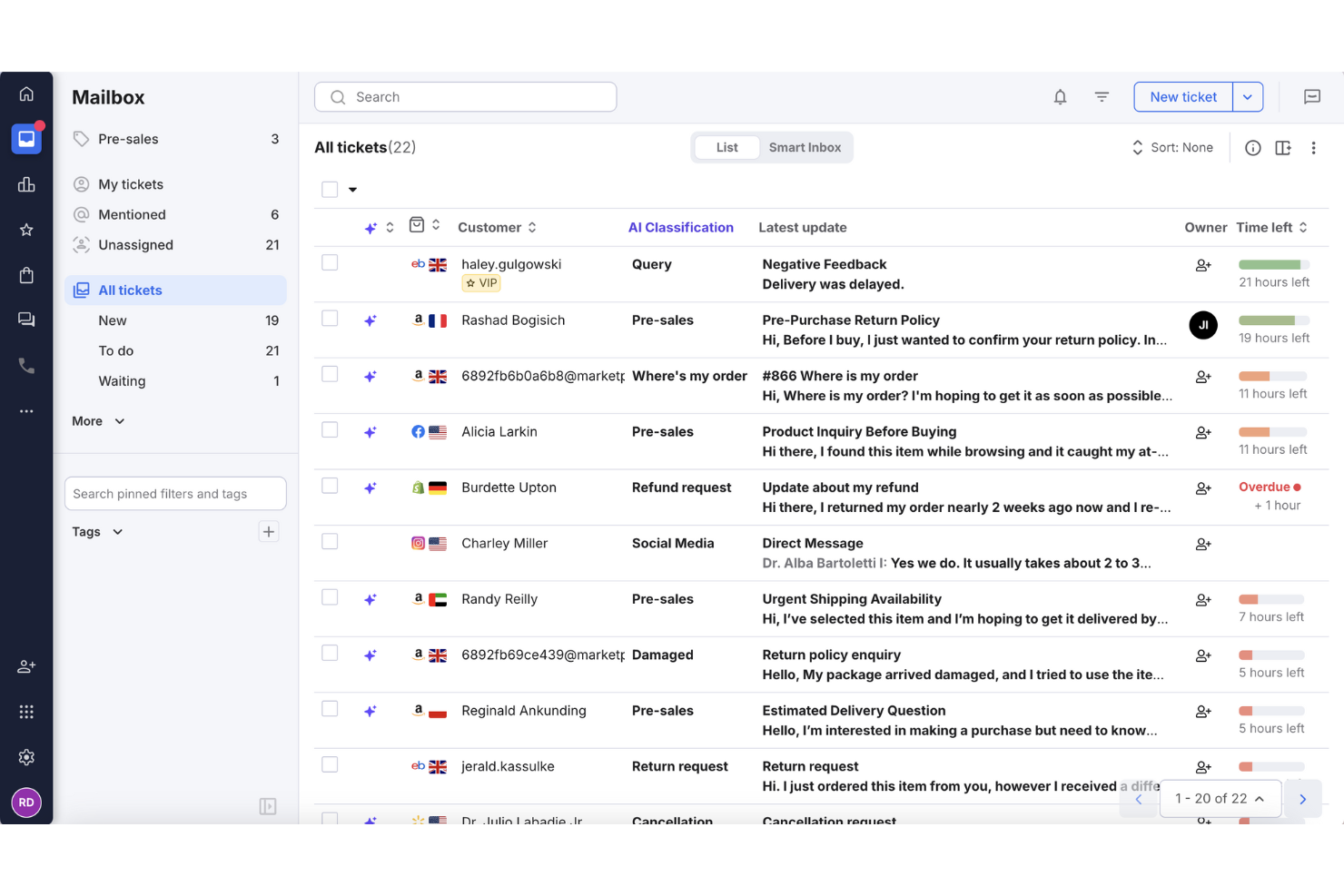
Se gestire le interazioni con i clienti su molteplici canali di vendita online ti sembra troppo impegnativo, eDesk potrebbe essere proprio ciò di cui hai bisogno. Pensato per le aziende ecommerce, eDesk centralizza le comunicazioni con i clienti e automatizza le attività, affrontando la complessità dell'assistenza multicanale. Le sue funzionalità basate sull'intelligenza artificiale e le sue estese integrazioni mirano a migliorare l’efficienza del tuo team di supporto e ad aumentare la soddisfazione dei clienti.
Perché ho scelto eDesk
Ho scelto eDesk per la sua capacità di gestire le sfide specifiche dell’ecommerce all’interno di un software di helpdesk cloud. La sua casella di posta unificata raccoglie i messaggi da più canali in uno spazio di lavoro più gestibile. L'agente AI aiuta anche ad automatizzare le attività di supporto routinarie, riducendo il carico manuale sul tuo team. Queste funzionalità favoriscono una comunicazione più efficiente e una gestione più fluida delle attività nelle operazioni di assistenza clienti.
Funzionalità principali di eDesk
Oltre alla gestione dell’assistenza ecommerce multicanale, eDesk offre:
- Automazione basata su AI: automatizza compiti ripetitivi come l’instradamento dei ticket e suggerimenti per le risposte, liberando il tuo team per questioni più complesse.
- Report in tempo reale: fornisce informazioni sulle tue operazioni di supporto per aiutarti a prendere decisioni basate sui dati.
- Chatbot 24/7: garantisce assistenza continua ai clienti che visitano il tuo negozio online, assicurando che nessuna richiesta resti senza risposta.
- Gestione dei feedback: ti consente di inviare richieste di recensione ai clienti, aiutandoti a raccogliere preziosi feedback e migliorare la qualità del servizio.
Integrazioni di eDesk
Le integrazioni includono Amazon, eBay, Walmart, Shopify, WooCommerce, BigCommerce, Magento, Facebook, Instagram e WhatsApp.
Pros and Cons
Pros:
- Automazioni e modelli riducono le attività di supporto ripetitive
- Visualizzazioni organizzate dei ticket migliorano l'efficienza del flusso di lavoro quotidiano
- Integra dati ordini dettagliati per un servizio clienti migliorato
Cons:
- Progettato principalmente per l’ecommerce, meno flessibile per altri settori
- I report e le analisi, pur essendo presenti, sono meno personalizzabili rispetto a dashboard più aziendali
New Product Updates from eDesk
eDesk Adds Galeria and Kaufland Support in Spain and Netherlands
eDesk adds support for Galeria, Kaufland Spain, and Kaufland Netherlands marketplaces. These integrations bring more European buyer messages into eDesk with routing, templates, AI insights, and automated translation. For more information, visit eDesk’s official site.
 .
.
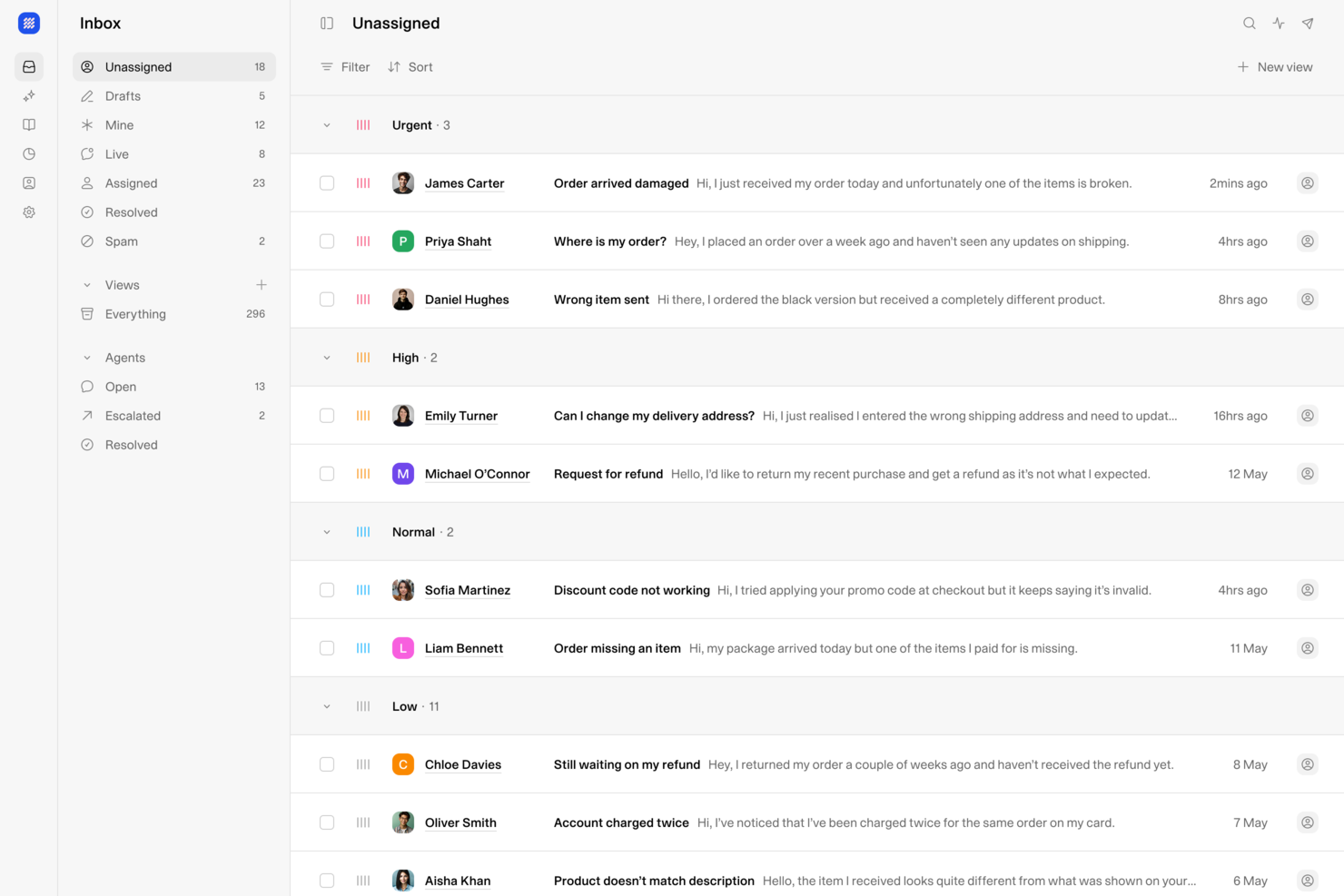
Weav è una piattaforma di helpdesk cloud AI-first che combina agenti AI, una casella di posta condivisa, chatbot per i clienti e uno strumento di knowledge interno, per gestire la risoluzione dei ticket attraverso i vari canali di supporto.
Per chi è più adatto Weav?
Weav è ideale per team SaaS ed ecommerce che desiderano gestire il supporto clienti tramite chat AI e automazione, piuttosto che attraverso il ticketing tradizionale.
Perché ho scelto Weav
Weav si guadagna un posto nella mia lista perché i suoi agenti AI utilizzano i dati di formazione del tuo prodotto reale per personalizzare le risposte in base alle richieste dell'utente, invece di restituire un generico articolo della knowledge base. Adoro la possibilità di iniettare contesto aggiuntivo in qualsiasi agente in qualsiasi momento con un semplice prompt, il che significa che le risposte dell'assistenza cambiano in base a ciò che è più rilevante nella situazione. Anche il modello di apprendimento continuo aiuta: Weav studia i ticket risolti per aggiornare la propria comprensione, così le risposte diventano sempre più precise man mano che il tuo prodotto e i comportamenti dei clienti evolvono.
Funzionalità principali di Weav
- Agenti specializzati: Crea più agenti AI, ciascuno formato per uno specifico ruolo di supporto o area tematica, per gestire scenari clienti distinti.
- Generazione delle risposte: L’AI prepara le risposte dell'agente nella casella di posta in base alla conoscenza del tuo prodotto, lasciando all’agente l’ultima parola prima dell’invio.
- Reportistica: Tieni traccia dei risultati del supporto, delle tendenze di risoluzione dei ticket e dei punti critici nei flussi di assistenza tramite una dashboard di reportistica integrata.
- Fonti verificate: Gli utenti interni possono vedere esattamente da quali documenti di training Weav ha preso le informazioni per elaborare una risposta.
Integrazioni di Weav
Weav offre un set ridotto di integrazioni native, tra cui Shopify, Google Drive e Stripe. Supporta inoltre azioni personalizzate e, nei piani Pro e superiori, offre un’API REST e webhooks in tempo reale per sviluppare integrazioni personalizzate.
Pros and Cons
Pros:
- Gli agenti apprendono dalla cronologia dei ticket risolti
- Controlli di tono e risposta per ogni agente
- Strumento di knowledge interno per gli agenti
Cons:
- Il piano gratuito limita l’AI a 20 messaggi
- Poche integrazioni native disponibili

Zendesk
Ideale per ticketing centralizzato omnicanale e gestione dei dati dei clienti
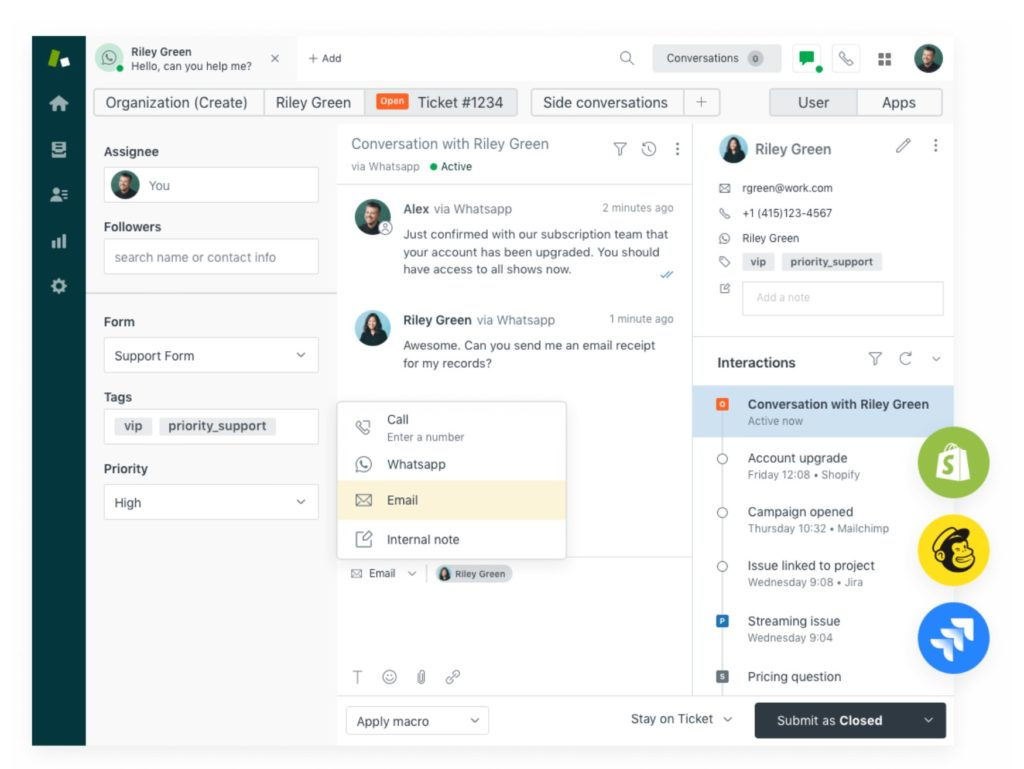
Zendesk è un software di assistenza clienti basato su cloud e potenziato dall'intelligenza artificiale che aiuta le aziende a gestire e risolvere richieste e problemi dei clienti offrendo una piattaforma centralizzata per interagire con il pubblico su diversi canali.
Il sistema di ticketing completamente integrato di Zendesk supporta l'invio di richieste da diversi canali, tra cui email, chat, telefono e messaggi sui social media, creando automaticamente un ticket per ogni richiesta. Il sistema di ticketing utilizza anche valutazioni CSAT, accordi sul livello di servizio (SLA), monitoraggio dei tempi e smistamento per garantire che tu e il tuo team forniate un'esperienza clienti di alta qualità.
Zendesk offre la propria piattaforma CRM, Sunshine, progettata per aiutare le aziende a centralizzare e gestire i dati dei clienti e offrire una visione unificata delle interazioni. Questa include una piattaforma di dati dei clienti (CDP) che permette di aggregare, archiviare e gestire i dati provenienti da molteplici sorgenti, come ticket di assistenza, conversazioni in chat, email e interazioni sui social. Questo profilo cliente unificato aiuta le organizzazioni a ottenere una comprensione approfondita delle preferenze, della storia e del comportamento dei propri clienti, permettendo di offrire esperienze di qualità superiore.
Le funzionalità includono strumenti per la gestione della knowledge base, chat dal vivo, software per call center e funzionalità di analisi dei clienti.
Le integrazioni includono Asana, Google Workspace, HubSpot, Jira, Microsoft Dynamics, Salesforce, Shopify, Slack, Trello, Zoom e oltre 1200 opzioni disponibili tramite Zendesk Marketplace.
Pros and Cons
Pros:
- Interfaccia intuitiva e gestione semplice delle attività
- Implementazione rapida e prezzi accessibili
- Capacità di automazione per snellire i processi
Cons:
- Opzioni di personalizzazione limitate
- È richiesta una licenza individuale per aggiungere nuovi agenti
New Product Updates from Zendesk
Zendesk Adds Email AI Replies and Predictive Routing
Zendesk’s latest email AI agents update brings configurable knowledge and welcome replies and adds predictive routing for email tickets, so you can tailor your automated emails and get inquiries resolved faster. For more information, visit Zendesk’s official site.
Altre opzioni
Ecco alcune altre opzioni interessanti che non sono rientrate nell’elenco dei migliori software per help desk cloud:
- Tidio
Ideale per conversazioni di helpdesk multilingue
- HappyFox
Ideale per il self-service dei clienti
- monday service
Ideale per sistema di ticketing personalizzabile
- SolarWinds Service Desk
Ideale per un help desk focalizzato sull'IT
- Issuetrak
Ideale per ticketing omnicanale
- Genesys Cloud CX
Ideale per trasformare l'esperienza del cliente
- Deskpro Draft
Ideale per un helpdesk in cloud o on-premise
- Bitrix24
Ideale per aziende che necessitano di una soluzione helpdesk gratuita
- Front
Ideale per costruire migliori relazioni con i clienti
- Spiceworks Cloud Help Desk
Ideale per il monitoraggio di server e siti web
- ManageEngine
Ideale per la gestione IT e la sicurezza dei dati
- Front
Ideale per l'automazione e la gestione delle attività
- SAAS First
Il miglior chatbot di supporto IA
- Supportbench
Ideale per strutture personalizzate e scalabilità
- Hiver
Ideale per la collaborazione tra help desk
- NinjaOne
Ideale per la gestione IT da un'unica interfaccia
- LiveAgent
Ideale per soluzioni di assistenza clienti multi-canale e orientate al cliente
- Help Scout
Ideale per aumentare la produttività degli agenti
- Zoho Assist
Ideale per supporto IT remoto non presidiato e sicuro


Come valuto i software cloud per help desk
Divido la mia valutazione in due livelli: i requisiti di base che uno strumento deve soddisfare, come la gestione dei ticket omnicanale e l'automazione degli SLA, e gli elementi distintivi che differenziano una piattaforma dall'altra per il tuo team.
Funzionalità principali (Requisiti fondamentali per questo elenco)
Quando seleziono gli strumenti per il mio elenco, assegno a ciascuno un punteggio su una scala da 0 (non offre la funzionalità) a 5 (eccelle in quest'area) per ogni funzionalità principale indicata di seguito. Quindi calcolo il punteggio totale dello strumento e lo converto in percentuale. Ogni strumento deve raggiungere un punteggio totale minimo del 65% per essere preso in considerazione.
- Gestione dei ticket basata sul cloud: verifico se la piattaforma funziona come prodotto SaaS completamente ospitato nel cloud, con monitoraggio strutturato del ciclo di vita dei ticket, campi personalizzati e flussi di lavoro per gli stati.
- Acquisizione omnicanale: ogni strumento che valuto deve raccogliere le conversazioni da email, chat, telefono e social in un'unica coda, anziché isolare i diversi canali.
- Automazione e instradamento: cerco attivatori basati su regole che gestiscano l'assegnazione, l'escalation e la definizione delle priorità dei ticket, ad esempio instradando automaticamente i problemi di fatturazione a un team specializzato.
- Base di conoscenza e servizio autonomo: un buon help desk consente ai clienti di trovare autonomamente le risposte attraverso una base di conoscenza ricercabile e strutturata e un portale personalizzato con il proprio marchio.
- SLA e reportistica: valuto come ogni strumento monitora gli obiettivi di risposta e risoluzione e se i cruscotti mettono in evidenza KPI come CSAT, tempo della prima risposta e tendenze dell'arretrato.
- Strumenti di collaborazione per gli operatori: funzionalità come note interne, @menzioni, rilevamento delle collisioni e conversazioni parallele fanno davvero la differenza quando più operatori intervengono sullo stesso ticket.
Una volta ottenuto un elenco di strumenti che soddisfano i criteri, considero ciò che distingue ogni piattaforma.
Fattori distintivi (Ciò che differenzia i fornitori)
Ecco come confronto e metto a confronto i diversi fornitori:
Funzionalità di punta
L'assistenza basata sull'intelligenza artificiale è oggi un importante elemento distintivo. Cerco strumenti in grado di redigere risposte, riassumere lunghe conversazioni relative ai ticket e suggerire agli operatori articoli pertinenti durante la conversazione. L'analisi del sentiment si abbina bene a questa funzione: segnalare i clienti insoddisfatti prima ancora che un operatore apra il ticket aiuta i team a dare priorità agli aspetti più importanti. Valuto inoltre se una piattaforma include funzionalità native di telefonia e IVR, poiché ciò elimina la necessità di aggiungere uno strumento separato per il centro di contatto per l'assistenza telefonica.
Oltre le funzionalità
La profondità delle integrazioni è molto importante in questo contesto. Verifico se una piattaforma si connette nativamente ai CRM e agli strumenti di e-commerce che il tuo team già utilizza, come Salesforce, HubSpot o Shopify, in modo che gli operatori possano avere una visione completa del cliente senza cambiare scheda. Anche la sicurezza è un fattore che valuto con attenzione, soprattutto certificazioni come SOC 2 Type II e la conformità al GDPR, importanti quando si gestiscono dati sensibili dei clienti su larga scala. Anche la struttura dei prezzi ha un ruolo: valuto se i modelli basati sul numero di operatori rimangono ragionevoli con la crescita del team di assistenza.
Come scegliere un software per help desk cloud
È facile perdersi in lunghi elenchi di funzionalità e strutture di prezzo complesse. Per aiutarti a rimanere concentrato mentre affronti il tuo particolare processo di selezione del software, ecco una lista di fattori da tenere a mente:
| Fattore | Cosa considerare |
|---|---|
| Scalabilità | Assicurati che il software possa crescere insieme alla tua azienda. Cerca soluzioni in grado di gestire un volume crescente di ticket e di supportare l'espansione in nuovi mercati. |
| Integrazioni | Verifica se lo strumento si integra con i sistemi che già utilizzi, come CRM, posta elettronica e piattaforme di chat, per creare un'esperienza di assistenza unificata per il tuo team. |
| Personalizzazione | Valuta quanto sia semplice adattare il software ai flussi di lavoro e ai processi del tuo team, inclusi campi personalizzati, priorità e visualizzazioni dei ticket. |
| Semplicità d'uso | Esamina l'interfaccia utente e valuta quanto sia intuitiva per il tuo team. Un design semplice e facile da navigare può ridurre i tempi di formazione e migliorare l'efficienza. |
| Budget | Valuta il costo totale, inclusi i costi di abbonamento e gli eventuali addebiti aggiuntivi. Confrontalo con il tuo budget per assicurarti che lo strumento offra un buon rapporto qualità-prezzo. |
| Misure di sicurezza | Cerca funzionalità come la crittografia dei dati, i controlli degli accessi e la conformità agli standard del settore per proteggere le informazioni sensibili dei clienti. |
Tendenze nei software per help desk cloud
Durante la mia ricerca, ho raccolto innumerevoli aggiornamenti sui prodotti, comunicati stampa e registri delle versioni di diversi fornitori di software per help desk cloud. Ecco alcune delle tendenze emergenti che sto monitorando:
- Assistenza basata sull'IA: L'IA sta migliorando le interazioni con i clienti fornendo risposte rapide e accurate. Strumenti come chatbot e assistenti virtuali stanno diventando più sofisticati, aiutando i team a gestire in modo efficiente grandi volumi di richieste.
- Funzionalità omnicanale: Gli utenti si aspettano assistenza attraverso più canali, inclusi social media, chat dal vivo ed e-mail. I fornitori stanno integrando questi canali per offrire un'esperienza coerente, consentendo agli operatori di passare dall'uno all'altro senza interruzioni.
- Portali self-service: Le aziende si stanno concentrando sull'offrire ai clienti maggiore autonomia mettendo a disposizione opzioni self-service. Questi portali consentono di accedere a domande frequenti, basi di conoscenza e forum della community, riducendo il carico di lavoro dei team di assistenza.
- Analisi del sentiment: Analizzare il sentiment dei clienti a partire dalle interazioni aiuta i team a dare priorità ai problemi e a migliorare la qualità del servizio. I fornitori stanno integrando strumenti di analisi del sentiment per fornire informazioni sulle emozioni dei clienti.
- Strumenti di assistenza remota: Con la diffusione del lavoro da remoto, i fornitori stanno aggiungendo funzionalità per aiutare i team a collaborare e risolvere i problemi da qualsiasi luogo. Tra queste figurano dashboard condivise, condivisione dello schermo e funzionalità di controllo remoto.
Che cos'è il software di help desk cloud?
Il software di help desk cloud è uno strumento che aiuta le aziende a gestire in modo efficiente le richieste di assistenza dei clienti attraverso una piattaforma basata sul cloud. Viene generalmente utilizzato dai team di assistenza clienti, dai professionisti IT e dai responsabili dei servizi per migliorare la comunicazione e risolvere rapidamente i problemi.
La gestione dei ticket, le funzionalità omnicanale e i portali self-service aiutano a organizzare le richieste, fornire un'assistenza coerente e consentire agli utenti di trovare autonomamente le soluzioni. Nel complesso, questi strumenti migliorano la soddisfazione dei clienti e la produttività dei team ottimizzando il processo di assistenza.
Funzionalità del software di help desk cloud
Quando scegli il software di help desk cloud, presta attenzione alle seguenti funzionalità chiave:
- Gestione dei ticket: Organizza e monitora le richieste dei clienti, assicurando che nessuna richiesta venga trascurata e consentendo una risoluzione efficiente.
- Funzionalità omnicanale: Fornisce assistenza attraverso più canali, come e-mail, chat e social media, garantendo un'esperienza coerente ai clienti.
- Assistenza basata sull'IA: Utilizza l'IA per offrire risposte rapide e gestire grandi volumi di richieste, lasciando agli operatori umani la gestione dei problemi più complessi.
- Portali self-service: Consentono ai clienti di trovare autonomamente le soluzioni attraverso domande frequenti e basi di conoscenza, riducendo il carico di lavoro dei team di assistenza.
- Analisi del sentiment: Analizza le interazioni con i clienti per valutare le emozioni, aiutando i team a stabilire le priorità e a migliorare la qualità del servizio.
- Strumenti di assistenza remota: Facilita la collaborazione e la risoluzione dei problemi per i team che lavorano da remoto, utilizzando funzionalità come la condivisione dello schermo e il controllo remoto.
- Personalizzazione: Consente ai team di adattare il software a flussi di lavoro e processi specifici, migliorando l'efficienza complessiva.
- Reportistica avanzata: Fornisce informazioni sulle metriche delle prestazioni, consentendo di prendere decisioni basate sui dati per migliorare i servizi di assistenza.
- Funzionalità di integrazione: Si collega ai sistemi esistenti, come CRM ed e-mail, creando un ambiente di assistenza unificato per una maggiore efficienza.
- Misure di sicurezza: Protegge le informazioni sensibili dei clienti con funzionalità come la crittografia dei dati e i controlli di accesso, garantendo la conformità agli standard del settore.
- Compatibilità e accessibilità dei dispositivi: Il software cloud dovrebbe essere compatibile con un'ampia gamma di dispositivi e sistemi operativi, dagli smartphone ai laptop e oltre.
Vantaggi del software di help desk cloud
L'implementazione di un software di help desk cloud offre diversi vantaggi al tuo team e alla tua azienda. Ecco alcuni dei vantaggi di cui potrai usufruire:
- Efficienza migliorata: Centralizza la gestione dei ticket e automatizza le attività ripetitive, consentendo al tuo team di risolvere i problemi più rapidamente.
- Maggiore soddisfazione dei clienti: Offre supporto omnicanale e opzioni self-service, fornendo ai clienti modi pratici per ricevere assistenza.
- Informazioni basate sui dati: La reportistica avanzata e l'analisi del sentiment forniscono informazioni preziose per perfezionare le tue strategie di supporto.
- Scalabilità: Si adatta alle crescenti esigenze aziendali, gestendo volumi maggiori di ticket ed espandendo le funzionalità di supporto secondo necessità.
- Collaborazione da remoto: Supporta il lavoro da remoto con strumenti come la condivisione dello schermo, aiutando i team a collaborare da qualsiasi luogo per risolvere i problemi dei clienti.
- Flussi di lavoro personalizzabili: Consente di adattare i processi alle esigenze specifiche del tuo team, migliorando l'efficienza operativa.
- Gestione sicura dei dati: Protegge le informazioni dei clienti con misure di sicurezza, garantendo fiducia e conformità agli standard di settore.
Software cloud per l'assistenza clienti Migliori pratiche di implementazione
Configurare un nuovo software cloud per l'assistenza clienti può essere difficile. Ecco i miei migliori consigli per l'implementazione di un sistema di assistenza:
- Sviluppa un piano di implementazione: Definisci obiettivi, tempistiche e responsabilità chiari. Identifica le principali parti interessate per il processo decisionale.
- Personalizza in base alle esigenze aziendali: Configura i flussi di lavoro, le regole di automazione e le categorie dei ticket in modo che si adattino ai processi di supporto esistenti. Evita complessità inutili.
- Effettua la migrazione dei dati con attenzione: Pianifica un trasferimento fluido dei dati dai sistemi precedenti. Pulisci e mappa i dati precedenti in modo che corrispondano alla struttura del nuovo sistema.
- Forma il personale e incoraggia l'adozione: Fornisci formazione pratica e documentazione agli operatori. Affronta i dubbi e metti in evidenza i principali vantaggi per incoraggiare l'utilizzo.
- Monitora le prestazioni e raccogli feedback: Monitora metriche chiave come il tempo di risoluzione dei ticket, la soddisfazione dei clienti e la produttività degli operatori. Raccogli regolarmente il feedback degli utenti.
- Ottimizza e amplia: Perfeziona continuamente i flussi di lavoro e l'automazione sulla base delle informazioni sulle prestazioni. Assicurati che il sistema si adatti alle esigenze aziendali in evoluzione.
Costi e prezzi del software cloud per l'assistenza clienti
La scelta di un software cloud per l'assistenza clienti richiede la comprensione dei vari modelli e piani tariffari disponibili. I costi variano in base alle funzionalità, alle dimensioni del team, agli extra e ad altri fattori. La tabella seguente riassume i piani più comuni, i relativi prezzi medi e le funzionalità tipicamente incluse nelle soluzioni software cloud per l'assistenza clienti:
Tabella comparativa dei piani per il software cloud per l'assistenza clienti
| Tipo di piano | Prezzo medio | Funzionalità comuni |
|---|---|---|
| Piano gratuito | $0 | Gestione di base dei ticket, supporto via email e reportistica limitata. |
| Piano personale | $5-$25/utente/mese | Gestione dei ticket, automazione di base e portale self-service. |
| Piano aziendale | $30-$60/utente/mese | Supporto multicanale, analisi avanzate e funzionalità di integrazione. |
| Piano per grandi aziende | $70-$120/utente/mese | Flussi di lavoro personalizzabili, supporto basato sull'intelligenza artificiale e funzionalità di sicurezza avanzate. |
Altre domande frequenti
Se cerchi un’introduzione al software per l’assistenza tecnica, queste sono le domande più frequenti che ti aiuteranno a rimanere informato.
Come funziona il software di assistenza tecnica basato sul cloud?
Il software di assistenza tecnica basato sul cloud utilizza server esterni (il cloud) per archiviare e gestire i dati relativi ai clienti o all’azienda. Grazie all’accesso al cloud, il tuo team può accedere a tutte le informazioni necessarie tramite un browser web o un dispositivo connesso a Internet, senza dover sostenere l’onere dell’hosting autonomo.
È importante notare che esiste una differenza tecnica tra il software di assistenza tecnica e il software per l’assistenza clienti. La maggior parte dei software di assistenza tecnica si concentra principalmente sul supporto operativo del personale interno, mentre il software per l’assistenza clienti è incentrato sulla gestione delle relazioni con i clienti (CRM). Tuttavia, molte aziende integrano entrambe le soluzioni in un unico sistema oppure utilizzano i termini in modo intercambiabile.
Quali sono alcuni casi d'uso del software di assistenza tecnica basato sul cloud nei diversi settori?
Il software di assistenza tecnica basato sul cloud viene utilizzato in diversi settori per ottimizzare l’assistenza clienti, la gestione IT e le richieste di servizio. Ecco alcuni dei principali casi d’uso nei vari settori:
- Supporto IT e tecnico: gestisce le richieste IT, risolve i problemi tecnici e automatizza la risoluzione dei problemi per dipendenti e clienti.
- Commercio elettronico e vendita al dettaglio: gestisce in modo efficiente le richieste dei clienti, il tracciamento degli ordini e l’elaborazione dei resi.
- Sanità: supporta le richieste dei pazienti, la programmazione degli appuntamenti e i problemi IT nelle strutture mediche.
- Istruzione: assiste studenti e docenti con il supporto tecnico, l’iscrizione ai corsi e le richieste amministrative.
- Finanza e settore bancario: fornisce assistenza ai clienti per problemi relativi ai conti, segnalazioni di frodi ed elaborazione dei prestiti.
- Produzione: gestisce le comunicazioni con i fornitori, le richieste di manutenzione delle apparecchiature e il supporto operativo.
- Settore alberghiero e viaggi: gestisce in tempo reale le richieste di prenotazione, i reclami dei clienti e l’assistenza di viaggio.
- Pubblica amministrazione e servizi pubblici: supporta le richieste dei cittadini, l’elaborazione dei documenti e la gestione dei servizi IT.
Il software di assistenza tecnica basato sul cloud migliora l’efficienza, automatizza i flussi di lavoro e aumenta la soddisfazione dei clienti in tutti i settori.
In che modo il software di assistenza tecnica basato sul cloud gestisce la sicurezza e i dati?
Il software di assistenza tecnica basato sul cloud garantisce la sicurezza e la gestione dei dati attraverso diverse funzionalità chiave:
- Crittografia dei dati: protegge le informazioni sensibili crittografando i dati sia durante il trasferimento sia quando sono archiviati.
- Controlli degli accessi: implementa l’accesso basato sui ruoli per garantire che solo gli utenti autorizzati possano visualizzare o modificare i dati.
- Autenticazione a più fattori (MFA): aggiunge un ulteriore livello di sicurezza richiedendo più passaggi di verifica.
- Backup regolari: esegue automaticamente il backup dei dati per prevenirne la perdita in caso di guasti del sistema o attacchi informatici.
- Standard di conformità: rispetta normative di settore come GDPR, HIPAA e SOC 2 per mantenere la privacy dei dati.
- Registri di audit: tiene traccia delle attività degli utenti e delle modifiche al sistema per garantire la responsabilità e monitorare la sicurezza.
- Rilevamento delle minacce: utilizza l’IA e il monitoraggio automatizzato per identificare e prevenire attività sospette.
- Ridondanza dei dati: archivia copie dei dati in più posizioni per garantirne la disponibilità anche durante le interruzioni del servizio.
Queste misure di sicurezza aiutano le aziende a proteggere i dati dei clienti e quelli interni, garantendo al contempo operazioni fluide.
Il software di assistenza tecnica basato sul cloud è conforme a ITIL e ITSM?
Sì, la maggior parte delle soluzioni software di assistenza tecnica basate sul cloud è conforme a ITIL (Biblioteca dell’infrastruttura delle tecnologie dell’informazione) e ITSM (Gestione dei servizi IT) per supportare una gestione efficiente dei servizi IT. Ecco come si allineano a questi framework:
- Gestione degli incidenti: monitora e risolve in modo efficiente i problemi IT, garantendo tempi di inattività minimi.
- Gestione dei problemi: identifica le cause principali dei problemi ricorrenti per prevenire incidenti futuri.
- Gestione delle modifiche: aiuta a pianificare, esaminare e implementare le modifiche IT con rischi minimi.
- Gestione degli asset: mantiene un registro degli asset IT, garantendone il corretto monitoraggio e utilizzo.
- Gestione delle richieste di servizio: automatizza e organizza le richieste degli utenti per una risoluzione più rapida.
- Gestione della conoscenza: archivia soluzioni e guide per offrire agli utenti opzioni di autoassistenza.
- Conformità e reportistica: fornisce tracce di audit e report per soddisfare gli standard ITIL e ITSM.
La maggior parte dei principali servizi di assistenza basati sul cloud, come ServiceNow, Freshservice e Zendesk, segue queste buone pratiche per migliorare l’efficienza del supporto IT.
Rimani informato
Sono certo che questo elenco contenga le migliori soluzioni software per help desk basate sul cloud. Tuttavia, prima di decidere quale sia quella più adatta a te, ti consiglio di definire le tue esigenze come organizzazione e di pianificare per il futuro.
Dopo aver circoscritto i requisiti essenziali, puoi testare alcuni di questi servizi tramite le loro demo e offerte di prova. Sfrutta la tua esperienza durante i periodi di prova per farti un'idea più precisa dei vantaggi e degli svantaggi di ciascun software e restringere ulteriormente il tuo elenco.
Se cerchi altri strumenti per completare il tuo flusso di lavoro o integrarli con il tuo software per help desk basato sul cloud, assicurati di rimanere aggiornato quando ti iscrivi oggi alla newsletter di The CX Lead!