

Recensione di Custify: vantaggi, svantaggi, funzionalità e prezzi spiegati
Custify si distingue per la sua automazione intuitiva e gli insight utili, risultando ideale per i team SaaS che cercano un customer success efficiente e basato sui dati, senza una complessità eccessiva.

Recensiamo gli strumenti in modo indipendente e le commissioni aiutano a finanziare i nostri test. Consulta la nostra politica di trasparenza, la nostra metodologia o suggerisci uno strumento.
Custify is a customer success software built for B2B SaaS teams that need to track customer health, manage onboarding, and intervene before accounts churn. I'd consider it if your team is outgrowing spreadsheets but doesn't need the complexity of an enterprise platform like Gainsight—Custify gives you health scoring, lifecycle automation, and task management in a setup that smaller or mid-market teams can actually own without a dedicated ops specialist.
Custify Evaluation Summary

4.9/5
- Pricing upon request
- Free demo available
Perché fidarsi dei nostri consigli sui software
6,700+
Reviews
20
Industry experts
16+
Evaluation factors
14
Years
Il nostro team testa e recensisce software dal 2012. In quanto leader CX noi stessi, sappiamo quanto sia difficile — e importante — scegliere il software giusto.
Per questa guida, abbiamo valutato gli strumenti attraverso test pratici e ricerche indipendenti, assegnando un punteggio agli strumenti in base ai nostri criteri di selezione.
Le nostre recensioni riflettono il nostro giudizio editoriale umano, non un discorso di vendita.
 Gui DrusinaCreative Director
 Tim FisherVP of AI
Custify Overview
In my experience, Custify strikes a strong balance between usability and depth, with a clean interface and automation that’s easy to set up. Its customer health scoring and playbooks are more actionable than most, and the onboarding support is responsive. While its integrations list isn’t as long as some, the core options cover most SaaS needs.
If you’re judging solutions for fast onboarding, clear reporting, and hands-on support, Custify is a top pick for SaaS companies that want actionable insights without a steep learning curve.
Pros
- Custify provides intuitive data visualization that makes it easy for your team to identify key customer insights.
- It offers excellent customer support, ensuring your team gets quick and helpful responses when needed.
- The software's onboarding process is smooth, helping your team get up to speed without hassle.
Cons
- Some users find the platform's learning curve steep, requiring time to master all functionalities.
- The system may overwhelm small teams with features they don't need, making it less ideal for smaller businesses.
- The software may lack certain advanced customization options compared to other tools.
Is Custify Right For Your Needs?
Who Would be a Good Fit for Custify?
Custify is ideal for SaaS companies and subscription-based businesses that need to enhance customer retention. Your team will benefit from its data visualization tools, which provide clear insights into customer behaviors and trends. Tech startups and online service providers will find its intuitive interface valuable for managing customer interactions efficiently. These functionalities enable your team to focus on building and maintaining strong customer relationships, which are crucial for sustained growth.
- SaaS CompaniesCustify helps your team track customer engagement and product usage effectively.
- Tech StartupsYour startup can leverage Custify’s insights to optimize customer retention strategies.
- Customer Success TeamsCustify supports your team’s efforts with actionable data and efficient workflows.
- Online Service ProvidersYou can use Custify to enhance customer interaction and satisfaction.
- Mid-Sized BusinessesCustify’s scalable features accommodate your growing customer base seamlessly.
- Subscription-Based ModelsCustify provides the tools you need to manage subscriptions and reduce churn.
Who Would be a Bad Fit for Custify?
Custify isn’t ideal for small businesses or teams that don’t have a dedicated customer success function. The platform’s robust features might overwhelm your team if you don’t need in-depth analytics or extensive customer management tools. Companies in industries that don’t rely on subscription models or those that require significant customization might find Custify’s offerings unnecessary. If your business doesn’t focus on long-term customer engagement, Custify might not be the right fit.
- Small RetailersCustify’s features may be excessive for your straightforward sales needs.
- FreelancersYou likely won’t need Custify’s advanced customer success functionalities for solo work.
- Non-Subscription ServicesYour business model doesn’t align with Custify’s focus on subscription management.
- Highly Specialized IndustriesYou might find Custify lacks the customization options you need.
- Minimal Customer InteractionIf customer engagement isn’t a priority, Custify’s tools might be irrelevant.
- Budget-Conscious StartupsCustify’s comprehensive features might not justify the investment for your tight budget.
Come Testiamo e Valutiamo gli Strumenti
Abbiamo passato anni a costruire, perfezionare e migliorare il nostro sistema di valutazione e testing dei software. Il nostro schema è progettato per cogliere tutte le sfumature nella selezione del software e per valutare ciò che rende uno strumento efficace, concentrandosi sugli aspetti critici nel processo decisionale. Qui sotto puoi vedere esattamente come funziona il nostro processo di testing e valutazione su sette criteri. Ci permette di offrire una valutazione imparziale del software basata su funzionalità principali, caratteristiche distintive, facilità d’uso, onboarding, supporto clienti, integrazioni, recensioni clienti e rapporto qualità/prezzo.
Funzionalità Principali (25% del punteggio finale)
Il punto di partenza della nostra valutazione sono sempre le funzionalità fondamentali dello strumento. Possiede le funzioni di base che un utente si aspetta? Alcune di queste funzionalità sono disponibili solo con piani più costosi? In sostanza, ci aspettiamo che uno strumento sia competitivo rispetto ai suoi concorrenti principali.
Caratteristiche Distintive (25% del punteggio finale)
Successivamente, valutiamo le funzionalità particolari e distintive che vanno oltre le funzionalità standard solitamente presenti in strumenti simili. Un punteggio elevato riflette funzionalità specializzate o uniche che rendono il prodotto più veloce, efficiente o che offrono valore aggiunto all’utente. Valutiamo anche quanto sia facile integrare lo strumento con altri strumenti tipicamente presenti nel tech stack, per ampliare le funzionalità e l’utilità del software. Ottengono il punteggio migliore gli strumenti che offrono numerose integrazioni native, connessioni di terze parti e accesso API per creare integrazioni personalizzate.
Facilità d’Uso (10% del punteggio finale)
Consideriamo quanto sia rapido e intuitivo eseguire le attività core usando lo strumento. Un software con un alto punteggio è ben progettato, intuitivo all’uso, offre app mobili, mette a disposizione modelli e semplifica attività relativamente complesse.
Onboarding (10% del punteggio finale)
Sappiamo quanto sia importante l’adozione rapida da parte del team per una nuova piattaforma, quindi valutiamo la facilità di apprendimento e utilizzo dello strumento con una formazione minima. Valutiamo quanto velocemente un membro del team può iniziare a usare lo strumento senza esperienza. Le soluzioni con punteggio elevato richiedono poco o nessun supporto.
Supporto Clienti (10% del punteggio finale)
Valutiamo quanto sia semplice ricevere assistenza via telefono, chat dal vivo o knowledge base. Gli strumenti e le aziende che offrono supporto in tempo reale ottengono il punteggio migliore, mentre i chatbot hanno il punteggio più basso.
Recensioni Clienti (10% del punteggio finale)
Oltre alla nostra valutazione interna, prendiamo in considerazione il net promoter score dei clienti attuali e passati. Analizziamo la probabilità che, potendo scegliere, selezionino di nuovo lo strumento per le sue funzionalità core. Un software con punteggio elevato riflette un alto net promoter score dai clienti attuali o passati.
Rapporto Qualità/Prezzo (10% del punteggio finale)
Infine, tenendo conto di tutti gli altri criteri, analizziamo il prezzo medio dei piani entry level rispetto alle funzionalità principali e consideriamo il valore delle altre metriche di valutazione. Il software che offre di più, a meno, otterrà un punteggio maggiore.
Core Features
Customer 360
See all customer data, product usage, and lifecycle stages in one dashboard. This gives teams a complete, real-time view of every account.
Health Scoring
Define custom KPIs and track customer health with dynamic scoring. Instantly spot churn risks and upsell opportunities.
Playbooks and Automation
Automate repetitive workflows and trigger playbooks for onboarding, renewals, or at-risk accounts. Teams can focus on high-value tasks while routine actions run in the background.
Task Management and Alerts
Automatically generate actionable tasks and alerts based on customer activity. Never miss a follow-up or renewal deadline.
Dashboards and Reporting
Build custom dashboards to track KPIs and customer success metrics. Visualize trends and performance at a glance.
Customer Segmentation
Custify lets you categorize your customers based on behavior and engagement, helping your team target specific groups with tailored strategies.

Ease of Use
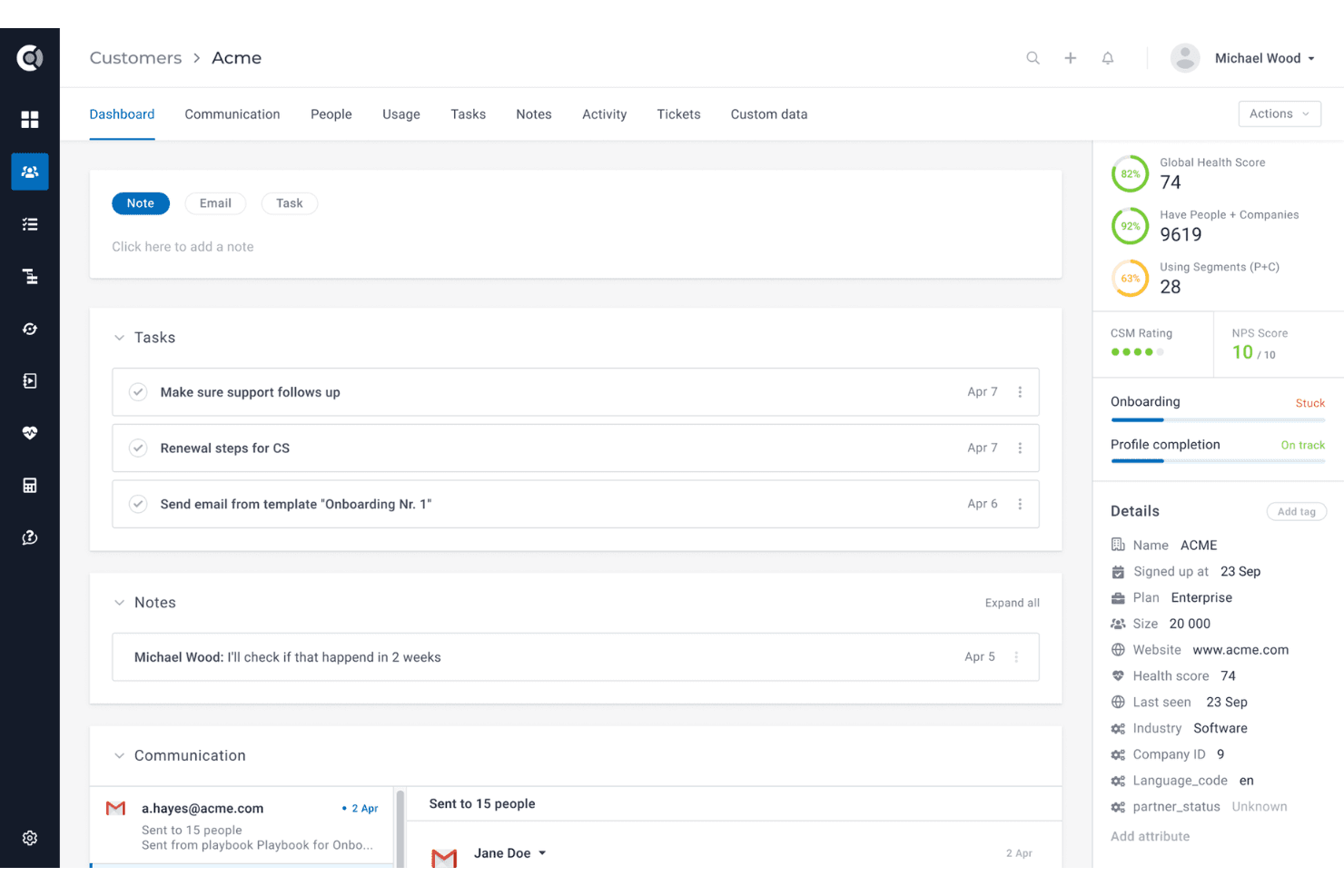
Custify is refreshingly straightforward, with a clean interface and intuitive navigation that lets teams get up and running quickly. Users often mention how easy it is to set up health scores, automate playbooks, and customize dashboards without technical help. The onboarding process is guided and hands-on, which reduces setup friction.
Compared to many customer success platforms, Custify’s usability stands out for busy teams who want actionable insights without a steep learning curve.
Integrations
Custify integrates with HubSpot, Salesforce, Pipedrive, Intercom, Zendesk, Jira, Slack, Stripe, Google Sheets, and Calendly, among others.
Custify also offers a comprehensive API and connects with third-party integration tools like Segment and Make.

Custify Specs
- Analytics: Yes
- API: Yes
- Calendar Management: Yes
- Chat: No
- Click-to-Dial: Yes
- CRM Integration: Yes
- Customer Management: Yes
- Customer Service: Yes
- Dashboard: Yes
- Dashboards: No
- Data Export: Yes
- Data Import: No
- Data Visualization: Yes
- External Integrations: Yes
- Feedback Management: Yes
- Knowledge Base: Yes
- Lead Management: Yes
- Lead Scoring: No
- Multi-Source Feedback: Yes
- Multi-User: Yes
- Net Promoter Score: Yes
- Notifications: Yes
- Omnichannel Referrals: No
- Online Surveys: Yes
- Review Moderation: Yes
- Scheduling: Yes
- Sentiment Analysis: No
- Social Media Monitoring: No


