

Call center monitoring systems help CX leaders and team managers tackle challenges like balancing customer satisfaction with agent performance, spotting coaching opportunities in real time, and streamlining operations across channels. With the right platform, you can improve service quality, reduce inefficiencies, and give your call center agents the tools they need to deliver consistently great experiences.
I’ve reviewed and tested these systems based on functionality, usability, integrations, scalability, and value for money. In this article, I’ll walk you through my top picks, what makes each one stand out, and how to choose the best fit for your team’s size, budget, and goals.
Why Trust Our Software Recommendations
6,700+
Reviews
20
Industry experts
16+
Evaluation factors
14
Years
Our team has been testing and reviewing software since 2012. As CX leaders ourselves, we know how difficult—and important—it is to choose the right software.
For this guide, we evaluated tools using hands-on testing and independent research, scoring tools using our selection criteria.
Our reviews reflect our human editorial judgment, not a sales pitch.
 Gui DrusinaCreative Director
 Tim FisherVP of AI
Call Center Monitoring System Comparison Table
This comparison table summarizes pricing details for my top call center monitoring system selections.
| Tool | Best For | Trial Info | Price | ||
|---|---|---|---|---|---|
| 1 | Best for AI-powered call insights | 14-day free trial | From $25/user/month (billed annually) | Website | |
| 2 | Best for performance analytics | Free demo available | From $25/month (billed annually) | Website | |
| 3 | Best with no-code AI workflow orchestration | Free demo available | Pricing upon request | Website | |
| 4 | Best for AI-driven insights | Free demo available | Pricing upon request | Website | |
| 5 | Best for real-time transcriptions | 14-day free trial + free demo available | Pricing upon request | Website | |
| 6 | Best for startups and SMBs | 10-day free trial | From $18/user/month (billed annually) | Website | |
| 7 | Best for large enterprises | Free demo available | From $110/agent/month (proactive AI extra) | Website | |
| 8 | Best for analytics capabilities | Free demo available | Available upon request | Website | |
| 9 | Best for remote teams | 14-day free trial | From $15/user/month (billed annually) | Website | |
| 10 | Best for small to mid-sized teams | Free trial + free demo available | From $19/agent/month (billed annually) | Website |


Best Call Center Monitoring System Reviews
Below are my detailed summaries of the best call center monitoring tools that made it onto my shortlist. My reviews offer a detailed look at the key features, pros and cons, integrations, and ideal use cases of each tool to help you find the best one for you.
 Best for AI-powered call insights
- 14-day free trial
- From $25/user/month (billed annually)
Visit WebsiteCustomer Rating:4.4/5
CloudTalk’s dashboard provides a clear overview of call activity and agent performance in real time. CloudTalk is a cloud-based call center monitoring system that helps sales and support teams manage calls efficiently. It combines AI-powered analytics, real-time monitoring, and global calling features to improve visibility into agent performance and overall call quality.
Why I Picked CloudTalk: I picked CloudTalk for its advanced AI-powered insights that help you evaluate agent performance and customer sentiment without manual review. Features like AI call summaries, sentiment analysis, and topic extraction turn complex call data into actionable feedback so you can coach your team more effectively.
I also like how CloudTalk supports global operations, letting you obtain local numbers in more than 160 countries and use branded caller IDs to strengthen your local presence. Combined with reliable call quality and intuitive monitoring dashboards, it’s a strong choice for teams that need both scale and intelligence in their call center system.
Standout Features & Integrations
Features include real-time call monitoring, AI call tagging and transcription, and spam protection to maintain call integrity. Managers can also use live listening and analytics dashboards for performance tracking and coaching.
Integrations include HubSpot, Pipedrive, Zoho CRM, Salesforce, MS Dynamics, OdooCRM, Intercom, Zendesk, Salesloft, Outreach, Bullhorn, Monday.com, and MS Teams.
Pros and Cons
Pros:
- User-friendly interface
- Global number availability
- Offers AI-powered call analytics
Cons:
- Occasional mobile app issues
- Learning curve for advanced tools
 Best for performance analytics
- Free demo available
- From $25/month (billed annually)
Visit WebsiteCustomer Rating:4.8/5
Squaretalk dashboard tracks call volume, agent activity, and performance metrics in real time. Squaretalk is a call center monitoring system built to support customer service teams and track daily call activity, with a focus on performance analytics. It offers real-time monitoring tools that help supervisors view call metrics, agent activity, and queue performance. Whether you're managing a small team or a larger operation, Squaretalk also includes reporting options and integrations with existing tools to help teams review call center performance and manage operations.
Why I Picked Squaretalk
I picked Squaretalk for its performance analytics, which helps track call activity, agent output, and queue performance. It also includes real-time monitoring tools that let supervisors review live calls and identify issues as they happen. The dashboards present call metrics in one place, making it easier to review trends and evaluate team performance.
Squaretalk Key Features
In addition to performance analytics, Squaretalk offers:
- Customizable Reporting: Tailor reports to track the metrics that are most important to your business.
- Integration Capabilities: Seamlessly connect with existing tools to streamline workflows and enhance productivity.
- User-Friendly Dashboards: Easily visualize data and gain insights into agent performance and customer interactions.
- Workflow Automation: Automate repetitive tasks so your team can focus on more complex issues.
Squaretalk Integrations
Integrations include Zoho, Salesforce, Freshworks CRM, Pipedrive, Antelope CRM, and WhatsApp Business.
Pros and Cons
Pros:
- Offers AI-powered transcripts, summaries, sentiment analysis
- Comprehensive analytics tools provide valuable insights for decision-making
- Predictive dialers boost agent productivity and efficiency
Cons:
- Connectivity or lag issues may occur under heavy usage
- Advanced workflows take time to set up correctly
Learn more about Squaretalk: Best with no-code AI workflow orchestration
- Free demo available
- Pricing upon request
Visit WebsiteCustomer Rating:5/5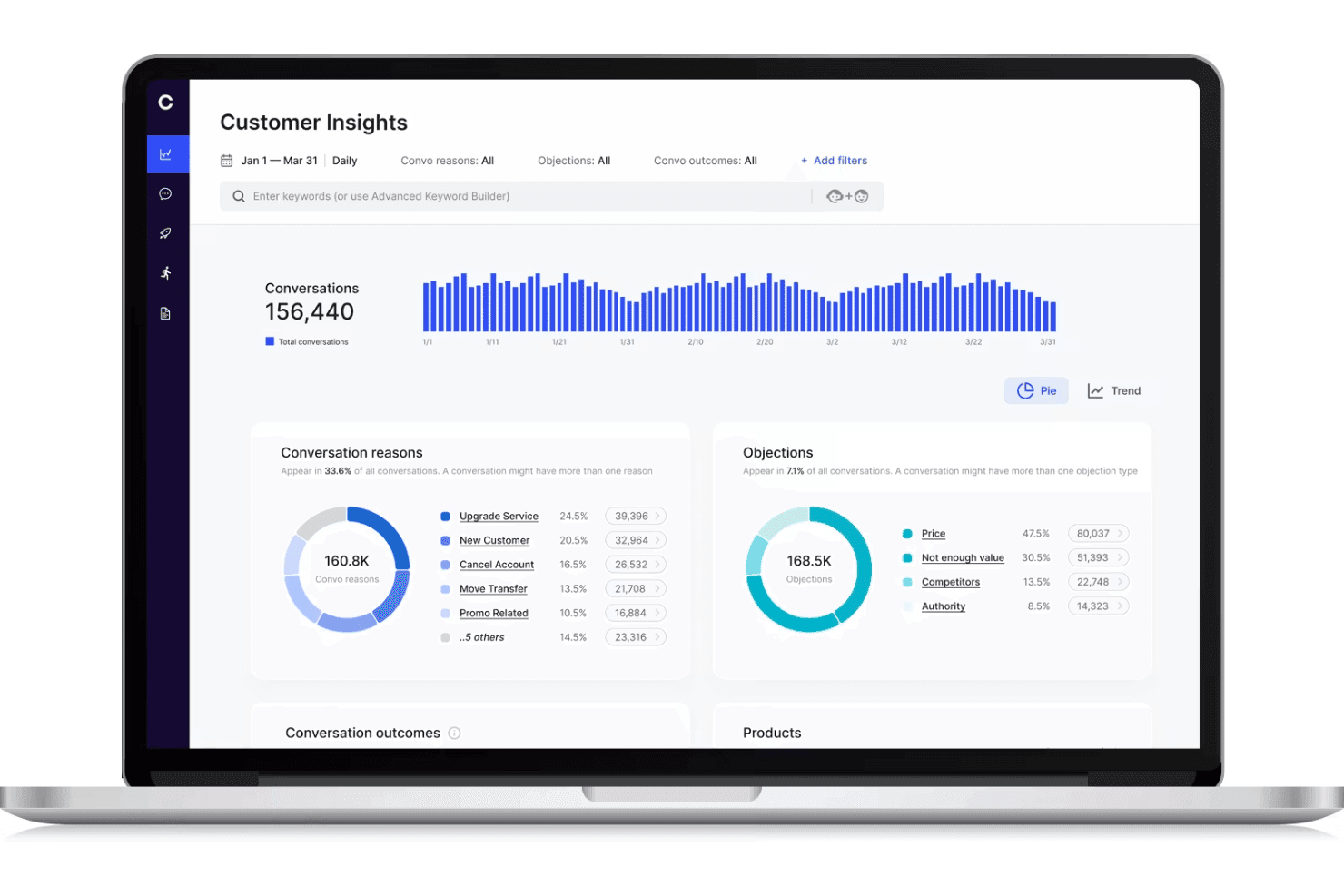
Cresta displays a call center monitoring dashboard with customer conversation analytics, objection tracking, and conversation trends. Cresta is an AI-powered call center monitoring platform that offers real-time conversation intelligence, workflow orchestration, and automated quality management for voice and digital channels.
Who Is Cresta Best For?
Enterprise support teams and contact centers seeking scalable AI-powered quality monitoring and workflow automation across multiple channels.
Why I Picked Cresta
I picked Cresta as one of the best because its no-code AI workflow orchestration lets my team build and update real-time coaching and compliance automations fast. I use Cresta’s drag-and-drop tools to automate quality monitoring and trigger proactive interventions during calls.
Cresta Key Features
- Real-time transcription: Converts calls and chats into text instantly for analysis and record keeping.
- Automated quality scoring: Scores 100% of customer interactions against custom criteria without manual review.
- Multi-channel monitoring: Monitors voice, chat, and digital channels from one centralized interface.
- Supervisor dashboards: Lets supervisors access live and historical performance metrics, transcripts, and flagged interactions.
Cresta Integrations
Cresta offers native integrations with Salesforce, Twilio, Pipedrive, BigCommerce, Five9, Zendesk, and more. An API is available for custom integrations.
Pros and Cons
Pros:
- Script adherence and compliance monitoring
- Automated quality scoring across all channels
- Real-time coaching for live call agents
Cons:
- Knowledge Assist needs ongoing model tuning
- AI guidance can require manual overrides
Learn more about Cresta: Best for AI-driven insights
- Free demo available
- Pricing upon request
Visit WebsiteCustomer Rating:4.4/5
Talkdesk uses AI to deliver data-driven insights for better customer interactions. Talkdesk is a call center monitoring system designed for businesses seeking advanced insights through AI technology. It's ideal for teams that want to enhance customer interactions by utilizing data-driven insights for decision-making.
Why I picked Talkdesk: Talkdesk offers AI-driven insights that help your team make informed decisions. The tool provides real-time analytics and sentiment analysis, allowing you to understand customer emotions during calls.
It includes features like automated quality management and predictive forecasting to improve service delivery. These capabilities make it a great choice for teams focused on leveraging AI for better customer experiences.
Standout features & integrations:
Features include call recording and transcription, which ensure you have a complete record of customer interactions. The software also offers customizable dashboards, so you can tailor the view to your team's needs. Additionally, it provides workforce management tools to optimize scheduling and resource allocation.
Integrations include Salesforce, Zendesk, Slack, Microsoft Teams, Google Workspace, Shopify, HubSpot, ServiceNow, Okta, and Zoom.
Pros and Cons
Pros:
- Includes predictive forecasting tools
- Provides automated quality management
- Offers real-time sentiment analysis
Cons:
- May need IT support for integration
- Requires ongoing training for staff
Learn more about Talkdesk: Best for real-time transcriptions
- 14-day free trial + free demo available
- Pricing upon request
Visit WebsiteCustomer Rating:4.3/5
Dialpad offers real-time call transcription to improve team communication. Dialpad is a call center monitoring system that caters to businesses needing real-time call transcription services. It’s designed for teams that want to enhance their communication by capturing and analyzing calls as they happen.
Why I picked Dialpad: Dialpad offers real-time transcriptions that help your team capture important details during calls. This feature is invaluable for training and quality assurance, allowing you to review conversations instantly.
The platform also includes call routing and analytics to help your team manage and understand call data. Its focus on real-time insights makes it ideal for teams looking to improve communication efficiency.
Standout features & integrations:
Features include voicemail transcription, which converts voicemails into text for easy review. The platform provides call analytics to give you insights into team performance and customer interactions. Additionally, it offers a smart call routing feature to ensure calls reach the right team members quickly.
Integrations include Salesforce, Slack, Microsoft Teams, Google Workspace, HubSpot, Zendesk, ServiceNow, Okta, LinkedIn, and Zoho CRM.
Pros and Cons
Pros:
- Includes voicemail transcription
- Offers smart call routing
- Provides real-time call transcriptions
Cons:
- Can be complex for new users
- Occasional transcription errors
 Best for startups and SMBs
- 10-day free trial
- From $18/user/month (billed annually)
Visit WebsiteCustomer Rating:4.4/5
CallHippo provides essential call tools for startups and growing teams. CallHippo is a call center monitoring system tailored for startups and small to medium-sized businesses. It offers essential call management features that help teams manage customer interactions efficiently.
Why I picked CallHippo: CallHippo is designed with startups and SMBs in mind, providing essential features without unnecessary complexity. It includes tools like virtual phone numbers and call recording, which are crucial for small teams.
The platform is easy to set up, so your team can start using it quickly. Its affordability and focus on core functionalities make it a smart choice for smaller businesses looking to grow.
Standout features & integrations:
Features include call analytics that give you insights into call performance and trends. The platform also offers call forwarding, so your team can direct calls to the right person easily. Additionally, it provides voicemail features that ensure no customer query goes unanswered.
Integrations include Zoho CRM, Slack, HubSpot, Pipedrive, Zendesk, Salesforce, Shopify, Zapier, Freshdesk, and Intercom.
Pros and Cons
Pros:
- Provides essential call recording
- Offers virtual phone numbers
- Easy setup process
Cons:
- Requires stable internet connection
- Can have occasional call drops
 Best for large enterprises
- Free demo available
- From $110/agent/month (proactive AI extra)
Visit WebsiteCustomer Rating:4.3/5
NICE CXone supports large enterprises with scalable customer interaction tools. NiCE CXone is a comprehensive contact center platform tailored for large enterprises looking to enhance customer interactions. It serves businesses that require a scalable solution to manage complex call center operations efficiently.
Why I picked NiCE CXone: NiCE CXone is built for large enterprises that need a scalable solution to handle high call volumes. It offers features like automatic call distribution and workforce management, which are crucial for large teams.
The platform provides real-time analytics to help your team make data-driven decisions. Its focus on scalability and efficiency makes it ideal for big organizations looking to streamline their contact center operations.
Standout features & integrations:
Features include omnichannel routing, which lets your team manage customer interactions across various channels seamlessly. The platform also offers quality management tools to ensure high service standards. Additionally, it provides predictive dialing to optimize call efficiency and reduce wait times.
Integrations include Salesforce, Microsoft Dynamics, Zendesk, ServiceNow, Oracle, SAP, Google Cloud, Amazon Web Services, Zoom, and Genesys.
Pros and Cons
Pros:
- Includes quality management tools
- Supports omnichannel routing
- Offers predictive dialing
Cons:
- Occasional feature updates needed
- Requires technical expertise for setup
Learn more about NiCE CXone: Best for analytics capabilities
- Free demo available
- Available upon request
Visit WebsiteCustomer Rating:4.2/5
Calabrio ONE enhances call center performance with analytics-driven insights. Calabrio ONE is a workforce optimization suite designed for call centers looking to leverage analytics for improved performance. It's targeted at teams that want to enhance decision-making through data-driven insights and analytics.
Why I picked Calabrio One: Calabrio ONE excels in analytics capabilities, providing tools that help your team understand customer interactions better. It offers speech analytics and quality management features, allowing you to gain insights into customer sentiment.
The platform also includes workforce management tools to optimize scheduling and resource allocation. These features make it perfect for teams focused on using analytics to drive performance improvements.
Standout features & integrations:
Features include advanced reporting tools that provide in-depth analysis of call center operations. The software also offers voice-of-the-customer analytics to help you understand customer needs and preferences. Additionally, it supports performance management with customizable dashboards to track key metrics effectively.
Integrations include Salesforce, Microsoft Dynamics, Cisco, Avaya, Genesys, Amazon Connect, Five9, RingCentral, NICE, and Zoom.
Pros and Cons
Pros:
- Includes performance management features
- Provides in-depth reporting tools
- Offers speech analytics
Cons:
- Needs time for full implementation
- Can be complex for beginners
Learn more about Calabrio ONE: Best for remote teams
- 14-day free trial
- From $15/user/month (billed annually)
Visit WebsiteCustomer Rating:4.1/5
Freshcaller supports remote teams with tools for efficient call management. Freshcaller is a cloud-based call center monitoring system designed for remote teams. It helps businesses manage calls efficiently with features that support distributed workforces.
Why I picked Freshcaller: Freshcaller is built to support remote teams, offering cloud-based solutions that don't require physical infrastructure. It provides features like call masking and number porting, which are essential for remote operations.
Freshcaller also offers call queues and routing to ensure your team handles calls efficiently. Its focus on remote accessibility makes it an excellent choice for businesses with distributed teams.
Standout features & integrations:
Features include call recording, which helps you keep track of all conversations for quality assurance. The system also offers real-time call monitoring, allowing supervisors to listen in and provide immediate feedback. This ensures higher call resolution rates and adherence to quality standards. Additionally, it supports multi-level IVR to direct customers to the right department seamlessly.
Integrations include Freshdesk, Slack, HubSpot, Salesforce, Zendesk, Shopify, Google Contacts, Office 365, Pipedrive, and Zapier.
Pros and Cons
Pros:
- Multi-level IVR available
- Offers call masking features
- Supports remote work environments
Cons:
- Occasional call quality issues
- Limited advanced analytics
Learn more about Freshcaller: 10Best for small to mid-sized teams
Zendesk
- Free trial + free demo available
- From $19/agent/month (billed annually)

Zendesk helps small teams manage calls and track customer interactions. Zendesk is a call center monitoring system designed for businesses looking to deliver personalized customer experiences. It's widely used by small to mid-sized teams to manage calls efficiently and track customer interactions.
Why I picked Zendesk: Zendesk is tailored for small to mid-sized teams with features like call routing and AI-driven insights. It lets you manage calls in one place, giving your team full context for every interaction.
The system offers tools like IVR and group routing to support faster customer service. Zendesk’s AI agents help resolve calls quickly, making it ideal for smaller teams looking to boost efficiency without overwhelming complexity.
Standout features & integrations:
Features include call monitoring that tracks all conversations, allowing you to identify performance trends. AI agents provide instant insights, helping your team resolve calls faster. The system also offers post-call summaries directly in your workspace to streamline workflow.
Integrations include Salesforce, Slack, Shopify, Mailchimp, Google Analytics, HubSpot, Microsoft Teams, Jira, Trello, and Asana.
Pros and Cons
Pros:
- Flexible call routing options
- AI-powered call summaries
- Offers real-time call monitoring
Cons:
- Occasional system lag reported
- Some features require additional purchases
Learn more about Zendesk:
Other Call Center Monitoring System
Here are some additional call center monitoring system options that didn’t make it onto my shortlist, but are still worth checking out:
- 11Twilio FlexBest for customizability
- 12PlayvoxBest for workforce engagement
- 13ComputerTalk iceBest for Microsoft integration
- 14LiveAgentBest for multi-channel support
- 15Zoho DeskBest for budget-conscious users
- 16AircallBest for remote team collaboration
- 17RingCentralBest for unified communications
- 18KixieBest for sales-focused teams
- 19RingoverBest for call monitoring simplicity
- 20Five9Best for performance management tools
- 21MightyCallBest for small business needs
- 22ConvinBest for call conversation analysis
- 23GenesysBest for customer experience solutions
- 24Enthu.AIBest for call quality insights
- 25TethrBest for voice data mining
Related Reviews
How I Evaluate Call Center Monitoring Systems
I split my evaluation into baseline requirements—like live monitoring and call recording—and the differentiators, like AI coaching and omnichannel QA, that separate good tools from great ones.
Core Functionality (Table Stakes For This List)
When I'm selecting tools for my list, I rank each one on a scale from 0 (does not offer the functionality) to 5 (excels in this area) for each core functionality listed below. Then, I calculate the tool's total score into a percentage. Each tool needs to achieve a minimum total score of 65% to be considered for inclusion.
- Call Recording & Storage: I check whether recordings are automatic, searchable, and paired with retention controls—especially for teams that revisit calls during disputes or escalations.
- Live Call Monitoring: Supervisors need listen, whisper, and barge options at minimum. I look for how easily a manager can jump into a live call to coach an agent mid-conversation.
- Quality Scoring & Evaluations: Customizable scorecards matter here. I evaluate whether the tool lets QA analysts build evaluation forms tied to specific call types, like billing inquiries vs. complaints.
- Speech & Interaction Analytics: Good tools go beyond transcription. I look for keyword spotting and sentiment analysis that help teams surface patterns across thousands of calls.
- Performance Dashboards & Reporting: I evaluate whether dashboards offer real-time and historical views, and whether supervisors can filter by agent, team, or queue without building reports from scratch.
- Compliance & Security Controls: Features like PCI redaction, role-based access, and encrypted storage all factor in, particularly for teams handling sensitive customer data in regulated industries.
Once I have a list of tools that meet the criteria, I consider what sets each platform apart.
Differentiating Factors (What Sets Vendors Apart)
Here's how I compare and contrast different vendors:
Standout Features
Omnichannel monitoring is a major differentiator. Teams handling chat, email, and voice need QA visibility across all channels, not just phone calls. I also look for AI coaching tools that surface targeted recommendations for agents, since they save supervisors hours of manual review. Customer journey playback adds another layer. It lets evaluators see the full sequence of interactions a customer had before a call, giving QA scores much richer context.
Beyond Features
I evaluate how well each tool connects with the broader tech stack. A monitoring system that integrates with your CCaaS platform, CRM, and workforce management tools keeps QA data flowing where supervisors actually work. Compliance and data governance also weigh heavily—I check for configurable recording rules and data residency controls, since teams in regulated industries need granular control over where and how long recordings are stored. Pricing transparency matters, too. Storage costs and add-on fees for analytics modules can quietly inflate total cost of ownership.
How to Choose a Call Center Monitoring System
With so many call center monitoring systems on the market, it’s easy to get stuck comparing feature checklists or confusing pricing tiers. Instead of getting lost in the noise, focus on these factors that will actually impact your team’s ability to monitor calls effectively and improve service quality.
| Factor | What to Consider |
|---|---|
| FactorScalability | What to ConsiderWill the tool grow with your business needs? Can it handle higher call volumes, new agents, or multi-channel expansion as your business grows? |
| FactorIntegrations | What to ConsiderDoes the monitoring system connect seamlessly with your CRM, helpdesk, and collaboration tools so you don’t create workflow silos? |
| FactorCustomizability | What to ConsiderCan you tailor dashboards, reports, and call monitoring workflows to match your performance metrics and coaching needs? |
| FactorEase of use | What to ConsiderIs the interface intuitive enough for supervisors and agents to adopt quickly without extensive training? |
| FactorImplementation and onboarding | What to ConsiderHow long will it take to set up? Consider the time and resources needed for full deployment and whether the vendor offers support during this phase. |
| FactorCost | What to ConsiderIs it within your budget? Beyond subscription fees, are there add-on costs for features like call recording or analytics? Compare pricing models against the features you actually need. |
| FactorSecurity safeguards | What to ConsiderAre your data and calls protected? Look for features like encryption and compliance with industry standards to safeguard sensitive information. |
| FactorSupport availability | What to ConsiderCan you get help when needed? Check if the vendor provides 24/7 support and multiple contact options, like phone, chat, and email, to resolve issues quickly. |
What Is a Call Center Monitoring System?
A call center monitoring system is software that tracks, records, and analyzes customer calls so managers can improve agent performance and service quality. With features like live monitoring, call recording, and analytics, these systems provide actionable insights needed to train contact center agents, ensure consistency, and deliver better customer experiences.
Features of a Call Center Monitoring System
When selecting a call center quality monitoring software, keep an eye out for the following key features:
- Call recording: Captures and stores call conversations for quality assurance and training purposes.
- Live monitoring: Allows call center managers to listen in on live calls and provide real-time feedback and support to agents.
- Analytics capabilities: Provides insights into performance, helping teams make data-driven decisions to improve call center efficiency.
- Customizable dashboards: Let users tailor the interface to display the most relevant metrics and information for their specific needs.
- Automatic call distribution: Routes incoming calls to the most appropriate agents, reducing average handling time and wait times.
- Quality management: Offers tools to evaluate and improve agent performance, ensuring high service standards.
- Omnichannel support: Manages customer interactions across multiple channels, such as phone, email, and chat, from a single platform.
- Predictive dialing: Automates outbound calls and optimizes agent availability by dialing numbers based on predictive algorithms.
- Sentiment analysis: Analyzes customer emotions during calls to provide insights into customer satisfaction and areas for improvement.
- Workforce management: Helps optimize agent schedules and resources to align with call center demands and improve productivity.
Benefits of a Call Center Monitoring System
Implementing a call center monitoring system provides several benefits for your team and your business. Here are a few you can look forward to:
- Improved agent performance: With live monitoring and feedback, agents receive real-time guidance to enhance their skills and service quality.
- Enhanced customer satisfaction: Quality management and sentiment analysis ensure that customer interactions meet high standards, leading to happier customers.
- Data-driven decisions: Analytics capabilities provide insights into call center operations, helping managers make informed decisions to boost efficiency.
- Efficient call handling: Features like automatic call distribution and predictive dialing ensure calls are routed and handled quickly, reducing wait times.
- Resource optimization: Workforce management tools help align agent schedules with demand, improving productivity and reducing costs.
- Customized insights: Customizable dashboards allow teams to focus on the metrics that matter most, tailoring insights to their specific goals.
- Consistent quality assurance: Call recording and quality management tools maintain a consistent level of service, building trust with customers.
Costs and Pricing of Call Center Monitoring System
Selecting a call center monitoring system requires an understanding of the various pricing models and plans available. Costs vary based on features, team size, add-ons, and more. The table below summarizes common plans, their average prices, and typical features included in call center monitoring system solutions:
Plan Comparison Table for Call Center Monitoring System
| Plan Type | Average Price | Common Features |
|---|---|---|
| Plan TypeFree Plan | Average Price$0 | Common FeaturesBasic call monitoring, limited analytics, and essential reporting. |
| Plan TypePersonal Plan | Average Price$15-$30/user/month | Common FeaturesCall recording, live monitoring, and basic analytics. |
| Plan TypeBusiness Plan | Average Price$50-$75/user/month | Common FeaturesAdvanced analytics, automatic call distribution, and customizable dashboards. |
| Plan TypeEnterprise Plan | Average Price$100-$150/user/month | Common FeaturesOmnichannel support, predictive dialing, and comprehensive quality management tools. |
Call Center Monitoring System FAQs
Here are some answers to common questions about call center monitoring systems:
What is the 80/20 rule in a call center?
The 80/20 rule in a call center means that 80 percent of calls should be answered within 20 seconds. This standard helps ensure quick response times and improves customer satisfaction. It’s a common benchmark used to set performance goals for call center operations.
How does call monitoring work?
Call monitoring involves observing and listening to calls either in real-time or through recordings. It’s used to evaluate agent performance, assign quality scores, and improve customer service. By monitoring calls, you can provide feedback to agents and identify areas for training and development.
What are the 5 key performance indicators of a call center?
Key performance indicators (KPIs) in a call center include customer satisfaction scores, first call resolution rate, first response time, agent utilization rate, and call abandonment rate. These metrics help you assess the effectiveness of your call center operations and identify areas for improvement.
What are the 7 important call center skills every agent should have?
Essential skills for call center agents include active listening, effective communication, empathy, problem-solving, product knowledge, time management, and multitasking. These skills enable agents to handle customer inquiries efficiently and provide high-quality service.
How can call center monitoring improve service quality?
Call center monitoring allows you to review interactions and provide targeted feedback to agents. By identifying strengths and areas for improvement, you can tailor training programs and enhance overall service quality. The monitoring process also helps in maintaining consistent service standards across your team.
What tools are commonly used in call center monitoring?
Common tools used in call center monitoring include call recording software, live monitoring systems, analytics platforms, and quality management tools. The right call center monitoring tools help you track performance, analyze data, and ensure that your team meets service expectations and resolves customer issues quickly.