

Die 10 besten E-Mail-Helpdesk-Softwares des Jahres 2026

10 Die beste Auswahl an E-Mail-Helpdesk-Software


E-Mail-Helpdesk-Software unterstützt Supportteams dabei, große Mengen an Kunden-E-Mails schnell, strukturiert und nachvollziehbar zu verwalten. Wenn Sie in nicht erfassten E-Mails untergehen oder Schwierigkeiten haben, Antworten zu priorisieren, können E-Mail-Helpdesk-Tools Ihnen dabei helfen, die Ticketverwaltung zu optimieren, Antwortzeiten zu verbessern und den Überblick zu behalten, wenn Ihr Team wächst.
Ich habe diese besten E-Mail-Helpdesk-Softwares nach persönlichem Testen und Recherchieren ihrer Fähigkeit ausgewählt, unübersichtliche Posteingänge in handhabbare Arbeitsabläufe zu verwandeln, wobei der Schwerpunkt auf Funktionen liegt, die sowohl Mitarbeiter im direkten Kundenkontakt als auch Führungskräfte im Kundenservice unterstützen.
Was ist E-Mail-Helpdesk-Software?
E-Mail-Helpdesk-Software ist ein Tool, das Supportteams dabei unterstützt, Kundenanfragen per E-Mail zu verwalten, nachzuverfolgen und zu beantworten. Sie optimiert die Kommunikation, indem sie Nachrichten zentralisiert, Arbeitsabläufe automatisiert und die Transparenz im gesamten Team verbessert.
Warum Sie unseren Software-Empfehlungen vertrauen können
Unser Team testet und bewertet Software seit 2012. Als CX-Führungskräfte selbst wissen wir, wie schwierig – und wichtig – es ist, die richtige Software auszuwählen.
Für diesen Leitfaden haben wir Tools mithilfe von praktischen Tests und unabhängiger Recherche bewertet und dabei unsere Bewertungskriterien angewendet.
Unsere Bewertungen spiegeln unser menschliches redaktionelles Urteilsvermögen wider, keine Verkaufsstrategie.
Zusammenfassung der besten E-Mail-Helpdesk-Software
| Tool | Best For | Trial Info | Price | ||
|---|---|---|---|---|---|
| 1 | Am besten geeignet für ein leistungsstarkes Ticketmanagement-System | Kostenlose Demo + 14-tägige kostenlose Testversion verfügbar | Ab $19/Nutzer/Monat (jährliche Abrechnung) | Website | |
| 2 | Beste E-Mail-zu-Ticket-Automatisierung | 14-tägige kostenlose Testphase | Preise auf Anfrage | Website | |
| 3 | Am besten für zentralisierte E-Mail- und Chat-Posteingänge | 14-tägige kostenlose Testversion verfügbar | Ab $16/Nutzer/Monat (jährliche Abrechnung) | Website | |
| 4 | Am besten geeignet für KI-gestützten Kundensupport | Kostenloser Plan verfügbar | Ab $25/Nutzer/Monat (jährlich abgerechnet) | Website | |
| 5 | Am besten geeignet für die Kombination aus KI und menschlichem Support | Kostenlose Testversion verfügbar | Ab $25/Nutzer/Monat (jährliche Abrechnung) | Website | |
| 6 | Am besten geeignet für die Zusammenarbeit und das Teilen von Informationen in Echtzeit | 15-tägige kostenlose Testphase + kostenloser Tarif | Ab $7/Nutzer/Monat (jährlich abgerechnet) | Website | |
| 7 | Am besten für die gemeinsame Erstellung von E-Mail-Entwürfen im Team | 30-tägige kostenlose Testversion verfügbar | Ab $14/Benutzer/Monat (jährliche Abrechnung) | Website | |
| 8 | Am besten geeignet zur Automatisierung von E-Commerce-Supportaufgaben | 14-tägige kostenlose Testversion | Ab $39/Agent/Monat | Website | |
| 9 | Am besten geeignet für intelligente Ticket-Organisation | 7-tägige kostenlose Testversion + kostenloser Tarif verfügbar | Ab $25/Nutzer/Monat | Website | |
| 10 | Am besten geeignet für Vorfallsverfolgung | 14-tägige kostenlose Testversion | Preise auf Anfrage | Website |


Übersicht über die 20 besten E-Mail-Helpdesk-Softwares
\u003cspan style=\u0022font-weight: 400\u0022\u003eMit den einfachen Übersichten zu den einzelnen Tools weiter unten können Sie nachvollziehen, wodurch sich die jeweiligen Tools von anderer E-Mail-Helpdesk-Software unterscheiden.\u003c/span\u003e

Am besten geeignet für ein leistungsstarkes Ticketmanagement-System
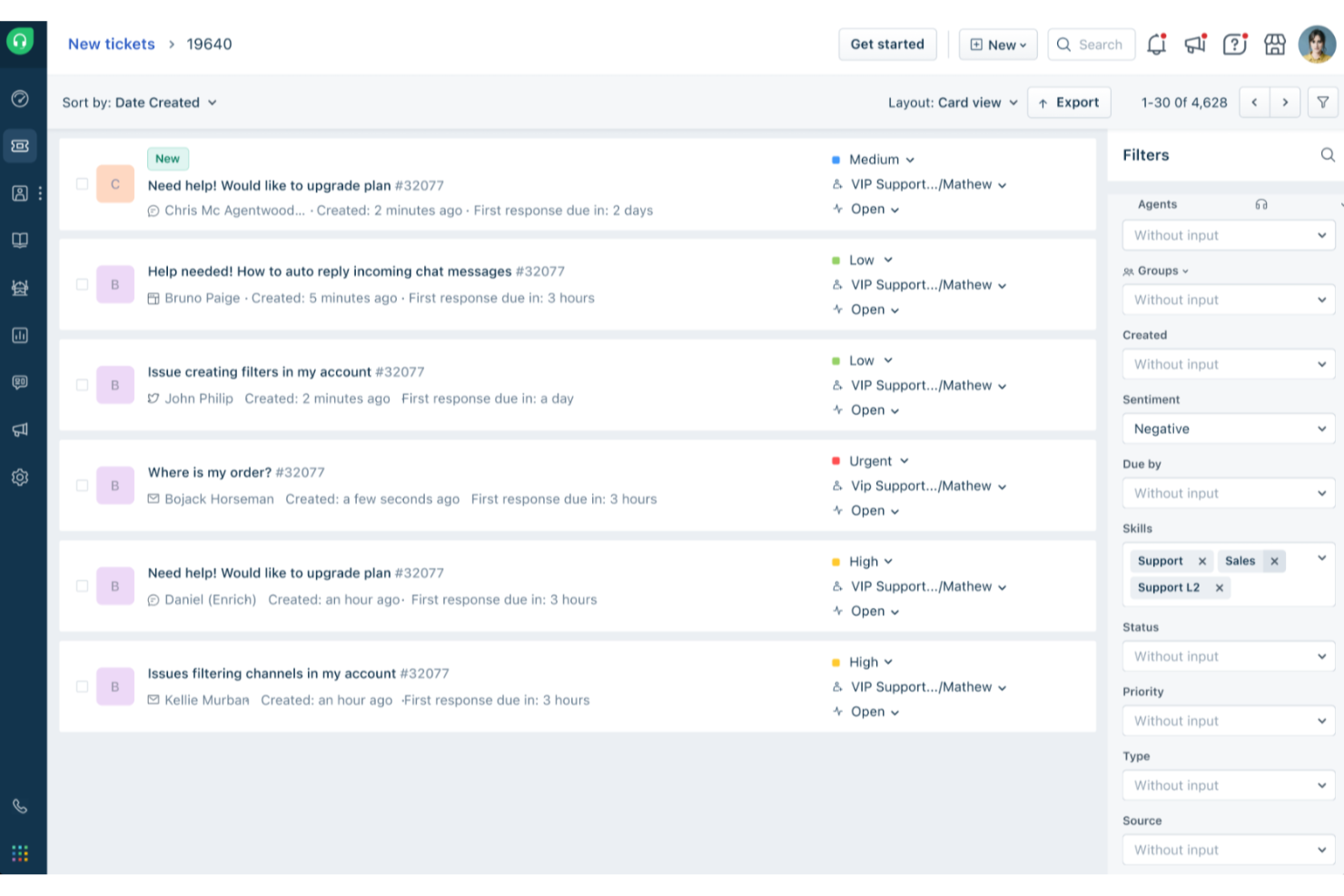
Freshdesk (ein Produkt von Freshworks Inc.) ist eine auf E-Mail fokussierte Helpdesk-Plattform, die Teams dabei unterstützt, Kundenanfragen strukturierter zu verwalten. Eingehende E-Mails werden in Support-Tickets umgewandelt, wodurch Teams Konversationen nachverfolgen, Anfragen priorisieren und bei steigendem Ticketaufkommen die Übersicht behalten können.
Warum ich Freshdesk ausgewählt habe
Ich habe Freshdesk aufgrund seiner umfangreichen Ticketmanagement-Funktionen ausgewählt, die speziell für E-Mail-basierte Support-Workflows entwickelt wurden. Funktionen wie gemeinsame Postfächer und Parent-Child-Ticketing helfen Teams, zusammenhängende Probleme und Abhängigkeiten zu verwalten, ohne den Kontext zu verlieren. Freddy AI ist in die Plattform integriert und unterstützt bei Aufgaben wie Ticketbearbeitung und Workflow-Unterstützung, was dazu beiträgt, wiederkehrende manuelle Arbeiten zu reduzieren. Gemeinsam erleichtern diese Tools es Support-Teams, organisiert zu bleiben und bei hohem E-Mail-Aufkommen effizient zusammenzuarbeiten.
Freshdesk Hauptfunktionen
Zusätzlich zu seinem leistungsstarken Ticketmanagementsystem bietet Freshdesk eine Vielzahl von Funktionen, die den E-Mail-Helpdesk-Betrieb Ihres Teams verbessern.
- Kundenportal: Mit dieser Funktion können Ihre Kunden eigenständig Tickets einreichen und auf Ressourcen zugreifen, was ihre Unabhängigkeit fördert und die Auslastung Ihres Support-Teams reduziert.
- Analysen und Einblicke: Bietet bedarfsgerechte Auswertungen wichtiger Kennzahlen wie Kundenzufriedenheit und erste Antwortzeit, sodass Sie die Leistung verfolgen und Verbesserungspotenzial erkennen können.
- Self-Service-Tools: Umfasst eine mehrsprachige Wissensdatenbank sowie Community-Foren, damit Kunden schnell und effizient Antworten finden können.
- Routing- und SLA-Automatisierung: Optimiert Arbeitsabläufe, indem Tickets und Folgeaufgaben automatisch weitergeleitet werden, sodass sich Ihre Mitarbeitenden auf wichtige Anliegen konzentrieren können.
Freshdesk-Integrationen
Integrationen umfassen Microsoft Teams, Slack, WhatsApp, Google Drive, Shopify, Mailchimp, Trello, Salesforce, Jira und HubSpot.
Pros and Cons
Pros:
- Automatisierungstools optimieren die Ticketverwaltung und sorgen für mehr Übersicht
- Selbstbedienungsoptionen für Kunden, einschließlich Wissensdatenbank
- KI-gestützte Automatisierung verbessert Reaktionszeiten und Kundenzufriedenheit
Cons:
- Mehrsprachige Wissensdatenbank nur in höheren Tarifstufen verfügbar
- Die Erstellung maßgeschneiderter Berichte kann fortgeschrittene Kenntnisse oder höhere Tarifstufen erfordern
New Product Updates from Freshdesk

Freshdesk Adds Voice AI Agents in Freshcaller
Freshdesk introduces Voice AI Agents available through Freshcaller Marketplace apps to handle routine calls and reduce queues. This feature enables automated call handling with real-time, conversational support. For more information, visit Freshdesk's official site.

SysAid
Beste E-Mail-zu-Ticket-Automatisierung
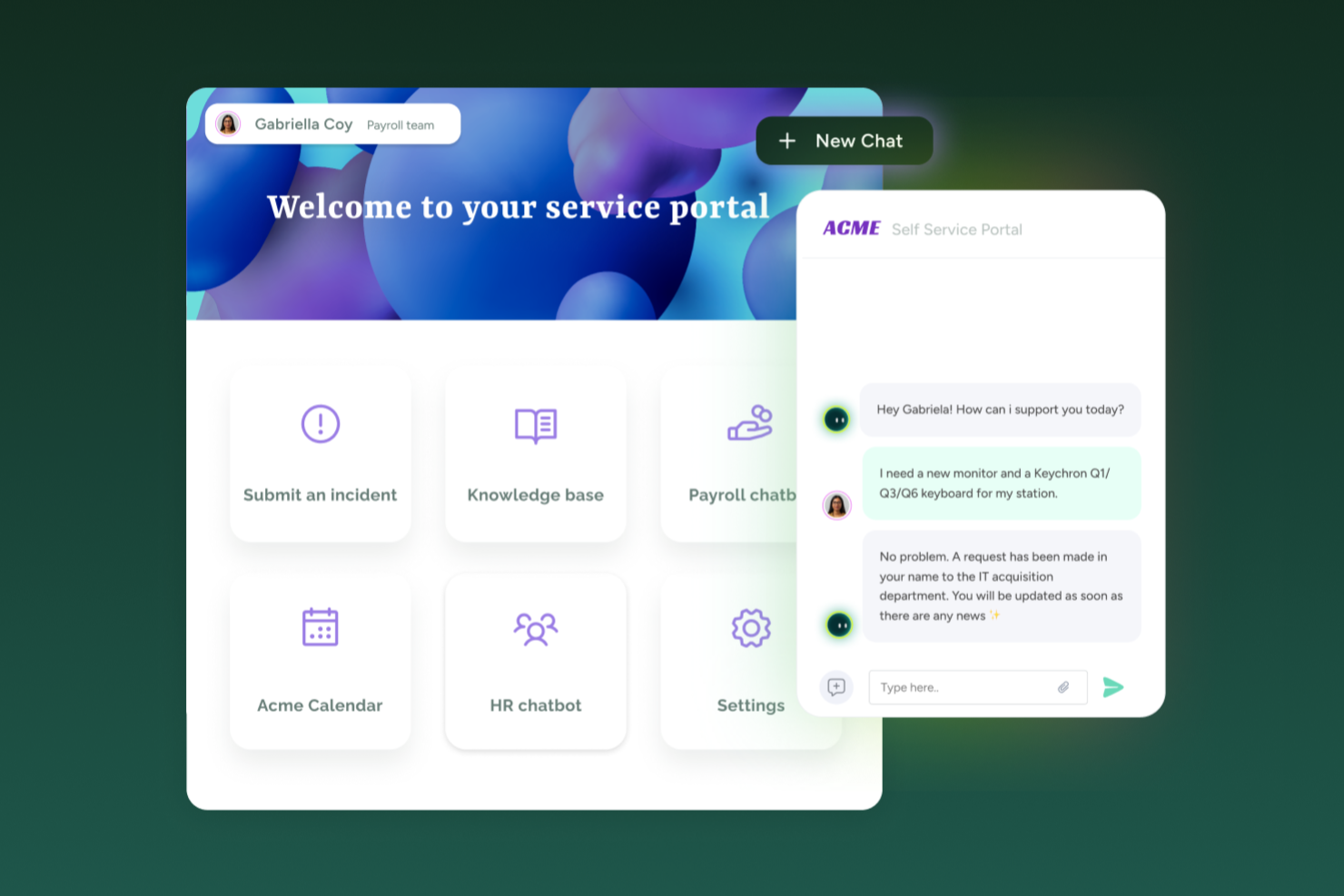
SysAid vereint Helpdesk- und IT-Service-Management auf eine Weise, die IT-Teams unterstützt, die E-Mail-basierte Supportanfragen sowie Asset-Tracking und Anforderungszuweisung bewältigen. Wenn Sie ein Helpdesk-Tool benötigen, das eingehende E-Mail-Tickets, Self-Service-Portale und ITSM-Workflows unterstützt – egal ob für ein mittelständisches Unternehmen oder eine größere Organisation –, bietet SysAid ein zentrales System zur Verwaltung von Serviceanfragen, Assets und Ticket-Arbeitslasten.
Warum ich SysAid gewählt habe
Ich habe SysAid gewählt, weil es die automatische Ticketerstellung aus eingehenden E-Mails unterstützt und jede Supportnachricht in eine nachverfolgbare Serviceanfrage mit integrierter Zuweisung und Kategorisierung umwandelt. Das hilft sicherzustellen, dass per E-Mail eingereichte Supportanfragen nicht übersehen oder vergessen werden, was wichtig ist, wenn E-Mail weiterhin der primäre Eingangskanal für Ihre Nutzer bleibt. Die Automatisierungsfunktionen – einschließlich regelbasierter Zuweisung und Ticketpriorisierung – helfen Ihrem Team, Anfragen konsistenter zu bearbeiten. Zudem gefällt mir, dass SysAid sowohl grundlegende Helpdesk-Funktionen als auch weiterführende ITSM-Prozesse unterstützt und so für Teams geeignet ist, deren Service-Management-Bedarf im Laufe der Zeit wächst.
SysAid Hauptfunktionen
Abgesehen davon, dass E-Mails in Tickets umgewandelt und automatische Zuweisungen möglich sind, könnten Sie diese Funktionen hilfreich finden:
- Self-Service-Portal: Endanwender können Serviceanfragen direkt über ein Webportal einreichen, was die Abhängigkeit von manuellen E-Mails oder Telefonanfragen reduziert.
- Asset-Management: Ermöglicht die Nachverfolgung von Hard- und Software-Assets, deren Verknüpfung mit Tickets sowie die Einsicht in die komplette Servicehistorie pro Asset.
- Reporting & Analyse: Bietet Berichte und Dashboards, mit denen Sie Ticketvolumen, Lösungszeiten und Asset-Lebenszyklen nachvollziehen können – hilfreich für Leistungsbewertung und Verbesserungsplanung.
- Incident Management (Störungsmanagement): Ermöglicht eine effiziente Bearbeitung und Lösung von Störungen über eine optimierte Oberfläche, die schnelle Reaktionszeiten fördert.
SysAid Integrationen
Zu den Integrationen zählen Microsoft 365, Salesforce, Slack, Google Workspace, Microsoft Dynamics 365, Zendesk, QuickBooks, Shopify, ServiceNow und Zoom.
Pros and Cons
Pros:
- KI-gestützte Automatisierung reduziert sich wiederholende IT-Aufgaben erheblich.
- SysAid bietet eine starke E-Mail-Integration für eine effiziente Ticketerstellung.
- Die Plattform bietet umfassende Funktionen zum Asset-Management.
Cons:
- Die Mobile-App bietet nicht den vollen Funktionsumfang.
- Wenn Funktionen nicht richtig konfiguriert sind, können Automatisierungen und SLA-Workflows für Agenten komplex und verwirrend werden.
New Product Updates from SysAid

SysAid Adds Bulk Contract Import
SysAid added bulk contract import to License Manager Essentials, letting admins upload a CSV template, validate entries, and create multiple contracts at once. For more information, visit SysAid's official site.

Am besten für zentralisierte E-Mail- und Chat-Posteingänge

SparrowDesk ist eine KI-gestützte Kundendienstplattform, die darauf ausgelegt ist, die Produktivität von Teams und die Kundenzufriedenheit durch intelligente Funktionen zu steigern. Sie wurde für Unternehmen entwickelt, die ihre Support-Kanäle optimieren möchten, und bietet ein zentrales Postfach, das E-Mail- und Chat-Kommunikation zusammenführt. Dadurch wird eine effiziente Ticketverwaltung und schnelle Reaktionszeiten ermöglicht.
Warum ich SparrowDesk ausgewählt habe
Ich habe mich für SparrowDesk aufgrund seiner herausragenden, KI-gestützten Funktionen entschieden, die das E-Mail-Management direkt verbessern. Der Luna-KI-Agent der Plattform löst automatisch einen Großteil der Kundenanfragen, sodass sich Ihr Team auf komplexere Fälle konzentrieren kann. Das zentrale Postfach ist ein weiteres Merkmal, das ich schätze, da es alle Kommunikationen bündelt und eine nahtlose Verwaltung von E-Mail- und Chat-Interaktionen ermöglicht. Außerdem unterstützt der KI Copilot die Agenten mit sofortigen Zusammenfassungen und intelligenten Entwurfsvorschlägen, was die Antwortzeiten deutlich verkürzen und die Qualität des Supports verbessern kann.
Wichtige Funktionen von SparrowDesk
Neben den KI-gestützten Möglichkeiten bietet SparrowDesk weitere Funktionen, die die Nutzbarkeit als E-Mail-Helpdesk-Software erhöhen:
- Service Level Agreements (SLA): Legen Reaktions- und Lösungsziele fest, um einen termingerechten Support für Ihre Kunden zu gewährleisten.
- Verwaltung der Geschäftszeiten: Verwaltet automatisch die Erwartungen der Kunden und die Ticketrouting nach Ihren definierten Arbeitszeiten.
- Schnellaktions-Makros: Automatisieren wiederkehrende Aufgaben, sparen Ihrem Team Zeit und sorgen für konsistente Antworten.
- Interaktive Analysen: Bieten Echtzeit-Einblicke in die Teamleistung und Kundentrends, damit Sie fundierte Entscheidungen treffen können.
SparrowDesk-Integrationen
Von SparrowDesk werden aktuell keine nativen Integrationen gelistet.
Pros and Cons
Pros:
- Zentrales Postfach für E-Mail und Live-Chat verhindert Kanalfragmentierung und ermöglicht dem Team, an einem Ort zu arbeiten.
- No-Code Workflow-Builder vereinfacht Routing, Tagging und Eskalationsregeln ohne Entwickler-Ressourcen.
- Echtzeit-Dashboards und Berichte ermöglichen Einblick in SLA-Compliance und Auslastung der Agenten.
Cons:
- Der starke Fokus auf KI kann zu einem höheren Konfigurationsaufwand zu Beginn führen.
- Unterstützt keine weiteren Kanäle außer E-Mail und Chat.

Hiver
Am besten geeignet für KI-gestützten Kundensupport
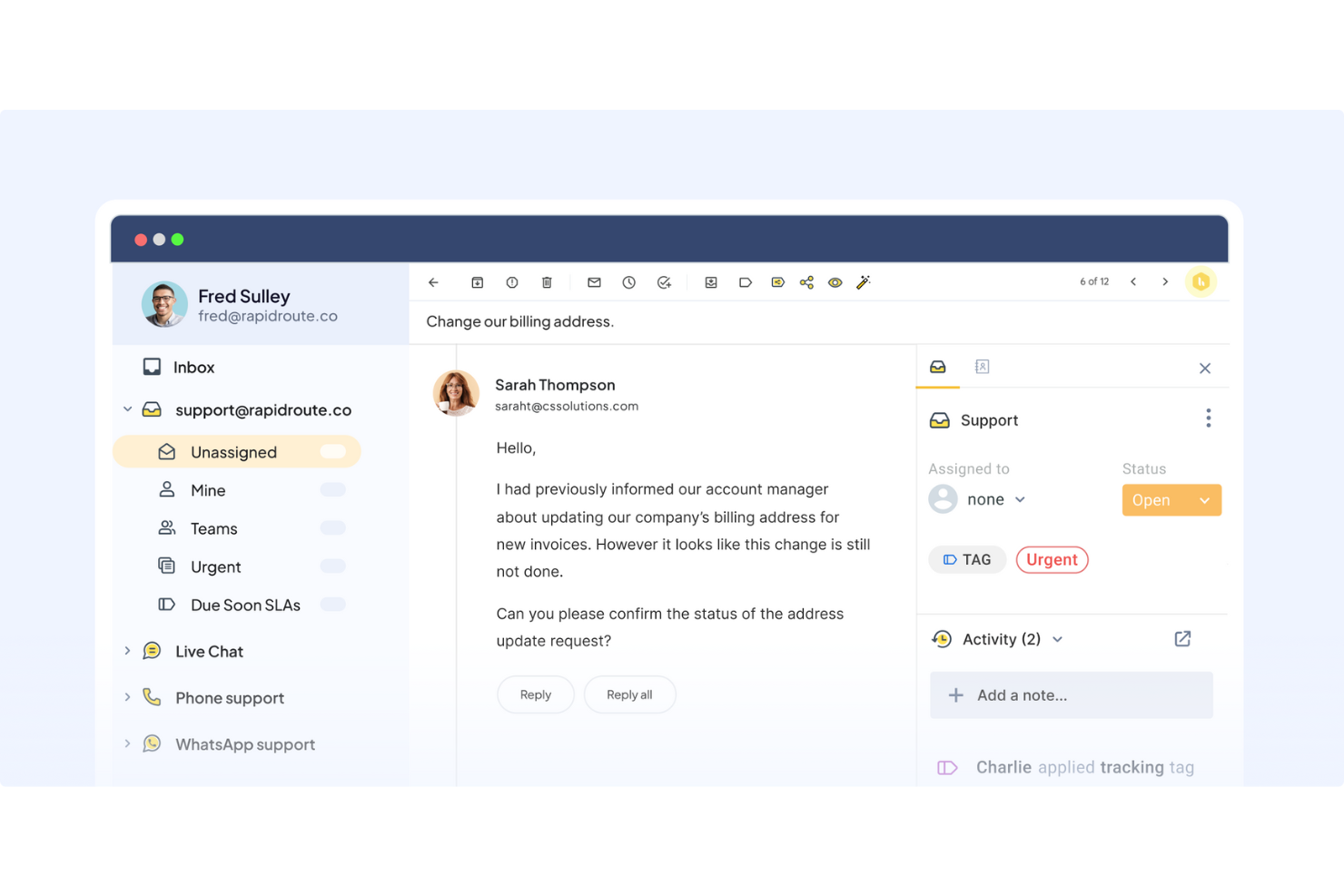
Hiver ist eine moderne, KI-gestützte Helpdesk-Plattform, die den E-Mail-Kundensupport einfach und effizient macht. Alle Kundenanfragen werden in eine vertraute, E-Mail-ähnliche Oberfläche gebracht, wo Sie Tickets zuweisen, den Fortschritt verfolgen und in Echtzeit mit Teamkollegen zusammenarbeiten können.
Warum ich Hiver ausgewählt habe: Die KI-Funktionen von Hiver machen es zu einer ausgezeichneten Wahl für Teams, die ihre Effizienz maximieren und auch bei begrenzten Ressourcen einen starken Support bieten wollen. Denn die KI übernimmt einen Großteil der Arbeitslast. Zum Beispiel unterstützt der KI-Copilot die Supportmitarbeiter bei der Beantwortung von Kundenanfragen. Er schlägt kontextbezogene Antworten vor, entwirft Antwortentwürfe, stimmt den Ton ab und formuliert Nachrichten um, um klar und markenkonform zu bleiben – auf Basis vergangener Konversationen, internen Wissens und gespeicherter Dokumente.
Die KI-Agenten von Hiver helfen dabei, autonome Workflows einzurichten, um häufig gestellte Fragen zu beantworten, Follow-ups zu versenden, Dankeschön-Abschlüsse zu erkennen, mehrstufige Aktionen (wie Rückerstattungen) auszuführen und Gespräche nach Kategorie, Dringlichkeit oder Stimmung zu klassifizieren und zuzuweisen. Hiver bietet zudem KI-gestützte Einblicke, die jede Konversation zur Lerngelegenheit machen. Sie helfen, Engpässe bei der Lösung zu erkennen, potenzielle Probleme vorherzusagen und Warnsignale beim Kontozustand frühzeitig zu entdecken. Prognosemodelle identifizieren Trends, sodass Teams proaktiv handeln und sich kontinuierlich verbessern können.
Hiver – Herausragende Funktionen und Integrationen
Funktionen umfassen ein gemeinsames Postfach zur Zuweisung und Nachverfolgung von Anfragen sowie Kollaborationstools wie Notizen, @Mentions und geteilte Entwürfe, mit denen Teams abgestimmt bleiben. Zudem gibt es Workflow-Automatisierungen und SLA-Verwaltung für fristgerechte Antworten sowie detaillierte Analysen zur Überwachung der Performance und Kundenzufriedenheit. Die Wissensdatenbank hilft den Supportmitarbeitern, häufig gestellte Standardanfragen selbstständig zu vermeiden.
Integrationen umfassen Aircall, Asana, Jira, Okta, QuickBooks, Salesforce, Slack, WhatsApp, Zapier sowie über 100 weitere Plattformen.
Pros and Cons
Pros:
- Kundensupport durch echte Menschen rund um die Uhr per Chat oder E-Mail, in allen Tarifen (auch kostenlos)
- KI-Funktionen in allen Phasen des Kundensupports integriert
- Starke interne Kollaborationsfunktionen
Cons:
- Das Nutzererlebnis auf Mobilgeräten ist nicht so stark wie am Desktop
- Im Vergleich zu manchen anderen Plattformen bietet Hiver weniger Integrationen von Drittanbietern
New Product Updates from Hiver

Hiver Brings Chat Widget Support to Mobile Apps
Hiver now lets you embed the Hiver Chat Widget in iOS, Android, React Native, and Flutter apps so customers can start chats without leaving your app. For more information, visit Hiver's official site.

Am besten geeignet für die Kombination aus KI und menschlichem Support
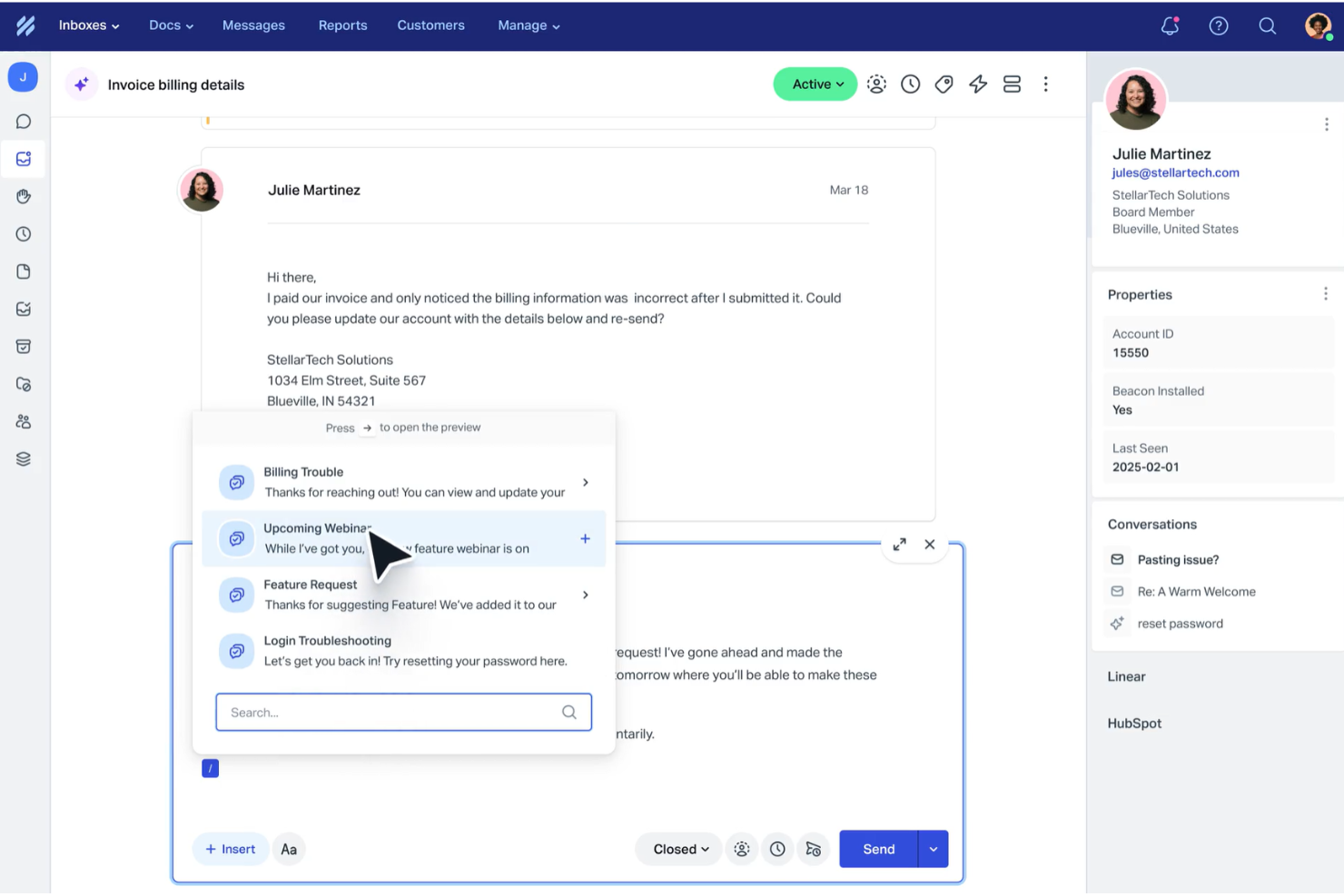
Help Scout ist für Unternehmen konzipiert, die ihr Kundensupport-Erlebnis durch eine Mischung aus KI und menschlicher Interaktion verbessern möchten. Durch die Automatisierung von Routineaufgaben und das Bereitstellen eines gemeinsamen Posteingangs für die Teamzusammenarbeit löst Help Scout Probleme wie unorganisierte Kommunikation und langsame Reaktionszeiten. Das macht es zu einem wertvollen Tool zur Steigerung der Kundenzufriedenheit.
Warum ich Help Scout gewählt habe
Ich habe Help Scout gewählt, weil es KI mit menschlichem Support kombiniert und somit eine hervorragende Wahl für Teams in unterschiedlichsten Branchen ist. Die Funktion des gemeinsamen Posteingangs ermöglicht es Ihrem Team, gemeinsam an Kundenanfragen zu arbeiten, sodass alle Kundenkommunikationen organisiert und zugänglich sind. Darüber hinaus übernimmt der KI-Chatbot einen großen Teil der Routinetätigkeiten, sodass Ihr Team sich auf komplexere Themen konzentrieren kann. Diese Kombination aus Funktionen hilft dabei, große Mengen an Kundenanfragen zu bewältigen, ohne an Servicequalität einzubüßen.
Wichtige Funktionen von Help Scout
Neben dem gemeinsamen Posteingang und dem KI-Chatbot bietet Help Scout weitere nützliche Funktionen für Ihr Team:
- Help Center: Mit dieser Funktion können Sie ein Self-Service-Portal erstellen, auf dem Kunden Antworten auf häufig gestellte Fragen finden – das entlastet Ihr Supportteam.
- Automatisierte Workflows: Sie können Automatisierungsregeln einrichten, um Ihr Postfachmanagement zu optimieren und sicherzustellen, dass keine wichtigen E-Mails übersehen werden.
- Gespeicherte Antworten: Damit kann Ihr Team schnell auf häufige Fragen reagieren, was die Reaktionszeit und die Konsistenz verbessert.
- In-App-Nachrichten: Kommunizieren Sie direkt in Ihrem Produkt mit Ihren Kunden, um beim Onboarding zu helfen, Feedback einzuholen oder Neuigkeiten zu teilen.
Help Scout Integrationen
Help Scout bietet eine breite Palette an nativen Integrationen, die die Funktionalität erweitern, darunter Salesforce, Shopify, Slack, HubSpot, Mailchimp, Jira, Trello, Google Apps, WooCommerce und WordPress.
Pros and Cons
Pros:
- Der KI-Chatbot übernimmt effektiv routinemäßige Kundenanfragen.
- Stellt detaillierte Analysen für Leistungsüberwachung und -verbesserung bereit.
- Bietet eine umfassende Wissensdatenbank für Self-Service-Support.
Cons:
- Weniger fortgeschrittene Anpassungsmöglichkeiten als Wettbewerber.
- Kein Support für Echtzeit-Kanäle wie WhatsApp und Sprachanrufe.
New Product Updates from Help Scout

Help Scout Adds Automatic Conversation Reassignment
Help Scout can now automatically unassign conversations when the assigned teammate has been away long enough, keeping replies moving so others can pick them up. For more information, visit Help Scout's official site.
 .
.
Am besten geeignet für die Zusammenarbeit und das Teilen von Informationen in Echtzeit
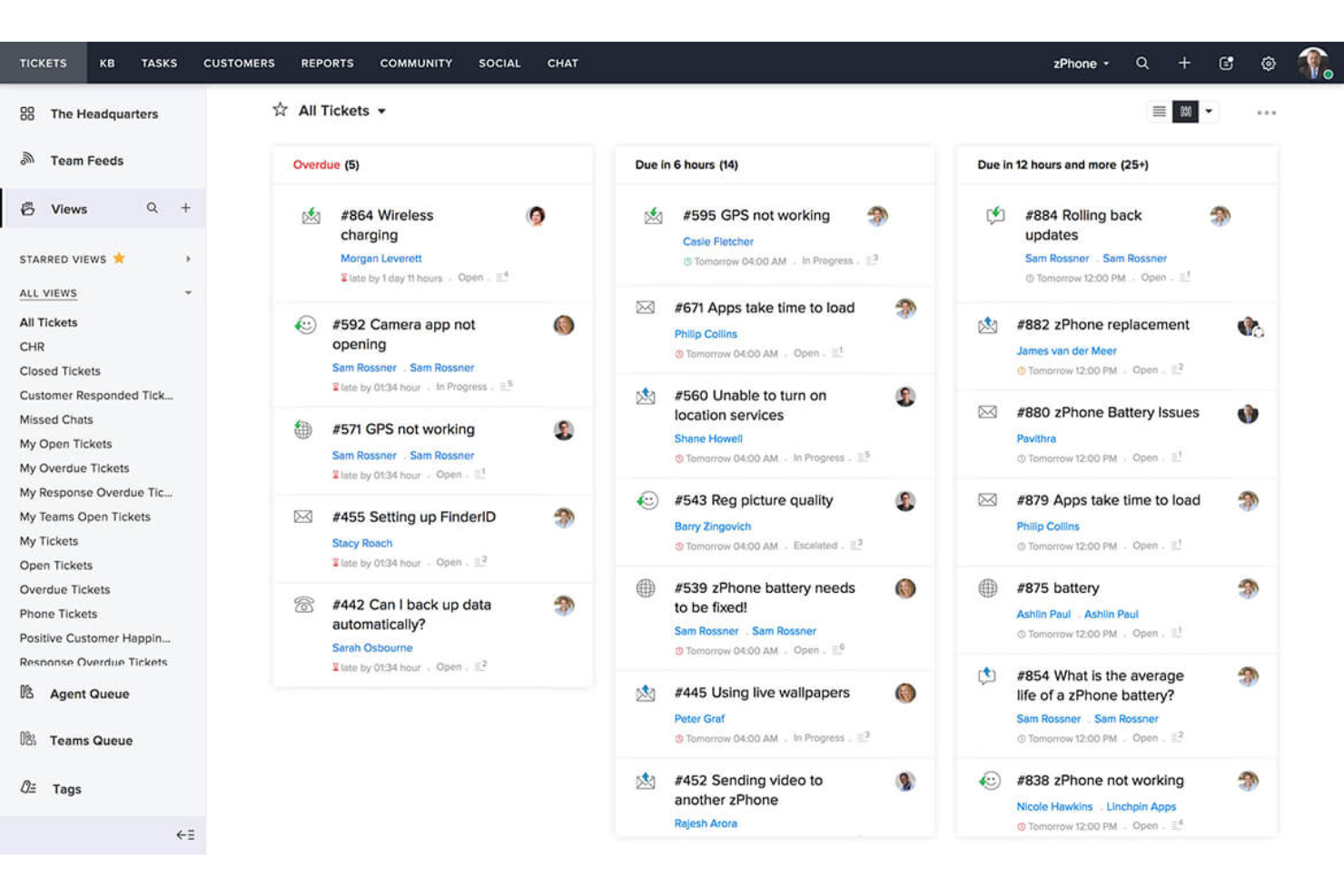
Zoho Desk ist eine KI-gestützte Helpdesk-Software, die Anwendern hilft, Kundenanfragen über E-Mail, Telefon, Chat und soziale Medien zu verwalten.
Warum ich Zoho Desk gewählt habe: Es verfügt über einen intelligenten virtuellen Assistenten namens Zia, der verschiedene Aufgaben automatisiert. Zum Beispiel kann er Tickets kategorisieren, Lösungsvorschläge machen und die Kundenzufriedenheit vorhersagen.
Zoho Desk bietet außerdem Funktionen für Ihre Support-Mitarbeiter, Manager und Kunden. So unterstützen Self-Service-Funktionen wie Wissensdatenbank und Community Ihre Kunden dabei, eigenständig Antworten zu finden, während die Berichterstattungs- und Analysefunktionen Managern helfen, die Leistung der Support-Mitarbeiter zu analysieren.
Ein weiterer großer Vorteil der Software ist die native Integration mit anderen Zoho-Anwendungen wie Zoho CRM, Zoho SalesIQ, Zoho Analytics und mehr. So können Unternehmen eine zentrale Anlaufstelle für Kundendaten und Support schaffen und die Zusammenarbeit zwischen verschiedenen Teams erleichtern.
Herausragende Funktionen und Integrationen von Zoho Desk
Funktionen umfassen Ticketmanagement, automatisches Taggen von Tickets, Sentiment-Analyse, Zia-Benachrichtigungen, Zia-Dashboard, Antwortassistent, Self-Service-Tools, CRM-Integration, benutzerdefinierte Funktionen, SDKs, Marketplace und Plattform, APIs, Berichte und Dashboards, Zeitverfolgung, Multi-Brand-Helpcenter, Domain-Mapping sowie Benutzer- und Zugriffsmanagement.
Integrationen umfassen Twilio, RingCentral, Amazon Connect, Ozonetel, Exotel, Knowlarity, Jive, sipgate, JustCall, ringover und weitere Softwareoptionen.
Pros and Cons
Pros:
- Bietet eine große Bandbreite an Funktionen
- Umfangreiche Anpassungsmöglichkeiten
- Übersichtliche, intuitive Benutzeroberfläche, die einfach zu bedienen ist
Cons:
- Eingeschränkte Berichterstattung bei günstigeren Tarifen
- Einarbeitung erforderlich bei erweiterten Funktionen

Missive
Am besten für die gemeinsame Erstellung von E-Mail-Entwürfen im Team
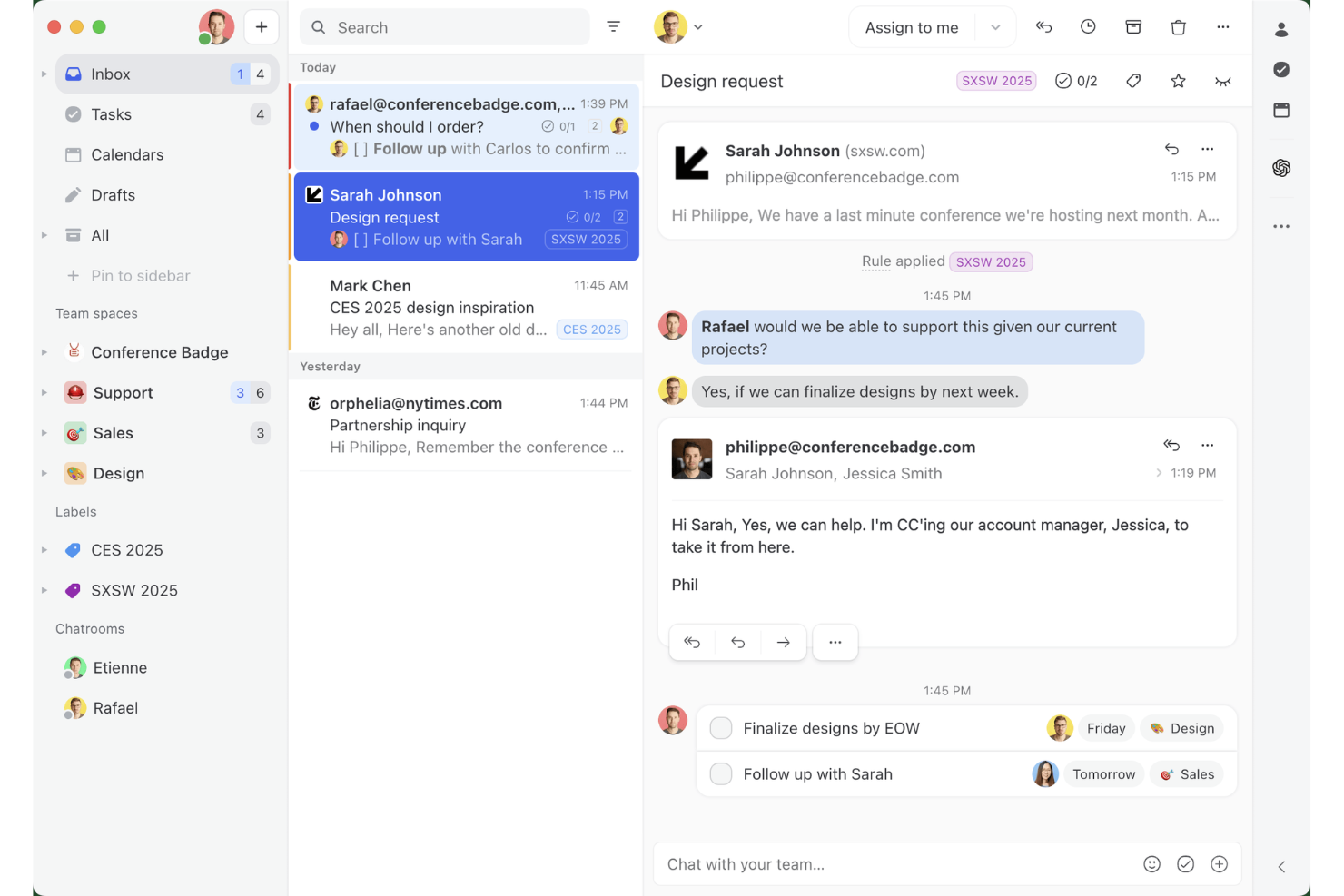
Missive ist eine kollaborative Plattform für gemeinsame Posteingänge, die die Verwaltung von E-Mails aus mehreren Kanälen, interne Team-Unterhaltungen, KI-gestützte Weiterleitungsregeln und die Zusammenarbeit beim Erstellen von Entwürfen in Echtzeit über E-Mail, WhatsApp, SMS und soziale Nachrichtenkanäle hinweg kombiniert.
Für wen eignet sich Missive am besten?
Missive eignet sich besonders für kleine bis mittelgroße Supportteams, die mehrere Mitarbeitende benötigen, die gemeinsam an geteilten E-Mail-Warteschlangen arbeiten, ohne den Aufwand eines formellen Ticketsystems.
Warum ich Missive ausgewählt habe
Ich habe Missive in meine Top-Auswahl aufgenommen, weil es das einzige E-Mail-Helpdesk-Tool ist, mit dem mehrere Mitarbeitende in Echtzeit gemeinsam eine einzelne Antwort verfassen können. Das ist besonders wichtig, wenn ein komplexes Kundenproblem den Input von zwei Personen erfordert, bevor etwas versendet wird. Die Kollisionserkennung zeigt, wer eine Unterhaltung gerade aktiv betrachtet oder darin schreibt, sodass dein Team keine doppelten Antworten mehr versendet. Darüber hinaus ermöglichen KI-Regeln eine inhaltsbasierte Weiterleitung und markieren dringende oder negativ formulierte Nachrichten automatisch.
Die wichtigsten Funktionen von Missive
- Vorgefertigte Antworten: Speichere und verwende Vorlagenantworten mit Unterstützung für Variablen wieder, um personalisierte und einheitliche Nachrichten in deinem gesamten Team zu gewährleisten.
- Ausgleich der Arbeitslast: Verteile eingehende Unterhaltungen automatisch per Rundlauf, nach geringster Auslastung, an alle gleichzeitig oder nach dem Zufallsprinzip.
- KI-Regeln: Inhaltsbasierte Automatisierungen analysieren die Bedeutung von Nachrichten und lösen abhängig von Absicht oder Stimmung eine Kennzeichnung, Eskalation oder Erstellung eines Entwurfs aus.
- Missive-MCP-Server: Verbinde externe KI-Clients wie Claude oder ChatGPT, um Helpdesk-Daten zu E-Mails abzufragen, Kalender zu prüfen und Antworten zu entwerfen – wobei vor dem Versand weiterhin eine menschliche Prüfung erforderlich ist.
- Posteingang für mehrere Kanäle: Verwalte E-Mail, WhatsApp, SMS, Facebook Messenger und Instagram-Direktnachrichten in einem einzigen gemeinsamen Posteingang.
Missive-Integrationen
Missive bietet native Integrationen mit Salesforce, HubSpot, Pipedrive, Shopify, Asana, ClickUp, Trello, Todoist, WhatsApp Business und Twilio für SMS. Außerdem werden eine REST-API, Webhooks, Zapier und der neue MCP-Server in den Tarifen Productive und Business unterstützt (erfordert die Aktivierung durch einen Administrator).
Pros and Cons
Pros:
- Gemeinsames Erstellen von E-Mail-Entwürfen in Echtzeit im Team
- KI-gestützte Weiterleitung und Antwortvorschläge verfügbar
- Einheitlicher Posteingang für E-Mail- und Nachrichtenkanäle
Cons:
- Keine herkömmliche Ticket-ID oder Nachverfolgung des Ticketlebenszyklus
- Für erweiterte Berichte ist ein höherer Tarif erforderlich
New Product Updates from Missive
Missive Adds Conversation Pins
Missive now lets you pin key links, decisions, and notes inside a conversation, keeping them accessible in a dedicated Pins section in the Details sidebar. For more information, visit Missive's official site.
 .
.
eDesk
Am besten geeignet zur Automatisierung von E-Commerce-Supportaufgaben
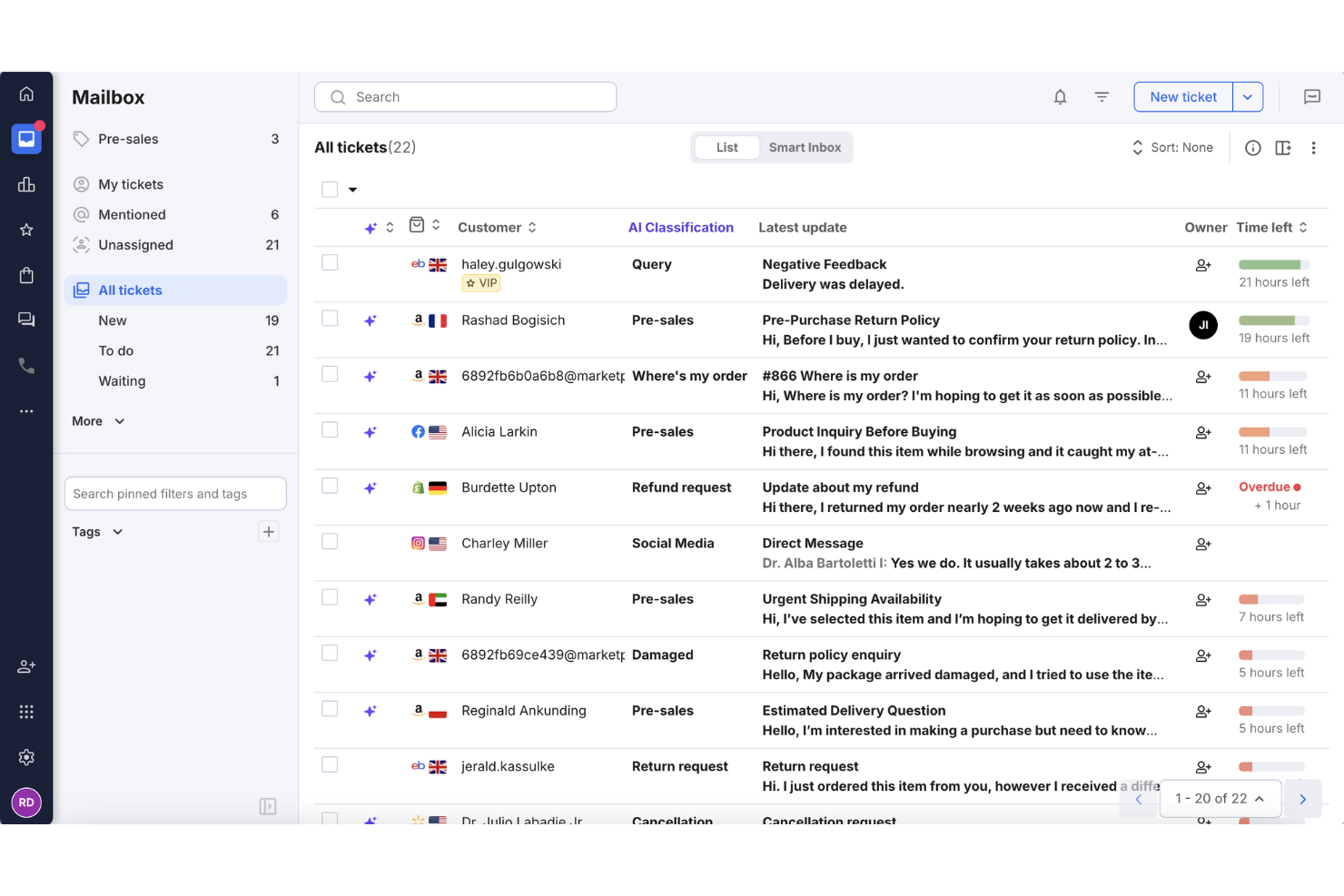
Für E-Commerce-Unternehmen, die nach einer effizienten Möglichkeit suchen, Kundenanfragen zu verwalten, hebt sich eDesk als maßgeschneiderte Lösung hervor. Die KI-gestützte Plattform zentralisiert die Kommunikation aus mehreren Kanälen in einem einzigen Posteingang, wodurch Ihr Team leichter zeitnah antworten kann. Speziell für den E-Commerce entwickelt, erhöht eDesk nicht nur die Kundenzufriedenheit, sondern optimiert auch Ihre Supportprozesse und löst die übliche Herausforderung, große Mengen an Kundenanfragen zu bewältigen.
Warum ich eDesk ausgewählt habe
Ich habe eDesk wegen seiner Fähigkeit zur Automatisierung routinemäßiger Support-Aufgaben ausgewählt – das ist besonders wichtig für Unternehmen mit einem hohen Volumen an Kundenanfragen. Diese Automatisierung wird durch Funktionen wie einen 24/7-Chatbot unterstützt, der rund um die Uhr auf häufig gestellte Fragen antworten kann. eDesk lässt sich zudem in zahlreiche E-Commerce-Kanäle integrieren, sodass Kundenkommunikation und supportbezogene Bestellungen zentral verwaltet werden können.
Wichtige Funktionen von eDesk
Neben den beeindruckenden Automatisierungsmöglichkeiten bietet eDesk:
- Vereinheitlichter Posteingang: Konsolidiert Nachrichten aus über 300 Kanälen, darunter große Marktplätze und soziale Medien.
- Live-Reporting: Liefert Einblicke in Leistungskennzahlen, damit Sie Ihre Supportprozesse optimieren können.
- KI-gestützte Automatisierung: Automatisiert Antworten auf häufige Anfragen und entlastet Ihr Team bei komplexeren Anliegen.
- Anpassbare Workflows: Erlaubt Ihrem Team, individuelle Workflows zu erstellen, die auf Ihre spezifischen Unternehmensanforderungen zugeschnitten sind.
eDesk-Integrationen
Integration unter anderem mit Amazon, eBay, Walmart, Shopify, Magento, Facebook, WhatsApp, Etsy, BigCommerce und WooCommerce.
Pros and Cons
Pros:
- Rund-um-die-Uhr-Chatbot kann einfache Anfragen übernehmen
- KI-Automatisierungen reduzieren wiederkehrende Support-Aufgaben
- Integriert umfangreiche Bestelldaten für besseren Kundendienst
Cons:
- In erster Linie für E-Commerce entwickelt, weniger flexibel für andere Branchen
- Berichtsanpassung ist für komplexe Analysen begrenzt
New Product Updates from eDesk
eDesk Adds Galeria and Kaufland Support in Spain and Netherlands
eDesk adds support for Galeria, Kaufland Spain, and Kaufland Netherlands marketplaces. These integrations bring more European buyer messages into eDesk with routing, templates, AI insights, and automated translation. For more information, visit eDesk’s official site.
 .
.
Tidio
Am besten geeignet für intelligente Ticket-Organisation
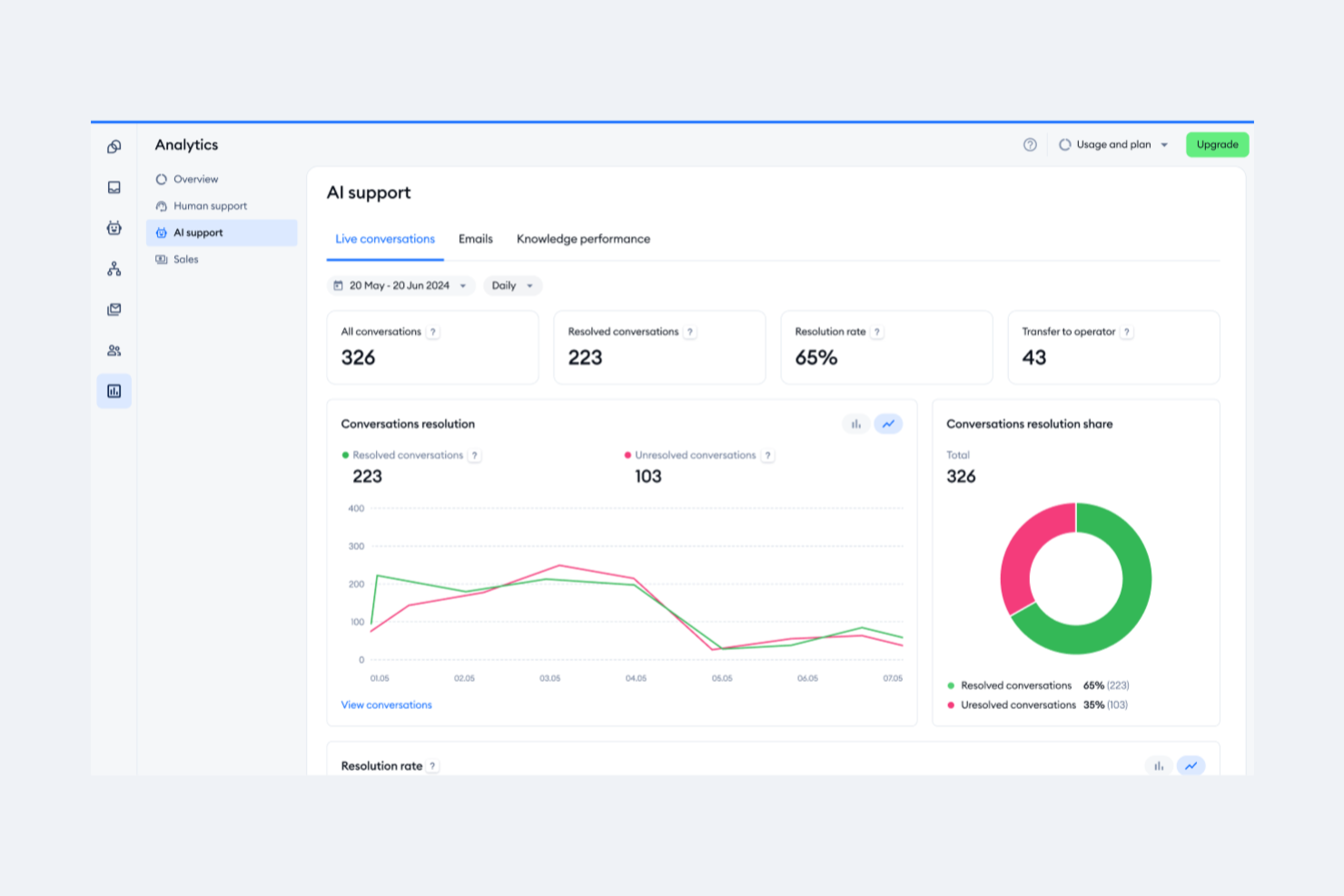
Tidio ist eine Kundenservice-Plattform, die Live-Chat, KI-Automatisierung und E-Mail-basierte Helpdesk-Tools kombiniert. Sie wurde entwickelt, um Teams die Verwaltung von Kundenkonversationen über mehrere Kanäle hinweg von einem einzigen Dashboard aus zu ermöglichen.
Warum ich Tidio ausgewählt habe: Was mir besonders gefällt, ist das intelligente Ticket-System von Tidio. E-Mails, Chats und Social-Media-Nachrichten können in Tickets umgewandelt, Teammitgliedern zugewiesen, priorisiert und ihr Status verfolgt werden. Das System unterstützt das Taggen, interne Notizen und individuelle Ansichten, sodass Ihr Team Tickets nach bestimmten Bedingungen filtern und organisieren kann.
Ein weiterer Grund, warum ich mich für Tidio entschieden habe, ist die KI-gestützte E-Mail-Automatisierung. Der Lyro KI-Agent kann routinemäßige Kundenanfragen bearbeiten, indem er eingehende E-Mails scannt und auf häufige Probleme reagiert. Kann die KI das Problem nicht lösen, wird die Unterhaltung mit allen Kontextinformationen an Ihr Team weitergeleitet.
Hervorstechende Funktionen und Integrationen von Tidio
Funktionen umfassen vordefinierte Antworten, individuelle Ticket-Ansichten, Spam-Ordner-Verwaltung, automatische Antworten, Statusaktualisierungen für Tickets, Ticket-Zusammenführung, Anpassung der Absenderadresse, Ticket-Priorisierung, interne Notizen, Ticket-Tagging, Kundenzufriedenheitsumfragen und SLA-Richtlinien.
Integrationen umfassen Shopify, WordPress, Squarespace, WIX, Adobe Commerce, BigCommerce, WooCommerce, Google Analytics, Mailchimp, HubSpot und Zendesk.
Pros and Cons
Pros:
- Multichannel-Support, einschließlich Chats, E-Mails und sozialer Netzwerke
- Lyro KI bearbeitet einen großen Teil der Kundenanfragen
- Bietet Einblicke in Teamleistung und Kundenzufriedenheit
Cons:
- Viele Automatisierungsfunktionen nur in höheren Tarifen verfügbar
- Einschränkungen bei der Integration bestimmter Drittanbieter-Tools

Halo
Am besten geeignet für Vorfallsverfolgung
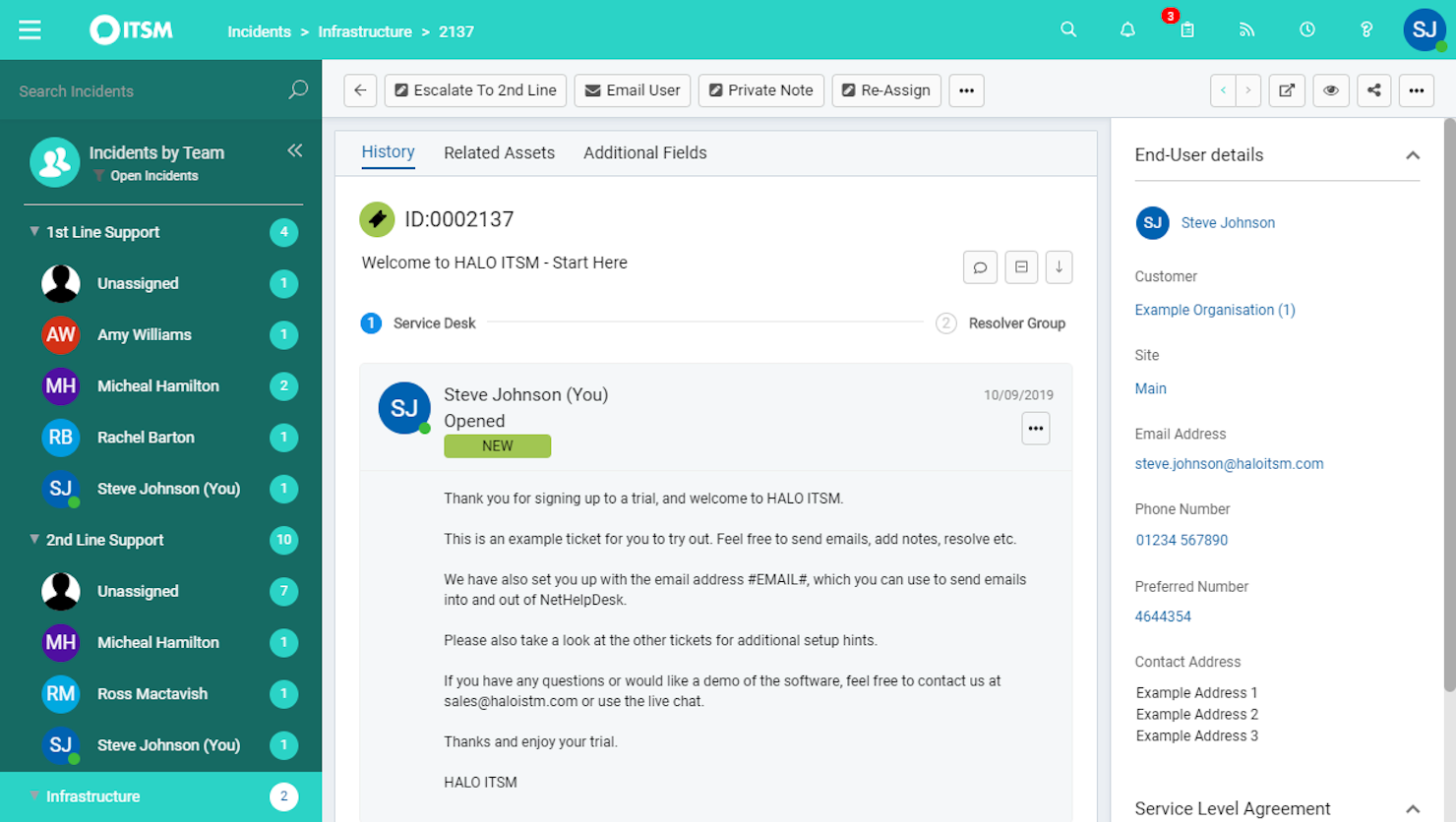
HaloITSM ist eine vielseitige IT-Service-Management-Plattform, die eine effiziente Abwicklung von IT-Prozessen unterstützt. Sie bietet eine Reihe von Werkzeugen zur Verbesserung der Servicebereitstellung und ist damit eine ausgezeichnete Wahl für Teams, die ihre Helpdesk-Fähigkeiten ausbauen möchten.
Warum ich HaloITSM ausgewählt habe: Ich habe mich für HaloITSM wegen der starken Vorfallsmanagement-Funktionen entschieden. Diese Funktion stellt sicher, dass Ihr Team Probleme nachverfolgen und lösen kann, was entscheidend für eine hochwertige Unterstützung ist. Außerdem halten die E-Mail-Benachrichtigungen der Plattform alle informiert und verringern so das Risiko, wichtige Updates zu verpassen.
Ein weiterer Grund für die Wahl von HaloITSM ist das ausgezeichnete Wissensdatenbank-System. Diese Funktion ermöglicht es Ihrem Team, Support-Artikel zu erstellen und zu verwalten, sodass Nutzer schnell Lösungen finden können, ohne zahlreiche E-Mails schicken zu müssen. Es unterstützt einen proaktiven Ansatz im Kundenservice und hilft Ihnen, das Volumen eingehender Anfragen zu reduzieren.
Herausragende Funktionen & Integrationen:
Funktionen umfassen einen Servicekatalog, mit dem Benutzer Dienstleistungen einfach anfordern können – so werden alle Anfragen verfolgt und verwaltet. Die Asset-Management-Funktionen helfen Ihnen, den Überblick über Ihre IT-Ressourcen zu behalten und bieten Transparenz hinsichtlich Ihrer Ressourcen. Darüber hinaus ermöglicht das Change-Management-Feature ein systematisches Änderungsmanagement, um Unterbrechungen Ihrer Services zu minimieren.
Integrationen umfassen RingCentral, Xero, Slack, Salesforce, TeamViewer, Cisco Webex, QuickBooks Online, Jira, AnyDesk, Azure Active Directory, Lansweeper und Splashtop.
Pros and Cons
Pros:
- Asset-Management-Funktionen
- Automatisierte Ticketzuweisung
- Detaillierte Reporting-Tools
Cons:
- Gelegentliche Leistungseinbußen
- Eingeschränkte mobile Funktionalität
Weitere Optionen
\u003cspan style=\u0022font-weight: 400\u0022\u003eHier sind einige weitere Optionen, die es nicht in die Liste der besten E-Mail-Helpdesk-Softwares geschafft haben:\u003c/span\u003e
- Vision Helpdesk
Am besten geeignet für Omnichannel-Support
- monday service
Am besten geeignet zur Zentralisierung von E-Mail-Kommunikation
- Gorgias
Am besten geeignet für die Integration mit anderen E-Commerce-Plattformen
- Assembled AI
Am besten für maschinelles Lern-Forecasting
- Issuetrak
Am besten für Nachverfolgung und Verwaltung von Problemen
- Froged
Am besten für Omnichannel-Kommunikation
- TOPdesk
Am besten für die Echtzeit-Datenvisualisierung
- Front
Am besten geeignet, um die Zusammenarbeit und Kommunikation im Team zu verbessern
- Jira Service Desk
Am besten geeignet, um Kundensupport, IT-Betrieb und Geschäftsteams zu verbinden
- HelpSpot
Ideal für Teams, die eine große Bandbreite an Anpassungsmöglichkeiten benötigen
- Rescue
Am besten geeignet für Fernsupport und Zugriffsoptionen
- Front
Am besten für Automatisierung und Kommunikationsmanagement geeignet
- NinjaOne
Am besten geeignet für Asset-Management im Helpdesk
- LiveAgent
Am besten geeignet, um die Motivation und Performance von Mitarbeitenden durch Gamification zu steigern
- Zendesk
Am besten geeignet, um ein Omnichannel-Kundenerlebnis zu schaffen


So bewerte ich E-Mail-Helpdesk-Software
Ich teile meine Bewertung in zwei Ebenen auf: die Grundvoraussetzungen, die jedes Tool erfüllen muss – gemeinsamer Posteingang, Ticket-Routing, SLA-Überwachung – und die Unterscheidungsmerkmale, die bestimmen, welches Tool am besten zu Ihrem Team passt.
Kernfunktionen (Mindestanforderungen für diese Liste)
Wenn ich Tools für meine Liste auswähle, bewerte ich jedes einzelne auf einer Skala von 0 (bietet die Funktion nicht) bis 5 (leistet in diesem Bereich Hervorragendes) anhand der unten aufgeführten Kernfunktionen. Anschließend berechne ich die Gesamtpunktzahl des Tools in Prozent. Jedes Tool muss eine Mindestgesamtpunktzahl von 65 % erreichen, um in die engere Auswahl zu kommen.
- Gemeinsamer E-Mail-Posteingang: Ich prüfe, ob das Tool mehrere Support-Adressen (z. B. support@, billing@, returns@) in einem einzigen Arbeitsbereich bündelt, in dem Agenten einsehen und antworten können, ohne sich gegenseitig zu behindern.
- Ticket-Konvertierung & Threading: Jede eingehende E-Mail sollte automatisch in ein nachverfolgbares Ticket mit einer eindeutigen ID, vollständigem Konversationsverlauf und klaren Statuskennzeichnungen umgewandelt werden, damit nichts untergeht.
- Zuweisungs- & Routing-Regeln: Ich bewerte, wie die Plattform Tickets verteilt – ob sie Rundlaufverfahren, skill-basiertes Routing oder bedingte Regeln wie das Senden von E-Mails wichtiger Kunden an eine Senior-Agenten-Warteschlange unterstützt.
- Vorlagen & Makros: Gespeicherte Antworten und mehrstufige Makros sind hier entscheidend. Ich achte auf dynamische Variablen (Kundenname, Bestellnummer) und zentral verwaltbare Vorlagenbibliotheken fürs gesamte Team.
- Interne Kollaborationsfunktionen: Funktionen wie private Notizen, @Erwähnungen und Kollisionsschutz ermöglichen es Agenten, Kollegen einzubeziehen oder eine heikle Erstattungsanfrage zu markieren, ohne dass der Kunde den internen Austausch sieht.
- E-Mail-SLA & Reporting: Ich prüfe, ob die Plattform Antwortzeiten, Lösungszeiten und SLA-Einhaltung pro Postfach oder Team erfasst und ob Dashboards so anpassbar sind, dass Engpässe erkannt werden können.
Wenn ich eine Liste von Tools habe, die diese Kriterien erfüllen, schaue ich mir an, was jedes einzelne besonders macht.
Unterscheidungsmerkmale (Was Anbieter voneinander unterscheidet)
So vergleiche und bewerte ich verschiedene Anbieter:
Herausragende Funktionen
KI-gestützte Antwortvorschläge machen einen echten Unterschied. Öffnet ein Agent ein typisches Ticket wie eine Passwort-Reset-Anfrage, spart eine vorformulierte Antwort auf Dauer wertvolle Zeit. Ich prüfe zudem, ob das Tool eine Kundenseitenleiste einblendet – mit vergangenen Tickets, Kontodaten oder Bestellverlauf – direkt neben dem aktiven Thread. Eine integrierte Wissensdatenbank ist ein weiteres Kriterium: So können Agenten Hilfsartikel direkt einfügen und wiederkehrende Fragen abfangen, bevor sie im Posteingang landen.
Mehr als nur Funktionen
Das Integrations-Ökosystem ist hier sehr wichtig. Ich prüfe, ob ein Tool sich nativ mit den CRM- und E-Commerce-Plattformen verbindet, die Ihr Team bereits nutzt – Salesforce, HubSpot, Shopify –, damit Agenten nicht ständig zwischen Tabs wechseln müssen, um Bestellstatus zu suchen. Auch die Preisstruktur wiege ich sorgfältig ab, insbesondere ob die Kosten pro Agent vernünftig bleiben, wenn Ihr Support-Team auf mehr als fünf oder zehn Mitarbeitende wächst. Die Teamgröße spielt ebenfalls eine Rolle: Ein dreiköpfiges Startup, das ein gemeinsames Gmail-Postfach nutzt, hat ganz andere Anforderungen als ein 50-köpfiges Team mit mehrstufigen SLAs.
So wählen Sie E-Mail-Helpdesk-Software aus
Bei langen Funktionslisten und komplexen Preisstrukturen verliert man leicht den Überblick. Damit Sie sich während Ihres individuellen Auswahlprozesses auf das Wesentliche konzentrieren können, finden Sie hier eine Checkliste mit Faktoren, die Sie bei der Auswahl eines E-Mail-Helpdesk-Tools berücksichtigen sollten:
| Faktor | Was zu beachten ist |
|---|---|
| Skalierbarkeit | Stellen Sie sicher, dass die Software mit Ihrem Unternehmen wachsen kann und steigende E-Mail-Mengen sowie wachsende Mitarbeiterteams ohne Leistungseinbußen bewältigt. |
| Integrationen | Prüfen Sie, ob sich die Software in Ihre bestehenden Tools wie CRM, Chat- und Social-Media-Plattformen integrieren lässt, um ein einheitliches Supportsystem zu schaffen. |
| Anpassbarkeit | Achten Sie auf Möglichkeiten, Arbeitsabläufe, Dashboards und Benutzerrollen an die spezifischen Anforderungen und Prozesse Ihres Teams anzupassen. |
| Benutzerfreundlichkeit | Bewerten Sie die Benutzeroberfläche und Navigation, um sicherzustellen, dass Ihr Team ohne umfangreiche Schulungen schnell mit der Software arbeiten kann. |
| Budget | Vergleichen Sie die Preispläne und prüfen Sie, welche Funktionen in den jeweiligen Stufen enthalten sind. Berücksichtigen Sie die Gesamtbetriebskosten einschließlich versteckter Gebühren oder zusätzlicher Kosten. |
| Sicherheitsvorkehrungen | Vergewissern Sie sich, dass die Software Datenschutzvorschriften einhält und Funktionen wie Verschlüsselung und Zugriffskontrollen zum Schutz von Kundendaten bietet. |
| Supportoptionen | Berücksichtigen Sie Verfügbarkeit und Qualität des Kundensupports, einschließlich eines 24/7-Service, mehrerer Kontaktkanäle und Selbsthilfe-Ressourcen. |
| Berichtstools | Prüfen Sie die Analyse- und Berichtsfunktionen, um sicherzustellen, dass Sie Leistungskennzahlen verfolgen und Erkenntnisse über Kundeninteraktionen gewinnen können. |
Trends bei E-Mail-Helpdesk-Software
In meiner Recherche habe ich unzählige Produktaktualisierungen, Pressemitteilungen und Versionsprotokolle verschiedener Anbieter von E-Mail-Helpdesk-Software ausgewertet. Hier sind einige der aufkommenden Trends, die ich im Auge behalte:
- KI und maschinelles Lernen: KI wird zunehmend unverzichtbar, um Kundenbedürfnisse vorherzusagen und Antworten zu automatisieren. Dabei integrieren KI-gestützte Helpdesk-Softwarelösungen diese Funktionen immer häufiger in den zentralen Support-Workflow. Tools wie Zoho Desk nutzen KI, um Erkenntnisse zu liefern und sich wiederholende Aufgaben zu automatisieren, sodass sich Ihr Team auf komplexe Probleme konzentrieren kann.
- Omnikanal-Support: Kunden möchten über verschiedene Kanäle Kontakt aufnehmen. E-Mail-Helpdesk-Software integriert inzwischen Chat, soziale Medien und Sprachsupport, sodass Teams alle Interaktionen an einem Ort verwalten können.
- Selbstbedienungsportale: Unternehmen ermöglichen es Kunden, Probleme selbst zu lösen. Software wie Freshdesk bietet umfassende Selbstbedienungsoptionen, verringert die Belastung der Supportteams und verbessert die Reaktionszeiten.
- Personalisierungsfunktionen: Die Personalisierung von Kundeninteraktionen ist entscheidend. Einige Tools bieten inzwischen Optionen, um Antworten auf Grundlage der Kundenhistorie und der Präferenzen anzupassen und so das gesamte Kundenerlebnis zu verbessern.
- Erweiterte Analysen: Unternehmen benötigen Einblicke in Kundeninteraktionen. Neue Analysefunktionen helfen Teams dabei, Leistungskennzahlen zu verfolgen und Trends zu erkennen, sodass sich die Servicequalität leichter verbessern lässt.
Funktionen von E-Mail-Helpdesk-Software
Achten Sie bei der Auswahl von E-Mail-Helpdesk-Software auf die folgenden wichtigen Funktionen:
- Mehrkanal-Ticketverwaltung: Organisieren, verfolgen und lösen Sie Kundenanfragen, die per E-Mail, Chat und über soziale Medien eingehen, effizient über eine übersichtliche Oberfläche. So müssen Sie nicht mehr zwischen Registerkarten wechseln oder wichtige Nachrichten übersehen.
- Automatisierte Ticketzuweisung: Leiten Sie eingehende Tickets automatisch anhand von festgelegten Regeln an das richtige Teammitglied oder die zuständige Abteilung weiter. Das sorgt für einen reibungslosen Arbeitsablauf und stellt sicher, dass Fragen sofort bei der richtigen Person landen.
- Vorgefertigte Antworten: Speichern und versenden Sie vorformulierte Antworten auf häufige Fragen, damit Sie nicht immer wieder dasselbe schreiben müssen. Das beschleunigt die Reaktionszeiten und gewährleistet jedes Mal eine korrekte Kommunikation im Einklang mit Ihrer Marke.
- Werkzeuge für die Zusammenarbeit: Markieren Sie Teammitglieder, hinterlassen Sie interne Notizen oder eskalieren Sie komplexe Tickets. Diese Funktionen helfen allen, auf dem Laufenden zu bleiben, sodass Sie keine E-Mails weiterleiten oder Zeit mit dem Nachverfolgen von Aktualisierungen verschwenden müssen.
- Nachverfolgung der Kundenhistorie: Greifen Sie sofort auf eine vollständige Aufzeichnung früherer Gespräche und vergangener Tickets mit jedem Kunden zu. Dieser Kontext ermöglicht es Ihnen, Ihre Antworten zu personalisieren und zu vermeiden, dass der Kunde sich wiederholen muss.
- Umfassende Berichte und Analysen: Verfolgen Sie Leistungskennzahlen wie Reaktionszeiten, Lösungsquoten und Kundenzufriedenheit. Nutzen Sie diese Erkenntnisse, um die Supportstrategie Ihres Teams zu optimieren (und vielleicht sogar Anerkennung dafür zu bekommen).
- Integration eines Selbstbedienungsportals: Bieten Sie Kunden ein leicht zugängliches Portal für häufig gestellte Fragen, Anleitungen und das Einreichen neuer Tickets. Das entlastet Ihren Posteingang und ermöglicht es Kunden, sich die meiste Zeit selbst zu helfen.
- Verwaltung von Service-Level-Vereinbarungen (SLA): Richten Sie SLAs ein und überwachen Sie diese, um sicherzustellen, dass Ihr Team Reaktions- und Lösungsfristen einhält. So können Sie Engpässe erkennen und Ihre hohen Standards im Kundensupport aufrechterhalten.
- Anpassbare Ticketfelder: Passen Sie die Informationen, die Sie in jedem Ticket erfassen und verfolgen, an die Anforderungen Ihres Unternehmens an. Dadurch können Sie einzigartige Probleme leichter kategorisieren und darüber berichten.
- Funktionen für Sicherheit und Compliance: Schützen Sie sensible Kundendaten mit Benutzerberechtigungen, Verschlüsselung, Prüfpfaden und Compliance-Optionen wie der Unterstützung der DSGVO. So stärken Sie das Vertrauen und halten den Aufwand gering.
Vorteile von E-Mail-Helpdesk-Software
Die Einführung von E-Mail-Helpdesk-Software bietet Ihrem Team und Ihrem Unternehmen mehrere Vorteile. Hier sind einige, auf die Sie sich freuen können:
- Verbesserte Antwortzeiten: Die Automatisierung von Aufgaben und die Verwaltung von Interaktionen über den Omnichannel-Support helfen Ihrem Team, schneller auf Kunden zu reagieren.
- Höhere Kundenzufriedenheit: Personalisierte Interaktionen und Self-Service-Optionen sorgen für ein zufriedenstellenderes Kundenerlebnis.
- Gesteigerte Effizienz: Automatisierungstools und KI-gestützte Erkenntnisse reduzieren die manuelle Arbeit, sodass sich Ihr Team auf komplexere Kundenanliegen konzentrieren kann.
- Besseres Datenmanagement: Erweiterte Analyse- und Integrationsfunktionen helfen Ihnen, die Leistung zu verfolgen und Erkenntnisse über Kundeninteraktionen zu gewinnen.
- Skalierbarkeit: Anpassungsoptionen und mobiler Zugriff stellen sicher, dass die Software mit Ihrem Unternehmen wachsen und sich an veränderte Anforderungen anpassen kann.
- Kosteneinsparungen: Die Verringerung des Bedarfs an manuellen Prozessen und die Verbesserung der Effizienz können Ihrem Unternehmen Zeit und Geld sparen.
- Höhere Sicherheit: Sicherheitsvorkehrungen schützen Kundendaten, gewährleisten die Einhaltung von Vorschriften und schaffen Vertrauen bei Ihren Nutzern.
Implementierungsoptionen für den E-Mail-Helpdesk
Bei der Einrichtung eines E-Mail-Helpdesks müssen Unternehmen wichtige Faktoren wie technische Anforderungen, Anpassungsoptionen und Bereitstellungsmodelle bewerten. Die Wahl der richtigen Implementierungsmethode gewährleistet nahtlosen Kundensupport, Skalierbarkeit und betriebliche Effizienz.
Technische Anforderungen
Berücksichtigen Sie vor der Einführung eines E-Mail-Helpdesks Folgendes:
- Infrastrukturkompatibilität – Stellen Sie sicher, dass sich die Software in bestehende E-Mail-Systeme (z. B. Outlook, Gmail) und Tools für das Kundenbeziehungsmanagement (CRM) integrieren lässt.
- Automatisierungsfunktionen – Achten Sie auf Funktionen wie Ticketweiterleitung, automatische Antworten und Workflow-Automatisierung, um die Effizienz zu steigern.
- Sicherheit & Compliance – Überprüfen Sie Verschlüsselungsstandards, Richtlinien zur Datenaufbewahrung und die Einhaltung von Vorschriften (z. B. DSGVO, HIPAA).
Anpassungsmöglichkeiten
- Markenauftritt & Personalisierung – Wählen Sie eine Software, die benutzerdefinierte E-Mail-Vorlagen, Signaturen und Antworten im Markenauftritt ermöglicht.
- Workflow-Konfiguration – Möglichkeit zur Anpassung von Ticketkategorien, Eskalationsregeln und Benutzerrollen an die Anforderungen der Organisation.
- Integrationsoptionen – Stellen Sie die Kompatibilität mit Drittanbieter-Tools wie Live-Chat, Wissensdatenbanken und Berichtsdashboards sicher.
Bereitstellungsmodelle
Organisationen können abhängig von Budget, IT-Ressourcen und Geschäftszielen aus verschiedenen Bereitstellungsmethoden wählen:
a. Cloudbasierter Helpdesk
- Vorteile: Schnelle Einrichtung, automatische Updates, Zugriff aus der Ferne und geringere Anschaffungskosten.
- Nachteile: Eingeschränkte Anpassungsmöglichkeiten, Abhängigkeit von der Internetverbindung und laufende Abonnementgebühren.
b. Helpdesk vor Ort
- Vorteile: Größere Kontrolle über Sicherheit, Datenbesitz und Anpassungsmöglichkeiten.
- Nachteile: Erfordert dedizierte IT-Ressourcen, höhere anfängliche Kosten und laufende Wartung.
c. Hybride Bereitstellung
- Vorteile: Verbindet den Zugriff aus der Cloud mit der Kontrolle vor Ort und bietet Unternehmen mit Compliance-Anforderungen Flexibilität.
- Nachteile: Komplexere Einrichtung und mögliche Integrationsprobleme.
Durch die Bewertung dieser Faktoren können Unternehmen die beste Implementierungsstrategie für ihren E-Mail-Helpdesk auswählen und so effizienten Kundensupport sowie reibungslose Abläufe sicherstellen.
Kosten und Preise von E-Mail-Helpdesk-Software
Für die Auswahl einer E-Mail-Helpdesk-Software ist ein Verständnis der verschiedenen verfügbaren Preismodelle und Tarife erforderlich. Die Kosten variieren je nach Funktionen, Teamgröße, Zusatzoptionen und weiteren Faktoren. Die folgende Tabelle fasst gängige Tarife, deren durchschnittliche Preise und typische enthaltene Funktionen von E-Mail-Helpdesk-Softwarelösungen zusammen:
Vergleichstabelle der Tarife für E-Mail-Helpdesk-Software
| Tarifart | Durchschnittlicher Preis | Übliche Funktionen |
|---|---|---|
| Kostenloser Tarif | $0 | Grundlegende Ticketverwaltung, E-Mail-Support und eingeschränkte Berichterstattung. |
| Persönlicher Tarif | $5-$25/Benutzer/Monat | E-Mail-Verwaltung, grundlegende Automatisierung und Integration des Kundensupports. |
| Geschäftstarif | $30-$50/Benutzer/Monat | Erweiterte Automatisierung, kanalübergreifender Support und detaillierte Analysen. |
| Unternehmenstarif | $60-$100/Benutzer/Monat | Individuelle Workflows, KI-gestützte Einblicke und Premium-Kundensupport. |
Häufig gestellte Fragen
Haben Sie allgemeine Fragen zur Funktionsweise von E-Mail-Helpdesk-Software? Diese Antworten auf häufig gestellte Fragen (FAQs) sollten Ihnen die richtige Richtung weisen:
Welche Sicherheits- und Compliance-Maßnahmen sollte E-Mail-Helpdesk-Software bieten?
Sie sollten nach Helpdesk-Software suchen, die Ende-zu-Ende-Verschlüsselung, robuste Zugriffskontrollen, detaillierte Prüfprotokolle und automatische Sicherungen bietet. Stellen Sie sicher, dass sie für Ihre Branche relevante Compliance-Standards wie DSGVO, PCI DSS oder HIPAA unterstützt, insbesondere wenn Sie sensible Kundendaten verarbeiten. Auch Anbieterzertifizierungen und regelmäßige Sicherheitsupdates sind wichtig, um sowohl Kunden- als auch Mitarbeiterinformationen zu schützen.
Wie geht E-Mail-Helpdesk-Software mit Spam und Junk-E-Mails um?
Die meisten E-Mail-Helpdesk-Tools verfügen über integrierte Spamfilter und ermöglichen Ihnen, benutzerdefinierte Regeln festzulegen. Sie können vermuteten Spam markieren oder automatisch in bestimmte Ordner weiterleiten. Für Callcenter bedeutet dies, dass Mitarbeiter weniger Zeit mit dem Sortieren irrelevanter Nachrichten verbringen und mehr Zeit für die Lösung tatsächlicher Kundenprobleme haben. Außerdem können Sie Adressen auf Positiv- oder Negativlisten setzen, um die Genauigkeit zu verbessern.
Wie kann ich die Leistung von Mitarbeitern mit E-Mail-Helpdesk-Software messen?
Sie können die Leistung von Mitarbeitern anhand von Kennzahlen wie Ticket-Lösungszeit, Zeit bis zur ersten Antwort, Kundenzufriedenheitswerten und bearbeitetem E-Mail-Volumen verfolgen. Die meisten Plattformen bieten Echtzeit-Dashboards und Berichte, sodass Sie Schulungsbedarf erkennen, besonders leistungsstarke Mitarbeiter belohnen und Arbeitslasten effizient verwalten können. Viele lassen sich auch in Workforce-Management-Tools integrieren, um einen vollständigen Überblick über die Produktivität des Teams zu erhalten.
Welche Integrationen sollte ich bei E-Mail-Helpdesk-Software für mein Callcenter suchen?
Achten Sie auf Software, die sich in Ihr CRM, Telefonsysteme des Callcenters, Live-Chat und Workforce-Management-Tools integrieren lässt. So können Sie Kundendaten kanalübergreifend synchron halten, wiederkehrende Aufgaben automatisieren und den Workflow Ihres Teams verbessern. API-Unterstützung und vorgefertigte Konnektoren für Plattformen wie Salesforce, Zendesk oder Microsoft Teams sind besonders nützlich.
Kann E-Mail-Helpdesk-Software kanalübergreifenden Kundenservice in meinem Kontaktcenter unterstützen?
Ja, viele E-Mail-Helpdesk-Lösungen bieten kanalübergreifende Funktionen, mit denen Sie E-Mail, Chat, soziale Medien und Anrufe über eine einzige Oberfläche verwalten können. Dies hilft Mitarbeitern, konsistente Antworten zu geben, und macht es Kunden leicht, Sie über ihren bevorzugten Kanal zu erreichen. Die Integration in Ihr CRM- und Ticketsystem stellt sicher, dass alle Interaktionen an einem Ort erfasst werden.
Wie verbessern Automatisierungsfunktionen in E-Mail-Helpdesk-Tools die Effizienz meines Teams?
Automatisierungsfunktionen wie die automatische Ticketweiterleitung, vorgefertigte Antworten und SLA-Erinnerungen beschleunigen gängige Workflows und reduzieren den manuellen Aufwand. Sie können Regeln festlegen, um Tickets anhand von Verfügbarkeit oder Fachkenntnissen zuzuweisen, ungelöste Probleme automatisch zu eskalieren und Benachrichtigungen für dringende Anfragen auszulösen. So kann Ihr Team Aufgaben mit hohem Mehrwert priorisieren, während sich Mitarbeiter auf komplexere Kundenanforderungen konzentrieren können.
Weitere Bewertungen von Helpdesk-Software
Suchen Sie nach einer anderen Art von Helpdesk-Software? Dann sollten Sie sich auch diese weiteren Top-10-Listen ansehen:
- Helpdesk-Software: Geprüft & verglichen
- Helpdesk-Software für kleine Unternehmen
- Helpdesk-Wissensdatenbanken für den Kundenservice
- Online-Helpdesk-Software
- Einfache Helpdesk-Software für eine unkomplizierte Nutzung
- Interne Helpdesk-Software
- Helpdesk-Software für Unternehmen
- Cloud-Helpdesk-Software
- Beste kostenlose Helpdesk-Software
Fazit
Die heutigen Kunden erwarten mehr als ein gutes Produkt oder eine gute Dienstleistung. Sie wünschen sich auch ein hervorragendes Support-Erlebnis, das ein wichtiger Faktor bei der Entscheidung sein kann, ob sie bei Ihnen kaufen oder nicht.
Ich hoffe, dass meine Bewertung der besten E-Mail-Helpdesk-Software Ihnen bei Ihrer Suche geholfen hat. Wenn Sie mehr darüber erfahren möchten, wie Sie Ihr Kundenerlebnis verbessern können, melden Sie sich für unseren Newsletter an.