

10 beste HappyFox-Alternativtools für den Support im Jahr 2026

Auswahl der besten HappyFox-Alternativen


Als Manager für Kundenerlebnisse ist es Ihre Aufgabe, sicherzustellen, dass Ihr Team erstklassigen Support bietet. Doch manchmal passen die von Ihnen verwendeten Tools nicht ganz zu Ihren Anforderungen. Vielleicht erfüllt HappyFox Ihre Erwartungen nicht oder Sie benötigen Funktionen, die es nicht bietet.
Meiner Erfahrung nach kann die Suche nach der richtigen Helpdesk-Software viele Herausforderungen bewältigen – von der Verwaltung von Kundenanfragen bis zur Verbesserung der Reaktionszeiten.
In diesem Artikel stelle ich meine erste Auswahl der besten HappyFox-Alternativen vor. Sie erhalten eine unvoreingenommene, gründlich recherchierte Bewertung von Lösungen, die besser zu den Anforderungen Ihres Teams passen könnten. Sehen wir uns Optionen an, die möglicherweise genau zu Ihrem Unternehmen passen.
Was ist HappyFox?
HappyFox ist eine Helpdesk-Software, die zur Verbesserung von Kundenserviceabläufen entwickelt wurde. Sie wird üblicherweise von Kundendienstteams, IT-Fachleuten und Supportmanagern eingesetzt, die Kundenanfragen effizient bearbeiten müssen. Funktionen wie Ticketverwaltung, Automatisierung und Berichterstellung helfen Ihrem Team dabei, Anfragen zu verwalten, Reaktionszeiten zu verkürzen und datengestützte Entscheidungen zu treffen. Insgesamt zielt HappyFox darauf ab, die Fähigkeit Ihres Teams zu verbessern, effektiven und gut organisierten Kundensupport zu bieten.
Warum Sie unseren Software-Empfehlungen vertrauen können
Unser Team testet und bewertet Software seit 2012. Als CX-Führungskräfte selbst wissen wir, wie schwierig – und wichtig – es ist, die richtige Software auszuwählen.
Für diesen Leitfaden haben wir Tools mithilfe von praktischen Tests und unabhängiger Recherche bewertet und dabei unsere Bewertungskriterien angewendet.
Unsere Bewertungen spiegeln unser menschliches redaktionelles Urteilsvermögen wider, keine Verkaufsstrategie.
Vergleichstabelle der HappyFox-Alternativen
Diese Vergleichstabelle fasst die Preisinformationen für meine Auswahl der besten HappyFox-Alternativen zusammen:
| Tool | Best For | Trial Info | Price | ||
|---|---|---|---|---|---|
| 1 | Am besten geeignet für die Automatisierung im Kundensupport | Kostenloser Plan verfügbar | Ab $25/Nutzer/Monat (jährliche Abrechnung) | Website | |
| 2 | Am besten für fortschrittliche Chatbots | Kostenlose Testphase + kostenloser Plan verfügbar | Ab $24.17/Monat (jährlich abgerechnet) | Website | |
| 3 | Am besten geeignet für Multichannel-Support | 30-tägige kostenlose Testphase | Ab $12/Nutzer/Monat | Website | |
| 4 | Am besten für automatisierte Fallzuweisung | Kostenlose Testversion verfügbar | Ab $478/Benutzer/jährlich | Website | |
| 5 | Am besten geeignet für Bildung und Gesundheitswesen | 21-tägige kostenlose Testphase | Ab $12.6/Benutzer/Monat (jährlich abgerechnet) | Website | |
| 6 | Am besten geeignet für ein kostenloses Ticketsystem | 30-tägige kostenlose Testphase + kostenloser Plan verfügbar | Ab $12 pro Nutzer/Monat | Website | |
| 7 | Am besten für Unternehmenssicherheit | Kostenlose Demo verfügbar | Preise auf Anfrage | Website | |
| 8 | Am besten für KI-gestützte Automatisierung | Kostenlose Demo verfügbar | Ab $1/gelöstem Ticket | Website | |
| 9 | Am besten für Skalierbarkeit | 14-tägige kostenlose Testphase + kostenlose Demo verfügbar | Ab $15/Nutzer/Monat (jährliche Abrechnung) | Website | |
| 10 | Am besten für Open-Source-Flexibilität geeignet | Kostenlose Testversion verfügbar | Ab $10/Monat | Website |

Wir testen und bewerten Software für Kundenerlebnisse seit 2020. Als Manager für Kundenerlebnisse wissen wir aus eigener Erfahrung, wie wichtig und schwierig es ist, bei der Auswahl einer Software die richtige Entscheidung zu treffen. Wir investieren in gründliche Recherche, um unserem Publikum zu helfen, bessere Kaufentscheidungen bei Software zu treffen.
Wir haben mehr als 2.000 Tools für verschiedene Anwendungsfälle im Bereich Kundenerlebnisse getestet und mehr als 1.000 umfassende Softwarebewertungen verfasst. Erfahren Sie, wie wir für Transparenz sorgen & sehen Sie sich unsere Methodik für Softwarebewertungen an.
Bewertungen der besten HappyFox-Alternativen
Nachfolgend finden Sie meine detaillierten Zusammenfassungen der besten HappyFox-Alternativen, die es in meine Auswahl geschafft haben. Meine Bewertungen bieten einen detaillierten Einblick in die wichtigsten Funktionen, Vor- und Nachteile, Integrationen und idealen Anwendungsfälle jedes Tools, damit Sie die beste Lösung für Ihr Kundensupportteam finden.

Hiver
Am besten geeignet für die Automatisierung im Kundensupport
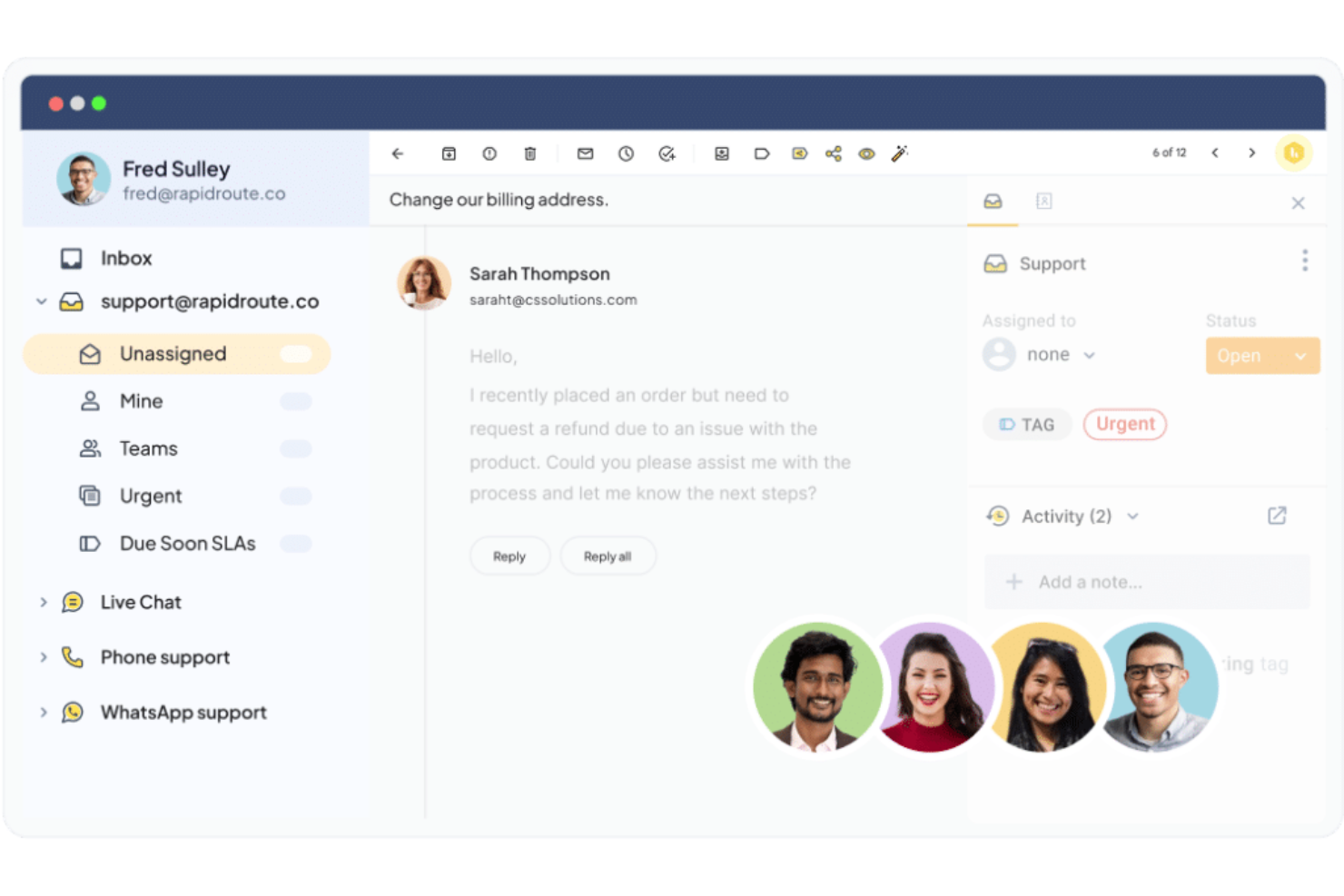
Hiver ist eine KI-gestützte Kundenservice-Plattform, die für Teams in verschiedenen Branchen wie Technologie, Gesundheitswesen und Finanzen entwickelt wurde. Sie richtet sich an Unternehmen, die ihre Kommunikationsprozesse und Reaktionszeiten durch Funktionen wie ein gemeinsames Postfach, Ticketing und Workflow-Automatisierung verbessern möchten. Wer eine Alternative zu HappyFox sucht, findet in Hiver eine praktische Lösung dank ihrer Integrationsmöglichkeiten und benutzerfreundlichen Oberfläche.
Warum ich Hiver gewählt habe
Ich habe Hiver als Alternative zu HappyFox gewählt, weil der Fokus stark auf E-Mail-Management und Automatisierung des Kundenservices liegt. Mit Funktionen wie einem gemeinsamen Postfach, das die Zusammenarbeit im Team erleichtert, und Ticketing, das ein effizientes Aufgabenmanagement gewährleistet, adressiert Hiver den Bedarf an einer reibungslosen Kommunikation. Besonders schätze ich die Möglichkeiten der Workflow-Automatisierung, die manuelle Aufgaben reduzieren und die Reaktionszeiten verbessern. Diese Eigenschaften machen Hiver zu einer praktischen Wahl für Teams, die ihren Kundenservice optimieren möchten.
Hiver Hauptfunktionen
Neben leistungsstarkem E-Mail-Management bietet Hiver zahlreiche weitere Funktionen, die den Einsatz als Alternative zu HappyFox attraktiv machen.
- KI-Chatbots: Automatisieren Sie Kundeninteraktionen und -support mit intelligenten Chatbots, die Routineanfragen bearbeiten können.
- Kundenportal: Bieten Sie Ihren Kunden eine Self-Service-Option, um Informationen abzurufen und Support-Anfragen zu verfolgen.
- Analysen und Berichte: Gewinnen Sie Einblicke in die Team-Performance durch Echtzeit-Analysen und anpassbare Berichte.
- Zusammenarbeitstools: Fördern Sie Teamwork mit geteilten Entwürfen, Notizen und Hinweisen auf Überschneidungen, um doppelte Arbeit zu vermeiden.
Hiver-Integrationen
Zu den Integrationen gehören Salesforce, Hubspot, Shopify, Slack, QuickBooks, Freshdesk, Asana, Trello, Zapier und Google Workspace.
Pros and Cons
Pros:
- Workflow-Automatisierung reduziert manuelle Aufgaben
- KI-Tools beschleunigen das Erstellen von Antworten
- Omnichannel-Postfach bündelt Kundenkommunikation
Cons:
- Starke Abhängigkeit von Google Workspace
- Begrenzte Integrationen schränken die Flexibilität der Plattform ein
New Product Updates from Hiver

Hiver Brings Chat Widget Support to Mobile Apps
Hiver now lets you embed the Hiver Chat Widget in iOS, Android, React Native, and Flutter apps so customers can start chats without leaving your app. For more information, visit Hiver's official site.

Tidio
Am besten für fortschrittliche Chatbots
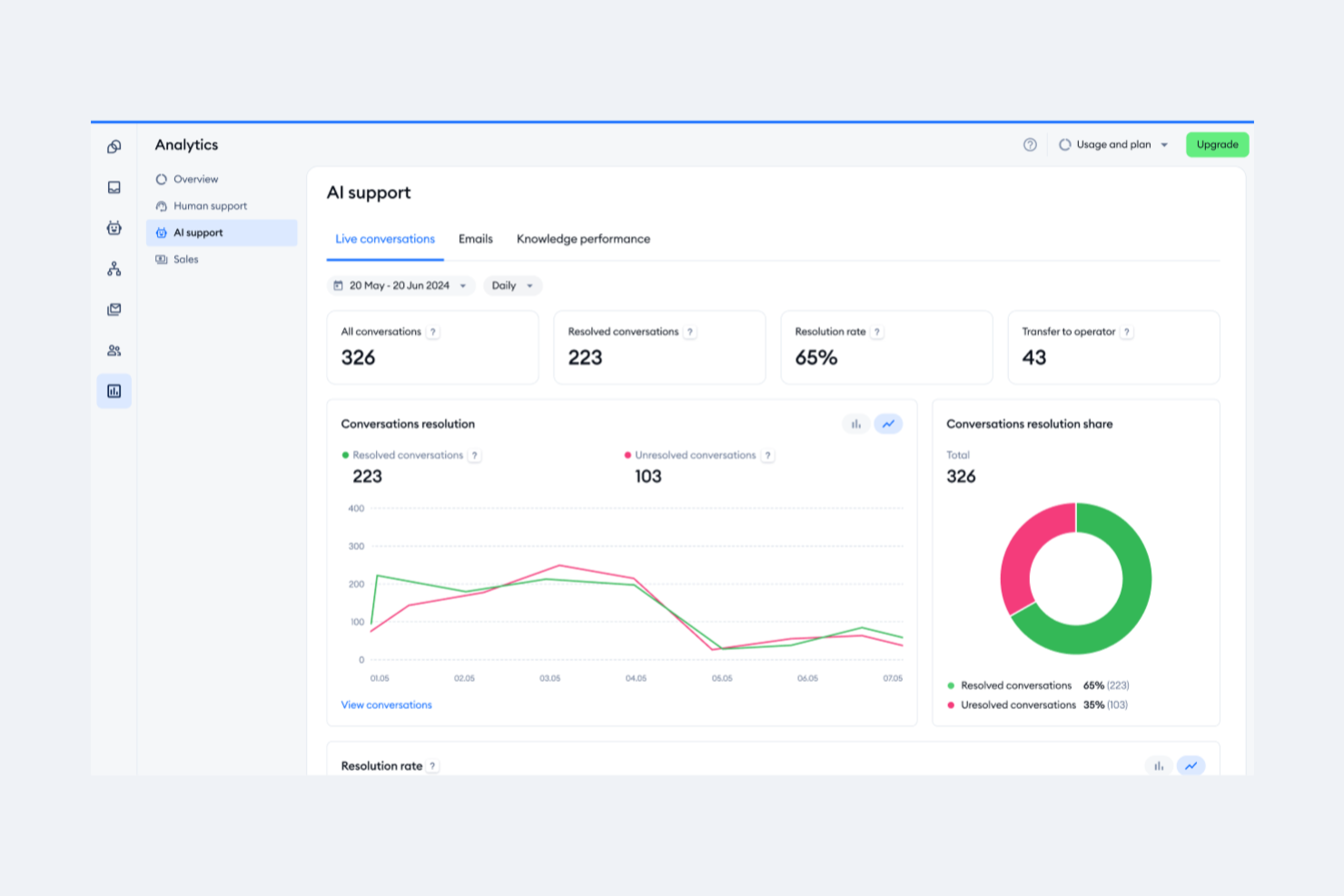
Tidio ist eine Kundenservice-Plattform, die Live-Chat, KI-gestützte Automatisierung und Ticketing-Tools kombiniert, um Unternehmen bei der Verwaltung von Kundeninteraktionen über mehrere Kanäle hinweg zu unterstützen.
Warum Tidio eine gute Alternative zu HappyFox ist: Ein Grund, warum ich Tidio ausgewählt habe, sind seine fortschrittlichen Chatbot-Funktionen. Die Chatbots von Tidio werden von KI unterstützt und ermöglichen es Ihnen, Antworten auf häufige Anfragen zu automatisieren, was Zeit spart und Ihnen ermöglicht, sich auf komplexere Anliegen zu konzentrieren. Es bietet sogar einen visuellen Automatisierungs-Editor, mit dem Sie regelbasierte Workflows für verschiedene Situationen erstellen können, wie z. B. das Starten von Chats basierend auf einem Auslöser wie dem Verweilen eines Besuchers für eine bestimmte Zeit auf einer Seite.
Herausragende Funktionen & Integrationen:
Funktionen beinhalten Vorschauen beim Tippen, sodass Agenten sehen können, was Nutzer schreiben, bevor sie ihre Nachrichten absenden, wodurch schnellere Antworten ermöglicht werden. Zudem können Sie vordefinierte Antworten einrichten, um häufig gestellte Fragen zügig zu beantworten, was Zeit spart und für eine konsistente Unterstützung sorgt.
Integrationen umfassen Shopify, WordPress, Squarespace, WIX, Adobe Commerce, BigCommerce, WooCommerce, Google Analytics, Mailchimp, HubSpot und Zendesk.
Pros and Cons
Pros:
- Multikanal-Support, einschließlich Chats, E-Mails und soziale Medien
- Lyro KI übernimmt einen großen Teil der Kundenanfragen
- Bietet Einblicke in die Teamleistung und Kundenzufriedenheit
Cons:
- Viele Automatisierungsfunktionen sind höheren Tarifen vorbehalten
- Einschränkungen bei der Integration mit bestimmten Drittanbieter-Tools

Am besten geeignet für Multichannel-Support
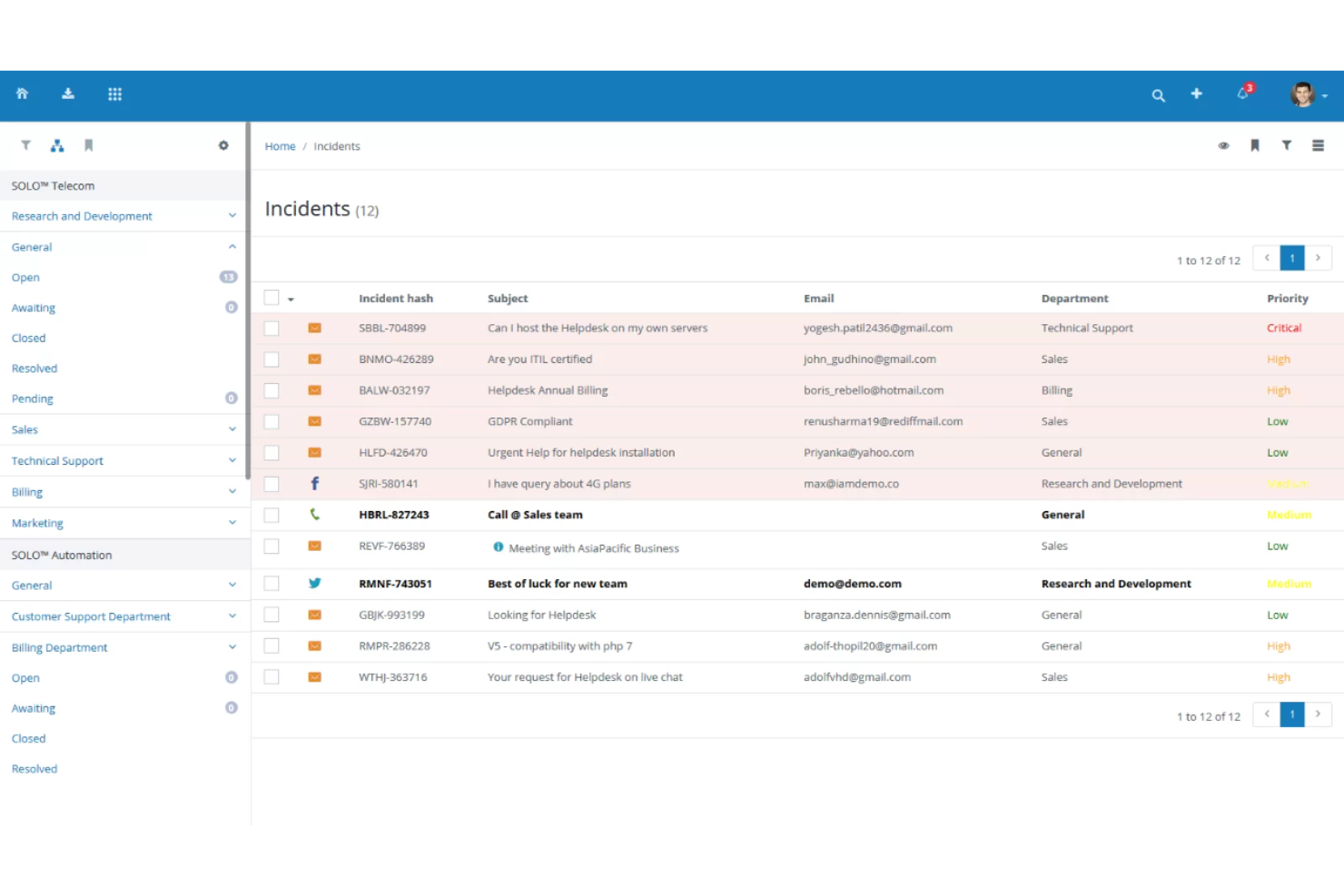
Vision Helpdesk ist eine Helpdesk-Lösung, die Unternehmen dabei unterstützt, ihren Kundensupport durch Multichannel-Ticketmanagement zu verbessern. Sie wird hauptsächlich von Organisationen genutzt, die ihre Serviceprozesse per E-Mail, Telefon, Chat und sozialen Medien optimieren möchten.
Warum Vision Helpdesk eine gute Alternative zu HappyFox ist: Vision Helpdesk bietet Multichannel-Support und ermöglicht es Ihrem Team, Tickets aus verschiedenen Quellen einfach zu verwalten. Automatisierte Ticket-Workflows, Service-Level-Agreement-(SLA)-Management und Aufgabenmanagement helfen Ihnen, die Abläufe zu optimieren. Der mobile Zugriff sowie Self-Service-Portale sorgen für Flexibilität und stärken die Kundeninteraktion. Diese Funktionen unterstützen Ihr Ziel, effizienten und organisierten Support bereitzustellen.
Herausragende Funktionen & Integrationen:
Funktionen umfassen automatisierte Ticket-Workflows, SLA-Management und Aufgabenmanagement. Mit diesen Tools kann Ihr Team Kundenanfragen effizient bearbeiten. Die Software bietet zudem zeitorientierte und ticketbasierte Abrechnungsfunktionen, wodurch Ihre betrieblichen Abläufe flexibler werden.
Integrationen umfassen Slack, Microsoft Teams, WhatsApp, Facebook, Twitter, Zopim, Salesforce, QuickBooks und FreshBooks.
Pros and Cons
Pros:
- Unterstützt mehrere Kommunikationskanäle
- Stellt SLA-Management bereit
- Bietet mobilen Zugriff
- Beinhaltet Self-Service-Portale
- Ermöglicht Aufgabenmanagement
Cons:
- Kann eine steile Lernkurve haben
- Technische Einrichtung kann erforderlich sein
- Begrenzte Anpassungsmöglichkeiten
- Gelegentlich sind Updates erforderlich
- Komplexe Abrechnungsfunktionen

Am besten für automatisierte Fallzuweisung
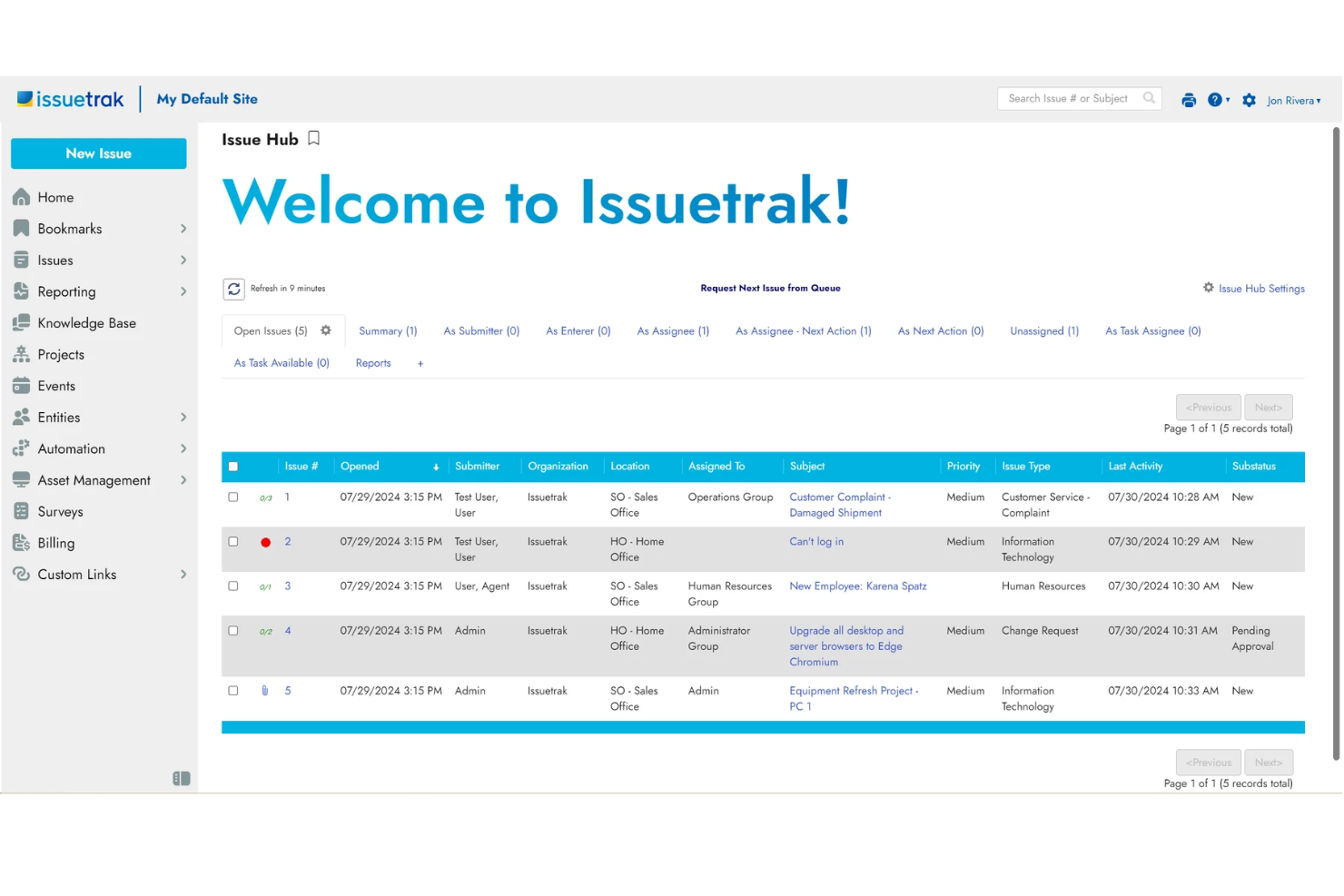
Issuetrak ist eine vielseitige Helpdesk-Lösung, die speziell für Branchen wie Finanzen, Gesundheitswesen und den öffentlichen Sektor entwickelt wurde. Sie bietet eine breite Palette an Funktionen, um Unternehmen bei der Verwaltung von Support- und täglichen operativen Aufgaben zu unterstützen.
Warum Issuetrak eine gute Alternative zu HappyFox ist: Ich habe Issuetrak ausgewählt, weil Ihr Team damit Anfragen aus verschiedenen Kanälen bearbeiten und automatisch zuweisen kann, was die Arbeitsbelastung Ihres Support-Personals verringert. Außerdem ermöglicht das Wissensdatenbank-Feature schnellen Zugriff auf wichtige Ressourcen, was eine effiziente Problemlösung unterstützt. Besonders schätze ich an Issuetrak das leistungsstarke Aufgabenmanagement. Mit Funktionen wie Aufgabenabläufen und schnellen Notizen kann Ihr Team effektiv zusammenarbeiten und sicherstellen, dass alle auf dem gleichen Stand sind.
Herausragende Funktionen & Integrationen:
Funktionen umfassen anpassbare Berichtswerkzeuge, mit denen Ihr Team detaillierte Berichte erstellen kann, die auf Ihre Bedürfnisse zugeschnitten sind. Issuetrak bietet außerdem Bereitstellungsoptionen, darunter Cloud- und Vor-Ort-Installationen, und damit Flexibilität beim Management Ihres Helpdesks.
Integrationen umfassen Microsoft 365, Google Analytics, Gmail, Salesforce, Power BI und tausende weitere über Zapier. Sie können zudem auf die Issuetrak API zugreifen, um noch mehr Verbindungen herzustellen.
Pros and Cons
Pros:
- Hochgradig anpassbar und flexibel für verschiedene Unternehmensanforderungen
- Integrierte Berichts- und Aufgabenmanagement-Funktionen
- Omnikanal-Ticket-Erfassung hilft, Supportanfragen zu bündeln
Cons:
- Das Mobil-Erlebnis könnte noch umfassender sein
- Der Einrichtungsprozess kann zeitaufwändig sein

Am besten geeignet für Bildung und Gesundheitswesen
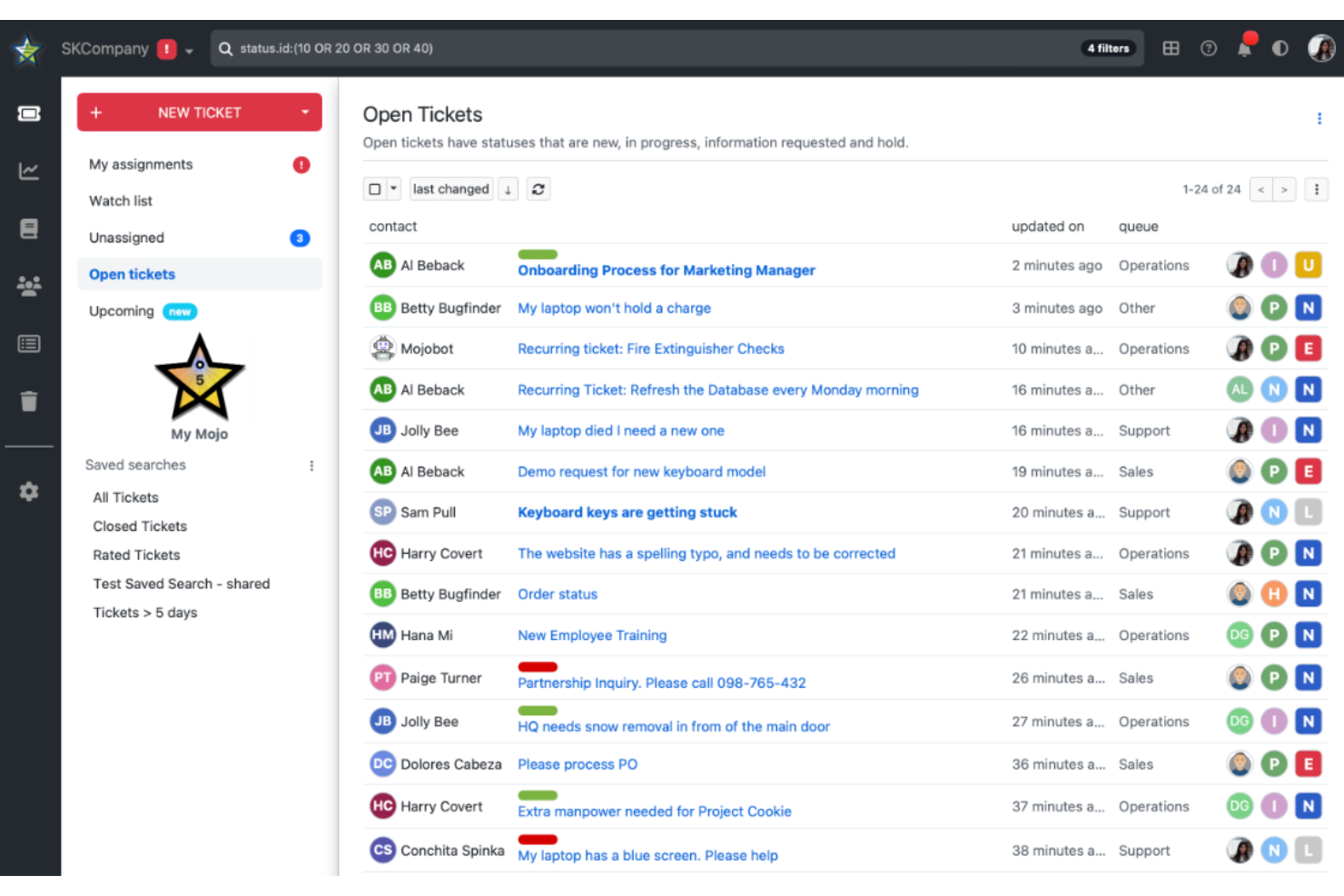
Mojo Helpdesk ist ein Ticketsystem, das speziell für Bildungseinrichtungen und Gesundheitseinrichtungen entwickelt wurde und ihnen hilft, Anfragen zu verwalten und den Service zu verbessern. Es wird von Teams genutzt, die eine organisierte Möglichkeit benötigen, Supportanfragen effizient zu verfolgen und zu lösen.
Warum Mojo Helpdesk eine gute Alternative zu HappyFox ist: Mojo Helpdesk bietet branchenspezifische Vorlagen, die auf die besonderen Anforderungen des Bildungs- und Gesundheitswesens zugeschnitten sind. Mit seinen leistungsstarken Tools zur Ticketerfassung und Berichterstellung behalten Sie die Leistung stets im Blick. Die benutzerfreundliche Oberfläche der Plattform erleichtert Ihrem Team die schnelle Einführung und Nutzung. Zudem unterstützt sie den Aufbau einer Wissensdatenbank, damit Benutzer eigenständig Lösungen finden können.
Hervorstechende Funktionen & Integrationen:
Funktionen umfassen ein benutzerfreundliches Dashboard, anpassbare Ticketfelder und automatische Benachrichtigungen. Diese Tools unterstützen Sie bei der Verwaltung und Priorisierung von Supportanfragen. Die Software stellt zudem Berichtswerkzeuge bereit, um die Teamleistung im Zeitverlauf zu analysieren.
Integrationen umfassen Google Workspace, Microsoft 365, Slack, Zoom, QuickBooks, FreshBooks, Trello, Asana, Dropbox und Box.
Pros and Cons
Pros:
- Bietet branchenspezifische Vorlagen
- Stellt detaillierte Berichtswerkzeuge bereit
- Unterstützt den Aufbau einer Wissensdatenbank
- Verfügt über eine benutzerfreundliche Oberfläche
- Erlaubt anpassbare Ticketfelder
Cons:
- Eingeschränkte erweiterte Anpassungsmöglichkeiten
- Kann begrenzte Skalierbarkeit haben
- Erfordert Einrichtungsaufwand
- Benötigt gelegentliche Updates
- Fehlen einiger erweiterter Funktionen

osTicket
Am besten geeignet für ein kostenloses Ticketsystem
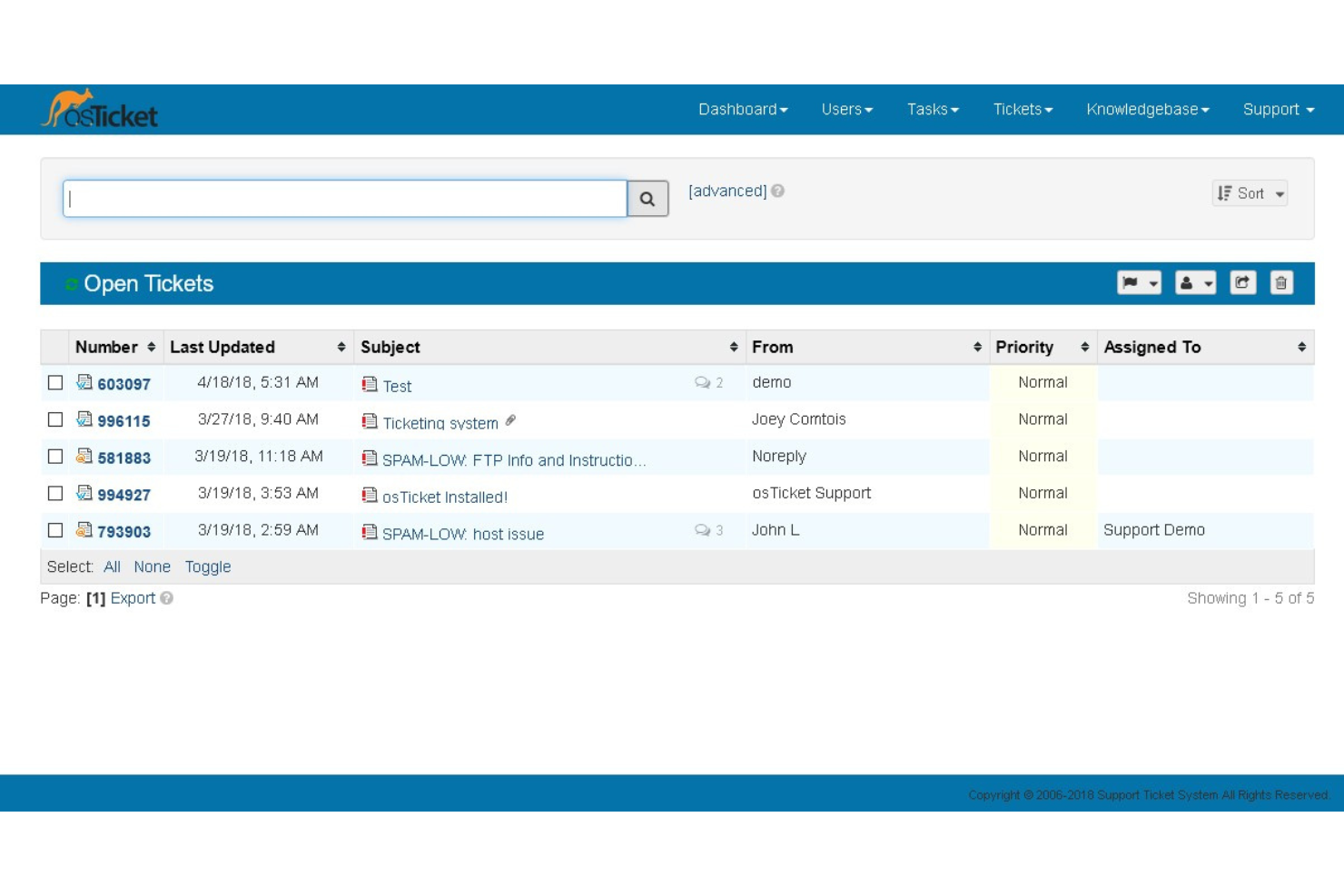
osTicket ist ein Open-Source-Ticketsystem, das für Unternehmen entwickelt wurde, die eine kostengünstige Lösung zur Verwaltung von Kundenanfragen suchen. Es richtet sich an Organisationen jeder Größe und bietet Werkzeuge zur Optimierung des Kundenservice.
Warum osTicket eine gute HappyFox-Alternative ist: osTicket stellt eine umfassende Plattform ohne Lizenzgebühren bereit. Funktionen wie anpassbare Felder ermöglichen die individuelle Gestaltung der Datenerfassung. Die Ticketfilter des Systems sorgen für eine automatisierte Zuweisung der Tickets an die passenden Abteilungen oder Mitarbeitenden. Zudem stellen konfigurierbare Hilfethemen sicher, dass Anfragen korrekt weitergeleitet werden, um eine schnelle Lösung zu ermöglichen.
Herausragende Funktionen & Integrationen:
Funktionen beinhalten ein umfangreiches Dashboard, das Echtzeit-Statistiken zum Helpdesk liefert. Service-Level-Agreements helfen dabei, Reaktionszeiten effizient zu verfolgen und zu managen. Das Kundenservice-Portal verbessert die Kommunikation und stärkt die Kundenbeziehungen.
Integrationen umfassen E-Mail, Webformulare und API, was die nahtlose Erstellung von Tickets aus verschiedenen Quellen ermöglicht.
Pros and Cons
Pros:
- Open-Source und anpassbar
- Automatisierte Ticketweiterleitung
- Anpassbare Hilfethemen
- Unterstützt mehrere Kanäle
- Keine Lizenzgebühren
Cons:
- Technische Einrichtung erforderlich
- Begrenzte erweiterte Funktionen
- Community-basierter Support
- Die Benutzeroberfläche wirkt möglicherweise veraltet
- Individualisierung erfordert Programmierkenntnisse

Ameyo
Am besten für Unternehmenssicherheit
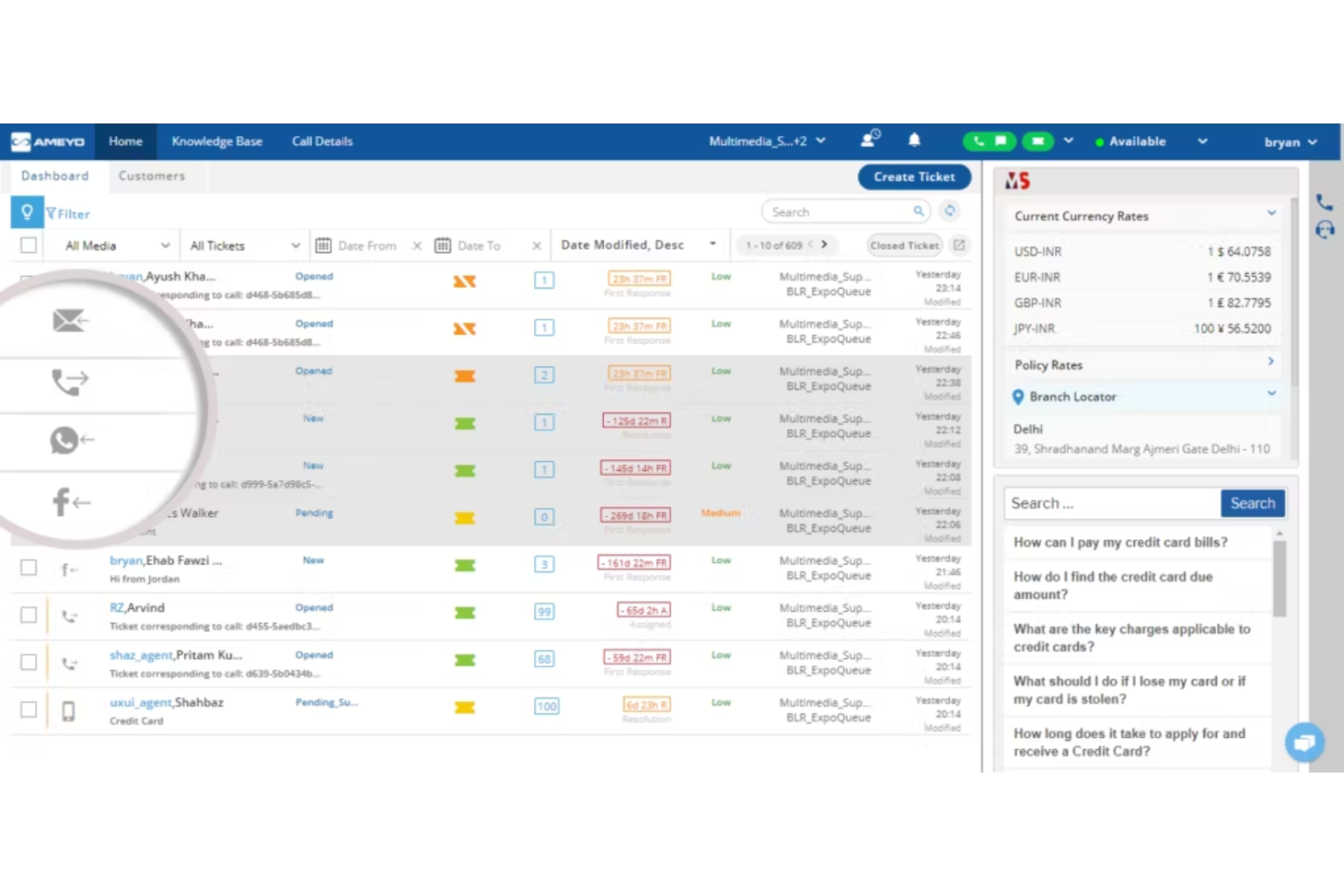
Ameyo ist ein Ticketingsystem, das speziell für Unternehmen entwickelt wurde, die Sicherheit erhöhen und Kundeninteraktionen effizient verwalten möchten. Es eignet sich am besten für große Organisationen, die sichere und skalierbare Lösungen für die Kundenbindung benötigen.
Warum Ameyo eine gute Alternative zu HappyFox ist: Ameyo bietet Sicherheitsfunktionen auf Unternehmensniveau und ist somit ideal für Unternehmen mit strengen Compliance-Anforderungen. Sein leistungsstarkes Ticket-Management-System unterstützt komplexe Workflows und ein hohes Interaktionsvolumen. Die Software stellt außerdem erweiterte Analysen bereit, damit Ihr Team datenbasierte Entscheidungen treffen kann. Zusätzlich ermöglichen die anpassbaren Dashboards von Ameyo, die Benutzeroberfläche individuell zu gestalten.
Hervorstechende Funktionen & Integrationen:
Funktionen umfassen erweiterte Analysen, individuell anpassbare Dashboards und automatisierte Ticketweiterleitung. Diese Tools helfen Ihrem Team, die Leistung zu analysieren und die Abläufe zu optimieren. Die Software bietet außerdem Überwachung in Echtzeit, um Kundeninteraktionen im Blick zu behalten.
Integrationen sind möglich mit Salesforce, Zendesk, Freshdesk, Microsoft Dynamics, Zoho CRM, HubSpot, WhatsApp, Facebook, Twitter und Instagram.
Pros and Cons
Pros:
- Bietet starke Sicherheit für Unternehmen
- Unterstützt komplexe Workflows
- Bietet erweiterte Analysefunktionen
- Beinhaltet individuell anpassbare Dashboards
- Erlaubt Echtzeitüberwachung
Cons:
- Kann schwierig zu implementieren sein
- Erfordert technisches Fachwissen
- Begrenzte Flexibilität bei Basistarifen
- Kann eine steile Lernkurve haben
- Gelegentliche Updates erforderlich

Kayako
Am besten für KI-gestützte Automatisierung
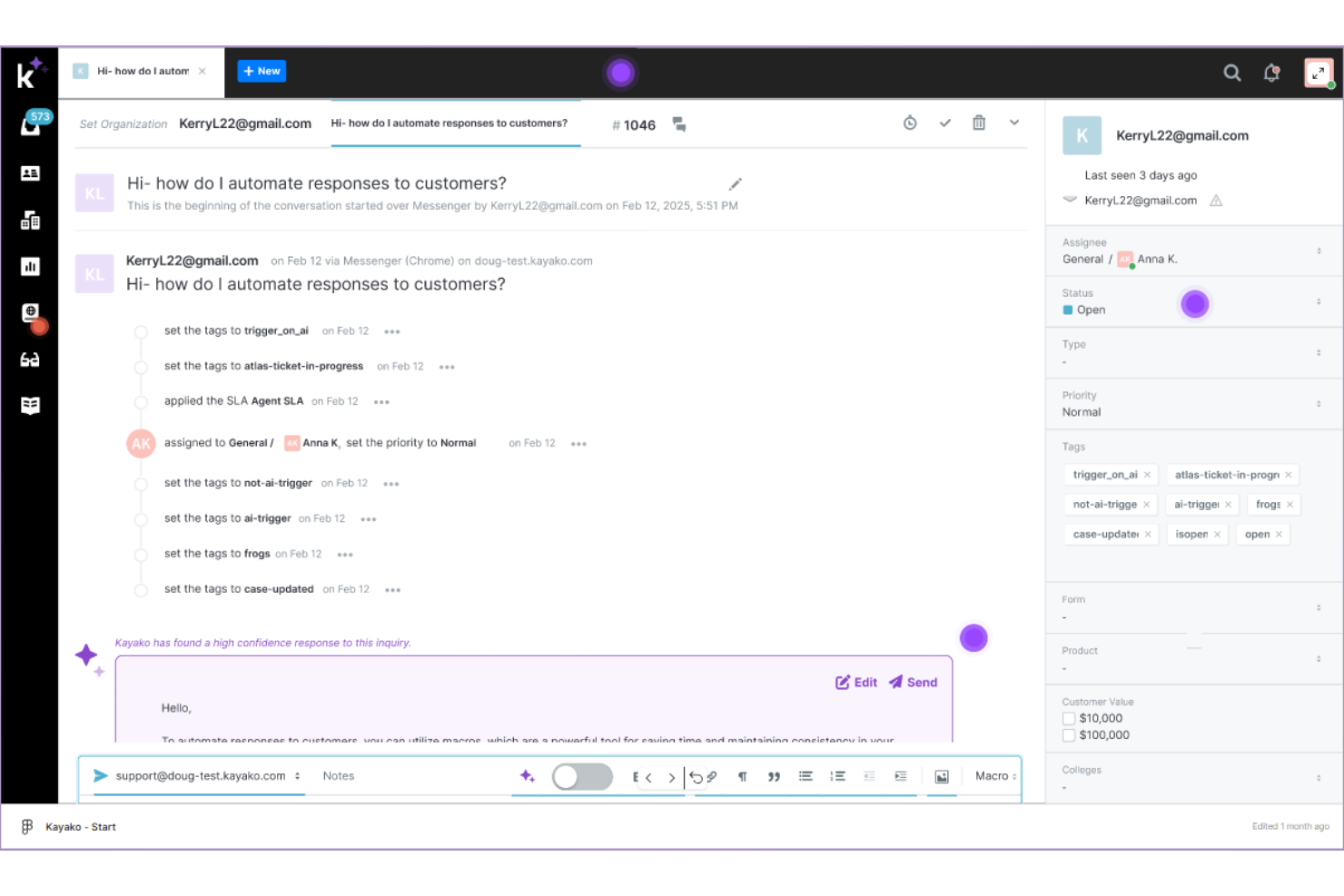
Kayako ist eine Kundenservice-Plattform, die darauf ausgelegt ist, die Serviceeffizienz für Unternehmen jeder Größe zu steigern. Sie bietet Werkzeuge wie Ticketing, Live-Chat und eine Wissensdatenbank, um Kundeninteraktionen zu optimieren.
Warum Kayako eine gute Alternative zu HappyFox ist: Kayakos KI-gestützte Automatisierung kann bis zu 80 % routinemäßiger Anfragen übernehmen und entlastet so die Mitarbeiter für komplexere Themen. Funktionen wie intelligentes Lernen ermöglichen es dem System, sich mit jeder Interaktion zu verbessern und die Antwortgenauigkeit zu erhöhen. Die Möglichkeit, Ihre Wissensdatenbank zu importieren, sorgt für eine konsistente Informationsbereitstellung. Zudem lässt sich Kayako nahtlos in bestehende Arbeitsabläufe integrieren, wodurch Störungen bei der Implementierung minimiert werden.
Herausragende Funktionen & Integrationen:
Funktionen umfassen eine einheitliche Sicht auf die Customer Journey, die bei jeder Interaktion Kontext liefert. Die Plattform unterstützt Omnichannel-Kommunikation, sodass Ihr Team E-Mails, Chats und Social-Media-Nachrichten an einem Ort verwalten kann. Anpassbare Workflows ermöglichen es, das System an Ihre Support-Prozesse anzupassen.
Integrationen beinhalten Slack, Salesforce, Zapier, Shopify und Magento und erweitern so die Funktionalität und Konnektivität.
Pros and Cons
Pros:
- KI-gestützte Automatisierung
- Omnichannel-Support
- Anpassbare Workflows
- Skalierbar für verschiedene Unternehmensgrößen
- Benutzerfreundliche Oberfläche
Cons:
- Erweiterte Funktionen in höherpreisigen Tarifen
- Begrenzte Anpassungsmöglichkeiten in niedrigeren Tarifen
- Komplexe Berichterstellung
- Gelegentliche Verzögerungen bei Benachrichtigungen
- Erfordert Schulung für die vollständige Nutzung

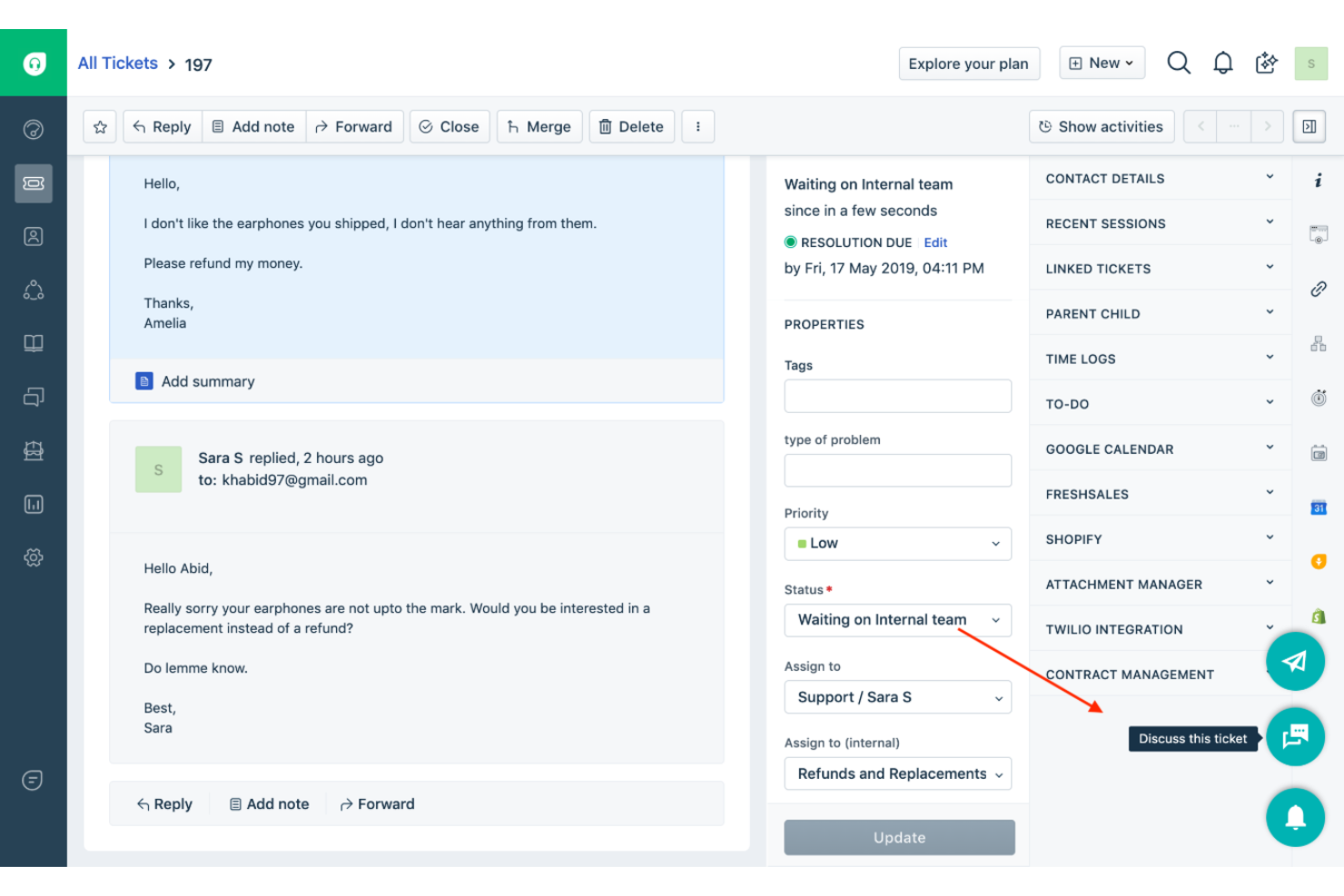
Freshdesk ist eine Kundenservice-Software, die für Unternehmen jeder Größe entwickelt wurde, um deren Kundensupport-Prozesse zu verwalten und zu optimieren. Sie bietet Tools wie Ticketingsysteme, Automatisierung und Self-Service-Portale, um die Effizienz im Support zu steigern.
Warum Freshdesk von Freshworks eine gute Alternative zu HappyFox ist: Freshdesk von Freshworks ist eine skalierbare Plattform, die mit Ihren Anforderungen mitwächst und steigende Support-Anforderungen bewältigen kann. Mit anpassbaren Workflows können Sie Prozesse individuell gestalten und an die Entwicklungen Ihres Unternehmens anpassen. Die Automatisierungsfunktionen reduzieren manuelle Tätigkeiten, sodass Ihr Team sich auf komplexe Anliegen konzentrieren kann. Zudem ermöglicht der Umgang mit mehreren Kommunikationskanälen einen konsistenten Support auch bei wachsendem Kundenstamm.
Herausragende Funktionen & Integrationen:
Funktionen umfassen KI-gestütztes Ticketing, das hilft, Anfragen effizient zu priorisieren und zu kategorisieren. Der gemeinsame Posteingang zentralisiert die gesamte Kundenkommunikation und erleichtert die Zusammenarbeit. Anpassbare Dashboards liefern Einblicke in Leistungskennzahlen und unterstützen datengestützte Entscheidungen.
Integrationen umfassen Slack, Salesforce, Shopify und Zapier und erweitern die Funktionalität sowie Konnektivität.
Pros and Cons
Pros:
- Skalierbar für wachsende Unternehmen
- Umfangreiche Automatisierungsmöglichkeiten
- Anpassbare Workflows
- Mehrkanal-Support
- KI-gestützte Funktionen
- Skalierbar für wachsende Unternehmen
- Umfangreiche Automatisierungsmöglichkeiten
- Anpassbare Workflows
- Mehrkanal-Support
- KI-gestützte Funktionen
Cons:
- Erweiterte Funktionen in höherpreisigen Plänen
- Einarbeitungskurve bei komplexen Funktionen
- Gelegentliche Systemverzögerungen
- Begrenzte Anpassungsmöglichkeiten in niedrigeren Tarifen
- Berichtsfunktionen können komplex sein
- Erweiterte Funktionen in höherpreisigen Plänen
- Einarbeitungskurve bei komplexen Funktionen
- Gelegentliche Systemverzögerungen
- Begrenzte Anpassungsmöglichkeiten in niedrigeren Tarifen
- Berichtsfunktionen können komplex sein

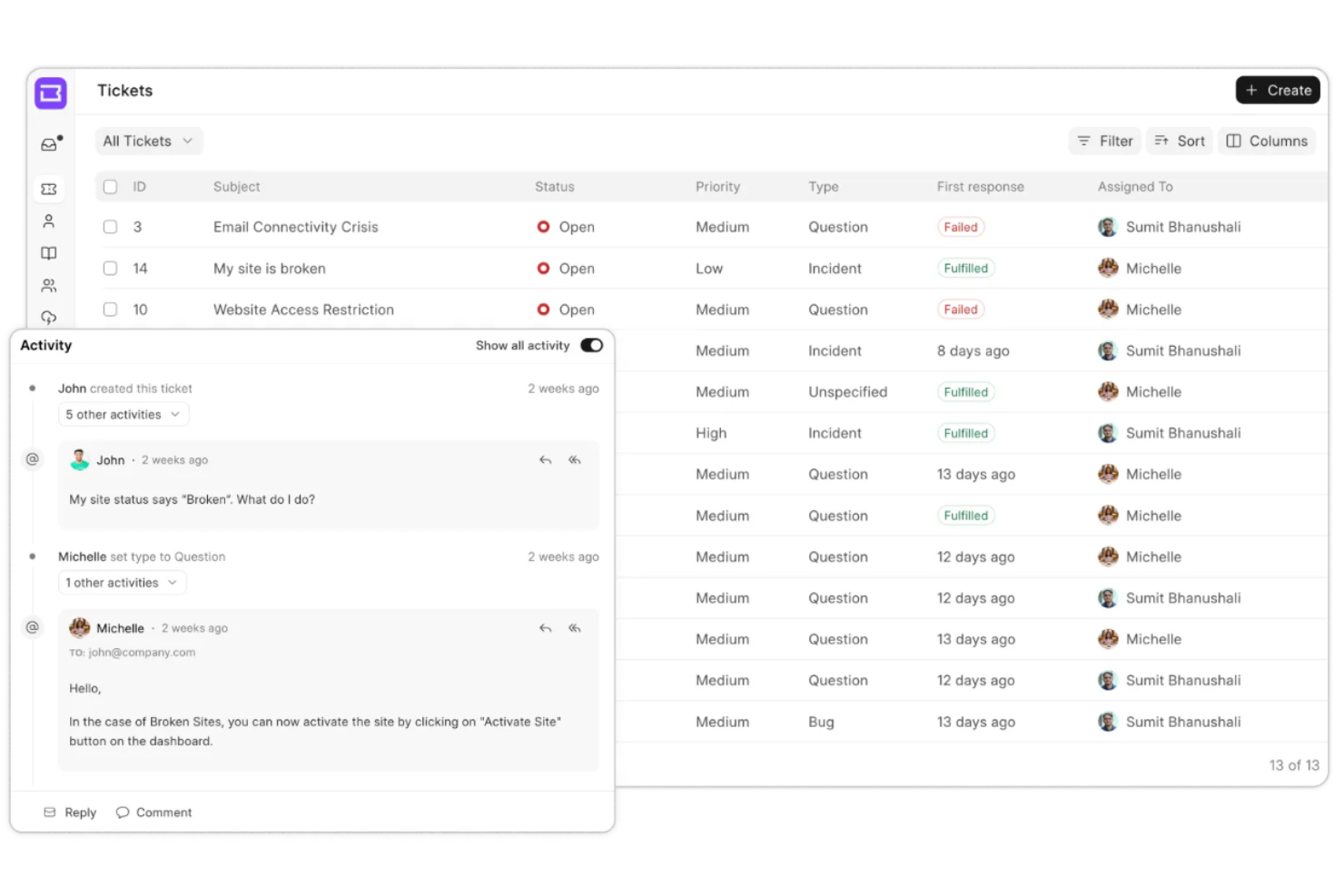
Frappe Helpdesk ist eine Open-Source-Helpdesk-Lösung, die für Teams entwickelt wurde, die anpassbare Support-Lösungen suchen. Sie ist ideal für Unternehmen, die vollständige Kontrolle über ihr Ticketsystem und ihre Workflows haben möchten.
Warum Frappe Helpdesk eine gute Alternative zu HappyFox ist: Frappe Helpdesk bietet die Flexibilität von Open Source und ermöglicht Ihnen, die Software an Ihre spezifischen Bedürfnisse anzupassen. Mit Funktionen wie anpassbaren Feldern und Workflows können Sie das System auf Ihre Prozesse zuschneiden. Die Plattform unterstützt außerdem Multi-Channel-Ticketing, wodurch Sie Anfragen aus verschiedenen Quellen leichter verwalten können. Durch den Community-Ansatz werden regelmäßige Updates und Verbesserungen sichergestellt.
Hervorstechende Funktionen & Integrationen:
Funktionen umfassen umfangreiche Berichtswerkzeuge, eine Wissensdatenbank und automatische Ticketzuweisung. Diese Werkzeuge helfen beim Zeitmanagement und ermöglichen es Ihrem Team, Leistung und Reaktionszeiten zu verbessern. Die Software unterstützt außerdem Mehrsprachigkeit, um unterschiedliche Nutzergruppen abzudecken.
Integrationen umfassen Slack, Microsoft Teams, WhatsApp, Facebook, Twitter, Google Workspace, Trello, Asana, Dropbox und Box.
Pros and Cons
Pros:
- Bietet Open-Source-Flexibilität
- Unterstützt Multi-Channel-Ticketing
- Bietet anpassbare Workflows
- Setzt auf einen Community-Ansatz
- Ermöglicht umfangreiche Berichtserstellung
Cons:
- Technische Einrichtung notwendig
- Möglicherweise häufige Updates erforderlich
- Wenige Funktionen direkt nach Installation
- Kann für Einsteiger komplex sein
- Erfordert Anpassungen für die volle Nutzung
Weitere HappyFox-Alternativen
Hier sind einige weitere HappyFox-Alternativen, die es nicht in meine Auswahl geschafft haben, aber dennoch einen Blick wert sind:
- Jitbit
Ideal für E-Mail-zentrierten Support
- Faveo
Am besten geeignet für preiswerte Anpassungen
- AzureDesk
Am besten für unbegrenzte Postfächer
- Desk365
Ideal für die Integration mit Microsoft Teams
- Zoho Desk
Am besten für Datenschutz und Sicherheit
- SparrowDesk
Am besten für schlanke Support-Teams geeignet


Wie ich HappyFox-Alternativen bewerte
Ich bewerte jedes Tool anhand von zwei Ebenen: den grundlegenden Ticket-, Automatisierungs- und Omnichannel-Funktionen, die ein Helpdesk unbedingt haben muss, sowie den Unterscheidungsmerkmalen, die die besten Optionen hervorheben.
Kernfunktionen (Mindestanforderungen für diese Liste)
Wenn ich Tools für meine Liste auswähle, bewerte ich jedes einzelne auf einer Skala von 0 (Funktionalität nicht vorhanden) bis 5 (hervorragend in diesem Bereich) für jede unten aufgeführte Kernfunktionalität. Anschließend berechne ich die Gesamtpunktzahl des Tools als Prozentsatz. Jedes Tool muss eine Mindestgesamtpunktzahl von 65 % erreichen, um für die Aufnahme in Betracht gezogen zu werden.
- Omnichannel-Ticketsystem: Ich prüfe, ob Tickets aus E-Mail, Chat, Social Media, Telefon und Webformularen in einer einheitlichen Warteschlange landen, damit Agenten nicht ständig zwischen Tabs wechseln müssen.
- Regeln zur Workflow-Automatisierung: Die Routing-Logik ist hier entscheidend – ich achte auf triggerbasierte Zuweisung, SLA-Eskalationspfade und automatisches Tagging, wie z. B. das automatische Eskalieren von VIP-Konten.
- Wissensdatenbank & Self-Service: Ein integriertes Helpcenter mit durchsuchbaren Artikeln und Kategoriestrukturen hilft, häufige "Wo ist meine Bestellung"- oder "Wie setze ich mein Passwort zurück"-Anfragen abzufangen.
- Berichtswesen & Analyse-Dashboards: Ich bewerte, ob das Tool Metriken wie Erstreaktionszeit, Lösungszeit und CSAT in Dashboards darstellt, die von Agenten und Managern wirklich genutzt werden können.
- Team-Kollaborationsfunktionen: Gemeinsame Posteingänge, interne Notizen und Kollisionswarnungen verhindern, dass zwei Agenten auf das gleiche Ticket antworten – Tools wie Zendesk und Freshdesk gehen hier unterschiedlich vor.
- Integrationen & API-Zugriff: Ich überprüfe native Schnittstellen zu CRMs, E-Commerce-Plattformen und Messaging-Tools sowie das Vorhandensein einer öffentlichen API für den individuellen Workflow-Aufbau.
Nachdem ich eine Liste von Tools erstellt habe, die diese Kriterien erfüllen, untersuche ich, was jede Plattform besonders macht.
Unterscheidungsmerkmale (Was hebt Anbieter hervor?)
So vergleiche und kontrastiere ich verschiedene Anbieter:
Herausragende Funktionen
KI-gestützte Copiloten, die Antworten vorschlagen oder lange Ticketverläufe zusammenfassen, sparen Agenten gerade in Hochphasen viel Zeit – ich prüfe, wie ausgereift die KI-Schicht jedes Tools tatsächlich ist. Multi-Brand-Support ist ebenfalls wichtig für Teams, die mehrere Produktlinien über ein Konto verwalten, da pro Marke eigene Helpcenter Verwirrung bei den Kunden vermeiden. Ich bewerte auch proaktive Nachrichten, etwa wenn beim Auftreten eines Check-out-Fehlers automatisch ein In-App-Chat gestartet wird, um Probleme zu lösen, bevor sie zu Tickets werden.
Über die Funktionen hinaus
Migrationsunterstützung ist beim Wechsel von HappyFox ein zentrales Thema – ich sehe nach, ob der Anbieter Importwerkzeuge für Tickets und KB-Artikel bereitstellt, damit Ihre Historie nicht verloren geht. Preistransparenz wiegt ebenfalls schwer, insbesondere ob die Kosten pro Agent im Rahmen bleiben, wenn Ihr Team wächst, oder ob Hauptfunktionen erst in Enterprise-Tarifen freigeschaltet werden. Ich achte zudem auf die Zielgruppenorientierung des Anbieters, denn eine Plattform für 500-köpfige Teams wie Zendesk oder Salesforce Service Cloud bedient ganz andere Anforderungen als ein System, das gezielt für schlanke Support-Teams mit fünf bis zehn Mitarbeitern entwickelt wurde.
Warum nach einer HappyFox-Alternative suchen?
Obwohl HappyFox eine gute Wahl für Helpdesk-Software ist, gibt es mehrere Gründe, warum manche Nutzer nach alternativen Lösungen suchen. Vielleicht suchen Sie aus folgenden Gründen nach einer HappyFox-Alternative …
- Sie benötigen eine erschwinglichere Preisgestaltung
- Ihr Team benötigt umfangreiche Anpassungsmöglichkeiten
- Sie wünschen sich bessere Integrationsmöglichkeiten
- Sie benötigen eine Lösung für ein größeres Team
- Ihr Unternehmen ist in mehreren Regionen tätig
- Sie benötigen besser skalierbare Funktionen
Wenn einer dieser Punkte auf Sie zutrifft, sind Sie hier genau richtig. Meine Liste enthält mehrere Helpdesk-Softwareoptionen, die besser für Teams geeignet sind, die mit diesen Herausforderungen bei HappyFox konfrontiert sind und nach alternativen Lösungen suchen.
Die wichtigsten Funktionen von HappyFox
Hier sind einige der wichtigsten Funktionen von HappyFox, damit Sie vergleichen können, was alternative Lösungen bieten:
- Leistungsfähiges Ticketsystem: Kundenanfragen und Supportanfragen effizient verwalten.
- Servicedesk: Optimierte Servicebereitstellung für verschiedene Branchen.
- KI-Integration: Generative KI für einen verbesserten Kundenservice und IT-Support nutzen.
- Chatbot: Rund um die Uhr Kundeninteraktionen mit vorgefertigten Chatbots ermöglichen.
- Automatisierte Workflows: Die Ticketlösung durch Prozessautomatisierung beschleunigen.
- Geschäftsanalysen: Datengestützte Erkenntnisse für einen verbesserten Kundenservice.
- Live-Chat: Sofortige Kommunikation mit Kunden über verschiedene Geräte hinweg.
- Wissensdatenbank: Selbstbedienungsunterstützung durch häufig gestellte Fragen und Hilfeseiten.
- Aufgaben- und Anlagenverwaltung: Aufgaben organisieren und Hardware- sowie Softwareanlagen verfolgen.
- Kundenfeedback: Zufriedenheitsumfragen zur Verbesserung der Nutzererfahrung.
Wie geht es weiter?
Abonnieren Sie unseren Newsletter mit den neuesten Erkenntnissen zur Kundenerfahrung, Anleitungen, Strategien und Ressourcen von führenden Experten auf dem Gebiet der Kundenerfahrung.