

I 10 migliori concorrenti di SolarWinds per il monitoraggio IT nel 2026

Selezione dei concorrenti di SolarWinds


Le migliori alternative a SolarWinds offrono il monitoraggio dell'infrastruttura IT tutto-in-uno, con una crescente attenzione all'esperienza digitale e alle prestazioni percepite dagli utenti. Se stai valutando delle alternative, probabilmente cerchi strumenti che non si limitino a monitorare lo stato dei sistemi, ma ottimizzino anche il modo in cui gli utenti vivono i tuoi siti web, le applicazioni e i servizi.
Scegliere la soluzione giusta è particolarmente importante durante la fase di definizione dell'ambito, in cui comprendere sia il comportamento dell'infrastruttura sia l'esperienza degli utenti aiuta i team a prendere decisioni più consapevoli.
In questo elenco troverai piattaforme convenienti e facili da usare, con funzionalità avanzate e componenti aggiuntivi flessibili, adatte a piccole imprese e aziende che desiderano migliorare le prestazioni e offrire esperienze digitali migliori.
Che cos'è SolarWinds?
SolarWinds è una piattaforma tutto-in-uno per la gestione dell'infrastruttura IT che aiuta i team a monitorare, analizzare e ottimizzare le prestazioni della rete in ambienti complessi. Include funzionalità di monitoraggio delle prestazioni di rete (NPM), monitoraggio remoto e visibilità su sistemi critici come router e firewall.
I team IT utilizzano SolarWinds per migliorare le prestazioni della rete, mantenere la disponibilità dei servizi e ottenere un maggiore controllo sui sistemi distribuiti. I prezzi trasparenti e l'approccio conveniente ne fanno un'opzione pratica per piccole imprese e organizzazioni più grandi che necessitano di un monitoraggio affidabile senza complessità superflue.
Tabella di confronto dei concorrenti di SolarWinds
Questa tabella di confronto riassume i dettagli sui prezzi delle mie principali alternative a SolarWinds:
| Tool | Best For | Trial Info | Price | ||
|---|---|---|---|---|---|
| 1 | Best with extensive plugin support | Free plan and free demo available | From $2,595 (perpetual license for 100 nodes) | Website | |
| 2 | Best for hybrid infrastructure observability | 14-day free trial | Pricing upon request | Website | |
| 3 | Best for open-source network visibility | Free download available | From $325/month (billed annually) | Website | |
| 4 | Best with real-time analytics for digital operations | Free plan + free demo available | Pricing upon request | Website | |
| 5 | Best for cloud-native log management | Free trial available | From $0.15/credit | Website | |
| 6 | Best for multi-cloud service health tracking | Free trial + free demo available | Pricing upon request | Website | |
| 7 | Best with sensor-based infrastructure monitoring | 30-day free trial + free plan available | From $200/month (billed annually) | Website | |
| 8 | Best for automated network mapping | 14-day free trial | Pricing upon request | Website | |
| 9 | Best for AI-powered root cause analysis | Free demo available | From $4.50/1000 sessions | Website | |
| 10 | Best for unified monitoring across cloud environments | Free plan available and 14-day free trial | From $5/month (billed annually) | Website |
Perché fidarsi dei nostri consigli sui software
Il nostro team testa e recensisce software dal 2012. In quanto leader CX noi stessi, sappiamo quanto sia difficile — e importante — scegliere il software giusto.
Per questa guida, abbiamo valutato gli strumenti attraverso test pratici e ricerche indipendenti, assegnando un punteggio agli strumenti in base ai nostri criteri di selezione.
Le nostre recensioni riflettono il nostro giudizio editoriale umano, non un discorso di vendita.
Recensioni dei concorrenti di SolarWinds
Di seguito trovi i miei riepiloghi dettagliati delle migliori alternative a SolarWinds incluse nella mia selezione. Le mie recensioni offrono una panoramica dettagliata delle funzionalità, delle integrazioni e dei prezzi di ogni software, per aiutarti a trovare quello più adatto a te.

Nagios
Best with extensive plugin support
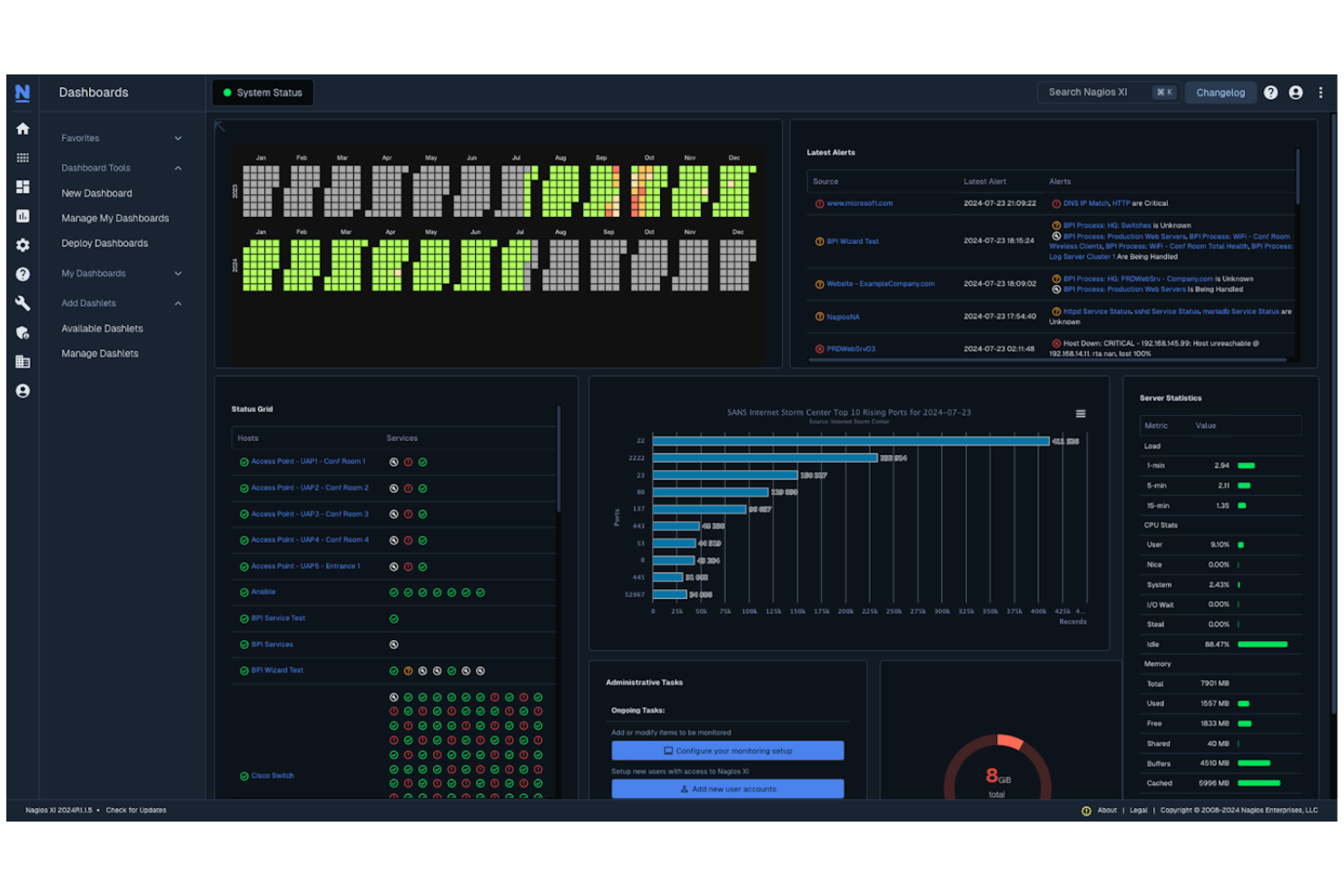
Nagios is a network and infrastructure monitoring platform trusted by IT teams who need deep visibility and control. It’s a strong fit for organizations that want to customize their monitoring environment and integrate with a wide range of systems. If you’re looking for a SolarWinds competitor that offers flexibility and granular monitoring, Nagios is worth considering.
Who Is Nagios Best For?
Nagios is a strong choice for IT administrators and network engineers in mid-sized to large organizations that require customizable infrastructure monitoring.
Why Nagios Is a Good SolarWinds Competitor
What sets Nagios apart from other SolarWinds competitors is its extensive plugin support, which allows teams to tailor monitoring to nearly any device, service, or application. I find that the Nagios Exchange marketplace offers thousands of community-contributed plugins, making it possible to extend monitoring far beyond out-of-the-box capabilities.
This flexibility is especially valuable for help desk teams managing diverse or legacy environments. With Nagios, you can adapt your monitoring setup as your infrastructure evolves, without being limited by vendor constraints.
Nagios Key Features
Some other features in Nagios that help IT and support teams manage infrastructure monitoring include:
- Multi-tenant monitoring: Monitor multiple clients or business units from a single Nagios deployment.
- Custom notification policies: Set up detailed alerting rules based on severity, time, or escalation paths.
- Performance graphing: Visualize historical trends and performance data for monitored devices and services.
- Automated remediation scripts: Trigger scripts to resolve common issues automatically when specific alerts are detected.
Nagios Integrations
Integrations include AWS, Azure, Google Cloud, VMware, Microsoft 365, Slack, ServiceNow, Docker, Ansible, and Chef.
Pros and Cons
Pros:
- Flexible alerting and notification configuration
- Strong community support and resources
- Extensive plugin library for flexible monitoring
Cons:
- Limited built-in reporting capabilities
- Outdated user interface compared to alternatives
Best for hybrid infrastructure observability
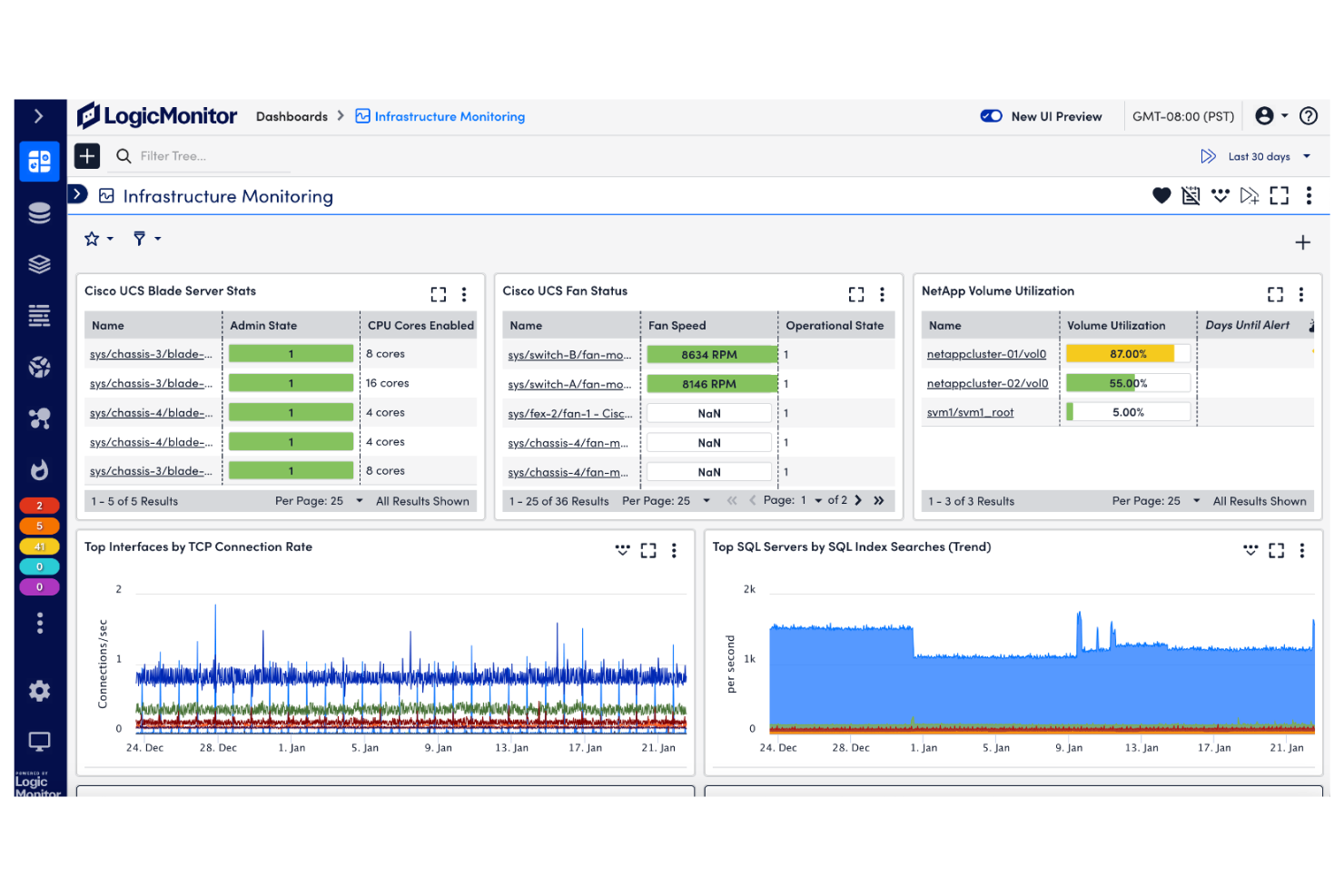
LogicMonitor is a cloud-based monitoring platform designed for IT teams managing complex, distributed environments. It appeals to organizations that need unified visibility across on-premises, cloud, and hybrid infrastructure. If you’re looking for a SolarWinds alternative that emphasizes automated discovery and deep observability, LogicMonitor is worth considering.
Who Is LogicMonitor Best For?
LogicMonitor is a strong fit for mid-sized to large enterprises with IT teams responsible for managing hybrid or multi-cloud infrastructure.
Why LogicMonitor Is a Good SolarWinds Competitor
What makes LogicMonitor a strong SolarWinds competitor is its focus on hybrid infrastructure observability. I picked LogicMonitor because it automatically discovers devices and services across both on-premises and cloud environments, giving IT teams a unified view. Its dynamic topology mapping and AI-driven anomaly detection help teams quickly identify and resolve issues across complex, distributed systems.
For organizations managing a mix of legacy and modern infrastructure, LogicMonitor offers the depth and flexibility needed to keep everything visible and under control.
LogicMonitor Key Features
Some other features in LogicMonitor that help IT teams manage complex environments include:
- Role-based access control: Assign granular permissions to users and groups for secure monitoring and management.
- Customizable dashboards: Build and share visual dashboards to track key metrics and system health in real time.
- Automated alert routing: Route alerts to the right team members based on customizable rules and escalation policies.
- REST API access: Integrate LogicMonitor with other IT systems and automate workflows using its robust API.
LogicMonitor Integrations
Integrations include AWS, Microsoft Azure, Google Cloud Platform, Cisco, VMware, ServiceNow, Slack, PagerDuty, Dell Technologies, and NetApp.
Pros and Cons
Pros:
- Real-time dashboards for infrastructure visibility
- Customizable alerting and escalation workflows
- Automated discovery across hybrid environments
Cons:
- Customer support response can be inconsistent
- Reporting customization options are limited

Zabbix
Best for open-source network visibility
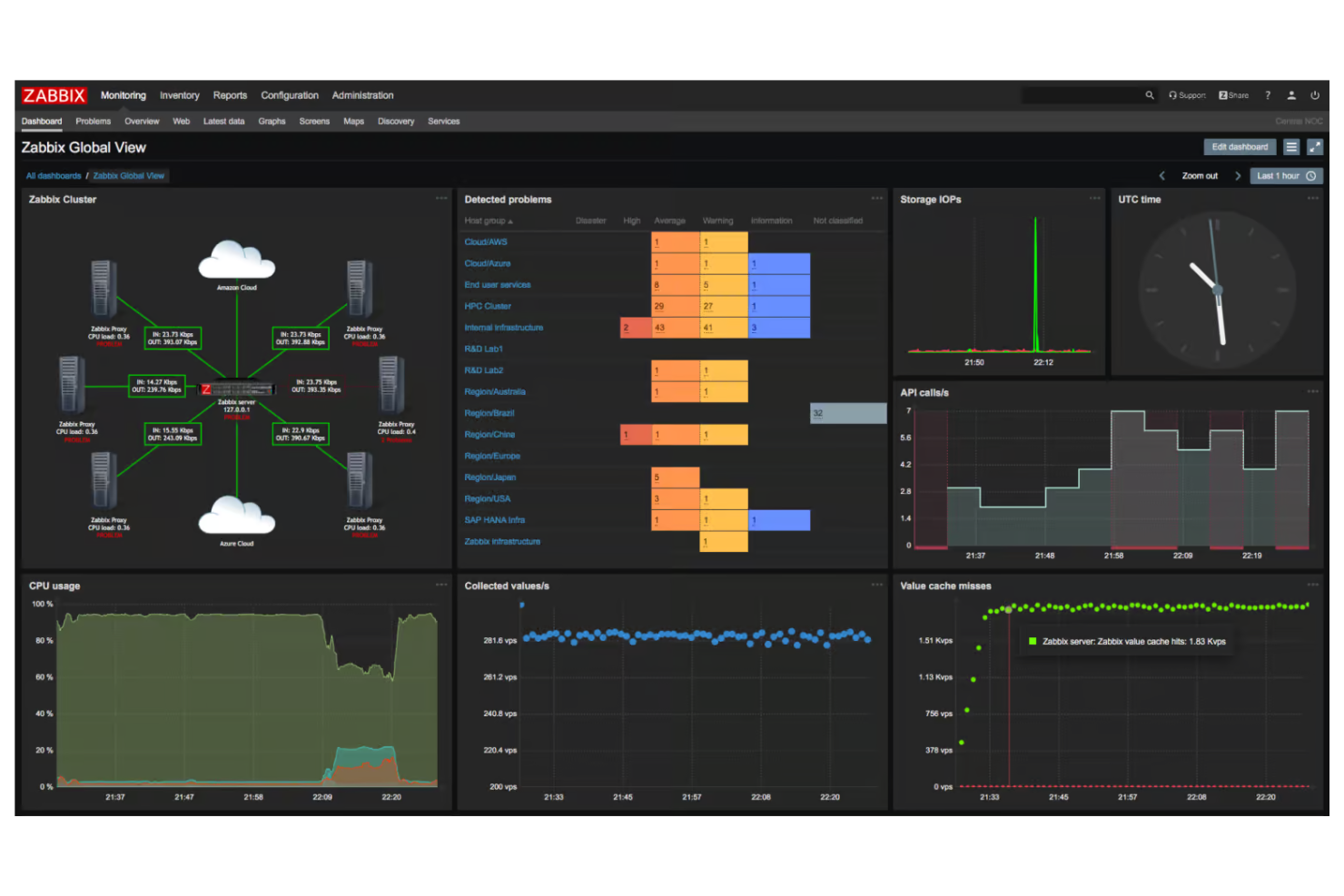
Zabbix is an open-source monitoring platform designed for IT teams that want full control over their network visibility and customization. It’s a strong fit for organizations with technical resources that prefer self-hosted solutions over proprietary alternatives like SolarWinds. If you need deep monitoring capabilities without vendor lock-in, Zabbix offers a flexible approach.
Who Is Zabbix Best For?
Zabbix is a strong choice for IT teams in mid-sized to large enterprises that want open-source, self-hosted network monitoring with extensive customization options.
Why Zabbix Is a Good SolarWinds Competitor
What sets Zabbix apart as a SolarWinds competitor is its open-source approach to network visibility. I picked it because you can deploy Zabbix on your own infrastructure and customize every aspect of monitoring, alerting, and reporting. Its template-driven monitoring lets you track a wide range of devices and services, while the flexible data collection methods support SNMP, IPMI, JMX, and more.
For IT teams that want transparency and control without vendor restrictions, Zabbix offers a compelling alternative.
Zabbix Key Features
Some other features in Zabbix that help IT teams manage complex environments include:
- Role-based access control: Assign granular permissions to users and groups for secure management and data access.
- Customizable dashboards: Build visual dashboards to monitor key metrics and system health in real time.
- Distributed monitoring: Monitor multiple sites and remote locations from a single Zabbix instance.
- Event correlation: Automatically link related alerts to reduce noise and highlight root causes.
Zabbix Integrations
Integrations include AWS, Microsoft Azure, Google Cloud, Cisco, VMware, ServiceNow, Slack, Jira, Grafana, and Oracle.
Pros and Cons
Pros:
- Strong alerting and escalation configuration options
- Supports distributed monitoring across multiple environments
- Highly customizable monitoring with full control
Cons:
- Steep learning curve for new users
- Requires manual setup and ongoing maintenance

Best with real-time analytics for digital operations

New Relic is a cloud-based observability platform designed for IT teams and digital operations leaders who need deep visibility into their systems. It’s a strong choice for organizations that want to correlate performance data with user impact with application and infrastructure performance data.
If you’re looking to troubleshoot incidents faster and understand the root cause of user issues, New Relic brings monitoring and support insights together in one place.
Who Is New Relic Best For?
New Relic is a good fit for IT operations teams and digital businesses that need real-time observability across complex cloud and application environments.
Why New Relic Is a Good SolarWinds Competitor
What sets New Relic apart is its focus on real-time analytics for digital operations, which is especially valuable for support teams managing complex environments. I picked New Relic because it lets you connect application performance with user experience in terms of live application and infrastructure data, so you can quickly pinpoint the root cause of user issues.
Its query builder and customizable dashboards make it easy to visualize and analyze operational data as incidents unfold. For teams that need to respond to problems as they happen, New Relic’s real-time insights offer a clear advantage over more traditional monitoring tools.
New Relic Key Features
Some other features in New Relic that help support and IT teams manage digital operations include:
- Synthetics Monitoring: Simulate user interactions to proactively test application performance and availability.
- Distributed Tracing: Track requests as they move through microservices and infrastructure to identify bottlenecks.
- Error Analytics: Aggregate and analyze error data across applications for faster troubleshooting.
- Service Maps: Visualize dependencies and relationships between services, databases, and infrastructure components.
New Relic Integrations
Integrations include Amazon Web Services, Microsoft Azure, Google Cloud Platform, Kubernetes, Prometheus, SAP, ServiceNow, Pivotal Cloud Foundry, Slack, and GitHub.
Pros and Cons
Pros:
- Custom dashboards for flexible data analysis
- Deep visibility into distributed systems and applications
- Real-time analytics for faster issue detection
Cons:
- Setup complexity for hybrid environments
- Alert noise can require manual adjustment

Best for cloud-native log management
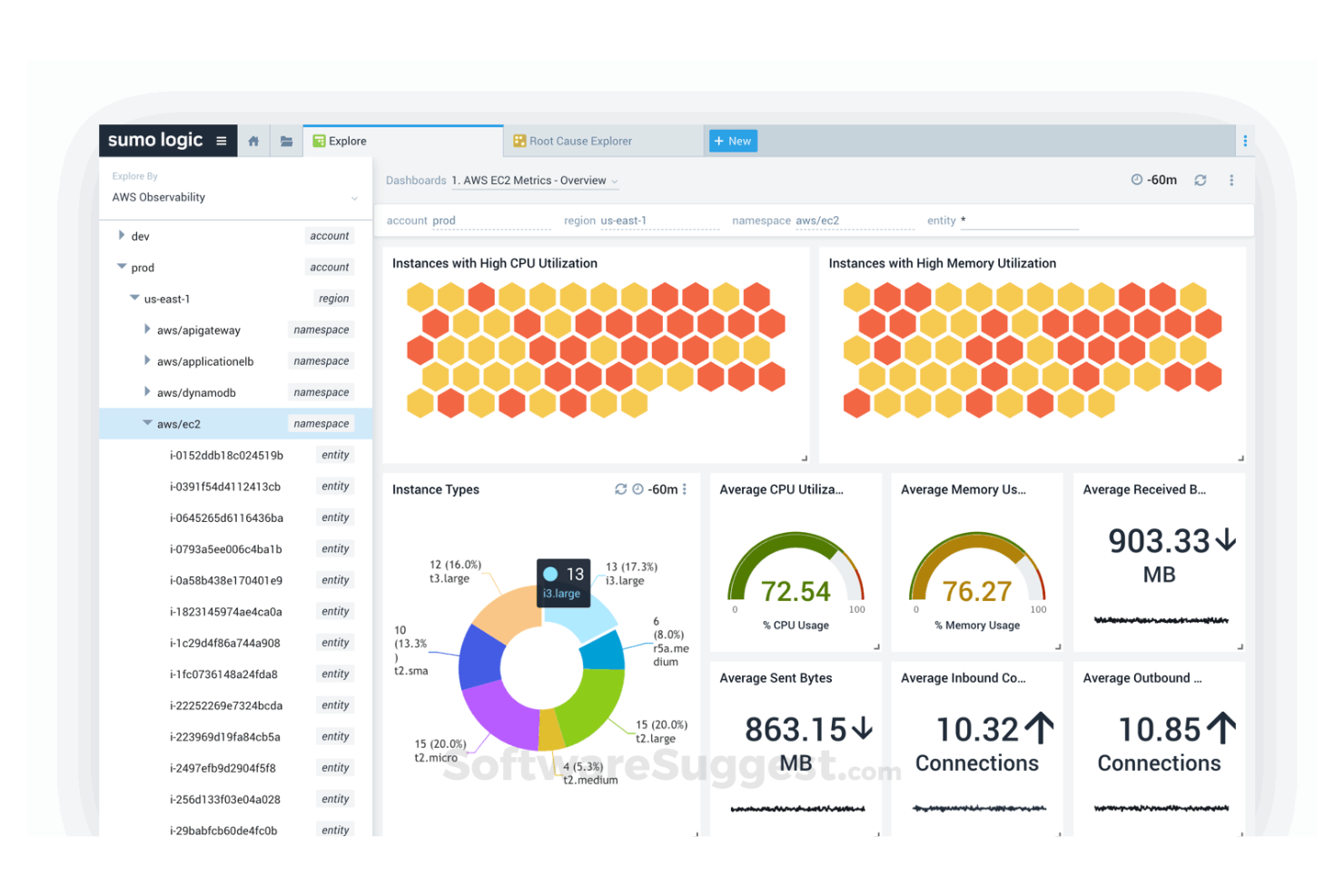
Sumo Logic offers a cloud-native platform for log management and analytics, designed for teams that need real-time visibility into complex IT environments. It’s a strong fit for organizations with distributed systems or hybrid cloud infrastructure that want to centralize monitoring and troubleshooting.
If your team needs to quickly detect, investigate, and resolve incidents across multiple platforms, Sumo Logic provides the tools to make that possible.
Who Is Sumo Logic Best For?
Sumo Logic is a strong choice for IT operations teams and DevOps professionals in mid-sized to large organizations managing cloud-native or hybrid environments.
Why Sumo Logic Is a Good SolarWinds Competitor
Unlike many traditional monitoring tools, Sumo Logic is purpose-built for cloud-native log management, making it a strong alternative for teams with modern, distributed environments. I picked Sumo Logic because it offers real-time log ingestion and analytics, which help support teams quickly identify and resolve incidents across cloud platforms.
Its scalable architecture means you can centralize logs from multiple sources without worrying about infrastructure limits. For organizations prioritizing rapid troubleshooting and visibility in dynamic cloud or hybrid setups, Sumo Logic delivers capabilities that SolarWinds and other legacy solutions may not match.
Sumo Logic Key Features
Some other features in Sumo Logic that help support and IT teams manage logs and incidents include:
- Role-based access controls: Assign granular permissions to users and teams for secure data access.
- Pre-built compliance dashboards: Use templates for monitoring and reporting on regulatory requirements like PCI DSS and HIPAA.
- Alert scheduling and suppression: Set custom alert windows and suppress notifications during maintenance or known events.
- Data retention management: Configure how long logs are stored and automate archival or deletion based on policy.
Sumo Logic Integrations
Integrations include AWS CloudTrail, Amazon S3, Apache, Kubernetes, Linux, NGINX, PCI Compliance, Azure Web Apps, Google Cloud Functions, and Office 365, among others. An API is also available, which supports connections with third-party integration tools for custom workflows and data ingestion.
Pros and Cons
Pros:
- Pre-built compliance dashboards support audits
- Scalable data ingestion for large environments
- Real-time log analytics for fast troubleshooting
Cons:
- Limited infrastructure monitoring capabilities
- Query language can be difficult for beginners

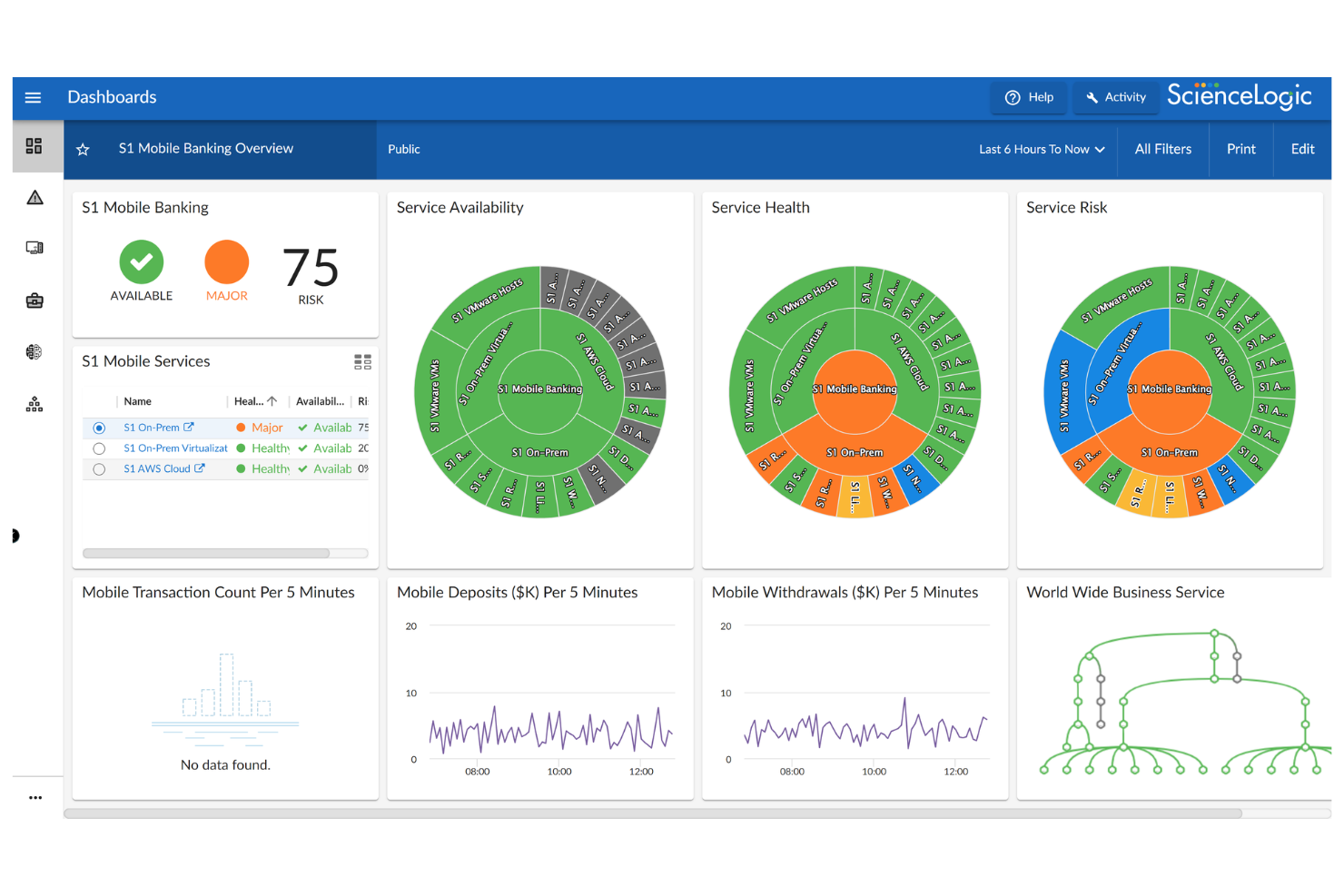
ScienceLogic offers an IT monitoring and AIOps platform designed for organizations managing complex, distributed infrastructure. It’s a strong fit for IT teams in enterprises or service providers who need unified visibility across on-premises, cloud, and hybrid environments. If you’re looking for a solution that goes beyond traditional tools by automating incident detection and providing deep infrastructure insights, ScienceLogic is worth considering.
Who Is ScienceLogic Best For?
ScienceLogic is a strong choice for enterprise IT operations teams and managed service providers overseeing multi-cloud and hybrid infrastructure.
Why ScienceLogic Is a Good SolarWinds Competitor
What sets ScienceLogic apart is its focus on tracking service health across multiple cloud providers and hybrid environments. I picked ScienceLogic because it automatically discovers and maps dependencies between services, applications, and infrastructure, giving IT teams a unified view of service health.
Its event correlation and automated incident response features help reduce noise and speed up troubleshooting in complex, distributed setups. For organizations that need to monitor and maintain uptime across AWS, Azure, Google Cloud, and on-premises systems, ScienceLogic offers visibility and automation that SolarWinds and other legacy tools may not provide.
ScienceLogic Key Features
Some other features in ScienceLogic that help IT and service teams manage complex environments include:
- Runbook automation: Automate routine incident response tasks and remediation workflows directly from the platform.
- Custom dashboard builder: Create tailored dashboards to visualize metrics, alerts, and service health for different teams or stakeholders.
- Ticketing system integrations: Connect with popular ITSM and help desk platforms like ServiceNow and BMC Remedy for streamlined incident management.
- Role-based access controls: Assign granular permissions to users and teams to ensure secure access to monitoring data and actions.
ScienceLogic Integrations
Integrations include ServiceNow, Microsoft, Cisco, Amazon Web Services, VMware, Oracle, Kubernetes, Docker, Net-SNMP, and NVIDIA.
Pros and Cons
Pros:
- Supports multi-tenant environments for MSPs
- Flexible runbook automation for incident response
- Deep integration with ServiceNow for ticketing
Cons:
- Fewer built-in network device monitoring tools
- Initial setup can be complex for enterprises

Best with sensor-based infrastructure monitoring
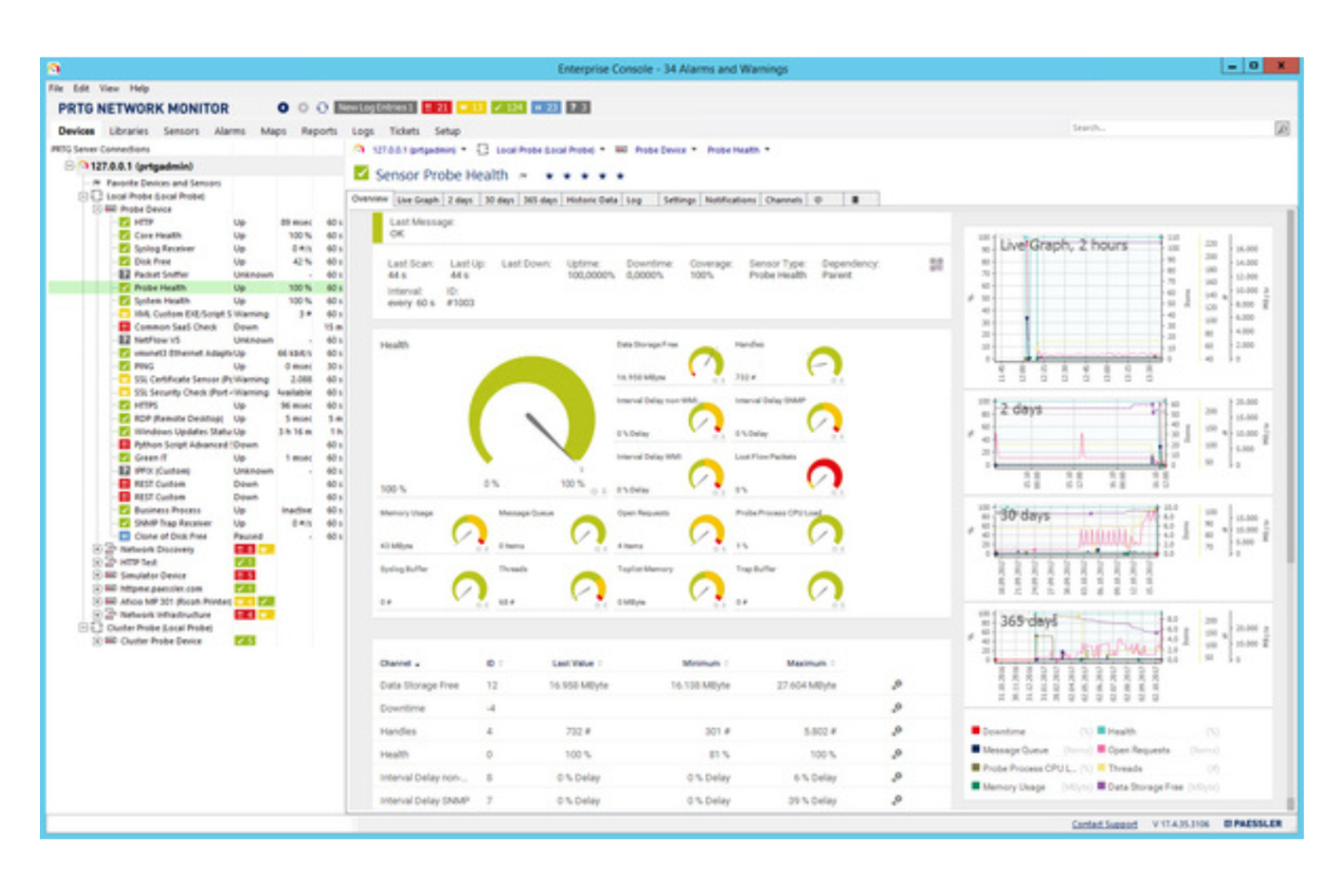
PRTG is a network monitoring platform designed for IT teams that need real-time visibility into their infrastructure. It’s a strong fit for organizations that want to proactively detect issues across devices, servers, and applications from a single dashboard. If you’re looking for a SolarWinds alternative that emphasizes unified monitoring and customizable alerts, PRTG is worth considering.
Who Is PRTG Best For?
PRTG is a strong choice for IT administrators in mid-sized to large enterprises that need centralized infrastructure monitoring across complex networks.
Why PRTG Is a Good SolarWinds Competitor
What makes PRTG a strong SolarWinds competitor is its sensor-based approach to infrastructure monitoring. I picked it because you can deploy individual sensors for specific devices, applications, or services, giving you granular control over what you monitor and alert on. This flexibility lets you tailor monitoring to your environment’s unique needs, whether you’re tracking bandwidth, server health, or application uptime. For IT teams that want to avoid one-size-fits-all monitoring and need detailed visibility, PRTG’s sensor model stands out.
PRTG Key Features
Some other features in PRTG that help IT teams manage and monitor their environments include:
- Auto-discovery: Automatically detects devices and services on your network to simplify initial setup and ongoing management.
- Custom dashboards: Build personalized dashboards to visualize key metrics and monitor critical systems at a glance.
- Multi-location monitoring: Monitor distributed networks and remote sites from a single, unified interface.
- Role-based access control: Assign user permissions to control who can view or modify specific monitoring data and settings.
PRTG Integrations
Integrations include Microsoft Azure, Amazon Web Services, Google Cloud Platform, Cisco, Fortinet, Bosch Rexroth, Brocade, GarrettCom, Ruckus, and ADTRAN.
Pros and Cons
Pros:
- Custom dashboards support tailored monitoring views
- Auto-discovery simplifies network setup
- Sensor-based monitoring enables granular control
Cons:
- Alert configuration can be time-consuming
- Reporting features are less advanced
New Product Updates from Paessler PRTG
Paessler PRTG Improves Route Monitoring and Auto-Discovery
Paessler PRTG adds route-change alerts, faster traceroute processing, updated auto-discovery defaults, and a Proxmox template. This improves network monitoring and setup. For more information, visit Paessler’s official site.
 .
.
Auvik
Best for automated network mapping
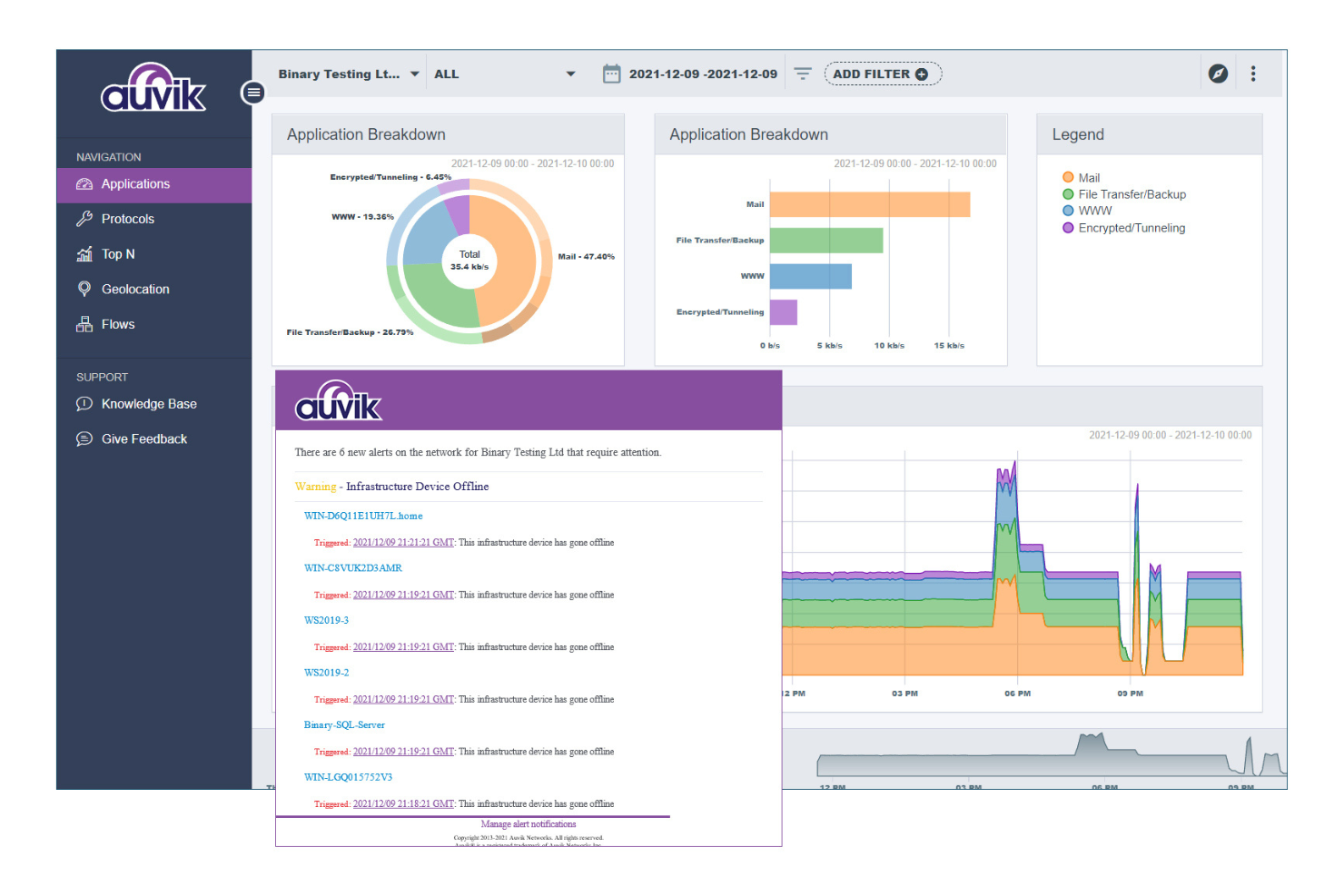
Auvik is a cloud-based network management platform designed for IT teams that need deep visibility into their network infrastructure. It’s especially useful for managed service providers and organizations with distributed networks who want to simplify troubleshooting and reduce manual network tasks. If you’re evaluating SolarWinds competitors, Auvik stands out for its focus on automated network discovery and real-time monitoring.
Who Is Auvik Best For?
Auvik is a strong choice for IT teams and managed service providers overseeing complex or distributed network environments.
Why Auvik Is a Good SolarWinds Competitor
When I compare Auvik to SolarWinds, its automated network mapping stands out as a major differentiator. Auvik continuously scans and updates network topology, so IT teams always have an up-to-date visual map of every connected device. This automation helps teams quickly pinpoint issues and understand network relationships without manual intervention. For organizations that need reliable, real-time network visibility, Auvik’s mapping and monitoring features make it a compelling alternative.
Auvik Key Features
Some other features in Auvik that help IT and support teams manage networks more efficiently include:
- Automated configuration backup: Auvik automatically backs up device configurations, making it easy to restore settings after outages or changes.
- Network traffic analysis: The platform provides detailed insights into bandwidth usage and traffic patterns across the network.
- Role-based access control: Assign granular permissions to users based on their responsibilities and access needs.
- Alerting and notification system: Set up customizable alerts for network events and receive notifications through email or integrated messaging platforms.
Auvik Integrations
Integrations include ConnectWise Manage, Autotask PSA, ServiceNow, Freshdesk, Slack, Microsoft Teams, PagerDuty, Opsgenie, IT Glue, and Dell.
Pros and Cons
Pros:
- Configuration backup protects network settings
- Real-time alerts support faster issue response
- Automated network mapping improves visibility
Cons:
- Limited historical data retention options
- Advanced reporting features are limited
New Product Updates from Auvik
Auvik Aurora Adds AI Alert Creation and Troubleshooting
Auvik Aurora adds AI-assisted alert creation and troubleshooting with natural-language prompts and guided investigation. This helps teams create alerts and diagnose issues faster. For more information, visit Auvik’s official site.
 .
.
Best for AI-powered root cause analysis
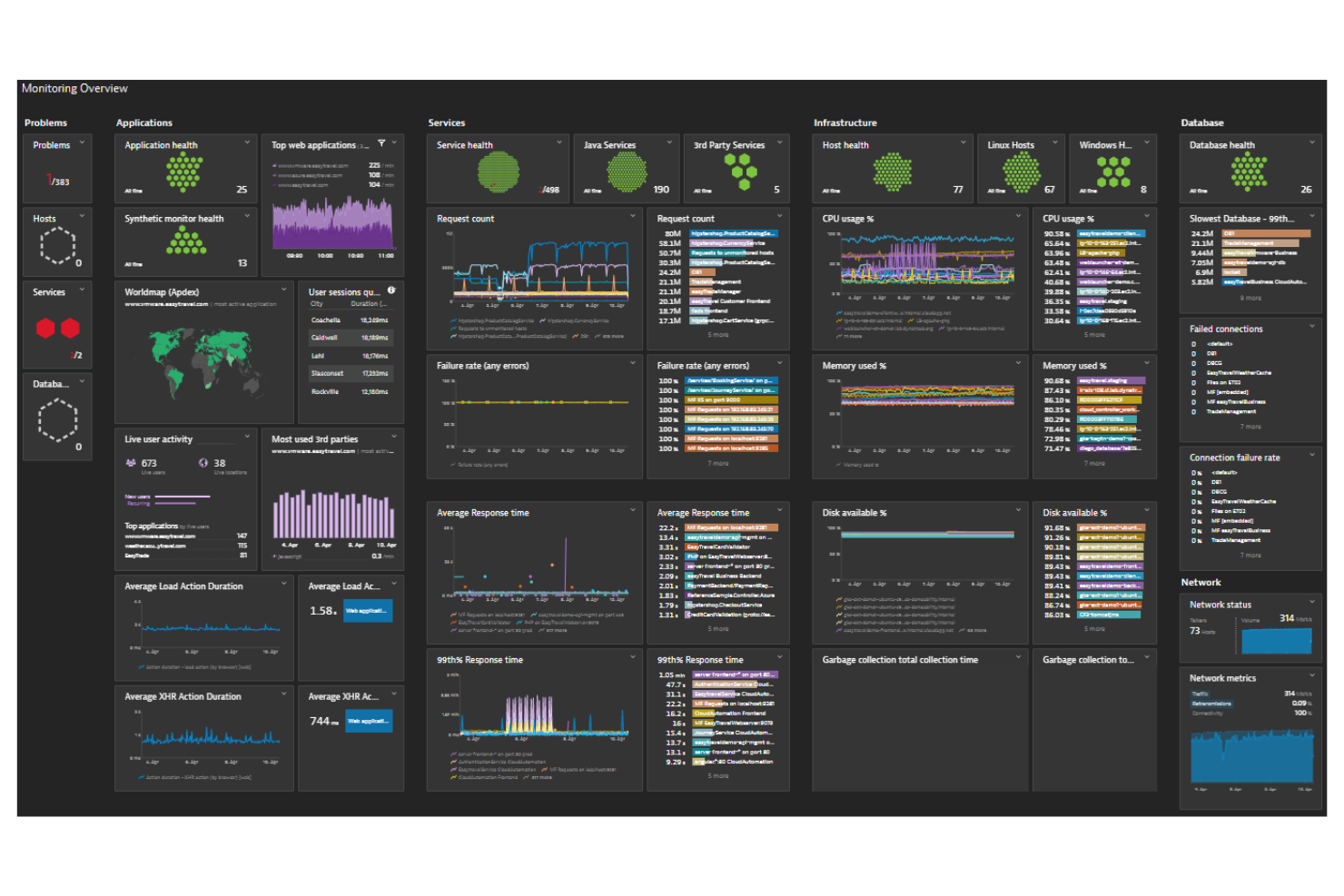
Dynatrace is a digital performance monitoring platform designed for IT teams and service operations leaders who need deep visibility into modern cloud environments. It’s especially useful for organizations that want to focus on the health of their applications and infrastructure.
If you’re looking to reduce incident resolution times and proactively address user issues, Dynatrace brings monitoring, automation, and support insights together in one place.
Who Is Dynatrace Best For?
Dynatrace is a strong choice for IT operations teams and enterprises managing complex, cloud-native environments that require automated monitoring and rapid incident response.
Why Dynatrace Is a Good SolarWinds Competitor
What makes Dynatrace stand out is its AI-powered root cause analysis, which is especially valuable for support teams dealing with complex, multi-layered systems. I picked Dynatrace because its Davis AI engine automatically pinpoints the source of incidents across applications, infrastructure, and user experience data.
This means your team can move from alert to actionable insight without manual correlation or guesswork. For organizations that need to resolve issues quickly and reduce downtime, Dynatrace’s automated problem detection and contextual analysis offer a clear advantage over traditional monitoring tools.
Dynatrace Key Features
Some other features in Dynatrace that help support and IT teams manage digital operations include:
- Full-stack monitoring: Dynatrace tracks performance across applications, infrastructure, and networks in real time.
- Session replay: This feature lets you view user sessions to diagnose issues from the end-user perspective.
- Custom dashboards: Build tailored dashboards to visualize key metrics and monitor service health at a glance.
- Automated deployment monitoring: Dynatrace automatically detects and monitors new deployments without manual configuration.
Dynatrace Integrations
Integrations include AWS, Microsoft Azure, Google Cloud Platform, Kubernetes, Slack, Jira, PagerDuty, GitHub, JetBrains, and ServiceNow.
Pros and Cons
Pros:
- Session replay helps diagnose user experience issues
- Full-stack monitoring across applications and infrastructure
- AI-driven root cause analysis reduces troubleshooting time
Cons:
- Initial setup can be complex for some teams
- Alert tuning may be required to reduce noise
Datadog
Best for unified monitoring across cloud environments
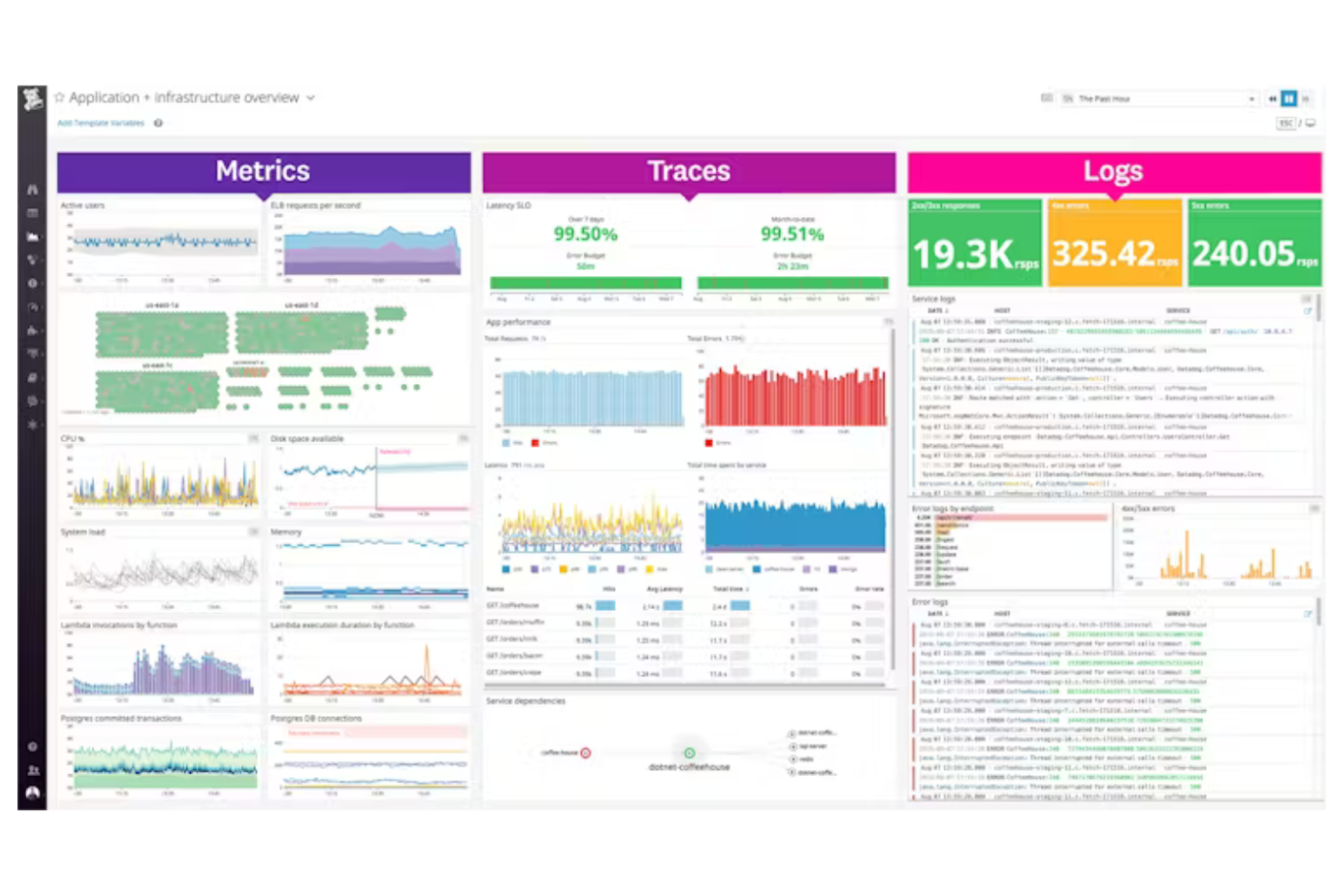
Datadog is a cloud-based monitoring and analytics platform designed for IT teams managing complex environments. It’s a strong fit for organizations that need deep visibility into infrastructure, applications, and logs from a single dashboard.
Who Is Datadog Best For?
Datadog suits IT operations teams in mid-sized to large enterprises that need unified monitoring across cloud and hybrid environments.
Why Datadog Is a Good SolarWinds Competitor
Datadog stands out for teams that need unified monitoring across cloud environments with a strong focus on digital experience and performance visibility. I picked Datadog because it brings infrastructure, application, and log monitoring together in one platform, making it easier to correlate system performance with real user impact.
Its customizable dashboards let you visualize performance data from multiple sources, so you can quickly identify and resolve issues affecting users. For organizations managing distributed or hybrid IT infrastructure, Datadog’s unified view helps reduce blind spots and improve overall system performance.
Datadog Key Features
Some other Datadog features that help IT teams manage support and monitoring together include:
- Incident Management: Create, track, and resolve incidents directly within the platform, linking them to relevant monitoring data.
- Alerting and Notifications: Set up custom alerts and notifications based on specific metrics or thresholds to keep teams informed of critical issues.
- Role-Based Access Control: Assign granular permissions to users, ensuring the right team members have access to the right data and tools.
- API Access: Integrate Datadog with other IT and business systems using robust API endpoints for automation and data sharing.
Datadog Integrations
Integrations include AWS, Azure, Google Cloud Platform, Slack, Jira, PagerDuty, GitHub, GitLab, Docker, and Kubernetes.
Pros and Cons
Pros:
- Automated anomaly detection improves issue identification
- Customizable dashboards for detailed performance visibility
- Real-time monitoring across cloud and hybrid environments
Cons:
- Alert noise may require ongoing tuning
- Initial setup can be complex for hybrid environments
Altri concorrenti di SolarWinds
Ecco alcuni concorrenti aggiuntivi di SolarWinds che non sono entrati nella mia selezione, ma che vale comunque la pena prendere in considerazione:
- Microsoft
For integration with Microsoft 365 apps
- Grafana Labs
For customizable dashboard visualizations
- Cisco (Splunk)
With advanced security event correlation


How I Evaluate SolarWinds Competitors
I look at every platform across two layers: the baseline network and application monitoring that a CX operations team requires, and the differentiators that make one tool a better fit than another.
Core Functionality (Table Stakes For This List)
When I'm selecting tools for my list, I rank each one on a scale from 0 (does not offer the functionality) to 5 (excels in this area) for each core functionality listed below. Then, I calculate the tool's total score into a percentage. Each tool needs to achieve a minimum total score of 65% to be considered for inclusion.
- Network Performance Monitoring: I evaluate how well each tool tracks latency, packet loss, and bandwidth across the infrastructure that supports live chat, voice queues, and customer portals.
- Application Performance Monitoring: Each platform's ability to trace response times and errors across CX apps matters—especially for support ticket systems and self-service portals.
- Real-Time Alerting: I look for configurable, multi-channel alerts with escalation policies that help on-call teams catch degraded service before customers start flooding the queue.
- Digital Experience Monitoring: Synthetic checks and real user monitoring help gauge what customers actually experience, so I check whether a tool covers both sides of that equation.
- Dashboards & Reporting: I evaluate whether dashboards support SLA tracking and historical trend views that CX operations managers can share with leadership without extra formatting.
- Multi-Source Integrations: The tool should connect with contact center platforms, CRMs, and ITSM systems—tools like Salesforce, ServiceNow, or Genesys that sit at the center of most CX stacks.
Once I have a list of tools that meet this criteria, I consider what sets each platform apart.
Differentiating Factors (What Sets Vendors Apart)
Here's how I compare and contrast different vendors:
Standout Features
AI-powered anomaly detection is a big one—I look for tools that surface unusual patterns in CX system behavior before agents or customers notice. Root cause analysis pairs well here, especially when a tool can correlate events across your network, apps, and contact center stack to pinpoint exactly where a problem started. I also evaluate automated remediation capabilities, like triggering a server restart or rerouting traffic when a customer portal goes down during peak hours.
Beyond Features
Deployment flexibility matters when your CX infrastructure spans on-premise contact centers and cloud-hosted support tools. I check whether a platform supports hybrid setups and scales across distributed sites. Pricing and licensing models also weigh heavily—I evaluate whether per-node or per-data-volume structures align with how CX teams grow. Compliance is another key factor, especially SOC 2, GDPR, and PCI DSS certifications that govern how customer interaction data is stored and accessed.
Perché cercare un'alternativa a SolarWinds?
Sebbene SolarWinds sia un'opzione solida per il monitoraggio dell'infrastruttura IT, esistono diversi motivi per cui i team valutano soluzioni alternative. Potresti cercare un'alternativa a SolarWinds perché…
- Hai bisogno di una visibilità più completa negli ambienti multicloud e ibridi
- Desideri informazioni più approfondite sull'esperienza digitale e sulle prestazioni percepite dagli utenti
- Cerchi prezzi più flessibili o trasparenti
- Hai bisogno di un'interfaccia più moderna o personalizzabile
- Desideri migliorare le funzionalità di monitoraggio remoto e automazione
- Richiedi funzionalità avanzate come l'analisi basata sull'intelligenza artificiale o il rilevamento delle anomalie
Se una di queste esigenze ti è familiare, sei nel posto giusto. Gli strumenti presenti in questo elenco offrono alternative potenti per i team che desiderano ottimizzare le prestazioni della rete, migliorare l'esperienza degli utenti e ottenere una visibilità più completa sulla propria infrastruttura IT.
Funzionalità principali di SolarWinds
Ecco alcune delle caratteristiche principali di SolarWinds, per aiutarti a mettere a confronto ciò che offrono le soluzioni alternative:
- Monitoraggio delle prestazioni di rete (NPM): Monitora lo stato della rete, l'utilizzo della larghezza di banda e le prestazioni dei dispositivi su router, firewall e altri componenti dell'infrastruttura
- Monitoraggio remoto: Fornisce visibilità sui sistemi e sugli ambienti distribuiti, supportando sia le implementazioni locali sia quelle SaaS
- Monitoraggio dell'esperienza digitale: Misura il modo in cui gli utenti interagiscono con applicazioni e servizi per identificare i colli di bottiglia nelle prestazioni
- Individuazione delle risorse: Rileva automaticamente e inventaria i componenti dell'infrastruttura presenti nel tuo ambiente
- Avvisi e notifiche: Invia avvisi in tempo reale in base a soglie di prestazione o anomalie
- Dashboard personalizzate: Visualizza lo stato del sistema, le metriche delle prestazioni e l'impatto sugli utenti in un'interfaccia intuitiva
- Report e analisi: Offre informazioni dettagliate sulle tendenze, sui tempi di attività e sulle opportunità di ottimizzazione delle prestazioni
- Scalabilità e componenti aggiuntivi: Supporta funzionalità avanzate e l'espansione tramite componenti aggiuntivi modulari
- Integrazione con gli strumenti dell'infrastruttura: Si connette alle piattaforme cloud e ad altre soluzioni di monitoraggio per offrire una visibilità unificata
- Accesso da dispositivi mobili: Consente ai team di monitorare e risolvere i problemi da qualsiasi luogo