

10 CRM per piccole imprese per il 2026

10 Elenco dei migliori CRM per piccole imprese


Un CRM per piccole imprese è una piattaforma per la gestione delle relazioni con i clienti e un software CRM progettato per aiutarti a organizzare i contatti, monitorare le vendite e gestire le interazioni con i clienti durante la crescita della tua attività. Se stai cercando il miglior CRM per una piccola impresa o il miglior software CRM, probabilmente cerchi un sistema CRM adatto alle dimensioni, al budget e al flusso di lavoro del tuo team, senza aggiungere complessità o costi generali.
Scegliere il CRM giusto aiuta a migliorare l'esperienza dei clienti, semplificare la gestione dei dati e supportare ogni fase del ciclo di vendita. Molte piattaforme moderne sono facili da usare, consentendo ai team di utilizzare più facilmente gli strumenti CRM per gestire i potenziali clienti, ricontattare i potenziali clienti e mantenere solide relazioni con i clienti. In questo elenco troverai una serie di opzioni CRM pensate per le piccole imprese, con informazioni sulle funzionalità e sui casi d'uso per aiutarti a prendere una decisione informata.
Perché fidarsi dei nostri consigli sui software
Il nostro team testa e recensisce software dal 2012. In quanto leader CX noi stessi, sappiamo quanto sia difficile — e importante — scegliere il software giusto.
Per questa guida, abbiamo valutato gli strumenti attraverso test pratici e ricerche indipendenti, assegnando un punteggio agli strumenti in base ai nostri criteri di selezione.
Le nostre recensioni riflettono il nostro giudizio editoriale umano, non un discorso di vendita.
Tabella comparativa: CRM per piccole imprese
| Tool | Best For | Trial Info | Price | ||
|---|---|---|---|---|---|
| 1 | Ideale per una configurazione rapida e un apprendimento immediato | Prova gratuita di 30 giorni disponibile | Da $15/utente/mese | Website | |
| 2 | Ideale per la gestione dei contatti orientata all’azione | Prova gratuita di 21 giorni + demo gratuita disponibile | Da $9.95/utente/mese | Website | |
| 3 | Ideale per strumenti di marketing e vendite integrati | Piano gratuito + demo gratuita disponibili | A partire da $7/utente/mese (fatturazione annuale) | Website | |
| 4 | Ideale per il monitoraggio visivo delle trattative | Prova gratuita di 14 giorni disponibile | Da $14/postazione/mese (fatturato annualmente) | Website | |
| 5 | Ideale per funzionalità email e pagamento integrate | Prova gratuita di 14 giorni + demo gratuita disponibile | Da $299/mese (fatturazione annuale) | Website | |
| 6 | Ideale per gestire pipeline di vendita semplici | Prova gratuita di 15 giorni + piano gratuito disponibile | Da $7/utente/mese (fatturato annualmente) | Website | |
| 7 | Ideale per l'integrazione con Microsoft 365 | Prova gratuita di 30 giorni disponibile | Da $65/utente/mese (fatturazione annuale) | Website | |
| 8 | Ideale per il punteggio lead basato sull’IA | Prova gratuita di 21 giorni + demo gratuita disponibile | A partire da $9/utente/mese (fatturato annualmente) | Website | |
| 9 | Ideale per opzioni avanzate di scalabilità | Prova gratuita di 30 giorni + demo gratuita disponibile | Da $25/utente/mese (fatturato mensilmente o annualmente) | Website | |
| 10 | Ideale per flussi di automazione personalizzabili | Prova gratuita di 15 giorni + piano gratuito disponibile | Da $14/utente/mese (fatturato annualmente) | Website |
Recensioni dei CRM per piccole imprese
Di seguito trovi le mie sintesi dettagliate dei CRM per piccole imprese inclusi nel mio elenco. Le mie recensioni offrono uno sguardo approfondito sulle funzionalità, sui migliori casi d’uso e sulle integrazioni di ciascuna piattaforma, per aiutarti a trovare quella più adatta a te.

Ideale per una configurazione rapida e un apprendimento immediato
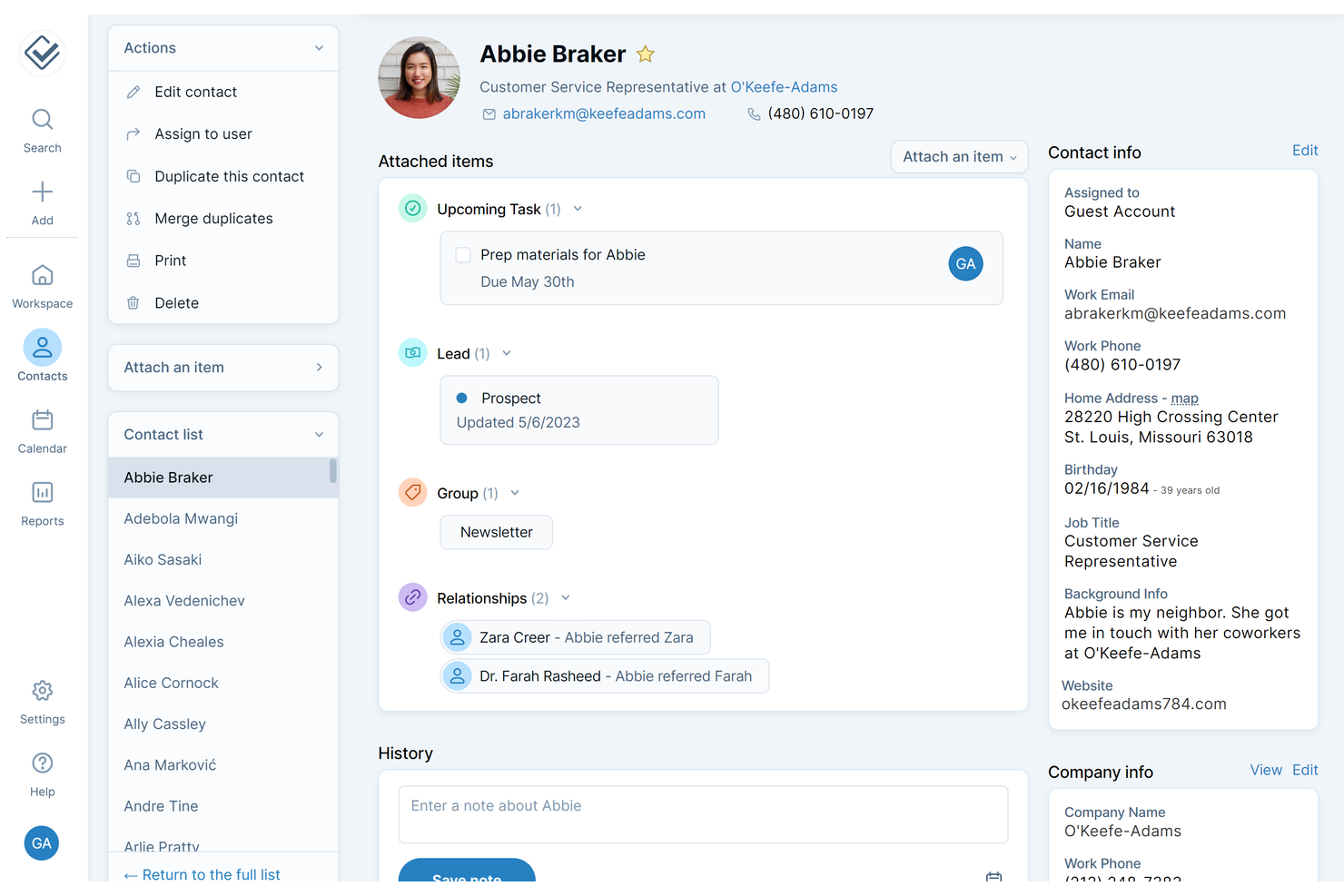
Se cerchi un CRM facile da configurare e semplice da usare, Less Annoying CRM merita sicuramente attenzione. Questa piattaforma è pensata per i proprietari di piccole imprese e per i team che non hanno tempo per lunghe procedure di onboarding o ripide curve di apprendimento. Ti aiuta a organizzare i contatti, monitorare i follow-up e gestire le vendite senza sommergerti con funzionalità superflue.
Perché ho scelto Less Annoying CRM
Per le piccole imprese che hanno bisogno di essere operative rapidamente, Less Annoying CRM si distingue per la sua configurazione immediata e la curva di apprendimento minima. Ho scelto questo strumento perché permette di importare i contatti in pochi clic e di iniziare subito a monitorare i lead, senza lunghi processi di onboarding. Il cruscotto mantiene le attività e i follow-up sempre in primo piano, così saprai sempre cosa richiede la tua attenzione. La semplice visualizzazione del pipeline ti permette inoltre di vedere facilmente lo stato di ogni trattativa, soluzione ideale per i team che desiderano chiarezza senza complessità aggiuntive.
Caratteristiche principali di Less Annoying CRM
Altre funzionalità rendono Less Annoying CRM una scelta pratica per i team delle piccole imprese:
- Integrazione con il calendario: Sincronizza gli eventi e le attività del CRM con Google Calendar per mantenere gli orari sempre allineati.
- Campi personalizzati: Aggiungi campi alle schede contatto per monitorare informazioni specifiche per la tua attività.
- Permessi utente: Controlla cosa ogni membro del team può visualizzare o modificare all'interno del CRM.
- Email agenda giornaliera: Ricevi ogni mattina nella tua casella di posta un riepilogo delle tue attività e appuntamenti.
Integrazioni di Less Annoying CRM
Le integrazioni includono Zapier, Mailchimp, Google Calendar, Google Contacts, Outlook Calendar, QuickBooks Sync, Google Forms Canvass e altro ancora.
Pros and Cons
Pros:
- Un prezzo fisso mensile semplifica la pianificazione del budget
- La gestione contatti supporta campi personalizzati
- Le email agenda giornaliera aiutano a monitorare le attività
Cons:
- I report non includono analisi avanzate sulle vendite
- Nessuno strumento email marketing integrato
Ideale per la gestione dei contatti orientata all’azione
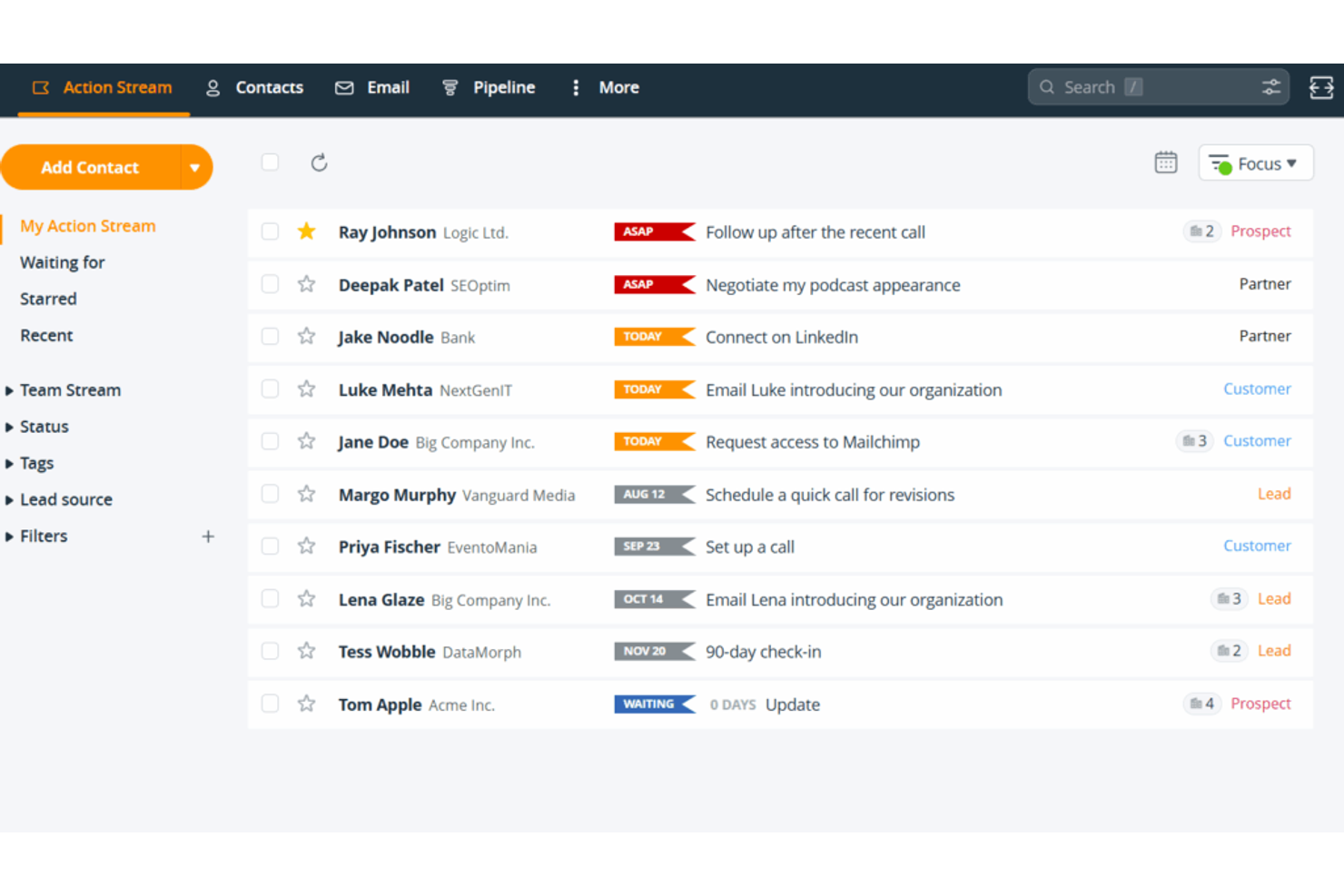
OnePageCRM adotta un approccio orientato alle attività per la gestione dei contatti, rendendolo adatto alle piccole imprese che desiderano trasformare ogni contatto in un prossimo passo concreto. I team di vendita e gli imprenditori individuali che faticano a mantenere lo slancio con i potenziali clienti possono utilizzare la sua interfaccia orientata all'azione per dare priorità ai follow-up. Lo strumento è particolarmente utile se desideri un CRM che ti aiuti a rimanere organizzato, sapendo sempre quale sia la prossima azione da compiere con ogni contatto.
Perché ho scelto OnePageCRM
Ciò che mi ha colpito di OnePageCRM è il suo focus unico nel trasformare la gestione dei contatti in una serie di azioni concrete. Invece di limitarsi a memorizzare le informazioni, la piattaforma ti invita ad assegnare una prossima azione a ogni contatto, così saprai sempre cosa fare dopo. Apprezzo come la funzione Action Stream mantenga le attività di follow-up sempre in evidenza, aiutando i team delle piccole imprese ad evitare di perdere delle opportunità. Questo approccio orientato all’azione è particolarmente utile per le aziende guidate dalle vendite che hanno bisogno di un metodo chiaro e organizzato per mantenere i potenziali clienti in movimento.
Funzionalità principali di OnePageCRM
Oltre alla gestione dei contatti orientata alle azioni, ho trovato utili anche queste funzionalità:
- Gestione della pipeline di vendita: Visualizza e monitora le trattative mentre avanzano tra le fasi personalizzabili della vendita.
- Sincronizzazione e modelli email: Collega il tuo account email per inviare, ricevere e utilizzare modelli direttamente dal CRM.
- Moduli di acquisizione lead: Crea moduli web per acquisire contatti e aggiungerli automaticamente alla tua lista.
- App mobile: Accedi ai contatti, aggiorna le azioni e gestisci le trattative dal tuo telefono o tablet.
Integrazioni di OnePageCRM
Le integrazioni includono Gmail, Outlook, Mailchimp, Zapier, Google Contacts, Google Calendar, Xero, Slack e FreshBooks. OnePageCRM offre inoltre un’API per integrazioni personalizzate.
Pros and Cons
Pros:
- La vista pipeline tiene traccia delle trattative per fase
- L’integrazione email traccia i messaggi nell’app
- I moduli lead acquisiscono i contatti dal sito web
Cons:
- L’importazione massiva richiede una mappatura manuale
- L’automazione è basilare e poco personalizzabile

HubSpot
Ideale per strumenti di marketing e vendite integrati
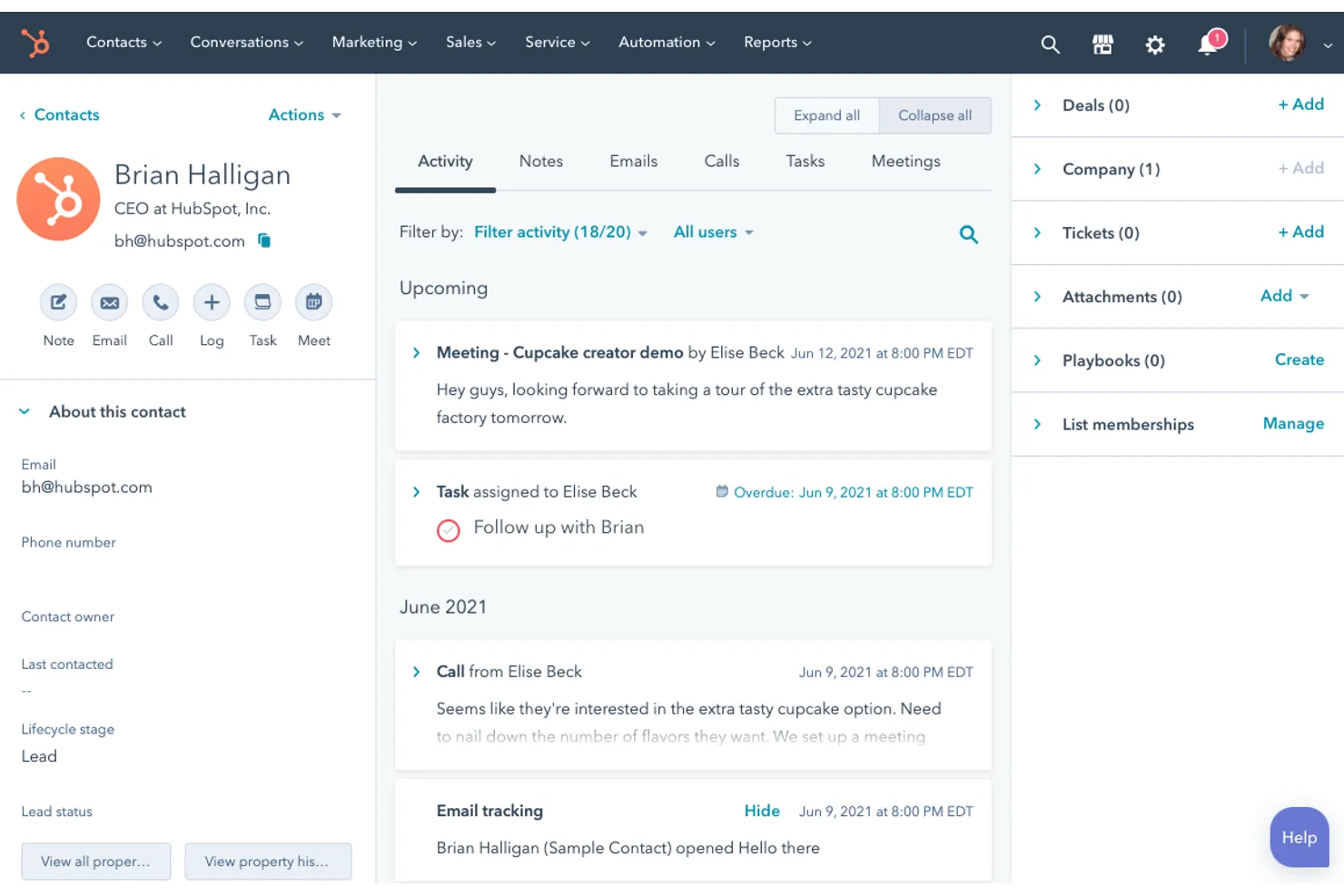
Se la tua piccola impresa ha bisogno di un CRM che riunisca marketing e vendite in un unico posto, HubSpot merita sicuramente attenzione. È un software CRM molto popolare per le piccole imprese, pensato per i team che desiderano gestire i contatti, automatizzare le campagne di marketing e monitorare le trattative senza dover usare molteplici strumenti. HubSpot include anche solide funzionalità di gestione dei lead, che aiutano i team a catturare, organizzare e coltivare i potenziali clienti durante tutto il processo di vendita. HubSpot si distingue per la sua piattaforma unificata, che rende più semplice allineare le attività di marketing e vendite man mano che l'azienda cresce.
Perché ho scelto HubSpot
Ciò che rende HubSpot una scelta solida come CRM per le piccole imprese è il modo in cui combina gli strumenti di marketing e vendite in una sola piattaforma. Puoi gestire email marketing, moduli di acquisizione lead e pipeline di vendita tutto da un'unica dashboard, aiutando i team a evitare silos di dati. Mi piace che le funzionalità di automazione di HubSpot permettano di creare flussi di lavoro che coltivano i lead e fanno avanzare le trattative senza intervento manuale. Questo approccio integrato supporta le piccole imprese che desiderano allineare marketing e vendite mentre crescono.
Funzionalità principali di HubSpot
Altre funzionalità rendono HubSpot una soluzione flessibile per le esigenze CRM delle piccole imprese:
- Gestione dei contatti: Archivia, organizza e segmenta tutte le informazioni sui clienti e i lead in un unico luogo.
- Live chat: Aggiungi una chat in tempo reale al tuo sito web per connetterti con i visitatori e rispondere immediatamente alle domande.
- Report personalizzati: Crea e condividi report su metriche di vendita, marketing e servizio utilizzando strumenti drag-and-drop.
- Monitoraggio dei documenti: Carica documenti di vendita e vedi quando i potenziali clienti li aprono o interagiscono con essi.
Integrazioni di HubSpot
Le integrazioni includono Salesforce, Shopify, WordPress, Slack, Zoom, Microsoft Teams, Gmail, Outlook, Facebook Ads, Google Ads e altro ancora. HubSpot offre anche un'API per integrazioni personalizzate.
Pros and Cons
Pros:
- Automazione marketing integrata nel CRM
- La pipeline usa trattative drag-and-drop
- I modelli email monitorano le campagne di comunicazione
Cons:
- I limiti sui contatti fanno aumentare i costi man mano che si cresce
- La personalizzazione delle fasi di trattativa è limitata nei piani inferiori

Ideale per il monitoraggio visivo delle trattative
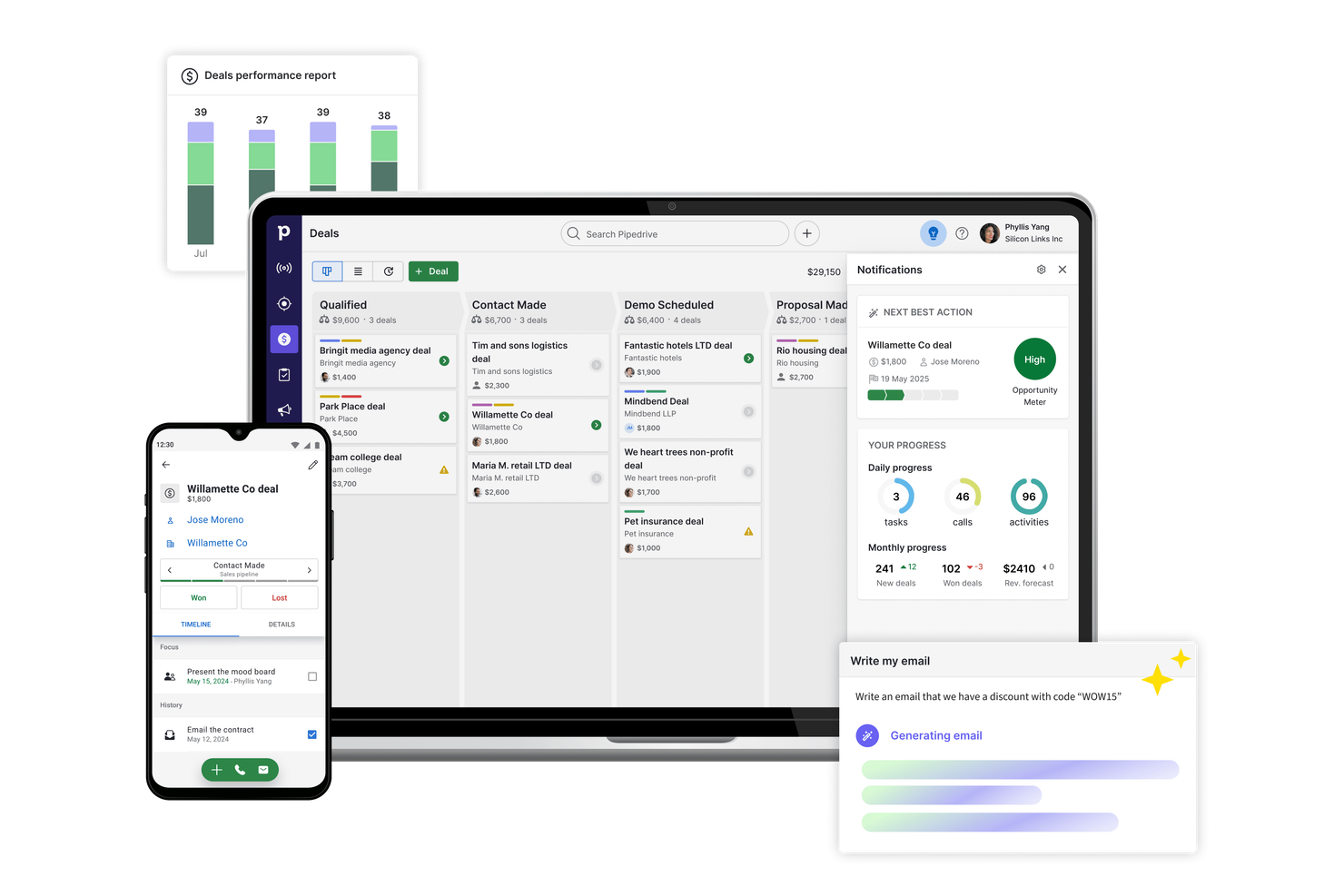
Se cerchi un CRM che metta la visibilità delle trattative al primo posto, Pipedrive è fatto per te. I team di vendita e i piccoli imprenditori che desiderano monitorare le opportunità in modo visivo possono utilizzare le pipeline drag-and-drop per mantenere ogni trattativa in movimento. Pipedrive è particolarmente utile per le aziende che devono gestire più fasi di vendita e dare priorità ai follow-up senza perdere di vista il passo successivo.
Perché ho scelto Pipedrive
Ciò che distingue Pipedrive per le piccole imprese è l'approccio fortemente visivo al monitoraggio delle trattative. La pipeline in stile kanban ti permette di spostare le trattative tra le varie fasi semplicemente trascinandole, così sai sempre cosa è in corso e cosa richiede attenzione. Apprezzo il fatto che tu possa personalizzare le fasi della pipeline in base al tuo specifico processo di vendita, facilitando l'adattamento man mano che l'azienda cresce. I promemoria delle attività di Pipedrive aiutano inoltre a non perdere mai di vista i follow-up, evitando che le trattative si disperdano.
Caratteristiche principali di Pipedrive
Altre funzionalità fanno di Pipedrive un'ottima opzione per le esigenze CRM delle piccole imprese:
- Integrazione email: Collega il tuo account di posta per inviare, ricevere e tracciare i messaggi direttamente in Pipedrive.
- Report di vendita: Accedi a report personalizzabili per analizzare le performance di vendita e la salute delle pipeline.
- Catalogo prodotti: Conserva e gestisci un elenco di prodotti o servizi da aggiungere alle trattative.
- App mobile: Gestisci trattative, contatti e attività ovunque grazie all'app mobile dedicata.
Integrazioni di Pipedrive
Le integrazioni includono Gmail, Outlook, Mailchimp, Trello, Slack, Zapier, Google Calendar, HubSpot, Zoom e Microsoft Teams. Pipedrive offre inoltre un'API aperta per integrazioni personalizzate.
Pros and Cons
Pros:
- Le pipeline visive monitorano l'avanzamento delle trattative
- I promemoria attività aiutano nei follow-up
- La sincronizzazione email tiene traccia delle conversazioni delle trattative
Cons:
- Importazioni massive richiedono pulizia manuale
- Nessun sistema ticketing di supporto integrato

Keap CRM
Ideale per funzionalità email e pagamento integrate
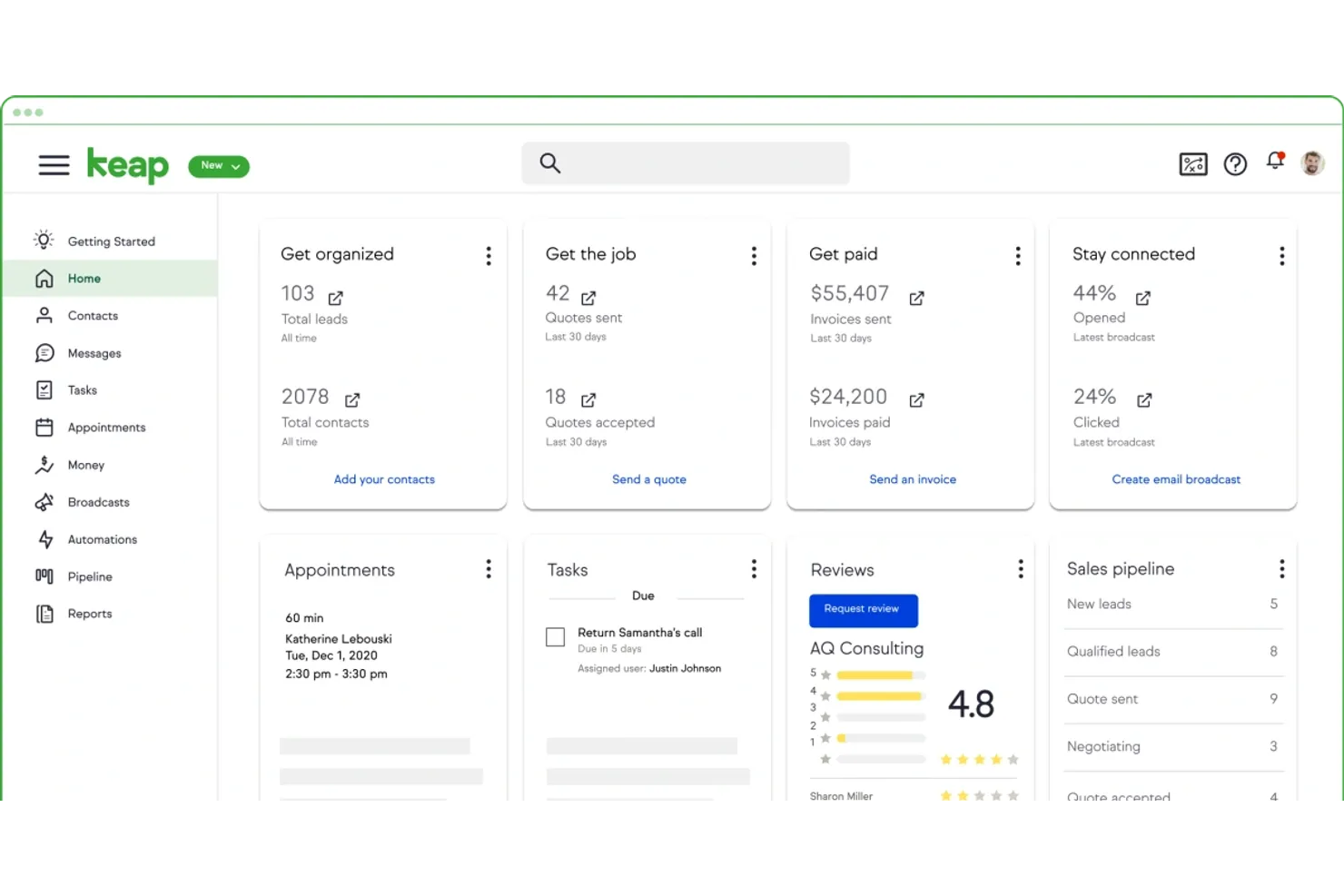
Keap CRM è pensato per le piccole imprese che vogliono gestire relazioni con i clienti, email marketing e pagamenti in un unico posto. Se cerchi un CRM che combini automazione delle vendite con fatturazione e riscossione dei pagamenti integrate, questa piattaforma merita considerazione. È particolarmente utile per le attività basate sui servizi e per gli imprenditori che desiderano semplificare le comunicazioni con i clienti e ricevere i pagamenti più rapidamente.
Perché ho scelto Keap CRM
Ciò che mi ha attratto di Keap CRM per le piccole imprese è l'attenzione nel combinare email marketing e gestione dei pagamenti all'interno della stessa piattaforma. L'ho scelto perché puoi inviare campagne email mirate e automatizzare i follow-up direttamente dal CRM, aiutando a mantenere organizzate le comunicazioni con i clienti. Le funzionalità integrate di fatturazione e riscossione ti permettono di creare, inviare e monitorare le fatture senza cambiare strumento. Questo rende Keap CRM particolarmente adatto alle piccole imprese che vogliono gestire vendite, marketing e pagamenti tutto in un unico luogo.
Funzionalità principali di Keap CRM
Altre funzionalità utili per gli utenti di piccole imprese includono:
- Pianificazione appuntamenti: consenti ai clienti di prenotare riunioni direttamente tramite il tuo link al calendario.
- Moduli di acquisizione lead: crea moduli personalizzabili per raccogliere lead dal tuo sito web o dalle landing page.
- Automazione delle attività: imposta promemoria e attività di follow-up automatici per il tuo team.
- Segmentazione dei contatti: organizza i contatti in liste in base a tag, comportamenti o campi personalizzati.
Integrazioni di Keap CRM
Le integrazioni includono QuickBooks, Gmail, Outlook, Zapier, WordPress, Shopify, PayPal, Stripe, Google Calendar e altro ancora.
Pros and Cons
Pros:
- Fatturazione integrata per una gestione più veloce
- Email marketing incluso senza componenti aggiuntivi
- Link per appuntamenti per pianificare le riunioni con i clienti
Cons:
- I report non includono analisi avanzate
- L’automazione richiede più passaggi di configurazione
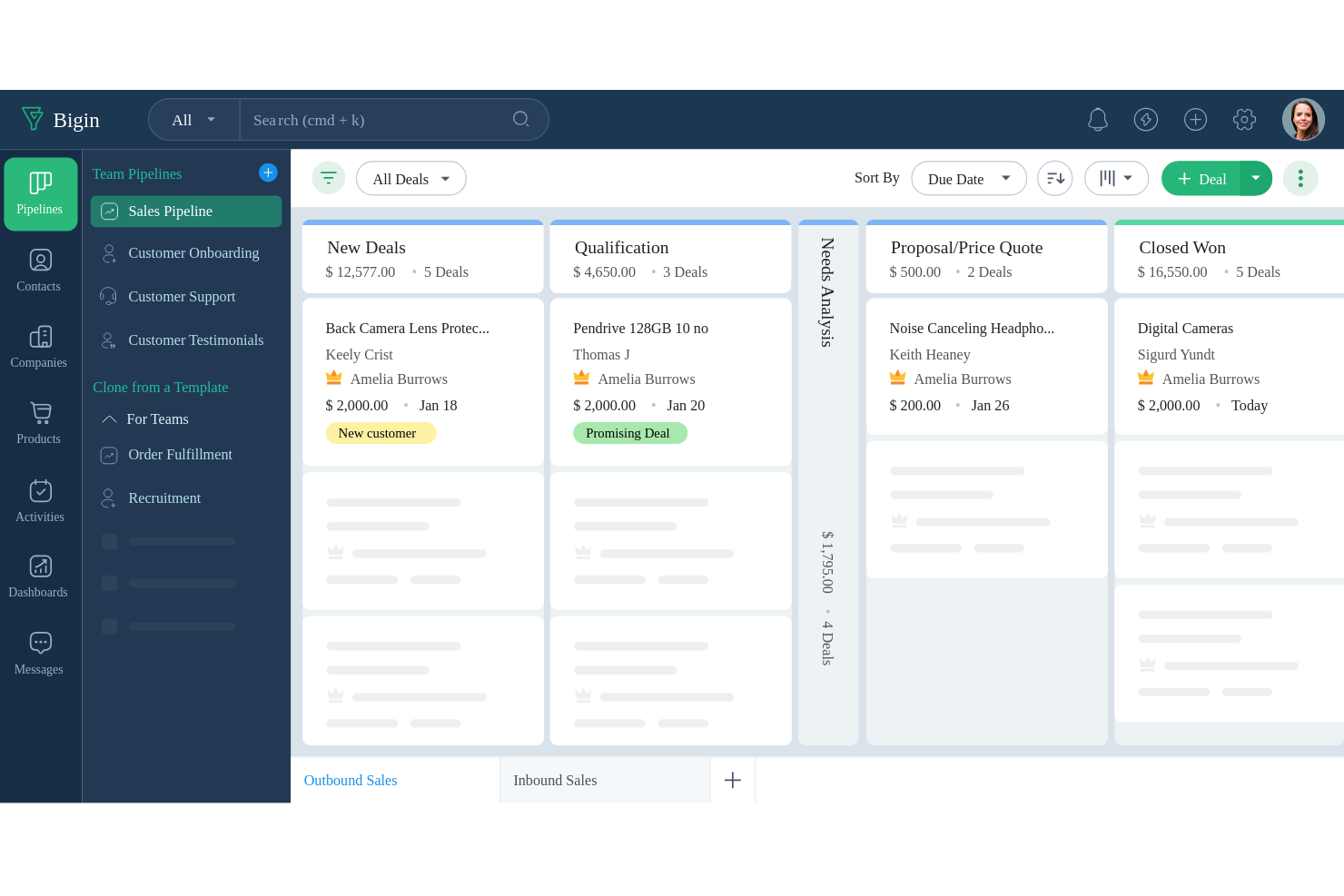
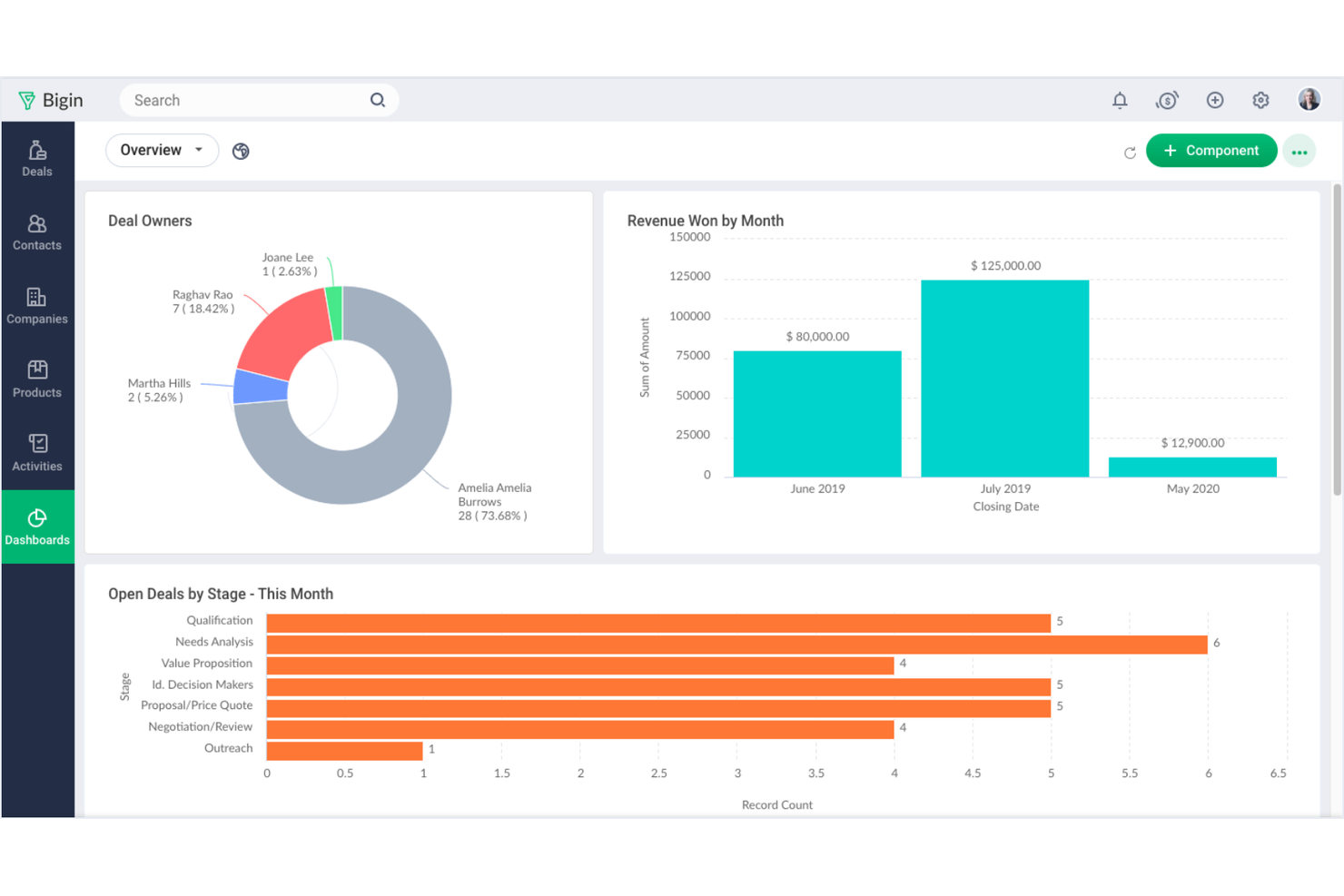
Bigin è pensato per le piccole imprese che desiderano una piattaforma CRM semplice per gestire le pipeline di vendita senza eccessiva complessità. È una buona soluzione per team o professionisti singoli che hanno bisogno di tenere traccia di trattative, contatti e attività in un formato semplice e visivo. Bigin si distingue per il suo focus sulla gestione chiara e immediata della pipeline, permettendoti di dedicare meno tempo alla configurazione e più tempo alla chiusura delle trattative.
Perché ho scelto Bigin
Per le piccole imprese che vogliono mantenere semplici i processi di vendita, Bigin offre un approccio focalizzato alla gestione della pipeline. La pipeline visiva consente di trascinare e rilasciare le trattative tra le diverse fasi, così è facile vedere a che punto si trova ogni opportunità. Apprezzo che Bigin includa il registro delle chiamate e il tracciamento delle email integrati, così puoi tenere tutte le comunicazioni di vendita organizzate in un unico luogo. Questo strumento è adatto se vuoi evitare la confusione dei CRM più complessi e hai solo bisogno di gestire le trattative dall'inizio alla fine.
Funzionalità principali di Bigin
Altre funzionalità rendono Bigin una scelta pratica per le esigenze CRM delle piccole imprese:
- Campi personalizzabili: Personalizza le schede di trattative, contatti e aziende con campi che rispecchiano il tuo processo di vendita.
- Automazione dei flussi di lavoro: Configura automazioni semplici per assegnare compiti o aggiornare i record in base a trigger predefiniti.
- App mobile: Accedi alle tue pipeline, ai contatti e alle attività ovunque grazie all’app mobile dedicata.
- Moduli web: Acquisisci lead direttamente dal tuo sito e inviali subito nella pipeline.
Integrazioni di Bigin
Le integrazioni includono Zoho CRM, Zoho Desk, Zoho Campaigns, Zoho Books, Zoho Projects, Google Workspace, Mailchimp, QuickBooks, Microsoft Outlook e Zapier.
Pros and Cons
Pros:
- La pipeline visiva semplifica il monitoraggio delle trattative
- Telefonia integrata registra le chiamate CRM
- I moduli web acquisiscono lead automaticamente
Cons:
- Nessun strumento avanzato di automazione marketing
- Ruoli utente e autorizzazioni sono basilari

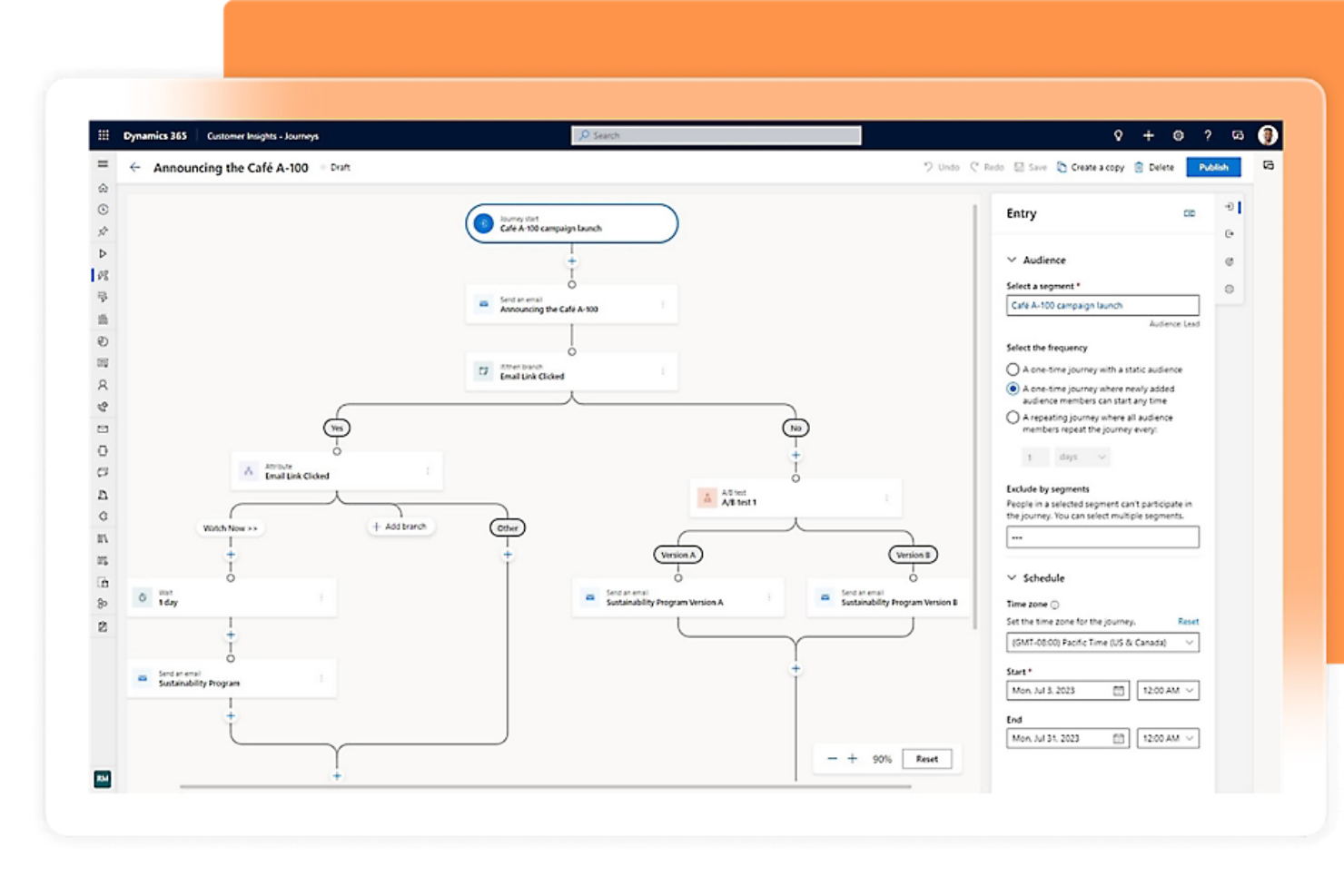
Se la tua azienda si affida già agli strumenti di Microsoft 365, Microsoft Dynamics 365 CRM offre un'esperienza familiare e profondamente integrata. Questo CRM è particolarmente indicato per le piccole imprese che desiderano collegare vendite, assistenza clienti e marketing con Outlook, Teams ed Excel. È particolarmente utile per i team che vogliono automatizzare i processi e mantenere tutti i dati dei clienti all'interno dell'ecosistema Microsoft.
Perché ho scelto Microsoft Dynamics 365 CRM
Per le piccole imprese che utilizzano già Microsoft 365, questo CRM si distingue perché si connette direttamente con strumenti familiari come Outlook, Teams ed Excel. Ho scelto Microsoft Dynamics 365 CRM perché consente di tracciare le email, programmare riunioni e gestire i dati dei clienti senza uscire dalle app Microsoft. Inoltre, la piattaforma permette di automatizzare i flussi di lavoro di vendita e assistenza tramite Power Automate, aiutando i team a risparmiare tempo sulle attività ripetitive. Questo livello di integrazione facilita alle piccole imprese il mantenimento di tutte le interazioni e i processi con i clienti in un ambiente connesso.
Funzionalità principali di Microsoft Dynamics 365 CRM
Altre funzionalità che i team delle piccole imprese potrebbero trovare vantaggiose includono:
- Dashboard personalizzate: Crea dashboard visive per monitorare in tempo reale metriche su vendite, assistenza o marketing.
- Gestione dei casi: Gestisci le richieste di assistenza clienti dalla creazione alla risoluzione all'interno del CRM.
- Punteggio lead: Dai priorità ai lead utilizzando modelli di punteggio personalizzabili basati su coinvolgimento e dati.
- Accesso tramite app mobile: Utilizza l'app mobile dedicata per visualizzare e aggiornare i record dei clienti ovunque ti trovi.
Integrazioni di Microsoft Dynamics 365 CRM
Le integrazioni includono Microsoft 365, LinkedIn Sales Navigator, Power BI, Azure DevOps, Outlook, SharePoint e altro ancora. Microsoft Dynamics 365 CRM offre anche un'API per integrazioni personalizzate.
Pros and Cons
Pros:
- Dashboard personalizzate monitorano le metriche di vendita
- Il punteggio lead dà priorità ai follow-up
- La gestione dei casi traccia le richieste di assistenza
Cons:
- Gli aggiornamenti dell'interfaccia interrompono i flussi di lavoro del team
- Gli strumenti di reportistica richiedono formazione aggiuntiva

Ideale per il punteggio lead basato sull’IA
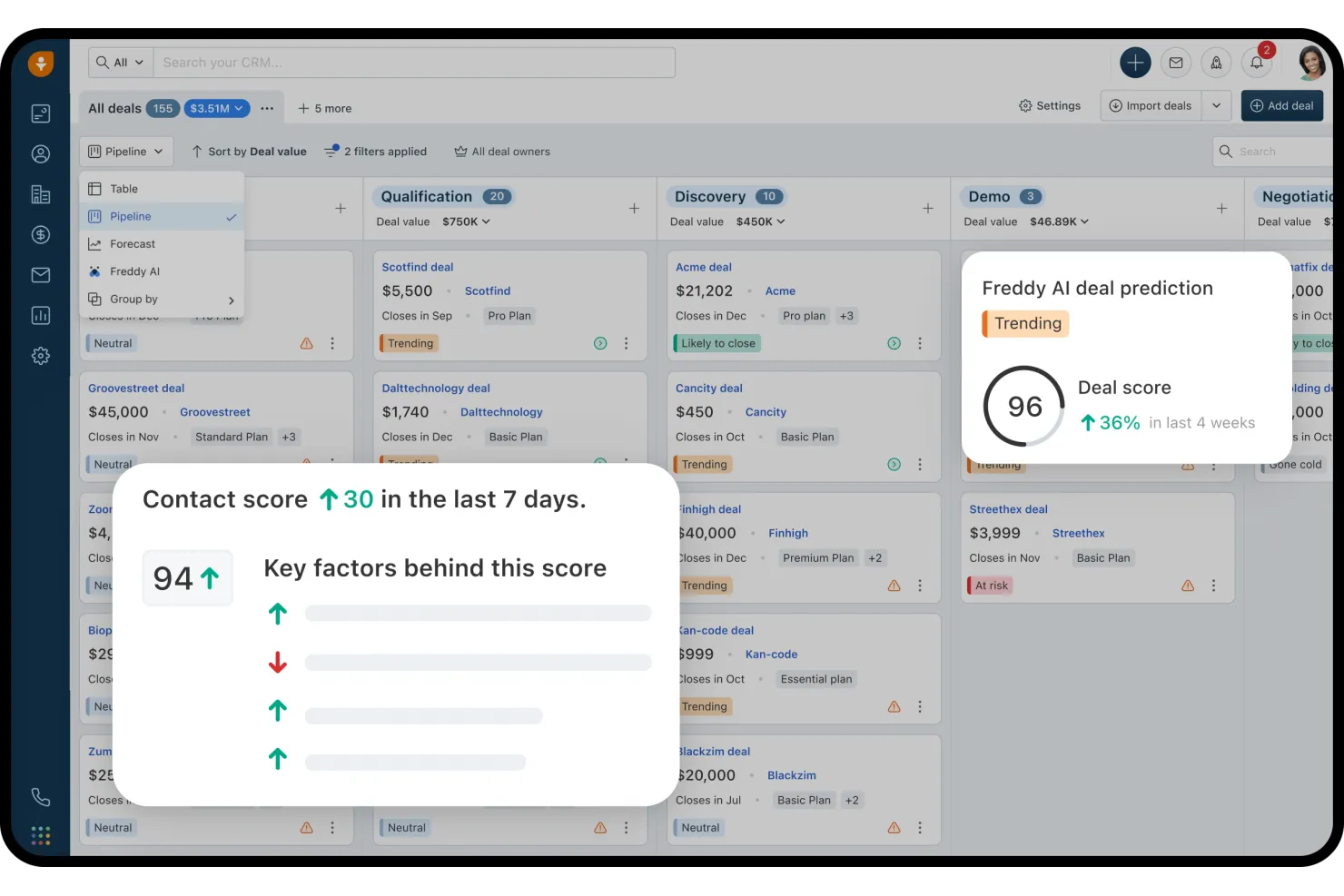
Freshsales è pensato per le piccole imprese che desiderano utilizzare l’IA per qualificare e dare priorità ai lead. I team di vendita alla ricerca di modalità più intelligenti per focalizzare l’attività di contatto troveranno particolarmente utile il punteggio lead basato sull’intelligenza artificiale. La piattaforma aiuta a identificare potenziali clienti di alto valore e a gestire la pipeline con meno incertezze.
Perché ho scelto Freshsales
Ciò che distingue Freshsales fra i CRM per piccole imprese è l’attenzione verso il punteggio lead basato sull’IA. Ho scelto questo strumento perché analizza automaticamente il comportamento e il coinvolgimento dei lead e poi assegna un punteggio per aiutare il team a concentrarsi sui potenziali clienti più promettenti. L’assistente Freddy AI integrato suggerisce inoltre le prossime azioni da intraprendere e mette in evidenza le trattative che richiedono attenzione, così puoi agire con tempestività. Questo approccio aiuta i piccoli team di vendita a dare priorità al tempo e alle risorse dove conta di più.
Funzionalità chiave di Freshsales
Altre funzionalità utili per i team delle piccole imprese includono:
- Telefono ed email integrati: Effettua chiamate e invia email direttamente dal CRM senza cambiare strumento.
- Pipeline di vendita visuale: Trascina e rilascia le trattative attraverso le fasi personalizzabili della pipeline per un monitoraggio facile.
- Automazione dei flussi di lavoro: Imposta azioni automatiche per le attività e i follow-up di vendita ripetitivi.
- Gestione di contatti e account: Archivia, organizza e visualizza tutte le informazioni dei clienti in un unico posto.
Integrazioni di Freshsales
Le integrazioni includono Gmail, Outlook, Mailchimp, Zapier, QuickBooks, Shopify, Slack, Google Calendar e altro. Freshsales offre anche un’API aperta per integrazioni personalizzate.
Pros and Cons
Pros:
- Strumenti di telefono ed email integrati
- La pipeline visuale semplifica il monitoraggio delle trattative
- L’automazione gestisce attività di vendita ripetitive
Cons:
- I modelli di email hanno un formato limitato
- Problemi nella sincronizzazione di calendario ed email
Ideale per opzioni avanzate di scalabilità
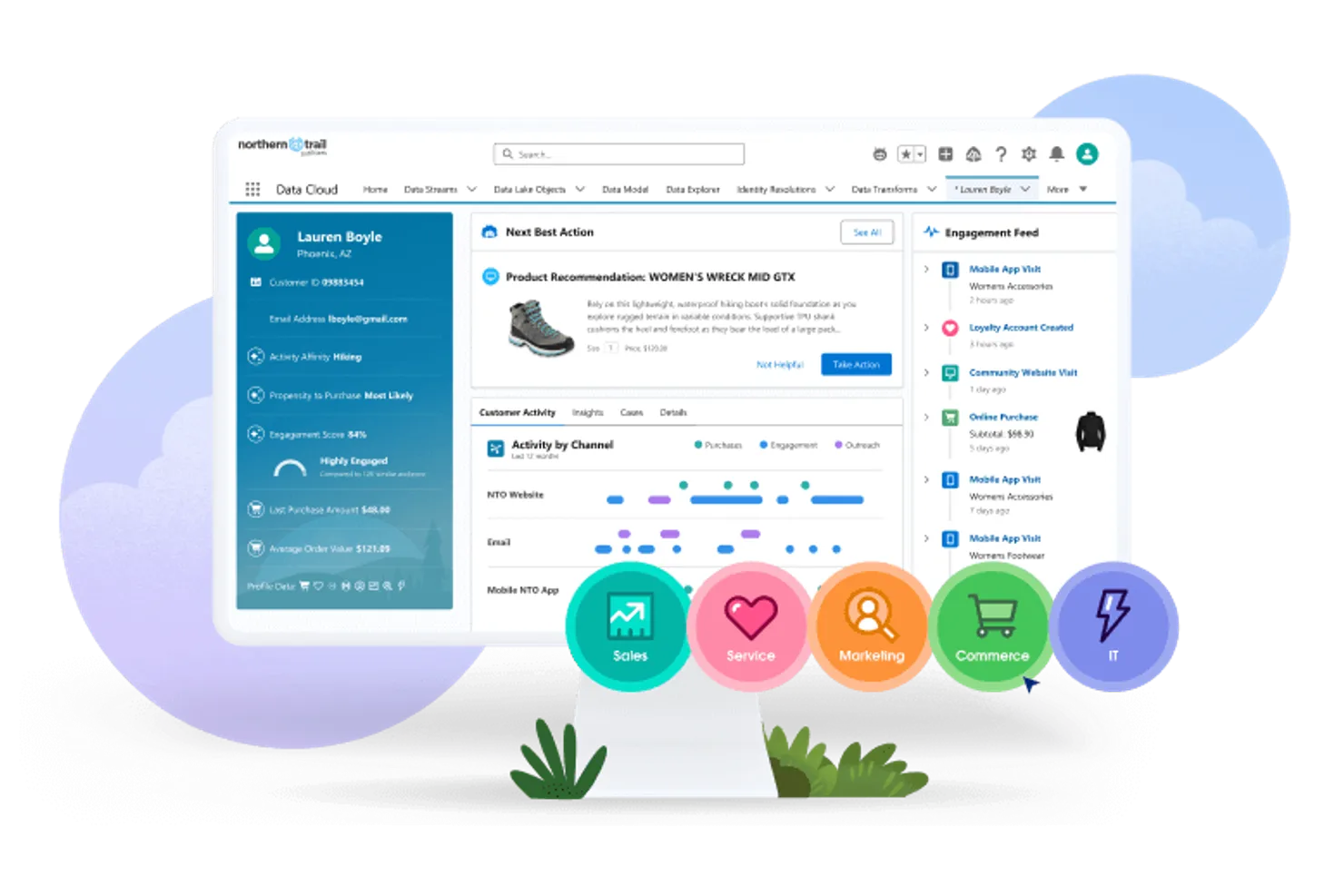
Salesforce CRM offre alle piccole imprese una piattaforma che può crescere e adattarsi man mano che le esigenze cambiano. Se il tuo team desidera personalizzazioni avanzate, automazione e la possibilità di aggiungere nuove funzionalità mentre espandi l’attività, questo strumento si distingue. È particolarmente utile per le aziende che pianificano una crescita a lungo termine e hanno bisogno di un CRM che non limiti le opzioni future.
Perché ho scelto Salesforce CRM
Ciò che distingue Salesforce CRM per le piccole imprese è la sua capacità di scalare insieme alla crescita dell’azienda. L’ho scelto perché puoi iniziare con la gestione di base delle vendite e dei contatti, per poi aggiungere automazioni avanzate, analisi e flussi di lavoro personalizzati quando aumentano le necessità. Il marketplace AppExchange della piattaforma ti consente di espandere le funzionalità con app e integrazioni specifiche per settore. Questa flessibilità rende Salesforce CRM una scelta solida se desideri una soluzione che non ti ostacolerà con l’aumentare della complessità della tua azienda.
Funzionalità principali di Salesforce CRM
Altre funzionalità che potrebbero risultare preziose per i team delle piccole imprese includono:
- Gestione delle opportunità: Traccia le opportunità di vendita, prevedi i ricavi e gestisci le fasi delle trattative in un unico luogo.
- Gestione dei casi: Organizza e risolvi le richieste di assistenza clienti tramite strumenti di ticketing integrati.
- Dashboard personalizzabili: Crea dashboard visive per monitorare metriche di vendita, assistenza e marketing.
- App mobile: Accedi ai dati CRM, aggiorna i record e gestisci le attività direttamente da telefono o tablet.
Integrazioni Salesforce CRM
Le integrazioni includono Outlook, Gmail, Slack, Mailchimp, HubSpot, QuickBooks, DocuSign, Google Analytics, LinkedIn Sales Navigator e Zoom.
Pros and Cons
Pros:
- AppExchange offre migliaia di integrazioni
- Permessi basati sui ruoli per controllare l’accesso degli utenti
- Report avanzati per analizzare l’attività di vendita
Cons:
- I costi mensili sono superiori rispetto ai piccoli CRM
- Gli aggiornamenti potrebbero richiedere formazione aggiuntiva
New Product Updates from Salesforce CRM

Salesforce CRM Adds Automated CMS Access Expiration
Salesforce CRM adds automated access expiration and a new view-only support role for Point of Sale CMS users. These controls reduce manual access cleanup and help teams limit unnecessary permissions. For more information, visit Salesforce CRM’s official site.
 .
.
Zoho CRM
Ideale per flussi di automazione personalizzabili
Zoho CRM offre alle piccole imprese la possibilità di creare flussi di lavoro automatizzati personalizzati che rispecchiano i loro specifici processi di vendita e assistenza. È particolarmente indicato per i team che desiderano automatizzare compiti ripetitivi, gestire i lead e personalizzare le interazioni con i clienti senza il pesante coinvolgimento dell’IT. Se hai bisogno di un CRM che si adatti alle regole della tua azienda e ti aiuti a scalare le operazioni, Zoho CRM offre la flessibilità necessaria per farlo.
Perché ho scelto Zoho CRM
Ciò che mi ha spinto a scegliere Zoho CRM per le piccole imprese è la sua capacità di permetterti di progettare flussi di automazione che si adattano perfettamente ai tuoi processi di vendita e assistenza. Puoi utilizzare il costruttore di workflow drag-and-drop per automatizzare l’assegnazione dei lead, i follow-up e le notifiche in base alle tue regole. Apprezzo anche il fatto che Zoho CRM consenta automazioni su più fasi, quindi puoi configurare sequenze che si attivano tra diversi moduli come contatti, trattative e attività. Questo livello di personalizzazione aiuta i piccoli team a risparmiare tempo e ridurre il lavoro manuale man mano che crescono.
Funzionalità principali di Zoho CRM
Altre funzionalità rendono Zoho CRM una soluzione flessibile per i team delle piccole imprese:
- Previsioni di vendita: Genera proiezioni di vendita basate sulla tua pipeline e sui dati storici.
- Integrazione email: Collega i tuoi account email per inviare, ricevere e tracciare i messaggi all’interno del CRM.
- Dashboard personalizzabili: Crea dashboard visivi per monitorare metriche chiave e performance del team.
- App mobile: Accedi ai dati dei clienti, aggiorna i record e gestisci le attività dal tuo telefono o tablet.
Integrazioni Zoho CRM
Le integrazioni includono Zoho Mail, Zoho Books, Zoho Desk, Zoho Campaigns, Google Workspace, Microsoft Office 365, Mailchimp, QuickBooks, Slack e Zapier. Zoho CRM offre anche un'API per integrazioni personalizzate.
Pros and Cons
Pros:
- Il costruttore di automazioni supporta workflow su più fasi
- I moduli personalizzati adattano i campi dati aziendali
- Il tracciamento email mostra aperture e clic
Cons:
- Le risposte dell’assistenza sono incoerenti nelle ore di punta
- Le funzioni avanzate richiedono piani di livello superiore
New Product Updates from Zoho CRM

Zoho CRM Adds Workflow Automation for Subform Actions
Zoho CRM now lets you automate subform events with workflow rules, triggering actions when rows are added, edited, or deleted based on conditions. For more information, visit Zoho CRM's official site.
 .
.Altri CRM per piccole imprese
Ecco alcune altre opzioni di CRM per piccole imprese che non sono state incluse nel mio elenco, ma che vale comunque la pena prendere in considerazione:
- Insightly
Ideale per l'integrazione con la gestione dei progetti
- Apptivo CRM
Ideale per moduli di app personalizzabili
- Bitrix24 CRM
Ideale per strumenti di collaborazione di team


Come valuto i CRM per le piccole imprese
Divido la mia valutazione in due livelli: la funzionalità di base—come la gestione dei contatti e il monitoraggio della pipeline—che ogni CRM deve garantire, e i fattori differenzianti che distinguono la soluzione giusta dalle altre.
Funzionalità principali (requisiti fondamentali per questa lista)
Quando seleziono gli strumenti per la mia lista, valuto ciascuno su una scala da 0 (non offre la funzionalità) a 5 (eccelle in quest'area) per ognuna delle funzionalità principali elencate di seguito. Poi calcolo il punteggio totale dello strumento in percentuale. Ogni strumento deve raggiungere un punteggio totale minimo del 65% per essere preso in considerazione per l'inclusione.
- Gestione contatti & account: Cerco registri clienti organizzati con cronologia delle interazioni, campi personalizzati e segmentazione—così un team di cinque persone può visualizzare l'intero storico del cliente in pochi secondi.
- Monitoraggio pipeline di vendita: Ogni strumento dovrebbe permettere di visualizzare le trattative attraverso diverse fasi, personalizzare le pipeline e prevedere i ricavi senza dover passare continuamente tra fogli di calcolo e CRM.
- Integrazione con email & comunicazione: Verifico la presenza di sincronizzazione bidirezionale con provider come Gmail e Outlook, oltre alla possibilità di registrare chiamate e messaggi in modo che nulla vada perso.
- Automazione dei flussi di lavoro: Le automazioni basate su trigger sono fondamentali qui—come l'assegnazione automatica dei lead per regione, l'invio di email di follow-up dopo le demo, o l'aggiornamento delle fasi di trattativa dopo la compilazione di un modulo.
- Reportistica & dashboard: Il CRM dovrebbe offrire report personalizzabili su pipeline, attività degli agenti e tendenze dei clienti, non solo grafici preconfezionati che non si adattano ai tuoi obiettivi.
- Prezzi accessibili & scalabilità per piccole imprese: Valuto se i prezzi sono trasparenti e suddivisi in fasce per piccoli team, con un piano gratuito o un ingresso economico che non escluda le funzionalità principali.
Una volta che ottengo un elenco di strumenti che soddisfano questi criteri, considero cosa distingue ogni piattaforma dalle altre.
Fattori di differenziazione (cosa distingue i fornitori)
Ecco come confronto i diversi fornitori:
Funzionalità distintive
L'automazione del marketing integrata è un forte elemento differenziante. Strumenti come HubSpot e Freshsales includono campagne email e moduli di acquisizione lead, risparmiando ai piccoli team la gestione di una piattaforma separata. Valuto anche se un CRM include la gestione dei ticket di supporto. Una casella di posta condivisa legata allo stesso record contatto offre al team una visione completa di ogni cliente. Anche un'app mobile completa è fondamentale, specialmente per titolari e agenti sul campo che devono aggiornare le trattative in mobilità.
Oltre le funzionalità
Per i piccoli team è importante la rapidità di implementazione. Cerco wizard di configurazione guidata e strumenti di importazione CSV che permettano a un team di tre persone di essere operativo in un giorno, non in settimane. Anche l'integrazione con l'ecosistema è fondamentale—integrazioni native con strumenti come QuickBooks, Mailchimp e Slack significano meno soluzioni di fortuna e meno inserimento manuale dei dati. Infine, valuto il costo totale di proprietà, verificando se funzionalità come la sincronizzazione email o l'automazione siano accessibili solo in piani superiori che potrebbero gravare sul budget di un team in crescita.
Come scegliere un CRM per una piccola impresa
È facile perdersi in lunghi elenchi di funzionalità e strutture tariffarie complesse. Per aiutarti a rimanere concentrato mentre affronti il tuo processo unico di scelta del software, ecco un elenco di fattori da tenere presenti:
| Fattore | Cosa considerare |
| Scalabilità | Il CRM sarà in grado di gestire più utenti, contatti e dati man mano che la tua attività cresce? Verifica i limiti relativi agli utenti e ai record di ciascun piano. |
| Integrazioni | Il CRM si collega nativamente agli strumenti che già utilizzi (e-mail, calendario, contabilità, marketing)? Elenca le integrazioni indispensabili prima di confrontare le opzioni. |
| Personalizzazione | Puoi adattare i campi, le pipeline e i flussi di lavoro al tuo processo di vendita? Evita gli strumenti che ti vincolano a strutture rigide. |
| Facilità d'uso | Il tuo team adotterà rapidamente il CRM o sarà necessaria una formazione approfondita? Prova l'interfaccia con utenti reali prima di prendere una decisione. |
| Implementazione e configurazione iniziale | Quanto tempo servirà per iniziare a utilizzarlo? Cerca supporto per la migrazione, guide alla configurazione e risorse per la configurazione iniziale adeguate al livello di familiarità tecnica del tuo team. |
| Costo | I livelli tariffari sono chiari e prevedibili quando aggiungi utenti o funzionalità? Fai attenzione ai costi nascosti, ai componenti aggiuntivi obbligatori o ai forti aumenti di prezzo tra un piano e l'altro. |
| Misure di sicurezza | Il CRM offre autorizzazioni basate sui ruoli, crittografia dei dati e backup regolari? Assicurati che soddisfi gli standard di protezione dei dati del tuo settore. |
| Disponibilità dell'assistenza | Puoi contattare l'assistenza quando ne hai bisogno (chat, telefono, e-mail)? Verifica gli orari dell'assistenza, i tempi di risposta e se è incluso il supporto per la configurazione iniziale. |
Che cos'è il CRM per le piccole imprese?
Un CRM per le piccole imprese è una piattaforma software che aiuta le piccole aziende a organizzare le informazioni sui clienti, monitorare le attività di vendita e gestire le relazioni in un unico luogo. Questi sistemi sono progettati per essere accessibili e convenienti per i team più piccoli e offrono strumenti per la gestione dei contatti, il monitoraggio delle trattative e la cronologia delle comunicazioni. L'utilizzo di un CRM per le piccole imprese aiuta i team a rimanere organizzati, ricontattare i potenziali clienti e costruire relazioni più solide con i clienti nel tempo.
Funzionalità del CRM per le piccole imprese
Quando selezioni un CRM per una piccola impresa, presta attenzione alle seguenti funzionalità principali:
- Gestione dei contatti: archivia, organizza e aggiorna le informazioni sui clienti e sui potenziali clienti in un database centralizzato, rendendo facile accedere ai dettagli e monitorare le interazioni.
- Monitoraggio della pipeline di vendita: visualizza e gestisci le trattative mentre avanzano attraverso le diverse fasi di vendita, aiutando il tuo team a stabilire le priorità e a monitorare i progressi.
- Gestione di attività e operazioni: assegna, programma e monitora le attività di ricontatto, le chiamate e le riunioni per assicurarti che nulla venga trascurato.
- Integrazione con la posta elettronica: collega il tuo account di posta elettronica per inviare, ricevere e registrare i messaggi direttamente nel CRM, mantenendo tutte le comunicazioni in un unico luogo.
- Integrazione del calendario: sincronizza riunioni, chiamate e promemoria con il tuo calendario per coordinare gli impegni ed evitare sovrapposizioni.
- Report e analisi: genera report sulle vendite, sulle attività e sulle prestazioni per monitorare la produttività del team e identificare tendenze o colli di bottiglia.
- Automazione dei flussi di lavoro: configura regole per automatizzare attività ripetitive come l'invio di messaggi di posta elettronica di ricontatto o l'aggiornamento delle fasi delle trattative, risparmiando tempo e riducendo il lavoro manuale.
- Accesso da dispositivi mobili: utilizza le app mobili per visualizzare e aggiornare i dati del CRM, gestire le attività e comunicare con i clienti anche lontano dalla scrivania.
- Autorizzazioni basate sui ruoli: controlla l'accesso alle informazioni sensibili assegnando ruoli e autorizzazioni agli utenti, assicurandoti che i membri del team vedano solo ciò di cui hanno bisogno.
- Archiviazione dei documenti: carica, organizza e condividi file come proposte, contratti e presentazioni all'interno del CRM per facilitarne la consultazione e la collaborazione.
Vantaggi del CRM per le piccole imprese
L'implementazione di un CRM per una piccola impresa offre diversi vantaggi al tuo team e alla tua attività. Eccone alcuni:
- Dati dei clienti centralizzati: conserva tutti i dettagli dei contatti, la cronologia delle comunicazioni e le attività di vendita in un unico luogo per facilitarne l'accesso e migliorare l'organizzazione.
- Ricontatti migliorati: utilizza la gestione delle attività e i promemoria per assicurarti che ogni potenziale cliente e cliente riceva un'attenzione tempestiva e che nulla venga trascurato.
- Maggiore visibilità sulle vendite: monitora visivamente le trattative e le pipeline di vendita, aiutando il tuo team a dare priorità alle opportunità e a prevedere i ricavi con maggiore precisione.
- Collaborazione di squadra migliorata: condividi note, documenti e aggiornamenti all'interno del CRM affinché tutti siano informati e allineati sulle interazioni con i clienti.
- Risparmio di tempo grazie all'automazione: automatizza attività ripetitive come le email di ricontatto e gli aggiornamenti delle trattative, liberando il tuo team affinché possa concentrarsi su attività di maggior valore.
- Report e informazioni più efficaci: genera report sulle prestazioni di vendita e sulle attività del team per identificare tendenze, misurare i risultati e orientare il processo decisionale.
- Maggiore sicurezza dei dati: controlla l'accesso alle informazioni sensibili con autorizzazioni basate sui ruoli, proteggendo i dati dei clienti e supportando le esigenze di conformità.
Costi e prezzi del CRM per le piccole imprese
La scelta di un CRM per una piccola impresa richiede la conoscenza dei diversi modelli e piani tariffari disponibili. I costi variano in base alle funzionalità, alle dimensioni del team, ai componenti aggiuntivi e ad altri fattori. La tabella seguente riassume i piani più comuni, i relativi prezzi medi e le funzionalità normalmente incluse nelle soluzioni CRM per le piccole imprese:
Tabella comparativa dei piani CRM per le piccole imprese
| Tipo di piano | Prezzo medio | Funzionalità comuni |
| Piano gratuito | $0 | Gestione di base dei contatti, pipeline di vendita limitata, monitoraggio semplice delle attività e reportistica di base. |
| Piano personale | $5-$25/user/month | Gestione dei contatti e delle trattative, integrazione e-mail, sincronizzazione del calendario e automazione di base dei flussi di lavoro. |
| Piano aziendale | $25-$50/user/month | Reportistica avanzata, pipeline personalizzabili, automazione dei flussi di lavoro, integrazioni e accesso da dispositivi mobili. |
| Piano per grandi aziende | $50-$100/user/month | Sicurezza avanzata, autorizzazioni basate sui ruoli, assistenza prioritaria, moduli personalizzati e accesso API. |
Domande frequenti sui CRM per piccole imprese
Ecco alcune risposte alle domande comuni sui CRM per le piccole imprese:
Come faccio a sapere se la mia piccola impresa ha bisogno di un CRM?
Se hai difficoltà a tenere traccia delle informazioni sui clienti, dei follow-up o delle attività di vendita tra fogli di calcolo o e-mail, è il momento di prendere in considerazione un CRM. Anche i piccoli team traggono vantaggio dalla disponibilità di un unico spazio per organizzare i contatti, gestire le trattative e monitorare la cronologia delle comunicazioni.
Posso migrare i dati dei clienti esistenti in un CRM per piccole imprese?
Sì, la maggior parte delle soluzioni CRM per piccole imprese offre strumenti di importazione per fogli di calcolo o altri sistemi. Cerca piattaforme con guide alla migrazione dettagliate, file modello e risorse di assistenza che ti aiutino a trasferire i dati in modo accurato e sicuro.
Cosa devo cercare in un CRM per un piccolo team con risorse tecniche limitate?
Dai priorità alla facilità d’uso, a una configurazione semplice e a un’assistenza clienti reattiva. Scegli un CRM con un’interfaccia intuitiva, istruzioni chiare per la configurazione e accesso a materiali formativi, così il tuo team potrà iniziare rapidamente senza bisogno di competenze informatiche.
Esistono opzioni CRM gratuite adatte alle piccole imprese?
Sì, molti fornitori di CRM offrono piani gratuiti con funzionalità di base come la gestione dei contatti e il monitoraggio delle trattative. Questi piani spesso prevedono limiti sul numero di utenti o sulle funzionalità, quindi verifica cosa è incluso e assicurati che copra le tue esigenze essenziali prima di procedere.
Quanto sono sicuri i dati dei clienti in un CRM per piccole imprese?
La maggior parte delle piattaforme CRM affidabili per piccole imprese utilizza la crittografia, backup regolari e autorizzazioni basate sui ruoli per proteggere i dati. Esamina sempre la documentazione sulla sicurezza del fornitore e verifica che le sue misure di protezione soddisfino i requisiti del tuo settore.