I 10 migliori chatbot online per l’assistenza clienti nel 2026

10 Selezione dei migliori chatbot per il servizio clienti


I chatbot per il servizio clienti possono alleggerire il carico dei team di assistenza rispondendo alle domande comuni, gestendo le richieste di routine e offrendo ai clienti un supporto più rapido 24 ore su 24. Tuttavia, lo strumento giusto deve ridurre il carico di lavoro degli agenti, non creare ulteriori escalation da gestire.
Basandomi su oltre due decenni di esperienza nella creazione di piattaforme tecnologiche e nella gestione di operazioni di AI, ho valutato i migliori chatbot per il servizio clienti per individuare gli strumenti che migliorano davvero l'assistenza per clienti e agenti.
Perché fidarsi dei nostri consigli sui software
Il nostro team testa e recensisce software dal 2012. In quanto leader CX noi stessi, sappiamo quanto sia difficile — e importante — scegliere il software giusto.
Per questa guida, abbiamo valutato gli strumenti attraverso test pratici e ricerche indipendenti, assegnando un punteggio agli strumenti in base ai nostri criteri di selezione.
Le nostre recensioni riflettono il nostro giudizio editoriale umano, non un discorso di vendita.
Riepilogo dei migliori chatbot per il servizio clienti
Questa tabella comparativa riassume i dettagli sui prezzi dei chatbot per il servizio clienti che ho selezionato tra i migliori, per aiutarti a trovare quello più adatto al tuo budget e alle esigenze della tua azienda.
| Tool | Best For | Trial Info | Price | ||
|---|---|---|---|---|---|
| 1 | Ideale per l'automazione IA nei settori regolamentati | Prova gratuita di 30 giorni | A partire da $31/agente/mese (fatturato annualmente) | Website | |
| 2 | Ideale per il coaching e la guida degli agenti in tempo reale | Demo gratuita disponibile | Prezzi disponibili su richiesta | Website | |
| 3 | Ideale per l'integrazione con i sistemi di assistenza esistenti | Prova gratuita di 30 giorni | Da $199/mese | Website | |
| 4 | Ideale per i servizi finanziari regolamentati | Demo gratuita disponibile | Prezzi su richiesta | Website | |
| 5 | Il migliore con AI multi-agente per la risoluzione dei casi | Piano gratuito disponibile | Prezzi su richiesta | Website | |
| 6 | Ideale per supporto e-commerce 24/7 | Prova gratuita di 14 giorni | A partire da $39/agente/mese | Website | |
| 7 | Ideale per combinare supporto umano e IA | Prova gratuita disponibile | Da $25/utente/mese (fatturato annualmente) | Website | |
| 8 | Ideale per il supporto multilingue | Prova gratuita di 14 giorni + demo gratuita disponibile | Da $19/agente/mese (fatturato annualmente) | Website | |
| 9 | Ideale per agenti IA personalizzabili | Prova gratuita di 14 giorni | A partire da $19/utente/mese (con fatturazione annuale) | Website | |
| 10 | Ideale per gestire richieste complesse dei clienti | Piano gratuito disponibile | A partire da $32/mese (fatturato annualmente) | Website |


Recensioni dei migliori chatbot per il servizio clienti
Di seguito trovi i miei riepiloghi dettagliati dei migliori chatbot per il servizio clienti inclusi nella mia selezione. Le mie recensioni offrono un’analisi approfondita delle funzionalità principali, dei vantaggi e svantaggi, delle integrazioni e dei casi d’uso ideali di ogni strumento, per aiutarti a trovare quello più adatto a te.

Comm100
Ideale per l'automazione IA nei settori regolamentati
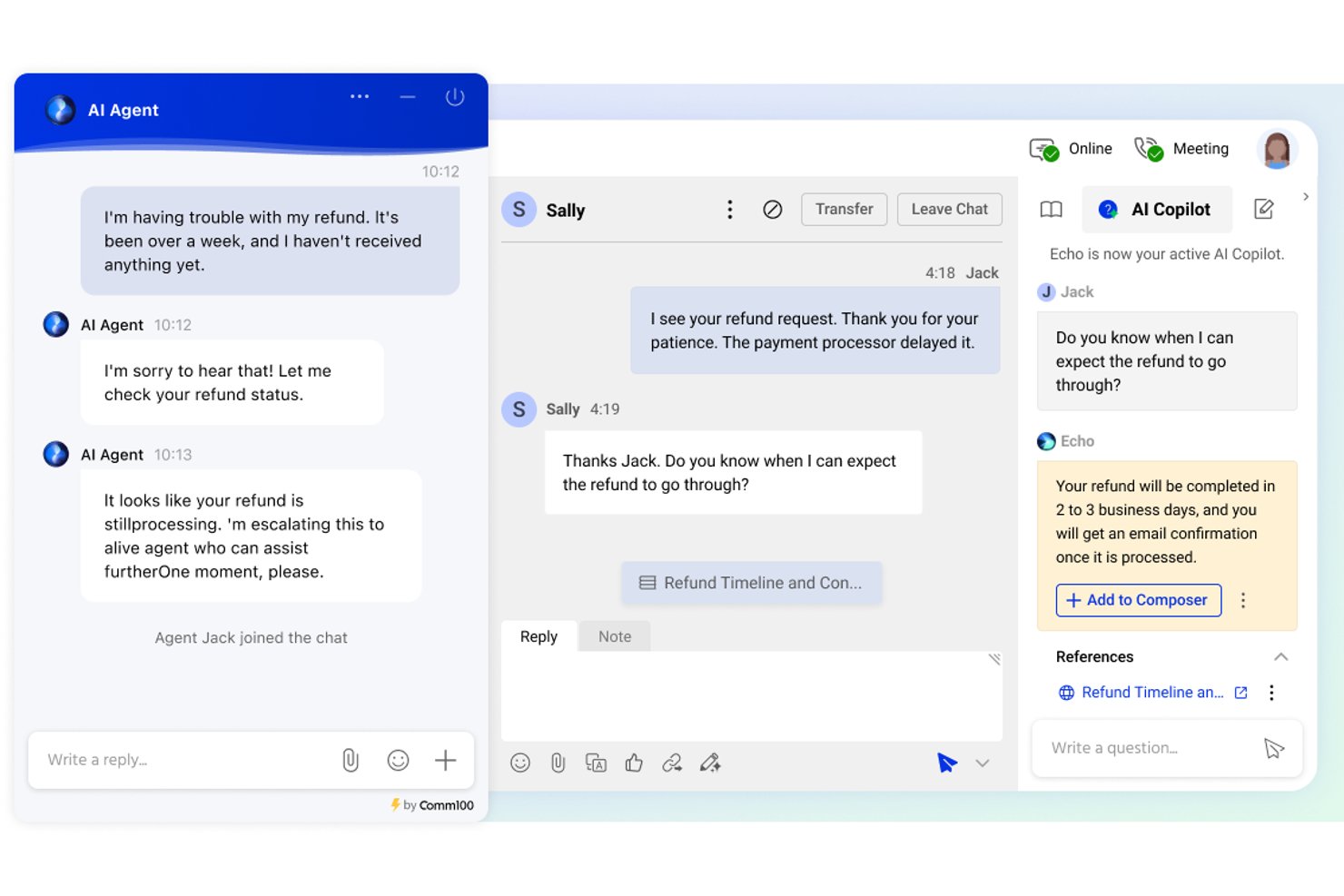
Comm100 è una piattaforma per il servizio clienti con chatbot e chat dal vivo che combina un agente IA, messaggistica omnicanale, flussi di lavoro per il passaggio agli operatori umani e una base di conoscenza nativa su oltre 12 canali digitali e vocali.
Per chi è più adatto Comm100?
Comm100 è particolarmente adatto ai team aziendali dei settori sanitario, governativo, dei servizi finanziari e dell'istruzione superiore che necessitano di un'automazione delle chat basata sull'IA con rigorosi requisiti di conformità e sovranità dei dati.
Perché ho scelto Comm100
Ho scelto Comm100 come una delle migliori soluzioni perché la sua architettura IA anti-allucinazioni è progettata specificamente per i settori regolamentati, nei quali una risposta errata comporta un rischio concreto di non conformità. L'agente IA risponde esclusivamente sulla base di fonti di conoscenza verificate, mai sulla base della memoria del suo modello preaddestrato, un aspetto estremamente importante nei contesti sanitari o dei servizi finanziari. Anche l'opzione di distribuzione on-premise è rara e consente ai team governativi e bancari di eseguire l'intera piattaforma dietro il proprio firewall.
Funzionalità principali di Comm100
- Agente IA: Utilizza l'elaborazione del linguaggio naturale per rispondere alle domande dei clienti sulla base delle fonti di conoscenza collegate.
- Azioni personalizzate: Configura l'agente IA per completare attività durante le conversazioni, tra cui la prenotazione di appuntamenti, la verifica dei saldi e l'attivazione di flussi di lavoro personalizzati.
- Distribuzione on-premise: Supporta la distribuzione on-premise per le organizzazioni con specifici requisiti di residenza dei dati o normativi.
- Dashboard dei report: Monitora i tassi di risoluzione del chatbot, i tempi di risposta degli operatori e i punteggi di soddisfazione dei clienti da una dashboard centralizzata.
Integrazioni di Comm100
Comm100 offre integrazioni native con Salesforce, HubSpot, Microsoft Dynamics 365, Zendesk, ServiceNow, Google Drive, SharePoint Online, Confluence Cloud, Calendly e Microsoft Bookings. Fornisce inoltre un'API REST, SDK, webhook e Zapier.
Pros and Cons
Pros:
- Supporta toni configurabili e istruzioni in linguaggio naturale
- Supporta la conformità a SOC 2 Type II, HIPAA, ISO 27001 e GDPR
- Supporta Telegram, X, LINE e WeChat
Cons:
- Alcuni utenti segnalano difficoltà con le integrazioni CRM
- Le risposte dell'IA dipendono dalla qualità delle fonti di conoscenza collegate

Cresta
Ideale per il coaching e la guida degli agenti in tempo reale
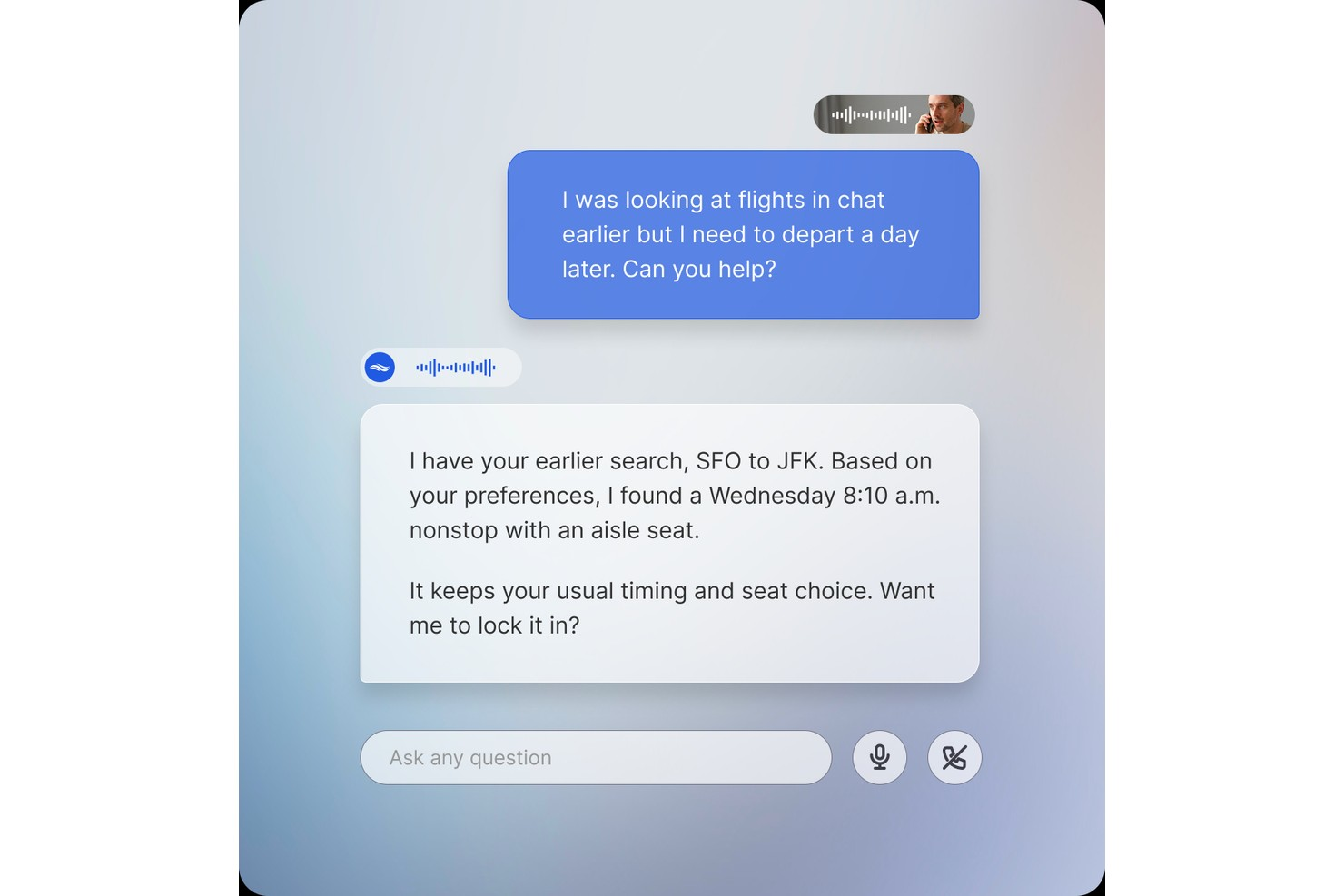
Cresta è una piattaforma di intelligenza artificiale per centri di contatto che combina agenti virtuali basati sull'intelligenza artificiale per conversazioni automatizzate con i clienti tramite voce, chat e SMS, con strumenti di assistenza agli agenti in tempo reale e di analisi delle conversazioni.
Per chi è più indicata Cresta?
Cresta è particolarmente adatta ai centri di contatto aziendali che desiderano implementare agenti di intelligenza artificiale e supportare gli agenti umani da un'unica piattaforma.
Perché ho scelto Cresta
Cresta si distingue come una delle migliori soluzioni per il coaching e la guida degli agenti in tempo reale grazie al funzionamento del suo prodotto Assistenza agli agenti durante le interazioni dal vivo. Fornisce agli agenti suggerimenti contestuali, promemoria sulla conformità e indicazioni sulla migliore azione successiva nel corso della conversazione, non a posteriori. Apprezzo anche Agente della conoscenza, che combina il contesto della conversazione parlata con i dati visualizzati sullo schermo per fornire istantaneamente risposte basate sulle fonti. Inoltre, i riepiloghi delle chiamate generati dall'intelligenza artificiale sono completamente personalizzabili e vengono creati automaticamente, riducendo il tempo che gli agenti dedicano alle attività successive alla chiamata.
Funzionalità principali di Cresta
- Agente AI di Cresta: gli agenti virtuali basati sull'intelligenza artificiale gestiscono le conversazioni con i clienti tramite voce, chat e SMS, supportando flussi di lavoro con più passaggi.
- Orchestrazione AI Opera: un ambiente senza codice per progettare, testare e modificare i flussi di lavoro degli agenti di intelligenza artificiale senza il supporto degli ingegneri.
- Analista AI: consente di interrogare tutti i dati delle conversazioni usando domande in linguaggio naturale per individuare tendenze e schemi.
- Valutazione automatica della qualità: assegna un punteggio a tutte le interazioni con i clienti in base ai criteri di qualità definiti.
Integrazioni di Cresta
Cresta si integra con soluzioni di telefonia e chat come Five9, Amazon Connect e Genesys, oltre che con piattaforme CRM e di coinvolgimento dei clienti come Salesforce e Zendesk. Si collega inoltre a NICE CXone e Twilio. Le integrazioni aggiuntive includono strumenti di marketing come HubSpot e Marketo e piattaforme dati tra cui Databricks. Cresta offre un'API per integrazioni personalizzate.
Pros and Cons
Pros:
- I suggerimenti di coaching dal vivo aiutano gli agenti di livello intermedio a migliorare
- Analizza tutte le interazioni, non solo campioni casuali
- La composizione intelligente completa automaticamente le risposte degli agenti durante le conversazioni
Cons:
- I suggerimenti dell'assistenza basata sulla conoscenza spesso interpretano erroneamente l'intento del chiamante
- Progettata per i team aziendali, non per le realtà più piccole

My AskAI
Ideale per l'integrazione con i sistemi di assistenza esistenti
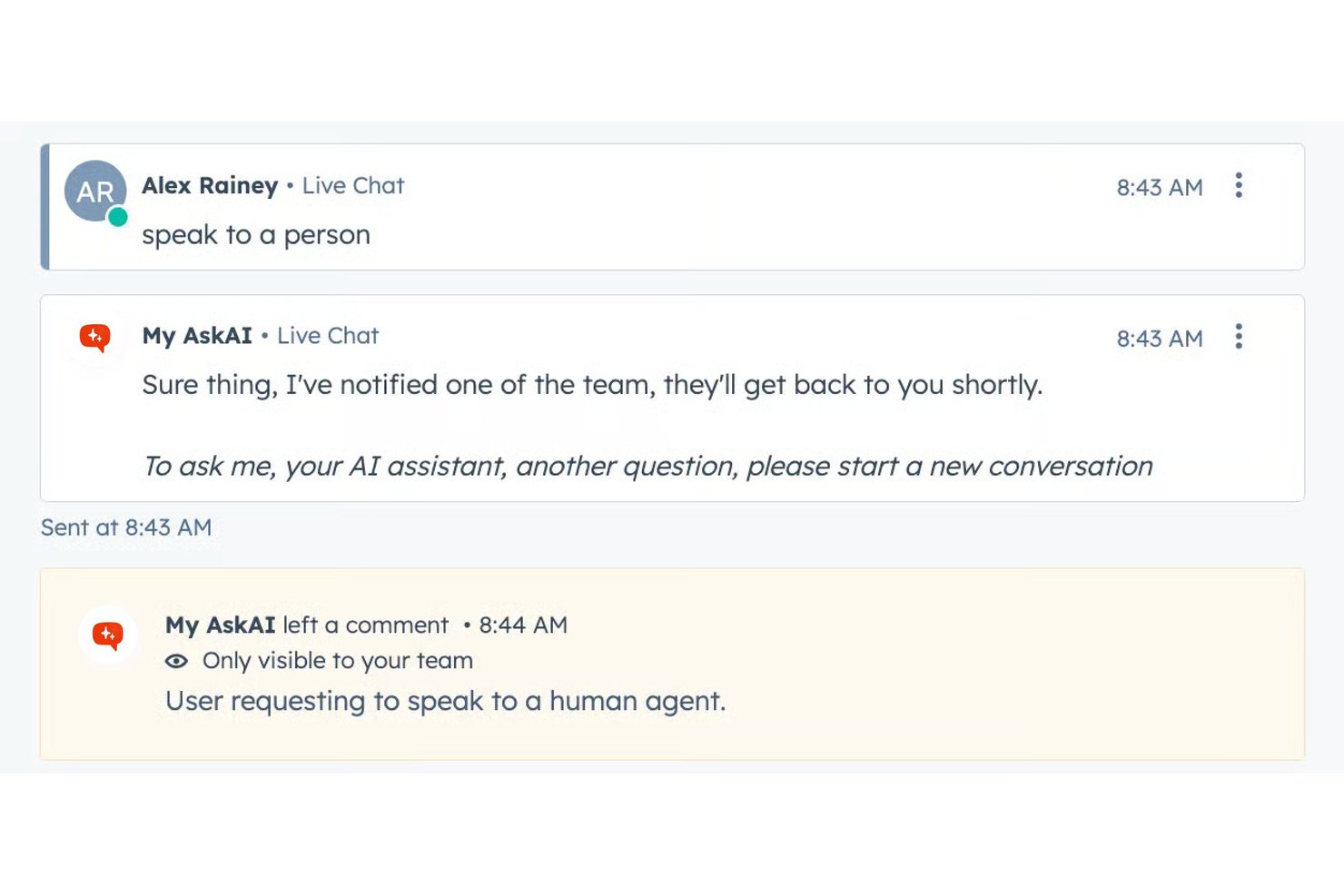
My AskAI è un chatbot per il servizio clienti basato sull'intelligenza artificiale che si integra con i sistemi di assistenza esistenti come Zendesk, Intercom e Freshdesk, risolvendo i ticket dalle fonti di conoscenza sincronizzate e trasferendo automaticamente le richieste agli agenti umani.
Per chi è più adatto My AskAI?
È una soluzione ideale per i team di assistenza piccoli e medi che utilizzano già un sistema di assistenza e desiderano ridurre i ticket tramite l'AI senza cambiare piattaforma o assumere sviluppatori.
Perché ho scelto My AskAI
Ho scelto My AskAI come una delle soluzioni migliori perché si integra direttamente con il sistema di assistenza esistente invece di sostituirlo. Su Zendesk o Intercom, risolve i ticket utilizzando le tue fonti di conoscenza e cita ogni risposta con un riferimento alla fonte. Mi piace anche Knowledge Improvement Studio, che analizza i ticket passati per identificare le lacune e genera automaticamente nuovi contenuti di assistenza. La funzione AI Tasks gestisce attività come rimborsi o modifiche degli indirizzi tramite istruzioni in linguaggio naturale.
Funzionalità principali di My AskAI
- Integrazioni con Slack e Teams: collega l'agente AI agli strumenti di chat interni per domande e risposte dei dipendenti.
- Citazioni automatiche delle fonti: ogni risposta del chatbot fa riferimento alla fonte di conoscenza originale per garantire la tracciabilità.
- Rilevamento multilingue della lingua: supporta oltre 95 lingue con rilevamento automatico e risposte localizzate.
- Assegnazione dei tag ai ticket tramite AI: assegna automaticamente i tag ai ticket di assistenza tramite l'AI per facilitare la categorizzazione e la creazione di report.
Integrazioni di My AskAI
My AskAI offre integrazioni native con Zendesk, Intercom, Gorgias, Freshdesk, HubSpot e Freshchat.
Pros and Cons
Pros:
- Si implementa sui sistemi di assistenza esistenti senza ricostruire i flussi di lavoro
- Cita le fonti in ogni risposta dell'AI
- Identifica le lacune nella conoscenza dai ticket passati
Cons:
- Copertura multicanale limitata oltre il web e le email
- La profondità degli strumenti di analisi è inferiore rispetto ai concorrenti orientati alle aziende

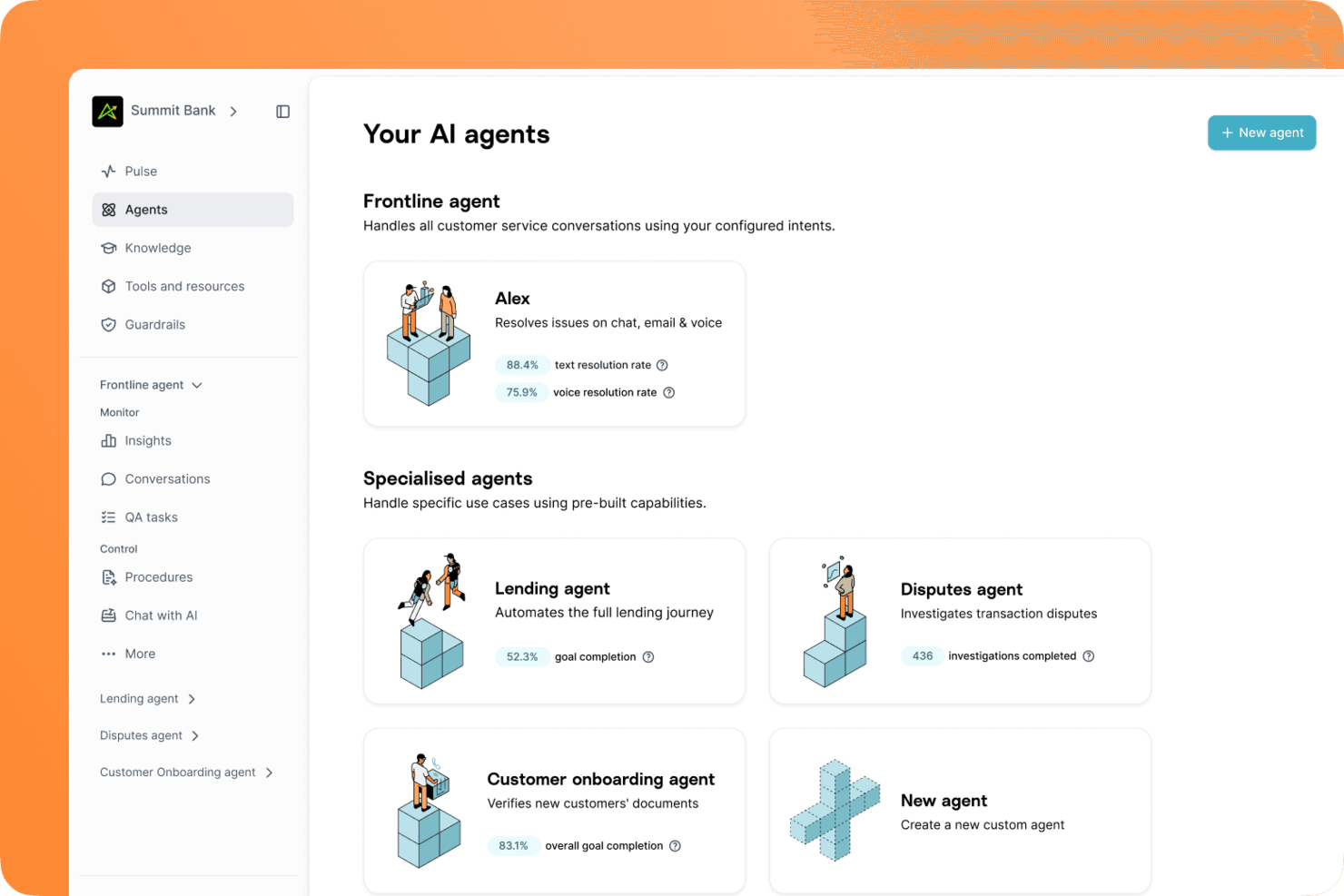
Gradient Labs è una piattaforma di gestione delle operazioni con i clienti nativa per l'IA, sviluppata specificamente per i servizi finanziari, che utilizza agenti specializzati per gestire l'assistenza clienti, le contestazioni, il recupero crediti, l'onboarding e il KYC.
Per chi è più adatto Gradient Labs?
Gradient Labs è particolarmente adatto ai team di assistenza clienti nei settori dei servizi finanziari, delle assicurazioni e dei prestiti che necessitano di un agente IA progettato in conformità con i requisiti normativi.
Perché ho scelto Gradient Labs
Ho incluso Gradient Labs tra le mie migliori scelte perché è una delle poche piattaforme di chatbot per l'assistenza clienti sviluppate fin dall'inizio per garantire la conformità normativa nei servizi finanziari. Apprezzo in particolare la sua automazione delle contestazioni, attraverso la quale l'agente raccoglie le prove, decide l'esito, trasferisce il caso a un operatore umano per l'approvazione e presenta la richiesta di chargeback al circuito della carta. La piattaforma include inoltre oltre 20 misure di controllo specifiche per i servizi finanziari a ogni turno della conversazione e copre i quadri normativi globali, tra cui il Consumer Duty della FCA, il Reg E, il Reg Z, la PSD2 e l'EU AI Act.
Funzionalità principali di Gradient Labs
- Distribuzione omnicanale: l'agente IA gestisce le richieste dei clienti tramite chat, e-mail, voce e SMS da un'unica configurazione.
- Controlli QA automatizzati: ogni turno della conversazione viene verificato automaticamente rispetto alle procedure definite.
- Misure di controllo per la conformità: i requisiti normativi, come quelli della FCA, del GDPR e dell'EU AI Act, vengono applicati direttamente all'interno del flusso della conversazione.
- Trasferimento a un operatore umano: l'agente trasferisce le conversazioni a un operatore in tempo reale quando non riesce a risolvere una richiesta.
Integrazioni di Gradient Labs
Gradient Labs offre integrazioni native con Intercom, Zendesk, Salesforce, Freshdesk, Twilio, RingCentral, Genesys, NICE e LoanPro. È inoltre disponibile un'API per le integrazioni personalizzate.
Pros and Cons
Pros:
- Gestisce conversazioni multi-giorno e multi-turno
- Oltre 20 misure di controllo integrate per la conformità
- Prezzi basati sui risultati per ogni richiesta risolta
Cons:
- Progettato principalmente per aziende di servizi finanziari
- Nessuna prova gratuita né onboarding autonomo

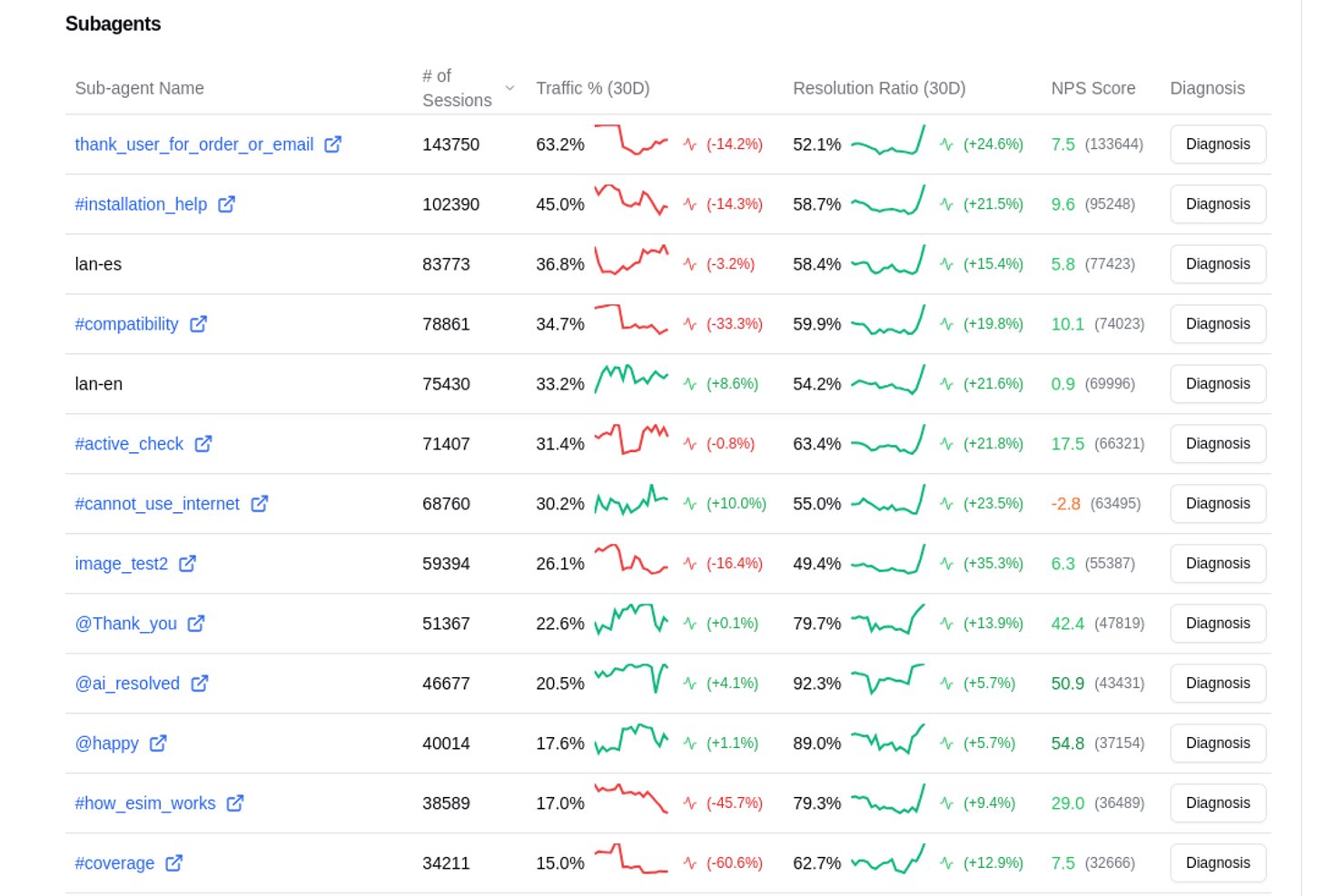
Aissist è una piattaforma di assistenza clienti AI agentica che implementa 'Dipendenti Digitali' multi-agente per gestire conversazioni, eseguire compiti back-office e automatizzare la risoluzione dei ticket su email, chat, SMS, WhatsApp e social media.
Per chi è ideale Aissist?
È particolarmente adatta per team di supporto ecommerce e PMI che gestiscono un elevato volume di ticket tramite helpdesk come Zendesk, Gorgias o Intercom e vogliono automatizzare la risoluzione senza aumentare il personale.
Perché ho scelto Aissist
Aissist si è guadagnata un posto nella mia lista perché la sua architettura AgentMesh™ assegna sub-agenti specializzati separatamente per fatturazione, pre-vendita e richieste tecniche, garantendo risposte accurate e specifiche per il dominio. Apprezzo anche il fatto che esegue attività reali all'interno della conversazione: etichettatura dei ticket, aggiornamento dei record e attivazione di escalation, invece di limitarsi a rispondere. In pratica, una controversia su un ordine Shopify gestita tramite Gorgias può essere risolta dall'inizio alla fine senza nessun intervento umano.
Caratteristiche principali di Aissist
- Integrazioni native con gli helpdesk: Si collega direttamente a Zendesk, Intercom, HubSpot, Freshdesk, Front e Gorgias per un'automazione unificata.
- Gestione omnicanale dei messaggi: Gestisce conversazioni su chat, email, SMS, WhatsApp e i principali canali social.
- Rilevamento automatico della lingua: Supporta oltre 65 lingue con traduzione in tempo reale e risposte nella lingua madre.
- Azioni personalizzate su API e backend: Avvia ricerche ordini, resi e aggiornamenti account nelle chat live utilizzando API REST e GraphQL.
Integrazioni Aissist
Aissist offre integrazioni native con Zendesk, Intercom, HubSpot, Freshdesk, Gorgias, Front, Salesforce, eDesk, Shopify, WooCommerce e Magento. È disponibile un'API per integrazioni personalizzate.
Pros and Cons
Pros:
- Risolve completamente i ticket senza l'intervento di operatori umani
- I sub-agenti gestiscono richieste specifiche di dominio con precisione
- Supporta oltre 65 lingue senza dover creare bot duplicati
Cons:
- La complessità dell'implementazione aumenta con la configurazione multi-agente
- Reportistica degli analytics limitata rispetto ai concorrenti

eDesk
Ideale per supporto e-commerce 24/7
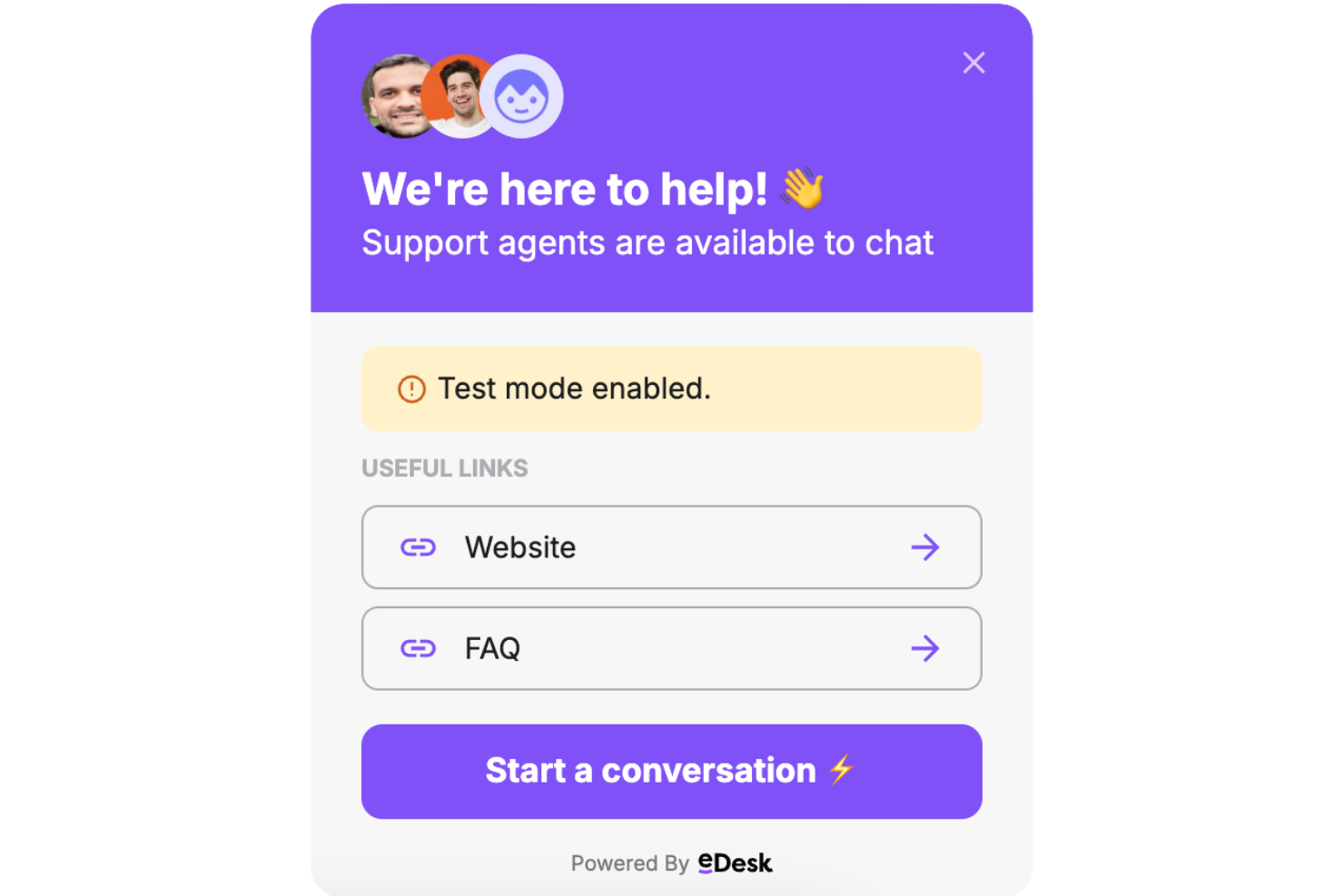
eDesk è una piattaforma di assistenza clienti per l'e-commerce che combina chatbot alimentati da IA, ticketing multicanale e integrazioni con marketplace per i team di supporto online.
Per chi è ideale eDesk?
eDesk è particolarmente indicato per le aziende di e-commerce che vendono su più marketplace online e necessitano di una piattaforma centralizzata per gestire il supporto clienti su larga scala.
Perché ho scelto eDesk
Ho scelto eDesk come uno dei migliori perché è progettato specificamente per il supporto e-commerce attivo 24/7. Il chatbot si collega direttamente ai dati degli ordini, al catalogo prodotti e alle FAQ per fornire ai clienti risposte precise, coerenti con il brand, a qualsiasi ora—senza bisogno che un agente sia online. Apprezzo in particolare la funzione di traduzione in tempo reale, che consente a un cliente che acquista a mezzanotte in un altro fuso orario di ricevere la stessa qualità di risposta di chi contatta durante l'orario lavorativo. Quando una richiesta è troppo complessa per il bot, questa viene inoltrata a un operatore umano con già tutto il contesto della conversazione allegato, così non si perde nulla nel passaggio.
Funzionalità principali di eDesk
- Smart inbox: Una casella di posta unificata che raccoglie i ticket da Amazon, eBay, Shopify e oltre 300 canali, allegando automaticamente a ogni ticket i dettagli dell'ordine e le informazioni sulla spedizione.
- Classificazione AI dei ticket: Ordina e assegna automaticamente tag ai ticket in entrata in base all'intento—resi, cancellazioni, domande sugli ordini—così gli operatori possono dare priorità e rispondere più rapidamente.
- Monitoraggio SLA: Monitora gli obiettivi di tempo di risposta su tutti i canali e segnala i ticket a rischio prima che le scadenze vengano superate.
- Casella pre-vendita: Uno spazio dedicato alla gestione delle domande sui prodotti da parte degli acquirenti prima che effettuino l'acquisto, integrando dati su inventario e prezzi per aiutare gli agenti a concludere più vendite.
Integrazioni eDesk
eDesk offre oltre 200 integrazioni native, tra cui Amazon, eBay, Shopify, Walmart, BigCommerce, Magento, WooCommerce, Linnworks, ChannelAdvisor, Allegro e Zapier. È disponibile un'API per integrazioni personalizzate.
Pros and Cons
Pros:
- Integra dati dettagliati sugli ordini per un servizio clienti avanzato
- Le automazioni IA riducono le attività ripetitive di supporto
- Progettato per gestire grandi volumi di richieste e-commerce
Cons:
- Principalmente pensato per l'e-commerce, meno flessibile per altri settori
- Reportistica e analisi, sebbene presenti, sono meno personalizzabili rispetto a dashboard enterprise più avanzate
New Product Updates from eDesk
eDesk Adds Galeria and Kaufland Support in Spain and Netherlands
eDesk adds support for Galeria, Kaufland Spain, and Kaufland Netherlands marketplaces. These integrations bring more European buyer messages into eDesk with routing, templates, AI insights, and automated translation. For more information, visit eDesk’s official site.
 .
.
Ideale per combinare supporto umano e IA
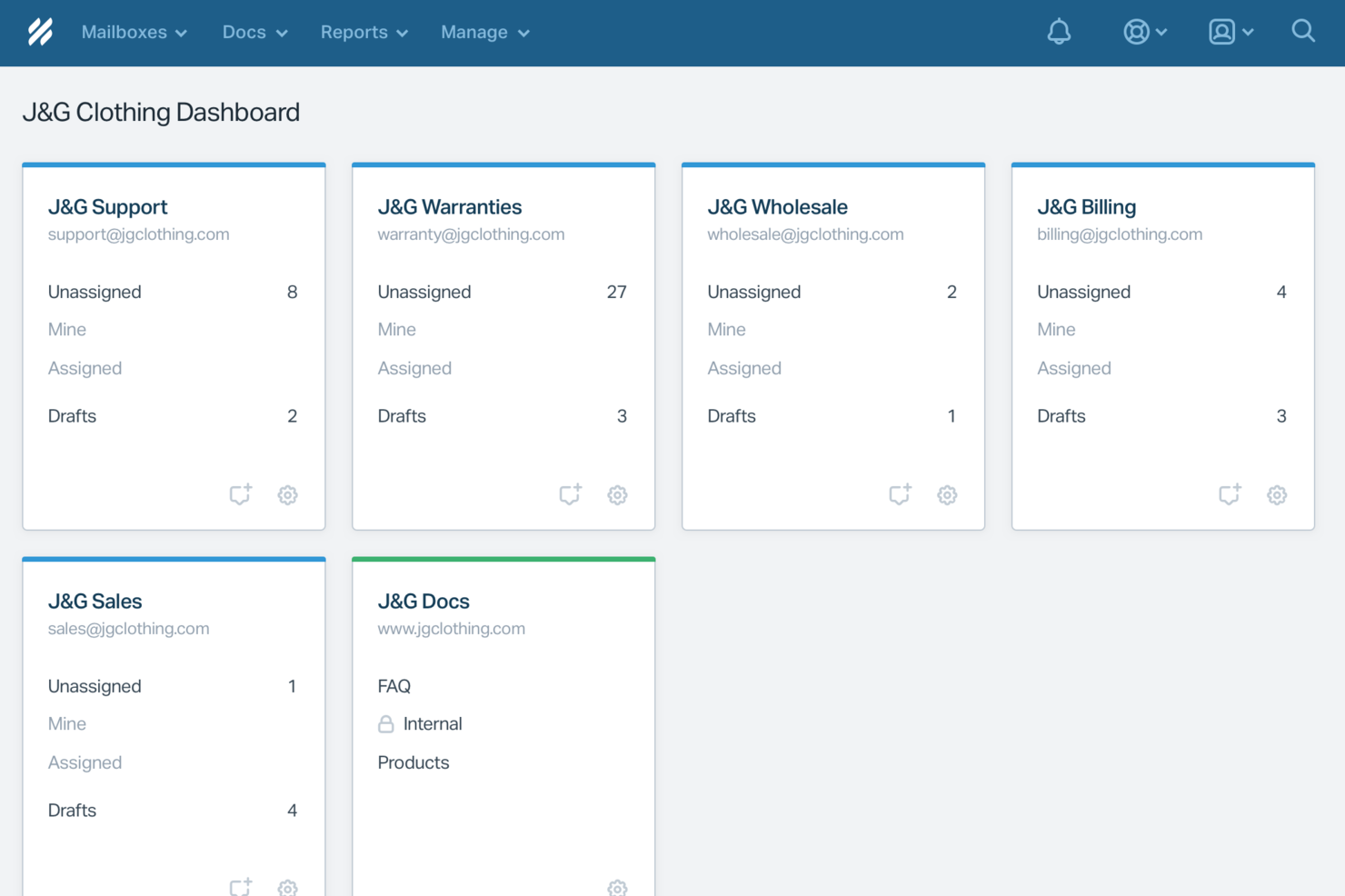
Help Scout è una piattaforma di assistenza clienti che combina chatbot alimentati dall'IA, chat dal vivo, caselle di posta condivise e una base di conoscenza per supportare le conversazioni online con i clienti.
Per chi è più indicato Help Scout?
Help Scout è adatto a piccole e medie imprese che desiderano gestire l'assistenza clienti tramite chat, email e self-service senza doversi occupare di strumenti eccessivamente complessi.
Perché ho scelto Help Scout
Help Scout si guadagna un posto nella mia selezione grazie a come fonde in modo naturale l'automazione dell'IA con il supporto umano, senza far sentire i clienti intrappolati in un loop di bot. Apprezzo molto la funzione AI Answers, che aiuta a risolvere richieste di routine attingendo dalla base di conoscenza e dalle istruzioni personalizzate. Quando l'IA non riesce a gestire una domanda, il cliente può passare a un agente dal vivo con un paio di clic, arrivando direttamente nella casella di posta condivisa. L'Inbox Assistant aiuta anche la mia squadra a scrivere risposte, riassumere conversazioni lunghe e adattare il tono quando necessario, così gli agenti restano efficienti anche nei periodi di grande afflusso.
Caratteristiche principali di Help Scout
- Widget Beacon: Un widget di chat integrabile che puoi inserire ovunque sul sito o nell'app per mostrare articoli della base di conoscenza, raccogliere richieste via email o avviare chat dal vivo.
- Risposte salvate: Modelli di risposta predefiniti che gli agenti possono utilizzare per rispondere a domande comuni senza dover scrivere ogni volta da zero.
- Profili cliente: Schede di contatto compilate automaticamente che mostrano conversazioni passate, dettagli dell'account e dati provenienti da app connesse.
- Report e analisi: Rapporti integrati che tracciano tempi di risposta, tempi di gestione, volume di conversazioni e punteggi di soddisfazione del cliente su tutti i canali.
Integrazioni di Help Scout
Help Scout offre integrazioni native con Slack, HubSpot, Salesforce, Shopify, Mailchimp, Jira e Google Workspace. Si collega anche con Zapier e fornisce un'API per integrazioni personalizzate.
Pros and Cons
Pros:
- AI Answers risolve i ticket comuni senza coinvolgimento dell'agente
- Passaggio senza interruzioni che mantiene il contesto della conversazione per gli agenti
- La base di conoscenza integrata consente risposte automatiche accurate
Cons:
- Non è un chatbot autonomo al di fuori dell'ecosistema Help Scout
- L'efficacia dell'IA dipende molto dalla qualità della base di conoscenza
New Product Updates from Help Scout

Help Scout Adds Automatic Conversation Reassignment
Help Scout can now automatically unassign conversations when the assigned teammate has been away long enough, keeping replies moving so others can pick them up. For more information, visit Help Scout's official site.
 .
.
Ideale per il supporto multilingue
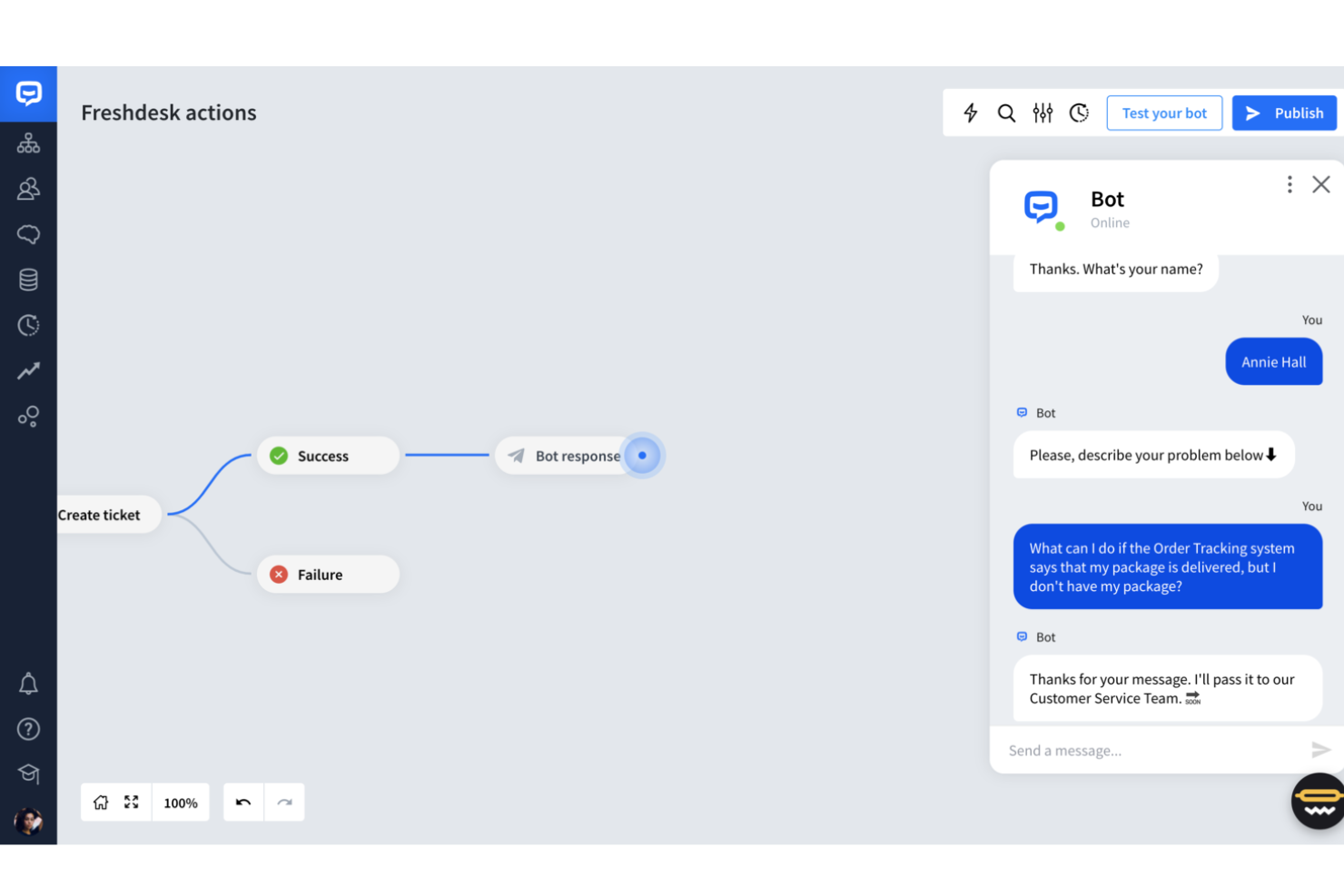
Freshdesk è una piattaforma di assistenza clienti che offre chatbot alimentati dall'IA, chat dal vivo, gestione dei ticket e strumenti di automazione per gestire le conversazioni dei clienti online su più canali.
Per chi è ideale Freshdesk?
Freshdesk è adatto ai team di supporto clienti di aziende di medie e grandi dimensioni che gestiscono un elevato volume di richieste in più lingue e regioni.
Perché ho scelto Freshdesk
Ho scelto Freshdesk come uno dei migliori grazie alla sua gestione del supporto multilingue, sia nel chatbot che nella knowledge base. Freddy AI Copilot traduce le conversazioni in tempo reale direttamente nell'area di lavoro dell'agente, così il tuo team può rispondere nella lingua del cliente senza cambiare strumento o copiare testi in un traduttore. Anche la knowledge base di Freshdesk supporta contenuti multilingue, permettendo di pubblicare articoli self-service in più lingue che il Freddy AI Agent può proporre durante le chat. Per i team che assistono clienti in diverse regioni, questa combinazione di traduzione live e self-service localizzato è difficile da trovare in un'unica piattaforma.
Caratteristiche principali di Freshdesk
- Freddy AI Agent: Un bot basato su IA che gestisce automaticamente le richieste in arrivo dei clienti, risolvendo i problemi frequenti senza l'intervento degli operatori.
- Smistamento dei ticket: Instrada automaticamente le richieste ai giusti agenti o team in base a regole e condizioni predefinite.
- Assegnazione dei ticket in base alle competenze: Assegna i ticket agli agenti in base alle loro competenze specifiche, assicurando che i clienti arrivino alla persona più qualificata.
- Forum della community: Uno spazio integrato dove i clienti possono fare domande, condividere risposte e trovare soluzioni dagli altri utenti.
Integrazioni Freshdesk
Freshdesk offre oltre 1.000 integrazioni native, tra cui Slack, Salesforce, Shopify, Jira, Mailchimp, WhatsApp, Facebook Messenger, Microsoft Teams, Google Workspace e Zoom. Fornisce inoltre un'API per integrazioni personalizzate.
Pros and Cons
Pros:
- Dashboard personalizzabili forniscono metriche di supporto in tempo reale.
- Il supporto omnicanale integra diverse piattaforme di comunicazione.
- L'automazione IA migliora i tempi di risposta e riduce il carico di lavoro.
Cons:
- Enfasi sull'IA potrebbe non adattarsi allo stile di lavoro di tutti.
- Mancano soluzioni di chiamata integrate, richiedendo strumenti separati.
New Product Updates from Freshdesk

Freshdesk Adds Voice AI Agents in Freshcaller
Freshdesk introduces Voice AI Agents available through Freshcaller Marketplace apps to handle routine calls and reduce queues. This feature enables automated call handling with real-time, conversational support. For more information, visit Freshdesk's official site.

Zendesk
Ideale per agenti IA personalizzabili
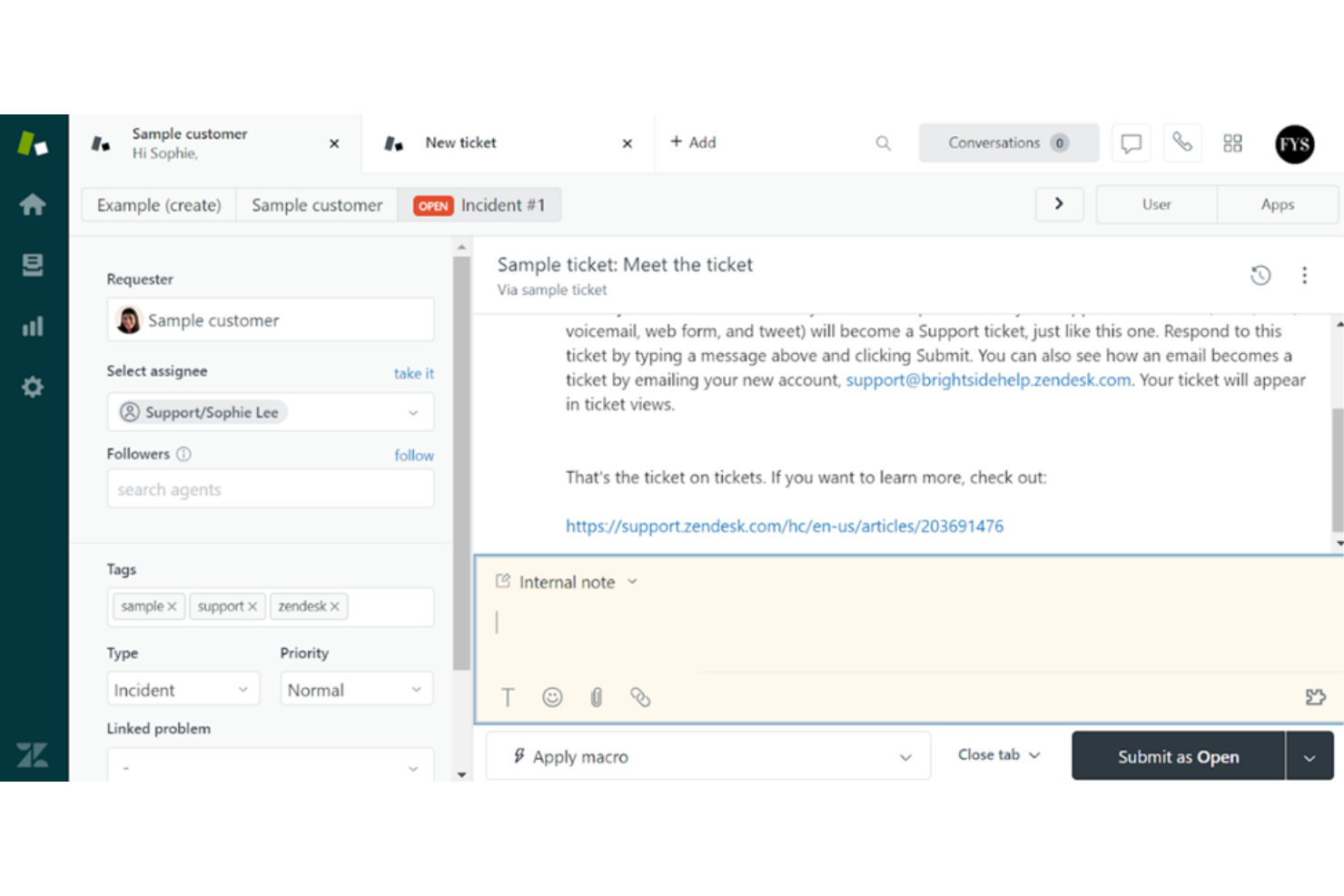
Zendesk è una piattaforma per il servizio clienti che offre chatbot basati sull'IA, gestione automatizzata dei ticket e messaggistica omnicanale per i team di supporto online.
Per chi è più adatto Zendesk?
Zendesk è una soluzione particolarmente adatta ai team di supporto di medie e grandi aziende che necessitano di una soluzione scalabile per il servizio clienti basata sull'IA e attiva su più canali digitali.
Perché ho scelto Zendesk
Zendesk è una delle scelte migliori perché offre un controllo notevole sul comportamento degli agenti IA. Mi piace molto poter definire profili personalizzati, impostare limiti per il ragionamento dell'IA e collegare gli agenti alle proprie fonti di conoscenza: in questo modo, il bot con cui interagiscono i clienti sembra una naturale estensione del brand, non un generico sistema di domande frequenti. Il generatore di agenti IA consente di descrivere gli obiettivi in linguaggio naturale invece di programmare flussi rigidi, permettendomi di gestire richieste complesse e articolate in più passaggi senza dover creare alberi decisionali. La valutazione della qualità integrata copre il 100% delle interazioni degli agenti IA, così posso vedere in quali aree l'agente offre buone prestazioni e dove necessita di ottimizzazioni.
Funzionalità principali di Zendesk
- Messaggistica omnicanale: Gestisci le conversazioni con i clienti su web, dispositivi mobili, WhatsApp, Facebook e Instagram da un'unica area di lavoro per gli agenti.
- Instradamento omnicanale: Assegna automaticamente i ticket in arrivo all'agente più adatto in base a disponibilità, carico di lavoro e competenze su tutti i canali.
- Copilota IA: Fornisce agli agenti umani suggerimenti in tempo reale, contesto e raccomandazioni sui passaggi successivi direttamente nell'area di lavoro dell'agente.
- Dashboard analitiche predefinite: Monitora il volume dei ticket, le prestazioni degli agenti e le tendenze relative ai clienti fin da subito, senza dover configurare report personalizzati.
Integrazioni di Zendesk
Zendesk offre oltre 1.200 integrazioni native tramite il proprio marketplace, tra cui Slack, Shopify, Google Play Reviews, Trustpilot, Pipedrive, Sprout Social, Harvest, ChannelReply e Guru. È disponibile un'API per le integrazioni personalizzate.
New Product Updates from Zendesk
Zendesk Adds Email AI Replies and Predictive Routing
Zendesk’s latest email AI agents update brings configurable knowledge and welcome replies and adds predictive routing for email tickets, so you can tailor your automated emails and get inquiries resolved faster. For more information, visit Zendesk’s official site.

Chatbase
Ideale per gestire richieste complesse dei clienti
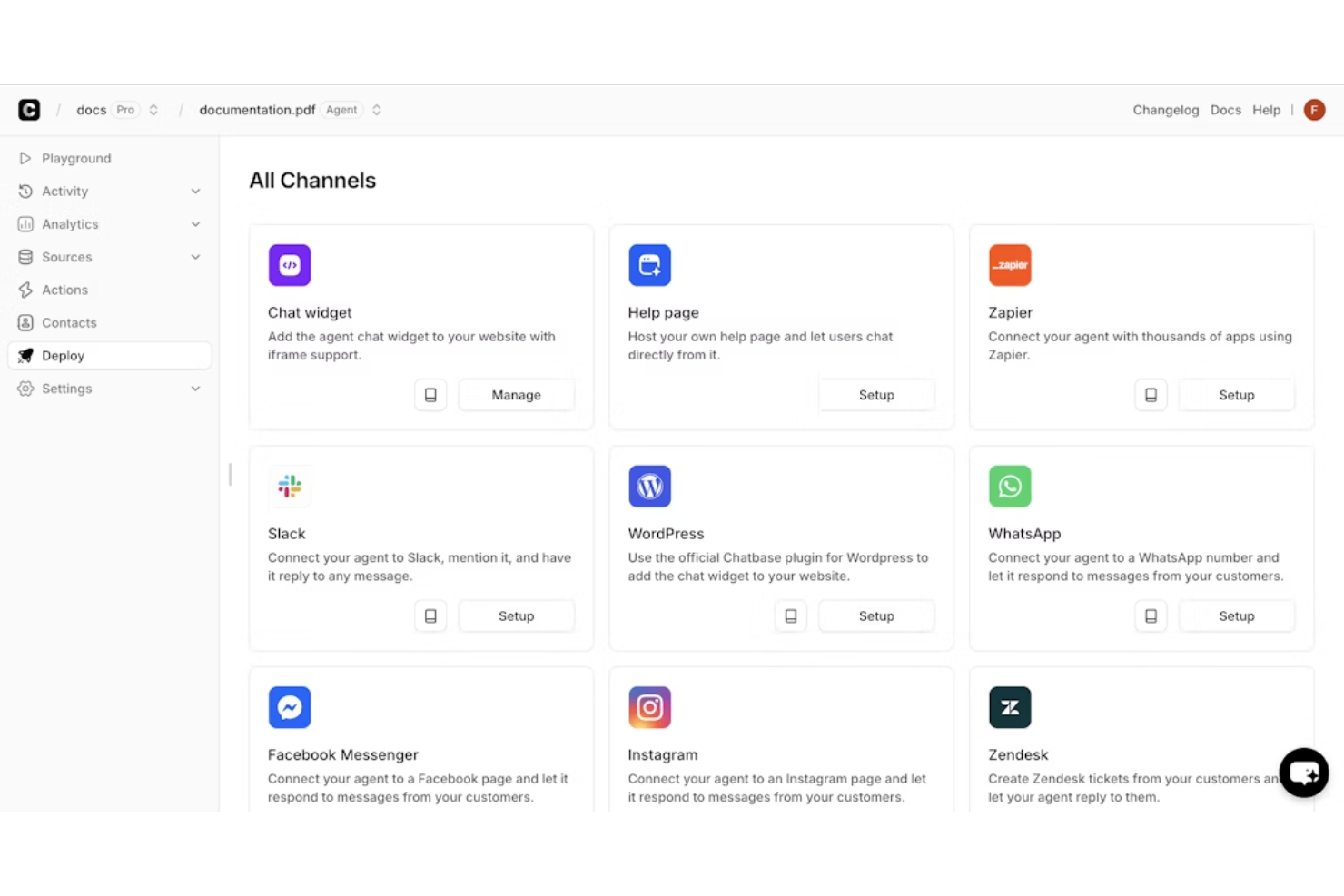
Chatbase è una piattaforma di chatbot AI per i team di assistenza clienti che consente di creare, addestrare e distribuire chatbot utilizzando i tuoi dati, collegandoli al tuo sito web o ai canali di messaggistica.
Per chi è ideale Chatbase?
Chatbase è indicato per piccole e medie imprese che desiderano implementare un chatbot AI personalizzato, formato sui propri contenuti, senza la necessità di un team di sviluppo.
Perché ho scelto Chatbase
Chatbase è tra le mie scelte preferite perché adoro il modo in cui utilizza i LLM con capacità di ragionamento che risolvono richieste di assistenza clienti complesse, non solo semplici FAQ. Lo uso per collegare l’agente a sistemi live come strumenti di gestione ordini e CRM, così quando un cliente chiede informazioni su una spedizione in ritardo o vuole aggiornare il suo abbonamento, l’agente può estrarre dati reali e agire direttamente. Mi affido anche alla funzione di escalation intelligente, che permette di impostare istruzioni in linguaggio naturale per stabilire quando il bot deve passare la conversazione a un operatore umano, evitando che problematiche davvero complesse restino irrisolte.
Caratteristiche principali di Chatbase
- Addestramento su dati personalizzati: Carica documenti, PDF o URL di siti web per addestrare il tuo chatbot sulla tua base di conoscenze specifica.
- Supporto multilingue: Rileva e risponde nella lingua del cliente senza configurazioni manuali.
- Moduli di acquisizione lead: Raccogli i dati di contatto dei clienti durante la conversazione utilizzando campi modulo integrati direttamente nel widget della chat.
- Cronologia conversazioni: Consulta le trascrizioni complete delle interazioni passate col chatbot per monitorare la qualità delle risposte e individuare eventuali lacune.
Integrazioni Chatbase
Chatbase offre integrazioni native con Slack, WhatsApp, Facebook Messenger e Telegram. È disponibile un'API per integrazioni personalizzate.
Altri chatbot per il servizio clienti
Ecco alcune ulteriori opzioni di chatbot per il servizio clienti che non sono entrate nella mia selezione, ma che vale comunque la pena prendere in considerazione:
- SparrowDesk
Ideale per la risoluzione dei ticket affidata principalmente all’AI
- Weav
Ideale per approfondimenti sui dati dell'esperienza cliente
- Birdeye
Ideale per acquisire potenziali clienti
- Zoho SalesIQ
Ideale per la sua interfaccia facile da usare
- Tidio
Ideale per focus sulla generazione di vendite
- Front
Ideale per la selezione ticket automatizzata dall'IA
- Tars
Ideale per facilità di configurazione
- Intercom
Ideale per un'interfaccia cliente semplice
- Kommunicate
Ideale per bilanciare chatbot e supporto umano
- CoSupport AI
Ideale per un'assistenza clienti più rapida, accurata e sicura
- Drift
Ideale per trasformare le conversazioni in vendite
- Acquire
Ideale per chat automatizzate simili a quelle umane
- LiveHelpNow
Ideale per il supporto clienti omnicanale
- Activechat
Ideale per marchi orientati al cliente
- Crescendo
Ideale per automatizzare il supporto sensibile alla conformità
- Helpshift
Ideale per una rapida implementazione
- Genesys
Ideale per chatbot che coprono più canali digitali
- Quiq Messaging
Ideale per l'integrazione con bot di altre piattaforme
- Quidget
Ideale per automatizzare il supporto di primo livello ripetitivo
- Hiver
Ideale per automazione chat basata su IA
- Freshchat
Ideale per scalare il supporto clienti su qualsiasi canale
- Kayako
Ideale per l'assistenza integrata su sito web e dispositivi mobili


Come Valuto i Chatbot per il Servizio Clienti
Divido la mia valutazione in requisiti di base—come la qualità del NLP e il passaggio all'agente umano—e in fattori differenzianti che rivelano quali strumenti riducono effettivamente il volume dei ticket e crescono insieme alla tua operazione di supporto.
Funzionalità di Base (Requisiti Indispensabili per Questa Lista)
Quando seleziono gli strumenti per la mia lista, valuto ciascuno su una scala da 0 (non offre la funzionalità) a 5 (eccelle in quest'area) per ogni funzionalità di base elencata qui sotto. Poi calcolo il punteggio totale dello strumento trasformandolo in una percentuale. Ogni strumento deve raggiungere un punteggio totale minimo del 65% per essere preso in considerazione.
- Intelligenza Artificiale Conversazionale & NLP: Valuto quanto bene un bot comprenda frasi diverse—come un cliente che chiede "dov'è il mio ordine" rispetto a "non ho ricevuto il mio pacco"—e risponda in modo naturale.
- Distribuzione Omnicanale: Ogni strumento dovrebbe supportare l'implementazione su canali realmente usati dai clienti, come la chat del sito web, WhatsApp, Facebook Messenger, SMS e app mobili.
- Passaggio all'Agente Umano: Controllo se le conversazioni vengono trasferite agli operatori umani mantenendo tutto il contesto, in modo che il cliente non debba ripetere il suo problema dopo che il bot ha raggiunto i suoi limiti.
- Integrazione con la Base di Conoscenza: Il bot deve attingere risposte da contenuti già presenti nel centro assistenza o nella documentazione, e verifico se mantiene le informazioni aggiornate quando il materiale di origine viene modificato.
- Integrazioni con CRM & Helpdesk: Qui è importante la connessione con piattaforme come Zendesk, Salesforce o HubSpot—cerco integrazioni native che permettano al bot di leggere i dati dei clienti e registrare le interazioni.
- Analisi & Reportistica: Valuto se la piattaforma traccia metriche specifiche del supporto come percentuale di deflessione, tasso di contenimento e tempo di risoluzione, invece di limitarsi al volume grezzo delle conversazioni.
Una volta ottenuta una lista di strumenti che soddisfano i criteri, considero ciò che distingue ogni piattaforma dalle altre.
Fattori Differenzianti (Cosa Distingue i Fornitori)
Ecco come confronto le diverse soluzioni:
Funzionalità Distintive
Un builder di bot senza codice è un fattore decisivo—permette ai team operativi di supporto di aggiornare i flussi conversazionali senza dover aprire una richiesta di sviluppo ogni volta che cambia una policy di reso. Valuto anche il supporto multilingue, in particolare se il bot riconosce automaticamente la lingua invece di costringere il cliente a sceglierla. È importante anche la messaggistica proattiva. Un bot che propone assistenza quando il cliente si blocca su una pagina di errore durante il checkout può risolvere i problemi prima che diventino ticket.
Oltre le Funzionalità
La struttura dei prezzi è molto rilevante in questo settore. Alcuni fornitori addebitano a risoluzione, altri a conversazione o per utente attivo mensile—e questa differenza può far cambiare parecchio i costi man mano che cresce il volume dei ticket. Considero anche la velocità di implementazione, poiché un chatbot che richiede mesi per essere addestrato e lanciato ritarda i benefici dell'automazione che il team si aspetta. La sicurezza è un altro aspetto che controllo, soprattutto la conformità a SOC 2 e GDPR, dato che questi bot trattano quotidianamente dati sensibili dei clienti come dettagli degli ordini e informazioni sugli account.
Come scegliere un chatbot per il servizio clienti
Il miglior chatbot per il servizio clienti dipende da ciò che deve gestire, dalla complessità delle richieste di assistenza e dai canali attraverso cui i clienti ti contattano. Concentrati su questi fattori quando confronti le opzioni:
| Fattore | Cosa considerare |
|---|---|
| Volume dell'assistenza | Analizza dove gli agenti trascorrono più tempo. Se le domande ripetitive rappresentano una quota significativa dei ticket, dai priorità a solide funzionalità di FAQ e automazione dell'assistenza autonoma. |
| Domande dei clienti | Considera quanto siano prevedibili le richieste. Scegli un chatbot di base per le FAQ semplici e un chatbot di AI per domande varie o contestuali. |
| Canali di assistenza | Individua i canali attraverso cui i clienti ti contattano già. Scegli un chatbot che supporti i canali con il volume più elevato, anziché quello con l'elenco di canali più lungo. |
| Integrazioni | Verifica la compatibilità con il sistema di assistenza, il CRM, la base di conoscenza e gli altri sistemi a cui il chatbot deve accedere. |
| Esperienza del cliente | Testa gli strumenti selezionati con domande reali dei clienti. Scegline uno che risponda con precisione e renda semplice contattare una persona quando necessario. |
| Metriche di successo | Definisci cosa vuoi migliorare con il chatbot, ad esempio il tasso di risoluzione, i tempi di risposta, il volume dei ticket o il CSAT. Scegli uno strumento che fornisca report su queste metriche. |
Le nuove tendenze dell'AI nei chatbot per il servizio clienti
I chatbot di AI per il servizio clienti stanno ampliando le possibilità oltre le FAQ tradizionali e le risposte predefinite. Ecco i principali cambiamenti da tenere d'occhio:
- Conversazioni simili a quelle umane: l'IA generativa sta rendendo le risposte dei chatbot meno schematiche e più capaci di comprendere il linguaggio naturale e il contesto.
- Oltre le FAQ di base: i chatbot basati sull'IA più recenti sono sempre più in grado di gestire richieste in più passaggi, come verificare un ordine e avviare un reso.
- Personalizzazione più approfondita: l'IA può utilizzare la cronologia del cliente, i dati dell'account e le conversazioni precedenti per fornire risposte specifiche per ogni cliente.
- Supporto vocale e visivo: l'IA multimodale consente ai chatbot di comprendere voce, immagini e documenti oltre al testo.
- Supporto proattivo: l'IA può utilizzare l'attività del cliente e altri segnali per identificare potenziali problemi e offrire assistenza prima che il cliente richieda supporto.
- Azioni autonome: l'IA agentica sta iniziando a consentire ai chatbot di eseguire azioni tra sistemi connessi, come aggiornare un account o modificare una prenotazione.
Che cos'è un chatbot per il servizio clienti?
Un chatbot per il servizio clienti è uno strumento che automatizza le risposte alle richieste dei clienti, fornendo assistenza 24 ore su 24, 7 giorni su 7 e gestendo le domande di routine. I rappresentanti del servizio clienti e i team di supporto utilizzano generalmente questi strumenti per migliorare l'efficienza e i tempi di risposta. Funzionalità come le risposte automatizzate, l'interazione in tempo reale e le capacità di integrazione aiutano a gestire grandi volumi di richieste e a migliorare la soddisfazione dei clienti. In definitiva, questi strumenti fanno risparmiare tempo e risorse, migliorando al contempo l'esperienza del cliente.
Funzionalità
I migliori chatbot per il servizio clienti combinano l'automazione con strumenti che aiutano i clienti a ottenere risposte accurate e a raggiungere un agente quando necessario. Le funzionalità principali includono:
- Risposte automatizzate: risposte predefinite o generate dall'IA alle domande dei clienti.
- Elaborazione del linguaggio naturale: riconoscimento dell'intento del cliente e del linguaggio conversazionale.
- Flussi di conversazione: percorsi predefiniti per FAQ, risoluzione dei problemi, prenotazioni, resi e altre richieste.
- Accesso alla base di conoscenza: recupero di informazioni da FAQ, articoli di assistenza e documentazione.
- Trasferimento a un agente umano: trasferimento delle conversazioni dal chatbot a un agente di supporto.
- Cronologia delle conversazioni: memorizzazione dei messaggi e delle interazioni precedenti.
- Supporto multicanale: implementazione del chatbot su siti web, app e piattaforme di messaggistica.
- Supporto multilingue: conversazioni con i clienti in più lingue.
- Integrazioni: connessioni con CRM, sistemi di assistenza, piattaforme di commercio elettronico e altri sistemi aziendali.
- Analisi: report su conversazioni, risoluzioni, escalation e utilizzo del chatbot.
Vantaggi
L'implementazione di un chatbot per il servizio clienti offre diversi vantaggi al tuo team e alla tua azienda. Eccone alcuni:
- Maggiore efficienza: automatizza le richieste di routine, consentendo al tuo team di concentrarsi sulle attività complesse e riducendo i tempi di risposta.
- Risparmio sui costi: riduce la necessità di un ampio team di supporto gestendo automaticamente un volume significativo di richieste.
- Migliore soddisfazione dei clienti: offre disponibilità 24 ore su 24, 7 giorni su 7, garantendo ai clienti un'assistenza tempestiva ogni volta che ne hanno bisogno.
- Informazioni più approfondite sui dati: fornisce analisi sulle interazioni con i clienti, aiutandoti a prendere decisioni informate per migliorare il servizio.
- Portata più ampia: il supporto multilingue consente di rivolgersi a una clientela diversificata, ampliando la presenza sul mercato.
- Migliore gestione dei potenziali clienti: funzionalità come l'assegnazione di un punteggio ai potenziali clienti aiutano a dare priorità a quelli di maggior valore, ottimizzando le attività di vendita.
- Qualità del supporto uniforme: garantisce risposte e qualità del servizio uniformi in tutte le interazioni con i clienti, preservando la reputazione del marchio.
Costi e prezzi
La scelta di un chatbot per il servizio clienti richiede una comprensione dei vari modelli di prezzo e dei piani disponibili. I costi variano in base alle funzionalità, alle dimensioni del team, agli elementi aggiuntivi e ad altri fattori. La tabella seguente riassume i piani più comuni, i relativi prezzi medi e le funzionalità tipicamente incluse nelle soluzioni di chatbot per il servizio clienti:
Tabella comparativa dei piani per chatbot per il servizio clienti
| Tipo di piano | Prezzo medio | Funzionalità comuni |
|---|---|---|
| Piano gratuito | $0 | Funzionalità di chat di base, integrazioni limitate e assistenza standard. |
| Piano personale | $5-$25/user/month | Risposte automatizzate, analisi di base e assistenza via e-mail. |
| Piano aziendale | $30-$75/user/month | Analisi avanzate, supporto multilingue e integrazioni CRM. |
| Piano per grandi aziende | $100-$200/user/month | Flussi di lavoro personalizzabili, responsabile account dedicato e assistenza prioritaria. |
Domande frequenti sui chatbot per il servizio clienti
Ecco alcune risposte alle domande comuni sui chatbot per il servizio clienti:
Qual è la differenza tra chatbot e agenti IA?
I chatbot interagiscono principalmente con i clienti tramite conversazioni, rispondendo alle domande, raccogliendo informazioni e gestendo flussi di lavoro predefiniti. Gli agenti IA possono fare un passo in più decidendo quali azioni sono necessarie e completando attività articolate in più passaggi tra sistemi collegati.
Ad esempio, un chatbot potrebbe spiegare la politica sui resi, mentre un agente IA potrebbe verificare l’ordine, confermare l’idoneità e avviare il reso.
Devo passare da un chatbot tradizionale a un chatbot basato sull'IA?
Non necessariamente. Molte piattaforme per chatbot stanno già aggiungendo funzionalità di IA, quindi potresti riuscire ad aggiornare la configurazione esistente invece di cambiare completamente gli strumenti.
Inizia verificando cosa è in grado di fare il tuo chatbot attuale. Valuta l’adozione delle sue funzionalità di IA o il cambio di piattaforma se:
- Il tuo bot si blocca davanti a domande inaspettate: l’IA può gestire variazioni nel linguaggio senza dipendere così tanto da script predefiniti.
- I clienti hanno bisogno di conversazioni migliori: l’IA può comprendere il contesto e le domande successive, rendendo le interazioni meno rigide.
- Vuoi automatizzare attività oltre le FAQ: le nuove funzionalità di IA possono aiutare a gestire richieste più complesse e, in alcuni casi, a eseguire azioni tra sistemi collegati.
- Hai bisogno di una maggiore personalizzazione: l’IA può usare i dati collegati dei clienti e la cronologia delle conversazioni per adattare le risposte.
Se il chatbot attuale svolge bene il proprio compito, non devi sostituirlo solo perché esistono opzioni basate sull’IA. Prima di investire in un nuovo strumento, confronta le funzionalità di IA disponibili sulla piattaforma attuale con i problemi che stai realmente cercando di risolvere.
I chatbot per il servizio clienti possono integrarsi con i software CRM e di assistenza?
Sì. La maggior parte dei chatbot per il servizio clienti si integra con le piattaforme CRM e di assistenza già in uso per accedere ai dati dei clienti, creare o aggiornare ticket e trasferire la cronologia delle conversazioni agli operatori. Verifica se i tuoi strumenti principali dispongono di integrazioni native o richiedono un’API o un connettore di terze parti.
I chatbot possono gestire richieste complesse dei clienti?
No, in genere i chatbot eccellono nella gestione di richieste di routine e semplici. Per i problemi complessi, è meglio predisporre un sistema che consenta al chatbot di inoltrare la conversazione a un operatore umano. Puoi configurare trigger che identificano quando una richiesta va oltre le capacità del chatbot. Forma il tuo team su come subentrare e fornire un’assistenza personalizzata quando necessario.
Quali canali del servizio clienti possono supportare i chatbot?
I chatbot per il servizio clienti possono supportare canali come siti web, app mobili, WhatsApp, Facebook Messenger, SMS e altre piattaforme di messaggistica. La disponibilità dei canali varia in base al fornitore, quindi dai priorità ai canali già utilizzati dai tuoi clienti invece di scegliere basandoti soltanto sul numero di canali.
I chatbot per il servizio clienti possono sostituire gli operatori umani?
Non completamente. I chatbot sono più adatti alle richieste ripetitive e ad alto volume, come FAQ, aggiornamenti sugli ordini e risoluzione dei problemi di base. Gli operatori umani restano importanti per i problemi complessi, delicati o insoliti; cerca quindi un chatbot in grado di riconoscere quando deve inoltrare la richiesta e trasferire il cliente mantenendo il contesto.
Le funzionalità comuni dei chatbot per il servizio clienti includono:
- Risposte automatizzate: risposte predefinite o generate dall’IA alle domande dei clienti.
- Elaborazione del linguaggio naturale: riconoscimento dell’intento del cliente e del linguaggio conversazionale.
- Flussi conversazionali: percorsi predefiniti per FAQ, risoluzione dei problemi, prenotazioni, resi e altre richieste.
- Accesso alla base di conoscenza: recupero di informazioni da FAQ, articoli di assistenza e documentazione.
- Passaggio a un operatore umano: trasferimento delle conversazioni dal chatbot a un operatore dell’assistenza.
- Cronologia delle conversazioni: archiviazione dei messaggi e delle interazioni precedenti.
- Supporto multicanale: utilizzo del chatbot su siti web, app e piattaforme di messaggistica.
- Supporto multilingue: conversazioni con i clienti in più lingue.
- Integrazioni: collegamenti con CRM, sistemi di assistenza, commercio elettronico e altri sistemi aziendali.
- Analisi: report sulle conversazioni, sulle risoluzioni, sugli inoltri e sull’utilizzo del chatbot.
Cosa succede quando un chatbot non sa rispondere alla domanda di un cliente?
Un chatbot ben progettato dovrebbe riconoscere quando non è in grado di risolvere un problema e inoltrarlo automaticamente a un operatore umano. Idealmente, trasferisce la cronologia della conversazione e i dettagli del cliente, così l’operatore può riprendere da dove il chatbot si è fermato invece di costringere il cliente a ricominciare.
| Inizia da | Aspetti da considerare |
|---|---|
| Volume delle richieste di assistenza | Analizza dove gli operatori trascorrono più tempo. Volumi elevati di domande ripetitive rendono particolarmente preziosa l’automazione delle FAQ e del self-service. |
| Domande dei clienti | Considera quanto siano prevedibili le richieste. Per le FAQ semplici può bastare un chatbot di base, mentre domande variabili o contestuali possono trarre vantaggio dall’IA. |
| Canali di assistenza | Dai priorità ai canali attraverso cui i clienti ti contattano già, come chat web, WhatsApp, SMS o messaggistica sui social. |
| Necessità di inoltro | Decidi quali problemi devono essere trasferiti a un operatore e assicurati che il chatbot possa inoltrarli mantenendo intatto il contesto della conversazione. |
| Stack tecnologico esistente | Verifica la compatibilità con il sistema di assistenza, il CRM, la base di conoscenza e gli altri sistemi a cui il chatbot deve accedere. |
| Esperienza del cliente | Testa il chatbot con domande reali. Valuta la qualità delle risposte, la facilità d’uso e la facilità con cui i clienti possono raggiungere una persona. |
| Metriche di successo | Definisci come si misura il successo, che si tratti di meno ticket ripetitivi, tassi di risoluzione più elevati, risposte più rapide o un CSAT migliore. |
Quando bisogna passare dal chatbot a un operatore umano?
Inoltra la conversazione quando gli utenti esprimono frustrazione, quando il problema esula dagli scenari comuni che il bot è in grado di gestire o quando un utente chiede esplicitamente assistenza umana.
I chatbot gestiscono bene le richieste ripetitive o transazionali, ma i problemi complessi o emotivi sono gestiti meglio dalle persone. Stabilire regole chiare per il passaggio mantiene fluide le interazioni con i clienti.
I chatbot per il servizio clienti possono personalizzare le interazioni con i clienti?
Sì, a condizione che abbiano accesso ai dati corretti dei clienti. Un chatbot collegato al CRM o ad altri sistemi può usare dettagli come le informazioni sull’account, la cronologia degli acquisti o le interazioni precedenti per fornire risposte più pertinenti. La personalizzazione deve comunque rispettare le politiche dell’organizzazione in materia di privacy e gestione dei dati.
Come misuro le prestazioni del chatbot per il servizio clienti?
Monitora le metriche che mostrano se il chatbot sta realmente risolvendo le esigenze dei clienti, non solo gestendo conversazioni. Tra i KPI utili figurano il tasso di risoluzione, il tasso di inoltro, la soddisfazione del cliente (CSAT), il tempo di risposta e il tasso di contenimento. Esamina anche le conversazioni non riuscite o abbandonate: possono rivelare lacune nelle conoscenze o nei flussi di lavoro del bot.
| Aspetti da considerare | Come valutarli |
|---|---|
| Caso d’uso | Inizia dalle attività che vuoi automatizzare, come FAQ, monitoraggio degli ordini, resi o risoluzione dei problemi di base. |
| Passaggio a un operatore umano | Assicurati che i clienti possano raggiungere facilmente un operatore quando il chatbot non riesce a risolvere il problema. |
| Canali | Concentrati sui canali attraverso cui i clienti ti contattano già, che si tratti di chat web, WhatsApp, SMS o messaggistica sui social. |
| Integrazioni | Verifica che il chatbot funzioni con il sistema di assistenza, il CRM, la base di conoscenza e gli altri sistemi su cui il tuo team fa affidamento. |
| Qualità delle risposte | Testa il chatbot con domande reali dei clienti, comprese quelle vaghe o inaspettate, prima di prendere una decisione. |
| Reportistica | Cerca metriche come risoluzione, inoltro, contenimento e CSAT per poter misurare il suo impatto. |
| Funzionalità di IA | Decidi quanto vuoi effettivamente automatizzare. I bot di base possono essere sufficienti per le FAQ, mentre i chatbot basati sull’IA possono gestire conversazioni meno prevedibili. |