

I 10 migliori software di chat in tempo reale per siti web nel 2026

10 Selezione dei migliori software di chat dal vivo per siti web


Con così tanti software di chat dal vivo per siti web disponibili, trovare quello migliore può essere una vera sfida. Vuoi che i clienti ricevano risposte alle loro domande specifiche senza dover consultare articoli per l'autoassistenza o aspettare di essere messi in contatto con un operatore di un call center, e hai bisogno dello strumento giusto per il lavoro. Ci penso io! In questo articolo ti aiuterò a scegliere facilmente, condividendo la mia esperienza personale nella valutazione di decine di strumenti di chat dal vivo e presentandoti la mia selezione dei migliori software di chat dal vivo per siti web.
Perché fidarsi dei nostri consigli sui software
Il nostro team testa e recensisce software dal 2012. In quanto leader CX noi stessi, sappiamo quanto sia difficile — e importante — scegliere il software giusto.
Per questa guida, abbiamo valutato gli strumenti attraverso test pratici e ricerche indipendenti, assegnando un punteggio agli strumenti in base ai nostri criteri di selezione.
Le nostre recensioni riflettono il nostro giudizio editoriale umano, non un discorso di vendita.
Tabella comparativa dei software di chat dal vivo per siti web
Questa tabella comparativa riassume i dettagli sui prezzi delle mie migliori selezioni di software di chat dal vivo per siti web:
| Tool | Best For | Trial Info | Price | ||
|---|---|---|---|---|---|
| 1 | Ideale per chat basate sull'IA nei settori regolamentati | Prova gratuita di 30 giorni | A partire da $31/agente/mese (con fatturazione annuale) | Website | |
| 2 | Ideale per la deviazione conversazionale tramite live chat guidata dall’IA | Versione di prova gratuita disponibile | Da $16/utente/mese (fatturazione annuale) | Website | |
| 3 | Ideale per assistenza clienti omnicanale | Prova gratuita di 30 giorni + demo gratuita disponibile | Da $15/mese (fatturato annualmente) | Website | |
| 4 | Ideale per l'automazione dell'assistenza clienti su larga scala | Prova gratuita di 30 giorni disponibile | Da $15/utente/mese | Website | |
| 5 | Ideale per la creazione facile di chatbot da dati personalizzati | Piano gratuito disponibile | Da $32/mese (fatturato annualmente) | Website | |
| 6 | Ideale per l'automazione della chat in tempo reale | Piano gratuito disponibile | A partire da $29/mese (fatturati annualmente) | Website | |
| 7 | Ideale per il servizio clienti basato su IA | Prova gratuita di 7 giorni + piano gratuito disponibile | Da $24.17/mese (fatturazione annuale) | Website | |
| 8 | Ideale per onboarding personalizzabile di grandi team | Prova gratuita di 14 giorni + demo gratuita disponibile | Da $25/postazione/mese (fatturazione annuale) | Website | |
| 9 | Ideale per la messaggistica clienti personalizzata | Prova gratuita di 14 giorni + demo gratuita disponibile | A partire da $29/utente/mese (fatturazione annuale) | Website | |
| 10 | Ideale per il marketing conversazionale | Demo gratuita disponibile | Prezzo su richiesta | Website |

Recensioni dei migliori software di chat dal vivo per siti web
Di seguito trovi i miei riepiloghi dettagliati dei migliori software di chat dal vivo per siti web inclusi nella mia selezione. Le mie recensioni offrono un’analisi approfondita delle funzionalità principali, dei pro e dei contro, delle integrazioni e dei casi d’uso ideali di ogni strumento, per aiutarti a trovare quello più adatto a te.

Comm100
Ideale per chat basate sull'IA nei settori regolamentati
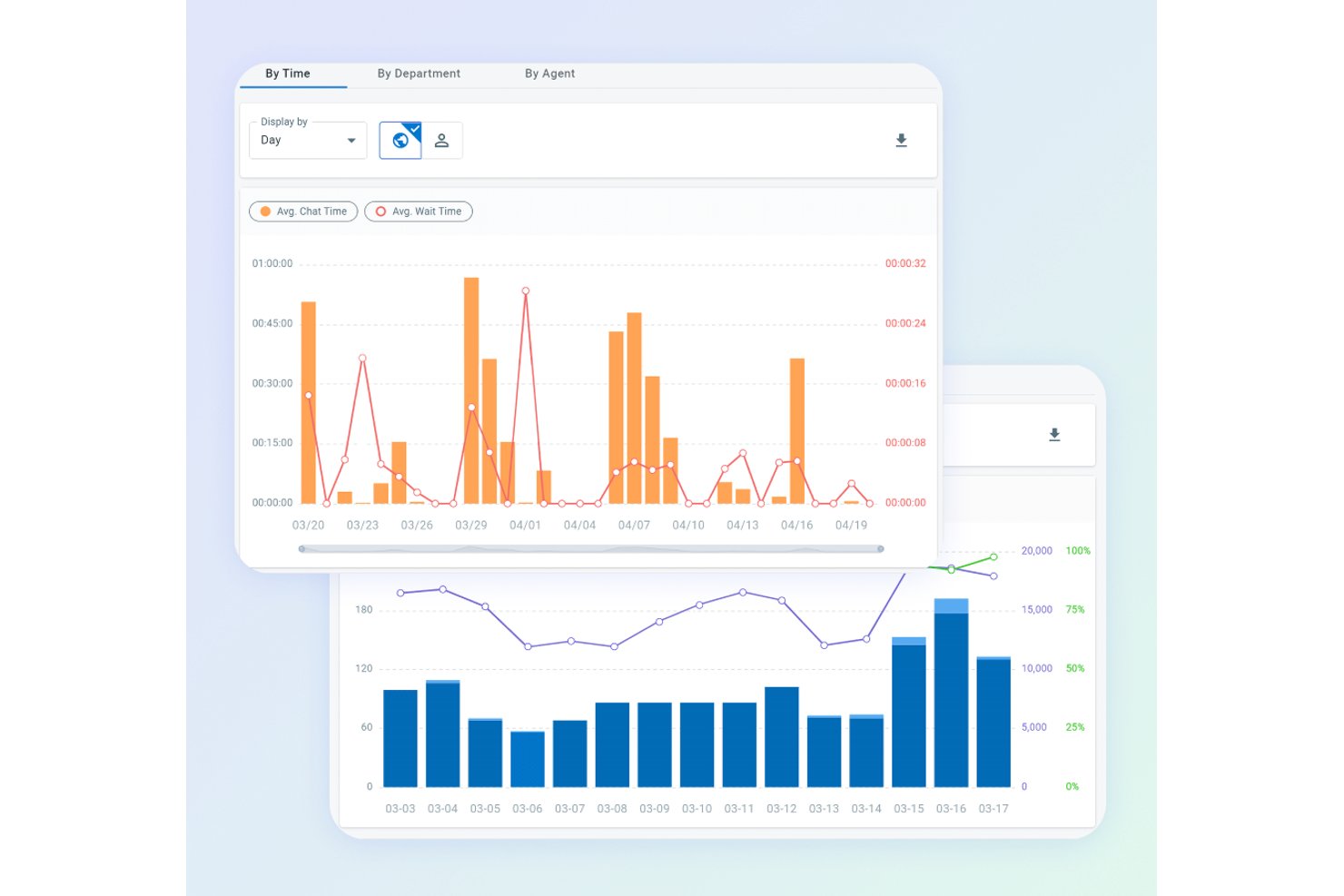
Comm100 è una piattaforma di chat dal vivo e coinvolgimento omnicanale dei clienti che combina un widget di chat personalizzabile per siti web, automazione basata sull'IA, monitoraggio dei visitatori in tempo reale e una casella di posta unificata per gli operatori che supporta oltre 12 canali di comunicazione.
Per chi è più adatto Comm100?
Comm100 è particolarmente adatto ai team del settore sanitario, dei servizi finanziari, della pubblica amministrazione e dell'istruzione superiore che necessitano di una chat basata sull'IA supportata da certificazioni di conformità di livello aziendale.
Perché ho scelto Comm100
Comm100 si è guadagnato un posto nella mia selezione per la serietà con cui affronta la conformità senza sacrificare le funzionalità dell'IA. Ho visto poche piattaforme di chat dal vivo eguagliare il suo insieme di certificazioni: SOC 2 Type II, HIPAA, PCI DSS e ISO 27001 tutte riunite in un'unica piattaforma, un aspetto di enorme importanza quando si supportano pazienti, studenti o clienti dei servizi finanziari. I controlli anti-allucinazione dell'agente IA, che limitano rigorosamente le risposte alle fonti di conoscenza verificate, fanno di Comm100 una piattaforma di cui mi fiderei in ambienti regolamentati, dove una singola risposta errata può comportare rischi concreti.
Funzionalità principali di Comm100
- Monitoraggio dei visitatori in tempo reale: Tiene traccia di oltre 30 parametri comportamentali, tra cui percorso di navigazione, fonte di provenienza e valore del carrello, così gli operatori possono vedere esattamente chi si trova sul sito prima di avviare una conversazione.
- Casella di posta omnicanale per gli operatori: Riunisce oltre 12 canali (chat dal vivo, e-mail, SMS, WhatsApp, Instagram e altri) in un'unica area di lavoro, così gli operatori possono gestire ogni conversazione in un solo luogo.
- Instradamento delle chat basato sulle competenze: Assegna e trasferisce automaticamente le chat in base alle competenze dell'operatore, al reparto o al segmento del visitatore, utilizzando un sistema ACD integrato.
- Implementazione locale: Consente alle organizzazioni di ospitare l'intera piattaforma, inclusa l'IA, sulla propria infrastruttura, una possibilità rara in questa categoria ed essenziale per requisiti rigorosi di localizzazione dei dati.
Integrazioni di Comm100
Comm100 offre integrazioni native con Salesforce, HubSpot, Microsoft Dynamics 365, Zendesk, ServiceNow, Shopify, Google Drive, SharePoint Online e Confluence Cloud. Supporta inoltre API REST e webhook per integrazioni personalizzate.
Pros and Cons
Pros:
- Copertura SOC 2 Type II, HIPAA, PCI DSS e WCAG
- Condivisione dello schermo, video e voce e trasferimento di file
- Completamente integrato con la suite di IA
Cons:
- I costi possono aumentare per le funzionalità più avanzate
- Le funzionalità di IA potrebbero essere eccessive per i team più piccoli

Ideale per la deviazione conversazionale tramite live chat guidata dall’IA
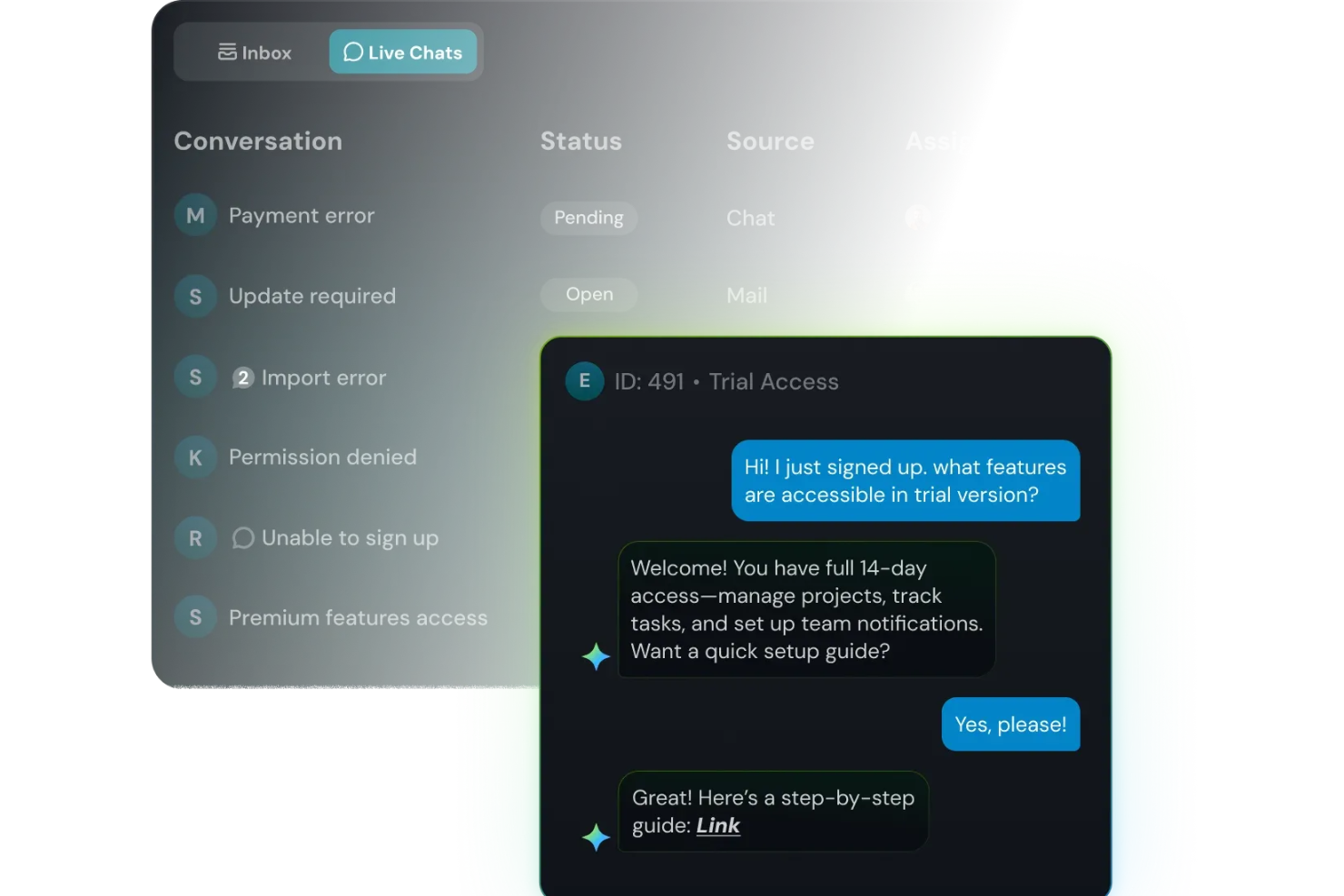
Quando la chat del tuo sito web si riempie di domande ripetitive e clienti impazienti, SparrowDesk ti offre un modo per mantenere le risposte rapide senza sfiancare il tuo team. È pensato per i responsabili del supporto che vogliono che l’IA gestisca le richieste di routine mentre gli operatori si concentrano sulle conversazioni complesse, tutto in un’unica casella di posta condivisa tra live chat ed email. Con SparrowDesk, puoi trasformare la chat del tuo sito in un mix di risposte istantanee dell’IA, supporto umano e massima visibilità sulle domande poste più frequentemente dai tuoi clienti.
Perché ho scelto SparrowDesk
Ho scelto SparrowDesk perché tratta il widget del tuo sito come la porta d’ingresso di una helpdesk progettata prima per l’IA, non come un altro canale isolato. Luna, l’agente IA integrato, può deviare e risolvere automaticamente una grande quota di richieste di routine direttamente in chat, così il tuo team può concentrarsi su conversazioni più complesse invece che su reset password e aggiornamenti ordini. Gli operatori continuano a lavorare da una casella unificata che combina chat ed email, con AI Copilot che suggerisce risposte coerenti con il tuo brand e riassume conversazioni lunghe, permettendo così di agire rapidamente senza perdere il contesto.
E poiché live chat, casella condivisa e segmentazione dei contatti sono incluse nello stesso piano, è una soluzione ideale se desideri conversazioni in tempo reale strettamente collegate a ticketing e storicità clienti invece che aggiunte come strumenti separati.
Funzionalità principali di SparrowDesk
Oltre al suo approccio guidato dall’IA al live chat, SparrowDesk include diverse altre funzioni che aiutano il tuo team a gestire conversazioni in tempo reale su larga scala.
- Service Level Agreements (SLA): Definisci obiettivi chiari di risposta e risoluzione per garantire un supporto puntuale.
- Orari di attività: Imposta gli orari lavorativi del tuo team per gestire le aspettative dei clienti e instradare efficacemente i ticket.
- Macro Azioni Rapide: Automatizza attività comuni con macro preimpostate per aumentare la produttività.
- Analisi interattive: Ottieni insight sulle performance del team e sulle tendenze dei clienti con dashboard in tempo reale.
Integrazioni di SparrowDesk
Le integrazioni native attualmente non sono indicate da SparrowDesk. Tuttavia, le capacità della piattaforma suggeriscono la possibilità di integrazioni personalizzate tramite API.
Pros and Cons
Pros:
- La casella di posta omnicanale centralizza la comunicazione su più piattaforme.
- Supporto multilingue per una clientela globale.
- AI Copilot assiste gli agenti con suggerimenti intelligenti per le bozze.
Cons:
- Le limitate integrazioni native potrebbero ostacolare la connettività senza soluzione di continuità.
- La dipendenza dall’IA potrebbe non adattarsi a qualsiasi stile di assistenza clienti.

Ideale per assistenza clienti omnicanale
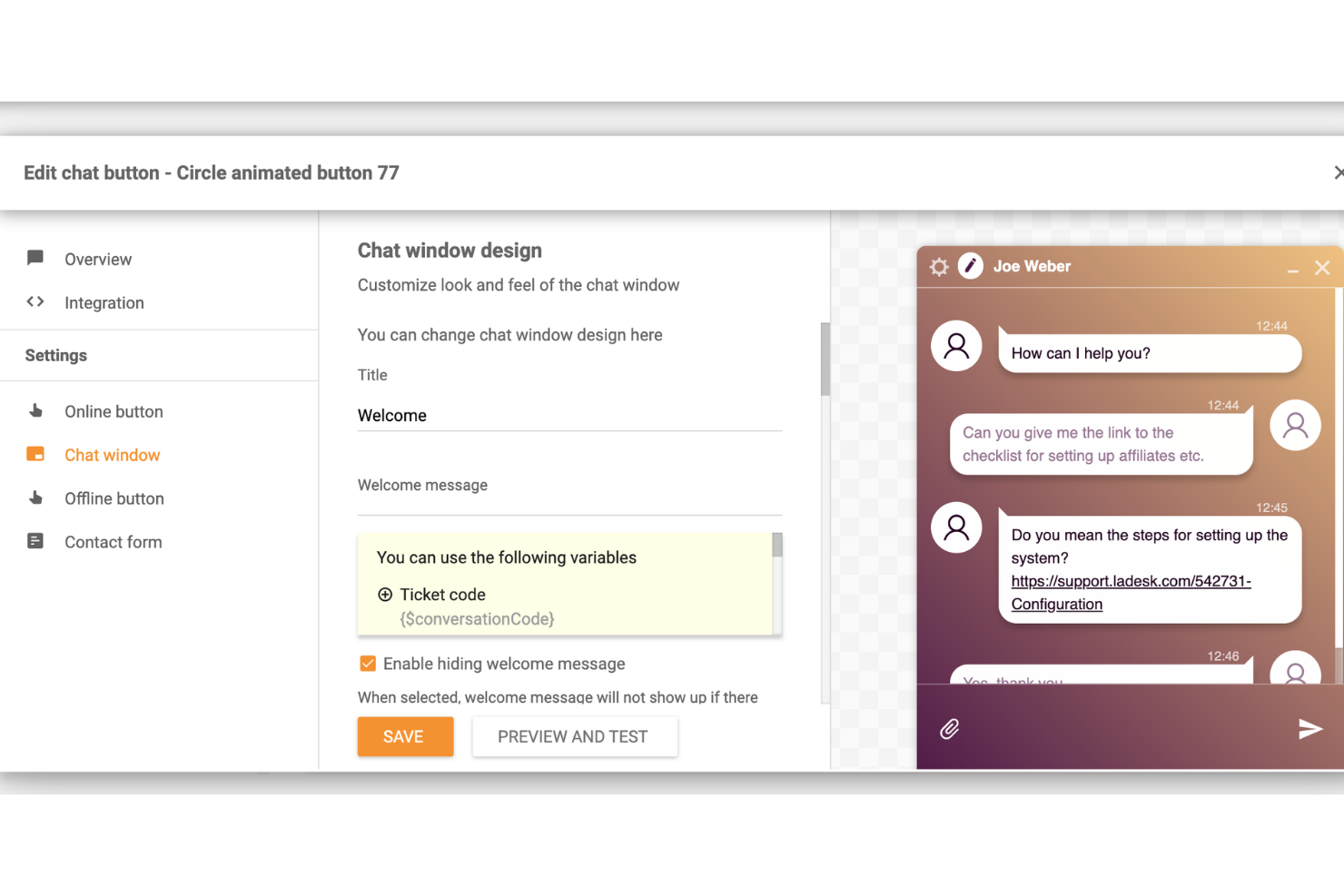
LiveAgent è un software di assistenza clienti che offre funzionalità di chat dal vivo per i siti web, fornendo un modo semplice ed efficiente per i team di comunicare con i clienti in tempo reale.
Perché ho scelto LiveAgent: La piattaforma si distingue per il suo supporto omnicanale completo, integrando funzionalità di chat dal vivo, gestione ticket, call center, social media e knowledge base in un'unica soluzione. La capacità di unificare tutti i canali di comunicazione in un'interfaccia unica rende più facile per i team di supporto gestire e rispondere in modo efficiente alle richieste dei clienti e offrire un'esperienza coerente.
Inoltre, la funzione di chat dal vivo consente la comunicazione in tempo reale con i visitatori del sito web. Include un widget di chat veloce che può essere facilmente implementato su qualsiasi sito. Lo strumento di chat dal vivo supporta inviti proattivi, risposte predefinite e cronologia delle chat, permettendo agli operatori di interagire con i clienti il più rapidamente possibile.
Funzionalità principali e integrazioni:
Le funzionalità includono un call center, assistenza clienti self-service, reportistica e analisi, supporto multilingue e automazione dei flussi di lavoro. Offre inoltre un sistema di gestione dei ticket con distribuzione automatica, etichettatura e campi personalizzati.
Le integrazioni includono Actinic, ActiveCampaign, ChargeDesk, ClickUp, CS-Cart, Drupal, Expression Engine, Jira, Joomla, Klaus, Klaviyo, Nicereply, Opencart, Pipedrive, Post Affiliate Pro, Quriobot, Salesforce e molte altre.
Pros and Cons
Pros:
- Funzionalità avanzate di automazione
- Interfaccia personalizzabile per il branding
- Supporto multicanale
Cons:
- La funzionalità di unione dei ticket potrebbe essere migliorata
- Potrebbe offrire più integrazioni di terze parti

Ideale per l'automazione dell'assistenza clienti su larga scala
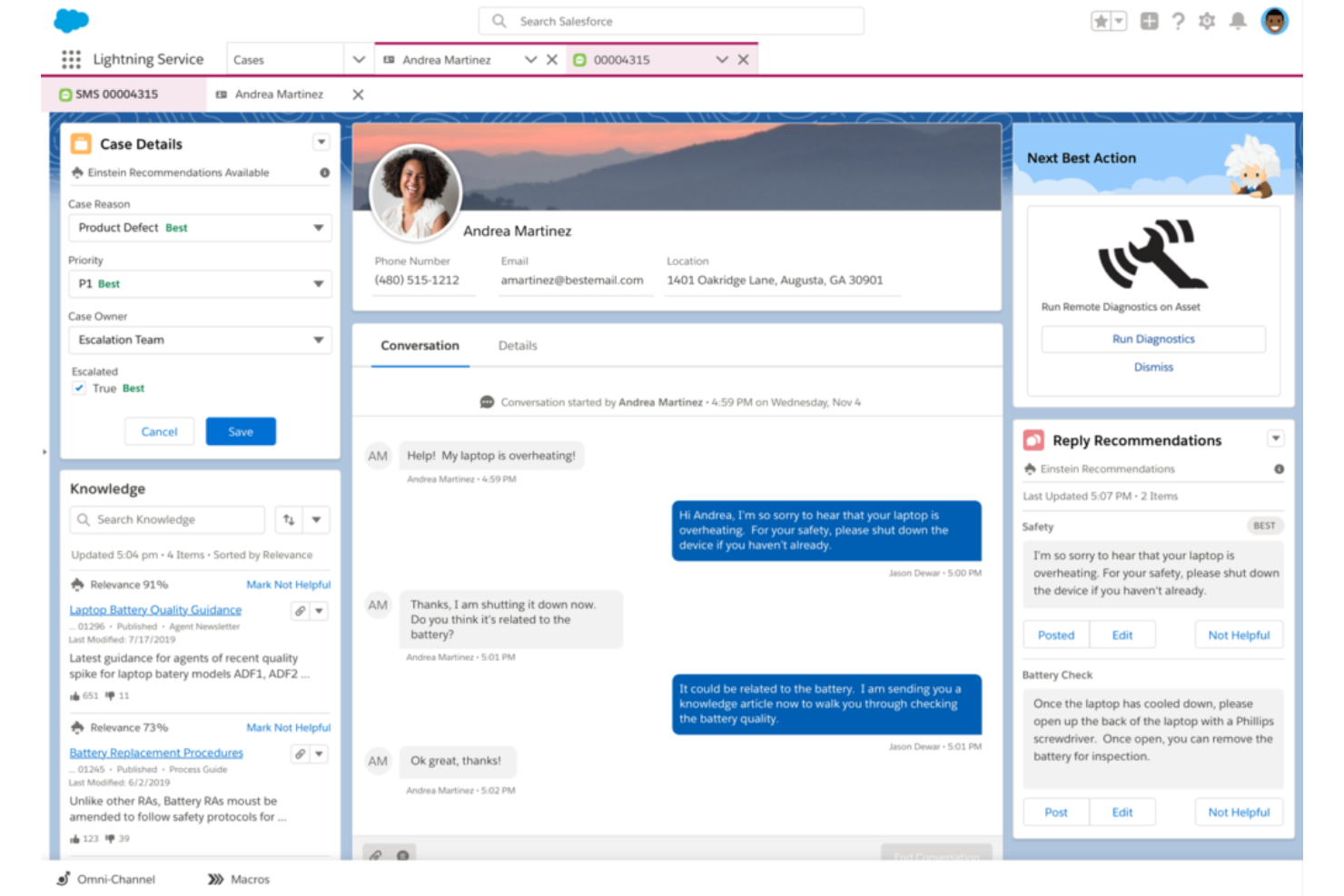
Salesforce Service Cloud è una soluzione completa per il servizio clienti progettata per facilitare le interazioni tra le aziende e i loro clienti. È particolarmente adatta a gestire le esigenze di assistenza clienti per grandi organizzazioni, grazie a strumenti che permettono l'automazione dei processi di servizio, semplificando i flussi di lavoro e migliorando l'efficienza del servizio su larga scala.
Perché ho scelto Salesforce Service Cloud: Ho selezionato Salesforce Service Cloud per questa lista per la sua reputazione nel settore e le sue funzionalità estese, che lo rendono insuperabile nell'automatizzare i processi di assistenza clienti su ampia scala. Ad esempio, Service Cloud sfrutta capacità di instradamento intelligente per distribuire automaticamente le richieste dei clienti agli agenti o ai team di supporto più appropriati. Tiene conto di fattori come competenze degli agenti, disponibilità e carico di lavoro, per garantire un'assegnazione efficiente ed efficace dei casi.
Service Cloud integra inoltre chatbot e capacità di intelligenza artificiale (AI) per automatizzare le interazioni con i clienti e fornire supporto immediato. L'automazione basata su AI consente al sistema di comprendere l'intento del cliente, suggerire soluzioni pertinenti e offrire raccomandazioni personalizzate, migliorando l'esperienza del servizio clienti.
Funzionalità principali e integrazioni:
Le funzionalità includono automazioni per la gestione dei casi, gestione degli SLA, automazione di workflow e processi, strumenti per la creazione di una knowledge base, gestione dell'assistenza sul campo, supporto omnicanale e una console di servizio unificata.
Le integrazioni comprendono la più ampia suite Salesforce, Slack, Trello, Mailchimp, HubSpot CRM, Freshdesk, Twilio, Quickbase, Guru e Helpshift.
Pros and Cons
Pros:
- Centralizza interazioni e dati dei clienti in un unico posto
- Scalabile per supportare grandi organizzazioni
- Interfaccia utente (UI) dinamica e intuitiva
Cons:
- Gli aggiornamenti sono limitati e l'evoluzione spesso è lenta
- La complessità delle funzionalità può richiedere un periodo di apprendimento
- Dipendenza da altri prodotti Salesforce per la massima utilità
New Product Updates from Agentforce Service (formerly Service Cloud)
Agentforce Service Keeps Full Agentforce Voice Transcripts After Calls
Agentforce Service now shows the full conversation history in post-call transcripts for Agentforce Voice calls within the Service Console, giving agents better context for follow-ups. For more information, visit Salesforce’s official site.
 .
.
Chatbase
Ideale per la creazione facile di chatbot da dati personalizzati
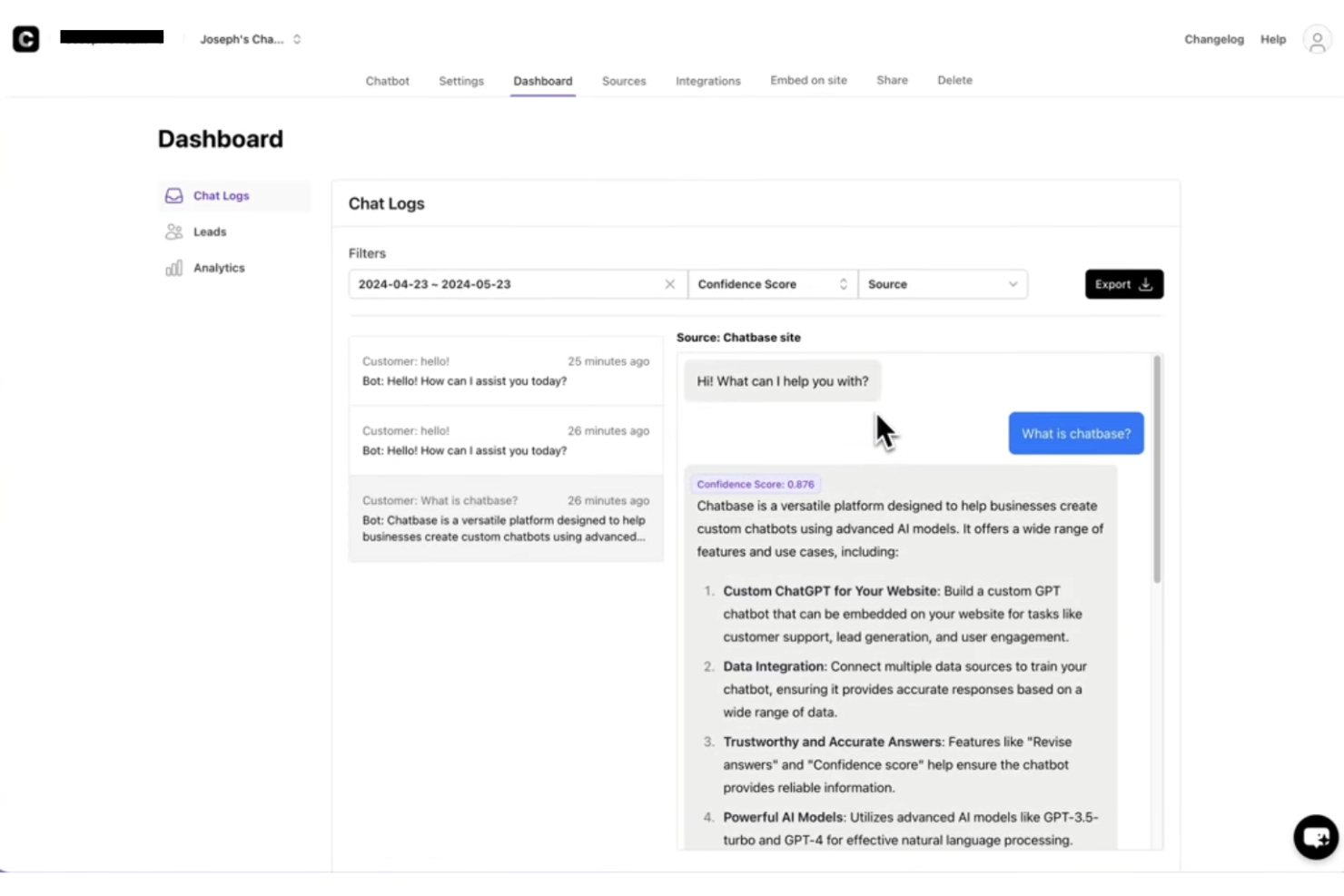
Chatbase è un software di live chat alimentato dall'IA per siti web che ti permette di creare e implementare chatbot addestrati sui tuoi dati, supportando l'integrazione di widget sul sito e conversazioni con clienti multilingue.
Per chi è ideale Chatbase?
Chatbase è adatto a piccole e medie imprese e team SaaS che desiderano implementare chatbot IA sui propri siti senza la necessità di uno sviluppatore.
Perché ho scelto Chatbase
Chatbase si è guadagnato un posto nella mia lista perché consente di creare facilmente un chatbot partendo dai propri contenuti. Ho caricato PDF, incollato URL di siti web e collegato basi di conoscenza per creare un chatbot che risponde davvero alle domande come farebbe il mio team. Questo è il nucleo di ciò che Chatbase fa bene: addestri il bot sui tuoi dati specifici e lui gestisce le conversazioni con i clienti in base a quel contesto. Mi piace anche la funzione delle azioni dell'agente IA, che permette al chatbot di compiere azioni come raccogliere lead o passare la conversazione a un umano quando raggiunge i limiti di ciò che conosce.
Funzionalità principali di Chatbase
- Passaggio a operatore umano: Inoltra le conversazioni a un operatore umano quando l'IA raggiunge i suoi limiti o quando la richiesta necessita di una risposta umana.
- Reportistica avanzata: Traccia i dati delle conversazioni, le performance degli agenti e il coinvolgimento dei clienti tramite una dashboard di analisi integrata.
- Confronto fra modelli IA: Testa e alterna diversi modelli IA per trovare la configurazione migliore per le tue esigenze di supporto.
- Distribuzione omnicanale: Distribuisci il tuo chatbot tramite chat del sito, WhatsApp, Slack e altri canali da un'unica configurazione.
Integrazioni di Chatbase
Chatbase offre integrazioni native con Make, Zendesk, Notion, Slack, Stripe, Salesforce e altri ancora. È disponibile anche un'API per integrazioni personalizzate.
Pros and Cons
Pros:
- Include analisi per monitorare le prestazioni del chatbot
- Design del widget completamente personalizzabile per il branding
- L'agente IA può raccogliere lead
Cons:
- La rimozione del branding richiede l'abbonamento di livello più alto
- Nessuna funzione di passaggio diretto a operatore umano integrata

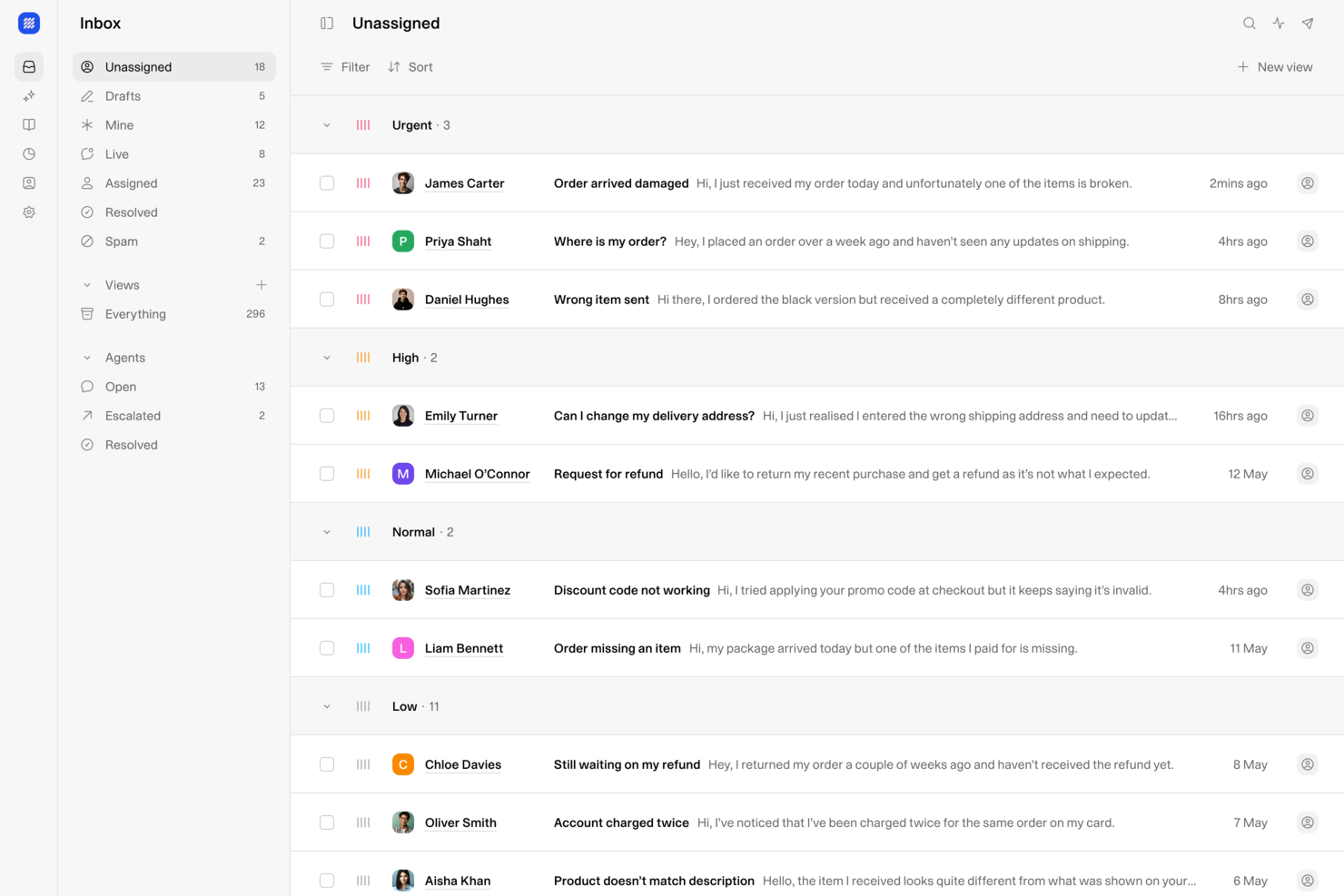
Weav è una piattaforma di live chat e assistenza clienti basata su intelligenza artificiale che combina un widget chatbot per siti web, una casella di posta unificata per agenti umani e IA e l'addestramento degli agenti senza codice, per gestire e risolvere automaticamente le richieste dei clienti.
Per Chi È Ideale Weav?
Weav è ideale per piccole e medie imprese che desiderano automatizzare il supporto clienti sul proprio sito senza dover creare o mantenere un'infrastruttura chatbot complessa.
Perché Ho Scelto Weav
Ho incluso Weav tra le mie migliori scelte perché consente di configurare un agente di live chat completamente automatizzato semplicemente sincronizzando il tuo sito web o caricando i tuoi documenti di supporto, senza necessità di programmazione. L'intelligenza artificiale si addestra direttamente sui tuoi contenuti e inizia a risolvere le richieste dei clienti in tempo reale tramite un widget di chat sul sito. Apprezzo anche il fatto che, quando le conversazioni superano il campo d’azione dell’IA, Weav le inoltra a un agente umano senza necessità di configurazioni manuali.
Caratteristiche Principali di Weav
- Casella di posta unificata: Gestisci le chat dal vivo e le conversazioni email da una singola dashboard per agenti.
- Personalizzazione delle risposte: Imposta il tono dell'IA, la lunghezza delle risposte e le frasi vietate per ogni interazione in chat.
- Dashboard di analisi: Monitora i tassi di risoluzione, il volume delle conversazioni e l’attività degli agenti in un’unica vista.
- Accesso REST API: Collega Weav a sistemi esterni o crea flussi di supporto personalizzati utilizzando la sua API.
Integrazioni di Weav
Weav offre integrazioni native con Stripe e Google Drive. Supporta inoltre azioni personalizzate, che consentono agli agenti IA di chiamare qualsiasi API HTTPS di terze parti durante una conversazione live per recuperare o aggiornare dati su sistemi esterni. API e webhook in tempo reale sono disponibili per integrazioni personalizzate.
Pros and Cons
Pros:
- Posti e agenti IA illimitati inclusi
- Prezzo per risoluzione evita i costi per utente
- Agenti IA addestrati sui tuoi veri documenti
Cons:
- Integrazioni native di terze parti molto limitate
- Nessun supporto ai social media multicanale al momento

Tidio
Ideale per il servizio clienti basato su IA
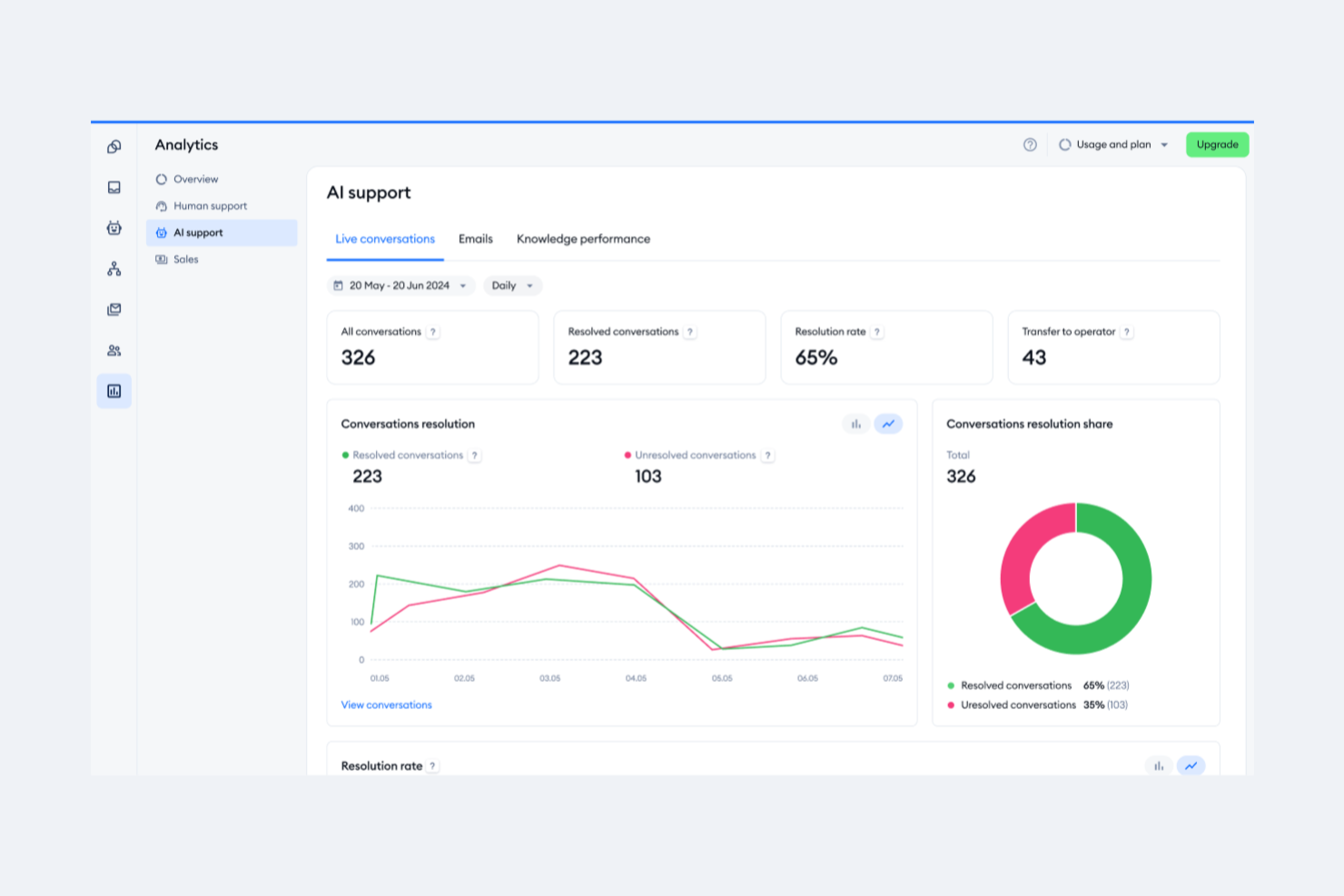
Tidio è un software di chat dal vivo progettato per aiutare le aziende a fornire assistenza clienti in tempo reale e aumentare le vendite tramite i loro siti web. Sfrutta l'IA per supportare i team di assistenza clienti nella gestione delle richieste e del supporto.
Perché ho scelto Tidio: La caratteristica distintiva della piattaforma, il chatbot Lyro AI, può risolvere autonomamente le richieste dei clienti in più lingue. Tidio si distingue come strumento per il servizio clienti guidato dall'IA perché non solo offre assistenza 24 ore su 24, ma aiuta anche le aziende a scalare le loro operazioni di assistenza clienti con costi prevedibili e migliora il coinvolgimento degli utenti attraverso esperienze personalizzate e automazione.
Inoltre, il software consente alle aziende di gestire diversi canali di comunicazione, tra cui email, chat dal vivo e messaggi sui social media, da un'unica dashboard. Tidio offre anche strumenti per tracciare l'attività dei visitatori, personalizzare la comunicazione e rispondere rapidamente con funzionalità come risposte preimpostate e anteprime di digitazione in tempo reale.
Funzionalità principali e integrazioni:
Le funzionalità includono chat dal vivo e help desk, analisi dei dati, personalizzazioni, videochiamate, app per dispositivi mobili e desktop, customer journey interattivi e reindirizzamenti intelligenti.
Le integrazioni includono Shopify, WordPress, Squarespace, Weebly, WooCommerce, Google Analytics, Klaviyo, Zendesk, Salesforce e altro ancora.
Pros and Cons
Pros:
- Monitoraggio dei visitatori
- Comunicazione omnicanale
- Assistente chatbot AI
Cons:
- Limitazioni nel piano gratuito
- Può richiedere risorse aggiuntive per una gestione efficace

Front
Ideale per onboarding personalizzabile di grandi team
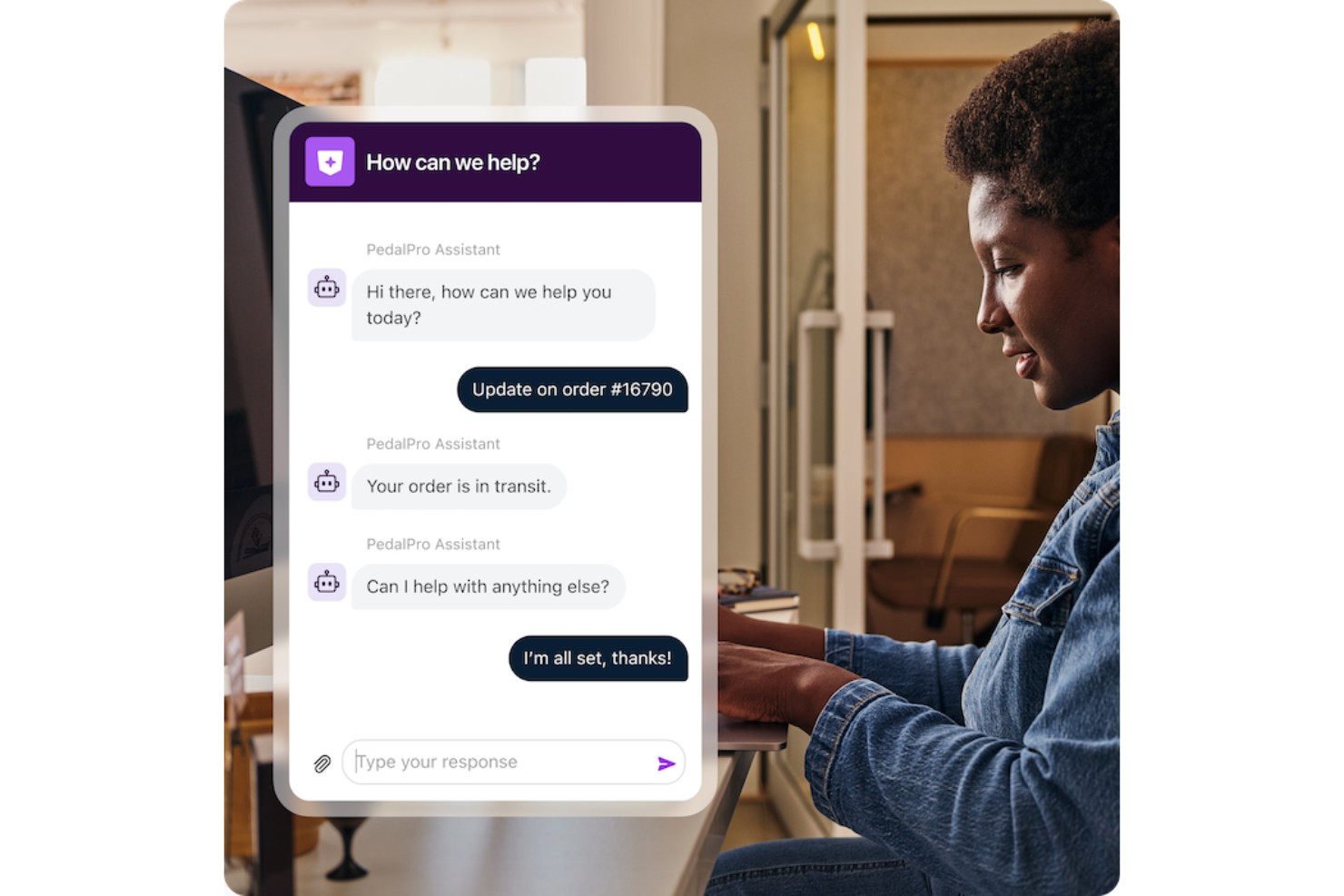
Front riunisce live chat, email e altri canali in una sola casella di posta collaborativa per i team a contatto con i clienti. Se cerchi una soluzione che aiuti il tuo team a gestire le conversazioni del sito web insieme agli altri canali, Front offre uno spazio di lavoro unificato con opzioni di automazione e integrazione. È particolarmente indicato per le aziende che vogliono semplificare la comunicazione con i clienti e mantenere ogni interazione organizzata tra i reparti.
Per chi è ideale Front?
Front è adatto a team di assistenza clienti e operativi di medie e grandi dimensioni che devono gestire elevati volumi di chat sul sito web e altre comunicazioni con i clienti in un ambiente collaborativo.
Perché ho scelto Front
Per i team che hanno bisogno di formare rapidamente ed efficacemente gruppi numerosi, Front si distingue grazie alle sue opzioni di onboarding personalizzabili. Ho scelto Front perché permette di adattare i flussi di onboarding, le autorizzazioni e le risorse di formazione in base alla struttura e ai processi del tuo team. La piattaforma supporta l’accesso basato sui ruoli e una gestione dettagliata degli utenti, così puoi configurare i nuovi agenti con gli strumenti e le informazioni giuste dal primo giorno. Questo approccio aiuta le grandi organizzazioni ad attivare la live chat sul proprio sito senza ritardi o confusione.
Funzionalità principali di Front
Altre funzionalità che rendono Front una scelta valida per i team di live chat sul sito web:
- Widget di live chat: Aggiungi un widget di chat personalizzabile al tuo sito per connetterti in tempo reale con i visitatori.
- Casella di posta condivisa: Smista e assegna i messaggi in arrivo ai membri giusti del team per risposte più rapide.
- Messaggistica omnicanale: Gestisci conversazioni da email, SMS, social media e chat del sito in un’unica casella di posta unificata.
- Analisi e reportistica: Monitora il volume delle chat, i tempi di risposta e le prestazioni del team con strumenti di analisi integrati.
Integrazioni di Front
Le integrazioni includono Salesforce, HubSpot, Slack, Jira, Asana, Aircall, ClickUp, FullContact, Gainsight e Chatra.
Pros and Cons
Pros:
- Supporta automazioni avanzate per il routing delle chat
- Casella condivisa che favorisce la collaborazione del team nelle chat
- Analisi in tempo reale per monitorare le prestazioni della chat
Cons:
- Nessun piano gratuito permanente per i team piccoli
- Richiede componenti aggiuntivi separati per SMS o WhatsApp

Intercom
Ideale per la messaggistica clienti personalizzata
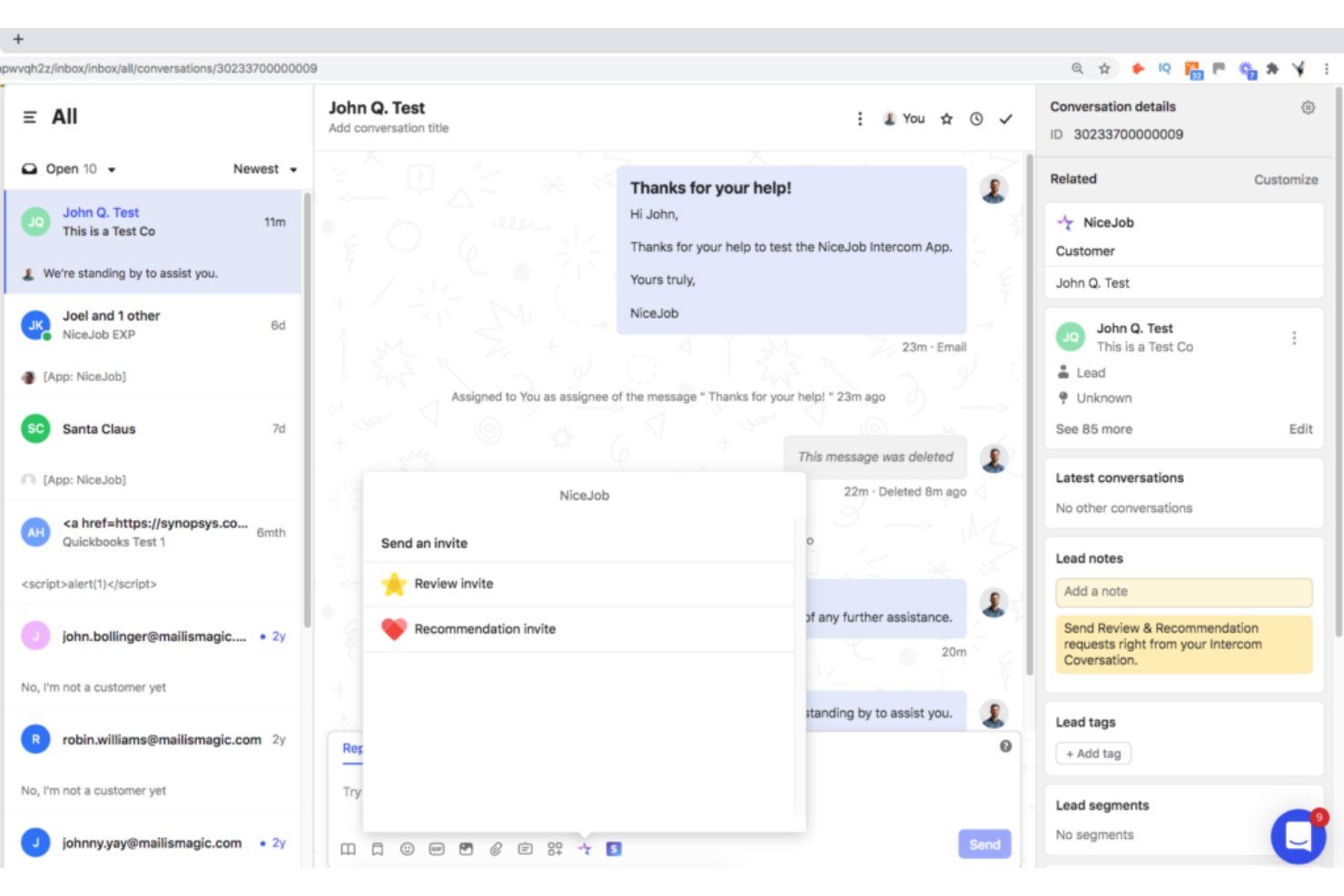
Intercom è una piattaforma per la gestione delle relazioni conversazionali che eccelle nell'invio di messaggi personalizzati ai clienti su diversi touchpoint. Consente alle aziende di inviare messaggi personalizzati e automatizzati in base al comportamento degli utenti, caratteristica che le conferisce la distinzione di miglior piattaforma per la messaggistica clienti personalizzata.
Perché ho scelto Intercom: Intercom è stata una scelta sicura per questa lista grazie alla sua capacità di automatizzare messaggi personalizzati in base al comportamento e alle preferenze individuali. Utilizzando i dati dei clienti, come comportamento, dati demografici o interazioni precedenti, le aziende possono segmentare il proprio pubblico e creare messaggi su misura che risuonano con specifici segmenti di clientela. Questo approccio mirato aiuta ad aumentare il coinvolgimento e il tasso di conversione grazie all'invio di contenuti personalizzati a singoli clienti o a gruppi definiti.
Intercom fornisce anche analisi e report dettagliati sulle performance dei messaggi. Le aziende possono monitorare metriche come tasso di apertura, tassi di clic, tassi di conversione e coinvolgimento dei clienti con i messaggi inviati tramite la piattaforma.
Caratteristiche principali & integrazioni:
Le funzionalità includono targeting comportamentale, segmentazione dei clienti, live chat e supporto conversazionale, messaggistica in-app e una piattaforma di messaggistica automatizzata.
Si integra perfettamente con Slack, HubSpot, Salesforce e altri strumenti, permettendo flussi di lavoro fluidi e una maggiore produttività.
Pros and Cons
Pros:
- Il software viene aggiornato frequentemente per soddisfare le aspettative dei clienti
- Interfaccia utente attraente e intuitiva
- La conformità HIPAA rende la piattaforma ideale per i professionisti del settore medico
Cons:
- Ricerca limitata
- Le funzionalità avanzate hanno un costo extra.
- Supporto utente limitato
Drift
Ideale per il marketing conversazionale
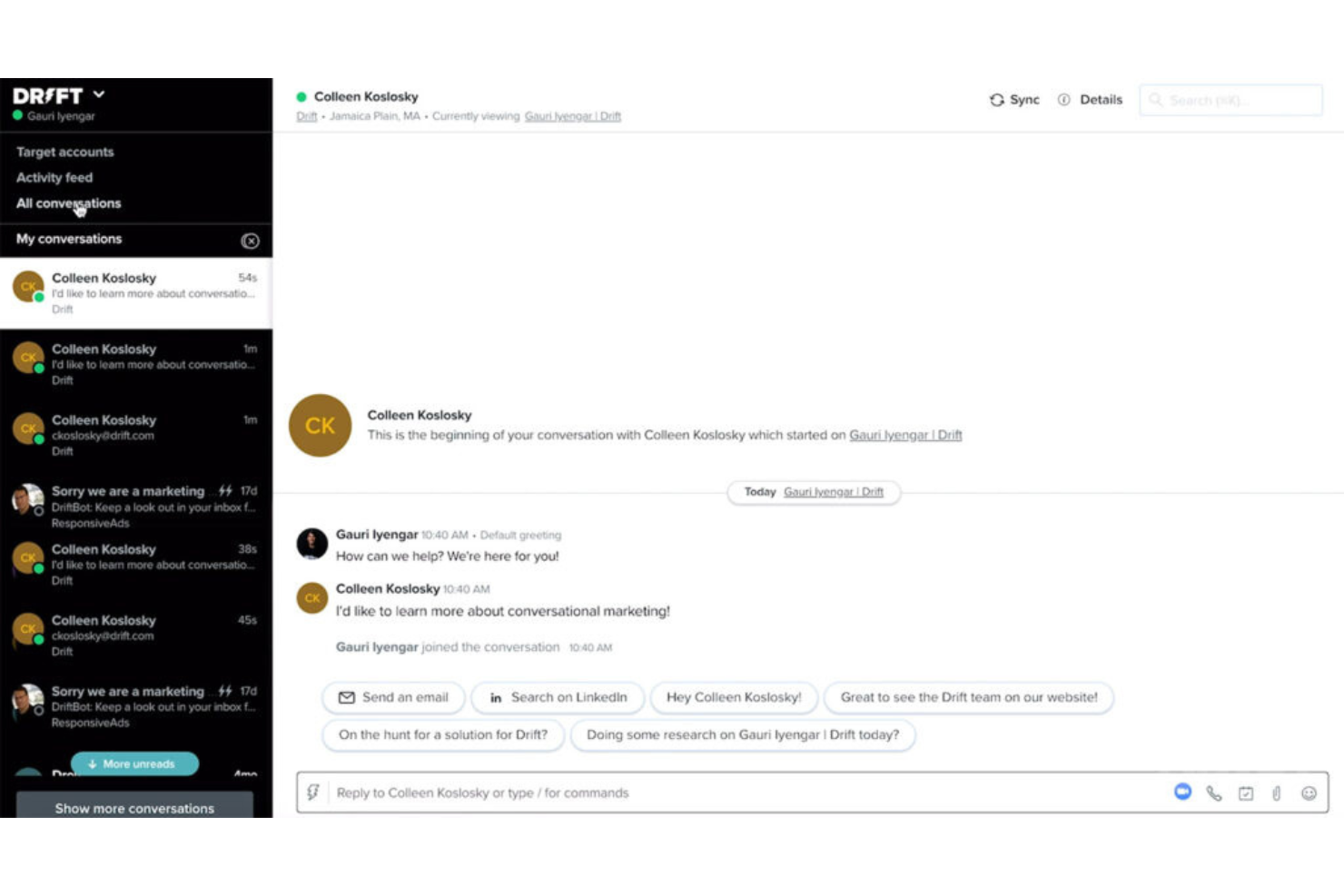
Drift è una piattaforma di marketing conversazionale che consente alle aziende di coinvolgere i visitatori del sito web con messaggi chat in tempo reale e personalizzati, creando un ambiente favorevole a conversazioni significative.
Perché ho scelto Drift: Quello che mi ha colpito di Drift è la sua dedizione a rendere le conversazioni una parte integrante della sua strategia di marketing. Non si tratta solo di email marketing di base e risposte alle domande dei clienti; si tratta di stimolare conversazioni chat significative per guidare i clienti lungo il funnel di vendita.
A tal fine, Drift include campagne di messaggistica mirate basate sul comportamento dei visitatori, sugli attributi o su azioni specifiche compiute sul sito web. Questa personalizzazione aiuta a fornire messaggi e offerte rilevanti ai visitatori, aumentando il coinvolgimento e i tassi di conversione. I messaggi possono essere adattati a segmenti specifici o a singoli visitatori per creare un'esperienza più personalizzata.
Funzionalità e integrazioni distintive:
Le funzionalità includono sistemi di qualificazione e smistamento dei lead, programmazione di appuntamenti, chatbot alimentati dall'intelligenza artificiale e funzionalità di chat dal vivo, oltre a strumenti di analisi e reportistica per monitorare e misurare l'efficacia degli sforzi di marketing conversazionale.
Le integrazioni includono Salesforce, Salesloft, Databox, FullStory, Google Analytics, Google Workspace, HubSpot, Lokalise, Marketo e Slack
Pros and Cons
Pros:
- Strumenti di marketing conversazionale avanzati
- Potenti chatbot basati su intelligenza artificiale
- Playbook per l'esperienza cliente personalizzabili
Cons:
- Lo smistamento delle chat e le notifiche possono essere lenti
- Non è disponibile un piano gratuito.
- Può risultare complesso per i principianti a causa della vasta gamma di funzionalità.
Altri software di chat dal vivo per siti web
Ecco alcune opzioni aggiuntive di software di chat dal vivo per siti web che non sono entrate nella mia selezione, ma che vale comunque la pena prendere in considerazione:
- HubSpot Service Hub
Ideale per l'integrazione con un CRM completo
- Sprinklr
Ideale per il coinvolgimento clienti sui social media
- Crescendo
Ideale per il coaching AI integrato nelle chat con i clienti
- Zendesk Support Suite
Ideale per la gestione centralizzata delle richieste
- Zoho Desk
Ideale per l'integrazione con altri prodotti Zoho
- Gladly
Ideale per la comunicazione unificata con i clienti
- Qualified
Ideale per l'identificazione dei visitatori del sito web
- 14.ai
Miglior motore di risposta consapevole dell'intento
- SwiftCX
Ideale per assistenza clienti dal vivo tramite AI nelle chat
- Hiver
Ideale per la gestione di volumi elevati di richieste
- Birdeye
Ideale per feedback dei clienti e gestione della reputazione
- LiveChat
Ideale per chat personalizzate con il proprio marchio
- Nextiva
Ideale per servizio clienti basato sulla voce
- Alhena AI
Ideale per un’implementazione rapida e maggiore accuratezza


Come Valuto i Software di Live Chat per Siti Web
Divido la mia valutazione tra le capacità di base—chat in tempo reale, instradamento e trigger proattivi—e i fattori differenzianti che distinguono gli strumenti degni di raccomandazione da quelli che non lo sono.
Funzionalità Principali (Requisiti Indispensabili per Questa Lista)
Quando seleziono gli strumenti per la mia lista, valuto ciascuno su una scala da 0 (non offre la funzionalità) a 5 (eccelle in quest'area) per ogni funzione principale elencata qui sotto. Poi calcolo il punteggio totale dello strumento trasformandolo in percentuale. Ogni strumento deve raggiungere un punteggio totale minimo del 75% per essere preso in considerazione per l'inclusione.
- Widget di Chat in Tempo Reale: Valuto come il widget gestisce il branding, i moduli pre-chat, la condivisione di file e la reattività su dispositivi mobili, così che i visitatori ricevano un'esperienza coerente su tutti i device.
- Area di Lavoro & Inbox dell'Agente: Un buon workspace mostra a colpo d'occhio i dettagli del visitatore, la cronologia delle chat e i tag. Cerco la gestione di chat multiple e note interne per la collaborazione tra agenti.
- Instradamento & Assegnazione: Controllo se le chat vengono instradate per reparto, competenza o disponibilità. Ad esempio, le domande sulla fatturazione dovrebbero arrivare al team pagamenti, non all'assistenza generale.
- Trigger di Chat Proattivi: L'impostazione dei trigger è importante. Cerco condizioni basate sul comportamento, come il tempo trascorso sulla pagina del carrello o visite ripetute, che permettono al team di ingaggiare i visitatori prima che abbandonino il sito.
- Chatbot & Automazione: Che si tratti di un flusso basato su regole o di un bot AI, valuto quanto bene le risposte automatiche gestiscono le FAQ e passano la conversazione ad agenti umani quando necessario.
- Integrazioni con CRM & Helpdesk: I dati delle chat devono fluire nel sistema già esistente. Verifico la presenza di integrazioni native con piattaforme come Salesforce, HubSpot, Zendesk e Freshdesk.
Una volta ottenuta la lista degli strumenti che soddisfano questi criteri, considero cosa rende ogni piattaforma unica.
Fattori Differenzianti (Cosa Distingue i Fornitori)
Ecco come comparo e metto a confronto i vari fornitori:
Funzionalità Distintive
La messaggistica omnicanale è un importante elemento di differenziazione. Quando un cliente inizia in chat sul sito e poi prosegue su WhatsApp, gli agenti hanno bisogno della cronologia completa della conversazione in un'unica inbox. Valuto anche l'assistenza AI alle risposte—gli strumenti che suggeriscono risposte o riassumono thread lunghi aiutano gli agenti a gestire volumi maggiori senza perdere qualità. L'integrazione con la knowledge base è rilevante, inoltre. Le migliori soluzioni propongono articoli di supporto rilevanti all'interno della chat e nei flussi bot, permettendo al cliente di trovare risposta da solo prima che intervenga un agente.
Oltre le Funzionalità
La struttura dei prezzi qui conta molto. Il prezzo per agente può diventare oneroso per team in crescita, quindi valuto se i fornitori propongono alternative basate su volume o in base alle conversazioni. Sicurezza e compliance sono altrettanto cruciali—chi gestisce dati di pagamento o sanitari deve rispettare GDPR, HIPAA o PCI-DSS e contare su certificazione SOC 2. Considero anche il time-to-value. Uno strumento con plugin CMS per Shopify o WordPress e template bot predefiniti permette di andare online più velocemente rispetto a uno che richiede un forte coinvolgimento degli sviluppatori.
Come scegliere il software di chat dal vivo per siti web
È facile perdersi in lunghi elenchi di funzionalità e strutture tariffarie complesse. Per aiutarti a rimanere concentrato mentre affronti il tuo processo di selezione del software, ecco una lista di controllo dei fattori da tenere a mente:
| Fattore | Cosa considerare |
|---|---|
| Scalabilità | Il software crescerà insieme alla tua attività? Considera il numero di utenti, il volume delle chat e l'espansione futura. Cerca strumenti in grado di gestire una domanda crescente senza costi aggiuntivi. |
| Integrazioni | Si collega ai sistemi che già utilizzi? Assicurati che sia compatibile con il CRM, la posta elettronica e gli altri strumenti che il tuo team usa quotidianamente. Evita gli strumenti che richiedono soluzioni alternative complesse. |
| Personalizzazione | Puoi adattare il software alle tue esigenze? Verifica se puoi modificare i widget della chat, i flussi di lavoro e le autorizzazioni degli utenti in base ai tuoi processi. |
| Facilità d'uso | L'interfaccia è intuitiva per il tuo team? Scegli un software che riduca al minimo il tempo di formazione e la curva di apprendimento per i nuovi utenti. |
| Implementazione e avvio | Quanto tempo occorrerà per iniziare? Cerca uno strumento con risorse chiare per l'avvio, una configurazione rapida e assistenza durante la fase di transizione. |
| Costo | Il prezzo rientra nel tuo budget? Confronta i costi con le funzionalità offerte. Considera il costo totale di proprietà, comprese le commissioni nascoste e le funzionalità aggiuntive. |
| Misure di sicurezza | I tuoi dati e le interazioni con i clienti sono protetti? Verifica la conformità agli standard di protezione dei dati e controlla la presenza di funzionalità di crittografia e privacy. |
| Disponibilità dell'assistenza | L'aiuto è disponibile quando ne hai bisogno? Cerca opzioni di assistenza 24 ore su 24, 7 giorni su 7, tempi di risposta rapidi e la disponibilità di responsabili dedicati dell'account. |
Che cos'è il software di chat dal vivo per siti web?
Il software di chat dal vivo per siti web è uno strumento che consente la comunicazione in tempo reale tra le aziende e i visitatori dei loro siti web. I team di assistenza clienti, i team commerciali e i professionisti del marketing utilizzano comunemente questi strumenti per coinvolgere i visitatori, rispondere alle domande e convertire i lead. Funzionalità come i widget di chat, le risposte automatiche e le capacità di integrazione aiutano nell'interazione con i clienti, nella comunicazione efficiente e nell'integrazione fluida dei flussi di lavoro. Nel complesso, questi strumenti migliorano il coinvolgimento dei clienti e l'erogazione del servizio.
Funzionalità
Quando selezioni un software di chat dal vivo per siti web, presta attenzione alle seguenti funzionalità chiave:
- Comunicazione in tempo reale: consente un'interazione immediata con i visitatori, migliorando il coinvolgimento e la soddisfazione dei clienti.
- Widget di chat: interfacce personalizzabili che si adattano al tuo brand e si integrano perfettamente nel tuo sito web.
- Risposte automatiche: fornisce risposte rapide alle domande frequenti, permettendo al tuo team di gestire richieste complesse.
- Monitoraggio dei visitatori: monitora il comportamento degli utenti sul tuo sito, aiutando a personalizzare le interazioni in base agli interessi dei visitatori.
- Capacità di integrazione: si collega a CRM, strumenti di posta elettronica e altre applicazioni per semplificare i flussi di lavoro e la gestione dei dati.
- Cronologia e trascrizioni delle chat: conserva i record delle interazioni passate per fornire un contesto e migliorare le comunicazioni future.
- Chatbot basati sull'IA: automatizzano le conversazioni e gestiscono le richieste quando il tuo team non è disponibile, garantendo un coinvolgimento 24 ore su 24, 7 giorni su 7.
- Supporto multicanale: gestisce le comunicazioni su più piattaforme, inclusi i social media e la posta elettronica, da un'unica interfaccia.
- Videochat: offre opzioni di interazione faccia a faccia per un servizio clienti più personalizzato.
- Misure di sicurezza: protegge i dati e garantisce la conformità agli standard sulla privacy, mantenendo sicure le interazioni.
Vantaggi
L'implementazione di un software di chat dal vivo per siti web offre diversi vantaggi al tuo team e alla tua azienda. Ecco alcuni dei vantaggi che puoi aspettarti:
- Maggiore coinvolgimento dei clienti: la comunicazione in tempo reale mantiene i visitatori coinvolti e più propensi a diventare clienti.
- Maggiore efficienza: le risposte automatiche e i chatbot basati sull'IA gestiscono le richieste di routine, lasciando al tuo team più tempo per affrontare i problemi complessi.
- Servizio clienti migliorato: la cronologia e le trascrizioni delle chat forniscono un contesto, consentendo un'assistenza più personalizzata ed efficace.
- Migliore integrazione dei dati: le capacità di integrazione garantiscono un flusso di dati fluido tra il software di chat e i sistemi esistenti come il CRM.
- Disponibilità 24 ore su 24, 7 giorni su 7: il supporto multicanale e i chatbot garantiscono che la tua azienda sia sempre disponibile ad assistere i clienti, indipendentemente dal fuso orario.
- Assistenza conveniente: riduce la necessità di un team di assistenza numeroso automatizzando molte interazioni con i clienti.
- Interazioni personalizzate: il monitoraggio dei visitatori e i widget di chat personalizzabili consentono di adattare l'esperienza alle esigenze di ogni visitatore.
Costi e prezzi
La scelta di un software di chat dal vivo per siti web richiede una conoscenza dei vari modelli di prezzo e dei piani disponibili. I prezzi vanno dagli strumenti gratuiti di chat dal vivo alle opzioni a pagamento, con costi variabili in base alle funzionalità, alle dimensioni del team, ai componenti aggiuntivi e ad altri fattori. La tabella seguente riassume i piani comuni, i relativi prezzi medi e le funzionalità tipicamente incluse nelle soluzioni software di chat dal vivo per siti web:
Tabella comparativa dei piani per software di chat dal vivo per siti web
| Tipo di piano | Prezzo medio | Funzionalità comuni |
|---|---|---|
| Piano gratuito | $0 | Funzionalità di chat di base, integrazioni limitate e assistenza standard. |
| Piano personale | $5-$25/user/month | Cronologia della chat illimitata, widget di chat personalizzabili e reportistica di base. |
| Piano aziendale | $30-$60/user/month | Analisi avanzate, strumenti di automazione e supporto multicanale. |
| Piano per grandi aziende | $70+/user/month | Chatbot basati sull'IA, integrazione completa con il CRM e gestione dedicata dell'account. |
Domande frequenti sul software di chat dal vivo per siti web
Ecco alcune risposte alle domande più comuni sul software di chat dal vivo per siti web:
Come faccio a sapere se il software di chat dal vivo è adatto alla mia attività?
Sì, il software di chat dal vivo può essere utile per la maggior parte delle attività, soprattutto per quelle con una presenza online. Considera le tue esigenze di interazione con i clienti e il modo in cui la comunicazione in tempo reale può migliorare il servizio e le vendite. Se hai un sito web e i clienti fanno spesso domande o hanno bisogno di assistenza, il software di chat dal vivo può migliorare il coinvolgimento e la soddisfazione.
È difficile configurare il software di chat dal vivo?
No, configurare il software di chat dal vivo è generalmente semplice. La maggior parte dei fornitori offre interfacce intuitive e risorse come tutorial e guide per aiutarti a iniziare. A seconda della complessità del tuo sito web e delle tue esigenze, potrebbe essere necessaria un’assistenza tecnica minima. Cerca un software con un buon supporto all’avvio per rendere più semplice il processo.
In che modo il software di chat dal vivo può influire sulla produttività del mio team?
Il software di chat dal vivo può aumentare la produttività automatizzando le richieste di routine e consentendo al tuo team di concentrarsi sui problemi più complessi. Funzionalità come i chatbot e le risposte automatiche riducono i tempi di risposta e migliorano l’efficienza. Gestendo più conversazioni contemporaneamente, il tuo team può assistere più clienti in meno tempo.