

Il software per la gestione delle interazioni con i clienti aiuta i team CX e di supporto a gestire il caos multicanale — email, chat, social e voce — permettendoti di rispondere più rapidamente, collaborare meglio e offrire esperienze coerenti e personalizzate. Queste piattaforme centralizzano le conversazioni, automatizzano l'instradamento, rendono disponibili le informazioni di contesto e forniscono analisi chiare per migliorare i tempi di risoluzione, la soddisfazione e l'efficienza del team.
Ho esaminato e testato questi strumenti in base alla profondità della collaborazione, alla copertura omnicanale, all'automazione e all'intelligenza artificiale, alla reportistica e alle analisi, alle integrazioni (CRM, commercio elettronico, telefonia), alla scalabilità e al rapporto qualità-prezzo. Questa guida analizza le scelte migliori, i casi in cui sono più adatte e i compromessi da considerare, così puoi scegliere una piattaforma in linea con le dimensioni del tuo team, il tuo settore e il tuo modello di supporto.
Perché fidarsi dei nostri consigli sui software
6,700+
Reviews
20
Industry experts
16+
Evaluation factors
14
Years
Il nostro team testa e recensisce software dal 2012. In quanto leader CX noi stessi, sappiamo quanto sia difficile — e importante — scegliere il software giusto.
Per questa guida, abbiamo valutato gli strumenti attraverso test pratici e ricerche indipendenti, assegnando un punteggio agli strumenti in base ai nostri criteri di selezione.
Le nostre recensioni riflettono il nostro giudizio editoriale umano, non un discorso di vendita.
 Gui DrusinaCreative Director
 Tim FisherVP of AI
Riepilogo dei migliori software per la gestione delle interazioni con i clienti
Questa tabella comparativa riassume i dettagli dei prezzi delle mie migliori selezioni di software per la gestione delle interazioni con i clienti, per aiutarti a trovare la soluzione più adatta al tuo budget e alle esigenze della tua azienda.
| Tool | Best For | Trial Info | Price | ||
|---|---|---|---|---|---|
| 1 | Ideale per la collaborazione di team tramite posta in arrivo condivisa | Prova gratuita di 30 giorni disponibile | A partire da $14/utente/mese (con fatturazione annuale) | Website | |
| 2 | Ideale per le integrazioni del marketplace | Prova gratuita di 14 giorni + demo gratuita disponibile | Da $19/agente/mese (fatturato annualmente) | Website | |
| 3 | Ideale per la gestione della casella di posta condivisa | Prova gratuita di 14 giorni + demo gratuita disponibile | Da $25/postazione/mese (fatturazione annuale) | Website | |
| 4 | Ideale per piccoli team | Piano gratuito + demo gratuita disponibile | Da $39.99/mese (fatturati annualmente) | Website | |
| 5 | Ideale per i team di vendita | Prova gratuita di 14 giorni disponibile | Da $14/postazione/mese (fatturazione annuale) | Website | |
| 6 | Ideale per l'integrazione con i social media | Demo gratuita disponibile | Prezzo su richiesta | Website | |
| 7 | Ideale per grandi aziende | Demo gratuita disponibile | Da $75/utente/mese (fatturazione annuale) | Website | |
| 8 | Ideale per aziende retail | Demo gratuita disponibile | Prezzi su richiesta | Website | |
| 9 | Ideale per la programmazione degli appuntamenti | Demo gratuita disponibile | Prezzo su richiesta | Website | |
| 10 | Ideale per aziende manifatturiere | Demo gratuita disponibile | Da $450/mese | Website |


Recensione dei migliori software per la gestione delle interazioni con i clienti
Di seguito trovi i miei riepiloghi dettagliati dei migliori software per la gestione delle interazioni con i clienti inclusi nel mio elenco. Le mie recensioni offrono un’analisi approfondita delle funzionalità principali, dei vantaggi e svantaggi, delle integrazioni e dei casi d’uso ideali di ogni strumento, per aiutarti a trovare quello più adatto a te.
 Ideale per la collaborazione di team tramite posta in arrivo condivisa
- Prova gratuita di 30 giorni disponibile
- A partire da $14/utente/mese (con fatturazione annuale)
Visit WebsiteCustomer Rating:4.8/5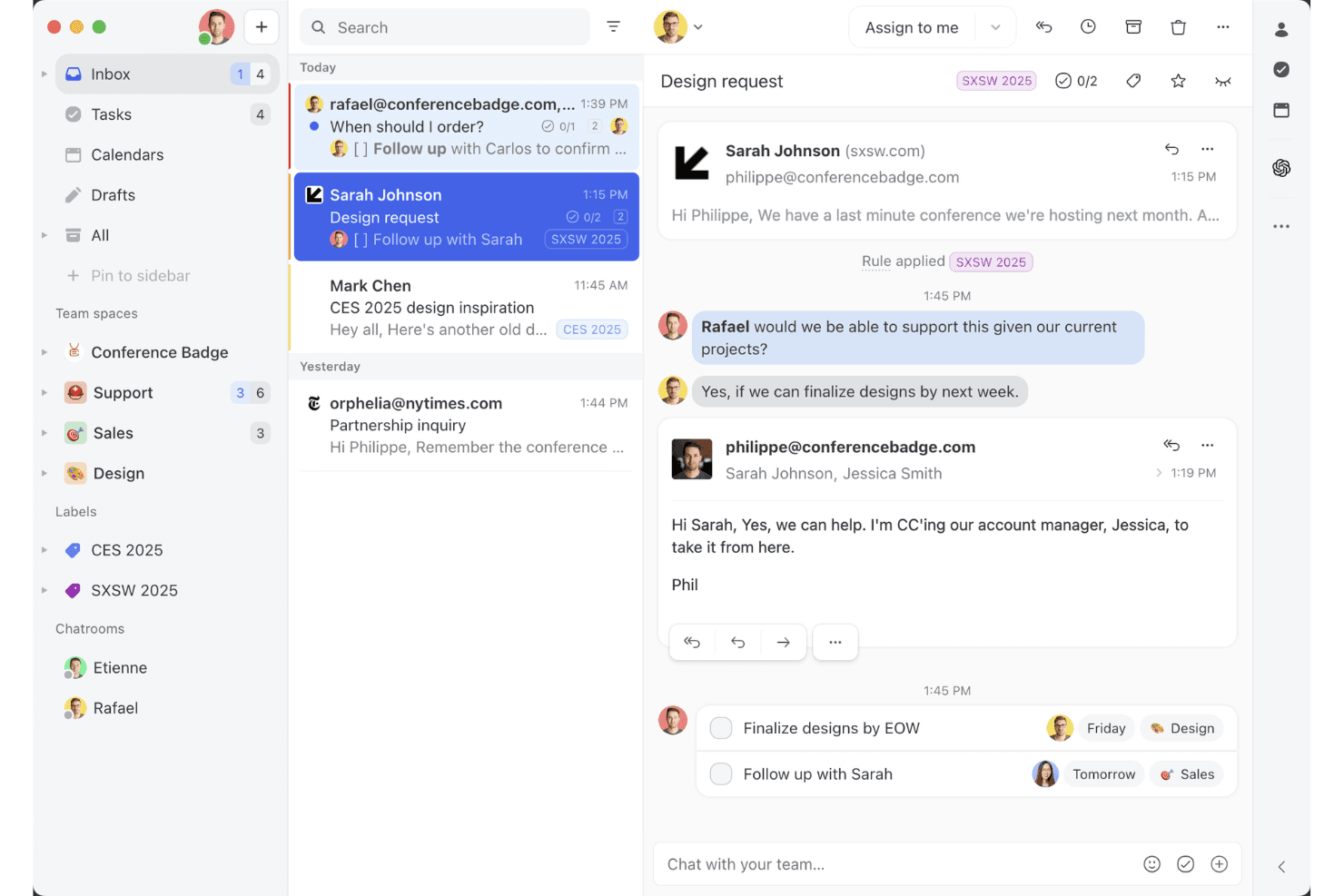
Missive offre una funzionalità di posta in arrivo condivisa per la collaborazione del team. Missive è una piattaforma di posta in arrivo condivisa che riunisce email, SMS, WhatsApp, messaggi diretti di Instagram, Facebook Messenger e chat dal vivo in un'unica interfaccia, con collaborazione di team integrata, instradamento basato su regole e automazione dei flussi di lavoro.
Per chi è più adatto Missive?
Missive è particolarmente adatto ai team di assistenza di piccole e medie dimensioni che gestiscono grandi volumi di conversazioni con i clienti tramite email, SMS e canali social e che devono collaborare internamente senza perdere il filo della conversazione.
Perché ho scelto Missive
Missive è entrato nella mia selezione ristretta grazie alla sua capacità di gestire efficacemente la collaborazione tramite posta in arrivo condivisa in un ambiente di assistenza multicanale. Apprezzo molto il fatto che i thread interni consentano ai membri del team di discutere una conversazione con un cliente senza che quest'ultimo possa vederla e che le regole di assegnazione, con instradamento a rotazione o verso l'operatore meno impegnato, mantengano le code in movimento senza supervisione manuale. In pratica, il mio team può gestire email, SMS, WhatsApp e messaggi diretti di Instagram in un unico luogo, rimanendo coordinato internamente.
Funzionalità principali di Missive
- Motore di regole basato sull'intelligenza artificiale: le regole di intelligenza artificiale analizzano i messaggi in arrivo per determinarne l'intento e l'urgenza, quindi li etichettano, li inoltrano a un livello superiore o preparano automaticamente delle risposte utilizzando i modelli Claude, GPT o Gemini.
- Risposte predefinite con variabili: i modelli di risposta predefiniti supportano variabili dinamiche come il nome del cliente e la data, consentendo agli operatori di inviare rapidamente risposte coerenti e personalizzate.
- Conformità SOC 2 Type II: Missive è sottoposto ad audit e certificato da un organismo indipendente, con crittografia TLS durante il transito, crittografia dei dati a riposo e SSO SAML opzionale nel piano Business.
- Integrazioni con Shopify e con la barra laterale dei CRM: gli operatori possono visualizzare la cronologia degli ordini dei clienti da Shopify o recuperare direttamente all'interno di una conversazione i dati aggiornati del CRM da HubSpot, Salesforce o Pipedrive.
- Server MCP di Missive: collega strumenti di intelligenza artificiale esterni, come Claude o ChatGPT, per interrogare i thread delle interazioni con i clienti, controllare i calendari e preparare risposte, mantenendo obbligatoria la revisione da parte dell'operatore prima dell'invio.
Integrazioni di Missive
Missive offre integrazioni native con HubSpot, Salesforce, Pipedrive, Close, Daylite e Shopify, oltre a un'API REST e webhook per connessioni personalizzate. Supporta inoltre Make, Relay.app, Integrately, Lindy.ai, Zapier e il nuovo Server MCP nei piani Productive e Business (è necessaria l'attivazione da parte di un amministratore).
Pros and Cons
Pros:
- I thread interni consentono discussioni riservate tra i membri del team
- La posta in arrivo multicanale centralizza tutte le conversazioni digitali
- Le regole di intelligenza artificiale automatizzano l'etichettatura, l'instradamento e la preparazione delle risposte
Cons:
- Non include nativamente funzionalità vocali né chatbot
- Mancano strumenti per l'analisi del CSAT e del sentiment
Learn more about Missive: Ideale per le integrazioni del marketplace
- Prova gratuita di 14 giorni + demo gratuita disponibile
- Da $19/agente/mese (fatturato annualmente)
Visit WebsiteCustomer Rating:4.4/5
Freshdesk offre una vista casella di posta unificata per semplificare la gestione delle interazioni con i clienti. Freshdesk è una piattaforma per la gestione delle interazioni con i clienti che unifica email, chat, telefono e messaggistica sociale in un unico spazio di lavoro omnicanale, con automazione basata su intelligenza artificiale, sistema di ticketing e un marketplace di oltre 1.200 app per integrare facilmente il tuo stack di assistenza.
Per chi è Freshdesk?
Freshdesk è particolarmente indicato per team di assistenza di medie e grandi dimensioni che gestiscono volumi elevati di interazioni con i clienti su più canali e regioni.
Perché ho scelto Freshdesk
Freshdesk si merita un posto nella mia selezione perché la profondità del suo marketplace è davvero difficile da eguagliare nello scenario della gestione delle interazioni con i clienti. Con oltre 1.200 app, posso collegare strumenti come Jira, Slack, Shopify e Salesforce direttamente nello spazio di lavoro dell'agente senza dover sviluppare middleware su misura. Apprezzo in particolare le collezioni di app curate, come i pacchetti e-commerce e Office 365, che mi fanno risparmiare il tempo che altrimenti avrei speso per cercare i connettori giusti.
Funzionalità principali di Freshdesk
- Freddy AI Copilot: Assiste gli agenti in tempo reale con suggerimenti per le risposte, rilevamento del sentiment e riepiloghi delle conversazioni direttamente nella visualizzazione dei ticket.
- Ticketing omnicanale: Riunisce le conversazioni con i clienti da email, chat, WhatsApp, telefono e canali social in una sola casella di posta unificata.
- Instradamento ticket basato sulle competenze: Assegna automaticamente i ticket in arrivo agli agenti in base a competenze, carico di lavoro o specializzazione di canale.
- Dashboard di analisi personalizzate: Permette di creare report in tempo reale su punteggi CSAT, volumi di ticket, rispetto SLA e performance degli agenti.
Integrazioni di Freshdesk
Freshdesk offre oltre 1.200 integrazioni attraverso il Freshworks Marketplace, tra cui Slack, Microsoft Teams, Salesforce, Jira, Shopify, Google Calendar, Google Analytics, Playvox e Aircall. È inoltre disponibile su Zapier e fornisce un'API per integrazioni personalizzate.
Pros and Cons
Pros:
- Il ticketing omnicanale copre email, chat e social
- Gamification integrata per la risoluzione dei ticket da parte degli agenti
- Offre ticketing genitore-figlio per problematiche complesse
Cons:
- L'app mobile manca di alcune funzioni chiave della versione desktop
- Per reportistica avanzata servono piani di livello superiore
Learn more about Freshdesk: Ideale per la gestione della casella di posta condivisa
- Prova gratuita di 14 giorni + demo gratuita disponibile
- Da $25/postazione/mese (fatturazione annuale)
Visit WebsiteCustomer Rating:4.7/5
Front ottimizza la collaborazione di squadra con la gestione della casella di posta condivisa per una comunicazione chiara. Front è uno strumento di gestione delle interazioni con i clienti che eccelle nella gestione della casella di posta condivisa. È progettato per i team che hanno bisogno di collaborare su email e messaggi in modo efficiente, garantendo una comunicazione chiara e organizzata.
Perché ho scelto Front: Si specializza nella gestione delle caselle di posta condivise, offrendo funzionalità come l'assegnazione delle email che aiuta il tuo team a distribuire il carico di lavoro in modo efficace. I commenti interni dello strumento permettono ai membri del team di discutere le email in privato senza dover uscire dalla piattaforma. I flussi di lavoro personalizzabili consentono di automatizzare le attività ripetitive, facendo risparmiare tempo al tuo team. Con l'analisi dei dati puoi monitorare le prestazioni e ottimizzare le strategie di comunicazione del tuo team.
Funzionalità e integrazioni principali:
Funzionalità includono etichettatura personalizzabile che aiuta il tuo team a categorizzare e dare priorità alle email. La funzione snooze consente di rimuovere temporaneamente le email dalla posta in arrivo fino a quando non sarai pronto a gestirle. La funzione di bozze condivise di Front permette al tuo team di collaborare sulle risposte prima di inviarle.
Integrazioni includono Salesforce, Slack, Asana, Trello, HubSpot, Dropbox, Google Drive, Microsoft Teams, Zapier e Intercom.
Pros and Cons
Pros:
- Assegnazione efficace delle email
- Commenti interni privati
- Bozze condivise per la collaborazione
Cons:
- Funzionalità base dell'app mobile
- Occasionali ritardi di sincronizzazione con l'email
Learn more about Front: Ideale per piccoli team
- Piano gratuito + demo gratuita disponibile
- Da $39.99/mese (fatturati annualmente)
Visit WebsiteCustomer Rating:4.7/5
ProProfs Help Desk semplifica il supporto clienti per i piccoli team. ProProfs Help Desk è uno strumento di gestione delle interazioni con i clienti pensato per piccoli team. Aiuta a gestire in modo efficiente le comunicazioni e le richieste di supporto dei clienti. Le funzioni principali includono la gestione dei ticket e il supporto multicanale, rendendolo ideale per le aziende che vogliono aumentare il coinvolgimento dei clienti.
Perché ho scelto ProProfs Help Desk: È pensato per piccoli team, offrendo funzionalità come una casella di posta condivisa e risposte predefinite che semplificano la comunicazione. La gestione degli SLA garantisce risposte tempestive, mentre i report personalizzati forniscono informazioni sulle prestazioni del team. L'attenzione dello strumento alla collaborazione è evidente nelle sue funzionalità per il lavoro di squadra, rendendolo ideale per piccoli gruppi che necessitano di una gestione efficiente delle interazioni.
Funzionalità e integrazioni principali:
Funzionalità includono la gestione dei ticket, che dà priorità alle richieste dei clienti per una risoluzione efficiente. Il supporto multicanale permette l'interazione tramite email, chat e social media, assicurando una comunicazione fluida. I sondaggi sulla soddisfazione del cliente aiutano a raccogliere feedback preziosi per mantenere elevati standard di servizio.
Integrazioni includono Salesforce, Mailchimp, Trello, Slack, Google Analytics, Shopify, WordPress, Zendesk, Freshdesk e Zoho CRM.
Pros and Cons
Pros:
- Viste ticket personalizzabili
- Supporto multilingua
- Instradamento automatico dei ticket
Cons:
- Funzionalità avanzate limitate
- Ritardi occasionali nelle prestazioni
Learn more about ProProfs Help Desk: Ideale per i team di vendita
- Prova gratuita di 14 giorni disponibile
- Da $14/postazione/mese (fatturazione annuale)
Visit WebsiteCustomer Rating:4.4/5
Pipedrive semplifica la gestione delle vendite monitorando i lead e gestendo le pipeline. Pipedrive è un software di gestione clienti pensato per i team di vendita. Aiuta i professionisti delle vendite a monitorare i lead, gestire le pipeline e concludere affari in modo efficiente, concentrandosi sulla gestione e organizzazione dei processi di vendita.
Perché ho scelto Pipedrive: È progettato specificamente per i team commerciali, con funzionalità come il tracciamento delle trattative che aiutano il tuo team a visualizzare i processi di vendita. Le pipeline personalizzabili di Pipedrive ti permettono di adattare le fasi alla tua strategia commerciale. I promemoria delle attività assicurano che il tuo team non dimentichi mai un follow-up. Grazie alla sua interfaccia intuitiva, Pipedrive rende facile per i team di vendita rimanere organizzati e concentrati sulla chiusura degli affari.
Caratteristiche principali e integrazioni:
Funzionalità includono un dashboard di analisi che offre al tuo team una panoramica visiva delle metriche di performance. La previsione delle vendite dello strumento aiuta ad anticipare i ricavi in base alle trattative in corso. Inoltre, Pipedrive offre funzionalità per fissare obiettivi che consentono al tuo team di impostare e monitorare i target di vendita.
Integrazioni includono Google Workspace, Microsoft Outlook, Slack, Trello, Mailchimp, Zapier, QuickBooks, Xero, HubSpot e Asana.
Pros and Cons
Pros:
- Monitoraggio trattative efficiente
- Sistema di promemoria attività efficace
- Analisi visiva delle performance
Cons:
- Funzionalità di reportistica basilari
- Problemi occasionali di sincronizzazione email
Learn more about Pipedrive: Ideale per l'integrazione con i social media
- Demo gratuita disponibile
- Prezzo su richiesta
Visit WebsiteCustomer Rating:4/5
Sprinklr gestisce le interazioni sui social media per migliorare il servizio clienti e il coinvolgimento. Sprinklr è una piattaforma di gestione delle interazioni con i clienti progettata per le aziende che si concentrano sull'engagement nei social media. Aiuta i team a gestire le interazioni con i clienti attraverso diversi canali social, migliorando il servizio clienti e il coinvolgimento.
Perché ho scelto Sprinklr: È ideale per l'integrazione con i social media, offrendo funzionalità come la messaggistica unificata che consente al team di gestire tutte le interazioni sociali in un unico luogo. Le sue capacità di social listening consentono di monitorare efficacemente i sentimenti dei clienti. Le analisi della piattaforma forniscono insight sulle prestazioni dei social media, aiutando ad ottimizzare le strategie. Le dashboard personalizzabili assicurano che il team possa tenere facilmente traccia delle metriche rilevanti.
Funzionalità e integrazioni principali:
Funzionalità includono avanzati strumenti di social listening che offrono approfondimenti sulle conversazioni dei clienti. L'analisi del sentiment della piattaforma aiuta il team a comprendere le emozioni dei clienti e a rispondere in modo adeguato. Inoltre, la reportistica automatizzata consente di risparmiare tempo offrendo insight dettagliati sulle prestazioni senza sforzo manuale.
Integrazioni includono Facebook, X, Instagram, LinkedIn, YouTube, WhatsApp, Salesforce, Microsoft Dynamics, Zendesk e ServiceNow.
Pros and Cons
Pros:
- Forte focalizzazione sui social media
- Eccellente analisi del sentiment
- Capacità di reportistica dettagliate
Cons:
- Richiede formazione per un utilizzo completo
- Non ideale per le piccole imprese
Learn more about Sprinklr: Ideale per grandi aziende
- Demo gratuita disponibile
- Da $75/utente/mese (fatturazione annuale)
Visit WebsiteCustomer Rating:4.4/5
Genesys migliora il servizio clienti aziendale su più canali. Genesys offre soluzioni per la gestione delle interazioni con i clienti, finalizzate al servizio clienti, al coinvolgimento e alla comunicazione su più canali per migliorare le esperienze dei clienti, rivolgendosi alle grandi aziende
Perché ho scelto Genesys: È progettato per grandi imprese e offre funzionalità come il routing omnicanale che garantisce il collegamento dei clienti all'agente più adatto ogni volta. I suoi strumenti di ottimizzazione della forza lavoro ti aiutano a gestire e allocare le risorse in modo efficiente. La piattaforma supporta flussi di lavoro complessi, rendendola adatta a operazioni su larga scala. Le analisi in tempo reale forniscono informazioni sulle interazioni con i clienti, permettendo di prendere decisioni basate sui dati.
Funzionalità e integrazioni principali:
Funzionalità includono l'instradamento avanzato delle chiamate che indirizza rapidamente i clienti al reparto appropriato. I suoi strumenti di gestione della forza lavoro aiutano il tuo team a pianificare e gestire i turni in modo efficiente. Inoltre, la piattaforma offre la mappatura del percorso cliente, consentendo di visualizzare e migliorare le esperienze dei clienti lungo tutti i punti di contatto ed evitare l'abbandono.
Integrazioni includono Salesforce, Microsoft Dynamics 365, Zendesk, ServiceNow, Google Cloud, Amazon Web Services, Twilio, Zoom, Slack e Oracle.
Pros and Cons
Pros:
- Forti capacità omnicanale
- Mappatura dettagliata del percorso cliente
- Opzioni di reportistica estese
Cons:
- Processo di configurazione iniziale complesso con curva di apprendimento ripida per i nuovi utenti
- Richiede supporto tecnico continuo


Gladly semplifica il servizio clienti retail con interazioni unificate e personalizzate. Gladly è una piattaforma di gestione delle interazioni con i clienti progettata per le aziende retail. Si concentra sul miglioramento del servizio clienti offrendo una visione unificata delle interazioni con i clienti attraverso vari canali, aiutando i team a fornire un supporto personalizzato.
Perché ho scelto Gladly: È pensata per le aziende retail e offre una vista unica del cliente che consolida tutte le interazioni, permettendo al tuo team di fornire un servizio personalizzato. Le funzionalità integrate di chat e messaggistica consentono di comunicare con i clienti in tempo reale. Grazie alla timeline del cliente, il team può tracciare le interazioni passate per comprendere meglio le esigenze dei clienti. La sua attenzione al servizio clienti la rende ideale per ambienti retail dove il supporto personalizzato è fondamentale.
Caratteristiche principali & integrazioni:
Caratteristiche includono un portale self-service avanzato che consente ai clienti di trovare risposte in modo autonomo. Le capacità voce della piattaforma permettono al tuo team di gestire efficacemente le chiamate telefoniche. Inoltre, gli strumenti di reportistica offrono informazioni sulle prestazioni del servizio clienti, aiutando a individuare aree di miglioramento.
Integrazioni includono Salesforce, Shopify, Zendesk, Slack, Zapier, Magento, Google Calendar, Mailchimp, Twilio e Stripe.
Pros and Cons
Pros:
- Vista unificata delle interazioni con i clienti
- Timeline cliente completa
- Adatto a retailer con grandi volumi
Cons:
- Costo più elevato per piccole imprese
- Non ideale per settori non retail
Learn more about Gladly: Ideale per la programmazione degli appuntamenti
- Demo gratuita disponibile
- Prezzo su richiesta

Q-nomy ottimizza la pianificazione degli appuntamenti e la gestione del flusso dei clienti per le aziende. Q-nomy è uno strumento per la gestione delle interazioni con i clienti, focalizzato sulla pianificazione degli appuntamenti e sulla gestione del flusso di utenti. È progettato per le aziende che necessitano di gestire in modo efficiente gli appuntamenti con i clienti, offrendo un'esperienza semplificata sia per il personale che per i clienti.
Perché ho scelto Q-nomy: È specifico per la pianificazione degli appuntamenti e offre funzionalità come la prenotazione online e la gestione delle code, ideali per le aziende con un elevato traffico di clienti. Le sue analisi in tempo reale aiutano il tuo team a monitorare e regolare gli orari per ottimizzare il flusso dei clienti. Le opzioni di personalizzazione consentono di adattare il sistema alle tue esigenze specifiche. Grazie alla sua attenzione al miglioramento dell'esperienza cliente, Q-nomy garantisce che gli appuntamenti siano gestiti in modo fluido ed efficiente.
Funzionalità e integrazioni principali:
Funzionalità includono la gestione delle code in tempo reale che permette al team di tenere traccia del flusso dei clienti e di ridurre i tempi di attesa. Gli strumenti di reportistica del sistema offrono approfondimenti dettagliati sulle tendenze degli appuntamenti e sulle prestazioni del personale. Inoltre, la sua interfaccia personalizzabile consente di adattare il processo di prenotazione alle esigenze della tua azienda.
Integrazioni disponibili con Salesforce, Microsoft Dynamics, SAP, Oracle, Google Calendar, Outlook, Zoom, Twilio, Slack e Mailchimp.
Pros and Cons
Pros:
- Forte attenzione alla gestione degli appuntamenti
- Opzioni di pianificazione personalizzabili
- Adatto ad ambienti ad alto traffico
Cons:
- Configurazione e messa in opera complesse
- Limitato alle aziende basate su appuntamento
Learn more about Q-nomy:

CIMcloud semplifica la gestione degli ordini e il supporto clienti per le aziende manifatturiere. CIMcloud è una piattaforma di gestione dell'interazione con i clienti progettata per le aziende manifatturiere. Si concentra sul miglioramento dei processi aziendali come la gestione degli ordini e l'assistenza clienti per aumentare l'efficienza nelle realtà produttive.
Perché ho scelto CIMcloud: È pensato specificamente per le aziende manifatturiere, offrendo funzionalità come il monitoraggio degli ordini e la gestione dell'inventario in linea con le esigenze del settore. I suoi portali clienti consentono ai clienti di accedere direttamente alle informazioni, riducendo il carico di lavoro del tuo team. L'integrazione ERP della piattaforma assicura che tutte le funzioni aziendali siano connesse, favorendo operazioni fluide. Dashboard personalizzabili forniscono una panoramica delle metriche di performance, aiutando il tuo team a prendere decisioni informate.
Funzionalità e integrazioni principali:
Funzionalità includono un portale vendite che consente al tuo team commerciale di gestire gli ordini, monitorare l'inventario e gestire le richieste dei clienti in modo efficiente. La piattaforma offre anche strumenti di reportistica personalizzabili che permettono di generare analisi adatte alle esigenze aziendali. Inoltre, la sua interfaccia intuitiva garantisce un'adozione rapida del sistema senza la necessità di una formazione approfondita.
Integrazioni includono QuickBooks, Salesforce, Microsoft Dynamics, Sage 100, UPS, FedEx, Shopify, Magento, PayPal e Authorize.Net.
Pros and Cons
Pros:
- Solida gestione degli ordini
- Capacità di integrazione ERP
- Accesso diretto al portale clienti
Cons:
- Richiede configurazione tecnica e curva di apprendimento ripida
- Opzioni di personalizzazione limitate
Learn more about CIMcloud:
Altri software per la gestione delle interazioni con i clienti
Ecco alcune altre opzioni di software per la gestione delle interazioni con i clienti che non sono state incluse nel mio elenco, ma che vale comunque la pena prendere in considerazione:
- 11Help ScoutIdeale per team remoti
- 12ZendeskIdeale per automazione dei ticket tramite IA
- 13Zoho DeskIdeale per l'automazione dei flussi di lavoro
- 14Agentforce Service (formerly Service Cloud)Ideale per l'integrazione CRM
- 15TaskRayIl migliore con integrazione nativa Salesforce
Come Valuto il Software di Gestione delle Interazioni con i Clienti
Divido la mia valutazione in due livelli: i requisiti di base che ogni piattaforma deve soddisfare—come l'instradamento omnicanale e la cronologia delle interazioni unificata—e i fattori differenzianti che rivelano su quali strumenti i team CX potranno realmente contare.
Funzionalità di Base (Requisiti Fondamentali per Questa Lista)
Quando seleziono gli strumenti per la mia lista, valuto ognuno su una scala da 0 (non offre la funzionalità) a 5 (eccelle in quest'area) per ciascuna delle funzionalità base elencate di seguito. Poi, calcolo il punteggio totale dello strumento in una percentuale. Ogni strumento deve raggiungere un punteggio totale minimo del 75% per essere preso in considerazione.
- Supporto alla Comunicazione Omnicanale: Controllo se una piattaforma integra email, live chat, voce, SMS e canali social in un unico sistema così che gli operatori non debbano passare da uno strumento all'altro durante una conversazione.
- Cronologia Interazioni Cliente Unificata: Ogni punto di contatto—una chat della settimana scorsa, una telefonata del mese scorso, un messaggio privato sui social di ieri—deve confluire in una timeline cronologica e ricercabile per ciascun cliente.
- Instradamento e Gestione Code Intelligente: Valuto come la piattaforma assegna le interazioni in arrivo, cercando instradamento in base alle competenze, prioritizzazione consapevole degli SLA e gestione delle code oltre la semplice distribuzione a rotazione.
- Automazione e Strumenti di Workflow: Verifico la presenza di workflow automatici, costruttori di chatbot e supporto per le macro che permettono ai team di automatizzare attività ripetitive come etichettare i ticket, inviare follow-up o segnalare conversazioni bloccate.
- Analisi delle Interazioni e Reportistica: I dashboard devono mostrare metriche come il tempo di prima risposta, il tasso di risoluzione e l'utilizzo degli operatori con filtri sufficienti per confrontare le prestazioni tra canali, team o periodi di tempo.
- Integrazione con CRM e Terze Parti: La piattaforma dovrebbe potersi collegare a CRM diffusi come Salesforce o HubSpot e offrire API aperte o webhook per mantenere i dati dei clienti sincronizzati con l'intero stack tecnologico.
Una volta che ho una lista di strumenti che soddisfano questi criteri, valuto cosa distingue ogni piattaforma.
Fattori Differenzianti (Cosa Distingue i Fornitori)
Ecco come confronto i diversi fornitori:
Funzionalità Distintive
L'assistenza tramite intelligenza artificiale generativa è un fattore differenziante importante. Cerco piattaforme in cui gli operatori ricevono risposte suggerite dall'IA e riassunti delle conversazioni che riducono i tempi di gestione durante i periodi intensi. Anche i trigger per l'ingaggio proattivo aggiungono valore reale. Una piattaforma che invia un invito in chat quando un cliente si ferma su una pagina di checkout trasforma il supporto in uno strumento attivo di fidelizzazione. Valuto anche l'analisi del sentiment in tempo reale, che aiuta i supervisori a individuare clienti frustrati e intervenire prima che una richiesta ordinaria si trasformi in una segnalazione critica.
Oltre le Funzionalità
Sicurezza e conformità sono fondamentali quando la piattaforma gestisce dati sensibili dei clienti. Controllo la certificazione SOC 2 Type II, le opzioni di residenza dei dati e i controlli di accesso basati sui ruoli che consentono di limitare la visibilità degli agenti per team o regione. Anche implementazione e velocità di avviamento incidono nella mia valutazione. Una piattaforma con template di workflow preconfigurati e onboarding guidato rende operativo il team CX più velocemente rispetto a una che richiede settimane di configurazione personalizzata. Prendo inoltre in considerazione la trasparenza dei prezzi, specialmente se le funzionalità IA e i canali aggiuntivi sono inclusi o richiedono costi separati.
Come scegliere un software per la gestione delle interazioni con i clienti
È facile perdersi in lunghi elenchi di funzionalità e strutture tariffarie complesse. Per aiutarti a rimanere concentrato mentre affronti il tuo processo di selezione del software, ecco un elenco dei fattori da tenere a mente:
| Fattore | Cosa considerare |
| Scalabilità | Assicurati che il software possa crescere insieme alla tua azienda. Cerca soluzioni in grado di supportare l'aumento delle interazioni con i clienti e l'espansione del team senza problemi di prestazioni. |
| Integrazioni | Verifica se il software si integra con gli strumenti che già utilizzi, come sistemi CRM, piattaforme email e canali social, per semplificare il tuo flusso di lavoro. |
| Personalizzazione | Considera quanto puoi adattare il software ai processi del tuo team. Flussi di lavoro e dashboard personalizzabili possono migliorare notevolmente la produttività. |
| Facilità d'uso | Scegli un'interfaccia intuitiva che riduca al minimo i tempi di formazione. Il tuo team dovrebbe poter navigare nel sistema in modo rapido ed efficiente. |
| Budget | Allinea il prezzo del software al tuo budget. Valuta i costi totali, comprese eventuali commissioni nascoste, e assicurati che il valore giustifichi la spesa. |
| Misure di sicurezza | Verifica le misure di protezione dei dati del software. Assicurati che sia conforme agli standard del settore e che offra funzionalità come la crittografia e i controlli degli accessi. |
| Assistenza clienti | Cerca opzioni di assistenza rapide e disponibili, tra cui chat dal vivo, telefono ed email. Assicurati che sia presente una base di conoscenza per ricevere assistenza autonomamente. |
| Funzionalità di reportistica | Valuta la qualità degli strumenti di analisi e reportistica. Hai bisogno di informazioni sulle interazioni con i clienti per prendere decisioni consapevoli e migliorare il servizio. |
Tendenze nei software per la gestione delle interazioni con i clienti
Durante la mia ricerca, ho raccolto innumerevoli aggiornamenti di prodotto, comunicati stampa e registri delle versioni di diversi fornitori di software per la gestione delle interazioni con i clienti. Ecco alcune delle tendenze emergenti che sto tenendo d'occhio:
- Approfondimenti basati sull'IA: l'IA si sta evolvendo per offrire approfondimenti più dettagliati sul comportamento e sulle preferenze dei clienti. Questa tendenza aiuta le aziende a personalizzare le interazioni e a prevedere le esigenze dei clienti. Fornitori come Salesforce stanno integrando strumenti avanzati di IA per migliorare il processo decisionale e la qualità del servizio.
- Esperienze omnicanale: sempre più fornitori si concentrano sull'offerta di esperienze cliente coerenti su tutti i canali. Questa tendenza è fondamentale, poiché i clienti si aspettano un servizio uniforme sia che utilizzino i social media, l'e-mail o il telefono. Piattaforme come Freshdesk Omni sono all'avanguardia grazie al supporto omnicanale integrato.
- Integrazione di voce e video: la crescita delle comunicazioni vocali e video nell'assistenza clienti sta producendo effetti significativi. Queste funzionalità consentono interazioni più personali e risoluzioni più rapide. Strumenti come Zoom vengono sempre più integrati nelle piattaforme di assistenza clienti per supportare questa tendenza.
- Analisi del sentiment: l'analisi del sentiment in tempo reale sta diventando decisiva per comprendere le emozioni dei clienti. Questo aiuta i team a rispondere meglio e a migliorare i livelli di soddisfazione. Aziende come Intercom utilizzano l'analisi del sentiment per adattare le interazioni in base all'umore dei clienti.
- Mappatura del percorso del cliente: i fornitori stanno potenziando gli strumenti che mappano l'intero percorso del cliente. Questa tendenza aiuta le aziende a visualizzare e ottimizzare ogni punto di contatto, migliorando l'esperienza complessiva del cliente. Adobe Experience Cloud è un esempio di piattaforma che offre funzionalità avanzate di mappatura del percorso.
Che cos'è il software di gestione delle interazioni con i clienti?
Il software di gestione delle interazioni con i clienti aiuta le aziende a organizzare e migliorare le comunicazioni con i clienti attraverso canali come e-mail, chat, social media e telefono. Centralizza le interazioni, tiene traccia delle conversazioni e utilizza strumenti come l'automazione e l'IA per migliorare la reattività, personalizzare le esperienze e rafforzare le relazioni con i clienti.
Funzionalità del software di gestione delle interazioni con i clienti
Quando scegli un software di gestione delle interazioni con i clienti, cerca le seguenti funzionalità chiave:
- Supporto omnicanale: gestisce le interazioni con i clienti su diverse piattaforme, come e-mail, chat e social media, garantendo comunicazioni coerenti.
- Approfondimenti basati sull'IA: fornisce approfondimenti basati sui dati sul comportamento e sulle preferenze dei clienti, per personalizzare le interazioni e migliorare il processo decisionale.
- Analisi del sentiment: analizza le emozioni dei clienti in tempo reale, consentendo ai team di adattare le risposte e migliorare la soddisfazione.
- Gestione automatizzata dei ticket: semplifica il processo di assegnazione e gestione delle richieste dei clienti, risparmiando tempo e riducendo gli errori.
- Flussi di lavoro personalizzabili: consente di adattare i processi alle esigenze specifiche del team, migliorando produttività ed efficienza.
- Mappatura del percorso del cliente: visualizza l'intera esperienza del cliente, aiutando le aziende a ottimizzare ogni punto di contatto e a migliorare il servizio.
- Reportistica in tempo reale: offre approfondimenti sulle prestazioni del team e sulle interazioni con i clienti, consentendo di prendere decisioni informate.
- Portale self-service: consente ai clienti di trovare autonomamente le risposte, riducendo il carico di lavoro dei team di assistenza.
- Integrazione di voce e video: migliora la comunicazione consentendo interazioni più personali e risoluzioni più rapide tramite chiamate vocali e video.
- Base di conoscenza: fornisce un archivio centralizzato di articoli e guide, aiutando clienti e membri del team ad accedere rapidamente alle informazioni.
Vantaggi del software di gestione delle interazioni con i clienti
L'implementazione di un software di gestione delle interazioni con i clienti offre diversi vantaggi al team e all'azienda. Ecco alcuni dei benefici che puoi aspettarti:
- Maggiore soddisfazione dei clienti: gestendo le interazioni su più canali e personalizzando le risposte, il team può ottenere clienti soddisfatti.
- Maggiore efficienza: la gestione automatizzata dei ticket e i flussi di lavoro personalizzabili riducono le attività manuali, consentendo al team di concentrarsi sulle questioni più importanti.
- Decisioni basate sui dati: gli approfondimenti basati sull'IA e la reportistica in tempo reale forniscono dati preziosi che aiutano a prendere decisioni aziendali informate.
- Collaborazione più efficace tra i team: funzionalità come le caselle di posta condivise e i commenti interni consentono al team di collaborare efficacemente alle richieste dei clienti.
- Approfondimenti migliori sui clienti: l'analisi del sentiment e la mappatura del percorso del cliente offrono una comprensione più approfondita delle esigenze e delle preferenze dei clienti.
- Risparmio sui costi: i portali self-service e le basi di conoscenza consentono ai clienti di trovare autonomamente le soluzioni, riducendo la richiesta di assistenza al team di supporto.
- Risoluzione più rapida dei problemi: l'integrazione di voce e video consente comunicazioni più personali e rapide, accelerando la risoluzione dei problemi.
Costi e prezzi del software di gestione delle interazioni con i clienti
La scelta di un software per la gestione delle interazioni con i clienti richiede la comprensione dei vari modelli e piani tariffari disponibili. I costi variano in base alle funzionalità, alle dimensioni del team, ai componenti aggiuntivi e ad altri fattori. La tabella seguente riassume i piani più comuni, i relativi prezzi medi e le funzionalità tipicamente incluse nelle soluzioni software per la gestione delle interazioni con i clienti:
Tabella comparativa dei piani per i software di gestione delle interazioni con i clienti
| Tipo di piano | Prezzo medio | Funzionalità comuni |
| Piano gratuito | $0 | Gestione di base dei ticket, assistenza via e-mail e reportistica limitata. |
| Piano personale | $5-$25/ utente/mese | Assistenza via e-mail, analisi di base e integrazioni limitate. |
| Piano aziendale | $30-$60/ utente/mese | Assistenza multicanale, flussi di lavoro personalizzabili e reportistica avanzata. |
| Piano per grandi aziende | $70-$120/ utente/mese | Assistenza omnicanale, analisi basate sull'intelligenza artificiale, analisi del sentiment e personalizzazione completa. |
Domande frequenti sui software per la gestione delle interazioni con i clienti
Ecco alcune risposte alle domande comuni sui software per la gestione delle interazioni con i clienti:
Qual è la differenza tra CRM e CIM?
Il CRM si concentra sulla gestione globale delle relazioni con i clienti, mentre il CIM è incentrato sulla gestione delle singole interazioni attraverso vari canali. Il CRM aiuta a coltivare relazioni a lungo termine, mentre il CIM riguarda la gestione efficiente di specifiche interazioni con i clienti.
Quali sono le 3 principali sfide nella gestione delle relazioni con i clienti?
Le principali sfide includono la mancanza di comunicazione, la scarsa adozione a livello aziendale e la mancanza di integrazione tecnologica. Questi problemi possono ostacolare l’implementazione efficace dei sistemi CRM e influire sulla capacità del team di gestire le interazioni con i clienti.
Come si valuta l'efficacia di un software CIM?
Valuta l’efficacia del software CIM analizzandone l’impatto sulla soddisfazione dei clienti, sui tempi di risposta e sulla produttività del team. Cerca miglioramenti nelle metriche relative al coinvolgimento dei clienti e considera il feedback sia dei clienti sia dei membri del team.
Perché l'assistenza omnicanale è importante nei software CIM?
L’assistenza omnicanale è fondamentale perché garantisce una comunicazione coerente attraverso tutti i punti di contatto con i clienti. Consente al team di gestire le interazioni via e-mail, chat, social media e telefono da un’unica piattaforma, migliorando l’esperienza del cliente.
In che modo le analisi basate sull'intelligenza artificiale possono essere utili al team del servizio clienti?
Le analisi basate sull’intelligenza artificiale possono analizzare i dati dei clienti per fornire consigli pratici, aiutando il team a personalizzare le interazioni e ad anticipare le esigenze dei clienti. Questo porta a una maggiore soddisfazione e fidelizzazione dei clienti e a un’erogazione del servizio più efficiente.
Cosa devo considerare quando scelgo un software CIM per la mia azienda?
Considera fattori come scalabilità, capacità di integrazione, facilità d’uso e costo. Assicurati che il software sia in linea con gli obiettivi aziendali e possa supportare le esigenze specifiche del team nella gestione delle interazioni con i clienti.
Quali sono i prossimi passi?
Se stai valutando un software per la gestione delle interazioni con i clienti, contatta gratuitamente un consulente SoftwareSelect per ricevere consigli personalizzati.
Compili un modulo e partecipi a una breve conversazione durante la quale verranno analizzate nel dettaglio le tue esigenze. In seguito riceverai una selezione ristretta di software da valutare. Ti supporteranno inoltre durante l'intero processo di acquisto, comprese le trattative sul prezzo.