
26 Best Call Center Software Reviewed for 2026

20 Best Call Center Software Shortlist
Here's my pick of the 20 best software from the 26 tools reviewed.


Call center software helps support teams manage high volumes of voice interactions with more speed, structure, and control. It’s built to reduce wait times, improve call routing, and give agents the tools they need to solve issues quickly.
With deep experience evaluating CX tools for functionality, usability, and ROI, I’ve identified the best call center software for handling inbound and outbound calls with consistency and scale. This will help you find the right call center software for your team, so you can deliver better customer service without adding complexity.
Why Trust Our Reviews
We’ve been testing and reviewing call center software since 2021. As CX professionals ourselves, we know how critical and difficult it is to make the right decision when selecting software.
We invest in deep research to help our audience make better software purchasing decisions. We’ve tested more than 2,000 tools for different customer experience use cases and written over 1,000 comprehensive software reviews. Learn how we stay transparent & our software review methodology.
The Best Call Center Software Comparison Chart
Here’s a comparison chart that summarizes basic details about each of my top call center software selections. You can view pricing details and the availability of free trials or demos side-by-side to help you find the best software for your budget and business needs.
| Tool | Best For | Trial Info | Price | ||
|---|---|---|---|---|---|
| 1 | Best for call monitoring features | 7-day free trial available | From $30/license/month (billed annually) | Website | |
| 2 | Best for automation-driven processes | Free demo available | From $30/user/month (billed annually) | Website | |
| 3 | Best for a scalable and versatile solution | Free demo available | From $15/user/month (billed annually) | Website | |
| 4 | Best for handling multiple calls | 7-day free trial available | From $19/user/month + $5/additional user | Website | |
| 5 | Best for global call centers | 14-day free trial available | From $19/month (billed annually) | Website | |
| 6 | Best for answering customers’ questions | Free demo available | From $85/user/month | Website | |
| 7 | Best for highly customizable contact centers | Free trial available | Pricing upon request | Website | |
| 8 | Best for phone, SMS, video, & email customer support | Free demo available | From $23/user/month (billed annually) | Website | |
| 9 | Best multichannel solution with advanced AI functionality | 14-day free trial available | From $15/month (billed annually) | Website | |
| 10 | Best for AI-powered customer interactions | Free demo + 10-day free trial available | From $1/user/month (billed annually) | Website | |
| 11 | Best for an affordable virtual contact center | 21-day free trial available | From $18/user/month | Website | |
| 12 | Best for integrated telephony in CRM | 15-day free trial available | From $39/user/month | Website | |
| 13 | Best for managing high call volumes | Free demo available | From $119/seat/month | Website | |
| 14 | Best for intelligent call routing | Free demo available | From $110/agent/month | Website | |
| 15 | Best for gamification and other employee engagement features | Free demo + free 14-day trial available | From $75/user/month (billed annually) | Website | |
| 16 | Best for omnichannel communication | Free demo available | Pricing upon request | Website | |
| 17 | Best for personalizing communication | 14-day free trial available | From $25/user/month | Website | |
| 18 | Best for integrated helpdesk and ticketing tools | 30-day free trial | From $4/user/month (billed annually) | Website | |
| 19 | Best for unifying communication channels | Free trial + free demo available | From $19/agent/month (billed annually) | Website | |
| 20 | Best for omnichannel communication | Not available | From $24/month (billed annually) | Website |
-

SupportYourApp
Visit WebsiteThis is an aggregated rating for this tool including ratings from Crozdesk users and ratings from other sites.4.7 -
Freshdesk
Visit WebsiteThis is an aggregated rating for this tool including ratings from Crozdesk users and ratings from other sites.4.4 -
Zendesk
Visit WebsiteThis is an aggregated rating for this tool including ratings from Crozdesk users and ratings from other sites.4.3




Best Call Center Software Reviews
I’ve provided detailed summaries of my top call center software choices and explained why I included each system in this list.
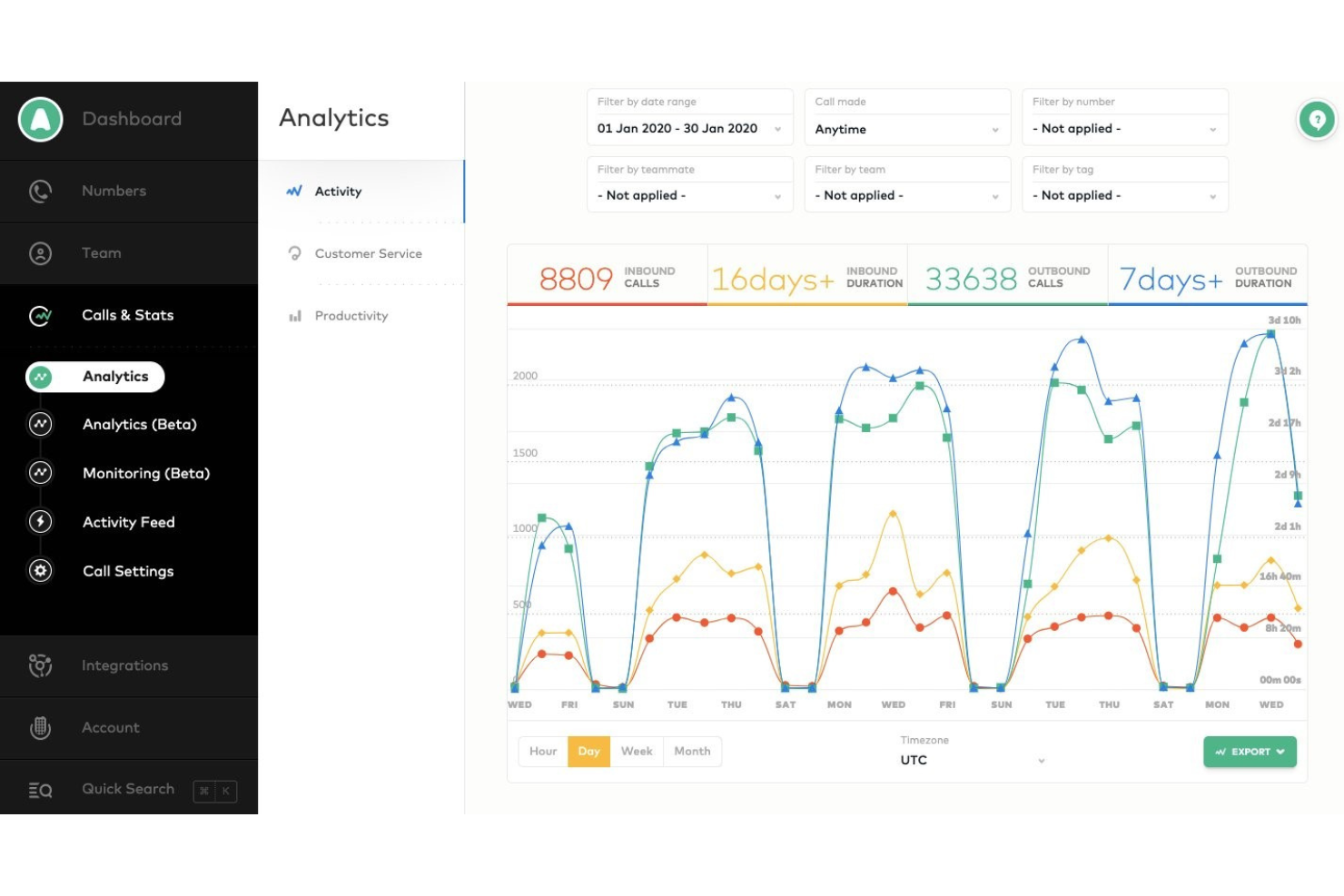
If you need a call center platform that connects quickly with your existing CRM and helpdesk tools, Aircall is worth a look. It’s built for fast-moving sales and support teams that want to launch new phone lines and integrations without IT delays. Aircall helps you centralize customer conversations and automate call logging, so your team can focus on the next interaction.
Who is Aircall Best For?
Customer support managers, contact center leaders, and sales operations teams at small to mid-sized organizations that need live call monitoring and coaching as part of their phone system. It suits companies operating distributed support or sales teams that require centralized visibility into call activity and real-time supervision across channels.
Why I Picked Aircall
What stands out about Aircall is how quickly you can get a new call center up and running, even if your team is distributed or remote. The platform’s fast setup process lets you create new numbers and onboard agents in minutes, which is ideal for businesses that need to scale or pivot quickly. I appreciate how Aircall’s deep CRM integrations automatically sync call data and notes, so your team always has the latest customer context at their fingertips. These features make Aircall a strong choice for teams that want to minimize downtime and keep customer records unified across channels.
Aircall Key Features
Some other features in Aircall that are especially useful for call center teams include:
- Call Whispering: Supervisors can listen in and provide guidance to agents during live calls without the customer hearing.
- Shared Call Inbox: Teams can view, assign, and manage missed calls and voicemails from a central dashboard.
- Power Dialer: Automatically dials through lists of numbers to speed up outbound calling campaigns.
- Warm Transfer: Agents can speak with a colleague before transferring a call, ensuring smoother handoffs.
Aircall Integrations
Integrations include Salesforce, HubSpot, Intercom, Zendesk, Pipedrive, Microsoft Dynamics, Slack, Shopify, Freshdesk, and Zoho CRM.
Pros and Cons
Pros:
- Excellent customer support
- Accessible on multiple devices
- Deep communication insights
Cons:
- No built-in workforce management tools
- Loudspeaker functionality is unpredictable

RingCentral Contact Center offers a cloud-based platform that integrates AI-driven insights and automation to enhance customer interactions. It appeals to industries ranging from retail to healthcare, where efficient customer service is paramount. By providing omnichannel support across voice, messaging, and social media, RingCentral helps businesses streamline communication and optimize agent performance, thus addressing challenges such as managing high call volumes and improving customer satisfaction.
Who is RingCentral Contact Center Best For?
Customer service and support managers, contact center leaders, and operations teams at mid-sized to large organizations that need a unified platform to manage omnichannel customer interactions with automation, routing, and analytics. It suits companies that handle high volumes of inbound and outbound support or sales activity and require centralized oversight of performance, workforce management, and CRM-integrated workflows.
Why I Picked RingCentral Contact Center
I picked RingCentral Contact Center for its strong focus on automation-driven processes, which is essential for any modern call center operation. With features like Interactive Voice Response (IVR) and Intelligent Virtual Agents (IVAs), you can automate routine customer interactions, reducing wait times and allowing your team to focus on more complex issues. This not only enhances customer satisfaction but also optimizes operational efficiency, ensuring your call center runs smoothly. Additionally, the use of AI-powered conversation intelligence provides real-time insights, helping your agents deliver personalized support and improving overall service quality.
RingCentral Contact Center Key Features
In addition to its automation-driven processes, RingCentral Contact Center offers a variety of key features that enhance its utility as a call center software.
- Omnichannel Support: Engage with customers through multiple channels including voice, chat, email, and social media, ensuring a seamless customer experience.
- Workforce Management: Optimize your team's schedules and monitor performance with tools designed to enhance productivity and service quality.
- Analytics and Reporting: Gain insights into your call center's performance with detailed analytics and reporting tools, helping you make informed decisions.
- Security and Compliance: Protect sensitive data and ensure compliance with industry regulations through advanced security features.
RingCentral Contact Center Integrations
Integrations include Salesforce, HubSpot, Zendesk, Slack, Microsoft Teams, Google Workspace, ServiceNow, Microsoft Dynamics 365, Oracle, and SugarCRM.
Pros and Cons
Pros:
- Built-in workforce and quality management tools
- Omnichannel support across voice, chat, and social
- AI-powered routing for complex customer journeys
Cons:
- Initial customization requires significant effort and resources
- Limited support for polycom phones


If your team needs to manage international calling and messaging from one platform, Squaretalk is built for you. This cloud-based call center software is especially useful for businesses with remote or distributed agents who need local numbers and automated workflows across multiple countries. Squaretalk helps simplify global communication and compliance for customer support and sales teams working at scale.
Who is Squaretalk Best For?
Squaretalk suits customer support and sales teams at growing small to mid-sized companies that need a scalable communications platform. It works well for organizations operating across multiple regions that require flexible voice infrastructure and centralized management of distributed teams.
Why I Picked Squaretalk
Squaretalk caught my attention because it’s designed for teams that need global voice and messaging capabilities from a single platform. I picked it for this list since it offers local phone numbers in over 100 countries and supports automated call distribution, which is essential for managing remote or distributed agents. The platform’s cloud-based telephony infrastructure helps businesses simplify international calling and stay compliant with local regulations. If your call center needs to reach customers worldwide without juggling multiple systems, Squaretalk’s unified approach is a strong fit.
Squaretalk Key Features
I also found several other features that support call center operations:
- Smart Dialer: Automatically dials numbers from call lists and skips busy or unanswered calls to keep agents focused on live conversations.
- Call Recording: Records inbound and outbound calls for quality assurance and compliance purposes.
- IVR Designer: Lets you create custom interactive voice response menus using a drag-and-drop interface.
- Real-Time Analytics Dashboard: Shows live call metrics and agent performance data for supervisors to monitor activity.
Squaretalk Integrations
Integrations include Zoho, Salesforce, Freshworks, Pipedrive, Lynx, Programmable Messaging, Programmable Voice Access, and Call Me Back widget.
Pros and Cons
Pros:
- User-friendly and intuitive interface
- Extensive reporting and analytics features
- High security standards
Cons:
- No mobile application
- Limited customization options
New Product Updates from Squaretalk

Squaretalk Adds Internal Chat for Unified Team Communication
Squaretalk introduces a built-in Internal Chat feature to enhance communication within the Contact Center Platform. For more information, visit Squaretalk's official site.
 .
.

If you’re looking for a virtual phone system that works across devices, Talkroute is built for small businesses and remote teams that need flexible call handling. It’s especially useful for companies that want to route calls to multiple locations or mobile phones without extra hardware. Talkroute helps you manage business calls professionally, even if your team is always on the go.
Who is Talkroute Best For?
TalkRoute fits small business owners and customer-facing teams that need to manage multiple inbound calls without adding complex infrastructure. It serves early-stage to mid-sized companies across industries that want a straightforward virtual phone system to route calls across distributed staff in the U.S. or other supported regions.
Why I Picked Talkroute
Talkroute stands out for its virtual phone system with call routing designed for small teams that need flexibility. I picked it because you can direct calls to any phone, whether your team is in the office, remote, or using mobile devices, so you never miss a customer call. The platform also lets you set up custom greetings and voicemail boxes for each user, which helps small businesses look professional. If you want a solution that brings advanced call handling to a distributed or mobile team, Talkroute is built for that purpose.
Talkroute Key Features
In addition to its flexible call routing and professional voicemail options, I also found these features worth noting:
- Call Stacking: Lets multiple callers wait in a queue instead of getting a busy signal.
- Text Messaging: Allows you to send and receive SMS messages from your business number.
- Desktop and Mobile Apps: Gives you access to your phone system from any device.
- Call Reporting: Provides detailed call logs and analytics for tracking team activity.
Talkroute Integrations
Integrations are not publicly listed.
Pros and Cons
Pros:
- Call stacking keeps callers in a queue
- Easy setup process
- Consistent call quality and reliability
Cons:
- Some users may want more sophisticated functionalities
- Additional costs for extra phone numbers and users


CloudTalk is designed for teams that need advanced call routing and analytics across multiple locations or remote setups. It’s a strong fit for businesses managing distributed support or sales teams who want to track performance and optimize workflows. The platform helps you handle high call volumes while keeping every interaction organized and measurable.
Who is CloudTalk Best For?
CloudTalk supports operations leaders and IT teams at mid-sized to enterprise organizations running global call centers. It is well-suited to companies with distributed sales and support teams that require centralized call management across multiple countries and regions.
Why I Picked CloudTalk
I chose CloudTalk because its advanced call routing and analytics are especially useful for teams working across different locations or time zones. The platform offers skills-based routing, so calls reach the right agent based on expertise, and real-time analytics dashboards that let you monitor call activity as it happens. I also like that you can set up custom call flows to match your team’s structure, which helps keep distributed operations running smoothly. These features make CloudTalk a strong option for businesses that need to coordinate and measure performance across remote or multi-site call centers.
CloudTalk Key Features
Some other features in CloudTalk that stand out for call center teams include:
- Voicemail Drop: Agents can leave pre-recorded voicemail messages with one click, saving time on repetitive follow-ups.
- Call Recording: Automatically record calls for quality assurance, training, and compliance purposes.
- Interactive Voice Response (IVR): Set up multi-level IVR menus to guide callers to the right department or information.
- Click-to-Call: Initiate calls directly from your CRM or helpdesk with a single click, reducing manual dialing errors.
CloudTalk Integrations
Integrations include Salesforce, HubSpot, Zendesk, Pipedrive, Zoho CRM, Intercom, Freshdesk, Microsoft Teams, Monday, and Shopify.
Pros and Cons
Pros:
- Stable call quality
- User-friendly interface
- Simple rep management
Cons:
- Needs better API support
- Updates can cause issues

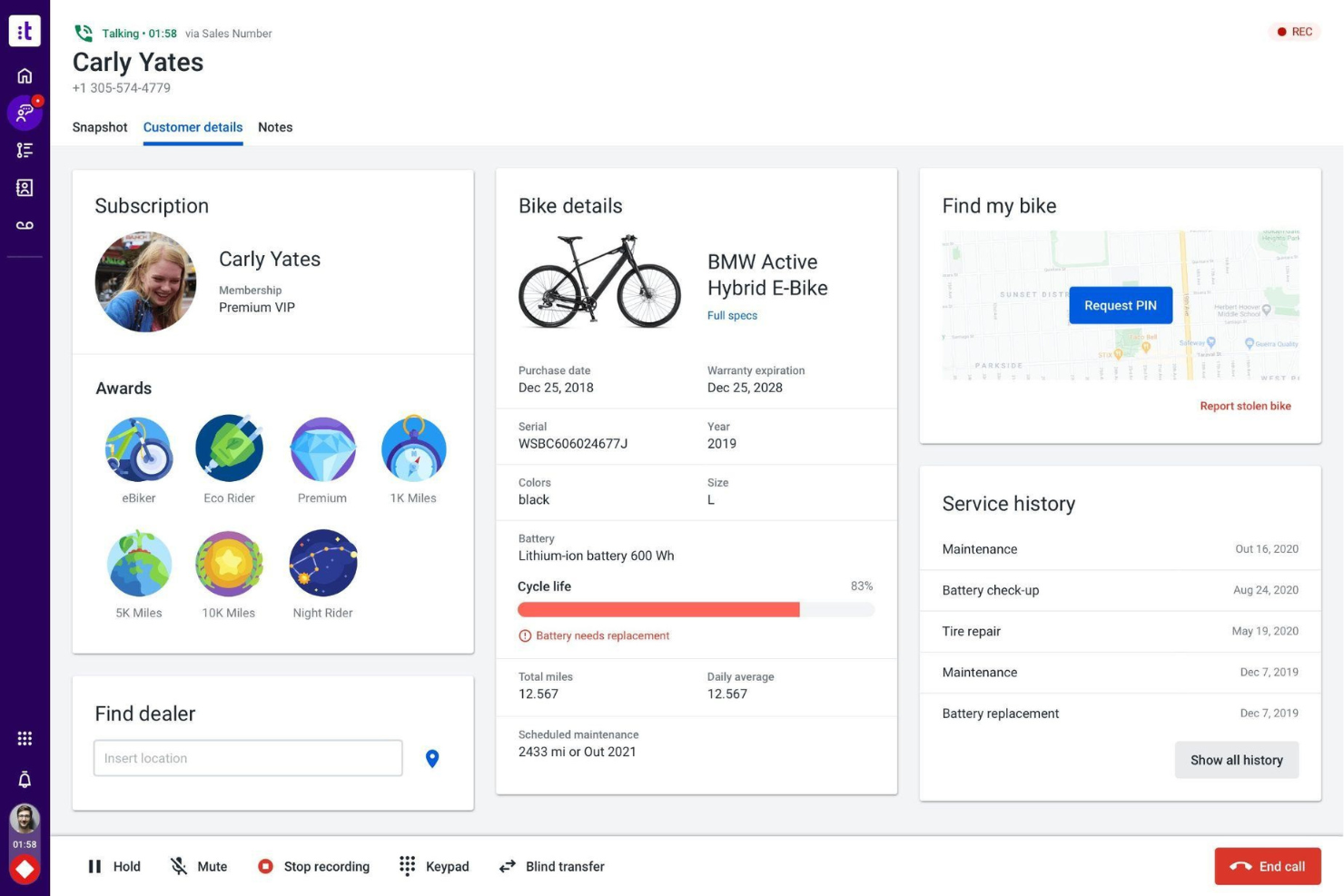
For teams looking to bring AI-driven automation and analytics into their contact center, Talkdesk offers a specialized platform. It’s designed for enterprise organizations that need advanced routing, real-time insights, and customizable workflows across multiple channels. Talkdesk helps you automate repetitive tasks and surface actionable data, so your agents can focus on complex customer needs.
Who is Talkdesk Best For?
Talkdesk serves customer service leaders and contact center managers at mid-sized to enterprise companies focused on structured support operations. It fits organizations across regulated and service-intensive industries that need a centralized platform to manage high volumes of customer inquiries across regions.
Why I Picked Talkdesk
What drew me to Talkdesk is its focus on AI-powered automation and analytics, which are essential for modern enterprise contact centers. The platform’s AI virtual agents handle routine inquiries, freeing up human agents for more complex issues. I also like how Talkdesk’s real-time analytics dashboard gives supervisors instant visibility into call metrics and agent performance. These capabilities help large teams optimize workflows and make data-driven decisions in fast-paced environments.
Talkdesk Key Features
Some other features in Talkdesk that are especially useful for call center teams include:
- Omnichannel Engagement: Manage voice, chat, email, and SMS interactions from a single interface.
- Customizable IVR: Build and update interactive voice response menus with a drag-and-drop editor.
- Call Recording and Storage: Automatically record and securely store all inbound and outbound calls.
- Workforce Management: Forecast demand, schedule agents, and track adherence within the platform.
Talkdesk Integrations
Integrations include Salesforce, Zendesk, Microsoft Teams, ServiceNow, HubSpot, Microsoft Dynamics 365, Zoom, Slack, Shopify, and Freshdesk.
Pros and Cons
Pros:
- User-friendly platform with good self-service options
- Efficiently organizes customer data
- Includes an AI-powered virtual assistant
Cons:
- Limited outbound dialer campaign customization
- Can be slow at generating reports


Twilio gives technical teams and enterprises a way to build fully custom call center solutions using its programmable cloud communications platform. It’s a strong fit for businesses that need to tailor every aspect of their voice, messaging, and routing workflows. With Twilio, you can design complex, multi-channel customer experiences that go far beyond the limitations of out-of-the-box call center software.
Who is Twilio Best For?
Twilio serves product, engineering, and IT teams at mid-sized to enterprise organizations building highly customizable contact center solutions. It fits companies with in-house development resources that need programmable communications infrastructure to support global customer engagement across channels.
Why I Picked Twilio
Twilio stands out for teams that want to build a call center platform tailored to their exact needs, rather than relying on pre-built solutions. Its programmable cloud communications platform lets you create custom call flows, automate routing, and integrate voice with SMS, chat, and other channels. I appreciate that Twilio offers granular control over every interaction, from IVR design to real-time analytics and compliance features. This level of flexibility is ideal for organizations with unique requirements or those looking to innovate beyond standard call center workflows.
Twilio Key Features
Some other features that make Twilio a flexible choice for call center teams include:
- Call Recording: Record inbound and outbound calls for quality assurance and compliance.
- Global Phone Number Provisioning: Instantly provision local, national, and toll-free numbers in over 100 countries.
- Speech Recognition: Convert spoken language into text for IVR and analytics use cases.
- WebRTC Support: Enable browser-based calling for agents without the need for desk phones.
Twilio Integrations
Integrations include Salesforce, Zendesk, HubSpot, Microsoft Dynamics 365, Shopify, Segment, SendGrid, Slack, Google Dialogflow, and ServiceNow.
Pros and Cons
Pros:
- Integrates well with CRMs and APIs
- Supports multiple communication channels
- Highly customizable and developer-friendly
Cons:
- Limited out-of-box features
- Requires technical setup expertise


If your team needs a unified platform for voice, video, and call center operations, Nextiva brings these channels together in one place. It’s a strong fit for growing businesses that want to manage customer calls, team messaging, and collaboration from a single dashboard. Nextiva helps you centralize communications and streamline customer interactions without juggling multiple tools.
Who is Nextiva Best For?
Nextiva supports customer experience and IT leaders at small to mid-sized businesses that want to manage phone, SMS, video, and email support in one system. It fits service-oriented organizations operating across the U.S. that need a unified communications platform for distributed teams.
Why I Picked Nextiva
Nextiva stands out for its unified communications approach, which is especially valuable for businesses that want to manage all customer interactions in one place. The platform combines voice, video, SMS, and team chat, so your agents can switch between channels without losing context. I appreciate how Nextiva’s call center dashboard brings together call routing, queue management, and real-time monitoring. This setup helps teams handle high volumes of customer inquiries while keeping internal collaboration seamless.
Nextiva Key Features
Some other features in Nextiva that are especially useful for call center teams include:
- Auto Attendant: Set up automated greetings and call routing for incoming calls.
- Call Recording: Record and store calls for quality assurance and training.
- Analytics and Reporting: Access detailed call metrics and performance dashboards.
- CRM Integration: Connect customer data from your CRM directly to the call center interface.
Nextiva Integrations
Integrations are not publicly listed.
Pros and Cons
Pros:
- Visual call flow designer for IVR setup
- Built-in team messaging and video meetings
- Voicemail transcription available for missed calls
Cons:
- International calling rates can be unpredictable
- Call recording limited to Enterprise plan


Dialpad brings AI-driven features like real-time transcription and sentiment analysis to contact centers that want deeper insight into every conversation. It’s a strong fit for teams that need to monitor customer interactions as they happen and quickly surface actionable data. Dialpad helps businesses spot trends, coach agents in the moment, and improve service quality across voice and digital channels.
Who is Dialpad Best For?
Dialpad supports customer support and revenue teams at small to mid-sized businesses that want to manage voice, messaging, and meetings in a single platform with built-in AI capabilities. It fits organizations operating across distributed or hybrid environments that prioritize centralized oversight and data-driven performance management.
Why I Picked Dialpad
What stands out about Dialpad is its focus on AI-powered tools that give call center teams real-time visibility into conversations. The platform’s live transcription feature captures every word as it’s spoken, making it easier for agents and supervisors to track details and follow up accurately. I also appreciate the built-in sentiment analysis, which flags customer mood shifts during calls so teams can respond proactively. These features help businesses coach agents in the moment and quickly identify trends that impact customer experience.
Dialpad Key Features
Some other features that make Dialpad a strong choice for contact centers include:
- Omnichannel Support: Manage customer conversations across voice, SMS, and web chat from a single interface.
- Call Routing: Set up custom call routing rules based on business hours, agent skills, or caller needs.
- Call Recording: Automatically record calls for quality assurance and training purposes.
- Analytics Dashboard: Access visual reports on call volume, agent activity, and customer wait times.
Dialpad Integrations
Integrations include Salesforce, Zendesk, Microsoft Teams, Google Workspace, HubSpot, Zoho, Front, Microsoft Dynamics, ServiceNow, and Google.
Pros and Cons
Pros:
- Automated post-call notes increase agent productivity
- Pinpoints follow-up topics
- Includes a self-service virtual agent
Cons:
- Limited customization options
- Hold queue is limited to 25 customers at one time


If you need a virtual call center that’s quick to launch and supports global operations, CallHippo is worth a look. It’s designed for teams that want to set up local or international numbers in minutes and manage calls from anywhere. With features like instant number activation and browser-based calling, CallHippo helps distributed teams stay connected and responsive.
Who is CallHippo Best For?
CallHippo supports sales and support teams at small to mid-sized businesses that want AI-enabled tools to manage customer interactions. It fits growing companies with distributed teams that need a cloud-based phone system to handle outbound and inbound communications across regions.
Why I Picked CallHippo
What drew me to CallHippo is how quickly you can set up a virtual call center and start making or receiving calls with global numbers. I picked CallHippo because it lets you activate local or toll-free numbers in over 50 countries almost instantly, which is ideal for teams with international customers or remote agents. The browser-based dialer means your team can work from anywhere without extra hardware. For businesses that need to scale up or down quickly and maintain a global presence, CallHippo’s instant number provisioning and flexible setup stand out.
CallHippo Key Features
In addition to instant number activation and browser-based calling, I also found these features useful:
- Call Analytics Dashboard: Offers real-time and historical call data to help teams monitor performance and call outcomes.
- Automatic Call Distribution (ACD): Routes incoming calls to the most appropriate agent based on set criteria.
- Call Recording: Records inbound and outbound calls for quality monitoring and training purposes.
- Voicemail Transcription: Converts voicemail messages into text so agents can quickly review and respond.
CallHippo Integrations
Integrations include Salesforce, HubSpot, Zoho CRM, Zendesk, Slack, Microsoft Teams, Pipedrive, Freshdesk, Intercom, and Shopify.
Pros and Cons
Pros:
- Instant activation of local and toll-free numbers
- Mobile app availability for on-the-go access
- User-friendly interface that simplifies navigation
Cons:
- Inconsistent performance during peak usage times
- Some users experienced issues with call connectivity

Best for an affordable virtual contact center

Freshdesk Contact Center offers a cloud-based call center platform with AI-powered routing and analytics. It’s a strong choice for support teams and customer service operations that want to automate call distribution and gain real-time insights into agent performance. The tool helps you manage high call volumes and improve response times without complex on-premise setups.
Who is Freshdesk Contact Center Best For?
Freshdesk Contact Center supports customer service managers at small to mid-sized businesses that need a cost-conscious virtual contact center. It fits growing service teams across industries that want cloud-based voice support integrated with help desk workflows for distributed operations.
Why I Picked Freshdesk Contact Center
What sets Freshdesk Contact Center apart is its focus on AI-powered routing and analytics, which directly address the needs of modern call centers. The platform uses intelligent call routing to match callers with the most suitable agents, helping reduce wait times and improve resolution rates. I like that it also provides real-time analytics dashboards, so supervisors can monitor call queues, agent performance, and key metrics as they happen. These features make it easier for teams to optimize workflows and deliver consistent, high-quality customer support.
Freshdesk Contact Center Key Features
Some other features that make Freshdesk Contact Center appealing for call center teams include:
- Call Masking: Protect agent and customer privacy by masking phone numbers during calls.
- Call Barging: Allow supervisors to join live calls and assist agents in real time.
- Voicemail Transcription: Automatically convert voicemails into text for easier review and follow-up.
- Holiday Routing: Set up custom call routing rules for holidays and non-business hours.
Freshdesk Contact Center Integrations
Integrations include Freshdesk, Freshsales, Freshservice, HubSpot, Salesforce, Slack, Microsoft Teams, Shopify, Google Contacts, and Zapier.
Pros and Cons
Pros:
- Detailed analytic reports
- Flexible platform
- Simple onboarding process
Cons:
- Mobile app is sometimes buggy
- No calls between reps


Teams looking to unify phone support with their Zoho apps will find Zoho Voice designed for seamless integration. It’s a strong fit for businesses that want to manage calls, SMS, and voicemails right inside Zoho CRM or Zoho Desk. Zoho Voice helps you keep customer conversations and data connected across your support and sales workflows.
Who is Zoho Voice Best For?
Zoho Voice supports sales and support teams at small to mid-sized businesses that rely on CRM-driven workflows. It fits organizations already using Zoho applications that want integrated telephony within their CRM to manage customer communications across regions.
Why I Picked Zoho Voice
Zoho Voice stands out for its deep integration with the Zoho ecosystem, which is especially valuable for teams already using Zoho CRM or Zoho Desk. I picked it because you can handle calls, SMS, and voicemails directly within your existing Zoho workflows, keeping all customer interactions and data in one place. The platform also supports advanced call routing and automation that syncs with your Zoho apps, so agents always have the right context. For businesses committed to the Zoho suite, Zoho Voice offers a unified approach to managing customer communications.
Zoho Voice Key Features
In addition to its Zoho ecosystem integration, Zoho Voice offers several features that support call center operations:
- Multi-level IVR: Lets you create interactive menus to route callers to the right department or agent.
- Call Recording: Automatically records calls for quality assurance and compliance needs.
- Click-to-Call Widget: Allows customers to initiate calls directly from your website.
- Number Porting: Enables you to transfer existing business phone numbers into Zoho Voice.
Zoho Voice Integrations
Integrations include Zoho CRM, Zoho Desk, Zoho Bigin, and Zoho ServiceDesk Plus.
Pros and Cons
Pros:
- Customizable IVR for personalized customer interactions
- Advanced call analytics for detailed performance insights
- Seamless integration with Zoho's suite of products
Cons:
- SMS features only available in select regions
- Can be complex for new users

Five9 offers a cloud-based contact center platform designed for organizations that want to blend AI automation with live agent support. It’s a strong choice for teams looking to unify voice, chat, email, and social channels while using analytics to optimize performance. Five9 helps businesses automate routine interactions and deliver more personalized service at scale.
Who is Five9 Best For?
Five9 supports contact center and operations leaders at mid-sized to enterprise organizations that manage high inbound and outbound call volumes. It fits companies in service-driven and regulated industries that require centralized oversight and workforce management across regional or global operations.
Why I Picked Five9
What drew me to Five9 is its focus on combining AI-powered automation with deep analytics for contact centers. The platform’s intelligent virtual agents handle routine customer inquiries, freeing up live agents for more complex issues. I also like that Five9’s analytics suite provides real-time and historical insights into agent performance and customer interactions. This approach helps teams continuously improve service quality and efficiency while managing high volumes across multiple channels.
Five9 Key Features
Some other features that make Five9 a strong option for call center teams include:
- Predictive Dialer: Automatically dials numbers and connects answered calls to available agents.
- Omnichannel Routing: Routes customer interactions from voice, chat, email, and social media to the right agent.
- CRM Integrations: Connects natively with Salesforce, ServiceNow, Microsoft Dynamics, and other leading CRMs.
- Call Recording and Monitoring: Records calls and allows supervisors to monitor live interactions for quality assurance.
Five9 Integrations
Integrations include Salesforce, ServiceNow, Microsoft Dynamics 365, Oracle, Zendesk, Oracle NetSuite, Zoom, Microsoft Teams, Slack, and Mitel.
Pros and Cons
Pros:
- Predictive dialer increases outbound call efficiency
- Includes gamification to improve agent performance
- Extensive documentation
Cons:
- Feature add-ons can be expensive
- Integration analytics are limited to their top-level paid plan


NICE inContact is designed for enterprise teams that need advanced AI-driven tools to manage complex, high-volume customer interactions across channels. It’s a strong fit for organizations with strict compliance needs or those looking to automate and personalize customer journeys at scale. The platform stands out for its ability to unify voice, chat, email, and digital channels while providing deep analytics and automation.
Who is NICE inContact Best For?
NICE inContact supports contact center and IT leaders at mid-sized to enterprise organizations that require intelligent call routing within complex service environments. It fits companies operating across multiple regions and channels that need structured workflow management and centralized oversight of customer interactions.
Why I Picked NICE inContact
What makes NICE inContact a strong contender for call center software is its focus on AI-driven omnichannel capabilities tailored for complex enterprise needs. The platform uses AI to automate routine tasks, route interactions intelligently, and personalize customer experiences across voice, chat, email, and digital channels. I appreciate how its analytics engine provides deep insights into customer journeys and agent performance, which is especially valuable for large organizations managing high volumes. For teams that need to orchestrate seamless, compliant interactions at scale, NICE inContact offers the advanced tools required.
NICE inContact Key Features
Some other features that make NICE inContact appealing for call center teams include:
- Workforce Management Suite: Forecast demand, schedule agents, and track adherence in one place.
- Call Recording and Archiving: Record and securely store calls for compliance and quality assurance.
- Customizable Agent Desktop: Tailor the agent interface with widgets and integrations to fit specific workflows.
- Self-Service IVR: Let customers resolve common issues through automated, menu-driven phone interactions.
NICE inContact Integrations
Integrations include Salesforce, Oracle, Microsoft Dynamics 365, Zendesk, ServiceNow, Google Workspace, Microsoft Teams, Slack, Zoom, and Cognigy AI.
Pros and Cons
Pros:
- AI-driven analytics for agent and customer insights
- Cloud-native, ensuring scalability and reliability
- Omnichannel routing across voice, chat, sms
Cons:
- Interface and reporting can feel dated or clunky
- Some users report call connectivity and audio issues


Genesys is designed for organizations that need advanced AI-powered routing and workforce management across multiple channels. It’s a strong fit for large contact centers handling complex customer journeys and high interaction volumes. With Genesys, teams can coordinate voice, chat, email, and social messaging while using automation to match customers with the right agent every time.
Who is Genesys Best For?
Genesys supports contact center and customer experience leaders at mid-sized to enterprise organizations that want structured engagement tools alongside core service capabilities. It fits companies with large, distributed support teams that need workforce engagement features integrated into a centralized customer experience platform across regions.
Why I Picked Genesys
What makes Genesys stand out for call center teams is its AI-powered omnichannel routing and workforce management, which are essential for handling complex customer interactions at scale. I picked Genesys because it uses AI to analyze customer intent and automatically direct each inquiry to the most qualified agent, no matter the channel. The platform’s workforce management tools also help supervisors forecast demand, schedule agents, and monitor adherence in real time. These features make Genesys a strong choice for organizations that need to coordinate large teams and deliver consistent service across voice, chat, email, and social channels.
Genesys Key Features
In addition to its routing and workforce management capabilities, Genesys offers several other features for call center teams:
- Speech and Text Analytics: Analyze customer interactions across channels to identify trends and quality issues.
- Quality Management Tools: Score and review agent calls and messages for training and compliance.
- Customizable Dashboards: Build real-time dashboards to monitor KPIs and operational metrics.
- Outbound Campaign Management: Set up and manage proactive outreach campaigns using voice, SMS, and email.
Genesys Integrations
Integrations include Salesforce, ServiceNow, Microsoft Teams, Zoom, Zendesk, Amazon Lex, Google CCAI, Okta, OneLogin, and eMite.
Pros and Cons
Pros:
- Flexible plan options
- Strong AI features
- Simple user interface
Cons:
- Report customization limitations
- Slow report generation


If you’re searching for a call center platform that brings AI-driven automation and omnichannel support together, Bright Pattern is worth a close look. It’s designed for organizations that want to unify customer conversations across voice, chat, SMS, and social channels. Teams handling complex, high-volume interactions can use its automation and workflow tools to deliver faster, more consistent service.
Who is Bright Pattern Best For?
Bright Pattern supports contact center and IT leaders at mid-sized to enterprise organizations that require omnichannel communication across voice and digital channels. It fits companies operating in customer service–intensive industries that need a centralized platform to manage interactions across regions and distributed teams.
Why I Picked Bright Pattern
What drew me to Bright Pattern is its focus on AI-powered omnichannel contact center automation. The platform uses AI to route customer interactions across channels like voice, chat, SMS, and social messaging, so teams can manage every conversation in one place. I picked Bright Pattern because its workflow automation tools let you design and adapt processes for complex customer journeys. The real-time agent assistance also helps support teams handle high volumes without losing quality or consistency.
Bright Pattern Key Features
I also found several other features that help Bright Pattern stand out for contact centers:
- Quality Management Suite: Includes call and screen recording, agent scoring, and evaluation forms for performance monitoring.
- Customizable Reporting Dashboards: Let supervisors track real-time metrics and KPIs with flexible, visual dashboards.
- Outbound Campaign Tools: Supports automated dialling, campaign scripting, and list management for proactive outreach.
- Compliance Controls: Offers built-in PCI and HIPAA compliance features to help organizations meet security and privacy requirements.
Bright Pattern Integrations
Integrations include Salesforce, Microsoft Dynamics 365, Zendesk, Oracle Service Cloud, HubSpot, Zoho, Microsoft Teams, ServiceNow, Ivanti Service Management, and ManageEngine.
Pros and Cons
Pros:
- Built-in quality management and call recording tools
- AI-powered agent assistance for live interactions
- AI-powered agent assistance for live interactions
Cons:
- Outbound campaign tools lack advanced segmentation
- High per-minute call costs


Creatio CRM offers a no-code platform for building and automating call center workflows. It’s a strong fit for teams that want to tailor omnichannel support processes without relying on IT. If you need AI-driven guidance and dynamic case management in a customizable environment, Creatio CRM is worth considering.
Who is Creatio CRM Best For?
Creatio CRM supports sales, marketing, and customer service leaders at mid-sized to enterprise organizations that prioritize personalized customer communication. It fits companies in process-driven industries that need configurable CRM workflows to manage customer engagement across regions and business units.
Why I Picked Creatio CRM
I picked Creatio CRM because its no-code workflow automation stands out for teams that want to quickly adapt call center processes without developer support. The drag-and-drop process designer lets you build and update call routing, escalation, and follow-up flows visually. I also appreciate how Creatio CRM’s AI-driven recommendations help agents respond faster and more accurately across channels. For call centers that need to customize and automate complex support journeys, Creatio CRM offers a flexible foundation.
Creatio CRM Key Features
Some other features that make Creatio CRM useful for call center teams include:
- Omnichannel Communication: Manage customer interactions across voice, email, chat, and social channels from a single interface.
- Dynamic Case Management: Track, assign, and resolve support cases with customizable workflows and automated notifications.
- Real-Time Analytics Dashboards: Monitor call volumes, agent performance, and service levels with configurable, live dashboards.
- Knowledge Base Management: Create and organize internal and external knowledge articles to support agents and customers during interactions.
Creatio CRM Integrations
Integrations include Microsoft Teams, DocuSign, SharePoint, OneDrive, Jotform, Velvetel Telephony, Beesender Chat Master, Ada AI Chatbot, Mapsly, and Starfish ETL.
Pros and Cons
Pros:
- Dynamic case management with automated notifications
- Scalable and flexible for growing businesses
- No-code platform accessible to non-technical users
Cons:
- Limited out-of-the-box call scripting tools
- Telephony setup can require third-party providers


LiveAgent combines a built-in call center with multichannel ticketing, making it a strong choice for teams that want to manage voice, email, chat, and social messages in one place. It’s especially useful for support teams that need to keep conversations organized and accessible across channels. LiveAgent helps businesses reduce missed messages and maintain a complete history of every customer interaction.
Who is LiveAgent Best For?
LiveAgent supports customer support managers at small to mid-sized businesses that need integrated helpdesk and ticketing tools alongside live chat and voice support. It fits growing service teams across industries that require a centralized system to manage customer inquiries across channels and distributed staff.
Why I Picked LiveAgent
What drew me to LiveAgent is its all-in-one approach, combining a full-featured call center with multichannel ticketing in a single platform. This setup lets support teams handle calls, emails, live chats, and social media messages without switching tools or losing track of conversations. I like that LiveAgent automatically creates tickets from every interaction, so nothing slips through the cracks. The unified dashboard also helps agents see the full context of each customer’s history, which is essential for delivering consistent service.
LiveAgent Key Features
Some other features that make LiveAgent useful for call centers include:
- IVR Designer: Build custom interactive voice response menus to route calls efficiently.
- Call Recording: Record inbound and outbound calls for quality monitoring and training.
- Real-Time Chat Widget: Add a live chat widget to your website for instant customer support.
- Social Media Integration: Connect Facebook, Twitter, and Instagram accounts to manage messages and comments from one dashboard.
LiveAgent Integrations
Integrations include Facebook, Twitter, Instagram, ActiveCampaign, BigCommerce, Braintree, ClickUp, Clockify, CloudApp, and Drupal.
Pros and Cons
Pros:
- Built-in call center with IVR designer
- Internal chat for agent collaboration
- Social media ticketing for Facebook and Twitter
Cons:
- No predictive dialer for outbound campaigns
- Occasional delays in ticket notifications


If your team needs a unified platform for managing customer conversations across channels, Zendesk offers a flexible solution. It’s especially useful for businesses that want to blend ticketing, voice, chat, and messaging in one place without heavy IT involvement. With its integrated approach, Zendesk helps support teams keep context and history at their fingertips, even as customers switch between channels.
Who is Zendesk Best For?
Zendesk supports customer experience and support leaders at small to enterprise organizations that need to unify communication channels within a structured service platform. It fits companies across industries that manage high volumes of customer interactions and require centralized oversight for distributed or global teams.
Why I Picked Zendesk
What sets Zendesk apart for call center teams is its unified ticketing and support platform that brings voice and messaging together in one place. I picked Zendesk because it lets agents manage calls, chats, and tickets from a single dashboard, so customer context is always available, no matter how someone reaches out. The platform’s built-in voice features, like call recording and automatic ticket creation from calls, help teams keep every interaction organized. With messaging integrated directly into the ticketing workflow, agents can switch between channels without losing track of customer history or requests.
Zendesk Key Features
Some other features that make Zendesk a strong option for call center teams include:
- Automated Ticket Routing: Assign incoming tickets to the right agent based on skills or workload.
- Customizable Macros: Create and use pre-written responses to speed up agent replies.
- SLA Management: Set and track service level agreements directly within the platform.
- Reporting and Analytics Suite: Access dashboards and reports to monitor team performance and customer trends.
Zendesk Integrations
Integrations include Salesforce, Slack, Microsoft Teams, Shopify, Jira, HubSpot, Mailchimp, Aircall, Talkdesk, and Trello.
Pros and Cons
Pros:
- SLA management and real-time performance dashboards
- Automated ticket routing based on agent skills
- Macros for fast, consistent agent responses
Cons:
- Bulk ticket actions can be slow with volume
- Difficult to personalize


With 8x8 Contact Center, you get a unified platform that brings together voice, video, chat, and analytics for customer engagement. This solution is well-suited for distributed teams or organizations that want to manage all customer interactions from a single interface. It’s especially useful for businesses looking to blend digital and voice channels while tracking performance in real time.
Who is 8x8 Best For?
8x8 supports IT and customer experience leaders at mid-sized to enterprise organizations that require omnichannel communication across voice and digital channels. It fits companies with distributed or international operations that need a unified cloud platform to manage internal collaboration and customer interactions.
Why I Picked 8x8
What stands out about 8x8 is its unified approach to managing voice, video, chat, and analytics in one platform. For call centers that need to handle multiple channels without juggling separate tools, 8x8 offers a single interface for all customer interactions. I like that you can switch between channels and monitor performance metrics in real time, which helps teams stay responsive and informed. This makes 8x8 a strong choice for organizations that want to centralize communication and gain actionable insights from every customer touchpoint.
8x8 Key Features
Some other features that make 8x8 appealing for call center teams include:
- Intelligent IVR: Route callers automatically based on their responses and needs.
- Speech Analytics: Analyze call recordings to identify trends and customer sentiment.
- Quality Management Tools: Score and review agent interactions for training and compliance.
- CRM Integrations: Connect directly with platforms like Salesforce and Microsoft Dynamics for seamless data access.
8x8 Integrations
Integrations include Salesforce, HubSpot, Microsoft Teams, Microsoft Dynamics 365, NetSuite, Zendesk, Freshdesk, ServiceNow, Slack, and Google Workspace.
Pros and Cons
Pros:
- Consistently reliable voice communication quality
- Easy setup and management of users through a dashboard
- Offers a wide range of features including VoIP, video, messaging
Cons:
- Reports of occasional connectivity problems
- Lack of granular access controls for specific features
Other Call Center Software
Here are a few more options that didn’t make the best call center software list:
- Calabrio
For workforce optimization
- Avaya
For enhancing business outcomes
- Vonage Business Cloud Contact Center
For call center flexibility and control
- AWS Connect
For onboarding new representatives
- Aspect Software
For high-performance contact center solution
- Intermedia Unite
For all-in-one cloud contact center


What Is Call Center Software?
Call center software is a platform that manages inbound and outbound phone communications between businesses and customers. It supports call routing, performance tracking, and operational efficiency for support and sales teams.
Call Center Software Selection Criteria
When selecting customer support software to include in this list, I considered common buyer needs and pain points like improving call handling efficiency and ensuring data security. I also used the following framework to keep my evaluation structured and fair:
Core Functionality (25% of total score)
- Manage inbound and outbound calls
- Provide call routing and call queuing
- Offer call recording and playback
- Deliver real-time analytics and reporting
- Multi-channel communication mamagement tools
Additional Standout Features (25% of total score)
- AI-driven call insights
- Advanced workforce management tools
- Customizable dashboards
- Integration with virtual assistants
- Real-time language translation
Usability (10% of total score)
- Intuitive user interface
- Easy navigation and layout
- Minimal training required
- Responsive design for all devices
- Customizable user settings
Onboarding (10% of total score)
- Availability of training videos and tutorials
- Interactive product tours
- Ready-to-use templates
- Access to live webinars
- On-demand chatbots for assistance
Customer Support (10% of total score)
- 24/7 availability
- Multi-channel support options
- Fast response times
- Knowledgeable support staff
- Comprehensive help center
Value For Money (10% of total score)
- Competitive pricing structures
- Features offered at each price tier
- Discounts for annual billing
- Scalability of pricing plans
- Return on investment potential
Customer Reviews (10% of total score)
To get a sense of overall customer satisfaction, I considered the following when reading customer reviews:
- Overall satisfaction ratings
- Commonly mentioned strengths
- Frequently noted weaknesses
- Feedback on customer support
- User experiences with updates and improvements
How to Choose Call Center Software
It’s easy to get bogged down in long feature lists and complex pricing structures. To help you stay focused as you work through your unique software selection process, here’s a checklist of factors to keep in mind:
| Factor | What to Consider |
|---|---|
| Scalability | Ensure the software can grow with your business. Look for flexible plans that allow you to add users or features as needed without major disruptions. |
| Integrations | Check if it connects with your existing tools like CRM software, email, and chat systems. Seamless integration can save time and reduce errors in data handling. |
| Customizability | Look for options to tailor workflows, dashboards, and reports to fit your team's specific needs, enhancing productivity and user satisfaction. |
| Ease of Use | Choose software with an intuitive interface that requires minimal training. This helps your team quickly adapt and focus on customer interactions. |
| Budget | Evaluate the total cost of ownership, including setup fees and potential add-ons. Ensure it aligns with your financial constraints and offers good value. |
| Security Safeguards | Prioritize software with strong data protection measures. Features like encryption and compliance with regulations (e.g., GDPR) keep your data safe. |
| Support & Training | Verify the availability of customer support and training resources. These can be crucial for troubleshooting and maximizing the software's potential. |
| Performance Metrics | Look for tools that offer detailed analytics and reporting. Understanding your team's performance helps in making informed decisions and improvements. |
Trends in Call Center Software
In my research, I sourced countless product updates, press releases, and release logs from different call center software vendors. Here are the key trends shaping the future of call center platforms:
AI-Powered Agent Assist
Beyond chatbots, AI is now supporting agents in real time—offering live transcription, surfacing relevant knowledge articles, and suggesting next-best actions during calls to improve accuracy and reduce handle time.
Self-Service as a Strategy
More platforms are prioritizing intelligent self-service tools like conversational IVRs, guided workflows, and AI-driven FAQs. These features lower call volume and empower customers to solve issues faster without agent intervention.
Predictive and Sentiment Analytics
Real-time sentiment analysis and predictive behavior tools are becoming more common. These insights help managers coach on live calls or identify churn risk before it escalates.
Low-Code Customization
Vendors are leaning into low-code and no-code tools that let teams build and modify call flows, automations, and integrations without relying on developers—making it easier to adapt quickly to evolving needs.
AI-Driven Quality Assurance
Instead of manually reviewing a fraction of calls, AI-powered QA tools now analyze 100% of interactions for compliance, script adherence, and tone—streamlining coaching and ensuring consistency.
Omnichannel and Remote-Ready by Default
As customer expectations grow, call center platforms continue to unify voice, chat, email, and social media into one interface—while offering full remote accessibility, cloud reliability, and built-in workforce management tools.
Features of Call Center Software
When selecting call center software, keep an eye out for the following key features:
- Automatic call distribution: Routes incoming calls to the most appropriate agent or department, ensuring shorter wait times for callers and better agent productivity.
- Interactive voice response: Lets callers interact with a self-service menu using voice or dial-pad, helping them quickly access the right department or resolve simple requests without involving an agent.
- Call recording: Automatically records calls for training, quality control, and dispute resolution, so you can review interactions, coach agents, and maintain compliance.
- Real-time reporting and analytics: Gives you dashboards and detailed reports on key metrics like call volume, agent performance, and customer satisfaction—making it easier to improve your operations.
- Omnichannel support: Lets customers reach you through phone, email, chat, or social media, so your team can manage all conversations in one place and deliver consistent help.
- CRM integration: Connects with your customer relationship management tools, allowing agents to access important customer information and history during calls for more personalized support.
- Call monitoring: Enables supervisors to listen in on live calls, whisper guidance to agents, or take over conversations if needed—perfect for coaching and quality assurance.
- Call queuing: Places callers in virtual lines with estimated wait times and updates, reducing frustration and smoothing out peak call periods.
- Workforce management: Helps you schedule shifts, forecast demand, and track agent availability to keep staffing levels in sync with call volumes.
- Outbound dialing: Automates tasks like follow-ups, surveys, or sales calls, so agents spend less time dialing and more time talking to customers.
Common Call Center Software AI Features
Beyond the standard call center software features listed above, many of these solutions are incorporating AI with features like:
- AI-powered chatbots: Handle routine inquiries instantly by chatting with customers and resolving simple issues without agent intervention, freeing up agents for more complex cases.
- Predictive call routing: Uses AI to match callers to the best-suited agent based on history, sentiment, or issue complexity, improving first-call resolution rates and customer satisfaction.
- Speech analytics: Analyzes call recordings in real time to detect keywords, emotional tone, and compliance issues—helping spot trends and opportunities faster than manual reviews.
- Sentiment analysis: Monitors the emotional state of both customers and agents during live calls, alerting supervisors to issues and helping you turn challenging interactions around.
- Automated quality assurance: Reviews conversations across channels and scores agent performance against set criteria, making feedback and coaching a breeze.
- Voice authentication: Uses unique vocal characteristics to verify caller identities securely and quickly, reducing fraud risks and slashing the time spent on manual authentication.
Benefits of Call Center Software
Implementing call center software provides several benefits for your team and your business. Here are a few you can look forward to:
- Improved customer satisfaction: Efficient call routing and omnichannel support ensure customers are connected to the right agent quickly.
- Enhanced team productivity: AI-powered insights, features like smart dialers or click-to-call, and advanced workforce management help your team focus on high-priority tasks and optimize their workflow.
- Better data management: Integration with existing tools keeps customer information organized and accessible, reducing errors in data handling.
- Increased flexibility: Remote work capabilities allow your team to provide consistent service from any location, adapting to changing work environments.
- Actionable insights: Real-time analytics and customizable dashboards offer valuable data to guide decision-making and improve operations.
- Cost savings: Automated scheduling and efficient resource allocation help reduce operational costs while maintaining service quality.
- Strengthened data security: Security safeguards protect sensitive customer information, ensuring compliance with regulations and building trust.
Costs and Pricing of Call Center Software
Costs vary based on features, team size, add-ons, and more. The table below summarizes common plans, their average prices, and typical features included in call center software solutions:
Plan Comparison Table for Call Center Software
| Plan Type | Average Price | Common Features |
|---|---|---|
| Free Plan | $0 | Basic call routing, limited support channels, and essential analytics. |
| Personal Plan | $15-$30/user/month | Enhanced call management, basic integrations, and limited reporting capabilities. |
| Business Plan | $40-$70/user/month | Advanced analytics, multi-channel support, CRM integration, and customizable dashboards. |
| Enterprise Plan | $80-$150/user/month | Comprehensive workforce management, AI-powered insights, full omnichannel support, and dedicated support. |
Call Center Software: Frequently asked Questions
If you have general questions about what call center software has to offer, these answers to frequently asked questions are a good place to start:
What call monitoring and analytics KPIs should I track?
Here are some key call monitoring and analytics KPIs you should track using call center software:
- Average Handle Time (AHT): Tracks the average time agents spend on each call, including hold and wrap-up time, to measure efficiency.
- First Call Resolution (FCR): Shows the percentage of issues resolved during the first call, highlighting the quality of support.
- Customer Satisfaction (CSAT): Measures customer happiness with their interaction, often through post-call surveys.
- Call Abandonment Rate: Reflects the percentage of callers who hang up before reaching an agent, indicating wait time concerns.
- Service Level: Monitors how often agents meet the expected response time, such as answering 80% of calls within 30 seconds.
- Agent Utilization: Tracks how much time agents spend actively handling calls versus idle time, helping balance workloads.
- Call Volume: Shows the total number of incoming and outgoing calls to help forecast staffing needs.
- Net Promoter Score (NPS): Measures how likely customers are to recommend your business, reflecting overall satisfaction.
- Hold Time: Tracks how long customers are placed on hold during calls, helping to identify bottlenecks in service.
- Call Quality Scores: Evaluates agent performance based on factors like script adherence, professionalism, and problem resolution.
Tracking these KPIs helps optimize call center operations, improve customer experience, and support data-driven decisions.
What are the ongoing costs of call center software?
Ongoing costs for call center software can vary widely based on several factors including the size of your team, the complexity of your needs, and the specific features you require. Generally, these costs can include monthly or annual subscription fees, costs per user or agent, and additional charges for premium features such as advanced analytics, AI capabilities, and integration with other business systems. It’s also common to encounter costs associated with updates, maintenance, and support services to ensure the software remains effective and secure over time.
Can call center software support remote or distributed call center teams?
Absolutely! Modern call center software is designed with flexibility and scalability in mind, which makes it ideal for supporting remote or distributed teams. These solutions often operate on cloud-based platforms, allowing team members to access the system from anywhere with an internet connection. This enables businesses to set up virtual call centers, where agents can work from home or any other remote location, without compromising on the quality of service. Features like real-time monitoring, call routing, and collaboration tools are specifically designed to support the unique needs of remote teams.
How do call center software solutions handle data security and privacy?
Data security and privacy are top priorities for call center software solutions, given the sensitive nature of customer interactions and data. These platforms typically employ several layers of security measures including encryption of data in transit and at rest, regular security audits, compliance with international data protection regulations (like GDPR and HIPAA, depending on the region and industry), and user authentication protocols. Additionally, many providers offer features for data anonymization and secure access controls to minimize the risk of data breaches and ensure that customer information is handled responsibly.
Check Platform Security and Service Agreements
These are important factors when choosing call center software because they impact both data safety and the reliability of the software. Here’s how they relate:
- Platform Security: Call center software often handles sensitive customer data, like personal details or payment information. Strong security measures—like encryption, access controls, and regular vulnerability assessments—protect this data from breaches, ensuring compliance with laws like GDPR or CCPA.
- Service Agreements (SLAs): Service Level Agreements define the reliability and performance standards of the software, such as uptime guarantees, support response times, and resolution timelines. These agreements ensure the software operates smoothly, minimizing disruptions to customer service.
By addressing both security and service agreements, businesses can trust the call center software to be dependable and safe for their operations and their customers.
How can I integrate call center software with my existing CRM or help desk?
You can usually integrate call center software with your CRM or help desk using built-in connectors, APIs, or third-party integration platforms like Zapier. Start by checking if your call center solution offers direct integrations with popular CRMs like Salesforce, monday CRM, or HubSpot. If not, look for API documentation or middleware solutions. Integration lets you automatically sync customer data and support tickets, giving your agents richer context and reducing manual data entry.
How can call center software improve first call resolution (FCR) for my team?
Call center software improves first call resolution by giving agents real-time access to customer history, knowledge bases, and call scripts. Features like intelligent call routing or skills-based routing direct callers to the best available agent. Monitoring tools let you spot common issues and knowledge gaps, so you can coach your team. Aim to leverage automated ticket creation, note taking, and even AI-driven prompts to help agents resolve issues on the first call.
What’s the difference between omnichannel and multichannel call center software?
Omnichannel call center software connects all your communication channels—phone, email, chat, and social media—so your agents see the full customer history in one place. Multichannel solutions let you offer support on various channels but manage each one separately. With omnichannel, customers enjoy a smoother experience, and agents can switch between channels without losing context. This leads to faster, more personalized support.
Call Center Software Makes Scaling Support Simple
The major benefit of call center software in today’s modern world is its ability to enhance customer service and team efficiency. It centralizes communication across multiple channels like phone, email, and chat, ensuring that customer inquiries are handled quickly and seamlessly. Features like automated call routing, AI support, and real-time analytics help teams work smarter, not harder, by reducing response times and personalizing customer interactions.
But what if you need more advice and tool suggestions? Where would you go? Well, there’s an answer to that too: Sign up for The CX Lead newsletter! You’ll get the latest advice from customer experience experts and tool recommendations from our team.