
26 Best Free Customer Service Software of 2026

10 Best Free Customer Service Software List
Here's my pick of the 10 best software from the 26 tools reviewed.


With so many customer service software solutions available, figuring out which one is right for you is tough — especially if you're set on using free customer service software. You know you want software to help you manage your customer interactions and support requests, but you need to figure out which system is best. In this article, I'll help you make your choice easier by sharing my insights on the best free customer service software to address your customer service needs without straining your budget.
Why Trust Our Software Reviews
The Best Free Customer Service Software Summary
| Tool | Best For | Trial Info | Price | ||
|---|---|---|---|---|---|
| 1 | Best for AI tools for drafting | Free trial available | From $25/user/month (billed annually) | Website | |
| 2 | Best for omnichannel communication through social media, email, chat, and video | 15-day free trial + free plan | From $7/user/month (billed annually) | Website | |
| 3 | Best build-your-own AI chat widget for SMBs | 7-day free trial + free plan available | From $25/user/month | Website | |
| 4 | Best for teams who need Microsoft, Slack, or WhatsApp integrations | Free demo + 14-day free trial available | From $19/user/month (billed annually) | Website | |
| 5 | Best for analyzing customer service experiences | Free trial + free plan + free demo available | From $39/month (billed annually) | Website | |
| 6 | Best for AI-powered customer support | Free trial + free demo available | From $19/agent/month (billed annually) | Website | |
| 7 | Best for automating repetitive tasks | 14-day free trial + free demo available | From $25/seat/month (billed annually) | Website | |
| 8 | Best for marketing, sales, and management teams | Free Plan | From $49/month to help you scale up fast | Website | |
| 9 | Best for communication between development and operation teams | 7-day free trial | From $20/user/month (billed annually) | Website | |
| 10 | Best software for managing customer invoices, expenses, and bills all from one place | Not available | From $16/month/user | Website |

-

SupportYourApp
Visit WebsiteThis is an aggregated rating for this tool including ratings from Crozdesk users and ratings from other sites.4.7 -
Freshdesk
Visit WebsiteThis is an aggregated rating for this tool including ratings from Crozdesk users and ratings from other sites.4.4 -
Hiver
Visit WebsiteThis is an aggregated rating for this tool including ratings from Crozdesk users and ratings from other sites.4.6


Best Free Customer Service Software Reviews
Here’s a brief description of each of the best free customer service software on my list showing what it does best, plus screenshots to showcase some of the features.


Help Scout is a flexible customer service platform that helps you manage customer interactions across channels. It includes a shared inbox, help center, and live chat so your team can deliver more personalized support.
I picked Help Scout as a good free customer service software because its shared inbox makes it easier for your team to collaborate on customer inquiries in one place. It also offers helpful AI tools for drafting and translating responses, which can save you time and reduce communication errors. These capabilities make it a practical option if you want efficiency without a steep learning curve.
Help Scout's help center feature lets you create a self service portal so customers can find answers to common questions without contacting support. This can reduce the load on your team and keep response times shorter. When customers need immediate assistance, the platform’s live chat feature gives them a direct line to your team.
Features include automated workflows that help you prioritize urgent messages so nothing gets overlooked. The reporting tools provide insights into support volume and team performance, helping you spot trends and areas for improvement. Proactive messaging is another useful feature that allows you to gather feedback and share timely updates.
Integrations include Salesforce, Shopify, Slack, HubSpot, Mailchimp, Stripe, WooCommerce, Zapier, Google Sheets, Trello, Asana, and Jira.
New Product Updates from Help Scout

Help Scout Enhances Support Management With AI and Integrations
Help Scout introduces smarter routing, WhatsApp and Aircall integrations, and new AI enhancements to help teams manage conversations, automate workflows, and support customers across more channels. For more information, visit Help Scout’s official site.
 .
.
Best for omnichannel communication through social media, email, chat, and video

Zoho Desk has created tidal waves within automation, customer support, and productivity. As a leader in customer service software, this company used a context-focused outlook to improve agent productivity and customer self-service. Zia, Zoho Desk’s AI system, aids the context-focused process by creating a huge base of knowledge from current and previous customer interactions to ensure solutions and fix loose-ends.
Free for up to 3 agents, Zoho Desk’s plan includes email ticketing, customer management, help and knowledge centers, various integrations, and a multi-language help desk.


Tidio is a customer service platform that can help you level up your customer support and generate more sales. Tidio comes with an easily accessible live chat widget that makes your business available 24/7, while AI-powered chatbots engage your customers in real-time. Tidio is currently being used on 300,000+ websites worldwide.
Tidio is designed and built for small businesses. It is delightfully easy to set up and use, so you can transform your customer service into a sales machine in no time.
Connect Messenger, Instagram, live chat, and email to Tidio’s multichannel tool and answer all messages from one place, also on mobile. Tidio easily integrates with all websites and platforms like WordPress, Shopify, Wix, BigCommerce, and many others.
Tidio is free for 3 operators and up to 100 unique visitors. Paid plans costs from $25/month and come with a 7-day free trial.

Best for teams who need Microsoft, Slack, or WhatsApp integrations
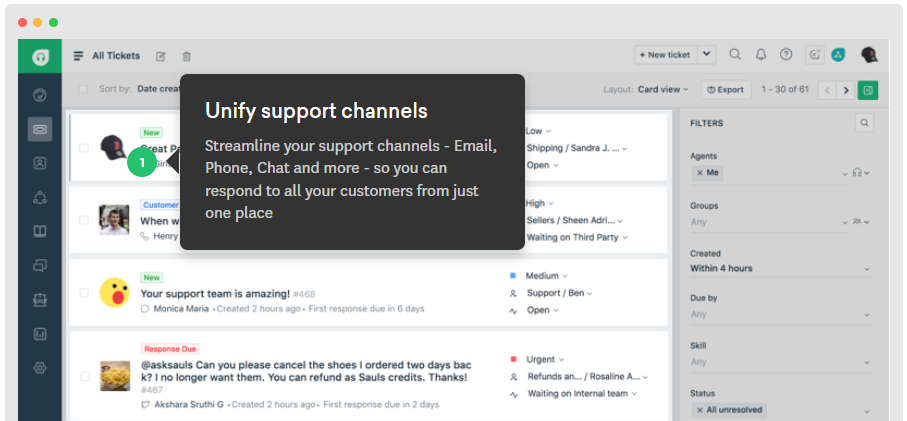
Freshdesk (a product of Freshworks Inc.) is a help desk platform designed to support customer service teams across a range of industries and team sizes. It includes core support tools such as ticketing, internal collaboration, help widgets, and analytics, which allow teams to manage customer inquiries and review support activity within a single system.
Freshdesk also provides access to learning resources through Freshworks Academy and its resource center. These materials can be used by teams looking to improve customer support practices and onboard agents more effectively.
The platform offers a free plan for up to two agents for six months, which includes basic ticketing and knowledge base functionality. Paid plans are available for teams that need additional channels, automation, or reporting capabilities, and select plans include a 14 day free trial.
New Product Updates from Freshdesk

Freshdesk Enhances Contact Data Management and Social Identity Fields
Freshdesk now lets you manage social handles and handle large contact lists with ease, streamlining customer profiles and data tasks. For more information, visit Freshdesk’s official site.


Sogolytics is a comprehensive feedback and experience management platform designed to help businesses understand and enhance customer and employee experiences. Originally known for its robust survey and feedback tools, Sogolytics has evolved to offer a suite of products tailored to different aspects of business intelligence and customer engagement.
It offers a ticketing system through the SogoConnect platform. This system allows businesses to manage customer inquiries efficiently by assigning tickets to the appropriate team members or departments, ensuring timely and effective resolution. The platform also offers the ability to analyze the experience of the interaction after the issue is resolved.
Sogolytics also has comprehensive feedback management features, from tailored survey collection to detailed data analysis of customer sentiments. The platform integrates with Salesforce, Microsoft Dynamics, HubSpot, Google Analytics, Slack, Mailchimp, Zendesk, and Zapier.


Zendesk is a customer service platform that helps you manage interactions across multiple channels, including email, live chat, messaging, and phone. It combines AI-powered tools with human-driven support so you can respond quickly and effectively to customer inquiries. While Zendesk doesn’t offer a permanent free plan, startups may qualify for six months of free access through their special offer program.
One thing I like about Zendesk is how it uses AI to streamline support tasks. Features like automated ticket triage and intelligent routing can help your team prioritize and resolve issues faster. This means your agents can focus on the more complex, relationship-building interactions instead of repetitive admin work.
Zendesk integrates with Zoom, Slack, HubSpot, Marketo, Twilio, BombBomb, Thinkific, Zapier, Geckoboard, eWebinar, Klaus, and TypeGenie. You can also expand functionality with many other marketplace apps.
Zendesk offers a 14-day free trial, with ongoing use available through paid plans.

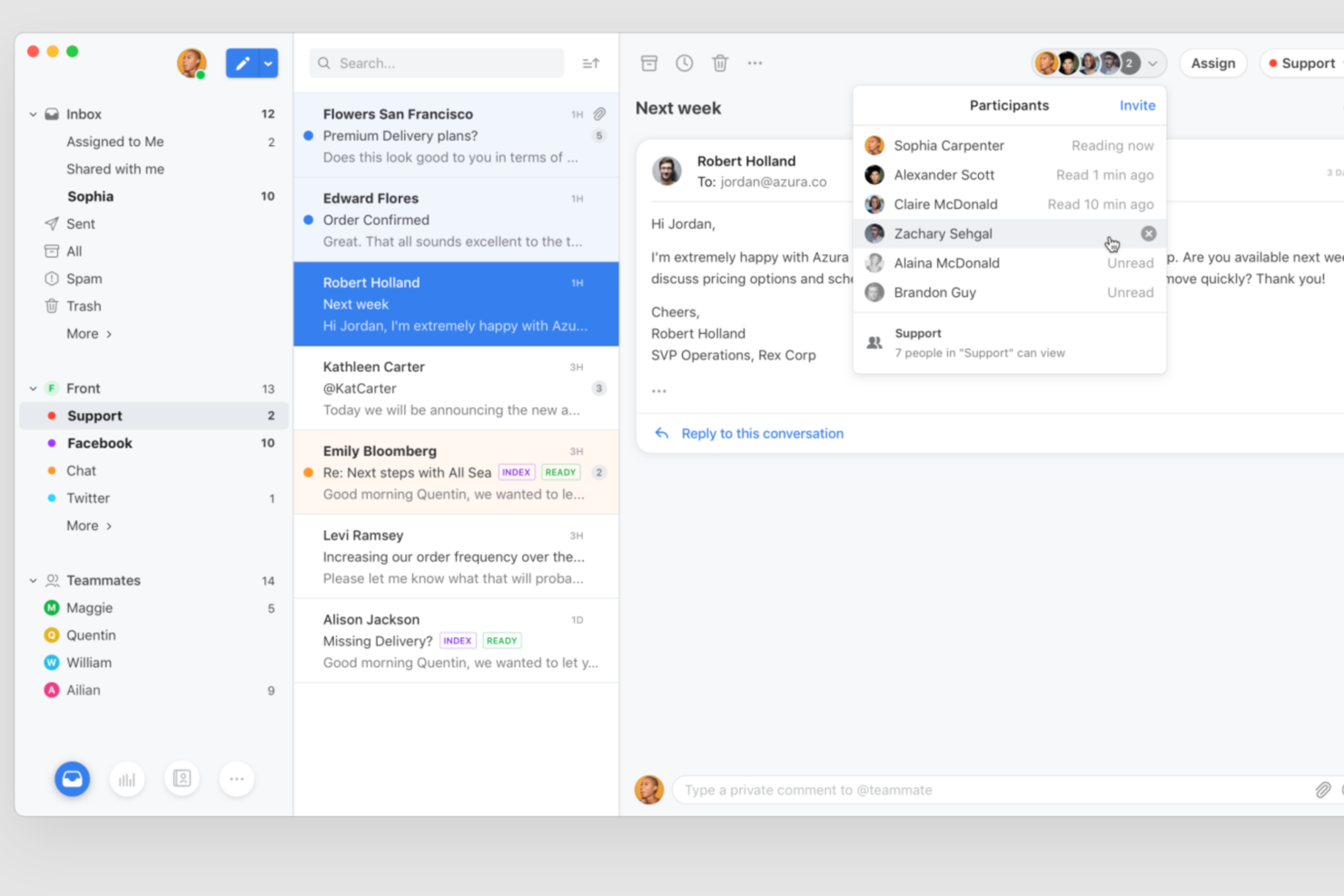
Front brings shared inbox and collaboration features to teams looking for a modern approach to customer service. It’s designed for businesses that want to manage customer conversations across multiple channels in one place. If you need to coordinate responses, automate workflows, and keep everyone on the same page, Front offers a flexible platform to help your team deliver consistent support.
Who Is Front Best For?
Front is a good fit for customer support and operations teams in small to midsize businesses that need to manage high volumes of customer inquiries across multiple channels.
Why I Picked Front
I picked Front because it stands out for teams that want to connect their customer service workflows with the rest of their tech stack. With over 160 integrations, Front lets you automate repetitive tasks and sync data between your inbox and tools like Slack, Salesforce, and HubSpot. This means you can trigger actions, update records, or pull in customer context without switching tabs. For anyone looking for free customer service software that can scale with more advanced workflow automation, Front offers a flexible foundation.
Front Key Features
Some other features in Front that stand out for customer service teams include:
- Shared inbox management: Organize and assign incoming messages from email, SMS, social, and chat channels in one unified inbox.
- Collision detection: Prevent duplicate replies by alerting team members when someone else is responding to the same conversation.
- Internal comments: Collaborate with teammates using private comments directly within customer threads, without leaving the inbox.
- Analytics and reporting: Track team performance, response times, and conversation trends with built-in analytics dashboards.
Front Integrations
Integrations include Salesforce, HubSpot, Asana, Slack, Jira, Aircall, ClickUp, FullContact, Gainsight, and Chatra.
What's Free?
Front offers a free 14-day trial of its Professional plan, which includes access to all features. After the trial, continued use requires a paid subscription, and there is no free-forever plan available.
Pros and Cons
Pros:
- Collision detection prevents duplicate customer responses
- Internal comments keep cross-team collaboration organized
- AI-powered ticket routing reduces manual triage work
Cons:
- Lacks built-in knowledge base functionality
- Some integrations are restricted to higher tiers

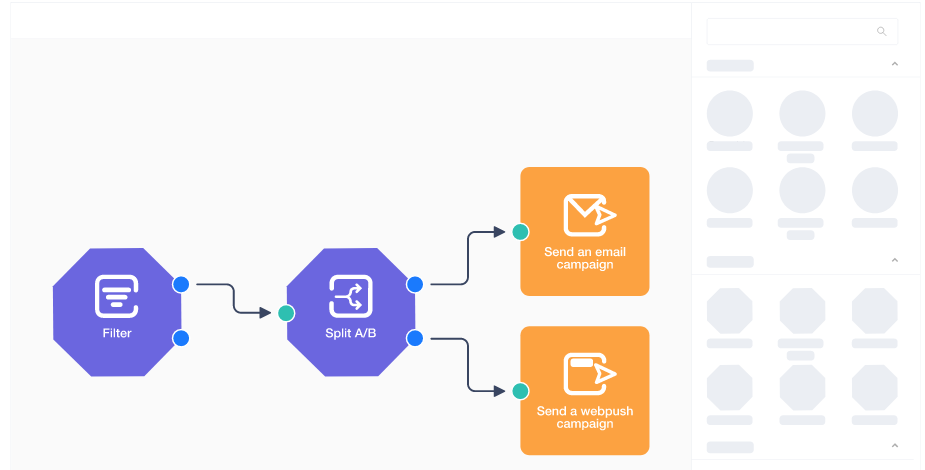
User.com is a flexible, free help desk software for your whole company—sales, marketing, management, and support will be able to collaborate and automate all on the same interface.
The personalized and customizable solutions let automation take over and deliver a great omnichannel communication system so the right customer receives the right message all the time. With User.com’s customer tracking, your team will be equipped with accurate customer data and timelines.
The free plan gives you a nice range of basic features that are free forever. If you’re looking for more, pricing for the personal plan starts at $49/month to help you scale up fast.
Best for communication between development and operation teams

From medicine and space travel to disaster response and pizza deliveries, Jira Service Desk has a mission ”to unleash the potential of every team”. Jira Service Desk is a high-velocity service management software that aligns well with agile product management methods.
The tool assists small teams with capturing and organizing issues with managing requests, incidents, problems, changes, and assets. Another cool thing that Jira offers is a free bug management tool that captures, tracks, and resolves bugs.
Jira Service Desk offers a great plan for small teams to start off, which allows up to 10 users, and includes integrations and automated workflow options.

Taimer
Best software for managing customer invoices, expenses, and bills all from one place

Another cloud-based help desk, Taimer can be accessed from any device, anywhere. They aim to replace your applications with their business management solution that helps to eliminate switching between them.
As you can see, Taimer is all about unified solutions, so they combine CRM, project management, resource planning, invoicing, and reporting to simplify work. Get real-time data with the account manager, which measures customer KPIs and metrics to measure risk and customer progress.
With their free plan, Taimer allows up to 2 users. Features with the free plan include mobile use (android and iOs compatible), CRM, sales, marketing, and team chat options. Their most popular “sales management” plan starts at $16/month/user.
Other Free Customer Service Software
Here’s a few more that didn’t make the top list, in case you’re looking for something specific.
- DiamanteDesk
Free customer service software for eCommerce companies that need customization
- ServiceSight
Free customer service software for home service businesses
- UDESK
For omnichannel customer support
- Compass
For self-service
- NABD
Multi channel service for healthcare and medical businesses
- 14.ai
Intent-aware customer response engine
- Zoho Assist
For remote access and troubleshooting
- LiveAgent
To manage a help desk and knowledge base
- Hiver
For scalability with growing teams
- EngageBay
For teams who need telephony, sales automation, and multi-deal pipelines
- Userlike
Advanced features for data privacy
- Spiceworks Help Desk
For IT professionals and tech brands
- ProProfs Help Desk
Issue tracker and smart reports
- Froged
For fixing and avoiding churn rate with customers
- Kommunicate
For customer chat support
- Bitrix24
For solo entrepreneurs


Related CX Software Reviews
If you still haven't found what you're looking for here, check out these related customer experience management tools that we've tested and evaluated.
- Customer Service Software
- Help Desk Software
- Call Center Software
- Customer Messaging Platform
- Digital Experience Platform
- Sentiment Analysis Tools
- Customer Service Software
- Customer Experience Management Software
Selection Criteria for Free Customer Service Software
Free customer service software is designed to optimize support operations, streamline client communication, and provide actionable insights into customer interactions. Having personally tried and researched various free customer service platforms, I've identified key features and use cases that are essential for any software to be considered effective in this domain.
To give you added confidence in my list, here’s a summary of the evaluation criteria I used to make my final selections for the best free customer service software:
Core free customer service software Functionality (25% of total weighting score):
To be considered for inclusion on my list of the best free customer service software, the solution had to offer the following basic services and software functionalities first:
- Efficient ticket management
- Real-time communication capabilities
- Multi-channel support integration
- Robust data analytics tools
- Comprehensive user support resources
Additional Standout Features (25% of total weighting score):
To help me narrow in on the best free customer service software from the numerous options available, I also took note of any unique or less common services, including:
- Advanced automation for routine inquiries
- Detailed customer interaction histories and analytics
- Customizable reports tailored to specific business needs
- Support for multiple languages to cater to a global customer base
- Innovative tools for team collaboration and communication
Usability (10% of total weighting score):
To evaluate usability, I looked for software that balances powerful functionality with ease of use, ensuring a clean interface design that supports quick navigation and operation without extensive training. This covers:
- Clean, easy-to-navigate interface
- Modern and visually appealing design
- Consistent functionality on desktop, tablet, and mobile
- Readily available tooltips, tutorials, and FAQs
Onboarding: 10% of total weighting score
To get a sense of each provider's customer onboarding process, I looked for:
- Availability of educational materials such as tutorials and webinars
- Interactive product tours that demonstrate key functionalities
- Responsive customer support during the setup phase
Customer Support: 10% of total weighting score
Since free customer service software can sometimes lack comprehensive support, you'll want a service provider with excellent customer support systems in place. To evaluate this, I considered:
- Availability of support via multiple channels
- Responsiveness and effectiveness of the support team
- Community and peer support options
Value For Money: 10% of total weighting score
To gauge the value of each software, I assess:
- The range of features offered at no cost
- Limitations or restrictions on the free version
- Opportunities for scalable upgrades that provide additional value
Customer Reviews: 10% of total weighting score
Evaluating customer reviews is the final element of my selection process, which helps me understand the software’s performance in real-world scenarios. Here are the factors I considered:
- Overall satisfaction with the software
- Frequency and context of reported issues
- User testimonials regarding long-term use
Ultimately, the selection of free customer service software was a careful balance between essential functionality and additional features that can push customer support operations to the next level. By considering these criteria, you can choose software that not only fits your immediate needs but also supports your long-term customer engagement strategies.
How to Choose Free Customer Service Software
Free customer service software can be used to facilitate better communication with customers and analyze service effectiveness. To help you figure out which software best fits your needs, you need to pinpoint your key users and document their specific challenges first.
As you're shortlisting, trialing, and selecting free customer service software consider the following:
- What problem are you trying to solve - Start by identifying the free customer service software feature gap you're trying to fill to clarify the features and functionality the free customer service software needs to provide.
- Who will need to use it - To evaluate cost and requirements, consider who'll be using the software and how many licenses you'll need. You'll need to evaluate if it'll just be the customer service team or the whole organization that requires access. When that's clear, it's worth considering if you're prioritizing ease of use for all, or speed for your free customer service software power users.
- What other tools it needs to work with - Clarify what tools you're replacing, what tools are staying, and the tools you'll need to integrate with, such as accounting, CRM or HR software. You'll need to decide if the tools will need to integrate together, or alternatively, if you can replace multiple tools with one consolidated free customer service software.
- What outcomes are important - Consider the result that the software needs to deliver to be considered a success. Consider what capability you want to gain, or what you want to improve, and how you will be measuring success. For example, an outcome could be the ability to get greater visibility into performance. You could compare free customer service software features until you’re blue in the face but if you aren’t thinking about the outcomes you want to drive, you could be wasting a lot of valuable time.
- How it would work within your organization - Consider the software selection alongside your workflows and delivery methodology. Evaluate what's working well, and the areas that are causing issues that need to be addressed. Remember every business is different — don’t assume that because a tool is popular that it'll work in your organization.
Trends in Free Customer Service Software
The landscape of free customer service software continues to evolve, driven by the demand for more efficient, responsive, and personalized customer support solutions. These trends play a pivotal role in shaping how companies manage customer interactions and support requests. Here, I explore the key trends and their impact on customer service professionals:
- Chatbots with advanced natural language processing (NLP): Free tools are incorporating more sophisticated NLP into chatbots, enabling them to handle increasingly complex customer queries. This allows for faster and more accurate resolution of basic issues, freeing up human agents for more intricate problems.
- Community forums and self-service portals: Free customer service software is increasingly integrating community forums where customers can find answers from peers and contribute to a collaborative knowledge pool. This fosters a sense of community and empowers customers to help each other.
- Focus on data encryption and compliance: As customer data becomes even more critical, free customer service software providers are prioritizing robust security features. Look for features like data encryption at rest and in transit, along with adherence to industry-standard compliance regulations.
- Customer journey mapping and contextual interactions: Advanced free software tools are incorporating customer journey mapping to help agents understand customer behavior and tailor interactions accordingly. This fosters a more personalized support experience.
- Evolving features: While core functionalities like ticketing and live chat remain essential, the free software market is constantly innovating. Keep an eye out for emerging features like co-browsing for real-time screen sharing and sentiment analysis for proactive customer support.
By staying informed about these trends and leveraging the functionalities offered by free customer service software, customer service teams can optimize their workflows, personalize interactions, and ultimately deliver a superior customer experience.
What is Free Customer Service Software?
Free customer service software are digital tools that offer basic features to help customer support teams resolve client issues in a timely and accurate fashion, without a monthly fee. They organize customer requests via a ticketing system, automate routine tasks, centralize customer communication, and track agent performance.
The main benefit of using free customer service software are the cost savings they offer. They can help you improve the efficiency of your customer support operations and increase your customer satisfaction, all without a monthly or annual fee. They're an excellent way for startups and small businesses to enhance customer support while remaining within a tight budget.
Features of Free Customer Service Software
Free customer service software equips your team with the necessary tools to effectively manage customer inquiries and tailor your support to meet user expectations. Here are the most important features to consider when making your selection:
- Ticketing System: This feature allows support requests to be organized, prioritized, and tracked. It ensures that no customer inquiry falls through the cracks and helps streamline the resolution process.
- Multi-channel Support: Provides the ability to manage inquiries across various platforms such as email, social media, and live chat. It's crucial to meet customers where they are and offer seamless support across different communication channels.
- Live Chat Capability: Enables real-time communication with clients, which is key for providing immediate assistance and can significantly enhance customer satisfaction. Some live chat software can be integrated into your website, allowing seamless customer service.
- Automated Responses: Allows for quick initial responses to common inquiries, improving efficiency and reducing response times. This feature ensures customers receive timely acknowledgments of their queries.
- Knowledge Base Integration: Offers customers self-service options to find answers to common questions, empowering customers and reducing the workload on support staff.
- Analytics and Reporting Tools: Track performance metrics such as response times and customer satisfaction. These tools are vital for assessing the effectiveness of your customer support and pinpointing areas for improvement.
- Real-time Customer Feedback: Captures instant customer feedback, which is essential for making immediate improvements to service quality.
- Mobile Compatibility: Allows team members to manage customer inquiries on the go. Mobile compatibility is essential in today's mobile-first world, enabling support staff to deliver timely service from anywhere.
- Internal and External Help Desks: Supports both customer-facing and internal support operations, ensuring that both customers and employees have their issues resolved efficiently.
- Language Optimization: Adapts the software to operate in multiple languages, making it accessible to a wider audience and enhancing the customer experience for non-English speakers.
The right software will be equipped with these features to enhance the effectiveness of your support team. This will help in managing day-to-day customer interactions, mprove customer satisfaction and loyalty by ensuring each client issue is addressed promptly and effectively. As you assess various options, remember that the best software is the one that aligns most closely with your team's needs and goals, helping you deliver outstanding service without the cost burden.
You might also like: 10 Best Customer Service Software for Small Business.
Benefits of Free Customer Service Software
Providing excellent customer service is essential, but managing a flood of inquiries across email, phone, and social media can be overwhelming. Free customer service software offers a powerful solution, streamlining your support operations and boosting customer satisfaction. Here are five key benefits to consider:
- Organized Communication: Free customer service software provides a central hub for all your customer interactions, no more digging through endless emails or relying on scattered notes.
- Improved Efficiency: Automate repetitive tasks and streamline workflows to free up your team's time to focus on complex issues and provide personalized support.
- Happier Customers: Faster response times and efficient issue resolution lead to happier customers, which means more positive reviews and increased brand loyalty.
- Data-Driven Decisions: Gain valuable insights into customer behavior and support performance through built-in analytics, allowing you to identify areas for improvement and optimize your service strategy.
- Scalability for Growth: Free plans often offer enough features to support your business in its early stages, and many have upgrade options as your needs grow.
By leveraging the power of free customer service software, you can create a more efficient and customer-centric support system, ultimately setting your business up for long-term success.
Costs & Pricing for Customer Service Software
Customer service software offers various pricing and plan options, each designed to address different levels of support, integration capabilities, and scale of operations. Understanding these plans and their features is crucial for selecting a software package that aligns with your organization's customer service goals and budget constraints. Here's a snapshot of typical plan options you might encounter:
| Plan Type | Average Price | Common Features |
|---|---|---|
| Free | $0 | Basic ticketing system, live chat, email integration |
| Basic | $10 - $20/ user/month | Enhanced ticketing capabilities, multi-channel support, basic analytics |
| Professional | $25 - $50/ user/month | Comprehensive analytics, advanced automation, CRM integration |
| Enterprise | $75+/user/ month | Custom reports, dedicated support, API access, scalability options |
When selecting a plan, consider the size of your support team, the complexity of your customer interactions, and the level of automation and analytics you require. A free plan can offer essential features without the cost, but keep in mind that you may need to upgrade to other paid options as your business grows.
FAQs about Customer Service Software
If your customer service team is looking for a free online customer system, you might have a few questions before signing on. Let’s take a look at some FAQs regarding the free customer service software solutions contained on this list.
How does free customer service software work?
Free customer service software allows customers to connect with your company via the web. Customers can use a live chat bot directly on your website, or connect with you on social media.
The best customer support solutions offer omnichannel support, meaning that all customer issues are contained within a singular interface whether they originate on your website, Facebook, Instagram, or Twitter.
When a customer submits a request, the online customer service system delivers it to your team according to routing rules that you establish. From there, customer issues can be tracked as they are escalated and eventually resolved.
What other customer software can I get for free?
Here are some of my other reviews on free software for customer service teams:
What’s Next:
If you're in the process of researching free customer service software, connect with a SoftwareSelect advisor for free recommendations.
You fill out a form and have a quick chat where they get into the specifics of your needs. Then you'll get a shortlist of software to review. They'll even support you through the entire buying process, including price negotiations.