
20 Best Omnichannel Customer Service Tools For 2026

Best Omnichannel Customer Service Software Shortlist
Here's my pick of the 10 best software from the 20 tools reviewed.


If you're a customer experience manager, you know the struggle of juggling multiple communication channels is real. Your team needs to stay on top of emails, chats, calls, and social media. It's a lot to handle, and it can get overwhelming fast. Omnichannel customer service software helps brings all those channels into one place.
In my experience, these tools make it easier for your team to manage customer interactions and provide consistent, seamless support. And, as a recent Gartner survey found, an overwhelming 93% of customers reported higher Customer Satisfaction (CSAT) when they were able to seamlessly transition from one service channel to another.
I've independently tested and reviewed several of these solutions. In this article, I’ll share my top picks, giving you an unbiased look at some of the best omnichannel customer service software, so you’re better placed to find the right fit for your team.
Why Trust Our Software Reviews
We’ve been testing and reviewing customer experience software since 2020. As customer experience managers ourselves, we know how critical and difficult it is to make the right decision when selecting software. We invest in deep research to help our audience make better software purchasing decisions.
We’ve tested more than 2,000 tools for different customer experience use cases and written over 1,000 comprehensive software reviews. Learn how we stay transparent & check out our software review methodology.
Best Omnichannel Customer Service Software Summary
This comparison chart summarizes pricing details for my top omnichannel customer service software selections to help you find the best one for your budget and business needs.
| Tool | Best For | Trial Info | Price | ||
|---|---|---|---|---|---|
| 1 | Best for centralized customer interactions | Free demo + 14-day free trial available | From $19/user/month (billed annually) | Website | |
| 2 | Best for B2B communication | Free demo available | From $45/month (billed annually) | Website | |
| 3 | Best for unified ecommerce customer communications | 14-day free trial | From $39/agent/month | Website | |
| 4 | Best for intelligent case routing systems | Free demo available | From $0.65/conversation | Website | |
| 5 | Best for a unifying chat and email | 14-day free trial available | From $16/user/month (billed annually) | Website | |
| 6 | Best for automated ticket distribution | Free 30-day trial available | From $15/user/month (billed annually) | Website | |
| 7 | Best for organized multi-channel inboxes | Free trial available | From $25/user/month (billed annually) | Website | |
| 8 | Best for internal customer service collaboration | Free plan available | From $25/user/month (billed annually) | Website | |
| 9 | Best for AI-powered assistant | 7-day free trial + free plan available | From $25/user/month | Website | |
| 10 | Best for collaborative email spaces | 30-day free trial + free plan available | From $14/user/month (billed annually) | Website |


-

SupportYourApp
Visit WebsiteThis is an aggregated rating for this tool including ratings from Crozdesk users and ratings from other sites.4.7 -
Freshdesk
Visit WebsiteThis is an aggregated rating for this tool including ratings from Crozdesk users and ratings from other sites.4.4 -
Hiver
Visit WebsiteThis is an aggregated rating for this tool including ratings from Crozdesk users and ratings from other sites.4.6


Best Omnichannel Customer Service Software Review
Below are my detailed summaries of the best omnichannel customer service software that made it onto my shortlist. My reviews offer an in-depth look at the key features, pros and cons, integrations, and ideal use cases of each tool to help you find the best one for you.

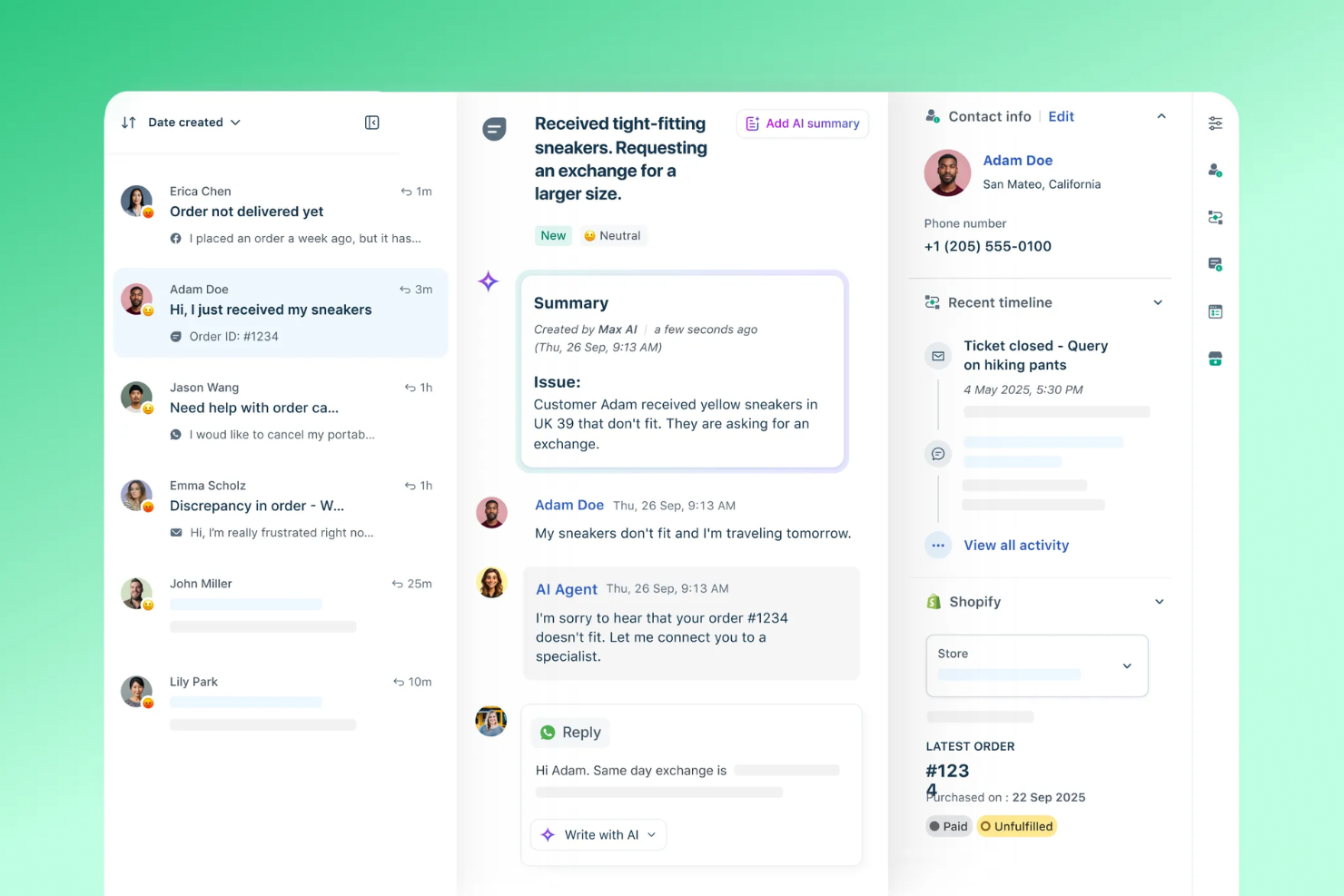
For businesses seeking a reliable omnichannel customer service solution, Freshdesk offers a unique blend of AI-driven support and integration capabilities. It caters to companies aiming to centralize their customer interactions, simplify support processes, and improve user experiences. By managing customer queries across multiple channels, Freshdesk helps your team build stronger connections and drive customer satisfaction.
Why I Picked Freshdesk
I picked Freshdesk for its standout capability in managing customer interactions from diverse channels in one centralized platform. This feature ensures your team can handle inquiries from email, phone, chat, and social media without missing a beat. The inclusion of Vertical AI Agents and over 50 prebuilt workflows allows your team to resolve complex queries swiftly. Additionally, the Freddy AI tool automates routine tasks and offers insightful analytics, which can improve your team's productivity and focus.
Freshdesk Key Features
In addition to its omnichannel prowess, Freshdesk offers a range of features that can further improve your customer service operations.
- Advanced Ticketing System: Simplifies the management of customer inquiries by categorizing and prioritizing tickets for efficient resolution.
- Team Huddle: Allows agents to collaborate in real-time within the platform to resolve customer issues faster.
- Canned Responses: Provides pre-formulated replies for common queries, saving time and ensuring consistency in responses.
- Scenario Automation: Automates repetitive tasks and processes, freeing up your team to focus on more critical customer interactions.
Freshdesk Integrations
Integrations include Freshservice, Freshchat, Freshcaller, Freshsales, Freshteam, Freshworks Neo, Freshsurvey, Playvox, Slack, Microsoft Teams, Shopify, Jira, and more.
Pros and Cons
Pros:
- Scenario automation reduces manual task load.
- Canned responses ensure consistent communication
- Effective collaboration features like team huddles
Cons:
- Occasional technical issues with the platform
- Ticketing system can be cumbersome
New Product Updates from Freshdesk

Freshdesk Enhances Contact Data Management and Social Identity Fields
Freshdesk now lets you manage social handles and handle large contact lists with ease, streamlining customer profiles and data tasks. For more information, visit Freshdesk’s official site.

For teams seeking a customer service software that transcends traditional communication barriers, TeamSupport emerges as a versatile solution tailored for B2B interactions. It caters specifically to the needs of businesses that require a unified platform to manage diverse communication channels, helping streamline customer interactions and enhance satisfaction. This tool is particularly appealing to industries where customer relationships are complex and multifaceted, offering a way to manage these effectively.
Why I Picked TeamSupport
I picked TeamSupport for its emphasis on facilitating seamless B2B customer interactions through its omnichannel support capabilities. The software allows you to consolidate multiple communication channels such as email, chat, and phone into a single platform, ensuring that no customer inquiry goes unanswered. Its advanced ticketing system is particularly beneficial in managing and prioritizing customer requests, making sure that your team can address issues promptly and efficiently.
TeamSupport Key Features
In addition to its robust omnichannel capabilities, I also found several other noteworthy features:
- Customer Hub: Provides a self-service portal where customers can find answers to their queries independently, reducing the load on your support team.
- Live Chat: Enables real-time communication with customers, facilitating immediate problem-solving and enhancing customer satisfaction.
- Advanced Analytics: Offers deep insights into customer interactions and team performance, helping you identify trends and areas for improvement.
- Collaboration Tools: Allows team members to share notes, tag each other, and escalate tickets, ensuring efficient issue resolution.
TeamSupport Integrations
Integrations include Salesforce, Microsoft Teams, Slack, Jira, SAP Sales and Service Clouds, and more.
Pros and Cons
Pros:
- Customizable customer self service hub
- Real time sentiment insights
- AI powered ticket automation
Cons:
- Limited mobile app functionality
- Knowledge base lacks configurability

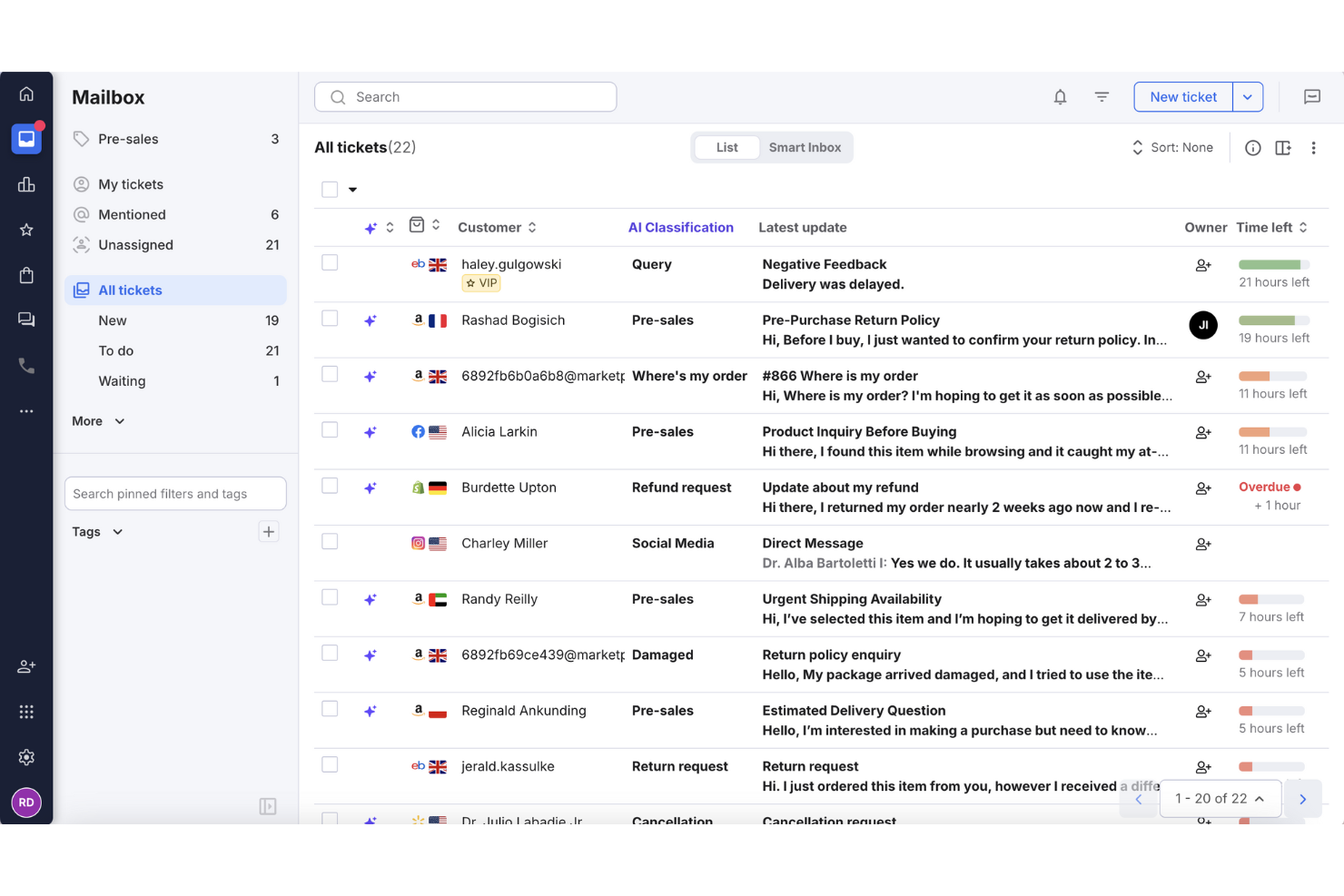
For online retailers looking to improve customer support, eDesk provides a practical helpdesk solution that consolidates messages from multiple sales channels. Built for ecommerce teams, it automates routine support tasks and offers reporting tools to track response performance. With integrations across many platforms, eDesk helps teams manage customer inquiries more efficiently and maintain consistent support workflows.
Why I Picked eDesk
I chose eDesk for its ability to unify ecommerce customer communications across marketplaces and online store channels, which helps teams manage support across multiple sales channels more easily. Its automation tools reduce manual handling of routine support tasks, allowing agents to focus on more complex customer issues. The built-in pre-sales tools also help ecommerce teams respond to product questions and support purchase decisions.
eDesk Key Features
In addition to its standout capabilities, eDesk offers other valuable features:
- AI Chatbot: Provides 24/7 automated assistance, engaging visitors and supporting customer inquiries.
- Review Management: Automates the process of requesting reviews from satisfied customers to enhance brand reputation.
- Insights & Reporting: Delivers real-time analytics on support metrics and customer interactions, helping you refine your operations.
- Multi-language Support: Accommodates international eCommerce operations with support for various languages.
eDesk Integrations
Integrations include Amazon, eBay, Walmart, Shopify, Magento, WooCommerce, Facebook, WhatsApp, Instagram, and Google Shopping.
Pros and Cons
Pros:
- AI-powered automations improve response efficiency
- Designed to handle high volumes of ecommerce inquiries
- Integrates rich order data for enhanced customer service
Cons:
- Reporting customization is limited for complex analysis
- Primarily built for ecommerce, less flexible for other industries


In the ever-evolving landscape of customer service, Assembled AI stands out as a versatile solution for businesses seeking to enhance their support operations. Designed for companies aiming to streamline their interactions across chat, email, SMS, and voice, this platform offers AI-driven agents that automate and optimize communication. By integrating these capabilities with workforce management tools and real-time analytics, Assembled AI addresses the challenges of managing both human and AI support teams, making it an ideal choice for those looking to improve efficiency and customer satisfaction.
Why I Picked Assembled AI
I picked Assembled AI for its unique ability to seamlessly integrate human agents with AI-driven support across multiple communication channels. Its intelligent case routing system ensures that inquiries are directed to the right agent, whether human or AI, based on the nature of the query. In addition, the platform's AI-powered workforce management tools, like scheduling and forecasting, help your team maintain optimal performance levels. These features, combined with its real-time analytics, empower users to make informed decisions and enhance the overall customer experience.
Assembled AI Key Features
In addition to its standout features, Assembled AI offers a range of functionalities designed to elevate your customer service operations.
- Intelligent Case Routing: Directs inquiries to the appropriate agent, whether human or AI, optimizing response times and accuracy.
- Machine Learning-Based Forecasting: Predicts support demand and adjusts workforce allocation accordingly, ensuring that your team is always prepared.
- Integrated Workflows: Streamlines processes by connecting various support channels, allowing for a seamless customer experience.
- Enterprise-Grade Security and Compliance: Ensures that all interactions are secure and compliant with industry standards, safeguarding your data and customer information.
Assembled AI Integrations
Integrations include Notion, Shopify, Salesforce, Zendesk, HubSpot, Intercom, Slack, Microsoft Teams, Google Workspace, and Freshdesk.
Pros and Cons
Pros:
- Integrates with major support platforms
- Advanced forecasting and scheduling tools
- Strong AI and human orchestration
Cons:
- Limited appeal for low volume teams
- Custom workflows require configuration effort


SparrowDesk is an AI-driven customer service platform that caters to businesses seeking to enhance their customer support operations. Designed to unify interactions across multiple channels, it appeals to companies in need of a streamlined approach to manage customer inquiries. By automating the majority of requests through AI agents, SparrowDesk addresses the challenge of handling high volumes of customer interactions without compromising on service quality.
Why I Picked SparrowDesk
I picked SparrowDesk for its unique approach to omnichannel customer service through its unified inbox and AI-powered features. The platform's omnichannel inbox centralizes all customer interactions, whether from email or live chat, into a single view, ensuring that no conversation is missed and response times are consistent. Additionally, SparrowDesk's AI Copilot enhances agent productivity by providing real-time suggestions and conversation summaries, allowing your team to focus on complex queries rather than routine tasks. These features make SparrowDesk a compelling choice for businesses looking to optimize their customer service operations.
SparrowDesk Key Features
In addition to its centralized inbox and AI capabilities, I also found the following features noteworthy:
- Advanced Workflows: Automate repetitive processes with a visual drag-and-drop interface, allowing you to assign tickets, send notifications, and update properties seamlessly.
- Help Center: Enable customers to find answers independently through a knowledge base integrated with your chat widget.
- Interactive Analytics: Gain real-time insights into team performance and customer interactions to refine your support strategy.
- Multi-Brand Support: Manage multiple brands or products under one SparrowDesk account, with distinct configurations for each.
SparrowDesk Integrations
Native integrations are not currently listed by SparrowDesk.
Pros and Cons
Pros:
- AI agents designed to auto resolve many repetitive tickets
- Copilot features summarize long conversations inside the agent inbox
- No code workflow builder automates routing and notifications
Cons:
- Channels currently focus on email and live chat, not voice or social
- Limited native integrations could hinder seamless connectivity


LiveAgent is an all-in-one customer support platform designed to help your team manage communications across multiple channels. It brings together email, live chat, phone, and social media into a single workspace, so your agents can respond faster and stay organized.
Why I picked LiveAgent: LiveAgent's ticketing system is built to handle messages from all your channels and turn them into organized tickets. This means your team can track and reply to every customer from one inbox, no matter where the message came from. I like that it offers automated ticket distribution, which assigns conversations to the right agent or department. Additionally, the built-in call center lets you handle inbound and outbound calls directly from the platform, with tools like interactive voice response (IVR), call routing, and automatic callbacks.
Standout features & integrations:
Features include a real-time typing view, which lets agents see what customers are typing before they hit send, helping them prepare faster responses. The proactive chat invitations also allow your team to reach out to visitors browsing your site, increasing the chance of engagement.
Integrations include WhatsApp, WordPress, Shopify, Mailchimp, Pipedrive, Slack, Facebook, Google Sheets, Salesforce, Asana, Twilio, and RingCentral.
Pros and Cons
Pros:
- Provides robust automation options
- Supports multiple languages
- Includes AI tools to assist with drafting responses
Cons:
- Some users find the interface to be outdated
- Social media channels are limited to higher-tier plans or are paid add-ons
New Product Updates from LiveAgent

LiveAgent Enhances Ticket Management and Integrations
LiveAgent introduces major improvements, including a more intuitive ticket field system, customizable spam thresholds, and Telegram integration to boost communication and efficiency. For more information, visit LiveAgent's official site.
 .
.
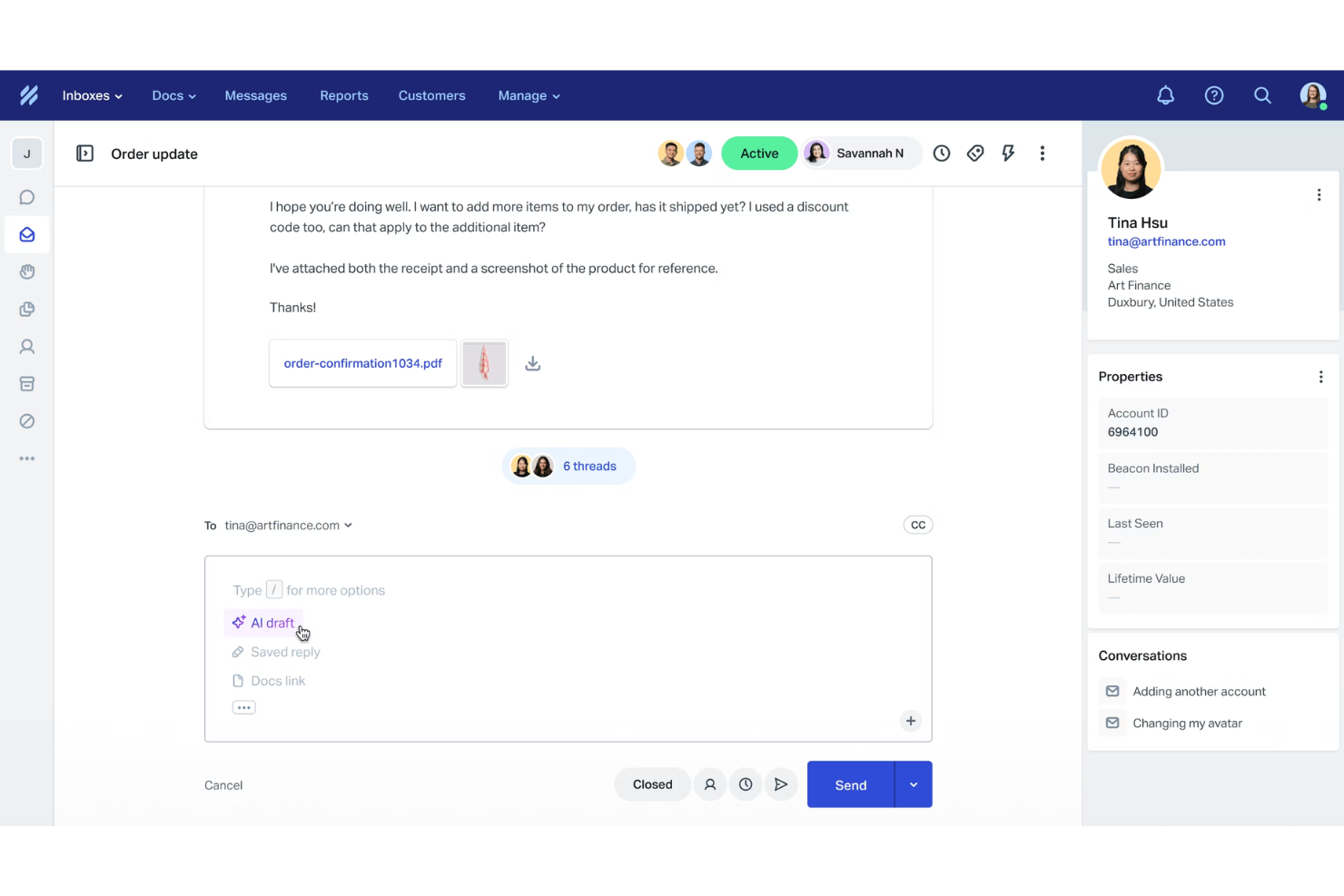
Help Scout is an omnichannel customer service platform that helps small and medium-sized businesses manage customer conversations across email, live chat, and connected voice and text tools. It brings these channels into a single workspace so your team can stay organized, respond faster, and keep track of customer history without switching between apps.
Why I picked Help Scout: I chose Help Scout because it brings core omnichannel features into an interface that stays simple for your team to use day to day. You can manage email, chat, and integrated phone or SMS conversations side by side, which helps you maintain consistency across touchpoints. I also like that its collaboration tools, like private notes and assignment features, help you prevent duplicate replies. The built-in reporting gives you visibility into volume, response times, and trends so you can adjust your support strategy without relying on additional analytics tools.
Standout features and integrations:
Features include automated routing to send conversations to the right team, a shared inbox to keep all channels in one place, and customer self-service options through Docs and Beacon. Real-time chat and in-app messaging help you support customers while they use your product, and the customer portal gives users easy access to past conversations.
Integrations include Salesforce, HubSpot, Slack, Microsoft Teams, Zendesk, Jira, Asana, ClickUp, Shopify, Mailchimp, Trello, and Google Sheets.
Pros and Cons
Pros:
- Built-in AI tools for faster replies
- Comprehensive reporting and analytics
- Easy multi-channel message consolidation
Cons:
- Limited customization in lower tiers
- Some advanced features on higher plans
New Product Updates from Help Scout

Help Scout Enhances Support Management With AI and Integrations
Help Scout introduces smarter routing, WhatsApp and Aircall integrations, and new AI enhancements to help teams manage conversations, automate workflows, and support customers across more channels. For more information, visit Help Scout’s official site.
 .
.

Hiver is a modern AI-powered customer service platform designed to provide advanced omnichannel support. It brings together various channels, like email, live chat, WhatsApp, voice, SMS, and social media, enabling you to manage all customer interactions from a single platform. Your team can toggle between these channels from a panel on the left-hand side, assign queries, and collaborate with internal notes or shared drafts without ever leaving the interface.
Why I picked Hiver: Hiver’s internal collaboration features really stand out. Agents can leave private notes on conversations to share context or ask for help, and @mentions ensure the right teammate is looped in instantly. Collision detection prevents multiple agents from replying to the same customer at once, saving your team from duplicate or conflicting responses. Shared drafts make it possible to co-write replies in real time, while approval workflows allow teams to request and secure quick approvals from managers or other stakeholders without leaving the inbox. All of this happens right next to the customer conversation, so teams don’t have to jump between apps to stay aligned.
Standout features & integrations:
Features include its omnichannel inbox, which lets teams manage customer conversations across email, live chat, WhatsApp, voice, SMS, and social media from a single, unified view. To keep operations running smoothly, Hiver includes workflow automations and SLA management, ensuring tickets are routed to the right agents, escalated when needed, and resolved on time. All of this is enhanced by Hiver’s AI features. AI Copilot suggests and refines responses in real time, AI Agents handle repetitive tasks like follow-ups and closures, and AI Insights helps you spot bottlenecks and areas for improvement.
Integrations include Aircall, Asana, Jira, Okta, QuickBooks, Salesforce, Slack, WhatsApp, and Zapier and 100+ other platforms.
Pros and Cons
Pros:
- AI features embedded at all stages of customer support journey
- Customer support from real humans available 24/7 via chat or email, across all plans (including free one)
- Strong internal collaboration features
Cons:
- Compared to some other platforms, Hiver offers fewer third-party integrations
- Mobile experience isn’t as strong as the desktop one
New Product Updates from Hiver

Hiver Introduces Public APIs for Custom Integrations
Hiver introduces public APIs enabling developers to access and sync data for custom integrations. For more information, visit Hiver's official site.
 .
.

Tidio is an omnichannel customer service software designed to enhance communication between businesses and their customers. It offers a suite of tools that enable businesses to interact with customers through various channels, including live chat, email, and social media.
Why I Picked Tidio: I chose Tidio for its AI-powered Lyro Agent, which automates a large share of customer interactions. It enables teams to manage inquiries across multiple platforms and deliver timely, personalized responses without overwhelming staff. Tidio also stands out for its smart help desk and self-service tools, which streamline both simple and complex support requests. By helping customers find quick answers, it reduces direct inquiries and frees your team to focus on higher-priority issues.
Standout features & integrations:
Features include detailed analytics, which help you understand customer interactions and improve support strategies. The platform supports communication in 12 languages, making it accessible to a global audience. Tidio also emphasizes data security and compliance, ensuring that customer information is protected according to industry standards.
Integrations include Shopify, WooCommerce, BigCommerce, PrestaShop, Shift4Shop, WordPress, Joomla, Drupal, Jimdo, Webydo, Google Analytics, and Klaviyo.
Pros and Cons
Pros:
- Quick to deploy with minimal setup
- Supports 12 languages for global teams
- Combines chat, email, and social channels in one inbox
Cons:
- Limited feature set on the free plan
- No phone support; live support limited to business hours


Missive is a collaborative inbox solution designed to enhance team communication and improve customer service experiences. By focusing on email collaboration, it allows teams to work together without disrupting their existing workflows, making it a valuable tool for businesses looking to streamline their communication processes.
Why I picked Missive: I chose Missive for its ability to turn traditional email management into a truly collaborative experience. The platform lets your team comment and chat directly within message threads, so everyone stays aligned while handling customer inquiries. You can also convert emails into tasks, assign responsibilities, and automate repetitive actions like routing or follow-ups. These capabilities make Missive a practical choice for teams that need an organized and flexible omnichannel workspace.
Standout features & integrations:
Features include shared inboxes for multi-channel communication, collaborative chat within emails, and automation tools for assigning or routing conversations. Task management and analytics features help teams stay on top of workloads and measure performance, while customization options allow you to tailor the workspace to your team’s needs.
Integrations include Zapier, Make, HubSpot, Salesforce, Pipedrive, Aircall, Dialpad, ChatGPT, Zoom, Dropbox, and Google Drive.
Pros and Cons
Pros:
- Integrates with 25+ major tools
- Turns emails into actionable tasks
- Centralized team inbox collaboration
Cons:
- Slight learning curve for beginners
- Offline functionality is limited
New Product Updates from Missive

Missive Introduces MCP Integrations for AI Workflows
Missive introduces MCP integrations, enabling its AI to interact with external tools and systems. This update allows teams to automate workflows and access data across platforms directly within conversations. For more information, visit Missive’s official site.
 .
.Other Omnichannel Customer Service Software
Here are some additional omnichannel customer service software options that didn’t make it onto my shortlist, but are still worth checking out:
- Chatbase
For smart AI escalation
- Intercom
For startups
- Nextiva
For small businesses
- Talkdesk
For call centers
- Kustomer
For CRM integration
- Sprinklr
For social media support
- Freshworks
For ease of use
- Front
For monitoring message quality
- Zendesk
For scalability
- Qualtrics XM
For customer feedback


Omnichannel Customer Service Software Selection Criteria
When selecting the best omnichannel customer service software to include in this list, I considered common buyer needs and pain points like managing multiple communication channels and providing a seamless experience across them. I used the following framework to keep my evaluation structured and fair:
Core Functionality (25% of total score)
To be considered for inclusion in this list, each solution had to fulfill these common use cases:
- Manage multiple communication channels
- Provide consistent experience across channels
- Track customer interactions and history
- Automate routine support tasks
- Offer real-time communication options
Additional Standout Features (25% of total score)
To help further narrow down the competition, I also looked for unique features, such as:
- AI-driven customer insights
- Advanced customization options
- Multi-language support
- Integration with CRM systems
- Social media monitoring tools
Usability (10% of total score)
To get a sense of the usability of each system, I considered the following:
- Intuitive interface design
- Ease of navigation
- Minimal training requirements
- Clear and concise user guides
- Responsive system performance
Onboarding (10% of total score)
To evaluate the onboarding experience for each platform, I considered the following:
- Availability of training videos
- Interactive product tours
- Access to templates and guides
- Support from AI-powered chatbots or live agents
- Webinars for new users
Customer Support (10% of total score)
To assess each software provider’s customer support services, I considered the following:
- Availability of 24/7 support
- Response time to inquiries
- Quality of support documentation
- Access to live chat or phone support
- Customer feedback on support experiences
Value For Money (10% of total score)
To evaluate the cost-effectiveness of each platform, I considered the following:
- Competitive pricing compared to features
- Flexible pricing plans
- Discounts for annual subscriptions
- Transparent pricing structure
- Cost-benefit ratio
Customer Reviews (10% of total score)
To get a sense of overall customer satisfaction, I considered the following when reading customer reviews:
- Overall satisfaction ratings
- Commonly mentioned pros and cons
- Frequency of updates and improvements
- User feedback on reliability
- Recommendations from current users
How to Choose Omnichannel Customer Service Software
It’s easy to get bogged down in long feature lists and complex pricing structures. To help you stay focused as you work through your unique software selection process, here’s a checklist of factors to keep in mind:
| Factor | What to Consider |
| Scalability | Ensure the omnichannel solution can grow with your business. Look for solutions that handle increasing volumes of interactions without compromising performance. |
| Integrations | Check if the software integrates with your existing tools. Seamless CRM and social media platform connections can enhance your team's efficiency. |
| Customizability | Consider how easily you can tailor the software to your omnichannel customer service strategy. Custom workflows and dashboards can help your team work more effectively. |
| Ease of use | Evaluate the interface for intuitiveness. Your team should be able to navigate the system easily without extensive training or frustration. |
| Budget | Compare pricing plans against your budget. Look for flexible options that offer value without hidden costs, considering both upfront and ongoing expenses. |
| Security safeguards | Verify the software's data protection measures. It should comply with industry standards to keep your customer information safe and secure. |
| Support | Assess the quality of customer support. Reliable 24/7 assistance and comprehensive documentation can make a big difference when issues arise. |
| Analytics | Look for robust reporting and analytics features. Insights into customer interactions can guide your decisions and improve service delivery. |
Trends in Omnichannel Customer Service Software
In my research, I sourced countless product updates, press releases, and release logs from different multichannel customer service software vendors. Here are some of the emerging trends I’m keeping an eye on:
- AI-powered personalization: Many vendors are using AI to offer personalized customer interactions. This trend is growing as businesses aim to tailor experiences to individual customer needs. For example, AI can analyze an entire customer interaction history to suggest personalized responses and ensure continuity of service.
- Voice Recognition technology: Voice recognition is becoming more common, allowing customers to interact with services hands-free. This trend enhances accessibility and convenience, with some vendors incorporating voice commands into their platforms for better customer engagement.
- Proactive customer engagement: Tools are evolving to engage customers before they reach out with issues. This trend involves using data analytics to predict customer needs and offer solutions proactively, improving satisfaction and reducing support tickets.
- Omnichannel analytics: Vendors are focusing on providing insights that allow businesses to understand customer behavior and preferences across platforms, helping to refine strategies and improve services.
- Video chat support: Video chat is gaining traction as a support tool, offering a more personal touch. It's useful for complex issues where visual guidance is needed, and some vendors are integrating this feature to enhance customer interactions.
What Is Omnichannel Customer Service Software?
Omnichannel customer service software is a tool that allows businesses to seamlessly manage customer interactions across multiple communication channels from a single platform. Customer service professionals and support teams generally use these tools to improve response times and provide consistent support.
Features like AI-powered personalization, proactive engagement, and omnichannel analytics help with tailoring customer experiences, predicting needs, and understanding behavior. Overall, these tools enhance customer satisfaction by ensuring efficient and personalized service across all channels.
Features of Omnichannel Customer Service Software
When selecting omnichannel customer service software, keep an eye out for the following key features:
- AI-powered personalization: This feature uses AI to tailor interactions based on customer data, enhancing the customer experience by making conversations more relevant.
- Advanced call routing: Directs calls to the most suitable agent, improving response times and ensuring customers get the help they need quickly.
- Multichannel analytics: Provides insights across all communication channels, helping businesses understand customer behavior and optimize service strategies.
- Proactive customer engagement: Uses data to anticipate customer needs and offer solutions before issues arise, reducing support tickets and increasing satisfaction.
- Unified customer timeline: Consolidates all interactions from different channels into a single view, giving agents the context they need to provide informed, personalized support.
- Video chat support: Offers a more personal way to assist customers; especially useful for complex issues requiring visual guidance.
- Customizable dashboards: Allows teams to tailor their workspace to fit their needs, improving efficiency and focus.
- Workflow automation: Streamlines repetitive tasks, freeing up your team to handle more complex customer interactions.
- Multi-language support: Enables communication with a diverse customer base, expanding reach and improving accessibility.
- Security safeguards: Protects customer data by complying with industry standards, and maintaining trust and reliability.
Benefits of Omnichannel Customer Service Software
Implementing omnichannel customer service software, including social customer service solutions, provides several benefits for your team and your business. Here are a few you can look forward to:
- Improved customer satisfaction: Customers receive timely, relevant, and consistent support across channels, enhancing their overall experience and consequently, customer retention.
- Increased efficiency: Workflow automation and advanced call routing help your team handle more interactions with less effort, boosting productivity.
- Better insights: Omnichannel analytics provide a comprehensive view of customer behavior, enabling data-driven decisions that improve service quality.
- Enhanced personalization: AI-powered features tailor interactions to individual customer preferences, making engagements more meaningful and effective.
- Cost savings: Businesses can save on operational costs by reducing the need for multiple platforms and optimizing resource allocation.
- Wider reach: Multi-language support and video chat options allow you to connect with a broader audience, expanding your customer base.
- Stronger security: Compliance with industry standards ensures customer data is protected, fostering trust and reliability.
Costs and Pricing of Omnichannel Customer Service Software
Selecting omnichannel customer service software requires an understanding of the various pricing models and plans available. Costs vary based on features, team size, add-ons, and more. The table below summarizes common plans, their average prices, and typical features included in omnichannel customer support solutions:
Plan Comparison Table for Omnichannel Customer Service Software
| Plan Type | Average Price | Common Features |
| Free Plan | $0 | Basic ticketing, email support, and limited analytics. |
| Personal Plan | $5-$25/user/month | Email and chat support, basic reporting, and limited customization options. |
| Business Plan | $30-$75/ user/month | Multi-channel support, workflow automation, and advanced reporting tools. |
| Enterprise Plan | $80-$150/ user/month | Full customization, AI-powered analytics, and dedicated account management. |
Omnichannel Customer Service Software FAQs
Here are some answers to common questions about omnichannel customer support software:
What is the main disadvantage of omnichannel customer service software?
The main disadvantage of omnichannel software is the complexity of implementation. It requires a well-coordinated system that functions seamlessly across multiple channels. An omnichannel approach can be difficult to implement in organizations where data silos exist. Ensuring consistent customer experiences everywhere can be challenging, especially without the right technology and processes in place.
How do you implement omnichannel customer service?
To implement omnichannel customer service, start by understanding customer expectations and identifying the channels you’ll use (hint: look at the channels your customers use). Invest in the right technology to support these channels and upskill your team to handle them effectively. Also, consider creating self-service options and ensure customer data security throughout the process.
What are the 4 C's of omnichannel customer service?
The 4 C’s of omnichannel customer service are Customer experience, Context, Content, and Collaboration. These elements work together to create a cohesive and engaging customer experience across all channels, ensuring that interactions are relevant and consistent.
What features should I look for in omnichannel service software?
Look for features like AI-powered personalization, advanced call routing, and omnichannel analytics. These features help tailor customer interactions, direct inquiries efficiently, and provide insights into customer behavior, enhancing overall service quality and satisfaction.
How does omnichannel software improve customer satisfaction (CSAT)?
Omnichannel service software improves customer satisfaction by providing consistent support across multiple channels, allowing for more personalized and efficient interactions. Features like proactive engagement and unified customer timelines ensure that customers receive timely and relevant assistance, boosting their overall experience.
What's Next?
Subscribe to our newsletter for the latest CX insights, how-to guides, strategies, and resources from top experts in the CX field.