10 meilleurs outils d’analyse de l’expérience client pour 2026

10 Sélection des meilleurs outils d’analyse de l’expérience client


Les outils d’analyse de l’expérience client vous aident à comprendre comment les utilisateurs parcourent réellement votre produit, votre service ou votre parcours d’assistance. Ils mettent en évidence les moments où les clients rencontrent des difficultés, abandonnent ou convertissent, afin que vous puissiez agir en toute confiance.
Fort de plus de 10 ans d’expérience dans la recherche sur l’expérience client, j’ai évalué et sélectionné les meilleurs outils d’analyse de l’expérience client, particulièrement efficaces pour transformer les données brutes d’interaction en informations claires. Que vous suiviez les comportements numériques, cartographiiez les parcours ou cherchiez à démontrer l’impact de vos initiatives d’expérience client, ces plateformes peuvent vous aider à prendre des décisions plus judicieuses et plus rapides.
Pourquoi faire confiance à nos recommandations de logiciels
Notre équipe teste et évalue des logiciels depuis 2012. En tant que leaders CX nous-mêmes, nous savons à quel point il est difficile — et important — de choisir le bon logiciel.
Pour ce guide, nous avons évalué les outils grâce à des tests pratiques et une recherche indépendante, en notant les outils selon nos critères de sélection.
Nos avis reflètent notre jugement éditorial humain, et non un argumentaire de vente.
Tableau comparatif des outils d’analyse de l’expérience client
Ce tableau comparatif récapitule les informations tarifaires concernant ma sélection des meilleurs outils d’analyse de l’expérience client :
| Tool | Best For | Trial Info | Price | ||
|---|---|---|---|---|---|
| 1 | Idéal pour comprendre le ressenti des clients | Démo gratuite disponible | Tarification sur demande | Website | |
| 2 | Idéal pour des analyses basées sur l'IA | Démo gratuite disponible | Tarification sur demande | Website | |
| 3 | Idéal pour unifier les retours clients | Démo gratuite disponible | Tarification sur demande | Website | |
| 4 | Idéal pour l’activation des données en temps réel | Plan gratuit + démo gratuite disponible | À partir de 20 $/mois | Website | |
| 5 | Idéal pour les environnements de support B2B | Démo gratuite disponible | À partir de 45 $/mois (facturé annuellement) | Website | |
| 6 | Idéal pour comprendre la santé des portefeuilles clients | Démo gratuite disponible | Tarif sur demande | Website | |
| 7 | Meilleur outil doté d’un générateur de résumés intelligents | Démo gratuite disponible | Tarifs sur demande | Website | |
| 8 | Idéal pour analyser les abandons de panier dans le commerce électronique | Forfait gratuit disponible | Tarification sur demande | Website | |
| 9 | Idéal pour l’analyse de la voix du client basée sur le traitement automatique du langage naturel | Démo gratuite disponible | Tarification sur demande | Website | |
| 10 | Idéal pour assurer le suivi en boucle fermée de la VoC à grande échelle | Démo gratuite disponible | Tarification sur demande | Website |


Présentation des 20 meilleurs outils d’analyse de l’expérience client
Pour vous aider à faire le bon choix, voici une évaluation des meilleurs outils d’analyse de l’expérience client, avec un résumé de leurs principales fonctionnalités, des captures d’écran ainsi que des informations sur les essais et les tarifs.

Unwrap
Idéal pour comprendre le ressenti des clients
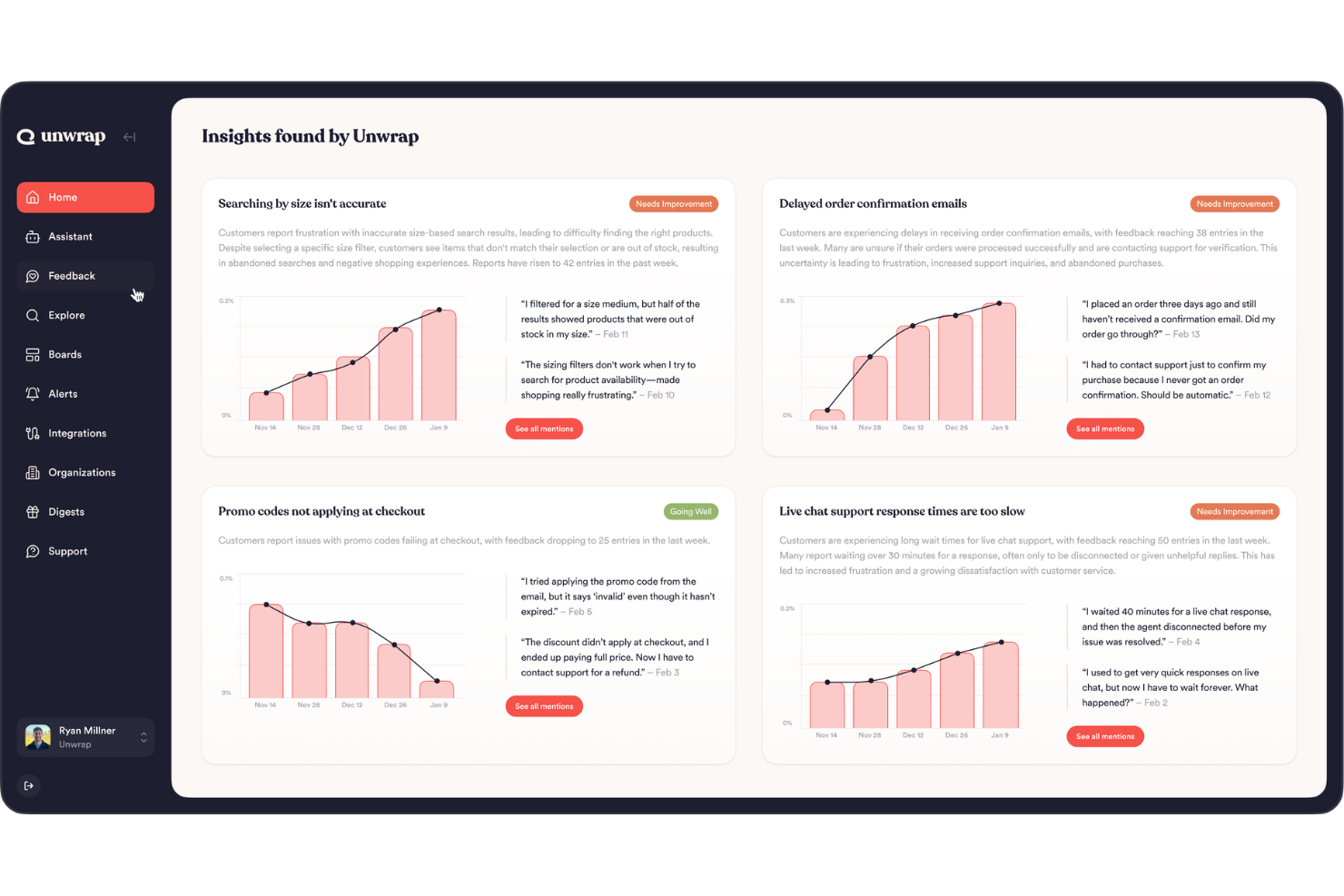
Unwrap vous aide à transformer la voix de vos clients en décisions exploitables en collectant et en analysant automatiquement les retours provenant de toutes leurs sources—pour que vous puissiez comprendre les tendances, les sentiments et les thématiques sans avoir à fouiller dans des feuilles de calcul ou des outils cloisonnés.
Pourquoi j'ai choisi Unwrap
J'ai choisi Unwrap parce que son analyse des retours basée sur l'IA répond directement à l'un des plus grands défis de l'analytique client : donner du sens à une grande quantité de retours non structurés. La catégorisation automatisée des retours de la plateforme utilise le traitement automatique du langage naturel pour organiser et faire ressortir des schémas de sentiment significatifs sans avoir besoin de balisage manuel. Cette fonctionnalité est particulièrement précieuse si votre équipe doit prioriser les améliorations produit ou les réponses du support en fonction des retours clients réels.
Fonctionnalités clés d'Unwrap
En plus de ses atouts majeurs, j'apprécie également qu'Unwrap offre :
- Systèmes d'alerte : Notifient votre équipe dès que de nouveaux insights apparaissent, garantissant des réponses rapides aux besoins clients.
- Tableaux de bord personnalisables : Adaptez la visualisation des données selon les exigences et priorités spécifiques de votre équipe.
- Détection d'anomalies en temps réel : Vous alerte lorsque de nouvelles tendances ou problèmes surgissent.
- Assistant de retour d'expérience : Propose une interface où vous pouvez interroger vos retours et obtenir des réponses en langage naturel.
Intégrations d'Unwrap
Les intégrations incluent Salesforce, Zendesk, Intercom, Slack, HubSpot, Mailchimp, Google Analytics, Asana, Trello et Jira.
Pros and Cons
Pros:
- Automatise la catégorisation des retours non structurés en groupes signifiants grâce au TALN.
- Les outils d'IA font émerger de nouvelles tendances sans avoir à parcourir manuellement de grands ensembles de données.
- L'analyse du sentiment aide les équipes à quantifier l'évolution du ressenti des utilisateurs au fil du temps.
Cons:
- Occasionnellement des lacunes dans les intégrations natives par rapport aux concurrents.
- La mise en place d'une taxonomie des retours peut nécessiter un effort de personnalisation supplémentaire.

Idéal pour des analyses basées sur l'IA
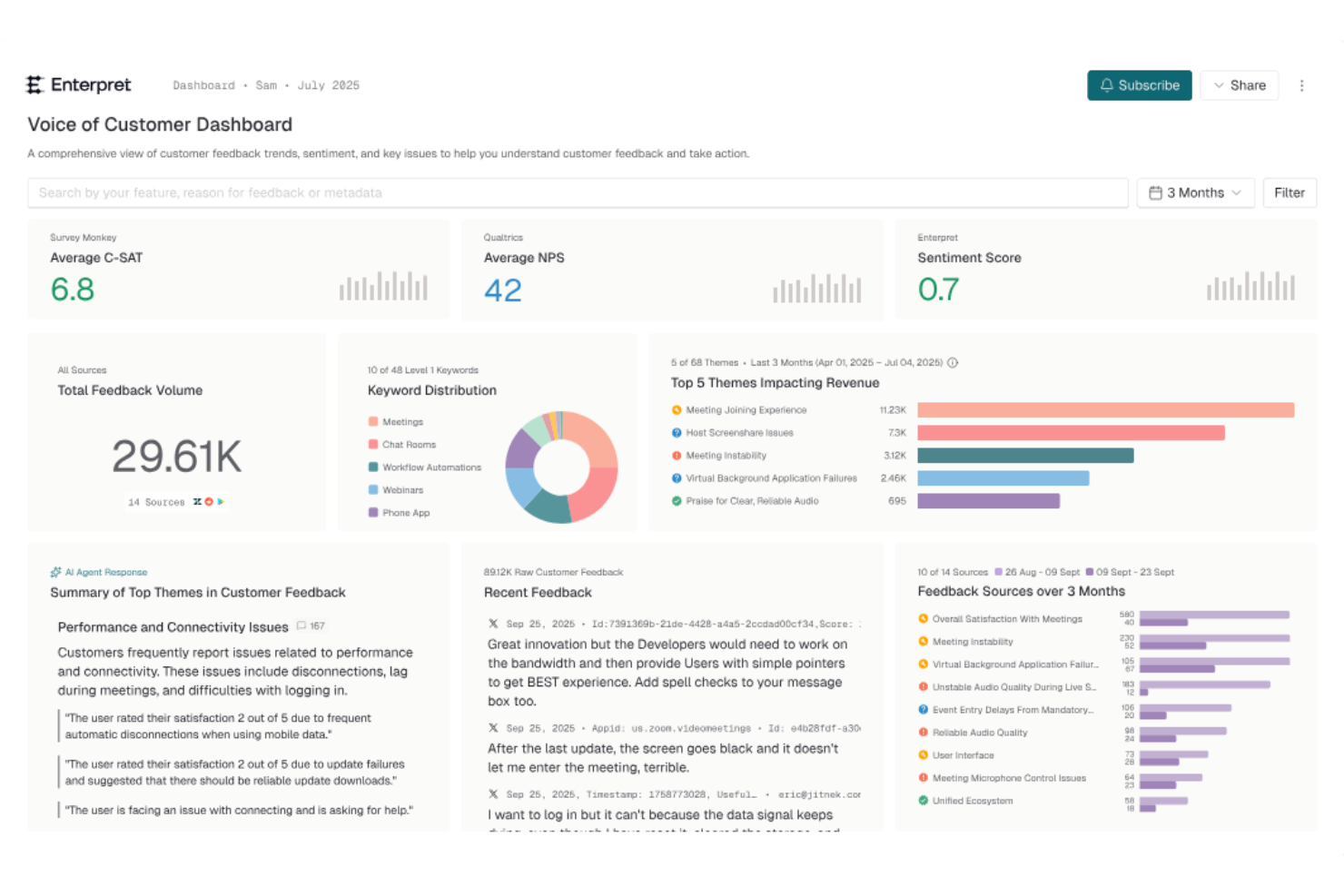
Enterpret est un outil d'analyse client qui utilise des informations basées sur l'IA pour analyser les retours issus de plusieurs sources en un seul endroit. En recueillant des données provenant de tickets de support, d'enquêtes et d'avis, Enterpret aide les équipes à identifier les problèmes récurrents, les besoins des clients et les tendances. Cela facilite l'action des équipes produit, support et expérience client (CX) sur les retours pour améliorer l'expérience client avec une orientation plus claire.
Pourquoi j'ai choisi Enterpret
J'ai choisi Enterpret pour sa capacité unique à intégrer des analyses alimentées par l'IA directement dans le processus d'analyse client. La fonctionnalité AI Insights de la plateforme vous permet d'interroger les retours clients et d'obtenir des informations contextuelles, ce qui peut changer la donne pour comprendre les tendances sous-jacentes. De plus, la fonctionnalité d'alertes en temps réel d'Enterpret garantit que votre équipe est immédiatement informée des nouveaux problèmes, permettant ainsi une réponse proactive. Ces fonctionnalités aident les équipes à analyser plus rapidement et de façon cohérente les retours clients, rendant plus facile la mise en œuvre des retours clients.
Fonctionnalités clés d'Enterpret
En plus des analyses pilotées par l'IA, Enterpret propose :
- Centralisation des retours : Organise les retours clients en thèmes personnalisables, permettant à votre équipe de prioriser les informations selon leur impact.
- Actions automatisées : Utilise des agents IA pour simplifier les flux de travail et résoudre rapidement les problèmes clients, améliorant ainsi l'efficacité opérationnelle.
- Graphique de connaissances client : Relie les retours à leur impact sur les clients et les produits, offrant une compréhension approfondie des besoins des clients.
- Intégration au flux de travail : Se connecte de manière transparente à des outils comme Jira, garantissant que les actions basées sur les informations sont exécutées efficacement.
Intégrations Enterpret
Les intégrations incluent Jira, Slack, Zendesk, Intercom, Salesforce, HubSpot, Amplitude, Segment, Freshdesk et Asana.
Pros and Cons
Pros:
- Prend en charge les rapports automatisés et les alertes proactives via Slack ou email
- Propose des tableaux de bord personnalisables pour visualiser les indicateurs de retours
- Agrège les retours clients issus de multiples sources pour une vue d'ensemble complète
Cons:
- Moins utile pour les équipes avec un faible volume de retours
- Les analyses de l'IA peuvent nécessiter une relecture humaine pour le contexte

Idéal pour unifier les retours clients
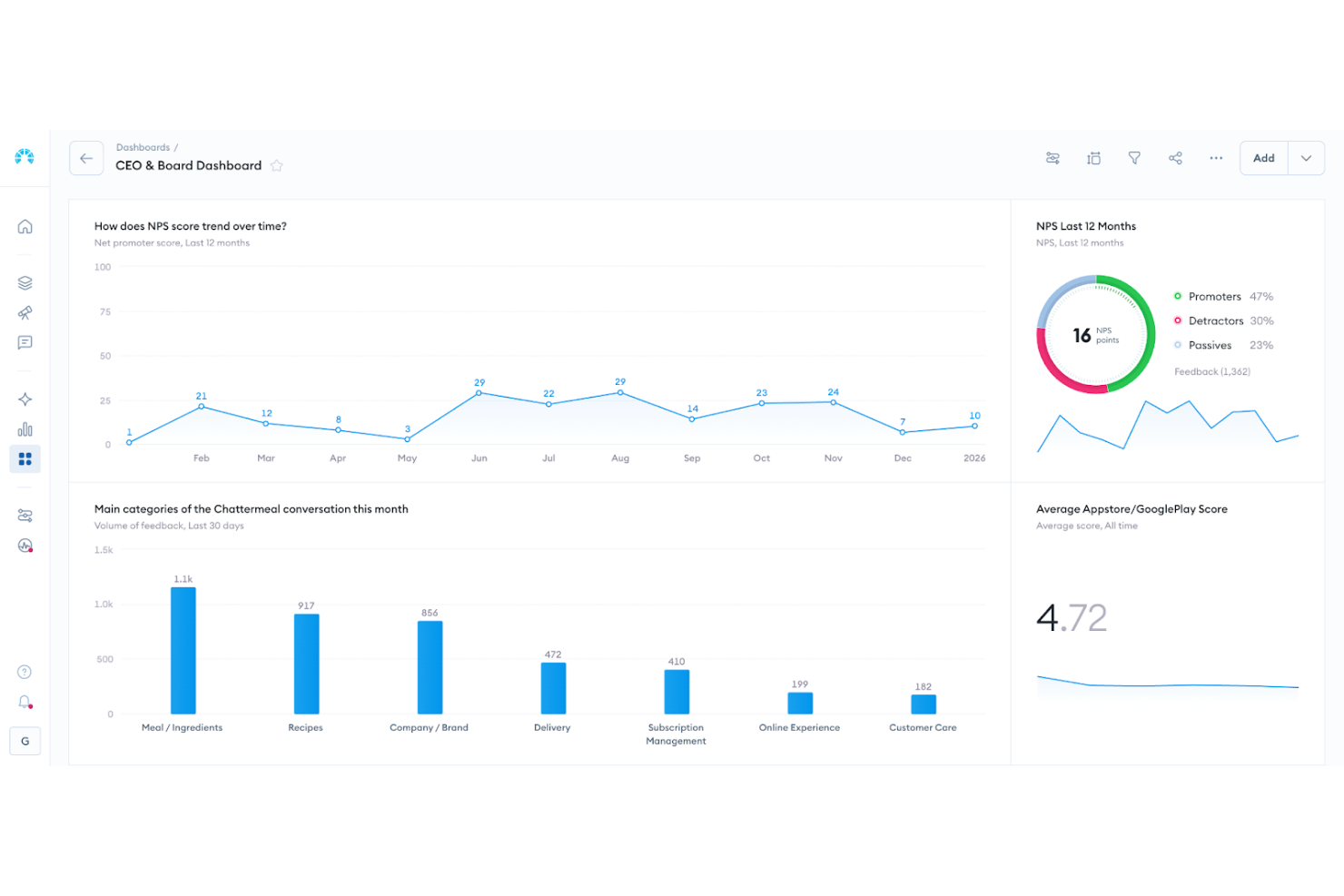
Chattermill est une plateforme d'analyse des retours clients conçue pour aider les entreprises à mieux comprendre et agir sur le sentiment client. Elle convient particulièrement aux équipes axées sur la clientèle dans des secteurs tels que la distribution, les services financiers et le voyage, où l'expérience et la fidélisation sont étroitement liées à la qualité des retours. En centralisant et en analysant les feedbacks non structurés provenant d'enquêtes, d'avis, de tickets de support et d'autres canaux, Chattermill permet aux équipes de détecter les tendances, de prioriser les améliorations et de prendre des décisions plus éclairées concernant le parcours client.
Pourquoi j'ai choisi Chattermill
J'ai choisi Chattermill pour ses capacités à unifier et analyser les retours clients issus de diverses sources. Son étiquetage automatique et ses synthèses générées par l’IA fournissent à votre équipe des informations claires et exploitables, réduisant le temps consacré à l'analyse manuelle des données. De plus, la fonctionnalité de suivi des tendances de Chattermill vous permet de surveiller l’évolution du sentiment client, vous aidant ainsi à traiter de manière proactive les problèmes potentiels. Cette orientation vers des analyses concrètes en fait un outil précieux pour les équipes souhaitant optimiser leur stratégie d’expérience client.
Principales fonctionnalités de Chattermill
En plus de ses fonctionnalités principales, j'ai également relevé plusieurs autres capacités qui pourraient vous intéresser :
- Consolidation des retours : Intègre les retours des enquêtes, des avis en ligne et des conversations de support sur une seule plateforme.
- Analyses pilotées par l’IA : Utilise l’intelligence artificielle pour générer des synthèses et des analyses exploitables à partir de données non structurées.
- Tableaux de bord personnalisables : Propose des tableaux de bord personnalisables permettant à votre équipe de visualiser et de suivre les indicateurs clés.
- Analyse du sentiment : Fournit une analyse du sentiment pour mieux comprendre la tonalité émotionnelle des retours clients.
Intégrations Chattermill
Les intégrations incluent Zendesk, Trustpilot, Qualtrics, Salesforce, Slack, Intercom, HubSpot, Medallia, SurveyMonkey et Typeform.
Pros and Cons
Pros:
- Suivi du sentiment en temps réel
- Étiquetage thématique par IA
- Modèles de sentiment spécifiques à l’industrie
Cons:
- Tarification non disponible publiquement
- Peut nécessiter un accompagnement pour les entreprises

Klaviyo
Idéal pour l’activation des données en temps réel
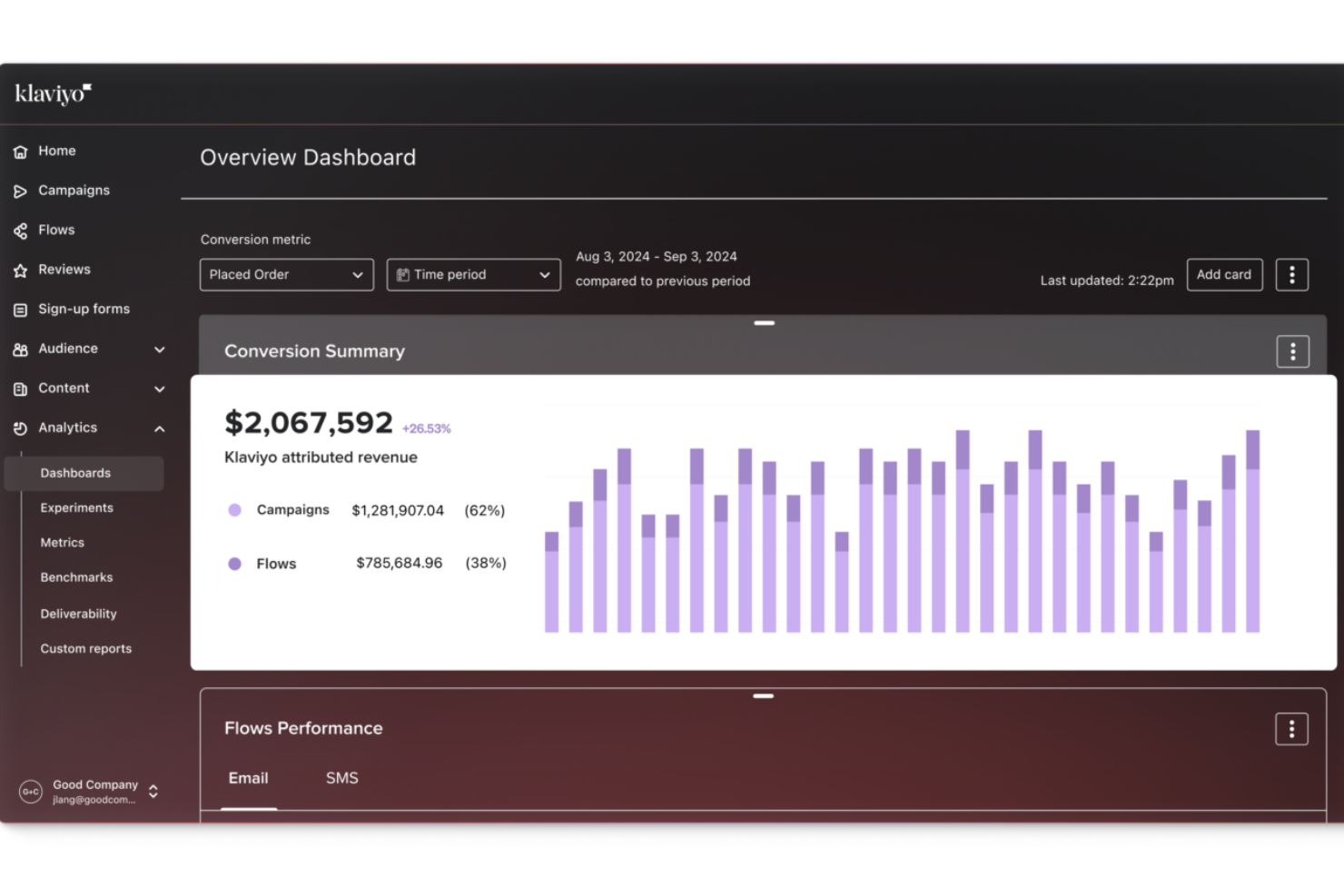
Klaviyo vous permet de transformer les données clients que vous collectez déjà en informations claires sur le comportement d'achat, la progression du cycle de vie et la performance des campagnes, afin que vous puissiez prendre de meilleures décisions sans avoir à jongler entre différents outils d'analyse. Cette solution s'adresse aux marketeurs B2C et aux propriétaires de boutiques en ligne qui souhaitent comprendre et agir sur les comportements des clients à travers des canaux comme l'email, le SMS et la publicité, en vous aidant à adapter votre communication en fonction du comportement réel et des tendances du parcours client.
Pourquoi j'ai choisi Klaviyo
J'ai choisi Klaviyo pour ses capacités d'unification et d'activation des données en temps réel, essentielles pour les entreprises qui veulent exploiter l'analytique client. Les outils de segmentation avancés de la plateforme vous permettent de catégoriser vos clients selon des données comportementales et transactionnelles, offrant une compréhension plus approfondie de leurs besoins. De plus, les analyses prédictives pilotées par l'IA de Klaviyo vous aident à anticiper les tendances futures, permettant à votre équipe de prendre des décisions éclairées pour améliorer l'engagement et la satisfaction client.
Fonctionnalités clés de Klaviyo
En plus de ses capacités de gestion des données en temps réel, Klaviyo propose plusieurs autres fonctionnalités :
- Marketing omnicanal : Cette fonctionnalité vous permet d'interagir avec vos clients sur différentes plateformes, garantissant une cohérence du message et une meilleure expérience client.
- Email et SMS Marketing : Klaviyo met à disposition des outils pour créer des campagnes ciblées d'email et de SMS, vous aidant à atteindre vos clients avec des messages personnalisés.
- Profils clients : Vous pouvez créer des profils clients détaillés, en intégrant des données de multiples sources afin d'obtenir une vision globale des interactions.
- Rapports d’attribution : Suivez comment les différentes campagnes et séquences contribuent aux conversions et au chiffre d’affaires sur l’ensemble des canaux.
Intégrations Klaviyo
Les intégrations incluent Shopify, Magento, WooCommerce, BigCommerce, Salesforce, Stripe, Facebook, Instagram, Google Ads et Zendesk.
Pros and Cons
Pros:
- Offre une intégration complète des données pour des profils clients unifiés.
- Fournit des analyses pilotées par l’IA pour des stratégies marketing personnalisées.
- Prend en charge le marketing omnicanal, y compris l’email, le SMS et les réseaux sociaux.
Cons:
- Certains utilisateurs aimeraient plus d’options de personnalisation.
- La tarification peut augmenter rapidement à mesure que la liste de contacts s’agrandit.

Idéal pour les environnements de support B2B
TeamSupport est une plateforme de support client B2B conçue pour les entreprises qui gèrent des environnements de service complexes. Elle combine l'automatisation des tickets, la gestion des flux de travail et le suivi intégré des données clients pour aider les équipes de support à coordonner les comptes et à résoudre les problèmes efficacement. Grâce à des intégrations natives avec des CRM et une API ouverte pour les connexions personnalisées, elle offre aux équipes une visibilité claire sur l’historique client, les dossiers en cours et les indicateurs de performance afin de gérer le support à grande échelle.
Pourquoi j'ai choisi TeamSupport
J'ai choisi TeamSupport pour son accent sur le renforcement de la collaboration d'équipe par le biais de l'analyse client. Son hub centralisé pour les interactions clients permet de conserver une vue d'ensemble complète de l'historique client, ce qui est essentiel pour l'analyse. De plus, les capacités d'IA de la plateforme, telles que le résumé des tickets et l’assistance intelligente, fournissent des informations exploitables sur les interactions clients, permettant d’identifier des tendances et des axes d’amélioration. Ces fonctionnalités répondent parfaitement aux besoins des entreprises cherchant à optimiser leurs opérations de support grâce à l’analyse.
Fonctionnalités clés de TeamSupport
En plus de ses fonctions de collaboration et d’IA, TeamSupport propose plusieurs autres fonctionnalités qui en font un candidat solide pour l’analyse client :
- Chat interne : Facilite une communication fluide au sein de votre équipe de support pour traiter les problèmes clients plus efficacement.
- Détection des collisions : Prévient que plusieurs agents travaillent sur le même ticket simultanément, assurant un processus de support fluide.
- Règles d'attribution de tickets : Permet d’automatiser la répartition des tickets de support selon des critères prédéfinis, optimisant ainsi la charge de travail de l’équipe.
- Outils de reporting : Fournit des informations exploitables sur les indicateurs de support, vous aidant à suivre la performance et à identifier des axes d’amélioration.
Intégrations TeamSupport
Les intégrations incluent Salesforce, HubSpot, Microsoft Teams, SAP Sales and Service Clouds, Jira et MailChimp. Une API ouverte est disponible pour des intégrations personnalisées.
Pros and Cons
Pros:
- Automatisation des tickets alimentée par l’IA
- Analyses du ressenti en temps réel
- Hub libre-service client personnalisable
Cons:
- La base de connaissances manque de flexibilité
- Fonctionnalité limitée de l'application mobile

Velaris
Idéal pour comprendre la santé des portefeuilles clients
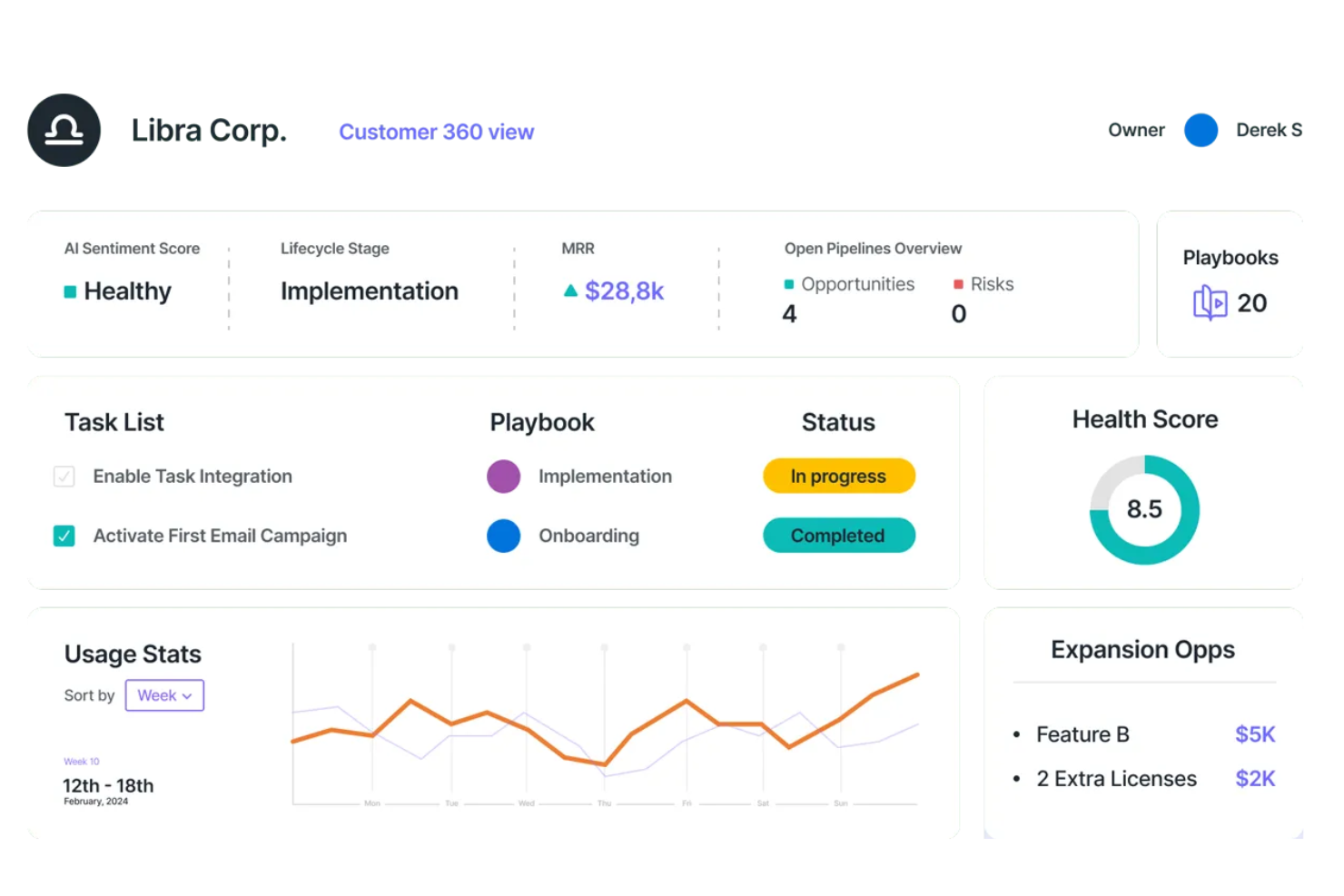
Velaris permet à votre équipe de bénéficier d’informations pilotées par l’IA afin de transformer les interactions client en opportunités stratégiques. Conçu pour les responsables de la réussite client, les équipes commerciales et les cadres, Velaris s’intègre à plus de 70 applications pour offrir une vue d’ensemble fluide des données et de la santé des clients, facilitant ainsi l’engagement proactif et la prise de décision. En prédisant le risque de désabonnement et en automatisant les tâches à faible valeur ajoutée, il vous permet de vous concentrer sur l’élaboration de parcours personnalisés et sur l’établissement de relations durables sans alourdir votre charge de travail.
Pourquoi j’ai choisi Velaris
J’ai choisi Velaris parce qu’il excelle dans la fourniture d’une compréhension approfondie des portefeuilles clients grâce à sa surveillance de la santé des clients basée sur l’IA et à ses scores de santé personnalisables. Cette fonctionnalité permet à votre équipe de gérer de manière proactive les relations clients en identifiant les comptes à risque et en traitant les problèmes potentiels avant qu’ils ne s’aggravent. De plus, Velaris propose des tableaux de bord en temps réel qui centralisent les données clients, vous offrant une vue à 360 degrés pour soutenir la prise de décision stratégique. En automatisant les tâches répétitives, Velaris libère vos ressources pour vous concentrer sur la valorisation des interactions avec les clients, en faisant un choix idéal pour ceux qui cherchent à renforcer l’analyse de l’expérience client.
Principales fonctionnalités de Velaris
En plus de ses atouts pour l’étude de la santé des portefeuilles clients, Velaris propose un ensemble de fonctionnalités destinées à renforcer les capacités de votre équipe en matière d’analyse de l’expérience client.
- Vue à 360° du client : Cette fonctionnalité offre une vision complète des comptes clients, en consolidant les informations pour une gestion simplifiée et un pilotage efficace du pipeline.
- Analyse de sentiment : Grâce à l’IA, cette fonctionnalité évalue le ressenti des clients et identifie les problèmes récurrents, fournissant des informations précieuses sur les interactions client.
- Objets personnalisés : Permet d’ajouter des champs de données adaptés à des processus complexes, offrant une grande souplesse pour répondre à des besoins métier spécifiques.
- Outils de collaboration : Facilite les interactions avec les clients via un portail dédié, enrichissant la communication et l’engagement avec les clients.
Intégrations Velaris
Les intégrations comprennent Hubspot, Intercom et plus de 70 autres outils natifs. Velaris prend également en charge des intégrations personnalisées pour s’aligner sur vos besoins métier.
Pros and Cons
Pros:
- Analyses avancées et plans de succès propulsés par l’IA
- Bonne agrégation des données clients
- Les tableaux de bord personnalisables permettent une visualisation des données adaptée
Cons:
- Manque de retours utilisateurs suffisants pour une évaluation complète
- L’efficacité des intégrations varie selon les systèmes existants

InMoment
Meilleur outil doté d’un générateur de résumés intelligents
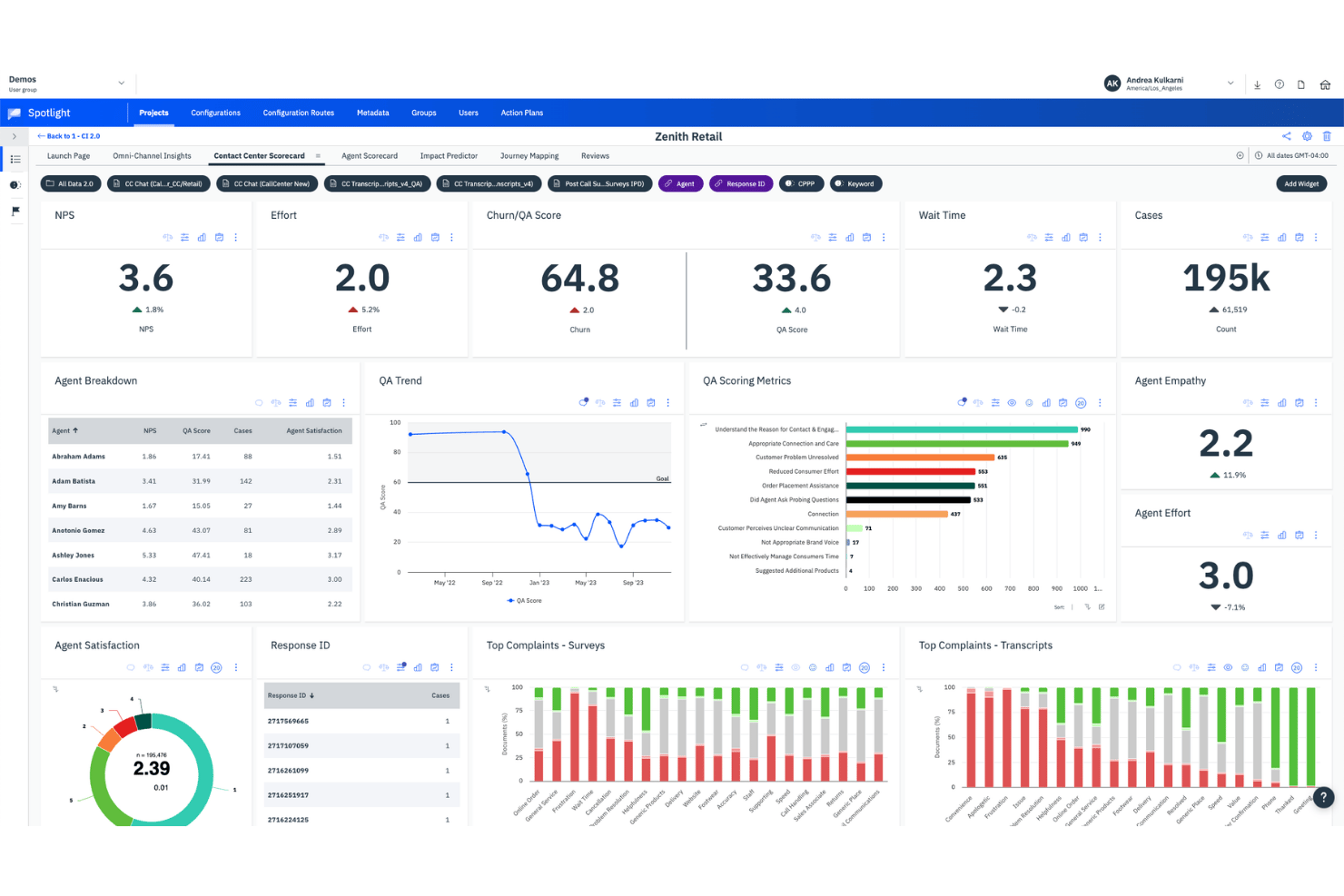
InMoment est une plateforme d’analyse de l’expérience client qui ingère les retours issus d’enquêtes, d’appels, d’avis et de canaux numériques, puis applique l’analyse de texte pilotée par l’IA, l’analyse des sentiments et la modélisation prédictive afin de faire émerger des informations exploitables.
À qui InMoment convient-il le mieux ?
InMoment convient particulièrement aux équipes d’entreprise chargées de l’expérience client et de la voix du client (VoC) qui doivent centraliser les retours provenant de dizaines de sources et faire rapidement émerger les thèmes principaux sans se noyer dans les données brutes.
Pourquoi ai-je choisi InMoment ?
InMoment figure dans ma sélection parce que sa fonctionnalité de résumés intelligents fait quelque chose de réellement utile : elle transforme des centaines de commentaires bruts en résumés rédigés dans un langage simple, réduisant de 75 % le temps d’analyse. J’apprécie également que chaque résumé renvoie aux commentaires sources, ce qui me permet de vérifier ce que l’IA a fait ressortir au lieu de lui faire simplement confiance. Associé à l’analyse de texte propulsée par Lexalytics, qui détecte l’intention, l’effort et les émotions dans 26 langues, InMoment transforme un volume massif de retours en informations sur lesquelles une équipe VoC peut réellement agir.
Fonctionnalités clés d’InMoment
- Ingestion de données multicanale : Centralise les retours provenant d’enquêtes, d’appels, de conversations instantanées, d’e-mails, de SVI, d’avis, des réseaux sociaux et des données CRM au sein d’une plateforme unique.
- Intelligence conversationnelle : Transcrit et analyse les appels, les conversations instantanées et les fils d’e-mails, puis génère des résumés par IA et des fiches d’évaluation des agents pour suivre la qualité.
- Prédiction de l’impact : Modélise les facteurs de l’expérience client qui influencent les scores NPS, CSAT et CES, et simule la manière dont des améliorations précises pourraient affecter les résultats de l’entreprise.
- Gestion des dossiers en boucle fermée : Attribue, suit et résout les problèmes des clients grâce à des réponses rédigées par l’IA, et s’intègre à Salesforce, Zendesk et Microsoft Dynamics.
Intégrations d’InMoment
InMoment propose des intégrations documentées avec Salesforce, Zendesk, Microsoft Dynamics, Power BI, Tableau, Databricks, Shopify, Stripe, Google et Trustpilot. La plateforme prend également en charge les API REST et les notifications webhook pour les intégrations personnalisées.
Pros and Cons
Pros:
- Les résumés intelligents réduisent l’analyse manuelle des retours
- Détection performante des sentiments, de l’intention, de l’effort et des émotions
- Les informations multicanales prennent en charge les programmes VoC d’entreprise
Cons:
- Le filtrage complexe ralentit l’exploration détaillée des retours
- Les fonctionnalités avancées d’IA nécessitent des modules supplémentaires

Idéal pour analyser les abandons de panier dans le commerce électronique
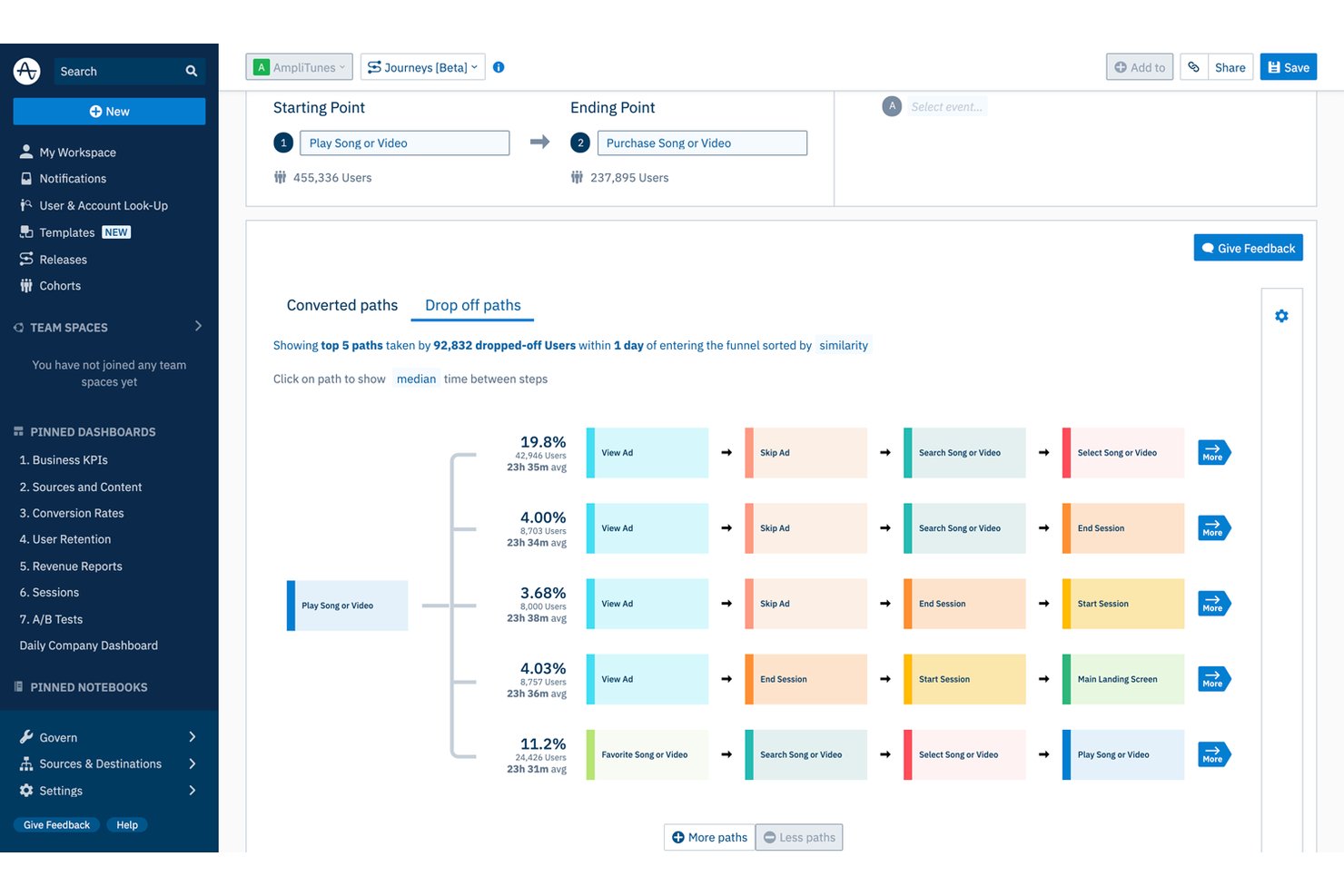
Amplitude est une plateforme d’analyse comportementale et numérique qui combine l’analyse des entonnoirs, la cartographie des parcours, la relecture des sessions, l’agrégation des commentaires alimentée par l’IA et l’analyse prédictive afin de révéler la manière dont les utilisateurs parcourent votre produit ou votre expérience de commerce électronique.
À qui Amplitude convient-elle le mieux ?
Amplitude convient parfaitement aux équipes de commerce électronique et axées sur les produits qui souhaitent regrouper au même endroit les données comportementales, l’analyse des paniers et les informations prédictives.
Pourquoi j’ai choisi Amplitude
J’ai choisi Amplitude comme l’une des meilleures solutions, car sa fonctionnalité d’analyse des paniers va plus loin que les rapports d’entonnoir classiques. Elle décompose les abandons par SKU, catégorie, marque et prix, afin que vous puissiez voir exactement quels produits font perdre des clients et à partir de quelle taille de panier. J’apprécie également la manière dont les parcours cartographient les chemins suivis par les utilisateurs qui ont converti par rapport à ceux qui ont abandonné, ce qui permet de repérer facilement où commencent réellement les frictions dans le panier.
Fonctionnalités clés d’Amplitude
- Agrégation des commentaires par l’IA : rassemble les avis, tickets d’assistance, enquêtes et publications sur les réseaux sociaux dans un tableau de bord unique, en reliant les thèmes des commentaires au comportement dans le produit.
- Cohortes prédictives : regroupe les utilisateurs selon leur probabilité de convertir, de se désabonner ou d’effectuer un achat à l’aide d’un modèle fondé sur un transformateur et entraîné sur des centaines de signaux comportementaux.
- Guides et enquêtes : déclenche des enquêtes NPS, des micro-enquêtes et des formulaires de commentaires destinés aux visiteurs en fonction du comportement des utilisateurs, avec des contrôles permettant de limiter la fréquence à laquelle chaque utilisateur les voit.
- Références comportementales : compare vos indicateurs d’acquisition, d’activation et de fidélisation à des données anonymisées provenant de plus de 2 600 entreprises réparties dans 17 secteurs et 102 pays.
Intégrations d’Amplitude
Amplitude propose des intégrations natives avec Zendesk, Intercom, Freshdesk, Salesforce, Snowflake, BigQuery, Segment, Qualtrics et Sprig. Son API Profile, son API Behavioral Cohorts et ses API d’accès aux données prennent en charge les intégrations personnalisées.
Pros and Cons
Pros:
- L’analyse des paniers identifie précisément les abandons au niveau des produits
- Les cartes de parcours révèlent les frictions liées à la conversion
- Les cohortes prédictives facilitent le ciblage de la fidélisation
Cons:
- Les rapports avancés nécessitent une expertise importante en instrumentation
- L’analyse des commentaires ne dispose pas d’analyse vocale native

Idéal pour l’analyse de la voix du client basée sur le traitement automatique du langage naturel
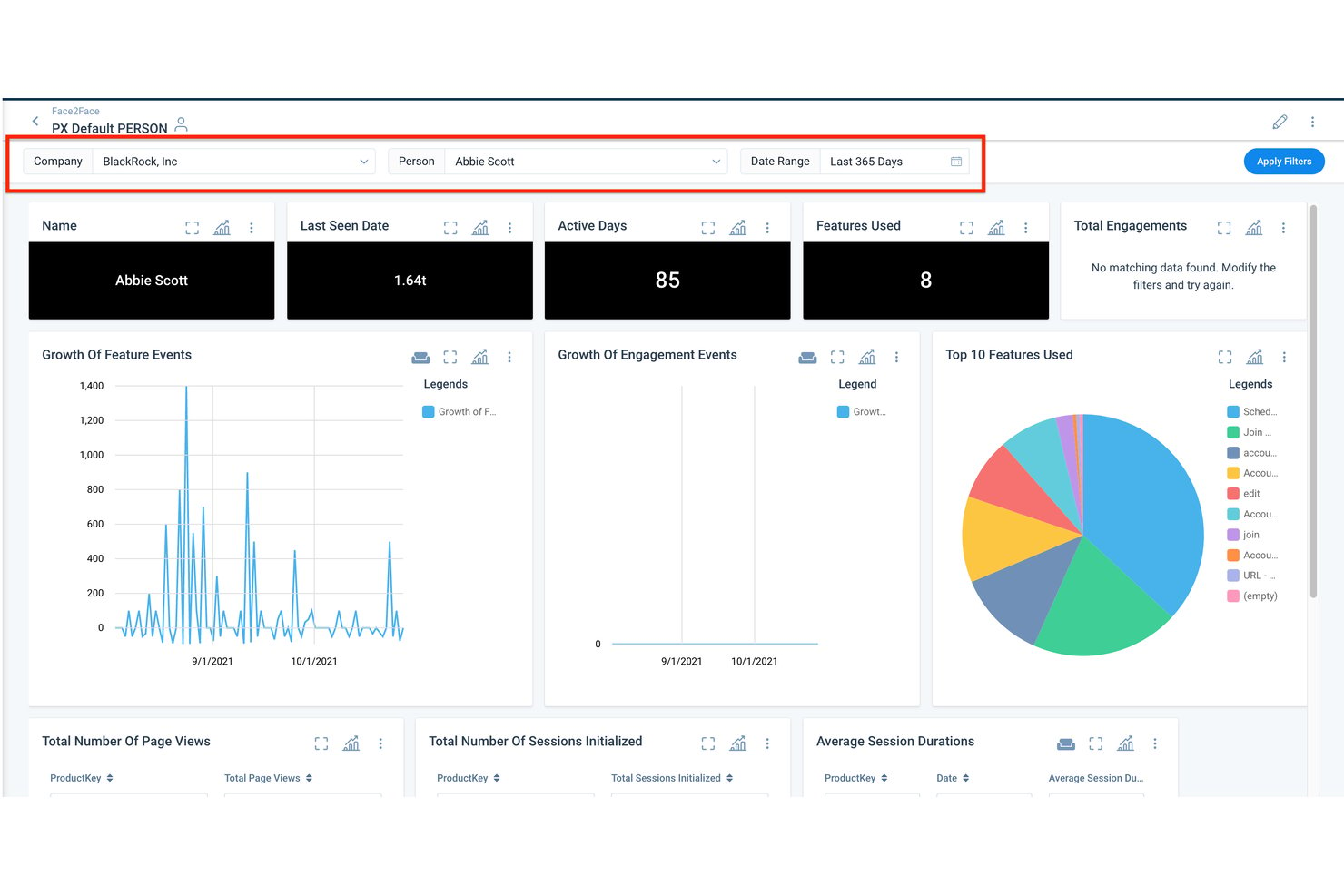
Gainsight est une plateforme d’analyse de la réussite client et de l’expérience client qui combine l’analyse des retours basée sur le traitement automatique du langage naturel, l’évaluation de la santé client, la modélisation prédictive de l’attrition et l’analyse comportementale des produits au sein d’une plateforme de données client unifiée.
À qui Gainsight convient-il le mieux ?
Gainsight convient particulièrement aux équipes de réussite client B2B SaaS qui doivent transformer les réponses aux enquêtes, les conversations avec le support et les données d’utilisation des produits en indicateurs clairs de fidélisation et d’expansion.
Pourquoi ai-je choisi Gainsight ?
J’ai choisi Gainsight comme l’une des meilleures solutions, car son moteur propriétaire de traitement automatique du langage naturel va plus loin que la plupart des outils d’analyse des retours, en évaluant le sentiment sur une échelle de −10 à +10 tout en tenant compte de la négation, du sarcasme et des signaux contradictoires dans les réponses en texte libre. Son analyseur d’impact relie directement ces tendances de sentiment au NPS, au CSAT et aux résultats des renouvellements, afin de vous montrer quels sujets favorisent réellement l’attrition. Staircase AI ajoute une intelligence conversationnelle en temps réel aux e-mails, tickets et réunions, en faisant ressortir les signaux de risque avant qu’ils ne se transforment en pertes.
Principales fonctionnalités de Gainsight
- Vue client à 360° : Une vue unifiée du compte qui présente les scores de santé, l’utilisation du produit, l’historique du support, les données de renouvellement et les cartographies des parties prenantes au même endroit.
- Orchestration numérique : Automatise les parcours client en combinant e-mails, guides intégrés à l’application, enquêtes et interactions humaines, avec une IA qui suggère le moment et le contenu appropriés.
- Agents IA préconfigurés : Des agents dédiés aux risques, aux transferts et à l’expansion qui détectent les signaux et recommandent les meilleures actions suivantes liées aux résultats de fidélisation et de chiffre d’affaires.
- Enquêtes intégrées à l’application : Déploie des enquêtes CSAT, NPS et CES ciblées directement dans votre produit sur le web, mobile et ordinateur de bureau, avec un suivi des retours en temps réel.
Intégrations de Gainsight
La marketplace d’intégrations de Gainsight comprend Salesforce, Zendesk, Intercom, Snowflake, BigQuery, Redshift, Gong, Zoom, Slack et Productboard. La plateforme prend également en charge la connectivité des données via Fivetran et Segment.
Pros and Cons
Pros:
- Le traitement automatique du langage naturel relie le sentiment aux résultats des renouvellements
- Les signaux conversationnels détectent rapidement les risques d’attrition
- Les analyses produit relient le comportement à la fidélisation
Cons:
- La traduction anglaise limite l’analyse des retours multilingues
- Une administration complexe ralentit l’adoption par l’ensemble des équipes

Idéal pour assurer le suivi en boucle fermée de la VoC à grande échelle
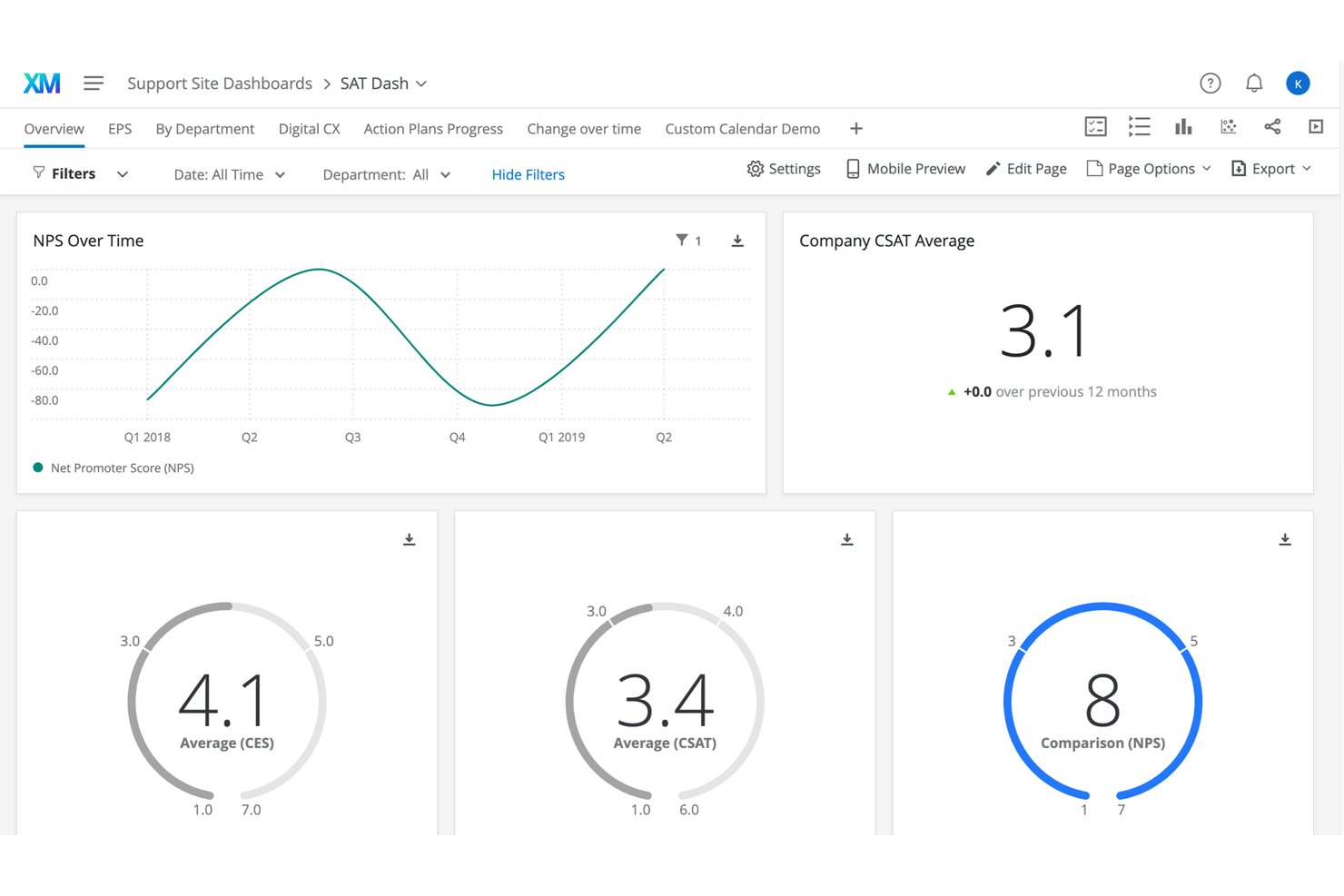
Qualtrics CustomerXM est une suite d’analyse de l’expérience client destinée aux entreprises, qui regroupe les données d’enquêtes VoC, l’analyse des conversations des centres de contact, l’analyse de l’expérience numérique ainsi que l’analyse de texte et des sentiments alimentée par l’IA au sein de profils clients unifiés.
À qui Qualtrics CustomerXM convient-il le mieux ?
Qualtrics CustomerXM est conçu pour les équipes d’expérience client et de VoC des grandes entreprises qui doivent recueillir des commentaires à grande échelle et les transformer en actions en boucle fermée au sein d’organisations complexes réparties sur plusieurs sites.
Pourquoi j’ai choisi Qualtrics CustomerXM
Qualtrics CustomerXM figure dans ma sélection parce qu’il est spécialement conçu pour assurer le suivi en boucle fermée de la VoC à grande échelle, et pas seulement pour recueillir des commentaires. J’apprécie le fait que XM Discover intègre 100 % des interactions du centre de contact (appels, conversations par chat, e-mails) en parallèle des réponses aux enquêtes, puis mette en évidence l’intention, l’effort et l’émotion grâce au traitement automatique du langage naturel, afin que rien ne passe inaperçu. Les flux de travail en boucle fermée acheminent automatiquement les tickets vers Zendesk, Jira ou ServiceNow, ce qui permet à des équipes comme celle de ServiceNow d’exécuter plus de 10 000 actions de suivi automatiques auprès de plus de 1 700 responsables de l’expérience.
Fonctionnalités clés de Qualtrics CustomerXM
- Analyse de l’expérience numérique : La relecture des sessions, les cartes thermiques et l’analyse des entonnoirs vous aident à déterminer précisément où les clients abandonnent leur parcours ou rencontrent des difficultés dans les expériences numériques.
- Segmentation de XM Directory : Les segments de contacts dynamiques sont mis à jour deux fois par jour en fonction des données démographiques, des besoins et des centres d’intérêt, et peuvent être utilisés directement dans les tableaux de bord CX.
- Étalonnage sectoriel : Les références sectorielles intégrées vous permettent de comparer votre NPS, votre CSAT et vos indicateurs clés de performance personnalisés à ceux d’entreprises du même secteur, de concurrents ou de marques affichant les meilleures performances.
- Qualtrics Assist pour l’expérience client : Un assistant d’IA générative qui répond aux questions formulées en langage courant et présente des synthèses des réponses aux questions ouvertes des enquêtes et des avis directement dans vos tableaux de bord.
Intégrations de Qualtrics CustomerXM
Qualtrics CustomerXM propose des intégrations natives avec Salesforce, Microsoft Dynamics, HubSpot, Zendesk, ServiceNow, Jira, Slack, Microsoft Teams, Tableau et Snowflake. La solution fournit également une API, des connecteurs développés par les services professionnels et Zapier.
Pros and Cons
Pros:
- Flux de travail VoC en boucle fermée à grande échelle
- Vision unifiée des enquêtes et des conversations
- L’étalonnage contextualise les performances CX
Cons:
- La modélisation prédictive nécessite l’implication de l’équipe chargée du compte
- Le périmètre destiné aux grandes entreprises peut submerger les équipes plus petites
Autres options
Voici quelques autres outils d’analyse de l’expérience client qui ne figurent pas dans ma liste des 20 meilleurs, mais qui méritent tout de même votre attention :
- Contentsquare
Idéal pour l’analyse comportementale intégrée
- Medallia Experience Cloud
Idéal pour faire évoluer les programmes CX à l’échelle de toute l’entreprise
- Sprout Social
Idéal pour l'analyse client sur les réseaux sociaux
- Treasure Data
Idéal pour prédire la probabilité d’attrition client
- ChurnZero
Idéal pour identifier les opportunités de vente croisée
- CleverTap
Idéal pour repérer les tendances d'utilisation des applications mobiles
- Pendo
Am besten geeignet, um die Ursachen von Reibungspunkten in der Customer Journey aufzudecken
- MonkeyLearn
Parhaiten soveltuu juridisesti tarkistettuihin paikallisiin työsopimuksiin
- Adobe Customer Journey Analytics
Idéal pour l’analyse des parcours multicanaux à grande échelle


Comment j’évalue les outils d’analyse de l’expérience client
Je divise mon évaluation en deux niveaux : les capacités de base — comme l’analyse des parcours et les tableaux de bord NPS — que tous les outils doivent proposer, et les facteurs de différenciation qui distinguent les meilleures options des autres.
Fonctionnalités essentielles (incontournables pour cette liste)
Lorsque je sélectionne les outils à inclure dans ma liste, j’évalue chacun d’eux sur une échelle de 0 (ne propose pas la fonctionnalité) à 5 (excelle dans ce domaine) pour chaque fonctionnalité essentielle répertoriée ci-dessous. Ensuite, je convertis le score total de l’outil en pourcentage. Chaque outil doit obtenir un score total minimum de 75 % pour être pris en compte.
- Ingestion de données multicanal : Je vérifie si un outil peut importer des données provenant du CRM, des tickets d’assistance, des enquêtes, des conversations instantanées et des réseaux sociaux, afin que vous disposiez d’une vue client unifiée.
- Segmentation de la clientèle : La possibilité de créer des segments dynamiques selon le comportement, l’étape du cycle de vie ou le sentiment est importante ici — les seuls filtres démographiques statiques ne suffisent pas.
- Analyse comportementale et des parcours : J’évalue la capacité d’un outil à cartographier les parcours clients à travers les différents points de contact, notamment l’analyse des entonnoirs, la visualisation des chemins et la détection des abandons.
- Analyse des sentiments et des retours : Je recherche une analyse fondée sur le TAL qui extrait les thèmes et les sentiments des réponses en texte libre, des avis et des conversations avec l’assistance, au-delà du simple étiquetage par mots-clés.
- Indicateurs de l’expérience client et tableaux de bord KPI : Les tableaux de bord doivent permettre de suivre en temps réel le NPS, le CSAT, le CES et le taux d’attrition, avec suffisamment de flexibilité pour créer des vues adaptées aux rôles des analystes et des dirigeants.
- Analyse prédictive : J’évalue si l’outil propose des modèles fondés sur le ML pour le risque d’attrition, les prévisions de CLV ou le score de propension, plutôt que de simples rapports de tendances rétrospectives.
Une fois que j’ai établi une liste d’outils répondant aux critères, j’examine ce qui distingue chaque plateforme.
Facteurs de différenciation (ce qui distingue les fournisseurs)
Voici comment je compare les différents fournisseurs :
Fonctionnalités remarquables
Les flux de travail de retours en boucle fermée constituent un facteur de différenciation majeur. Je recherche des outils qui transmettent directement un score CSAT faible à l’équipe appropriée et qui assurent le suivi de sa résolution. Un assistant d’IA générative apporte une réelle valeur aux analystes de la VoC qui doivent interroger les données en langage courant plutôt que créer des rapports complexes. Les alertes en temps réel sont tout aussi importantes. Lorsque le NPS baisse après le lancement d’un produit, votre équipe chargée de l’expérience client doit le savoir en quelques minutes, et non en quelques jours.
Au-delà des fonctionnalités
La profondeur des intégrations est l’un des premiers éléments que j’évalue. Un outil d’analyse client qui se connecte nativement à votre CRM, à votre centre d’assistance et à votre entrepôt de données permet à votre équipe de consacrer moins de temps à assembler les données. La conformité pèse également dans la balance — je vérifie la préparation au RGPD et au CCPA, la suppression des informations d’identification personnelle et la certification SOC 2, en particulier lorsque les retours des clients contiennent des données sensibles. La rapidité de mise en œuvre est également importante. Les tableaux de bord préconfigurés et l’accompagnement à l’intégration permettent aux analystes de la VoC de commencer à fournir des informations en quelques semaines plutôt qu’en quelques mois.
Que sont les outils d’analyse de l’expérience client ?
Les outils d’analyse de l’expérience client sont des plateformes logicielles qui analysent les données d’interaction avec les clients afin de révéler les tendances, les préférences et les points de friction. Ils aident les entreprises à comprendre les comportements sur différents canaux afin d’améliorer la prise de décision et d’optimiser le parcours client.
Comment choisir les meilleurs outils d’analyse de l’expérience client
Utilisez cette liste de contrôle pratique pour vous aider, vous et votre équipe, à choisir les meilleurs outils d’analyse de l’expérience client.
☐ Le logiciel X possède-t-il les 2 ou 3 fonctionnalités que j’apprécie le plus ?
☐ De quelles fonctionnalités supplémentaires, spécialisées ou exceptionnelles, le logiciel X dispose-t-il ?
☐ Le logiciel X est-il adapté à la taille de mon équipe, qu’elle soit grande ou petite ?
☐ Le logiciel X s’intègre-t-il aux applications que j’utilise quotidiennement (e-mail, Slack, etc.) ?
☐ Le logiciel X est-il réputé pour être facile à apprendre et à utiliser ?
☐ Les valeurs du logiciel X correspondent-elles aux miennes ?
☐ Le logiciel X entre-t-il dans mon budget ?
Si vous recherchez un logiciel d’expérience client plus complet, avec des fonctionnalités allant au-delà de l’analyse, j’ai retenu les 10 meilleurs logiciels d’expérience client en 2026.
Tendances des outils d’analyse de l’expérience client
Les outils d’analyse de l’expérience client évoluent au gré de nouvelles tendances qui façonnent le secteur.
Intégration de l’IA et de l’apprentissage automatique
L’IA et l’apprentissage automatique deviennent essentiels, offrant des informations plus approfondies et automatisant les analyses complexes. Cette tendance est importante pour renforcer les capacités prédictives.
Traitement des données en temps réel
Le traitement des données en temps réel gagne du terrain, permettant aux entreprises de prendre des décisions immédiates. Cette tendance est essentielle pour rester compétitif sur des marchés en constante évolution.
Intégration des données multicanal
L’intégration de données provenant de plusieurs canaux devient la norme, offrant une vision globale du comportement des clients. Cette tendance est essentielle pour obtenir une compréhension complète des clients.
Renforcement des mesures de protection des données
Face aux préoccupations croissantes concernant la confidentialité des données, les outils intègrent des fonctionnalités de sécurité avancées. Cette tendance est essentielle pour préserver la confiance des clients.
Tableaux de bord personnalisables
Les tableaux de bord personnalisables se généralisent, permettant aux utilisateurs d’adapter leur expérience d’analyse. Cette tendance est importante pour répondre aux divers besoins des entreprises.
Fonctionnalités des outils d’analyse de l’expérience client
Lors du choix d’outils d’analyse de l’expérience client, soyez attentif aux fonctionnalités clés suivantes :
- Intégration complète des données : Connectez facilement les données provenant de plusieurs sources telles que les sites web, les applications mobiles, le service client et les réseaux sociaux afin d’obtenir une vision complète du comportement des clients. Cette fonctionnalité vous aide à éliminer les silos de données et vous offre une vue unifiée du parcours client.
- Analyse en temps réel : Accédez à des informations actualisées à la minute près au fur et à mesure des interactions avec les clients. L’analyse en temps réel vous permet de repérer rapidement les tendances ou les problèmes, afin de réagir avec agilité et de ravir vos clients au moment le plus important.
- Tableaux de bord personnalisables : Personnalisez les tableaux de bord pour afficher les indicateurs et les visualisations qui comptent le plus pour vous et votre équipe. Il devient ainsi facile de suivre les indicateurs clés de performance et de partager des informations avec les autres parties prenantes, sans devoir parcourir des montagnes de données.
- Segmentation et filtrage : Regroupez les clients en fonction de leurs comportements, de leurs caractéristiques démographiques ou de leurs commentaires. Grâce à la segmentation, vous pouvez identifier les différents besoins des clients et adapter vos stratégies pour maximiser leur impact.
- Cartographie du parcours : Visualisez chaque étape du parcours de vos clients afin d’identifier les points de friction, les abandons et les possibilités d’amélioration. Cette fonctionnalité vous aide à vous mettre à la place de vos clients et à créer des expériences plus fluides et plus agréables.
- Collecte et analyse des commentaires : Recueillez et analysez facilement les commentaires issus des enquêtes, des avis, des conversations et d’autres sources. Vous comprendrez mieux le sentiment des clients et repérerez les domaines où votre service excelle — ou ceux qui méritent un peu plus d’attention.
- Alertes et notifications : Configurez des alertes automatiques pour les événements clés, tels qu’une baisse des scores de satisfaction ou une hausse du nombre de tickets d’assistance. Vous restez ainsi informé et prêt à agir avant que les petits problèmes ne deviennent de véritables casse-têtes.
- Rapports complets : Générez des rapports détaillés et faciles à comprendre qui présentent les résultats pour tous les niveaux de votre organisation. Partagez les réussites, les enseignements et les plans d’action sans les tracas des feuilles de calcul.
Fonctionnalités d’IA courantes des outils d’analyse de l’expérience client
Au-delà des fonctionnalités standard des outils d’analyse de l’expérience client présentées ci-dessus, nombre de ces solutions intègrent l’IA avec des fonctionnalités telles que :
- Informations prédictives sur les clients : Utilisez l’IA pour prévoir les comportements des clients, par exemple pour déterminer qui risque de se désabonner ou de devenir votre plus grand ambassadeur. Cela vous aide à entretenir les relations et à éviter les mauvaises surprises à l’avenir.
- Traitement automatique du langage naturel (NLP) : Analysez automatiquement les commentaires libres, les conversations avec l’assistance ou les avis afin d’en déterminer le sentiment et les thèmes récurrents, et donnez rapidement du sens à de vastes quantités de données non structurées.
- Analyse automatisée des sentiments : Laissez l’IA évaluer l’humeur et le niveau de satisfaction des clients à partir des e-mails, des appels ou des commentaires. Vous repérerez rapidement les tendances et pourrez répondre aux préoccupations, parfois avant même que vos clients ne vous contactent.
- Détection des anomalies : L’IA identifie les changements inattendus dans le comportement ou les commentaires des clients, afin que vous puissiez examiner les évolutions soudaines et maintenir la constance de votre service.
- Recommandations intelligentes : Obtenez des suggestions générées par l’IA concernant les prochaines étapes, par exemple les améliorations à prioriser ou les clients à contacter en premier. Vos actions restent ainsi alignées sur ce qui compte le plus pour vos clients.
Avantages des outils d’analyse de l’expérience client
Les outils d’analyse de l’expérience client offrent plusieurs avantages aux utilisateurs et aux organisations. Voici les principaux avantages :
- Meilleure compréhension des clients : Fournit des informations approfondies sur le comportement et les préférences des clients.
- Prise de décision améliorée : Facilite les décisions fondées sur les données grâce à des informations précises et disponibles en temps utile.
- Fidélisation accrue des clients : Identifie les clients à risque et contribue à créer des stratégies de fidélisation ciblées.
- Optimisation des campagnes marketing : Permet un ciblage précis et une personnalisation des actions marketing.
- Croissance des revenus : Stimule la croissance de l’entreprise en identifiant de nouvelles opportunités et en optimisant celles qui existent déjà.
Ces avantages soulignent la valeur des outils d’analyse de l’expérience client pour les entreprises.
Coûts et tarifs des outils d’analyse de l’expérience client
Le coût des outils d’analyse de l’expérience client varie en fonction des fonctionnalités et des types de forfaits.
| Type de forfait | Prix moyen | Fonctionnalités courantes |
|---|---|---|
| Forfait gratuit | $0 | Analyses de base, stockage de données limité, rapports standard |
| Forfait personnel | $20/mois | Analyses avancées, davantage de stockage de données, rapports personnalisables |
| Forfait professionnel | $100/mois | Analyses complètes, accès multi-utilisateur, données en temps réel |
| Forfait entreprise | $500/mois | Ensemble complet de fonctionnalités, assistance dédiée, sécurité avancée |
Ce tableau fournit une estimation des forfaits et des coûts moyens des outils d’analyse des clients.
Questions fréquemment posées
Voici quelques réponses aux questions fréquentes sur les outils d’analyse client :
Comment choisir le bon outil d’analyse de l’expérience client pour mon équipe ?
Commencez par définir les principaux objectifs de votre équipe, comme améliorer le NPS, augmenter les taux de fidélisation ou rationaliser les retours des clients. Évaluez les outils en fonction des fonctionnalités qui répondent précisément à vos difficultés, comme la collecte de retours multicanale, les rapports avancés ou l’analyse des sentiments optimisée par l’IA. Tenez compte de la courbe d’apprentissage pour votre équipe ; un outil doté d’un tableau de bord convivial est essentiel à son adoption. Vérifiez les options d’intégration avec les systèmes existants, comme les plateformes de CRM, de service d’assistance ou de marketing, afin d’éviter les silos de données. Évaluez l’assistance du fournisseur, ses garanties en matière de sécurité et ses certifications de conformité, et donnez la priorité à ceux qui proposent des démonstrations personnalisées ou des périodes d’essai afin de tester les flux de travail avant de prendre une décision finale.
Quelles métriques dois-je suivre avec les outils d’analyse de l’expérience client ?
Vous devez suivre un ensemble de métriques quantitatives et qualitatives pour obtenir une vision globale. Commencez par des indicateurs fondamentaux comme le score de promoteur net (NPS), le score de satisfaction client (CSAT) et le score d’effort client (CES) afin de mesurer la fidélité et les impressions immédiates. Analysez ensuite les métriques opérationnelles, comme le taux d’attrition, le délai de première réponse et les taux de résolution, pour repérer les goulots d’étranglement dans les processus. Utilisez l’analyse des parcours pour surveiller les points d’abandon et les taux de conversion tout au long des différents points de contact. Certains outils vous permettent d’analyser les sentiments en examinant le contenu des réseaux sociaux, des conversations instantanées ou des e-mails, révélant ainsi des frustrations cachées ou des tendances positives que les enquêtes peuvent ne pas détecter. Le suivi de ces métriques conjointement vous aidera à ajuster votre stratégie d’expérience client en temps réel.
Les outils d’analyse de l’expérience client peuvent-ils s’intégrer à mon CRM ou à mes plateformes d’assistance existants ?
Oui, l’intégration est une considération majeure pour les responsables de l’expérience client, et la plupart des outils de premier plan proposent des connecteurs préconfigurés pour les CRM populaires (comme Salesforce, monday CRM ou HubSpot) et les plateformes de service d’assistance (comme Zendesk ou Freshdesk). Cela vous permet de synchroniser automatiquement les interactions avec les clients, les tickets et les données de retour entre les plateformes, en éliminant les transferts manuels de données et en réduisant les erreurs. Certaines plateformes prennent également en charge l’accès aux API pour des intégrations plus personnalisées, ce qui vous permet de créer des tableaux de bord ou des flux de travail adaptés aux besoins spécifiques de votre équipe. Avant la mise en œuvre, examinez le processus d’intégration, la documentation disponible et l’assistance du fournisseur afin de garantir une configuration fluide et un temps d’arrêt minimal.
Comment les outils d’analyse de l’expérience client peuvent-ils contribuer à réduire l’attrition ?
Les outils d’analyse de l’expérience client permettent d’identifier les clients à risque en analysant les comportements, les données d’utilisation et les tendances des retours. Par exemple, si l’outil détecte une baisse de l’engagement ou des avis négatifs après certaines modifications apportées au produit, votre équipe peut agir rapidement pour résoudre les problèmes. Vous pouvez configurer des alertes automatisées pour des indicateurs clés, comme l’augmentation du taux de réclamations ou la baisse des scores NPS, afin de déclencher un suivi immédiat. Certaines plateformes proposent des analyses prédictives pour mettre en évidence les utilisateurs les plus susceptibles de partir, ce qui permet de mettre en place une prise de contact personnalisée de manière préventive. En transformant systématiquement les informations en actions concrètes, comme l’amélioration des ressources en libre-service ou la formation du personnel d’assistance, vous pouvez traiter l’attrition à sa source et renforcer la fidélisation des clients.
Existe-t-il des problèmes de confidentialité ou de conformité liés aux outils d’analyse de l’expérience client ?
Oui, la confidentialité et la conformité doivent être des priorités absolues dès que vous traitez des données clients avec des outils d’analyse. Recherchez des plateformes certifiées pour les réglementations en matière de protection des données applicables à votre entreprise, comme le RGPD dans l’UE ou le CCPA en Californie. Assurez-vous que l’outil prend en charge le stockage sécurisé des données, des contrôles d’accès structurés et des outils de transparence comme la gestion des consentements. Vous pouvez également discuter des régions d’hébergement des données avec le fournisseur, en particulier si vos clients sont répartis dans le monde entier. Examinez la manière dont la plateforme collecte, traite et partage les données, et veillez à ce que vos équipes juridiques et informatiques participent au processus d’évaluation. Donnez la priorité aux fournisseurs qui proposent une documentation claire et une assistance pour les audits de conformité afin de limiter les risques à long terme.
Comment les entreprises utilisent-elles les données et l’analyse pour améliorer l’expérience client ?
Les entreprises utilisent les outils d’analyse de l’expérience client pour recueillir des retours en temps réel, cartographier les parcours clients et repérer des tendances qui n’étaient pas visibles auparavant. Par exemple, les marques de commerce de détail analysent les tickets d’assistance et les interactions sur le site web pour identifier les points de blocage des clients, puis mettent à jour les pages produits ou rationalisent les parcours d’assistance. Les entreprises SaaS utilisent l’analyse des sentiments pour détecter une hausse des frustrations et lancer des prises de contact ciblées avant que le risque d’attrition n’augmente. De nombreux responsables de l’expérience client intègrent les données d’analyse à leur CRM et à leur automatisation marketing afin de personnaliser les prises de contact et de traiter rapidement les réclamations importantes. En transformant les informations en actions précises et traçables, les entreprises comblent les lacunes de l’expérience et renforcent la fidélité des clients.
Avis sur d’autres outils d’expérience client
Avant de changer d’onglet, voici quelques articles géniaux pour mieux connaître vos clients :
- Plateformes d’intelligence client
- Logiciels de gestion de l’expérience client
- Logiciels VOC pour l’analyse client
- Logiciels d’analyse des données qualitatives
- Logiciels de collecte des retours clients
- Plateformes d’engagement client
- Logiciels de gestion de la relation client
- Logiciels de gestion du parcours client