

I 10 migliori software per assistenza clienti mobile recensiti nel 2026

I migliori software di assistenza per dispositivi mobili: selezione


In qualità di responsabile dell'esperienza del cliente, affronti ogni giorno la sfida di mantenere efficiente il tuo team garantendo al contempo la soddisfazione dei clienti. Un software di assistenza per dispositivi mobili può cambiare radicalmente la situazione, consentendo al tuo team di rispondere in modo rapido ed efficace, ovunque si trovi.
Nella mia esperienza di test e valutazione dei software, ho visto come lo strumento giusto possa fare davvero la differenza. Ho esaminato e valutato in modo indipendente diverse opzioni per offrirti le migliori. In questo articolo presenterò le mie scelte principali, fornendo informazioni imparziali per aiutarti a trovare la soluzione perfetta per le tue esigenze.
Perché fidarsi dei nostri consigli sui software
Il nostro team testa e recensisce software dal 2012. In quanto leader CX noi stessi, sappiamo quanto sia difficile — e importante — scegliere il software giusto.
Per questa guida, abbiamo valutato gli strumenti attraverso test pratici e ricerche indipendenti, assegnando un punteggio agli strumenti in base ai nostri criteri di selezione.
Le nostre recensioni riflettono il nostro giudizio editoriale umano, non un discorso di vendita.
Tabella comparativa dei migliori software di assistenza per dispositivi mobili
Questa tabella comparativa riassume i dettagli sui prezzi delle mie migliori selezioni di software di assistenza per dispositivi mobili.
| Tool | Best For | Trial Info | Price | ||
|---|---|---|---|---|---|
| 1 | Ideale per trasformare le email in attività | Prova gratuita di 30 giorni disponibile | A partire da $14/utente/mese (con fatturazione annuale) | Website | |
| 2 | Ideale per creare chatbot AI personalizzati | Piano gratuito disponibile | Da $32/mese (fatturato annualmente) | Website | |
| 3 | Ideale per supporto clienti guidato dall'AI | Prova gratuita di 7 giorni + piano gratuito disponibile | A partire da $24.17/mese (fatturato annualmente) | Website | |
| 4 | Ideale per piccoli team | Prova gratuita di 14 giorni | Prezzo su richiesta | Website | |
| 5 | Migliore con strumenti di collaborazione tra team | Prova gratuita di 14 giorni + demo gratuita disponibile | Da $25/postazione/mese (fatturazione annuale) | Website | |
| 6 | Ideale per la semplicità | Piano gratuito + demo gratuita disponibile | A partire da $29/utente/mese | Website | |
| 7 | Ideale per il supporto multilingue | Demo gratuita disponibile | Prezzo su richiesta | Website | |
| 8 | Ideale per la conformità ITIL | Prova gratuita di 30 giorni | Da $12/utente/mese | Website | |
| 9 | Ideale per integrazione progetti | Prova gratuita + demo gratuita disponibile | Da $9.99/utente/mese (fatturato annualmente) | Website | |
| 10 | Ideale per la scalabilità | Prova gratuita di 15 giorni | Da $49/mese (fatturazione annuale) | Website |
Recensione dei migliori software di assistenza per dispositivi mobili
Di seguito trovi i miei riepiloghi dettagliati dei migliori software di assistenza per dispositivi mobili entrati nella mia selezione. Le mie recensioni offrono una panoramica dettagliata delle caratteristiche principali, dei vantaggi e degli svantaggi, delle integrazioni e dei casi d’uso ideali di ogni strumento, per aiutarti a trovare quello più adatto a te.

Missive
Ideale per trasformare le email in attività
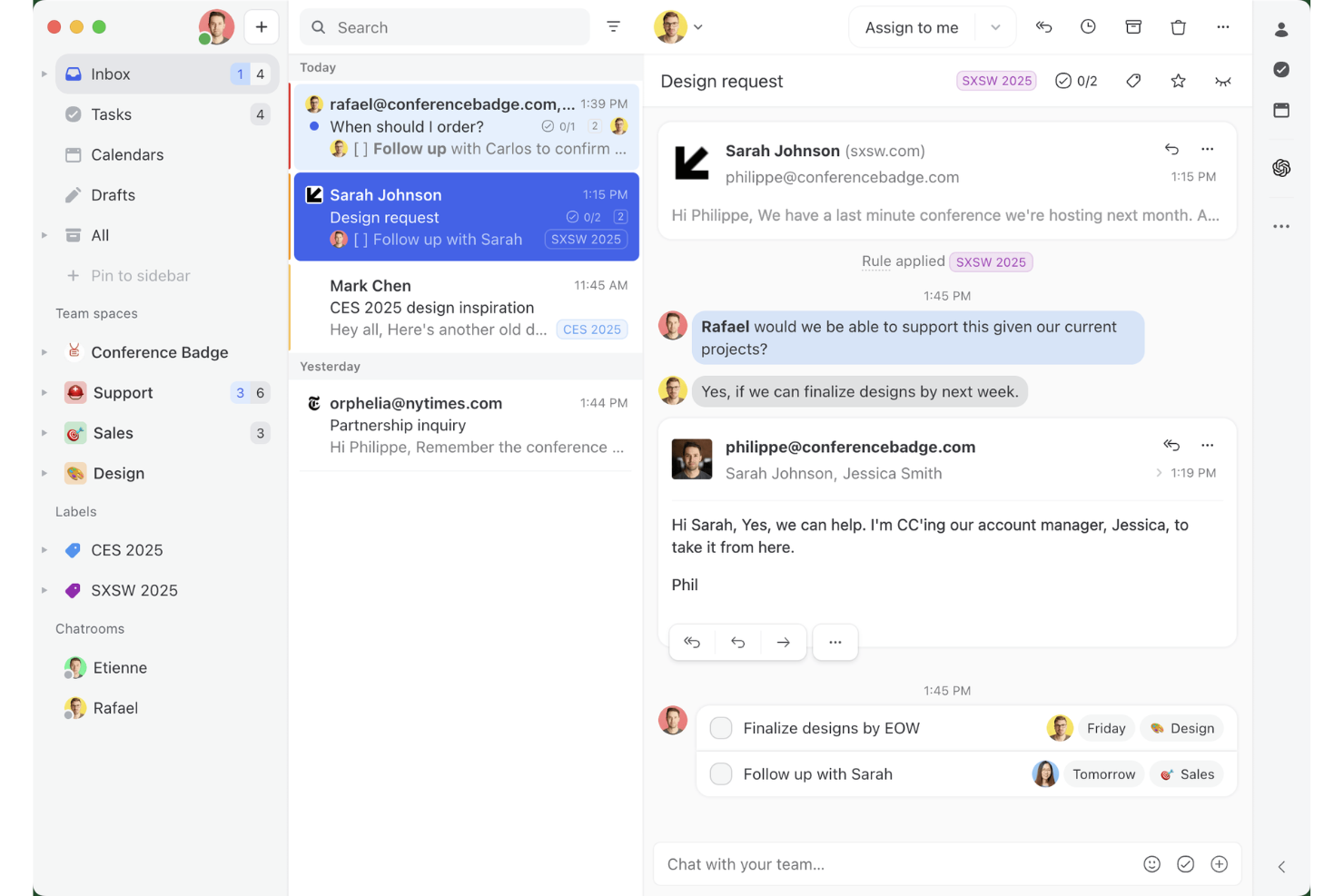
Missive è uno strumento collaborativo per la gestione della posta in arrivo e dell'assistenza da dispositivi mobili che riunisce email, WhatsApp, SMS, Instagram e chat dal vivo in un'unica interfaccia, con funzionalità integrate per la creazione di attività, regole di assegnazione e comunicazione tra team.
Per chi è più adatto Missive?
Missive è particolarmente adatto ai team di assistenza clienti remoti e distribuiti che devono gestire email, WhatsApp e conversazioni sui social da un'unica casella di posta mobile.
Perché ho scelto Missive
Ho scelto Missive come uno dei migliori strumenti perché trasforma davvero la casella di posta in un motore di attività. Quando arriva un'email, puoi convertirla immediatamente in un'attività assegnata con una scadenza, coinvolgere i colleghi tramite commenti interni e indirizzarla attraverso regole di assegnazione automatica, tutto dall'app mobile. Mi piace anche il fatto che riunisca email, WhatsApp Business, Instagram e SMS in un'unica casella di posta mobile, così nulla sfugge quando il team lavora da remoto.
Funzionalità principali di Missive
- Casella di posta unificata multicanale: Riunisce email, WhatsApp Business, Instagram, Facebook Messenger, SMS e chat dal vivo in un'unica interfaccia mobile.
- Server MCP di Missive: Collega app di IA esterne (come Claude o ChatGPT) a mcp.missiveapp.com per interrogare la casella di posta mobile, controllare gli orari e preparare risposte, mantenendo obbligatoria la revisione umana prima dell'invio.
- Regole di assegnazione automatica: Indirizza automaticamente le conversazioni in arrivo agli operatori utilizzando una logica a rotazione, basata sul carico di lavoro minore o sul mittente.
- Notifiche push configurabili: Consente di impostare le preferenze di notifica per ciascuna casella di posta e tipo di evento, con la sospensione delle notifiche in base all'ora del giorno per la copertura al di fuori dell'orario lavorativo.
- Promemoria SLA e regole di escalation: Attiva avvisi ed escalation automatici quando le conversazioni rimangono senza risposta oltre una soglia prestabilita.
Integrazioni di Missive
Missive si integra con HubSpot, Salesforce, Pipedrive, Aircall, Dialpad, Asana, ClickUp, Trello, Twilio e WhatsApp Business. Offre inoltre un'API REST, webhook, Zapier e il nuovo server MCP (mcp.missiveapp.com) per collegare client di IA esterni (disponibile nei piani Productive e Business, con attivazione da parte di un amministratore).
Pros and Cons
Pros:
- Vera casella di posta mobile omnicanale per tutti i canali
- Trasforma istantaneamente le email in attività operative
- Le notifiche push includono promemoria SLA ed escalation
Cons:
- Nessuna base di conoscenza nativa per gli operatori
- Accesso offline e sincronizzazione limitati sui dispositivi mobili
New Product Updates from Missive
Missive Adds Conversation Pins
Missive now lets you pin key links, decisions, and notes inside a conversation, keeping them accessible in a dedicated Pins section in the Details sidebar. For more information, visit Missive's official site.
 .
.
Chatbase
Ideale per creare chatbot AI personalizzati

Chatbase è un builder di chatbot AI no-code che consente di creare agenti AI personalizzati addestrati sui tuoi dati—documenti, URL e testo—e distribuirli su canali di supporto clienti web e mobile.
Per chi è Chatbase?
Chatbase è adatto a piccole e medie imprese e sviluppatori che desiderano aggiungere supporto AI al proprio prodotto senza dover creare un chatbot da zero.
Perché ho scelto Chatbase
Ho scelto Chatbase tra i migliori perché offre un ambiente completamente no-code per costruire un agente AI di supporto personalizzato e addestrato sui dati della propria azienda. Apprezzo in particolare la funzione di confronto modelli, che permette di testare diverse configurazioni di LLM per trovare quella più adatta al proprio caso d’uso. L’impostazione delle regole di escalation tramite istruzioni in linguaggio naturale consente inoltre di definire quando l’AI deve passare la conversazione a un operatore umano senza scrivere codice.
Funzionalità principali di Chatbase
- Distribuzione omnicanale: Distribuisci il tuo agente AI su chat del sito, WhatsApp, Slack ed email da un’unica piattaforma.
- Sincronizzazione dati in tempo reale: Collega il tuo agente a CRM, strumenti di gestione ordini e piattaforme di helpdesk per recuperare dati cliente in tempo reale durante le conversazioni.
- Reportistica avanzata: Monitora le performance dell’agente con analisi dettagliate sulle interazioni, sui tassi di risoluzione e dati di coinvolgimento.
- Supporto multilingue: Rileva e risponde automaticamente in oltre 80 lingue usando il rilevamento linguistico integrato e la traduzione AI generativa.
Integrazioni Chatbase
Chatbase offre integrazioni native con WhatsApp, Slack, Instagram, Facebook Messenger, Zendesk, Salesforce, Shopify, Stripe, Notion, Calendly e Cal.com. Si connette anche con Zapier e Make e dispone di un’API per integrazioni personalizzate.
Pros and Cons
Pros:
- Offre la distribuzione di un agente addestrato in pochi minuti
- Supporta 80+ lingue nativamente
- Ampia scelta di modelli AI disponibili
Cons:
- Nessun builder visuale del flusso conversazionale
- La messaggistica a crediti può far aumentare i costi

Tidio
Ideale per supporto clienti guidato dall'AI
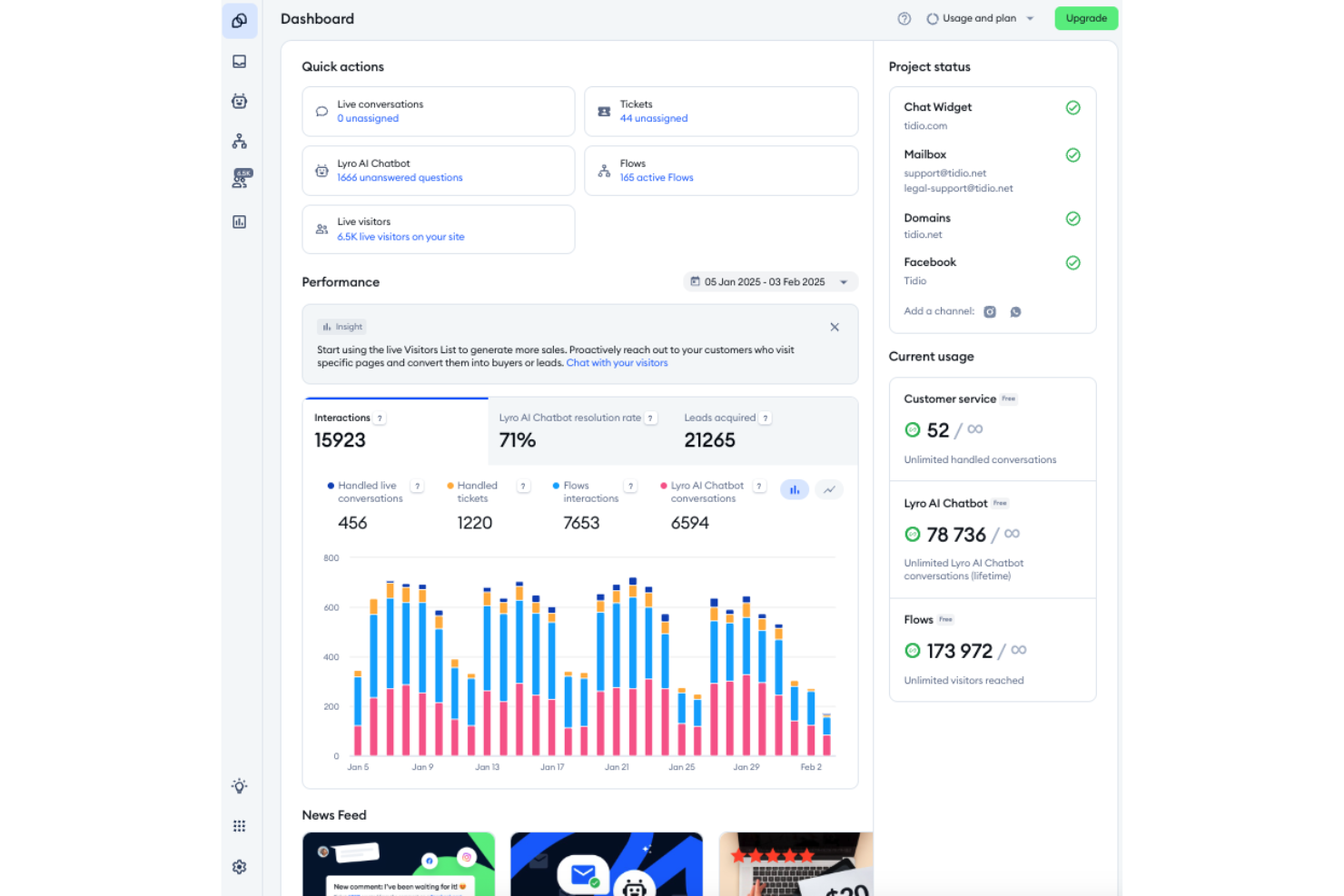
Tidio combina l'automazione alimentata dall'AI con la chat dal vivo e l'accessibilità mobile per offrire un'esperienza completa di help desk. Progettato per l'e-commerce e i fornitori di servizi, consente al tuo team di gestire le conversazioni con i clienti su più canali in tempo reale—da dispositivi mobili o da desktop.
Perché ho scelto Tidio: Ho scelto Tidio perché integra un'automazione intelligente con un design mobile-first. Il suo Lyro AI Agent automatizza le interazioni con i clienti, gestendo ticket e FAQ senza intervento manuale, ideale per mantenere i tempi di risposta rapidi anche quando il tuo team è fuori sede. Mi piace anche come i suoi strumenti di analisi offrano visibilità sulle prestazioni, aiutandoti a ottimizzare le strategie di coinvolgimento e migliorare la qualità del servizio grazie agli insight in tempo reale.
Funzionalità e integrazioni principali di Tidio:
Le funzionalità includono chatbot AI, ticketing automatico e strumenti di supporto multicanale per una gestione unificata dei clienti. Puoi monitorare il comportamento dei visitatori, personalizzare i widget di chat e gestire le conversazioni dall'app mobile.
Le integrazioni includono Shopify, WordPress, WooCommerce, Mailchimp, HubSpot, Slack, Zendesk, Salesforce, Google Analytics, ActiveCampaign, Pipedrive e Zapier.
Pros and Cons
Pros:
- Interfaccia intuitiva per principianti
- Automazione potente e chatbot AI
- Solide integrazioni con piattaforme e-commerce
Cons:
- Costo elevato per le funzionalità premium
- Funzionalità offline limitate

Cayzu
Ideale per piccoli team
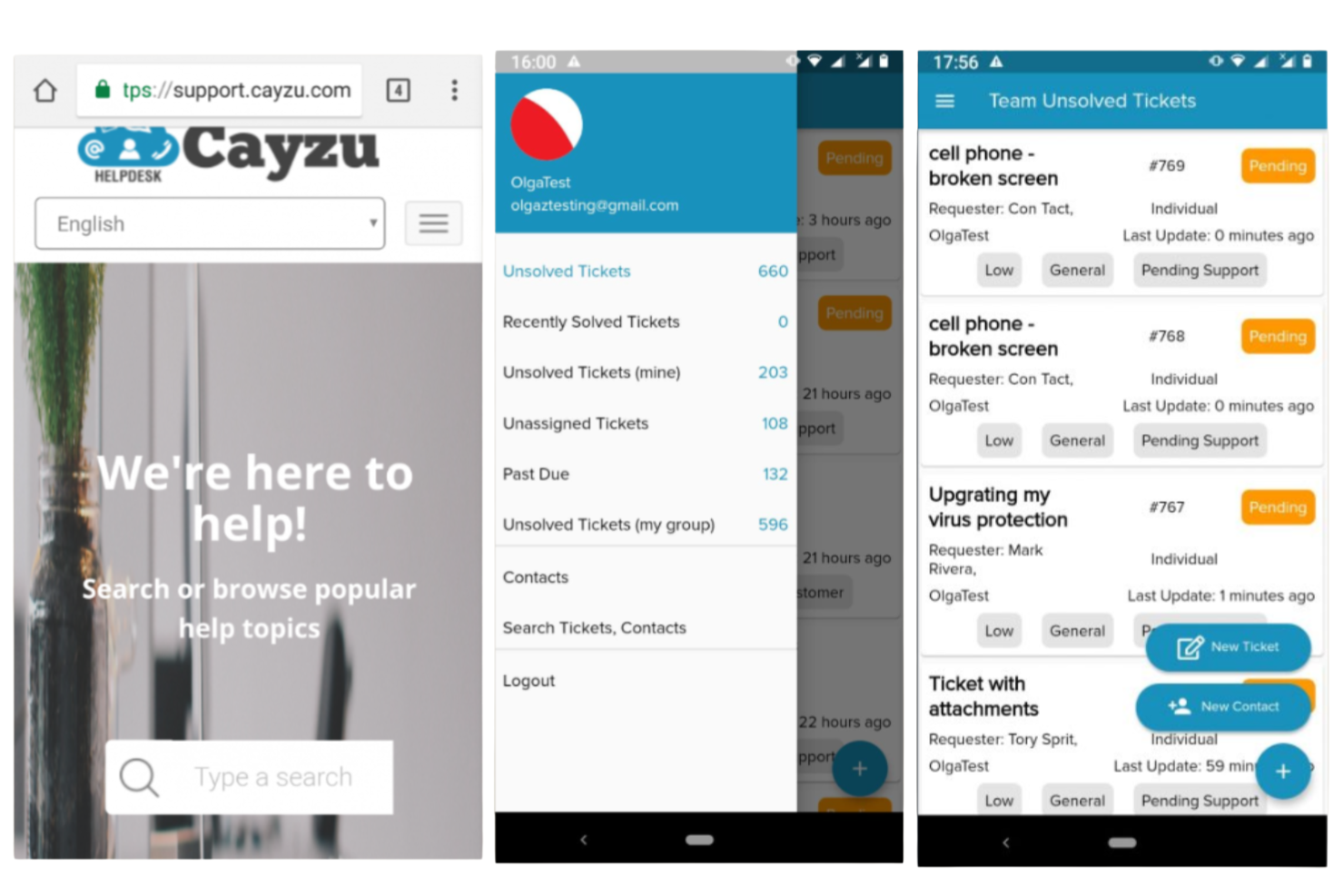
Cayzu è un software di help desk basato su cloud pensato per le piccole e medie imprese. Aiuta il tuo team a gestire le richieste dei clienti in modo efficiente tramite la sua piattaforma mobile.
Perché ho scelto Cayzu: È pensato per i piccoli team che necessitano di una soluzione facile da usare. Funzionalità come il supporto multi-marchio e un portale self-service lo rendono versatile per le aziende in crescita. L'app mobile facile da usare consente al tuo team di gestire i ticket dell’assistenza ovunque si trovi. La possibilità di personalizzare dashboard e report ti permette di monitorare le prestazioni in modo semplice.
Funzionalità e integrazioni principali:
Funzionalità includono un portale self-service, risposte predefinite e supporto per più marchi. Il tuo team può utilizzare la chat interna per comunicare rapidamente. Il software offre anche dashboard personalizzabili per adattarsi alle esigenze della tua azienda.
Integrazioni includono Slack, Dropbox, Google Drive, Facebook, X, Mailchimp, FreshBooks, Salesforce, HubSpot e Zoho CRM.
Pros and Cons
Pros:
- Interfaccia ottimizzata per i dispositivi mobili
- Report personalizzabili
- Portale self-service disponibile
Cons:
- Funzionalità avanzate limitate
- Opzioni di personalizzazione limitate

Front
Migliore con strumenti di collaborazione tra team
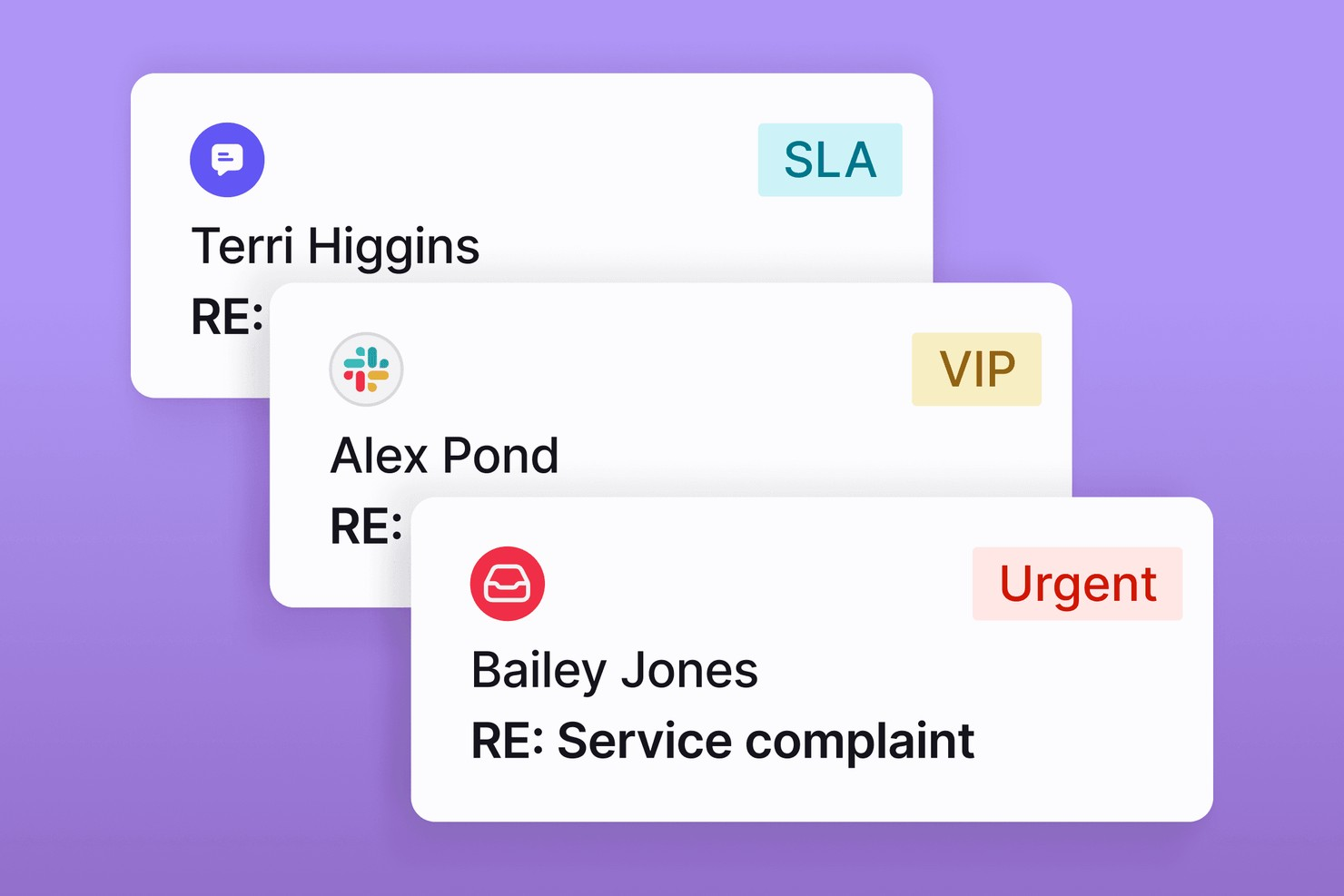
Front unisce messaggistica, collaborazione e gestione dei ticket in un'unica piattaforma ottimizzata per dispositivi mobili. È progettato per i team che devono gestire conversazioni con i clienti su diversi canali restando connessi anche in movimento. Se cerchi un help desk che unisca caselle di posta condivise e collaborazione in tempo reale, Front offre una soluzione flessibile per team di supporto dinamici.
Per chi è più adatto Front?
Front è ideale per team di assistenza clienti e customer service in aziende di medie e grandi dimensioni che devono gestire volumi elevati di conversazioni clienti su più canali.
Perché ho scelto Front
Per i team di help desk mobile che hanno bisogno di lavorare insieme senza interruzioni, Front si distingue per i suoi strumenti di collaborazione inter-team. Ho scelto Front perché consente agli agenti di coinvolgere i colleghi con commenti interni e bozze condivise, così tutti rimangono aggiornati senza dover cambiare app. La possibilità di assegnare conversazioni, taggare colleghi e gestire caselle condivise direttamente dall'app mobile evita che il supporto venga isolato, anche quando i team sono distribuiti o lavorano da remoto. Queste funzionalità permettono di risolvere rapidamente i problemi dei clienti e con il contributo delle persone giuste.
Caratteristiche principali di Front
Altre funzioni di Front utili per i team di help desk mobile includono:
- Notifiche push su mobile: Ricevi avvisi in tempo reale per nuovi messaggi, assegnazioni o menzioni direttamente sul dispositivo mobile.
- Posta in arrivo omnicanale: Gestisci email, SMS, chat e conversazioni sui social media da una singola casella di posta unificata.
- Dashboard di analisi: Accedi alle metriche delle conversazioni e ai dati sulle prestazioni del team ovunque ti trovi, anche da mobile.
- Regole di instradamento automatico: Imposta regole per assegnare o dare priorità automaticamente alle richieste in arrivo in base a criteri personalizzati.
Integrazioni Front
Le integrazioni includono Salesforce, HubSpot, Asana, Slack, Shopify, Twilio, Zoom, Pipedrive, Trello e Jira.
Pros and Cons
Pros:
- Analisi in tempo reale per monitoraggio delle performance degli agenti
- I commenti interni consentono una collaborazione rapida del team
- Oltre 160 integrazioni native con strumenti aziendali
Cons:
- Nessuna modalità offline per l'utilizzo dell'app mobile
- L'automazione avanzata richiede piani di livello superiore

HelpDesk
Ideale per la semplicità
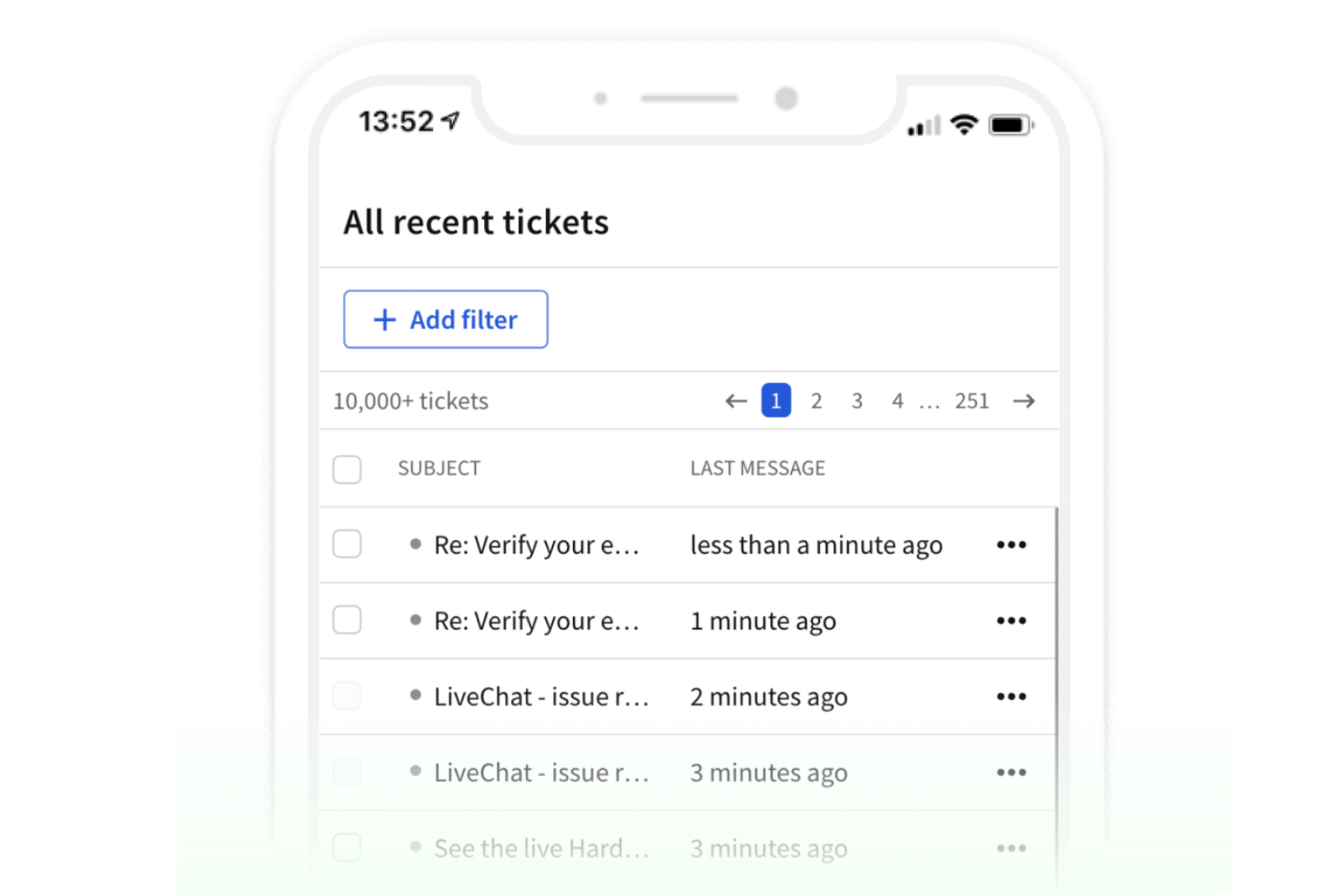
HelpDesk è un software di help desk mobile semplice, pensato per le piccole e medie imprese che cercano una soluzione facile da usare. Aiuta i team a gestire efficacemente le richieste dei clienti senza complessità inutili.
Perché ho scelto HelpDesk: Offre un’interfaccia pulita e intuitiva, rendendolo accessibile ai team che puntano alla facilità d’uso. Il software include funzionalità essenziali per la gestione dei ticket, consentendo al tuo team di gestire rapidamente le richieste di assistenza. Le regole di automazione aiutano a snellire le attività ripetitive, aumentando la produttività. L’app mobile assicura che il tuo team possa rimanere connesso e reattivo ovunque si trovi.
Funzionalità e integrazioni principali:
Funzionalità comprendono regole di automazione, un’interfaccia pulita e gestione essenziale dei ticket. Il tuo team può utilizzare l’app mobile per rimanere connesso e reattivo. Il software offre inoltre una casella di posta centralizzata per gestire tutte le richieste dei clienti.
Integrazioni disponibili con Slack, Microsoft Teams, Zapier, Google Workspace, Shopify, Mailchimp, Salesforce, HubSpot, Trello e Asana.
Pros and Cons
Pros:
- Gestione essenziale dei ticket
- Regole di automazione per le attività
- Casella di posta centralizzata per le richieste
Cons:
- Funzionalità avanzate limitate con capacità di reportistica basilare
- Richiede internet per un accesso completo

HappyFox
Ideale per il supporto multilingue
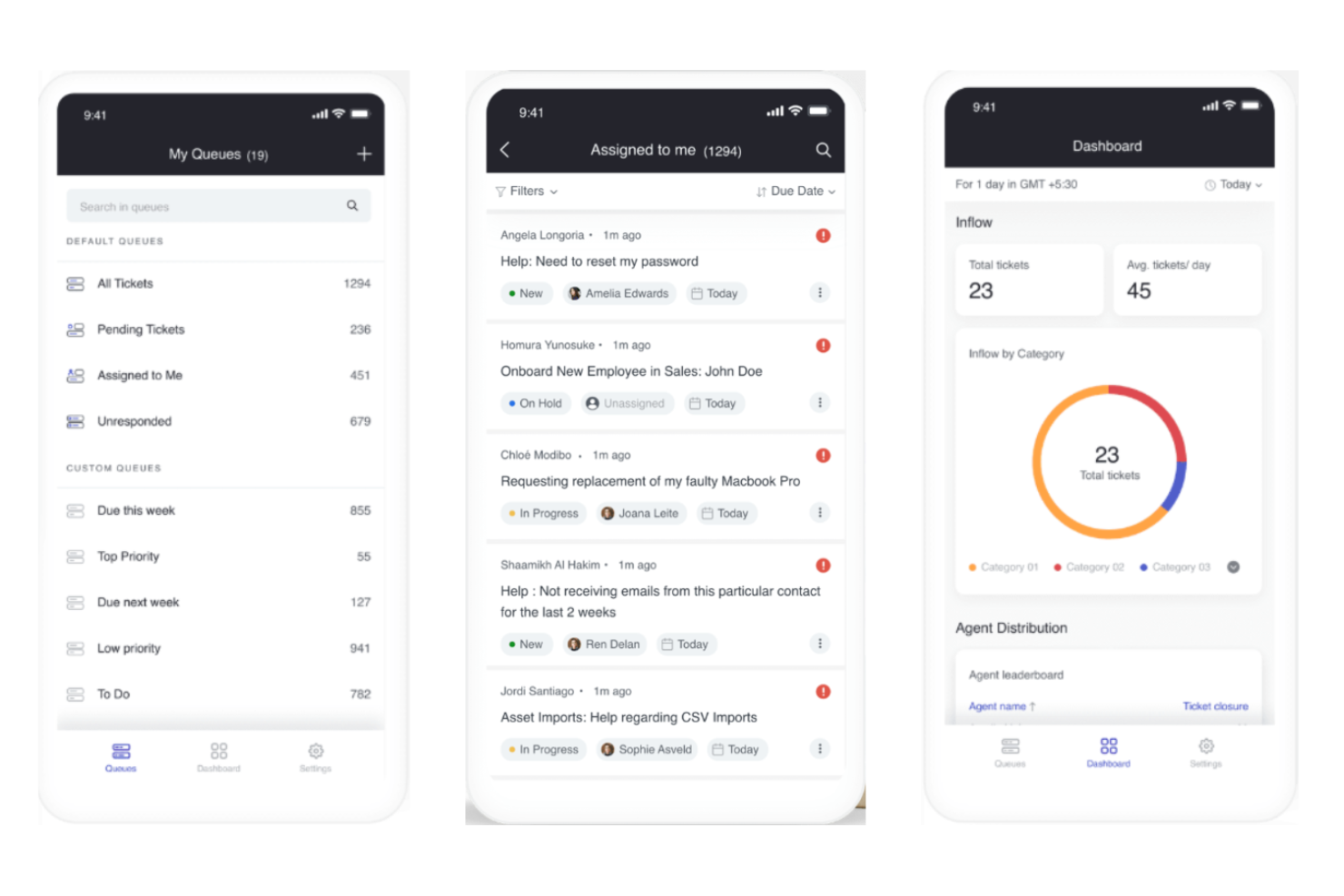
HappyFox è una soluzione di help desk mobile progettata per le aziende che devono gestire l'assistenza clienti in più lingue. È pensato per team che desiderano migliorare il servizio clienti in ambienti linguistici diversi.
Perché ho scelto HappyFox: Offre supporto multilingue, essenziale per le aziende che operano su mercati internazionali. Il software consente al tuo team di gestire richieste in varie lingue, garantendo una comunicazione efficace con i clienti di tutto il mondo. L'app mobile ti permette di gestire le attività di assistenza ovunque ti trovi. Categorie di ticket personalizzabili e regole di automazione aiutano a ottimizzare il flusso di lavoro.
Funzionalità e integrazioni distintive:
Funzionalità comprendono categorie di ticket personalizzabili, regole di automazione e supporto multilingue. Il tuo team può gestire le attività di assistenza in modo efficiente tramite l'app mobile. Il software offre anche report dettagliati per monitorare le prestazioni.
Integrazioni includono Slack, Salesforce, Shopify, QuickBooks, Zapier, Microsoft Teams, Google Workspace, Jira, Trello e Asana.
Pros and Cons
Pros:
- Automazione per ottimizzare le attività
- App mobile per accesso globale
- Strumenti di reportistica dettagliati
Cons:
- Configurazione complessa per i nuovi utenti e alcune funzioni possono risultare difficili da gestire
- Funzionalità offline limitate

Ideale per la conformità ITIL
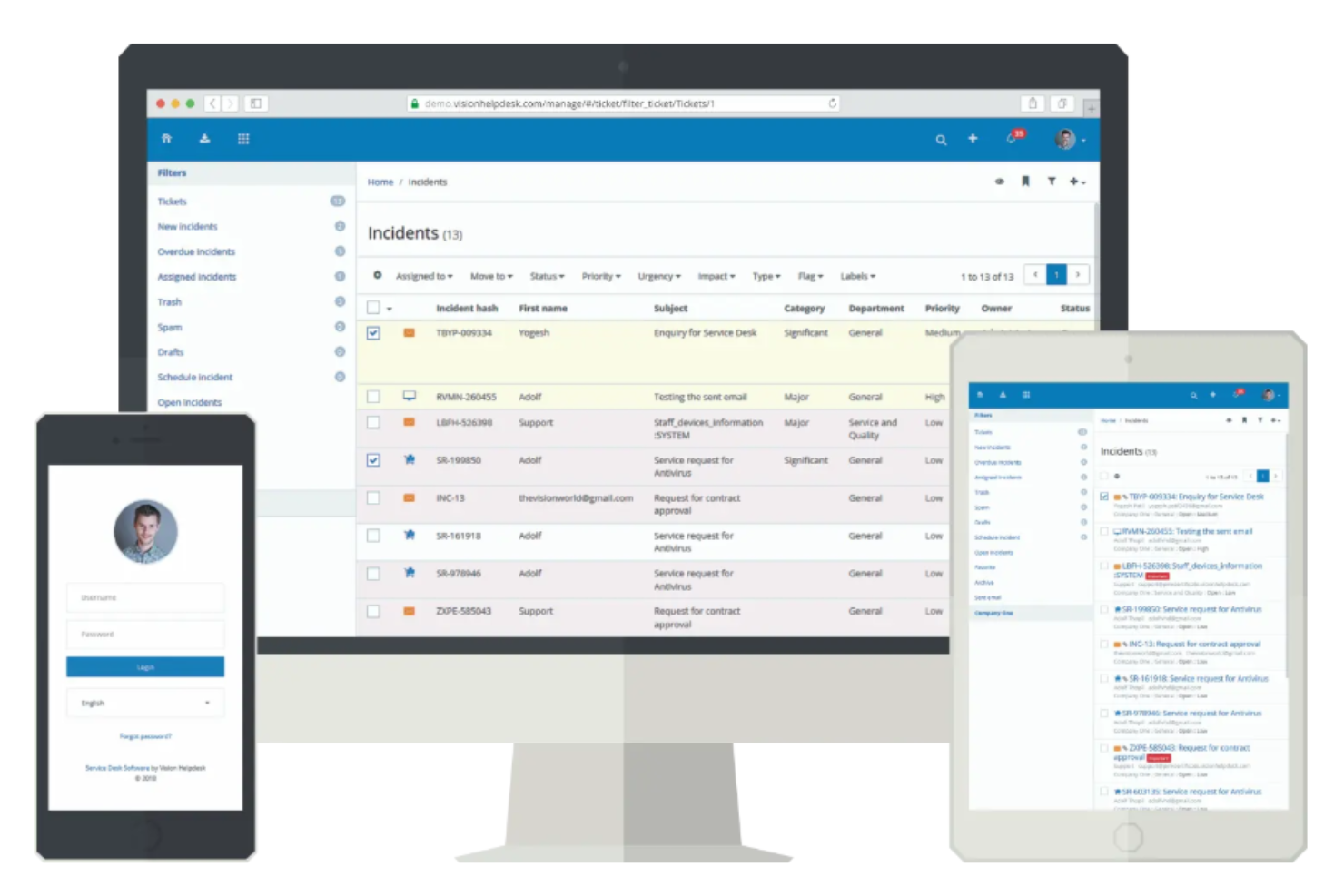
Vision Helpdesk è una soluzione mobile di help desk progettata per le aziende che necessitano di una gestione dei servizi IT. Supporta i processi ITIL, rendendolo ideale per i team IT che cercano una gestione dei servizi strutturata.
Perché ho scelto Vision Helpdesk: Offre funzionalità allineate a ITIL come la gestione degli incidenti, la gestione dei problemi e la gestione delle modifiche, che sono fondamentali per i reparti IT. La funzione di help desk satellitare consente di gestire più aziende o reparti da un'unica piattaforma. I suoi strumenti di automazione aiutano a snellire le attività e migliorare l'efficienza. La possibilità di creare flussi di lavoro personalizzati garantisce che il software si adatti alle specifiche esigenze aziendali.
Funzionalità e integrazioni di rilievo:
Funzionalità includono la gestione degli incidenti, la gestione dei problemi e la gestione delle modifiche. Il tuo team può utilizzare la funzione di help desk satellitare per gestire più reparti. Il software offre anche strumenti di automazione per migliorare l'efficienza delle attività.
Integrazioni includono Slack, Microsoft Teams, Zapier, Jira, Salesforce, FreshBooks, QuickBooks, Trello, Asana e Zoho Desk.
Pros and Cons
Pros:
- Processi allineati a ITIL
- Supporta più reparti
- Funzione di help desk satellitare
Cons:
- Può essere complesso per i nuovi utenti
- Funzionalità offline limitata

Ideale per integrazione progetti
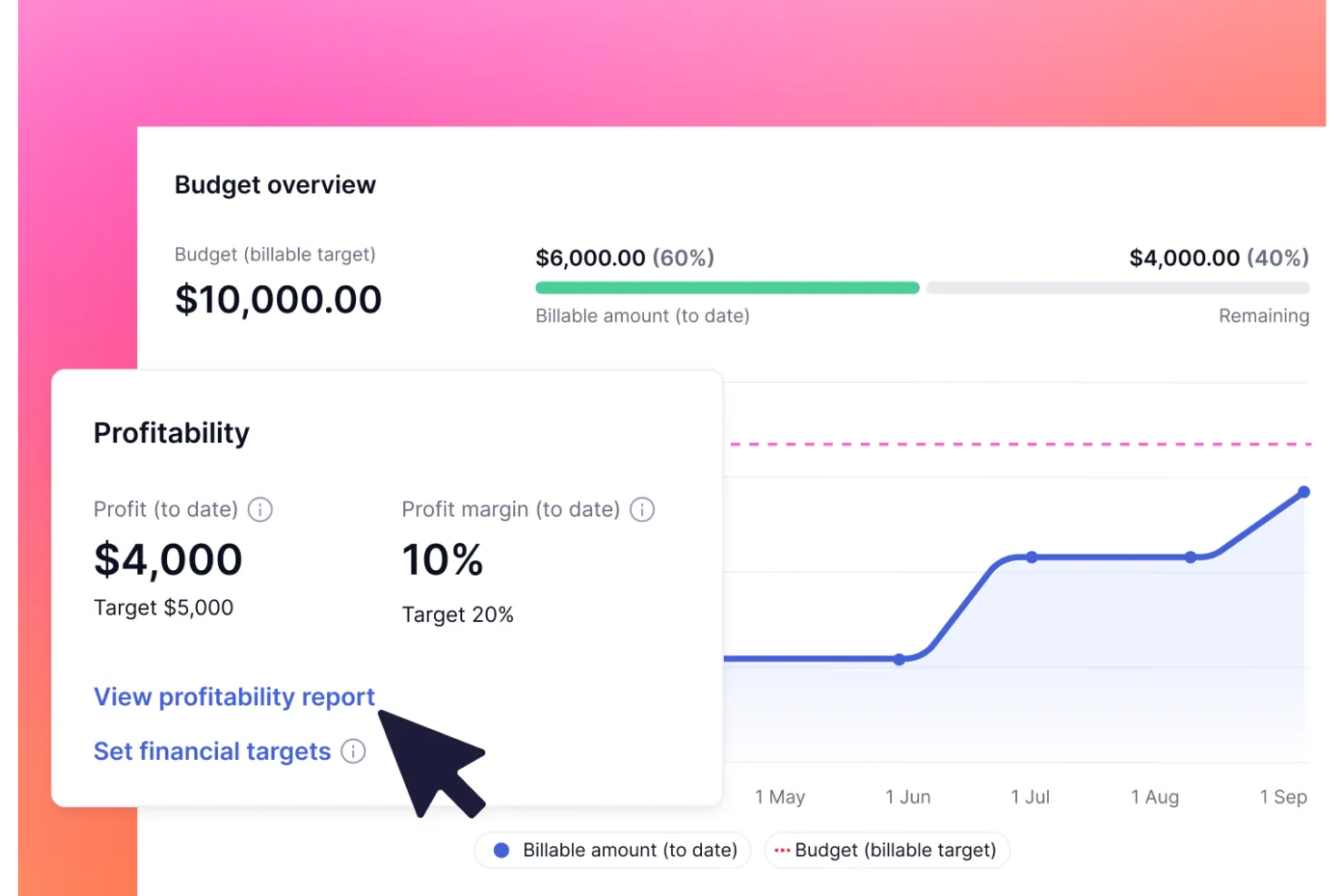
Teamwork.com è un software di help desk con un focus sull'integrazione delle funzionalità di gestione progetti. È ideale per i team che hanno bisogno di allineare il supporto clienti ai flussi di lavoro dei progetti.
Perché ho scelto Teamwork.com: Offre un connubio unico tra help desk e funzionalità di project management, rendendolo adatto ai team collaborativi. Il software permette di collegare direttamente i ticket ai progetti, migliorando la coordinazione. Con funzionalità come il monitoraggio del tempo e la gestione delle attività, il tuo team può rimanere organizzato ed efficiente. È una scelta ottima per le aziende che necessitano di collegare le attività di supporto e quelle di progetto.
Caratteristiche principali & integrazioni:
Caratteristiche includono tracciamento del tempo, gestione delle attività e collegamento dei ticket. Il team può facilmente dare priorità alle attività grazie a dashboard personalizzabili. Il software offre anche strumenti di reportistica per analizzare le prestazioni del team.
Integrazioni includono Slack, HubSpot, QuickBooks, Zapier, Xero, Microsoft Teams, Google Drive, Dropbox, Trello e Asana.
Pros and Cons
Pros:
- Opzioni di reportistica dettagliate
- Supporta il monitoraggio del tempo
- Collega i ticket ai progetti
Cons:
- Può risultare complesso per i nuovi utenti
- Richiede una connessione a internet con funzionalità offline limitate

BoldDesk
Ideale per la scalabilità
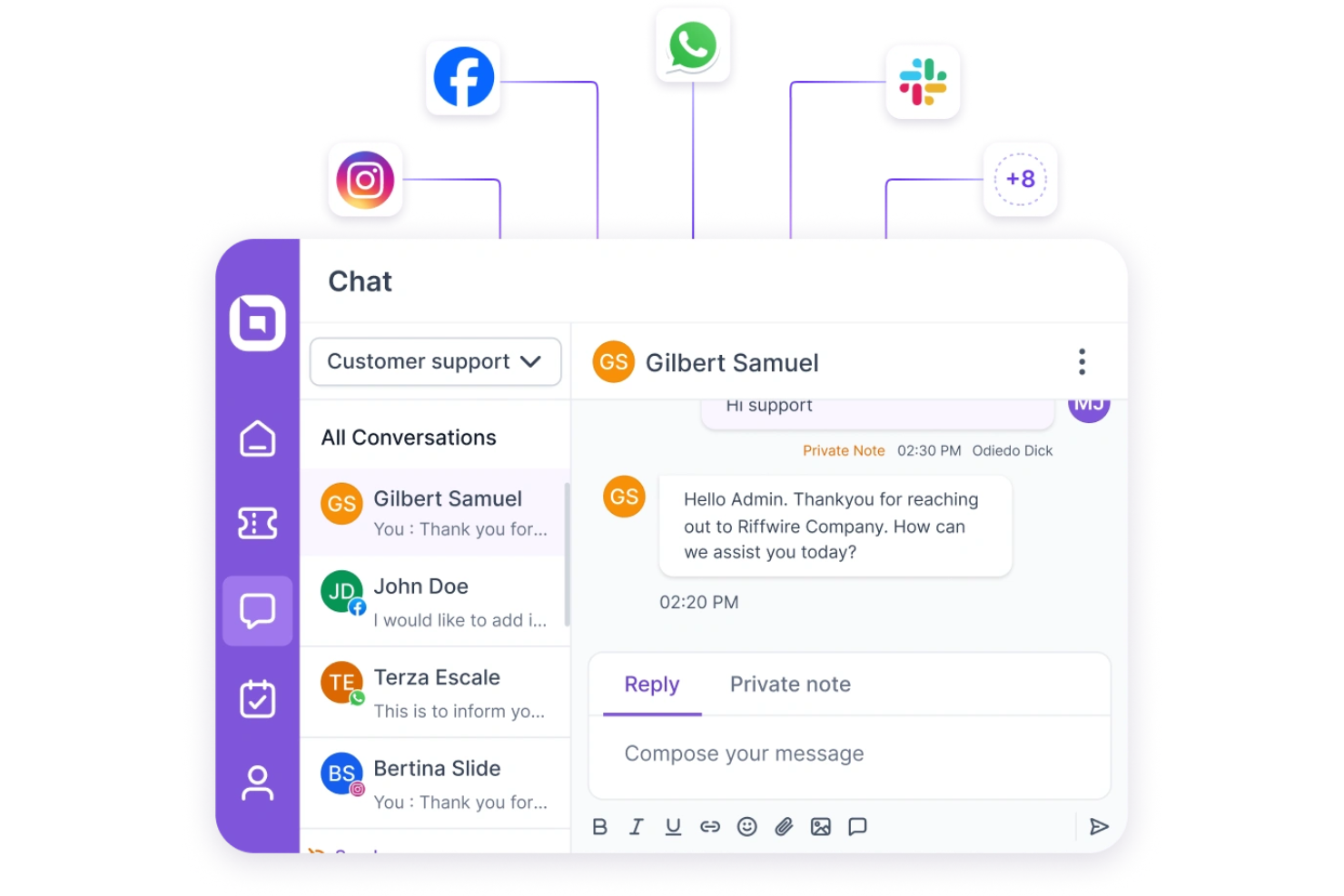
BoldDesk è un software di help desk mobile progettato per aziende di tutte le dimensioni, che offre soluzioni di supporto scalabili. Si rivolge ai team che necessitano di una piattaforma flessibile in grado di crescere insieme alle esigenze di supporto clienti.
Perché ho scelto BoldDesk: Offre funzionalità scalabili che si adattano alla crescita del tuo team, rendendolo ideale per le aziende in espansione. Il software include flussi di lavoro personalizzabili e strumenti di reportistica avanzata per monitorare le prestazioni. L'app mobile garantisce al team la gestione efficiente dei ticket di supporto ovunque si trovi. Grazie alle funzionalità di automazione, il team può ridurre le attività manuali e concentrarsi sull'offerta di un servizio clienti eccellente.
Funzionalità e integrazioni principali:
Funzionalità includono flussi di lavoro personalizzabili, strumenti di reportistica avanzata e funzioni di automazione. Il team può monitorare le prestazioni grazie ad analisi dettagliate. Il software offre anche un'app mobile per gestire i ticket di supporto ovunque ci si trovi.
Integrazioni includono Slack, Microsoft Teams, Salesforce, Google Workspace, Zapier, Jira, Trello, Asana, Mailchimp e Shopify.
Pros and Cons
Pros:
- Si adatta alla crescita aziendale
- App mobile per la gestione dei ticket
- Automazione per ridurre le attività manuali
Cons:
- Richiede configurazione iniziale per la personalizzazione
- Può essere necessaria una formazione per l'utilizzo ottimale
Altri software di assistenza per dispositivi mobili
Ecco alcune altre opzioni di software di assistenza per dispositivi mobili che non sono entrate nella mia selezione, ma che vale comunque la pena esaminare:
- Deskpro
Ideale per la personalizzazione
- HubSpot Help Desk
Ideale per l'integrazione CRM
- Jitbit
Ideale per una configurazione rapida
- Hiver
Ideale per gli utenti di Gmail
- Giva
Ideale per la conformità normativa in ambito sanitario
- Zendesk
Ideale per la gestione dei ticket in mobilità
- OneDesk
Ideale per la gestione delle attività


Come Valuto il Software di Help Desk Mobile
Valuto gli strumenti di help desk mobile su due livelli: la funzionalità di base senza la quale un tecnico sul campo non può lavorare e i fattori differenzianti che distinguono le soluzioni per team distribuiti e in movimento.
Funzionalità di Base (Requisiti Fondamentali per Questa Lista)
Queste funzionalità di base costituiscono i criteri di ammissione per l'inclusione nella mia lista di software di help desk mobile:
- App Mobile Native: Controllo se il fornitore offre app dedicate per iOS e Android (non solo un sito web responsive) e se entrambe ricevono aggiornamenti regolari.
- Gestione dei Ticket da Mobile: È essenziale poter gestire l'intero ciclo di vita del ticket da smartphone. Cerco la possibilità di creare, assegnare, modificare priorità e risolvere i ticket senza passare al desktop.
- Notifiche Push & Avvisi: Senza avvisi push configurabili, gli agenti sul campo possono perdere aggiornamenti. Valuto quanto sia dettagliata la regolazione delle notifiche per violazioni SLA ed escalation.
- Comunicazione Multicanale: Cerco una casella di posta unificata che consenta agli agenti di rispondere via email, chat, SMS e social dalla stessa schermata senza dover cambiare canale.
- Accesso Offline & Sincronizzazione: I tecnici operano spesso in ambienti con poca connettività. Valuto se l'app consente di visualizzare i ticket offline, prendere appunti e sincronizzare automaticamente.
- Strumenti di Collaborazione Mobile: Note interne, @menzioni e riassegnazione dei ticket dall'app aiutano i team distribuiti a restare allineati. Controllo anche la presenza di una chat di squadra integrata nell'app.
Valuto ciascun fornitore su una scala da 0 (funzionalità assente) a 5 (eccellenza in quest'area) per ogni criterio.
I fornitori devono raggiungere una media minima per essere inclusi nella mia lista. Da lì, considero cosa distingue ciascuna piattaforma.
Fattori Differenzianti (Cosa Distingue i Fornitori)
Dopo aver selezionato i candidati, ecco come confronto e paragono le diverse soluzioni di help desk mobile:
Funzionalità Distintive
Una knowledge base mobile rappresenta un grande punto di forza perché permette agli agenti di accedere a guide passo-passo e materiali di troubleshooting direttamente dal campo. Controllo anche la presenza di scansione di codici a barre o asset, dato che i tecnici in settori come le strutture o la sanità spesso devono poter visualizzare rapidamente i dettagli delle apparecchiature. Le funzioni di geolocalizzazione e instradamento sono importanti per i team che gestiscono visite di supporto in presenza, poiché consentono una gestione più intelligente delle assegnazioni e il monitoraggio in tempo reale dei tecnici. L'aggiornamento dei ticket tramite dettatura vocale aiuta gli agenti a rispondere senza mani mentre svolgono più attività in ambienti dinamici.
Oltre le Funzionalità
La sicurezza mobile è una priorità. Valuto se le app supportano login biometrico, SSO e crittografia a livello di dispositivo, soprattutto per team che gestiscono dati sensibili in sanità o finanza. Anche l'ecosistema di integrazione è fondamentale, dato che il tuo help desk deve sincronizzarsi con strumenti come Salesforce, Jira o Slack senza costringere gli agenti a tornare al desktop. Analizzo anche la trasparenza dei prezzi, in particolare se l'accesso mobile completo è incluso nei piani base o richiede livelli premium che potrebbero cogliere di sorpresa i team in crescita.
Come scegliere un software di assistenza per dispositivi mobili
È facile perdersi in lunghi elenchi di funzionalità e strutture tariffarie complesse. Per aiutarti a rimanere concentrato mentre affronti il tuo specifico processo di selezione del software, ecco un elenco dei fattori da tenere a mente:
| Fattore | Elementi da considerare |
| Scalabilità | Assicurati che il software possa crescere insieme alla tua attività. È in grado di gestire un aumento del volume dei ticket con l'espansione del team? |
| Integrazioni | Verifica se si connette agli strumenti che il tuo team utilizza già, come i sistemi CRM o le app di messaggistica. |
| Personalizzazione | Cerca opzioni per adattare i flussi di lavoro e i pannelli di controllo alle tue esigenze e ai tuoi processi specifici. |
| Facilità d'uso | Valuta l'interfaccia. È intuitiva e consente al tuo team di navigare senza una formazione approfondita? |
| Budget | Verifica se i prezzi sono in linea con il tuo piano finanziario. Sono previsti costi nascosti o funzionalità premium? |
| Misure di sicurezza | Verifica che siano presenti misure per la protezione dei dati. Il software è conforme a normative come il GDPR? |
| Opzioni di assistenza | Considera il livello di assistenza clienti disponibile. È disponibile un supporto 24 ore su 24, 7 giorni su 7, o un'assistenza dedicata? |
| Funzionalità mobile | Assicurati che l'app mobile offra tutte le funzionalità. Il tuo team può gestire efficacemente le attività anche in movimento? |
Tendenze nei software di assistenza per dispositivi mobili
Durante la mia ricerca, ho raccolto innumerevoli aggiornamenti dei prodotti, comunicati stampa e registri delle versioni di diversi fornitori di software di assistenza per dispositivi mobili. Ecco alcune delle tendenze emergenti che sto monitorando:
- Approfondimenti basati sull'IA: gli strumenti di help desk basati sull'IA vengono utilizzati per analizzare le interazioni con i clienti e fornire informazioni utili. Questo aiuta i team ad anticipare le esigenze e a migliorare i tempi di risposta. Alcuni fornitori stanno integrando l'IA per offrire analisi predittive e analisi del sentiment.
- Riconoscimento vocale: i comandi vocali stanno diventando sempre più comuni e consentono ai team di assistenza di interagire con il software di help desk senza usare le mani. Questa tendenza è utile per gli operatori sul campo che hanno bisogno di accedere rapidamente alle informazioni senza digitare.
- Realtà aumentata (AR): la realtà aumentata viene integrata per supportare i processi di assistenza, soprattutto negli ambiti tecnici. I team di assistenza possono utilizzare la realtà aumentata per guidare i clienti nella risoluzione di problemi complessi, sovrapponendo istruzioni alle immagini del mondo reale.
- Assistenza omnicanale: un numero sempre maggiore di fornitori offre una vera assistenza omnicanale, integrando social media, chat, SMS ed e-mail in un'unica piattaforma. Questo garantisce un'esperienza cliente coerente su tutti i canali di comunicazione.
- Portali self-service: le opzioni self-service avanzate stanno prendendo piede e consentono ai clienti di risolvere autonomamente i problemi. I fornitori stanno ampliando le basi di conoscenza e integrando chatbot per guidare gli utenti nella risoluzione dei problemi più comuni.
Che cos'è un software di help desk mobile?
Il software di help desk mobile è uno strumento che consente ai team di assistenza di gestire le richieste e i problemi dei clienti sui dispositivi mobili. Questi strumenti sono comunemente utilizzati dagli addetti al servizio clienti, dai professionisti IT e dai team di assistenza che devono risolvere in modo efficiente i problemi dei clienti mentre sono in movimento. La gestione dei ticket, le notifiche in tempo reale e l'accesso da dispositivi mobili contribuiscono a garantire tempi di risposta rapidi e una comunicazione efficace. In generale, questi strumenti consentono alle aziende di mantenere livelli elevati di soddisfazione dei clienti fornendo servizi di assistenza tempestivi e facilmente accessibili.
Funzionalità dei software di help desk mobile
Quando scegli un software di help desk mobile, presta attenzione alle seguenti funzionalità principali:
- Gestione dei ticket: organizza e monitora le richieste dei clienti, consentendo ai team di assistenza di risolvere i problemi in modo efficiente.
- Notifiche in tempo reale: avvisano il team della presenza di nuovi ticket e aggiornamenti, garantendo risposte rapide.
- Accesso da dispositivi mobili: consente ai team di assistenza di gestire le attività ovunque si trovino, aumentando flessibilità e reattività.
- Approfondimenti basati sull'IA: forniscono analisi e previsioni per contribuire a migliorare le strategie di servizio clienti.
- Riconoscimento vocale: consente il funzionamento a mani libere, utile per gli operatori di assistenza sul campo.
- Realtà aumentata: facilita la risoluzione di problemi complessi sovrapponendo istruzioni alle immagini del mondo reale.
- Assistenza omnicanale: integra più canali di comunicazione per offrire un'esperienza cliente coerente.
- Portali self-service: consentono ai clienti di risolvere autonomamente i problemi, riducendo il carico di lavoro dei team di assistenza.
- Flussi di lavoro personalizzabili: permettono ai team di adattare i processi alle proprie esigenze specifiche e di migliorare l'efficienza.
- Misure di sicurezza: proteggono i dati sensibili dei clienti e garantiscono la conformità alle normative.
Vantaggi dei software di help desk mobile
L'implementazione di un software di help desk mobile offre diversi vantaggi al tuo team e alla tua azienda. Ecco alcuni dei benefici che puoi aspettarti:
- Tempi di risposta migliori: le notifiche in tempo reale e l'accesso da dispositivi mobili assicurano che il team possa gestire rapidamente le richieste dei clienti.
- Maggiore soddisfazione dei clienti: l'assistenza omnicanale e i portali self-service offrono ai clienti diversi modi per ricevere assistenza, migliorando la loro esperienza.
- Maggiore flessibilità: l'accesso da dispositivi mobili consente al team di lavorare ovunque, adattandosi a diversi stili ed esigenze lavorative.
- Migliore allocazione delle risorse: gli approfondimenti basati sull'IA aiutano il team a concentrarsi sulle aree che richiedono maggiore attenzione, ottimizzando l'uso delle risorse.
- Maggiore efficienza: i flussi di lavoro personalizzabili e l'automazione riducono le attività manuali, consentendo al team di gestire più ticket in modo efficace.
- Maggiore sicurezza dei dati: le misure di sicurezza proteggono le informazioni dei clienti e garantiscono la conformità alle normative sulla privacy.
- Riduzione del carico di lavoro: i portali self-service consentono ai clienti di risolvere autonomamente i problemi, alleggerendo il carico del team di assistenza.
Costi e prezzi dei software di help desk mobile
La scelta di un software di help desk mobile richiede la conoscenza dei diversi modelli e piani tariffari disponibili. I costi variano in base alle funzionalità, alle dimensioni del team, ai componenti aggiuntivi e ad altri fattori. La tabella seguente riassume i piani più comuni, i relativi prezzi medi e le funzionalità generalmente incluse nelle soluzioni di software di help desk mobile:
Tabella di confronto dei piani per il software di assistenza mobile
| Tipo di piano | Prezzo medio | Funzionalità comuni |
| Piano gratuito | $0 | Gestione di base dei ticket, canali di assistenza limitati e report essenziali. |
| Piano personale | $5-$25/ utente/mese | Gestione dei ticket, accesso mobile, integrazioni di base e report standard. |
| Piano aziendale | $30-$60/ utente/mese | Funzionalità avanzate per la gestione dei ticket, automazione, flussi di lavoro personalizzati e analisi. |
| Piano aziendale | $70-$100/ utente/mese | Personalizzazione completa, assistenza prioritaria, informazioni basate sull'intelligenza artificiale e sicurezza completa. |
Domande frequenti sul software di assistenza mobile
Ecco alcune risposte alle domande comuni sul software di assistenza mobile:
Qual è la differenza tra l'assistenza software e un servizio di assistenza?
L’assistenza software si occupa generalmente di problemi tecnici più complessi e richiede competenze specialistiche, mentre un servizio di assistenza gestisce le richieste di base dei clienti e la risoluzione dei problemi. Se il tuo team si occupa spesso di problemi software approfonditi, potresti aver bisogno di entrambi i servizi per garantire un’assistenza completa.
Qual è il problema più comune del servizio di assistenza IT?
I problemi più comuni includono difficoltà relative alla posta elettronica, malfunzionamenti hardware e problemi di accesso alle risorse condivise. Queste difficoltà possono rallentare l’efficienza del tuo team, quindi disporre di un software di assistenza affidabile che assegni priorità e tenga traccia di questi problemi può essere fondamentale per mantenere la produttività.
Come funziona un software di assistenza?
Il software di assistenza consente al tuo team di accettare, monitorare e rispondere sistematicamente alle richieste di supporto. Spesso include funzionalità come basi di conoscenza, portali di autoassistenza e strumenti di reportistica per semplificare il processo di assistenza. Comprendere le tue esigenze specifiche ti aiuterà a scegliere il software giusto.
Qual è il miglior software di assistenza?
Il miglior software di assistenza dipende dai requisiti della tua organizzazione. Considera fattori come la gestione dei ticket, la facilità d’uso e le possibilità di integrazione. Tra le opzioni più note ci sono Help Scout per il servizio clienti e Zendesk per le grandi aziende, ciascuna con punti di forza specifici.
In che modo un software di assistenza mobile può migliorare l'efficienza del team?
Il software di assistenza mobile migliora l’efficienza consentendo al tuo team di gestire le attività di assistenza ovunque si trovi. Funzionalità come le notifiche in tempo reale e l’accesso mobile garantiscono risposte rapide, mentre l’automazione riduce il carico di lavoro manuale, aiutando il tuo team a concentrarsi sulle attività più importanti.
Un software di assistenza può integrarsi con altri strumenti aziendali?
Sì, la maggior parte delle soluzioni software di assistenza offre integrazioni con altri strumenti aziendali, come i CRM, le app di collaborazione e i software di gestione dei progetti. Questa connettività aiuta il tuo team a mantenere un flusso di lavoro unificato e garantisce la coerenza dei dati dei clienti tra le diverse piattaforme.